WS9011ZMTUU - Range hood Atag - Free user manual and instructions
Find the device manual for free WS9011ZMTUU Atag in PDF.


| Product type | Built-in or island extractor hood |
| Brand | Atag |
| Model | WS9011ZMTUU |
| Width | 90 cm |
| Depth | Approximately 50 cm (estimated) |
| Net weight | Approximately 15 kg (estimated) |
| Power supply | 220-240 V ~ 50 Hz |
| Motor power | 200 W (estimated) |
| Number of speeds | 4 speeds + intensive |
| Lighting | Fluorescent (tube) |
| Grease filter | Dishwasher safe |
| Carbon filter | Optional, replace twice a year (recycling) |
| Automatic run-on | 10 or 20 minutes |
| Filter saturation indicator | Yes, indicator light |
| Material | Brushed stainless steel and glass |
| Noise level | Approximately 55-65 dB(A) depending on speed (estimated) |
| Annual energy consumption | Not specified, estimated 50 kWh |
| Installation type | External extraction or recirculation |
| Maintenance | Gentle cleaning, washable filters |
| Safety | Fan stops before filter replacement, disconnect before maintenance |
| Warranty | According to manufacturer's terms |
Frequently Asked Questions - WS9011ZMTUU Atag
User questions about WS9011ZMTUU Atag
0 question about this device. Answer the ones you know or ask your own.
Ask a new question about this device
Download the instructions for your Range hood in PDF format for free! Find your manual WS9011ZMTUU - Atag and take your electronic device back in hand. On this page are published all the documents necessary for the use of your device. WS9011ZMTUU by Atag.
USER MANUAL WS9011ZMTUU Atag
instructions for use
extractor hood horizon
7000256001

natural_image
Three people preparing food at a table with ingredients and a glass (no visible text or symbols)ATAG
ATAG
uw afzuigkap
natural_image
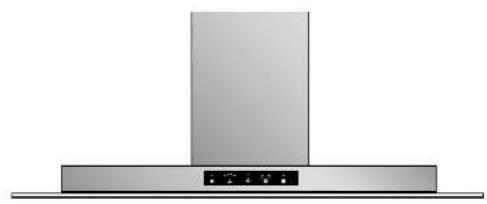
Exterior view of a stainless steel kitchen range hood (no text or symbols visible)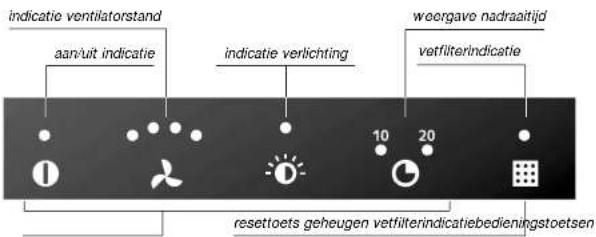
natural_image
Exterior view of a stainless steel kitchen air conditioner unit (no text or symbols visible)
natural_image
Exterior view of a stainless steel kitchen range hood (no text or symbols visible)
your extractor hood description of control panel
your extractor hood foreword
natural_image
Exterior view of a stainless steel kitchen air conditioner unit (no text or symbols visible)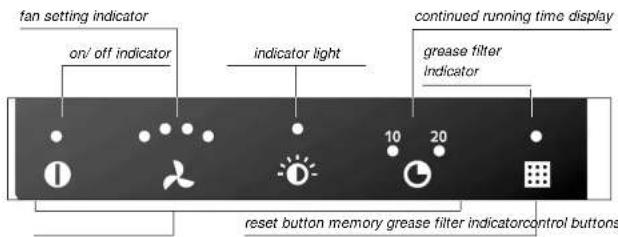
This manual describes how you can make the best possible use of your extractor hood.
You can find information in it about the controls and background information about how the appliance works. You will also find tips about how to look after it.
The safety instructions that are important during the installation are included in the installation guide, which is supplied separately and is meant for the installer.
Please keep this manual carefully, since any subsequent user will also find it very useful.
your extractor hood introduction
your extractor hood contents
You have chosen an Atag extractor hood.
Optimum ease of use and simple operation were the most important factors in the development of this product.
The extractor hood works soundlessly. Cooking smells become a thing of the past.
You can let the extractor hood continue to run for ten or twenty minutes, completely automatically, on the fan setting you want, after which the fan switches itself off. In addition, when the grease filters need to be cleaned, the extractor hood will indicate this automatically.
safety
what you should pay attention to 4 - 5
operation
switching on 6 - 7
maintenance
cleaning 8 - 9
replace light 10
faults
what should I do if... 11
environmental aspects
disposal of packaging and appliance 11
safety
what you should pay attention to
safety
what you should pay attention to
general
This extractor hood is extremely safe. There are, however, a number of things you have to pay attention to, just as for any other product.
For safety tips in relation to the installation, we refer you to the instructions in the accompanying installation guide.
This appliance should only be connected by a registered installer.
Repairs should only be carried out by an authorised service engineer.
Never open the casing and do not alter the mechanical and/or electrical structure of the appliance. This could result in dangerous situations (touching live components) and faults.
Do not use the appliance if it is damaged.
The appliance should be disconnected from the mains before being repaired or cleaned. Remove the plug from the socket or turn the switch in the meter cupboard to zero.
For electrical safety reasons, the appliance must not be cleaned using high-pressure cleaners or steam cleaners.
during use
Flambeing under an extractor hood is not permitted. The high flames could cause a fire, even if the fan is switched off.
Always keep an eye on things when deep-frying.
Switch the extractor hood on before starting to cook. Leave the extractor hood on for about ten minutes after you have finished cooking. You can do this automatically (see page 7, "operation – automatic continued running").
Clean the extractor hood regularly, as specified on page 8, "maintenance". In this way, you prevent the risk of fire.
Disconnect the extractor hood from the mains before replacing the light bulbs! Only use the same light bulbs, with the wattage stated.
operation
switching on
operation
switching on
introduction
You can set the extraction capacity and continued running time required on the control panel and erase the memory of the grease filter indicator. On this and the following pages you can read how to make use of the facilities.
switching on the extractor hood
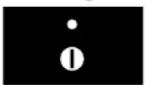
Press the on/off button.
The indicator light above the button lights up. You can now use the other function buttons.
on/off button
Press the fan button until the required setting has been reached.
If you keep the button pressed, after a few seconds the setting jumps one setting further (sequence 0-1-2-3-4-3-2-1-0).
The indicator lights above the button show the setting.
intensive setting
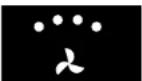
Press the fan button until all the indicator lights above the button light up.
When you release the button, the intensive setting switches on.
intensive setting
Press the fan button until all the indicator lights above the button go out.
When you release the button, the fan switches off.
fan switched off
automatic continued running
continued running button
Press the continued running button until the time required is shown.
You can choose to have the fan switch off after ten minutes or twenty minutes. The time selected lights up above the button. The extractor hood automatically switches down, in steps, from the setting entered to 0. If the lighting was switched on during the continued running, it remains switched on.
switching lighting on

lighting button
Press the lighting button.
The light comes on. The indicator light above the button lights up.
switching lighting off
Press the lighting button until all the indicator lights above the button have gone out.
switching extractor hood off
on/off button
Switch the extractor hood off with the on/off button.
The Ian switches off and the lighting goes out.
grease filter indicator
grease filter indicator button
1 Clean the grease filters when the indicator light above the grease filter button lights up (see page 8, "maintenance – grease filters").
The filters are dishwasher-proof.
2 Put the clean filters back.
3 Erase the memory of the grease filter indicator by keeping a finger on the grease filter button until the indicator light goes out.
maintenance
cleaning
maintenance
cleaning
duct and hood
For cleaning the stainless steel parts and the glass plate, you can best use a mild cleaning agent (washing-up liquid) and a damp cloth. Dry with kitchen paper or a dry cloth.
The stainless steel regains its shine if you occasionally use a stainless-steel care product or polish. The polish applies a dirt-resistant layer to the stainless steel. Always clean the stainless steel in the direction of polishing.
Atag supplies cleaning and care products for extractor hoods.
Never use abrasive cleaning agents (such as Vim, green scourers or other scouring pads) or polishing cleaning agents (such as liquid abrasives). Never use caustic agents. These can attack the stainless steel.
grease filters
Clean the grease filters as soon as the grease filter indicator lights up (see also page 7, 'grease filter indicator').
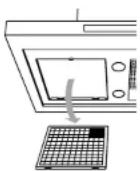
removing grease
filters
removing
1 Switch the fan and lighting off.
2 Push the filter backwards using the indentation and pull the front downwards.
3 Remove the filter from the hood.
cleaning
You can clean the filters in the dishwasher. Let the filters drain well (through the slits at the side) before putting them back.
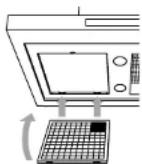
90 cm wide:
Be careful about the correct position of the filters.
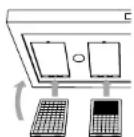
120 cm wide:
Be careful about the correct position of the filters.
The filters can also be cleaned by hand. Clean the filters in soapy water made with washing-up liquid and rinse them.
Allow the filters to drain well (through the slits at the side). The underside of the extractor hood can be cleaned with a mild cleaning agent and a damp cloth. Dry with kitchen pap or a dry cloth.
replacing
The filters can only be put back in place in one way. Be careful about the correct position of the filters. The covered part of the filter should be at the back. In the case of the left-hand filter this part is at the back on the right. The centre filter (where applicable) is covered at the back over its entire width. In the case of the right-hand filter the covered part is at the back on the left. NB: the island hood has 4 identical filters.
1 Push the rear of the filter into the holder.
2 Push the front upwards until it will not go any further.
3 Let the filter slide forwards.
The filter is again in its correct position.
4 Erase the memory of the grease filter indicator (see page 7, "operation – grease filter indication").
replacing the carbon filter
Replace the carbon filter twice a year. This only applies to recirculation hoods.
Put the carbon filter in the space intended for it above the filters.
maintenance replacing light
faults
what should I do if...
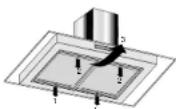
removing filter frame
1 Switch fan and light off.
2 Remove the grease filters (see page 8 "cleaning – grease filters").
3 Loosen the screws (1) at the back of the filter frame by approximately two turns.
4 Loosen and remove the screws (2) at the front.
NB: support the filter frame while unscrewing the screws.
5 Lower the filter frame slightly at the front and pull it forwards (3). Remove the filter frame.
6 Replace the fluorescent tube.
refitting filter frame
Refit the filter frame in reverse order. Install the grease filters as described on page 9 ("cleaning – refitting grease filters").
If the appliance does not work properly, this does not always mean that it is defective. Try to deal with the problem yourself first. Phone the service department if the advice given below does not work.
attention:
Disconnect the appliance from the mains before starting the repair, preferably by removing the plug from the socket or setting the main switch to zero.
| fault | cause | solution |
| Lighting is not on. | Fluorescent tube or starter faulty. | Replace the fluorescent tube, see "light", page 10. |
| Extractor hood makes a noise. | Discharge too long or too many bends in the duct. | Change the discharge ducting (see installation guide). |
| Motor defective. | Phone the service department. | |
| No extraction. | Motor or controls defective. | Phone the service department. |
| Connection cable defective. | Phone the service department. |
environmental aspects
disposal of packaging and appliance
The appliance's packaging is recyclable. The following may be used:
- cardboard;
• polyethylene film (PE);
• CFC-free polystyrene (PS rigid foam).
Dispose of these materials responsibly and in accordance with government regulations.
The government can also provide information about the responsible disposal of discarded domestic appliances.

- your extractor hood introduction
- your extractor hood contents
- safety
- operation
- maintenance
- faults
- environmental aspects
- what you should pay attention to
- general
- during use
- introduction
- switching on the extractor hood
- intensive setting
- automatic continued running
- switching lighting on
- switching lighting off
- switching extractor hood off
- grease filter indicator
- duct and hood
- grease filters
- removing
- cleaning
- replacing
- replacing the carbon filter
- maintenance replacing light
- removing filter frame
- refitting filter frame
- attention:
- disposal of packaging and appliance
Brand : Atag
Model : WS9011ZMTUU
Category : Range hood