OG2011AR01UU - Electric oven Atag - Free user manual and instructions
Find the device manual for free OG2011AR01UU Atag in PDF.



| Product type | Built-in electric oven |
| Brand | Atag |
| Model | OG2011AR01UU |
| Power supply | 230 V, 50 Hz |
| Maximum temperature | 250 °C |
| Cooking functions | Turbo (hot air), Infra (top and bottom heat), Bottom heat, EcoGril, MaxiGril, Rapid preheating |
| Interior lighting | Yes, 25 W / 300 °C lamp |
| Included accessories | Flat grid, baking tray / drip pan |
| Optional accessories | Rotisserie with mixed grill set |
| Control type | Rotary knobs with indicator lights |
| Timer | Yes, programmable |
| Cooling fan | Yes |
| Simultaneous cooking | Possible on several levels with Turbo function |
| Cleaning | Manual with mild product; grill reflector plate removable |
| Inner door glass | Removable for cleaning |
| Safety | Installation by approved professional; disconnect before maintenance; do not cover the bottom |
| Energy saving tips | Preheating unnecessary except if cooking time <30 min; turn off 10 min before end |
| Temperature range | 80 °C (keep warm) to 250 °C |
| Heat type | Convection heat (Turbo), static heat (Infra), bottom heat |
| Grill | EcoGril and MaxiGril |
Frequently Asked Questions - OG2011AR01UU Atag
User questions about OG2011AR01UU Atag
0 question about this device. Answer the ones you know or ask your own.
Ask a new question about this device
Download the instructions for your Electric oven in PDF format for free! Find your manual OG2011AR01UU - Atag and take your electronic device back in hand. On this page are published all the documents necessary for the use of your device. OG2011AR01UU by Atag.
USER MANUAL OG2011AR01UU Atag
instructions for use electric oven
gba 70000184000
ATAG
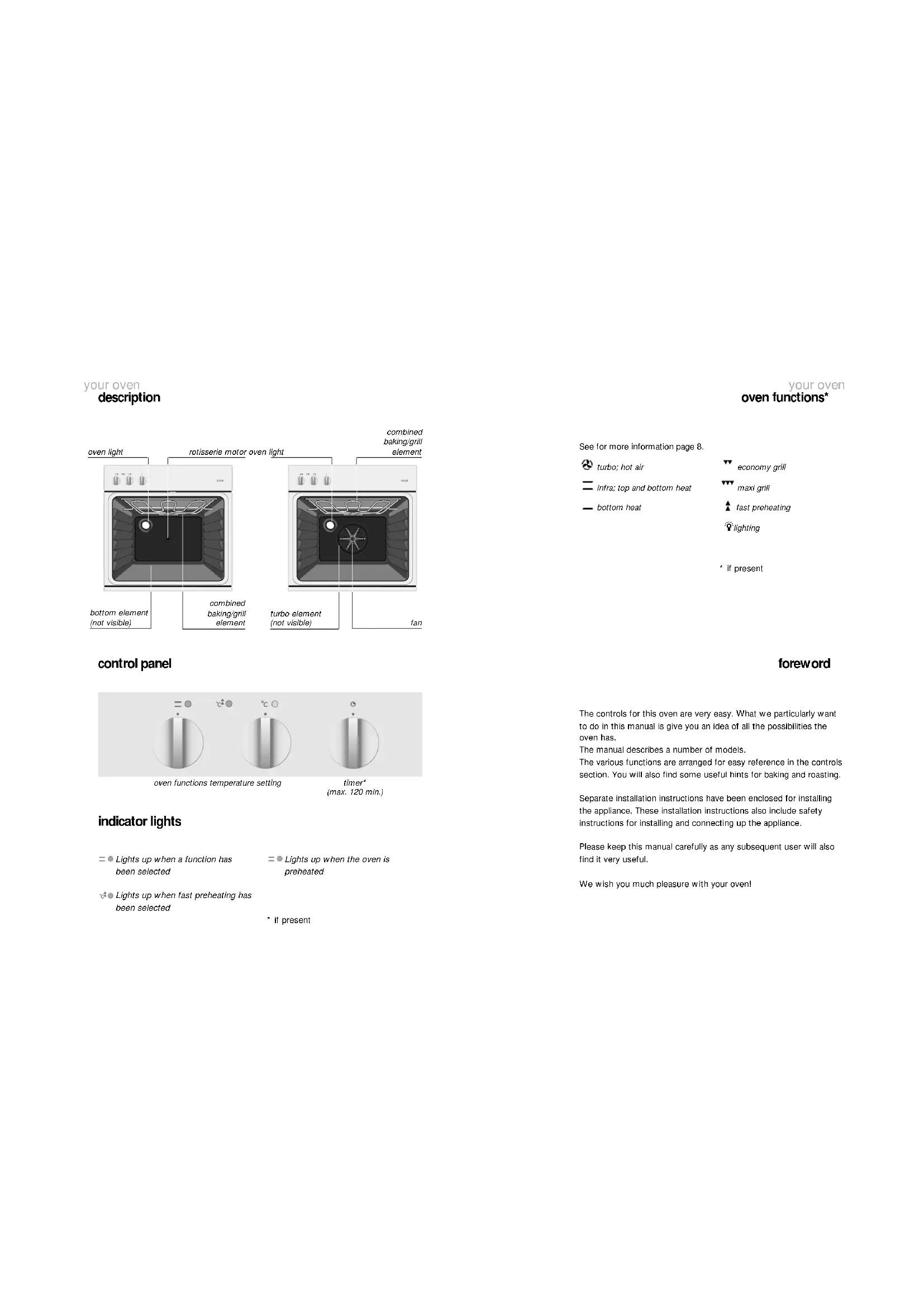
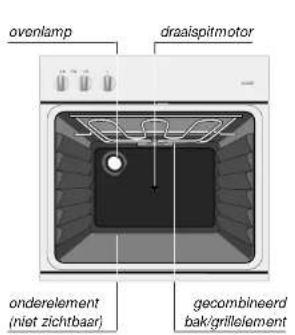
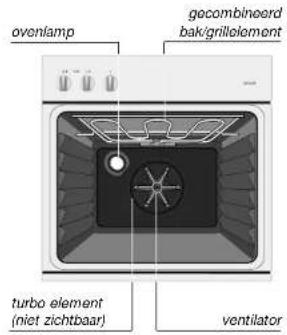
uw oven
beschrijving
uw oven
ovenfunctions*
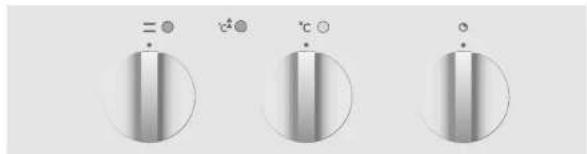
bedieningsknoppen
ovenfunctions temperatuurinstelling
kookwekker max. 120 min.)
Indicatielampjes
Lights up when a function has been selected
= Lights up when the oven is preheated
Lights up when fast preheating has been selected
- if present
See for more information page 8.
turbo; hot air
economygrill
intra;top and
maxi grill
bottom heat
fast preheating
fighting
The controls for this oven are very easy. What we particularly want to do in this manual is give you an idea of all the possibilities the oven has.
The manual describes a number of models.
The various functions are arranged for easy reference in the controls section. You will also find some useful hints for baking and roasting.
Separate installation instructions have been enclosed for installing the appliance. These installation instructions also include safety instructions for installing and connecting up the appliance.
Please keep this manual carefully as any subsequent user will also find it very useful.
We wish you much pleasure with your oven!
You have chosen an Atag oven.
Optimum ease of use and simple operation were the most important factors in the development of this product.
The ovens have a wide area of application. Your favourite recipes will certainly give excellent results.
You simply choose the desired function and the right temperature.
The extensive range of settings available enables you to select exactly the method of cooking that you have in mind. The oven functions are arranged in a logical sequence on the control panel.
safety
what you should pay attention to 4-5
bringing the oven into operation
before you start cooking 6
operating
switching on 7
cooking information
oven functions 8
accessories 9
optional accessories 9
tips for baking and roasting 10 - 11
maintenance
cleaning 12
faults
what should I do if... 13
environmental aspects
disposal of packaging and appliance 14
safety
what you should pay attention to
general
This oven is extremely safe. As with all products, however, there are a number of things you have to pay attention to.
The appliance must only be installed by a registered installer.
For safely lips about the installation, we refer you to the instructions in the accompanying installation instructions.
Repairs must only be carried out by an authorised service engineer.
Never open the appliance's casing and do not alter the mechanical and/or electrical structure of the appliance. This could result in dangerous situations (touching live components) and faults.
Do not use the appliance if it is damaged.
If the connecting lead is damaged, it should be replaced by the manufacturer's service department or by someone at least similarly qualified, in order to avoid dangerous situations.
The power supply to the appliance should be turned off when it is being repaired or cleaned. Remove the plug from the socket or switch off the protective device in the meter cupboard.
Warning: Disconnect mains power from the unit before replacing the oven lamp (see 'Faults' page 13).
For electrical safety reasons, the appliance must not be cleaned using high-pressure cleaners or steam cleaners.
Be careful with the leads of electrical appliances, such as mixers. They can get caught in the door of the hot oven.
This oven has been designed for domestic use. You should only use it for cooking food.
safety
what you should pay attention to
during use
The oven has optimum insulation and a fan which cools the oven casing. Despite this, there is always some transfer of heat, as a result of which the outside of the oven heats up. This heating fails well within the standard limits.
Make sure that the food is always heated sufficiently. The time required for this depends on various factors, such as the quantity and type of food. Any bacteria in the food will only be killed if the food is heated to a temperature greater than 70^ for at least 10 minutes. Allow the food to cook for a bit longer if you are not sure whether the food has been heated sufficiently.
Never heat food in unopened tins. Pressure will build up inside the tin and may cause it to explode.
If the oven is used at the maximum temperature for a long time (when grilling, for example), the glass panel in the oven door may become hot. Take care if there are any children nearby.
During use the oven will become hot. Make sure you do not touch the oven elements by accident.
Do not use the oven for storing flammable or easily deformable materials.
When cooking dishes that contain alcohol, the alcohol can evaporate due to the high temperatures. The vapour can catch fire if it comes into contact with a hot oven element.
Never cover the bottom of the oven with aluminium foil and do not place any baking trays or tins on it. The foil checks the heat, which may result in damage to the enamel and inferior cooking results.
Never pour water into the oven when it is hot. This could cause damage to the enamel.
Frozen products such as pizzas should preferably be cooked on the grid shelf, covered with greaseproof paper. If the baking tray is used, it may become deformed due to the great difference in temperature.
bringing the oven into operation
before you start cooking
operation
switching on
cleaning the oven and accessories
Remove the accessories from the oven and clean the accessories and the Inside of the oven with a mild cleaning agent.
Switch the oven on for an hour at 250^ (see page 7). Protective greases used during manufacture will then be removed.
remark
When your oven is heated strongly for the first time, it will have a 'new' smell. This is normal. Switch the extractor hood on if necessary.
After the oven has cooled down, clean it with warm water.
switching on
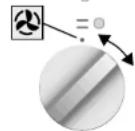
selecting function
functions
1 Select an oven function.
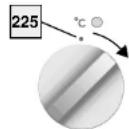
setting the
temperature
temperature
2 Set the temperature required.
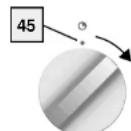
setting the time
switching off
cooking time*
3 Set the cooking time.
The indicator lights above the knobs light up.
If you do not wish to set a cooking time, you turn the knob to 13 .
1 Turn the knobs to
The indicator lights go out.
attention!
The oven will only function if the timer is set to , or if a time has been set.
- if present
cooking information oven functions
cooking information accessories
turbo: hot air
You can cook on various levels at the same time. Thanks to the Intensive heat transfer, you can select a temperature approx. 20^ lower than stated for conventional recipes.
infra, top and bottom heat
.
一
Infra is meant for cooking on one level. Place the dish in the middle of the oven for the traditional method of cooking. The dishes rise well and get a nice brown colour.
bottom heat
一
Only the bottom heat is switched on. This setting is suitable for giving tart and pizza bases a bit of extra cooking. Switch to this setting at the end of a baking process.
economy grill
Use the economy grill when there is only a dish in the middle of the oven or when using the rotisserie. The thermostat also controls the grill. As a result, the element will not be red continuously, but only from time to time.
maxi grill
Use the maxi grill for large portions - for a fully-covered grid shelf, for example. The thermostat also controls the grill. As a result, the element will not be red continuously, but only from time to time.
preheating
Use this function if you want to preheat the oven extra fast. NB: Never use this setting for cooking food. Only place the food in the oven after the oven has first been preheated.
flat grid shelf

For grilling and for baking with baking tins.
baking tray/roasting tin
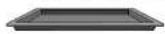
For baking dough without a tin and for roasting meat. The roasting tin can also be slid under the grid shelf and used as a drip-tray.
optional accesoes
rotary spit and mixed grill set
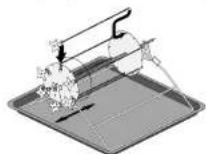
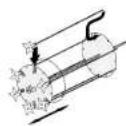
You use the spit for roasting large pieces of meat, game or poultry. The mixed grill set is for grilling small pieces of meat and vegetables.
1 Switch the grill motor on when you put the grill set in the oven.
2 Slide the two discs on to the rotary spilt. Make sure that the clamps are on the front and back of the spilt.
3 Push the point of the skewer into one of the openings in the back disc as shown in the illustration.
4 Push the other end into the clamp at the front.
cooking information
tips for baking and roasting
cooking information
tips for baking and roasting
energy-conscious use of the oven
Open the oven door as little as possible.
Cook dishes with approximately the same cooking
temperatures (apple tart and an oven dish, for example) at the same time on the same grid shelf, or one above the other with the turbo function. You can also praise meat at the same time.
Cook several dishes one after the other (an oven dish after a cake, for example). The cooking time for the second dish can often be shortened by 10 minutes because there is so much heat still in the oven.
Thanks to the oven insulation, dishes with a longer cooking time (more than an hour) can finish cooking using the residual heat in the oven. Switch the oven off 10 minutes earlier than is indicated, but leave the door shut.
preheating
Preheating is not generally necessary, except for dishes with a cooking time of less than 30 minutes or when the recipe indicates it. You can warm the oven extra quickly using the special preheating setting.
empty oven
Take everything that is not required for cooking out of the oven.
cooling down
Switch the oven off before taking the cooked dish out of it. Close the oven door and let the oven cool down.
oven dishes
You can, in principle, use any dish that is heatproof. Do not rinse glass dishes under cold water directly after use. The sudden temperature difference may cause the glass to crack. Use dark or black baking tins. These conduct heat better and allow the food to cook more evenly.
do not cover the bottom of the oven
Covering the bottom of the oven - for example, with aluminium foil or a baking tray - may result in overheating and damage to the enamel.
setting the time
Select a cooking time 5 minutes shorter than that given in the recipe. This enables you to check whether the dish or cake is cooked and has a good colour before the end. If not, close the oven door and check it again a little later. The door should be opened and closed slowly, and preferably not before three-quarters of the cooking lime has elapsed.
keeping warm
You can use the oven to keep warm food that has already been cooked. Select the turbo function and a temperature of 80^ . Cover food that you want to keep warm, to stop it drying out.
maintenance cleaning
Use the enamelled baking tray as a drip-tray when grilling.
cleaning after use
For cleaning both the inside and the outside of the oven, it is best to use a mild cleaning agent (washing-up liquid) and a damp cloth. Dry with kitchen paper or a dry cloth. Never use abrasive agents. These may harm the enamel or cause scratches.
stubborn stains
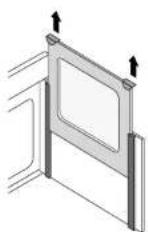
You can remove stubborn stains with a liquid abrasive or oven cleaner. Remove burnt-on food inside the oven with a glass scraper.
The glass panel on the inside of the door is removable. If the oven has been built in under the worktop, it may be that the glass panel cannot be taken out of the door. You can clean the window on the inside by sliding a cloth between the two panes. The glass panel's guides on the inside of the oven door may become discoloured if they come into contact with oven cleaner. Read the directions on the packaging of the oven cleaner before use.
cleaning accessories
Use a mild cleaning agent. Dry the accessory wall with a dry cloth. Any burnt-on food on the grill set can be removed using steel wool.
grill reflector plate
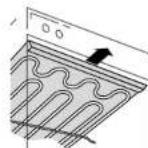
The oven is equipped with a removable grill reflector plate. When you want to clean the plate, you must pull it straight towards you out of the oven. When putting the grill reflector plate back, take care that the two studs slot into the element.
faults what should I do if...
If the appliance does not work properly, this does not always mean that it is defective. Try to deal with the problem yourself first. Phone the service department if the advice given below does not help.
| fault | cause | solution |
| Oven or grill does not heat up. | Fuse in the meter cupboard defective. | Replace the fuse. |
| Temperature is not correct. | Temperature set incorrectly. | Set the oven temperature again. |
| Thermostat defective. | Switch oven off and phone the service department. | |
| Oven light not on. | No power supply. | Insert the plug in the socket. Switch on the two-way and off switch in the meter cupboard. |
| Bulb defective. | Switch oven off and replace the bulb. Disconnect the appliance from the power supply by removing the plug from the socket or by turning the two-way and off switch in the meter cupboard or by removing the fuse. You can snap the glass cover out of the side wall of the oven. The bulb is then accessible. Replace it with a new bulb 230 V-50 Hz-300 °C/25 W. |
environmental aspects
disposing of packaging and appliance
The appliance's packaging is recyclable. The following may be
used:
cardboard;
polyethylene film (PE):
CFC-free polystyrene (PS rigid foam).
Dispos of these materials responsibly and in accordance
with government regulations.
The government can also provide information about the
responsible disposal of discarded domestic appliances.
- Indicatielampjes
- safety
- bringing the oven into operation
- operating
- cooking information
- maintenance
- faults
- environmental aspects
- what you should pay attention to
- general
- during use
- cleaning the oven and accessories
- remark
- switching on
- functions
- setting the
- temperature
- setting the time
- switching off
- cooking time*
- attention!
- cooking information oven functions
- cooking information accessories
- turbo: hot air
- infra, top and bottom heat
- bottom heat
- economy grill
- maxi grill
- preheating
- flat grid shelf
- baking tray/roasting tin
- optional accesoes
- rotary spit and mixed grill set
- energy-conscious use of the oven
- empty oven
- cooling down
- oven dishes
- do not cover the bottom of the oven
- keeping warm
- cleaning after use
- stubborn stains
- cleaning accessories
- grill reflector plate
- disposing of packaging and appliance
Brand : Atag
Model : OG2011AR01UU
Category : Electric oven