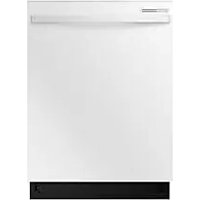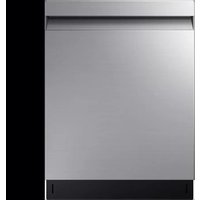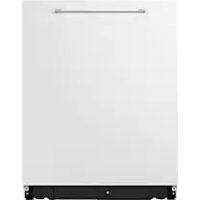
DW60A6092BB - Dishwasher SAMSUNG - Free user manual and instructions
Find the device manual for free DW60A6092BB SAMSUNG in PDF.



User questions about DW60A6092BB SAMSUNG
0 question about this device. Answer the ones you know or ask your own.
Ask a new question about this device
Download the instructions for your Dishwasher in PDF format for free! Find your manual DW60A6092BB - SAMSUNG and take your electronic device back in hand. On this page are published all the documents necessary for the use of your device. DW60A6092BB by SAMSUNG.
USER MANUAL DW60A6092BB SAMSUNG
DW60A609*/DW60A608* Series
text_image
SAMSUNGSAMSUNG
Inhalt
natural_image
Symbol of a trash bin with no text or labelsnatural_image
Line drawing of a kitchen sink and cabinet with a circular inset showing a window labeled 'A' (no text or symbols beyond label)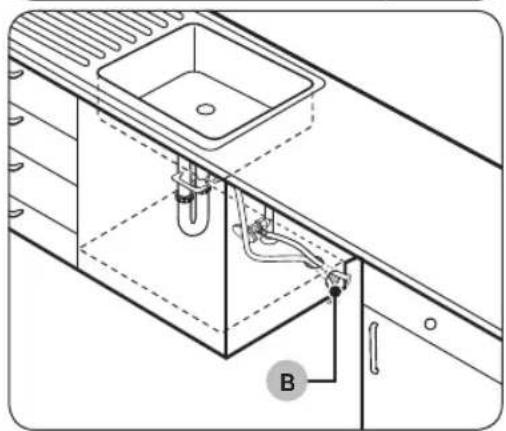
natural_image
Technical line drawing of a kitchen sink and cabin with pipes and fixtures (no text or symbols)natural_image
Line drawing of a hand holding a smartphone against a wall-mounted shelf (no text or symbols)natural_image
Diagram showing a structural component with an arrow indicating direction and a magnified inset of a bracket detail (no text or symbols)text_image
Diagram illustrating a kitchen cleaning or ventilation system with labeled components and directional arrows indicating inspection or monitoring.text_image
Diagram showing a screwdriver inserted into a base plate with labeled components C, D, and others.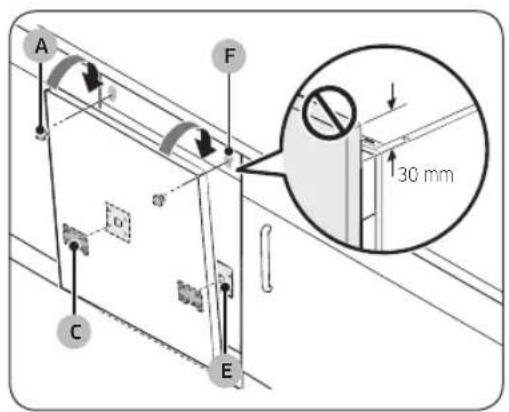
text_image
A F 30 mm C E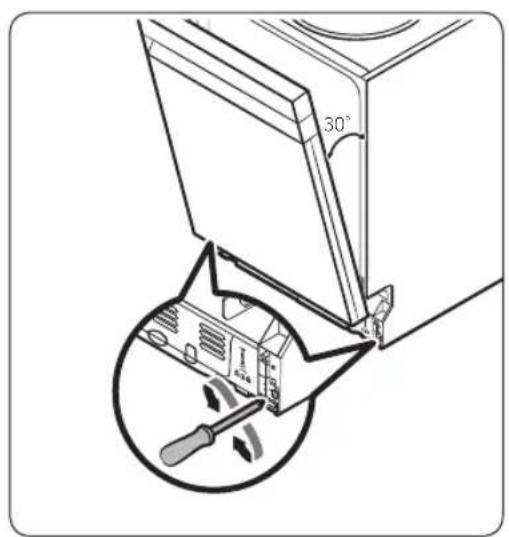
text_image
30°natural_image
Diagram of screwdriver installation on a flatbed electronic device (no text or symbols)natural_image
Technical diagram showing screwdriver installation with downward arrows indicating assembly or repair (no text or symbols present)natural_image
Isometric technical diagram of a mechanical assembly with four vertical supports and a base plate, no text or symbols present.text_image
Technical diagram showing structural components with numbered annotations and directional arrows, likely from an engineering or architectural drawing.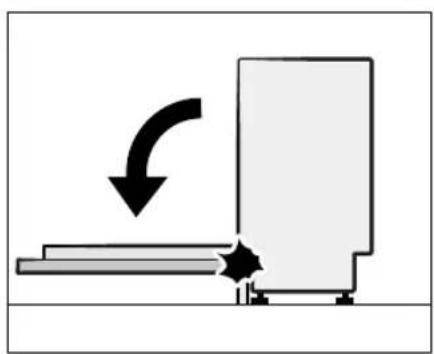
natural_image
Diagram showing a mechanical or electrical component with an arrow indicating rotational motion (no text or symbols present)text_image
Diagram illustrating screwdriver tool positioning a mechanical component with directional arrows and a magnified inset showing the component's rotation.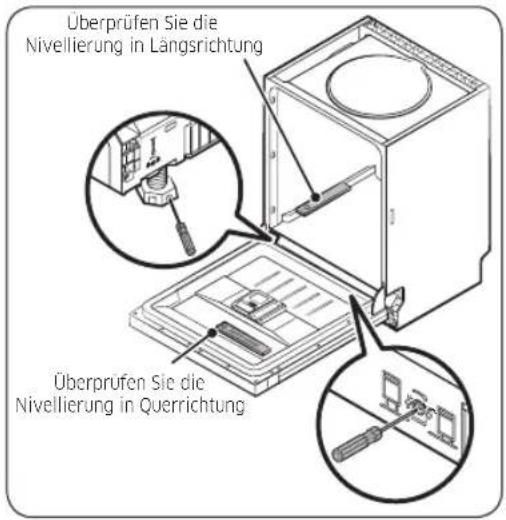
natural_image
Diagram showing two views of a car interior with arrows indicating direction of movement (no text or symbols present)natural_image
Pure technical line drawing of a structural joint or bracket (no text or symbols)natural_image
Technical diagram showing a mechanical bracket with an arrow indicating direction (no text or symbols present)text_image
Diagram showing a mechanical or electrical component with labeled parts and directional arrow indicating motion or movement.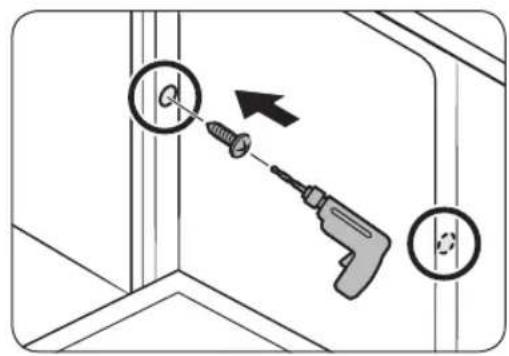
text_image
Diagram showing a screwdriver inserted into a corner with a magnified view of the screw, indicating tool application or repair process.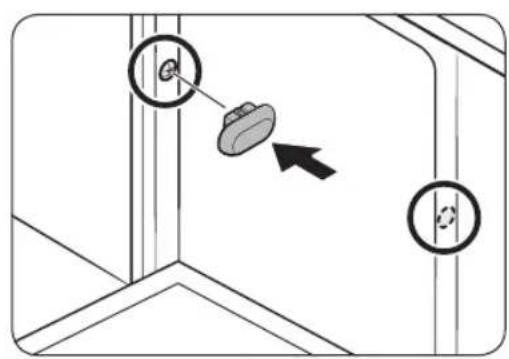
text_image
Diagram showing a mechanical or structural component with two circular features and an arrow indicating direction, likely illustrating a motion or assembly.VORSICHT
natural_image
Diagram showing a panel being inserted into a metal sheet with an arrow indicating direction (no text or symbols present)natural_image
Technical line drawing of a saw cutting through layered metal sheets (no text or symbols)natural_image
Diagram showing a structural joint with an arrow indicating direction (no text or symbols present)text_image
Diagram illustrating cable installation with labeled components and directional arrows, including a magnified inset showing mechanical assembly.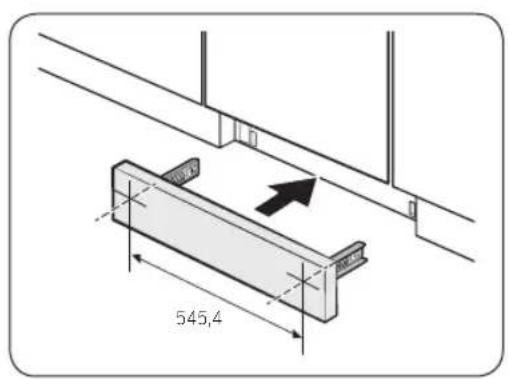
text_image
545,4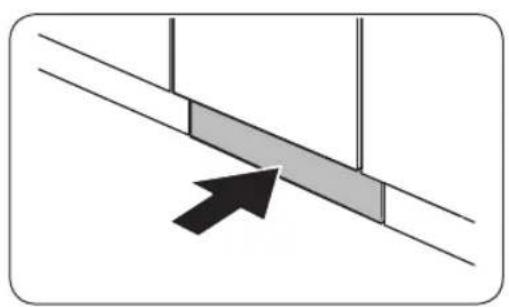
natural_image
Diagram showing a diagonal line with two shaded rectangular blocks and an arrow pointing to one block (no text or symbols)text_image
Diagram showing electrical panel installation with directional arrows and a magnified view of a mechanical component.text_image
Diagram showing cable installation with labeled components and a magnified view of a mechanical component with a 32.0 degree angle.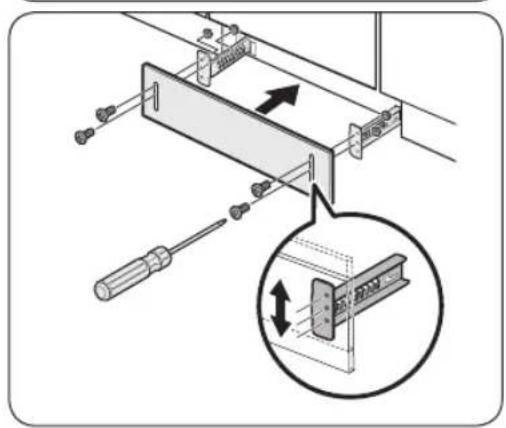
text_image
Technical diagram showing a mechanical assembly with screwdriver and directional arrows, including a magnified inset of a component detail.Deutsch34
text_image
Technical diagram of an appliance internal structure with numbered components and a magnified inset showing internal layout details.01 Besteckkorb
02 Oberkorb
03 Salzbehälter
04 Unterkorb
05 Spülmittelfach
06 Glasträger
07 Gerätetür
08 Gehäuse
natural_image
Diagram of a refrigerator interior showing internal components and a magnified view of the handle mechanism (no text or symbols)natural_image
Three-step diagram showing mechanical assembly with no visible text or symbolsDeutsch38-
natural_image
Cross-sectional line drawing of a mechanical component or housing (no text or symbols)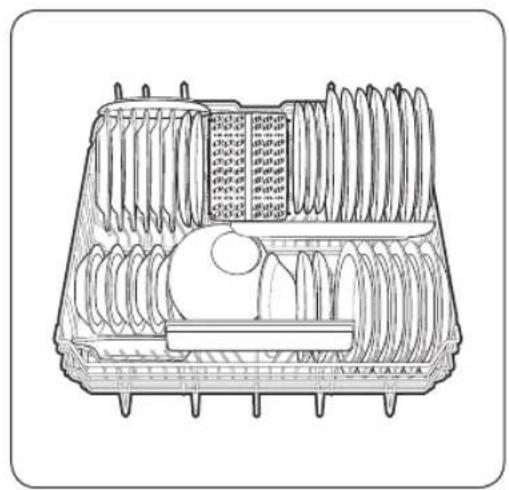
natural_image
Technical line drawing of a mechanical component with multiple cylindrical parts and internal features (no text or symbols)Modelle DW60A609* Modelle DW60A608*
HINWEIS
text_image
Diagram illustrating the process of lifting a cart with rebar, showing step-by-step assembly and rebar removal.Oberkorb
natural_image
Line drawing of a multi-compartment container filled with plastic and paper cutouts (no text or symbols)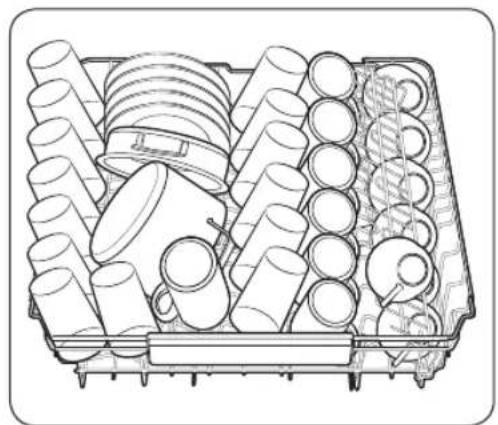
natural_image
Technical line drawing of a mechanical assembly with multiple cylindrical components and a central housing (no text or symbols)Modelle DW60A609* Modelle DW60A608*
Deutsch40
Führungszinken
text_image
Technical diagram of a mechanical assembly with labeled components and an inset showing a component with directional arrows.Oberkorb
text_image
Technical diagram showing three views of a multi-chamber appliance with labeled control buttons and component layouts.natural_image
Cross-sectional diagram of a mechanical component with internal channels and housing (no text or labels)natural_image
Technical line drawing of a mechanical assembly with two cylindrical components and conveyor systems (no text or symbols)natural_image
Line drawing of a hand inserting a device into a plastic case with a black arrow indicating the component (no text or symbols)natural_image
Line drawing of a mechanical device with a lid and internal components, no text or symbols presentnatural_image
Isometric technical diagram of a mechanical component with an arrow indicating direction (no text or symbols)natural_image
Illustration of a hand pouring liquid onto a rectangular device with a tray and control panel nearby (no text or symbols)natural_image
Illustration of a hand inserting a USB into a device slot, showing the arrow indicating rotation (no text or symbols present)natural_image
Illustration of a milk bottle pouring liquid into a tray with a stopper (no text or symbols)natural_image
Isometric diagram of a device with a black arrow pointing to a component, no text or symbols presentnatural_image
Diagram showing a gear mechanism interacting with a component, no text or symbols present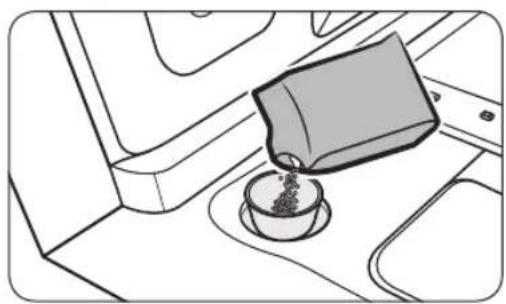
natural_image
Line drawing of a coffee cup pouring liquid into a container on an airplane (no text or symbols)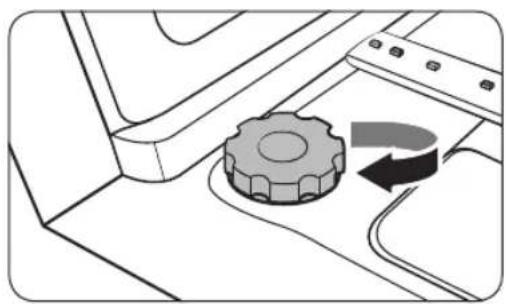
natural_image
Diagram of a mechanical component with a gear and curved arrow indicating rotation (no text or symbols)Modelle DW60A609*BB, DW60A608*BB, DW60A609*IB, DW60A608*IB

text_image
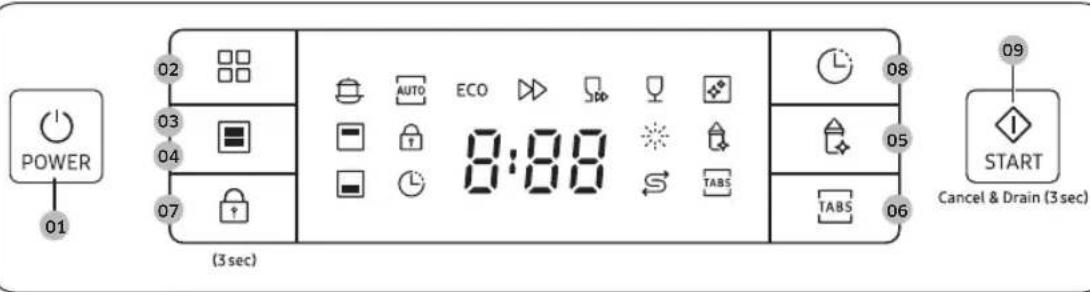
POWER 01020504 ECO 03 (Used) 070609 8:88 START Cancel & Begin (Used)Modelle DW60A609*F*, DW60A608*F*, DW60A609*U*, DW60A608*U*
text_image
POWER 01 02 03 04 07 (3 sec) AUTO ECO 8:08 TABS 08 05 06 TABS 09 START Cancel & Drain (3 sec)Modelle DW60A609*BB, DW60A608*BB, DW60A609*IB, DW60A608*IB
text_image
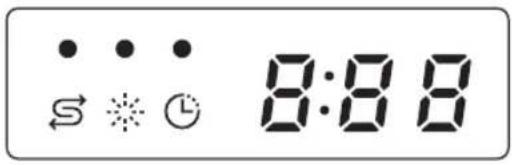
S ⚠️ ⚠️ 8:88Modelle DW60A609*F*, DW60A608*F*, DW60A609*U*, DW60A608*U*
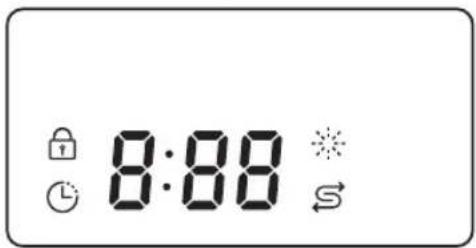
text_image
8:88natural_image
Technical line drawing of a mechanical assembly with an inset showing a rotating component (no text or symbols)Unterer Sprüharm
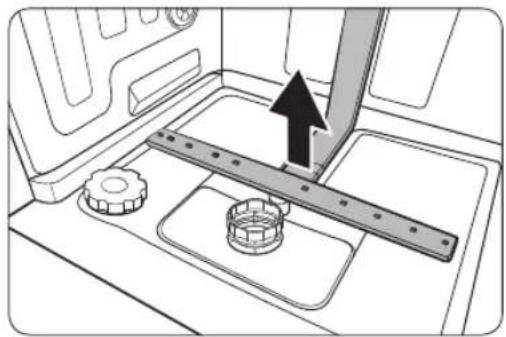
natural_image
Mechanical assembly diagram showing a rotating shaft and gear mechanism (no text or symbols)natural_image
Technical diagram of a mechanical component with a central cylindrical housing and surrounding components (no text or symbols)natural_image
Diagram of a mechanical component with a circular housing and directional arrow, no text or symbols present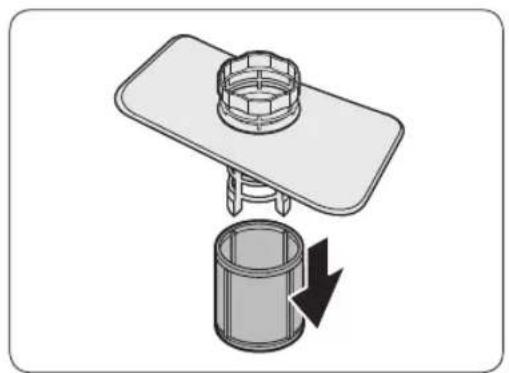
natural_image
Diagram of a mechanical assembly with a cylindrical component and a flat plate, showing a downward arrow indicating rotation (no text or symbols present)Wartung und Pflege
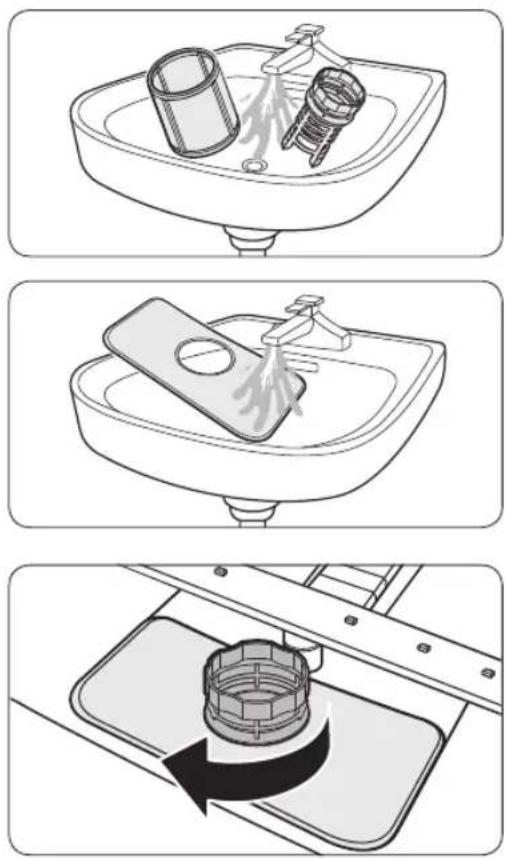
Serie DW60A609*/DW60A608*
text_image
SAMSUNGSAMSUNG
Sommario
natural_image
Symbol of a trash bin crossed with no text or numbers, representing waste sorting or restriction (no text present)natural_image
Line drawing of a kitchen sink with a circular inset showing a dial indicator (no text or symbols)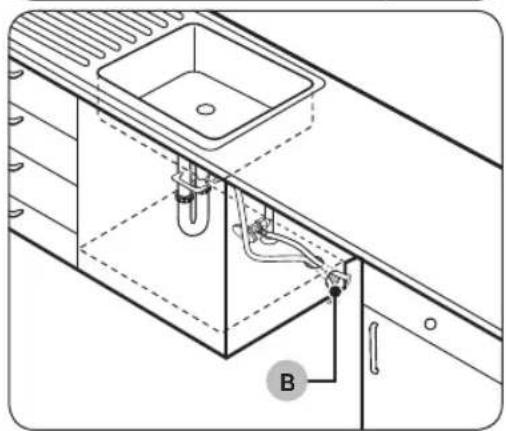
natural_image
Technical line drawing of a kitchen sink and cabin with tubing and a labeled component (B), no text or symbols present.natural_image
Line drawing of a hand holding a smartphone against a wall-mounted shelf (no text or symbols)natural_image
Technical diagram showing a mechanical assembly with an arrow indicating direction and a magnified inset of a bracket detail (no text or symbols)text_image
Diagram illustrating a kitchen sink with a magnified view of a circular component, showing mechanical components and directional arrows.text_image
Diagram showing a screwdriver inserted into a workbench with labeled components C, D, and others for assembly or repair.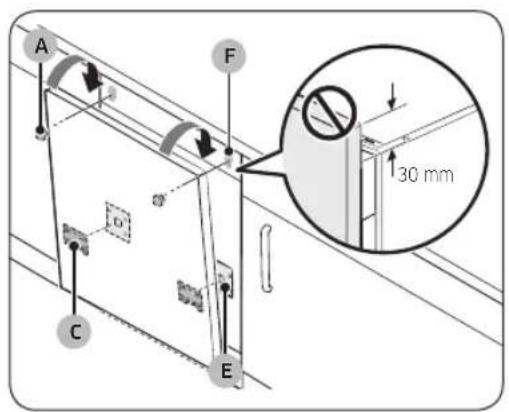
text_image
A F 30 mm C E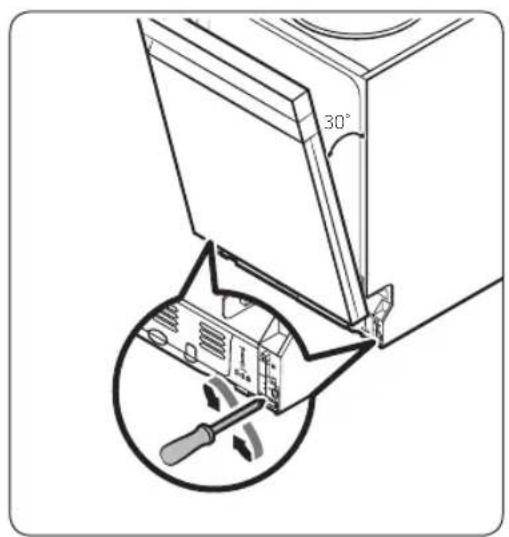
text_image
30°natural_image
Diagram of screwdriver installation on a flatbed electronic device (no text or symbols)natural_image
Technical diagram showing screwdriver installation with downward arrows indicating assembly or repair (no text or symbols present)natural_image
Isometric technical diagram of a mechanical assembly with four vertical supports and a base plate, no text or symbols present.text_image
Technical diagram illustrating mechanical assembly steps with numbered components and directional arrows indicating motiontext_image
Diagram illustrating screwdriver tool positioning a component with directional arrows and a magnified inset showing a mechanical assembly.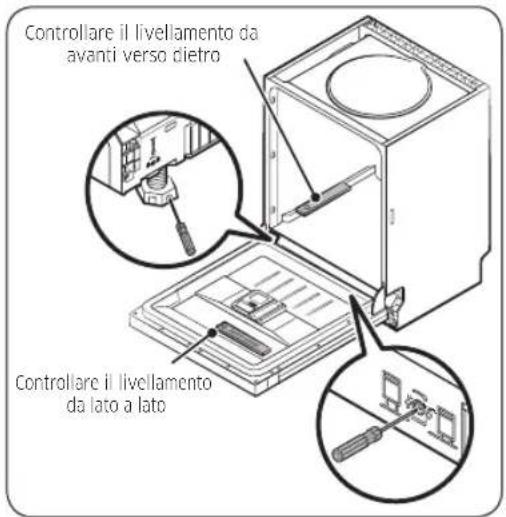
natural_image
Diagram showing two views of a car interior with arrows indicating direction of movement (no text or symbols present)natural_image
Pure technical line drawing of a structural joint or bracket (no text or symbols)natural_image
Technical diagram showing a mechanical bracket with an arrow indicating direction (no text or symbols present)text_image
Diagram showing a mechanical or electrical component with labeled parts and directional arrow indicating motion or force.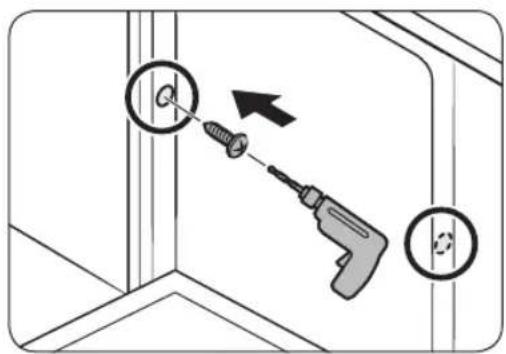
text_image
Diagram showing a screwdriver inserted into a corner with circular holes, indicating tool application or repair process.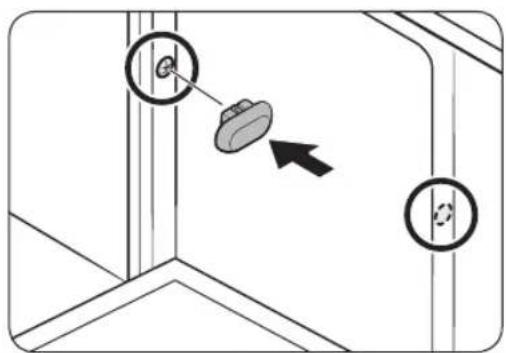
text_image
Diagram showing a mechanical or structural component with two circular annotations and an arrow indicating direction, possibly illustrating a process or assembly.ATTENZIONE
natural_image
Diagram showing a panel being inserted into a ceiling, with an inset magnified view of the pencil inserted (no text or symbols present)natural_image
Technical line drawing of a saw cutting through layered metal sheets (no text or symbols)natural_image
Diagram showing a structural joint with an arrow indicating direction (no text or symbols present)text_image
Diagram showing cable connector installation with directional arrows and magnified detail view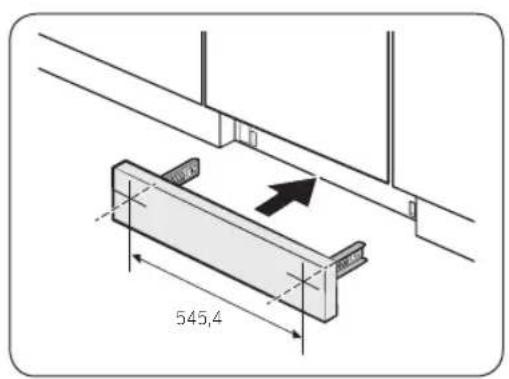
text_image
545,4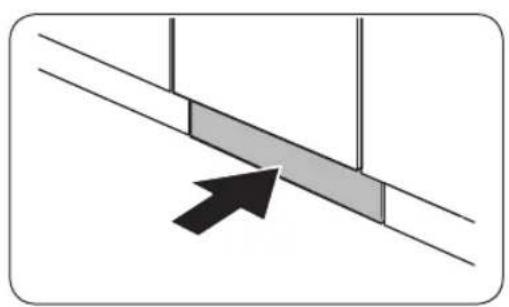
natural_image
Diagram showing a diagonal line with two shaded rectangular blocks and an arrow pointing to one block (no text or symbols)text_image
Diagram showing electrical panel installation with directional arrows and a magnified view of a mechanical component.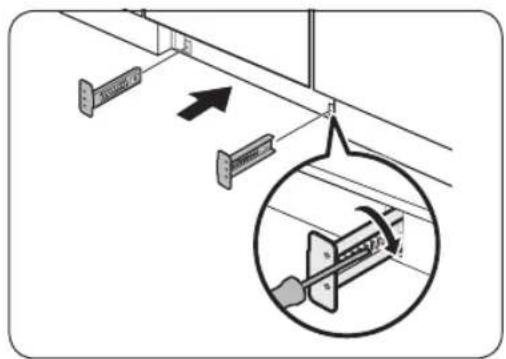
text_image
Diagram showing cable installation with labeled components and a magnified inset highlighting a mechanical component.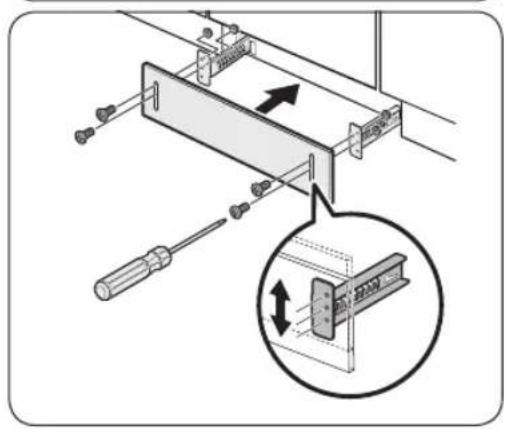
text_image
Technical diagram showing a mechanical assembly with screwdriver and directional arrows, including a magnified inset of a component detail.natural_image
Diagram of a refrigerator interior showing internal components and a magnified view of the device (no text or symbols present)natural_image
Three-step diagram showing mechanical assembly or assembly process, with no visible text or symbolsItaliano38-
natural_image
Cross-sectional diagram of a mechanical device with internal components (no text or symbols)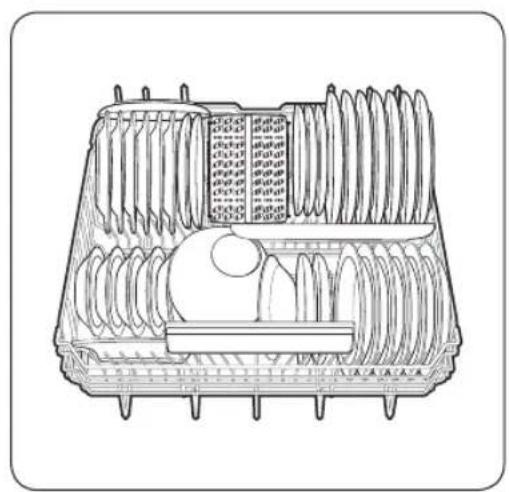
natural_image
Technical line drawing of a multi-layered plastic tray with internal rollers and a central circular component (no text or symbols)Modelli DW60A609* Modelli DW60A608*
NOTA
text_image
Diagram illustrating the process of lifting a cart with rebar, showing step-by-step assembly and rebar removal.Cestello superiore
natural_image
Line drawing of a container filled with various plastic components (no text or symbols)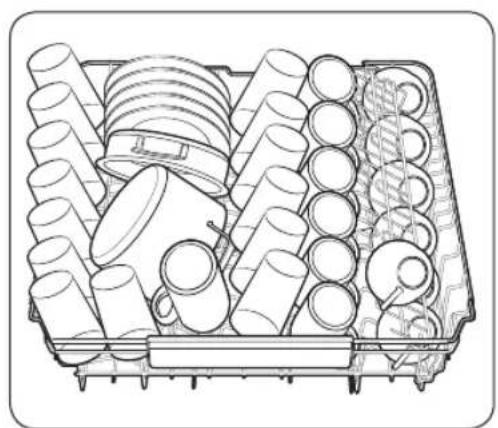
natural_image
Technical line drawing of a mechanical assembly with multiple cylindrical components and a central circular component (no text or symbols)Modelli DW60A609* Modelli DW60A608*
Italiano40
Scanalature guida

text_image
Technical diagram of a mechanical assembly with labeled components and an inset showing a component with directional arrows.Cestello superiore
text_image
Technical diagram showing three views of a multi-chamber appliance with control panel labels in ChineseGriglia posate (modelli DW60A609*)
natural_image
Cross-sectional diagram of a mechanical component with internal channels and housing (no text or symbols)natural_image
Technical line drawing of a mechanical assembly with two cylindrical components and a multi-tiered housing (no text or symbols visible)natural_image
Hand inserting a device into a plastic case with a black arrow indicating the component (no text or symbols present)natural_image
Diagram of a device being inserted into a tray, showing internal components and mounting holes (no text or symbols)natural_image
3D diagram of a mechanical device with an arrow indicating direction (no text or symbols)natural_image
Illustration of a hand pouring liquid onto a device with a tray and control panel nearby (no text or symbols)natural_image
Hand inserting a USB into a device case with an arrow indicating the process (no text or symbols present)natural_image
Illustration of a milk bottle pouring liquid into a container with a tray (no text or symbols)natural_image
Diagram of a device with a black arrow pointing to a component, no text or symbols presentnatural_image
Diagram showing a gear mechanism interacting with a mechanical component (no text or symbols)
natural_image
Line drawing of a coffee cup pouring liquid into a container on a tray (no text or symbols)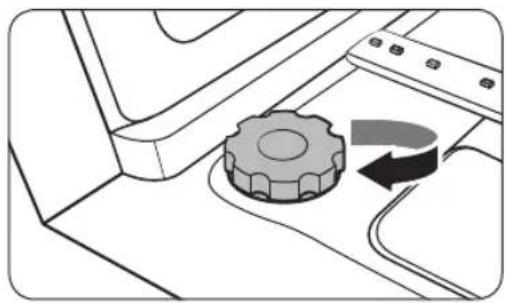
natural_image
Diagram of a mechanical device with a gear and curved arrow indicating rotation (no text or symbols)Modelli DW60A609*BB, DW60A608*BB, DW60A609*IB, DW60A608*IB

text_image
POWER 01020504 ECO 03 070609 8:88 START Cancel & Drain (5sec)Modelli DW60A609*F*, DW60A608*F*, DW60A609*U*, DW60A608*U*
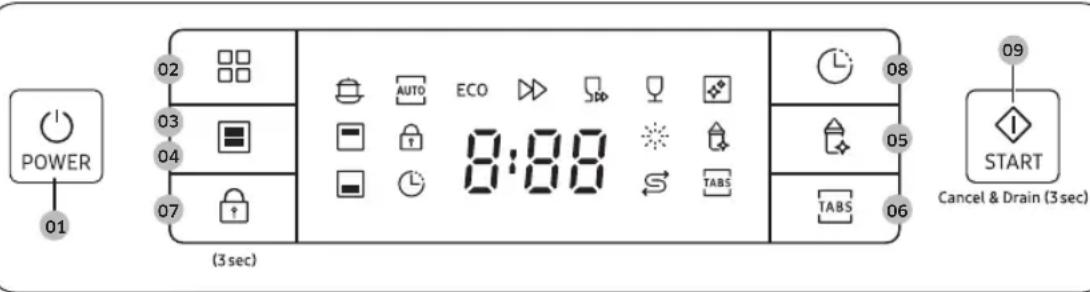
text_image
POWER 01 02 03 04 07 (3 sec) AUTO ECO 8:08 TABS 08 05 06 TABS 09 START Cancel & Drain (3 sec)Modelli DW60A609*BB, DW60A608*BB, DW60A609*IB, DW60A608*IB
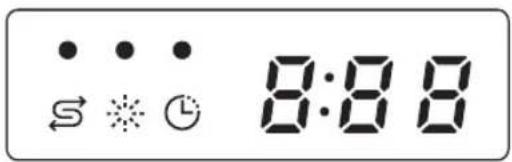
text_image
S ⚫ ⚫ 8:88Modelli DW60A609*F*, DW60A608*F*, DW60A609*U*, DW60A608*U*

text_image
8:88natural_image
Technical line drawing of a mechanical assembly with an inset circular detail showing a component (no text or symbols)natural_image
Mechanical assembly diagram showing a lever mechanism with a gear and base plate (no text or symbols)natural_image
Technical diagram of a mechanical component with a central cylindrical housing and surrounding components (no text or symbols)natural_image
Diagram of a mechanical component with a circular housing and directional arrow, no text or symbols present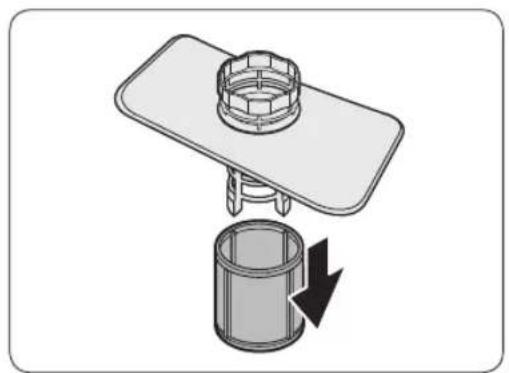
natural_image
Diagram of a mechanical assembly with a cylindrical component and a flat plate, showing a downward arrow indicating rotation (no text or symbols present)Manutenzione
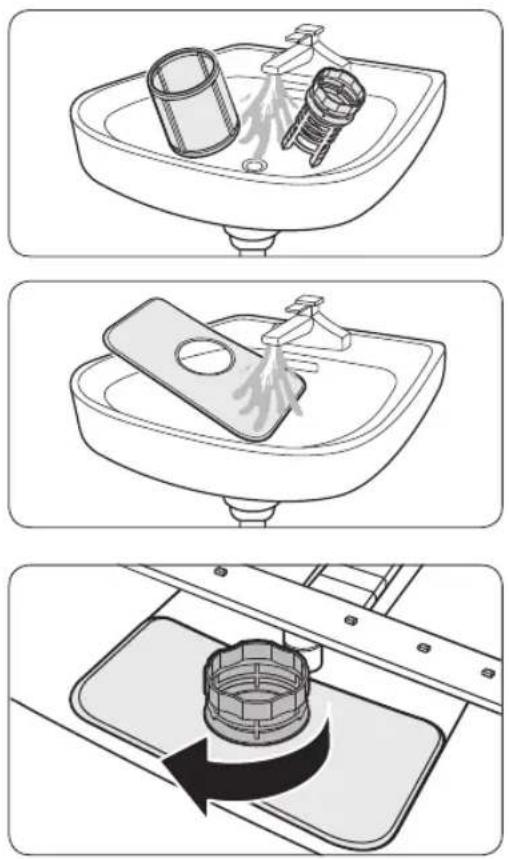
Séries DW60A609*/DW60A608*
text_image
SAMSUNGSAMSUNG
Table des matières
natural_image
Symbol of a trash bin crossed with no text or numbers, representing waste sorting or disposal (no text present)Autocollant anti-condensation (1)
Français14

natural_image
Line drawing of a kitchen sink with a circular inset showing a dial indicator (no text or symbols)
natural_image
Line drawing of a kitchen sink with an open drain and piping system, labeled B (no text or symbols beyond label)natural_image
Line drawing of a hand holding a smartphone against a wall-mounted shelf (no text or symbols)natural_image
Technical diagram showing a structural component with an arrow indicating direction and a magnified inset of a bracket detail (no text or symbols)text_image
Diagram illustrating a kitchen sink with a magnified view of a circular component, showing mechanical parts and directional arrows.text_image
Diagram showing a screwdriver inserted into a workbench with labeled components C, D, and others for assembly or installation.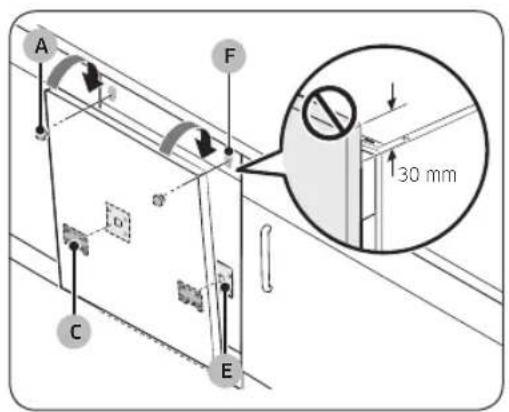
text_image
A F 30 mm C E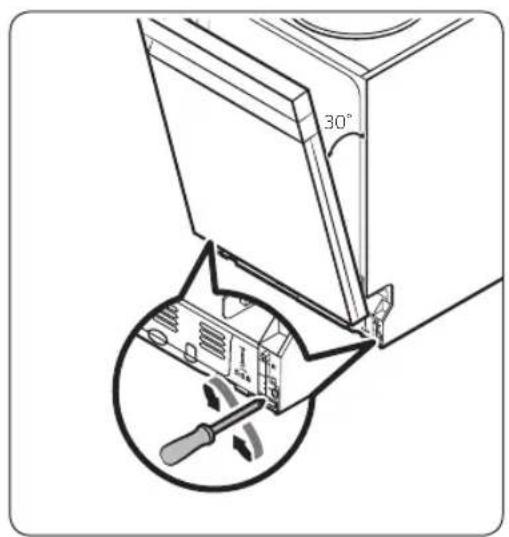
text_image
30°natural_image
Diagram of a screwdriver installing or adjusting a component on a flat plate (no text or symbols present)natural_image
Technical diagram showing screwdriver installation with downward arrows indicating movement (no text or symbols present)natural_image
Isometric technical diagram of a mechanical assembly with four vertical supports and a scale bar labeled ≤10kg (no text or symbols beyond the scale indicator)text_image
Technical diagram showing structural components with numbered annotations and directional arrows, likely from an engineering or architectural drawing.natural_image
Diagram showing a mechanical or electrical component with an arrow indicating rotational motion (no text or symbols present)ATTENTION
text_image
Diagram illustrating screwdriver tool positioning a component with directional arrows and a magnified inset showing a mechanical assembly.text_image
Minimum (5 mm)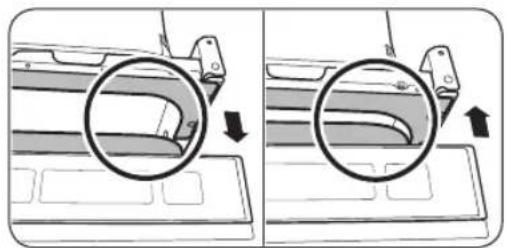
natural_image
Diagram showing two views of a car interior with arrows indicating direction of movement (no text or symbols present)natural_image
Pure technical line drawing of a structural joint or bracket (no text or symbols)natural_image
Technical diagram showing a mechanical bracket with an arrow indicating direction (no text or symbols present)text_image
Technical diagram showing a screwdriver and tool installation with dimension annotations Ø 2 and φtext_image
Diagram showing a mechanical or electrical component with labeled parts and directional arrow, likely illustrating a motion or assembly process.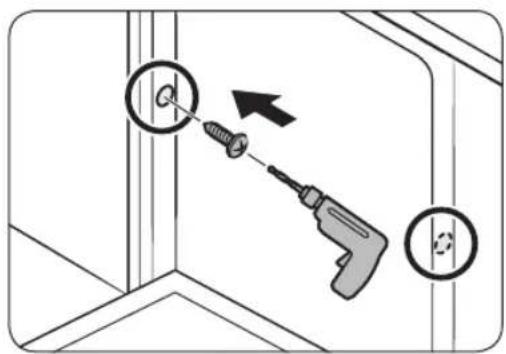
text_image
Diagram showing a screwdriver inserted into a corner with circular holes, indicating tool application or repair process.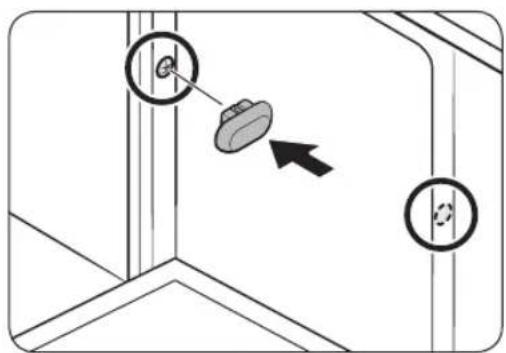
text_image
Diagram showing a mechanical or structural component with two circular annotations and an arrow indicating direction, likely illustrating a process or assembly.ATTENTION
natural_image
Diagram showing a panel being inserted into a ceiling, with an inset close-up of the pencil inserted (no text or symbols present)natural_image
Technical line drawing of a saw cutting through layered metal sheets (no text or symbols)natural_image
Diagram showing a structural joint with an arrow indicating direction (no text or symbols present)Français32
text_image
Diagram illustrating cable installation with labeled components and directional arrows, including a magnified inset showing mechanical assembly.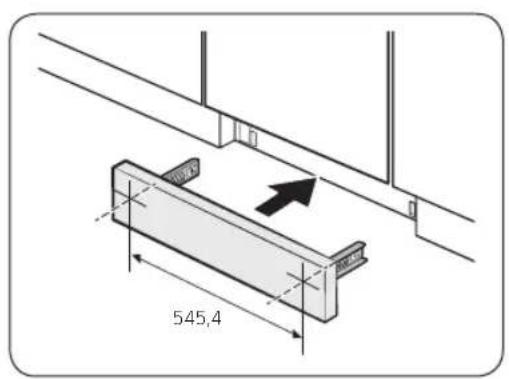
text_image
545,4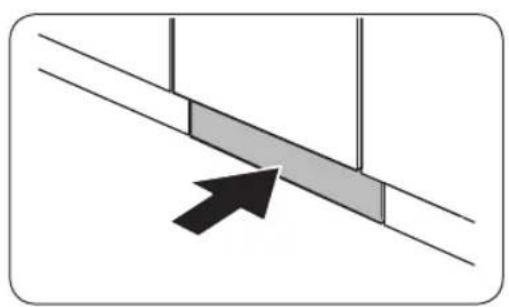
natural_image
Diagram showing a diagonal line with two shaded rectangular blocks and an arrow pointing to one block (no text or symbols)text_image
Diagram showing electrical panel installation with directional arrows and a magnified view of a mechanical component.text_image
Diagram showing cable installation with labeled components and a magnified view of a mechanical component detail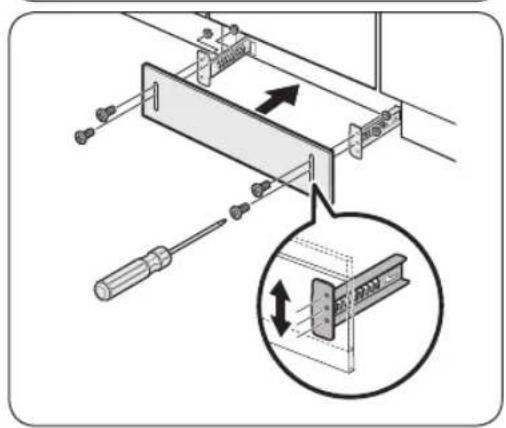
text_image
Technical diagram showing a mechanical assembly with screwdriver and directional arrows, including a magnified inset of a component detail.Français34
Avant de commencer
natural_image
Diagram of a refrigerator interior showing internal components and a magnified view of the device (no text or symbols present)natural_image
Three-step diagram showing mechanical assembly or assembly process, with no visible text or symbolsFrançais38
natural_image
Cross-sectional diagram of a kitchen appliance with layered contents (no text or labels)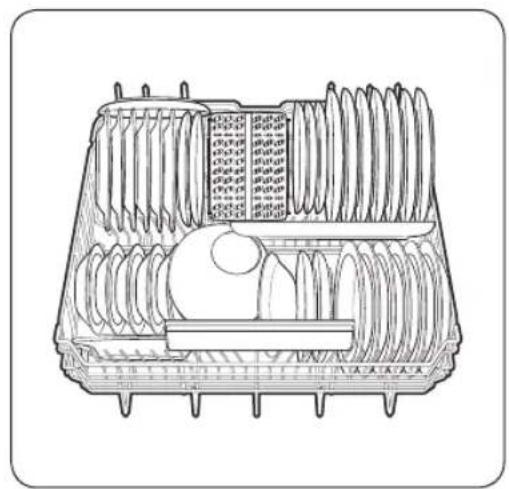
natural_image
Technical line drawing of a mechanical component with multiple cylindrical parts and internal channels (no text or symbols)text_image
Diagram illustrating the process of lifting a cart with rebar, showing step-by-step assembly and rebar removal.Panier supérieur
natural_image
Two technical line drawings of cylindrical and mechanical components inside a container (no text or symbols)text_image
Technical diagram of a mechanical assembly with labeled components and an inset showing a component with directional arrows.Panier supérieur
text_image
Technical diagram showing three views of a multi-chamber appliance with control panel labels in Chinesenatural_image
Cross-sectional diagram of a mechanical component with internal channels and housing (no text or symbols)natural_image
Three technical illustrations of a multi-tiered storage or cleaning machine casing, showing internal components and assembly (no text or symbols present)Panier à couverts
natural_image
Technical line drawing of a mechanical assembly with two cylindrical components mounted on a grid base (no text or symbols visible)natural_image
Hand inserting a device into a plastic case with a black arrow indicating the component (no text or symbols present)natural_image
Diagram of a device being inserted into a plastic housing (no text or symbols visible)natural_image
Isometric line drawing of a mechanical component with an arrow indicating direction (no text or symbols)natural_image
Illustration of a hand pouring liquid onto a rectangular device on a workbench (no text or symbols visible)natural_image
Illustration of a hand inserting a device into a folder with an arrow indicating rotation (no text or symbols)natural_image
Illustration of a milk bottle pouring liquid into a tray with a label (no text or symbols on the diagram itself)natural_image
Diagram of a device with a black arrow pointing to a component, no text or symbols presentnatural_image
Diagram showing a gear mechanism interacting with a component, no text or symbols present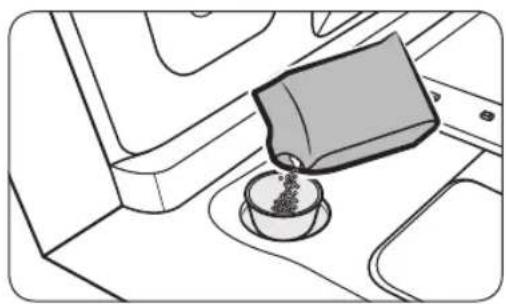
natural_image
Line drawing of a coffee cup pouring liquid into a container on an airplane (no text or symbols)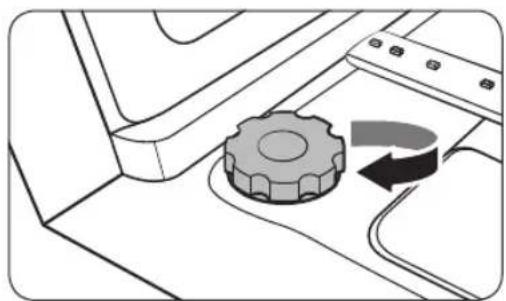
natural_image
Diagram of a mechanical device with a gear and curved arrow indicating rotation (no text or symbols)Modèles DW60A609*BB, DW60A608*BB, DW60A609*IB, DW60A608*IB

text_image
POWER 01020504 ECO 03 Used Used Used Used Used Used Used Used 8:88 START Cancel & Drain (Used) 070609 08Modèles DW60A609*F*, DW60A608*F*, DW60A609*U*, DW60A608*U*
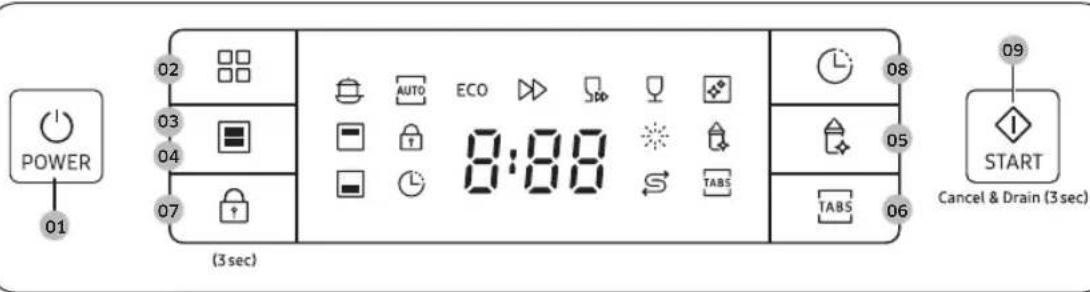
text_image
POWER 01 02 03 04 07 (3 sec) AUTO ECO 8:08 TABS 08 05 06 TABS 09 START Cancel & Drain (3 sec)Modèles DW60A609*BB, DW60A608*BB, DW60A609*IB, DW60A608*IB
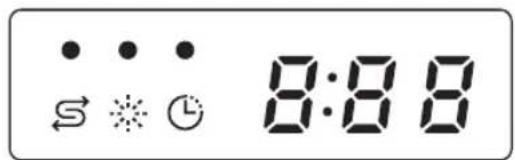
text_image
8:88Modèles DW60A609*F*, DW60A608*F*, DW60A609*U*, DW60A608*U*
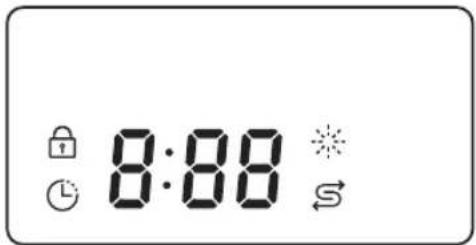
text_image
8:88natural_image
Technical line drawing of a mechanical assembly with an inset circular detail showing a component (no text or symbols)Gicleur inférieur
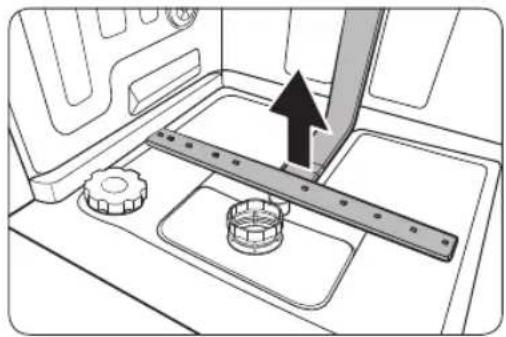
natural_image
Mechanical assembly diagram showing a rotating shaft and gear mechanism (no text or symbols)natural_image
Technical diagram of a mechanical component with a central cylindrical housing and surrounding components (no text or symbols)natural_image
Diagram of a mechanical component with a circular housing and directional arrow, no text or symbols present
natural_image
Diagram of a mechanical assembly with a cylindrical component and a flat plate, showing a downward arrow indicating rotation (no text or symbols present)Entretien
natural_image
Symbol of a trash bin crossed with no text or numbers, representing waste sorting or disposal (no text present)natural_image
Line drawing of a kitchen sink with a circular inset showing a dial indicator (no text or symbols)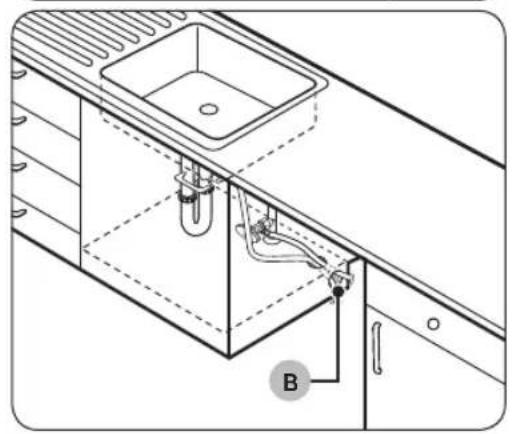
natural_image
Technical line drawing of a kitchen sink and cabin with pipes and a valve (no text or symbols)natural_image
Line drawing of a hand holding a smartphone against a wall-mounted shelf (no text or symbols)natural_image
Technical diagram showing a structural component with an arrow indicating rotation, and a magnified inset of a bracket detail (no text or symbols)text_image
Diagram illustrating a kitchen sink with a magnified view of a circular object containing a ring, showing mechanical components and directional arrows.text_image
Diagram showing a screwdriver inserted into a workbench with labeled components C, D, and others for assembly or installation.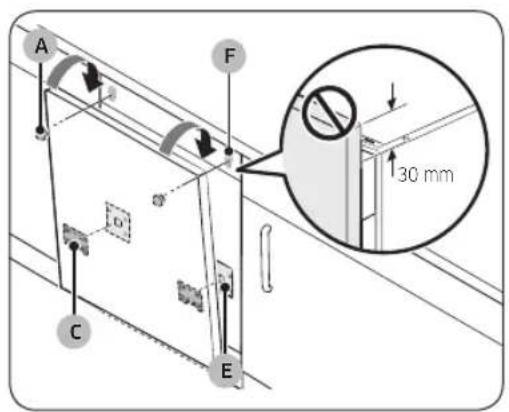
text_image
A F 30 mm C E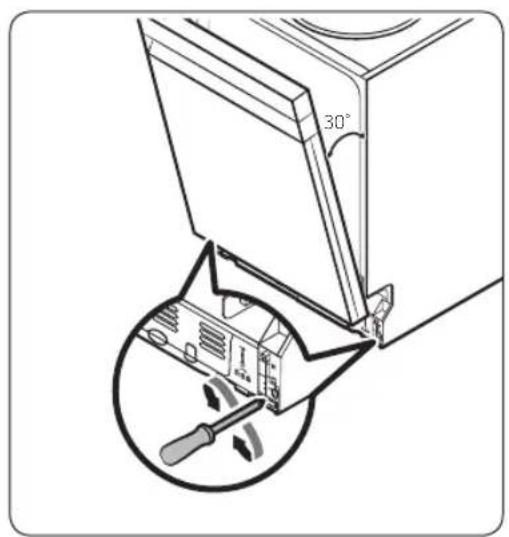
text_image
30°natural_image
Diagram of a mechanical assembly with screwdrivers and a central component, showing upward force arrows (no text or symbols)natural_image
Technical diagram showing screwdriver installation with downward arrows indicating assembly or repair (no text or symbols present)natural_image
Isometric technical diagram of a mechanical assembly with four vertical supports and a base plate, no text or symbols present.text_image
Technical diagram showing structural components with numbered annotations and directional arrows, likely from an engineering or architectural drawing.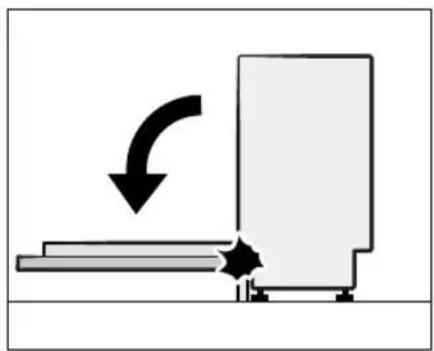
natural_image
Diagram showing a mechanical or industrial process with an arrow indicating direction, no text or symbols presenttext_image
Diagram showing screwdriver installation with a magnified view of a mechanical component, labeled with rotation arrows.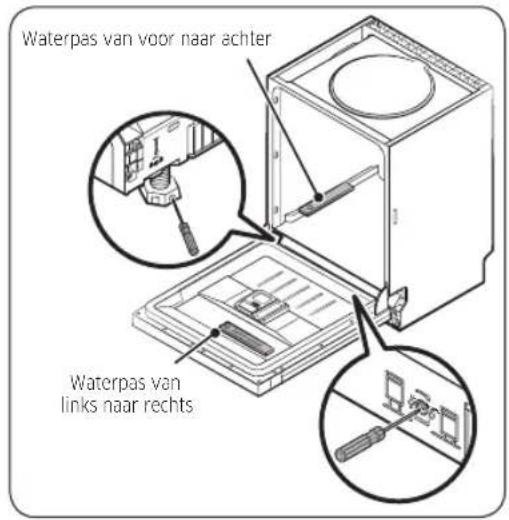
natural_image
Diagram showing two views of a car interior with arrows indicating direction of movement (no text or symbols present)natural_image
Pure technical line drawing of a structural joint or bracket (no text or symbols)natural_image
Technical diagram showing a mechanical bracket assembly with an arrow indicating direction (no text or symbols present)text_image
Technical diagram showing a tool and screwdriver installation with dimension annotationstext_image
Diagram showing a mechanical or structural setup with labeled components and directional arrows indicating movement or force.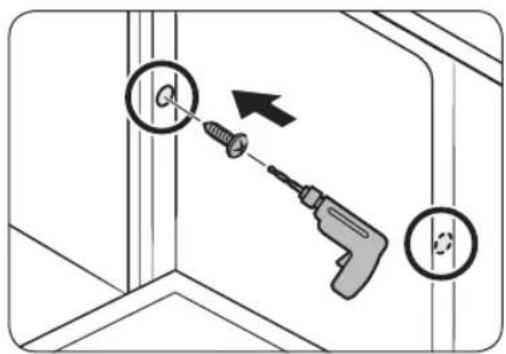
text_image
Diagram showing a screwdriver inserted into a corner with circular holes, indicating tool application or repair process.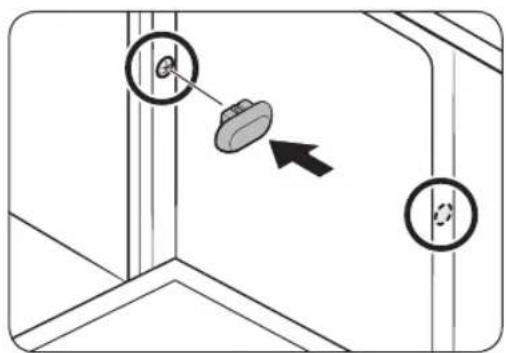
text_image
Diagram showing a mechanical or structural component with two circular annotations and an arrow indicating direction, possibly illustrating a process or assembly.LET OP
natural_image
Diagram showing a panel being inserted into a metal sheet, with an inset close-up of the pencil inserted (no text or symbols present)natural_image
Technical line drawing of a saw cutting through layered metal sheets (no text or symbols)natural_image
Diagram showing a structural joint with an arrow indicating direction (no text or symbols present)text_image
Diagram illustrating cable installation with labeled components and directional arrows, including a magnified inset showing mechanical assembly.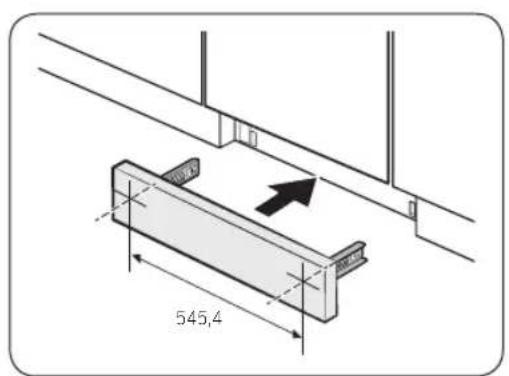
text_image
545,4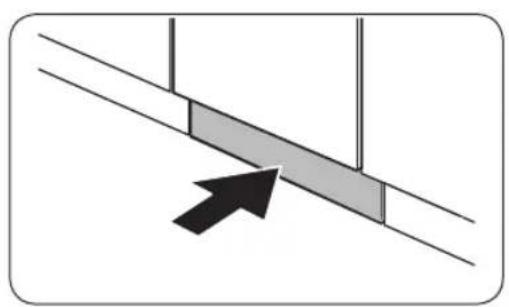
natural_image
Diagram showing a diagonal line with two shaded rectangular blocks and an arrow pointing to one block (no text or symbols)text_image
Diagram showing electrical panel installation with directional arrows and a magnified view of a mechanical component.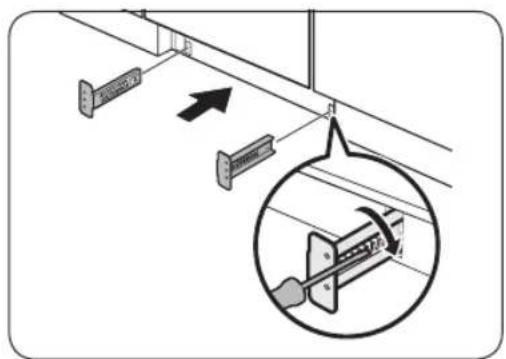
text_image
Diagram showing cable installation with labeled components and a magnified inset of a mechanical component detail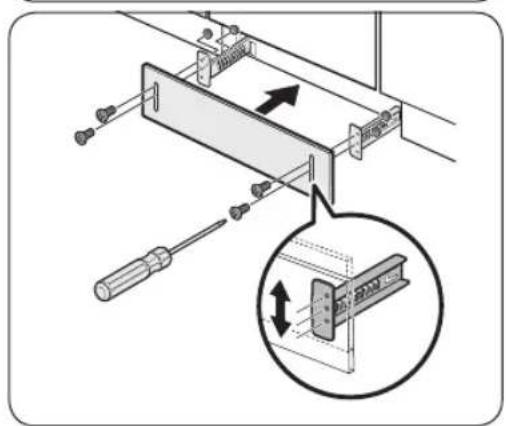
text_image
Technical diagram showing a mechanical assembly with screwdriver and directional arrows, including a magnified inset of a component detail.natural_image
Diagram of a refrigerator interior showing internal components and a close-up of the device (no text or symbols present)natural_image
Three-step diagram showing mechanical assembly or assembly process, with no visible text or symbolsNederlands38
Vaatwerk plaatsen
Onderste rek
natural_image
Cross-sectional line drawing of a mechanical component or housing (no text or symbols)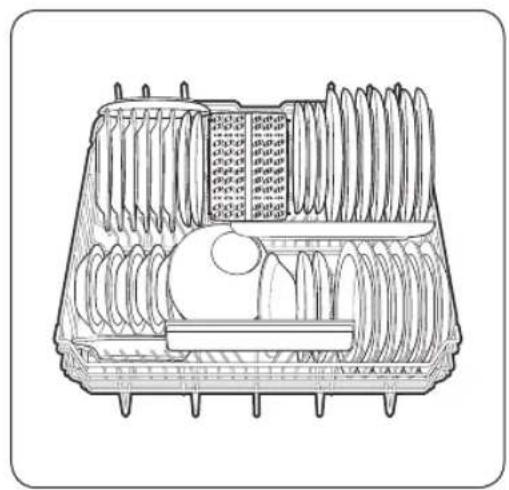
natural_image
Technical line drawing of a mechanical component with multiple cylindrical parts and internal features (no text or symbols)DW60A609*-modellen DW60A608*-modellen
OPMERKING
text_image
Diagram illustrating the process of steel rebar installation on a cart, showing step-by-step assembly and rebar removal.Bovenste rek
natural_image
Two technical line drawings of a multi-compartment mechanical device with cylindrical components and threaded ends (no text or symbols)DW60A609*-modellen DW60A608*-modellen
Nederlands40-
Geleidepennen
text_image
Technical diagram of a mechanical assembly with labeled components and an inset showing a component with directional arrows.Bovenste rek
text_image
Technical diagram showing three views of a multi-chamber appliance with control panel labels in ChineseBestekrek (DW60A609*-modellen)
natural_image
Cross-sectional diagram of a mechanical component with internal channels and housing (no text or labels)natural_image
Technical line drawing of a mechanical assembly with two cylindrical components and conveyor systems (no text or symbols)natural_image
Hand inserting a device into a plastic case with a black arrow indicating the action (no text or symbols present)natural_image
Line drawing of a mechanical device with a lid and internal components, no text or symbols presentnatural_image
3D diagram of a mechanical component with an arrow indicating direction (no text or symbols)natural_image
Line drawing of a hand pouring liquid onto a flat surface with a device on the floor (no text or symbols)natural_image
Hand inserting a USB into a device case with an arrow indicating the process (no text or symbols present)natural_image
Illustration of a milk bottle pouring liquid into a container with a tray (no text or symbols)natural_image
Diagram of a device with a black arrow pointing to a component, no text or symbols presentnatural_image
Diagram showing a gear mechanism interacting with a mechanical component (no text or symbols)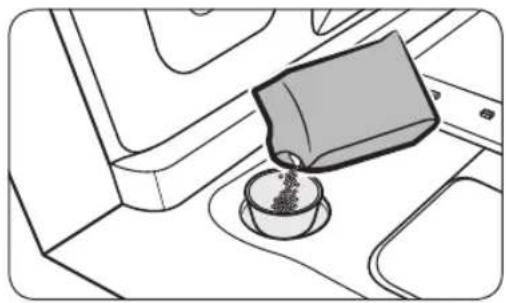
natural_image
Line drawing of a coffee cup pouring liquid into a container on a tray (no text or symbols)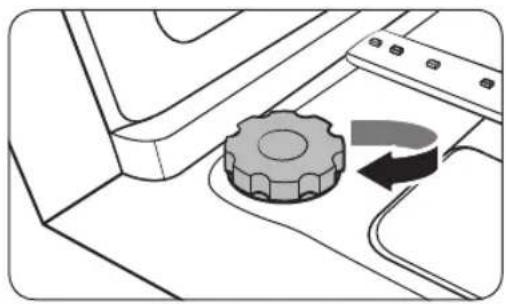
natural_image
Diagram of a mechanical component with a gear and curved arrow indicating rotation (no text or symbols)- Open de deur.
- Draai de dop linksom om te openen.
OPMERKING
natural_image
Technical line drawing of a mechanical assembly with an inset circular detail showing a component (no text or symbols)natural_image
Technical diagram of a mechanical assembly with gears and a ruler, showing no text or symbolsnatural_image
Technical illustration of a mechanical component with a central hub and surrounding parts (no text or symbols)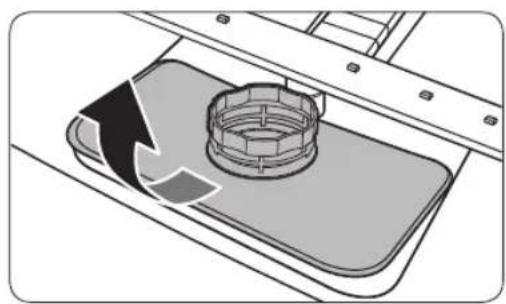
natural_image
Diagram of a mechanical component with a circular housing and directional arrow, no text or symbols present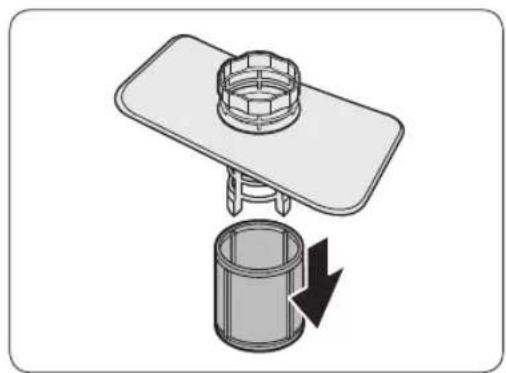
natural_image
Diagram of a mechanical assembly with a cylindrical component and a flat plate, showing a downward arrow indicating rotation (no text or symbols present)DW60A609*/DW60A608* Series
text_image
SAMSUNGSAMSUNG
Contents
Safety information 4
What you need to know about safety instructions 4 Important safety symbols 4 Instructions about the WEEE 5 Important safety precautions 6 Instructions when using your dishwasher 8 Instructions for protecting your children 9 Instructions for installing your dishwasher 10
Installation 13
What's included 13 Installation requirements 16 Step-by-step installation 18 Skirting board 32 Kick plate (DW60A60**U* Series) 34
Before you start 35
Dishwasher at a glance 35
Unsuitable items for the dishwasher 37
Basic use of racks 38
Detergent compartment 43
Rinse aid reservoir 45
Salt storage 46
Touchpad responsiveness 47
Setting mode 48
Operations 50 Control panel 50 Cycle overview 52 Simple steps to start 53 Salt storage 54 Delay Start 56 Control Lock 56
Maintenance 57 Cleaning 57 Long-term care 60
English2
Troubleshooting 61
Checkpoints 61
Information codes 64
Cycle chart 65
Appendix 67
Transportation/relocation 67
Protection against frost 67
Disposing the dishwasher and helping the environment 67
Energy, water saving tip 68
EPREL information 68
Specifications 69
For standard test 70
Safety information
Congratulations on your new Samsung dishwasher. This manual contains important information on the installation, use and care of your appliance. Please take time to read this manual to take full advantage of your dishwasher's many benefits and features.
What you need to know about safety instructions
Please read this manual thoroughly to ensure that you know how to safely and efficiently operate the extensive features and functions of your new appliance and retain it at a safe place near the appliance for your future reference. Use this appliance only for its intended purpose as described in this user manual.
Warning and important safety instructions in this manual do not cover all possible conditions and situations that may occur. It is your responsibility to use common sense, caution, and care when installing, maintaining, and operating your dishwasher.
Because the following operating instructions cover various models, the characteristics of your dishwasher may differ slightly from those described in this manual and not all warning signs may be applicable. If you have any questions or concerns, contact your nearest service center or find help and information online at www.samsung.com.
Important safety symbols
What the icons and signs in this user manual mean:
WARNING
Hazards or unsafe practices that may result in severe personal injury, death and/or property damage.
CAUTION
Hazards or unsafe practices that may result in personal injury and/or property damage.
NOTE
Indicates that a risk of personal injury or material damage exists.
These warning symbols are here to prevent injury to you and others. Please follow them explicitly.
Keep these instructions in a safe place and ensure that new users are familiar with the content. Pass them on to any future owner.
English4

Instructions about the WEEE

natural_image
Symbol of a trash bin with no text or labelsCorrect Disposal of This Product (Waste Electrical & Electronic Equipment)
(Applicable in countries with separate collection systems)
This marking on the product, accessories or literature indicates that the product and its electronic accessories (e.g. charger, headset, USB cable) should not be disposed of with other household waste at the end of their working life. To prevent possible harm to the environment or human health from uncontrolled waste disposal, please separate these items from other types of waste and recycle them responsibly to promote the sustainable reuse of material resources.
Household users should contact either the retailer where they purchased this product, or their local government office, for details of where and how they can take these items for environmentally safe recycling.
Business users should contact their supplier and check the terms and conditions of the purchase contract. This product and its electronic accessories should not be mixed with other commercial wastes for disposal.
For information on Samsung's environmental commitments and product specific regulatory obligations e.g. REACH, WEEE, Batteries, visit our sustainability page available via Samsung.com
Safety information
Important safety precautions
To reduce the risk of fire, electric shock, or injury to persons when using your appliance, follow basic precautions, including the following:
- This appliance is not to be used by persons (including children) with reduced physical, sensory or mental capabilities, or lack of experience and knowledge, unless they have been given supervision or instruction concerning use of the appliance by a person responsible for their safety.
- For use in Europe: This appliance can be used by children aged from 8 years and above and persons with reduced physical, sensory or mental capabilities or lack of experience and knowledge if they have been given supervision or instruction concerning use of the appliance in a safe way and understand the hazards involved. Children shall not play with the appliance. Cleaning and user maintenance shall not be made by children without supervision.
- Children should be supervised to ensure that they do not play with the appliance.
- If the supply cord is damaged, it must be replaced by the manufacturer, its service agent or similarly qualified persons in order to avoid a hazard.
- The new hose-sets supplied with the appliance are to be used and old hose-sets should not be reused.
English6
- For appliances with ventilation openings in the base, a carpet must not obstruct the openings.
- For use in Europe: Children of less than 3 years should be kept away unless continuously supervised.
- CAUTION: In order to avoid a hazard due to inadvertent resetting of the thermal cut-out, this appliance must not be supplied through an external switching device, such as a timer, or connected to a circuit that is regularly switched on and off by the utility.
- WARNING: Knives and other utensils with sharp points must be loaded in the basket with their points down or placed in a horizontal position.
This appliance is intended to be used in household and similar applications such as:
- staff kitchen areas in shops, offices and other working environments;
- farm houses;
- by clients in hotels, motels and other residential type environments;
• bed and breakfast type environments.
Safety information
Instructions when using your dishwasher
This dishwasher is not designed for commercial use. It is intended for use in domestic households and in similar working and residential environments such as:
- Shops
• Offices and showrooms
and by residents in establishments such as:
• Hostels and guest houses.
It must only be used as a domestic appliance as specified in this user manual, for cleaning domestic crockery and cutlery. Any other usage is not supported by the manufacturer and could be dangerous.
The manufacturer cannot be held liable for damage resulting from incorrect or improper use or operation.
Do not use solvents in the dishwasher. Danger of explosion.
Do not inhale or ingest dishwasher detergent. Dishwasher detergents contain irritant or corrosive ingredients which can cause burning in the nose, mouth and throat if swallowed, or inhibit breathing. Consult a doctor immediately if detergent has been swallowed or inhaled.
Avoid leaving the door open unnecessarily, as you could trip over it.
Do not sit or lean on the opened door. This could cause the dishwasher to tip and be damaged, and you could get injured.
Only use detergent and rinse aid formulated for domestic dishwashers. Do not use washing-up liquid.
Do not use any strong acid cleaning agent.
Do not fill the rinse aid reservoir with powder or liquid detergent. This will cause serious damage to the reservoir.
Inadvertently filling the salt reservoir with powder or liquid dishwasher detergent will damage the water softener. Make sure you have picked up the correct packet of dishwasher salt before filling the salt reservoir.
Please only use special coarse grained dishwasher salt for reactivation, as other salts may contain insoluble additives which can impair the functioning of the softener.
In an appliance with a cutlery basket (depending on model), cutlery is cleaned and dried more if placed in efficiently the basket with the handles downwards. However, to avoid the risk of injury, place knives and forks etc. with the handles upwards.
Plastic items which cannot withstand being washed in hot water, such as disposable plastic containers, or plastic cutlery and crockery should not be cleaned in the dishwasher. The high temperatures in the dishwasher may cause them to melt or lose shape.
On models with Delay Start function, make sure that the dispenser is dry before adding detergent. Wipe dry if necessary. Detergent will clog if poured into a damp dispenser and may not be thoroughly dispersed.
English8
Knives and other utensils with sharp points must be loaded in the basket with their points down or placed in a horizontal position.
Instructions for protecting your children
This appliance is not a toy! To avoid the risk of injury, keep children well away and do not allow them to play in or around the dishwasher or to use the controls. They will not understand the potential dangers posed by it. They should be supervised whenever you are working in the kitchen. There is also a danger that children playing might shut themselves in the dishwasher.
This appliance can be used by children aged from 8 years and above and persons with reduced physical, sensory or mental capabilities or lack of experience and knowledge if they have been given supervision or instruction concerning use of the appliance in a safe way and understand the hazards involved. Children shall not play with the appliance. Cleaning and user maintenance shall not be made by children without supervision.
Older children may only use the dishwasher when its operation has been clearly explained to them and they are able to use it safely, recognising the dangers of misuse.
KEEP CHILDREN AWAY FROM DETERGENTS!
Dishwasher detergents contain irritant and corrosive ingredients which can cause burning in the mouth, nose and throat if swallowed, or inhibit breathing.
Keep children away from the dishwasher when the door is open. There could still be detergent residues in the cabinet.
Consult a doctor immediately if your child has swallowed or inhaled detergent.
Safety information
Instructions for installing your dishwasher
Before setting up the appliance, check it for any externally visible damage. Under no circumstances should you use a damaged appliance. A damaged appliance could be dangerous.
The dishwasher must only be plugged into the electricity supply via a suitable switched socket. The electrical socket must be easily accessible after the dishwasher is installed so that it can be disconnected from the electricity supply at any time. (Refer to the "Dishwasher at a glance" section on page 35.)
There must be no electrical sockets behind the dishwasher. Danger of overheating and fire risk if the dishwasher were to be pushed up against a plug.
The dishwasher must not be installed under a hob. The high radiant temperatures which are sometimes generated by a hob could damage the dishwasher. For the same reason it should not be installed next to open fires or other appliances which give off heat, such as heaters etc.
Do not connect the dishwasher to the mains supply until it has been fully installed and any adjustment has been made to the door springs.
Before connecting the appliance, check that the connection data on the data plate (voltage and connected load) match the mains electricity supply. If in any doubt, consult a qualified electrician.
The electrical safety of this appliance can only be guaranteed when continuity is complete between it and an effective grounding system. It is most important that this basic safety requirement is present and regularly tested and where there is any doubt the electrical system in the house should be checked by a qualified electrician.
The manufacturer cannot be held liable for the consequences of an inadequate grounding system (e.g. electric shock).
Do not connect the appliance to the mains electricity supply by a multi-socket unit or an extension lead. These do not guarantee the required safety of the appliance (e.g. danger of overheating).
This appliance may only be installed in mobile installations such as ships if a risk assessment of the installation has been carried out by a suitably qualified engineer.
English10
The plastic housing of the water connection contains an electrical component. The housing must not be submerged in water.
There are electrical wires in the hose of Aqua-Stop. Never cut the water inlet hose, even if it is too long.
Installation, maintenance and repairs may only be carried out by a suitably qualified and competent person in strict accordance with current national and local safety regulations. Repairs and other work by unqualified persons can be dangerous. The manufacturer cannot be held liable for unauthorised work.
The integrated waterproof system offers protection from water damage, provided the following conditions are met:
- The dishwasher is correctly installed and plumbed in.
- The dishwasher is properly maintained and parts are replaced where it can be seen that this is necessary.
- The stopcock has been turned off when the appliance is not used for a longer period of time (e.g. during holidays).
- The waterproof system will work even if the appliance is switched off. However, the appliance must remain connected to the electricity supply.
A damaged appliance can be dangerous. If the dishwasher gets damaged, switch it off at the mains and call your dealer or the service department.
Unauthorised repairs could result in unforeseen dangers for the user, for which the manufacturer cannot accept liability. Repairs should only be undertaken by an approved service technician.
Faulty components must only be replaced by original spare parts. Only when these parts are fitted can the safety of the appliance can be guaranteed.
Always disconnect the dishwasher from the electrical supply for maintenance work (switch off at the wall socket and remove the plug).
If the connection cable is damaged it must be replaced with a special cable, available from the manufacturer. For safety reasons, this must only be fitted by the service department or an authorised service technician.
In countries where there are areas which may be subject to infestation by cockroaches or other vermin, pay particular attention to keeping the appliance and its surroundings in a clean condition at all times. Any damage which may be caused by cockroaches or other vermin will not be covered by the guarantee.
Safety information
In the event of a fault or for cleaning purposes, the appliance is only completely isolated from the electricity supply when:
- it is switched off at the wall socket and the plug is withdrawn, or
- it is switched off at the mains, or
• the mains fuse is disconnected, or - the screw-out fuse is removed (in countries where this is applicable).
Do not make any alterations to the appliance, unless authorised to do so by the manufacturer.
Never open the casing/housing of the appliance. Tempering with electrical connections or components and mechanical parts is highly dangerous and can cause operational faults or electric shock.
While the appliance is under guarantee, repairs should only be undertaken by a service technician authorised by the manufacturer. Otherwise the guarantee will be invalidated.
When installing the product, make sure there is space at the top, left, right and back of the product to ensure proper ventilation. If there is insufficient space between the product and the sink, it may damage the sink or allow mold to grow.
Make sure that your dishwasher's hardness level setting is correct as your area. (Refer to the "Salt storage" section on page 46.)
Please consult www.samsung.com/support for more information about materials and repair.
English12-
Installation
What's included
Make sure all the parts are included in the product package. If you have a question about the dishwasher or the parts, contact a local Samsung customer centre or your retailer. The actual appearance of the dishwasher may differ, depending on your model and country.
CAUTION
After unpacking the dishwasher, keep packaging materials out of children's reach to ensure their safety.
FBI (Fully Built-In, DW60A60**BB) models
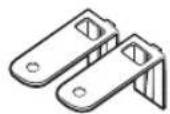
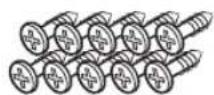
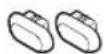
Top bracket (2) ∅4 X 14 screw (10) Protective
condensation sticker (1)
Plastic cap (2)
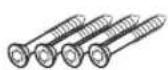
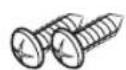
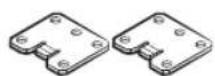
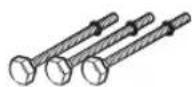
∅3.5 X 45 screw (4) ∅3.5 X 16 screw (2) Door bracket (2) Sub foot (3)
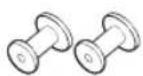
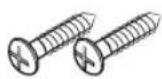
Custom panel fixer (wood panel holders, 2)
∅3.5 X 25 screw (2)
Installation
FBI (Sliding, DW60A60\*\*IB) models
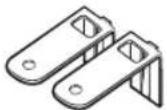
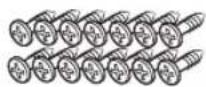

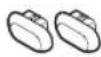
Top bracket (2) ∅4 X 14 screw (14) Protective
condensation sticker (1)
Plastic cap (2)
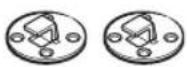
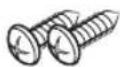
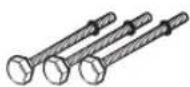
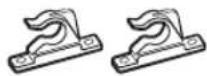
Custom panel fixer (2)
∅3.5 X 16 screw (2) Sub foot (3) Custom panel fixer
(2)
BU (Built Under, DW60A60\*\*U\*) models
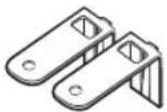
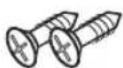
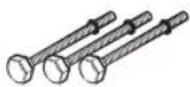
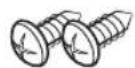
Top brackets (2) ∅4 X 14 screws (2) Sub foot (3) ∅3.5 X 16 screws
(2)
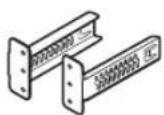
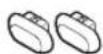
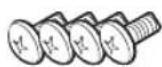
Kick plate brackets (2)
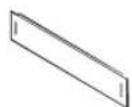
Kick plate Plastic cap (2) Kick plate bolt (4)
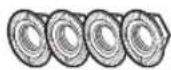

Kick plate nut (4) Protective
condensation sticker (1)
English14

Installation kit (not provided)
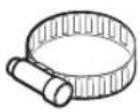
Hose clamp
Tools required (not provided)
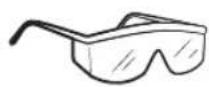
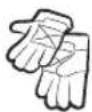
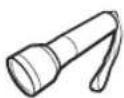
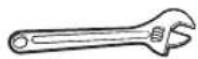
for the front foot
Safety glasses Gloves Flashlight Wrench (22 mm)
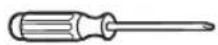
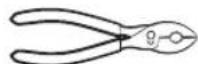
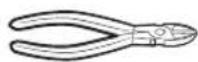
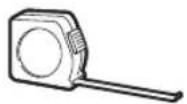
Torx T15 Pliers Nipper Tape measure



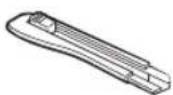
screwdriver
Pencil Phillips screwdriver Flat head

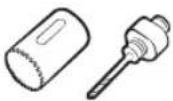
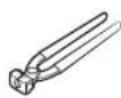
Level Hole saw
(80-100 mm)
Ear clamp plier
Installation
Installation requirements
To prevent a risk of fire, electric shock, or personal injury, all wiring and grounding must be done by a qualified technician.
Power supply
- An individual 220-240 V, 50 Hz branch circuit that is dedicated to the dishwasher.
- Power outlet with a maximum allowable current of 16 A (maximum 11 A for the dishwasher)
WARNING
- Do not use an extension cord.
- Use only the power plug that comes with the dishwasher.
• After installation is complete, make sure the power plug is not bent or damaged.
Grounding
For permanent grounding, the dishwasher must be properly grounded to a grounded metal or permanent wiring system. The grounding conductor must be run with the circuit conductors and then connected to the grounding terminal or lead on the dishwasher.
WARNING
- Do not connect the ground wire to plastic plumbing, gas lines, or hot water pipes. Improperly connected grounding conductors may cause electric shock.
- Do not modify the power plug of the dishwasher. If the power plug does not fit the outlet, have a proper outlet installed by a qualified electrician.
Water supply
- The water supply line must support water pressures between 0.04 and 1 MPa.
• Water temperatures must be lower than 60^ C. - A stopcock with a 3/4" male thread must be installed on the water tap.
To reduce a risk of leaks:
- Make sure water taps are easily accessible.
- Turn the water tap off when the dishwasher is not in use.
- Check for any leaks at the water hose fittings on a regular basis.
- To stop any leak, seal the water line connections and joints using Teflon tape or sealing compound.
Aqua Stop
The Aqua Stop is an electrical component that is designed to prevent water leaks. The Aqua Stop is attached to the water hose and automatically cuts off the water flow in the event of damage to the hose.
CAUTION
- Handle the Aqua Stop with care.
- Do not kink or twist the water hose connected to the Aqua Stop. If the Aqua Stop is damaged, shut off the water taps and unplug the power plug immediately. Then, contact a local Samsung customer centre or a qualified technician.
English16
Drain
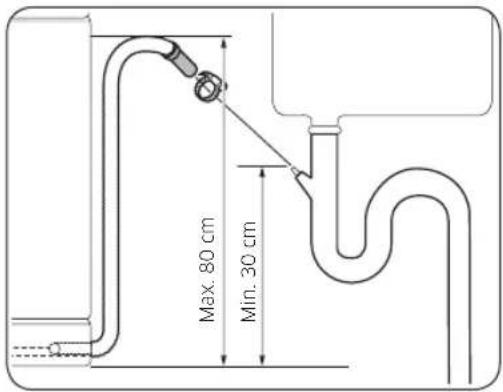
If you are using a drain system dedicated to the dishwasher, connect the drain hose to a drain system that is between 30 cm and 70 cm off the ground. Connecting the drain hose to a drain system more than 80 cm off the ground can cause the drained water to flow backward.
Flooring
- For safety, the dishwasher must be installed on a solidly constructed floor. Wooden floors may need to be reinforced to minimise vibrations. Avoid installing on carpet or soft tile. Carpeting and soft tile may cause vibrations and may cause your dishwasher to move slightly while operating.
WARNING
Do not install the dishwasher on a poorly supported structure.
- Make sure the dishwasher is level using the height adjustable feet.
- When levelling is complete, check if the door opens and closes properly.
Ambient temperature
Do not install the dishwasher in an area exposed to freezing temperatures. The dishwasher always retains some water in the water valve, pump, and hose. If the water freezes in the dishwasher or hoses, it may damage the dishwasher and its components.
Test run
After installing the dishwasher, run the Quick cycle to make sure the dishwasher is installed correctly.
Installation
Step-by-step installation
The installation procedure may differ depending on the model.
STEP 1 Select a location
natural_image
Line drawing of a kitchen sink with a circular component labeled 'A' pointing to the door (no text or symbols beyond label)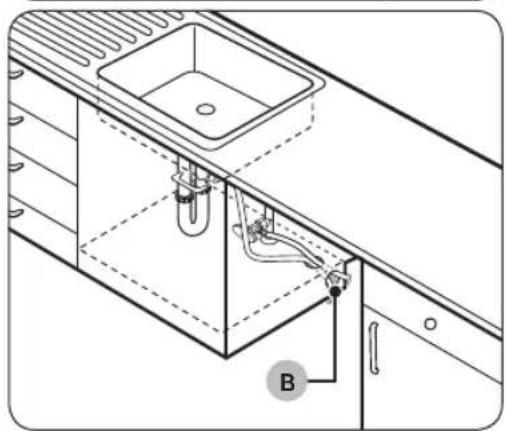
natural_image
Technical line drawing of a kitchen sink and cabin with tubing and labeled component B (no text or symbols beyond label)Select a location that meets the following conditions.
- The location must have a solid floor that can support the weight of the dishwasher.
- The location must be near a sink with easy access to the water supply, drain system, and electrical outlet.
- The location must let you load dishes into the dishwasher easily.
- The location must have sufficient space for the dishwasher door to open easily and provide enough space between the dishwasher and the cabinet sides.
- The rear wall must be free of obstructions.
Installation in a new location
If you install the dishwasher in a new location, follow these instructions before installing the dishwasher.
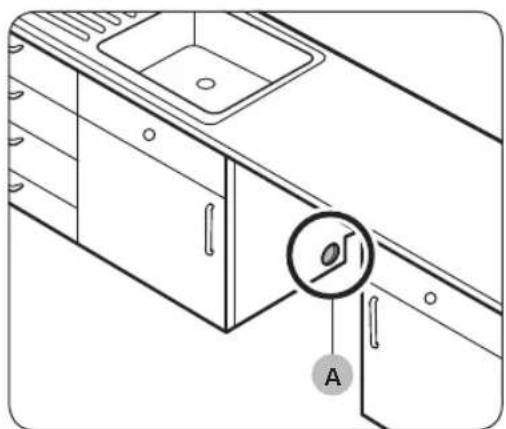
- Using a hole saw, cut a hole into the side of the cabinet that holds the sink (A).
- If the base inside the sink cabinet is raised above the kitchen floor and is higher than the connections on the dishwasher, make a hole in the base inside the cabinet and in the cabinet side (B).
NOTE
- If you are replacing an old dishwasher, check the existing connections for compatibility with the new dishwasher and replace the connections as needed.
- You may need to cut a hole in the opposite side of the cabinet according to the location of the electrical outlet.
English18
Cabinet dimensions
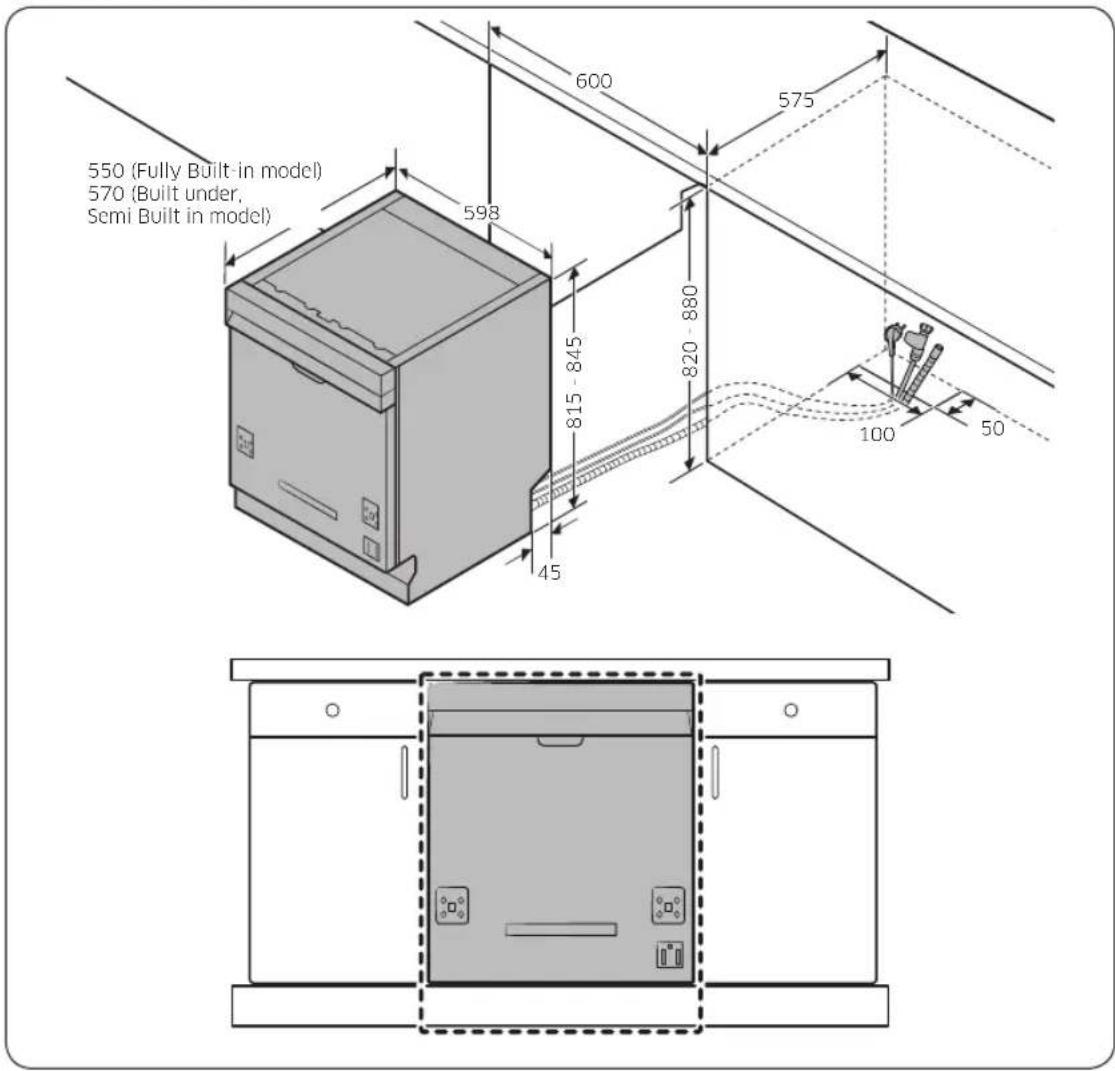
text_image
550 (Fully Built-in model) 570 (Built under, Semi Built in model) 600 575 598 815 - 845 820 - 880 45 100 50
NOTE
Check if the distance between the floor and the bottom of the worktop is more than 850 mm. If so, insert the sub foot included in the installation kit. For details, see the next section. If the distance is less than 850 mm, skip to STEP 3.
Installation
STEP 2 To insert the sub foot (Except Free Standing model)
If the distance between the floor and the bottom of the worktop is more than 850 mm, insert the sub foot into the hole on the bottom of the dishwasher before you start the installation.
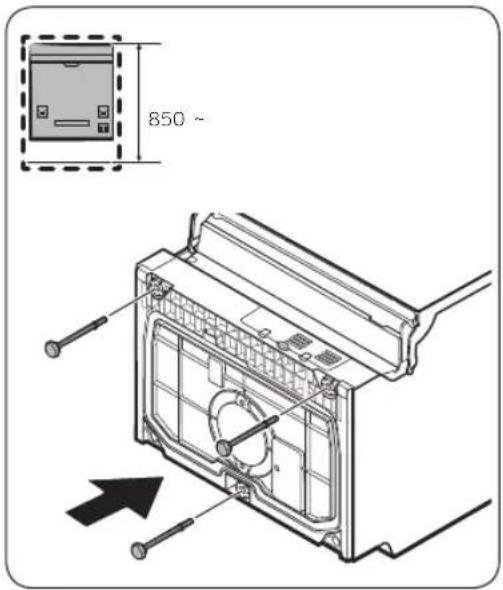
text_image
850 ~- Lay the dishwasher on its back.
CAUTION
Do not lay down the dishwasher on its side. Water may leak.
- Find the sub foot in the installation kit, and then insert the sub foot into the hole on the bottom of the dishwasher as shown in the figure.
STEP 3 Check the water line
- The water line pressure must be between 0.04 and 1.0 MPa.
- Make sure that the water temperature does not exceed 60 °C. Hot water over 60 °C may cause the dishwasher to malfunction.
- Make sure that the water supply valve is turned off before connecting the water supply line to the dishwasher.
English20
STEP 4 Arrange the hoses
natural_image
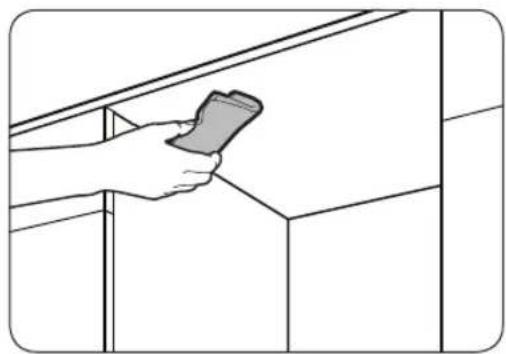
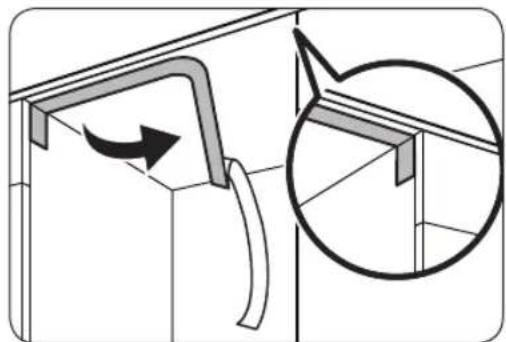
Line drawing of a hand holding a smartphone against a cabinet shelf (no text or symbols)- Clean the bottom of the countertop.
natural_image
Technical diagram showing a structural component with an arrow indicating rotation, and a magnified inset of a bracket detail (no text or symbols)- Attach the protective condensation sticker as shown.

text_image
Diagram illustrating a kitchen sink with an inset showing a circular diagram of a showerhead and directional arrows, likely illustrating a showerhead or ventilation system.- Pull the power plug, the water hose, and the drain hose through the sink hole.
CAUTION
- Use caution not to kink or step on the power plug or the hoses.
- Do not remove the brown paper on the back of the dishwasher. The paper is used to keep the rear side clean against the wall.
Installation
STEP 5 Install the custom panel (For Fully Built-In models)
FBI (Fully Built-In, DW60A60\*\*BB) models
text_image
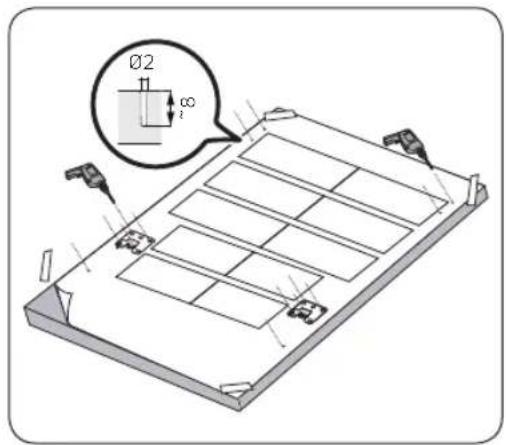
Technical diagram showing a 3D mechanical assembly with labeled components and a magnified inset of a cylindrical feature.- Place the installation template on the back of the custom panel and fix it temporarily using transparent tape. Note that the rear of the custom panel will be attached to the dishwasher door.
CAUTION
- The top end of the custom panel must be aligned with the top end of the installation template.
- Use a custom panel between 3 kg and 7 kg.
- Mark 14 points guided on the installation template.
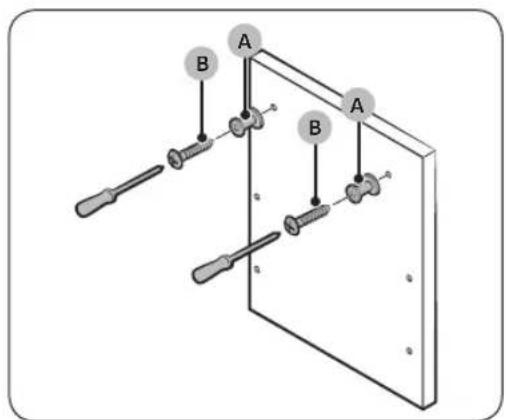
- Remove the installation template, and then tighten the custom panel fixers (A) with 2 screws (B, ∅3.5 X 25) as shown in the figure.
English22-
text_image
Diagram showing a screwdriver inserted into a workbench with labeled components C, D, and others for assembly or repair.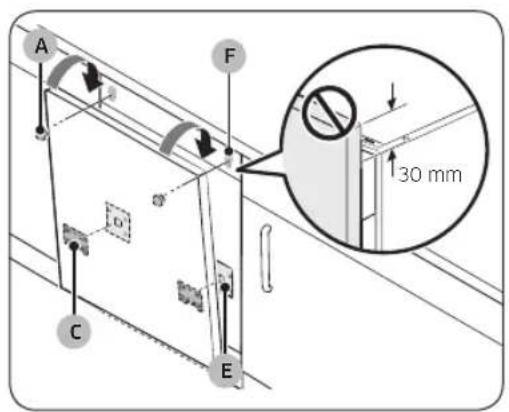
text_image
A F 30 mm C E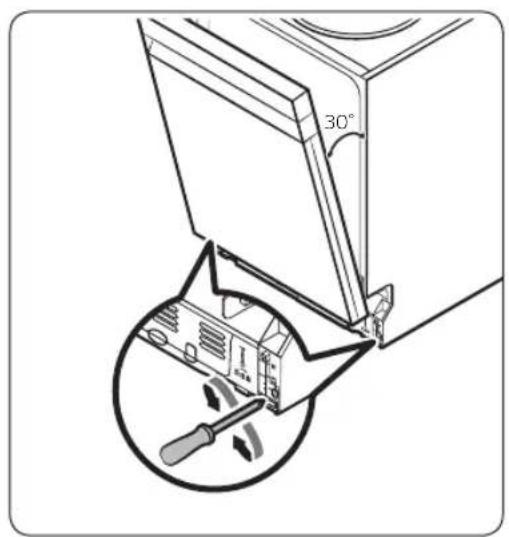
text_image
30°-
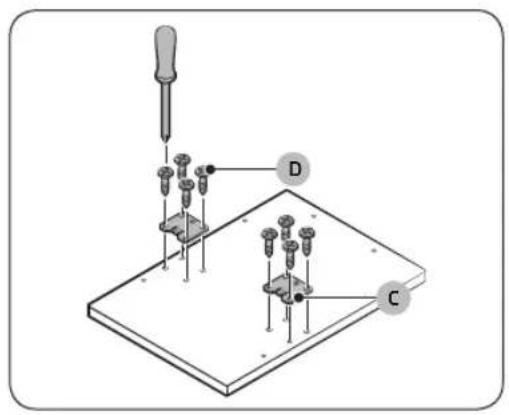
Tighten the door bracket (C) with 8 screws (D, ∅4 X 14) as shown in the figure.
-
Insert the door brackets (C) on the custom panel to the holes (E) on the dishwasher door to fix the custom panel.
- While holding the custom panel, attach it to the door and insert the custom panel fixers (A) into the holes (F) as shown in the figure.
- Push the custom panel downward to fix.
CAUTION
Do not let the custom panel extend more than 30 mm from the top of the dishwasher.
- Adjust the spring level while the door is approximately opened at 30 degrees. The door should hold its position, and should not fall open.
CAUTION
- Do not adjust the spring level while the door is completely opened.
- If the custom panel weighs more than 7 kg, the door may fall open.
- Custom panels weighing more than 7 kg are not recommended.
Installation
installation
natural_image
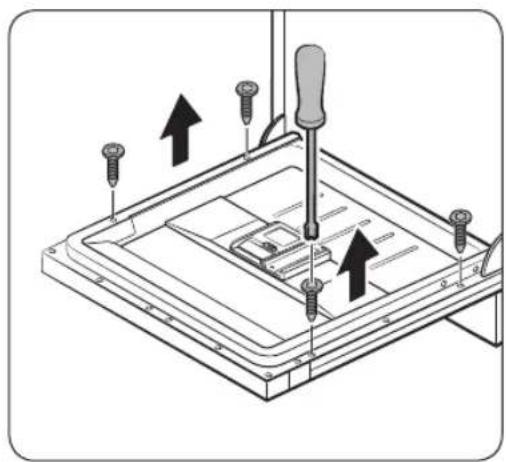
Diagram of a screwdriver installing or adjusting a component on a flat plate (no text or symbols present)- Open the dishwasher door and remove the 4 screws.
CAUTION
Use caution when opening the door. The door might open or close unexpectedly if the spring level is not adjusted appropriately, resulting in physical injury.
natural_image
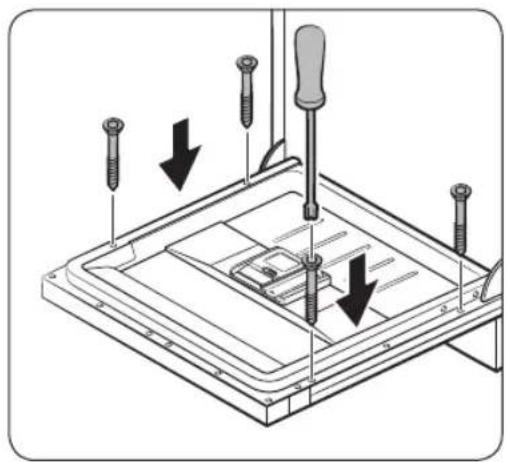
Technical diagram showing screwdriver installation with downward arrows indicating assembly or repair (no text or symbols present)- Secure the custom panel to the door by fastening the 4 screws (3.5 X 45).
English24
FBI (FBI Sliding, DW60A60\*\*IB) models
This dishwasher model is equipped with an auto-balancing system in the door. It has a sliding hinge, which is perfect for plinth-less kitchens or for installation above a small cupboard. Custom panel's height (A) can be between minimum 670 mm to maximum 800 mm depending on the installation environment. Custom panel's weight must not exceed 10 kg. Refer to the table for the height (C) in relation to the cabinet's height (B), and then determine the height of the custom panel.
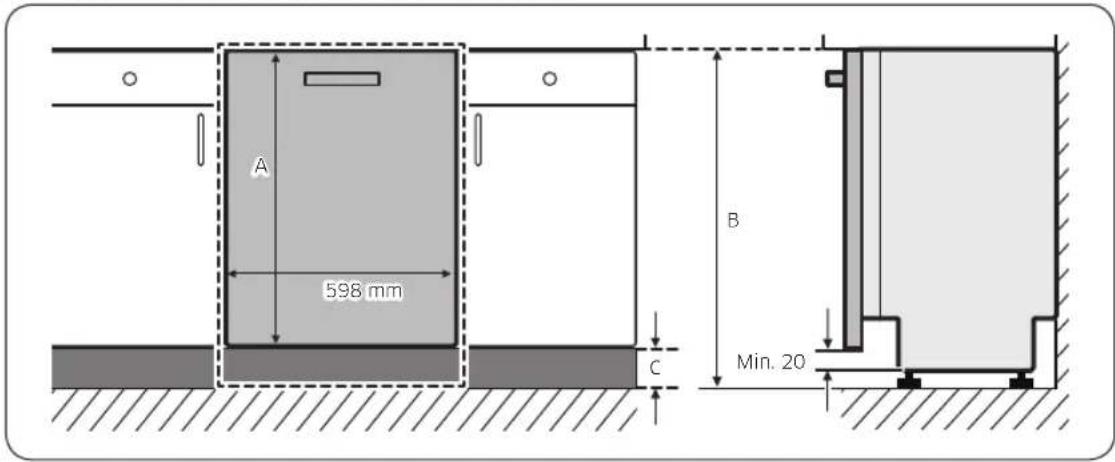
text_image
A 598 mm B C Min. 20| A B C | ||
| 670-800 mm | 820 mm 20-150 mm | |
| 850 mm 50-180 mm | ||
| 880 mm 80-210 mm |
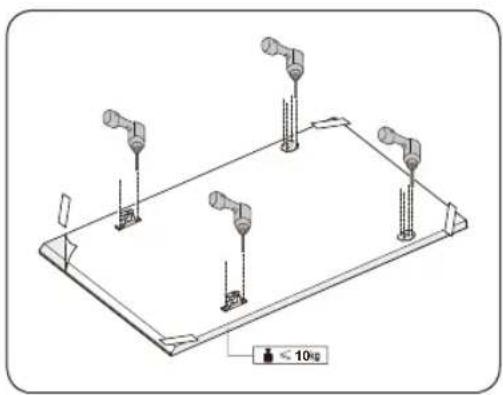
natural_image
Isometric technical diagram of a mechanical assembly with four vertical supports and a base plate, no text or symbols present.- Place the installation template on the back of the custom panel and fix it temporarily using transparent tape. Note that the rear of the custom panel will be attached to the dishwasher door.
- Mark 4 points guided on the installation template.
NOTE
Custom panel's height can be between minimum 670 mm to 800 mm depending on the installation environment.
CAUTION
Custom panel's weight must not exceed 10 kg.
Installation
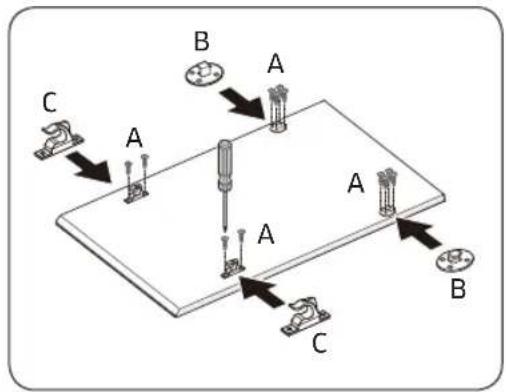
text_image
A B C A A A B C- Remove the installation template, and then tighten the Custom panel fixers (B), (C) with 12 screws (A) as shown in the figure.
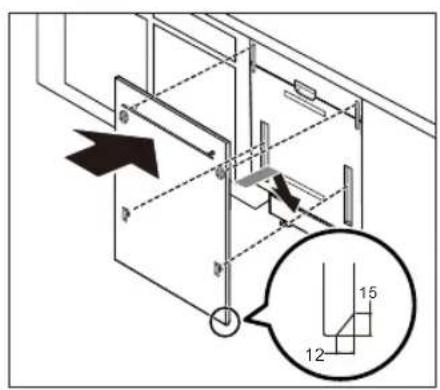
text_image
Technical diagram showing structural components with numbered annotations and directional arrows, likely from an engineering or architectural drawing.- While holding the custom panel, attach it to the door and insert the Custom panel fixers into the corresponding holes at the door.
natural_image
Diagram showing a mechanical or electrical component with an arrow indicating rotational motion (no text or symbols present)CAUTION
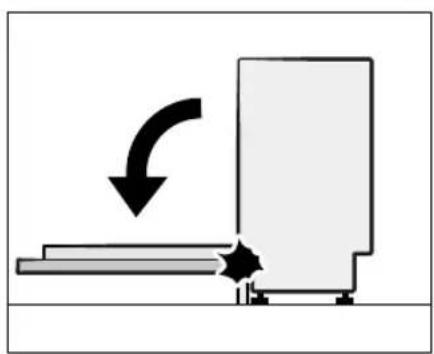
Use a custom panel between 4-10kg. Make sure the skirting board does not interfere with the dishwasher's door fully opening and closing.
English26
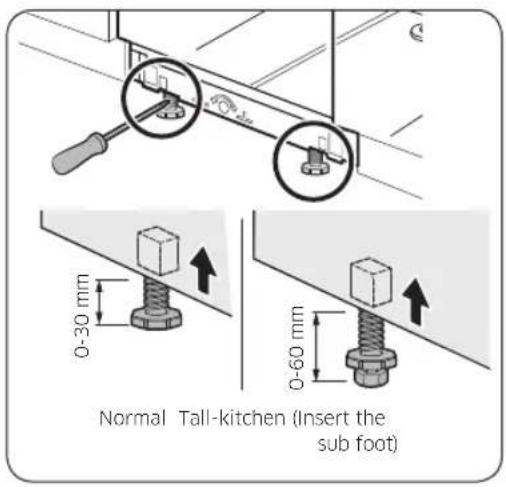
STEP 6 Level the dishwasher
text_image
Normal Tall-kitchen (Insert the sub foot)You can adjust the height of the dishwasher to level it. Note that in these steps, the dishwasher is currently inserted halfway.
- Use the level to check if the dishwasher is level.
- To adjust the front height, use a flat head(-) screwdriver.
• To lower the height, turn the foot counterclockwise. - To raise the height, turn the foot clockwise.
text_image
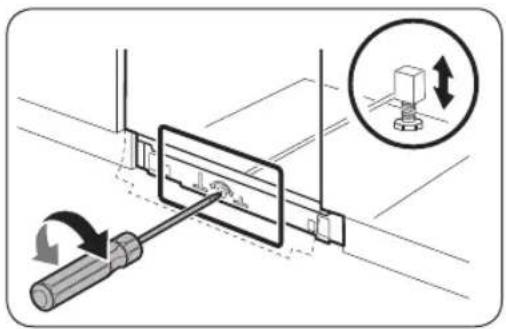
Diagram illustrating screwdriver tool positioning a mechanical component with directional arrows and magnified detail view- To adjust the rear height, insert a cross head(+) screwdriver in the bottom centre of the dishwasher.
• To lower the height, turn the screwdriver clockwise. - To raise the height, turn the screwdriver counterclockwise.
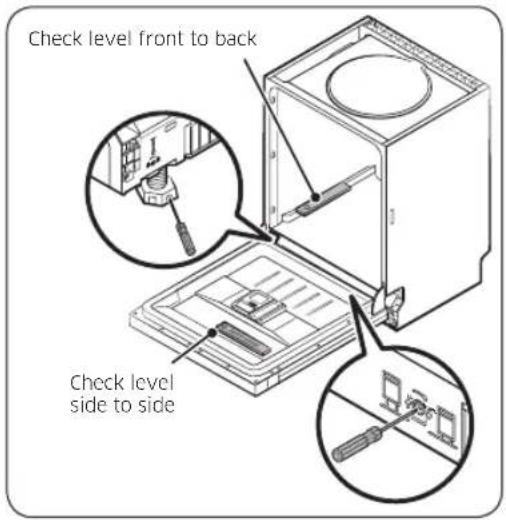
- Place a spirit level on door and rack track inside the tub as shown to check that the dishwasher is level.
text_image
Check level front to back Check level side to sideInstallation
installation
text_image
Min. (5 mm)
natural_image
Diagram showing two views of a car interior with arrows indicating direction of movement (no text or symbols present)-
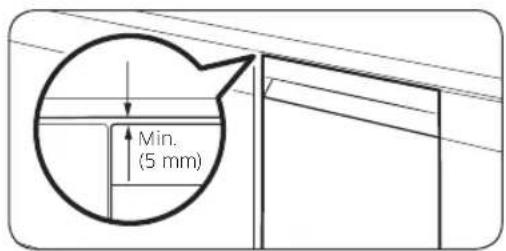
Leave at least a 5 mm space between the top of the dishwasher and the bottom of the countertop.
-
When levelling is complete, check if the door opens and closes properly.
English28-
STEP 7 Secure the dishwasher
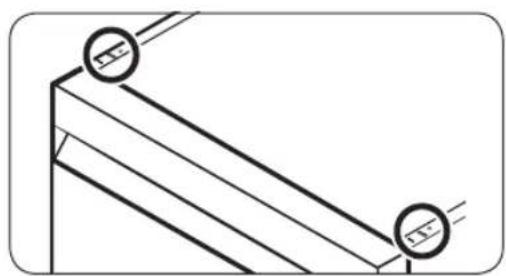
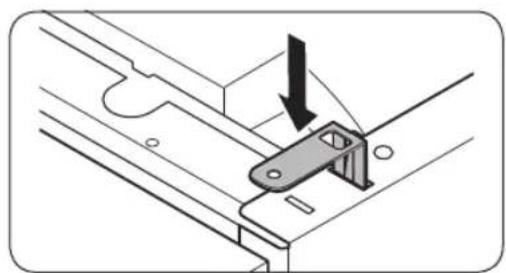
You can use the brackets to secure the dishwasher to the countertop. Alternatively, you can drill the side holes to secure the dishwasher to the cabinet sides.
To the countertop using the brackets
natural_image
Pure technical line drawing of a structural joint or bracket (no text or symbols)- Insert the provided brackets into the top front holes of the dishwasher as shown.
natural_image
Technical diagram showing a mechanical bracket with an arrow indicating direction (no text or symbols present)- Insert the dishwasher fully into place under the countertop.
text_image
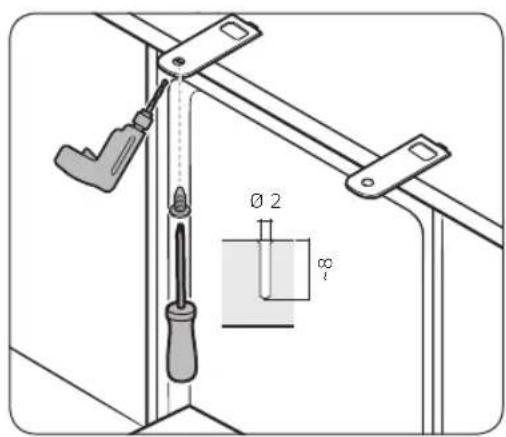
Technical diagram showing a screwdriver inserted into a bracket with dimension annotations including Ø2 and Ø1- Tighten the 2 screws (∅4 X 14) to fix the brackets.
NOTE
After fixing the dishwasher to the countertop, some screws remain. You can simply discard these screws, or use them to fix the sides of the dishwasher to the cabinet if you want to.
- Connect the water hose, but do not open the water tap until installation is complete.
Installation
To the sides

text_image
Installation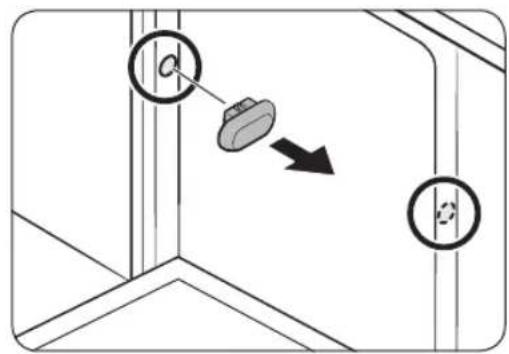
text_image
Diagram showing a mechanical or electrical component with labeled parts and directional arrow indicating motion or movement.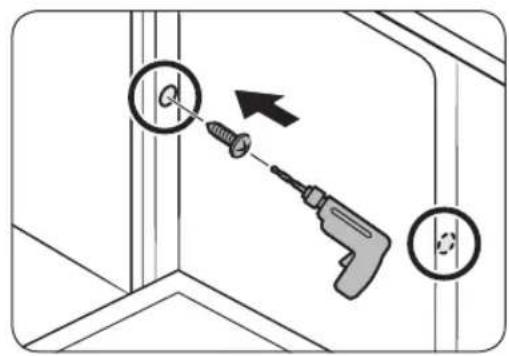
text_image
Diagram showing a screwdriver inserted into a corner with a magnified view of the screw, indicating tool application or repair process.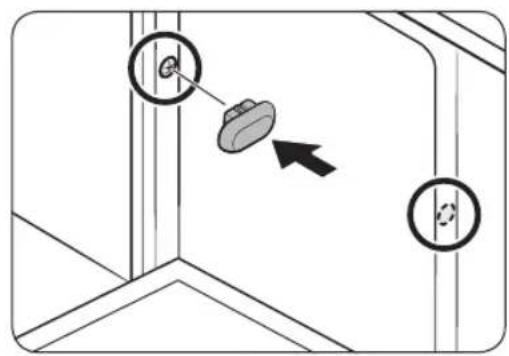
text_image
Diagram showing a mechanical or structural component with two circular features and an arrow indicating direction, possibly illustrating a motion or assembly.CAUTION
If the plastic caps are not assembled, water may leak and cause a fire or electric shock.
-
Remove the plastic caps.
-
Tighten the 2 screws ( 3.5 X 16) to the 2 places (marked on the illustration).
- Insert the provided plastic caps to the 2 places where screws are fastened.
- Connect the water hose, but do not open the water tap until installation is complete.
English30-
STEP 8 Connect the drain hose
text_image
Max. 80 cm Min. 30 cm- Connect the drain hose to the drain outlet.

CAUTION
- Install the drain system properly so that the drain hose does not come out of the drain outlet in the draining process.
- Make sure that the drain hose, supply hose, and power cord is not kinked or folded.
STEP 9 Final check
- Remove all foam, paper packaging, and unnecessary parts from inside the dishwasher.
- Turn the circuit breaker on.
- Open the water supply valve to supply water to the dishwasher.
- Plug in and turn the dishwasher on. Then, select and run the Quick cycle.
- Check if the dishwasher turns on normally and if there are any water leaks while the dishwasher is operating. Make sure to check for water leaks on both ends of the water line and the drain hose connector.
Installation
Skirting board
You can attach the skirting board according to the model or installation conditions.
Skirting board
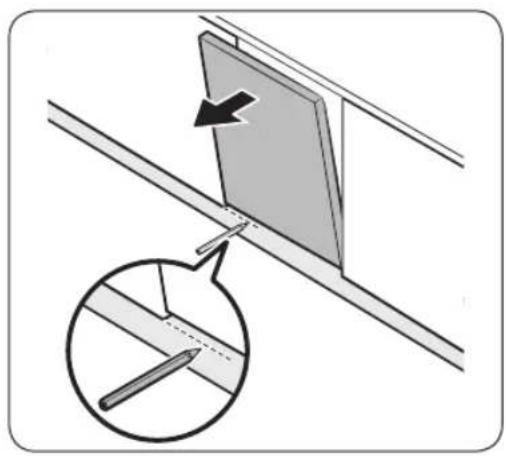
natural_image
Diagram showing a panel being inserted into a ceiling, with an inset magnified view of the pencil inserted (no text or symbols present)-
Put the skirting board on the bottom of the dishwasher.
-
Open the door of the dishwasher, and draw a baseline on the skirting board where it interferes with the door.
-
Follow the baseline and cut the skirting board using a saw.
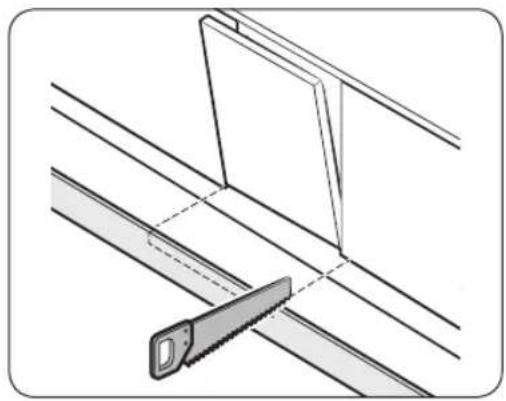
natural_image
Technical line drawing of a saw cutting through layered metal sheets (no text or symbols)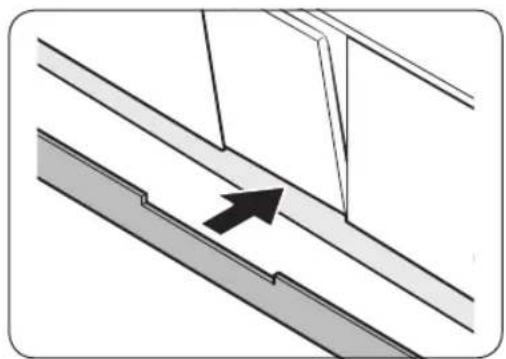
natural_image
Diagram showing a structural joint with an arrow indicating direction (no text or symbols present)- Attach the cut skirting board to the bottom of the dishwasher. Make sure the board does not interfere with the door of the dishwasher.
English32-
Pre-cut skirting board (DW60A60\*\*U\* Series)
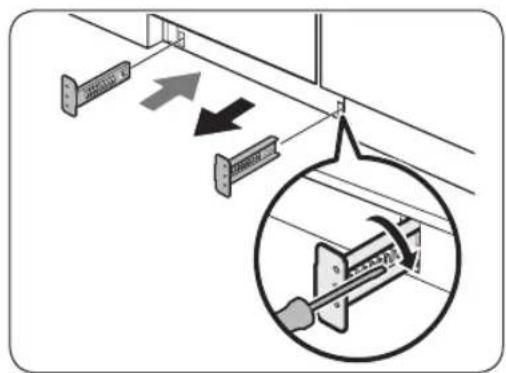
text_image
Diagram showing mechanical assembly with labeled components and directional arrows, including a magnified inset of a mechanical component.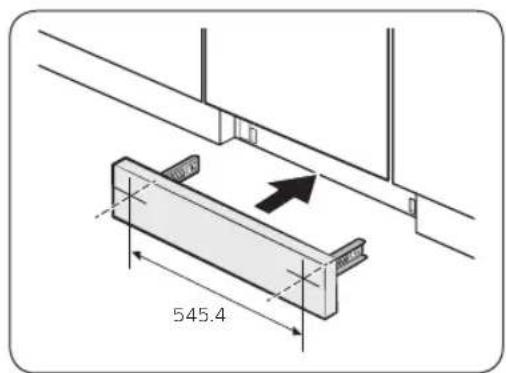
text_image
545.4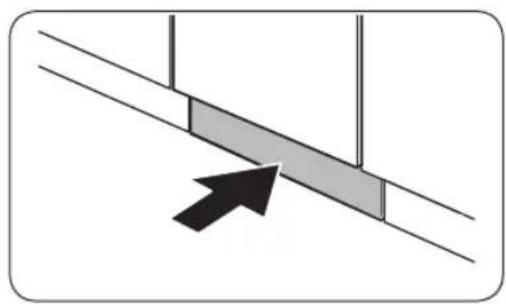
natural_image
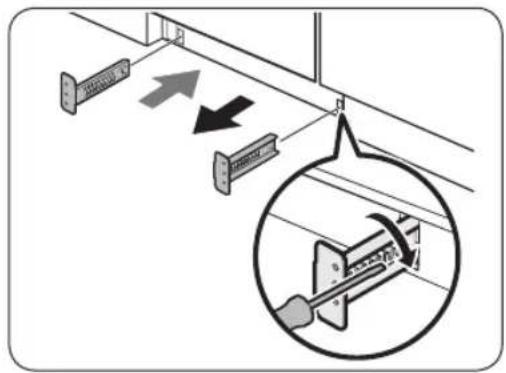
Diagram showing a directional arrow pointing to a shaded rectangular area between two parallel lines (no text or symbols)- Insert the provided brackets to the bottom of the dishwasher. Turn them into position.
-
See the figure on the left for the correct attaching sequence and place of the brackets.
-
Insert the pre-cut skirting board into the brackets first, and then tighten the screws to fix the board. See the figure on the left and make sure the brackets are positioned in the correct place.
CAUTION
Make sure the skirting board does not interfere with the dishwasher's door opening and closing.
- Push the skirting board with the brackets into the bottom of the dishwasher as shown.
Installation
Kick plate (DW60A60\*\*U\* Series)
If you want to install the kick plate, follow these steps.
text_image
Diagram showing electrical cable installation with directional arrows and magnified detail view- Insert the provided brackets to the bottom of the dishwasher. Turn them into position.
• See the figure on the left for the correct attaching sequence and place of the brackets. - Insert the kick plate into the brackets first, and then tighten the 4 kick plate bolts and nuts to fix the kick plate.
NOTE
If the dishwasher is raised by levelling the foot, move kick plate down so that the kick plate fits in bottom.
3. Push the kick plate with the brackets into the bottom of the dishwasher as shown.
CAUTION
Make sure the kick plate does not interfere with the dishwasher's door opening and closing.

text_image
Diagram showing cable installation with labeled components and a magnified inset of a mechanical component detail
text_image
Technical diagram showing a mechanical assembly with screwdriver and directional arrows, including a magnified inset of a component detail.English34
Before you start
Follow these instructions carefully to ensure proper installation of the dishwasher and to prevent accidents when washing dishes.
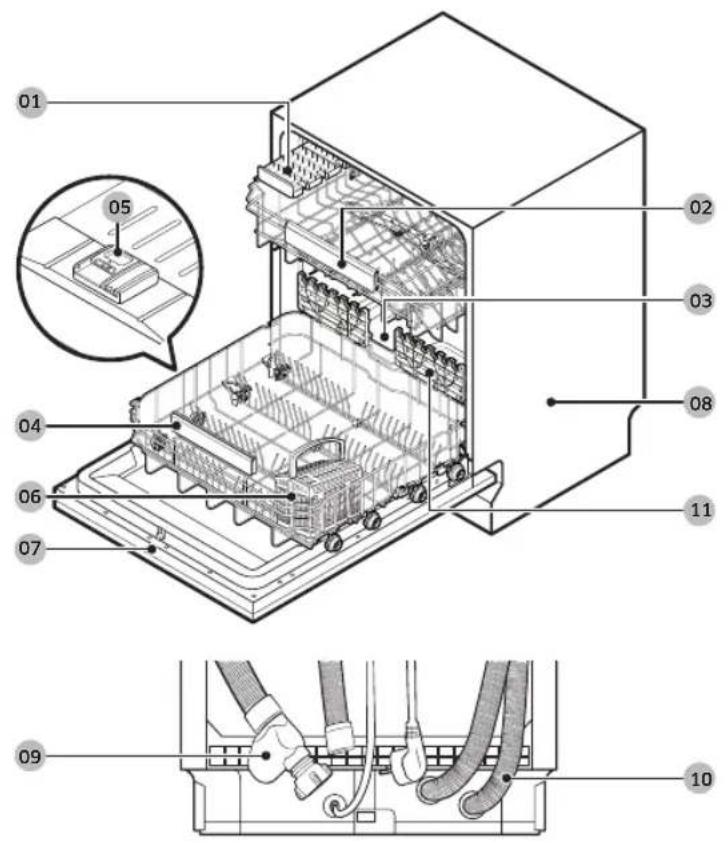
Dishwasher at a glance
DW60A609* models
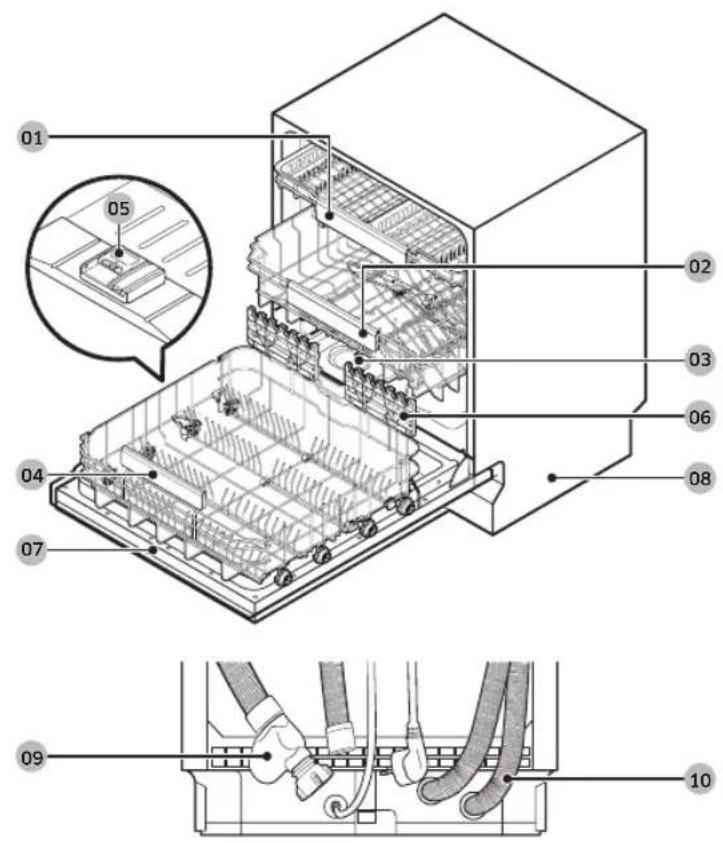
text_image
01 05 02 03 06 08 04 07 09 1001 Cutlery rack
02 Upper rack
03 Salt storage
04 Lower rack
05 Dispenser
06 Glass support
07 Door
08 Base
09 Inlet hose
10 Drain hose
Before you start
DW60A608* models
text_image
01 05 02 03 04 06 07 11 08 09 1001 Knife rack
02 Upper rack
03 Salt storage
04 Lower rack
05 Dispenser
06 Cutlery basket
07 Door
08 Base
09 Inlet hose
10 Drain hose 11 Glass support
English36-

CAUTION
- Do not wash items that are covered with ash, sand, wax, lubricating grease, or paint. These materials will damage the dishwasher. Ash does not dissolve and will spread inside the dishwasher.
- Remove food remains such as bones, fruit seeds, etc. and waste such as toothpicks, paper napkins, etc. from your dishes. Food remains and waste can make noise, cause the dishwasher to malfunction, and damage your dishes and dishwasher.
Unsuitable items for the dishwasher

WARNING
Wash only items such as glass, porcelain, and cutlery which the manufacturer declares as dishwasher safe. Do not wash aluminium (e.g. grease filters). The dishwasher may damage aluminium, or in extreme cases, cause a severe chemical reaction.
Do not wash the following items in the dishwasher.
• Copper, brass, tin, ivory, and aluminium items or items with adhesive
• Non-heat resistant plastics
- Craft items, antiques, valuable vases, and decorative glassware
• Pottery or glazed-ceramic items
- Wooden cutlery and crockery or items with wooden parts
- Delicate glassware or glassware containing lead crystal. Clouding may occur on the glassware after frequent washing.

NOTE
Silverware that has contacted foods containing sulphur may become discoloured. Food with sulphuric content include egg yolks, onions, mayonnaise, mustard, fish, fish brine, and marinades.
Before you start
Basic use of racks
Height adjustment
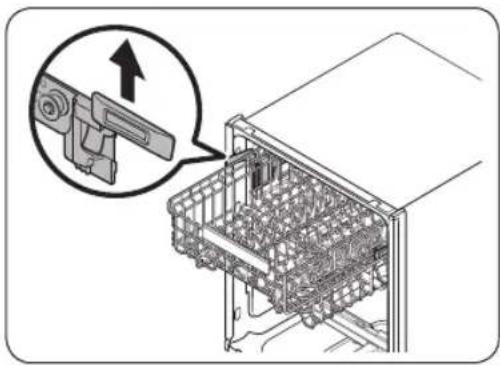
You can adjust the height of the upper rack so that the lower rack can accommodate larger sized dishes. Depending on the height of the upper rack, the lower rack can accommodate plates up to 30 cm in diameter, and the upper rack can accommodate plates up to 18 cm (with Cutlery rack) or 25 cm (without Cutlery rack) in diameter.
CAUTION
- Adjust the height of the upper rack before loading dishes into the rack. Adjusting the rack after loading the dishes may damage the dishes.
- Make sure to hold both handles when adjusting, or the dishwasher door may not close properly.
natural_image
Diagram of a refrigerator interior showing internal components and a magnified view of the device (no text or symbols present)• To raise the upper rack, pull the upper rack upwards. The adjustable handle will latch, and the upper rack will raise.
- To lower the upper rack, hold both the adjustable handles located at the left and right sides of the upper rack, and then evenly press down.
Upper rack removal
CAUTION
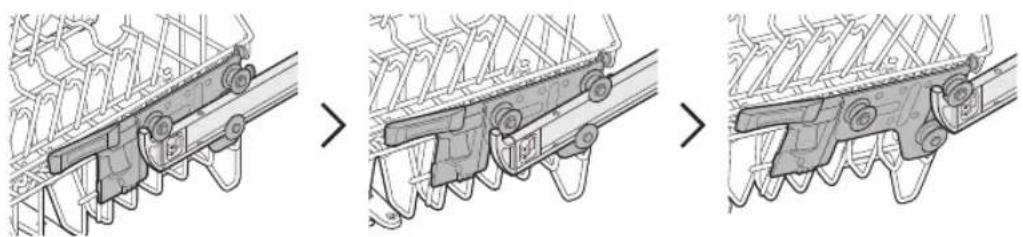
- Do not operate the dishwasher without the upper rack. Otherwise, noises occur and the dishwasher does not operate properly.
- Because the upper rack is removable, insert the upper rack properly to ensure the dishwasher operates normally.
Pull the upper rack to the front until it is fully extended, and then lift it slightly to remove. See the following figures.
natural_image
Three-step diagram showing mechanical assembly or assembly process, with no visible text or symbolsEnglish38-
Loading dishes
Lower rack
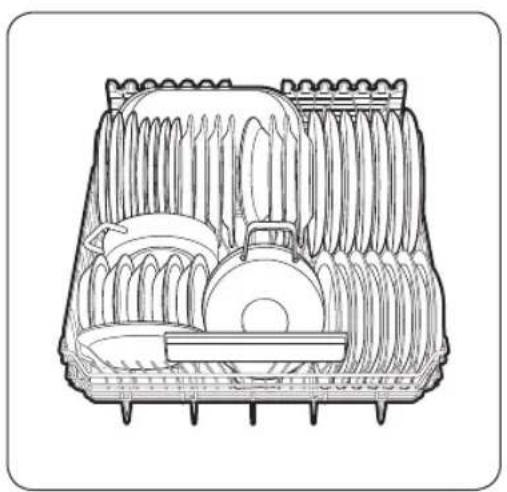
We recommend that you place large items, that are difficult to clean (such as pots, pans, lids, serving dishes and bowls), in to the lower rack.
It is preferable to place serving dishes and lids on the side of the racks in order to avoid blocking the rotation of the upper nozzle. Pots, serving bowls, etc. must always be placed top down.
Deep pots should be slanted to allow water to flow out.
The lower rack features folding tines to easily load larger pots and pans.
natural_image
Cross-sectional diagram of a mechanical device with internal components (no text or symbols)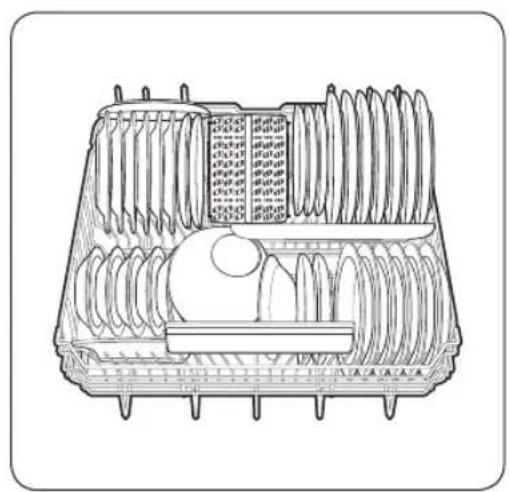
natural_image
Technical line drawing of a multi-layered plastic tray with internal rollers and a central circular component (no text or symbols)DW60A609* models DW60A608* models
NOTE
Long items, serving cutlery, salad servers and big knives should be placed on the shelf so that they do not obstruct the rotation of the nozzles.
Before you start
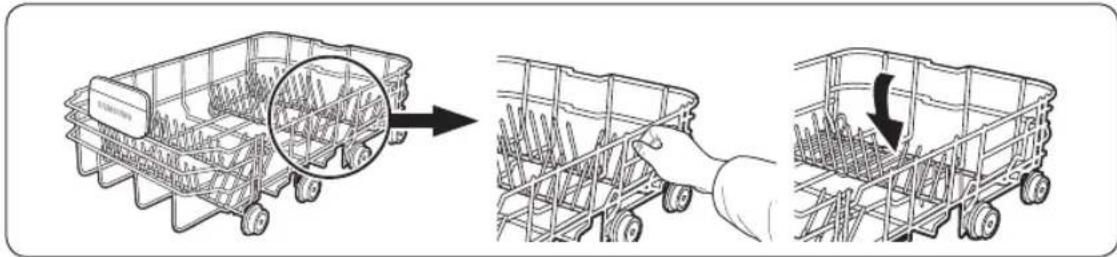
Using the folding tines
For better stacking of pots and pans, the tines can be folded down as show in the figure.
text_image
Diagram illustrating the process of a car storage system, showing step-by-step assembly and reassembly.Upper rack
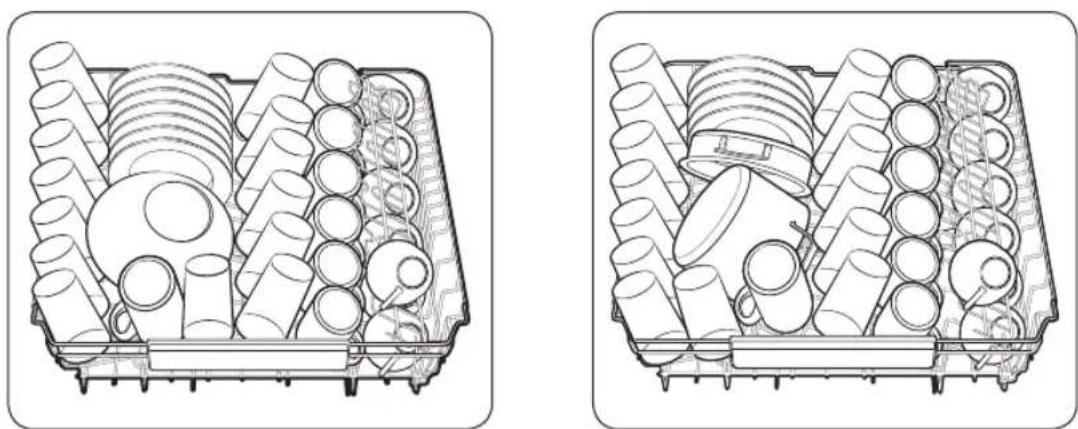
The upper rack is designed to hold more delicate and lighter dishware such as glasses, coffee and tea cups and saucers, as well as plates, small bowls and shallow pans (as long as they are not too dirty). Position the dishes and cookware so that they will not get moved by the spray of water. Always place glasses, cups & bowls upside down.
natural_image
Two technical line drawings of a mechanical component with cylindrical and threaded parts inside (no text or symbols)DW60A609* models DW60A608* models
English40
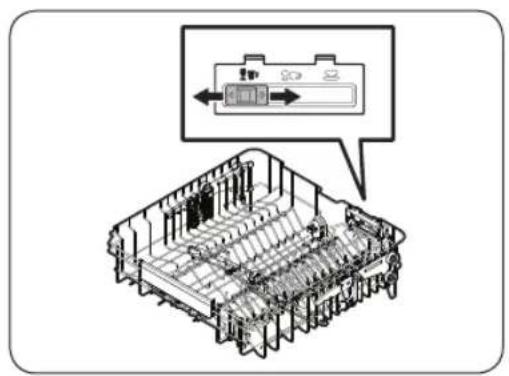
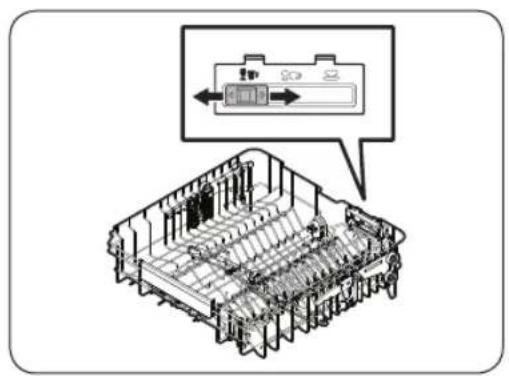
Guide Tines
text_image
Technical diagram of a mechanical assembly with labeled components and an inset showing a component with directional arrows.Upper rack
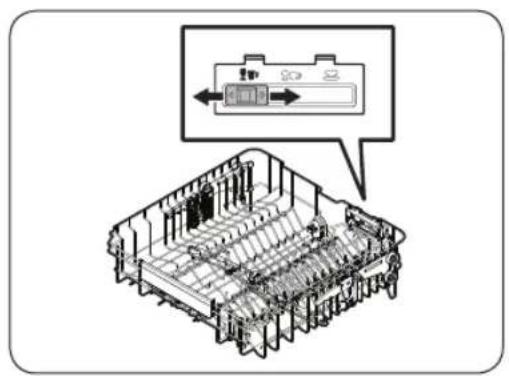
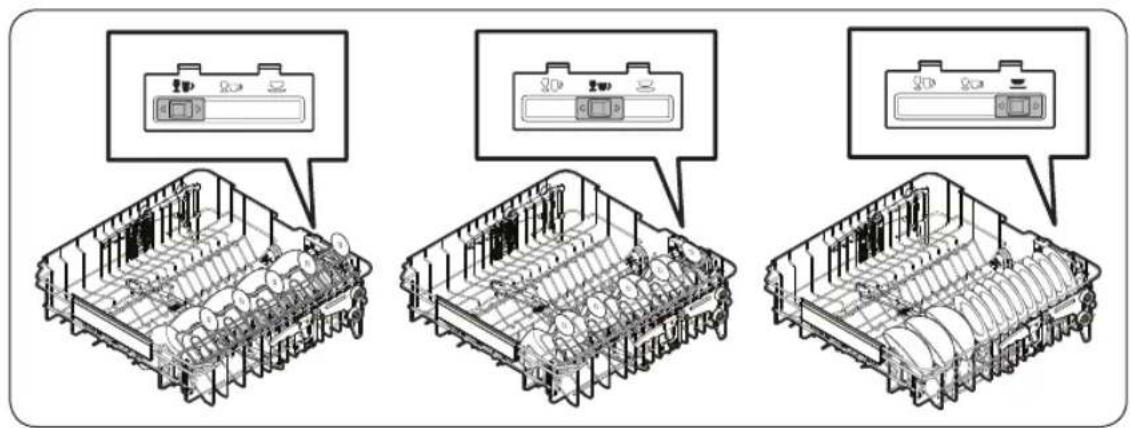
You can load dishes into the central rack in various ways by changing the guide tines. If the guide button is moved to the left, you can load standard wine glasses. If the guide button is in the middle, you can load shorter wine or brandy glasses. If the guide button is on the right, you can load bowls and plates.
text_image
Technical diagram showing three views of a multi-chamber appliance with control panel labels in ChineseCutlery rack (DW60A609* models)
natural_image
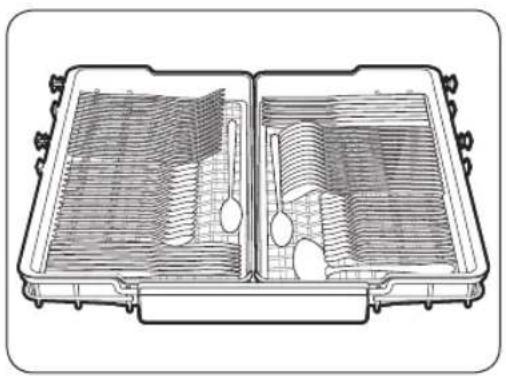
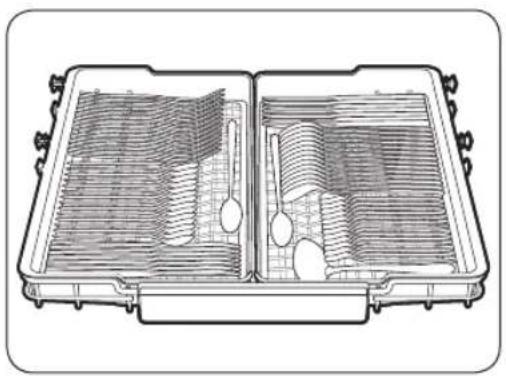
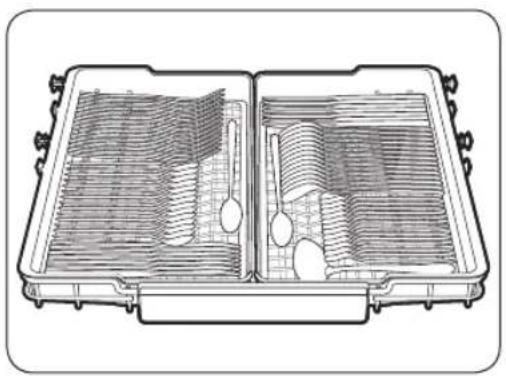
Cross-sectional diagram of a mechanical component with internal channels and housing (no text or labels)The cutlery rack is best for flatware and cooking or serving utensils. Use the cutlery rack to organize flatware or utensils.
NOTE
The cutlery rack can be removed if you need more space on the upper rack to clean larger items.
Before you start
3rd Rack Tray
You can easily unload cutlery from a removable tray in the upper rack. You can also remove the left or right tray to load relatively larger utensils. Both trays are removable.

text_image
Cutlery rackUsing the glass support
natural_image
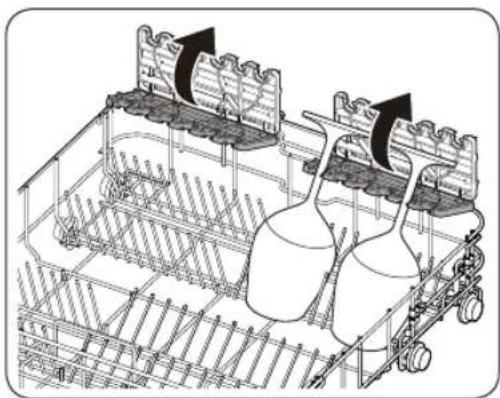
Technical line drawing of a mechanical assembly with two cylindrical components and directional arrows indicating motion (no text or symbols)The glass support is especially suited for wine glasses. Hang wine glasses onto the pegs of the glass support. Fold the glass support back when it is not being used.
English42-
Detergent compartment
All dishwasher cycles require detergent in the detergent compartment. Apply detergent as recommended for the selected cycle to ensure best performance.

WARNING
- Do not place dishwasher detergent in your mouth. Avoid breathing in detergent fumes. Dishwasher detergent contains irritants and caustic chemicals that can induce respiratory conditions. If you have consumed dishwasher detergent or inhaled detergent fumes, seek medical attention immediately.
- Keep dishwasher detergent out of children's reach.

CAUTION
- Use dishwasher detergent only. Other types of detergent produce excessive foam, which may decrease the dishwasher's performance or cause it to malfunction.
- The dishwasher may not wash well if there is not much detergent. For normally soiled items, we recommend 20-25 grams; however, this may differ depending on the detergent manufacturer, so please follow that manufacturer's recommendations.
Filling the detergent
natural_image
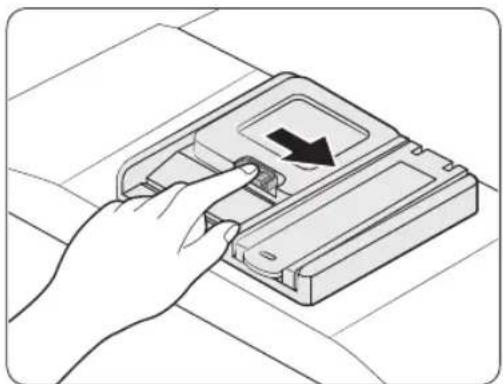
Hand inserting a device into a plastic case with a black arrow indicating the component (no text or symbols present)- Open the detergent dispenser cap by pushing the detergent dispenser catch to the right.

NOTE
The cap remains open at the end of a cycle.
Before you start
Before you start
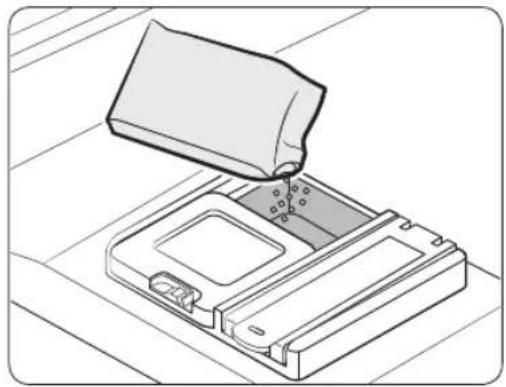
natural_image
Line drawing of a mechanical device with a lid and internal components, no text or symbols present- Add the recommended amount of detergent to the main wash detergent compartment.
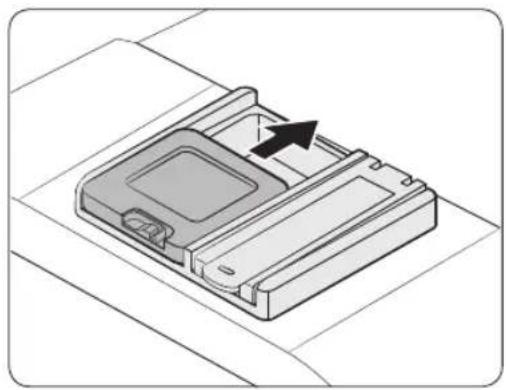
natural_image
3D diagram of a mechanical device with an arrow indicating direction (no text or symbols)- Close the lid by sliding it up.
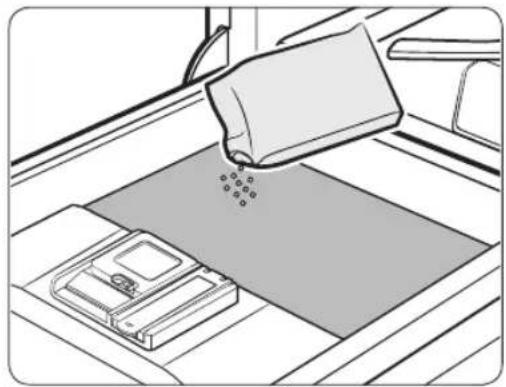
natural_image
Line drawing of a mechanical device with a lever and base plate (no text or symbols)- If the items are heavily soiled, pour a small amount of detergent onto the door for better cleaning results.
NOTE
The additional detergent will activate during the pre-wash process.
The cover opens automatically to dispense the detergent during the wash.
English44
Rinse aid reservoir
Rinse aid improves the drying performance of the dishwasher. When the Rinse Refill indicator lights up on the control panel, refill with rinse aid. Only use liquid rinse aid. Powdered rinse aid will clog the reservoir opening and cause the dishwasher to malfunction.

CAUTION
- Do not apply any type of detergent to the rinse aid reservoir.
- Do not excessively fill the reservoir. Excessive rinse aid may overflow during a cycle.
Filling the rinse aid
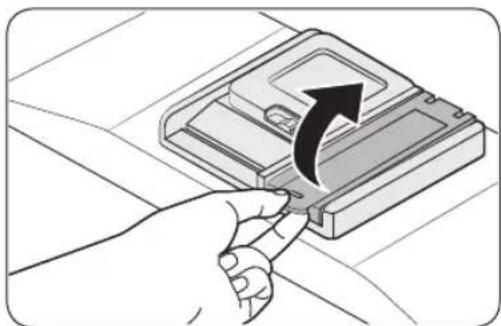
natural_image
Hand inserting a USB into a device slot, showing a black arrow indicating the process (no text or symbols present)- Open the rinse aid reservoir cap.
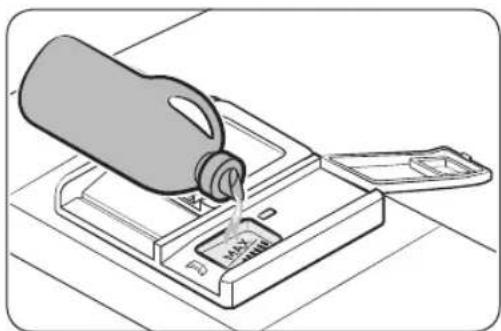
natural_image
Illustration of a milk bottle pouring liquid into a tray with a bag attached (no text or symbols)- Fill the rinse aid reservoir with rinse aid.

CAUTION
Do not fill the reservoir above the full level indicator. Excess rinse aid can overflow during the wash cycle.
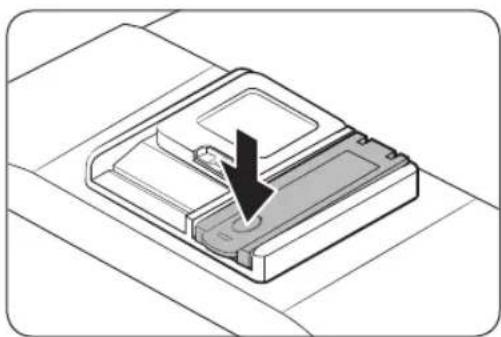
natural_image
Isometric view of a mechanical device with a black arrow indicating a specific component (no text or symbols present)- Close the rinse aid reservoir cap.
Before you start
Salt storage
CAUTION
- Use dishwasher-specific salt only. Do not use any other type of salt or solvent. This may damage the salt storage and the water softening system.
- To prevent corrosion due to an excessive amount of salt or salty water, always fill the salt storage before a washing cycle gets started.
Filling the salt storage
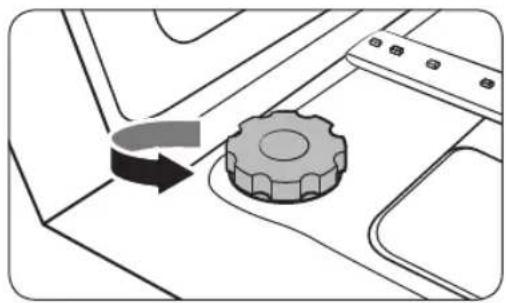
natural_image
Diagram showing a gear mechanism interacting with a mechanical component (no text or symbols)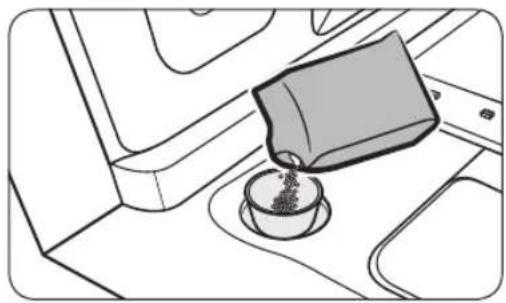
natural_image
Line drawing of a coffee cup pouring liquid into a container on a tray (no text or symbols)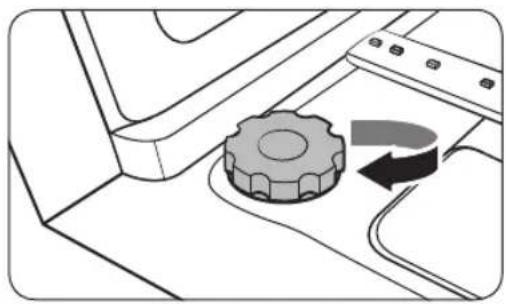
natural_image
Diagram of a mechanical component with a gear and curved arrow indicating rotation (no text or symbols)- Open the door.
- Turn the cap counterclockwise to open.
NOTE
When you open the softener lid, clean water stored for about one minute may run out. Add salt to stop the water from leaking out.
-
Fill the salt storage with water (only required when using the dishwasher for the first time).
-
Apply dishwasher salt.
CAUTION
- The maximum capacity is about 1 kg. Do not exceed the capacity.
-
Exceeding the capacity may affect the dishwasher performance.
-
Turn the cap clockwise to close.
NOTE
• To clean salt or salt water from dishwasher, run the Quick cycle.
- Depending on the size of the salt grains, it may take a while for the salt to dissolve and the indicator (→to turn off.
English46-
Salt indicator
The indicator (Turns on if there is not enough salt for the next several cycles.
Touchpad responsiveness
To prevent the touch-enabled controls from losing responsiveness, follow these instructions.
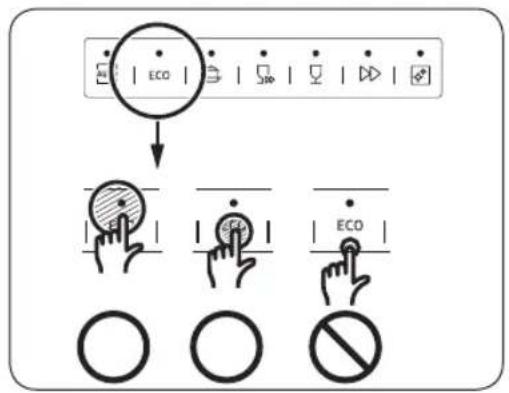
text_image
ECO ECO ECO- Touch the centre of each button with one finger.
- Do not touch more than one button at a time, except as directed.
- Clean the surface of the control panel regularly with a soft, damp cloth.
Before you start
Setting mode
You can change the sound, auto door open function, rinse aid level, and water hardness settings to your preference.
Entering the Setting mode
- Turn the dishwasher on.
- Press and hold the AUTO (DW60A60**BB, DW60A60**IB model) or Program (DW60A60**F*, DW60A60**U* model) cycle button for five seconds within 60 seconds from turning on the dishwasher.
- When you entered the Setting mode, the display will show "0:00".
Sound setting
You can turn the sound on or off.
- Press the Upper rack only button to select the sound setting menu.
- The display shows the current setting. (Default setting: "U1")
- Press the AUTO (DW60A60**BB, DW60A60**IB model) or Program (DW60A60**F*, DW60A60**U* model) cycle button to change the setting.
- UO: Sound off
- U1: Sound on
- Wait 5 seconds to save the setting.
Auto door open function setting
You can set the dishwasher to automatically open the door after each cycle for better drying results.
- Press the Multi tab button to select the auto door open function setting menu.
- The display shows the current setting. (Default setting: "A1")
- Press the AUTO (DW60A60**BB, DW60A60**IB model) or Program (DW60A60**F*, DW60A60**U* model) cycle button to change the setting.
- A0: Function disabled
- A1: Function enabled
- Wait 5 seconds to save the setting.
English48
Rinse aid level setting
You can change the amount of rinse aid applied during a cycle.
- Press the Delay Start button to select the rinse aid level setting menu.
- The display shows the current setting. (Default setting: "F4")
- Press the AUTO (DW60A60**BB, DW60A60**IB model) or Program (DW60A60**F*, DW60A60**U* model) cycle button to change the setting.
- You can select from F1 - F5 (minimum - maximum).
- Wait 5 seconds to save the setting.
Water hardness level setting
You can change the water hardness level according to water hardness in your local area. Changing this setting will have effect on the salt consumption in the dishwasher's salt storage.
- Press the Self Clean (DW60A60**BB, DW60A60**IB model) or Sanitize (DW60A60**F*, DW60A60**U* model) button to select the water hardness level setting menu.
- The display shows the current setting. (Default setting: "H3")
- Press the AUTO (DW60A60**BB, DW60A60**IB model) or Program (DW60A60**F*, DW60A60**U* model) cycle button to change the setting.
- You can select from H1 - H6 (soft - hard).
- Wait 5 seconds to save the setting.
NOTE
- Change the setting according to the table in the "Adjusting salt consumption" section on page 54.
- Default Setting: H3
- The dishwasher regenerates the water softener once every 3-4 cycles depending on the setting. However, the dishwasher will regenerate the water softener on the first cycle after you change the setting.
Operations
Control panel
DW60A609*BB, DW60A608*BB, DW60A609*IB, DW60A608*IB models

text_image
POWER 01020504 ECO 03 (Used) 070609 8:88 START Cancel & Drain (Used)DW60A609*F*, DW60A608*F*, DW60A609*U*, DW60A608*U* models
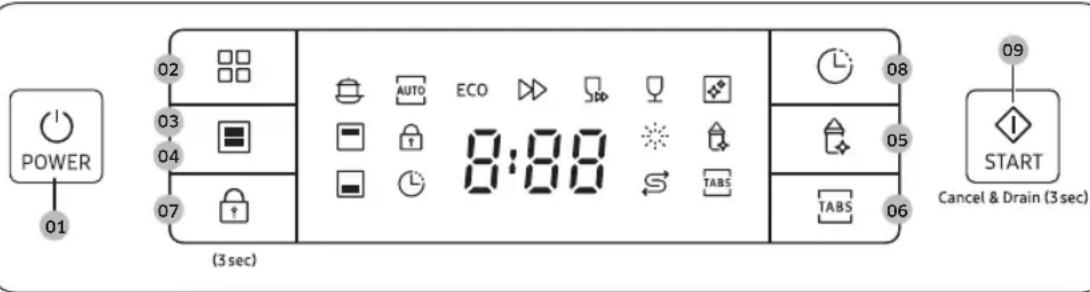
text_image
POWER 01 02 03 04 07 (3 sec) AUTO ECO 8:08 TABS 08 05 06 TABS 09 START Cancel & Drain (3 sec)| 01 POWER Press to turn the dishwasher on or off. | |
| 02 Program | Press to select a desired wash cycle. For more information, see the “Cycle overview” section on page 52. |
| 03 Upper rack only | Press to wash items using only the upper rack. |
| 04 Lower rack only | Press to wash items using only the lower rack. |
| 05 Sanitize | Press to increase the water temperature up to 69 °C in the final rinse process for high temperature sanitization.This option is not available with AUTO, Quick, Self Clean and Delicate. |
| 06 Multi tab | Press to select the Multi tab option to use the 3 in 1 tablet which does not need salt and rinse aid. This option is not available with AUTO, Quick and Self Clean. |
| 07 Control Lock | Control lock allows you to lock the buttons on the control panel except for the POWER button. For more information, see the “Control Lock” section on page 56. |
English50
| 08 Delay Start | You can delay the cycle starting time up to 24 hours. For more information, see the “Delay Start” section on page 56. |
| 09 START(Cancel & Drain) | Press START to start operation. Make sure the door is closed.Cancel & Drain: To cancel the current cycle and drain the dishwasher, press and hold START for 3 seconds. |
Indicators
DW60A609*BB, DW60A608*BB, DW60A609*IB, DW60A608*IB models
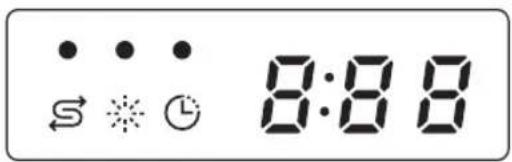
text_image
S ⋯ ⋯ ← ☆ ⏱ 8:88DW60A609*F*, DW60A608*F*, DW60A609*U*, DW60A608*U* models
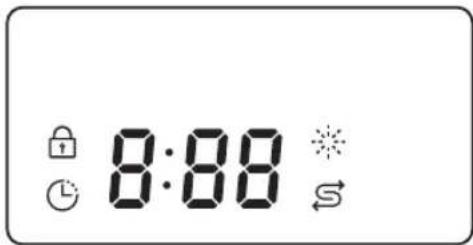
text_image
8:88| No Salt indicator Lights up | when the salt storage runs out of salt. | |
| Rinse Refill indicator Lights up if the dishwasher runs out of rinse aid. | ||
| Control Lock indicator (DW60A609*F*, DW60A608*F*, DW60A609*U*, DW60A608*U* models) | Lights up if Control Lock is activated. | |
| Delay Start indicator Lights up if Delay Start is activated. | ||
Operations
Cycle overview
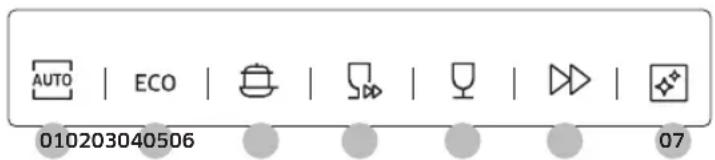
text_image
AUTO | ECO | 010203040506 07| 01 AUTO | This cycle detects the level of soil and automatically initiates the optimal cycle, which is appropriate for all levels of soiled items. |
| 02 ECO * | This cycle reduces power and water consumption, which is appropriate for normally soiled items. |
| 03 Intensive Select this cycle for heavily soiled items. | |
| 04 Quick | Select this cycle to clean lightly soiled items in a short time. Sanitize and Multi tab options are not available in this cycle. |
| 05 Delicate | Select this cycle for lightly soiled, fragile items such as glasses. Sanitize option is not available in this cycle. |
| 06 Express 60 | Normally soiled daily using items, with short cycle time. |
| 07 Self Clean | Select this cycle to clean the inside of the dishwasher. Make sure the dishwasher is empty. |
* The values for the ECO program have been obtained following the test standard EN 60436:2020. The values given for the other programs are indicative only.
English52-
Simple steps to start
- Open the door, and then load the dishwasher. Make sure to remove food remains and waste on the dishes.
- Apply detergent to the detergent dispenser. For better results, add rinse aids.
- Press POWER, and then select a cycle with necessary options (Upper rack only, Lower rack only, Sanitize, Multi tab, and Delay Start). Some options may not be available depends on the cycle.
NOTE
• If you select Lower rack only, make sure the dishes are loaded in the lower rack.
- If you select Upper rack only, make sure the dishes are loaded in the upper rack.
4. Press START, and then close the door. The dishwasher starts the cycle after draining for a few seconds.
NOTE
- To change the cycle after it has started, press and hold START for 3 seconds to cancel the cycle. Then, select a new cycle.
• The default cycle is ECO. - To resume after you have opened the door to stop the dishwasher while operating, simply close the door.
Operations
Salt storage
The water softener is designed to remove minerals and salts from the water, which would have a detrimental or adverse effect on the operation of the appliance. We recommend using soft water for better results. Hard water contains impurities that can reduce the washing performance. You will need to soften the water if the supplied water is harder than 1.0 mmol/l (6 °d - German scale).
- To soften the water, you need dishwasher-specific salt and configuration of the water hardness level according to your area. For more information about the water hardness level in your area, contact your local water department.
- If the hardness level of the supplied water supply is unsteady, set the dishwasher to the highest measurement. For example, if the water hardness reading ranges from 6.7 mmol/l to 9.0 mmol/l, set the dishwasher to 9.0 mmol/l.
- The dishwasher's default water hardness level is 3 (2.1-3.0 mmol/l). If this setting matches the water hardness level in your area, you do not need to change it.
Adjusting salt consumption
The dishwasher is designed to allow for adjusting the amount of salt consumed based on the hardness of the water used. This is intended to optimise and customise the level of salt consumption so that the salt consumption could be set proceed as follows:
- Turn the dishwasher on.
- Press and hold the AUTO (DW60A60**BB, DW60A60**IB model) or Program (DW60A60**F*, DW60A60**U* model) cycle button for five seconds within 60 seconds from turning on the dishwasher.
-
When you entered the Setting mode, the display will show "0:00".
-
Press the Self Clean (DW60A60**BB, DW60A60**IB model) or Sanitize (DW60A60**F*, DW60A60**U* model) button to select the water hardness level setting menu.
- The display shows the current setting. (Default setting: "H3")
- Press the AUTO (DW60A60**BB, DW60A60**IB model) or Program (DW60A60**F*, DW60A60**U* model) cycle button to change the setting.
- You can select from H1 - H6 (soft - hard).
- Wait 5 seconds to save the setting.
NOTE
- It is recommended that adjustments should be made in accordance with the following (or Manual) table.
- Default Setting: H3
English54
| Water hardness | Water hardness setting | Salt consumption (gram/cycle) | Autonomy (cycles/1 kgs) | |||
| °dH °fH | °Clark m | mol/l | ||||
| 0-5 0-9 | 0-6 0-0 | .94 H1 0 | / | |||
| 6-11 10 | 20 7-14 | 1.0-2.0 | H2 20 60 | |||
| 12-17 21 | 30 15- | 21 2.1-3.0 | H3 30 50 | |||
| 18-22 31 | 40 22- | 28 3.1-4.0 | H4 40 40 | |||
| 23-34 41 | 60 29- | 42 4.1-6.0 | H5 50 30 | |||
| 35-55 61 | 98 43- | 69 6.1-9.8 | H6 60 20 | |||
NOTE
• 1 dH (German degree) = 0.178 mmol/l
• 1 Clark (British degree) = 0.143 mmol/l
• 1 fH (French degree) = 0.1 mmol/l
- Contact your local water board for information on the hardness of your water supply.
- WATER SOFTENER
The hardness of the water varies from place to place. If hard water is used in the dishwasher, deposits may form on dishes and utensils. The appliance is equipped with a special softener that uses a salt specifically designed to eliminate lime and minerals from the water.
• How water softener regeneration works (ECO cycle with H3 level setting)
- Operates for about 2 minutes when drying starts and uses 2 L water, 0.0002 kWh energy
- Regenerates once every 5 cycles
- Operates for about 2 minutes when drying starts and uses 2 L water, 0.0002 kWh energy - Regenerates once every 5 cycles
Operations
Delay Start
You can delay the cycle starting time up to 24 hours in 1-hour increments. To increase the delay time, press Delay Start. The hour displayed indicates the time at which the cycle will start.
- Open the door, and then load the dishwasher.
- Press Delay Start to change the time in 1-hour increments.
- If you press and hold the button, the time will increase until you release the button.
- Press START, and then close the door.
NOTE
To change the delay time once the dishwasher has started, press POWER and restart the dishwasher.
Control Lock
To prevent children from playing with the dishwasher, Control Lock locks all button controls except for POWER.
- To activate Control Lock, press and hold Control Lock for 3 seconds. With Control Lock activated, you cannot select a cycle or option, or start an operation.
• To deactivate Control Lock, press and hold Control Lock again for 3 seconds. - Control Lock remains active after the dishwasher restarts. To cancel Control Lock, you must deactivate it first.
English56
Maintenance
Cleaning
Keep the dishwasher clean to improve performance, reduce unnecessary repairs, and lengthen the lifecycle.
Exterior
Clean spills on the surface of the dishwasher immediately. Use a soft, damp cloth on the control panel to gently wipe away spills and dust.

CAUTION
- Do not use benzene, wax, thinner, chlorine bleach, alcohol, or other chemical substances. These materials may discolour the surface of the dishwasher and cause stains.
- The dishwasher has electric parts inside. Do not spray water directly onto the dishwasher. Protect electrical components from water.
- For a stainless-steel door panel, use a stainless steel cleaner for home appliances and a clean, soft cloth.
Interior
Clean the interior of the dishwasher on a regular basis to remove any dirt or food particles. Wipe inside the dishwasher and inside the door with a wet dishcloth.

CAUTION
- Do not remove the front seal (the long rubber seal enclosing the opening of the dishwasher). The seal keeps the inner side of the dishwasher sealed.
- Use a damp cloth to remove lime scale or grease deposits inside the dishwasher. Alternatively, apply some detergent, and then run an empty cycle using the highest rinse temperature.
Maintenance
Nozzles
To prevent the nozzles from being clogged or if the nozzles are clogged, remove and clean each nozzle. Use caution when removing the nozzles as they may break.
Upper nozzle
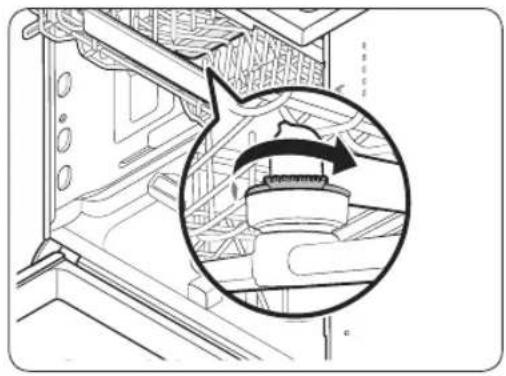
natural_image
Technical line drawing of a mechanical assembly with an inset circular detail showing a component (no text or symbols)- Open the door, and then pull out the upper rack to reveal the upper nozzle.
- Loosen and remove the nut, and then remove the nozzle.
- Unclog and clean the nozzle.
- Reinsert the nozzle, and then tighten the nut by hand.
- Rotate the nozzle by hand to make sure the nozzle is engaged correctly.
Lower nozzle
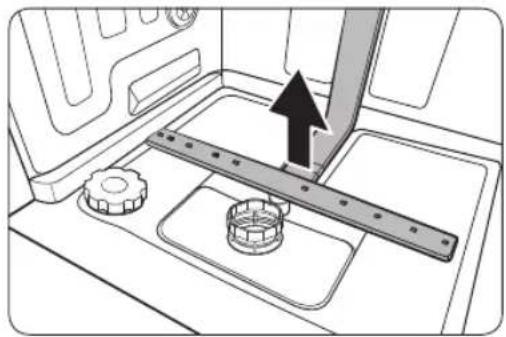
natural_image
Technical diagram of a mechanical assembly with gears and a ruler, showing no text or symbols- Open the door, and then pull out the lower rack. The lower nozzle is visible on the bottom.
- Unclog and clean the nozzle.
- Reinsert the nozzle.
- Rotate the nozzle by hand to make sure the nozzle is engaged correctly.
Internal Cleaning
We recommend internal cleaning every month. You can use the Self Clean cycle or the Intensive cycle without putting in dishes.
If your tap water is hard, you can prevent limescale inside the dishwasher by adding citric acid to the detergent when operating the dishwasher.
English58-
Filter
We recommend cleaning the filter every month.
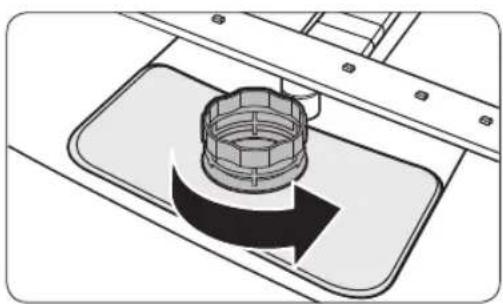
natural_image
Technical illustration of a mechanical component with a central hub and surrounding parts (no text or symbols)- Open the door, and then remove the lower rack first.
- Turn the filter handle counterclockwise to unlock the Coarse filter.
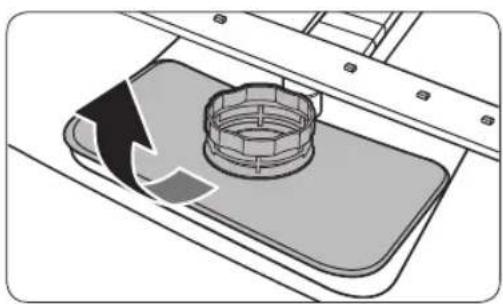
natural_image
Diagram of a mechanical component with a circular housing and directional arrow, no text or symbols present- Remove the Coarse filter, and then the cylindrical micro filter underneath.
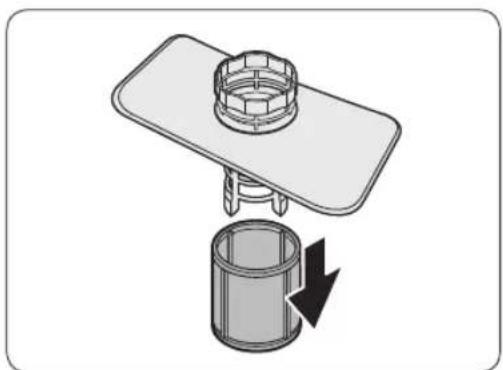
natural_image
Diagram of a mechanical assembly with a cylindrical component and a flat plate, showing a downward arrow indicating rotation (no text or symbols present)Maintenance
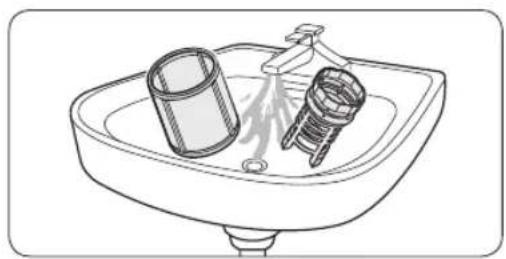
natural_image
Line drawing of a sink with two fixtures, one cylindrical and one threaded, no text or symbols present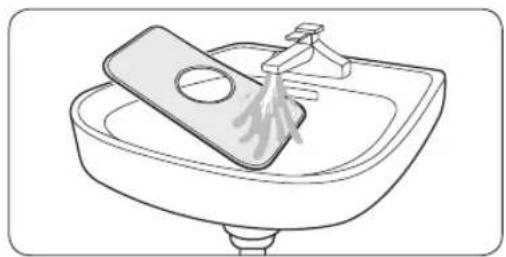
natural_image
Line drawing of a sink with a plate and faucet, no text or symbols present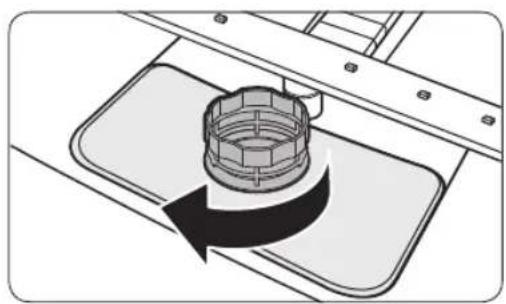
natural_image
Diagram of a mechanical component with a rotating arrow indicating rotation (no text or symbols)- Remove any dirt and impurities from the micro filter and the Coarse filter.
-
Rinse them with running water, and then dry well.
-
Reinsert the filter, and then the Coarse filter.
-
Turn the filter handle clockwise to lock.
CAUTION
Make sure the Coarse filter is closed properly. A loose cover can reduce the filtering performance.
Long-term care
If you will not use the dishwasher for an extended period of time, first drain the unit completely, and then disconnect the water hose. Shut off the water supply valve and the circuit breaker. Water remaining in the hoses or the internal components can damage the dishwasher.
English60-
Troubleshooting
Checkpoints
If you encounter an issue with the dishwasher, first check the table below and try the suggestions.
Following the repair by a non-authorised service provider, self-repair or non-professional repair of the product, Samsung is not liable for any damage to the product, any injury or any other product safety issue caused by any attempt to repair the product which does not carefully follow these repair and maintenance instructions. Any damage to the product caused by an attempt to repair the product by any person other than a Samsung certified service provider will not be covered by the warranty.
| Symptom Possible cause Action | ||
| The dishwasher does not start. | The door is not completely closed. | Make sure the door is latched and completely closed.Make sure the upper rack is properly joined with the nozzle.Make sure the upper rack is properly assembled. |
| The power cord is not connected. | Check power supply is present. | |
| Water is not being supplied. | Make sure the water supply valve is open. | |
| The control panel is locked. • Deactivate the Control Lock. | ||
| The dishwasher has bad odours. | Water remains from the previous cycle. | With the dishwasher empty, add detergent, and then run the Quick cycle. This is available only on applicable models. |
| Water remains in the dishwasher after a cycle has finished. | The drain hose is folded or clogged. | Straighten and unclog the hose. |
Troubleshooting
| Symptom Possible cause Action | ||
| Food remains on dishes. | An incorrect cycle was selected. | Select a cycle according to the soil level of the dishes as instructed in this manual. |
| The filters are clogged or not correctly fastened. | Clean the filters.Make sure the filters are correctly fastened. | |
| An insufficient amount of detergent was used. | Use the correct amount of detergent for each load. | |
| The water pressure is low. | Make sure the pressure is between 0.04-1.0 Mpa. | |
| The nozzles are clogged. | Clean and unclog the nozzles. | |
| Dishes improperly loaded or overloaded. | Arrange the dishes so they do not interfere with the nozzles and/or the detergent dispenser. | |
| The water is too hard. | Check the salt refill indicator, and refill with dishwasher salt. | |
| Dishes are not dried well. | There is no rinse aid in the dispenser, or not enough rinse aid was used. | Add rinse aid.Check the rinse aid settings. |
| Too many dishes are loaded. | Overloading may reduce the drying performance.Load your dishes as recommended. | |
| Glasses and cups spilled water onto other dishes while being unloaded. | Empty the lower rack first, and then the upper rack. This will avoid water dripping from the upper rack onto the dishes in the lower rack. | |
| Multiple detergent tablets were used without selecting the Sanitize option. | Select the Sanitize option or use rinse aid. | |
English62-
| Symptom Possible cause Action | ||
| The dishwasher is too noisy. | The dishwasher makes a sound when the dispenser cover is open and the drain pump is operating. | ·This is normal. |
| The dishwasher is not level. | ·Make sure the dishwasher is level. | |
| The nozzle bumps against the dishes, creating a chopping sound. | ·Rearrange the dishes. | |
| Yellow or brown film remains on dishes. | Coffee and tea soils. | ·Use a cycle with a higher temperature. |
| Indicators do not light up. | The power cord is not connected. | ·Check power supply is present. |
| The nozzles do not rotate smoothly. | The nozzles are clogged with food particles. | ·Clean the nozzles. |
| A white coating remains on dishes. | The water is too hard. | ·Make sure the salt fill indicator and softener settings are correct according to the water hardness of your area.·Make sure the salt storage cap is correctly fastened. |
| Air bubbles and scratch marks are on the control panel. | Air gets into the protective film, causing EPS marks to remain. | ·Remove the protective film from the control panel. |
Troubleshooting
Information codes
If the dishwasher fails to operate, you may see an information code on the display. Check the table below and try the suggestions.
| Code Action | |
| LC | Leakage checkClose the water supply valve. Go to your home's circuit breaker panel, and set the dishwasher's circuit breaker switch to off. Then, contact the installer to repair. If the issue continues, contact a local Samsung service center. |
| 4C | Water supply checkCheck if the water supply valve is closed, if the water supply is suspended, or if the water inlet valve or line is frozen or clogged by foreign particles. If the issue continues, contact a local Samsung service center.Check filter and drain pipe. If it is jammed, clean it. If the issue continues, contact a local Samsung service center. |
| AC | PCB communication checkAbnormal communication between the main PCB and the sub PCB.If the problem continues, contact an authorised Samsung service center. |
| HC | High temperature heating checkFunctional check. With the dishwasher empty, add detergent, and then run a cycle. If the issue continues, go to your home's circuit breaker panel, and set the dishwasher's circuit breaker switch to off. Then, contact a Samsung service center. |
| tC | Thermistor checkTemperature sensor is Deformed or broken (short or open circuit). If the problem continues, contact an authorised Samsung service center. |
| PC | Distribution motor checkAbnormal working with distribution motor assembly, or main PCB. If the issue continues, contact a local Samsung service center. |
If any information code keeps appearing on the screen, contact a local Samsung service centre.
Spare parts* for end-users are available for a minimum of 10 years**.
* Applicable parts: door hinge and seals, other seals, spray arms, drain filters, interior racks and plastic peripherals such as baskets and lids.
** This means a minimum of 10 years after Samsung places the last unit of the model on the market.
English64
Cycle chart
| Cycle AUTO ECO Intensive | |||
| Cycle sequence | Pre wash (45 °C) ▶Main wash (55 °C-65 °C) ▶ Rinse ▶Rinse ▶Hot rinse (50 °C - 55 °C) ▶ Dry ▶ End | Main wash (50 °C) ▶Rinse ▶Hot rinse (50 °C) ▶Dry ▶ End | Pre wash (50 °C) ▶Main wash (65 °C) ▶Rinse ▶ Rinse ▶Hot rinse (60 °C) ▶Dry ▶ End |
| Water consumption (L) | 10.6-15.9 10 16.5 | ||
| Energy consumption (kWh) | 1.050-1.551 | 0.848 (DW60A6092**)0.836 (DW60A6082**)0.950 (DW60A6090**)0.936 (DW60A6080**) | 1.651 |
| Cycle time (min.) | 80-150 210 205 | ||
| Cycle Quick Delicate Express 60 | |||
| Cycle sequence | Main wash (40 °C) ▶Hot rinse (40 °C) ▶Hot rinse (55 °C) ▶End | Pre wash (40 °C) ▶Main wash (50 °C) ▶Rinse ▶Hot rinse (50 °C) ▶Dry ▶ End | Main wash (55 °C) ▶Rinse ▶Hot rinse (50 °C) ▶Dry ▶ End |
| Water consumption (L) | 11 13.5 11.5 | ||
| Energy consumption (kWh) | 0.781 0.902 | 0.853 | |
| Cycle time (min.) | 38 | 120 | 60 |
| Cycle | Self Clean |
| Cycle sequence | Pre wash (45 °C) ▶Main wash (70 °C) ▶Rinse ▶Hot rinse (70 °C) ▶Dry ▶ End |
| Water consumption (L) | 15.1 |
| Energy consumption (kWh) | 1.241 |
| Cycle time (min.) | 145 |
English 65
Cycle chart
NOTE
- The cycle time depends on the options you have added, and the pressure and temperature of the supplied water.
- The dishwasher drains the remaining water inside automatically if it has not been used for the last 5 days.
- The power consumption depends on the water temperature and/or load. When the rinse aid reservoir is empty, time and temperature can increase a little.
- If no rinse aid is used, the cycle time and temperature may increase slightly.
English66
Appendix
Transportation/relocation
Make sure the dishwasher is empty with no loose parts. First, drain the dishwasher as follows.
- When the draining process is complete, open the door.
- Turn the dishwasher off, and then shut the water valve off.
- Disconnect the both the water hose and the drain hose.
CAUTION
Do not shake or sway the dishwasher while moving it. Residual water may drip from the dishwasher.
Protection against frost
If you leave the dishwasher in a place with a risk of frost for an extended time, make sure to empty the dishwasher. For details, see the “Transportation/relocation” section.
Disposing the dishwasher and helping the environment
Your dishwasher is manufactured from recyclable materials. If you decide to dispose of it, please observe your local waste disposal regulations. Cut off the power cord so that the appliance cannot be connected to a power source.
Remove the door so that animals and children cannot get trapped inside the appliance.
Appendix
Energy, water saving tip
- ECO programme is suitable to clean normally soiled tableware, that for this use, it is the most efficient programme in terms of its combined energy and water consumption, and that it is used to assess compliance with the EU ecodesign legislation (COMMISSION REGULATION (EU) 2019/2022).
- Manual pre-rinsing of tableware items leads to increased water and energy consumption and is not recommended.
Use a knife, etc. to remove only large bits of food before loading. - Water supplied can be up to 60 °C, and less power is consumed when hot water is connected.
- It's better to fill the basket if possible but without overloading.
- Load the tableware to the baskets properly to prevent damages and poor performance.
- Overloading and overlapping tableware may reduce the cleaning and drying performance.
Load your tableware as recommended. - Load the tableware with concave bottom at an angle so that water can run off.
- Arrange the tableware so they do not interfere with the nozzles and the detergent dispenser.
It can make the cleaning and drying performance better, and prevent the noise of nozzle bumping the tableware. - To prevent injury from the knives and other utensils with sharp points, it must be loaded in the basket with their points down or placed in a horizontal position.
- To save water and energy, use the ECO cycle. ECO is the most efficient program when washing normally soiled items.
- Use an appropriate amount of detergent and rinse according to the manufacturer's guidelines.
- Dishwasher use saves water compared to ordinary washing by hand.
- Ecodesign information can be found by going to www.samsung.com/support.
EPREL information
To access energy labelling information about this product on the European Product Registry for Energy Labelling (EPREL), go to https://eprel.ec.europa.eu/qr/***** where ***** is the product's EPREL registration number. You can find the registration number on the rating label of your product.
English68
Specifications
| MODEL | DW60A6090F* | DW60A6090U* | DW60A6090BB | DW60A6090IB | |
| DW60A6092F* | DW60A6092U* | DW60A6092BB | DW60A6092IB | ||
| DW60A6080F* | DW60A6080U* | DW60A6080BB | DW60A6080IB | ||
| DW60A6082F* | DW60A6082U* | DW60A6082BB | DW60A6082IB | ||
| Type Free Standing Built Under Fully Built-in | Fully Built-in (Sliding) | ||||
| Power 220-240 V | ~, 50 Hz | ||||
| Water pressure 0.04-1.0 MPa | |||||
| Wash capacity | DW60A609* 14 Place settings | ||||
| DW60A608* 13 Place settings | |||||
| Rated power 1760-2100 W | |||||
| Dimension (Width x Depth x Height) | 598×600×845 mm | 598×570×815 mm | 598×550×815 mm | ||
| Weight (Unpacked) | 53 kg (DW60A609* models)51.5 kg (DW60A608* models) | 45 kg (DW60A609* models)43.5 kg (DW60A608* models) | 43.5 kg (DW60A609* models)42 kg (DW60A608* models) | 44 kg (DW60A609* models)42.5 kg (DW60A608* models) | |
| Weight (Packed) | 59 kg (DW60A609* models)57.5 kg (DW60A608* models) | 51 kg (DW60A609* models)49.5 kg (DW60A608* models) | 49.5 kg (DW60A609* models)48 kg (DW60A608* models) | 51 kg (DW60A609* models)48.5 kg (DW60A608* models) | |
For standard test
NOTE
The information for comparability test as follows.
DW60A609\* models
- Washing capacity: 14 place settings
• Test standard: EN 60436 - Position of upper rack: lower position
- Wash cycle: ECO
• Additional options: None - Rinse aid level setting: F4
• Water hardness level setting: H3
• Dosage of the standard detergent: Main-wash 22 g - For the arrangement of the items, refer to the below figures
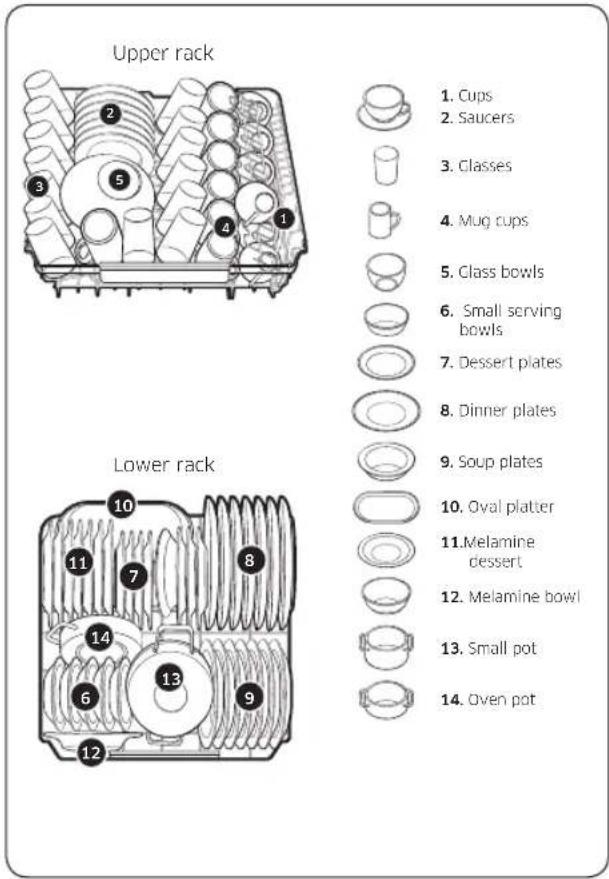
text_image
Upper rack 1. Cups 2. Saucers 3. Classes 4. Mug cups 5. Class bowls 6. Small serving bowls 7. Dessert plates 8. Dinner plates 9. Soup plates 10. Oval platter 11. Melamine dessert 12. Melamine bowl 13. Small pot 14. Oven pot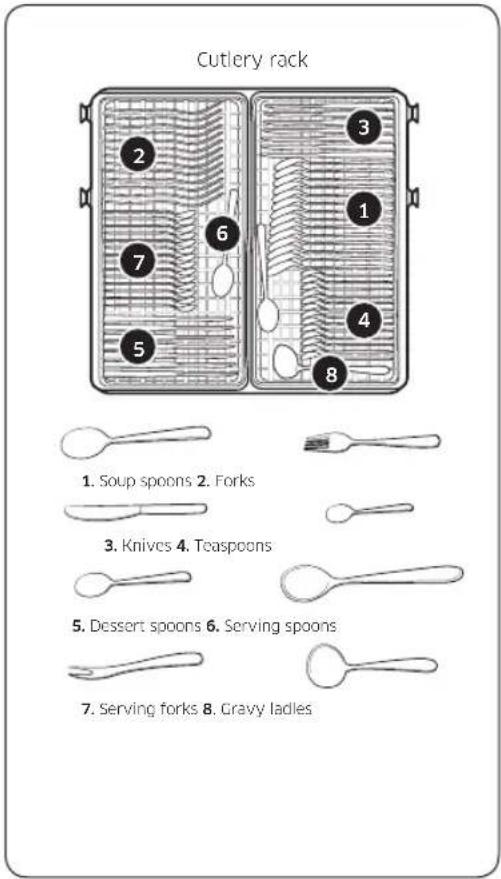
text_image
Cutlery rack 1. Soup spoons 2. Forks 3. Knives 4. Teaspoons 5. Dessert spoons 6. Serving spoons 7. Serving forks 8. Cravy ladlesEnglish70
DW60A608\* models
- Washing capacity: 13 place settings
• Test standard: EN 60436 - Position of upper rack: lower position
- Wash cycle: ECO
• Additional options: None - Rinse aid level setting: F4
• Water hardness level setting: H3
• Dosage of the standard detergent: Main-wash 21 g - For the arrangement of the items, refer below figures
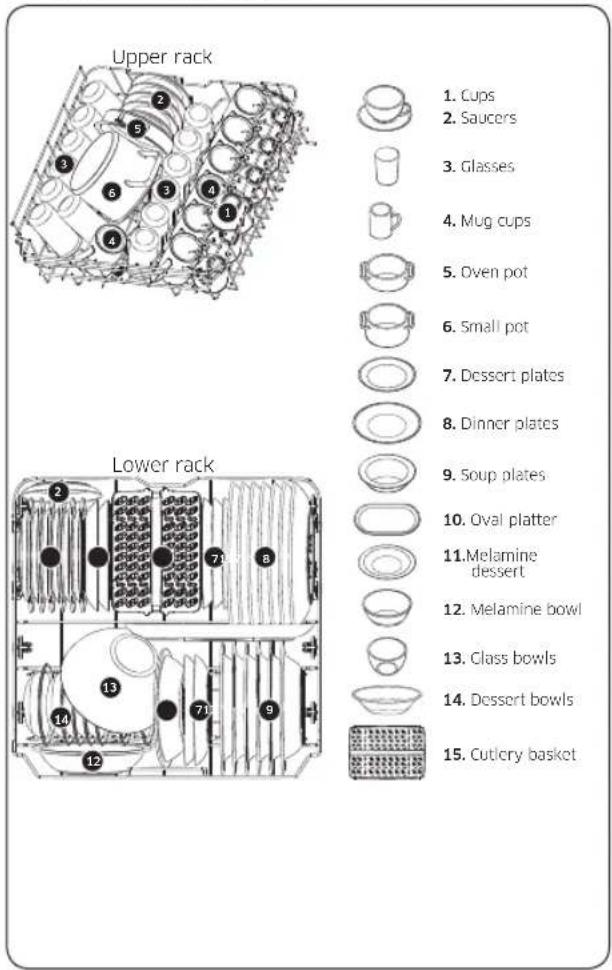
text_image
Upper rack Lower rack 1. Cups 2. Saucers 3. Glasses 4. Mug cups 5. Oven pot 6. Small pot 7. Dessert plates 8. Dinner plates 9. Soup plates 10. Oval platter 11. Melamine dessert 12. Melamine bowl 13. Class bowls 14. Dessert bowls 15. Cutlery basket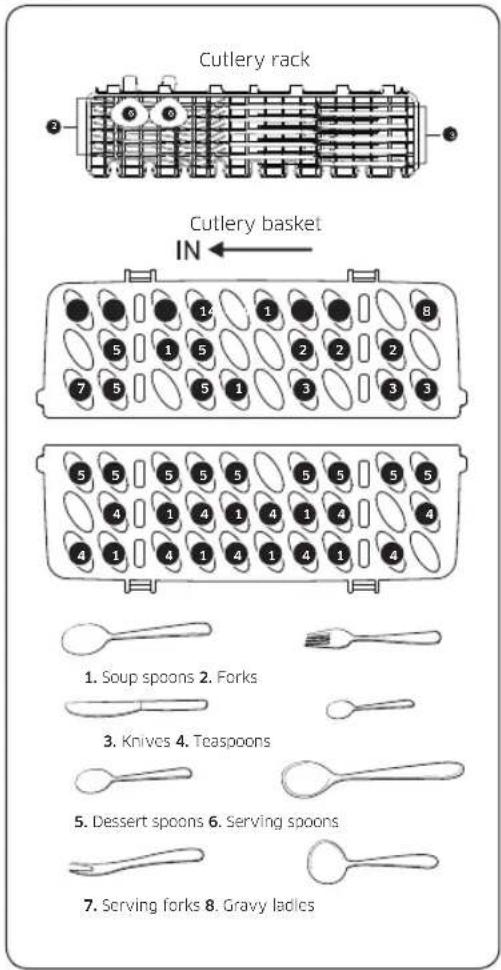
text_image
Cutlery rack Cutlery basket IN ← 1. Soup spoons 2. Forks 3. Knives 4. Teaspoons 5. Dessert spoons 6. Serving spoons 7. Serving forks 8. Gravy ladiesSAMSUNG
QUESTIONS OR COMMENTS?
| COUNTRY CALL OR VISIT US ONLINE AT | ||
| AUSTRIA 0800 72 67 864 (0800-SAMSUNG) www.samsung.com/at/support | ||
| BELGIUM 02-201-24-18 | www.samsung.com/be/support (Dutch)www.samsung.com/be_fr/support (French) | |
| DENMARK 707 019 70 www.samsung.com/dk/support | ||
| FINLAND 030-6227 515 www.samsung.com/fi/support | ||
| FRANCE 01 48 63 00 00 www.samsung.com/fr/support | ||
| GERMANY 06196 77 555 77 www.samsung.com/de/support | ||
| ITALIA 800-SAMSUNG (800.7267864) www.samsung.com/it/support | ||
| CYPRUS | 8009 4000 only from landline, toll free | www.samsung.com/gr/support |
| GREECE | 80111-SAMSUNG (80111 726 7864)only from land line(+30) 210 6897691 from mobile and land line | www.samsung.com/gr/support |
| LUXEMBURG | 261 03 710 | www.samsung.com/be_fr/support |
| NETHERLANDS | 088 90 90 100 | www.samsung.com/nl/support |
| NORWAY | 21629099 | www.samsung.com/no/support |
| PORTUGAL | 808 207 267 | www.samsung.com/pt/support |
| SPAIN | 91 175 00 15 | www.samsung.com/es/support |
| SWEDEN 0771-400 300 www.samsung.com/se/support | ||
| SWITZERLAND | 0800 726 786 | www.samsung.com/ch/support (German)www.samsung.com/ch_fr/support (French) |
| UK | 0333 000 0333 | www.samsung.com/uk/support |
| IRELAND (EIRE) | 0818 717100 | www.samsung.com/ie/support |


DD81-04050D-02