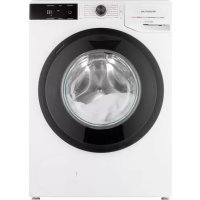
VWM9001W - Washing machine INVENTUM - Free user manual and instructions
Find the device manual for free VWM9001W INVENTUM in PDF.


| Product type | Washing machine |
| Brand | Inventum |
| Model | VWM9001W |
| Washing capacity | 9.0 kg |
| Dimensions (W x D x H) | 60 x 54.5 x 85 cm |
| Net weight | 67 kg |
| Power supply | 220-240 V~, 50 Hz |
| Rated power | 2000 W |
| Maximum current | 10 A |
| Water pressure | 0.05 - 0.8 MPa (0.5 - 8 bar) |
| Energy efficiency class | A (eco 40-60 program) |
| Wash programs | Cotton, Mix, Drum Clean, Rinse/Softener, Spin/Drain, Eco, Quick 20 min, Wool/Hand Wash, Shirts, Anti-Allergy Steam, Auto Wash |
| Maximum spin speed | 1400 rpm |
| Additional functions | Intensive, Quick, Extra Water, Prewash, Pump Stop, Delay Start (max 24h), Child Lock, Personal Settings |
| Safety | Overflow protection, Child lock, Total Aqua Stop, Stability control system |
| Cleaning and maintenance | Drum cleaning with dedicated program, cleaning of pump filter, door seal, detergent drawer, and water inlet filter |
| Warranty | 2 years full, extension to 5 years after registration within 45 days |
| Installation | Removal of transport bolts, leveling, connection to cold water and drain |
| Operating conditions | Ambient temperature 5-35 °C, water pressure 0.05-0.8 MPa |
Frequently Asked Questions - VWM9001W INVENTUM
User questions about VWM9001W INVENTUM
0 question about this device. Answer the ones you know or ask your own.
Ask a new question about this device
Download the instructions for your Washing machine in PDF format for free! Find your manual VWM9001W - INVENTUM and take your electronic device back in hand. On this page are published all the documents necessary for the use of your device. VWM9001W by INVENTUM.
USER MANUAL VWM9001W INVENTUM
natural_image
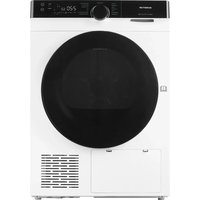
Front view of a white washing machine with black rim and silver casing (no visible text or symbols)- gebruiksaanwijzing
•instruction manual
•Gebrauchsanleitung
•mode d'emploi
Nederlands
- safety instructions page 30
- product description page 37
- installation and connection page 37
- operation page 40
- maintenance and cleaning
- troubleshooting
- technical specifications
general terms and conditions of service and warranty
page 48
page 50
page 53
page 109
Deutsch
- Sicherheitshinweise
Seite 55
- Produktbeschreibung
Seite 62
7.spécifications techniques
page 105
INSTALLATIELOCATIE EN OMGEVING
WATERTOEVOER EN -AFVOER
VERPLAATSEN EN TRANSPORTEREN NA INSTALLATIE

APPARAAT WATERPAS ZETTEN
natural_image
Diagram showing two different behaviors of a faucet, one with curved arrows indicating rotation or movement, the other with upward arrows indicating flow direction (no text or symbols present)WATERAFVOERSLANG AANSLUITEN
! WAARSCHUWING!
natural_image
Illustration of a sweater with a tag and tie, no text or symbols present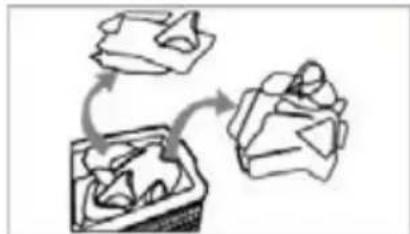
flowchart
graph TD
    A["Step 1: Bag"] --> B["Step 2: Bag"]
    B --> C["Step 3: Bag"]
natural_image
Line drawing of a shirt with accessories and accessories (no text or symbols)natural_image
Two handbags with circular designs, one open and one closed, shown in line drawing style (no text or symbols)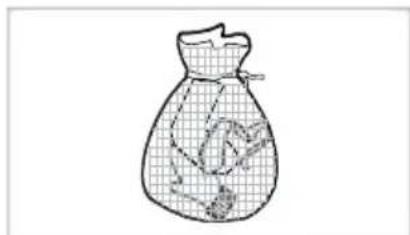
natural_image
Line drawing of a bag with internal mesh pattern and a small object inside (no text or symbols)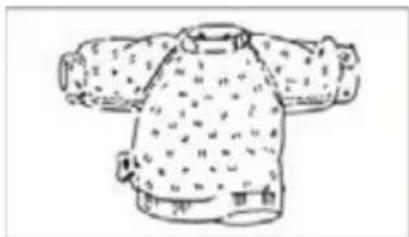
natural_image
Line drawing of a traditional East Asian-style jacket with patterned sleeves and shoulder-length sleeves (no text or symbols)natural_image
Simple diagram with concentric circles and curved arrows, no text or symbols present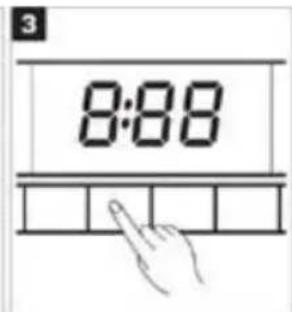
DE WASMIDDELLADE
natural_image
Three-step line drawing showing a person seated in a boat's side, with arrows indicating the motion (no text or symbols)
LET OP!
Toeren (TOERENTAL/AFVOER/POMPSTOP)
WASPROGRAMMA ANNULEREN
natural_image
Line drawing of a hand gripping a curved object (no text or symbols)INLAATFILTER IN DE WATERKRAAN REINIGEN

LET OP!
22 • Nederlands
INLAATFILTER AAN DE ACHTERZIJDE VAN HET APPARAAT REINIGEN
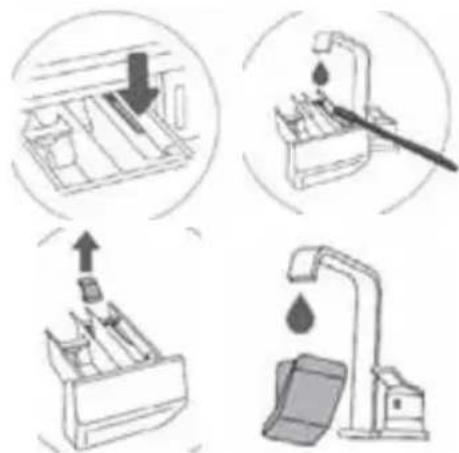
AFVOERPOMPFILTER REINIGEN
6
probleemoplossing
1 safety instructions
Symbols used in this document
 | Information, advice, tip or recommendation | |
 | Warning General danger | |
 | Warning Danger of electric shock | |
 | Warning Danger of hot surface | |
 | Warning Danger of fire | |
 | It is important that you carefully read all the instructions. | |

Please read these instructions before operating the appliance and store them for future use.
Please, do not use the washing machine without reading the instructions for use first.
- Check for any damage to the packaging or the appliance that may have occurred during transportation. Never use a damaged appliance, but contact your supplier.
- Failure to observe the instructions for use or inappropriate use of the appliance may result in damage to the laundry or the appliance, or injury to the user. Keep the instruction manual in a convenient location, near the appliance.
INSTALLATION LOCATION AND SURROUNDING AREA
- Keep the appliance clear from heat sources and direct sunlight to prevent plastic and rubber parts from corroding.
- The room where this appliance will be placed may not be warmer than 35^ .
- Do not install the appliance in a room where the temperature can drop below 5°C, as the parts of the appliance may become damaged when water freezes.

Do not install the appliance in humid environments or rooms containing explosive or caustic gas. In case of water leakage or water splashes, allow the appliance to dry in the open air.
- Never use flammable sprays or substances in the immediate proximity of the appliance.
INSTALLATION
- Place the appliance on a solid (concrete) base that is level and stable.
- Adjust the adjustable feet to ensure the appliance is standing level and balanced.
- Before first use of the appliance, remove the transport bolts, as switching on a blocked appliance can result in serious damage. In such a case, the manufacturer shall not be liable for any resulting damage.
- Before connecting the appliance to the power mains, wait at least 2 hours to allow it to reach room temperature.
- The door cannot be opened during operation of the washing machine.
- Before washing clothes for the first time, the appliance should be operated once with a full programme without any clothes inside.
• After the washing cycle, close the water tap and pull the plug from the power socket. Never pull the cord itself. - Dispose the packaging materials according to local regulations. Keep the material out of reach of children. Danger of suffocation.
ELECTRICAL INSTALLATION
- Connect the appliance to a earthed power socket protected by a fuse that complies with the values on the rating plate.
• Particularly make sure that the appliance is not placed on the power cord.

To avoid danger, a damaged power cord may only be replaced by the manufacturer, its service agent or similarly qualified persons.

If the appliance is damaged, it must not be operated until it is repaired by the manufacturer, its service agent or similarly qualified persons.
The appliance may not be connected to the power mains using an extension cord.

Do not connect the appliance to the power mains using an external switch device such as a programme timer, or connect it to a power mains that is regularly switched on and off by the power supply provider.
- Do not connect the appliance to an electrical outlet intended for an electric shaver or hair dryer.
- The mains plug must be accessible after installation.

Never use an extension cord or multiple plugs for making a connection.

Do not pull the plug out of the power socket if there is flammable gas around.

Never pull out the plug with wet hands.

Always unplug the appliance when it is not being used and close the water tap.
- Connection to water and power supply has to be executed by an adequately trained technician or expert.
- Any repair and maintenance pertaining to safety or performance should be done by trained experts.
- In case of a defect, only use approved spare parts by authorised manufacturers.
- In case of incorrect appliance connection, incorrect use, or servicing by an unauthorised person, Inventum will not be responsible for any damage, as such damage will not be covered by warranty.
WATER INSTALLATION
- The appliance is equipped with a single inlet valve and can be connected to the cold water supply only.
- To connect the appliance to the water supply, make sure to use the supplied water supply hose and gaskets.
The water pressure has to be between 0.05 and 0.8 MPa (0.5 - 8 bar). - Always use the supplied new water supply hose to connect the appliance to the water supply; do not reuse an old water supply hose.
32· English
- The end of the water discharge hose should reach into a water drain line.
- Check the connections of the water supply hose, the water tap and the water discharge hose for possible problems due to changes of water pressure. If the connections loosen or leak, close the water tap and get it repaired. Do not use the appliance before the pipes and hoses are installed properly by authorised persons.

At higher washing temperatures, the door glass will heat up. Be careful to avoid burns. Keep children and animals far away from the machine while it is operating.

Do not remove the drain pump filter while there is still water in the appliance. Big quantities of water can leak out, and there is a risk of scalding due to hot water.
WATER OVERFLOW PROTECTION
- If the water level in the appliance rises above normal level, then the excess water level protection will be activated. It will shut off the water supply and start pumping out the water. The programme is interrupted and an error is reported.
CHILD SAFETY
- Before closing the appliance door and running the programme, make sure there is nothing except laundry in the drum (e.g. check if a child or animal climbed into the drum of the appliance).
- Keep the detergents and softeners out of reach of children.
- Do not let children aged 3 years and under come near the appliance, unless they are under constant supervision.
- This appliance may be used by children aged 8 years and above and by persons with reduced physical, sensory or mental capabilities or lack of experience and knowledge, provided they are supervised or have been given instructions concerning the use of the appliance in a safe way and understand the hazards of inappropriate use. Children are not allowed to play with the appliance.
- The appliance may not be cleaned or maintained by children, unless this is done under supervision.
- Children should be supervised to prevent them from playing with the appliance.
- Do not climb or sit on the appliance.
- The appliance is made in compliance with all relevant safety standards.
Do not use detergents that contain solvents as this could lead to release of poisonous gases, damage to the appliance, and risk of fire and explosion.
- Only use the appliance for washing laundry as described in the instruction manual. The machine is not intended for dry cleaning.
- Only use agents for machine washing and care of laundry. Inventum will not be responsible for any damages or discolouration of gaskets and plastic parts resulting from incorrect use of bleaching or colouring agents.
- In case of a defect, only use approved spare parts by authorised manufacturers.
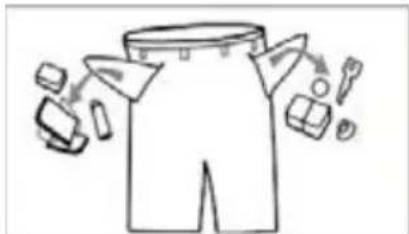
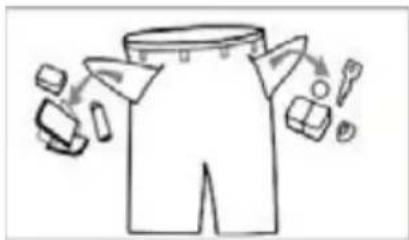
- Make sure that all pockets are emptied. Sharp and rigid items such as coins, brooches, nails, screws, stones etc. may cause serious damages to this machine.
- Remove all objects from pockets such as lighters and matches before using the appliance.
- Fabric softeners or similar products should be used as recommended in their instructions.
- Never try to open the door by force. The door will unlock shortly after the end of a cycle.
- Please do not close the door with excessive force. If it is found difficult to close the door, please check if the clothes are properly inserted and distributed.
- In case of incorrect connection of the appliance, incorrect use, or servicing by an unauthorised person, the user shall bear the cost of any damage, as such damage shall not be covered by warranty.
- When cleaning the appliance, only use non-corrosive descaling agents. Follow the instructions of the manufacturer of the cleaning agent. Finish the descaling process with several rinse cycles in order to remove any residual acid (e.g. vinegar etc.).
- The warranty does not cover consumables, minor deviations in colour, increased noise that results from appliance age and which does not affect the functionality of the appliance, and
aesthetic defects on components, which do not affect the functionality and safety of the appliance.
TRANSPORT/RELOCATION AFTER INSTALLATION
- If you intend to move the appliance after it has been installed, it should be blocked by applying at least one transport bolt. Before applying the transport bolt, disconnect the appliance from the power mains.
- Accumulated water must be drained out of the appliance.
- The appliance is heavy. Transport with care. Never hold any protruding part of the appliance when lifting. The door of the appliance cannot be used as a handle.
INTENDED USE
- The appliance is intended solely for household use. If the appliance is used for professional, commercial purposes or purposes exceeding normal use in a household, or if the appliance is used by a person who is not a consumer, the warranty period shall be equal to the shortest warranty period required by relevant legislation.
- This appliance is intended to be used in households and similar applications such as:
- staff kitchen areas in shops, offices or residential type environments;
- farm houses;
- by clients in hotels, motels and other residential type environments;
- bed & breakfast type environments;
- areas for communal use in blocks of flats or in launderettes.
- The appliance is not intended for use by persons (including children) with physical or mental impairments, or persons lacking experience and knowledge. These persons should be instructed about the use of the appliance by a person responsible for their safety.
OLD APPLIANCE
- Remove the door or deactivate the lock when disposing of the appliance. Children are known to have gotten themselves locked in old appliances. To prevent such a situation, break the door lock of your appliance and tear off the electrical cables.
This marking indicates that this product should not be disposed of with other household wastes throughout the EU. To prevent possible harm to the environment or human health from uncontrolled waste disposal, recycle it responsibly to promote the sustainable reuse of material resources. To return your used device, please use the collection systems or contact the retailer where the product was purchased. They return and can take this product for environmental safe recycling.
2 product description
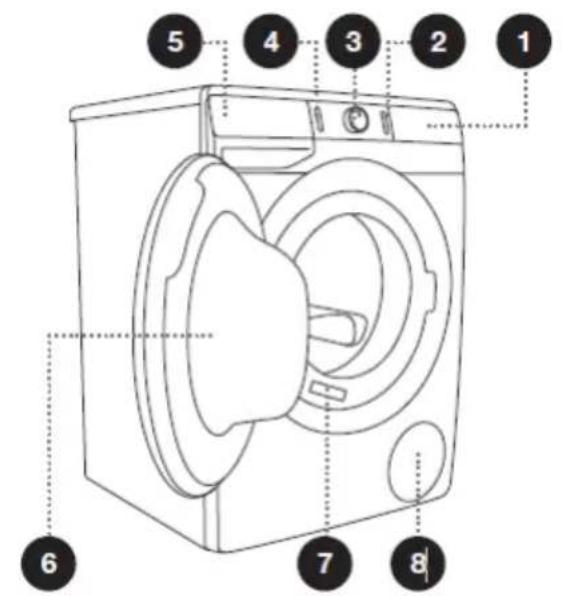
FRONT
- Control unit
- Start/pause button
- Programme selector knob
- On/off/reset button
- Dispenser tray
- Door
- Rating plate
- Pump filter
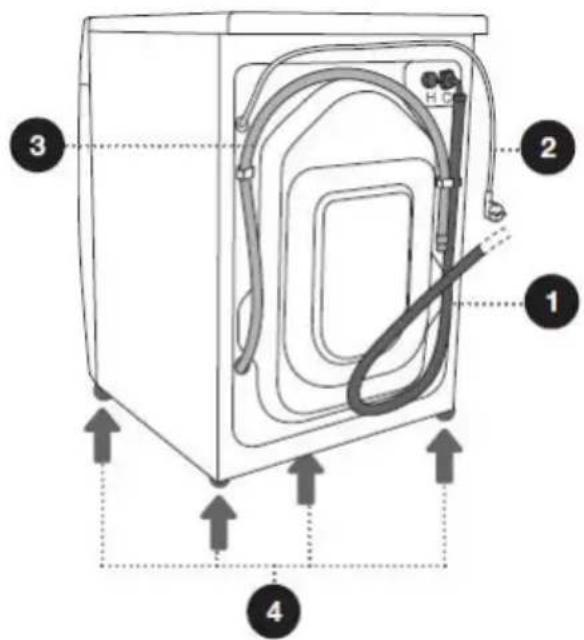
BACK
- Water supply hose
- Power cord
- Water discharge hose
- Adjustable feet
3 installation and connection
UNPACKING THE APPLIANCE
WARNING!
- Move the appliance with at least two people and wear protective clothing, such as sturdy gloves.
- When removing the packaging, make sure not to damage the appliance with a sharp object.
- Packaging material (e.g. films, Styrofoam) can be dangerous for children.
- There is a risk of suffocation! Keep all packaging away from children.
REMOVING THE BLOCKING RODS
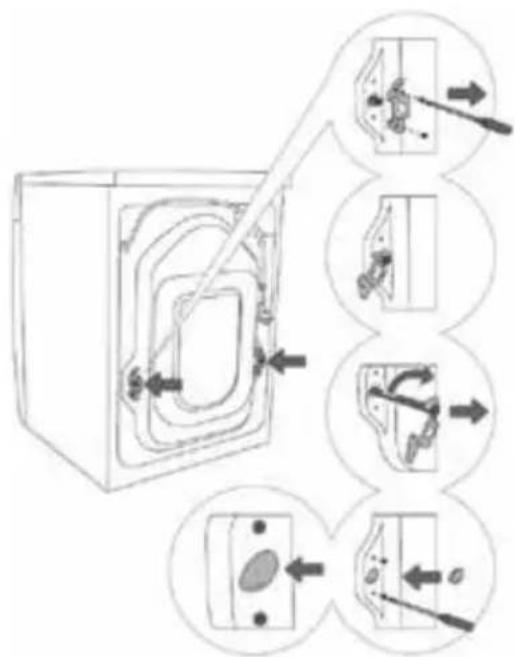
WARNING! Before first use of the appliance, the transport bolts must be removed from the back of the appliance. A blocked appliance may become damaged when it is switched on for the first time. The warranty does not apply in cases of such damage!
- Remove the hoses and undo the screws on the back of the washing machine. Remove the two angular pieces.
- Slide the angular pieces onto the groove in the blocking rod; before doing so, rotate the right angular piece to the opposite side.
- Use the angular pieces to rotate the blocking rods by 90^ and pull them out.
- Cover the two holes through which the blocking rods were inserted with plastic plugs, and redo the screws that you undid in step 1. The plastic plugs are supplied in the bag with the washing machine instruction manual.
MOVING AND TRANSPORTING AFTER INSTALLATION

If you wish to move the washing machine after it has been installed, the angular pieces and at least one blocking rod to be re-installed to prevent vibration damage to the washing machine during transport (see previous page). If you lost angular pieces and the blocking rods, they can be ordered from the manufacturer.

After transport, the washing machine should be left to stand still for at least two hours before it is connected to the other mains, so that it can reach room temperature. The appliance should be installed and connected by a trained technician.

Carefully read the instructions for use before connecting the washing machine. Repairs or warranty claims resulting incorrect connection or use of the washing machine shall not be covered by the warranty.
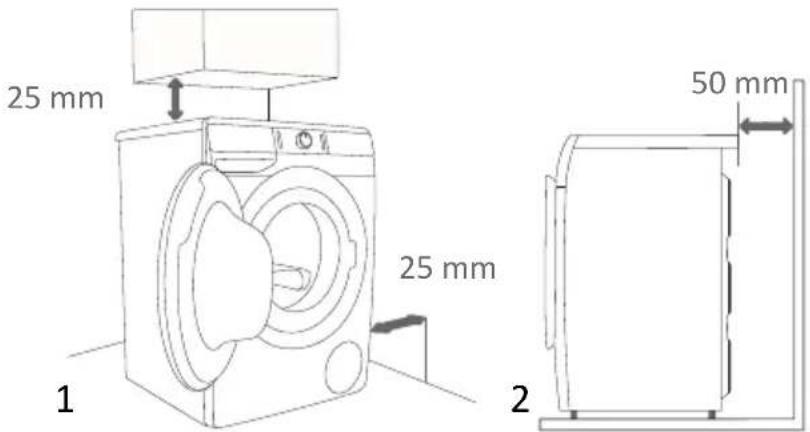
REQUIRED SPACE FOR INSTALLING
WARNING!
- Stability is important to prevent the product from moving across the installation site! Make sure to level the appliance and install it on a stable base in longitudinal and traverse direction by screwing the adjustable feet up or down.
- Make sure the appliance is not standing on the power cord.
- Observe the minimum required clearances from the walls as indicated in the figure.

The room in which the appliance is placed must meet the following requirements:
-
Dry, level and stable solid base
-
Avoid direct sunlight
-
Sufficient ventilation
-
Room temperature of minimum 5°C and maximum 35°C
-
Keep far away from heat sources such as coal, gas or wood burning appliances.
WASHING MACHINE INSTALLATION CLEARANCES
The washing machine may not be in contact with a wall or adjacent furniture. For optimum washing machine operation, we recommend observing the clearances from the walls as indicated in the figure.
In case of failure to observe the minimum required clearances, safe and correct washing machine operation cannot be ensured. Moreover, overheating can also occur (figures 1 and 2).

Installing the washing machine under antertop is not recommended.
LEVELLING THE APPLIANCE
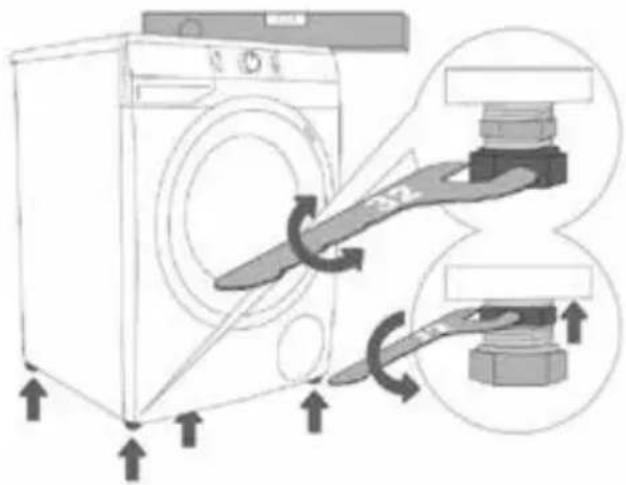
Use a water level and spanners No. 32 (for feet) and 17 (for the nut).
- Level the washing machine in longitudinal and traverse direction by screwing the adjustable feet up or down.
- After adjusting the height of the feet, firmly tighten the jam nuts (counter nuts) using a spanner No 17, by turning them towards the bottom of the washing machine (see figure).
i Incorrect levelling of the washing machine with the adjustable legs may cause vibration, appliance moving across the room, and loud operation.
Incorrect levelling of the washing machine is not subject to warranty.
Sometimes, an unusual or louder noise may appear during appliance operation; these are mostly the result of improper installation.
CONNECTING THE WATER SUPPLY HOSE
WARNING! To prevent leakage or water damage, follow the instructions in this chapter. Make sure not to kink, crush or modify the water supply hose.
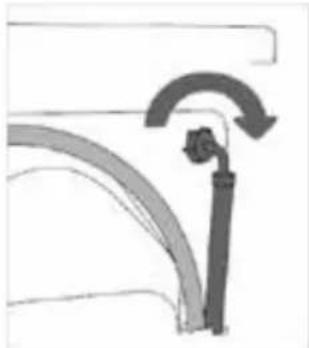
Tighten the water supply hose by hand, firmly enough for the hose to have a good seal. After connecting the hose, the seal must be checked for any leaks. Do not use pliers or similar tools when connecting the water supply hose as this could damage the nut thread.
- Connect the water supply hose to the water inlet valve on the back of the appliance.
- Connect the other end of the water supply hose with the aqua stop to a water tap with cold water.
natural_image
Diagram of a mechanical or hydraulic component with curved arrows indicating motion (no text or symbols)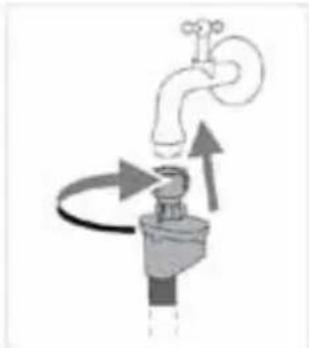
natural_image
Diagram of a faucet with directional arrows indicating flow or movement (no text or symbols)CONNECTING THE WATER DISCHARGE HOSE
WARNING!
- Make sure not to kink or stretch the water discharge hose.
- Connect the water discharge hose properly, otherwise it could result in damage or water leakage.
Feed the water discharge hose into a drain pipe, wash basin or floor drain. Be careful not to feed the water discharge hose too deep in the drain. Otherwise the waste water cannot flow freely. The vertical distance from the floor to the end of the discharge hose may be no more than 100cm and no less than 60cm .
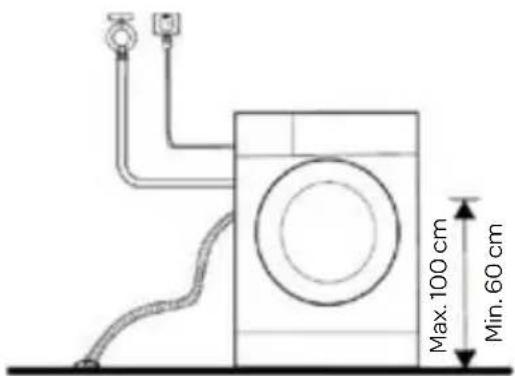
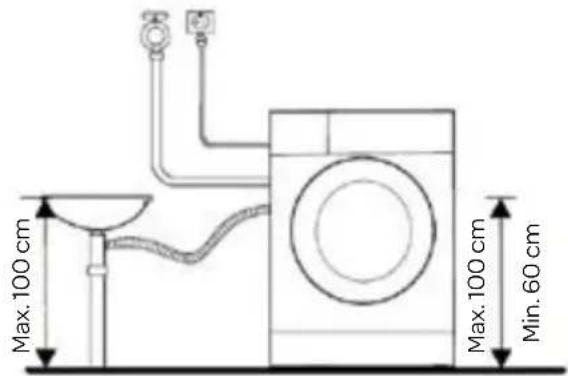
- Put the water discharge hose in a floor drain. 2. Connect the water discharge hose to a drain pipe.
CONNECTING THE APPLIANCE TO THE POWER MAINS

WARNING!
• Before connecting the appliance to the power mains, wait at least 2 hours to allow the appliance to reach room temperature.
- Connect the appliance to an earthed power outlet. After installation, the wall outlet must be freely accessible.
The outlet must be fitted with an earth contact (in compliance with the relevant regulations).
• Information about your appliance is shown on the rating plate
- Using an over-voltage protection to protect the appliance in case of a lightning strike, is recommended.
- Do not connect the appliance to the power mains using an extension cord.
- Do not connect the appliance to an electrical outlet intended for an electric shaver or hair dryer.
- Any repair and maintenance pertaining to safety or performance must be done by trained experts.
- A damaged power cord may only be replaced by a person authorised by the manufacturer.
BEFORE USING THE APPLIANCE FOR THE FIRST TIME
- Before washing, please make sure the appliance is properly installed.
- Your appliance was thoroughly checked before it left the factory. To remove any residual water and to neutralise potential odours, it is recommended to clean your appliance before first use. To do so, please run the Cotton programme at 90°C without laundry and detergent. See the chapter WASHING.
4 operation
BEFORE EACH WASHING
- The ambient temperature of the appliance should be 5-40°C. If used below 0°C, the inlet valve and draining system may be damaged. If the appliance is installed under freezing conditions, it should be transferred to an environment with a normal ambient temperature to ensure the water supply hose and water discharge hose can unfreeze before use.
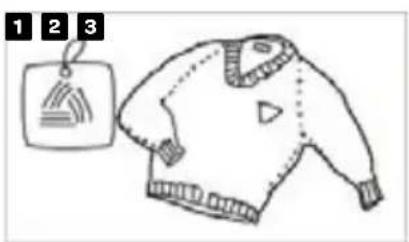
- Before each washing, sort your laundry by reading the care labels and the detergent use instructions. Use non-foaming or less-foaming detergents suitable for machine washing.
natural_image
Line drawing of a sweater with a tag and label (no text or symbols on the sweater itself)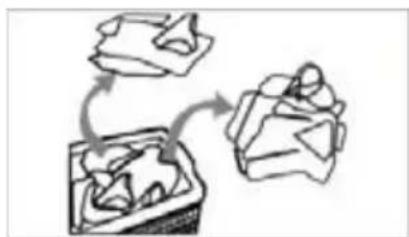
natural_image
Simple line drawing of a gift box with a gift box and gift box, no text or symbols present.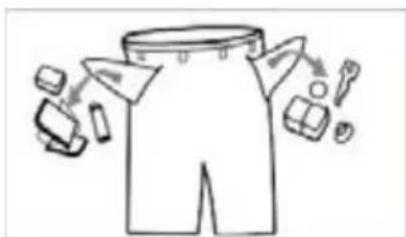
natural_image
Line drawing of a shirt with accessories and accessories (no text or symbols)Turn the pockets inside out, making sure there are no items left inside
Check the care label Sort the laundry according to colour and textile type
natural_image
Two handbags with circular designs, one open and one closed, shown in line drawing style (no text or symbols)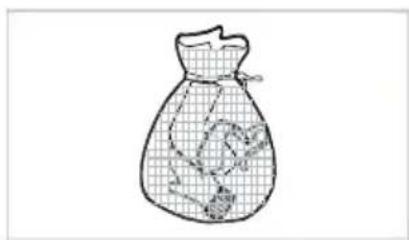
natural_image
Line drawing of a bag with a grid pattern and a small object inside (no text or symbols)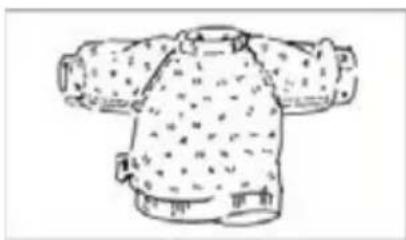
natural_image
Line drawing of a traditional Chinese tunic with patterned collar and shoulder details (no text or symbols)Put small items and delicate clothing into a special laundry bag
Turn easy-pilling and long-pile fabric inside out
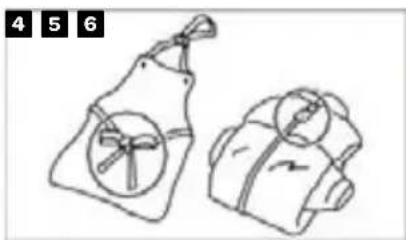
Tie any ribbons or belts and close buttons and zippers

WARNING!
- Do not wash clothes that have been cleaned, washed, soaked in or dabbed with combustible or explosive substances such as wax, oil, paint, gasoline, alcohol, kerosene or other flammable materials.
- Washing single items may easily create major eccentricity and cause vibrations and noise due to unbalance. Therefore it is suggested to add one or two more laundry items to the wash, so that spinning can be done smoothly.
PREPARING BEFORE WASHING
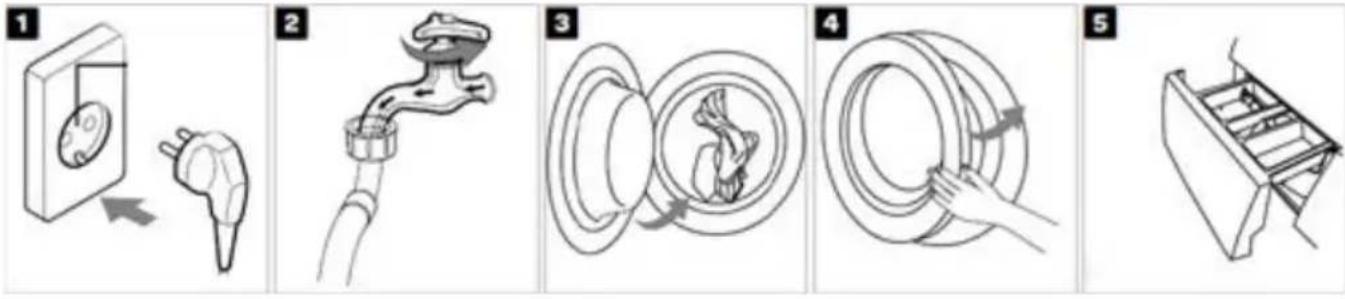
Plug in Open the tap Open the door
Close the door Add detergent
and load

NOTE!
• Additional detergent needs to be added in compartment if the pre-wash function is selected.
WASHING
USING THE DISPENSER TRAY
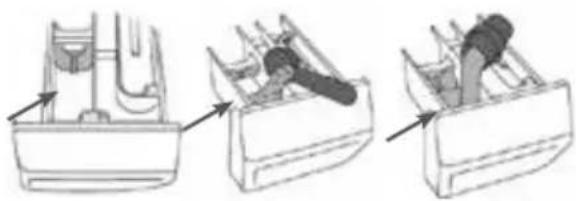
A separator/divider tab is supplied with the washing machine, which allows adding liquid detergent to the main wash compartment (left compartment).
natural_image
Three-step diagram showing a person working in a boat hull, with arrows indicating the process (no text or symbols present)
- When using powder detergent, the separator/divider tab should be lifted.
- When using liquid detergent, the separator/divider tab should be lowered.
| Symbols of detergent dispenser compartments | |
| Pre-wash | |
| Main wash | |
| Softener | |

NOTE!
- Before adding hardened lumps of powder detergent or a thick stringy liquid detergent or additive into the dispenser tray, it can be diluted in some water before pouring it in, as it may otherwise clog the piping in the appliance and cause a water overflow.
- Choose a suitable type of detergent, suitable for the selected washing temperature and fabric, to get the maximum washing performance and a minimum of water and energy consumption.
- Add powder or liquid detergents according to the manufacturer's instructions, considering the washing temperature, washing programme, how soiled the laundry is, and water hardness.
AFTER WASHING
When the programme is finished and the appliance is ready, a buzzer will sound and on the display [End] appears for a few seconds before the display goes out.
CONTROL PANEL
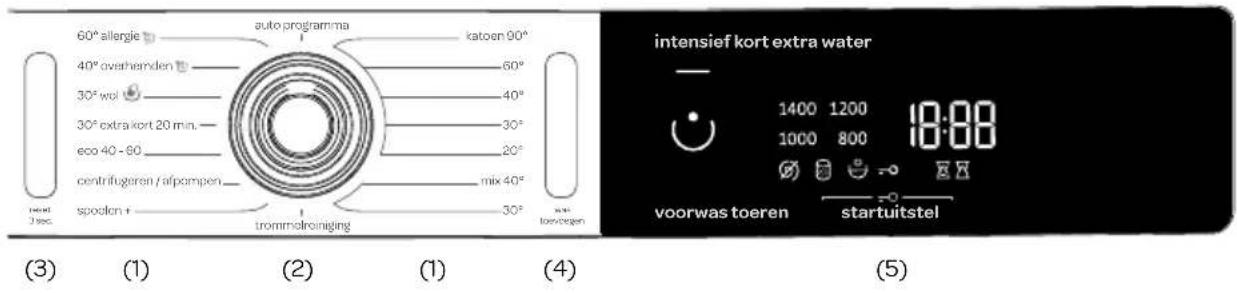
| No. | Symbol Button or indicator Description | |
| 1. | Programmes | |
| 2. |  | Programme selector knob |
| 3. | reset 3 sec. On/off/reset button Turn the appliance on or off, and reset the programme | |
| 4. | add laundry [was toevoegen] | Start/Pause button Press the button to start or pause the washing cycle. |
| 5. | Display Touch display For choosing settings and selecting additional functions. | |
THE WASHING PROCESS IN STEPS
- Read the labels on the laundry. Sort the laundry by type of fabric, colour, soiling and allowed washing temperature.
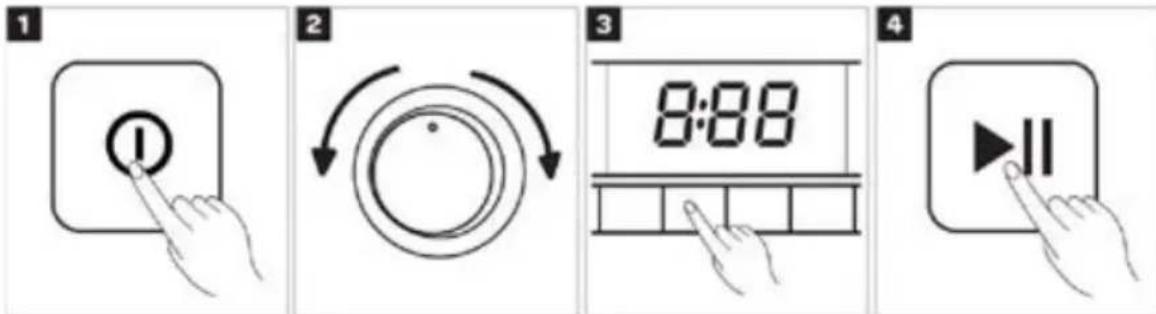
- Switch on the washing machine by pressing the On/off/reset button.
- Open the washing machine door. Load the washing machine and close the door.
- Choose the washing programme by rotating the selector knob to the left or to the right. See the PROGRAMME TABLE on the next page.
- Adjust settings and select additional functions on the touch display. See WASHING MODE below for a description.
- Start the washing programme by pressing the Start/Pause button.
PROGRAMME TABLE
| Programme (depending on the model) | Max. load | Programme description |
| Cotton [katoen]20°C - 90°C | * MAX | Washing programme for normally or heavily soiled laundry, white or coloured.The temperature can be set separately; therefore, observe the instructions indicated on the clothing. Choose 40°C if the laundry is only lightly soiled.Spinning speed can be set to your preference.Programme duration and amount of water will be adjusted to the amount of laundry. |
| Mix [mix] (Mixed laundry/Synthetics)30°C - 40°C | 3.5 kg | Washing programme for delicate clothing made of synthetic and mixed fibres or viscose, and for simple care of cotton. Observe the instructions indicated on the clothing. Most garments made of synthetic fibres are washed at 40°C. |
| Steril tub [trommelreiniging](Self-cleaning programme) | 0 kg | Washing programme that is used to clean the drum and to remove detergent residues and bacteria. To select the programme, rotate the programme selector knob to the left or to the right to the Steril tub [trommelreiniging] (Self-cleaning programme) position. Other extra functions cannot be selected. The drum has to be empty. You can add some distilled (spirit) vinegar (approx. 2 dl) or sodium bicarbonate (1 tablespoon, or 15 g). We recommend running the programme at least once a month. |
* Maximum load (MAX) ** Half load (1/2) / Any load (0 kg - MAX kg)
42 · English
| Programme (depending on the model) | Max. load | Programme description |
| Rinse/Softening [spoelen +] (Partial programme) | / | For softening, starching, or impregnating the washed laundry. It can also be used as a rinse programme, but without added softener. It is completed with an additional rinse.You can also choose EXTRA WATER (HIGH WATER LEVEL) by selecting the extra function. |
| Spin/Drain [centrifugeren/afpompen] (Partial programme) | / | Use the programme when you only wish to spin the laundry. If you only wish to pump out the water from the washing machine, press the RPM [toeren] button to select (drain) [afpompen]. |
| Eco [eco] 40-60 * MAX | Washing cycle that is able to clean normally soiled cotton laundry declared to be washable at 40°C or 60°C. | |
| Speed [extra kort] 20 min 30°C | 2.5 kg | Quick washing programme for laundry that only needs refreshing. |
| Wool/Handwash [wol 📋] 30°C | 2 kg | Gentle washing programme for washing wool, silk, and clothes that require manual washing. Maximum temperature is 30°C. This programme has a short spinning cycle. Top spinning speed available is 800 rpm. |
| Shirts [overhemden 📋] (Shirts with steam) 40°C | 3.5 kg | This programme is intended for washing garments made of cotton, microfibres and synthetics; for washing collars and cuffs. The wash takes place at a low temperature, with a greater amount of water and gentle tumbling. Preset spinning speed is 800 rpm. |
| Allergy steam [allergie 📋] (Anti-allergy programme with steam) 60°C | ** (1/2) | This program is intended for washing normal to heavily soiled garments that require special care, such as garments for people with highly sensitive skin or skin allergies. We recommend turning the garments inside out, as this will also thoroughly wash out skin and other residues. You can also select the option to wash at maximum temperature and maximum spinning speed. Preset spinning speed is 800 rpm. |
| Auto wash [auto programma] 30°C | * MAX | Washing programme automatically adjusts the duration of the main wash and the number of rinses depending on the amount of laundry in the machine. Use it for lightly soiled laundry.No extra programme settings are possible. |
* Maximum load (MAX) ** Half load (1/2) / Any load (0 kg - MAX kg)

NOTE!
- Add powder or liquid detergents according to the manufacturer's instructions, considering the washing temperature, washing programme, how soiled the laundry is, and water hardness.
- Maximum amount of laundry in kg (for the cotton programme) is indicated on the rating plate fitted under the washing machine door.
• Maximum or nominal load applies to laundry prepared pursuant to the IEC 60456 standard. - For better washing effect, we recommend loading the drum to 2/3 when using the cotton programmes.
ADJUSTING THE SETTINGS
Most programmes feature basic settings, but these settings can be changed.
Adjust the settings by pressing the relevant function button (before pressing the Start/Pause button).
Functions that cannot be changed with the selected washing programme are partly lit (dimmed). Certain settings cannot be selected with some programmes. Such settings will not be lit, and the button will flash when pressed.
Description of lighting of functions for the selected programme:
- Lit (Basic/preset setting)
- Dimmed (Functions that can be adjusted)
- Unlit (Functions that cannot be selected)
WASHING MODE
NORMAL CARE (basic/default setting)
No button lit.
INTENSIVE [intensief] (This mode will save energy; washing time will be longer, and water consumption will be lower.)
SHORT [kort] (This mode will save time as programme duration will be shorter, but it will use more water.)
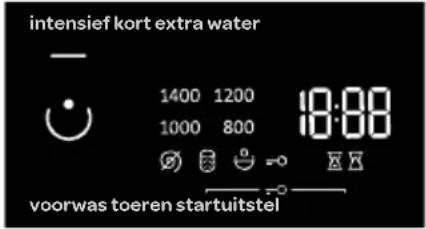
- The light on the button for the selected washing mode is lit.
RPM (ftoeren) (SPINNING RATE/DRAIN/PUMP STOP)
For changing the spinning rate, only draining, and pump stop. With a preset or selected spinning rate, the spinning rate number will light up on the display unit. If you select draining without spinning, the symbol will appear on the display unit. If you select Pump stop, the symbol will appear on the display unit.
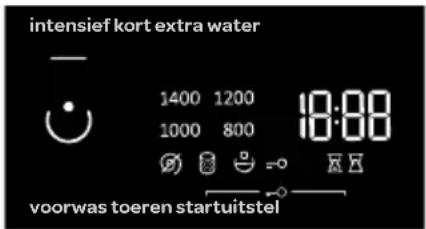
Select the Pump stop option when you want the laundry to stay soaked in the
water from the last rinse cycle in order to prevent it from creasing when you are unable to take it from the washing machine immediately after the washing programme is complete. You may set the desired spinning rate. To continue the programme, press the Start/Pause button that is lit. Water will be drained (pumped out) and the final spin cycle will run.

CHILD LOCK (RPM [toeren] and Start Delay [startuitstel])
A safety feature. To activate the child lock, simultaneously press RPM [toeren] and Start Delay [startuitstel] and hold them for at least three seconds. The selection will be confirmed by an acoustic signal and by a signal light (the symbol = O will be lit). Follow the same procedure to deactivate the child lock. As long as the child lock is activated, programme, settings, or additional functions cannot be changed.
Child lock remains active even after the washing machine is switched off. For safety reasons, the child lock does not prevent switching off the washing machine with the On/Off/Reset button. To select a new programme, the child lock must first be deactivated.
Start Delay [startuitstel]
Use this function to start the washing cycle after a certain amount of time has elapsed. Press Start Delay [startuitstel] and -:--- will appear on the display. If, for example, you choose a programme with a duration of 2:39, the time will be indicated on the display unit, and the symbol will be lit under the time.
If the function Start Delay has been selected, the symbol will be lit.
By pressing Start Delay [startuitstel], you can adjust the time in 30-minute steps up to 6 hours, and by 1-hour steps up to 24 hours.
If nothing is pressed for 5 seconds, the actual washing time will be displayed. To set the time to the end of the washing programme again, press Start Delay.
The function is activated when the Start/Pause button is pressed. The washing machine will count down the set time. When the countdown reaches zero, the selected washing programme will start automatically.
- To interrupt or change the start delay time, press and hold the On/Off/Reset button. Press Start Delay [startuitstel] to select a new delay time and confirm it by pressing the Start/Pause button.
- To quickly cancel the start delay, press and hold Start Delay [startuitstel] for 3 seconds. The washing programme will resume.
- In case of a power supply failure before the delay time has elapsed, press the Start/Pause button to resume the delay time countdown.
EXTRA WATER [extra water] (HIGH WATER LEVEL)
Use this function to wash with a larger amount of water, and with two additional rinse cycles on some programmes.
Pre Wash [voorwas]
Washing heavily soiled laundry, particularly with stubborn superficial stains. If you select Pre Wash [voorwas], add the detergent into the prewash compartment ⚙.
![INVENTUM VWM9001W - Pre Wash [voorwas] - 1](/content/2026/03/543266/images/d5582200d7c88e5263418016b2d7e1f0ccabca1bf398c2944da8f08f02d7981f.jpg)
- When the washing machine is switched off, all extra functions return to their basic or custom settings, except for the acoustic signal setting.
FUNCTION TABLE
| Programmes | Temp. [°C] | NORMAL (basic/default setting) | INTENSIVE [intensief] | SHORT [kort] | EXTRA WATER (HIGH WATER LEVEL) | PRE WASH [voorwas] | PUMP STOP | RPM [toeren] (SPINNING RATE/ DRAIN / PUMP STOP) |
| Cotton [katoen] | 90······ | |||||||
| 60······ | ||||||||
| 40······ | ||||||||
| 30······ | ||||||||
| 20······ | ||||||||
| Mix [mix](Mixed laundry/Synthetics) | 40······ | |||||||
| 30······ | ||||||||
| Steril tub [trommelreiniging](Self-cleaning programme) | -· | |||||||
| Rinse/Softening [spoelen +](Partial programme) | -····· | |||||||
| Spin/Drain [centrifugeren / afpompen](Partial programme) | -··· | |||||||
| Eco [eco] 40-60 -··· | ||||||||
| Speed [kort] 20 min. | 30···· | |||||||
| Wool/Handwash[wol / 📋] | 30······ | |||||||
| Shirts [overhemden 🎨](Shirts with steam) | 40····· | |||||||
| Allergy steam [allergie 🎨](Anti-allergy program with steam) | 60···· | |||||||
| Auto wash[auto programma] | 30···· |
• Additional functions can be used
Standard programme
PROGRAMME DURATION / TEMPERATURE / SPINNING RATE
| Programmes Temp. [°C] | NORMAL (basic/default setting) | RPM [toeren] (SPINNING RATE) | |
| Washing time [minutes] [rpm] | |||
| Cotton [katoen] | 90 218 * 1200 | ||
| 60 182 | |||
| 40 192 | |||
| 30 106 | |||
| 20 97 | |||
| Mix [mix] (Mixed laundry/Synthetics) | 40 117 ** 1000 | ||
| 30 114 | |||
| Steril tub [trommelreiniging] (Self-cleaning programme) | -112 - | ||
| Rinse/Softening [spoelen +] (Partial programme) | -32 * 1200 | ||
| Spin/Drain [centrifugeren / afpompen] (Partial programme) | -17 * 1200 | ||
| Eco [eco] 40-60 - 175 * 1200 | |||
| Speed [kort] 20 min. 30 20 ** 1000 | |||
| Wool/Handwash [wol / 📋] | 30 49 ** 800 | ||
| Shirts [overhemden 🎨] (Shirts with steam) | 40 61 | ** 800 | |
| Allergy steam [allergie 🎨] (Anti-allergy program with steam) | 60 138 * 800 | ||
| Auto wash [auto programma] | 30 93 | *1200 | |
* Spinning rate can be changed, and the newly set rate can be up to the maximum rate
** Depending on the model
Standard programme
- Low water temperature, low mains voltage and different washing loads may affect the washing time; the remaining time displayed is adjusted accordingly during the washing process.
- Due to deviations in terms of type and amount of laundry, spinning, power supply oscillation, and ambient temperature and humidity, the programme duration and power consumption values measured at the end user may differ from the ones stated in the table.
STARTING THE WASHING PROGRAMME
Press the Start/Pause button.
The time remaining to the end of the programme ☑ or start delay ☑ time (if set) will appear on the display.
Symbols will be lit on the selected functions.
After pressing the Start/Pause button, the spinning rate can be adjusted (except in the case of the Steril tub [trommelreiniging] (Self-cleaning programme) and RPM [toeren] (SPINNING RATE/DRAIN/PUMP STOP)) and child lock can be activated or deactivated, while other settings cannot be changed.

If anything is flashing on the display unit, the washing machine door is open or not closed correctly. Close the washing machine door and press the button Start/Pause again to resume the washing programme.
PAUSING THE WASHING PROGRAMME (ADDING/REMOVING LAUNDRY)
The washing programme can always be stopped by pressing the Start/Pause button. The washing programme is temporarily paused while the time remaining until programme completion is flashing on the display unit.
If the water level in the drum is below a certain value and the water temperature is not too high, the door will unlock after a certain period of time. Open the door to add or remove laundry.
To resume the washing programme, first close the door and then press the Start/Pause button.

CANCELLING THE WASHING PROGRAMME
To stop and cancel a washing programme, press the On/Off/Reset button and hold it for more than 3 seconds.
Signal lights will flash on the display. At the same time, the washing machine pumps the water out of the washing machine drum. When the water is pumped out, the washing machine door will be unlocked. If the water in the washing machine is hot, the washing machine will automatically cool it and pump/drain it out.
END OF THE WASHING PROGRAMME
The washing machine will indicate the end of the washing programme with an acoustic signal and »End« will appear on the display until the washing machine switches into low standby mode or switches off. After 5 minutes, the »End« sign will no longer be displayed.
LOW STANDBY MODE
If you do not run any programme or choose any settings after switching on the washing machine (On/Off/Reset button), the display unit will be switched off after 5 minutes and switched to standby mode in order to save energy.
The display unit will be reactivated if you rotate the programme selector knob or press the On/Off/Reset button. If you do not do anything for 5 minutes after the end of a programme, the display unit will be switched off to save power.
ERRORS
In case of an error or fault, the programme will be interrupted.
A flashing signal lights and an acoustic signal will warn about such an occurrence (see TROUBLESHOOTING TABLE), and the error will be indicated on the display (E:XX).
POWER SUPPLY FAILURE
In case of a power supply failure, the washing programme is interrupted. When power supply resumes, »PF« (Power Failure) will appear on the display unit. To resume the washing programme, press the Start/Pause button.
The delay time will not be reset.
Washing time will resume from the point at which the washing programme was interrupted.
PERSONAL SETTINGS
Basic or default settings for each washing programme can also be changed.
When you select the programme and additional functions, you may store such a combination by pressing the Start/Pause button and holding it for five seconds. S C will appear on the display.
The programme will remain stored until it is changed using the same procedure. Personal settings can also be reset to factory settings in the user menu.
PERSONAL SETTINGS MENU
Switch on the washing machine by pressing the On/Off/Reset button.
Simultaneously press Pre Wash [voorwas] and Start Delay [startuitstel] to open the Personal Settings Menu. Signal lights for INTENSIVE [intensief], SHORT [kort], and EXTRA WATER (HIGH WATER LEVEL) will light up on the display unit.
Number 1 will appear on the LED display, which also indicates the settings function. Rotate the programme selector knob to the left or to the right to choose the function to change.
Number 1 indicates sound settings and number 2 indicates resetting of Personal programme settings to factory defaults. If the desired settings are not selected in 20 seconds, the programme will automatically return to the main menu.
Press the RPM [toeren] button (SPINNING RATE/DRAIN/PUMP STOP) to confirm the desired functions and their settings; press Pre Wash [voorwas] to go back one step.
Acoustic signal volume can be set at four levels
• 0 means the sound is off;
- 1 means that the button sound is activated;
• 2 means low volume, and
• 3 means high volume.
Choose the volume level by rotating the programme selector knob to the left or to the right. The lowest setting means that the acoustic signal is switched off.
5 maintenance and cleaning

WARNING!
Always unplug the appliance and close the water tap before cleaning and maintenance.
CLEANING THE EXTERIOR OF THE APPLIANCE
Proper maintenance of the appliance can extend its useful life. Clean the exterior of the appliance and the control panel using a soft damp cloth and water. If necessary, a diluted non-abrasive neutral cleaning agent can be used to clean the appliance.

CAUTION!
- Do not use abrasive or caustic agents, formic acids, diluted solvents or similar substances, such as alcohol or chemical products that could damage the appliance. Please observe the recommendations and warnings provided by the cleaning agent manufacturer.
- If there is any water overflow, use a cloth to wipe it off immediately.
- Do not clean the appliance with a jet of water.
- Do not use sharp items to clean the appliance.
CLEANING THE DRUM
Any rust stains left inside the drum by metal articles must be removed immediately using chlorine-free detergents. Do not use steel wool for cleaning the drum!

NOTE!
- Do not keep laundry near the appliance while cleaning the drum.
- When you often wash at 40^ C or lower temperatures, or when you haven't used the appliance for a longer period of time, clean the drum. Run the Cotton programme at 90^ C without laundry. Preferably use a powder detergent.
CLEANING THE RUBBER DOOR GASKET AND THE GLASS
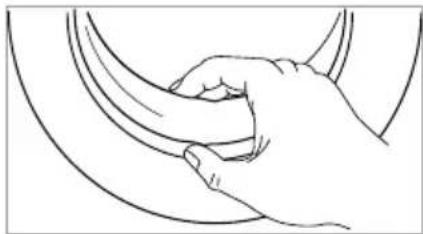
Wipe the glass and rubber door gasket after each wash to remove lint and stains and to extend the useful life of the appliance. If lint builds up, it can cause leakages. Check the rubber door gasket to remove any coins, buttons or other objects after each wash.
Clean the rubber door gasket and the glass once a month to ensure normal operation of the appliance.
natural_image
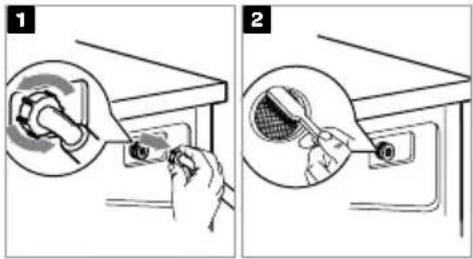
Line drawing of a hand gripping a curved object (no text or symbols)CLEANING THE INLET FILTER IN THE WATER TAP

NOTE!
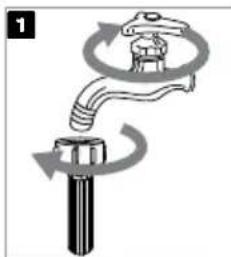
- A diminishing water flow is a sign that the inlet filter needs to be cleaned. - Cleaning the inlet filter every 3 months ensures normal operation of the appliance.
- Close the water tap and remove the water supply hose.
- Clean the inlet filter with a brush under running water.
- Reconnect the water supply hose to the water tap.
natural_image
Diagram of a mechanical valve or valve assembly with rotating arrows indicating flow direction (no text or symbols)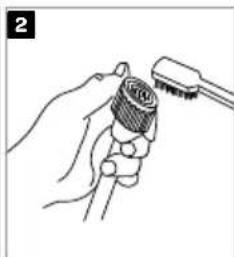
natural_image
Line drawing of a hand holding a tool with a brush (no text or symbols)CLEANING THE INLET FILTER AT THE BACK OF THE APPLIANCE
- Close the water tap.
- Unscrew the water supply hose from the back of the appliance.
- Pull out the filter with a long nose plier and clean the filter using a brush under running water.
- Reinstall the filter to the water inlet and reconnect the water supply hose.
- Open the water tap.
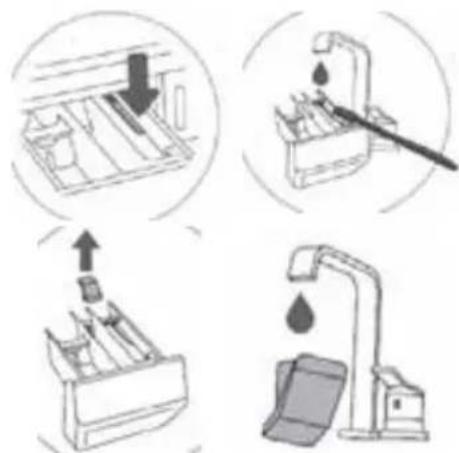
CLEANING THE DISPENSER TRAY
- Press the small tab and pull the dispenser tray out of the recess.
- Clean the dispenser tray under running water using a brush, and dry it. Also, remove any detergent residue from the bottom of the housing. Make sure not to forget to clean the drain hole of the softener compartment and the openings at the bottom of the dispenser tray.
- Clean the inside of the recess with a brush.
- If required, remove and clean the plug cap.
- Clean the plug cap under running water and replace it.
- Push the dispenser tray back in the recess.
i
- Do not use abrasive or caustic agents to clean plastic parts.
- Cleaning the dispenser tray every 3 months ensures normal operation of the appliance.
CLEANING THE DRAIN PUMP FILTER
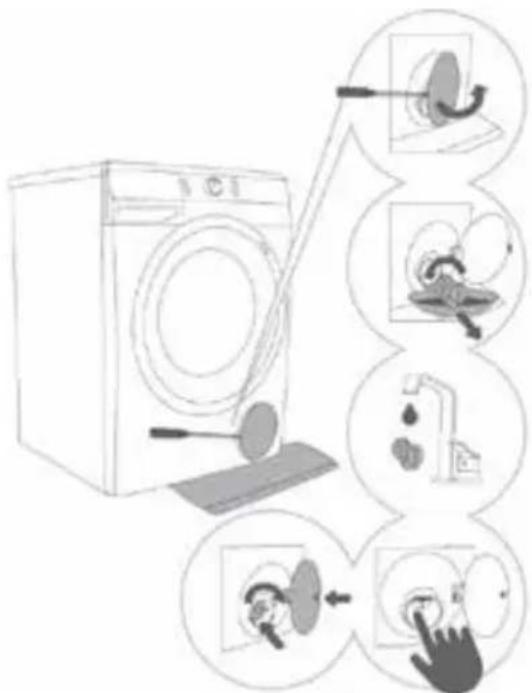
The pump filter can filter the yarns and small foreign matters from the washing. Especially after washing fleecy, woolly or very old laundry.
Clean the pump filter and the in-wall water trap whenever the symbol appears on the display unit.

WARNING!
- Unplug the appliance to avoid electrical shock before cleaning.
- Be careful of hot water!
- Allow detergent solution to cool down.
-
During cleaning, some water may be spilled. It is recommended to place an absorbent cloth on the floor.
-
Open the pump filter cap using a suitable tool (flat screwdriver or a similar tool).
- Pull out the water outlet funnel before cleaning the pump filter. Rotate the pump filter slowly in the counter clockwise direction. Pull out and remove the pump filter to allow the water to drain slowly.
- Clean the pump filter thoroughly under running water.
- Remove all and any objects and impurities from the filter housing and the pump propeller. Replace the pump filter as shown in the figure and fasten it by rotating in the clockwise direction. For a good seal, the filter gasket surface should be clean.

WARNING!
- Never remove the pump filter cap during a washing cycle. Always wait until the appliance has finished the cycle and is empty.
- When the appliance is in use and depending on the selected programme, there can be hot water in the pump.
- When replacing the pump filter cap, ensure it is securely snapped in place.
6
troubleshooting
The washing machine will automatically control the operation of particular functions during the washing cycle. If any irregularity occurs, this will be identified by a message (E:XX) on the display. The appliance will report the error until it is switched off. External disturbances (e.g. the power grid) may result in various error reports. In such case:
- Switch off the appliance and wait for a few seconds.
- Switch the appliance on and repeat the washing programme.
- Most errors during operation can be solved by the user.
- If the error persists, call the customer care service.
• Repairs may only be carried out by an adequately trained person. - Repairs or warranty claims resulting from incorrect connection or use of the appliance shall not be covered by the warranty. In such cases, the costs of repair shall be charged to the user.
- The warranty does not cover the errors or failures resulting from external disturbances (lighting strike, power grid failures, natural disasters etc.).
TROUBLESHOOTING AND ERROR TABLE
| Problem/ error | Indication on the display unit and problem description | What to do? |
| E0 | Incorrect settings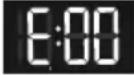 | Restart the programme. If the error reoccurs, call a service technician. |
| E1 | Temperature sensor error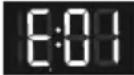 | Inlet water too cold. Repeat the washing programme. If the washing machine reports this error again, call a service technician. |
| E2 | Door lock error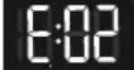 | Make sure the washing machine door is closed. Unplug the power cord from the outlet; then, plug the power cord back into the outlet and switch on the washing machine. If the error reoccurs, call a service technician. |
| E3 | Water filling error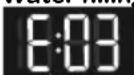 | Check the following:is the water inlet valve open,is the filter on the water supply hose clean,is the water supply hose deformed (clipped, clogged etc.),is the pressure in the water mains between 0.05 and 0.8 MPa (0.5–8 bar). Then, press the Start/Pause button to resume the programme. If the error reoccurs, call a service technician. |
| E4 | Motor error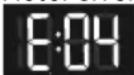 | Restart the programme. If the error reoccurs, call a service technician. |
| E5 | Motor error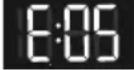 | Restart the programme. If the error reoccurs, call a service technician. |
| E6 | Water heating error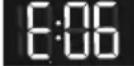 | Restart the programme. If the error reoccurs, call a service technician. |
| E7 | ###ing error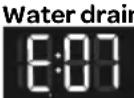 | Check the following:is the pump filter clean,is the discharge hose clogged,is the drain clogged,if the discharge hose placed is placed below the maximum and above the minimum height (see chapter »INSTALLATION AND CONNECTION / Connecting and securing the water discharge hose«); then, press the Start/Pause button again. If the error reoccurs, call a service technician. |
| E9 | Water detected at the bottom of the washing machine(Total Aqua Stop system)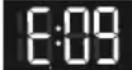 | Turn off the appliance and turn it back on. If the error reoccurs, call a service technician. |
| E10 | Water level sensor error.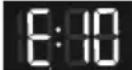 | Unplug the power cord from the outlet; then, plug the power cord back into the outlet and switch on the washing machine. If the error reoccurs, call a service technician. |
| E11 | Water overflow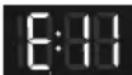 | If there is water in the drum that exceeds a certain level, and an error is reported on the display unit, the washing program will be interrupted and water will be pumped out of the washing machine. Restart the programme. If the error reoccurs, call a service technician. If there is water in the drum that exceeds a certain level, and an error is reported on the display unit, while the washing machine continues to add water, close the water tap and call a service technician. |
| E12 | Motor control error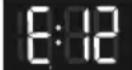 | Restart the programme. If the error reoccurs, call a service technician. |
| E22 | Error while locking the door.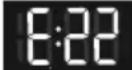 | Door is closed, but it cannot be locked. Switch off the washing machine. Switch it back on and restart the washing programme. If the error reoccurs, call a service technician. |
| E23 | Error while unlocking the door.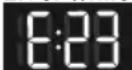 | Door is closed, but it cannot be unlocked. Turn off the washing machine, then turn it back on. If the error reoccurs, call a service technician. To open the door, see chapter »INTERRUPTIONS AND CHANGING THE PROGRAMME/Opening the door manually«. |
| E36 | Electronics communication failure in the washing machine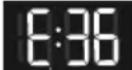 | Unplug the power cord from the outlet; then, plug the power cord back into the outlet and switch on the washing machine. If the error reoccurs, call a service technician. |
| E37 | Electronics communication failure in the washing machine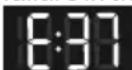 | Unplug the power cord from the outlet; then, plug the power cord back into the outlet and switch on the washing machine. If the error reoccurs, call a service technician. |
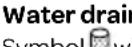 system alert. Symbol will appear. system alert. Symbol will appear. | Alert about reduced water flow in the pumping stage. Check the following:is the pump filter clean,is the discharge hose clogged,is the drain clogged,if the discharge hose placed is placed below the maximum and above the minimum height (see chapter »INSTALLATION AND CONNECTION/ Connecting and securing the water discharge hose«). | |
 istributed laundry when the washing programme is complete, the symbol will remain lit on the display unit. istributed laundry when the washing programme is complete, the symbol will remain lit on the display unit. | Manually distribute the laundry and run the spinning programme.See additional description under TROUBLESHOOTING TABLE. | |
| cln»PF« |  ning to run the Steril eaning programme) ning to run the Steril eaning programme) shing programme, the signs »cln« and »End« will alternate on the display unit.Power supply failure warning (»PF«/Power Failure) shing programme, the signs »cln« and »End« will alternate on the display unit.Power supply failure warning (»PF«/Power Failure)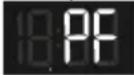 | We recommend running the Steril tub [trommelreiniging](Self-cleaning programme).Washing process was interrupted due to power supply failure. To restart, press the Start/Pause button. |
| Unresponsive display unit and all buttons | Manually (physically) stop the programme by pressing the button On/Off/Resetand hold it for more than 3 seconds. Unplug the power cord from the outlet; then, plug the power cord back into the outlet and switch on the washing machine. If the error reoccurs, call a service technician. | |
 | Washing machine standing by, ready to resume the washing programmeThe time remaining until programme completion is alternately lit and off on the display unit. | To resume the washing programme, press the button Start/Pause, or manually (physically) stop the programme and press the button On/Off/Resetand hold it for more than 3 seconds. |
Preparation for unlocking the doorSignal lights will flash on the display unit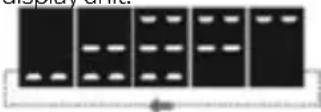 | Wait until the process is completed. If no error is indicated after the process, then a new programme can be started. Water has to be drained. Wait for the door to unlock. | |
| Noise and vibration | Make sure the appliance is levelled using the adjustable legs and that the jam nuts are securely tightened. |
- Unevenly distributed laundry or lumps of laundry in the washing machine drum can cause problems such as vibration and noisy operation.
- The washing machine detects such problems and the UKS* (*stability control system) will be activated.
- Smaller loads (e.g. one towel, one sweater, one bathrobe etc.) or clothes made of materials with special geometrical properties are virtually impossible to distribute evenly across the washing machine drum (slippers, large items etc.). This results in several attempts to redistribute the laundry, which in turn leads to longer programme duration. In extreme cases of unfavourable conditions, the programme can be completed without the spinning cycle.
- The UKS* (*stability control system) allows stable operation and a longer useful life of the washing machine.
If the problems persist despite observing the advice above, call an authorised service technician. Repairs or warranty claims resulting from incorrect connection or use of the washing machine shall not be covered by the warranty. In this case, the user will cover the cost of repair.
CUSTOMER SERVICE

WARNING! Risk of electric shock
- Never try to repair an appliance which is defective or presumed to be defective. You may put your own and future users' lives in danger. Only authorised specialists are allowed to carry out this repair work.
- Improper repair will void the warranty and subsequent damages cannot be recognised!
TRANSPORT
IMPORTANT STEPS WHEN MOVING THE APPLIANCE
- Unplug the appliance and close the water tap.
- Check that the door and dispenser tray are closed properly.
- Remove the water supply hose and the water discharge hose from the house installations.
- Allow the water to drain completely from the appliance.
- IMPORTANT: Re-install the transport bolts in the back of the appliance.
- The appliance is heavy. Transport with care. Never hold any protruding part of the appliance when lifting. The door of the appliance cannot be used as a handle.
7 technical specifications
Model VWM9001W
Washing capacity 9.0 kg
Power supply 220-240V\~, 50Hz
Rated power 2000 W
Max. current 10 A
Standard water pressure 0.05 - 0.8 MPa
Dimension (WxDxH in cm) 60 x 54.5 x 85
Nett weight 67 kg
RECYCLING
This symbol means that this product should not be disposed of with regular household waste (2012/19/EU).
Observe the rules that apply in your country for the separated collection of electric and electronic products.
Correct disposal of the product prevents negative consequences for the environment and for public health.
The packaging material of this product can be recycled 100%, return packaging material separately.
PRODUCT INFORMATION SHEET ACC. REGULATION (EU) 2019/2023
| Supplier's name or trade mark: | |||||
| Supplier's address (b): | |||||
| Model identifier: | |||||
| General product parameters: | |||||
| Parameter Value Parameter Value | |||||
| Rating capacity (e) (kg) Dimensions in cm Height | |||||
| Width | |||||
| Depth | |||||
| EEIw (e) | Energy efficiency class (a) | ||||
| Washing efficiency index (a) | Rinse effectiveness (g/kg) (a) | ||||
| Energy consumption in kWh per cycle, based on the eco 40-60 programme. Actual energy consumption will depend on how the appliance is used. | Water consumption in litre per cycle, based on the eco 40-60 programme. Actual water consumption will depend on how the appliance is used and on the hardness of water. | ||||
| Maximum temperature inside the treated textile (s) (oC) | Rated capacity | Remaining moisture content (a) (%) Rated capacity | |||
| Half Half | |||||
| Quarter Quarter | |||||
| Spin speed (s) (rpm) Rated | capacity | Spin-drying efficiency class (a) | |||
| Half | |||||
| Quarter | |||||
| Programme duration (a) (h:min) Rated | capacity | Type | |||
| Half | |||||
| Quarter | |||||
| Airborne acoustical noise emissions in the spinning phase (c) (dB(A) re 1 pW) | Airborne acoustical noise emissions class (a) (spinning phase) | ||||
| Off-mode (W) Standby mode (W) | |||||
| Delay start (W) (if applicable) Networked standby (W) | (if applicable) | ||||
| Minimum duration of the warranty offered by the supplier (b): | |||||
| This product has been designed to release silver ions during the washing cycle | |||||
| Additional information: | |||||
| Weblink to the supplier's website, where the information in point 9 of Annex II to Commission Regulation (EU) 2019/2023 (1) (b) is found: https://www.inventum.com | |||||
| (a) for the eco 40-60 programme(b) changes to these items shall not be considered relevant for the purposes of paragraph 4 of Article 4 of Regulation (EU) 2017/1369(c) if the product database automatically generates the definitive content of this cell, the supplier shall not enter these data | |||||
UMSTELLEN UND TRANSPORT NACH DER INSTALLATION

natural_image
Diagram of a pipe valve with curved flow direction arrow (no text or symbols)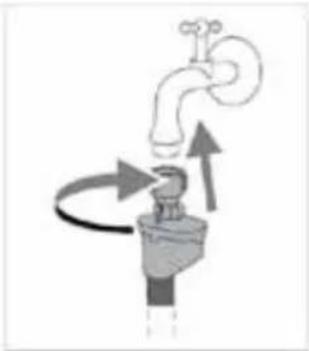
natural_image
Diagram of a faucet with arrows indicating flow direction (no text or symbols)natural_image
Line drawing of a sweater with a tag and three numbered labels (1, 2, 3) — no text or symbols on the clothing itself.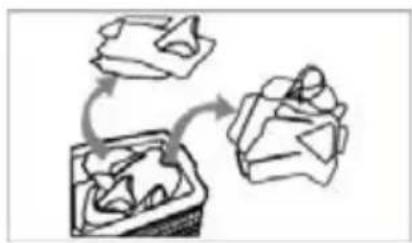
flowchart
graph TD
    A["Initial State"] --> B["Intermediate Stage"]
    B --> C["Final State"]
natural_image
Line drawing of a shirt with cutouts and accessories (no text or symbols)natural_image
Two handbags with circular designs, one wrapped in a blanket and the other in a sack (no text or symbols)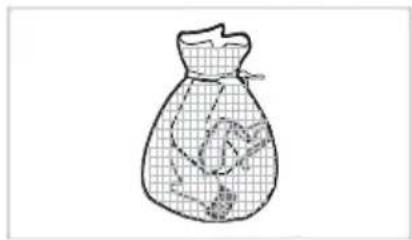
natural_image
Simple line drawing of a bag with a grid pattern and a small object inside (no text or symbols)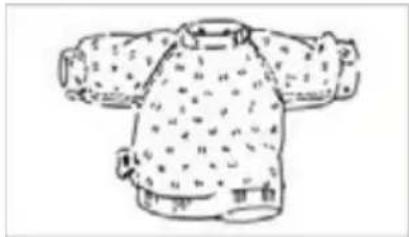
natural_image
Line drawing of a patterned sweater with two arms and a side panel (no text or symbols)natural_image
Simple line drawing of a wall-mounted device and a plug, no text or symbols present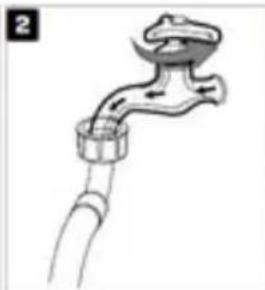
natural_image
Illustration of a faucet with a handle and valve (no text or symbols)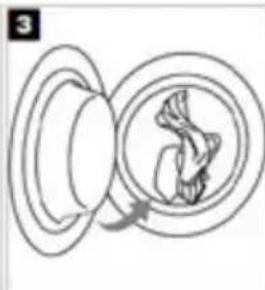
natural_image
Diagram of a biological or mechanical process with concentric circles and a central arrow indicating rotation (no text or symbols)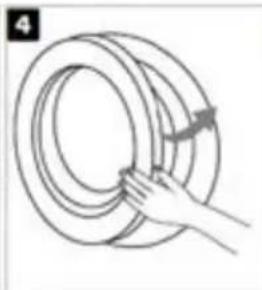
natural_image
Illustration of a hand holding a coiled rope or ring, with no text or symbols present.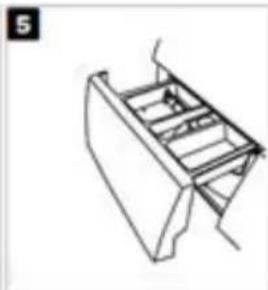
natural_image
Line drawing of a mechanical component or bracket (no text or symbols)natural_image
Simple diagram with concentric circles and curved arrows, no text or symbols present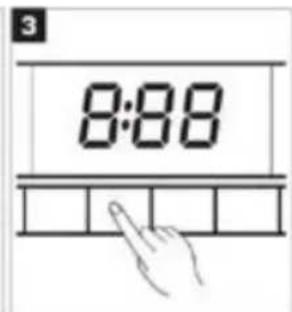
natural_image
Three-step line drawing of a mechanical component with arrows indicating assembly or positioning (no text or symbols)
natural_image
Line drawing of a hand washing a washing machine (no text or symbols)DIE TROMMEL REINIGEN
natural_image
Line drawing of a hand gripping a curved object (no text or symbols)74 • Deutsch
natural_image
Diagram of a faucet with rotating arrows indicating flow direction (no text or symbols)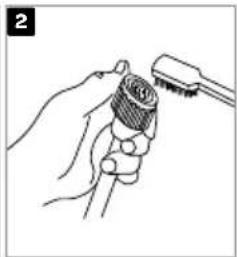
natural_image
Line drawing of a hand holding a tool with a brush (no text or symbols)natural_image
Illustration of a hand inserting a plug into a device (no text or symbols visible)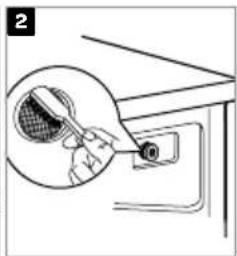
natural_image
Illustration of a hand inserting a component into a device (no text or symbols visible)DIE EINSPÜLSCHALE REINIGEN
natural_image
Diagram showing two views of a refrigerator with an arrow indicating upward motion (no text or symbols)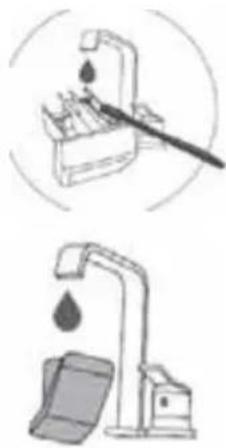
natural_image
Illustration of two different water tap methods: one using a tool to prevent drop, the other using a bucket pump (no text or symbols present)
6
Fehlersuche
DÉPLACEMENT ET TRANSPORT APRÈS L'INSTALLATION
natural_image
Two technical diagrams showing pipe installation and valve assembly (no text or symbols)CONNEXION DU TUYAU D'ÉVACUATION D'EAU

AVERTISSEMENT!
natural_image
Illustration of a sweater with a tag and three numbered labels (1, 2, 3) — no text or symbols on the sweater itself.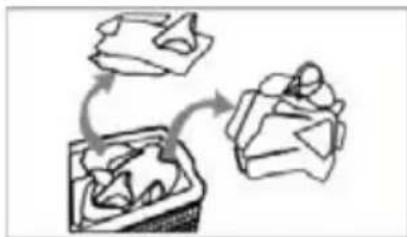
natural_image
Hand-drawn sketch of three abstract geometric shapes with curved arrows indicating rotation or transformation (no text or symbols)natural_image
Illustration of a shirt with cutouts and accessories (no text or symbols)natural_image
Two handbags with circular designs, one wrapped in a blanket and the other a closed pocket (no text or symbols)natural_image
Line drawing of a bag with grid pattern and small objects inside (no text or symbols)natural_image
Line drawing of a traditional-style jacket with patterned fabric and side arm (no text or symbols)natural_image
Three-step diagram showing a mechanical assembly with arrows indicating direction (no text or symbols)
natural_image
Line drawing of a hand washing a washing machine (no text or symbols)natural_image
Line drawing of a hand gripping a curved object (no text or symbols)NETTOYAGE DU FILTRE D'ENTRÉE SOUS LE ROBINET

REMARQUE!
natural_image
Diagram of a mechanical valve assembly with rotating arrows indicating motion (no text or symbols)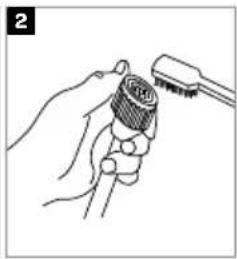
natural_image
Illustration of a hand holding a connector with a tool inserted (no text or symbols)NETTOYAGE DU FILTRE D'ENTRÉE AU DOS DE L'APPAREIL
natural_image
Illustration of a hand inserting a plug into a device (no text or symbols visible)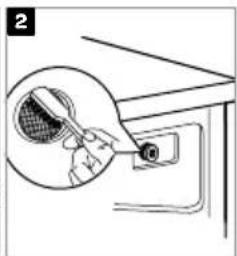
natural_image
Illustration of a hand holding a tennis racket inside a device (no text or symbols)NETTOYAGE DU TIROIR DISTRIBUTEUR
natural_image
Simple line drawing of a room interior with furniture and a downward arrow (no text or symbols)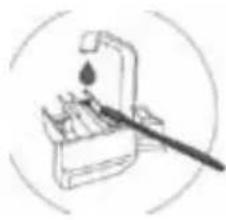
natural_image
Simple line drawing of a tool with a droplet and a brush, no text or symbols present.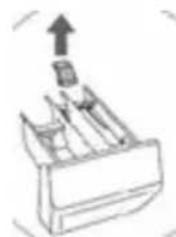
natural_image
Simple line drawing of a mechanical component with an upward arrow, no text or symbols present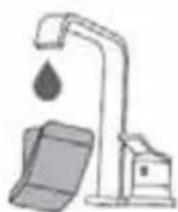

general terms and conditions of service and warranty
We do not need to remind you of the importance of service. After all, we develop our products to a standard so that you can enjoy them for many years, without any concerns. If, nevertheless, there is a problem, we believe you are entitled to a solution straight away. Hence our products come with an exchange service, on top of the rights and claims you are entitled to by law. By exchanging a product or part, we save you time, effort and costs.
2-year full manufacturer's warranty
- Customers enjoy a 2-year full manufacturer's warranty on all Inventum products. Within this period, a faulty product or part will always be exchanged for a new model, free of charge. In order to claim under the 2-year full manufacturer's warranty, you can either return the product to the shop you bought it from or contact the Inventum costumer service department via the form at www.inventum.eu/service-aanvraag.
- The 2-year warranty period starts from the date the product is bought.
- In order to claim under the warranty, you must produce a copy of the original receipt.
- The warranty applies only to normal domestic use of Inventum products within the Netherlands.
5-year Inventum warranty
- Inventum offers a 5-year warranty on most large domestic appliances and a selection of small domestic appliances. This 5-year Inventum warranty consists of a 2-year full manufacturer's warranty, extended by a further 3-year warranty. The only thing you need to do to qualify for the 3-year extended warranty is to register the product within 45 days of purchase. You can read more about registering the product in the following paragraph.
- In accordance with the 5-year Inventum warranty provisions, a faulty product or part will always be exchanged for a new model during the first 2 years under the warranty. During the 3rd to 5th year under the warranty, you will only pay the costs of exchange. The current costs of exchange are listed at www.inventum.eu/omruilkosten.
- In order to claim under the 5-year Inventum warranty, you can either return the product to the shop you bought it from or contact the Inventum costumer service department via the form at www.inventum.eu/service-aanvraag.
- The 5-year warranty period starts from the date the product is bought.
- In order to claim under the warranty, you must produce a copy of the original receipt.
- The warranty applies only to normal domestic use of Inventum products within the Netherlands.
Product registration
- The 3-year extended warranty is easy to obtain, free of charge, by registering the product within 45 days of purchase, via the website www.inventum.eu/garantie-registratie. If you did not register the product within 45 days of purchase, you can still do so up to 2 years after the purchase date. However, there will be a charge. The one-off registration charge is € 89 for each separate product. Registration is possible only for products that are subject to the 5-year Inventum warranty. Whether the product qualifies for the 5-year Inventum warranty is stated in the product user manual and in the product information sheet, on Inventum's website.
- The warranty period always starts from the date the product is bought. If the product is registered for the extended warranty at a later date, the warranty period still starts from the original date of purchase.
- The 3-year extended warranty can only be applied for if you are in the possession of a copy of the original receipt and the Inventum 5-year warranty certificate.
Large domestic appliances
- Breakdowns or faults in large domestic appliances (separate and built-in white goods) can be registered via the form at www.inventum.eu/service-aanvraag, by calling the Inventum costumer service department or in the store where you bought the device. The telephone number of the costumer service department can be found at www.inventum.eu.
- In the event of breakdowns or faults in large domestic appliances, Inventum will have the option to have a service engineer inspect the faulty device onsite at the customer in the Netherlands and to carry out repairs, there and then. The Inventum customer service department can also decide to have the device exchanged.
- If you suffer a breakdown or fault in a large domestic appliance during the first 2 years from the date of purchase, Inventum will not charge any costs for the exchange, call-out or for parts and labour.
- If you registered the product as described before at www.inventum.eu/garantie-registratie and you subsequently report a breakdown of a large domestic appliance in the 3rd to 5th year of the date of purchase, the 5-year Inventum warranty applies and the device will be repaired or exchanged, free of charge. In the event of a repair or exchange of the device, you only pay the costs of exchange. The current costs of exchange are listed at www.inventum.eu/omruilkosten. If you did not register the product, the 3-year extended warranty does not apply.
- When reporting a breakdown or fault, a service engineer will contact the customer within 1 working day in order to make an appointment. When the report is made in a weekend or during a public holiday, this will be the next working day.
- If you report a breakdown or fault via the form at www.inventum.eu/service-aanvraag, you will be kept informed of the progress via mobile messages and e-mail.
-
The warranty period starts from the date the product is bought.
-
In order to claim under the warranty, you must produce a copy of the original receipt and the Inventum 5-year warranty certificate.
- The warranty applies only to normal domestic use of Inventum products within the Netherlands.
Breakdowns or faults outside the warranty period
- Breakdowns or faults in small or large domestic appliances outside the warranty period, can be reported to the costumer services department via the form at www.inventum.eu/service-aanvraag or by calling the costumer services department.
- The costumer services department may ask you to send the product for inspection or repair. The costs of dispatch will be at your expense.
- The inspection to establish whether repair is possible involves a charge. You need to grant your permission for this, in advance.
- In the event of a large domestic appliance, Inventum, at your request, can send out a service engineer. In that case, you will be charged the call-out costs, as well as parts and labour.
- In the event of an instruction to repair, the repair costs must be paid in advance. In the event of a repair by a service engineer, the costs of the repair must be settled with the engineer onsite, preferably by means of PIN payment.
Warranty exclusions
- The following is excluded from the aforesaid warranties:
• normal wear and tear;
- improper use or misuse;
• insufficient maintenance;
- failure to comply with the operating and maintenance instructions;
- unprofessional installation or repairs by third parties or the customer himself;
• non-original parts used by the customer;
- use for commercial or business purposes;
- removal of the serial number and/or rating label.
-
In addition, the warranty does not apply to normal consumer goods, such as:
-
dough hooks, baking tins, (carbon) filters, etc.;
- batteries, bulbs, carbon filters, fat filters etc.;
• external connection cables; -
glass accessories and glass parts such as oven doors;
• and similar items. -
Transport damage not caused by Inventum is also excluded. Therefore, inspect your new device before starting to use it. If you detect any damage, you must report this to the store where you purchased the product within 5 working days, or to the Inventum customer service department via the form at www.inventum.eu/service-aanvraag. If transport damage is not reported within this period, Inventum does not accept any liability in this respect.
-
The following are excluded from warranty and/or replacement: faults, loss of and damage to the device as a result of an event that is normally insured under the home contents insurance.
Important to know
- The replacement or repair of a faulty product, or a part thereof, does not lead to an extension of the original warranty period.
- Parts that have been replaced, packaging material and exchanged devices are taken back by the service engineer and become the property of Inventum.
- If a complaint is unfounded, all costs arising from it will be at the customer's expense.
- Following expiry of the warranty period, all costs of repair or replacement, including administration costs, dispatch and call-out charges, will be charged to the customer.
- Inventum cannot be held liable for damage as a result of devices built in incorrectly.
- Inventum cannot be held liable for damage caused by external events, unless this liability arises from mandatory statutory provisions.
- These warranty and service provisions are governed by Dutch law. Disputes will be settled exclusively by the competent Dutch court.
instagram.com/inventum1908

facebook.com/inventum1908

youtube.com/inventum1908
- Nederlands
- Deutsch
- INSTALLATIELOCATIE EN OMGEVING
- WATERTOEVOER EN -AFVOER
- VERPLAATSEN EN TRANSPORTEREN NA INSTALLATIE
- APPARAAT WATERPAS ZETTEN
- WATERAFVOERSLANG AANSLUITEN
- ! WAARSCHUWING!
- DE WASMIDDELLADE
- LET OP!
- WASPROGRAMMA ANNULEREN
- INLAATFILTER IN DE WATERKRAAN REINIGEN
- • Nederlands
- INLAATFILTER AAN DE ACHTERZIJDE VAN HET APPARAAT REINIGEN
- AFVOERPOMPFILTER REINIGEN
- 6
- probleemoplossing
- safety instructions
- Please read these instructions before operating the appliance and store them for future use.
- Please, do not use the washing machine without reading the instructions for use first.
- INSTALLATION LOCATION AND SURROUNDING AREA
- INSTALLATION
- ELECTRICAL INSTALLATION
- WATER INSTALLATION
- 32· English
- WATER OVERFLOW PROTECTION
- CHILD SAFETY
- TRANSPORT/RELOCATION AFTER INSTALLATION
- INTENDED USE
- OLD APPLIANCE
- product description
- FRONT
- BACK
- installation and connection
- UNPACKING THE APPLIANCE
- WARNING!
- REMOVING THE BLOCKING RODS
- MOVING AND TRANSPORTING AFTER INSTALLATION
- REQUIRED SPACE FOR INSTALLING
- WASHING MACHINE INSTALLATION CLEARANCES
- LEVELLING THE APPLIANCE
- CONNECTING THE WATER SUPPLY HOSE
- CONNECTING THE WATER DISCHARGE HOSE
- CONNECTING THE APPLIANCE TO THE POWER MAINS
- BEFORE USING THE APPLIANCE FOR THE FIRST TIME
- operation
- BEFORE EACH WASHING
- PREPARING BEFORE WASHING
- NOTE!
- WASHING
- USING THE DISPENSER TRAY
- AFTER WASHING
- THE WASHING PROCESS IN STEPS
- · English
- ADJUSTING THE SETTINGS
- WASHING MODE
- Start Delay [startuitstel]
- Pre Wash [voorwas]
- STARTING THE WASHING PROGRAMME
- PAUSING THE WASHING PROGRAMME (ADDING/REMOVING LAUNDRY)
- CANCELLING THE WASHING PROGRAMME
- END OF THE WASHING PROGRAMME
- LOW STANDBY MODE
- ERRORS
- POWER SUPPLY FAILURE
- PERSONAL SETTINGS
- PERSONAL SETTINGS MENU
- maintenance and cleaning
- CLEANING THE EXTERIOR OF THE APPLIANCE
- CAUTION!
- CLEANING THE DRUM
- CLEANING THE RUBBER DOOR GASKET AND THE GLASS
- CLEANING THE INLET FILTER IN THE WATER TAP
- CLEANING THE INLET FILTER AT THE BACK OF THE APPLIANCE
- CLEANING THE DISPENSER TRAY
- i
- CLEANING THE DRAIN PUMP FILTER
- troubleshooting
- CUSTOMER SERVICE
- WARNING! Risk of electric shock
- TRANSPORT
- technical specifications
- RECYCLING
- UMSTELLEN UND TRANSPORT NACH DER INSTALLATION
- DIE TROMMEL REINIGEN
- • Deutsch
- DIE EINSPÜLSCHALE REINIGEN
- Fehlersuche
- DÉPLACEMENT ET TRANSPORT APRÈS L'INSTALLATION
- CONNEXION DU TUYAU D'ÉVACUATION D'EAU
- AVERTISSEMENT!
- NETTOYAGE DU FILTRE D'ENTRÉE SOUS LE ROBINET
- REMARQUE!
- NETTOYAGE DU FILTRE D'ENTRÉE AU DOS DE L'APPAREIL
- NETTOYAGE DU TIROIR DISTRIBUTEUR
- general terms and conditions of service and warranty
- 2-year full manufacturer's warranty
- 5-year Inventum warranty
- Product registration
- Large domestic appliances
- Breakdowns or faults outside the warranty period
- Warranty exclusions
- Important to know
Brand : INVENTUM
Model : VWM9001W
Category : Washing machine