ManualGo.com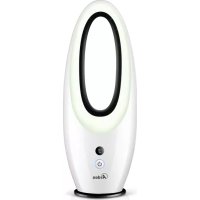
AR5BL2 - Fan ARDES - Free user manual and instructions
Find the device manual for free AR5BL2 ARDES in PDF.



Download the instructions for your Fan in PDF format for free! Find your manual AR5BL2 - ARDES and take your electronic device back in hand. On this page are published all the documents necessary for the use of your device. AR5BL2 by ARDES.
USER MANUAL AR5BL2 ARDES
1. KEEP BATTERIES OUT OF THE REACH OF CHILDREN. Swallowing can lead to
chemical burns, perforation of soft tissue, and death. Severe burns can occur within 2 hours of ingestion. Seek medical attention immediately.
2. Do not allow children to replace batteries.
3. Always insert batteries correctly with regard to polarity (+ and -) marked on the battery
5. Do not charge batteries.
6. Do not force discharge batteries.
7. Do not mix new and used batteries or batteries of different types or brands.
8. Exhausted batteries should be immediately removed from equipment and properly
10. Do not weld or solder directly to batteries.
11. Do not dismantle batteries.
12. Do not deform batteries.
13. Do not dispose of batteries in fire.
14. A lithium battery with a damaged container should not be exposed to water.
15. Do not encapsulate and/or modify batteries.
16. Store unused batteries in their original packaging away from metal objects. If already
unpacked, do not mix or jumble batteries.
17. Remove batteries from equipment if it is not to be used for an extended period of time
unless it is for emergency purposes.
18. Clean the battery contacts and also those of the equipment prior to battery installation.
19. In case of leak from batteries, avoid any contact with it; in case of contact, wash the
affected part with water and seek medical attention.11 / 46
(EN) INSTRUCTIONS FOR USE
Place the fan on a flat, dry and stable surface, and insert the plug of the fan in a socket; the unit will emit a short “BIP” sound indicating that power is supplied. For your convenience the unit can be operated by using control panel in the main body or using remote control included. Unit Remote control
J. Light K. Display L. MULTIFUNCTION button M. Base A. ON/OFF button B. LIGHT button C. SCREEN OFF button D. SPEED – button E. SPEED + button F. TIMER – button G. TIMER + button H. OSC button Batteries To use the remote control, insert 2 batteries 1,5V AAA (not supplied) in the appropriate battery compartment on the back of the remote control.12 / 46 To remove batteries, open the batteries holder placed on the back of the remote control, by sliding the cover to the outwards. “ON/OFF” button (A) When the device is switched off, press this button to turn it on. When the device is switched on, press this button to turn it off. LIGHT button (B): Press this button to activate or deactivate the light (2). SCREEN OFF button (C): Press this button to activate or deactivate the display (3). SPEED buttons (D, E): Press “SPEED +” (E) for increase the speed. Press “SPEED –“ (D) for reduce the speed. Speed setting 1,2,3 is showed on the display (3). “TIMER” button (F, G) Press the TIMER button when the device is working to program automatic switch-off at an interval of between 1 to 9 hours from when it is programmed. Every time the button is pressed, the interval increases (G) or decreases (F) by one hour. Timer setting is showed on the display (3). “OSC“ button (E) Press this button to activate or deactivate the automatic swing function of the device. MULTIFUNCTION button (4) Press it (short pression) to select: speed 1, speed 2, speed 3, OFF. While the fan is on, press it for 3 seconds to activate or deactivate the automatic swing function of the device. (EN) MAINTENANCE Before carrying out the regular cleaning operations turn off the fan and unplug it. DO NOT disassemble the fan: this fan cannot be disassembled. For external cleaning use a soft and dry cloth. DO NOT dip the device in water, or splash it with any other liquids. DO NOT use solvents or any other chemical products for cleaning it. When you do not use it, after cleaning it, store the fan in a dry place.13 / 46
BATTERIES - Remove the batteries from the appliance before its disposal. Do not dispose the batteries with domestic waste. The batteries must be disposed of in the appropriate containers or in the specific collecting centre. Suitable segregated collection helps prevent damage to the environment and to human health. To remove batteries, refer to USER INSTRUCTIONS. USER INFORMATION “Implementation of Directive 2012/19/EU on Waste Electrical and Electronic Equipment (WEEE)”, pertaining to reduced use of hazardous substances in electrical and electronic equipment, as well as to waste disposal”. The symbol of the crossed-out wheelie bin on the equipment or on its packaging indicates that the product must be disposed of separately from other waste at the end of its service life. The user must therefore take the dismissed equipment to suitable separate collection centres for electrical and electronic waste. For more details, please contact the appropriate local authority. Suitable segregated collection of the equipment for subsequent recycling, treatment or environmentally-friendly disposal helps prevent damage to the environment and to human health, and encourages the re-use and/or recycling of the materials that make up the equipment. Abusive disposal of the product by the user shall result in the application of administrative fines in accordance with the laws in force.