CERA612APPB - Fridge CONTINENTAL EDISON - Free user manual and instructions
Find the device manual for free CERA612APPB CONTINENTAL EDISON in PDF.


| Product type | Freestanding refrigerator-freezer |
| Brand | Continental Edison |
| Model | CERA612APPB |
| Dimensions (W x D x H) | 911 x 746 x 1780 mm |
| Net weight | 89 kg |
| Power supply | 220-240 V ~ 50 Hz |
| Energy efficiency class | A++ |
| Annual energy consumption | 329 kWh/year |
| Total net volume | 608 L |
| Refrigerator volume | 403 L |
| Freezer volume | 177 L |
| 2-star compartment volume | 28 L |
| Power failure autonomy | 9 h |
| Freezing capacity | 15 kg/24h |
| Climate class | SN/N/ST/T (10 °C to 43 °C) |
| Noise level | 42 dB(A) |
| Refrigerant | R600a (90 g) |
| Insulation | Cyclopentane |
| Defrosting | Automatic (No Frost) |
| Special functions | Super freezer, Super refrigerator, Vacation mode, Child lock, Door open alarm |
| Equipment | Water tank 2L, Ice maker, Vegetable bin, Glass shelves, Door balconies |
| Compartment types | Freezer (drawers + shelves), Refrigerator (shelves + vegetable bin) |
| Installation | Freestanding, rear space ≥ 10 cm, wait 8 h before use |
| Warranty | See conditions in manual (does not cover normal wear) |
Frequently Asked Questions - CERA612APPB CONTINENTAL EDISON
User questions about CERA612APPB CONTINENTAL EDISON
0 question about this device. Answer the ones you know or ask your own.
Ask a new question about this device
Download the instructions for your Fridge in PDF format for free! Find your manual CERA612APPB - CONTINENTAL EDISON and take your electronic device back in hand. On this page are published all the documents necessary for the use of your device. CERA612APPB by CONTINENTAL EDISON.
USER MANUAL CERA612APPB CONTINENTAL EDISON
natural_image
Abstract geometric shapes resembling partial arcs or crescent, rendered in gray tones without any text or symbols.Continental Edison
natural_image
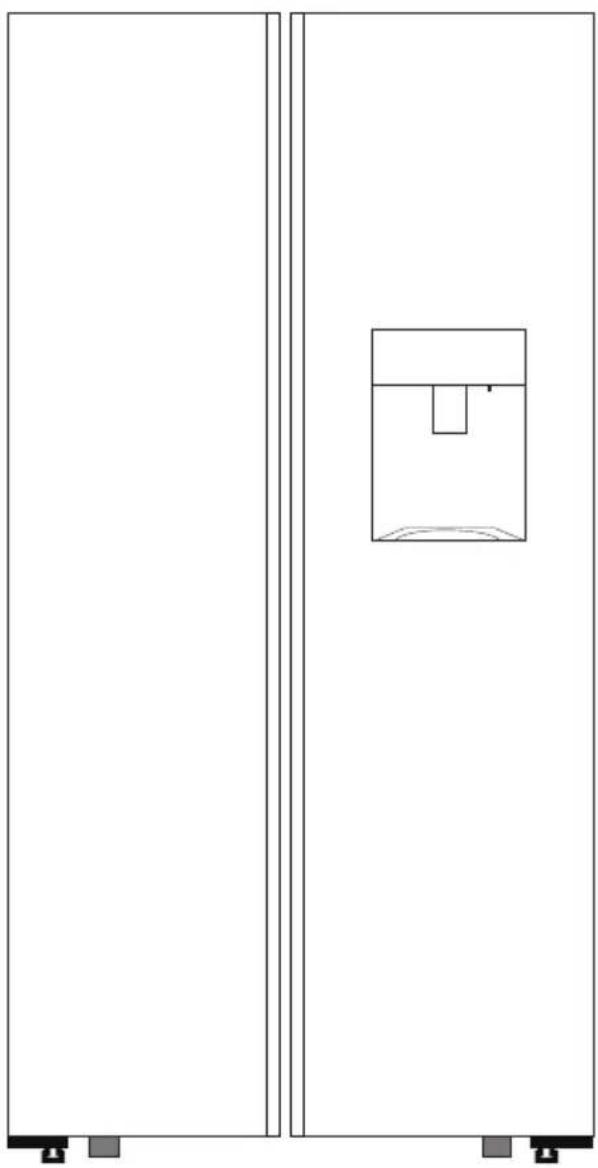
Simple line drawing of a two-panel cabinet with a central container and mounting feet (no text or symbols)CERA612APPIX / CERA612APPB
RÉFRIGÉRATEUR MULTI-PORTES 608L
MULTI-DOOR REFRIGERATOR 608L
natural_image
Warning symbol of a flame inside a triangle (no text or numbers)- FR (version originale)
- EN (translated from the original)
natural_image
Illustration showing a van with a cross symbol and two workers handling a large box (no text or symbols present)natural_image
Illustration of a hand pressing down on a mechanical component with an arrow indicating downward motion (no text or symbols)natural_image
Symbolic icon of a person moving with arrows, enclosed in a circle (no text or symbols)natural_image
Interior view of a refrigerator showing four numbered compartments (no text or symbols visible)natural_image
Simple 3D illustration of a rectangular block with rounded edges and a flat top (no text or symbols)FR-32
Clayettes en verre
text_image
Diagram showing a hand pressing a button on a U-shaped object, labeled with two numbered steps and directional arrows.INSTRUCTIONS D'ASSEMBLAGE DU RÉSERVOIR D'EAU
natural_image
Line drawing of a mechanical device with two rectangular compartments and vertical supports (no text or symbols)natural_image
Simple line drawing of a rectangular frame with two circular indentations on the base (no text or symbols)natural_image
Abstract curved line pattern forming a layered oval shape (no text or symbols)natural_image
Technical line drawing of a mechanical component or housing (no text or symbols)natural_image
Technical line drawing of a mechanical device with a labeled component (no text or symbols present)FABRICATION DES GLAÇONS
natural_image
Diagram of a storage bin with an arrow indicating rotation or movement (no text or symbols)natural_image
Line drawing of a container with a cup pouring liquid into a tray (no text or symbols)natural_image
Diagram of a refrigerator interior with a circular button indicating rotation (no text or symbols)natural_image
Illustration of a hand placing a container into an empty storage tray with granular material inside (no text or symbols)natural_image
Line drawing of a hand inserting a small object into a container with granular material inside (no text or symbols)COMPARTIMENT DU CONGELATEUR
natural_image
Interior view of a refrigerator with three numbered compartments (1, 2, 3) showing open doors and internal shelves (no text or symbols visible)natural_image
Diagram of a mechanical component with an arrow indicating rotational motion (no text or symbols)
ATTENTION
natural_image
Interior view of a modern stainless steel refrigerator with open doors showing empty shelves (no visible text or labels)natural_image
Symbol of a trash bin crossed with no text or labels, accompanied by a black rectangular block below (no readable text or symbols)IMPORTANT WARNINGS AND
SAFETY ADVICE
We encourage you to read this user guide carefully and completely before installing and using your device.
It is important that this user guide is kept with the device for any new consultation. If this unit is to be transferred to another person, make sure that the user guide follows the unit so that the new user can be informed of the operation of the unit. In this user guide, the following symbols are used:
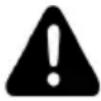 | Important information about your personal safety and how to avoid damage to the device |
 | General information and advice |
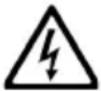 | Risk of electric shock |
Security and warning information:
- WARNING: Do not damage the refrigerant circuit.
- Refrigerant causes serious injury if splashed in the eyes. If this happens, go to the hospital immediately.
- WARNING: Ventilation openings in the housing of the device or in the mounting location must not be obstructed.
- CAUTION: Do not use electrical appliances inside the appliance's food storage compartments.
- WARNING: Do not use mechanical devices or other means to speed up the defrosting process.
- Refrigeration equipment may not operate evenly (possible defrosting of the contents or temperature becoming too high in the freezer compartment) when placed for a long time at a temperature below
the cold limit of the temperature range for which the refrigerating appliance is designed.
-
This device may be used by children 8 years of age or older, and those with reduced physical, sensory or mental capabilities or lack of experience or knowledge, if they are properly supervised if instructions for the safe use of the apparatus have been given to them and the risks involved have been apprehended. Children should not play with the device. Cleaning and maintenance by the user should not be done by unattended children.
-
Children should be supervised to ensure that they do not play with the appliance.
-
Do not use or store flammable materials such as ether, benzene, alcohol, drugs, liquefied
gas, spray or cosmetics near or in the refrigerator. This can cause an explosion or fire.
- Do not place glassware at the air outlet of the freezer compartment or refrigeration compartment as this may cause an explosion or injury.
- Make sure the unit is grounded.
- Consult a qualified electrician or service technician if the grounding instructions are not completely understood or if you are not sure whether the appliance is grounded.
- Improper grounding may result in failure and electric shock.
- This appliance is intended for domestic and similar uses such as:
- kitchen areas of store staff, offices and other professional environments;
- farms and customers of hotels, motels or other types of residential environments;
- Bed and Breakfast type environments;
-
caterers and other services not related to retail sales.
-
The dedicated outlet must be used.
- Connecting multiple devices to a power outlet can result in a fire.
- Install the unit in a dry, well-ventilated room.
- The device should be placed near a socket, it is easy to turn off the power at the time of the accident.
- Do not leave the plug facing up or crushed on the back of the refrigerator.
Water may enter or the plug may be damaged causing fire or electric shock.
- Do not let the power cord bend or be squeezed by heavy objects to
be damaged. If it is damaged, it must be replaced by the repairer or a similarly qualified person to avoid a hazard.
- If the power cord is damaged, it must be replaced by the manufacturer, its repairer or a person of equivalent qualification to avoid any danger.
Unplug the plug when cleaning and handling the interior lamp of the refrigerator.
This can cause an electric shock or injury.
If the LED lamp is damaged, it must be replaced by the manufacturer or his repairer.
-
Remove water or dust from the plug with a clean, dry cloth, do not use wet hands to touch it, and insert it with the ends of the pins firmly connected.
-
Do not touch food or containers in the freezer with wet hands. This can cause frostbite.
Clean the water tanks if they have not been used for 48 hours; rinse the water system connected to a water supply if the water has not been flowing for 5 days.
-
Do not place heavy or dangerous objects, mugs, mud, cosmetics, medicine or other containers with water in the refrigerator.
-
It could fall and cause injury, fire or electric shock when opening or closing the door. Do not spray water outside or inside the refrigerator and do not clean it with benzene or thinner.
-
Wait 5 minutes or more before reconnecting the plug. This may cause the freezer to fail.
-
Do not use the refrigerator for non-household purposes (storage of medicines or test materials, blood, on a ship, etc.). This could result in an unexpected hazard such as fire, electric shock, deterioration of stored material, or chemical reaction.
-
Do not use a dryer to dry the interior, do not light a candle to eliminate odors. This can cause an explosion or fire.
- Do not grab the door or the door trays.
This can cause the refrigerator to fall or damage your hands.
Prevent children from doing what is described above.
- If there is a gas leak, do not touch the refrigerator or electrical outlet and ventilate the room immediately.
A spark explosion can cause a fire or burn. When gas leaks due to serious damage caused during delivery, installation or use of the refrigerator, any spark may cause a fire or burn.
- Do not insert hands or metal stick into the fresh air outlet, the lid, the bottom of the refrigerator, the
heat resistant grill (exhaust port) on the back.
This can cause an electric shock or injury.
- Do not place ice in a crystal glass or ceramic dishes.
This can break the glass or ceramic and cause an injury.
- Please check the refrigerator before using if it has been immersed in water.
This can cause electric shock or fire.
- Do not install the refrigerator in a humid place or where there is splashing water or rain.
Damage to the insulation of electrical parts can lead to electrical leakage. Please check the refrigerator regularly.
- Do not let anyone, except a qualified engineer, dismantle, repair or modify the refrigerator.
This can cause injury, electric shock or fire.
- WARNING: When positioning the appliance, ensure the supply cord is not trapped or damaged.
- WARNING: Do not locate multiple portable socket-outlets or portable power supplies at the rear of the appliance.
- Children aged from 3 to 8 years are allowed to load and unload refrigerating appliances.
- To avoid contamination of food, please respect the following instructions:
- Opening the door for long periods can cause a significant increase of the temperature in the compartments of the appliance.
- Clean regularly surfaces that can come in contact with food and accessible drainage systems.
- Store raw meat and fish in suitable containers in the refrigerator, so that it is not in contact with or drip onto other food.
- Two-star frozen-food compartments are suitable for storing pre-frozen food, storing or making ice-cream and making ice cubes.
- One-, two- and three-star compartments are not suitable for the freezing of fresh food.
- If the refrigerating appliance is left empty for long periods, switch off, defrost, clean, dry, and leave the door opens to prevent mould developing within the appliance.
- Place the against a wall at a distance greater than or equal to 100mm.
Refrigerant
natural_image
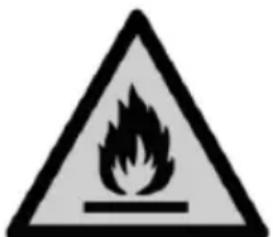
Warning symbol of a flame inside a triangle (no text or numbers)Warning; Risk of fire / flammable materials
Warning; Risk of fire /
flammable materials
WARNING: When positioning the appliance, ensure the supply cord is not trapped or damaged.
WARNING: Do not locate multiple portable socket-outlets or portable power supplies at the rear of the appliance.
The refrigerant gas contained in the circuit of this unit is isobutane (R 600a), a low-pollution but flammable gas. When transporting and installing the unit, take care not to damage any part of the refrigerant circuit.
Do not use sharp or sharp tools to defrost the unit.
Do not use any electrical devices inside the device.
If the refrigeration system is damaged:
- Turn off the refrigerator.
- Do not use a flame near the unit.
- Avoid sparks - do not light electrical appliances or electric lamps.
- Ventilate the room immediately.
* Have a storage area in which an average temperature of less than or equal to + 4 °C can be maintained. This zone is identified by a legible, visible and indelible signage in literal, graphic or color form;
* To be accompanied by a device intended to indicate the temperature in the zone lower or equal to + 4 °C in conformity with
the requirements defined by this decree;
* Be accompanied by a user guide.
* explaining the signs provided for in 1°;
* describing the rules of hygiene to be respected for the maintenance of the apparatus, in particular the procedures of cleaning and disinfection;
* indicating the areas to be used according to the nature of the food and giving recommendations on the protection of foodstuffs and the separation of foodstuffs in order to avoid cross-contamination between foods of a different nature;
- with temperature setting instructions, when this is manual.
Provisions for the identification of storage areas are not applicable to forced air refrigerators.
For installation, handling, cleaning and disposal of the device, refer to the following chapters of the User's Guide.
Suitable for food
CE
Important warnings and safety advice -2-
I. Description of the device -18-
II. Technical characteristics -19-
III. Installation -21-
IV. Before first use -24-
V. Instructions to use -25-
VI. Maintenance and cleaning -33-
VII. Trouble shooting -36-
VIII. Disposal -37-
IX. Warranty -38-
This user guide is available in the following languages:
- FR (original version)
- EN (translated from the original)
Any other translation would be a translation of the original version.
This user guide, any modifications or any new version, is available on our website.
I.I. DESCRIPTION OF THE DEVICE
The appearance and specifications of the actual product may vary depending on the model.
A: Freezer compartment
- Freezer shelf (x3)
- Ice maker
- Glass shelves for freezer (x4)
- Freezer drawers (x2)
- Glass shelves for refrigerator (x4)
- Vegetable bin (x2)
- Refrigerator shelf (x3)
- Water tank
- Control panel
II. TECHNICAL CHARACTERISTICS
TECHNICAL DATA :
| Brand | Continental Edison |
| Reference | CERA612APPIX / CERA612APPB |
| Power supply 220-240V~ | |
| Electric power 50Hz | |
| Dimensions WxDxH 911 x 746 x | 1780 mm |
| Net weight 89 kg | |
| Refrigerant gas: R600a (90g) | |
| Insulating: Cyclopentane |
TECHNICAL SHEET RELATING TO ENERGY:
| Brand: | Continental Edison |
| Commercial reference: | CERA612APPIX / CERA612APPB |
| Model: BCD-646WDAAAAAGAA | |
| Refrigerator category: 7, Fridge-freezer | |
| Energy efficiency class: A++ | |
| Energy consumption : | 329 kWh per year, calculated on the basis of the result obtained for 24 hours under standardized test conditions. The actual energy consumption depends on the conditions of use and the location of the device. |
| Refrigerator capacity (I): 403 | |
| Freezer capacity (I): | 177  |
| Capacity of the 2-star compartment (I): | 28  |
| Gross volume (I): 608 | |
| Defrost: Automatic | |
| Autonomy in the event of a power cut: | 9 h |
| Freezing power: 15 kg/24h | |
| Climate class: | SN / N / ST / TThis device is designed to be used at an ambient temperature between 10 °C and 43 °C. |
| Acoustic emissions in air in dB (A) re 1 pW: | 42 dB(A) |
| Installation type: Freestanding | |
III. INSTALLATION
TRANSPORT
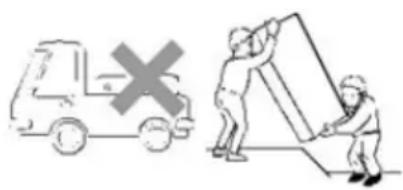
IMPORTANT: the installation of this device requires several people
text_image
Diagram showing a van with a cross symbol and two workers lifting a large box, likely illustrating vehicle collision or repair instructions.- Do not carry the refrigerator horizontally or upside down.
- Do not carry the refrigerator by holding the door or the handle; the refrigerator must be carried by lifting the lower part.
When transporting this device, take it by the base and tilt it gently up to 45^ maximum. Do not lift the appliance by the door handle. Do not put the device in a completely horizontal position or upside down. Push the refrigerator using the rear rollers.
Please note: After transporting the refrigerator, you must wait 8 hours before putting it into service.
LOCATION
text_image
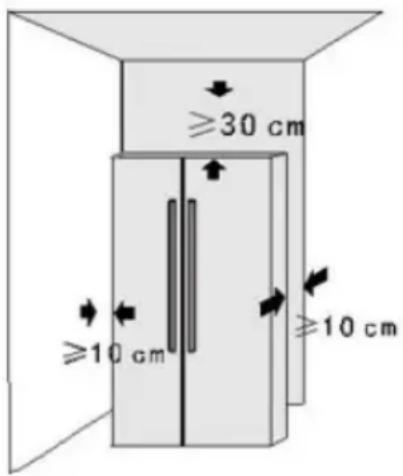
≥30 cm ≥10 cm ≥10 cm- The refrigerator should be placed on a hard, level floor; if a damper is required, use non-flammable damper blocks rather than the foam support of the refrigerator.
- The refrigerator must be kept away from damp places, where water can be easily sprayed; water or dust should be removed regularly with a soft cloth to prevent rust which can affect the electrical characteristics.
- Place the refrigerator in a well ventilated place, keep some space around and behind the refrigerator and do not cover or obstruct the air grille located on the back plate of the refrigerator; keep the refrigerator away from heat sources or direct sunlight.
natural_image
Illustration of a hand pressing down on a mechanical component with an arrow indicating downward motion (no text or symbols)- When the refrigerator is in its packaging, the plastic feet are tight. After removing the refrigerator from its packaging to install it, be sure to adjust the two front plastic feet until the height is suitable; just adjust the two plastic feet with a wrench or by hand.
UNPACKING THE UNIT AND DISPOSING OF PACKAGING ELEMENTS

natural_image
Symbolic icon of a person walking with arrows indicating rotation or cycle (no text or symbols)- Remove all packing material from around the device, as well as the protective parts from inside the device compartments. The cardboard packaging and the sheets of paper are recyclable. They must be disposed of in the collection bins provided for this purpose.
- Materials bearing the symbol is recyclable:
PE <= polyethylene; > PP <= polypropylene
This means that they can be recycled by depositing them in appropriate collection containers.
- The other packaging elements (adhesive, fasteners, etc.) must be disposed of with household waste.
The other packaging elements (adhesive, fasteners, etc.) must be disposed of with household waste.
BEFORE USE
- Remove all packaging, including the foam support at the bottom of the refrigerator and the adhesive tapes that attach the accessories to the box.
- Place the refrigerator in the correct position and adjust the feet to the correct level.
- It is best to clean the refrigerator before using it.
- Remove the film: There is a layer of transparent film on the panels of your product which can protect the products from scratches during manufacturing and transport. You can choose to keep or remove the film as needed.
- Place the fridge and adjust the level, clean it, let the fridge stand for 8 hours, then turn it on to check that the fridge works normally.
STARTING AND SETTING FUNCTIONS
Starting
- Connect the power cord.
- During the first start-up, the screen displays the temperature values set by default (the temperature of the refrigeration compartment is set to 5 °C, the temperature of the freezing compartment to -18 °C)
Setting the LED display functions
The default mode is power saving mode at startup: the screen turns on for 20 seconds and then turns off.
This mode saves energy and extends the life of the LED indicators.
V. USE
CONTROL PANEL
text_image
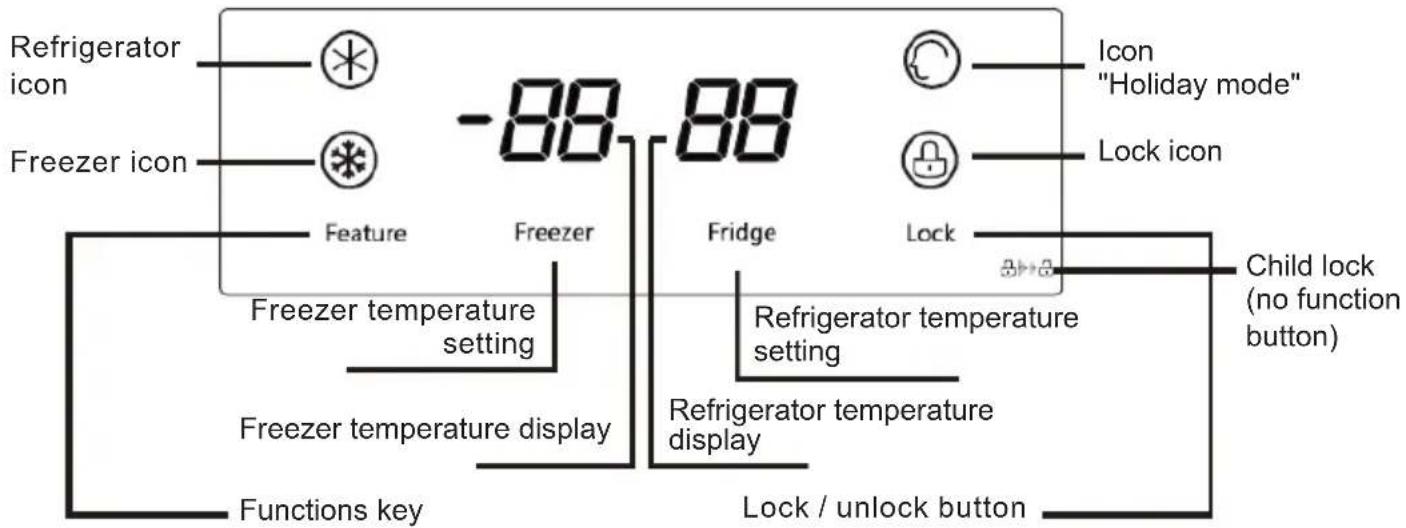
Refrigerator icon Freezer icon Feature Freezer Freezer temperature setting Freezer temperature display Functions key -88 88 Fridge Lock Icon "Holiday mode" Lock icon Child lock (no function button) Refrigerator temperature setting Refrigerator temperature display Lock / unlock buttonSELECTION OF "FEATURE" MODE (FUNCTIONS)
- Holiday mode - the refrigerator operates at 6^ C , while the freezer operates at -15^ C .
- Super Freezer Mode - when Super Freezer mode is selected, the compressor will run continuously to freeze food faster and keep it cool. The super freezer mode switches off automatically after 24 hours of operation or when the freezer reaches -28^ C . The super freezer icon will go out and the freezer will continue to operate at normal temperature.
- Super refrigerator mode - when Super refrigerator mode is selected, the refrigerator compartment will reach the set temperature as quickly as possible to keep food as fresh as possible. In this mode, the set temperature of the refrigerator compartment is locked at 0^ C . The program runs for a maximum of 150 minutes, then exits it automatically. The "Super fridge" icon goes out, which means that the "Super fridge" function is deactivated. The temperature returns to the last temperature set before the "Super Refrigerator" mode was activated.
FREEZER COMPARTMENT SETTINGS
The default freezer temperature is -18^ C . To change the temperature, press the "Freezer" button to scroll through the set temperatures.
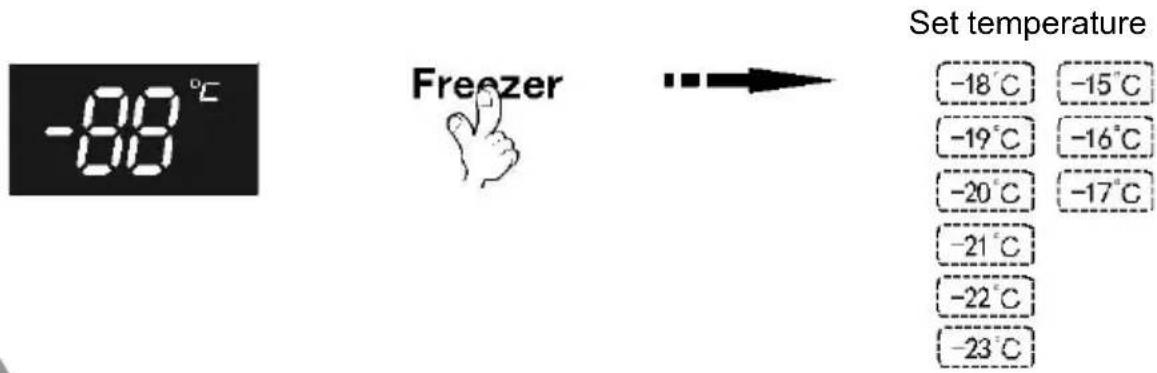
text_image
-88°C Freezer Set temperature -18°C -15°C -19°C -16°C -20°C -17°C -21°C -22°C -23°C
CAUTION: Do not place fresh food directly on frozen food.
REFRIGERATOR COMPARTMENT SETTINGS
The default freezer temperature is 5^ C. To change the temperature, press the "Fridge" button to scroll through the set temperatures.
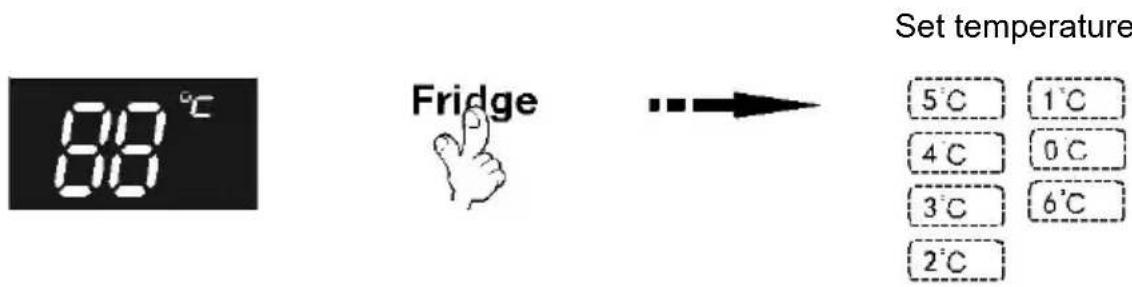
text_image
88°C Fridge Set temperature 5°C 1°C 4°C 0°C 3°C 6°C 2°CLOCK / UNLOCK" BUTTON
This product has a locking function.
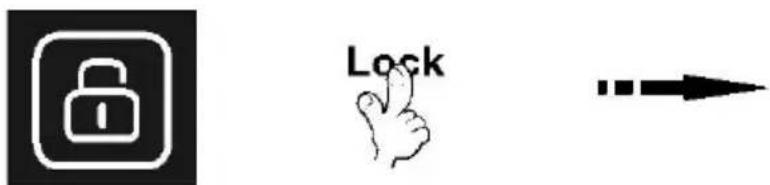
text_image
Three black-and-white icons: a padlock icon, a hand with 'Lock' text, and a right-pointing arrow.- Pressing the "Lock" key activates the lock mode and the lock icon is displayed.
- When the refrigerator is in this mode, the other buttons on the control panel are disabled. When the keys are touched, a buzzer sounds and the lock icon flashes.
- To exit the unlock mode, press and hold the lock key for 3 seconds until the icon no longer appears.
DOOR OPENING ALARM
When the refrigerator door is opened for more than 1 minute, an alarm sounds to remind users to close the door. After closing the door, the alarm stops automatically.
REFRIGERATOR COMPARTMENT
natural_image
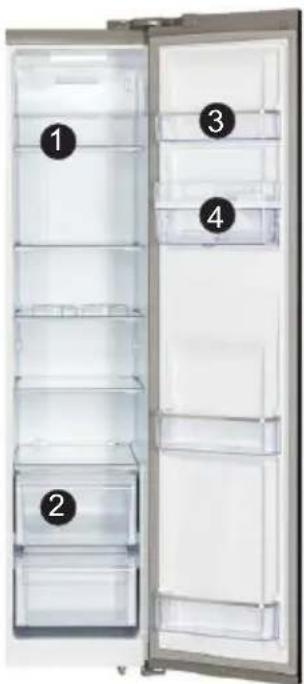
Interior view of a refrigerator with numbered compartments (1, 2, 3, 4) showing exterior and front views (no text or symbols on the doors)Suggested sections of the refrigerator compartment for various foods:
① Glass shelves: food made from wheat, milk, etc.
② Drawer: fruit, vegetables, etc.;
③ Upper tray: dairy products, fragrant foods, etc.
④ Water dispenser: can store water for direct drinking (the water in the water dispenser must be pure water).
The refrigerator compartment is mainly used to store food that is kept for a short time.
The refrigerator compartment is suitable for storing fruit, vegetables, drinks and other food that will be consumed quickly. It is suggested to put food in closed containers and then put it in the refrigerator.
Fruit and vegetable bin
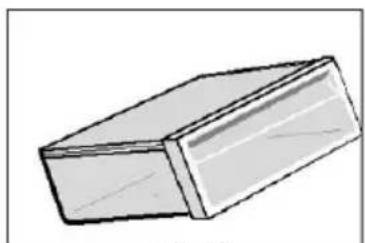
The refrigeration compartment has a fruit and vegetable drawer, which can retain the humidity of fruit and vegetables and keep the humidity of the drawer.
natural_image
Simple line drawing of a rectangular block with a flat top and rounded edges (no text or symbols)EN-27
Glass shelves
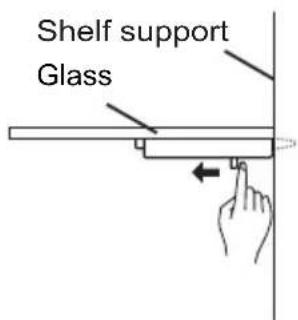
When you remove the glass shelf, press the movable pin located under the shelf with both hands and simultaneously push it inwards. Then the shelf can be easily removed.
text_image
Shelf support Glass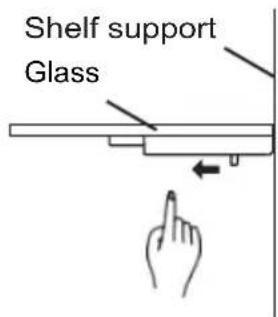
text_image
Shelf support GlassBottle compartment
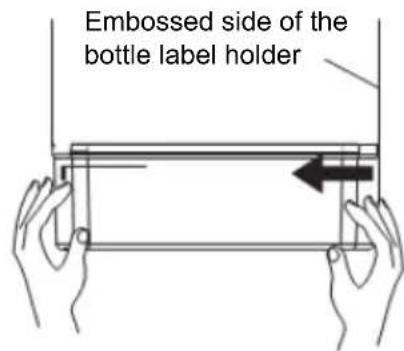
Disassembly: Hold both sides of the bottle rack with both hands. Push it on the smooth side (without relief) and push it inward in the direction of the arrow. When pushing hard, please note that the loop on the edge of the bottle tray is separated from the groove of the holder. The bottle shelf can then be removed.
Installation: Hold both sides of the bottle rack with both hands. First install the loop on the raised side. Then gently push the other side inward and the buckle can be attached.
text_image
Embossed side of the bottle label holderINSTRUCTIONS FOR USING THE CHILD SAFETY LOCK LEVER
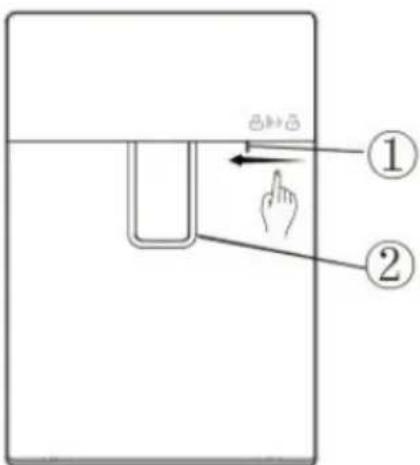
Press the child lock lock lever with your thumb in the direction shown below.
① and the water lever ② will be locked to prevent children from taking water.
Press in the opposite direction to unlock and take water
text_image
Diagram showing a hand pressing a button on a device, labeled with parts ① and ②.WATER TANK ASSEMBLY INSTRUCTIONS
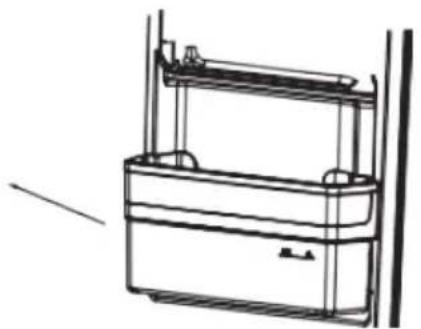
- Hold both sides of the tank with your hands and pull the tank out of the door slightly in the direction shown below.
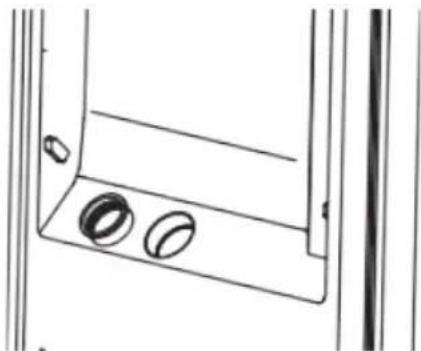
Notes: The transparent silicone parts of the sealed water valve can be removed in the meantime when removing the water tank. If so, remove them and reinstall them as follows.
natural_image
Line drawing of a mechanical device with two rectangular compartments and vertical supports (no text or symbols)i. Align the sealed part with the hole in the door and place it inside.
natural_image
Technical line drawing of a mechanical bracket with two circular features on its base (no text or symbols)ii. The assembly will be completed when the sealed part is inserted into the hole.
natural_image
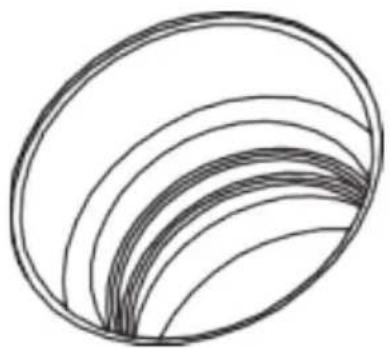
Abstract curved line pattern forming a layered oval shape (no text or symbols)- Turn counterclockwise to remove the water valve from the water tank for cleaning.
natural_image
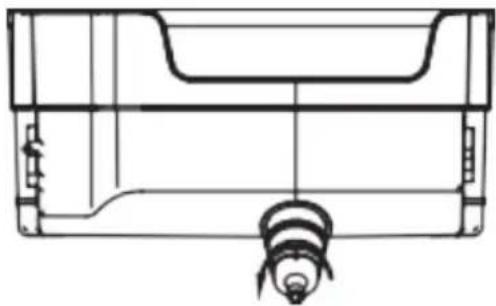
Technical line drawing of a mechanical component or housing (no text or symbols)- Lightly pinch the flange of the water tank cover to separate the water tank cover. Remove the other side with the same method. The tank and its cover can be cleaned after disassembly.
text_image
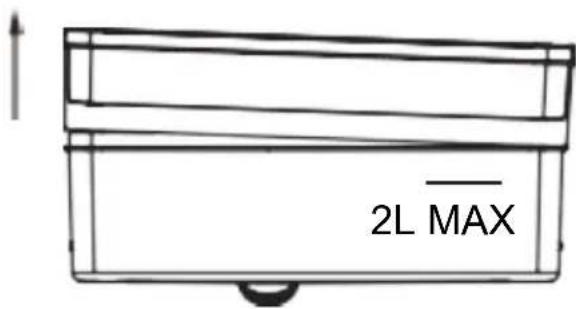
2L MAX- Install the water valve by turning it clockwise after cleaning. When installing the tank cover, install one side first (do not press it completely) and then install the other side. Press firmly on the edges of the tank cover to adjust it to the tank. Reinstall the entire water tank 45° from the door. Press lightly on the outside edge of the water tank to bring it into the door.
FILL THE TANK WITH PURE WATER ONLY
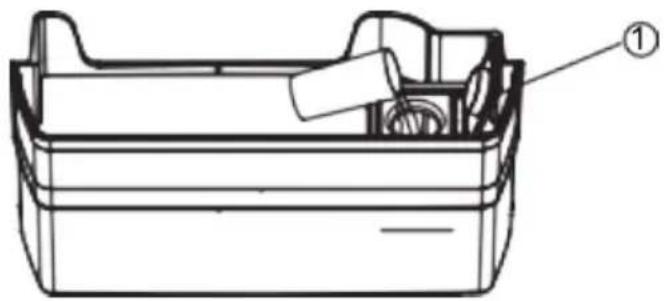
Open the water tank intake cover. Slowly fill the tank with pure drinking water up to the maximum filling line indicated by "2L". Then close the intake cover. To avoid spillage, please use a small container for water filling.
natural_image
Technical line drawing of a mechanical device with labeled component (no text or symbols present)ICE MAKING
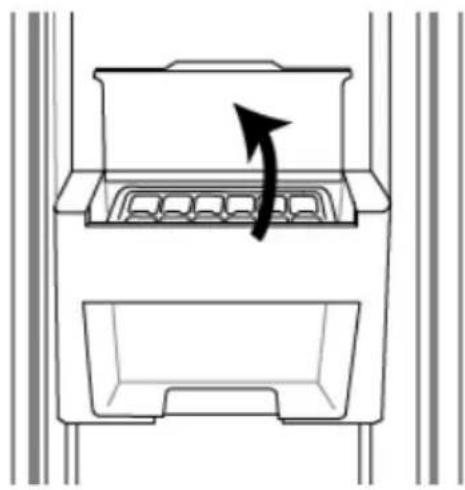
- Lift to open the ice bin cover.
natural_image
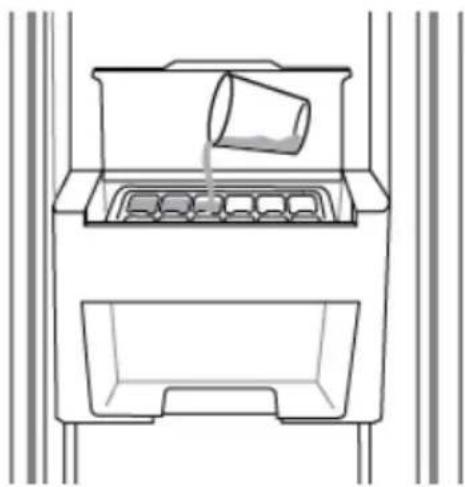
Diagram of a storage unit with an arrow indicating rotation or movement (no text or symbols)- Fill the compartments of the ice cube tray with water, avoid exceeding the maximum level, then close the cover.
natural_image
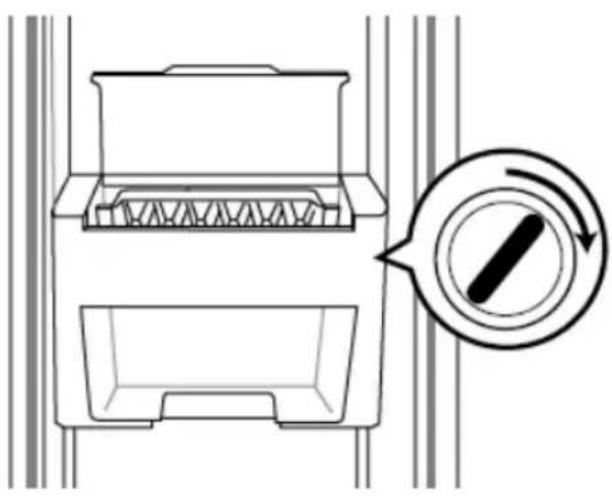
Line drawing of a container with a cup pouring liquid into a tray (no text or symbols)- Once the ice cubes have formed, turn the knob on the right side to drop them and collect them in the ice cube box located under the bin.
natural_image
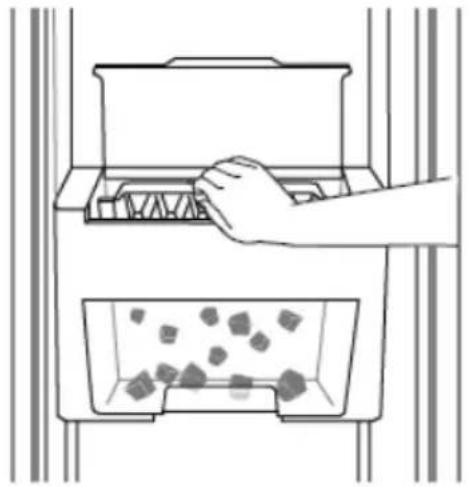
Diagram of a refrigerator interior with a circular button indicating rotation (no text or symbols)- A light tap on the bottom of the ice maker tray will help release the ice from the tray.
natural_image
Illustration of a hand placing a container into an empty storage tray with granular material inside (no text or symbols)- Pull the ice box by the handle at the bottom. The ice cubes can be picked up and used.
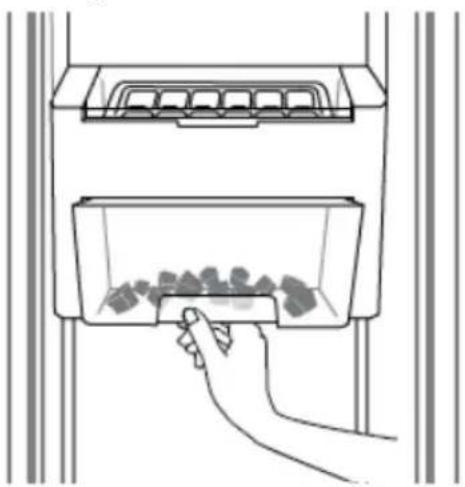
natural_image
Line drawing of a hand inserting a small object into a container with granular material inside (no text or symbols)FREEZER COMPARTMENT
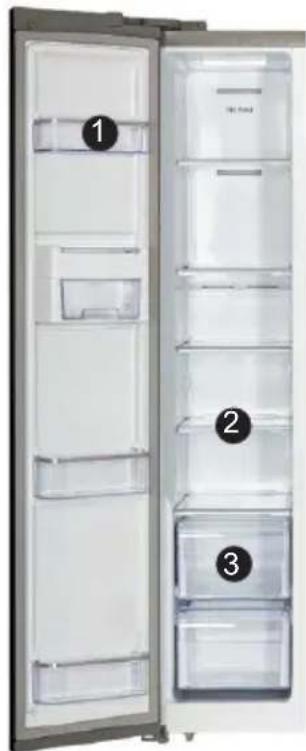
natural_image
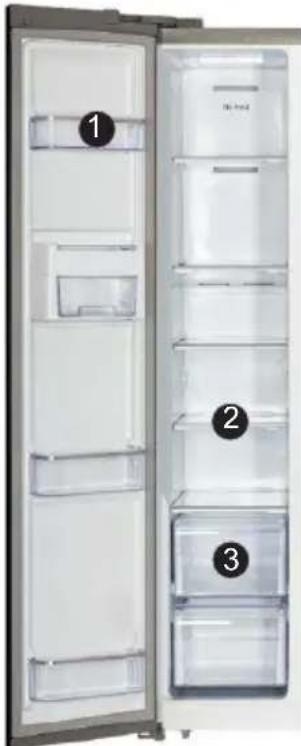
Interior view of a refrigerator with open doors and numbered compartments (no text or symbols visible)Suggested sections of the refrigerator compartment for various foods:
① Supérieur Upper shelf: small frozen items;
② Glass shelf: frozen food, such as fish, meat and ice cream;
③ Drawer: packaged frozen food, etc.
Freezer compartment drawer
The top drawer of the freezer compartment can freeze and store large quantities of food, and the bottom drawer is mainly used to store frozen food.
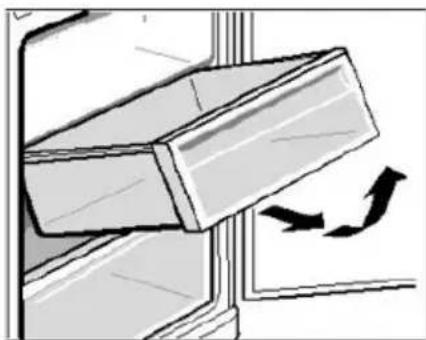
natural_image
Diagram of a mechanical component with an arrow indicating rotational motion (no text or symbols)
WARNING
Please avoid direct contact between food, especially fatty food stored in the refrigerator, and the coating. When the interior is stained with oil or soup, it should be cleaned immediately to avoid prolonged contact with the coating which could lead to corrosion and cracking of the coating.
FOOD STORAGE
WARNING
- When storing frozen food, place it inside the freezer compartment and not in the bottle rack.
- Do not place bottles or cans in the freezer compartment to avoid cracks due to frost.
- Before placing hot food in the refrigerator, first cool it to room temperature; otherwise, they increase energy consumption.
- Indicate the date of freezing on the freezer bag according to the different storage times of food to avoid exceeding the expiry date.
- Divide foods into pieces and package them separately, those that are easy to freeze and those that do not freeze together.
- The packaging materials must be odorless, airtight, watertight and non-polluting, so that the packaged food is not easily spoiled by other odors, without reducing the quality.
- Do not put too much fresh food in the freezer compartment at one time. Preferably, do not exceed the freezing capacity of the refrigerator.
- Defrosted food cannot be frozen again unless it has been processed into dishes; otherwise, their quality of service will be affected.
- Glass bottles or containers should not be placed in the freezer compartment or near the air outlet of the refrigeration compartment duct; otherwise, they can explode.
- Food should not obstruct the air outlet; otherwise there will be abnormal air circulation.
ENERGY SAVING TIPS
- Be sure to keep the refrigerator away from heat sources and direct sunlight.
- Before storing hot food, cool it to room temperature, then put it in the refrigerator.
- Close the door, reduce the frequency and the opening time.
- When defrosting frozen food, you can place it in the refrigeration compartment, which will help to refrigerate the compartment.
- Assurez-vous que le capteur de température n'est pas couvert ou bloqué par des aliments et maintenez une distance correcte entre les aliments et le capteur.
INSTALLATION OF THE TEMPERATURE INDICATOR
Coldest zone:
- You will get a better preservation of your food if you place them in the cold zone best suited to their nature.
- The symbol below indicates the location of the coldest area of your refrigerator.
- This zone is delimited at the top by the low temperature compartment and at the bottom by the symbol or by the shelf positioned at the same height.
- In order to guarantee the temperatures in the coldest zone, take care not to modify the positioning of this shelf.
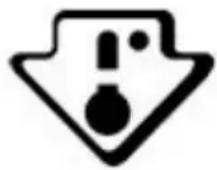
To help you adjust your refrigerator, it is equipped with a temperature indicator that will control the average temperature in the coldest area.

Warning:
This indicator is intended to work only with your refrigerator, be careful not to use it in another refrigerator (in fact, the colder zone is not the same), or for another use.
CHECKING THE TEMPERATURE IN THE MOST COLD AREA
Once the temperature indicator has been installed, you can check regularly that the temperature of the coldest zone is correct, and, if necessary, adjust the thermostat accordingly as indicated above.
For proper storage of food in your refrigerator and particularly in the coldest area, make sure that the temperature indicator reads "OK". If "OK" does not appear, the average temperature of the zone is too high. Set the thermostat to a higher position.
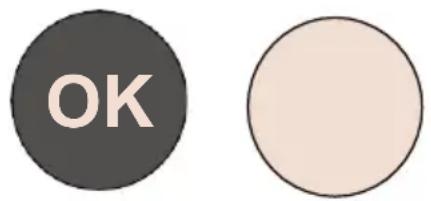
text_image
OKWhenever you change the thermostat, wait for the temperature inside the device to stabilize before proceeding to a new setting if necessary. Do not change the position of
Thermostat gradually and wait at least 12 hours before proceeding to a new check and a possible modification.
NOTES:
After loading the appliance with fresh food or after repeated opening (or extended opening) of the door, it is normal that the word "OK" does not appear in the temperature indicator.
Wait at least 12 hours before readjusting the thermostat.
Tips - Energy Savings
natural_image
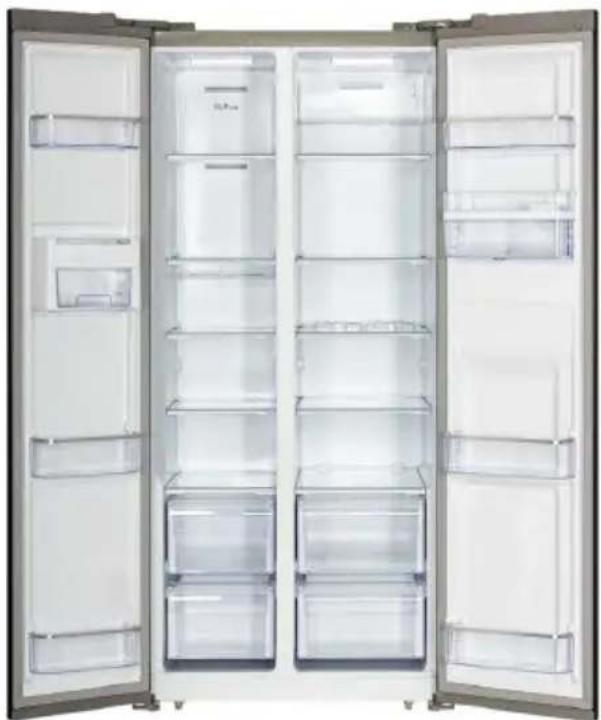
Interior view of a modern stainless steel refrigerator with open doors showing empty shelves (no visible text or labels)A - Freezer compartment
B - Refrigerator compartment
- how to arrange the drawers, bins and shelves so that the energy is used as rationally as possible by the apparatus.
- Install the unit in a cool, dry, properly ventilated room.
- Be careful not to expose the unit to direct sunlight or place it near a direct source of heat (for example, near a radiator).
- Never block the ventilation openings or grilles of the appliance.
- Allow food to cool before placing in the appliance.
- Place the frozen products in the refrigerator to thaw them.
- The low temperature of the frozen products will help cool the food in the refrigerator.
- Defrost the freezer when the ice has accumulated. A thick layer of ice can affect the transfer of cold to frozen products and increase the energy consumption of the unit.
- Do not leave the appliance doors open for too long when storing or removing food from the appliance. The ice will form all the less in the freezer as you leave the door open for as short a time as possible.
- When you freeze food or want to store it in the freezer, place it directly in the upper freezer compartment.
VI. ENTRETIEN ET NETTOYAGE
ICING
This unit has an automatic defrost function, without manual operation.
CLEANING
Precautions for internal and external cleaning of the refrigerator:
- Before cleaning, please unplug the power plug.
- During cleaning, make sure that there is no water entering the switch, the control panel, the door lamp and the upper control box.
- Remove dirt on the outside of the refrigerator with a mild detergent, then wipe with a clean, soft cloth and let the refrigerator dry naturally.
- When cleaning the sealing strips of the door, always use clean water, wipe with a clean, soft cloth, and allow the refrigerator to dry naturally. Moisten a soft cloth with warm water or a neutral detergent to wipe the refrigerator body except for the door sealing strips.
- It is forbidden to rinse the refrigerator directly with water, which would affect the electrical insulation properties, etc.
- It is forbidden to clean the refrigerator with metal sponges, dish brushes, coarse abrasive detergents, strong alkaline detergents or flammable or toxic cleaning fluids.
After cleaning, reconnect the refrigerator plug.
When you are not going to use the refrigerator for a long time, remove all food, unplug the power cord, clean the interior thoroughly and leave each door OPEN to prevent odors.
GENERAL INFORMATIONS
On holiday
When going on vacation, it is better to keep the refrigerator running continuously and leave food inside that can be stored for a short time. If you want to stop the refrigerator, remove all food, unplug the appliance, clean the inside of the refrigerator completely and open the door to prevent odors.
In case of power failure
- Generally, a short power outage does not have a dramatic effect on the refrigerator temperature. However, if the power outage lasts a long time, you must reduce the frequency of opening the refrigerator and you must not put fresh food in the refrigerator (avoids an acceleration of the increase of the temperature of the refrigerator).
- If you know that a power failure is going to occur, you can turn on the "Super Freezer" feature early to keep the fridge temperature low.
Stop
It is not usually recommended to stop a refrigerator because it can have an impact on its life
NORMAL PHENOMENA
Failure of touch
Please check the control panel to see if the refrigerator is in lock mode. When in lock mode, no keys will work.
Long to start
When the ambient temperature is too high, it takes longer to start the device.
Hot central beams
The central beams are hot after a certain time of operation of the device, it is a normal phenomenon.
Drops of dew
When air from outside flows over the cold interior surfaces of the refrigerator, dew drops may form.
If the place where the unit is installed is very humid or during the wet season, dew drops may form on the outside surface of the refrigerator. This is a natural phenomenon that occurs when the weather is wet. Wipe the drops of water with a dry cloth.
Noise
When operating the refrigerator for the first time, it runs at high speed to cool down quickly and the sound may appear to be louder. When the internal temperature falls below a certain level, the noise fades.
If you have the impression that something is bumping into something else inside the refrigerator, this is normal.
This sound is due to the high speed operation of the compressor. These are normal noises.
Hot compressor
In operation, the external temperature of the compressor is above 80 °C. Please do not touch the compressor as this can cause serious injury.
Compressor running for a long time
When the ambient temperature is too high or when too much fresh food has been placed in the refrigerator, it takes time to cool the refrigerator and for the appliance to operate at the desired temperature.
VII. TROUBLE SHOOTING
| Problem | Possible cause | Solution |
| No display on the billboard. | The power plug of the device is not inserted correctly into the wall outlet. The fuse of the household power supply is not engaged. | Check if there is power; the fuse must be on. |
| Alarm | The door is slightly open or has not been closed for more than a minute. | Close the door completely. |
| The compressor does not work | It is in defrost mode.The power supply is not properly connected. | This is normal in case of defrosting.Check that the power supply is correctly connected. |
| The compressor runs for a long time | The refrigerator has been recently disconnected for a period of time;Too many fresh or hot foods have been introduced into the refrigerator;Doors are opened too frequently or for too long. | It takes a few hours in the refrigerator to cool completely;Hot foods will operate the refrigerator longer until the desired temperature is reached;A warm air intake in the refrigerator makes it work longer. Open the door less frequently. |
| Vibration noise | The soil is not regular or it is fragile;Objects placed on the refrigerator vibrate;The refrigerator touches the wall or closet. | Make sure that the floor is level and that it can support the refrigerator properly;Remove the objects;Move the refrigerator so that it does not touch the wall or cabinet. |
For any other problem occurring on your device: contact the After-Sales Service.
VIII. DISPOSAL
natural_image
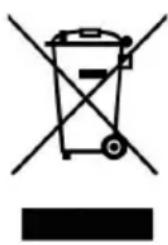
Symbol of a trash bin with no text or labelsThis logo affixed to the product means that it is a device whose treatment as waste falls within the framework of the directive 2012/19 / EU of July 4th, 2012, relative to the waste of electrical and electronic equipment (WEEE). This means that this product must be supported by a selective collection system in accordance with the European directive
mentioned above in order to be either recycled or dismantled in order to reduce any impact on the environment.
Hazardous substances in electrical and electronic equipment can have potentially harmful effects on the environment and human health.
Thus, at the end of the life of this appliance, it must not be disposed of with unsorted municipal waste. Recovery and collection systems are made available to you by local authorities (waste disposal centers) and distributors.
This device must not be thrown on public roads. You have the obligation to use the selective collection systems available to you.
IX. WARRANTY
The warranty does not cover the wear parts of the product, nor the problems or damages resulting from:
- superficial deterioration due to normal wear of the product;
- defects or deterioration due to product contact with liquids and corrosion caused by rust;
- any incident, abuse, misuse, modification, disassembly or unauthorized repairs;
- any unsuitable maintenance operation, use not in accordance with the product instructions or connection to incorrect voltage;
- any use of accessories not supplied or not approved by the manufacturer.
The warranty will be void if the nameplate and / or serial number of the product is removed.

natural_image
Abstract geometric shapes with no text or symbolsContinental Edison
www.continentaledison.fr