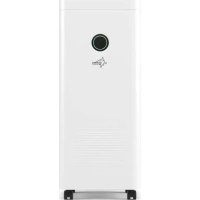
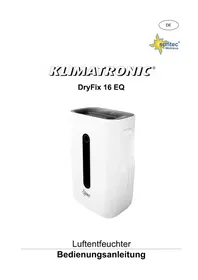
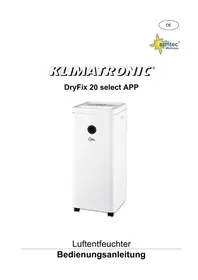
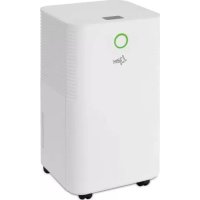
DryFix 16 Select App - Dehumidifier SUNTEC - Free user manual and instructions
Find the device manual for free DryFix 16 Select App SUNTEC in PDF.



| Product type | Dehumidifier |
| Brand | Suntec (Suntec Wellness GmbH) |
| Model | DryFix 16 Select App |
| Dimensions (approx.) | 35 x 25 x 55 cm |
| Weight (approx.) | 9 kg |
| Power supply | 220-240 V ~ 50 Hz |
| Power consumption | 300 W (max) |
| Refrigerant | R290 (55 g) |
| Max dehumidification | 16 L/24h (at 30°C, 80% RH) |
| Tank capacity | 2.5 L |
| Control types | Touch panel + smartphone app |
| Operating modes | Manual dehumidification, automatic, laundry drying, ventilation |
| Humidity setting | 30% to 80% (manual mode) |
| Fan speed | Low or high |
| Timer | 0-24h (programmed on/off) |
| Humidity indicator | Color display: blue (<50%), green (50-70%), red (>70%) |
| Wi-Fi / App function | Yes, via Suntec Wellness app |
| Air filter | Washable dust filter |
| Cleaning | Soft dry cloth; filter washable with water |
| Continuous drainage | Yes, via drainage hose (supplied) |
| Operating temperature | 5°C to 32°C |
| Operating humidity | 10% to 90% RH |
| Noise level | ~42 dB(A) (low speed) |
| Child safety | Use by children >8 years under supervision |
| Warranty | 24 months |
Frequently Asked Questions - DryFix 16 Select App SUNTEC
User questions about DryFix 16 Select App SUNTEC
0 question about this device. Answer the ones you know or ask your own.
Ask a new question about this device
Download the instructions for your Dehumidifier in PDF format for free! Find your manual DryFix 16 Select App - SUNTEC and take your electronic device back in hand. On this page are published all the documents necessary for the use of your device. DryFix 16 Select App by SUNTEC.
USER MANUAL DryFix 16 Select App SUNTEC
natural_image
White outdoor air purifier with a circular vent and brand logo (no visible text or symbols on the device body)Luftentfeuchter
Bedienungsanleitung
Sicherheitshinweise
VORSICHT!
natural_image
Line drawing of a portable electronic device with a screen and hand inserting a box (no text or symbols)natural_image
Diagram of a refrigerator with internal compartments and a grid panel, showing directional arrows (no text or symbols)Lagerung
Thank you for buying this product from Suntec Wellness. Please read the manual carefully before using the appliance. Retain this manual for future reference.
Safety Instructions
CAUTION!
This appliance can be used by children aged from 8 years and above and persons with reduced physical, sensory and mental capabilities or lack of experience and knowledge if they have been given supervision or instruction concerning use of the appliance in a safe way and understand the hazards involved. Cleaning and user maintenance shall not be made by children without supervision. Children of less than 3 years should be kept away unless continuously supervised. Children aged from 3 years and less than 8 years shall only switch on/off the appliance provided that it has been placed or installed in its intended normal operating position and they have been given supervision or instruction concerning use of the appliance in a safe way and understand the hazards involved.
Children aged from 3 years and less than 8 years shall not plug in, regulate and clean the appliance or perform user maintenance.
- Please read the instruction manual carefully before using your dehumidifier and keep it in a safe place.
- Please never put the appliance in water or any other liquid.
- Please place the appliance on a stable flat surface to avoid loud noises and vibrations.
-
Never switch on the appliance in case of malfunction or if a cable or plug has been damaged, or if the appliance has been dropped or damaged in any other way.
-
Repairs to electrical equipment must only be carried out by qualified persons; incorrect repairs can be a major source of danger to users and will invalidate the warranty.
- Please unplug the appliance when not using it, before moving it and/or before cleaning it.
- Please only operate the appliance at the mains voltage indicated on the rating label.
- Please do not use an extension cord to connect the unit.
- Please use the appliance only in the household and only for the purpose for which it was designed.
- Please do not take the appliance out of the household.
- Please do not operate the appliance near heating appliances and flammable or hazardous objects.
- If the dehumidifier is used in a room with appliances that emit gas, the room must be regularly and frequently ventilated.
- Please empty and dry the water tank and the appliance if it is not used for a long time. This will prevent mould growth and unpleasant odours inside the appliance.
- Please do not place heavy objects on the appliance.
- Please do not hang curtains or wet clothes directly in front of the air outlet, this will cause the unit to overload.
- Do not lead the drainage tube outside when the temperature is low.
- Please empty the water tank before moving the unit to avoid water spillage.
- Please do not tip the appliance as leaking water may cause damage to the appliance.
- If the connection cable has been damaged, please do not use the drain hose outside.
If the connection cable has been damaged, please contact your supplier to avoid danger. - If there is a smoke smell or smoke during operation,
please unplug the appliance immediately and contact your supplier.
- Please pull only on the plug and not on the cable.
- Please do not modify the unit in any way. Please do not attempt to disassemble or repair the unit yourself.
- Please operate the unit with dry hands only.
- Please do not insert any foreign objects into the unit.
- Please do not operate the appliance outside. Sun, rain, or low temperature may cause damage to the unit or electric shock.
- Please never cover the outlet or inlet of the unit.
- The unit should be placed at least 50 cm away from the wall or other obstacles/objects.
- Please keep the dust filter and air outlet/inlet grilles clean. They should be cleaned regularly to ensure best performance.
Important.
The appliance must always be stored and transported in an upright position.
If in doubt, we recommend that you wait at least 24 hours before switching the hours before switching the unit on again.
Control via smartphone / SUNTEC Wellness -App
- Please download the "SUNTEC Wellness" app from the App Store or Google Play and install it.
- Please follow the step-by-step instructions in the app to connect your device to the WLAN and set up the control.
- If you have any further questions about the app, please visit our web page at www.suntec-wellness.de/suntec-app/


Installation
- To save energy and ensure optimal performance of the appliance, please close all doors and windows in the room.
- Please place the appliance on a flat level surface.
• To avoid loud noises and vibrations, you can place a small carpet or rubber mat under the unit.
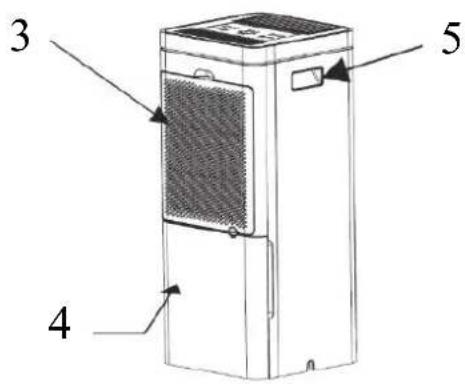
Parts

1 Air outlet
2 Humidity control light/colour indicator
3 Air inlet
4 Water tank
5. Handles
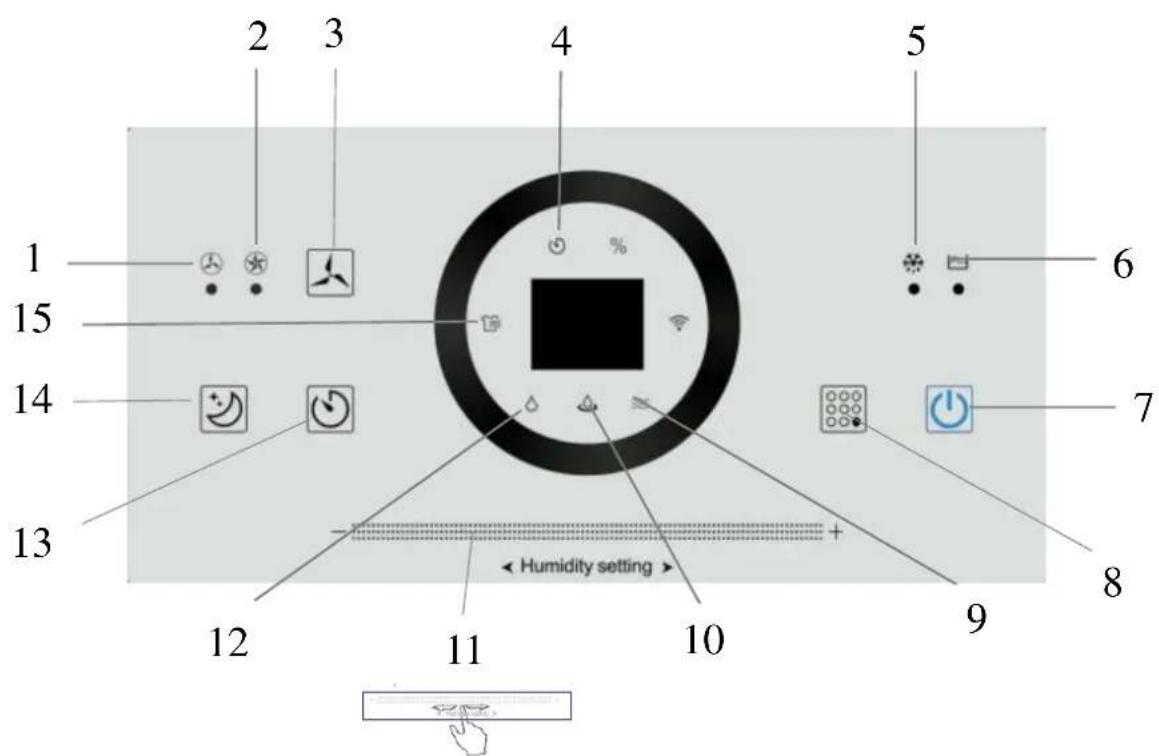
Buttons:
3 Fan speed
7 On/Off
8 Mode
11 Digital slider
13 Timer
14 Sleep mode
Light indicators:
1 Low fan speed
2 High fan speed
4 Timer
5 Defrost mode
6 Full water tank
9 Fan mode
10 Automatic dehumidification
12 Manual dehumidification
15 Laundry drying
Functions
On/off:
- Please plug in the unit.
- Please make sure that the water tank is empty before switching on.
- Please press the On/Off button (7) to switch the unit on or off. An acoustic signal sounds and indication light for the manual dehumidification (12) lights up.
- The unit starts automatically with the previous setting.
Mode:
- Please press the mode button (8) after switching on the appliance to select manual dehumidification
laundry drying, fan mode or automatic dehumidification.

Manual dehumidification :
- Please press the mode button (8) to switch on the dehumidification mode. The corresponding mode indication lights up. In this mode, you can set the desired level of dehumidification and the fan speed.
- Please use the digital slider (11) to set the dehumidification from 30% - 80%.
- Please use the speed button (3) to select between low and high fan speed.
Automatic dehumidification:
- Please press the mode button (8) to switch on the automatic dehumidification mode. The corresponding mode indication (10) lights up.
- The fan speed and humidity level cannot be set in this mode, the unit dehumidifies automatically and with
low fan speed
Laundry drying function:
- Please press mode button (8) to switch on the laundry drying function. The corresponding mode indication (15) lights up.
- The ventilation speed and humidity level are set automatically and cannot be set manually, the appliance dehumidifies automatically and with high wind speed.
• This function helps you to dry clothes, shoes or rugs faster.
Fan mode:
- Please press the "Fan speed" button (3) to switch on the ventilation mode. The corresponding mode indication (9) lights up.
• In this mode, only the fan is working, dehumidification function is not available. - For low fan speed, press the fan speed button once, the low fan speed indication (1) and the fan mode indication (9) light up.
- For a high fan speed, press the fan speed key again. The high fan speed indication (2) and the fan mode indication (9) light up.
Timer:
- Please press the timer button (13) to set the desired time 0-24h with the digital slider (11).
- When the unit is switched on, press the timer button to set the shut-off time as described above.
- When the unit is switched off, press the timer key to set the switch-on time as described before.
Sleep mode:
- Please press the sleep mode button (14) to switch on the sleep mode. All indication lights and the display will be switched off. The "Water tank full" light will light up in case the water tank should be emptied.
Colour light indication:
- If the humidity of the ambient air is below 50%, the indicator light lights up in blue.
• If the humidity is between 50% and 70%, the indicator light is green.
• If the humidity is above 70%, the indicator light is red.
Drainage
Water tank:
- As soon as the water tank is full, the unit stops working, a warning signal sounds and the 'water tank full' indication (6) lights up on the display.
- Please switch off and unplug the unit.
- Carefully pull out the water tank and tip out the water by using the handle.
- Please clean and dry the empty tank, and carefully place it back into the machine.
•
Continuous drainage:
- Please pull the plug out of the outlet.
- Please remove the water tank from the appliance as described above and remove the drainage hose.
- Carefully push the water tank back into the appliance without the drainage hose.
• You will find the drainage opening on the back of the machine. - Please insert the drainage hose into the opening and place the other end of the hose into a container so that the water can drain off continuously.
- Please make sure that the hose is connected tightly to prevent the water from leaking.
Cleaning and maintenance
To avoid injury, please switch off and unplug the appliance before starting service or cleaning.
Cleaning:
- Please unplug the unit.
- Please clean the unit with a dry and soft cloth. For heavy dirt, please use a slightly damp cloth.
- Please do not use any chemical products (such as petrol, alcohol, etc.). The unit's housing and the unit's surface may be damaged.
Cleaning the dust filter:
- Please open the filter cover on the backside of the unit and carefully remove the filter.
- To remove dust from this filter, please use a vacuum cleaner or to tap it out carefully.
- If the filter is very dirty, wash it in water with neutral detergent, rinse well with water and let it dry.
- Carefully put the filter back into the unit and close the filter cover.
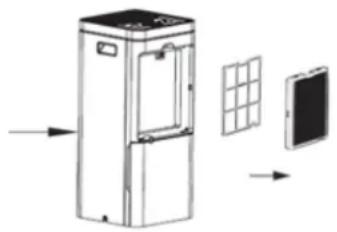
natural_image
Diagram of a refrigerator with internal compartments and a grid panel, showing directional arrows (no text or symbols)Storage
- Please unplug the unit and bundle the power cord.
- Please empty the water tank, wipe out the tank with a cloth and reinstall it.
- Please clean the air filter as described above and then reinstall it in the unit.
- For storage, place the unit in an upright position and avoid direct sunlight.
Troubleshooting
| problem | cause | solution |
| The unit is not working | Is the unit connected to the power source? | Plug-in the unit. |
| Is the 'water tank full' indicator lighting up (water tank is full or incorrectly placed)? | Empty the water tank and install it correctly. | |
| Is the water tank installed correctly? | Please check the position of the water tank. | |
| Are the air outlet slats open? | Please open the air outlet slats. | |
| The unit is in defrost mode. | This is a normal process and helps to protect internal parts. Once the process is complete, the unit returns to normal operation. | |
| The dehumidification performance is insufficient | Is the air inlet or outlet blocked? | Check the air inlet and outlet and remove any obstructing objects |
| Is the air filter dirty? | Clean the air filter as described in the operating instructions | |
| Does the unit operate in the fan mode? | Please switch to dehumidification mode. | |
| Is the room temperature/humidity too low high? | The unit should be operated at the air temperature of 5°C - 32°C and a humidity of 10%-90%. The unit cannot dehumidify the air optimally at ambient temperature and/or humidity level below/above this. | |
| Humidity does not drop | Is the room size too large? | Please observe the recommended room size indicated on the packaging. |
| Are all windows and doors in the room closed? | Please close all doors and windows if necessary. | |
| Loud noises during start-up | Does the unit stand upright on the stable surface? | Place check the position of the unit. |
| The circulation of the refrigerant inside may cause noise. | The noises disappear as soon as the refrigerant circuit has stabilised. | |
| Unpleasant smells during start-up. | This is not a defect. | Unpleasant smells during start up are normal and will disappear after a short time. If the surrounding objects are heavily soiled, e.g. by cigarette smoke, this can also lead to unpleasant smells from the air outlet. |
| The start-up is interrupted. | Is the room temperature higher than the operating temperature? | The unit restarts automatically as soon as the ambient temperature has dropped. |
| The clothes do not get dry. | Is the laundry too far away from the unit? | Please make sure the laundry is exposed to the air flow. |
| Is the room temperature lower than the operating temperature? | The laundry dries more slowly when the ambient temperature is low. Try drying your laundry in another room. | |
| There is water in the water tank (before the first start-up). | This is not a defect. | Some water may remain after the factory function test has been carried out. |
Refrigerant
(CE) N 842/2006: This dehumidifier contains the refrigerant R290. The amount of refrigerant is less than 1kg and is in a closed cooling circuit. The coolant does have zero ozone depletion potential, but is a so-called greenhouse gases under the Kyoto Protocol and may thus contribute to global warming, if it is released to the atmosphere. Therefore, only trained technicians with refrigerant certificate make a filling or emptying. Suntec your dehumidifier does not have to use if used properly and undamaged coolant circuit can be refilled with refrigerant.
R290, GWP: 3, 55g = 0.000165t CO2e
EC-Declaration of Conformity
The unit complies with the essential health and safety requirements of the European Union. The EC declaration of conformity is the basis for the CE marking of this unit.
With the publication of this manual, all previous are not valid. SUNTEC, SUNTEC Wellness, KLIAMTRONIC and the Sun logo are registered trademarks. © 2021 SUNTEC WELLNESS GMBH
Note concerning protection of environment
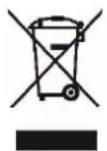
This product must not be disposed of via normal household waste after its service life but must be taken to a collection station for the recycling of electrical and electronic devices. The symbol on the product, the operating instructions or the packaging indicate such disposal procedures. The materials are recyclable in accordance with their respective symbols. By means of re-use, material recycling or any other form of recycling old appliances you are making an important contribution to the protection of our environment. Please ask your local council where your nearest disposal station is located.
No liability is assumed for printing errors and mistakes.
natural_image
Line drawing of a mechanical device with a screen and handle, showing hands interacting with the base panel (no text or symbols)natural_image
Diagram of a refrigerator with internal door and solar panel array, showing airflow direction (no text or symbols)Almacenamiento
natural_image
Line drawing of a portable electronic device with a screen and hand inserting a door (no text or symbols)natural_image
Diagram of a refrigerator with internal compartments and a grid panel, showing directional arrows (no text or symbols)Stockage
Controllo tramite smartphone / app SUNTEC Wellness
natural_image
Line drawing of a portable electronic device with a screen and hand inserting a bag (no text or symbols)Manutenzione
natural_image
Diagram of a refrigerator with internal compartments and a grid panel, showing airflow direction (no text or symbols)Stoccaggio
natural_image
Line drawing of a portable electronic device with a monitor and hand inserting a bag (no text or symbols)Continue condenswaterafvoer:
natural_image
Diagram of a refrigerator with solar panel and screen, showing internal components and directional arrows (no text or labels)Opslag
natural_image
Line drawing of a mechanical device with a screen and handle, showing internal components (no text or symbols)natural_image
Diagram of a refrigerator with internal compartments and a solar panel, showing airflow direction (no text or symbols)Armazenamento
natural_image
Line drawing of a device with a screen and hand inserting a box (no text or symbols)Kontinuirano odvođenje kondenzirane vode:
• Molimo izvucite utikač iz utičnice.
- Molimo uklonite spremnik za vodu na gore opisani način i izvadite drenažno crijevo.
- Spremnik za vodu gurnite bez drenažnog crijeva pažljivo natrag u uređaj.
- Drenažni otvor možete pronaći na stražnjoj strani uređaja.
- Molimo uvedite drenažno crijevo u otvor i postavite ga na drugom kraju crijeva u prihvatnu posudu, tako da voda može kontinuirano otjecati.
- Molimo obratite pozornost na to, da crijevo bude čvrsto priključeno, kako bi curenje vode bilo izbjegnuto.
Održavanje
natural_image
Diagram of a refrigerator with solar panel and door, showing internal structure and airflow direction (no text or symbols)Skladištenje
- Molimo izvucite mrežni utikač uređaja i složite mrežni kabel.
- Molimo ispraznite vodu iz spremnika za vodu, spremnik prebrišite krpom i ponovo ga vratite.
- Molimo očistite filtar za zrak na gore opisani način i zatim ga ponovo instalirajte u uređaju.
- Uređaj za skladištenje postavite okomito i izbjegavajte neposrednu izloženost sunčevoj svjetlosti.
Vremenski programator:
- Za podešavanje željenog vremena od 0 do 24 h pomoću digitalne pomične trake (11) pritisnite tipku vremenskog programatora (4).
- Kada je uređaj uključen, pritisnite tipku vremenskog programatora da podesite vrijeme isključivanja na prethodno opisan način.
- Kada je uređaj isključen, pritisnite tipku vremenskog programatora da podesite vrijeme uključivanja na prethodno opisan način.
Stanje mirovanja:
- Za uključivanje režima mirovanja pritisnite tipku režima mirovanje (13). Isključuju se svi svjetlosni indikatori i zaslon. Ako je potrebno isprazniti spremnik za vodu, uključit će se svjetlosni indikator „Spremnik za vodu pun“.
natural_image
Line drawing of a desktop computer with a monitor and open door, showing hands interacting with the screen (no text or symbols)Održavanje
natural_image
Diagram of a refrigerator with internal compartments and a grid panel, showing airflow direction (no text or symbols)Skladištenje
- Izvucite strujni utikač iz utičnice i namotajte strujni kabel.
- Izlijte vodu iz spremnika za vodu, obrišite spremnik krpom i ponovo ga umetnite.
- Zračni filter očistite kako je prethodno opisano, a zatim ga ponovo stavite u uređaj.
- Uređaj skladištite u uspravnom položaju i izbjegavajte direktno sunčevo zračenje.
Rješavanje problema
| Problem | Uzrok | Rješenje |
| Uređaj ne radi. | Je li uređaj priključen na strujno napajanje? | Priključite strujni kabel. |
| Svijetli li indikator „Spremnik za vodu pun“ (spremnik za vodu je pun ili je pogrešno postavljen)? | Ispraznite spremnik za vodu i ponovo ga postavite u ispravan položaj. | |
| Je li spremnik za vodu propisno postavljen? | Provjerite položaj spremnika za vodu. | |
| Jesu li krilca za izlaz zraka otvorena? | Otvorite krilca za izlaz zraka. | |
| Uređaj se nalazi u režimu odleđivanja. | To je uobičajen proces i služi za zaštitu unutrašnjih dijelova. Čim se proces završi, uređaj se vraća u normalan način rada. | |
| Učinak odvlaživanja je nedovoljan. | Je li ulaz ili izlaz zraka blokiran? | Provjerite ulaz i izlaz zraka i eventualno uklonite predmete koji smetaju. |
| Je li zračni filter zaprljan? | Očistite zračni filter na način opisan u uputstvu za upotrebu. | |
| Da li se uređaj nalazi u režimu pročišćavanja zraka? | Prebacite uređaj u režim odvlaživanja. | |
| Je li temperatura okruženja/vlažnost zraka preniska/previsoka? | Uređaj se treba upotrebljavati kada je temperatura zraka od 5 °C do 32 °C, a vlažnost zraka od 10% do 90%. U slučaju rada pri temperaturama i/ili vlažnosti zraka izvan navedenih okvira uređaj ne može optimalno odvlaživati zrak. | |
| Vlažnost zraka se ne spušta. | Je li prostorija prevelika? | Obratite pažnju na podatke o preporučenoj veličini prostorije navedene na ambalaži. |
| Jesu li svi prozori i sva vrata u prostoriji zatvoreni/a. | Ako je potrebno, zatvorite sva vrata i sve prozore. | |
| Glasni šumovi tokom stavljanja u pogon. | Stoji li uređaj nakrivo ili je nestabilan? | Stavite uređaj na stabilnu i ravnu površinu. |
| Cirkulacija rashladnog sredstva u uređaju može uzrokovati šumove. | Šumovi nestaju čim se krug rashladnog sredstva stabilizuje. | |
| Neugodni mirisi tokom stavljanja u pogon. | To nije kvar. | Neugodni mirisi prilikom prvog stavljanja u pogon uobičajena su pojava i nestaju za kratko vrijeme. Ako su predmeti iz okruženja vrlo zaprljani, npr. od dima cigareta, i to može izazvati pojavu neugodnih mirisa iz izlaznog otvora za zrak. |
| Stavljanje u pogon se prekida. | Je li temperatura okruženja viša od radne temperature? | Uređaj se automatski uključuje kada se temperatura okruženja spusti. |
Rublje se ne suši.
natural_image
Line drawing of a portable electronic device with a screen and open door, showing hands inserting or removing components (no text or symbols)Stalno odvajanje kondenzirane vode:
natural_image
Diagram of a refrigerator with solar panel and screen, showing internal components and directional arrows (no text or symbols)Skladiščenje
natural_image
Line drawing of a device with a monitor and open door, showing hands interacting with the handle (no text or symbols)natural_image
Diagram showing a refrigerator with doors and a grid panel, alongside a smartphone (no text or symbols present)Skladovanie
natural_image
Line drawing of a device with hands inserting a card into a cabinet (no text or symbols)natural_image
Diagram of a refrigerator with internal compartments and a solar panel, showing airflow direction (no text or symbols)Uložení
natural_image
Line drawing of a device with hands inserting a card into a cabinet (no text or symbols)Karbantartás
natural_image
Diagram of a refrigerator with internal compartments and a grid panel, showing directional arrows (no text or symbols)Tárolás
natural_image
Line drawing of a desktop computer with monitor and hand inserting a box (no text or symbols)natural_image
Diagram of a refrigerator with internal compartments and a grid panel, showing directional arrows (no text or symbols)Przechowywanie
For this appliance we assure 24 months warranty.
During the 24 months warranty we guarantee to repair your appliance free of charge or to provide your seller the spare parts free of charge if the appliance fails to work due to production failure.
Other claims are excluded from this warranty. We will not be liable for any defects caused by acts of nature, improper use, neglection of the instruction manual, damage from continuous use and damages during transportation.
This warranty card is only applicable with the according invoice.
In case of service please bring your purchased product to your seller.
Product name:
Serial number:
Name of buyer:
Date of purchase:
Stamp and signature of seller:
Manufacturer:
Suntec Wellness GmbH
Holzstraße 2
40221 Düsseldorf
Germany
SUNTEC WELLNESS GMBH
HOLZSTRAße 2
40221 DÜSSELDORF
NÉMETORSZÁG
www.suntec-wellness.de
Garanciajegy
vásárlás helye
vásárlás dátuma
cikkszám/EAN
Kedves Vásárló,
- Sicherheitshinweise
- VORSICHT!
- Lagerung
- Safety Instructions
- CAUTION!
- Important.
- Control via smartphone / SUNTEC Wellness -App
- Installation
- Parts
- Buttons:
- Light indicators:
- Functions
- On/off:
- Mode:
- Manual dehumidification :
- Automatic dehumidification:
- Laundry drying function:
- Fan mode:
- Timer:
- Sleep mode:
- Colour light indication:
- Drainage
- Water tank:
- Continuous drainage:
- Cleaning and maintenance
- Cleaning:
- Cleaning the dust filter:
- Storage
- Refrigerant
- EC-Declaration of Conformity
- Note concerning protection of environment
- Almacenamiento
- Stockage
- Controllo tramite smartphone / app SUNTEC Wellness
- Manutenzione
- Stoccaggio
- Continue condenswaterafvoer:
- Opslag
- Armazenamento
- Kontinuirano odvođenje kondenzirane vode:
- Održavanje
- Skladištenje
- Vremenski programator:
- Stanje mirovanja:
- Stalno odvajanje kondenzirane vode:
- Skladiščenje
- Skladovanie
- Uložení
- Karbantartás
- Tárolás
- Przechowywanie
- Garanciajegy
Brand : SUNTEC
Model : DryFix 16 Select App
Category : Dehumidifier