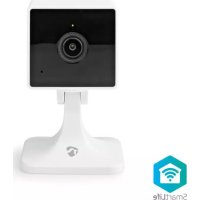
WIFICI40CWT - Surveillance Camera NEDIS - Free user manual and instructions
Find the device manual for free WIFICI40CWT NEDIS in PDF.



| Product type | Indoor IP surveillance camera |
| Brand | Nedis |
| Model | WIFICI40CWT |
| Resolution | Full HD 1920 x 1080p |
| Viewing angle | 122 degrees |
| Wireless connection | Wi-Fi 2.4 GHz, access point |
| Power supply | 5 VDC, 1 A via micro USB port |
| Storage | microSD card (8 to 128 GB, not included) |
| Dimensions (L x W x H) | 58 x 46 x 90 mm |
| Weight | 0.06 kg |
| Operating temperature | -20 °C to 50 °C |
| Main features | Motion and sound detection, night vision, two-way audio, push notifications |
| Application | Nedis SmartLife (iOS and Android) |
| Package contents | Camera, micro USB cable, power adapter, reset pin |
| Care and cleaning | Clean with a soft dry cloth; do not use harsh chemicals |
| Safety | Do not expose to water or moisture; unplug in case of issue |
| Spare parts and repairability | Repair only by a qualified technician |
| General information | Indoor use only; comply with local laws |
Frequently Asked Questions - WIFICI40CWT NEDIS
User questions about WIFICI40CWT NEDIS
0 question about this device. Answer the ones you know or ask your own.
Ask a new question about this device
Download the instructions for your Surveillance Camera in PDF format for free! Find your manual WIFICI40CWT - NEDIS and take your electronic device back in hand. On this page are published all the documents necessary for the use of your device. WIFICI40CWT by NEDIS.
USER MANUAL WIFICI40CWT NEDIS
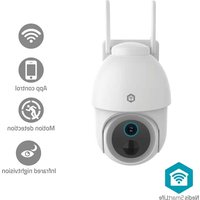
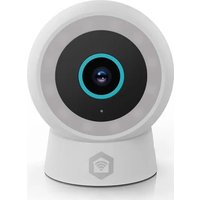
The Nedis WIFICl40CWT is an IP security camera with a viewing angle of 122 degrees.
If the security camera detects movement or sound, you will receive a warning message on your phone.
With the app you can watch live video images, play back, but also listen in and talk back.
The product is exclusively intended as an IP security camera for indoor use.
Consult the local laws and regulations for this product before installing and using.
Any modification of the product may have consequences for safety, warranty and proper functioning.
Specifications
| Product Full HD IP Camera | |
| Article number WIFICl40CWT | |
| Dimensions (I x w x h) 58 x 46 x 90 mm | |
| Weight 0.06 kg | |
| Ambient temperatures -20 °C – 50 °C | |
| Input power 5 VDC; 1 A | |
| Wireless connection 2.4G Wi-Fi, AP | |
| Memory MicroSD card (8 - 128 GB) (not included) | |
| Resolution 1920 x 1080p | |
| Viewing angle 122 degrees | |
| Max. radio transmit power 18 dBm | |
| Antenna gain 2 dBi | |
| Frequency range 2412 - 2472 MHz |
Main parts (image A)
① Status indicator LED
② Camera lens
③ Microphone
④ Reset button
⑤ MicroSD card slot
(6) Speaker
⑦ Micro USB port
USB power adapter
⑨ Reset pin
⑩ Micro USB cable
Safety instructions
WARNING
- Ensure you have fully read and understood the instructions in this document before you install or use the product. Keep this document for future reference.
- Only use the product as described in this document.
- Do not use the product if a part is damaged or defective. Replace a damaged or defective product immediately.
- Do not drop the product and avoid bumping.
- This product may only be serviced by a qualified technician for maintenance to reduce the risk of electric shock.
- Do not expose the product to water or moisture.
- Unplug the product from the power source and other equipment if problems occur.
- Do not unplug the product by pulling on the cable. Always grasp the plug and pull.
- Consult the local laws and regulations for this product before installing and using.
Preparing the security camera
Use an SD card with a minimum of 8 GB and a maximum of 128 GB.
- Insert the new microSD card into the microSD card slot A⑤.
- Connect the USB cable A to the micro USB port A 7.
- Connect A to the USB power adapter.
- Connect the USB power adapter to a power outlet to charge the camera. The product switches on automatically.
Installing the Nedis SmartLife app
- Download the Nedis Smartlife app for Android or iOS on your phone via Google Play or the Apple App Store.
- Open the Nedis Smartlife app on your phone.
- Create an account with your e-mail address and tap Continue.
- Enter the received verification code.
- Create a password and tap Done.
- Tap Add Home to create a SmartLife Home.
- Set your location, choose the rooms you want to connect with and tap Done.
Connecting the product
- Open the Nedis Smartlife app on your phone.
- Tap + in the Nedis SmartLife app.
- Select the device type you want to add from the list.
- Confirm the status indicator LED A① is blinking.
- Enter the Wi-Fi network data and tap Confirm.
- Tap Continue and a QR-code will appear.
- Hold your phone with a 15 – 20 cm distance in front of the camera.
- If the camera has detected the QR-code, you will hear a sound.
- Tap to confirm you heard the sound.
- Give the camera a name and tap Done. A① will turn blue.
- The product is now ready for use.
- If the camera failed to connect, A will be continuously red. To reset the camera, push the reset pin A in the reset button A for 5 seconds until you heard the sound. Then repeat step 1 to 10 closer to the router.
Important instructions to reduce false alarms
- Do not place the camera facing the sun or any objects with bright lights.
The ideal viewing distance is 2 - 10 meters. - Do not place the camera close to frequently moving vehicles. The recommended distance between the camera and moving vehicles is 15 meters.
- Stay away from air outlets, including air conditioner and heat transfer vents, etc.
- Do not place the camera facing a mirror or highly reflective object.
- Keep the camera at least 1 meter away from any wireless devices, including Wi-Fi routers and phones, in order to avoid wireless interference.
Declaration of Conformity
We, Nedis B.V. declare as manufacturer that the product WIFICI40CWT from our brand Nedis®, produced in China, has been tested according to all relevant CE standards and regulations and that all tests have been passed successfully. This includes, but is not limited to the RED 2014/53/EU regulation.
The complete Declaration of Conformity (and the safety datasheet if applicable) can be found and downloaded via:
nedis.com/WIFICl40CWT#support
For additional information regarding the compliance, contact the customer service:
Web: www.nedis.com
E-mail: service@nedis.com
Nedis B.V., de Tweeling 28
5215 MC's-Hertogenbosch, the Netherlands
DE Kurzanleitung
Full-HD IP-Kamera
WIFICI40CWT
Telecamera IP Full HD
WIFICI40CWT
Installation of Nedis SmartLife-appen
5215 MC's-Hertogenbosch, the Netherlands
Full HD IP kamera
WIFICI40CWT
5215 MC's-Hertogenbosch, the Netherlands

Rychly námod
WIFICI40CWT
Full HD IP kamera
Viac informáci najdete v rozsírenom námode online:ned.is/ wifici40cwt
Urcené použitie


- Specifications
- Main parts (image A)
- Safety instructions
- WARNING
- Preparing the security camera
- Installing the Nedis SmartLife app
- Connecting the product
- Important instructions to reduce false alarms
- Declaration of Conformity
- DE Kurzanleitung
- Full-HD IP-Kamera
- Telecamera IP Full HD
- Installation of Nedis SmartLife-appen
- Full HD IP kamera
- Rychly námod
- Urcené použitie
Brand : NEDIS
Model : WIFICI40CWT
Category : Surveillance Camera