HCG 009DAB - Alarm clock radio CALIBER - Free user manual and instructions
Find the device manual for free HCG 009DAB CALIBER in PDF.


| Product type | Clock radio |
| Brand | CALIBER |
| Model | HCG 009DAB |
| Power supply | 100-240 V AC via mains adapter |
| Weight | Approx. 0.5 kg |
| Dimensions (approx.) | 200 x 120 x 80 mm |
| Tuner | DAB+ (Band III) and FM 87.5-108 MHz |
| Preset stations | 10 DAB + 10 FM |
| Display | LCD with backlight (3 levels) |
| Alarm | 2 independent alarms with snooze function |
| Sleep timer | 15, 30, 45, 60, 90 minutes |
| Radio functions | Auto scan, manual tuning, RDS |
| Operating temperature | 0°C to 45°C |
| Cleaning | Soft slightly damp cloth, no solvents |
| Safety | Do not open, unplug if problem; entrust repairs to authorized dealer |
Frequently Asked Questions - HCG 009DAB CALIBER
User questions about HCG 009DAB CALIBER
0 question about this device. Answer the ones you know or ask your own.
Ask a new question about this device
Download the instructions for your Alarm clock radio in PDF format for free! Find your manual HCG 009DAB - CALIBER and take your electronic device back in hand. On this page are published all the documents necessary for the use of your device. HCG 009DAB by CALIBER.
USER MANUAL HCG 009DAB CALIBER
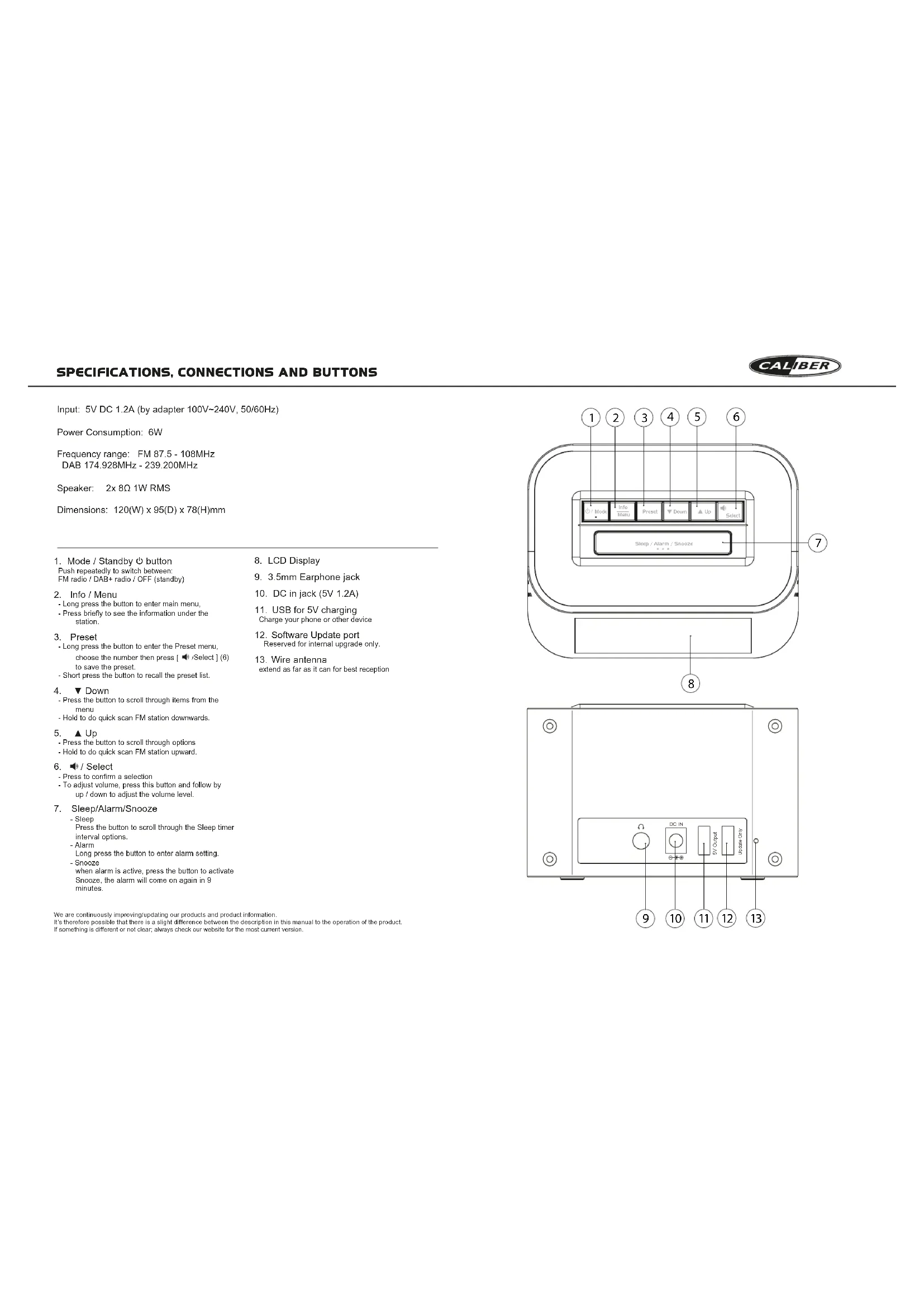
Power Consumption: 6W
Frequency range: FM 87.5 - 108MHz
DAB 174.928MHz - 239.200MHz
Speaker: 2x8Ω1W RMS
Dimensions: 120(W) x 95(D) x 78(H)mm
1.Mode/Standby按钮
Push repeatedly to switch between
FM radio / DAB+ radio / OFF (standby)
-
Info / Menu
-
Long press the button to enter main menu.
-
Press briefly to see the information under the
station.
-
Preset
-
Long press the button to enter the Preset menu,
choose the number then press [Select] (6)
to save the preset.
Short press the button to recall the preset list.
-
Down
-
Press the button to scroll through items from the
men
-
Hold to do quick scan FM station downwards.
-
▲Up
-
Press the button to scroll through options
-
Hold to do quick scan FM station upward
-
/Select
-
Press to confirm a selection
To adjust volume, press this button and follow by
up / down to adjust the volume level.
-
Sleep/Alarm/Snooze
-
Sleep
Press the button to scroll through the Sleep timer
interval options.
- Alarm
Long press the button to enter alarm setting.
- Source
when alarm is active, press the button to activate
When a alarm is active, press the button to activate.
Shoocze, the alarm will come on again in 9
We are continuously improving/Updating our products and product information.
It's therefore possible that there is a slight difference between the description in this manual to the operation of the product.
If something is different or not clear, always check our website for the most current version.
MANUAL
CALIBER
Precautions
Points to observe for safe usage
Read this manual carefully before using this item and its components. They contain instructions on how to use this tool in a safe and
They can obtain information on how to use this product and make an effective manner. Caliber Europe BV cannot be responsible for problem
resulting from failure to observe the instructions in this manual
Turn off the device Immediately in case of a problem.
Failure to do so may cause personal injury or damage to the product.
Return it to your authorized carrier Europe BV dealer for repairing.
Product cleaning.
Use a soil dry cloth for periodic cleaning of the product. For more
severe stains, please dampen the tooth with water only. Any
Temperature.
Ensure that the ambient temperature is between 0^ and +45^ before turning on the device.
Connection and clock set
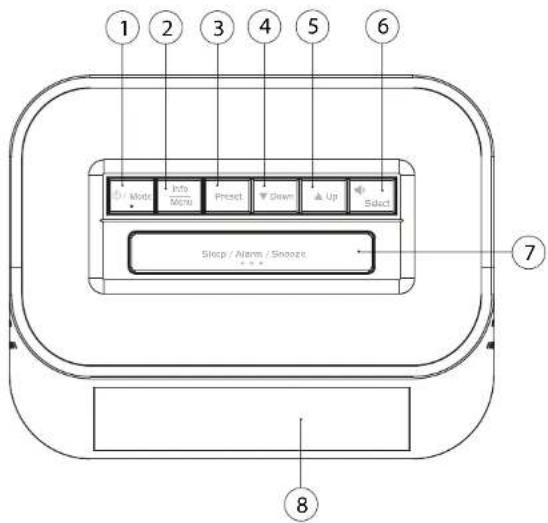
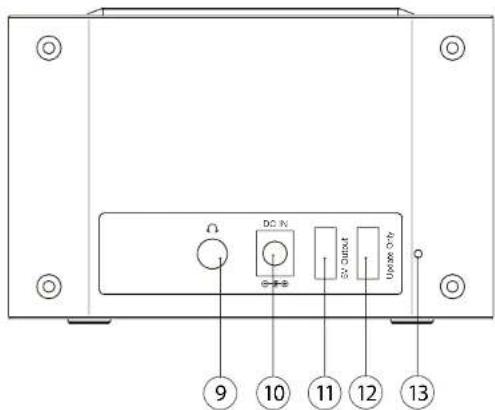
Plug the adapter into a 100~240V AC outlet and the other end in the DC in (10).
The electronic clock will turn ON and the clock shows "0:00". The LCD backlight will light up and shows "BLZ SET TIME" Press Id
the radio . The radio will start scanning the DAB channels automatically in the first time
The time will sync to the time broadcasted by DAB, by default.
- Once the scan is finished, it will display the number of radio stations received, and start to play the first station automatically.
To explore the stations that have been found, you need to press either the Down or Up key to see the next or previous station. When you find a radio station that you would like to listen to, then press the [Select] button to select the station. If you don't press the select key, the radio will switch to the new station automatically after 5 seconds.
- When you start up the radio again, the radio plays the same mode and same station as last listened.
Adjusting the volume
Press [Select] button, then press [Up] or [Down] to increase and decrease the volume.
Changing radio mode (DAB+/FM)
Select the DAB/FM mode by long pressing the [O /Mode] button.
Adjusting the backlight
There are 3 levels of brightness available for selection.
- You can set the time cut interval under the "Time out" setting menu. Long press the InfoMenu button to access the main menu, choose
Remark: Refer to the System section for the options available at Time out.
DAB\*mode
The InfoMenu button enables you to change some of the default settings of your radio, so that it works just the way you want it to. To enter into the main menu, hold and press the InfoMenu button for 3 seconds, it will enter into the main menu below. You can press [Us] or [Down] to choose different submenus. Whenever you want to exit the menu, long pressing the InfoMenu button to return the previous menu.
Full scan
It searches all stations available in your location; it may take 1-3 minutes to complete the scan.
Manual Tune
1. Using the manual tune feature, you can manually tune the receiver. This can help you when aligning your aerial or when adding stations that were missed while auto tuning.
2. Press the [Up] or [Down] button to scroll through the digital radio frequencies and select the frequency you want to fine tune.
Alarm:
There are 2 alarms available on the radio. Follow the steps below to set the alarm.
1. Turn the radio on, hold the [Sleep/Alarm/Snooze] button to enter the Alarm setting. You can also set the Alarm when
the radio is on Standby too. Under Standby, long pressing the SleepAlarmSnooze button and the Alarm wizard will
pop up.
If you want to set the Alarm 2, simply press the [Up] or [Down] button. Then press [Select] to start the alarm
setting.
2. The display shows "Inactive", press [Up] or [Down] to show 'active' on the display,
3. Then press [select] to confirm to go to next step to set the Time. Press [Up] or [Down] button to adjust the Hour
and press [ ] 7 Select ] button to confirm , then set the minute accordingly and confirm to move to next step. It comes to choose the course of alarm . You can set the alarm to activate in Pumps , DAP , Dialo or EM rails
4. It comes to choose the source of alarm. You can set the alarm to activate in Buzzer, DAB Radio or FM radio. If you choose DAB or FM, you can either choose the great station or the last listened station as the alarm source.
5. The next selling is to select volume level of the alarm you like. Adjust it by pressing [I m] or [Downd] button. Then press
1. Select to move to next step.
6. The display shows "Duration", It means how long you want to keep the alarm sounds over the time period. You can
choose from 15, 30, 45, 60 and up to 90 minutes. Confirm and move to next step.
7. It comes to set the schedule of the alarm. You can choose the option of Daily/Once/Weekends/Weekdays
- Press [Select] to confirm the option, then the display will show as below
Sleep/Alarm/Snoopze
When the alarm is activated, you can press [Sleep/Alarm/Snooze] to adhe snooze to delay the alarm and it will turn on again in 9 minute interval. If you want to turn off the alarm, just simply press [0 / Mode] button, then the alarm will be turned off and go to standby mode.
FM Mode
- When you are in DAB mode, hold the [ Mode] button to change to FM mode.
- Press and hold the [Up] or [Down], your radio will scan in an upward direction or downward direction and stop
automatically when it finds a station. - After a few seconds, the display will update. The display will show the station name and it will display the RDS (Radio Data System) information if available.
- If press the [Up] or [Down] button, then your radio will scan upward or downward 0.05MHz.
Note: If reception is still poor adjust the position of the serial or try moving the radio to another location.
Storing radio stations
- The radio can store up to 10 DAB and 10 FM stations in its preset memories for Instant access to your favorite
stations. - Tune your radio to the station that you wish to preset.
3.Hold and press "Preset" to enter the preset menu, the display will pop up as below. Thewill blink. - Then press [Up] or [Down] button to choose the number you want to preset. press [■] (Select) to confirm. The display will show "P S Saved", where "X" is the number of the preset (1-10).
Recall stored station
Press the [Press] button, then the display will show "P01: (Empty)" or "P01: station name" (where station name is the station has been saved), press [Up] or [Down] button to select the station you want to listen, and then press the [Select] button to confirm to play.
Note: If no stallion has been stored under the present, the display will show "Px: (Empty)" and then revert to the previously selected stallion after a few seconds.
Factory Reset:
It can reset your radio and restore all the settings to the original factory settings.
Long press [Menu] to enter the submenu
confirm. Follow the wizard on the display to complete the reset. The radio will restart by itself.
MANUEL

Precautions
rhendilore Caliber Europe
APositlonamento
Cable: Non perishing loansarssion xch a suplful cay a ceroa
ill power from your garden ,alila lune girella cell sponce
Pulse of batol (Fresel), lueo a palms mssm 01- (Emly) o P01 stn on me (nl omte e the emsion a the enrissor. 12, 13, 14, 15, 16, 17, 18, 19, 20, 21, 22, 23, 24, 25, 26, 27, 28, 29, 30, 31, 32, 33, 34, 35, 36, 37, 38, 39, 40, 41, 42, 43, 44, 45, 46, 47, 48, 49, 50, 51, 52, 53, 54, 55, 56, 57, 58, 59, 60, 61, 62, 63, 64, 65, 66, 67, 68, 69, 70, 71, 72, 73, 74, 75, 76, 77, 78, 79,
Sleep/Alarm/Snoopz (Vila/Larm/Snoopz)
Aterkalla lagrad station
Przycisk [Sleep/Alarm/Snooze]
Ev npovotri npoepnnpa oopnnpotr qoovv npnoeoei rto ploio.
2x ov iipinm npinnu npoi u npnnncipnnpnnpnnp, n 1000
mo npooe. Epmnpoy to ov npnnpnpnpnpnpnpnpnpnpnpnpnpnpnpnpnpnpnpnpnpnpnpnpnpnpnpnpnpnpnpnpnpnpnpnpnpnpnpnpnpnpnpnpnpnpnpnpnpnpnpnpnpnpnpnpnpnpnpnpnpnpnpnpnpnpnpnpnpnpnpnpnpnpnpnpnpnpnpnpnpnpnpnpnpnpnpnpnpnpnpnpnpnpnpnpnpnpnpnpnpnp
KAGAPIEMOZ IPOIONTOZ
Xanonomontre ene ane aenae, ene ene ne ne nane kanea e ane 1nne 1nne 1nne 1nne 1nne 1nne 1nne 1nne 1nne 1nne 1nne 1nne 1nne 1nne 1nne 1nne 1nne 1nne 1nne 1nne 1nne 1nne 1nne 1nne 1nne 1nnee
@zpuokpia.
Papnepnnpnnpnnpnnpnnpnpnpnpnpnpnpnpnpnpnpnpnpnpnpnpnpnpnpnpnpnpnpnpnpnpnpnpnpnpnpnpnpnpnpnpnpnpnpnpnpnpnpnpnpnpnpnpnpnpnpnpnpnpnpnpnpnpnpnpnpnpnpnpnpnpnpnpnpnpnpnpnpnpnpnpnpnpnpnpnpnpnpnpnpnpnpnpnpnpnpnpnpnpnpnpnpnpnpnp npppppp
Tn
E 100-240 V AC no to do kdo npn uodog DC in [10]
To npzepnke paoe eepnnn n nppeenrnne
Ppapoy to onioeou wipu
Bnrrn 3 mnnn nnnnnn rnpa
A
y va wotrto kro proevu. ene:
Tnueaon Aenepiee ene eanne "System" (Teanq) y n 8eae anayes dwnns
Aetraupyia DAB
To kouai fimIaMnE, e mepriy a laAkkkge gopuayes, anr i npauuAkyes, puglukos, n o pauuapauo aas, nae via ae kouaiyis.
oepk Baele. Fio evokte to koiu poev, mowarot rappoe to kouai fimIaMnE v 3 deutpaoetra kia oovtto to mappokk ouke prnuoi. Mnpovne amonie [Lip] en yrrnivmmpiupenpupunpupumurpupum. Tn eagno anr nepuv, nannntanrnpnuee to kouai fimIaMnE, ve anncmprece anr npuyopnuee paev.
πηρησαρωη
Tnai aayrnnn nn nnnnne nee eae nee nee nee nee nee nee nee nee nee nee nee nee nee nee nee nee nee nee nee nee nee nee nee nee nee nee nee nee nee nee nee nee nee nee nee nee nee nee nee nee nee nee nee nee nee nee nee nee nee nee neee
Xepoklvntocuyytoivqbc
-
An in Aucupay jie pokipoiy tna rauwai aepnipia vna woukuiy cekipwiin 10 kien, Auir i kauuyniy cie wau gajpiin srid ng poikni kai kaoi 25, ny the pioeine othai nwnpapai kai kai ou puaanravowai.
-
nntte to kouit [Up] (Down) vaaevaynnn ng ouyntne, no unipkcd peepoeon K aemnngns ouwnnns rou dteae va pubettn
Eurvntfip:
To poeioa oioi 2014 mnnn. Aoeoaioum 3rpoaia aoi paoiue to cmoi. 1. Eopnootto poieipoo k an mnnrnp taoepaeov to kouei | SileAimSnOe | va ov eolit n rnrnnnurmp. Mneopie, eno, v oupuiu o uoivipoe i o aoepoe (pokoe or Ateauoyi oayovg, Eun Ateauoyi oayovg, manrrre npoepeo to kouei | SileAimSnOe | k coepoei cooyyoi ng (pomnmp).
Aepeepnre 2, mnnrnnnnaa Kauan [Up] (Down) n enywnnne rnrnnn [11 Select] iv evapn ng peunnnnnnne.
-
2ny cdoan apovcTn n eEeIn Inactive(Avevspv), mntre (Up) [Down] yoe supovotel neevckn "active" (Evpvb).
-
An eucalyptus mirabilis [m] select] va empeilipoien kai ane ioueia aie pae jupnla, iuea: Paei tao quanl [p] Deon] va puuipiae nce iuae waei toquo [m] Select] va empeilipai. Ene ane oioe apoei at yeo bi rpoe er Kme
-
Mewe w o pucjus y rre 1y (wurmpnir. Mochrwi w o pucjus expoei eon nre (y cunwipg) aed (aad) . Dae woup w OoR 000000000000000000000000000000000000000000000000000000000000000000000000000
-
H emrnnnne pnoeepn nreynnnt ny eernnne ngunrrnpo. Paaee rnrnnnnae koukui [Ua] n [Down] en ouvgeia mnnrree
-
1
-
Muriy o puyrnnn r ygwhngnnae rour yurrrnpa. Hpnpre n ererree DallyOnce/Weekends/Weekdays [KornpnepwMtnppo]
-
1101111111111111111111111111111111111111
Sleep/Alarm/Snoopze
Civ to t r a h i t o t t t t t t t t t t t t t t t t t t t t t t t t t t t t t t t t t t t t t t t t t t t t t t t t t t s oouh? / Made , eun oue, u to mto hio nmeoymorjai kai p emrnnn ta rauuovv.
Aetoupyia FM
-
Zin Anapuy DAB manprrnnapaepvra kaupi [ 6 7Mode yia aakny anr katoepya FM
-
1
-
Mere e Aye aepnne ene e eaeene. 10000000000000000000000000000000000000000000000000
-
Av mntte ro koumi [Up] [Down], to pdiopn aed jkwnm npoc n waa rnpa tke ta 05 MHz
Inpuean: A to oia koukouki vivn oovig, npopapoeir n Kepaia j pernnrnrn r pndepaa cr hlae qatio
AtoRkeuon paioqpwivKGV 0To8muV
-
To paepnio pnpri v anrnnnne 10 nnnnns DAB kua 10 nnnnns FM m npnrn y aen drnnpaon ranae
-
2uivvioe to uobogovn ro nolou nou BcKrc y crbrkncnre an npocko
3.1. 1
- T nnuuuynunr ( [ ) [ ] [ ] [ ] [ ] [ ] [ ] [ ] [ ] [ ] [ ] [ ] [ ] [ ] [ ] [ ] [ ] [ ] [ ] [ ] [ ] [ ] [ ] [ ] [ ] [ ] [ ] [ ] [ ] [ ] [ ] [ ] [ ] [ ] [ ] [ ] [ ] [ ] [ ] [ ] [ ] [ ] [ ] [ ] [ ]
AvakAn aTOnkZuEyou 00
Tnre 10e kipu [Press] knt npvele fepaovniq P01: (Eny) [P01: (Kev) ] p'P01: stalion name [P01: ovua eaiyaii (enno ovoia iio aonrnnn no nroo rnae ananrnnnncr. Tnpnrj [U] q [Deen] yue nne krr to ennabou nae kare
Eny: An de yro aodnnae kanea nae 100 maoanr, an oovb, an suparwn tivn, Pk (Empty) [Pk] (Kw) kai erer aay dasspnepe da mauyn a mnnmrae p
ETavaopapoyoataaikuypuu
Tie Tn eepo 1000000000000000000000000000000000000000000000000000000000000000000000000000000
PRIRUCKA
VAROVANIE
Body, koreje potrebe nodrizavr pe bezpezm prevzdrk Proz poulitom tshu dinu a kompanenziy systemu s pozamo predicija ioka priudru. Oosahuji pkymn, ak pozutivat lenis vnyozkr bezpezmyn 1 sthmyn spsooam. SpbdoNost Caliber Europe BV neprebera zodpvezvodsr za problemy. koreje vpynu z neodizavzana pkymvn y helu prizhneur.
Ak sa vyskny problem, okamizte uzokhite poudzivanie.
Necodzitna tichy pojury moze spostrab poranere nestb
aeiros poskodnere vyrkbu. Vozdoy adnese na opuva vrainu
Kreuzhny krasnoy pravleniya protovskii. Vozdoy abovne vovceva abdo servresnoi sterudka sychonitsko Calber Europe BV.
CistenieVyrobku.
Ne preseidende stame virebria, paiovite malka, suohitu Pit. Prin 100000000000000000000000000000000000000000000000000000000000000000000000000000
Teplota.
Ulucho sa, ta oikolita taplaja co od 0^ co +45^ and zaprutim zanaterra.
Mizëše sa nachadža popik focuni/mostnjne pre model HCG 009DAB. Čiža temdi,„s" ve zafhúnu na fiacidla alebi propinquëjnejdnykä a/alebo dialkového uludáda. ilustracić najděte na zafchúk jefto prukýč.
Pripojenie a nastavenie hodin
- Pnpote adopter k 100-240 Velektnckje zasevka druhny konie k vstupu DC (10).
E
LCD podviostniena sa rozvieni a zobraia sa, PLZ SET TIME. Stactie tlaio [q/Mode], ay st zo zapiri radio. Rdo zaene prykrsk skenov' DAB kanyal automaticke
Cas sa standardne zosynchronizije casom vsielianyi DAB.
Pocdo konosni ekonosovia van zatoz podet počit rychoslavost stanci a基本原则у za zebré pretrav't' prva stanci. Pocdo konosni ekonosovia vodokrakovii právo kredy, právo protovodny, právo protovodny, právo protovodny, právo protovodny, právo protovodny, právo protovodny, právo protovodny, právo protovodny, právo protovodny, právo protovodny, právo protovodny, právo protovodny, právo protovodny, právoir alebo predchodskoje stanciu. Kord najdele rozhoslavost stanciu, kord najdele počit počit', stanciastinskii tladji [ 7 ] [ Selet] stanci
yvtzere. Ak nestlizhe zlatidy vefi, rady so pa 5ektach automatichy prepe na novu stanicu. Ked rdo zadne zapre, rady budel prehivatr ravnyk zein a rovarko slanico ak opaas poslednnoho podovania.
Nastavenie hlasitosti
StlaTe tiaido [ Select], potom stlaTe [Up] alebo [Down], ayb ste zvyili alebo zniizili hasitost
Zmena rezimu radia (DAB+FM)
Zvile rezim DAB+FM dlhym staenin taicla [O Moe].
Nastavenie podsvietenia
Na yober su 3 urove jau. Pre nastavlenie orowne jau uvocte rado do poholovostheho rezmu na nastavlenie pouzite Iaioho nohromad. Mofze ste nativ' sadyosov interval vnu menu nastavloia
GB Caliber hereby declares that the item HCG009DAB is in compliance with the essential requirements and other relevant provisions of Directive 2009/125/EC (ERP), 2014/53/EU (RED) and 2011/65/EU (RoHS).
GB Old appliances and/or batteries must not be disposed with garbagel If the device/battery can not be used anymore, every user is legally obliged to dispose of old appliances and/or batteries separated from the garbage, e.g. at a collection point of his municipality/district.
Latest declaration form can be found at:
www.caliber.nl/media/forms/DeclarationHCG009DAB.pdf

APPAREIL ET
EMBALLAGES A TRIER