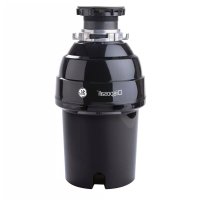
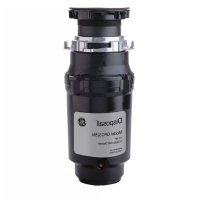
GFC1020N - Food grinder GE - Free user manual and instructions
Find the device manual for free GFC1020N GE in PDF.



| Product Type | Food waste disposer |
| Brand | GE |
| Model | GFC1020N |
| Category | Garbage disposer |
| Power Supply | 110-120 V, 60 Hz, AC |
| Power Connection Type | Direct wire or power cord (ref. PM3X215) |
| Grounding | Yes, with grounding conductor and grounding plug |
| Power | Permanent magnet motor, power not specified |
| Capacity | Continuous feed |
| Grinding Mechanism | Pivoting jam-buster impellers |
| Overload Protection | Red reset button (thermal protection) |
| Required Clearance Height | 228 to 304 mm (9 to 12 in) under sink |
| Dishwasher Connection | Yes, via dishwasher drain connector and rubber gasket |
| Material | Stainless steel (internal parts) |
| Cleaning | Self-cleaning, do not lubricate |
| Maintenance | Removable splash guard, clean with ice cubes and lemon |
| Warranty | 10 years (parts and labor) |
| Country of Manufacture | Not specified (GE Appliances) |
| Dimensions (approx.) | Height: 300 mm, diameter: 200 mm (estimate) |
| Net Weight (approx.) | 5 kg (estimate) |
| Included Accessories | Sink flange, mounting ring, foam gasket, rubber gasket, discharge elbow |
| Repairability | Spare parts available (see GE website) |
Frequently Asked Questions - GFC1020N GE
User questions about GFC1020N GE
0 question about this device. Answer the ones you know or ask your own.
Ask a new question about this device
Download the instructions for your Food grinder in PDF format for free! Find your manual GFC1020N - GE and take your electronic device back in hand. On this page are published all the documents necessary for the use of your device. GFC1020N by GE.
USER MANUAL GFC1020N GE
SAFETY INFORMATION 3
USING THE DISPOSER
Continuous Feed 5
CARE AND CLEANING 6
INSTALLATION INSTRUCTIONS
Preparation 7
Components and Installation 8
Installation of Sink Flange 8
Dishwasher Connection 9
Attach the Discharge Elbow 9
Connect Disposer to Sink Flange 10
Dimensions 11
Some Typical Installations 11
TROUBLESHOOTING 12
LIMITED WARRANTY 14
CONSUMER SUPPORT 16
OWNER'S MANUAL AND INSTALLATION INSTRUCTIONS
GFC320
GFC325
GFC520
GFC525
GFC720
GFC1020
ENGLISH/FRANÇAIS/ ESPÁÑOL
Write the model and serial numbers here:
Model #
Serial #
You can find them on a label on the bottom of the dispenser.
THANK YOU FOR MAKING GE APPLIANCES A PART OF YOUR HOME.
Whether you grew up with GE Appliances, or this is your first, we're happy to have you in the family.
We take pride in the craftsmanship, innovation and design that goes into every GE Appliances product, and we think you will too. Among other things, registration of your appliance ensures that we can deliver important product information and warranty details when you need them.
Register your GE appliance now online. Helpful websites and phone numbers are available in the Consumer Support section of this Owner's Manual. You may also mail in the pre-printed registration card included in the packing material.

GE APPLIANCES
IMPORTANT SAFETY INFORMATION READ ALL INSTRUCTIONS BEFORE USING THE APPLIANCE
WARNING For your safety, the information in this manual must be followed to minimize the risk of fire, explosion, electric shock, and to prevent property damage, personal injury, or death.
WARNING WHEN USING YOUR ELECTRICAL APPLIANCES, BASIC SAFETY PRECAUTIONS SHOULD BE FOLLOWED, INCLUDING THE FOLLOWING:
Use this appliance only for its intended purpose as described in this Owner's Manual.
Read all the instructions before using the appliance.
To reduce the risk of injury, close supervision is required when a dispenser is used near children.
Do not put fingers or hands into a waste disposer.
Turn the power switch to the OFF position before attempting to clear a jam or remove an object from the dispenser.
- When attempting to loosen a jam in a waste disposer, use a long wooden object such as a wooden spoon or the wooden handle of a broom or mop.
- When attempting to remove objects from a waste dispenser, use long-handled tongs or pliers. If the dispenser is magnetically actuated, use only nonmagnetic tools.
To reduce the risk of injury by materials that may be expelled by a waste dispenser, do not put the following into a dispenser:
a. Clam or oyster shells
b. Caustic drain cleaners or similar products
c. Glass, china or plastic
d. Large whole bones
e. Metal, such as bottle caps, tin cans, utensils or aluminum foil
f. Hot grease or other hot liquids
g. Whole corn husks
- When not operating a dispenser, leave the drain stopper in place to reduce the risk of objects falling into the dispenser.
For proper grounding instructions, see the CONNECTING ELECTRICITY portion of this manual.
CONNECTING ELECTRICITY
If you are not familiar with electrical power and procedures, call a qualified electrician.
WARNING Improper connection of the equipment-grounding conductor can result in a risk of electric shock. Check with a qualified electrician or serviceman if you are in doubt as to whether the appliance is properly grounded. Do not modify the plug provided with the appliance if it will not fit the outlet; have a proper outlet installed by a qualified electrician.
For Models Equipped with a Grounded Cord: GROUNDING INSTRUCTIONS: This dispenser must be grounded to reduce the risk of electric shock in the event of a malfunction or breakdown. Grounding provides a path of least resistance for electric current. This dispenser is equipped with a cord having an equipment-grounding conductor and a grounding plug. The plug must be plugged into an outlet that is properly installed and grounded in accordance with all local codes and ordinances.
IMPORTANT SAFETY INFORMATION READ ALL INSTRUCTIONS BEFORE USING THE APPLIANCE
CONNECTING ELECTRICITY (Cont)
If you are not familiar with electrical power and procedures, call a qualified electrician.
The power cord and/or connections must comply with the National Electrical Code, Section 422 and/or local codes and ordinances.
For Models Not Equipped with a Cord:
If your dispenser does not come equipped with a cord, you can connect it in two ways:
- Attach a power cord, minimum 18" in length and not to exceed 36" in length. Use GEA Part Number PM3X215.
or - Wire the dispenser directly into the house current.
To Attach a Power Cord:
GROUNDING INSTRUCTIONS: This dispenser must be grounded to reduce the risk of electric shock in the event of a malfunction or breakdown. Grounding provides a path of least resistance for electric current. This dispenser is equipped with a cord having an equipment-grounding conductor and a grounding plug. The plug must be plugged into an outlet that is properly installed and grounded in accordance with all local codes and ordinances.
WARNING
Improper connection of the
equipment-grounding conductor can result in a risk of electric shock. Check with a qualified electrician or serviceman if you are in doubt as to whether the appliance is properly grounded.
NOTE: Disconnect electric power to dispenser circuit before installation. Turn the circuit breaker to the OFF position or remove the fuse.
A. Connect the dispenser to 110-120 Volt, 60Hz AC current only.
B. If a plug-in cord is used, use a three prong plug. Ground wire should be attached to the ground screw in the bottom of the dispenser (end bell).
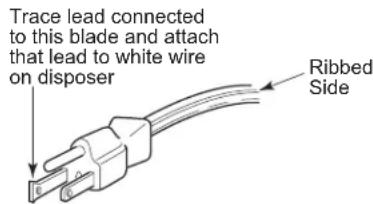
NOTE: When viewing face of electrical plug with grounding pin at top, the larger left blade is connected to the identified wire.
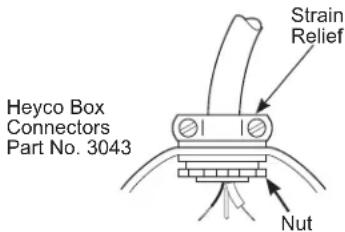
C. Use a cable clamp strain relief connector where power cord enters the dispenser.
To Wire Your Disposer Directly into the House Current:
GROUNDING INSTRUCTIONS: This dispenser must be connected to a grounded, metal, permanent wiring system; or an equipment-grounding conductor must be run with the circuit conductors and connected to the equipment-grounding terminal or lead on the appliance.
A. If you use BX cable:
- These products are designed for household use.
- Connect white wire to white lead of dispenser with a wire nut. Connect black wire to black lead of dispenser with a wire nut. Connect bare ground wire to the ground screw. The ground wire should be clamped and held by a strain relief.
- Do not use a rigid conduit for the wiring connection.
- A dedicated acceptable motor switch, with the off position marked, shall be provided for this dispenser at the time of installation. The switch shall be mounted in sight of the dispenser or the
If BX cable is not used, provide a separate ground wire to nearest reliable ground, using the screw in the end bell for the ground wire.
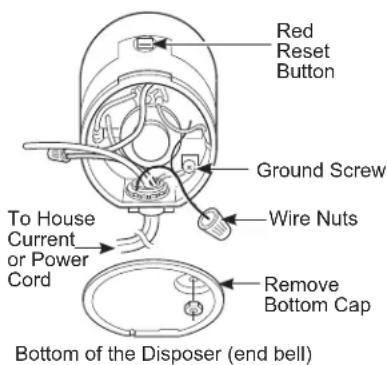
B. If your power supply does not
include a ground wire, you must provide one unless metal cable is used. Attach a copper wire securely to dispenser ground screw and attach other end of wire to a reliable ground. Use only UL approved ground clamp. If plastic pipe is used in your home, a qualified electrician should install a proper ground.
READ AND SAVE THESE INSTRUCTIONS
Using the Disposer
READ ALL SAFETY INSTRUCTIONS ON PAGES 3 AND 4 BEFORE USING THIS DISPOSER.
This disposer uses anti-jam swivel impellers that make a clicking sound as they swing into place. This indicates normal operation.
Continuous Feed
A. Remove the sink stopper and turn on a medium flow of cold water.
B. Turn the switch to ON.
C. Scrape in food waste. To speed up food waste disposal, cut or break up large bones, rinds and cobs. Large bones and fibrous husks require considerable grinding time and are more easily thrown away with other trash. Do not be alarmed that the disposer slows down while grinding. The disposer is actually increasing torque (grinding power) and is operating under normal conditions.
D. Before turning the dispenser off, let the water and the dispenser run for approximately 25 seconds after shredding stops. This assures that all waste is thoroughly flushed through the trap and drain.
E. Do not use hot water while running the dispenser. Cold water will keep food waste and fats solid so they can be flushed down the drain.
Helpful Hints
A. Be sure the dispenser is empty before using the dishwasher so it can drain properly.
B. You may want to leave the stopper in the drain when not in use to prevent utensils and foreign objects from falling into the dispenser.
C. The dispenser is ruggedly built to give you years and years of trouble-free service. It will handle all normal food wastes - BUT it will not grind and dispose such items as tin cans, bottles and bottle caps, glass, china, leather, cloth, crockery, rubber, string, feathers, or clam or oyster shells. These are waste materials and belong in the trash can or trash compactor.
D. TO SPEED UP FOOD WASTE DISPOSAL: Cut or break up large bones, melon rinds, grapefruit skins and corn cobs. Items such as large bones, fibrous husks like lima bean pods and corn husks, require considerable cutting time. For this reason, you may prefer to place them in the trash can or trash compactor.
Care and Cleaning
THE MOTOR IS PERMANENTLY LUBRICATED FOR LIFE. DO NOT ATTEMPT TO LUBRICATE YOUR DISPOSER. The dispenser is self cleaning and scours itself with each use.
NEVER put lye or chemical cleaners into the dispenser, as they cause serious corrosion of metal parts.
- Your dispenser is equipped with a removable splash guard for ease of cleaning or replacement. Remove the splash guard by pulling it out from the top. To replace, insert into the sink flange and push down until it is properly seated.
If an odor develops, run orange or lemon rinds through the dispenser. A dozen ice cubes sprinkled with a little household scouring powder will also work.
Installation Instructions
Disposer
Questions? Call 833-4BODEWELL (833-426-3393) or visit our Website at: GEAppliances.com In Canada, call 1.800.561.3344 or visit our Website at: GEAppliances.ca
BEFORE YOU BEGIN
Read these instructions completely and carefully.
FOR YOUR SAFETY
Read and observe all WARNINGS and CAUTIONS shown throughout these instructions.
While performing installations described in this booklet, gloves and safety glasses or goggles should be worn.
IMPORTANT - Observe all governing codes and ordinances.
- Save these instructions for local inspector's use.
Note to Installer - Be sure to leave these instructions with the Consumer. - Note to Consumer - Keep these instructions for future reference.
- Skill level - Installation of this appliance requires basic mechanical skills.
Completion time-1 hour - Proper installation is the responsibility of the installer.
Product failure due to improper installation is not covered under the Warranty.
PREPARATION
- Disconnect electrical power supply to dispenser.
- Remove old disposer or sink flange assembly.
- Inspect drain line. If it is heavily coated with hardened grease and accumulations, rout out with a plumber's snake.
- Remove old sealing materials and gasketing from sink opening, both top and bottom.
NOTE: Top and bottom of sink surfaces must be free of any materials to prevent leaks.
WHAT YOU WILL NEED
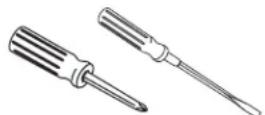
- Phillips and flat blade screwdriver
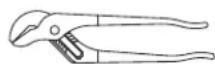
- Channel lock pliers, slip joint
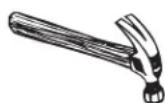
- Hammer
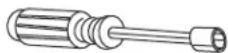
Nut Driver
WARNING
FOR PERSONAL SAFETY: Remove house fuse or open circuit breaker before beginning installation. Do not use an extension cord or adapter plug with this appliance.
FOR PERSONAL SAFETY: Do not position your head or body under dispenser; unit could fall during removal or installation.
- The improper connection of the equipment grounding conductor can result in a risk of electric shock. Check with a qualified electrician or service representative if you are in doubt that the appliance is properly grounded.
If house wiring is not 2-wire with ground, a ground must be provided by the installer. When house wiring is aluminum, be sure to use UL-Listed anti-oxidant compound and aluminum-to-copper connectors.
ADDITIONAL MATERIALS YOU MAY NEED
- Steel punch or wooden dowel
- Petroleum jelly or liquid soap
- Hose clamp
- Dishwasher drain connector
- Adjustable pipe wrench
- Plumber's putty (for cast sinks)
- Stepped rubber drain adapter
- Wire nuts
- Cable connector
- Flexible drain pipe
Power cord kit (Part No. PM3X215)
COMPONENTS AND INSTALLATION
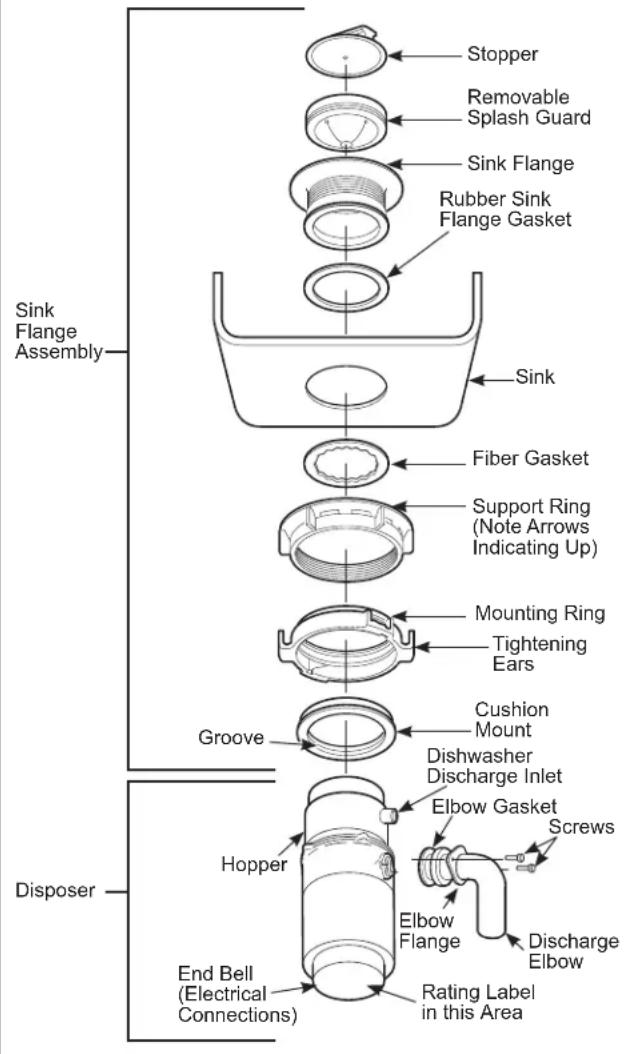
COMPONENTS
NOTE: Pay close attention to the order of the sink flange parts, as they have been correctly assembled by the factory.
A. Disassemble the sink flange assembly from the dispenser by turning the mount ring to the left (clockwise) and removing it.
B. Raise the mount ring toward the top of the sink flange. Remove the cushion mount and the mount ring. You may want to practice installing the cushion mount at this point before you are under the sink.
C. Unscrew the support ring from the sink flange and remove the fiber gasket. You are now left with the sink flange and the rubber gasket.
D. The rubber gasket is used instead of plumbers putty with stainless steel sinks. Some cast iron sinks will require putty.
E. If no putty is used, insert the sink flange through the rubber gasket into the sink opening. Do not turn the flange once it is seated.
F. If you use putty instead of the gasket, form a ring around the underside of the sink flange. Insert the flange into the sink opening, press down hard to squeeze out excess putty. For under the sink, trim off excess putty flush with the bottom edge of the sink opening.
G. From underneath the sink, slip the fiber gasket onto the exposed sink flange. With arrows pointing up, screw the support ring onto the sink flange and hand-tighten until the sink flange will not move. At this point you may want to the sink and fill with water to seal and insure there are no leaks.
H. Place the mount ring over the sink flange and hold in place while installing the cushion mount (large side down). Make sure the groove on the inside of the cushion mount fits over the lip on the sink flange, similar to putting the lid on a plastic container.
Run your fingers around the entire cushion mount with slight pressure. Do not press too hard.
When the cushion mount is properly seated, the mount ring can be pulled downward over the cushion mount and will be free to turn.
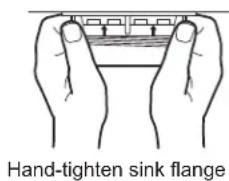
Hand-tighten sink flange
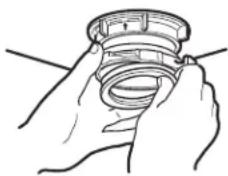
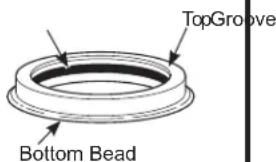
Cushion Mount Detail
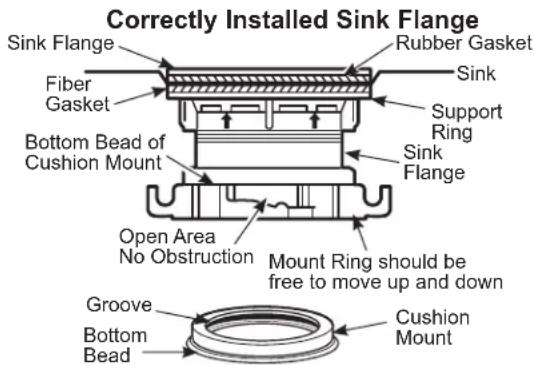
INSTALLATION OF SINK FLANGE
(Read completely before starting.)
(show for proper orientation)
DISHWASHER CONNECTION (IF REQUIRED)
If you are connecting to a dishwasher, complete the following step. If a dishwasher is not to be connected, go to "Attaching the Discharge Elbow" below.

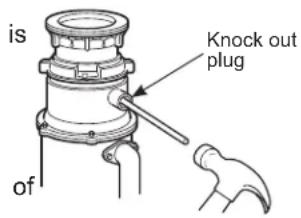
KNOCK OUT PLUG
Using a blunt instrument (steel punch or wooden dowel), knock out the entire plug. Do not use a screwdriver or sharp instrument. When knockout plug falls into disposer, you may remove it
or simply grind it up when the dispenser used. This will not damage the dispenser in any way, but may take some time to grind, over the course several uses.

CONNECT HOSE
Connect the dishwasher hose using a hose clamp. If the hose size is different, you will need a stepped rubber adapter.
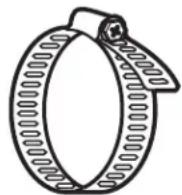
Hose Clamp
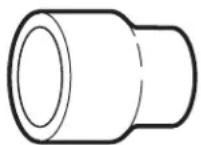
Stepped Rubber Adapter
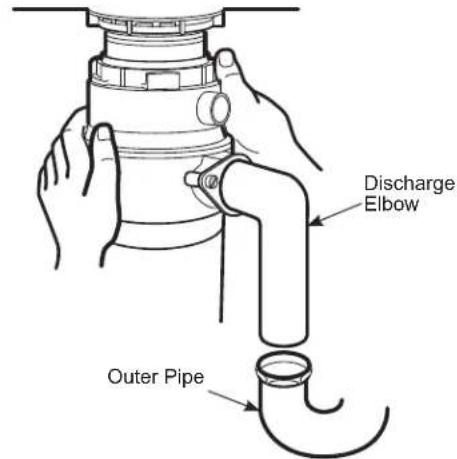
ATTACH THE DISCHARGE ELBOW

Slide rubber gasket over drain pipe.
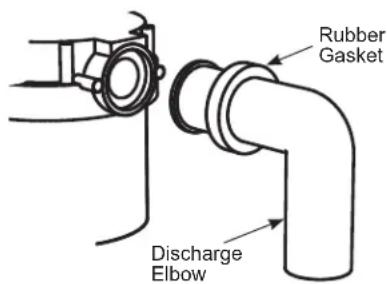

CONNECT DISCHARGE ELBOW*
Slide bracket over discharge elbow and connect to the dispenser.** Make sure all plumbing connections are tight.
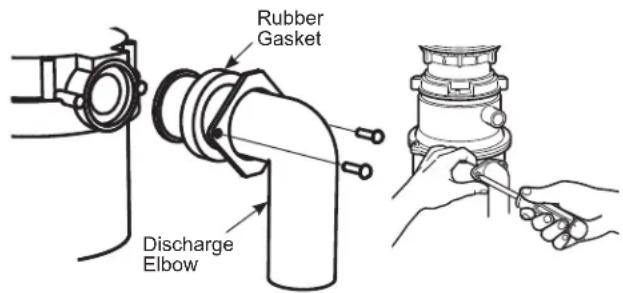
*Discharge elbow must be installed by a professional
** Some installations (see page 11 for example) may require the use of a flexible drain pipe.
CONNECT DISPOSER TO SINK FLANGE
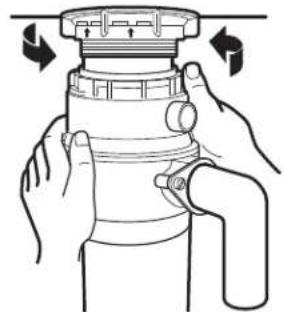
1 ATTACH TO SINK FLANGE
Line up the dispenser under the sink flange. Guide the hopper projections into the mount ring slots. Turn the mount ring about 1/4 to the right so that the dispenser is temporarily supported.
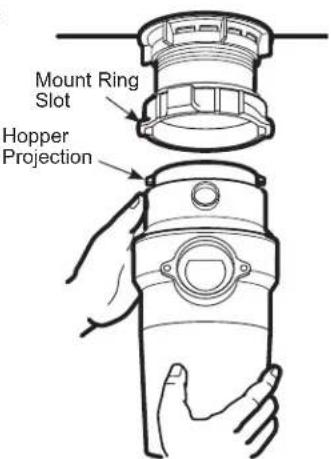
LINE UP WITH OUTLET PIPE
Turn the mount ring and the dispenser until the dispenser discharge elbow lines up with the outlet pipe (see page 11).
3 LOCK MOUNT RING
Turn the mount ring to the right until it locks up tight. Hopper projections must be to the extreme left of the mounting slots. If the mount ring is hard to turn, you may add a small amount of petroleum jelly or liquid soap to the hopper projection. Run water and check for leaks.
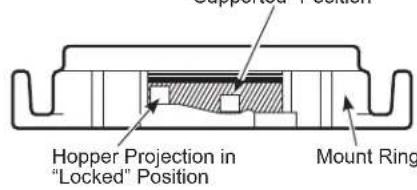
Locking Detail
Hopper Projection in "Supported" Position
4 CHECK FOR LEAKS
Check the unit for leaks 24 hours after installation and first operation.
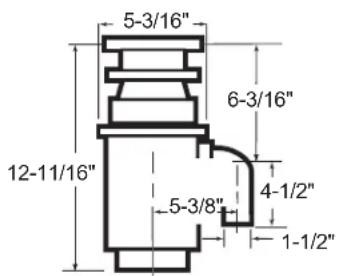
DIMENSIONS
GFC320
GFC325
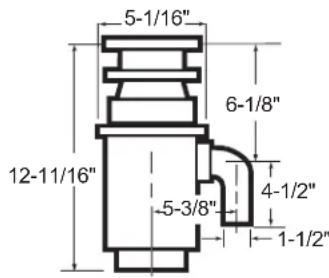
GFC520
GFC525
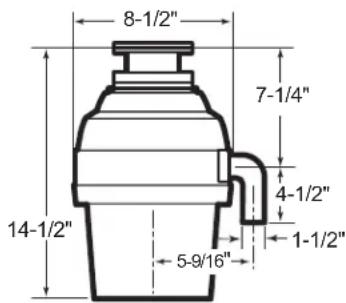
GFC720
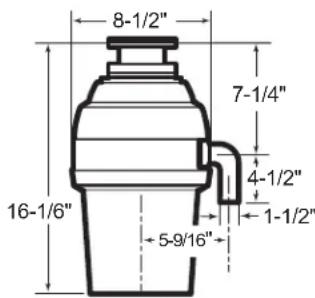
GFC1020
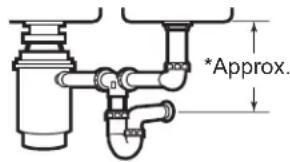
SOME TYPICAL INSTALLATIONS
NOTE: It is essential for the proper operation of the disposer that this dimension be 9^ - 12^ ,depending upon the models listed above, to avoid standing water in disposer motor housing.
**Flexible drain pipe may be necessary for application.
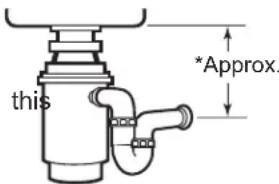
SINGLE BOWL
DOUBLE BOWL
CENTER OUTLET**
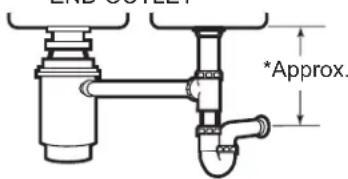
DOUBLE BOWL
END OUTLET**
Troubleshooting Tips... Before you call for service
Save time and money! Review the charts below first and you may not need to call for service.
SAFETY NOTE: Before investigating, you must disconnect the power supply.
WARNING
Before resetting, disconnect the power supply - see SAFETY NOTE above. The overload control prevents the motor from operating should overloading occur. This feature protects and your dispenser. When overloaded, the motor will stop automatically.
| Problem Poss | ble Cause What To Do | |
| Loud noises (other than those during grinding of bones and fruit pits) | Silverware, bottle cap or other foreign object has fallen into the disposer | Remove the object with long-handled tongs. |
| Disposer does not start | Reset button has been tripped With the splash Reset button Reset Button Serial No. | guard* removed, check to see if the turntable will move freely using a broom handle. If the turntable moves freely, replace the splash guard* and check the reset button to see if it has been tripped. The reset button is red and located opposite the discharge elbow, near the bottom of the disposer. Push the button in until it clicks and remains depressed. If the reset button has not been tripped, check for a shorted or broken wire connecting to the disposer. Check the electrical power switch, fuse box or circuit breaker. If wiring and electrical components are intact, the unit may have internal problems that require service or replacement. |
| Turntable cannot rotate. If the turntable does not turn freely, check for an object lodged between the turntable and the grind ring. Dislodge the object by moving the turntable with a broom handle. Then remove the object. If no foreign object is present, there may be internal problems. | ||
| Disposer leaks If the | eak is at the top, it may be caused by:1. Improper seating of sink flange (gasket choice, putty, or tightening.2. Support ring not tightened properly.3. Defective cushion mount.If the leak is at the discharge elbow, leak may be caused by improper tightening of elbow flange screws. | |
GE Appliances Disposer Limited Warranty
(For customers in the United States)
GEAppliances.com
All warranty service is provided by our Factory Service Centers, or an authorized Customer Care® technician. To schedule service online, visit us at GEAppliances.com/service, or call GE Appliances at 833-4BODEWELL (833-426-3393). Please have your serial number and your model number available when calling for service.
Warranty for GFC320, GFC325, GFC520 and GFC525 models only:
| For the period of GE Appliances will choose to repair or replace | |
| Seven YearsFrom the date of the original purchase | The product which fails due to a defect in materials or workmanship. The exchange unit is warranted for the remainder of your product's original seven-year warranty period. GE Appliances is not responsible for installation charges relating to the replacement product. |
Warranty for GFC720 and GFC1020 models only:
| For the period of GE Appliances will choose to repair or replace | |
| Ten YearsFrom the date of the original purchase | The product which fails due to a defect in materials or workmanship. The exchange unit is warranted for the remainder of your product's original ten-year warranty period. GE Appliances is not responsible for installation charges relating to the replacement product. |
What is not covered:
Service trips to your home to teach you how to use the product.
- Improper installation, delivery or maintenance.
Failure of the product if it is abused, misused, or used for other than the intended purpose or used commercially.
- Replacement of house fuses or resetting of circuit breakers.
- Products which are not defective or broken, or which are working as described in the Owner's Manual.
- Damage to the product caused by accident, fire, floods or acts of God.
- Incidental or consequential damage caused by possible defects with this appliance.
Defects or damage due to operation in freezing temperatures.
Damage caused after delivery.
Product not accessible to provide required service.
EXCLUSION OF IMPLIED WARRANTYES
Your sole and exclusive remedy is product repair as provided in this Limited Warranty. Any implied warranties, including the implied warranties of merchantability or fitness for a particular purpose, are limited to one year or the shortest period allowed by law.
This limited warranty is extended to the original purchaser and any succeeding owner for products purchased for home use within the USA. If the product is located in an area where service by a GE Appliances Authorized Servicer is not available, you may be responsible for a trip charge or you may be required to bring the product to an Authorized GE Appliances Service location for service. In Alaska, the limited warranty excludes the cost of shipping or service calls to your home.
Some states do not allow the exclusion or limitation of incidental or consequential damages. This limited warranty gives you specific legal rights, and you may also have other rights which vary from state to state. To know what your legal rights are, consult your local or state consumer affairs office or your state's Attorney General.
Warrantor: GE Appliances, a Haier Company, Louisville, KY 40225
GE Appliances Disposer Limited Warranty
(For customers in Canada)
GEAppliances.ca
All warranty service is provided by our Factory Service Centers, or an authorized Customer Care® technician. To schedule service online, visit us at GE Appliances.ca/after-sales-support, or call GE Appliances at 800.561.3344. Please have your serial number and your model number available when calling for service.
Warranty for GFC320, GFC325, GFC520 and GFC525 models only:
| For the period of GE A | Appliances will choose to repair or replace |
| Seven YearsFrom the date of the original purchase | The product which fails due to a defect in materials or workmanship. The exchange unit is warranted for the remainder of your product's original seven-year warranty period. GE Appliances is not responsible for installation charges relating to the replacement product. |
Warranty for GFC720 and GFC1020 models only:
| For the period of GE A | Appliances will choose to repair or replace |
| Ten YearsFrom the date of the original purchase | The product which fails due to a defect in materials or workmanship. The exchange unit is warranted for the remainder of your product's original ten-year warranty period. GE Appliances is not responsible for installation charges relating to the replacement product. |
What is not covered:
Service trips to your home to teach you how to use the product.
- Improper installation, delivery or maintenance.
Failure of the product if it is abused, misused, or used for other than the intended purpose or used commercially.
- Replacement of house fuses or resetting of circuit breakers.
- Products which are not defective or broken, or which are working as described in the Owner's Manual.
- Damage to the product caused by accident, fire, floods or acts of God.
- Incidental or consequential damage caused by possible defects with this appliance.
Defects or damage due to operation in freezing temperatures.
Damage caused after delivery.
Product not accessible to provide required service.
EXCLUSION OF IMPLIED WARRANTY
Your sole and exclusive remedy is product repair as provided in this Limited Warranty. Any implied warranties, including the implied warranties of merchantability or fitness for a particular purpose, are limited to one year or the shortest period allowed by law.
This limited warranty is extended to the original purchaser and any succeeding owner for products purchased in Canada for home use within Canada. If the product is located in an area where service by a GE Appliances Authorized Servicer is not available, you may be responsible for a trip charge or you may be required to bring the product to an Authorized GE Appliances Service location.
Some provinces do not allow the exclusion or limitation of incidental or consequential damages. This limited warranty gives you specific legal rights, and you may also have other rights which vary from province to province. To know what your legal rights are, consult your local or provincial consumer affairs office.
Warrantor: MC Commercial Inc., Burlington, ON, L7R 5B6
Consumer Support
GE Appliances Website
Have a question or need assistance with your appliance? Try the GE Appliances Website 24 hours a day, any day of the year! You can also shop for more great GE Appliances products and take advantage of all our on-line support services designed for your convenience. In the US: GEAppliances.com
In Canada: GEAppliances.ca
Register Your Appliance
Register your new appliance on-line at your convenience! Timely product registration will allow for enhanced communication and prompt service under the terms of your warranty, should the need arise. You may also mail in the pre-printed registration card included in the packing material. In the US: GEAppliances.com/register
In Canada: GEAppliances.ca/after-sales-support
Schedule Service
Expert GE Appliances repair service is only one step away from your door. Get on-line and schedule your service at your convenience any day of the year. In the US: GE Appliances.com/service or call 833-4BODEWELL (833-426-3393) during normal business hours.
In Canada: GEAppliances.ca/after-sales-support or call 800.561.3344.
Extended Warranties
Purchase a GE Appliances extended warranty and learn about special discounts that are available while your warranty is still in effect. You can purchase it on-line anytime. GE Appliances Services will still be there after your warranty expires. In the US: GEAppliances.com/extended-warranty or call 800.626.2224 during normal business hours.
In Canada: GEAppliances.ca/purchase-extended-warranty or call 866.277.9842.
Parts and Accessories
Individuals qualified to service their own appliances can have parts or accessories sent directly to their homes (VISA, MasterCard and Discover cards are accepted). Order on-line today 24 hours every day.
In the US: GEApplianceparts.com or by phone at 877.959.8688 during normal business hours.
In Canada: GEAppliances.ca/parts-filters-accessories or call 800.661.1616.
Instructions contained in this manual cover procedures to be performed by any user. Other servicing generally should be referred to qualified service personnel. Caution must be exercised, since improper servicing may cause unsafe operation.
Contact Us
If you are not satisfied with the service you receive from GE Appliances, contact us on our Website with all the details including your phone number, or write to:
In the US: General Manager, Customer Relations | GE Appliances, Appliance Park | Louisville, KY 40225
GEAppliances.com/contact or call 800.626.2000
In Canada: Director, Customer Relations | MC Commercial Inc. | Suite 300, 5420 North Service Road | Burlington, ON L7L 6C7
GEAppliances.ca/contact-us or call 877.994.5366
DISPOSALL
Broyeur de déchets
CONSIGNES DE SECURITE 3
UTILISATION DU BROYEUR DE DÉCHETS
Chargement continu 5
ENTRETIEN ET NETTOYAGE 6
INSTALLATION INSTRUCTIONS
Preparation 7
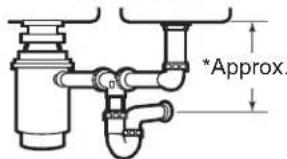
DOUBLE CUVETTE, ÉCOULEMENT AU CENTRE**
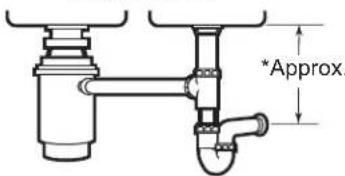
DOUBLE CUVETTE, ÉCOULEMENT EN EXTREMITE**
Garant:MCCommercialInc.,Burlington,ON,L7R5B6
Au Canada : Director, Customer Relations | MC Commercial Inc. | Suite 300, 5420 North Service Road | Burlington, ON L7L 6C7 electromenagersge.ca/contactez-nous ou composer le 877.994.5366
DISPOSALL
Garante: GE Appliances, a Haier company, Louisville, KY 40225
GEAppliances.com/service
GEAppliances.com/extended-warranty
General Manager, Customer Relations | GE Appliances, Appliance Park | Louisville, KY 40225
GEAppliances.com/contact o comuniquese al 800.626.2000

- SAFETY INFORMATION 3
- USING THE DISPOSER
- CARE AND CLEANING 6
- INSTALLATION INSTRUCTIONS
- TROUBLESHOOTING 12
- LIMITED WARRANTY 14
- CONSUMER SUPPORT 16
- OWNER'S MANUAL AND INSTALLATION INSTRUCTIONS
- ENGLISH/FRANÇAIS/ ESPÁÑOL
- THANK YOU FOR MAKING GE APPLIANCES A PART OF YOUR HOME.
- IMPORTANT SAFETY INFORMATION READ ALL INSTRUCTIONS BEFORE USING THE APPLIANCE
- WARNING WHEN USING YOUR ELECTRICAL APPLIANCES, BASIC SAFETY PRECAUTIONS SHOULD BE FOLLOWED, INCLUDING THE FOLLOWING:
- CONNECTING ELECTRICITY
- CONNECTING ELECTRICITY (Cont)
- For Models Not Equipped with a Cord:
- To Attach a Power Cord:
- WARNING
- To Wire Your Disposer Directly into the House Current:
- READ AND SAVE THESE INSTRUCTIONS
- Continuous Feed
- Helpful Hints
- Care and Cleaning
- Disposer
- BEFORE YOU BEGIN
- FOR YOUR SAFETY
- PREPARATION
- WHAT YOU WILL NEED
- ADDITIONAL MATERIALS YOU MAY NEED
- COMPONENTS AND INSTALLATION
- DISHWASHER CONNECTION (IF REQUIRED)
- KNOCK OUT PLUG
- CONNECT HOSE
- ATTACH THE DISCHARGE ELBOW
- CONNECT DISCHARGE ELBOW*
- CONNECT DISPOSER TO SINK FLANGE
- ATTACH TO SINK FLANGE
- LINE UP WITH OUTLET PIPE
- LOCK MOUNT RING
- CHECK FOR LEAKS
- DIMENSIONS
- SOME TYPICAL INSTALLATIONS
- Troubleshooting Tips... Before you call for service
- SAFETY NOTE: Before investigating, you must disconnect the power supply.
- GE Appliances Disposer Limited Warranty
- (For customers in the United States)
- GEAppliances.com
- What is not covered:
- EXCLUSION OF IMPLIED WARRANTYES
- (For customers in Canada)
- GEAppliances.ca
- EXCLUSION OF IMPLIED WARRANTY
- Consumer Support
- GE Appliances Website
- Register Your Appliance
- Schedule Service
- Extended Warranties
- Parts and Accessories
- Contact Us
- DISPOSALL
- Broyeur de déchets
- UTILISATION DU BROYEUR DE DÉCHETS
- ENTRETIEN ET NETTOYAGE 6
- GEAppliances.com/service
- GEAppliances.com/extended-warranty
Brand : GE
Model : GFC1020N
Category : Food grinder