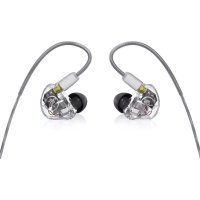
MP460 - Earplug MACKIE - Free user manual and instructions
Find the device manual for free MP460 MACKIE in PDF.



| Product Type | Intra-auricular monitor (earplug) |
| Brand | Mackie |
| Model | MP460 |
| Acoustic Isolation | Up to 40 dB |
| Speaker Type | Knowles Balanced Armature |
| Number of Speakers | 4 |
| Frequency Response | 20 Hz - 20 kHz |
| Sensitivity | 118 dB/mW |
| Impedance | 15.5 Ω |
| Input Type | 3.5 mm and 6.3 mm stereo male jack |
| Cable Length | 1570 mm (61.8 inches) |
| Weight | 0.03 kg (0.07 lb) |
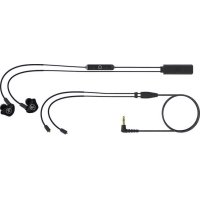
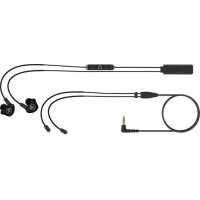
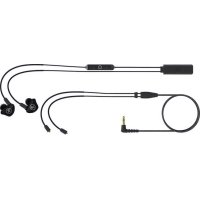
| Included Accessories | Molded hard case, gold-plated jack adapters, extra cable with inline control, cleaning tool, cloth |
| Maintenance | Clean with a mild detergent solution |
| Safety | Adjust volume gradually; do not use in hazardous environments |
| Warranty | Limited warranty (see terms on mackie.com) |
Frequently Asked Questions - MP460 MACKIE
User questions about MP460 MACKIE
0 question about this device. Answer the ones you know or ask your own.
Ask a new question about this device
Download the instructions for your Earplug in PDF format for free! Find your manual MP460 - MACKIE and take your electronic device back in hand. On this page are published all the documents necessary for the use of your device. MP460 by MACKIE.
USER MANUAL MP460 MACKIE
MP-320 Triple Dynamic Driver Professional In-Ear Monitors
MP-360 Triple Balanced Armature Driver Professional In-Ear Monitors
MP-460 Quadruple Balanced Armature Driver Professional In-Ear Monitors
OWNER'S MANUAL

natural_image
Symbolic icon of a running person inside a circle, no text or numbers presentwww.mackie.com
INTRODUCTION
For decades, our renowned loudspeaker designs have been helping artists perform their best on stage. MP Series Professional In-Ear Monitors build on that legacy with incredible sound and build quality.
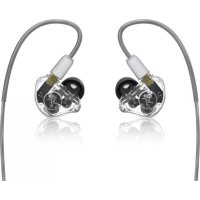
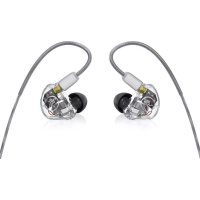
With an array of driver configurations available, MP Series In-Ear Monitors are perfect for live performance, mixing reference, and audiophiles alike. And thanks to their specially molded enclosures, they sit gracefully in your ear with a comfortable, ergonomic fit and with up to 40 dB of sound isolation.
The optional MP-BTA Bluetooth Adapter makes on-the-go listening a breeze. Elevate your performance and music with Mackie MP Series Professional In-Ear Monitors.
Features
PROFESSIONAL DESIGN
- Ergonomically molded low-profile enclosure offers maximum comfort, sound isolation and bass response
- Up to 40 dB of sound isolation
CUSTOM DRIVERS
• Crystal-clear sound with stunning vocal clarity and detail resolution
• High-headroom for distortion-free listening even at high volumes
- Precision crossovers ensure a balanced sound across the entire frequency range
HIGH-FIDELITY CABLE
- The shielded, braided cable is designed for extra durability and sonic performance
- Equipped with a detachable MMCX connector that swivels for increased comfort and durability
- The over ear design keeps them securely in your ears and the cables behind your head for uninterrupted performance
PERFECT FIT
- With three different types of ear tips included and in three different sizes, you can choose what works for your ears to provide maximum comfort and sound isolation
Features continued...
INCLUDED ACCESSORIES
- Hard molded case
• Gold-plated 1/8" to 1/4" adapter
• Additional cable with in-line remote - Cleaning tool
- Cleaning cloth
IMPORTANT SAFETY INSTRUCTIONS
- Read, follow, and keep these instructions. Heed all warnings.
- Do not use in or near dangerous environments. This includes driving, cycling, walking, jogging and other areas where traffic is present and accidents could occur.
-
Keep this product and its accessories out of reach of children. Handling or use by children may pose a risk of death or serious injury. Contains small parts and cords that may pose a risk of choking or strangulation.
-
Set the volume level of the audio device to a minimum, and then, after connecting the earphones, adjust the volume gradually. Sudden exposure to loud noises could cause hearing damage.
- Install the in-ear monitors firmly. If an ear tip accidentally detaches and is left in your ear, it may cause injury.
-
Failure to use, clean, or maintain ear tips may increase the risk of the ear tips detaching from the nozzle and becoming lodged in your ear.
-
Prior to inserting the in-ear monitors, always recheck the ear tip to make sure it is firmly attached to the nozzle.
- If an ear tip becomes lodged in your ear, seek skilled medical assistance to remove it. Damage to the ear may be caused by non-professionals attempting to remove the ear tip.
- Keep in-ear monitors clean. To clean the in-ear monitors, wash outside with a mild detergent solution.
-
Do not attempt to modify this product. Doing so could result in personal injury and/or product failure.
-
Do not immerse in water, such as while taking a shower, bath, or washing your face. Otherwise, sound deterioration or failures may result.
- Do not use while sleeping as accidents may result.
- Use a slow twisting motion to remove the earphones. Never pull on the earphone cord.
- Stop using the earphones immediately if they are causing great discomfort, irritation, rash, discharge, or any other uncomfortable reaction.
-
If you are currently receiving ear treatment, consult your physician before using this device.
-
Exposure to extremely high noise levels may cause permanent hearing loss. Individuals vary considerably in susceptibility to noise-induced hearing loss, but nearly everyone will lose some hearing if exposed to sufficiently intense noise for a period of time. The U.S. Government's Occupational Safety and Health Administration (OSHA) has specified the permissible noise level exposures shown in the chart. According to OSHA, any exposure in excess of these permissible limits could result in some hearing loss:
| Duration, per day in hours | Sound Level |
| 8 90 dB | |
| 6 92 dB | |
| 4 95 dB | |
| 3 97 dB | |
| 2 100 dB | |
| 1.5 102 dB | |
| 1 105 dB | |
| 0.5 110 dB | |
| 0.25 or less 115 dB | |
NOTE ON STATIC ELECTRICITY
Static electricity accumulated in the body may cause mild tingling in your ears. To minimize the effect, wear clothes made from natural materials.
natural_image
Pure electrical circuit lines without any symbolsCorrect disposal of this product: This symbol indicates that this product should not be disposed of with your household waste, according to the WEEE directive (2012/19/EU) and your national law. This product should be handed over to an authorized collection site for recycling waste electrical and electronic equipment (EEE). Improper handling of this type of waste could have a possible negative impact on the environment and human health due to potentially hazardous substances that are generally associated with EEE. At the same time, your cooperation in the correct disposal of this product will contribute to the effective usage of natural resources. For more information about where you can drop off your waste equipment for recycling, please contact your local city office, waste authority, or your household waste disposal service.
GETTING STARTED
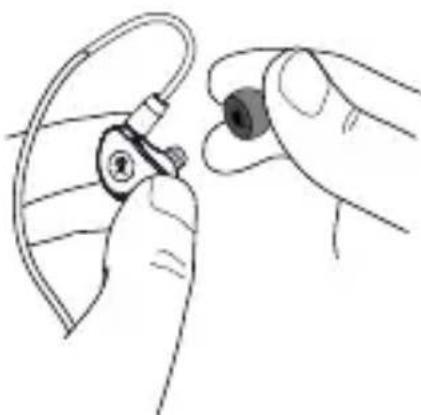
- Select and attach one ear tip per in-ear monitor. It should easily attach by applying light pressure, but you may find that you have to rotate the ear tip back-and-forth until it's secure.
natural_image
Illustration of a hand holding an earbell with a small ear component (no text or symbols)-
Your ears are important to us! Be careful of permanent hearing damage. Lower the volume on your device. Even intermediate levels may be painfully loud. Always turn the volume all the way down before connecting the in-ear monitors or doing anything new that may affect the headphone volume. Then turn it up slowly as you listen carefully.
-
Plug the connector of the in-ear monitors into the device.
-
Carefully insert the in-ear monitors into your ears. The L/R markings are located on the inside of the in-ear monitors where the flexible over-ear piece meets the in-ear monitor.

natural_image
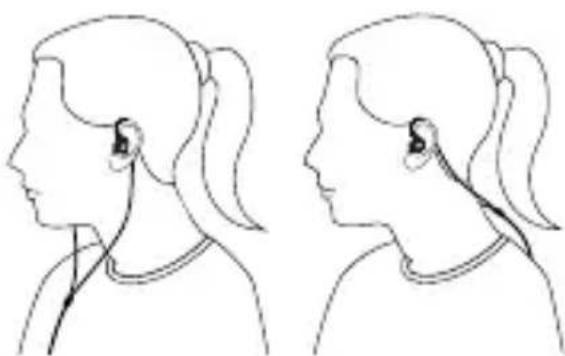
Line drawing of an ear with a device inserted, showing a magnified inset (no text or symbols)- The cable may be located on your front or rear side.
natural_image
Side-by-side line drawings of a human head profile showing ear and ear anatomy (no text or symbols)- Raise the volume on your device up to a comfortably loud listening level and enjoy!
| Technical Specifications | MP-320 MP-360 MP-460 | ||
| Bandwidth | 20 kHz | ||
| Sensitivity | /mW 117 dB / mW 118 dB | /mW | |
| Impedance | 15.5 Ω | 15 Ω | 15.5 Ω |
| Driver Type | Dynamic Knowles Balanced Armature | ||
| Drivers | |||
| Input Type | 3" • 1/4" Stereo | ||
| Output Type | L/R In-Ear Monitors | ||
| Cable Length | • 1570 mm | ||
| Weight | 0.07 lb • 0.03 kg | ||
| All specifications subject to change | |||
Need help with the In-Ear Monitors?
- Visit www.mackie.com and click Support to find: FAQs, manuals, and addendums.
- Telephone 1-800-898-3211 to speak with one of our splendid technical support chaps (Monday through Friday, normal business hours, Pacific Time).
LIMITED WARRANTY Please keep your sales receipt in a safe place.
This Limited Product Warranty (“Product Warranty”) is provided by LOUD Audio, LLC. (“LOUD”) and is applicable to products purchased in the United States or Canada through a LOUD-authorized reseller or dealer. The Product Warranty will not extend to anyone other than the original purchaser of the product (hereinafter, “Customer,” “you” or “your”).
For products purchased outside the U.S. or Canada, please visit www.mackie.com to find contact information for your local distributor, and information on any warranty coverage provided by the distributor in your local market. LOUD warrants to Customer that the product will be free from defects in materials and workmanship under normal use during the Warranty Period. If the product fails to conform to the warranty then LOUD or its authorized service representative will at its option, either repair or replace any such nonconforming product, provided that Customer gives notice of the noncompliance within the Warranty Period to the Company at: www.mackie.com or by calling LOUD technical support at 1.800.898.3211 (toll-free in the U.S. and Canada) during normal business hours Pacific Time, excluding weekends or LOUD holidays. Please retain the original dated sales receipt as evidence of the date of purchase. You will need it to obtain any warranty service.
For full terms and conditions, as well as the specific duration of the Warranty for this product, please visit www.mackie.com.
The Product Warranty, together with your invoice or receipt, and the terms and conditions located at www.mackie.com constitutes the entire agreement, and supersedes any and all prior agreements between LOUD and Customer related to the subject matter hereof. No amendment, modification or waiver of any of the provisions of this Product Warranty will be valid unless set forth in a written instrument signed by the party to be bound thereby.
INTRODUCCIÓN
natural_image
Pure electrical circuit lines without any symbolsnatural_image
Illustration of a hand holding an ear with a small ear device inserted (no text or symbols visible)natural_image
Line drawing of an ear with a device and magnified inset showing internal components (no text or symbols)natural_image
Side-by-side line drawings of a person's head and neck in profile view, showing ear signals (no text or symbols)natural_image
Pure electrical circuit lines without any symbolsnatural_image
Illustration of a hand holding an earbell with a small ear component inserted (no text or symbols)natural_image
Line drawing of an ear with a device inserted, showing a magnified inset of the ear structure (no text or symbols)natural_image
Side-by-side line drawings of a person's head in profile, showing ear and ear signals (no text or symbols)natural_image
Pure electrical circuit lines without any symbolsnatural_image
Illustration of a hand holding an earbell with a small ear component (no text or symbols)natural_image
Line drawing of an ear with a device inserted, showing a magnified inset of the ear structure (no text or symbols)natural_image
Side-by-side line drawings of a human head profile showing ear and neck segments (no text or symbols)BESCHRÄNKTE GARANTIE
natural_image
Symbolic icon of a running person inside a circle, no text or numbers presentwww.mackie.com

natural_image
Symbolic icon of a running person inside a circle (no text or numbers)19820 North Creek Parkway #201 • Bothell, WA 98011 • USA
Phone: 425.487.4333 • Toll-free: 800.898.3211
Fax: 425.487.4337 • www.mackie.com
Part No. 2052145 Rev. C 09/20 ©2020 LOUD Audio, LLC. All Rights Reserved.

- INTRODUCTION
- Features
- PROFESSIONAL DESIGN
- CUSTOM DRIVERS
- HIGH-FIDELITY CABLE
- PERFECT FIT
- Features continued...
- INCLUDED ACCESSORIES
- IMPORTANT SAFETY INSTRUCTIONS
- NOTE ON STATIC ELECTRICITY
- GETTING STARTED
- Need help with the In-Ear Monitors?
- LIMITED WARRANTY Please keep your sales receipt in a safe place.
- INTRODUCCIÓN
- BESCHRÄNKTE GARANTIE
Brand : MACKIE
Model : MP460
Category : Earplug