ManualGo.com
LiNX BH50010W - Vacuum Cleaner HOOVER - Free user manual and instructions
Find the device manual for free LiNX BH50010W HOOVER in PDF.



Download the instructions for your Vacuum Cleaner in PDF format for free! Find your manual LiNX BH50010W - HOOVER and take your electronic device back in hand. On this page are published all the documents necessary for the use of your device. LiNX BH50010W by HOOVER.
USER MANUAL LiNX BH50010W HOOVER
CLEANER ASSEMBLY MAY INCLUDE SMALL PARTS. SMALL PARTS CAN PRESENT A CHOKING HAZARD. When using an electrical appliance, basic precautions should always be followed, including the following:
SAVE THESE INSTRUCTIONS1
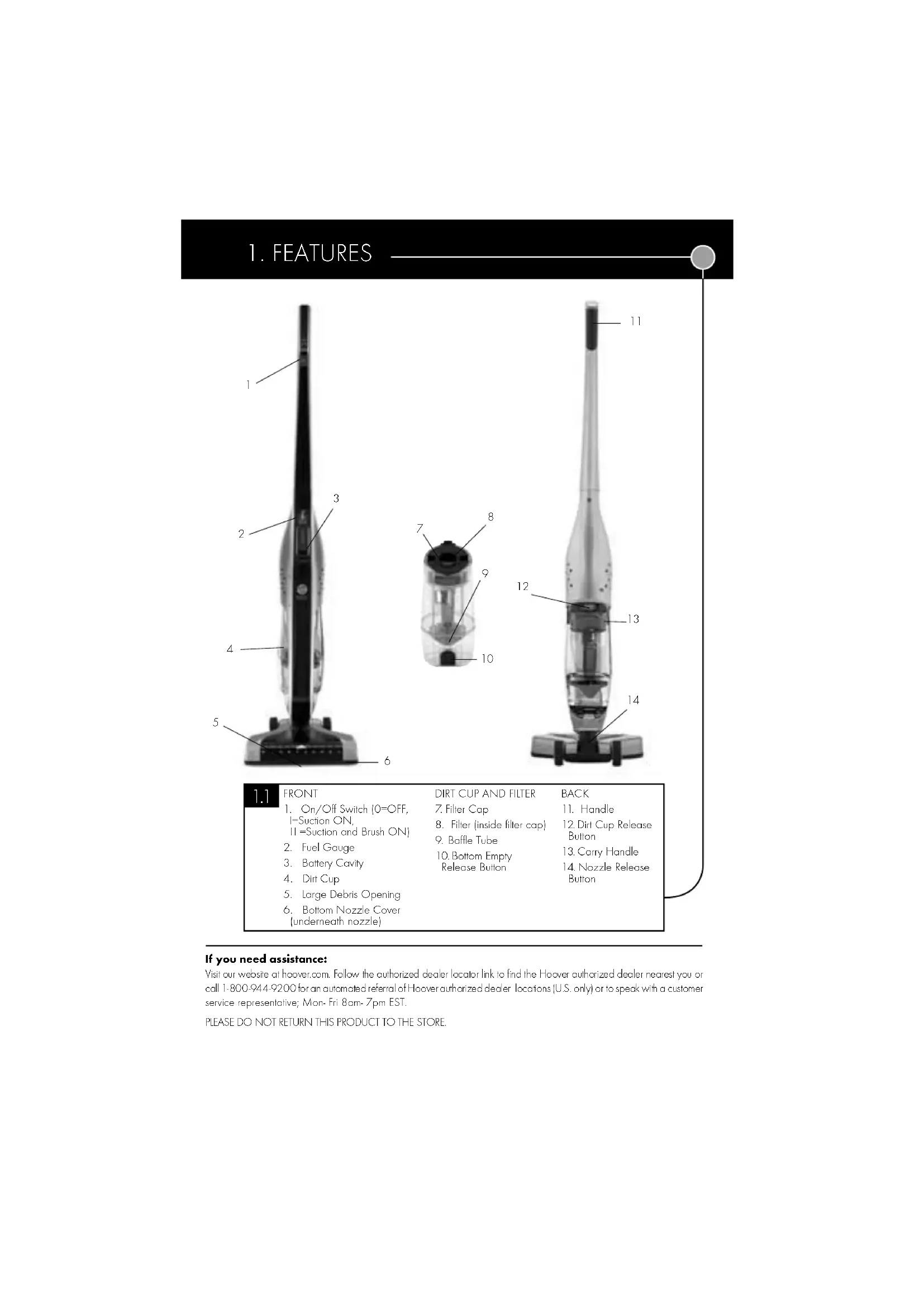
1. On/Off Switch (0=OFF,
I=Suction ON, I I =Suction and Brush ON)
5. Large Debris Opening
8. Filter (inside filter cap)
If you need assistance: Visit our website at hoover.com. Follow the authorized dealer locator link to find the Hoover® authorized dealer nearest you or call 1-800-944-9200 for an automated referral of Hoover® authorized dealer locations (U.S. only) or to speak with a customer service representative; Mon- Fri 8am- 7pm EST. PLEASE DO NOT RETURN THIS PRODUCT TO THE STORE.2. HOW TO OPERATE Assembly Line up nozzle with main body and firmly push nozzle into body of unit until nozzle locks into place. NOTE: To remove, push release button and pull the nozzle away from the body of the unit. Insert handle into body. NOTE: Ensure handle faces proper direction. Insert screw and tighten until secure. NOTE: DO NOT over tighten screw. Charge battery fully before first use. Fully discharged battery will take up to 3 hours to charge. NOTE: See battery and charging manual for battery charging instructions. Use only manufacturer’s supplied or recommended battery and charger.
Insert charged battery into battery cavity until latch is locked into place. NOTE: When inserting and removing battery, ensure the switch is in the off position marked “O”. Hold down nozzle with foot and tilt back to reclining position. To turn vacuum on, roll button forward. PUSH DIAL:
I - Suction ON - Recommended for use on hard floors. II - Suction and Brushroll ON - Recommended for use on carpet. To remove and charge battery, turn switch to off position. Pull on release lever located on end of battery and pull out gently. Nozzle Release Button3. MAINTENANCE For filter replacement, please call 1-800-944-9200 or visit our website at www.hoover.com to locate a dealer nearest you. Filter Service Part # 410044001. Dirt Cup & Filter Removal & Replacement IMPORTANT: For best results, clean after each use. REGULAR MAINTENANCE: Each time the dirt cup is emptied, the filter should be cleaned (Filter will be discolored after use. This will not affect the filter’s performance.) Dirt Cup Removal and Cleaning Filter Removal and Cleaning To Remove dirt cup, depress the dirt cup release button located on the top of the dirt cup and tip away from the body of the unit. Press dirt cup empty button over trash can to release debris. Push door closed until latch clicks.
WARNING: Always dry filter
for 24 hours before replacing.
detergent or hot water to clean filter.
Pull out filter cap. Pull out filter and brush clean. Rinse under cold water as needed. In order to maintain optimum performance of your cleaner, each time the dirt cup is removed for emptying it is recommended to check if there is any debris trapped in the dirt tube (A). If so, remove the debris before re-attaching the dirt cup to the cleaner. If you still are experiencing reduced suction/performance, detach the nozzle base from the main unit (press button on back of nozzle to release, B) and inspect both openings of the nozzle base (C) for any trapped debris. Remove any debris that may be present before re-attaching the nozzle base to the main body of the cleaner. Dirt Cup Debris and Clog Removal
BBattery Fuel Gauge: Battery Capacity Indicator Information All three LEDS will momentarily light when the product’s power switch is turned on. Then the Battery Fuel Gauge will indicate the pack’s remaining capacity as noted below. NOTE: Unit and lights will turn off when battery is fully discharged. Once battery is fully discharged return switch to off position.3 LEDs lit Remaining battery capacity > 75%2 LEDs lit Remaining battery capacity > 50%For belt replacement, please call 1-800-944-9200 or visit our website at www.hoover.com to locate a dealer nearest you. Belt Service Part # 001942002
EXPOSURETOTOXICMATERIAL CAUTION:The battery used in this device may present a risk of fire or chemical burn if mistreated. Do not disassemble, heat above manufacturer’s maximum temperature limit (60˚C/140˚F), or incinerate. Replace battery with HOOVER
® battery Part # BH50000 only. Use of another battery may present a risk of fire or explosion. Dispose of used battery promptly. Keep away from children. Do not disassemble and do not dispose of in fire. Do not attempt to disassemble the battery or remove any component projecting from the battery terminals. The battery and charger have no user serviceable parts. Fire or injury may result. Prior to disposal, protect exposed terminals with heavy insulating tape to prevent shorting. 1 LED lit Remaining battery capacity > 25%1 LED blinking Remaining battery capacity < 25% Baffle Tube Removal and Replacement Belt and Brushroll Replacement REMOVAL Hold dirt cup right side up and press bottom release button to open trap door. Turn baffle tube counter clockwise until it stops. Pull out baffle tube, hold over trash can and shake free debris.REPLACEMENT To replace baffle tube, insert back into dirt cup, align slots and twist clockwise till tube locks in place.
Dirt Cup and Filter Replacement REPLACEMENTInsert filter into filter cap.Insert filter cap into dirt cup. Place bottom of dirt cup onto housing and pivot into place until dirt cup release button locks.
WARNING: Remove battery before servicing. Turn vacuum nozzle over. Remove screws indicated by arrows on bottom nozzle plate. Lift plate off nozzle bottom to access brush, belt and nozzle. After replacement turn brushroll making sure belt turns freely.Return nozzle plate and screws.ANY SERVICING SHOULD BE DONE BY AN
AUTHORIZED SERVICE REPRESENTATIVE
Call 1-800-944-9200 USA & Canada In the event that further assistance is required, see your Yellow Pages for an authorized HOOVER Dealer or visit www.hoover.com. Costs of any transportation to and from any place of repair are to be paid by the owner. The service parts used in this unit are easily replaced and readily available from an authorized HOOVER Dealer or retailer. Always identify your product by the model number and manufacturing code when requesting information or ordering replacement parts. (The model number appears behind the dirt cup of the product.)
4. BATTERY FUEL GAUGE, DISPOSAL & SERVICE
Lithium-ion BatteriesThe battery must be collected, recycled or disposed of in an environmentally sound manner. The EPA certified RBRC Battery Recycling Seal on the lithium-ion (Li-ion) battery indicates Techtronic Industries, a corporate affiliate of Hoover, Inc., is voluntarily participating in an industry program to collect and recycle these batteries at the end of their useful life, when taken out of service in the United States or Canada. The RBRC program provides a convenient alternative to placing used Li-ion batteries into the trash or the municipal waste stream, which may be illegal in your area.Please visit www.rbrc.org/call2recycle/ for information on Li-ion battery recycling and disposal bans/restrictions in your area. Hoover, Inc., involvement in this program is part of our commitment to preserving our environment and conserving our natural resources. (continued) Service
PROBLEM POSSIBLE REASON POSSIBLE SOLUTION
Product does not turn on 1. Battery is not in product. 1. Insert battery into product.
2. Battery is not inserted properly. 2. Make sure battery is fully seated in battery cavity.
3. Battery is not charged. 3. Remove and charge battery or replace with second charged battery.
4. Battery is too hot. 4. Remove battery and let cool for 30 minutes, replace battery and retry or replace with second charged battery.5. Internal component damage. 5. Call for service: 1-800-944-9200Product turns off while in use
1. Battery is fully discharged. 1. Remove and charge battery or replace with second charged battery.
2. Battery is too hot. 2. Remove battery and let cool for 30 minutes, replace battery and retry or replace
with second charged battery. Product does not pick up dirt3. Internal component damage. 3. Call for service: 1-800-944-92001. Dirt cup may be full. 1. Empty dirt cup.2. Filter may be dirty. 2. Clean and/or wash filter. 3. Baffle tube may be dirty. 3. Remove and clean.4. Airpath may be clogged. 4. Make sure the battery is removed and the product is off. Remove nozzle by pressing the nozzle release button and pulling the nozzle in a downward motion. Remove any debris clogged in the nozzle airpath. Reassemble nozzle to the product. 5. Internal component damage. 5. Call for service: 1-800-944-9200 Brushroll will not turn 1. Brushroll may have an obstruction. 1. Make sure the battery is removed and the product is turned off. Remove nozzle by pressing the nozzle release button and pulling the nozzle in a downward motion. Remove any debris clogged in the nozzle airpath. Reassemble nozzle to the product.
2. Motor protection device tripped. 2. Turn product to off position, product will reset in approximately 30 minutes.
3. Broken belt. 3.Make sure the battery is removed and the product is off. Remove nozzle cover replace
with recommended belt and replace nozzle cover.4. Internal component damage. 4. Call for service: 1-800-944-9200 If a minor problem develops, it usually can be remedied quite easily when the cause is identified by using the checklist below.Any other servicing should be done by an authorized service representative.WARNING: To reduce risk of personal injury - unplug vacuum before servicing.CET ASPIRATEUR A ÉTÉ CONÇU POUR USAGE DOMESTIQUE SEULEMENT.
- Garder les cheveux, lesvêtements amples, les doigts et toute autre partie du corps à bonne distance des ouverturesetdespiècesmobilesdel’appareil. FRANÇAIS Limited TWO Year Warranty(Domestic Use)WHAT THIS WARRANTY COVERSWhen used and maintained in normal household use and in accordance with the Owner’s Manual, your HOOVER product is warranted against original defects in material and workmanship for a full two year from date of purchase (the “Warranty Period”). During the Warranty Period, Hoover
will provide labor and parts, at no cost to you, to correct any such defect in products purchased in the United States, U.S. Military Exchanges and Canada. HOW TO MAKE A WARRANTY CLAIMIf this product is not as warranted, take or send the product to a Hoover Authorized Warranty Service Dealer along with proof of purchase. For an automated referral to authorized service outlets in the U.S.A., phone: 1-800-944-9200 OR visit Hoover online at www.hoover.com. WHAT THIS WARRANTY DOES NOT COVER This Warranty does not cover: use of the product in a commercial operation (such as maid, janitorial and equipment rental services), brushroll, belt, improper maintenance of the product, damage due to misuse, acts of God, nature, vandalism or other acts beyond the control of Hoover®, owner’s acts or omissions, use outside the country in which the product was initially purchased and resales of the product by the original owner. This warranty does not cover pick up, delivery, transportation or house calls. However, if you mail your product to a Hoover® Authorized Warranty Service Dealer, cost of shipping will be paid one way. This warranty does not apply to products purchased outside the United States, including its territories and possessions, outside a U.S. Military Exchange and outside of Canada. This warranty does not cover products purchased from a party that is not an authorized retailer, dealer, or distributor of Hoover® products.OTHER IMPORTANT TERMS This Warranty is not transferable and may not be assigned. This Warranty shall be governed and construed under the laws of the state of Ohio. The Warranty Period will not be extended by any replacement or repair performed under this Warranty. THIS WARRANTY IS THE EXCLUSIVE WARRANTY AND REMEDY PROVIDED BY HOOVER