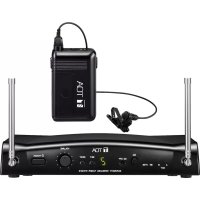
WS5225 - Microphone TOA - Free user manual and instructions
Find the device manual for free WS5225 TOA in PDF.


| Product Type | Unidirectional electret condenser wireless microphone |
| Dimensions | ø43,6 × 231,5 mm |
| Weight | 180 g (with battery) |
| Power Supply | AA alkaline battery (10 h) or WB-2000 rechargeable battery (13 h) |
| Frequency Range | 576 – 865 MHz (depending on country) |
| Number of Channels | 64 (16 channels × 4 banks) |
| Range | 3 to 120 m |
| RF Output Power | < 50 mW |
| Frequency Response | 100 Hz – 15 kHz |
| Max. Input Level | 126 dB SPL |
| Battery Indicator | Green LED (sufficient) / Red LED (low) |
| Antenna | Built-in type |
| Operating Temperature | -10 to +50 °C |
| Operating Humidity | 30–85 % RH |
| Maintenance and Cleaning | Dry cloth; for stubborn dirt, cloth dampened with neutral detergent |
| Supplied Accessories | Microphone stand with adapter, screwdriver, carrying case |
| Safety | Use only WB-2000 battery and BC-5000 charger; do not expose to water or shocks |
| Repairability | Contact a TOA representative; no modifications allowed |
| Standards | Compliant with Industry Canada RSS (license-exempt radio device) |
Frequently Asked Questions - WS5225 TOA
User questions about WS5225 TOA
0 question about this device. Answer the ones you know or ask your own.
Ask a new question about this device
Download the instructions for your Microphone in PDF format for free! Find your manual WS5225 - TOA and take your electronic device back in hand. On this page are published all the documents necessary for the use of your device. WS5225 by TOA.
USER MANUAL WS5225 TOA
Thank you for purchasing TOA's Wireless Microphone.
Please carefully follow the instructions in this manual to ensure long, trouble-free use of your equipment.
1. SAFETY PRECAUTIONS
- Be sure to read the instructions in this section carefully before use.
- Make sure to observe the instructions in this manual as the conventions of safety symbols and messages regarded as very important precautions are included.
• We also recommend you keep this instruction manual handy for future reference.
Safety Symbol and Message Conventions
Safety symbols and messages described below are used in this manual to prevent bodily injury and property damage which could result from mishandling. Before operating your product, read this manual first and understand the safety symbols and messages so you are thoroughly aware of the potential safety hazards.

WARNING
Indicates a potentially hazardous situation which, if mishandled, could result in death or serious personal injury.

CAUTION
Indicates a potentially hazardous situation which, if mishandled, could result in moderate or minor personal injury, and/or property damage.

WARNING
When the Unit is in Use
- To prevent the electromagnetic wave from badly influencing medical equipment, make sure to switch off the unit's power when placing it in close proximity to the medical equipment.
- Use TOA's BC-5000 Battery Charger when recharging.
- The wireless microphone can be powered by WB-2000 Battery. But, if use of any other than the counter specified battery into the BC-5000 Battery Charger, it may cause fire, personal injury, or environmental contamination due to battery rupture or leakage.
- The use of any other than the specified charger could result in fire, personal injury, or environmental contamination due to battery rupture or leakage.
- Stop charging, if the batteries are not fully charged within 3 hours. Failure to do so may cause the batteries to fire, explode, leak, or heat.
- Never short-circuit the charging terminals on the bottom of the microphone with metal objects. Doing so could result in electric shocks or burns.

CAUTION
When the Unit is in Use
- When the unit is not in use for 10 days or more, be sure to take the battery out of the unit because battery leakage may cause personal injury or contamination of environment.
-
Make sure to observe the following handling precautions so that a fire or personal injury does not result from leakage or explosion of the battery.
-
Do not short, disassemble, heat nor put the battery into a fire.
- Never charge batteries of the type which are not rechargeable.
· Do not solder a battery directly. -
Be sure to use the specified type of battery.
-
Note correct polarity (positive and negative orientation) when inserting a battery in the unit.
- Avoid locations exposed to the direct sunlight, high temperature and high humidity when storing batteries.
Do not place the dry cell battery into charger.
Placing non-rechargeable batteries in the charger may cause the battery to crack resulting in a fire and/or harm to the body.
When recharging, please only use the BC-5000
Battery Charger and WB-2000 Battery.
Do not use other battery types.
When the battery becomes inflated or leaks, discontinue use and replace with new one immediately.
If there's any burning and/or peculiar smell while charging the battery, please switch off the power immediately.
CAUTION TO USER: Changes or modifications not expressly approved by the party responsible for compliance could void the user's authority to operate the equipment.
IMPORTANT NOTE: To comply with the FCC RF exposure compliance requirements, no change to the antenna or the device is permitted. Any change to the antenna or the device could result in the device exceeding the RF exposure requirements and void user's authority to operate the device.
License requirement
The term "IC:" before the radio certification number only signifies that Industry Canada Technical specifications were met. Operation is subject to the following two conditions;
(1) This device may not cause harmful interference, and (2) this device must accept any interference received, including interference that may cause undesired operation.
The TOA's WM-5225 Wireless Microphone employs an electret condenser microphone element of high sensitivity and intelligible sound quality, and is suitable for speech use.
WM-5265 is a vocal microphone, employing a fine, powerful dynamic microphone unit.
3. FEATURES
- One frequency can be selected from 64 frequencies (16 channels x 4 banks) of 576 – 865 MHz (576 – 606 MHz and 614 – 698 MHz for USA/Canada).
- An optimized PLL-synthesizer minimizes the oscillation frequency drift resulting from the ambient temperature or voltage fluctuation.
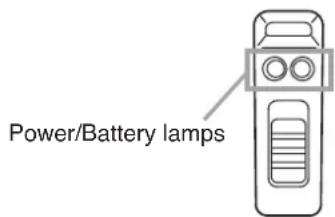
- Power/Battery lamps indicate battery consumption to prevent the unit from malfunctioning when the battery level remarkably decreases.
- Operates on a single AA battery.
• Employs a built-in antenna. - The state of battery consumption can be displayed on the tuner's indicator when the unit is used in conjunction with the optional WT-5800, WT-5805 or WT-5810 Wireless Tuner.
4. HANDLING PRECAUTIONS
- Do not expose the unit to rain or an environment where it may be splashed by water or other liquids, as doing so may result in unit failure.
- Never open nor remove the unit case to modify the unit. Refer all servicing to your nearest TOA dealer.
• Take care not to drop the unit onto the floor nor bump it against a hard object as the unit could fail. - Do not place the unit in locations of high temperature (ex. in an ill-ventilated car in summer) or high humidity as the unit could fail.
- Do not use the unit in locations where it is exposed to seawater.
- To clean, use a dry cloth. When the unit gets very dirty, wipe lightly with a cloth damped in a dilute neutral cleanser, then wipe with a dry cloth. Never use benzine, thinner, or chemically-treated cleaning towel.
- Avoid using a mobile telephone near the wireless microphone in use. Noise could be picked up.
- When using two or more wireless microphones, keep them at least 50 cm away from each other to avoid malfunctions or noise.
- Keep the wireless microphone at least 3 m away from the receiving antenna. Using the microphone in close proximity to the antenna could result in malfunctions or noise.
5. NOMENCLATURE
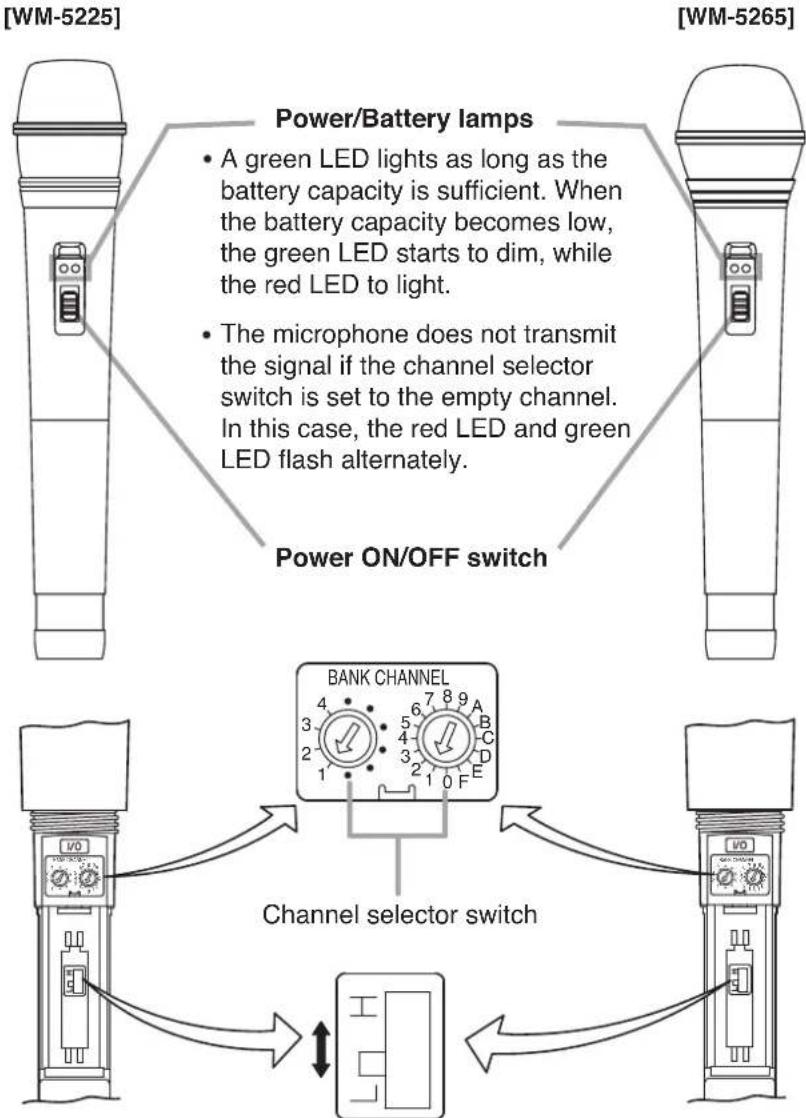
flowchart
graph TD
    A["Power/Battery lamps"] --> B["Green LED lights as long as battery capacity is sufficient. When the battery capacity becomes low, the green LED starts to dim, while the red LED to light."]
    B --> C["The microphone does not transmit the signal if the channel selector switch is set to the empty channel. In this case, the red LED and green LED flash alternately."]
    C --> D["Power ON/OFF switch"]
    D --> E["BANK CHANNEL"]
    E --> F["Channel selector switch"]
    F --> G["Output"]
Keep the switch in the "L" position (factory-preset).
Leave the switch setting to qualified service technicians.
6. BATTERY INSERTION
Step 1. Turn off the power switch.
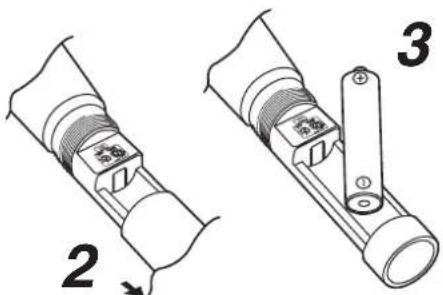
Step 2. Hold the microphone body and rotate the microphone grip counterclockwise to remove it.
Step 3. Insert an AA battery according to (+) and (−) indications on the battery compartment.
Step 4. Replace the microphone grip by sliding and rotating it clockwise.
Battery replacement
- A brand-new AA alkaline battery will continuously operate the unit for about 10 hours.
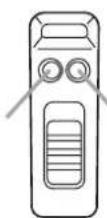
- When the battery capacity becomes low, the green LED of the Power/Battery lamps starts to dim, while the red LED to light.
When only the red LED lights, replace the battery with a new one. In this condition, the unit transmits the remaining battery capacity information to the tuner, causing the tuner's BATT indicator to light.
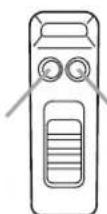
Green LEDRed LED
7. WHEN OPERATING ON RECHARGEABLE BATTERY

CAUTION
When charging, never insert rechargeable batteries other than the specified WB-2000 battery in the wireless microphone (transmitter). Charging any other than the WB-2000 battery may result in fire or personal injury due to battery rupture.
Notes
- When operating on rechargeable batteries, the optional BC-5000 Battery Charger is required.
- For rechargeable batteries, be sure to use the optional WB-2000 battery. Do not use other batteries.
7.1. How to Charge
Step 1. Set the wireless microphone's power switch to the OFF position.
Note
Be sure to turn off the microphone's power switch when charging. Batteries cannot be correctly charged if the power switch is ON.
Step 2. Place the WB-2000 rechargeable battery in the wireless microphone.
(Refer to p. 4 "Battery insertion.")
Step 3. Fully insert the wireless microphone into the microphone receptacle of the BC-5000 Battery Charger.
In this case, place the microphone with its power ON/OFF switch facing the charger's front or back.
The BC-5000's charging indicator lights red and charging begins.
Charging is completed in approximately 3 hours and the BC-5000's full-charge indicator lights green.
(When charging the WM-5225/5265 microphone, attach the mounting adapter supplied with the charger.)

Charging indicator (red)
Full-charge indicator (green)
Notes
- If the red charging indicator does not light even if the wireless microphone has been inserted into the charger, check to see if the microphone has been correctly inserted.
- The wireless microphone becomes warm after charging completion, however this is not a failure.
Note: For more information, please read the instruction manual enclosed with the BC-5000 Battery Charger.
7.2. Charging Timing
Please charge the equipment immediately when green LED light is off and red light is on during use.
When the battery alarm lamp on the receiver is on, the battery level of the microphone is low as well.
The microphone will not be able to operate within a few minutes.
Even though the battery remains enough, both green and red lights might be on at the same time.
[Guidelines on the rechargeable battery operation time]
Continuous usage time: Approx. 13 hours
Notes
- When using the WB-2000 rechargeable battery for the first time or when using it after it has been stored for a long period of time, be sure to charge it before use.
- The WB-2000 battery is designed to cycle through about 500 charges and discharges. When the microphone operation interval becomes extremely short after prolonged repeated use, change the battery with a new one.
8. CHANNEL NUMBER SETTING
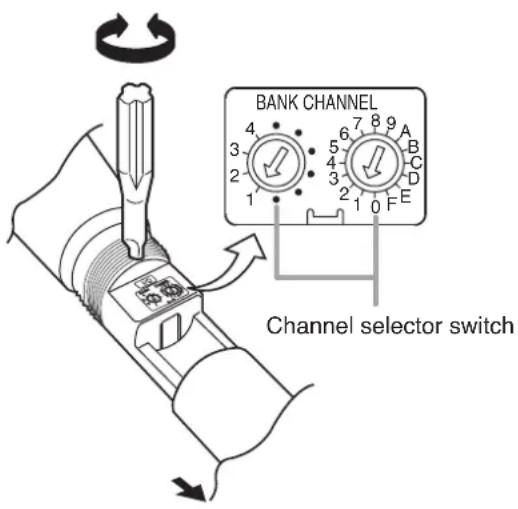
Step 1. Switch off the power. Rotate the microphone grip counterclockwise to remove it.
Step 2. Using the supplied screwdriver, set the Channel setting switch pointer to the desired channel number.
Step 3. Replace the microphone grip.
Note: Make sure that the wireless microphone is identical to the wireless tuner in the channel number. Should the microphone's setting differ from that of the tuner, the tuner does not receive the microphone signal.
9. OPERATION
Step 1. Confirm that the wireless microphone and the wireless tuner are identical in the channel number. If not identical, turn the power ON/OFF switch to the OFF position, then set the channel number to the same channel number as the tuner.
Step 2. Turn the Power ON/OFF switch to the ON position. Then, confirm the green LED of the Power/Battery lamps will light.
Step 3. Turn the Power ON/OFF switch to the OFF position after use.
10. OPERATIONAL HINTS
- The microphone's service distance is 3 – 120 m. When the microphone user moves in a facility, signal dropouts (momentary losses of signal reception) may be encountered. These dropouts are caused by the building's architectural designs or materials which block the travel of or reflect the radio signal. If this occurs, the user needs to change locations for better signal reception.
- The proper operation of your wireless system may be interfered with by other system operating on the same frequency. In such cases, change the operating frequency of your system. (As to dealing with the interference, refer to the operating instructions of the wireless tuner.)
- Should you have any questions regarding the use or availability of TOA wireless products, please contact your local TOA dealer.
11. SPECIFICATIONS
| Model No. WM-5225 WM-5265 | ||
| Microphone Element Electret | condenser microphone unit: Dynamic Unidirectional Unidirectional | microphone unit: |
| Modulation | Frequency | |
| Frequency Range 576 – 865 | MHz (576 – 606 MHz and 614 – 698 MHz for USA/Canada) | |
| Channel Selectable | 64 channels (the number of channels may differ from country to country) | |
| RF Carrier Power 50 mW or less | ||
| Tone Frequency 32.768 kHz | ||
| Oscillator PLL synthesized | ||
| Maximum Input Level 126 dB | SPL 132 dB SPL | |
| Maximum Deviation ±40 kHz | ||
| Audio Frequency Response 100 Hz – 15 kHz | ||
| Dynamic Range | 95 dB or more (with WT-5800) | |
| Battery | WB-2000 rechargeable battery (option) or AA alkaline dry cell battery | |
| Battery Life | Approx. 13 h (when the WB-2000 rechargeable battery is used) Approx. 10 h (when the alkaline battery is used) | |
| Indicator | Power/Battery lamps | |
| Antenna | Built-in type | |
| Operating Temperature | -10°C to +50°C (14°F to 122°F) (except battery) | |
| Operating Humidity | 30 % to 85 %RH | |
| Finish | Resin, coating | |
| Dimensions | ø43.6 x 231.5 mm (ø1.72" x 9.11") | ø50 x 229 mm (ø1.97" x 9.02") |
| Weight | 180 g (0.4 lb) (with battery) | 205 g (0.45 lb) (with battery) |
modu
Note: The design and specifications are subject to change without notice for improvement.
- Accessories
Microphone holder (with stand adapter) .... 1
Storage case 1
Screwdriver (for setting) 1
DRAHTLOS-MIKROFONE
WM-5225
WM-5265
Batteriewechsel
The term "IC:" before the radio certification number only signifies that Industry Canada Technical specifications were met. Operation is subject to the following two conditions;
(1) This device may not cause harmful interference, and (2) this device must accept any interference received, including interference that may cause undesired operation.
2. DESCRIPTION GENERALE
LED verdeLED rojo
7. CUANDO SE UTILIZA CON LA BATERÍA RECARGABLE

PRECAUCIÓN
话筒架(with stand adapter) 1
螺丝刀(安装使用) 1
储存容器 1

TOA
DECLARATION OF CONFORMITY
as the authorised representative of the
Manufacturer: TOA Corporation 7-2-1, Minatojima-nakamachi, Chuo-ku, Kobe, Japan 650-0046
declare, under our sole responsibility, that the product
Product Name: WIRELESS MICROPHONE
Model Number: WM-5225, WM-5265, WM-5325 WM-5270 (A/B/C/D/E/F/G/H)
conforms with following specifications:
EMC: EN 301 489-1 V1.8.1, EN 301 489-9 V1.4.1, EN 55022: 2006/A1: 2007, EN 61000-4-2: 2009, EN 61000-4-3: 2006/A1: 2008
LVD (11)*: EN 60065: 2002 + A11: 2009
ERM: EN 300 422-2 V1.2.2
(*: the last two digits of the year in which the CE marking was affixed.)
The product herewith complies with the requirements of the EU directives: 2006/95/EC relating to electrical safety (LVD), 2002/95/EC relating to the restrictions of hazardous substances (RoHS) 1999/5/EC relating to the radio spectrum.
Remark:
This Declaration of Conformity replaces all previous ones of the above model(s).

Hamburg, 23 ^th June 2011 (place, date)
The Technical Construction File (TCF) is kept at the UK office:
TOA Corporation (UK) Ltd: HQ3, Unit 2; Hook Rise South; Surbiton, Surrey KT6 7LD; United Kingdom Tel.: +44 (0) 870 774 0987; Fax: +44 (0) 870 777 0839; URL: www.toa.co.uk
German Office:
TOA Electronics Europe GmbH, Süderstraße 282, 20537 Hamburg, Germany Tel: +49 / (0)40 / 25 17 19-0, Fax: +49 / (0)40 / 25 17 19-98 URL: www.toa.eu
COMPLIANCE STATEMENT TO
WM-S200, WM-S300,
WM-3210, WM-3220, WM-3310, WM-3310H,

- SAFETY PRECAUTIONS
- Safety Symbol and Message Conventions
- When the Unit is in Use
- License requirement
- FEATURES
- HANDLING PRECAUTIONS
- NOMENCLATURE
- BATTERY INSERTION
- Battery replacement
- WHEN OPERATING ON RECHARGEABLE BATTERY
- CAUTION
- Notes
- How to Charge
- Note
- Charging Timing
- [Guidelines on the rechargeable battery operation time]
- CHANNEL NUMBER SETTING
- OPERATION
- OPERATIONAL HINTS
- SPECIFICATIONS
- - Accessories
- DRAHTLOS-MIKROFONE
- Batteriewechsel
- DESCRIPTION GENERALE
- CUANDO SE UTILIZA CON LA BATERÍA RECARGABLE
- PRECAUCIÓN
- DECLARATION OF CONFORMITY
- COMPLIANCE STATEMENT TO
- WM-S200, WM-S300,
Brand : TOA
Model : WS5225
Category : Microphone