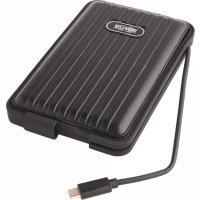
U457025G2WPB - Hard Drive Tripp Lite - Free user manual and instructions
Find the device manual for free U457025G2WPB Tripp Lite in PDF.


| Product Type | External Enclosure for 2.5\" SATA SSD/HDD |
| Brand | Tripp Lite |
| Model | U457-025-G2-WPB (USB 3.1 Gen 2, 10 Gbps) |
| Dimensions | 24 x 94 x 148 mm (0.94 x 3.7 x 5.8 inches) |
| Power Supply | Bus-powered (power from USB port) |
| Connectivity | Integrated USB Type-C male (attached cable) |
| Max Transfer Rate | 10 Gbps (USB 3.1 Gen 2) |
| Compatible Drives | SATA I/II/III, 2.5\" SSD/HDD, height 7 to 9.5 mm |
| Protection | IP66 (water and dust resistant) |
| UASP Support | Yes |
| Operation | Bus-powered, plug-and-play, no software required |
| Package Contents | Enclosure, screwdriver, screws (x10), washers (x10), quick start guide |
| System Requirements | USB 3.1 Gen 2 port for full speed, UASP-capable host controller |
| Operating Temperature | 10 to 50 °C (50 to 122 °F) |
| Relative Humidity | 10 to 80% RH, non-condensing |
| Warranty | 1 year limited |
| Care and Cleaning | Clean with a soft, dry cloth |
| Safety | Do not use for life support devices |
| Spare Parts and Repairability | No user-serviceable parts; contact Tripp Lite |
Frequently Asked Questions - U457025G2WPB Tripp Lite
User questions about U457025G2WPB Tripp Lite
0 question about this device. Answer the ones you know or ask your own.
Ask a new question about this device
Download the instructions for your Hard Drive in PDF format for free! Find your manual U457025G2WPB - Tripp Lite and take your electronic device back in hand. On this page are published all the documents necessary for the use of your device. U457025G2WPB by Tripp Lite.
USER MANUAL U457025G2WPB Tripp Lite
USB-C 3.1 SATA SSD/HDD Water-Resistant Enclosure with Built-In Cable for 2.5-Inch Drives
Models: U457-025-G1-WPG (USB 3.1 Gen 1, 5 Gbps), U457-025-G2-WPB (USB 3.1 Gen 2, 10 Gbps)
Español 5 • Français 9 • Русский 13
WARRANTY REGISTRATION
Register your product today and be automatically entered to win an ISOBAR surge protector in our monthly drawing!
tripplite.com/warranty


1111 W. 35th Street, Chicago, IL 60609 USA • tripplite.com/support
Copyright © 2019 Tripp Lite. All rights reserved.
Product Features
- Converts any 2.5 in. internal SATA SSD (solid state drive) or HDD (hard disk drive) into an external hard drive for storing data
- Designed for 2.5 in. SATA drive heights between 7 mm and 9.5 mm
• Supports SATA III (6 Gbps), II (3 Gbps) and I (1.5 Gbps) drives - Backward compatible with USB 3.0, 2.0 and 1.1 devices
• Water-resistant and dust-tight to comply with IP66 standards
• UASP-compatible for enhanced performance - Bus-powered plug-and-play operation with no software or external power required
Package Contents
- U457-025-G1-WPG (SuperSpeed USB 3.1 Gen 1, 5 Gbps) or U457-025-G2-WPB (SuperSpeed USB 3.1 Gen 2, 10 Gbps)
- Mini Screwdriver
- Screws (x10)
- Washers (x10)
- Quick Start Guide
System Requirements
- USB 3.1 Gen 1 (5 Gbps) port required to achieve maximum speeds for U457-025-G1-WPG
- USB 3.1 Gen 2 (10 Gbps) port required to achieve maximum speeds for U457-025-G2-WPB
- UASP-enabled host controller required to achieve UASP performance
• 2.5 in. SATA HDD or SSD with maximum height of 9.5 mm
Installation
1 Remove the back cover (side with the screw holes) of the SSD/HDD enclosure.
2 Connect your 2.5 in. SATA SSD/HDD to the SATA connector.
3 Once the SATA SSD/HDD is securely in place, replace the back cover, ensuring the screw holes line up with one another.
4 Using the included screwdriver, screws and washers, fasten the 10 screws and washers securely to the enclosure.
Note: In order to comply with IP66 standards, screws need to be properly tightened to the enclosure.
5 Connect the built-in USB 3.1 Type-C cable to an available USB port on your computer.
Specifications
| Drive Connection 22-Pin SATA | Data + Power |
| USB Connection USB Type-C (Male) | |
| Maximum Data Transfer Rate | 10 Gbps (U457-025-G2-WPB) |
| 5 Gbps (U457-025-G1-WPG) | |
| SSD/HDD Supported 2.5 in. SATA I/II/III HDD/SSD | |
| Operating Temperature 50° to | 122°F (10° to 50°C) |
| Relative Humidity 10% to 80% RH, Non-Condensing | |
| Dimensions 0.94 x 3.7 x 5.8 in. (24 x 94 x 148 mm) | |
Warranty and Product Registration
1-Year Limited Warranty
TRIPP LITE warrants its products to be free from defects in materials and workmanship for a period of one (1) year from the date of initial purchase. TRIPP LITE's obligation under this warranty is limited to repairing or replacing (at its sole option) any such defective products. To obtain service under this warranty, you must obtain a Returned Material Authorization (RMA) number from TRIPP LITE or an authorized TRIPP LITE service center. Products must be returned to TRIPP LITE or an authorized TRIPP LITE service center with transportation charges prepaid and must be accompanied by a brief description of the problem encountered and proof of date and place of purchase. This warranty does not apply to equipment, which has been damaged by accident, negligence or misapplication or has been altered or modified in any way. EXCEPT AS PROVIDED HEREIN, TRIPP LITE MAKES NO WARRANTIES, EXPRESS OR IMPLIED, INCLUDING WARRANTIES OF MERCHANTABILITY AND FITNESS FOR A PARTICULAR PURPOSE.
Some states do not permit limitation or exclusion of implied warranties; therefore, the aforesaid limitation(s) or exclusion(s) may not apply to the purchaser.
EXCEPT AS PROVIDED ABOVE, IN NO EVENT WILL TRIPP LITE BE LIABLE FOR DIRECT, INDIRECT, SPECIAL, INCIDENTAL OR CONSEQUENTIAL DAMAGES ARISING OUT OF THE USE OF THIS PRODUCT, EVEN IF ADVISED OF THE POSSIBILITY OF SUCH DAMAGE. Specifically, TRIPP LITE is not liable for any costs, such as lost profits or revenue, loss of equipment, loss of use of equipment, loss of software, loss of data, costs of substitutes, claims by third parties, or otherwise.
Product Registration
Visit tripplite.com/warranty today to register your new Tripp Lite product. You'll be automatically entered into a drawing for a chance to win a FREE Tripp Lite product!*
* No purchase necessary. Void where prohibited. Some restrictions apply. See website for details.
WARNING
Use of this equipment in life support applications where failure of this equipment can reasonably be expected to cause the failure of the life support equipment or to significantly affect its safety or effectiveness is not recommended.
WEEE Compliance Information for Tripp Lite Customers and Recyclers (European Union)

Under the Waste Electrical and Electronic Equipment (WEEE) Directive and implementing regulations, when customers buy new electrical and electronic equipment from Tripp Lite they are entitled to:
- Send old equipment for recycling on a one-for-one, like-for-like basis (this varies depending on the country)
- Send the new equipment back for recycling when this ultimately becomes waste
Tripp Lite has a policy of continuous improvement. Specifications are subject to change without notice.


Manufacturing Excellence,
1111 W. 35th Street, Chicago, IL 60609 USA • tripplite.com/support
1111 W. 35th Street, Chicago, IL 60609 USA • tripplite.com/support
1111 W. 35th Street, Chicago, IL 60609 USA • tripplite.com/support
1111 W. 35th Street, Chicago, IL 60609 USA • tripplite.com/support