ManualGo.com
HH-S35100E - Digital Camera PANASONIC - Free user manual and instructions
Find the device manual for free HH-S35100E PANASONIC in PDF.



Download the instructions for your Digital Camera in PDF format for free! Find your manual HH-S35100E - PANASONIC and take your electronic device back in hand. On this page are published all the documents necessary for the use of your device. HH-S35100E by PANASONIC.
USER MANUAL HH-S35100E PANASONIC
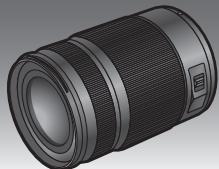
Operating Instructions
INTERCHANGEABLE LENS FOR DIGITAL CAMERA
Model No. H-HS35100
LUMIX
Please read these instructions carefully before using this product, and save this manual for future use.




VQT4G75
F1012HH0(7000A)
Contents
Information for Your Safety 2
Precautions 4
Supplied Accessories 5
Attaching/Detaching the Lens 6
Names and Functions of Components 8
Cautions for Use 9
Troubleshooting 9
Specifications. 10
Information for Your Safety
Keep the unit as far away as possible from electromagnetic equipment (such as microwave ovens, TVs, video games, radio transmitters, high-voltage lines etc.).
- Do not use the camera near cell phones because doing so may result in noise adversely affecting the pictures and sound.
- If the camera is adversely affected by electromagnetic equipment and stops functioning properly, turn the camera off and remove the battery and/or the connected AC adaptor. Then reinsert the battery and/or reconnect the AC adaptor and turn the camera on.
The lens can be used with a digital camera compatible with the lens mount standard for the "Micro Four Thirds™ System".
- It cannot be mounted on the Four Thirds™ mount specification camera.
- The digital camera illustrations in these operating instructions show DMC-GH2 as an example.
- The appearance and specifications of products described in this manual may differ from the actual products you have purchased due to later enhancements.
- Micro Four Thirds™ and Micro Four Thirds Logo marks are trademarks or registered trademarks of Olympus Imaging Corporation, in Japan, the United States, the European Union and other countries.
- Four Thirds™ and Four Thirds Logo marks are trademarks or registered trademarks of Olympus Imaging Corporation, in Japan, the United States, the European Union and other countries.
G MICRO SYSTEM is an interchangeable lens type digital camera system of LUMIX based on a Micro Four Thirds System standard. - Other names of systems and products mentioned in these instructions are usually the registered trademarks or trademarks of the manufacturers who developed the system or product concerned.
-If you see this symbol
Information on Disposal for Users of Waste Electrical & Electronic Equipment (private households)


This symbol on the products and/or accompanying documents means that used electrical and electronic products should not be mixed with general household waste.
For proper treatment, recovery and recycling, please take these products to designated collection points, where they will be accepted on a free of charge basis.
Alternatively, in some countries you may be able to return your products to your local retailer upon the purchase of an equivalent new product.
Disposing of this product correctly will help to save valuable resources and prevent any potential negative effects on human health and the environment which could otherwise arise from inappropriate waste handling. Please contact your local authority for further details of your nearest designated collection point.
Penalties may be applicable for incorrect disposal of this waste, in accordance with national legislation.
For business users in the European Union
If you wish to discard electrical and electronic equipment, please contact your dealer or supplier for further information.
Information on Disposal in other Countries outside the European Union
This symbol is only valid in the European Union.
If you wish to discard this product, please contact your local authorities or dealer and ask for the correct method of disposal.
Precautions
Lens Care
- This lens has a dust-proof and splash-proof construction. When using it, please be careful of the following.
If the lens is not working properly, consult the dealer or your nearest Service Centre.
-
Please attach the lens to a dust-proof and splash-proof digital camera.
-
Make sure that no sand, dust, drops of water, etc., gets on or inside the lens mount rubber, terminals, and inside the digital camera and lens when attaching or detaching the lens.
-
This lens is not waterproof and cannot be used to record underwater. For splash-proofing, the lens is constructed to resist the entry of water. If splashes of water etc. do adhere to the lens, wipe after use with a soft dry cloth.
-
To improve the dust-proofing and splash-proofing of this lens, a lens mount rubber is used in the mounting portion. After changing the lens a number of times, you may find that the lens mount rubber has marked the mount portion of the digital camera body, which does not affect its performance.
For information on changing the lens mount rubber, contact your nearest Service Centre.
-
Do not press the lens with excessive force.
-
When there is dirt (water, oil, and fingerprints, etc.) on the surface of the lens, the picture may be affected. Lightly wipe the surface of the lens with a soft, dry cloth before and after taking pictures.
-
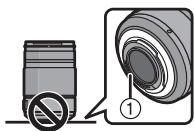
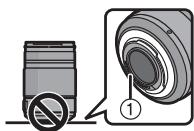
Do not place the lens mount facing downwards. Do not allow the lens contact points ① to become dirty.
About Condensation (Fogging of the Lens)
-
Condensation occurs when there are differences in temperature and humidity as described below. Condensation can cause the lens to become dirty and lead to mold and malfunctioning, so exercise caution in the following situations:
-
When the camera is brought indoors from outside during cold weather
- When the camera is brought into an air-conditioned car
-
When cold air from an air conditioner is directly blown onto the lens
-In humid places -
Put the camera into a plastic bag to allow it to acclimatize to the surrounding temperature in order to prevent condensation. If condensation occurs, turn the power off and leave it for about two hours. Once the camera acclimatizes to the surrounding temperature the condensation will go away naturally.
Supplied Accessories
[Inspection to be performed when you unpack the unit]
When removing the unit from its packing box, check that the main unit and the supplied accessories are there and also check their external appearance and functions to verify that they have not sustained any damage during distribution and transportation. If you discover any trouble, contact your vendor before using the product.
Product numbers correct as of October 2012. These may be subject to change.
![PANASONIC HH-S35100E - [Inspection to be performed when you unpack the unit] - 1](/content/2019/09/53392/images/f489751bd677a84e818371537e628e7f8fef3e0e28a35cb939a2023d6db3792e.jpg)
VFC4430
![PANASONIC HH-S35100E - [Inspection to be performed when you unpack the unit] - 2](/content/2019/09/53392/images/24a72b07605cefca08028756f077032c7e51530c7d955aa856a1334500392aa8.jpg)
VYC1085
![PANASONIC HH-S35100E - [Inspection to be performed when you unpack the unit] - 3](/content/2019/09/53392/images/933a44a132b989a606f4530207b2182cc374ad750a50613b754a7ec90592e0c3.jpg)
VYF3480
![PANASONIC HH-S35100E - [Inspection to be performed when you unpack the unit] - 4](/content/2019/09/53392/images/633fb1207ac9232a2073665ff0c016b76f14c3f01ab879168e9281c5e2912140.jpg)
VFC4605
1 Lens Storage Bag
2 Lens Hood
3 Lens Cap
4 Lens Rear Cap (The lens rear cap and lens cap are attached to the interchangeable lens at the time of purchase.)
Attaching/Detaching the Lens
■ Attaching the Lens
Refer also to the camera's operating instructions for attaching and detaching the lens.
- Check that the camera is turned off.
1 Turn the lens rear cap to detach it.
A: Lens Rear Cap
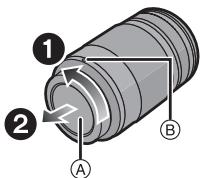
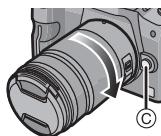
2 Align the lens fitting marks (red marks) on the camera body and the lens and then rotate the lens in the direction of the arrow until it clicks.
- Do not press the lens release button ⑥ when you attach a lens.
- Do not try to attach the lens when holding it at an angle to the camera body as the lens mount may get scratched.
- Check that the lens is attached correctly.
Detaching the Lens
- Check that the camera is turned off.
While pressing on the lens release button ① , rotate the lens toward the arrow until it stops and then remove.
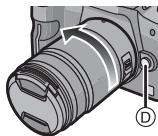
- Attach the lens rear cap so that the lens contact point does not get scratched.
- Attach the body cap to the camera so no dirt or dust will get inside the main unit.
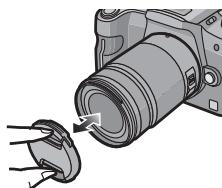
■ Attaching and Detaching the Lens Cap
Pinch the lens cap as shown in the figure to attach or detach.
- Be careful not to lose the lens cap.
■ Attaching the Lens Hood (Supplied Accessory)
Align the fitting mark on the lens hood with the mark on the tip of the lens.
Turn the lens hood in the direction of the arrow until it stops, and align the stop mark F on the lens hood with the mark on the tip of the lens.
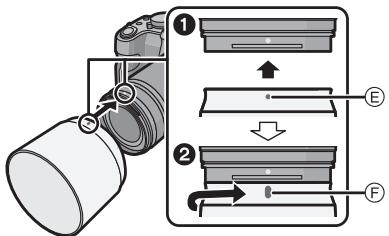
■ Temporarily Storing the Lens Hood
1 Turn the lens hood in the direction of the arrow to detach it.
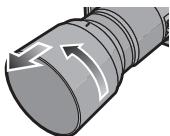
2 Reverse the lens hood and then attach it in the same way as shown previously.
-
When taking pictures with the flash with the lens hood attached, the lower portion of the screen may turn dark (vignetting effect) and the control of the flash may be disabled because the photo flash may be obscured by the lens hood. We recommend detaching the lens hood.
-
When using the AF assist lamp in the dark, detach the lens hood.
■ Attaching Filters
- Vignetting may occur if using 2 or more MC protectors (optional: DMW-LMCH58), PL filters (optional: DMW-LPL58) or ND filters (optional: DMW-LND58), or if using thick protectors and/or filters.
- The filter may become impossible to remove if excessively tightened, so please refrain from tightening it too strongly.
- It is possible to attach the lens cap with the filter already attached.
- You cannot attach a conversion lens or adaptor to this lens. A filter may be used, but attaching any other element may cause damage to the lens.
Names and Functions of Components
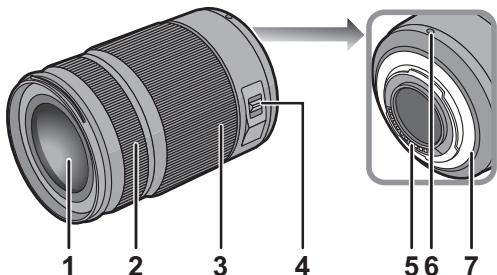
1 Lens surface
2 Focus ring
Rotate to focus when taking pictures with manual focus.
3 Zoom ring
Rotate the zoom ring when you wish to take large (tele) or wide (wide angle) pictures. (35 mm film camera equivalent: 70 mm to 200 mm)
[O.I.S.] switch
When the lens is attached to the camera the stabiliser function is set to activate if the [O.I. switch is set to [ON].
- We recommend setting the [O.I.S.] switch to [OFF] when using a tripod.
-
The stabiliser function may not be effective in the following cases.
-
When there is a lot of jitter.
- When the zoom magnification is high.
- When using the digital zoom.
- When taking pictures while following a moving subject.
- When the shutter speed becomes slower to take pictures indoors or in dark places.
5 Contact points
6 Lens fitting mark
7 Lens mount rubber

Note
- When flash recording with a close subject, the light of the flash will be blocked by the lens and part of the picture may be dark. Check the distance from the subject when recording.
- If you zoom after focusing, focusing errors may occur. After zooming, please perform the focusing again.
Cautions for Use
Take care not to drop or knock the lens. Also take care not to put a lot of pressure on the lens.
Take care not to drop the bag that you inserted the lens in as it may strongly shock the lens. The camera may stop operating normally and pictures may no longer be recorded. Also, the lens may be damaged.
When using pesticides and other volatile substances around the camera make sure that they do not get onto the lens.
- If such substances get onto the lens they can damage the exterior case or cause the paint to peel.
Do not carry the unit when it is still attached to the camera body.
-
Under no circumstances should the unit be stored in any of the following locations since doing so may cause problems in operation or malfunctioning.
-
In direct sunlight or on a beach in summer
- In locations with high temperatures and humidity levels or where the changes in temperature and humidity are acute
-Where there is fire
- Near heaters, air conditioners or humidifiers
-Where there is vibration
- Inside a vehicle
Refer also to the operating instructions of the digital camera.
- When the unit is not going to be used for a prolonged period, we recommend storing with a desiccant (silica gel). Failure to do so may result in performance failure caused by mold, etc. It is recommended that you check the unit's operation prior to use.
- Do not leave the lens in contact with rubber or plastic products for extended periods of time.
- Do not touch the lens contact point. Doing so can cause failure of the unit.
- Do not disassemble or alter the unit.
Do not use benzine, thinner, alcohol or other similar cleaning agents to clean the lens glass or exterior cabinet.
- Using solvents can damage the lens or cause the paint to peel.
- Wipe off any dust or fingerprints with a soft, dry cloth.
- Wipe off the dust or dirt on the lens mount rubber (P8), zoom ring, or focus ring with a dry dust cloth.
- Do not use a household detergent or a chemically treated cloth.
Troubleshooting
A sound is heard when the camera is turned on or off.
- This is the sound of lens or aperture movement and is not a malfunction.
Specifications are subject to change without notice.
INTERCHANGEABLE LENS FOR DIGITAL CAMERA
"LUMIX G X VARIO 35-100 mm/F2.8/POWER O.I.S."
| Focal length | f=35 mm to 100 mm (35 mm film camera equivalent: 70 mm to 200 mm) |
| Aperture type | 7 diaphragm blades/circular aperture diaphragm |
| Aperture range | F2.8 |
| Minimum aperture value | F22 |
| Lens construction | 18 elements in 13 groups (2 ED Lens, 1 UED Lens) |
| Nano surface coating | Yes |
| In focus distance | 0.85 m to ∞ (from the focus distance reference line) |
| Maximum image magnification | 0.1× (35 mm film camera equivalent: 0.2×) |
| Optical image stabiliser | Available |
| [O.I.S.] switch | Available (Switching ON/OFF) |
| Mount | “Micro Four Thirds Mount” |
| Angle of view | 34° (Wide) to 12° (Tele) |
| Filter diameter | 58 mm |
| Max. diameter | Approx. 67.4 mm |
| Overall length | Approx. 99.9 mm (from the tip of the lens to the base side of the lens mount) |
| Mass | Approx. 360 g |
| Dust-proof and splash-proof | Yes |
Panasonic Warranty
- The product is warranted for 12 months from the date of purchase. Subject to the conditions of this warranty Panasonic or its Authorised Service Centre will perform necessary service on the product without charge for parts or labour, if in the opinion of Panasonic, the product is found to be faulty within the warranty period.
- This warranty only applies to Panasonic products purchased in Australia and sold by Panasonic-Australia or its Authorised Distributors or Dealers and only where the products are used and serviced within Australia or it's territories. Warranty cover only applies to service carried out by a Panasonic Authorised Service Centre and only if valid proof of purchase is presented when warranty service is requested.
-
This warranty only applies if the product has been installed and used in accordance with the manufacturer's recommendations (as noted in the operating instructions) under normal use and reasonable care (in the opinion of the manufacturer). The warranty covers normal domestic use only and does not cover damage, malfunction or failure resulting from use of incorrect voltages, incorrect installation, accident, misuse, neglect, build-up of dirt or dust, abuse, maladjustment of customer controls, main supply problems, thunderstorm activity, infestation by insects or vermin, tampering or repair by unauthorised persons (including unauthorised alterations), introduction of sand, humidity or liquids, commercial use such as hotel, office, restaurant, or other business or rental use of the product, exposure to abnormally corrosive conditions or any foreign object or matter having entered the product.
-
This warranty does not cover the following items unless the fault or defect existed at the time of purchase: (a) Cabinet Part(s) (e) DVD, Blu-ray or Recordable Discs (b) Video or Audio Tapes (f) Video / Audio Heads from wear and tear in normal use (c) SD cards or USB devices (g) Information stored on Hard Disk Drive, USB stick or SD card (d) User replaceable Batteries (h) DTV reception issues caused by TV Aerial / Cableing / Wall socket(s) etc
- Some products may be supplied with Ethernet connection hardware. The warranty is limited on such products and will not cover (a) Internet and or DLNA connection / setup related problems (b) Access fees and or charges incurred for internet connection (c) The use of incompatible software or software not specifically stipulated in the product operations manual;
(d) Any indirect or consequential costs associated with the incorrect use or misuse of the hardware, its connection to the internet or any other device. 6. To claim warranty service, when required, you should: Telephone Panasonic's Customer Care Centre on 132600 or visit our website referred to below and use - Send or take the product to a Panasonic Authorised Service Centre together with your proof of purchase receipt as a proof of purchase date. Please note that freight and insurance to and / or from your nearest Authorised Service Centre must be arranged by you.
- Note that home or pick-up/delivery service is available for the following products in the major metropolitan areas of Australia or the normal operating areas of the nearest Authorised Service Centres:
- Plasma/LCD televisions / displays (screen size greater than 103cm )
- The warranties hereby conferred do not extend to, and exclude, any costs associated with the installation, de-installation or re-installation of a product, including costs related to the mounting, de-mounting or remounting of any screen, (and any other ancillary activities), delivery, handling, freightling, transportation or insurance of the product or any part thereof or replacement of and do not extend to, and exclude, any damage or loss occurring by reason of, during, associated with, or related to such installation, de-installation, re-installation or transit.
Panasonic Authorised Service Centres are located in major metropolitan areas and most regional centres of Australia, however, coverage will vary dependant on product. For advice on exact Authorised Service Centre locations for your product, please telephone our Customer Care Centre on 132600 or visit our website and use the Service Centre Locator. In addition to your rights under this warranty, Panasonic products come with consumer guarantees that cannot be excluded under the Australian Consumer Law. If there is a major failure with the product, you can reject the product and elect to have a refund or to have the product replaced or if you wish you may elect to keep the goods available for sale. This means that you can drop in value of the goods. You are also entitled to have the product repaired or replaced if the product fails to be of acceptable quality and the failure does not amount to a major failure. If there is a major failure in regard to the product which cannot be remedied then you must notify us within a reasonable period by contacting the Panasonic Customer Care Centre. If the failure in the product is not a major failure then Panasonic may choose to repair or replace the product and will do so in a reasonable period of time from receiving notice from you.
SHOULD BE RETAINED BY THE CUSTOMER AT ALL TIMES
If you require assistance regarding warranty conditions or any other enquiries, please visit the
www.panasonic.com.au or contact by phone on 100sure you have your operating instructions available .
ic Australia Pty. Ltd
ACN001592187ABN83001592187
PRO-031-F11 Issue: 4.0
Inhalt
4 Interruptor [O.I.S.]
UcTpaHHeHHeuCnPaBHOCTe 69
Texnueckne xapaKTepeNCTIKN 70
-EcnnBbIyBnDnteTaKoCNMBOJ
HOpMaunno oBaepenCOTXoamn dna cTpaH,He BXoJuxB Ebponeckn Co03


ДeиctBVE 3TOrO CnmbOna
pacnpoctpaHReTcraToIbKOHa
Ebponeckn Co03.
EcN BbCobupaTeCb
BbIbpcntb DaHHbI pOdyKT,
y3HaHTe B MeCThByx OpraHax
BlaCTn nIu y dIJIepa, KaK
CneDyET NOCTynaTb C
OTXODAMn TAKOTO TnA.
HΦopMaçnЯДЯ Baшeɪ 6e3OpaCHOCTN
XpaHnte npn6op BdaJN OT nCTOCHNKOB 3JIeKTPOMarHHTHO n3JyEHHa (HaNPmEp, MKNPOBONHObIX neey, TeJeBN3OpOB, 06OpyDoBaHN dJa BVdeOnrP, paDNOpereDaTCHKOB, BBICOKOBNbTHbIX NINHn I T.D.).
He nolbyTeCb foToKamepoB B6n3n COTOBbIX TepeHOB, TAK KaT ePeOHbI MOrY T Bbl3BaTb NOMEXN, OTpuCaTeJbHo Cka3blBaIOUneCn Ha KaueCTBe CHIMKOB 3ByKa.
- Ecni kamepa noDBepraetc HeraTINBHOMy BnIaHNI 3JIeKTPOMaHTNTHORO n3NJUeHInu NpecctaeT paOtaTB HopMaIbHO, BbIKLIOUHTE KAMEpy, u3BNeKNTe batapeo u/Inn POkKnIOUeHHbC cTeBOi aadAnTep nepemehHO TOKa.3aTe CMOBa BCTaBBte batapeo w/Inn cHObA POkKnIOUHTe CTeBOI aadAnTep nepemehHO TOKa u BKIOUHTe KAMEpy.
ObekTMB MoKET NcNtB3OBAbCc CnDpOBoKamepo, CoBmecTmOo CO TAndapTom KpePJIeHnOobekTnBOB "Micro Four ThirdsTM System".
He npedyucmTopeHa eOyctaHOBKa HaΦoTOKaMepbco cneuФkauee KpeIJIeHnFour ThirdsTM.
- Ha nllnctpaunx unpoBoi KaMepbI B daHHbIX INCTpyKuNX IO 3KcPnyataunB kaYeCTBe npimepa nokazah DMC-GH2.
BHeuHn Bn n CneunKauu npOyKTOB, OINCAHHbIe B DaHHOM pyKOBOCTBE, MOrYT OTJNUaTbCt OT fakTuYeCKNX pNIObpeTeHHbIX npOyKTOB BBNDy 6oee No3DnX yNyUWeHn. - Micro Four Thirds™и 3нakи Логотина Micro Four ThirdsягютсTOВарьимиЗнakамиИлп ЗaperистриpoваныIMи TOВарьимиЗнakамиОlympus Imaging Corporation вЯнони, Соедин exhaust
Лтатax,ЕврoneickomCoiozeи дучixстрах.
Four Thirds™иЗнадилоротиа Four ThirdsЯгяюТСТOBAPHBIM3HAKAMИЗЗaperИстриpoВаньIMTOBAPHBIM3HAKAMI Olympus Imaging Corporation BЯнои,CoedинБixШтатax,EbponeeckOMCoiOzeиДугnx cTpaHax.
G MICROSYSTEMЯBJIeTcCnCTeMoI obBeKTHOB CmEHHO TINa DnIuΦpOBbIX kAmeP LUMIX,pa3pa6OtaHNo Ha OCHObe cTaHApTa Micro Four Thirds System.
Дугпе Ha3BaHЯ СИСТЕМ ИnpODYKTOB, ynomянтуье B ДаHHО ИНСТPyКУП NO 3KcPnyaTauMn, OБычно YВЛЯТСТЯрпстпpoВаBHIMTOBapHyIMN 3HaKaMm INI TOBAPHyIMN 3HaKaMn pOON3BOUdTeNEI, KOTOpbIe pa3pa6oTaIIy nYomЯнHuTyo CINCTeMу INI npOdyKT.
Ppabuna 3kcnnyataun
YxOa 3a o6bekTnBOM
- Y daHHoro obBeKTnBa nbIJIeHeIpOnHuaemoe n 6pb3ro3aunuienHoe nCPOHneHne. Ppi nCNoIb3OBAHN ObEeKtNBA coBLOJaTe OINCAHbIe DaanepekOMeHdaun. EcIn obBeTnB pa6oTaET HnPaBnBHo, 6obpaTntecb B nyHKT npOdaXn IJIN bJnxKaHn cepBnchbl ueHTp.
-Прикpenлг Te obkeTINB K nbIeHepnoHnuaeMoи 6bpI3ro3aunuueHHo nФрOBоN pOToKampe.
-ПрипрасоeинehиллбОТcoeINHEnn OБьektиBa y6eINTecbВ OTCyTCTBnNEcKa, Пыл,在КалелвБОдьИ.T.П.BHHTPNpe3INHOBOrO yNLOTHTeNBHO KOLbua OБьektiBa,Ha KJIeMMax,a TAKKHe BHyTpNiФрOBoi ФOTOKaMepbl N OБьektiBa.
-Даньи obteknв HeяВЯETcR BOHOHepOnuAeMbIM. YTo KacaetcR 6pbI3ro3aunueHHoCTn, KOHcTpkyuN noBekTNaB He OJnyckaet npOHNKHOBeHn BHyTp b BoDbl. EcIn Ha obTeKnB nonaTy KaNNn BoDbl n T.. nocLe nCNoNb3OBAHn npOTpnte erO cyXoJ MArKoY TkaHbIO.
-ДяушенипьileнepoHuaemocTN 6pb3ro3auniueHHOCTN daHORO obbektuBA MecTe npNKpePlleneHn IcNoIb3yETca pe3HOBoe yNtHTeBHOe KOnbUO obbektuBA.Пocne HeODHKpTaHOm CMeHbIOObbektuBA MOKHO 3amETNb TPOBLeHne OTNeUaTka OTpe3HOBoro yNtHTeBHOr KOJIbUa OobbektuBA B MeCTe npNKpePlleneHn ObbektuBa Ha Kopnyce cHΦpOBOk KaMepbI.3To He BnIraet Ha ee paBoTy. 3a INHΦopMaUeN O CmeHe pe3HOBoro yNtHTeBHOr KOJIbUa OobbektuBA 6paauTeCB B6nKaIsh cepBnchbl ueHTp.
- HeJIb3a CINbHO HaxIMaTb Ha ObBeKtNB.
Bcnyae nonaadaHna HOBepxHOCTb OBeKtNbArp3n (BOdbI, Macna, OTpeaTKOB NaJIbueB IN T. d.) KaeeTBO CHIMKA MOKeT yXyDUnTbcra. CNeNyET octopoxHo BblTepeTB NOBepxHOCTb OBeKtNbMaMrkO cyXoTKaHbIO nepeCd cEmKO.
- He cTaBbTe 06BeKTHB MOHTaXHNoI NOBepXHOCTbIO BnH3. He dOnyckaIte IonoJaHaHne 3aRpa3HeHn Ha MOHTaXHbIe NOBepXHOCTn ① 06BeKTHBa.
O KOHdeHcaunn (3anoteBaHHn 06bekTNaB)
KoHdEHaCaIpy npOcxOaNT npn pa3Hnue B Tempepatye n BlaJaxHoCTn, KaK OIIncAHO HnKe. KoHeHaCaIpy MoKeT npNBeCTn K 3aqr3HeHIO o6bekTnBa, NOBLeHIO PnecEHn I HeNCpAbaHocTei, No3ToMy HeoXoIMO co6nIOaTb OCTOpOxHOCtB CneNyUoInx CnTyauIyx:
-ПИ ВHECEHIN KAMepbI B NOMEseHne C yINuB XOIOHyo nOroDy
-ПИ ВHECEHIN KaMepbI B CaNoH aBToMo6nIЯ, rIe pa60TaET KOHdNtioHeP
-eczI NOTOK XOJIODHOrO Bo3dYka I3 KOHNIOHepaNpaBJIeN pIraMo Ha O6bEKTINB -BO B7JAKHBIX MECTaX
-ПяпгдOTВрашени КондсалиnomecтiteКамерВ паCTIKOBьн napet,чTOБы ee Tempepatуca crabHЯпась с TempepatурОkpyжанцero BO3dya.При BOЗнковени KOндсали ВьклIOUHTe Kameperи OCTaBte ee npIMepHO NaDBa Yaca.Korda TempepatуkaKamepbI cspAHReTcRc TmpepatуOgKpyжанцero BO3dyaXa,3anoTeBaHne nCue3HET ECTeCTBeHHbIM O6pa30M
CTapaTecb He poHrB n He yIapraTb 06BeKTHB. TaKke CTapaTecb He noDbepraTb 06BeKTHB 4pe3MepHomy daBHeHIO.
CneiTe 3a Tem, YTObI He yPOHnTB CymKy, B KOTOpYBOBbIOJNOXINN OObEKTNB, NOCOJIbKY 3TO MOKeT IpNBecTn K NOBpeKdEHNO OObeKTNbA. KaMepa MoKeT nepeCTaTB HOpMaIbHO pa6oTaB, IN DaJIbHeNlJa 3aIncb CHIMKO B MOKeT OKa3aTbCRA HeBO3MOxH0H.
PnncnoB3OBAHnn neCTnUIOB n dpynx IeTyuNx BeueCTB B6JIn3n KaMepbI y6eINTeCb, YTO OHn He nonadaIoT Ha oBekTNB.
3Byk BO3HnKaet Bpe3yIbTaTe DnBKeHnIaФpArMbI O6bEkTuBa N He RaBnEeTcHHeNCnpaBHOCTbIO.
Texnueckne xapaKTepeNCTIKM OMyT 6bITb N3MeHeHbI 6e3 yBeDoMJIeHna.
CMEHHbI OObEKTINB IJIa CIIΦPOBOI FOTOKAMEPbI
"LUMIX G X VARIO 35-100 MM/F2.8/POWER O.I.S."
Pursuant to at the directive 2004/108/EC, article 9(2)
Panasonic Testing Centre
Panasonic Marketing Europe GmbH
Winsberging 15, 22525 Hamburg, Germany