U44406NH4GUC2 - Interface Tripp Lite - Free user manual and instructions
Find the device manual for free U44406NH4GUC2 Tripp Lite in PDF.


| Brand | Tripp Lite |
| Model | U444-06N-H4GUC2 |
| Product Type | USB-C Multiport Hub Adapter |
| Color | Black |
| Input Connector | USB-C (male) with attached cable |
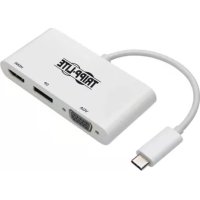
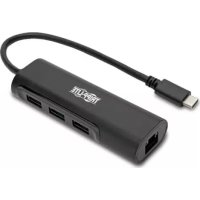
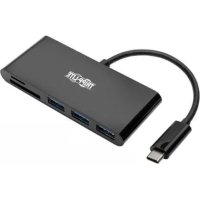
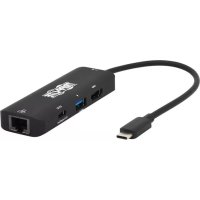
| Output Connectors | HDMI 4K (female), RJ45 Gigabit Ethernet (female), USB-A 3.1 Gen 1 (female), USB-C PD (female) |
| Maximum Video Resolution (DP 1.4 Host) | 3840 x 2160 @ 60 Hz (4:4:4) |
| Maximum Video Resolution (DP 1.2 Host) | 3840 x 2160 @ 30 Hz |
| HDR Support | Yes (HDRI) |
| Network Speed | 10/100/1000 Mbps (Gigabit Ethernet) |
| USB-A Speed | USB 3.1 Gen 1 up to 5 Gbps |
| USB-C Speed (Data) | USB 3.1 Gen 1 up to 5 Gbps |
| USB-A Charging | Up to 7.5 W (5 V 1.5 A) |
| USB-C Charging (Power Delivery) | Up to 100 W (PD 3.0, 20 V 5 A) |
| Supported Protocols | HDCP 2.2, backward compatible |
| Compatibility | Devices with USB-C or Thunderbolt 3 port supporting DisplayPort Alt Mode |
| Installation | No software or external power supply required, plug and play |
| Operating Temperature | 0 to 45 °C |
| Storage Temperature | -10 to 70 °C |
| Relative Humidity | 10 to 90 % RH |
| Warranty | 3 years limited |
Frequently Asked Questions - U44406NH4GUC2 Tripp Lite
User questions about U44406NH4GUC2 Tripp Lite
0 question about this device. Answer the ones you know or ask your own.
Ask a new question about this device
Download the instructions for your Interface in PDF format for free! Find your manual U44406NH4GUC2 - Tripp Lite and take your electronic device back in hand. On this page are published all the documents necessary for the use of your device. U44406NH4GUC2 by Tripp Lite.
USER MANUAL U44406NH4GUC2 Tripp Lite
USB-C Multiport Hub Adapter with 4K HDMI, USB-A and Gigabit Ethernet Hub Ports, 100W PD 3.0 Charging, Black
Model: U444-06N-H4GUC2
USB Type- C^TM and USB- C^TM are trademarks of USB Implementers Forum
Espanol 8 • Français 15 • Pycckn 22
WARRANTY REGISTRATION
Register your product today and be automatically entered to win an ISOBAR® surge protector in our monthly drawing!
triplite.com/warranty
TRIPP·LITE

Innovation Excellent, 10
1111 W. 35th Street, Chicago, IL 60609 USA tripplite.com/support
Copyright © 2020 Tripp Lite. All rights reserved.
Package Contents
- USB-C Multiport Hub Adapter, Black
- Owner's Manual
Optional Accessories
P568-Series High-Speed HDMI Cables
U322-Series USB 3.0 A/B Cables
U420-Series USB-C Cables
- N201-Series Cat6 Gigabit Snagless Patch Cables
Product Features
Supports USB-C DisplayPort 1.4 Alternate Mode for connecting a 4K HDMI display via a USB-C port
Supports Ultra High Definition (UHD) resolutions up to 3840 x 2160 @ 60 Hz (4:4:4) when plugged into a DP 1.4 host
Supports UHD resolutions up to 3840 x 2160 @ 30 Hz when plugged into a DP 1.2 host
Supports High Dynamic Range (HDR) for richer contrast and expanded color accuracy
- RJ45 port supports true 10/100/1000 Mbps Gigabit Ethernet network speeds
- USB-A port supports USB 3.1 Gen 1 data transfer speeds up to 5 Gbps and charging up to 7.5W (5V 1.5A)
- USB-C port supports USB 3.1 Gen 1 data transfer speeds up to 5 Gbps and 100W PD 3.0 charging
Supports HDCP 2.2 and is backward compatible with previous generations
- Plug-and-play operation with no software or external power required
Installation
Note: When the hub is connected to the USB-C port on your computer and to a network via Cat5e/6 cabling, a network connection will be automatically established. If no connection is made, you can manually establish one by going to your computer's network settings page. For example, on a Mac™, you would navigate to the Network section found in System Preferences, click "Assist Me" to get to the Network Setup Assistant, then follow the prompts to establish a connection.
- Connect the built-in USB-C cable to the USB-C Thunderbolt™ 3 port on your laptop, tablet or other compatible device.
- Connect the HDMI port to your display with a user-supplied HDMI cable.
- Connect a USB peripheral, such as a thumb drive or MP3 player, to the USB-A port.
- Connect the RJ45 port to a Gigabit Ethernet network with a user-supplied UTP cable.
- Connect a USB-C device to the Power Delivery port with a user-supplied USB-C cable. You can also charge the host device by connecting its wall charger to this port.
Specifications
| Input Connector | |
| USB USB-C (Male) | |
| Output Connectors | |
| 4K Video HDMI (Female) | |
| Ethernet RJ45 (Female) | |
| USB 3.1 Gen 1 (5 Gbps) | USB-A (Female), USB-C (Female) |
| Display | |
| HDMI (with DP 1.4 Host) | 3840 x 2160 (4K x 2K) @ 60 Hz |
| HDMI (with DP 1.2 Host) | 3840 x 2160 (4K x 2K) @ 30 Hz |
| Network | |
| Ethernet 10/100/1000 | Mbps (1 Gbps) |
| Environmental | |
| Operating Temperature | 32° to 113°F (0° to 45°C) |
| Storage Temperature 14 | 4° to 158°F (-10° to 70°C) |
| Relative Humidity 10% | to 90% RH |
| Power Requirements | |
| USB-C Power | PD 3.0 Charging up to 100W (20V 5A) |
| Delivery Port | |
| USB-A Port Supports Ch | charging up to 7.5W (5V 1.5A) |
Warranty and Product Registration
3-Year Limited Warranty
Seller warrants this product, if used in accordance with all applicable instructions, to be free from original defects in material and workmanship for a period of 3 years from the date of initial purchase. If the product should prove defective in material or workmanship within that period, Seller will repair or replace the product, at its sole discretion.
THIS WARRANTY DOES NOT APPLY TO NORMAL WEAR OR TO DAMAGE RESULTING FROM ACCIDENT, MISUSE, ABUSE OR NEGLECT. SELLER MAKES NO EXPRESS WARRANTY OTHER THAN THE WARRANTY EXPRESSLY SET FORTH HEREIN. EXCEPT TO THE EXTENT PROHIBITED BY APPLICABLE LAW, ALL IMPLIED WARRANTYES, INCLUDING ALL WARRANTYES OF MERCHANTABILITY OR FITNESS, ARE LIMITED IN DURATION TO THE WARRANTY PERIOD SET FORTH ABOVE; AND THIS WARRANTY EXPRESSLY EXCUSES ALL INCIDENTAL AND CONSEQUENTIAL DAMAGES. (Some states do not allow limitations on how long an implied warranty lasts, and some states do not allow the exclusion or limitation of incidental or consequential damages, so the above limitations or exclusions may not apply to you. This warranty gives you specific legal rights, and you may have other rights which vary from jurisdiction to jurisdiction.)
Warranty and Product Registration
WARNING: The individual user should take care to determine prior to use whether this device is suitable, adequate or safe for the use intended. Since individual applications are subject to great variation, the manufacturer makes no representation or warranty as to the suitability or fitness of these devices for any specific application.
Product Registration
Visit triplite.com/warranty today to register your new Tripp Lite product. You'll be automatically entered into a drawing for a chance to win a FREE Tripp Lite product!*
- No purchase necessary. Void where prohibited. Some restrictions apply. See website for details.
Tripp Lite has a policy of continuous improvement. Specifications are subject to change without notice. Photos and illustrations may differ slightly from actual products.

1111 W. 35th Street, Chicago, IL 60609 USA tripplite.com/support
1111 W. 35th Street, Chicago, IL 60609, EE UU tripplite.com/support
1111 W. 35th Street, Chicago, IL 60609, EE UU tripplite.com/support
20-05-246 93-3CAD_RevA
1111 W. 35th Street, Chicago, IL 60609 USA tripplite.com/support
1111 W. 35th Street, Chicago, IL 60609 USA tripplite.com/support
20-05-246 93-3CAD_RevA
PykoBODCTBO NOIb30BaTeJia
Mhoroonoptobii KOHcEHTpaTOp/aanTep USB-C c npTaMu 4K HDMI, USB-A n Gigabit Ethernet, c noDpejKoI cTaHdapTa PD 3.0 Charging (100 Bt),
B Kopnyce uephoroцBeTa
Modélb: U444-06N-H4GUC2
USB Type-C n USB-C yBnIOTcT TopROBbIMN 3HaKaMn KomnaHm USB Implementers Forum
English 1 • Espanol 8 • Français 15
EAC

1111 W. 35th Street, Chicago, IL 60609 USA tripplite.com/support
OxpaHЯETcA bTOpCKnM npaBOM © 2020 Tripp Lite. IepeneuatKa 3anpeuaetc.
Copejkmoe ynaKOBKn
- Mhoronoptobii konchehtpapop/aaprep USB-C B kopnyce cephoro zBeta
-PykoBOIDCTBO nOJIb30BaTeJIa
OnuHaBHeKOMnKeKToOu
- BbICOKoCKOpocThbIe HDMI-ka6eIi cepn P568
Ka6eI N USB 3.0 A/B cepnn U322
Ka6eI NSB-C cepuU420
Be3pa3pbHbIe coeINHITbHbIe Ka6eN Cat6 Gigabit cepnn N201
XapakTepnCTnKn npOdyKta
1111 W. 35th Street, Chicago, IL 60609 USA tripplite.com/support
20-05-246 93-3CAD_RevA