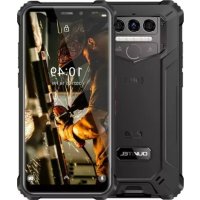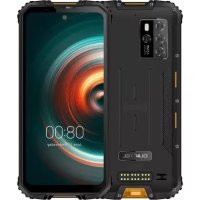
WP10 - Smartphone OUKITEL - Free user manual and instructions
Find the device manual for free WP10 OUKITEL in PDF.



User questions about WP10 OUKITEL
0 question about this device. Answer the ones you know or ask your own.
Ask a new question about this device
Download the instructions for your Smartphone in PDF format for free! Find your manual WP10 - OUKITEL and take your electronic device back in hand. On this page are published all the documents necessary for the use of your device. WP10 by OUKITEL.
USER MANUAL WP10 OUKITEL
Redefine Outdoor Communication!
Manufacturer Name: ShenZhen YunJi Intelligent Technology CO., LTD
Manufacturer Address: A-side A2 Building 2/F Enet New Industrial Park,No.20 Dafu
Industrial Zone, Aobei Community, GuanLan, LongHua New District, ShenZhen China
https://www.oukitel.com

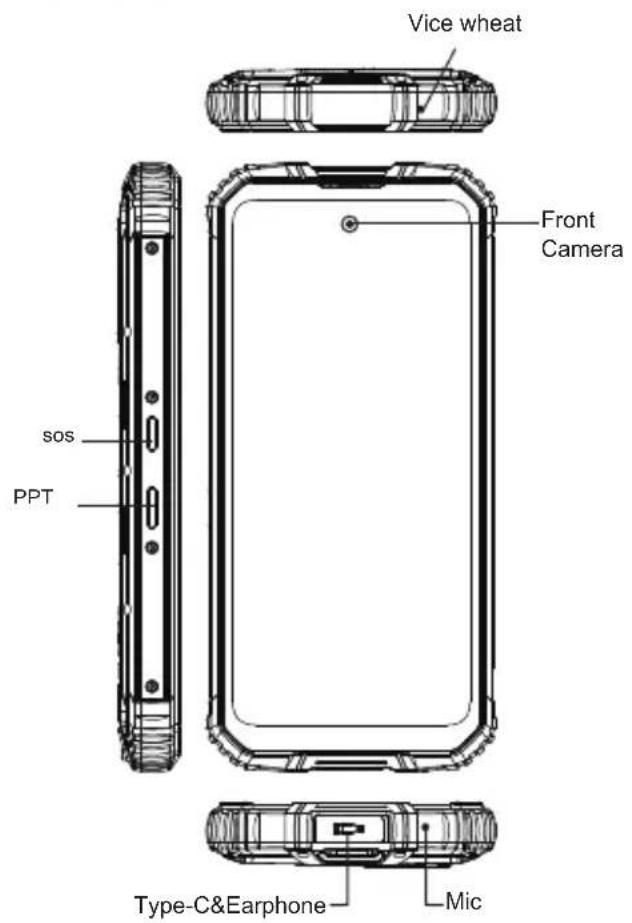
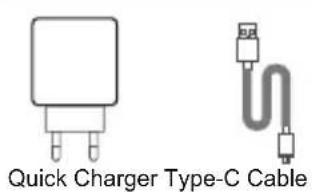
Accessories
Comes with the GoogleTM app and Google ChromeAndroid is a trademark of Google LLC
1
Battery
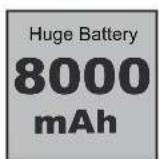
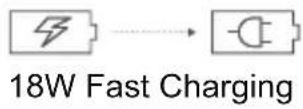
WP10 includes an internal battery. You can track your battery status with the icon showed on the top right of the screen.
Warning
- Use only OUKITEL-approved batteries specifically designed for you phone.
- Incompatible batteries can cause serious injuries or damage to your phone.
- Never place batteries or phones on or in heating devices such as microwave ovens, stoves, or radiators. Batteries may explode when overheated.
Comes with the GoogleTM app and Google ChromeTM Android is a trademark of Google LLC
2

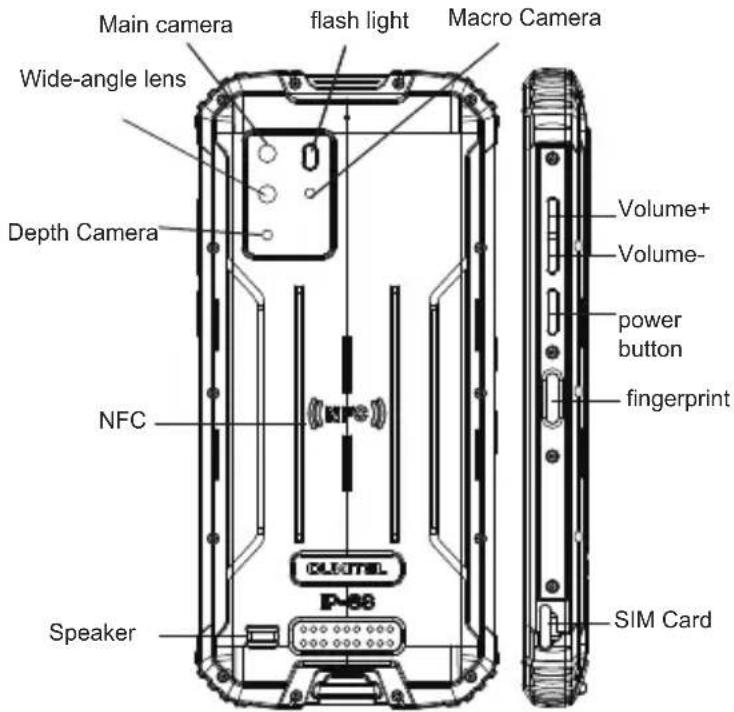
1 How to insert the card How to boot
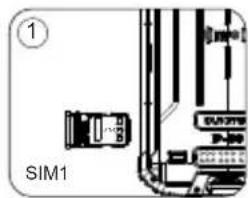
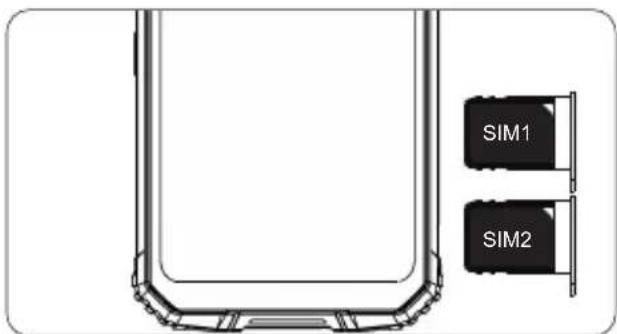
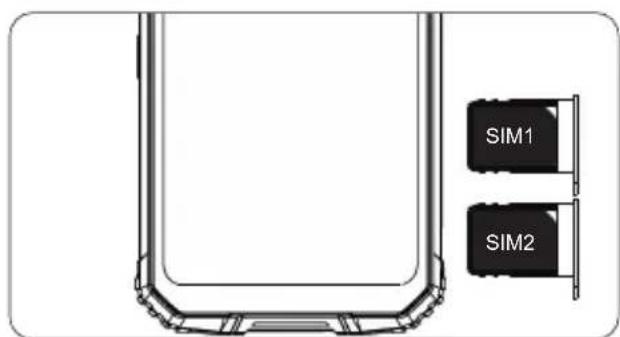
To make sure your smartphone be able to call, put the SIM card in the following order.
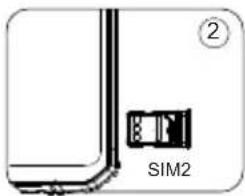
Press the card pin into the side hole and then the card tray pops up and pull out it.
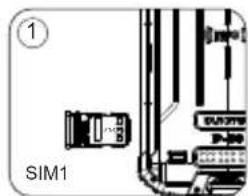
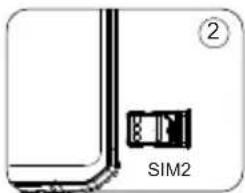
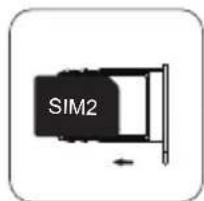
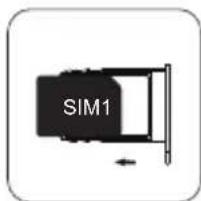
- Take out the card slot and place the Nano card or Nano card. Make sure the bevel angle is aligned with the bevel angle of the card slot and placed in the corresponding card slot.
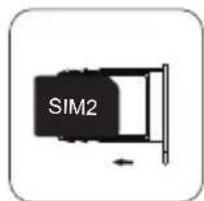
or
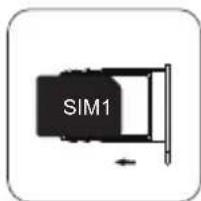
with the phone facing up, insert the card holder into the phone in the direction of the arrow
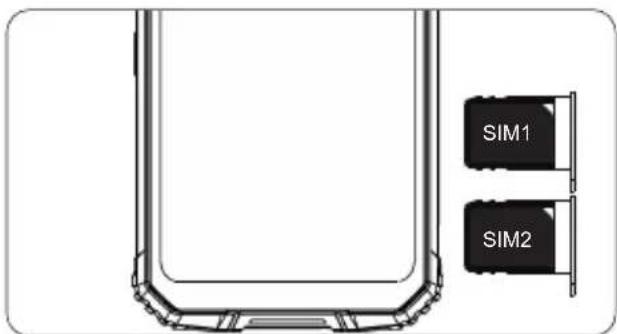
Comes with the GoogleTM app and Google ChromeAndroid is a trademark of Google LLC
3

Non-removable battery Press the power button for 3-5 seconds to boot
3 How to send SMS,MMS
SMS
- Open the SMS app
- Select New Information
- Enter a phone number or browse your contacts
- Select Edit Information and enter your text
Send
MMS-video
- When writing a text message
- Select images, videos or other files you want to add, even you can take a new picture or video right away.
- Selecting or sending
4 Language switching settings
- Main menu --settings-system setting--language and input method
- Language and input method--language--language adding
- Select the language you need, the system will automatically jump back to the language interface
- Select the icon after the language bar and drag it to the first one.
SAR
The maximum electromagnetic radiation absorption ratio(SAR) of this product is < 2.0W / kg
In line with the requirements of the national standard EN 50360:2017; EN 50566:2017; EN62209-1:2016; EN 62209-2:2010; EN 62479:2010;
Comes with the GoogleTM app and Google ChromeTM Android is a trademark of Google LLC
4

6 Safety-In order to ensure safely using the product, you must strictly abide by the following rules
- The phone should be at least 15cm away from any medical implant or rhythm adjuster and never put the device in your coat pocket.
- Do not expose the device and other batteries together with the high temperatures or heat-generating equipment such as sunlight, heaters, microwave ovens, ovens or water heaters. Overheating of the battery can cause an explosion.
- When charging is complete or not charging, disconnect the charger from the device and unplug the charger from the power outlet.
- If the device is equipped with a non-removable battery, do not replace the battery yourself to avoid damaging the battery or device.
- Use of an unapproved or incompatible power source,charger or battery may cause fire,explosion or other hazards.
- Do not disassemble or reset the battery, insert other objects, immerse in water or other liquids to avoid battery leakage, overheating, fire or explosion.
- Do not drop, crush, scratch or puncture the battery to avoid subjecting the battery to excessive external pressure, resulting in internal short-circuit and overheating of the battery.
- The company does not bear the responsibility for accidents caused by non-standard related charging equipment.
If you want to read the full CE compliance, please check this link:https://www.oukitel.com
Comes with the GoogleTM app and Google ChromeTM Android is a trademark of Google LLC
7 Maintenance
Thoroughly understand the maintenance of this mobile phone to use the mobile phone more safely and effectively, and extend the service life of the mobile phone as much as possible.
- Please follow the instructions in the manual to open the phone, disassemble the accessories, and do not try other methods.
- Please avoid falling,knocking or shaking your phone. Rough handling of the phone can cause the screen to rupture, damaging the internal circuit board and the delicate structure.
- Do not use chemical solvents or detergents to clean your phone. Wipe the phone case with a soft cotton cloth dampened with water or a mild soap.
Clean the lens with a clean, dry, soft cloth. (Example: camera lens) and display.
- If you encounter an abnormal image such as a crash during use, the processing method is as follows: For a mobile phone that cannot remove the battery, please press and hold the power button for more than 12 seconds, the mobile phone will be forced to restart (unlock the phone when restarting) It can solve the general bug; for the mobile phone that can remove the battery, please remove the battery, then insert the battery and restart it to solve the bug.
- When the charger is not in use, please unplug it from the power outlet. Do not connect the battery that has been fully charged to the charger for a long time, as overcharging will shorten the battery life.
This machine's standard package (package box --mobile phone--manual--protective film--USB data cable -- charger)
Comes with the GoogleTM app and Google ChromeAndroid is a trademark of Google LLC

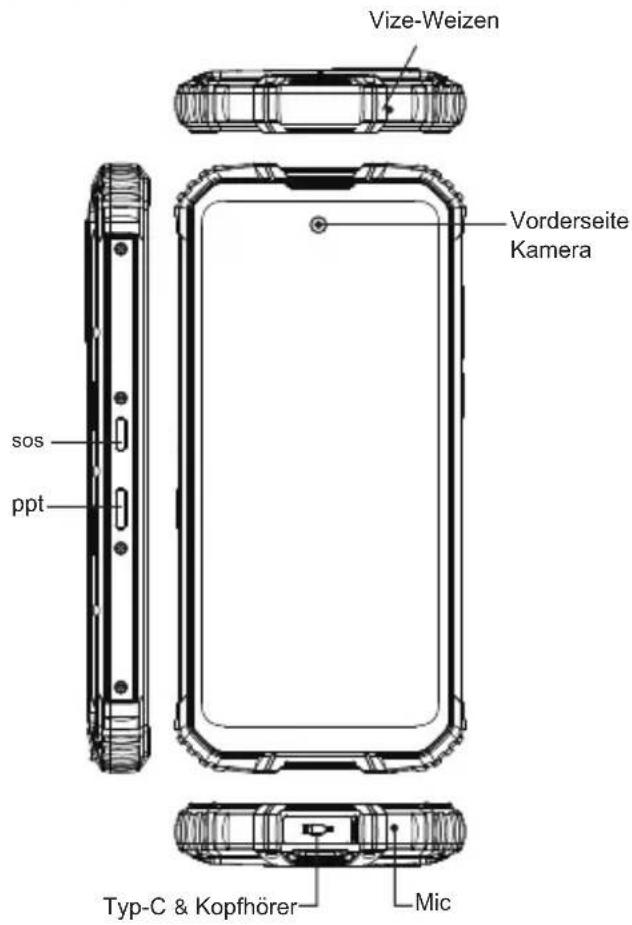
Accessories
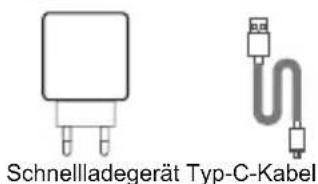
Comes with the GoogleTM app and Google ChromeTM. Android is a trademark of Google LLC
9
2 Wie man bootet
Dieser Link: https://www.oukitel.com
Comes with the GoogleTM app and Google ChromeTM Android is a trademark of Google LLC
Come avviare
1 KaK BCTaBNTb KapTy
-TO6bBAuCMapToHOM3BOHHTB,BCTaBBTe SIM-kapTy BCNEUYIOJEM NOPAKe.
Bdabnte 6ybnky KapTb B 60kOBoe OTBepCTne, nocJe Yero Jnotok dIra Kap T bIDBuHETcN bITaunr Ero.
-3BNEKNTe CNOT DnRA KapTbI IN NOMECTNTE HaHO-KAPTy HnHaHO-KaPTy. Y6eINTeCb, yTO yRON CKOCA COBnaJaAET C yrNOm CKOCA CNOT DaNRA KapTbI N BCTABNeH B COOTBetCTByoUnn CNOT DnRA KapTbI.
or
TepeHOM BBepx BCTaBte depKaTeNb KapTbIB TepeOH HnpaBneHN CTpeKN
Comes with the GoogleTM app and Google ChromeAndroid is a trademark of Google LLC
2Kak 3arpy3ntbca
Hecbemhbl aKKymyIaTOp Haxmnte KhoNky nTuHaB B TeueHne 3-5 ceKynd dna 3arpy3kn
How to send SMS,MMS SMS
- OTKpoTe npInOKeHne dIa SMS
BbIbpaTbHOByIO INHΦopMaζHo
BBeDHTe HOMe TeJefoHa Nn npocMOTpuTe Baun KOHTaKtbi
BbIbepnte《H3MeHHTb HhOpMaunHO》N BBeDNTe TkCT.
Pocnatab
MMS-BnDeo
-Пинанпсанн TeKCTOBOrO coo6eHnA
BbIbepnte n3o6paXeHn, BnDeo nn npyne paJIbI, KOtOpbl XOTnTe Do6aBnTb, DaKe Bbl MoKeTe cpa3y CdeNaTb HOBbl CHIMOK NIN BNDeO.
- Otnpabka
4 HacTpoIKN nepeKIOUOeHnra3bIKOB
-ΓJIaBHOe MeHIO-HaCTpoIKN-HaCTpoIKA CnCTEmbl-J3bIK nCnocob BBoda
-3bIK MeTOB BBOda -3bIK -D06aBHeHne 3bika
BbI6epnte HxKbH BAM Ra3bIK, CnCTema aBTOMaTnueckn npblrHer BepHyTcR K Ra3bIKOBOMy INHTepceiny
BbIePHTe 3NaOcK nocJe a3bIKOBn paHeiN nepeTaunTe ero Ha nepByIO.
SAR
MaKcImaIbHbIKo3ΦΦnueHT nOIOUeEHN 3JIeKTPOMarHHTHO n3JIyueHn (SAR) 3TOrO npOdyKaT <2,0BT/ K
B COOTBETCTBUN C Tpe6OBaHnMa HauNoHaIbHo rO CTaHapTa EN 50360:2017; EN 50566:2017; EN62209-1:2016; EN 62209-2:2010; EN 62479:2010;
IocTbJIeTcC npJIOXeHnem GoogleTM n Google ChromeTM Android JbIeTcTOBapHbIM 3HaKOM Google LLC.

6 Be30nacHocTb-ДЯ obecneueHn8e30nachoro nCnoJb30BaHnI npOyKT, BbldoJXhbl cTporo co6JIoJaTb CNeDyUoune npaBnla
TepeohdoJKeH haoDHTbCra Ha paccToHHm He MeHee 15 cm OT IIO6bIX MeiHcNcknx IMnAHTaT INIpeYrAToP pTuMa n HIKoTd A He BCTABJIte YeCTPOINCTBO B KApMaH NaIbTO.
He BbICTabnIte ycTpoINCTBO BmecTe C dpyrIMn 6aTapeMn. C BbICOKIMN TempepaTypAMn NIN TENIOBbIDeJIHOUIM MOBpyoDBaHnEM TaKne KAK COJNeHbI CBET, OborpeBaTeJI, MNKPOBOHOBbie neu, DxyOBKn IIN BOa O6orpeBaTeJI. NeperpeB aKKMyJnTopa MoKeT BblBaTb B3pbIB.
Korda 3apraKa 3aBepseHa HnH He 3apxkaeTc,OTKnIOHTe 3apraHoe yCTpoiCTBO OT yCTPOICTBA N OTKJIIOHTe 3apraHoe yCTPOICTBO OT pO3eTKy.
- EcIn yCTpoiCTBO OChaIeHO HeCbemHbIM aKKMyJITOpOM, He 3aMeHnTE aKKMyJITop CAMoCTOaTeNbHO, YTO6bI He NOBpeDNTb aKKMyJITOP INN yCTpoiCTBO.
NcnoIb3OBAHHe HeyTBepeJxDeHHoro Nn HecOBMeCTUMORO nCTOUYHnKa nITaHnA, 3aprAnHO yCTpoiCTBa Nn AKKyMylTOp MOKeT cTaB npuHnOH noXapa, B3pbIbA nn Dpyrnx onaCHOteN.
He pa36bpaTe n He c6paCbIbAaTe aKkyMnyTOp, He BCTaBnAte Dpyrne npedMeTb, noRpy3ntb B Body nnDpyrme KIOKcTn, YTO6bI u36exKaTb npoteKk 6atapEn,pepepeB, NOxkap nnB3pbIB.
He poHnIte, He pa3daBnBaIte, He capanaIte n He npotbkaIte aKkyMnyIaTOp, YTO6bl NOBepraA aKkyMnyIaTOp Upe3MePHOMy BHeuHEmy DaBneHIO, Bpe3yIbTaTe npn BHyTpEHem KopoTKOM 3aMbKaHIn N NepepeBe AKKMyJrTopa.
KOMnHaHHe HecET OTBETCTBeHHOCTN 3a HeCuaCThIe CnyaI. Bb3BaHO HeCTaHdAPThbIM 3apJHbIM O6OpyOBoAHm.
EcIN BxOTnTe PPOHTaTb NONHoe COOTBeTcTBnE CE, NOXaNyIcTa, nepexoIte Ha 3Ty CcbIky: https://www.oukitel.com
IocTabnreTcnpnIOKeHem GoogleTM n Google ChromeAndroid rBnEeTc TobapbIM 3HaKoM Google LLC.
7 06cnyxmbaHne
TataTeBHO pa36paTecb B 06cIyKbAHm 3TOrO Mo6nHbHO TeteΦoHa YTO6bl NOb3ObaTcR Mo6nHbIM TepeHoM 6OJIe 6eONaCHO n 3ΦΦeKTnBHO, a TaKKe paCUnpTuMaKcImaHb DOJrnc pOc Kcyk6bl Mo6nHbHO TepeHa.
PtoxanyiTa, cneyuTe nHCTpyKunm B pykoBODCTBE, YTO6bl OTKpbIb TepeoH,pa3bnpaTe aKceccyapbl N He nbitaNTecb NCnObl30BaTb Dpyrme MeToDbI.
I36eraTe NaDeHn, yApOB n TpRcN TeNeoHa.06paueHne C TeNeoHOM MoKeT npBecNT K pa3pbBy 3KpaHa, NOBpeJdeHne BHyTpEHHe NeaTHOH NAtbI XpyNKo KOHCTpyKuIN.
He nOpIb3yIte xIMUueckne pactBOpITeHn IIN MOUuepeCpeCTBa IIN YIcTKn TElefoHa.IIpOTpIte YexON TelefoHaMgKoXIOHATO6yMaXHO TKAHbIO,CMOeHHoB ODa IIN MMRKoeMbINo.
OuHuaTe oBekTNB uNCToON cyXOn MraKoT KHaHbIO. (Pnmupe: oBekTNB kamepb) i dncnnnei.
- EcINBbCTOKNHYNcBHeHOpMaNbHbIMN3o6paXeHNEM, HAnpImep, c60B BO Bpemr NcNOJb3OBaHNr, MeTOd O6pa6OTKn CNeDyUoMn:ДЯ MO6uNbHOrO TeJeFOHa KOTOpbI He MoKET n3BLeue bAKKMyJrTOp, HAKMTe N yDEpkuBaITe KHOkY NITAHn 6OJee 12 CekyHd, MO6uNbHbI TeJeFOh npHyDntE hO nepe3arpy3nB (pa36IoKnpoBaTteJeFOH np Nepe3arpy3ke) MoKet peWHTb 6OuyIO OUn6Ky;ДЯ CBemHoro aKKMyJrTopa, n3BLeKeIte aKKMyJrTOp, 3aTeM BCTaBBTe aKKMyJrTOp n nepe3anyCTne erO, YTObI y CTpaHtB OUn6Ky.
Korda TepeHOM BHe NoIb3yeTecb,OTKnIOHTe 0rO 3apJka.He NOKJIIOUaIte NOINOCbIO 3apJKeHHbIKKMyJITOP K 3apJHOmy yCTPOINCTBy B DInTEJbHOe BpEme,TAK Ka nepe3apJka cokpaNT cPOK cnjkb6bATapei.
CTaHapTHaKOMnEeTaUg3ToMaunHbI(ynakOBouHaKoPobKa-MoBnIbHbI TelefoH-NHcTpkyuN-3aunTHaPiNeHka-KabelIpypeauDanHbIX USB-3apdHoeycTpoiCtBO)
IocTbIaTeTc c npJIOKeHnem GoogleTM n Google ChromeTM Android JbIaTeTc TobapHbIM 3HaKOM Google LLC.

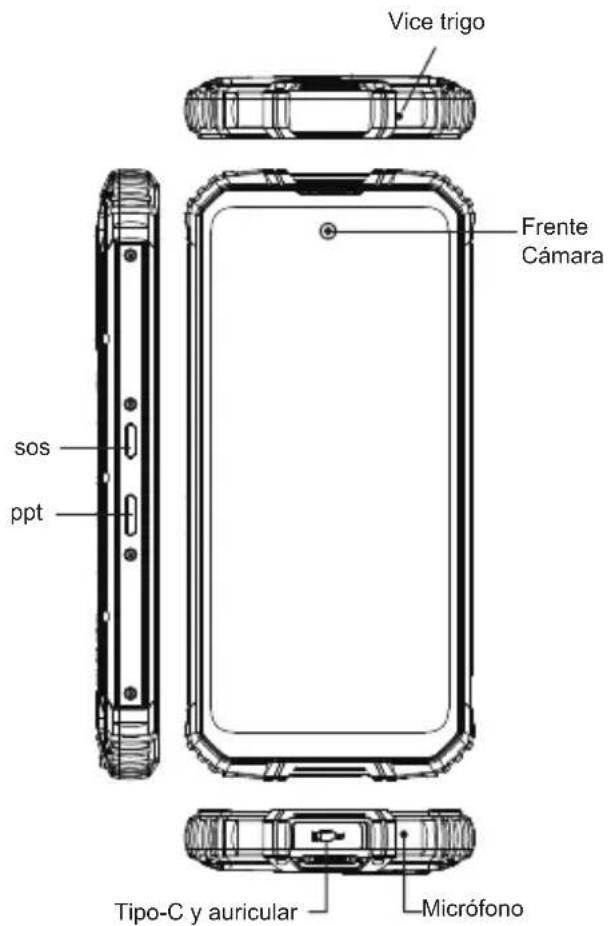
Accesorios

Comes with the GoogleTM app and Google ChromeTM Android is a trademark of Google LLC
2 Cómo arrancar
Comes with the GoogleTM app and Google ChromeTM Android is a trademark of Google LLC
Comment démarrer
aal aal aal alal alal
GoogleTM Google ChromeTM. Android Google LLC
4.6.5 2
3-5 12 jy
aill bilwglilwj. ywll jwjl w
SMS
SMS
3222 1000
Jaaal Jaaai Caaa a
y jlll l 1
MMS
iai jaijai 1
1
y
Jzj
4
Jaiy jay jay aal - pail 1 - aai
aui aui - aui - jui, aui u
jLjx jll jss
a2x1 a2x2 x2
jll jll jll jll jll
SAR ⑤
SAR
12.0 20
a a a a a a a a a a a a a a a a a a
EN 50360:2017; EN 50566:2017; EN62209-1:2016
EN 62209-2:2010; EN 62479:2010;
Google ChromeTM, GoogleTM
Google LLC 2015
AR
-081p#
y2121 1g21 pJau21 pJj21
15 1
1 1
Jn JnJnJnJnJnJnJnJnJnJnJnJnJnJnJnJnJnJnJnJnJnJnJnJnJnJnJnJnJnJnJnJnJnJnJnJnJnJnJnJnJnJnJnJnJnJnJn
aJbH JuauSla Jaa 1 aH jdu Aya Jaua Jaua Jaua Jaua Jaua Jaua Jaua
j 1
jglg 1eall g yal lal aolal 1aalal 1y alal ay
y
y
jL 100000000000000000000000000000000000000000000000000000000000000000000000000
Google ChromeTM, GoogleTM Google LLC Android
G
Manufacturer's Name: SHENZHEN YUNJI INTELLIGENT TECHNOLOGY CO.,LTD
Smart Phone
Model number:WP10
Operating Temperature: -10^ to 40^
This device was tested for typical body-worn operations. To comply with RF exposure requirements, a minimum separation distance of 0mm must be maintained between the user's body and the handset, including the antenna. Third-party belt-clips, holsters, and similar accessories used by this device should not contain any metallic components. Body-worn accessories that do not meet these requirements may not comply with RF exposure requirements and should be avoided. Use only the supplied or an approved antenna.
This device in compliance with the essential requirements and other relevant provisions of Directive 2014/53/EU. All essential radio test suites have been carried out.
1.Use careful with the earphone maybe possible excessive sound pressure from earphones and headphones can cause hearing loss.
2.CAUTION : RISK OF EXPLOSION IF BATTERY IS REPLACED BY AN INCORRECT TYPE. DISPOSE OF USED BATTERIES ACCORDING TO THE INSTRUCTIONS
3.The product shall only be connected to a USB interface of version USB 2.0
4. Adapter shall be installed near the equipment and shall be easily accessible.
5.The plug considered as disconnect device of adapter
6.The device complies with RF specifications when the device used at 0mm form your body
This device complies with part 15 of the FCC Rules. Operation is subject to the condition that this device does not cause harmful interference
Any changes or modifications not expressly approved by the party responsible for compliance could void the user's authority to operate the equipment.
NOTE: This equipment has been tested and found to comply with the limits for a Class B digital device, pursuant to Part 15 of the FCC Rules. These limits are designed to provide reasonable protection against harmful interference in a residential installation. This equipment generates, uses and can radiate radio frequency energy and, if not installed and used in accordance with the instructions, may cause harmful interference to radio communications. However, there is no guarantee that interference will not occur in a particular installation. If this equipment does cause harmful interference to radio or television reception, which can be determined by turning the equipment off and on, the user is encouraged to try to correct the interference by one or more of the following measures:
-- Reorient or relocate the receiving antenna.
-- Increase the separation between the equipment and receiver.
-- Connect the equipment into an outlet on a circuit different from that to which the receiver is connected.
-- Consult the dealer or an experienced radio/TV technician for help. Specific Absorption Rate (SAR) information:
This Mobile Phone meets the government's requirements for exposure to radio waves. The guidelines are based on standards that were developed by independent scientific organizations through periodic and thorough evaluation of scientific studies. The standards include a substantial safety margin designed to assure the safety of all persons regardless of age or health.
requirements, use accessories that maintain a 10mm separation distance between the user's body and the back of the handset. The use of belt clips, holsters and similar accessories should not contain metallic components in its assembly. The use of accessories that do not satisfy these requirements may not comply with FCC RF exposure requirements, and should be avoided.
Body-worn Operation
This device was tested for typical body-worn operations. To comply with RF exposure requirements, a minimum separation distance of 10mm must be maintained between the user's body and the handset, including the antenna. Third-party belt-clips, holsters, and similar accessories used by this device should not contain any metallic components. Body-worn accessories that do not meet these requirements may not comply with RF exposure requirements and should be avoided. Use only the supplied or an approved antenna.
FCC ID: 2ANMU-WP10