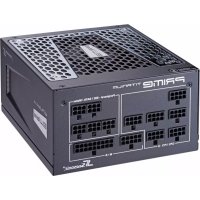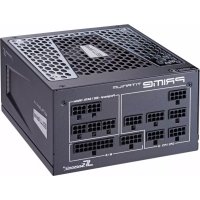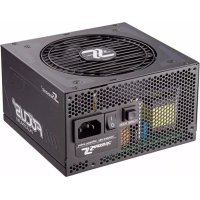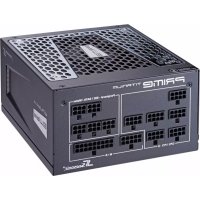
Focus PX650 - Phone charger SEASONIC - Free user manual and instructions
Find the device manual for free Focus PX650 SEASONIC in PDF.



| Product type | Portable phone charger |
| Brand | Seasonic |
| Model | Focus PX650 |
| Output power | 650 W |
| Input voltage | 100-240 V AC |
| Connectors | 20/24 pins, +12V 4 pin, EPS +12V 8 pin, peripheral cables |
| Cable management | Modular |
| Fan | Integrated |
| Dimensions (approx.) | 150 x 140 x 86 mm |
| Weight (approx.) | 2 kg |
| Package contents | Power supply unit, modular cable set, manual, power cord, accessories bag |
| Safety | Do not open, do not obstruct ventilation, use only Seasonic cables |
| Maintenance | Clean with a dry cloth, avoid moisture |
| Standards | ErP 2013 compliant |
| Warranty | Manufacturer's warranty (see conditions) |
| Intended use | Integration in a computer to power components |
Frequently Asked Questions - Focus PX650 SEASONIC
User questions about Focus PX650 SEASONIC
0 question about this device. Answer the ones you know or ask your own.
Ask a new question about this device
Download the instructions for your Phone charger in PDF format for free! Find your manual Focus PX650 - SEASONIC and take your electronic device back in hand. On this page are published all the documents necessary for the use of your device. Focus PX650 by SEASONIC.
USER MANUAL Focus PX650 SEASONIC
POWER SUPPLY INSTALLATION GUIDE
1. Remove your old PSU (power supply unit)
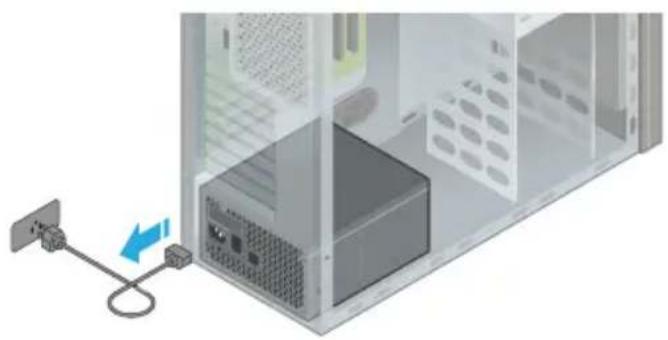
1.1. Disconnect your AC power cord from the wall socket and the back of the power supply.
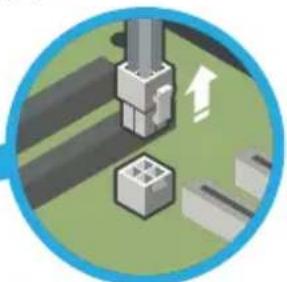
1.2. Disconnect all DC cable connectors.
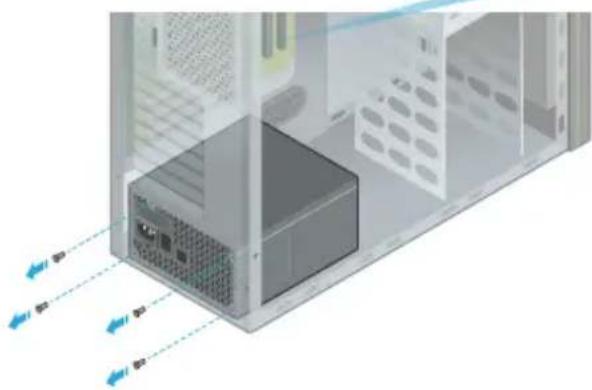
1.3. Remove all 4 mounting screws.
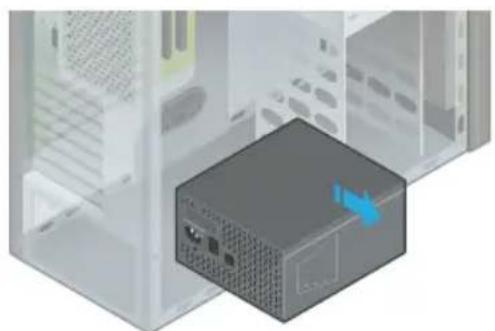
1.4. Remove your old PSU.
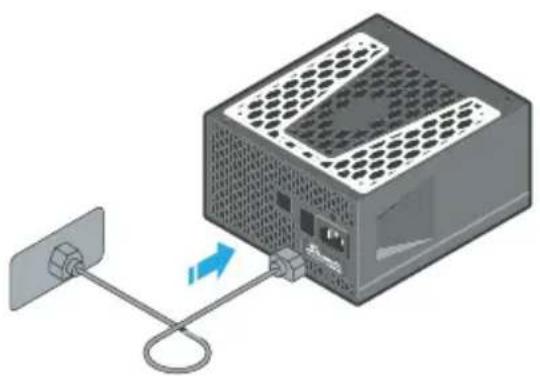
2.1. Plug the AC power cord into the PSU. Make sure that the AC power is coming directly from the wall outlet.
It is recommended to use a high quality surge protector to protect the PSU and the system.
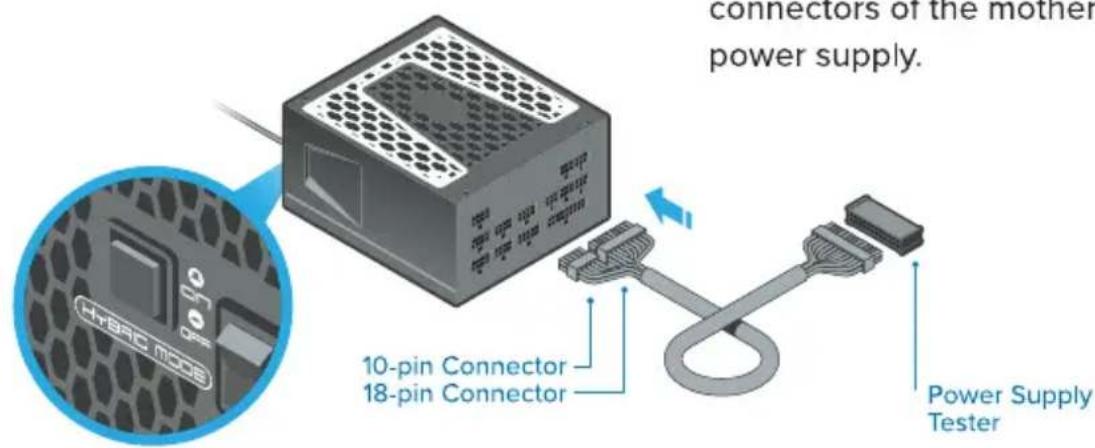
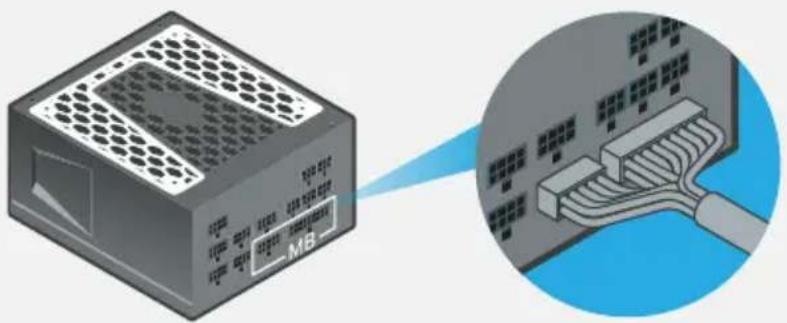
2.2. Connect both the 18-pin and 10-pin connectors of the motherboard cable to the power supply.
2.3. If you power supply features a fan control switch, set it to Normal Mode.
In Hybrid or Fanless Mode (S3FC) the fan will not turn.
2.4. Attach the Power Supply Tester to the 24-pin motherboard connector. There is a notch on the Tester that fits directly into the notch on the 24-pin connector.
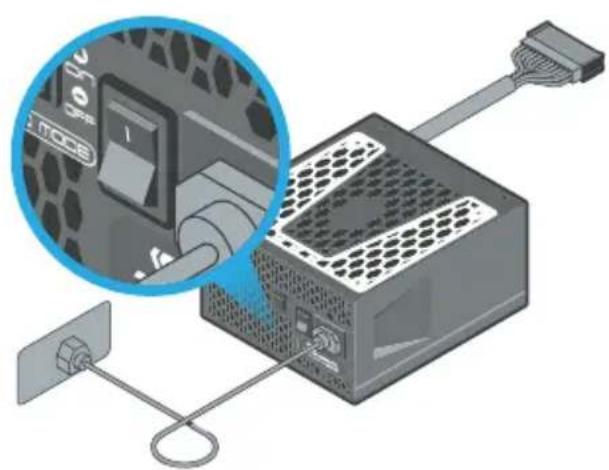
2.5. Turn on the power supply by setting the I/O switch to the "1" (ON) position.
If the power supply fan starts spinning then your PSU is working.
The drawings illustrate a fully modular PSU with a fan control switch; the features of your actual PSU might vary.
3.1. Bottom of the case
The fan control setting determines the optimal PSU placement.
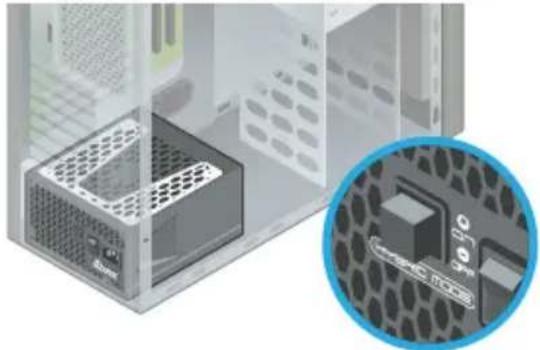
In "Hybrid" mode
Seasonic recommends to install your PSU with ventilation top cover facing UPWARD, towards the direction of the motherboard. This will ensure natural heat dissipation.
Fanless PSU
The PSU must be mounted into the computer case with the ventilation top cover facing UPWARD.
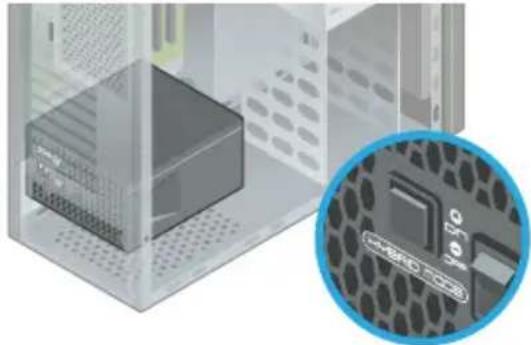
In "Normal" mode
Although the direction of mounting is optional, it is not recommended to install the PSU with the ventilation top cover facing downward if there are no ventilation holes on the bottom of the case.
To learn about the ventilation of your computer case, please refer to the case manufacturer's instruction manual.
3.2. Flat Desktop-, SFX- or ITX systems
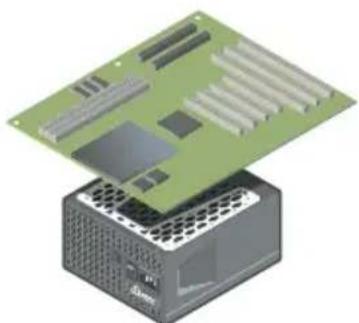
3.3.Top of the case
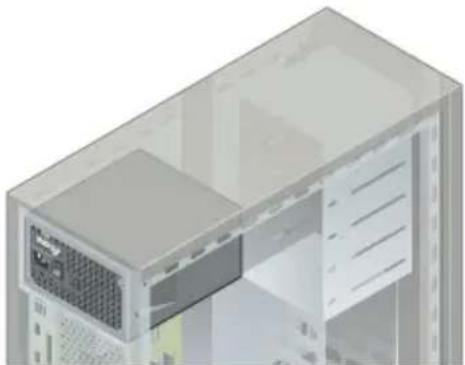
In general, it is recommended to mount the PSU with the ventilation top cover facing the motherboard. Due to the different varieties of case layouts, however, please also consult the case manufacturer's instruction manual for more information.
Seasonic recommends the PSU to be mounted with its ventilation top cover facing DOWNWARD.
3.3.Top of the case
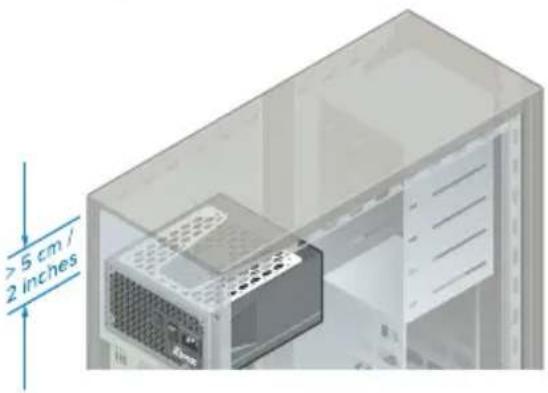
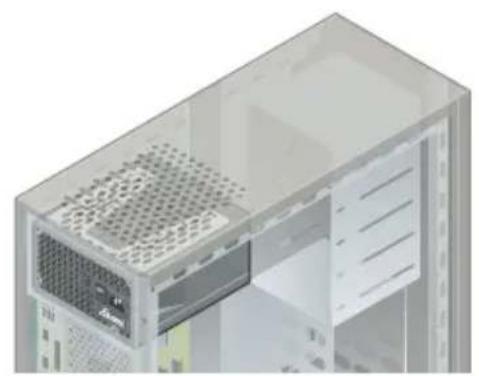
Mount the power supply with the ventilation top cover facing UPWARD only if there is enough space (at least 5 cm/2 inches) available between the PSU ventilation top cover and the metal plate of the case, and only if the case has a ventilation panel on top.
4. Install your Seasonic PSU
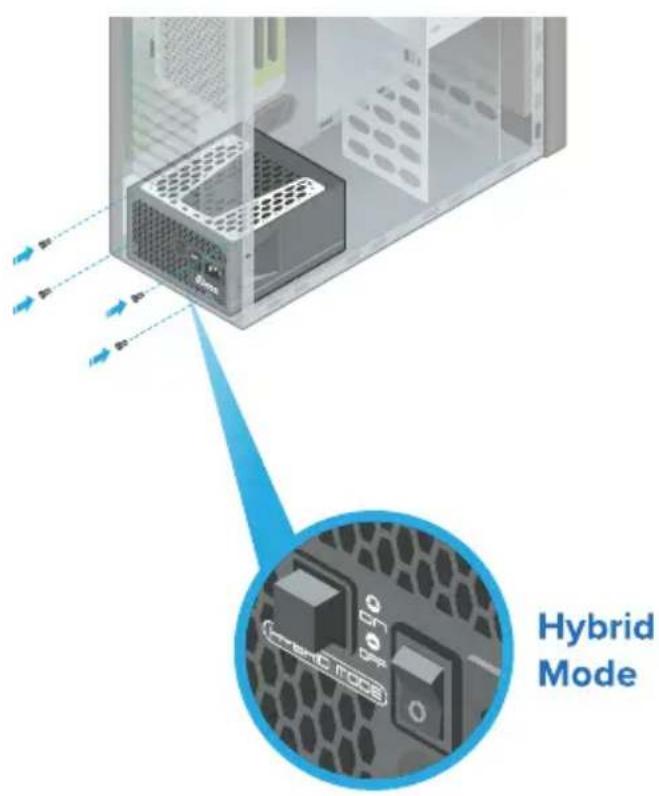
4.1. Secure all 4 mounting screws.
4.2. Make sure the PSU switch is in the "O" (OFF) position.
4.3. Select the fan control type if your PSU has this option.
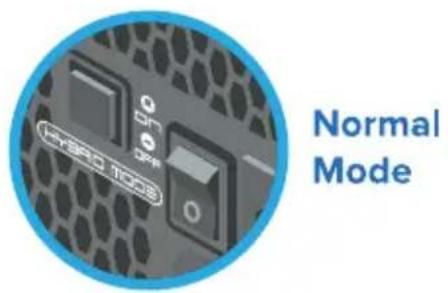
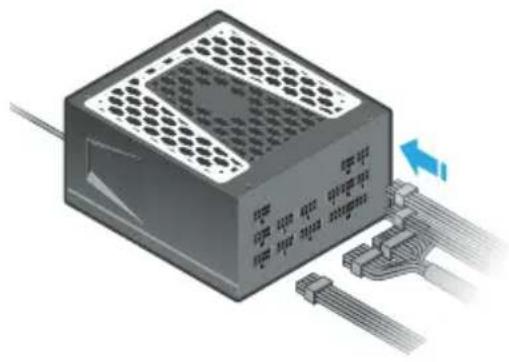
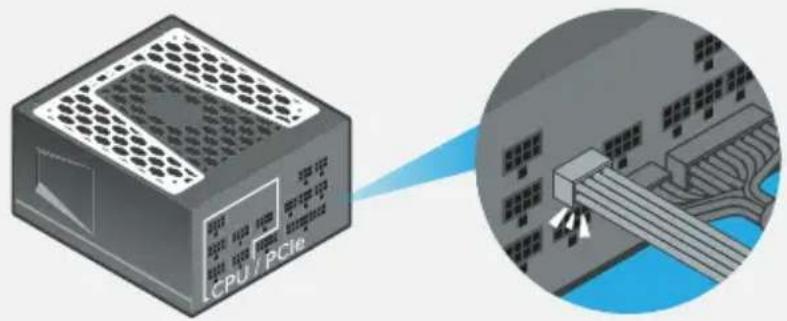
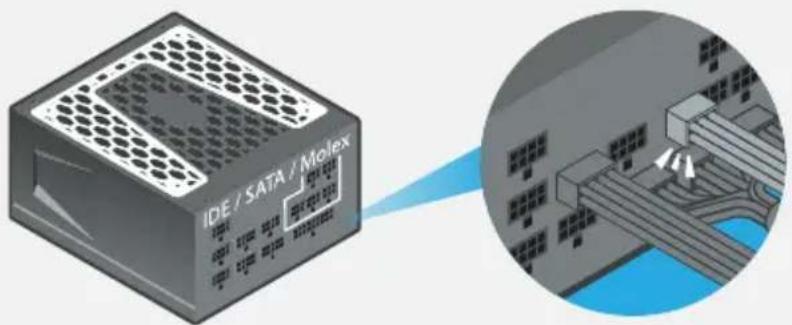
4.4. Connect all the necessary system DC cables (Motherboard, CPU, VGA, HDD, Optical Drivers, etc). The connectors should click to lock in.
ATTENTION! Use only cables provided by Seasonic! Should you require additional cables, please contact Seasonic.
Motherboard cable
Make sure both Motherboard connectors on the PSU side are properly connected.
CPU and PCIe cables (8-pin connectors)

Peripheral cables (6-pin connectors)

High powered graphics cards are usually outfitted with two (or three) PCIe power connector slots. Seasonic prefers the use of two (or three) separate PCIe cables to connect these cards to your power supply.
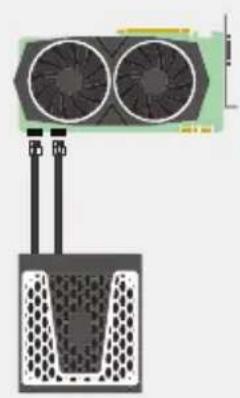
Recommended Standard
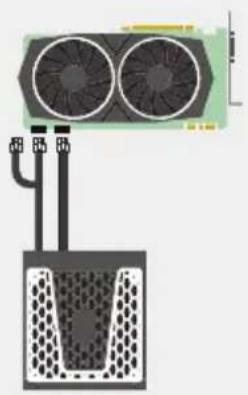
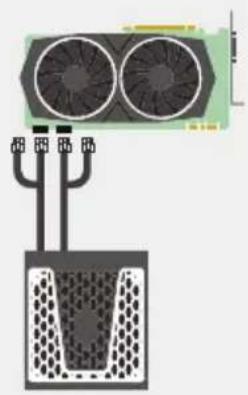
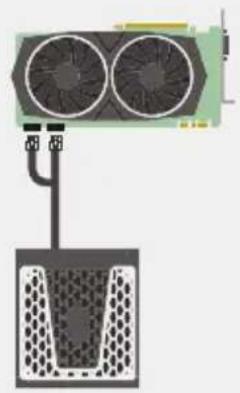
ATTENTION! The intended use of the PSU is to power PC systems. For mining usage, please contact Seasonic for special cables.
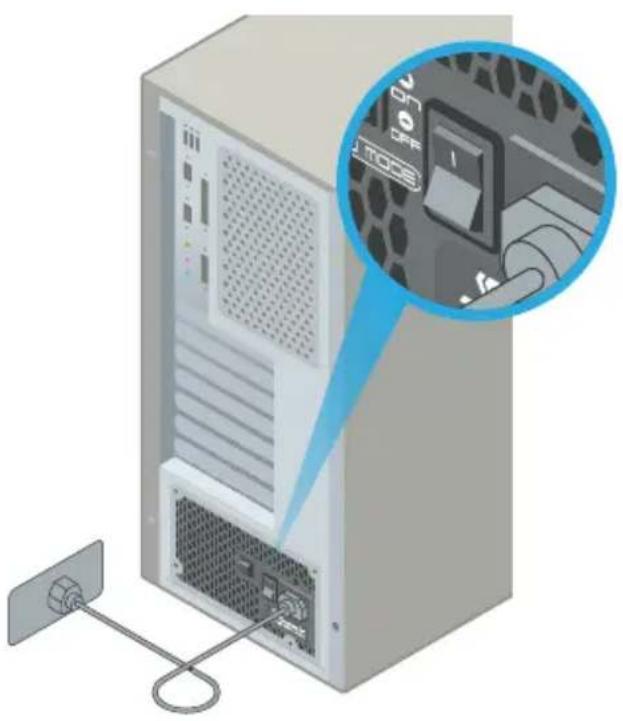
4.5. Connect the AC power cord to the PSU. Plug the AC power cord into the wall socket.
4.6. Click the AC ON/OFF switch to the "I" (ON) position.
Register
seasonic.com/ product-registration
Your
Power
Supply

Seasonic®
Tech Support Online Chat on SEASONIC.COM
Seasonic®
POWER SUPPLY USER'S MANUAL
NETZTEIL BENUTZERHANDBUCH
BLOC D'ALIMENTATION MANUEL D'UTILISATEUR
Power supply
Modular cable pack
- User manual
AC power cord
- Accessory bag
II. WARNING! IMPORTANT SAFETY INFORMATION
NEVER, under any circumstances, open the power supply unit. High voltage inside. WARRANTY IS Void once the cover is removed.
DO NOT insert any object into the fan grill or the ventilation area of the power supply unit.
DO NOT place any object in front of the fan or the ventilation area of the power supply unit that may obstruct or restrict airflow.
USE ONLY the Seasonic modular cables provided with the power supply unit.
- Keep the power supply unit in a dry environment, away from humidity.
The power supply unit is for integration into a computer system and not intended for external or outdoor usage.
III. Power Supply Removal
- Please first read Chapter II. Warning! Important Safety Information above.
- Make certain that your system is entirely powered off; set the power supply's AC power switch to the "O" (OFF) position and disconnect the power cord from the AC outlet.
- Open the computer case (please refer to the manufacturer's user manual).
- Carefully disconnect all the power supply's connectors from the mainboard and the peripherals.
- Unscrew the mounting screws securing the power supply unit to the back panel of the case.
- Carefully remove the power supply from the case.
IV. Power Supply Installation
- Place the Seasonic power supply into the space provided within the case and use the four mounting screws provided in the accessory bag to secure it to the back panel of the case. Do not over-tighten the screws.
a. For power supplies with a built-in fan, the fan side top cover should be facing the mainboard. (Depending on the type of computer case, this can mean either upwards or downwards facing fan cover.)
b. For fanless power supplies, Sea Sonic recommends to mount fanless power supplies into the computer case with their ventilation cover facing UPWARDs. However, there are extra mounting-screw holes provided on the back of the power supply to allow for reverse mounting, if necessary
- Mainboard connection:
a. DO NOT force the connectors into place; the connectors are "keyed" so they can only fit one way. Make sure the connectors lock in their place securely.
b. Connect the power supply end of the 24/20-Pin convertible connector to the appropriate receptor on the power supply unit.
c. Connect the mainboard end of the 24/20-Pin convertible connector to the mainboard. Depending on the mainboard, you may need to either attach or detach the 4-Pin module of the 24/20-Pin connector.
d. Connect the +12V 4-Pin connector and the EPS + 12V connector, if applicable.
e. If your system requires dual EPS + 12 V connectors, please connect the 8-Pin end of the second CPU 8-Pin connector into the appropriate 8-Pin receptor on the power supply unit. Then connect the mainboard end of this 8-Pin connector to the mainboard.
- Peripheral components connection:
a. Connect one end of the peripheral cable to the power supply and the other end to the component.
b. DO NOT use excessive force to attach the connectors; the connectors are "keyed" so they can only fit one way.
c. Make sure that the connectors lock in tightly and securely.
- Close the computer case according to the manufacturer's instructions.
- Plug in the AC power cord provided in the box and switch the AC On/Off switch on the back panel of the power supply to the "I" (On) position.
- You are now ready to start your computer powered by Seasonic.
V. Troubleshooting
If the power supply unit fails to function properly, please go through the below checklist.
- Check to make sure the AC power cord is properly connected to the AC source and the power supply unit.
- Check to make sure the AC source is On.
- Check to make sure the AC On/Off switch on the back panel of the power supply unit in the "1" (On) position.
- Check and secure all mainboard and peripheral connectors.
-
The AC on/off switch on the back of the power supply unit can be toggled between "l" and "O" a few times with a 0.5 second delay in between to make sure the power supply unit is reset.
-
If you are still experiencing difficulties to get the power supply unit to function properly, please visit www.seasonic.com for further technical support instructions.
Notes
- The operation of power supply is a "pull" technology, which means that the unit only provides the power as demanded by the mainboard and the system components.
If there is a mainboard malfunction, the power supply will not turn on.
If there is a peripheral component malfunction, the power supply will not provide power to that particular component. - This power supply complies with the newest ErP 2013 requirements. For proper system function please update your main-board BIOS to the newest version and configure the BIOS in accordance to ErP 2013 requirements - enable all Energy Savings functions for standby and normal operations and disable audio always-on. Please consult your motherboard manufacturer for further assistance.
VI. Warranty
Seasonic's warranty covers all power supplies beginning from the date of purchase, against defects in materials or workmanship. During the warranty period, Sea Sonic maintains the discretion to either repair units or replace broken components with parts of similar or equal performance, provided that:
The product is returned to the point of purchase, postage prepaid.
The product was properly used according to the manufacturer's intended purposes.
The product was not damaged due to acts of nature, such as lightening, flood or fire.
The product's cover was never removed and the warranty sticker was not broken.
For additional details, please visit www.seasonic.com/rma
Notes
Warranty terms may vary between different geographic regions.
- For consumers in Australia - Our goods come with guarantees that cannot be excluded under the Australian Consumer Law. You are entitled to a replacement or refund for a major failure and compensation for any other reasonably foreseeable loss or damage. You are also entitled to have the goods repaired or replaced if the goods fail to be of acceptable quality and the failure does not amount to a major failure.
Local distributor:
Powerhouse PC Australia
service@powerhousepc.com.au
www.powerhousepc.com.au
PO Box 6139 Silverwater, NSW 2128, Sydney, Australia
Tel: +61 2 9648 6268
Fax: +61 29648 6269
VII. Disclaimer
All efforts have been made to ensure accuracy of all information provided herein. Sea Sonic assumes no liability, expressed or implied, for any damage(s) occurring to your system's components or other devices as a result of any mistake or omission during power supply installation or removal, or due to any defect or failure of the product itself.
Please visit our homepage www.seasonic.com for further details.
DEUTSCH
I. Lieferumfang
- Anschlüsse am Mainboard:
yOtnpIKoHTaKTmmoynb 24/20-KoHTaKTHoro po3'Emy.
d. RaKIO ue Heo6xIDHO, nIKIIOHTb YoITnpNKoHTaKTTHn po3'EM +12 B Ta KOHeKTop EPS +12 B.
e. RaKoBaWiCnCTeMI nOTpi6HdBA po3'EMn EPS +12 B, 6yNb IaCKa, NiKJIouiTB 8-KoHTaKTHi pO3'EM npIpyrO 8-KoHTaKTHO rpo3'Em JxuBHeHHa CEHTpaIbHOrO npocepa y BiIOBIDHe 8-KoHTaKTHe rH3do 6NOKy JxuBHeHHa. IOTIM NiKJIouiTB dpyrn KHeCbIbOro 8-KoHTaKTHO Ka6eIIO do MaTePunHcbKOI PnATn.
3.Пдкюунна nepифepiHnx KOMnoHEHTiB:
a.ПдкнluчыОдIH KHeць Ka6eJIIO XnBLeHЯ nepiФepiHnx KOMnoHentIB Do 6NoKy XnBLeHHa,iHsM —do nepiФepiHoro KOMnoHenta.
b. HE DOKJIADAIITE HADNIUKOBNX 3YCINb, BCTaBnIOuHPO3'EMN KNBJIeHHRA, BOHN MaOTb CneuiabHi «KNIOUH, IIO He DO3BOJHOb BCTaHOBnOBAtIx 3a HeBipHOIOpiHTaIIEO.
c. NepekeohaiTecb y hauiHooCTi iikluoehnpo3'EMIB.
4.ДоТримуюсь Incтрукци виробнka,зakpniteКорпсКOMn'IOTepa.
5.ПлкючыкбьжингьБЗКOMпгКТу NOCTаHнДо CTINHOIpo3ETKnTa BCTaHOBITb nepemkauchHa3aHni naHeni 6LoKyжингьHrynoLoXeHHA «|» (BBIMKH.).
6. 3apa3 Bn roTOBI do BVKOpunctaHHa KOMN'IOTepa 3 6IokOM JKNBHeHHa Seasonic.
V. Moxkinbi HecnpabHocti taix ycyHeHHa
JaKIO 6NOK KINBJIeHn He yHKcIOHyE HOpMaJbHO, BIKOPNCOTByIte HaCTyHNi CNICOK dI nepeBipKn.
- IpebeipTe, cn BiPHO niiKJIIOueHn shypr JxNBJeHHn do eNEKtpnUHOi po3ETKn Ta 6IOKy JxNBJeHHn.
2.Пелеверг,чИ BBIMKHeHи 6лOKЖИВЛeHHЯ. - Ipepebipte, uBCTaHOBneHo nepemkau Ha 3aHni naHeni 6nOky KINBHeHHy y noLoXeHHRA (I) (BbIMKH.).
- IpepebiTe HadiiHicTb NiikIoueHHBcix po3'EMIB MaTeepHcbKoi IIaTu Ta nepuhepiHnx npncTpoB.
- 506 nepekoHaTnca, 0o Bci napameTpni 6Ioky kNbneHHy 6yIn cKHyTi, MoXHa deKinbKa pa3iB Ioro BBIMKHyTu Ta BUMKHyTu, BCTaHOBNIIOUCh NOrO BUMKau, PO3TaWOBaHn Ha 3aHi nAHeJI, y noLoXeHHra «I» Ta «O» 3 3aTpumKOIO y 0,5c.
6.Якso 6лok кивлесь се щeHopmaNbHo He yHKuioHye,3BepHiTbCra 3a TexHicHO IO donOMorOIO Ta dOdaTKOBIO IHopMaucieIO Do Be6-caity www.seasonic.com.
Ipumimku
BIOK KINBJIENHRA 3a6e3neUe JINBJIENH RAme TAKOI NOTyXHOCTI, JKOI NOTpe6ye IJRA CBOEi PO6OTMaTEPHCBKa PJIATA Ta IHWI KOMNOHEHTN CNTCTEMI.
- Y BnnaKky HecnpaBHOcTi MaTepuHcbKOI PNaTn 6JOK KINBJIeHHHa BBIMKHeTbCra.
Y BnnaKny HecnpabHocti Ondoro 3 nepuΦepiHnx npncTroIB 6Iok XNBleHn He 6yde nocTaTu KMBeHHcame dny zuBoro nepuΦepiHoro npncTroIO.
Ley 6nok jxnbeneHHB iDnOBiDaBumoram octaHboro cTahapTy ErP 2013. IJy 3a6e3neueHH HOpMaIbHOIO pO6OTu CNCTeMm MPeKOMeHdyEMo BIKOHaTu OHOBJIHH BIOS BaWoi MaTePHCbKOITnTa 3miHTu NOro HAcTPOkN y BiNobIHocTi Do BImor ErP 2013: zadjTu yci fYHKU eHepro36epexehny y peXIMax kPo6OuNX, Ta i OuykBaHH, a TAKOX 3a6OpOHtN peXUM «ayio nOCTiHo BBIMKHeHe». 3a DODaTKOBOIO IHΦopMauiCiTO Ta dONOMrOIO 3BepTaIteCra Do BInpo6HnKa MaTePHCbKOI nIaTI.
VI. RapaHTia
TapaHTia Seasonic po3noBcIOJxUeTbcra Ha Bci 6IOKn XINBJeHHa, aKTHByETbCBA MOMENT npu6aHHa, i oxonJIIOe moKJIINI DEeKTN Bnpo6HnTba a6o 6paK KOMNoHEnTI. Ha npot3i cTPOky II rapaHTII Sea Sonic Ha CBI BnACnHn PO3cyd BN3Haaye, YN 6yde HecnpaBHn IPOdyKT BiDpemOHTOBAHn a60 3amHeHn IHsIM, 10 MaE CXOki a6o aHaONrHi MoKJIBOCTi, 3a yMOB, 10:
IpoNyKT 6yB NOBepHeH NOKynCem, nepeaNaueHm NOnTOBnM BiINpaBHeHHM y MaRa3nH, De BIn 6yB npud6aHn.
- IpoDyKT BnKOpNCToBvBaBCa y BiDnOBiHocTi do npu3HaueHHa Ta peKOMeHdaCi, 10 6yJIu HadaHi BnPo6HnKOM.
IpoNyKT He 6yNo noSKoJKeHO BHaCNIIDOK CTnxiHOrO IINxA, TAKORO Jk 6nckabKa, NOBInb a60 noXeJa.
Kopnyc npodykty He demoHTyBaBcra, Ta rapaHTiHi HanInKn He 6ynn nouKOJxH. DoatkoBi BIDOMOci MoJHa 3HaItn Ha Be6-CTOpIHci www.seasonic.com/rma.
Ipumimku
- Y pi3hnx perioHax cTpOKn Ta yMOBN rapaHTi moKyTB BiDiPI3HATnCra.
VII. BIDMOBA BID BIDNOBiIaNbHocTi
Bnyo doKnaedeHO MaKcMym 3ycnIb, 063a6e3neuHT ToHicb ycici IHphiopMauii, HabeJeoi y bomy DOKymeHt. Sea Sonic He Hece ABO a6o yABIOBaHO BIDNOBdaNbHOCTs 3a 6yd-b-ki NOKOJKeHH KOMnoHeTIB CNTeMI a6o IHxN pncTroB KOpNCyBaA BHaCNIkO NOMINKN, 0o 6yla npinyueHa NiD Yac BCTaHOBLeHHa a6o DEMoHTaKy 6loky XNBHeHHa, a TaKoX BHaCNIdoK 6yb-akoro DeΦekTy a6o HecnpabHocTI cboR npodykTy.
DogaTkoBIBidomocTi MoXHa 3HaTu Ha Be6-caTti www.seasonic.com.
Seasonic®
Global: support@seasonic.com
America: ssa.support@seasonic.com
Europe:sse.support@seasonic.com
HEADQUARTERS
Sea Sonic Electronics Co., Ltd.
8F, #19, Alley 360, Sec.1,
Neihu Road, Neihu, Taipei,
Taiwan, R.O.C.
EUROPEAN OFFICE
Sea Sonic Europe B.V.
Everdenberg 117,
4902 TT Oosterhout,
The Netherlands
www.seasonic.com
This manual is printed on environmentally friendly material.