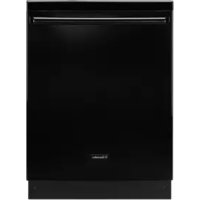
EIDW5905JB - Dishwasher ELECTROLUX - Free user manual and instructions
Find the device manual for free EIDW5905JB ELECTROLUX in PDF.


User questions about EIDW5905JB ELECTROLUX
0 question about this device. Answer the ones you know or ask your own.
Ask a new question about this device
Download the instructions for your Dishwasher in PDF format for free! Find your manual EIDW5905JB - ELECTROLUX and take your electronic device back in hand. On this page are published all the documents necessary for the use of your device. EIDW5905JB by ELECTROLUX.
USER MANUAL EIDW5905JB ELECTROLUX
natural_image
Abstract geometric logo design with curved and straight lines forming a stylized 'D' shape (no text or symbols)Use & Care Guide
Built-In Dishwasher
natural_image
Front view of a white stainless steel kitchen appliance with a handle (no visible text or symbols)Electrolux
(154813901 & 2010/07)
2
Finding Information
Table of Contents
Finding Information ...... 2
Make a Record for Future use 2
Questions? 2
Internet 2
Table of Contents 2
Safety 3
Important Safety Instructions .... 3
Feature Overview 4
How your Dishwasher Cleans 4
Operating Instructions .... 5
Getting Started 5
Normal Operating Sounds 5
Wash Cycle Selections 5
Cycle Selections 6
Energy Option Selections 6
Operation Selections 7
Preparing & Loading Dishes 8
Dish Preparation 8
Loading the Top Rack 8
Loading the Bottom Rack 9
Adjusting Rack Height 10
Loading the Silverware Basket 10
Adding a dish 10
Dishwasher Dispenser & Detergents 11
Filling the Detergent Dispenser 11
How much Detergent to use 11
Detergent Usage Guide 12
Rinse Aid 13
Factors Affecting Performance .... 14
Water Temperature....14
Water Pressure 14
Care & Cleaning 15
Outside 15
Inside 15
Winterizing 16
Solutions to Common Problems ...... 17
Food Soils Left on Dishes 17
Dishes Not Dry 17
Dishware Chipped 17
Glassware/Flatware Spotted or Cloudy 18
Etching 18
Normal Sounds You Will Hear 18
Dishware Stained or Discolored 18
Detergent Left in Dispenser Cup 18
Dishwasher Leaks 19
Water in Bottom of Tub 19
Dishwasher Won't Run 19
Dishwasher Does Not Drain
Properly 19
Cycle Takes a Long Time.... 19
Dishwasher Won't Fill 19
Dishwasher Has an Odor 20
Removing Spots and Film 20
Error Codes 20
Error Code Indication 21
Warranty Information 22
Spanish Version 23
French Version 40
Please read and save this guide
Thank you for choosing Electrolux, the new premium brand in home appliances. This Use & Care Guide is part of our commitment to customer satisfaction and product quality throughout the service life of your new appliance.
We view your purchase as the beginning of a relationship.
To ensure our ability to continue serving you, please use
this page to record important product information.
Keep a record for quick
reference
Purchase date
Electrolux model number
Electrolux serial number

NOTE
Registering your product with Electrolux enhances our ability to serve you. You can register online at
www.electroluxappliances.com or by dropping your Product Registration Card in the mail.
Questions?
For toll-free telephone support in the U.S. and Canada:
1-877-4ELECTROLUX (1-877-435-3287)
For online support and Internet production information visit http://
www.electroluxappliances.com
Important Safety Instructions
Please read all safety instructions before using your new Electrolux dishwasher.
- Read all instructions before using your dishwasher.
- Use your dishwasher only as instructed in this Use and Care Manual.
- This manual does not cover every possible condition and situation that may occur. Use common sense and caution when installing, operating and maintaining any appliance.
- National Sanitation Foundation (NSF) certified residential dishwashers are not intended for licensed food establishments. Such establishments require a higher dishwasher water temperature to meet commercial sanitization requirements.
- DISHWASHER MUST BE ELECTRICALLY GROUNDED. Read the Installation Instructions for details.
- This dishwasher is designed to operate on regular house current (120 V, 60 Hz). Use a circuit equipped with a 15 ampere fuse or circuit breaker. Use a 20 ampere fuse or circuit breaker if dishwasher is connected with a food waste disposer.
- Do not operate dishwasher unless all enclosure panels are in their proper place as explained in the Installation Instructions provided with your dishwasher.
- To avoid entrapment and/or suffocation, remove the door to the washing compartment when removing an old dishwasher from service or discarding it.
- Keep young children and infants a safe distance away from the dishwasher when it is in operation.
- Use only detergents and rinse agents recommended for use in a dishwasher.
- Do not abuse, sit on, or stand on the door or dish rack of the dishwasher.
- Store dishwasher detergent and rinse agents out of the reach of children.

WARNING
This symbol will help alert you to such dangers as personal injury, burns, fire, and electrical shock.

WARNING
To reduce the risk of fire, electrical shock, or injury when using your dishwasher, follow basic precautions including the following:
- Do not wash plastic items unless marked "dishwasher safe" or the equivalent. Check with manufacturer for recommendations, if not marked. Items that are not dishwasher safe may melt.
- If the dishwasher drains into a food disposal, make sure disposal is completely empty before running dishwasher.
- Disconnect electrical power to dishwasher before servicing.
• Repairs should be done by a qualified Electrolux professional. - Do not tamper with controls.
- Use care unloading the dishware when the SANITIZE option has been selected. Contents may be hot to the touch immediately after the end of cycle.
- When loading and unloading items:
- Locate sharp items and knives so that they are not likely to damage the tub or door seal
- Load sharp items and knives with the handles up to reduce the risk of cut-type injuries.
- Under certain conditions, hydrogen gas may be produced in a hot water system that has not been used for 2 weeks or more. HYDROGEN GAS IS EXPLOSIVE. If hot water system has not been used for such a period, before using dishwasher, turn on all hot water faucets and let water flow from each for several minutes. This will release any accumulated hydrogen gas. HYDROGEN GAS IS FLAMMABLE. Do not smoke or use an open flame during this time.
- Do not store or use combustible materials, gasoline or other flammable vapors and liquids in the vicinity of this or any other appliance.

NOTE
Save these important safety instructions for future reference.
HOW YOUR DISHWASHER CLEANS
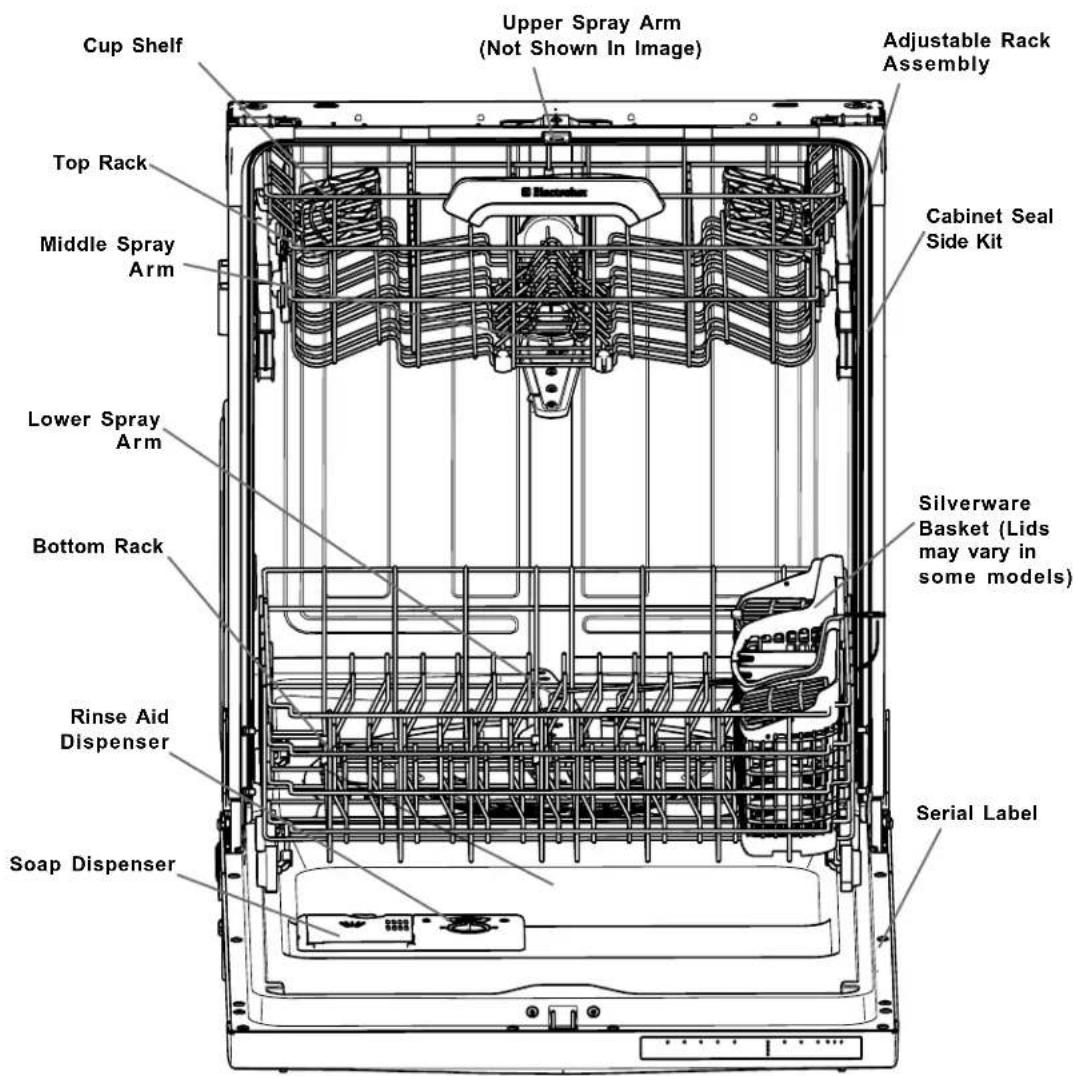
Your dishwasher fills with a small amount of water (just covers the filter area at the bottom), sprays that water on to the dishware to remove soils, captures the soils in its filtration system and then uses that water to flush the captured soils down the drain. When more soils are present more iterations of the fill/spray/filter/flush are applied. When appropriate, detergent, heat and/or rinse agent are also applied to the spray water at the optimal times within the cycle.
The applied cycle (number of fills, spray pressure, water temperature, addition of detergent, addition of rinse agent, and amount of heat for drying) is set by a combination of your cycle and option selections and many automated decisions programmed into your dishwasher. Your input sets the temperature targets but the dishwasher will automatically adjust heat input to account for the actual heat loss, thermal capacity of the dish load, and temperature of the incoming water. The dishwasher also has the capacity to measure the soil load and to shorten or lengthen the cycle to apply the optimal response.
text_image
Cup Shelf Upper Spray Arm (Not Shown In Image) Adjustable Rack Assembly Top Rack Middle Spray Arm Lower Spray Arm Bottom Rack Silverware Basket (Lids may vary in some models) Serial Label Soap Dispenser Rinse Aid DispenserGETTING STARTED
EIDW5905

text_image
auto heavy normal quick rinse CLEAN SANITIZED LOCKED LOW RINSE hi temp sanitize air dry delay START CANCEL 3HR 4HR 6HRPress and hold HI-TEMP icon for 5 - 10 seconds before first use.
To run your dishwasher, follow these basic steps:
1 Load dishwasher. (See Preparing and Loading Dishes, pages 8-10.)
2 Add detergent. (See Dishwasher Dispenser & Detergents, pages 11-12.)
3 Add rinse aid, if needed. (See Rinse Aid, page 13.)
4 Select desired CYCLE. (See Cycle Selections, pages 5 -7.)
The cycle LED will illuminate when selected.
5 Select desired OPTIONS. (See Energy Options Selections, page 5-7.)
The option LED will illuminate when selected.
6 To start, press START/CANCEL pad and close door. (See Start/Cancel, page 7.)
Though your dishwasher has many enhancements to reduce its sound level, it is normal to hear some of what is going on inside. The wash cycles include several instances of water entering the unit (splashing), the wash pump running to spray water on the dishware (motor & splashing) and the drain pump running to discharge the dirty water and soils. Variations in the pumping/spraying sounds are also normal. During a cycle the pump switches on and off many times and the spray pressure is adjusted up and down throughout to provide the best cleaning performance.
WASH CYCLE SELECTIONS
Cycle times are approximate and vary by options selected. Hot water is necessary to activate dishwasher detergent and melt fatty food soils.
An automatic sensor checks the water temperature throughout each cycle. When HI-TEMP WASH is selected, the unit heats the water to an even higher temperature. Run hot water faucet nearest dishwasher until water is hot before starting.
CYCLE SELECTIONS
You may find that your highly efficient dishwasher actually washes longer than your old one. The hydraulic system and cycles are carefully designed to use less heat and less water. To assure the dishes get clean with less use of costly resources more time is spent spraying water. The pump uses little energy. The advanced filter design allows water to be used longer before needing to replace it and results in a better use of resources.
Cycle durations, wash temperatures and water usage all vary with the cycle and options selected. When incoming water or the room is colder the unit will heat and wash longer to be sure to achieve critical temperatures.
Your dishwasher also uses a Smart Sensor to understand how heavily soiled the dish load is and to adjust the cycle accordingly. This sensor is calibrated at the end of most cycles - when the unit is sure to have a small amount of clean water around the sensor. The sensor will not be calibrated for the first cycle run after power has been removed from the dishwasher. To assure you get clean dishes the unit defaults to the cycle option that is suited for heavy soils on this first run after power is restored.
Heavy Wash

This is a hard hitting cycle for pots, pans, casserole dishes and dinnerware with dried-on or baked-on soils. Water usage is about 9.2 gallons. Wash time ranges from approximately 140 to 162 minutes.
Auto Wash

This excellent all around cycle uses the SmartSensor to determine the amount soils that were on the dishware. Cycle time and water usage are then automatically adjusted to assure the soils are fully and efficiently removed. Soils from light to extreme are accommodated. Light soils will result in a short cycle, heavy soils in a long cycle. Water usage varies between 3.1 to 9.1 gallons while cycle duration varying from 93 to 131 minutes.
Normal Wash

This cycle is an automated, one-cycle-fits-all solution that is appropriate for all but very special loads. Its automatic adjustment and wash limits are nearly identical to the Auto Wash described above.
Quick Wash

This cycle uses power and water (about 6.1 gallons) at a higher rate to wash dishes quickly (approximately 42 to 52 minutes). The cycle is designed to wash lightly soiled or pre-rinsed dishes and silverware.
Rinse

This cycle is intended for rinsing off food soils when you do not intend to run a full cycle until much later. Rinse uses much less water than you would use rinsing by hand. Unheated water is used to dissolve and remove much of the soils and wash them down the drain before they can dry in place or spoil.
ENERGY OPTION SELECTIONS
Hi-Temp Wash

When the HI-TEMP option is selected, the dishwasher heats water in the main wash to approximately 140°F (60°C) and in the final rinse to 150°F (65°C). HI-TEMP ON will be displayed.
This increase in water temperature helps dishwasher detergent remove food, grease and soil from dishes more effectively and aids in drying. The HI-TEMP option can only be used with AUTO, HEAVY and NORMAL cycles.
When the HI-TEMP option is selected, the LED will illuminate and remain on until the door is closed.
Child Lock Controls/ Air Dry

To prevent children from accidentally changing or starting a dishwasher cycle, lock the dishwasher controls by pressing the AIR DRY icon for at least 3 seconds then release. The LOCKED indicator light will illuminate when the controls are locked. Then no new selections can be made and dishwasher will not operate until the lock is released. To unlock the controls, again press the AIR DRY icon for 3 seconds and release.
Sanitize

To sanitize your dishes, glassware and silverware select the SANITIZE option available on the Auto, Heavy, and Normal cycles. Only these cycles offer the option to meet NSF Sanitization requirements.
When the Sanitize option is selected an LED above the icon resembling a thermometer will illuminate. The unit will then drive the water to higher temperatures, up to about 155^ F ( 68.3^ C) in the final rinse, and maintain that temperature for 7 minutes.
Sanitization is accomplished when the water reaches a set temperature and the dishware is assured to have achieved a specific temperature and amount of heat input.
When the sanitized option is selected the dishwasher will complete the cycle. However, the sanitization LED, located in the center of the keypad, will only light at the end of the cycle if ALL of the NSF criteria are met.
Failure to reach sanitization may mean that the cycle was interrupted due to power loss or the opening of the dishwasher's door during the final rinse. Another possibility is a failure to reach temperature which might occur if the incoming water is too cold. Within limits, the unit automatically adjusts for variations in water supply temperature and so this will not normally occur.
OPERATION SELECTIONS
Delay Start

The dishwasher start can be delayed 2, 4, or 6 hours from the time the cycle is initiated. Make cycle selections, press the DELAY START key until the desired delay LED is it, then close the door and the cycle will start.
To cancel the delay and start the cycle before the delay period is over, open the door and press the START/CANCEL key. Close the door and the cycle will start.
Start/Cancel

To start a cycle, press the START/CANCEL key once and close the door. To cancel when a cycle is running, open the door and press the START/CANCEL key once. Close the door again and the dishwasher will drain and shut off.

NOTE
Opening the door during normal operation will only pause the selected cycle.
Error Indications
Your unit monitors wash parameters and component communications. If any event or failure occurs that might prevent proper machine function or safe operation the unit will shut down and indicate an error by flashing all indicator lights. If the lights are flashing contact the Electrolux Customer Care Center at 1-877-435-3287. They will be able to provide assistance in troubleshooting the problem and/or locating an authorized service technician, if needed.
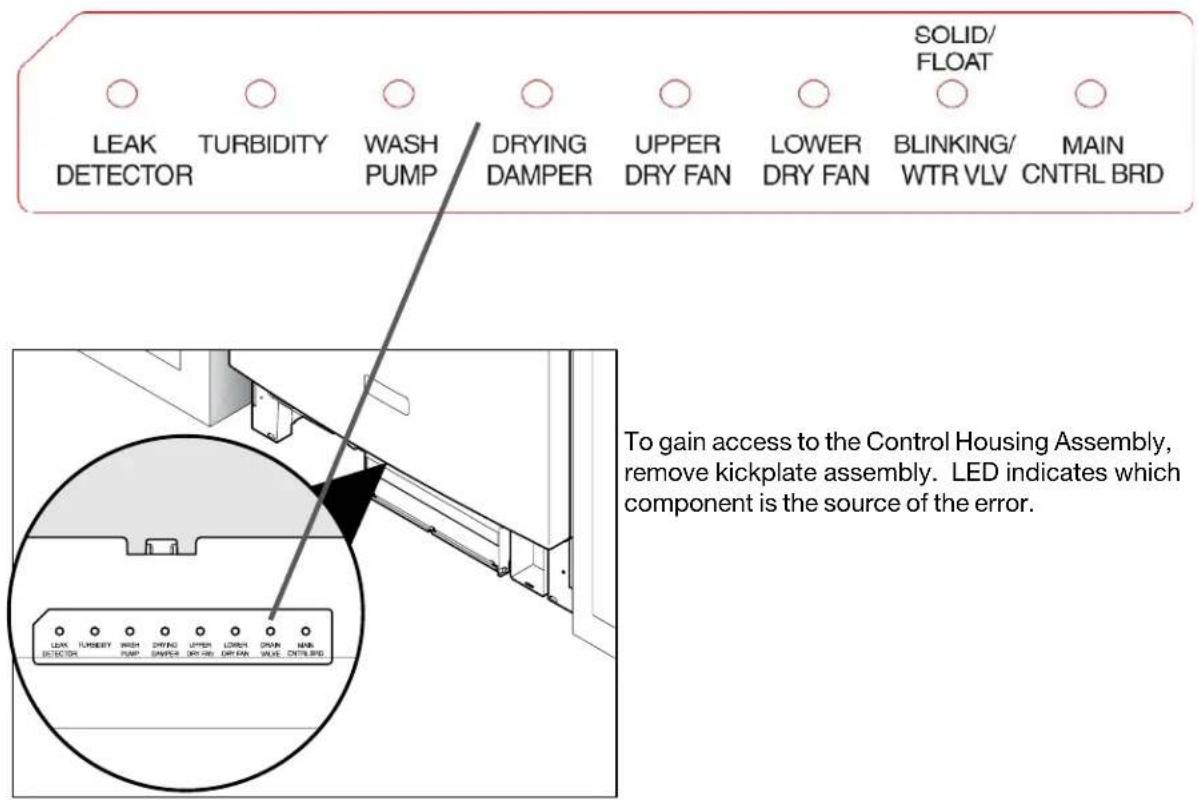
Possible errors are detailed on page 20. In the case of an error, an LED on the bottom control board in the base of your unit will further indicate the root cause for error as shown on page 21.
Automatic Overflow Correction and Prevention
During the entire cycle your dishwasher watches for high water level. In the rare instance that correction is needed, it will pause the cycle, drain (often a few seconds is sufficient) then resume the cycle.
If corrective draining continues for 90 seconds without lowering the water level your unit will stop the cycle and initiate error 16 (Float switch stuck/Drain clogged).
If the water level must be corrected 7 times during a cycle, your unit will stop the cycle and initiate error 15 (Stuck water valve). It will then periodically run the drain pump to prevent flooding until someone arrives to clear the error and turn off the water.
DISH PREPARATION
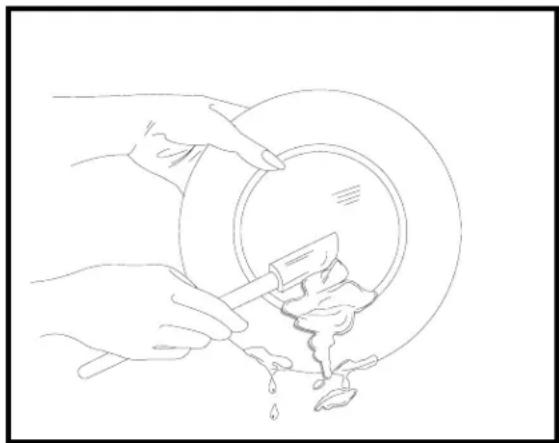
Scrape away large pieces of food, bone, pits, toothpicks, etc. The wash system will remove remaining food particles. Gently scrape away burned-on food with a non-scratch utensil or let dish soak before before loading them into the dishwaher (See Figure 1). Empty liquids from glasses and cups.
Foods containing vegetable oil and/or chemical additives such as mustard, mayonnaise, vinegar, lemon juice or tomato-based products may cause discoloration of stainless steel and plastics if allowed to sit for a long period of time. Unless the dishwasher is to be operated at once, it is best to rinse off these food soils.
- Load racks so that large items do not prevent the detergent dispenser from opening.
- Check dishware manufacturer's recommendations before washing items in question.
- If the dishwasher drains into a food disposal, be sure disposal is completely empty before starting dishwasher.
Tips for Loading the Racks -
Soil is removed when water is sprayed on each surface. For optimal cleaning, load dishware and silverware so that it is not touching each other. Then every surface is exposed to the cleaning jets.
Corner positions are the hardest to reach for spray arms. It is best to put the tallest glasses away from the corner positions of the upper rack.
Always place dishware with open ends facing down for best cleaning and drying.
Some dishes have rims or indentations that may capture and hold water. For improved drying use the slopes built into the rack and the position of the tines to place this dishware so that the surfaces are not horizontal to help drain as much out as possible.
Load delicate items securely in the rack without allowing them to touch other dishware. This will minimize the chance that they will tip or collide with other dishware and become damaged when the rack is moved or when the spray jets are turned on.
In some dishwashers it is not safe to load glasses or plastics into the lower rack - mainly because they have an exposed heater just below it. This is not one of them. The same strong, gentle jets and the same temperature water is applied to the dishware in both the upper and lower racks. You're free to place the dishware where it fits best.
natural_image
Line drawing of hands using a tool to clean or wash a circular object with liquid, no text or symbols presentFigure 1
LOADING THE TOP RACK
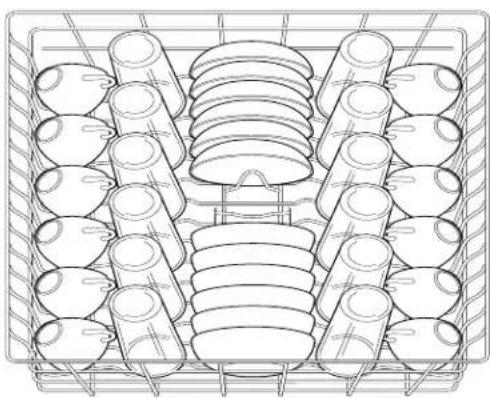
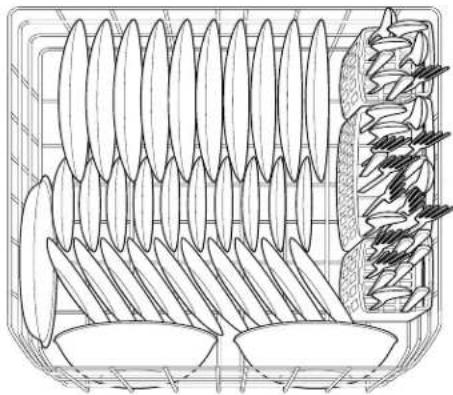
The top rack is optimized for flexibility in loading a wide variety of items but especially cups, glasses, stemware, small plates and small bowls.
Be sure that nothing protrudes through the bottom of the rack or can shift to protrude so that the middle spray arm is blocked. If in doubt, give the arm a spin to see if there is interference.

natural_image
Line drawing of a basket containing various food items (no text or symbols)10 place settings standard loading pattern
natural_image
Technical line drawing of a mechanical component with multiple cylindrical parts arranged in a grid (no text or symbols)12 place settings standard loading pattern
natural_image
Technical line drawing of a mechanical component with layered components and a separate view of a gear-like structure (no text or symbols)10 place settings standard loading pattern

NOTE
Features in your dishwasher's model may vary in appearance from illustrations in this manual.
LOADING THE BOTTOM RACK
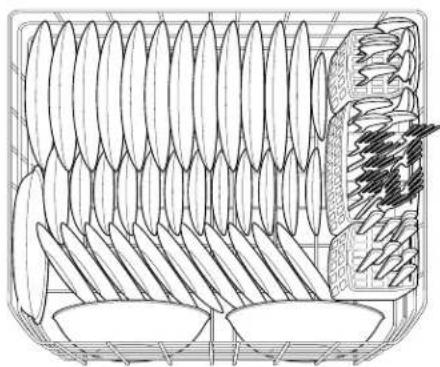
To wash items up to 13" in the bottom rack place the top rack in its high position.
The bottom rack is designed to accept plates, saucers, bowls, and cookware.
- Large items should be placed along the edge so they do not block the middle spray arm rotation.
- For best results, place bowls, casserole dishes, and sauce pans with the soiled surface facing down or toward the center. Tilt any horizontal surfaces slightly for better drainage.
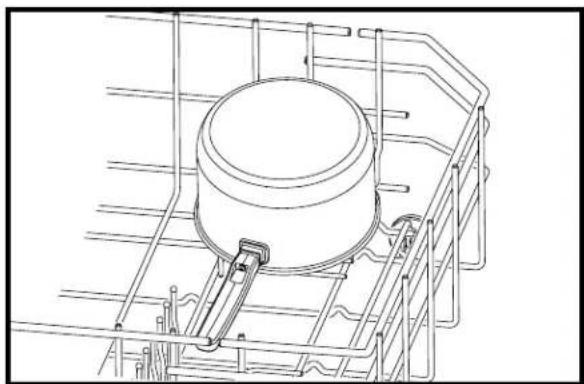
• Make sure tall items do not block middle spray arm rotation. - Be sure pan handles do not protrude through the bottom of the rack and block the lower spray arm rotation.
natural_image
Technical line drawing of a mechanical component with layered structure and internal components (no text or symbols)12 place settings standard loading pattern
Fold-down Bowl Tines
The fold-down tines in the lower rack and the bowl tines in the upper rack make easy loading for those extra large and hard-to-fit items. The tines may be left up for normal use or folded down for more flexible loading.
Fold tines down for ease in loading large pots or pans.
natural_image
Technical line drawing of a mechanical assembly with a cylindrical component mounted on a metal frame (no text or symbols)ADJUSTING RACK HEIGHT
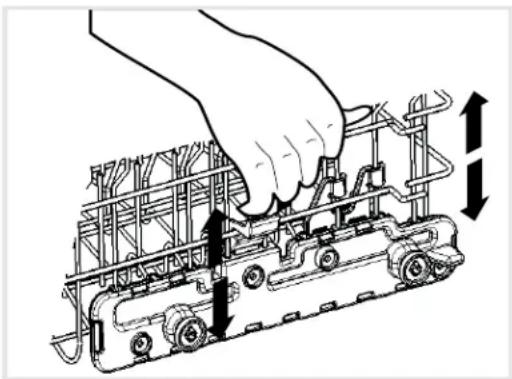
The top rack has two height settings. Adjust the rack down to the low height to accommodate loading of tall glasses. Adjust it to the high setting to make room for tall dishware in the lower rack.
To avoid damage to dishware always adjust the upper rack's height before loading dishware into it.
To change the rack position with the greatest ease lift or lower the rack so that it remains level from front to back and from side to side. To raise the rack from the low to the high position simply grab the top rack (one hand on each side) and lift it straight up. The lever is spring loaded and will engage when the upper position is reached. To release the rack and lower it to the bottom position grab the rack as shown in the figure below, extend your fingers to pull on the lever and gently lower the rack to its level and lowest setting.
natural_image
Illustration of a hand adjusting a mechanical component with arrows indicating motion (no text or symbols)LOADING THE SILVERWARE BASKET
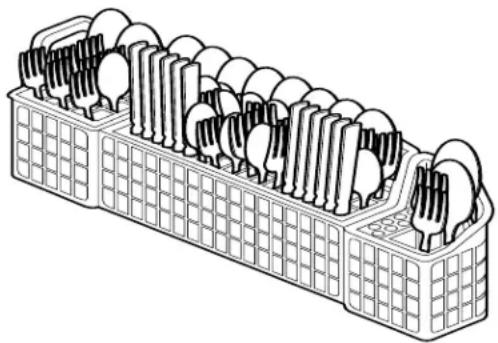
The silverware basket may be loaded while it is in the bottom rack or it can be taken to a counter or table.
- Place small items like baby bottle caps, jar lids, corn cob holders, etc., in a covered section. Close the cover to hold small items in place.
- Be sure nothing protrudes through the bottom of the basket or rack that might block the lower spray arm.
- Do not mix silver and stainless items to avoid damaging the silver finish.
• Silverware placed one item per slot will result in the best cleaning.
natural_image
Isometric line drawing of a multi-tiered plastic container with cutouts and lids (no text or symbols)CAUTION
TO AVOID CUT INJURY: Load sharp items (knives, skewers, etc.) pointing down. Failure to do so may result in injury.
natural_image
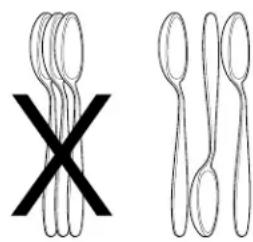
Two types of fork shapes: one with a black X symbol, the other with a simple line drawing (no text or symbols)When covers are up, mix non-sharp items in each section of the basket with some pointing up and some down to avoid nesting. Water spray cannot reach nested items.
ADDING A DISH
To add or remove items after wash cycle starts:
1 Open door slightly and wait a few seconds until wash action stops before completely opening.
2 Add the item.
3 Close door firmly to latch and the cycle will automatically resume.
CAUTION
TO AVOID BURN INJURY: Slightly open door and wait until spray arms and wash action stop. Hot water may splash out of dishwasher. Failure to do so may result in injury.
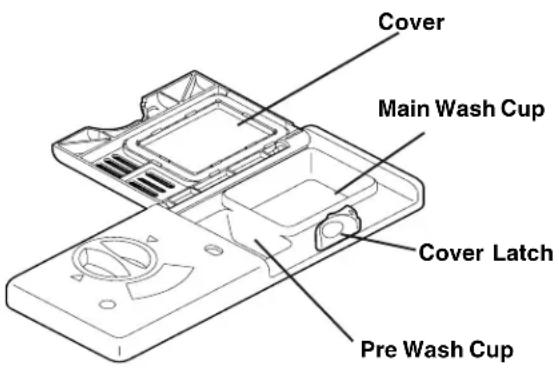
FILLING THE DETERGENT DISPENSER
The detergent dispenser has two cups one for the pre-wash and another for the main wash. Once the detergent is placed the dispenser door should be closed. Open slots over the pre-wash cup allow it to enter at the time of the first wash. During the main wash the door will automatically open to allow the main wash cup detergent to enter and work with the heated water of the main wash.
- If the detergent cups have water in them, lift the door to the closed position to remove the water then re-open to place the detergent.
- Place the detergent into the dishwasher just before starting the cycle to minimize the chance for it to become moist.
- Use only automatic dishwashing detergent. Other detergents will cause oversudsing.
- When using automatic dishwashing detergent tablets or packets place just one in the main wash cup and close the dispenser door.
- Store detergent in a cool, dry location. Moist or caked detergent may not dissolve properly.
text_image
Cover Main Wash Cup Cover Latch Pre Wash CupHOW MUCH DETERGENT TO USE
The amount of detergent to use depends upon the water hardness. The greater the concentration of minerals in solution, the “harder” the water. Minerals are actually good for you and up to a point, changes in the amount of detergent can be used to assure a proper wash. If the water is too hard, then it is difficult to get a good wash and the minerals may stain or build up on the dishware and dishwasher. In that case a water softener is recommended.
Using too little detergent can result in poor cleaning and hard water filming or spotting. Using too much, especially in combination with high water temperatures, can result in permanent damage to the surface of dishware called “etching” (see “etching”, page 18). Etching on glassware gives their surface the appearance of a hazy film.
For the proper amount of detergent use the chart provided.
Your local water company, water softener company, or county extension agent can tell you the water hardness in your area. There are many different units used to describe water hardness so be sure to ask them for the measure in grains per US gallon (gpg) used in the chart. If they are not able, water hardness conversion calculators are readily available on line.
CAUTION
The use of industrial grade detergent can damage parts of the dishwasher leading to damage to the unit and surrounding property. Use only household grade automatic dishwasher detergents.
DETERGENT USAGE GUIDE
Refer to the following table for recommended detergent usage.
| Cycle | Soft Water(0-3 Grains) | Medium HardWater(4-8Grains) | Hard Water(9-12 Grains) | Very Hard Water*(Over 12 Grains) |
| Heavy, Auto or Normal | 2 Teaspoons(Main Wash Cup - 1⁄4 Full) | 5 Teaspoons(Main Wash Cup – fill to line above “Regular”) | 8 Teaspoons(Main Wash Cup Completely Full) | Each Cup – Completely Full(Water Softener Recommended) |
| Quick | 2 Teaspoons(Main Wash Cup – 1⁄4 Full) | 5 Teaspoons(Main Wash Cup – fill to line above “Regular”) | 8 Teaspoons(Main Wash Cup completely full) | Main Wash Cup – Completely Full(Water Softener Recommended) |
| Rinse | No Detergent No | DetergentNo Detergent | No Detergent(Water Softener Recommended) |
As shown in the last column of this table, a water softener is recommended to improve water quality and dishwashing performance when using very hard water.
RINSE AID
Rinse aid greatly improves drying and reduces water spots and filming. It causes the water to "sheet" off of dishes rather than form water droplets that cling and leave spots.
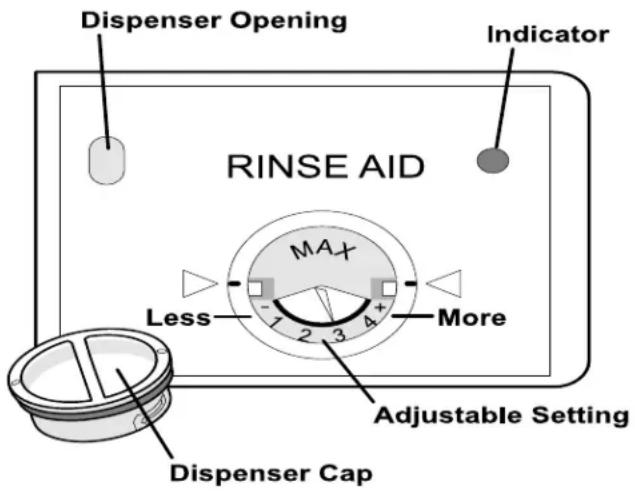
The rinse aid dispenser, located next to the detergent cup, automatically releases a measured amount of rinse aid during the last rinse. If spotting and poor drying are problems, increase the amount of rinse aid dispensed by rotating the dial to a higher number. The dial is located under the dispenser cap.
If the rinse aid is low, the LOW RINSE LED is illuminated at the beginning and end of the cycle indicating that it is time to refill.
To add liquid rinse aid:
1 Turn dispenser cap 1/4 turn counterclockwise and lift out.
2 Pour in rinse aid until liquid reaches the flat surface marked MAX in the Rinse Aid dispenser. Do not overfill since this can cause oversudsing.
3 Replace cap.
4 Wipe up any spills with a damp cloth.
The dispenser holds enough for 35 to 140 washes, depending on the setting.
text_image
Dispenser Opening RINSE AID Indicator MAX Less 1 2 3 4 + More Adjustable Setting Dispenser CapWATER TEMPERATURE
All heated cycles are designed for 120°F (49°C) inlet water, the typical setting for your home's hot water heater. Up to a point, if the water comes in at a different temperature then the dishwasher will adjust its washing and heating time. Limits are placed on adjustments to prevent excessively long or short cycles.
The first pre-wash in each cycle is typically unheated and gets the dose of detergent from the pre-wash cup of the dispenser. The detergent is more effective at 120^ F than at the 90^ F or even 70^ F water that you might get the first time you open the valve. To get optimal cleaning it is recommended that the hot water be run in the sink next to the dishwasher until the cold water is purged from the line. Then shut off the sink and start the dishwasher cycle.
Plastic items will likely need to be towel dried. This geometry is more likely to capture water. Also, plastic does not hold heat as well so that when the cycle is over, there is little heat left in the plastic with which to evaporate the remaining water on its surface.
To check water temperature entering the dishwasher:
1 Turn on hot water faucet nearest dishwasher for several minutes to clear cool water from pipes.
2 Hold a candy or meat thermometer in stream of water to check the temperature.
3 If temperature is below 120^ F ( 49^ C), have a qualified person raise the water heater thermostat setting.
Tips for Dryer Dishes -
Rinse agents help to minimize the amount of water that remains on dishware when the unit is drained. Water that remains on the dishware is evaporated in large part due to the heat that is stored in the dishware at the end fo the cycle. Plastics do not store much heat and so they do not dry as well. When the water becomes vapor (moist air) it is removed by a fan.
Water that is captured in the up turned lip or indentation of dishware may not evaporate. To avoid having this fall on to dishes that are dry during the unloading process follow the following sequence: Unload the bottom rack first, then the top rack. In either rack, first unload the dishware that is fully dry, then remove dishware that has free standing rinse water on or in it.
At the end of the cycle your unit will stop the wash, complete a drain and light the LED to tell you the cycle is ended. At this time you may unload the dishes. If you are not there or do not empty it immediately the unit will run a very small fan for up to an hour longer or until someone opens the door (which ever comes first) to further improve the drying. This fan uses very little energy.
WATER PRESSURE
The hot water line to the dishwasher must provide water pressure between 20 and 90 pounds per square inch (psi).
Low water pressure may occur when laundry or showers are in operation. Wait until water use is reduced before starting the dishwasher.

IMPORTANT
Before starting a cycle, run hot water to clear cool water from pipe.
OUTSIDE
Occasionally wipe the outside surfaces of your dishwasher with a mild nonabrasive detergent and water. Rinse and dry.
Stainless Steel Door
Clean the stainless steel door and handle with hot, soapy water and a dishcloth. Rinse with clean water and a cloth. Do not use harsh scrubbing cleaners. Use only kitchen cleaners made especially for cleaning stainless steel.
INSIDE
Remove spots on the door and tub with a damp, nonabrasive cloth.

IMPORTANT
Read before operating your dishwasher!
Care of Glass Trap Filter
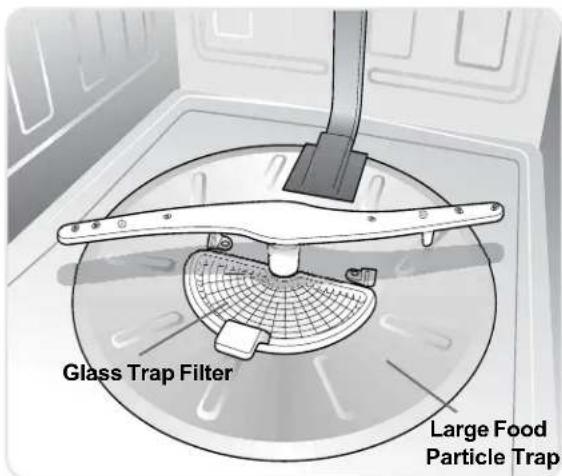
Your dishwasher is equipped with a state of the art wash system. Periodically, the Glass Trap Filter and Large Food Particle Trap may need to be cleaned to maximize wash performance.
The Glass Trap Filter is located in the center of the Large Food Particle Trap. The Glass Trap Filter is designed to collect large debris such as pieces of broken glass, straws, bones and pits. To remove items in the Glass Trap Filter, grasp the handle, push it forward slightly as you lift out, empty and replace.
The Large Food Particles Trap may be cleaned by wiping with a damp paper towel.
text_image
Glass Trap Filter Large Food Particle TrapCare of Drain Air Gap
If a drain air gap was installed for your built-in dishwasher, check to make sure it is clean so the dishwasher will drain properly. A drain air gap is usually mounted on the sink at the countertop and can be inspected by removing the cover. This is not part of your dishwasher and is not covered by warranty.

CAUTION
Freezing temperatures may cause water lines to rupture. Be sure all supply lines to and circulating lines within dishwasher are protected. Failure to do so could result in property damage.
WINTERIZING
A dishwasher left in an unheated place should be protected from freezing. Have a qualified person do the following:
To Disconnect Service:
1 Turn off electrical power to the dishwasher at the supply source by removing fuses or tripping circuit breaker.
2 Shut off water supply.
3 Place a pan under the inlet valve. Disconnect water line from inlet valve and drain into pan.
4 Disconnect drain line and drain water into pan.
To Restore Service:
1 Reconnect the water, drain, and electrical power supply.
2 Turn on water and electrical power supply.
3 Fill both detergent cups and run dishwasher through a HEAVY WASH cycle.

NOTE
See Installation Instructions for more details.

IMPORTANT
Before calling for service, review this list. It may save you both time and expense. This list includes common experiences that are not the result of defective workmanship or material in your dishwasher.

FOOD SOILS LEFT ON
DISHES
- Make sure items are not blocking any of the spray arms, preventing them from rotating.
- Check incoming water temperature. (See Getting Started, page 5.) It should be at least 120^ (49^) . (See Factors Affecting Performance, page 14.)
- Choose another cycle for longer washing time.
- Check rack loading section for proper loading—avoid nesting items.
- Home water pressure may be too low—should be 20 to 90 pounds per square inch (psi).
- Check water hardness. More detergent is needed when water is hard. For extremely hard water, it may be necessary to install a water softener. (See Detergent Usage Guide, page 12.)
- Use fresh detergent.
- Consider running the rinse cycle when soiled dishes are expected to sit in the dishwasher for hours before running a wash cycle.
DISHES NOT DRY
- Make sure the rinse aid dispenser is filled.
- Increase the amount of rinse aid (See Rinse Aid, page 13).
- Check the incoming water temperature. Be sure it is at least 120^ (49°C).
- Check for proper loading—avoid nesting items.
- Plastic items will likely need to be towel dried. Plastic items generally are less flat - shape gives stiffness to the more flexible material. This geometry is more likely to capture water. Also, plastic does not hold heat as well so that when the cyle is over, there is little heat left in the pastic with which to evaporate the remaining water on its surface.
- Cups with a concave bottom will collect water.
• See Tips for Dryer Dishes, page 14.
DISHWARE CHIPPED
- Load with care and do not overload. (See Preparing and Loading Dishes, pages 8-10.)
- Place delicate items in top rack.
- Place glasses securely against pins and not over pins.
- Load items so they are secure and don't jar loose when moving racks in and out. Move racks in and out slowly.
- Make sure tall glasses and stemware will clear top of tub when rack is pushed in.
- It is recommended to wash fine antique china and crystal by hand.

GLASSWARE / FLATWARE
SPOTTED OR CLOUDY
- Check water hardness. For extremely hard water, it may be necessary to install a water softener. (See Detergent Usage Guide, page 13.)
- Water temperature may be low. Avoid extremely low or high temperatures. (See Factors Affecting Performance, page 14.)
- Avoid overloading and improper loading. (See Preparing and Loading Dishes, pages 8-10.)
- Use fresh detergent. Old detergent is ineffective.
- Make sure rinse aid dispenser is filled.
- Check to see that the proper amount of detergent is being used for cycle selected. (See Detergent Dispenser, pages 12-13.)
- Home water pressure may be too low—it should be 20 to 90 pounds per square inch (psi).

ETCHING
- Using too much detergent, especially in combination with high water temperatures, can result in permanent damage to the surface of dishware called "ETCHING". Etching on glassware gives their surface the appearance of a hazy film.
- Adjust the amount of detergent based on water table, Detergent Usage Guide, Page 12.
- Lower the temperature (select a lower temperature option or turn down the temperature of the hot water heater if water over 130^ is being supplied to the dishwasher.
NORMAL SOUNDS YOU WILL HEAR
- Normal sounds include water fill, water circulation, draining water and motor sounds.
- Pump motor speed will increase and decrease during cycles.
DISHWARE STAINED OR
DISCOLORED
- Tea and coffee can stain cups. Remove the stains by hand washing in a solution of 1/2 cup (120 ml) bleach and one quart (1 L) of warm water. Rinse thoroughly.
- Iron deposits in water can cause a yellow or brown film. A proper water filter or water softener installed in-line with your water supply will correct this problem.
- Aluminum utensils can leave gray/black marks when they rub against other items. Load properly allowing spaces between dishware.
- Certain high acid foods can cause discoloration of stainless steel and plastics if allowed to sit for a long period. Use the Rinse cycle or rinse by hand if not operating dishwasher immediately after loading.
- Mixing stainless steel and silver utensils in silverware basket can cause pitting on the stainless steel utensils. Avoid mixing stainless steel and silver.
DETERGENT LEFT IN
DISPENSER CUP
- Detergent may be old. Discard and use fresh detergent.
- Load dishware differently in rack - spray jets used to rinse detergent from cup may be blocked.
- Check to see if cycle has been completed.
- Make sure items do not block the detergent dispenser door from opening.
- Make sure the upper rack is firmly engaged to the nozzle on the back of the tub before closing the door.
DISHWASHER LEAKS
- Use only fresh detergent designed for automatic dishwashers. Measure detergent carefully. Try a different brand.
- Spilled rinse aid can cause foam and lead to overflowing. Wipe up any spills with a damp cloth.
- Check to see that dishwasher is level (See Installation Instructions).
WATER IN THE BOTTOM OF THE TUB
- It is not normal for water to remain in the bottom of the tub at the end of a cycle. If water remains in the bottom of the tub at the end of a cycle, the dishwasher may not be draining properly. (See Dishwasher Does Not Drain Properly, page 19.) The filter may also need to be cleaned. (See Care of Glass Trap Filter, page 15.) Note: It is normal to see a small amount of water under the filter and glass trap at the end of a cycle.
DISHWASHER WON'T FILL
- Check to see if the water supply is turned on.
- Check to see if inlet water hose in kinked.
- Check that float is in down position and make sure it moves freely.
DISHWASHER WON'T RUN
- Check to see if circuit breaker is tripped or if a fuse is blown.
- Make sure water supply is turned on.
- Check to see if cycle is set correctly. (See Operating Instructions, pages 6-7.)
- Check to see if the Delay Start option has been selected.
- Make sure door is closed and latched.
- Check to see if the dishwasher is in the Child Lock mode.
DISHWASHER DOES NOT DRAIN PROPERLY
- If unit is hooked up to a garbage disposal, make sure the disposer is empty.
- If unit is hooked up to a new food waste disposer, check to see if the “knockout” plug located inside the disposal inlet has been removed.
- Check to see if drain hose is kinked.
- Make sure cycle is complete, not in a pause.
- Check to see if cycle is in a water heating delay, depending on incoming water temperature, cycle time may be increased. Water temperature should be at least 120^ (49°C). (See Factors Affecting Performance, page 14.)
- Check to see if the delay start option has been selected.
- Check to see if the sanitize option has been selected.
- The first cycle after power has been removed from the dishwasher will run a long version of the selected cycle.
DISHWASHER HAS AN ODOR
- Soiled dishes left in dishwasher too long can create an odor. Use Rinse cycle.
- There will be a “new” smell when first installed. This is normal.
- Check to see if food particles are in glass trap. (See Care of Glass Trap Filter, page 15).
- Check to see if unit is draining properly (See Dishwasher Does Not Drain Properly, page 19).

REMOVING SPOTS AND
FILM
Hard water can cause lime deposit buildup on the interior of the dishwasher. Dishes and glasses may also get spots and film for a number of reasons (See Glassware/Flatware Spotted or Cloudy, page 18).
To remove build-up, spots and film, clean using the following instructions:
1 Load clean dishes and glasses in normal manner. Do not load any metal utensils or silverware.
2 Do not add detergent.
3 Select the HEAVY WASH cycle. Press START/CANCEL pad and close door.
4 Allow 1/2 hour for the dishwasher to begin the main wash. Open door and pour 2 cups of white vinegar into the bottom of the dishwasher.
5 Close and latch door and allow cycle to finish.

NOTE
If these conditions persist, a home water softener should be considered.
ERROR CODES
In certain situations which are critical to machine function and safe operation, the control will shut down. All lights on console will illuminate.
Er 01
Leak Detector - Water detected in the pan under the tub.
Er 02
Thermistor - Failed thermistor/turbidity module.
Er 03
Wash Pump - Wash pump not operating
Er 06
Lower Fan - The control board did not receive proper speed feedback from the lower fan
Er 08
Tactile or touch switch - Control board has verified a switch on the user interface is bad or shorted
Er 09
Communications - Communication failure between main user board and power supply
Er 10
Mains Relay - Failure in the mains power relay
Er 13
System wide - Lost control of the State Machine
Er 15
Fill Valve - Water inlet valve is leaking
Er 16
Float - Float switch is stuck/drain is clogged.
text_image
SOLID/ FLOAT LEAK DETECTOR TURBIDITY WASH PUMP DRYING DAMPER UPPER DRY FAN LOWER DRY FAN BLINKING/ WTR VLV MAIN CNTRL BRD To gain access to the Control Housing Assembly, remove kickplate assembly. LED indicates which component is the source of the error. LEAK TURBIDITY WASH DRYING UPPER LOWER DRAIN MAIN DETECTOR PUMP DAMPER DRY CAN DRY CAN WAVE CNTRL BRDTo gain access to the Control Housing Assembly, remove kickplate assembly. LED indicates which component is the source of the error.
Your appliance is covered by a one year limited warranty. For one year from your original date of purchase, Electrolux will repair or replace any parts of this appliance that prove to be defective in materials or workmanship when such appliance is installed, used, and maintained in accordance with the provided instructions. The stainless tub and door liner of your appliance are covered by a lifetime limited warranty. During the lifetime of the appliance, Electrolux will provide a replacement stainless tub or door liner that fails to contain water due to a defect in materials or workmanship if the appliance has been installed, used, and maintained in accordance with the provided instructions. In addition, the dishwasher racks and the electronic control module of your appliance are covered by a two through five year limited warranty. During the 2nd through 5th years from your original date of purchase, Electrolux will provide a replacement dishwasher rack or electronic control module for your appliance which has proven to be defective in materials or workmanship when such appliance is installed, used, and maintained in accordance with the provided instructions.
Exclusions
This warranty does not cover the following:
- Products with original serial numbers that have been removed, altered or cannot be readily determined.
- Product that has been transferred from its original owner to another party or removed outside the USA or Canada.
- Rust on the interior or exterior of the unit.
- Products purchased "as-is" are not covered by this warranty.
- Food loss due to any refrigerator or freezer failures.
- Products used in a commercial setting.
- Service calls which do not involve malfunction or defects in materials or workmanship, or for appliances not in ordinary household use or used other than in accordance with the provided instructions.
- Service calls to correct the installation of your appliance or to instruct you how to use your appliance.
- Expenses for making the appliance accessible for servicing, such as removal of trim, cupboards, shelves, etc., which are not a part of the appliance when it is shipped from the factory.
- Service calls to repair or replace appliance light bulbs, air filters, water filters, other consumables, or knobs, handles, or other cosmetic parts.
- Labor or in-home service costs during the additional limited warranty periods beyond the first year from your original date of purchase.
- Pickup and delivery costs; your appliance is designed to be repaired in the home.
- Surcharges including, but not limited to, any after hour, weekend, or holiday service calls, tolls, ferry trip charges, or mileage expense for service calls to remote areas, including the state of Alaska.
- Damages to the finish of appliance or home incurred during transportation or installation, including but not limited to floors, cabinets, walls, etc.
- Damages caused by: services performed by unauthorized service companies; use of parts other than genuine Electroluxparts or parts obtained from persons other than authorized service companies; or external causes such as abuse, misuse, inadequate power supply, accidents, fires, or acts of God.
DISCLAIMER OF IMPLIED WARRANTIES; LIMITATION OF REMEDIES
CUSTOMER'S SOLE AND EXCLUSIVE REMEDY UNDER THIS LIMITED WARRANTY SHALL BE REPAIR OR REPLACEMENT AS PROVIDED HEREIN. CLAIMS BASED ON IMPLIED WARRANTIES, INCLUDING WARRANTIES OF MERCHANTABILITY OR FITNESS FOR A PARTICULAR PURPOSE, ARE LIMITED TO ONE YEAR OR THE SHORTEST PERIOD ALLOWED BY LAW, BUT NOT LESS THAN ONE YEAR. ELECTROLUX SHALL NOT BE LIABLE FOR CONSEQUENTIAL OR INCIDENTAL DAMAGES SUCH AS PROPERTY DAMAGE AND INCIDENTAL EXPENSES RESULTING FROM ANY BREACH OF THIS WRITTEN LIMITED WARRANTY OR ANY IMPLIED WARRANTY. SOME STATES AND PROVINCES DO NOT ALLOW THE EXCLUSION OR LIMITATION OF INCIDENTAL OR CONSEQUENTIAL DAMAGES, OR LIMITATIONS ON THE DURATION OF IMPLIED WARRANTIES, SO THESE LIMITATIONS OR EXCLUSIONS MAY NOT APPLY TO YOU. THIS WRITTEN WARRANTY GIVES YOU SPECIFIC LEGAL RIGHTS. YOU MAY ALSO HAVE OTHER RIGHTS THAT VARY FROM STATE TO STATE.
If You Need Service
Keep your receipt, delivery slip, or some other appropriate payment record to establish the warranty period should service be required. If service is performed, it is in your best interest to obtain and keep all receipts. Service under this warranty must be obtained by contacting Electrolux at the addresses or phone numbers below.
This warranty only applies in the USA, Puerto Rico and Canada. In the USA and Puerto Rico, your appliance is warranted by Electrolux Major Appliances North America, a division of Electrolux Home Products, Inc. In Canada, your appliance is warranted by Electrolux Canada Corp. Electrolux authorizes no person to change or add to any obligations under this warranty. Obligations for service and parts under this warranty must be performed by Electrolux or an authorized service company. Product features or specifications as described or illustrated are subject to change without notice.
USA
1-877-435-3287
Electrolux Major Appliances North America
10200 David Taylor Drive
Charlotte, NC 28262
Canada
1-800-265-8352
Electrolux Canada Corp.
5855 Terry Fox Way
Mississauga, Ontario, Canada L5V 3E4
TABLA DE MATERIAS
Version in English ......3
text_image
clean SANITIZED LOCKED LOW RINSE hi temp sanitize air dry delay START CANCELnatural_image
Line drawing of hands using a spatula to clean or brush the lid (no text or symbols)CARGA DE LA CANASTILLA SUPERIOR
natural_image
Diagram of a basket filled with multiple cylindrical objects, no text or symbols presentnatural_image
Technical line drawing of a mechanical assembly with cylindrical components and housing (no text or symbols)natural_image
Line drawing of a basket containing three bowls with leaf-like shapes on top, alongside a grid of leaf-like objects on the right (no text or symbols)natural_image
Technical line drawing of a mechanical component with layered components and a highlighted section (no text or symbols)natural_image
Technical line drawing of a mechanical assembly with a cylindrical component mounted on a grid base (no text or symbols)natural_image
Illustration of a hand pressing down on a toy car chassis with arrows indicating motion (no text or symbols)natural_image
Isometric line drawing of a multi-tiered plastic kitchen drawer with cutlery and handles (no text or symbols)
TENCION
PARA EVITARSUFRIRUNACORTADURA:
natural_image
Illustration of a crossed spoon and its side view (no text or symbols)Electrolux Major Appliances North America
10200 David Taylor Drive
Charlotte, NC 28262
Canadá
1-800-265-8352
Electrolux Canada Corp.
5855 Terry Fox Way
Mississauga, Ontario, Canadá L5V 3E4
TABLE DES MATIÈRES
text_image
auto heavy normal quick rinse CLEAN SANITIZED LOCKED LOW RINSE hi temp sanitize air dry delay START CHILLSanitize (Désinfection)

natural_image
Line drawing of hands using a tool to clean or store items around a circular object (no text or symbols)natural_image
Line drawing of a basket filled with various food items (no text or symbols)natural_image
Technical line drawing of a multi-layered mechanical component or housing (no text or symbols)natural_image
Technical line drawing of a multi-layered mechanical component with internal blades and a separate gear-like assembly (no text or symbols)natural_image
Technical line drawing of a multi-layered container with layered compartments and a textured interior (no text or symbols)natural_image
Illustration of a hand using a tool to adjust or install a mechanical component, with no visible text or symbols.Tiges repliables
natural_image
Technical line drawing of a mechanical assembly with a cylindrical component mounted on a metal frame (no text or symbols)CHARGEMENT DU PANIER À COUVERTS
natural_image
Isometric line drawing of a multi-tiered plastic container with circular cutouts and grid patterns (no text or symbols)
ATTENTION
natural_image
Two line drawings of spoon illustrations, one with a black X symbol and the other with three elongated handles (no text or symbols)Electrolux Major Appliances North America
10200 David Taylor Drive
Charlotte, NC 28262
Canadá
1-800-265-8352
Electrolux Canada Corp.
5855 Terry Fox Way
Mississauga, Ontario, Canadá L5V 3E4
