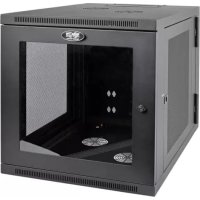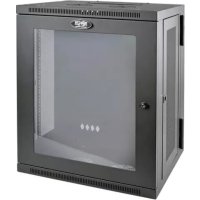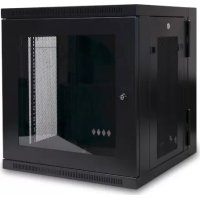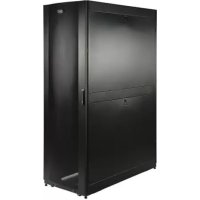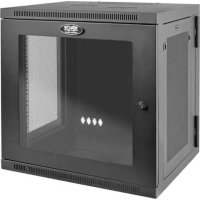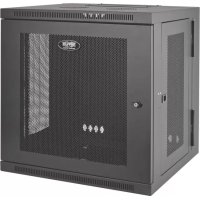
SmartRack SRW10US - Electrical cabinet Tripp Lite - Free user manual and instructions
Find the device manual for free SmartRack SRW10US Tripp Lite in PDF.


| Product Type | Swing-out Wall-mount Electrical Enclosure |
| Brand | Tripp Lite |
| Model | SmartRack SRW10US |
| Height | 10U (rack units) |
| Mounting Depth | Adjustable in 6 mm increments |
| Material | Heavy-gauge steel |
| Mounting | Wall-mount (swing-out) or floor |
| Doors | Front and rear, reversible, lockable |
| Side panels | Removable and lockable |
| Cable management | Top and rear openings with removable covers |
| Grounding | Front/rear grounding point (M6 screw included) |
| Equipment compatibility | Standard 19-inch rack, square and threaded holes |
| Maximum load capacity | Depends on wall mount and structure - see online specifications |
| Operating environment | Indoor, away from moisture and extreme temperatures |
| Maintenance | Clean with dry cloth, store in original packaging |
| Warranty | 5-year limited |
| Box contents | Enclosure, keys, cage nuts, mounting screws (black and silver), M6 grounding screw, manual |
| Optional accessories | SRCASTER caster kit |
Frequently Asked Questions - SmartRack SRW10US Tripp Lite
User questions about SmartRack SRW10US Tripp Lite
0 question about this device. Answer the ones you know or ask your own.
Ask a new question about this device
Download the instructions for your Electrical cabinet in PDF format for free! Find your manual SmartRack SRW10US - Tripp Lite and take your electronic device back in hand. On this page are published all the documents necessary for the use of your device. SmartRack SRW10US by Tripp Lite.
USER MANUAL SmartRack SRW10US Tripp Lite
Swinging Wall-Mounted SmartRack® Enclosures
Applies to Model Series: SRWxxUS, SRWxxUSG
(Agency Series Number: AG-00EA)
Table of Contents
- Important Safety Instructions 2
- Overview 2
- Feature Identification 2
- Enclosure Installation 3
4.1 Preparation 3
4.2 Unpacking 3
4.3 Ground Connection 3 -
Enclosure Configuration 4
5.1 Door Locks 4
5.2 Cable Access and Management 4
5.3 Reversing the Enclosure 4
5.4 Mounting Rails 5
5.5 Adjusting Mounting Rail Depth 5 -
Wall Mounting the Enclosure 5
6.1 Mounting 5 - Equipment Installation 6
7.1 Installing or Removing Cage Nuts 6
7.2 Alternate Mounting: 7
Tapped Hole Mounting Rail
- Storage and Service 8
- Warranty and Product Registration 8
Espanol 9
Francais 17
Pycckn 25
PROTECT YOUR INVESTMENT!
Register your product for quicker service and ultimate peace of mind.
You could also win an ISOBAR6ULTRA surge protector—a $100 value!
www.triplite.com/warranty



Manufacturing Excellence.
1. Important Safety Instructions
SAVE THESE INSTRUCTIONS
This manual contains instructions and warnings that must be followed during the installation and operation of the product described in this manual. Failure to comply may invalidate the warranty and cause property damage or personal injury.
- Keep the enclosure in a controlled indoor environment, away from moisture, temperature extremes, flammable liquids and gasses, conductive contaminants, dust and direct sunlight.
- Leave adequate space at the front and rear of the enclosure for proper ventilation. Do not block, cover or insert objects into the external ventilation openings of the enclosure.
The enclosure is extremely heavy. Use caution when handling the enclosure. Do not attempt to unpack, move or install it unassisted. Use a mechanical device such as a forklift or pallet jack to move the enclosure in the shipping container. - Do not place any object on the enclosure, especially containers of liquid, and do not attempt to stack the enclosures.
- Inspect the shipping container and the enclosure for shipping damage. Do not use the enclosure if it is damaged.
- Leave the enclosure in the shipping container until it has been moved as close to the final installation location as possible.
- Install the enclosure in a structurally sound area capable of handling the load, or on a level floor that is able to bear the weight of the enclosure, all equipment that will be installed in the enclosure and any other enclosures and/or equipment that will be installed nearby.
- For permanent wall mounting, be sure to securely fasten the enclosure to the building structure before operation.
- Use caution when cutting packing materials. The enclosure could be scratched, causing damage not covered by the warranty.
- Save all packing materials for later use. Repacking and shipping the enclosure without the original packing materials may cause product damage that will void the warranty.
- Do not reship the enclosure with additional equipment unless the enclosure was shipped with a special shock pallet ("SP1" models only). The combined weight of the enclosure and installed equipment must not exceed the load capacity of the pallet. Tripp Lite is not responsible for any damage that occurs during reshipment.
- Use of this equipment in life support applications where failure of this equipment can reasonably be expected to cause the failure of the life support equipment or to significantly affect its safety or effectiveness is not recommended. Do not use this equipment in the presence of a flammable anesthetic mixture with air, oxygen or nitrous oxide.
2. Overview
Swinging wall-mounted SmartRack enclosures accommodate all standard 19-inch rackmount equipment, regardless of vendor, and ship fully assembled for quick and easy deployment. They feature adaptable, heavy-duty cabinets in various heights. All models have a hinged design that lets the cabinet swing away from the wall bracket for easy equipment access.
Swinging wall-mounted SmartRack enclosures have variable mounting depths, ideal for servers. The cabinets include quick-release doors and side panels for convenient maintenance. Front access doors are reversible for installation flexibility. Front door and side panels are lockable. An optional rolling caster kit (SRCASTER) is available for easy maneuvering of enclosures.
3. Feature Identification
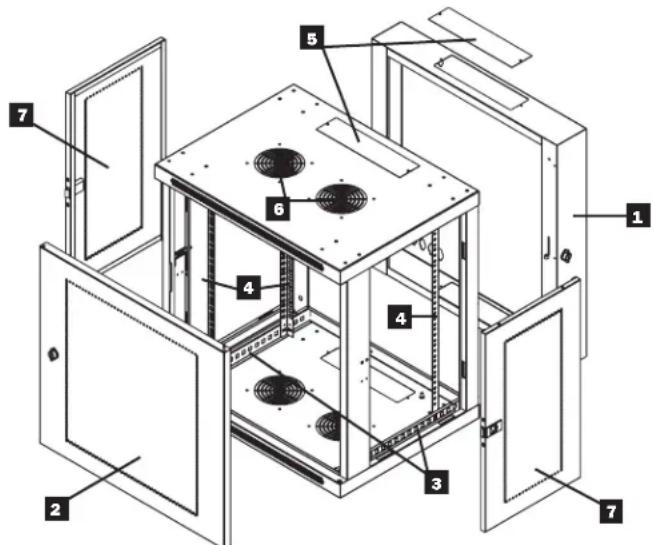
Model SRW12US is shown. The other models have similar features, with the only differences being rack height and depth.
1 Rear Door
2 Front Door
3 Horizontal Rails
4 Vertical Mounting Rails
5 Removable Cable Access Hole Covers
6 Vents
7 Locking/Removable Side Panels
4. Enclosure Installation

Caution! Read All Instructions andWarnings Before Installation!

Warning: Rack enclosures can be extremely heavy. Do not attempt to unpack, move or install the enclosure without assistance. Use extreme caution when handling the enclosure and be sure to follow all handling and installation instructions. Do not attempt to install equipment without first stabilizing the enclosure.
4.1 Preparation
The enclosure must be installed in a structurally sound area that is able to bear the weight of the enclosure, all the equipment that will be installed in the enclosure and any other enclosures and/or equipment that will be installed nearby. Before unpacking the enclosure, you should transport the shipping container closer to the final installation location to minimize the distance you will need to move the unit after the protective packaging has been removed. If you plan to store the enclosure for an extended period before installation, follow the instructions in the Storage and Service section.
You need several tools:
You also need the following hardware:
Level
- Appropriate hardware for wall mounting (not included)
- Phillips-head screwdriver
- Appropriate tools for wall mounting
4.2 Unpacking

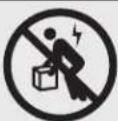
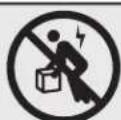
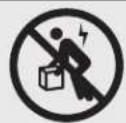
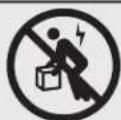
Use at least two people to unpack the enclosure.
1 Move shipping pallet to a firm, level surface.
2 Open box and remove the four foam corner protectors. Save all packing materials for later use unless you are certain they will not be required. Packing materials are recyclable.
3 With one person on each side, carefully lift the enclosure out of the box and place on a firm, level surface.
Examine the enclosure for any damage or loose parts. Confirm all parts are present. If anything is missing or damaged, contact Tripp Lite for assistance. Do not attempt to use the enclosure if it has been damaged.

Never extend more than one component from the enclosure at a time.


Warning: Never attempt to lift or install without adequate help. Do not try lifting the enclosure alone.
4.3 Ground Connection
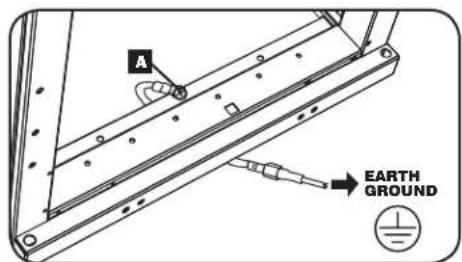
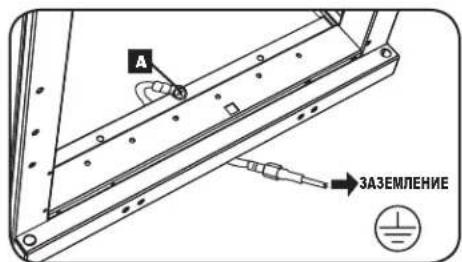
All parts of the enclosure are grounded to the frame of the enclosure. Use the enclosure's front or rear threaded grounding point A and an M6 screw (included) to connect the frame of the enclosure directly to your facility's earth ground connection with an 8 AWG (3.264 mm) wire. Route the ground wire under the enclosure's frame to ensure unhindered door operation. Warning: Attach each enclosure to earth ground separately. Do not use the enclosure without an earth ground connection.
5. Enclosure Configuration
Before installation, be sure to plan the location and arrangement of components within the enclosure. Be sure all mounting rails are reversed or adjusted for depth, depending on your equipment configuration.
5.1 Door Locks
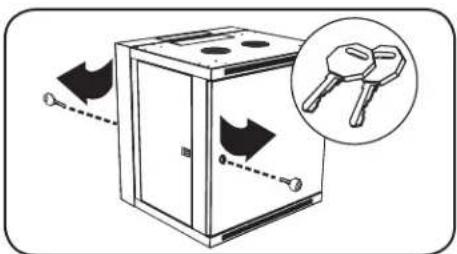
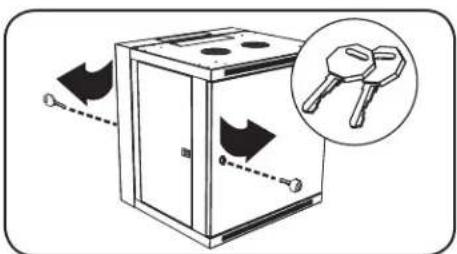
The front and back doors have locks that are accessible by the included keys.
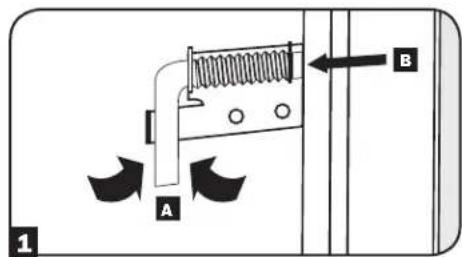
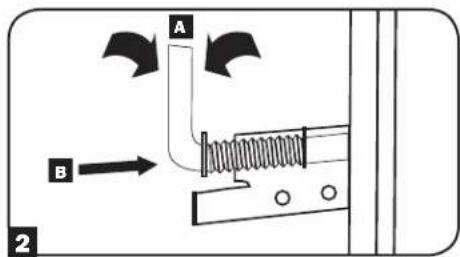
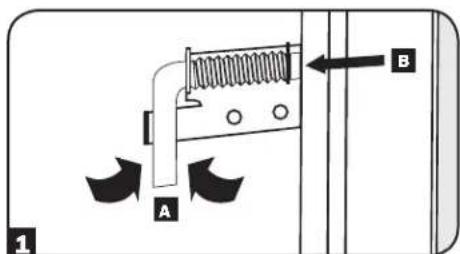
Each side panel locks using an L-shaped lever on the inside of the enclosure.
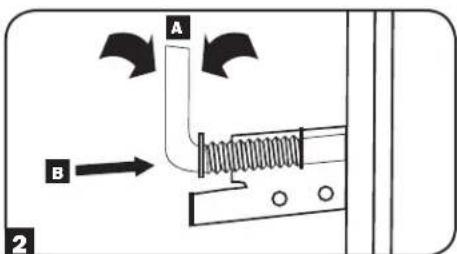
To unlock and remove the side panels, lift the shorter leg of the "L" up and pull it away from the side panel. Pull the tab on the side panel and remove it from the enclosure.
To re-lock the side panels, secure it in the proper position, lift the shorter leg of the "L" up A and push it toward the side panel, back into the hole that it was in initially B. Once it is in place, push the shorter leg of the "L" down to lock it. Note: To lock and unlock the side panels, you will need to have access to the interior of the enclosure.
5.2 Cable Access and Management
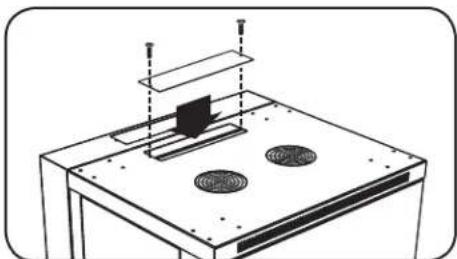
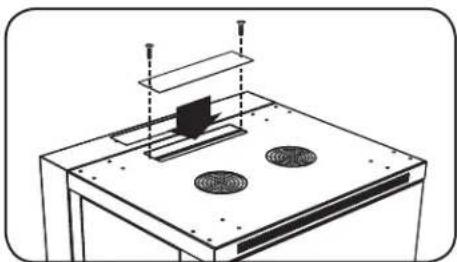
The back door of the enclosure has a square opening for cable access and management. An additional opening can be found on top of the main cabinet. Each opening can also be closed by screwing in the removable cable access panels.
5.3 Reversing the Enclosure
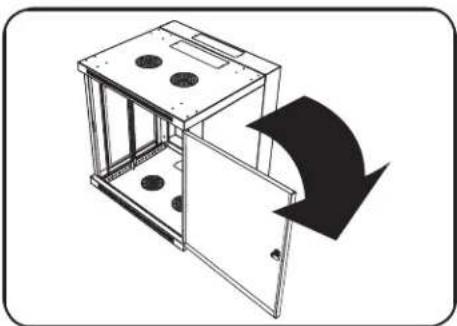
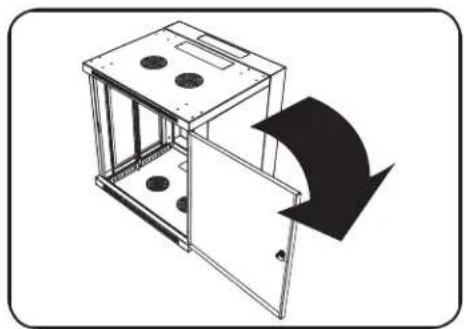
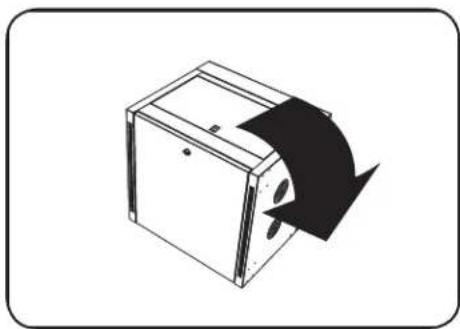
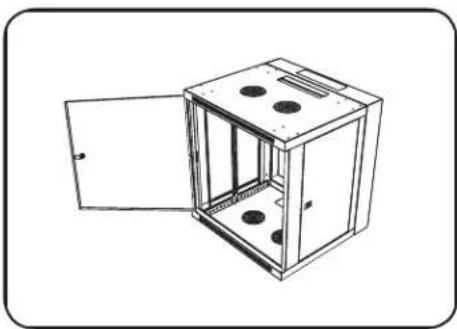
In order to accommodate various rack configurations, the enclosure can be reversed. To do so, simply turn the enclosure over so that the doors open in the opposite direction.
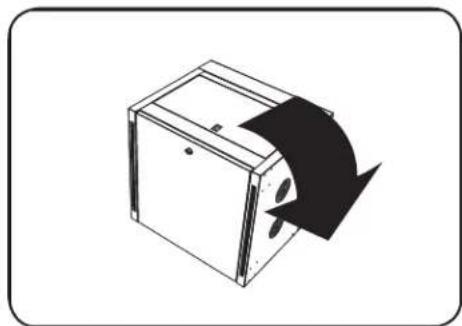
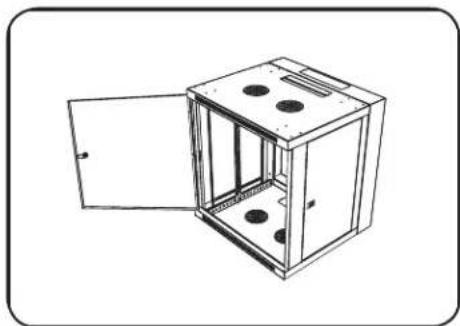
5. Enclosure Configuration (continued)
5.4 Mounting Rails
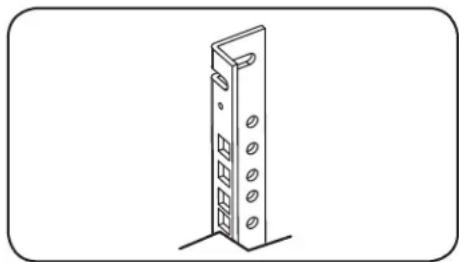
The enclosure comes with mounting rails that have both square and tapped holes for mounting rack equipment. To install equipment, use the included cage nuts and other hardware. (See section 7.1 for installation of cage nuts.) Warning: Be sure to have the enclosure securely mounted to the wall, or in its final position on the floor, before mounting any equipment inside. Also be sure to have all the right adjustments on your rails before mounting equipment. (See below for Adjusting Mounting Rail Depth.)
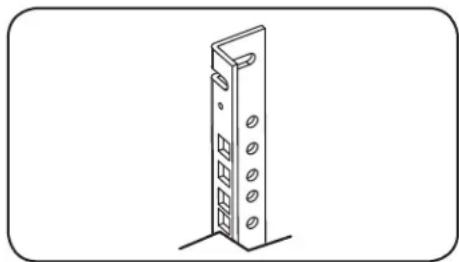
5.5 Adjusting Mounting Rail Depth
Warning: Do not attempt to adjust rails while equipment is installed in the enclosure. Do not attempt to use rails without screws installed. (2 per rail.)
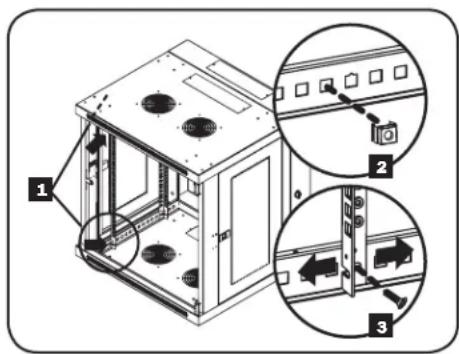
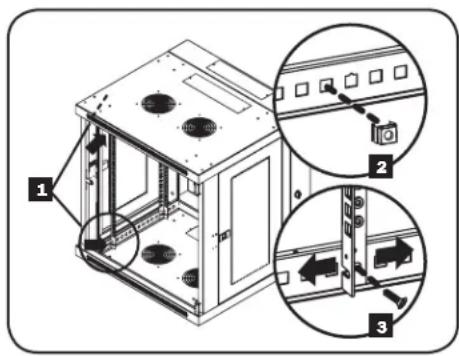
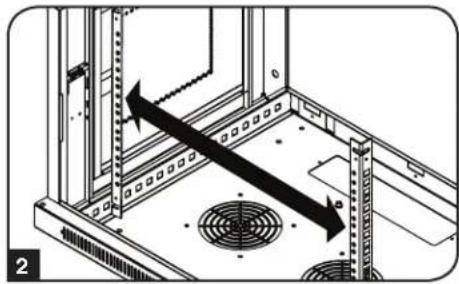
Depending on the model, either two or four mounting rails will be pre-installed in the cabinet. The preset mounting depth varies based on the model. Do not adjust the mounting rails unless your equipment requires a different mounting depth. The front and rear sets of rails can be adjusted independently in 1/4-inch (6mm) increments.
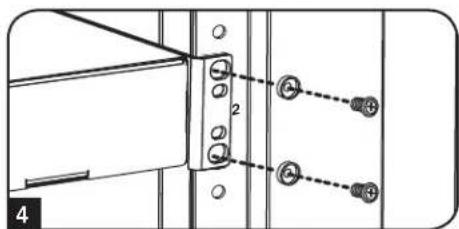
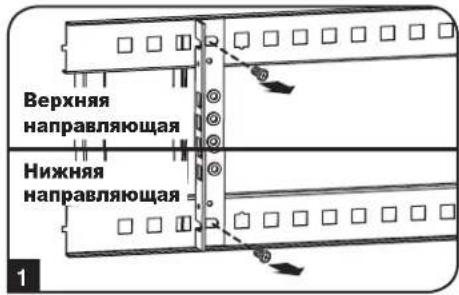
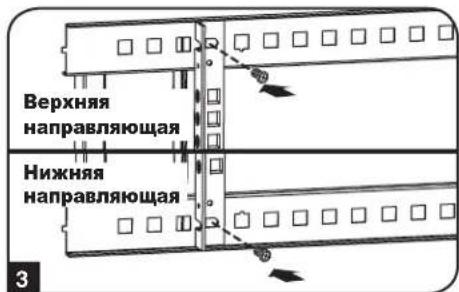
Each rail is connected to the enclosure with 2 screws and 2 cage nuts: 1 set in the upper corner and another in the lower corner. Using a Phillips-head screwdriver, remove the screws that fasten the rails to the enclosure.
2 Move cage nuts to the desired depth and reinstall.
3 Slide the mounting rails to the desired depth and reattach them using the screws you removed in Step 1.
6. Wall Mounting the Enclosure
Warning: Do not attempt to mount the enclosure to the wall with equipment in the enclosure.
6.1 Mounting
The number of keyhole cutouts on the back door of the enclosure will vary based on your model. Each keyhole can accommodate an M8, M10, 5/16" or 3/8 bolt. The holes are centered 16" apart horizontally to accommodate the standard placement of wall studs. The vertical distance between the holes will vary based on your model.
Note: Enclosure must be installed by a qualified technician. Before mounting, use a level and tape measure to position your mounting area precisely. Use appropriate fasteners (not included) to secure the enclosure to the wall. A minimum of four fasteners and appropriately-sized fender washers is recommended. Use suitable mounting means when installing to cinder block, concrete, drywall or wood studs. Warning: The supporting surface must be able to safely support the combined load of the equipment and all attached hardware and components. For the actual weight, size and load capacity of the enclosure, view the product specifications and other support resources at www.triplite.com/support.
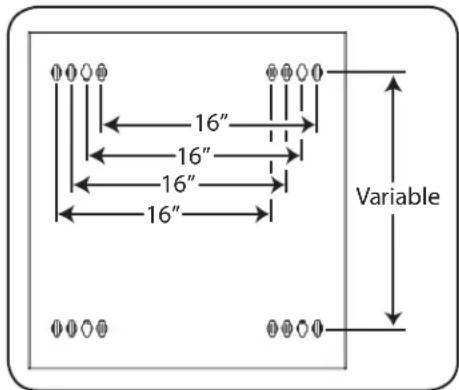
Your model's keyhole configuration may be different.
7. Equipment Installation
Warning: Do not install equipment until you have stabilized the enclosure. Install heavier equipment first and install it towards the bottom of the enclosure. Install equipment starting from the bottom of the enclosure and proceeding toward the top of the enclosure—never the reverse. If using sliding equipment rails, be careful when extending the rails. Do not extend more than one set of sliding equipment rails at one time. Avoid extending sliding equipment rails near the top of the enclosure.
Note: The unit comes with two different kinds of screws for equipment installation, black and silver. Use the black mounting screws if you are securing your equipment to the square hole side of the mounting rail. Use the silver screws if you are securing your equipment to the tapped hole side of the mounting rail.
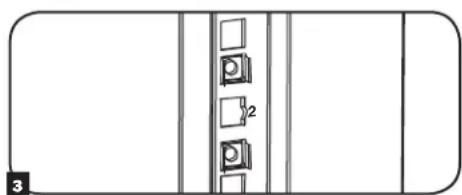
Note: The square holes in the middle of each rack unit are numbered and also include a small notch to aid identification. A single rack unit includes the space occupied by the numbered hole and the holes directly above and below.

7.1 Installing or Removing Cage Nuts
WARNING: The flanges of the cage nuts should engage the sides of the square opening in the rail, not the top and bottom. Follow the instructions in your equipment documentation to ensure proper installation of your equipment.
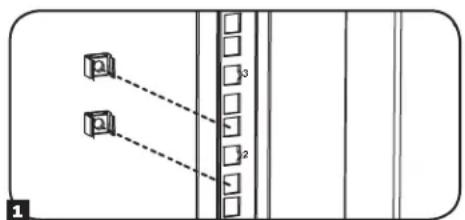
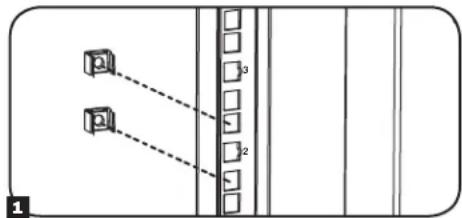
1 Locate the numbered square openings in the mounting rails where you plan to install your equipment. You will install cage nuts (included) into the square openings in order to provide an attachment point for the mounting screws (included). Note: Consult your equipment documentation to determine how many cage nuts will be required and where they will need to be installed.
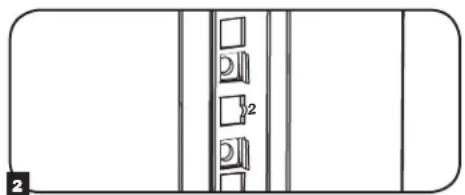
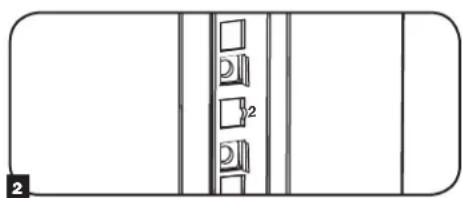
2 From the inside of the mounting rail, insert one of the flanges of the cage nut through the square opening. Press it against the side of the square opening. Each flange should engage one side of the square opening, not the top or bottom.
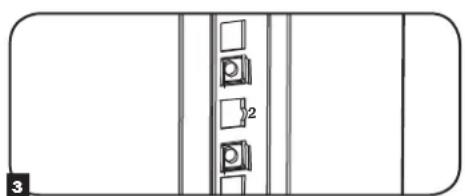
3 Compress the cage nut at the sides slightly to allow the remaining flange to fit through the square opening. When the cage nut is properly installed, both flanges will protrude through the square opening and will be visible on the outer surface of the mounting rail. Repeat steps 1-3 until all required cage nuts are installed.
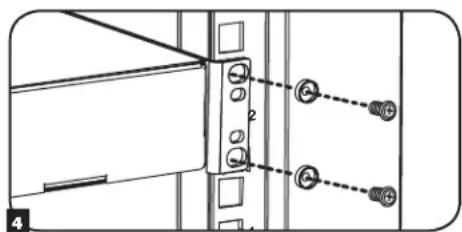
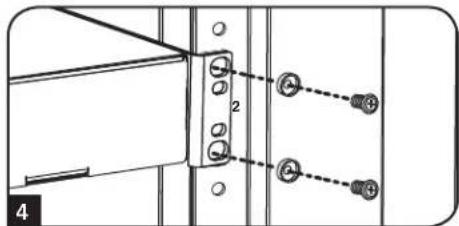
4 After installing the required cage nuts, use the included black mounting screws and cup washers to secure your equipment to the rack rail. Place the cup washers between the screws and the equipment mounting brackets.
Note: Your equipment may also include mounting hardware. Read the mounting instructions that came with your equipment before installing your equipment.
To Remove Cage Nuts, Reverse Steps 1-3
Note: You may wish to use a cage nut tool (user-supplied) to aid cage nut installation and removal.
7. Equipment Installation (continued)
7.2 Alternate Mounting: Tapped Hole Mounting Rail
WARNING: Do not attempt to adjust rails while equipment is installed in the enclosure. Do not attempt to use rails without screws installed. (2 per rail.)
The 2 mounting rails are pre-installed for securing equipment using the square hole side of the mounting rail. To switch to the tapped hole side of the mounting rail, follow the steps below:
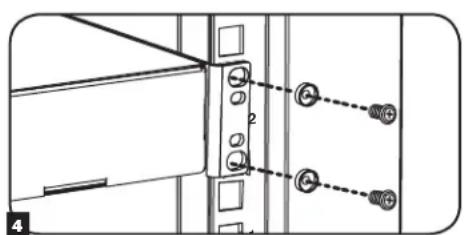
Each rail is connected to the enclosure with 2 screws: 1 in the upper corner and another in the lower corner. Using a Phillips-head screwdriver, remove the screws that fasten the rails to the enclosure.
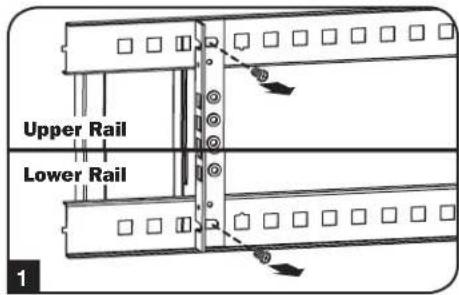
Switch the rail locations. Ensure the tapped hole side of each rail is facing the front door.
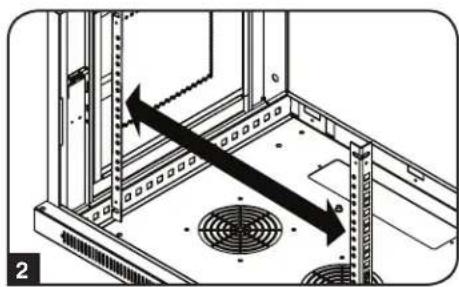
3 Reattach the mounting rails.
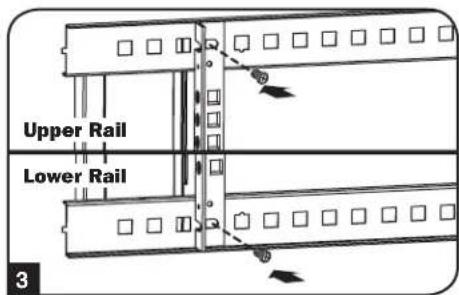
Use the included silver mounting screws to secure your equipment to the rack rail. Place the cup washers between the screws and the equipment mounting brackets.
Note: Your equipment may also include mounting hardware. Read the mounting instructions that came with your equipment before installing your equipment.
8. Storage and Service
Storage
The enclosure should be stored in a controlled indoor environment, away from moisture, temperature extremes, flammable liquids and gasses, conductive contaminants, dust and direct sunlight. Store the enclosure in its original shipping container if possible.
Service
Your Tripp Lite product is covered by the warranty described in this manual. A variety of Extended Warranty and On-Site Service Programs are also available from Tripp Lite. For more information on service, visit www.triplite.com/support. Before returning your product for service, follow these steps:
- Review the installation and operation procedures in this manual to insure that the service problem does not originate from a misreading of the instructions.
- If the problem continues, do not contact or return the product to the dealer. Instead, visit www.triplite.com/support.
- If the problem requires service, visit www.triplite.com/support and click the Product Returns link. From here you can request a Returned Material Authorization (RMA) number, which is required for service. This simple on-line form will ask for your unit's model and serial numbers, along with other general purchaser information. The RMA number, along with shipping instructions will be emailed to you. Any damages (direct, indirect, special or consequential) to the product incurred during shipment to Tripp Lite or an authorized Tripp Lite service center is not covered under warranty. Products shipped to Tripp Lite or an authorized Tripp Lite service center must have transportation charges prepaid. Mark the RMA number on the outside of the package. If the product is within its warranty period, enclose a copy of your sales receipt. Return the product for service using an insured carrier to the address given to you when you request the RMA.
9. Warranty and Product Registration
5-Year Limited Warranty
Seller warrants this product, if used in accordance with all applicable instructions, to be free from original defects in material and workmanship for a period of 5 years from the date of initial purchase. If the product should prove defective in material or workmanship within that period, Seller will repair or replace the product, at its sole discretion.
THIS WARRANTY DOES NOT APPLY TO NORMAL WEAR OR TO DAMAGE RESULTING FROM ACCIDENT, MISUSE, ABUSE OR NEGLECT. SELLER MAKES NO EXPRESS WARRANTY OTHER THAN THE WARRANTY EXPRESSLY SET FORTH HEREIN. EXCEPT TO THE EXTENT PROHIBITED BY APPLICABLE LAW, ALL IMPLIED WARRANTYES, INCLUDING ALL WARRANTYES OF MERCHANTABILITY OR FITNESS, ARE LIMITED IN DURATION TO THE WARRANTY PERIOD SET FORTH ABOVE; AND THIS WARRANTY EXPRESSLY EXCULES ALL INCIDENTAL AND CONSEQUENTIAL DAMAGES. (Some states do not allow limitations on how long an implied warranty lasts, and some states do not allow the exclusion or limitation of incidental or consequential damages, so the above limitations or exclusions may not apply to you. This warranty gives you specific legal rights, and you may have other rights which vary from jurisdiction to jurisdiction).
WARNING: The individual user should take care to determine prior to use whether this device is suitable, adequate or safe for the use intended. Since individual applications are subject to great variation, the manufacturer makes no representation or warranty as to the suitability or fitness of these devices for any specific application.
Product Registration
Visit www.triplite.com/warranty today to register your new Tripp Lite product. You'll be automatically entered into a drawing for a chance to win a FREE Tripp Lite product!*
- No purchase necessary. Void where prohibited. Some restrictions apply. See website for details.
Tripp Lite has a policy of continuous improvement. Specifications are subject to change without notice.


Manufacturing Excellence.
1111 W. 35th Street, Chicago, IL 60609 USA www.triplite.com/support
1111 W. 35th Street, Chicago, IL 60609 USA www.triplite.com/support
1111 W. 35th Street, Chicago, IL 60609 USA • www.triplite.com/support

Manufacturing Excellence.
1111 W. 35th Street, Chicago, IL 60609 USA www.triplite.com/support
PykoBODCTBO NOJIb3OBaTeJia
Manufacturing Excellence.
1111 W. 35th Street, Chicago, IL 60609 USA · www.triplite.com/support
Copyright © 2015 Tripp Lile. Bce ToproBle MapKn ABHIOr cNkHNOHTbHO Co6CTBENHOx COOTBeTcByIOx INaIeIbueB.
1. Baxhblc yka3aHnno TexHnke 6e30nacHOCTN
COXPAHNTE HACTOUIE YKA3AHNIA
B hactoIeM pykoBDCTBe coepkATc yka3aHn H npdynpckDnH, KOtOpbIe Heoo6xmoMo cOIODaT B npoceCe ycaHOKn 3KcnpyatauOnicAHoro B hem 3denn. HecobIoJeHne 3nx yka3aHn H npdynpckDnH MOKeT npBecn K aHHyIpOBaHIO rapaHTn N npNHTb MaTePnaIbHm yuepe6 mN BpE 3doPoBbIO IIOeN
- ⅢkaФdoJIeHn HaxOHTbCnB NOMEUeHmN C KOHTPOINpyEmM MKNKpOKlHMaTOM BdaIOnOT NCTOHKNOB BnaI, 3KCTpeMaJIbHbIX TEMNEpaTp, BOCIIaMeHHOUxCxJxIDKoCTeHn Ra3OB, 3JKeTPOnpBODhbX 3aPr3HITeJe, PbJIn n PpRMO COJIHeHOrO CBeta.
- Ipeid ukafoi n no3aHrero Heo6xOIMO oecneuHb DocTaOnHc Cbo6oHOro npoctpaHCTBa Ira ero HndEkaeIero npoBeTpBaHn. He 3aropaxBaiTe n He HaKpbBaIte BHeUHHe BeHTnIauHOHHbte OTBepCTna UkaΦa, a TAKKe He BCTaJIyTe B HIX KaKe-NIO ppeMToI.
- WkaF ABnEe TkpaHne TaKEnoBcHbIM. PnppeMeuen HkaFa co6nOaTe ocToPOXHOCTb. He bTaIeTcB paCnAOBbBaTb, nepeMeaTb nYcTaHaBnBaTb WkaF B OINOHcy. IpnpeMeueHry WkaFa BHyTPn TpaHCnOpTnPoBOHOro KOHeHepa NcNoJ3yTe MExAHueCKoe yCTpOcTB0 TnA BInOnHOro NOrpy3uNkA ININ BInOnHOrn TnDpaBnueckO TeNeekn.
He KnaIaIte Ha IkaF KaKne-JIb6o PnpEdMeTbI, OOCeHNo EMKocTcMn C XNdkocTMy, a TAKKe He ycTaHaBnBaaiTe IkaFbI dpyrHa dpyra.
OcmotnTe TpaHcnpTupOBOnHbKOHTeHep HkaΦ Ha npEaMeT HAnuNra NobpeXdHn, noYueHHbIX npn TpaHCnpTIpOBKe. He nolb3yTEcb uKaΦom B cnUae ero noBpeXdHn.
He 3BNeKaIe TkaqnTpaHcnpToPOBOHOro KOHTeHepa Do erOpneMeHnHa MaKcImaJIbHo 6bn3Ke pacCTOHHe K MeCTy OKOHaTeNbHO yCTaHOBN. - ⅢkaФdoJIeKHeBbYcTaHOBJIeN B KOHCTpyKUHOHHIOPOyHOM MeCe C POBHbIM OCHOBaHMe, CTOOC6bHIM BblEepXnBaTb Bec Camoro ⅢkaFpa, Bcero obopyoobAHnra, KOTOpoe 6yIET yCTaHOBNeHO BHTpHrHr Hero, n IIObIx dpyrnx ⅢkaFOBn HmO bOpoyoDBAHn, KOTOpbe 6yIyt yCTaHOBnHeBbBnHr Hero.
- Ipeed hauanom paobtbo co 8kafoom o63aTeIbH no pKpene ero K Hecuiee KOHctpkun 3daHna.
CobnDnTcOToP0xHocTb npa3pezAHm yNakOBuHbIX MaTepnaIOB. 3TO MOKET PnBecTN K HHeceHNU capanHH Ha NOBepXHOCTb uKaΦa, YTO npEeCTabTnE Tco8o yuepe, He nokpbBaembl DeIcTByUoe rapaHTnei.
Bce ynakobouhble matepnaIbI cneyet coxpanHt dnn nocnelyuioero nCnoJb3oBaHn. NOBtopha ynakobka n TpaHcnpTnpoBaKs kaqfa 6e3 nCnoJb3oBaHnOpnHaJIbHbIX ynakoboyhix matepnaIOB MoKeT npBeCTN K nobpeXdeHHIO u3dJIIN, KOtOpe NOBleET 3a co6oan HHyIpOBaHHe neCTByUooi rapaHTNI.
He onyckaeTcnoCnedyoua TpaHcnopTpOBka kKaFa c dononHnteBbHM o6OpyOBOAHm 3a NCKIIOHem CNYaEB nepBOHaJIbHO NoCTABK u KaFco CneuAIBhm yapOzauuHBM noDOnOHm (ToIbKO dNRA MODeNei SP1). CymMaphBn BEc uKAp aN u YCTaHOBNEHORo B HEM O6OpUdoBaHn He doJKeH npEBAIATb rpy30oDbemHOCT b noDoHa. KomnaHr Tripp Lite he Hecet OTBeTcBEHOCTn 3a KAKO-NIO BO Ueep6, pNHNHbB npocece nocJeyoue TpaHCnpOpTPOBKN.
He peKomeHnyetcNcNoJIb3OBAHnE daHHoro o6OpyOBaHnB B CNTeMax Xn3HeoBeCneHEnr, rIe erO BixOu n3 cTPO npEpanoONKeTbHO MOKET pINBEcTN K nepe6oM B pa6ote obOpyOBaHnXn3HeoBeCneHEnr nnB 3NaHTenbHO Mepe Chn3ntb er 6eOnaCHOCTb nn 3ΦFeKTMBHOCTb. He nCIOJb3yIte daHHoe obOpyOBaHnE B npCcyTCTBNBOcIIaMeHHOSeCnAheTeUeCKOH Cmecn C Bo3DyOM, KNCLOpOOM Nn 3Akncbo a3ota.
2. Kpatkoe onncahne
BpaaHueeacn HcTeHHbIe KAbI cEmEcTbA SmrRack BMeauoB C68 CtaHapThoe 19-IOMOoe O60yObaHme He3ABNCmo OT erpoN3BOHTeY I nocTabnIOTc NOHOCbB C6ope dno ObecneHn 6bICpOBy N IERKocTN BBOJa B 3KcNpyaTuio. B coCTab 3Toi cepin BXoJAT aAnTIpyeMbIe Ukafo bpa3NCHOB HiCBoTcN IOPOHcTbIO KOHcTpyuIN. Bce moEJI N IMeIo T KOHcTpyuIN C 7apHNpHbIM KpePENHeM, P03BOJHOU OTOBnRaTb Kopnyc OT CTHe, ObecneHBA yOobHbI DoCTyn K O60pyObaHnIO.
Bpaauouee cactenbile kafbcie mecmecbta SmrRack mheot perynpyemyu nybuhy mohtaxa, yto ndeanbo noxount dny yctahOBKn cepebob. Kkafo bKOMPNEKTYIOCTb6bIcPOCBEMHIMDBePAMN 60KBbIMn PAHeJIaMn DnA yOObCTBA TexHmecKO orocnykmbAHnpeHNHE DBepbMyOT habeunBaTc HJIOyTO CTOPOH, YTO oecneuBaet yHBePCaBnHOCTb yCTAHOBKn. PepeHraDBepa N 60KBbIe NaHeJI3aIPaOTc H a3AMOK. KpOME TOrO, BO3MOXHO npnoBPteHne OUHOHaBBOr KOIMLeKTa pONIKOB (SRCASTER), Obnervaounx npoecc yCTAHOBKn MONTAXHO 6kaqBa WKeJAeMOE NOIOXeHne.
3.Cxema pacnoIoxeHnApyHKuOHaJIbHbIX 3JeMeHTOB
Ha nIIOCTpaunn pnpdctabHeHa moeJIb SRW12US. pyrme moeIN mEOT aHaONHbIe cyHKUHOHaJIbHbIe 3JEMeHTbI IN OTNmuOTcra TOnbKO BbICOTOn Iy6HNoH.
1 3aHnY DBepua
2ПереднayaDbepura
3 Topn3OHTaNbHbIe HAnpaBnIOuIe
4BepTNKaJIbHbIeMOHTaXHbIeWHHbI
5 Cbemhble 3aJnyuKNO TBepCTN DJI BBOda KaBeNei
6 BeHTnIaHIOHHbIe OTBepCTNIA
7 3aHpaembIe/cbEmhble6okOBbe naHenn

(B KOMNJIeKT NCTaBKn He BXOJIT)
- INHCTPymEnbI, INCNoB3yEmble IINHACTeHHOro MOHTaxa
4.2 PacnaKOBka

IpaacnakobbBaHna Wkaopa Tpe6yetc He MeHee DByx YenOBek.
1 IpeMeCTnTe TpaHcnpOpTnPoBOuHb KoHTeHep Ha npOuyHy oPbOHy IOBepxHOctb.
OTKpoTe Kopo6ky N3BnEKeNte YeTbpe yrIOBbIX amOpTN3aToPA H3 neHONlacta. Bce ynaKOBOHyIbe MaTePmaJIb CneJyET coXpaHITb IINocNeDyoUeIO nCnoJIb30BaHn, ecNI bI He y6ExJeHb TOM, YTO OHn 6Oone He notpe6yIOTc. YnaKOBOHyIbe MaTePmaJIb NOndexat BTOPuHOn nepepa6oTke.
3 Pacnooxmbncb no OHmy cKaoDcTOPOh, aKKypaTHo BbHbTe kka KOPoBkn NnOmeCTte erHa npOHTy nOBpyIO NOBepxHOCTb.
Ocmotptte wkaΦ ha npemet hannuHn kaxx-n6o nobpejdeHnn Hn He3akpenneHbIX Detanei. Y6eHTecb B HnHnBceX Detanei. B cnpyae oTCyTcBna Hn NobpeJeHHa KaHX-N6o Detanei 6paTntEc b 3a nmoIbIO B KOMNaHIO Tripp Lite. He nno3yTeCb WkaFOM B cnpyae erO nobpeXeHnA.

HnB Koem cnyae He n3BnekaTe n3 ukaFa 6oJee OndHOrO KOMNoHeNTa OndHObpeMeHHo.


BHMaHHe! Hn B KOem cIyue He nbItaTeCb n3BneKaTb uKaΦ n3 ypaKOBKn nIh yctaHaBJIbAtb ero 6e3 noJHOceHHo nOmoU. He nbItaTeCb nopHMaTb uKaΦ B ODNHOuyk.
4.3 3a3eMJIeHne
Bce Detaln ukaΦa 3aemIIOCTcpe3 er Kapkac. Ipymoro coeHHeHnKapkaca ukaΦa c HnHnO 3aemHeHnBaWero oBeKTA C NOMOJIO npOBoA kAn6pom 8 AWG (3,264 MM) cJeYET nCnOb3oBaTb nepeHIOu nn 3aHIO TOky 3aEmHeHn A n BnHT M6 (noCTabnnEhB KOMnKeTc).Iy
obecneueHHN 6ecPENrTcBEHNOr OTKpbIBAHn N 3akpbIBAHn DBePbI npOBeNTe 3aEMnIOu npOBo
noKapkacom ukaΦa.BHMHaH! KaKDbu IkaΦ dONKeH NoCoEHNrTBcK WnHe 3aEmHeHn NO OTdENoctn. NOnb3oBAHHe He3aEmHeHbIM ukaΦom He DonyckaTeC.
5. KomnohoBka wkaqpa
Ipeed yctahOBKO Wkaapa obaatbno cneyet cctabntb nnae rpoaemeHn i cxemy paonoloxHn KOMnoHToB BHTpyn Hero. Heo6xOIMO y6eHtbcB TOM, YTO BCE MOHTaxKnhe Hapabnouuie nobepHytb Hndnxauim obpa3om nIN OTperynpObaHbI NO Ipy6HHe B 3abncmocTn OT KOMNOHOBKn BaJero oobopyoBaHn.
5.1Дверныезамки
IpeHnHa 3aDnHra DBePbIO OChAaHeBb 3aMKaMn, OTPiPaembIMN C IOMOuBbIO BXoJuaNX B KOMIIeK TKnOue.
Kakda n3 6okobix naheen 3a npnnpaetc npn nmoonr-06pa3Horo pbayka c BHTpeHHe CTOPHO kka.
I JnO TnpaHn H ChTnB 60Kobbix naHee CneDyET NoHrTB BBepx KopoTKoe PnEo I-6pa3HOro pbuXkA A nOTcPaHtB erO OT 60koBn NaHn B BbHyTb 60Koby np HeJIb n3 WkaFpa, NotraHyB ee 3a 3bHoc.
2IINOBTOHOFKCAUHN60KOBHOHAeHnHa CBOEM MeCTe CJeDyET YcTAHOBnTB eB HHyKHe NOIOXeHne,NOHrTB BBePb KopoTkoE PNeO I-6pa3HO 1pocne toro kak Kopotkoepno 60KOBoH aHcENoNOMeCTnb ERO O6paTHo B TO OTBepCTne, rde OHHXoHnCnepBOHaunbo 8. 3aupanu u omnpaunur 60Kobix naheue Heo6xodmo umemb docmyn ehmpb ukafoa.
5.2 OTBepCTne Inra BbOda Ka6eJeN n ONTNMn3aunna Ka6eJbHbIX CoeMHHeHH
3aHnra DBepu 1kKaFa 1mEe T KaDpaTHoe OTBepCTne Dn BBOda KaBeNe I ONTMMaUN KaBeIbHbIX coeHNHeHn. B BepXHe N aHEn OCHOBHO R KOpNyCa MMeTcN DOIOHNTEbHO EOTBepCTne. KpOme TOrO, KaKDoe OTBepCTne MOKeT 6bItb CkPbTo NpyEm BBMHuBaHn B Hero CbeMHO NaHeN KaBeIbHO R BDOA.
5.3 IpebopaunbaHne ukaFa
IpeaH3au pa3nHbBv BapnaHTOB pa3MeueHn 1kaFa DnyckaTcpepeBaHnHe er KOpNyCa. IyTOcneDyET npocTo nepeBepHyb KopNyc 1kaFpa TAKM Oba3OM, UTo6I er DBePcbI OTKpbBAHnCB BnpTUBONIOXHM HnPaBHeHH.
5. KomnoHObKa WkaΦa (npoJxHne)
5.4 MoTαxHbIe HappaBnIoune
UkaqnoctabnreTc moHTaKbHmHa npabnlooMn, KOtOpe IMeOT KAc KbaDpaTHbe, TaN I pe3b6obble OTBepCTnI MOHTaKa CToeHOrO obopyoBaHn. IIny cTaHOKn ObopyoBaHnCneJyET 1ncNl3b0aBb NOCTABnREMbE B KOMnJIeKTE 3aKnadHBe rAKNI INPOyIO OChACTKY (NOPDK YCTAOBKn 3aKnADhXraek CM. B pa3dene 7.1). BHMAnHe! Pepe yCTAHOBKn KaKoro-Ni6o ObopyoBaHn BHytpb WkaFa Heo6xOmoY6eDnTBcm, YTO OH NaEKeHO 3aKpePnIeH Ha CTeHe NIN B DpyROM KoHeHOM NoNoKeHH. Kpome TOr, nepe MoTahXom ObopyoBaHn Heo6xOmoDOnKHBIM 6pa30m OTperynipoBaTb BCE HapabnlooHne. (CM. npeCTaBneHbI Hnxke pa3denn "PeynpobKa rnybHbMoTAtkHbX HnPaPabnlooX").
5.5 PerynnpobKa rJy6HbMoHTaXHbIX HappaBriaUx
BnmaHne: He nbTaTaeTcB peryInpoBaTb HapabJIOUne npu yCTaHOBJEHOM B shkaΦ o6OpydoBaHH. He nbTaTaeTcB nCnoIb3ObaTb HapabJIOUne 6e3 yCTaHOBJBnTOB (No 2 Ha kaxdyu HapabJIOUy).
B 3abncmocn OT KOHpeTHOHOmei, DBe HIN YeIbpe MOHTaXbIX HappaBIAIOxu XcTaHaBnBaOTc BHTpb KOpnyca WkaFa HeNocpeCTBeHNO Ha 3aObe-ntROBtTe. 3aueHne MoTAtXHO rY6nHbI, YCTaHaBnBAeMOH 3aBOOM-H3rTOBtENe, 3aBNCIT OT KOHpeTHoHOmei. He perynpyTe MOtAtXhIE HAnpbaJIouHcE 3a NckIQUHeHem Tex CnyaEB, KOrda Ipy yCTaHaBnBaEMoro Bamn o6OpydoBaHH Tpe6yETc dpyra MOtAtXHARrIy6Hn. IpeDnHry n 3aJHnra rpynnb HAppaBIAIOxu MOryt peYnpoBaTbc He3aBncmO npyot Dpyra c warom 6 MM.
1 KaKaJdHa HApabnIouaepnKppeNHeKa KOpnyu KaPapn NOMOu2 BnHToB 23aKaJadHbIXraek: OHa npa TapaX DeTanePacNoIaraeCBAbeXHEy, aDpyra-BnHexm. C NOMOuKpcto06pa3HOn OTBePTKn BBeBnHTe BnHTbl, KOtpbE Kpenr HApabnIoume K KOpnyc uKaPfa.
2 Nepemectite 3aKnaadHbIe rAknHa Jxenaemyu IybuHy uYctaHOBtBe BnHTbHa MeCTO.
3 CbHbTe MOHTaXhIe HnPaBraIOuHe Ha XeJaEMyIO rnybHy n CHOBa 3aKpeNITe IX C NOMUbHO BnHTOB, BbIEbpHyTbIX Ha Iare 1.
6.ПорадokнагенHoroMOHTaxaшkaфа
BHHMaHHe! He nbitaTecb KpeNTb WkaΦ K CTHe C haoDyUHMcB HByTpH Hero o6OpdyoBaHHeM.
6.1 MoThax
KoIuYeCTBO MOtaxKnbIX OTBepCTn B 3aDHeN DBePue 1kaFa 3aBcNt OT BaWe KOnHKeTHO MoeJI. KaJdoe MoTataKHe OE TBPCTne paccHTaHO Ha 6oNT M8, M10, 5/16" uIN 3/8". PaCToHHe MeXy du CEHTpAMN OTBepCTn IIO rOpNZHTaIN COCTaBnIET 16 IOIMOB, YTO oBeCNEuMBAET BO3MOxHOCTb pa3MeUeHNI 1kaFa H a CTeHAX Co CTaNapTHbIM KapkacOM. PaCToHHe MeXy OTBepCTnMI NO BePtnKaJIN 3aBcNt OT BaWe KOHKPeTHO MoeJI.
PpumueaHue. YcmaHOeKa ukaFpa dOJHKa npou3eodumbc moIbKO KbaUduuipoaeAHBM mexHueckum cneuaunucmOM. IpeD hauanom MOmaxa cneyem moHOnHAMemub mecmo bdyuzeo pacnnojKeHHua kapa c nOoubIO ypoBHeu pynemku. DnKpennHua ukaFpa Kcme He uonnb3yUme noXoohuue deA mou ueu KpeneKbHe demAn (8 KomNekm noCMAKHe exOxam). PekomeHyemca Ucnlo3oBam He Meee yembpex KpennKbIX demaneu C yEeuUeHHbIMu wauBAM cooMeemcmEyooz0 pa3Mepa. Ppu KpennHeu K6eMoH, uanaKoBemohy, zuncokapmohy unu cmoukAm depeBraHNO zu Kapkaca Ucnlo3yUme cooBemcmByouue MoHMaKHe npucncocobHeu. BHumane! Onopna NoepExHocmb doJHKa c 3apanac om ebidepkueamb cymmapHyu Ha2py3ky, co3daeaemyo obOpdoBaHuanu E cEmu exOdUmu E KomNekm demaTmu OchacMu npdyumu KomNoehmAmu. CM. mexHuecue xapakmpucmu u3denu u dpyae ecnoaamenbHbe pcucpbI c yEmum faKmueeckoO eeca, pa3Mepa u donycmuoi Haay3ku ukaFpa ha cmpaHue www.triplite.com/support.
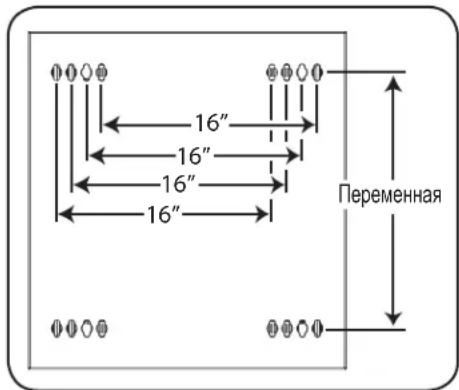
B BaaeM MoaEn CXema paacnoJooKeHHN MONTaXhBix OTBepCTn MOKeT 6bIb DpyroI.
7. установka оборуданья
BnmaHHe He yctaHbNbaTe o6opyoBaHne Do o6ceueHHy yToCHBOCTu WkaFa. Chayana cJeIyET ycTaHaBnBaTb 6Oone TKeJe O6opyoBaHne, pa3meaer Ero B HxKHe qactn WkaFpa. YcTaHabNbaTe o6opyoBaHne HaHHa C Hn3a WkaFpa No HanpaBHeHIO BBepx - Hn B KOem cnyae He Haobopot. Ppi HCNoJIb30BaHm HAnpaBIAOux DnA yCtAHOBKn O6pOyBaHncoBHOte ocTOPOXHOCTb npn IN BbIDBHXeHH. He BbIDBnraTe 6Oone OhoH rpynnb1 HAnpaBIAOux OndHOBpeMeHHo. CtapaiTeCB He BbIDBnraTb HAnpaBIAOue nDe yCTaHOBKn O6opyoBaHn, pacnoJoxHHBe B cepxHe qactn WkaFa.
Ppumeyaue. DAnHbModynb Nocmaenmec 8 KomnneKe m EbuHMaMu dByx paunuHbx munoe nmo Hmmaxa o6pyoohua. MoHmaxhBie eHmbI cepHozo ueema cnedyem uonb3oabMb e mom cnyae, ecu bbl kpenume c6oe obopyoehue K moI cmopohe MOmaxho Hanaepnoe, komopar Chabxena KaadpaHbIMU omepcmmu. MoHmaxhBie eHmbI cepe6pucozo ueema cnedyem uonb3oabMb e mom cnyae, ecu bbl kpenume c6oe obopyoehue K moI cmopohe MOmaxho Hanaepnoue, komopar Chabxena pe3b6obmu omepcmmu.
PpumueaHue.Keapamhhe omepmua cepedune kaozdo zu kapa npohymepoahbu u meom heonbwyu hadceky dya yod6mba pactno3haaun. B kaxdOm omdenbHom ukafpy uemeemcme mo, 2e paonanaemc hymepoaHHoe omepcmue u omepcmua, haxoayuec herocpecmehno had u noHUM.

7.1 YctaHOBKa NJI CHrTHe 3aKJaIbIX raeK
BHIMAHHE! OTRb6kPOMOK 3aKnAdbHX raeKdoNkhBt 3aenTb63 60koBle, a He BepxHn HnxHKn Kpa KBaDpTHOrO OTBepCTN B HapabLIOe. Ira oecneueHH npabInbHocTN yctahOBKn BaWero 6opydoBaHH cNe dyTe yka3AHm, nJNOXeHHbIM B coPBOHTelhOH DOKymentauu K hemy.
1 HauHnTe HymepoBaHHbIe KBaIpaTHbIe OTBepCTN B MOHTaXHbIX HAnpabJIHOxN, KOtOpbe Bbl PnAHHpyTe IcNoIb3ObaTb IJy UcTaHOBKn CBOero O6OpYDoBaHN. BCTaBte 3akJaHbIe raIKN (u3 KOMIIeKTA) B KBaDpaTHbIe OTBepCTN C cJIbHo O6ceNeHIN TOck KNpeJIeHIN DIn MOHTaXHbIX BNTOB (IOCTaBnEMyB KOMIIeKTe).PumueHue. IJr ONpeDeHn HEOxOduMOz KOJIueCmea 3aKaNaDhbx 2aek U Mcm ux ycmaHOeK O3HaKOMbMeC b cOnpoBodUmHou DokyMeHmauei K eauemy O6OpOdoAHUo.
2 IpoodeHbTe OINH 3O OTn6OB KpOMK 3aKnadHO raKu Ype3 KBaDpaTHOE OTBepCTne CBHYtpHeN CTOpOHb MoTAtXHoH HapBaPnHOuei. BdaBITE ee NO HanpaBNeHHo K bokOBMy kpaIO KBaDpaTHORO OTBepCTn. OTn6bI KpOMK 3aKnadHbIX Raek DOnKbI 3aCenPiYbcra 3a bokOBBe, a He BepxHn n HkHN KpaR KBaDpaTHORO OTBepCTn.
3 CnErKa Hauabnte Ha 3aknaDHyu raKy no 6okam, YTO no3BONHT dpyromy OTR6y KpOMKn npOtn Yupe3 KBaDpaTHoe OTBepCTne. Ipn npABInbHoi ycTaHOBKe 3aknaDHO raKu oBa OTN6a ee KpOMOK BbIaOTcra C obpaTHo CTOpHO bKaDpaTHoro OTBepCTnHa BHeUHe NObEPXHOCTn MOtAXHO HapRaBnIOuei. NOBToprTe warr 1-3 do Tex nop, noka He 6dyT yCTaHOBNeHb BCE Heo6xOumble 3aknaDhbie raKu.
4 NocIe yCTaHOBKn Heo6xOaMbX 3aKnaAdHbX rAek npKpenTe CBOE o6OpyDobAHne K CToeuHO HnpaBIAHOUeC NOMOsbIO NOCTaBIAReMbx B KOMIIeKTE MOHTaXHbIX BNHTOB UePHoro UBeTa I YaIweo6pa3HbX WaiB. IomeCTte Yauo6pa3HbX WaIb MeJMy BnHTAMN MoHTaXHBIM KPOHtEnHAMn DnI KpeJIeHnA O6OpYDoBaHnR.
PumueaHue. Bae obopyoohue maKx me Kxem noCmaenb8 KOmnekme c MOHmaxhbuM npucno6nEHmu. Ipepe ycmaHOeKou c0e2o obopyoohua OsHaKOMbmcB c yka3aHuraMu nO MoHmaxy, noCmaenbEmBu E KomneKeMe C HUM.
IIN3BneHnnaKnaHbIXraek nobTopte warn 1-3 B o6paTHOM npAke
PpumeyaHue. Ppu kehaHuu ycmahoeky u 3aeneeHue 3aknaedbix aaeK moxho npou3eoodmb c nomoubocneuaIbHOO uHcmpyMeHma (e KOMPNeKM nocmaeku He exoDum).
7. YctaHOBka nnn CHrTne 3aKJaadhbIX raeK (npoDoJIxHene)
7.2 AnbtephatNBbI cnoc06 MOtaxa: MoHTaxHa HnpaBIAOuaC pe3b6OBbIMN OTBepCTnAMN
BHIMAHNE: He nbitaTecb perynpoBaTb HappaBnaOuIe npy yctaHOBneHOM B ukaΦ o6opyoBaHn. He nbitaTeCb nCnoB3OBaTb HappaBnaIOUe 6e3 yctaHOBKn BuHTOB (no 2 Ha kaxdyu HappaBnaIOUyHo).
Ha 3aBoJe-3rTOBnTeJe 2 MoHTaxKbIe HAnpabNIOUne yCTaHOBNeHb IO KpeTneHne O6OpOBOAHm C NcNoIb3OBAHmE To CTOpOHb HAnpABJIOUe, KOtOpA CHa6KeHa KBaDpaTHbIMN OTBepCTnMn. IJIpePexOJa Ha NCIOB3OBAHme ToI CTOpOHb MOHTAXHOH HAnpABJIOUe, KOtOPa CHa6KeHa pe3b6oBbIMN OTBepCTnMn, HeoXoDMMO BblONHb TcNeIyOuine DeIcTBnIa:
1 KaKaJdHa HApBaBnIoua PnpKpeIeHa K Kopny Cy IkaFa npn NmOuN DByX BInTOB, OINH 3 KOtOpbIX pacNoJIraeTcB BepxHem yIpy, aDpyro-B HnxHem. C NOMoUbIO KpeCToo6pa3HOI OTBePTKn BBePHTe BInrbl, KoTopbIe KpenT HApBaBnIOUme K Kopny Cy IkaFa.
2 NomeHnIe pacnoNoXeHHe HappaBnIoox. Y6eNtEcB TOM, yTO KaKdA u3 HappaBnIOxuX pacnOraetc TaKIM oBa3OM, yTO ee cTOpHa C pe3b6oBbIMN OTBepCTnMn oBaPaeHa K nepedHe nDbepue.
3 NOBTOHO 3AKPeHNTe MOHTaXHbIe HnPaBnIOUHe.
4PnKpeNITE O6OpyOBOAHNE K CTOeHbIM HAnpaBIAIOUcM C NcONb3OBaHHeM BXoJUX B KOMnEKT MOHTaXbIX BVHTOB CEpe6pictoro Ubeta. IomeCTne Taueo6pa3hIe 7aIbI MeKdy BNHTAMIN MOHTaXbIM KPOHtTeHaMn DnKpeNHeHra6opyOBAHn.
PpumueaHue. B KOMnEkm NoCmaeku eaueoo obopyoehua Moay makxie exodm b MOhmaxhble npucno6bneHua. Ipeed ycmaHoekou obopyoehua 03HaKoMbmecb c yka3aHuaMu n oMhmaxy, noCmaenBmU e KomnEkm c Hum.
8. XpaHHeHne n TexHnueckoe o6cIyXnBaHne
XpaHHeHne
KaФdoJKeH XpaHnTbC B NOMeUeHmN C KOHTpOInpyEmbl MmKpOKlMAtOM BdaIIN OT NCToCHNKOB BlaIIN, 3KCTpeMaJIbHbIX TeMnepaTp, BocnAmHeHOuXcK JIKKOCTe Hra3OB, 3NeKTpOInpoBOdHbIX 3arpa3HNTeNe, PbIN IN Pnmaoro coJIneHOro CBeta. IIO Bo3MOxHOCTn XpaHnTe 5kaΦ B erO 3aBoDcKo TpaHCnOpTHoynakOBke.
CepBnchoe o6cnyKnBaHne
Ha npdykun kOMnAHm Tripp Lite daetc rpaHueHHa rapaHTn yCIOBn KOTopo n3IOKeHb B HactoIe m pyKOBOCTBe. TaKke docTyHb pa3JMHbIe nporpammbl npdneBaemr rapaHTn u obcykubAHna Ha obeke T OKmAHm Tripp Lite. Ipynoyehn 6Oee noDpoBHO INHFPOM O cepBnCHOM ocbnykubAHm nocTeTte Be6-caT KMnAHm www.triplite.com/support. PpeD Bo3BPaTOM npdykun dnoobnykubAHn, BInOnHNTe Cne dyuoune JeicTBNA:
- Pocmtpnte HnCTpykun no yctahOBke n3Kcnnyatau, n3IOKeHHbE B hactoHem pykoBodCTBe, YTO6bI y6eHTbcra, YTO npO6nmbi npOcXoJrT He n3-3a HnpabNlboHOro NoHMAMHn HnCTpykun.
- Ecnn npo6nema coxpanreTc, He obaaaiTeB n He Bo3bpaaiTe n3dene Tropobomy nopeHky. Bmcto 3toro nocetite Be6-caT www.triplite.com/support.
- Ecnn npepehenna np6bemblTre6yecpmoHT, nocetnte Be6-caT Www.triplite.com/support n nepeinnte no cbbjke Product Returns (Bo3bpat npdykun). 3decb moKHO cdenaTb 3anpoc o Homepe pa3pehenna Ha Bo3bpat (RMA), KOTOpB Heo6xOIM dnn peMOHTa. B 3toI npocToHnTEPAKTHBOH Ofme Huxho 6ydt 3anolnlb Homep Moe nn yctpoCTBa n erc cepniHb Homep, a TAKKe 6ouu InhFopMaHIO O nokynateHe. Homep RMA Bmecte C nHCTpykunmno OTnpabke 6ydt BcIaNn Ho 3neKtpoHHo Noute. Lio6bte NOBpexdHenra npdykun (PnMble, KOCBEHbE, yMbIJIeHHBe IIN NOOchUbe), nOlyeHNb B p3yIbTaTe TpaHCnOpTPOBKN B KomnHIO Tripp Lite INB yONHOMOeHHb CEHTp, rapaHTne He NOKpbBAOTcR. TpaHCnOpTPOBKA npdykun B KomnHIO Tripp Lite INN ABTopn3OBaHHb CEpBCHb CEHTp, DOnJXHa 6bITb ONNaeha OTnpaBHTenEM. Ha BHeuHcSTOpOHe ynakOBKn HAHeCtne Homep pa3pehenna Ha BO3bpat. Ecnn npdyKT haoDNTcRa h rapaHTnB, BNOKHe KOInu Yeka INN DOkyMeHTa Ha npO6peTHe. DoCTABKy npdykun nIg o6cnyKBaHHa ocuiectBnIte ueep 3actpaxoBAHHb xepeBO3HKnOB no aDpecy, NoIyueHHOMY Bmecte C pa3pehenmHa BO3BPaT.
9. rapaHTnHbIe 6o3aTeJIbCTBa
OrpaHnueHHra rapaHTna 5 net
PpOdaeU rapaHTpyETIg daHnHO rpoyTA OTCYCTBne DepeKToB MaTePnaIax N TexHOIINX B TeueHne 5 net OT daTb nepBnHIO npOaONBM IcNOJIb3OBAHN ERO B COOTBETCBM CO BCEMnpIMHeHMblm HnCTpyKJAMM. B cnyae BbIaJIeHNE JDepeKTOB, C83aHHbIX CO CBOITBaM MATEPNAI INI KAcE TBM
13r0TOBHeHn DAHHORIO hENBAHn B TEueHne Yka3AHNO nepoDA, PPOBaue o83yTc, NO CBOEMY yCMOTpeHIO, POBECTn 3A CBOI CHT erO pMOHT INI 3aMeHy.
3TA FAPAHNTI HE PACNPOCTPAHRETC HA HOPMALbHbI IN3HOC INI IIOBPEXJEHNE IPOyKA TBA PE3yIBTATE HECYACTHO TCIyAR,
HEPABINbHO rOcNoJIb3OBAHN, HE6PEKHTOO OBpaUeHNE INI IPEHE6PEXEHN IPNABINAMN 3KCNPTALAUIN. IPODABEU HE 3AIBJRET
HMKAKNX IPAHTNI, KPOME BHO BbIPAXEHHB X3DECb. 3A NCKLIQUEHNEOM OPAHHEHNI, 3ATPEUeHHbIX DEIECTBYOUM IM 3AKOHODATENBOM,
BCE IODPA3YMBAEMbIE TAPAHNTNI, BKIIHOAY BCA PAHNI PPINOHOCTN K IPODAJKE INI IONHOCTN INI KOHKPETHO TIPIMEHENIA,
OPAHUYEHBI NO CPOKY DEICTBnI TAPAHNTNIbIM PEPNOOM, YKA3AHBBIM BbiIE; IN 3TA FAPAHNTN RBO HKNCKIOAYET BCE CNYAANHbIE INI
105OBHbIE PPOBEXDEHNI. (PpImeHMoe 3akoHDaTeBCTBO HeKOTopbIX CTpaH 3Appeaet OrpAHueHne cpoKa dTeCTBNIO pDpa3ymBaemor rapaTHIN; Bdpynx
ctpaHx 3appeJeHo NckIOuEHNE INI ORpAHueHne DeICTBnRApaHTMN B OTHoouHm cnyaHInN INI NocpeDuOxN NobpeExHNI. B C83nC 3tMM,
BbIepeHNCENHbIE OrpAHUEHNI INCKIOUeHNE DeIECTBnR HAOTOpae rapaHTN MOYt OKa3aTcB HePIMeHMblm B BAWeM KOHKPeTOM CNYae. Hactoarra rapaHTN
PepocTabnre Bam onpeDeenHhble OpDnuHeckne npaba, KOtbpie MOr7 bOdoNeHbI Dpyfumn ppabamn B aZBCMnOCTN TO opncndkun.
BHIMAHVE:peepncno3oBAMHem HactoIeO nIeNnKdIb noIb3oBaTeIb dOnKeH camocToTbe hOnpeIeNTb cTeIeH b erO npiroDHOCTn dIpyeONaRaEMOrO npimeHeHnA, a TaKxe CTeNEh 6e30NaChOCTn TAKORO pImMeHHe. TaK KAc HactoIeue I3DeIe NMeET MHOKeCTBO INHDbUyabNbIX pIMMeHIn, pOn3BODITeH He daet rapaHTmHBx OBtB OTHoWeHH pRIOHOCTn HactoIuX N3DeIe DnT Etx INM INHbX KOHKPeTHbIX pIMMeHIn.
KoMaHnI Tripp Lite noctoHHo COBepueHCTByET CBOHO npOykuu. B CBa3n C 3TMM BO3MOXHO n3MeHeHne TexHmecx xapaKTePcTik 6e3 npedbapntbHoroybeDomHeHnI.


Manufacturing Excellence.
1111 W. 35th Street, Chicago, IL 60609 USA www.triplite.com/support