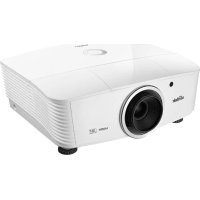
DU5671 - Projector VIVITEK - Free user manual and instructions
Find the device manual for free DU5671 VIVITEK in PDF.


| Product type | DLP Projector |
| Brand | Vivitek |
| Model | DU5671 |
| Native resolution | WUXGA (1920 x 1200) |
| Display technology | DLP 0.67" WUXGA S600 HB |
| Lens | Manual zoom, manual focus |
| Vertical lens shift | +55% to -15% (WUXGA) |
| Horizontal lens shift | ±5% of image width |
| Keystone correction | Vertical ±30°, Horizontal ±25° |
| Video inputs | VGA x2, DVI-D, HDMI x2, BNC (RGBHV), S-Video, Composite video, HDBaseT |
| Video outputs | VGA x1, 3D SYNC OUT (5V) |
| Audio inputs | Mini stereo jack x2, RCA stereo x1 |
| Audio output | Stereo jack x1 |
| Built-in speaker | 3W x 1 |
| Network | RJ45, Crestron/AMX/Extron/PJLink control |
| 3D functions | DLP Link and IR |
| Lamp | 430W (Normal) / 320W (Eco) |
| Power consumption | 540W (Normal), 410W (Eco), <0.5W (standby), <2W (standby on LAN) |
| Power supply | 100-240 V AC universal |
| Dimensions (W x D x H) | 431.11 x 344.16 x 180.57 mm |
| Security | Kensington slot, security bar, password lock |
| Cleaning | Unplug, wait for cooling, clean lens and casing |
| Lamp replacement | Unplug, wait 30 min, replace with certified part |
| Dust filter | Optional, cleaning and replacement |
Frequently Asked Questions - DU5671 VIVITEK
User questions about DU5671 VIVITEK
0 question about this device. Answer the ones you know or ask your own.
Ask a new question about this device
Download the instructions for your Projector in PDF format for free! Find your manual DU5671 - VIVITEK and take your electronic device back in hand. On this page are published all the documents necessary for the use of your device. DU5671 by VIVITEK.
USER MANUAL DU5671 VIVITEK
natural_image
Line drawing of a projector with a circular lens and spiral pattern (no text or symbols)Copyright
natural_image
Diagram showing a mechanical component with directional arrows indicating rotation or movement (no text or symbols)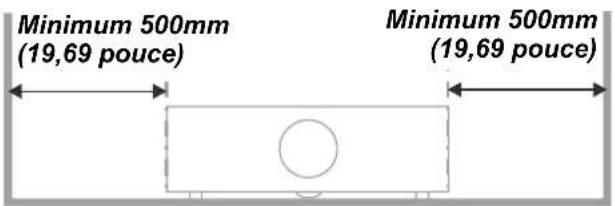
SUGGESTIONS POUR LE DEPANNAGE....66
MESSAGES D'ERREUR DEL 67
PROBLEMES D'IMAGE....67
PROBLEMES AVEC LA LAMPE 68
PROBLEMES AVEC LA TELECOMMANDE 68
PROBLEMES AVEC L'AUDIO 69
FAIRE REPARER LE PROJECTEUR 69
Q ET R SUR HDMI 70
SPECIFICATIONS....71
SPECIFICATIONS 71
DISTANCE DE PROJECTION PAR RAPPORT A LA DIMENSION DE PROJECTION (WUXGA)....72
natural_image
Line drawing of a projector with a circular vent and side screw, shown with a separate coiled cable (no text or symbols)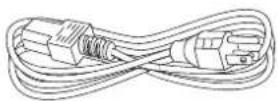
Cordon
(1d80imentation
natural_image
Three simple line drawings of a ventilation grille layout, no text or symbols presentnatural_image
Technical line drawing of a vehicle rearview component with an arrow indicating direction (no text or symbols)natural_image
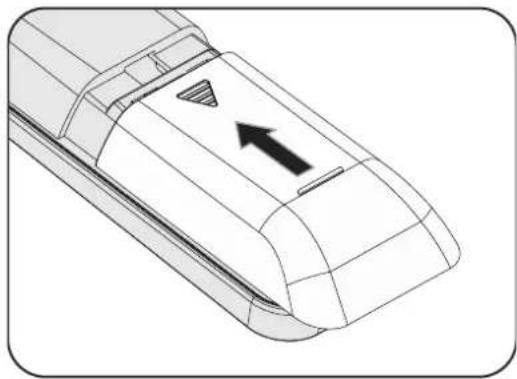
Diagram of a mobile phone casing with battery and charging mechanism arrows (no text or symbols)- Refermez le couvercle.
natural_image
Technical line drawing of a mechanical component with an arrow indicating direction (no text or symbols)
Attention :
natural_image
Illustration of a projector with a close-up view showing the internal structure and operation (no text or symbols)natural_image
Diagram showing a projector with a close-up of its internal components, no text or symbols present
natural_image
Technical line drawing of a projector housing with rotating buttons and ventilation slots (no text or symbols)natural_image
Technical line drawing of a projector housing with cooling fans and mounting base (no text or symbols)other
| Dimension | Percentage | | --------- | ---------- | | W | Hx5% | | H | Hx5% | | Hx | Hx15% |other
| Dimension | Percentage | | --------- | ---------- | | Total Height (W) | Wx5% | | Total Height (H) | Hx5% | | Total Height (Hx45%) | Hx45% | | Total Height (Hx10%) | Hx10% | | Total Height (Wx5%) | Wx5% |natural_image
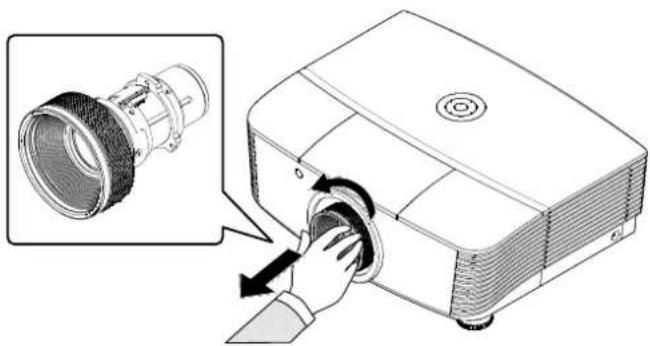
Illustration of a projector with a hand inserting a circular component into the chamber (no text or symbols present)natural_image
Illustration of a projector with a hand inserting a button into the lens (no text or symbols present)Réglage du volume
Audio
Menu Réglages 2
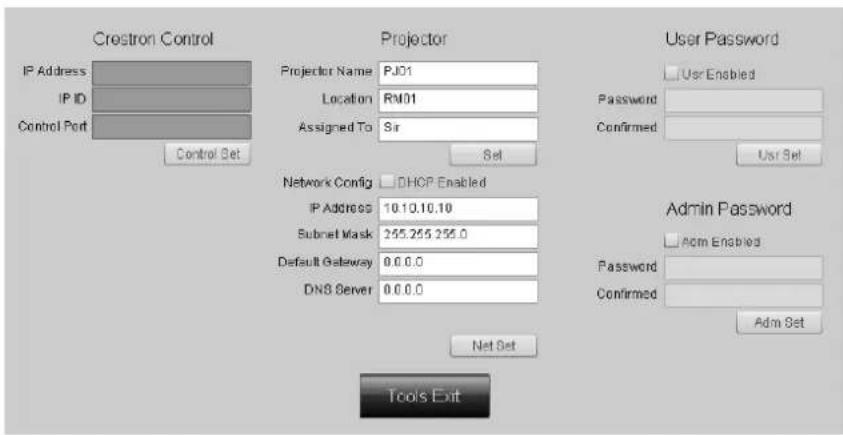
CRESTRON
Expansion Options
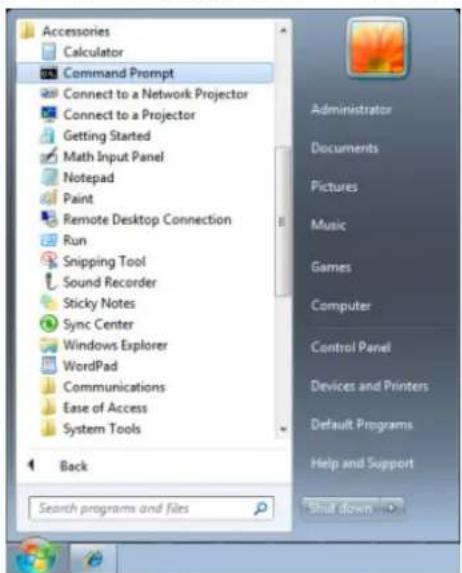
Démarrer => Tous les programmes => Accessoires => Invite de commande
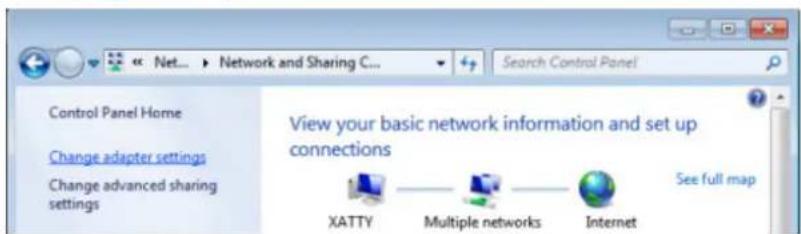
Ouvrez "Programmes"
natural_image
Technical illustration of a projector with internal components and a screwdriver inserted (no text or symbols)natural_image
Technical line drawing of a projector with screwdriver and adjustment mechanism (no text or symbols)natural_image
Technical line drawing of a projector with an inset showing internal components (no text or symbols)8.
natural_image
Diagram of a projector with internal components and a screwdriver inserted (no text or symbols)Réinitialiser la lampe
natural_image
Line drawing of a projector with ventilation grilles and a circular lens (no text or symbols)
Attention :
natural_image
Technical line drawings of three different projector devices with arrows indicating internal components (no text or symbols present)natural_image
Technical line drawing of a rectangular panel with internal grid structure and an arrow indicating direction (no text or symbols)natural_image
Technical line drawings of three different projector devices with ventilation grilles and mounting feet (no text or symbols)
Avertissement :
Using the Physical Lock
Remarque :
FCC-B, cUL, UL, CE, C-tick, CCC, KC, CB, PCT, CECP, BSMI
| Fonction OSD | Commande d'opération | Paramètres/Valeurs de retour | Remarque | |
| Picture Mode pic.mode | ? | = | 0:Presentation1:Bright2:Game3:Movie4:Vivid5:TV6:sRGB8:DICOM SIM9:User110:User2 | Not applicable when the project is in standby mode. |
| Input Select input.sel ? | = | 1 = VGA12 = VGA23 = DVI4 = Video5 = S-Video6 = HDMI 17 = BNC9 = HDMI 215 = HDBASET | Not applicable when the project is at below status.*Standby mode | |
| Auto Power Off auto.powoff ? | = | 0-180 Not applicable when the project is in standby mode | ||
| Auto Power On auto.powon ? | = | 0 = Off1 = On | Not applicable when the project is in standby mode | |
| Blank Screen no.signal ? | = | 0 = Black1 = Red2 = Green3 = Blue4 = White | Not applicable when the project is in standby mode | |
| Contrast contras | t | ? = + - | 0-100 Not applicable when the project is in standby mode or the input signal is not locked yet. | |
| Brightness brigh | t | ? = + - | 0-100 Not applicable when the project is in standby mode or the input signal is not locked yet. | |
| Saturation saturat | ? | = + -- | 0-100 a. Apply for YUV signal inputb. Not applicable when the project is in standby mode or the input signal is not locked yet. | |
| Hue tint ? | =+ - | 0-100 a. Apply for YUV signal | al inputb. Not applicable when the project is in standby mode or the input signal is not locked yet. | |
| Sharpness sharp ? | =+ - | 0-31 Not applicable when th | the project is instandby mode or the input signal is not locked yet. | |
| Color Temperature color | temp ? | = | 0 = Warm1 = Normal2 = Cold | Not applicable when the project is instandby mode or the input signal is not locked yet. |
| White Balance /Red Offset | red.offset ? | =+ - | -100 ~ +100 Not applicable | when the project is instandby mode or the input signal is not locked yet. |
| White Balance /Green Offset | green.offse ? | =+ - | -100 ~ +100 Not applicable | when the project is instandby mode or the input signal is not locked yet. |
| White Balance /Blue Offset | blue.offset ? | =+ - | -100 ~ +100 Not applicable | when the project is instandby mode or the input signal is not locked yet. |
| White Balance /Red Gain | red.gain | ? =+ - | 0-200 Not applicable when | the project is instandby mode or the input signal is not locked yet. |
| White Balance /Green Gain | green.gain | ? =+ - | 0-200 Not applicable when | the project is instandby mode or the input signal is not locked yet. |
| White Balance /Blue Gain | blue.gain | ? =+ - | 0-200 Not applicable when | the project is instandby mode or the input signal is not locked yet. |
| HSG/Red Gain | hsg.r.gain | ? =+ - | 0-100 Not applicable when | the project is instandby mode or the input signal is not locked yet. |
| HSG/Green Gain | hsg.g.gain ? | =+ - | 0-100 Not applicable when | the project is instandby mode or the input signal is not locked yet. |
| HSG/Blue Gain | hsg.b.gain | ? =+ - | 0-100 Not applicable when | the project is instandby mode or the input signal is not locked yet. |
| HSG/Cyan Gain | hsg.c.gain | ? =+ - | 0-100 Not applicable when | the project is instandby mode or the input signal is not locked yet. |
| HSG/Magenta Gain | hsg.m.gain | ? =+ - | 0-100 Not applicable when | the project is instandby mode or the input signal is not locked yet. |
| HSG/Yellow Gain | hsg.y.gain | ? =+ - | 0-100 Not applicable when | the project is instandby mode or the input signal is not locked yet. |
| HSG/Red/Saturation hsg | r.sa t | ? =+ - | 0-100 Not applicable when | the project is instandby mode or the input signal is not locked yet. |
| HSG/Green/Saturation | hsg.g.sat | ? =+ - | 0-100 Not applicable when | the project is instandby mode or the input signal is not locked yet. |
| HSG/Blue/Saturation Hsg.b.sa t | ? = + - | 0-100 Not applicable when | the project is in standby mode or the input signal is not locked yet. | |
| HSG/Cyan/Saturation hsg.c.sa t | ? = + - | 0-100 Not applicable when | the project is in standby mode or the input signal is not locked yet. | |
| HSG/Magenta/Saturation | hsg.m.sat | ? = + - | 0-100 Not applicable when | the project is in standby mode or the input signal is not locked yet. |
| HSG/Yellow/Saturation Hsg.y.sat ? | = + - | 0-100 Not applicable when | the project is in standby mode or the input signal is not locked yet. | |
| HSG/Red/Hue hsg.r.hue ? | = + - | 0-100 Not applicable when | the project is in standby mode or the input signal is not locked yet. | |
| HSG/Green/Hue hsg.g.hue ? | = + - | 0-100 Not applicable when | the project is in standby mode or the input signal is not locked yet. | |
| HSG/Blue/Hue Hsg.b. hue ? | = + - | 0-100 Not applicable when | the project is in standby mode or the input signal is not locked yet. | |
| HSG/Cyan/Hue hsg.c. hue ? | = + - | 0-100 Not applicable when | the project is in standby mode or the input signal is not locked yet. | |
| HSG/Magenta/Hue | hsg.m. hue | ? = + - | 0-100 Not applicable when | the project is in standby mode or the input signal is not locked yet. |
| HSG/Yellow/Hue | Hsg.y. hue ? | = + - | 0-100 Not applicable when | the project is in standby mode or the input signal is not locked yet. |
| HSG/White/Red Gain | hsg.wr.gain ? | = + - | 0-100 Not applicable when | the project is in standby mode or the input signal is not locked yet. |
| HSG/White/Green Gain | hsg.wg.gain | ? = + - | 0-100 Not applicable when | the project is in standby mode or the input signal is not locked yet. |
| HSG/White/Blue Gain | Hsg.wb.gain | ? = + - | 0-100 Not applicable when | the project is in standby mode or the input signal is not locked yet. |
| Aspect Ratio | aspecl | ? = | 0 = Fill1 = 4:32 = 16:93 = LetterBox4 = Native5 = 2.35:1 | *Not applicable when the project is in standby mode or the input signal is not locked yet.*When the Zoom function is set to Zoom in, the Unscaled function is disabled. |
| VGA FrequencyVGA Tracking h.total ? | h.phase | ? = + -=+ - | 0-31-5 ~ +5 *Not applicable when | *Not applicable when the project is in standby mode or the input signal is not locked yet.*Apply for VGA and Component signal input.in the project is in standby mode or the input signal is not locked yet.*Apply for VGA and Component signal input. |
| VGA H Position h.pos ? | =+ - | -5 ~ +5-100 ~ +100(Auto Sync Off) | *Not applicable when the project is in standby mode or the input signal is not locked yet.*Apply for VGA and Component signal input. | |
| VGA V Position v.pos ? | =+ - | -5 ~ +5-100 ~ +100(Auto Sync Off) | *Not applicable when the project is in standby mode or the input signal is not locked yet.*Apply for VGA and Component signal input. | |
| Auto Sync auto.img (execute) Not applicable when the project is in standby mode or the input signal is not locked yet. | ||||
| Zoom zoom ? | = | -10 ~ +10 The Lens control command does not apply when the projector is in standby mode. | ||
| Lamp Mode Lamp.mode ? | = | 0 = Normal1 = Eco | *Not applicable when the project is in standby mode*Not applicable when the project is in cooling or lighting up status.Please send control command after the said commands are completed. | |
| Fan Speed altitude ? | = | 0 = Normal1 = High | Not applicable when the project is in standby mode | |
| Lamp 1 Statu lamp1.sta t ? | 0 = Off1 = On | Not applicable in standby mode | ||
| Projection Mode proj.mode ? | 0 = Desktop Front1 = Desktop Rear2 = Ceiling Front3 = Ceiling Rear | Not applicable when the project is in standby mode | ||
| Gamma gamma ? | 0 = 1.81 = 2.02 = 2.23 = 2.44 = B&W5 = Linear | Not applicable when the project is in standby mode or the input signal is not locked yet. | ||
| Test Pattern pattern ? | 0 = None1 = RGB Ramps2 = Color Bars3 = Setp Bars4 = Checkboard5 = Grid6 = Horizontal Lines | Not applicable when the project is in standby mode. | ||
| V Keystone v.keystone ? | -30 ~ 30 | Not applicable when the projector is in standby mode. | ||
| H Keystone h.keystone ? | -25 ~ 25 | Not applicable when the projector is in standby mode. | ||
| Network/IP Adress net.ipaddr ? | Not applicable when the project is in standby mode | |||
| Network/Subnet net.subnet ? | Not applicable when the project is in standby mode | |||
| Network/Gateway net.gateway ? | Not applicable when the project is in standby mode | |||
| Network/DHCP net.dhcp ? | 0 = Off1 = On | Not applicable when the project is in standby mode | ||
| Menu Position menu.pos ? | 0 ~ 4 | Not applicable when the project is in standby mode | ||
| Startup Logo startup.logo ? | = | 0 = STD1 = Black2 = Blue | Not applicable when the project is in standby mode | |
| Auto Search auto.src ? | = | 0 = Off1 = On | Not applicable when the projector is in standby mode. | |
| Language lang ? | = | 0 = English1 = French2 = German3 = Spanish4 = Portugues5 = Simplified Chinese6 = Traditional Chinese7 = Italian8 = Norwegian9 = Swedish10 = Dutch11 = Russian12 = Polish13 = Finnish14 = Greek15 = Korean16 = Hungarian17 = Czech18 = Arabic19 = Turkish20 = Vietnamese21 = Japanese22 = Thai23 = Farsi24 = Hebrew25 = Danish26 = French Canadian | ||
| Model model ? | ||||
| Serial Number ser.no ? | ||||
| Software Version sw.ver ? | ||||
| Active Source | Act.src ? 1 = VGA1 | |||
| Pixel Clock | pixel.clock | ? | *In unit of MHz*Not applicable when the project is in standby mode or the input signal is not locked yet. | |
| Signal Format | signal | ? | Not applicable when the project is in standby mode or the input signal is not locked yet. | |
| H Refresh Rate | h.refresh | ? | Not applicable when the project is in standby mode or the input signal is not locked yet. | |
| V Refresh Rate | v.refresh | ? | Not applicable when the project is in standby mode or the input signal is not locked yet. | |
| Lamp1.Time | lamp1.hours | ? | ||
| Lamp1 Time Reset | Lamp1.reset | (execute) | Reset All of lamp time | |
| Power On Time | proj.runtime | ? | ||
| Factory Reset | fact.reset | (execute) | ||
| Blank | Picture.mute | ? | 0 = Off1 = On | |
| Power On | power.on | (execute) | Not applicable in active mode | |
| Power Off | power.off | (execute) | Not applicable in standby mode | |
| Projector Status status ? | 0 = Rese | t1 = Standby2 = Active3 = cooling | ||
| Low Power Mode lowpower.mod e | ? = | 0 = Off1 = On2 = On By Lan | ||
| 3D Sync thread.mode ? | = 0 = Off1 = DLP-Link2 = IR | Auto 3D (1080P 24Hz) can not Off | ||
| 3D Sync Invert thread.sync.invert | ? = | 0 = Off1 = On | Active in DLP-LINK | |
| 3D Sync Format thread.forma t ? | = | 0 = Frame Sequential1 = Top / Bottom2 = Side by side3 = Frame Packing | Function available dependent on input source & timing. | |