303 - Air purifier BLUEAIR - Free user manual and instructions
Find the device manual for free 303 BLUEAIR in PDF.



| Product type | Air purifier |
| Brand | Blueair |
| Model | 303 |
| Dimensions (approx.) | 53.3 x 66 x 53.3 cm |
| Weight (approx.) | 14.5 kg |
| Power supply | 220–240 V, 50 Hz |
| Energy consumption | Equivalent to a light bulb |
| Filtration technology | HEPASilent™ (particulate filter + activated carbon option) |
| Filter material | Polypropylene |
| Filtered particles | Dust, pollen, bacteria, pet odors |
| Fan speeds | Adjustable (min, max) |
| Indicator light | Blue LED light |
| Minimum recommended distance | 10 cm from other objects |
| Recommended placement | Indoors, away from heat and moisture sources |
| Routine maintenance | Clean the grille with a vacuum, wipe the exterior with a damp cloth |
| Filter replacement frequency | Every 6 months |
| Recommended filters | Blueair genuine filters only |
| Warranty | Extended limited warranty upon registration |
| Recyclability | Unit and polypropylene filters recyclable |
| Safety standards | Unplug before cleaning; do not use outdoors |
Frequently Asked Questions - 303 BLUEAIR
User questions about 303 BLUEAIR
0 question about this device. Answer the ones you know or ask your own.
Ask a new question about this device
Download the instructions for your Air purifier in PDF format for free! Find your manual 303 - BLUEAIR and take your electronic device back in hand. On this page are published all the documents necessary for the use of your device. 303 by BLUEAIR.
USER MANUAL 303 BLUEAIR
2 Welcome
3 Getting started
5 Getting the most from your Blueair system
6 Changing the filter
7 Filters
Welcome
Thank you for choosing Blueair. Before you start using your Blueair air purifier, take a few minutes to become familiar with the basics.
Filter replacement
Be sure to change your Blueair filter according to the recommended filter replacement schedule. This helps keep your Blueair air purifier running in top condition. See page 6.
Extend your warranty
Complete and send your warranty card to Blueair today to extend your limited warranty.
Help keep the planet healthy, too
Blueair air purifiers provide maximum improvement of indoor air quality with minimum impact on the environment. The entire unit can be recycled.
Getting started
General safety instructions
The Blueair 300 Series air purifier is an electrical appliance. Please read the safety instructions before use and take the necessary precautions to reduce the risk of fire, electric shock or injury. The Blueair Limited Warranty applies only if the unit is used according to these instructions.
This appliance is not intended for use by persons (including children) with reduced physical, sensory or mental capabilities, or lack of experience and knowledge, unless they have been given supervision or instruction concerning use of the appliance by a person responsible for their safety.
Children should be supervised to ensure that they do not play with the appliance. If the supply cord is damaged, it must be replaced by the manufacturer or its service agent or similarly qualified persons in order to avoid a hazard.
Placement
Place the unit in a location that allows air to circulate freely in, out and around the unit. The minimum acceptable distance from another object is 4" or 10 cm. Use only genuine Blueair filters. Do not place the unit:

Directly on or against soft furnishings, such as bedding or curtains.

Near sources of heat, such as radiators, fireplaces or ovens.

Near wet areas, such as bathrooms or laundry rooms, where it may come into contact with water.

Outdoors.
Settings\*
Plug the cable into a grounded wall outlet and turn on your Blueair unit. The blue light-emitting diode indicates that the unit is working. Set the control knob to maximum speed, which is recommended for fast initial cleaning, daytime use, or very polluted air. After a few minutes, adjust the control to the desired speed. Minimum speed is generally recommended for nighttime use.
Care and maintenance
Blueair air purifiers feature high quality design, materials and workmanship. To keep your unit in top condition, we recommend routine cleaning. The appliance must be disconnected from the supply mains before cleaning or maintenance.
- Vacuum the air intake grille from the inside when you remove the filter to replace it.
• Vacuum the small inlets with a soft brush attachment. - Wipe the exterior of the unit with a soft, clean, damp cloth.
- Never clean with gasoline, chemical solvents or corrosive material also as these agents may damage the surface.
- Do not allow foreign objects to enter the ventilation or exhaust openings. This may cause electric shock or damage the unit.
- Do not try to repair or adjust any of the electrical or mechanical functions on your Blueair unit yourself. Contact your local dealer or Blueair for warranty information.
Getting the most from your Blueair system
The Blueair system is easy to use. Make sure your unit is the right size for your room, and change the filters according to recommended filter replacement schedule. Remember that, just as air conditioners and heaters have limits to the volume of air they can cool or heat, every air purification system has limits to the volume of air it can clean. Follow these common-sense guidelines.
Close your windows
You wouldn't throw open your windows on a hot summer day and expect your air conditioner to work efficiently, because you can feel the hot air coming in and the cool air going out. Even though you can't see the contaminated air coming in and the clean air going out, the same logic applies to your air purifier.
Close your doors, too
Just as you might seal off part of your house on a cold winter night to keep your heater working more efficiently, seal off the room in which your system is working for best results. This is especially important for people using a Blueair system to ease nighttime asthma or allergy attacks.
Run your system 24 hours per day
For best results, run your Blueair unit 24 hours a day, 7 days a week. Round-the-clock operation ensures that a continuous supply of clean, filtered air constantly circulates throughout the room. Blueair systems are designed for phenomenally low power usage. In fact, it costs about the same to power a Blueair air purifier as it does to power a single light bulb, depending on the unit and the operating speed.
Changing the filter
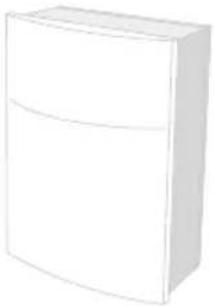
Step 1
Unplug the unit.
natural_image
Simple line drawing of a white rectangular box (no text or symbols)Step 2
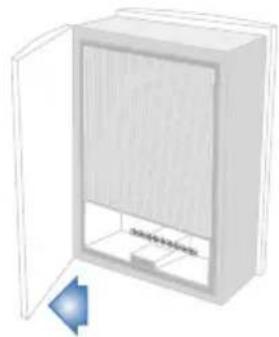
Open the door.
natural_image
Illustration of a cabinet with open door and internal panel (no text or symbols)Step 3
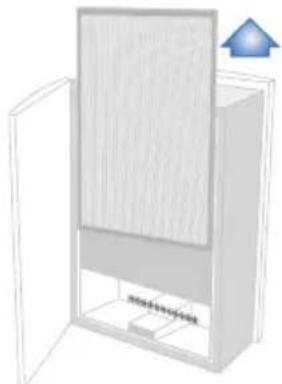
Slide out the old Blueair filter.
natural_image
3D diagram of a cabinet with open door and lid, showing internal structure and a blue arrow pointing upward (no text or symbols)Step 4
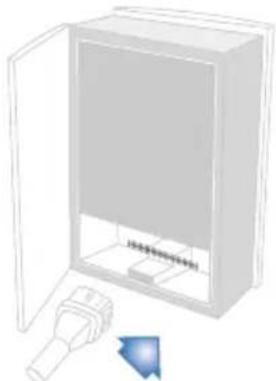
Vacuum inside the unit with a soft brush attachment.
natural_image
Diagram of an open electrical cabinet with a plug and a blue arrow indicating direction (no text or symbols)Step 5
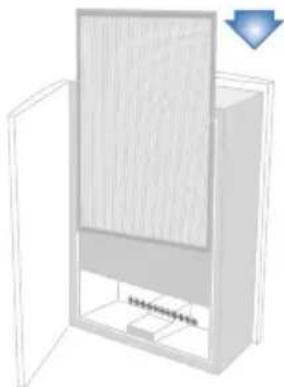
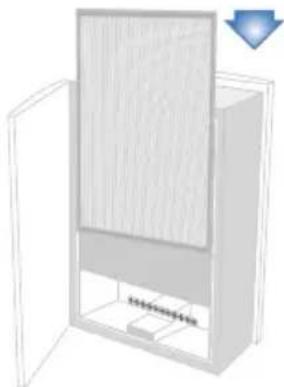
Slide in the new Blueair filter.
natural_image
3D diagram of a cabinet with open door and internal panel, no text or symbols visibleStep 6
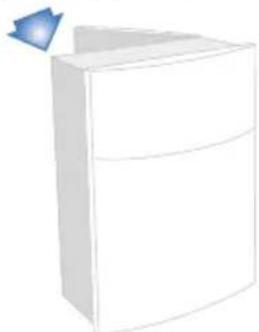
Close the door, plug in the unit and turn it back on.
natural_image
Simple line drawing of a white rectangular container with a blue triangular pointer (no text or symbols)Filters
Patented HEPASilent™ technology makes the Blueair 300 Series incredibly quiet. The unit comes with a HEPASilent™ filter already installed.
Particle Filter. Includes a particle filter that removes dust, pollen, bacteria, pet dander, mold spores and other airborne particles. The particle filter is made of polypropylene, which help mechanically filter out airborne particles. To maximize filter effectiveness, particles are negatively charged by the Blueair unit before reaching the filter.
Optional carbon filter. Includes a filter with active carbon to remove gaseous pollutants such as cigarette and cigar smoke or other VOCs (volatile organic compounds, including household paints and other chemicals). You may notice a slight odor from the active carbon when the filter is first used; this will quickly dissipate.
For optimal performance, Blueair recommends that you replace filters every six (6) months.
We offer a convenient Filter Subscription Program in some countries.
Contact your local dealer or Blueair to find out whether the program is available to you.
IMPORTANT! Use only genuine Blueair filters to ensure proper function of your unit and to qualify for full warranty coverage.
Customer's record
The model number and serial number of this product can be found on the bottom of the unit. Please note them in the space provided below and keep for future reference.
Model number Dealer's name
Serial number Dealer's address
Date of purchase Telephone number
Contenido
natural_image
Simple line drawing of a rectangular box with a curved top and bottom edge (no text or symbols)Paso 2
natural_image
Illustration of a cabinet with open door and internal panel (no text or symbols)Paso 3
natural_image
Diagram of a cabinet with open door and window, showing wood panel and ventilation unit (no text or symbols)Paso 4
natural_image
Diagram of an open electrical cabinet with a plug and arrow indicating direction (no text or symbols)Paso 5
Coloque un nuevo filtro Blueair.
natural_image
3D diagram of a cabinet with open door and internal panel, showing no text or symbolsPaso 6
natural_image
Simple line drawing of a white rectangular box with a blue triangular pointer (no text or symbols)Filtros
natural_image
Simple line drawing of a white rectangular box with a curved top and side panel (no text or symbols)Étape 2
natural_image
Illustration of a cabinet with open door and internal panel (no text or symbols)Étape 3
natural_image
3D diagram of a cabinet with open door and internal panel, no text or symbols presentÉtape 4
natural_image
Diagram of an open electrical cabinet with a plug and a blue arrow indicating direction (no text or symbols)Étape 5
natural_image
3D diagram of a cabinet with open door and internal panel, showing no text or symbolsÉtape 6
natural_image
Simple 3D illustration of a white rectangular box with a blue arrow pointing to the top-right corner (no text or symbols)Filtres
Blueair believes in cleaner indoor air for everyone. Removing air impurities down to the tiniest particle requires a deep commitment to continuous innovation and a greener global environment. Our fresh air solutions are not only inventive, but extremely effective, energy efficient and ecofriendly. At Blueair we believe that clean air is a human right.
Nuestra filosofía
17 N. State, Suite 1830, Chicago, IL 60602 Phone: (888) blueair (1-888-258-3247), Fax: (312) 727-1153 info@blueair.com www.blueair.com
Blueair AB
Danderydsgatan 11, SE-114 26 Stockholm, Sweden Tel: +46-8-679 45 00, Fax: +46-8-679 45 45 info@blueair.se www.blueair.com

Blueair