30iMAT - Ice machine Marvel - Free user manual and instructions
Find the device manual for free 30iMAT Marvel in PDF.


| Product Type | Ice Machine |
| Brand | Marvel |
| Model | 30iMAT |
| Production Capacity | Approximately 13.5 kg of ice per 24 hours (at 21.1 °C ambient and 12.8 °C water) |
| Ice Type | Clear ice cubes by fractional freezing |
| Dimensions (H x W x D) | Approximately 70.3 x 37.1 x 61 cm (height adjustable with legs from 85.7 to 88.3 cm) |
| Weight | 45.5 kg (100 lbs) |
| Power Supply | 115 V, 15 A, dedicated circuit with grounding, 3-prong plug |
| Water Connection | Cold potable water supply, pressure 20-120 psi, 1/4" copper tubing |
| Drain Connection | Gravity drainage (5/8" ID tubing) or built-in pump (max height 2.4 m) |
| Drain Pump | Factory-installed or optional, max lift 2.4 m, level detection |
| Ice Storage Bin | Capacity not specified, maintained above 0 °C to prevent excessive melting |
| Functions | Automatic ice production, automatic shut-off when bin is full, automatic restart |
| Cleaning Cycle | Built-in CLEAN mode, duration 49 minutes, uses a special nickel-free cleaner |
| Recommended Ambient Temperature | 13 to 27 °C for built-in installation, 13 to 32 °C for freestanding (minimum 13 °C) |
| Safety | Grounded plug required, GFCI protection recommended for outdoor, shut-off if pump overflows |
| Maintenance | Annual minimum cleaning of water circuit and evaporator, descaling if necessary |
| Warranty | 1 year parts and labor, additional 4 years on sealed cooling circuit |
| Certifications | ISO 9001, ISO 14001, OHSAS 18001 (factory) |
| Spare Parts and Reparability | Marvel customer service, authorized centers available, serial and model numbers required |
Frequently Asked Questions - 30iMAT Marvel
User questions about 30iMAT Marvel
0 question about this device. Answer the ones you know or ask your own.
Ask a new question about this device
Download the instructions for your Ice machine in PDF format for free! Find your manual 30iMAT - Marvel and take your electronic device back in hand. On this page are published all the documents necessary for the use of your device. 30iMAT by Marvel.
USER MANUAL 30iMAT Marvel
MPRO30iMT (Professional)



CONTENTS
Important Safety Instructions. 3
Warranty Registration 3
Installing your ice machine. 4
Selecting the location. 4
Outdoor Installation 4
Cabinet Clearances 4
Leveling legs 4
Electrical Connection 5
Installing the drain plumbing 5
Drain pump 6
Connecting the water supply. 8
Dimensions for 30iMT solid door. 9
Recommended Rough in Opening Dimensions for 30iMT solid door. 9
Dimensions for 30iMT and MPRO30iMT solid door. 10
Recommended Rough in Opening Dimensions for 3OiMT and MPRO30iMT solid door. 10
Dimensions for 30iMT solid overlay door. 11
Recommended Rough in Opening Dimensions for 30iMT solid overlay door. 11
Dimensions for 30iMAT solid door. 12
Recommended Rough in Opening Dimensions for 30iMAT solid door. 12
Dimensions for 30iMAT solid overlay door. 13
Recommended Rough in Opening Dimensions for 30iMAT solid overlay door. 13
Full Overlay Panel Installation Instructions. 14
Operation, Care, and Cleaning. 16
Operation (Turning on the ice machine). 16
The Ice Making Process 16
Ice Production 17
New Sounds 17
Care of the Ice machine. 17
Cleaning the Ice Machine. 17
Energy Saving Tips 19
Filler panel kit installation instructions (optional) 20
Troubleshooting Guide 21
Preparing the ice machine for storage. 23
Drain pump removal instructions 24
Obtaining Service 26
Household Product Warranty 27



AGA MARVEL is committed to building a quality product in an environmentally friendly manner. Our processes are tightly controlled and closely monitored. We have achieved certifications in ISO 9001 for quality assurance, ISO 14001 for environmental management, and OHSAS 18001 for occupational health and safety from Lloyd's Register Quality Assurance.
Important Safety Instructions
Warnings and safety instructions appearing in this guide are not meant to cover all possible conditions and situations that may occur. Common sense, caution, and care must be exercised when installing, maintaining, or operating this appliance.
Recognize Safety Symbols, Words, and Labels.

WARNING
WARNING-Hazards or unsafe practices with high probability of personal injury or property / product damage.

CAUTION
CAUTION-Hazards or unsafe practices which could result in personal injury or property or product damage.
NOTE
NOTE-Important information to help assure a problem free installation and operation.
Remove Interior Packaging
Your ice machine has been packed for shipment with all parts that could be damaged by movement securely fastened. Remove internal packing materials and any tape holding internal components in place. The owners manual is shipped inside the product in a plastic bag along with the warranty registration card, and other accessory items.
Important
Keep your carton and packaging until your ice machine has been thoroughly inspected and found to be in good condition. If there is damage, the packaging will be needed as proof of damage in transit. Afterwards please dispose of all items responsibly in particular the plastic bags which can be a suffocation hazard.
Note to Customer
This merchandise was carefully packed and thoroughly inspected before leaving our plant. Responsibility for its safe delivery was assumed by the retailer upon acceptance of the shipment. Claims for loss or damage sustained in transit must be made to the retailer.
DO NOT RETURN DAMAGED MERCHANDISE TO THE MANUFACTURER - FILE THE CLAIM WITH THE RETAILER.

CAUTION
If the ice machine was shipped or has been laying on its back for any period of time allow the ice machine to sit upright for a period of at least 24 hours before plugging in. This will assure oil returns to the compressor. Plugging the ice machine in immediately may cause damage to internal parts.
Warranty Registration
It is important you send in your warranty registration card immediately after taking delivery of your ice machine.
The following information will be required when registering your ice machine.
Model Number
Serial Number
Date of Purchase
Dealer's name and address
The model number and serial number can be found on the serial plate which is located inside the ice machine on the left side of the liner. See Figure 1.
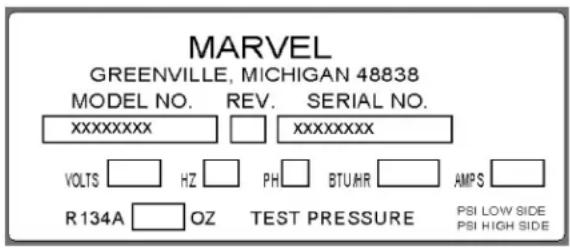
Figure 1

CAUTION
Help Prevent Tragedies
Child entrapment and suffocation are not problems of the past. Junked or abandoned refrigerators are still dangerous. Even if they sit out for "just a few days".
If you are getting rid of your old refrigerator, please follow the instructions below to help prevent accidents.
Before you throw away your old refrigerator or freezer:
Take off the doors or remove the drawers.
- Leave the shelves in place so children may not easily climb inside.
Select Location
The proper location will ensure peak performance of your appliance. We recommend a location where the ice machine will be out of direct sunlight and away from heat sources. To assure your product performs to specifications the recommended installation location temperature range is from 55 to 80^ (13 to 27^ ) for built in ice machines, 55 to 90^ (13 to 32^ ) for freestanding ice machines. Ice machine will not perform correctly in ambient temperatures less than 55^ ( 13^ ).

CAUTION
Outdoor Installation
Only the 30iMT model is suitable for outdoor installations.
Building codes may require a ground fault circuit interrupter electrical receptacle to supply electrical power to the ice machine for outdoor applications, (see "Electrical Connection" section).
Do not install in a location where the ice machine will be exposed to direct sun exposure as this may result in unsatisfactory performance.
Winterizing Your Outdoor Ice Machine
For instructions on winterizing your ice machine see page 23, "Preparing the Ice Machine for Storage".
Cabinet Clearance
Ventilation is required from the bottom front section of the ice machine. Keep this area open and clear of any obstructions. Adjacent cabinets and counter top can be installed around the ice machine as long as the front grille remains unobstructed.

CAUTION
FrontGrille
Do not obstruct the front grille. The openings within the front grille allow air to flow through the condenser heat exchanger. Restrictions to this air flow will result in increased energy usage and loss of cooling capacity. For this reason it is important this area to not be obstructed and the grille openings kept clean. AGA MARVEL does not recommend the use of a custom made grille as air flow may be restricted because of inadequate openings. (See Figure 2).
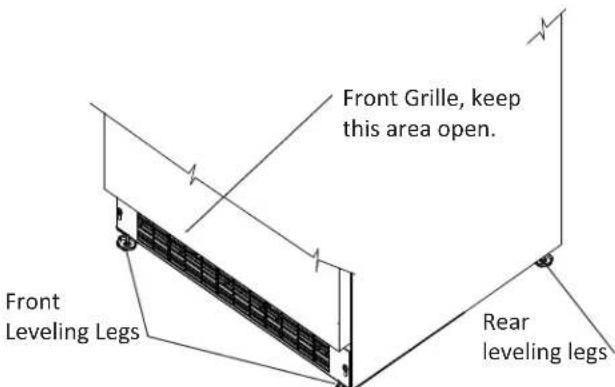
Figure 2
Leveling Legs
Adjustable legs at the front and rear corners of the ice machine should be set so the ice machine is firmly positioned on the floor and level from side to side and front to back. The overall height of your Marvel ice machine may be adjusted from 33^3 / 4'' (85.7cm) with the leveling legs turned in, and up to 34^3 / 4'' (88.3cm) with the leveling legs extended.
To adjust the leveling legs, place the ice machine on a solid surface and protect the floor beneath the legs to avoid scratching the floor. With the assistance of another person, lean the ice machine back to access the front leveling legs. Raise or lower the legs to the required dimension by turning the legs. Repeat this process for the rear by tilting the ice machine forward using caution to prevent the door from opening. On a level surface check the ice machine for levelness and adjust accordingly.
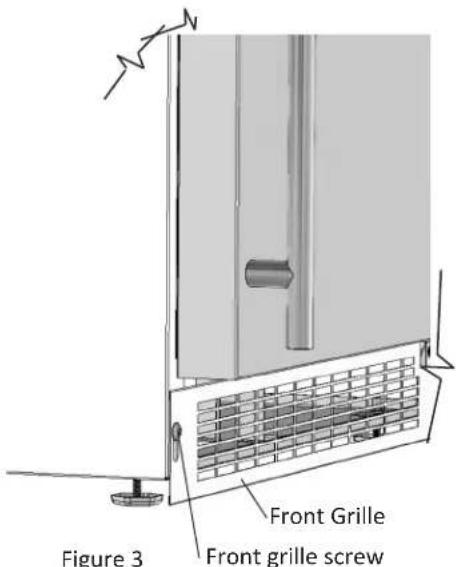
The front grille screws may be loosened and the front grille adjusted to the desired height. When adjustment is complete tighten the two front grille screws. (See Figure 3).

WARNING
- Do not splash or spray water from a hose on the ice machine. Doing so may cause an electrical shock, which may result in severe injury or death.
- This ice machine should not, under any circumstances, be installed to an un-grounded electrical supply.
Electrical Connection
A grounded 115 volt, 15 amp dedicated circuit is required.
This product is factory equipped with a power supply cord that has a three-pronged, grounded plug. It must be plugged into a mating grounding type receptacle in accordance with the National Electrical Code and applicable local codes and ordinances (see Figure 4). If the circuit does not have a grounding type receptacle, it is the responsibility and obligation of the customer to provide the proper power supply. The third ground prong should not, under any circumstances, be cut or removed.

CAUTION
Electrical Extension cords should not be used. They can be hazard
ous and cause deficient operation. The wall receptacle should be located near the ice machine and be a polarized type with adequate ground protection. The ice machine must be installed to your local building codes and ordinances.
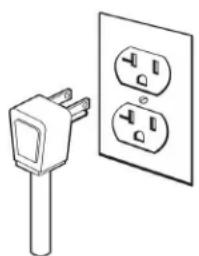
Figure 4
NOTE
Ground Fault Circuit Interrupters (GFCI) are prone to nuisance tripping which will cause the ice machine to shut down. GFCI's are generally not used on circuits, with powered equipment, that must run unattended for long periods of time, unless required to meet local building codes and ordinances.

WARNING
Risk of electrical shock or personal injury could occur due to moving components, if machine compartment access cover is removed before unplugging the ice machine.
Drain Plumbing
Your ice machine requires drain plumbing. There are 2 variations of ice machines in regards to the installation of the drain plumbing, without a drain pump (gravity drain), and with a drain pump.
Gravity Drain, no drain pump.
Your ice machine requires a gravity drain (Figure 5) that requires 5% inch inside diameter (I.D.) tubing from the back of the ice machine to a plumbed connection to a sanitary sewer. Remove the access panel to plumb in drain connection. The gravity drain location for built-in ice machines can be within the shaded area shown in Figure 7.
With a factory installed drain pump.
Your ice machine has a factory installed drain pump. The discharge tubing is coiled up and attached to the back of the ice machine. The 3/8 inch I.D. tubing needs to be plumbed and connected to a sanitary sewer. Refer to Figure 6. The maximum lift of the drain pump is 8 feet (2.44 meters) through the 3/8 inch I.D. tubing.
Conversion of factory installed system to a gravity drain system
Service kit 42248304 will be required if the ice machine is converted to a gravity drain. Removal of the drain pump without service kit 42248304 will prevent the ice machine from continued ice production.
Optional Drain Pump.
An optional drain pump (Figure 6) is available if you have purchased an ice machine without one and do not have access to a gravity drain. Installation instructions are provided with the optional drain pump. Contact Marvel customer service for ordering. Observe and follow all local codes when installing ice machine.

CAUTION
Failure to use an adequate drainage system, will result in surround
ing water damage and/or poor ice production.
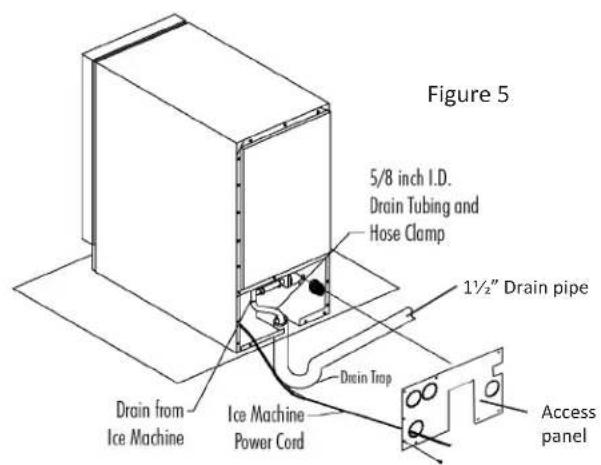
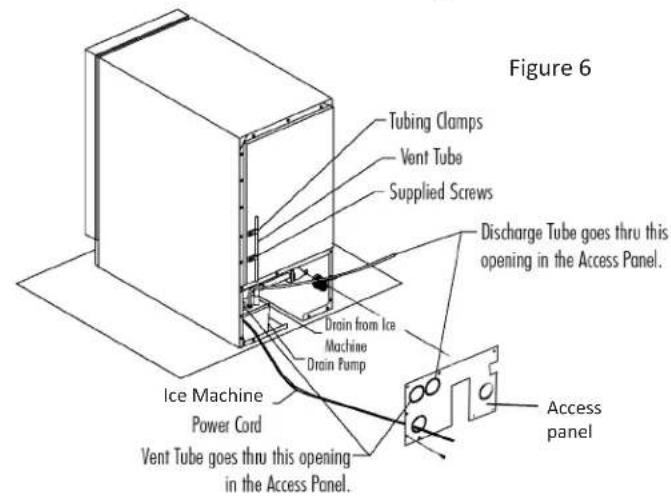
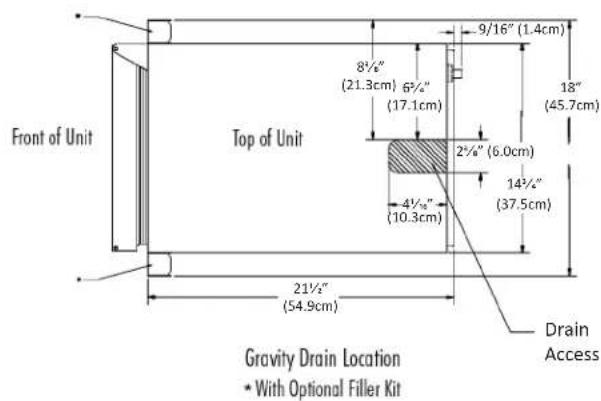
Figure 7
The Marvel Drain Pump is designed to remove drain water from ice machines installed in areas without direct drainage access. The sealed reservoir pump collects the melted ice water and pumps it to a maximum lift of eight (8) feet (2.44 meters) through 3/8 I.D. vinyl tubing to a drain.

CAUTION
This pump has been evaluated for use with water only.
NOTE: Reasonable care and safe methods should be practiced. Do NOT work with energized electrical equipment in a wet area. Read and follow the installation instructions listed in this manual.

WARNING
Risk of electric shock - This pump is supplied with a grounding conductor and grounding-type attachment plug. To reduce the risk of electric shock, be certain that it is connected only to properly grounded, grounding-type receptacle.
Maintenance
The following items require review on a regular basis.
-
Check that the vent line is open, free of kinks/sharp bends, so that air flows freely from the pump reservoir.
-
Check that the discharge tubing is free of foreign material (algae, etc.) and kinks/bends. Confirm that the check valve is operational by observing that the water flow is evident in one (1) direction only - out of the pump. Remove and clean as required.
Troubleshooting the Drain Pump
NOTE
If the drain pump reservoir (not the ice machine bin) reaches overfill condition, the power to the ice machine will be shut off.
If the ice machine is not working, check the following:
- Make sure there is power at the receptacle.
Make sure the ice machine is turned on. - Make sure the ice bin is not full.
Then check the drain pump:
The pump does not run:
- Make sure the pump is plugged in and there is power to the receptacle.
- Check the inlet to the drain pump for debris and clean as needed. Remove clamps and inlet tube from drain pump to check for and remove debris.
- Make certain the vent line is free of kinks/ sharp bends or restrictions.
- Make certain there is enough water to activate the drain pump. It will take at least one (1) quart (.95 liters) of water to activate the drain pump.
The pump runs, but no water is pumped out:
- Check that the vent is clear and free of restrictions.
- Check the discharge line to make certain there are no restrictions.
- Make sure that the discharge tubing has not exceeded the maximum lift of eight (8) feet (2.44 meters) and the horizontal run is not greater than twenty (20) feet (6.1 meters).
The pump runs and then quickly turns off repeatedly:
- Check to make certain the drain pump is level.
- Check that the vent is clear and free of restrictions.
The ice machine is running but not producing ice:
Water Supply
The ice machine must be connected to a potable, active cold water supply line delivering water pressure at a minimum of 20 psi and a maximum of 120 psi.
Water connection is made through a right angle garden hose fitting supplied with the ice machine. See Figure 9 for detailed instructions. DO NOT USE ANY THREAD SEALERS.
- A water filter can be used with this ice machine. A quality filter can help remove particles as well as remove taste and odors from water.
- DO NOT USE A "REVERSE OSMOSIS" FILTERING DEVICE.
- Softened water is not recommended. This will produce soft, cloudy ice cubes that will stick together.
- De-ionized water is not recommended. This water will not form solid ice cubes.
- A water specialist can recommend proper water treatment.
- When installing a water line for this ice machine a shutoff valve is recommended. NOTE: DO NOT USE A SELF-PIERCING TYPE VALVE.
- After installation of water line, turn on water and check for any leaks. Additional tightening may be needed.
- Allow for extra water line for built-in installations for easy removal of ice machine and to help prevent the water line from kinking.
The ice machine is designed to make clear ice from the majority of water sources on a daily basis. If your results are unsatisfactory, your water may need to be filtered or treated.
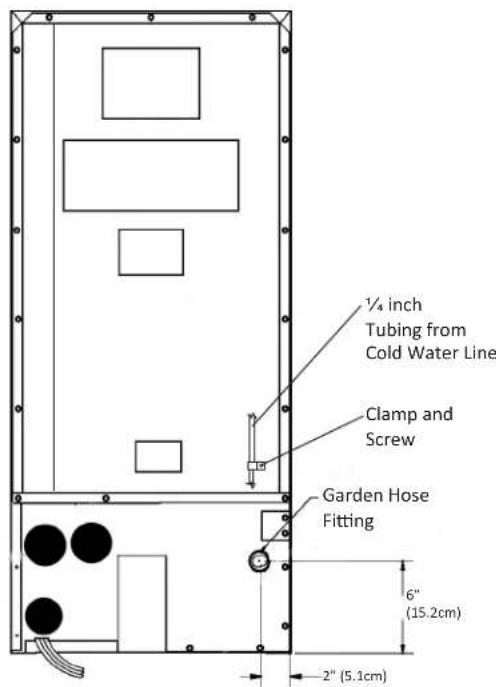
Figure 8
Secure the water supply line to the back of the cabinet with the screw and clamp provided in the corner of the back panel. (See Figure 8).
NOTE
The water line fitting supplied with your ice machine
is to be used on a 1 / 4 inch copper water supply line only. Do not attach a plastic supply line using this fitting.
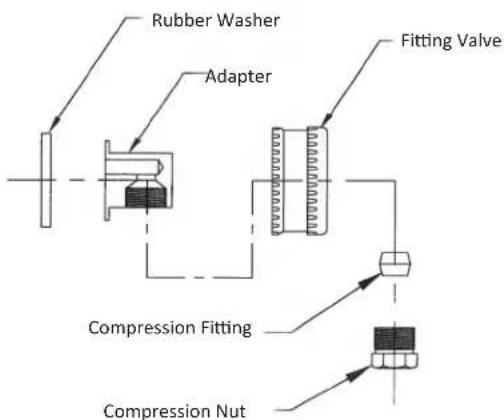
Figure 9
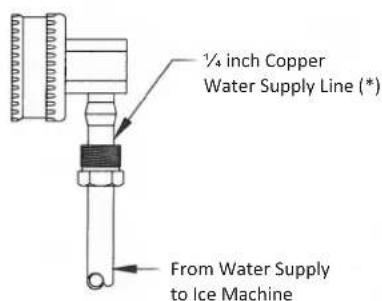
(*) Supplied by Customer
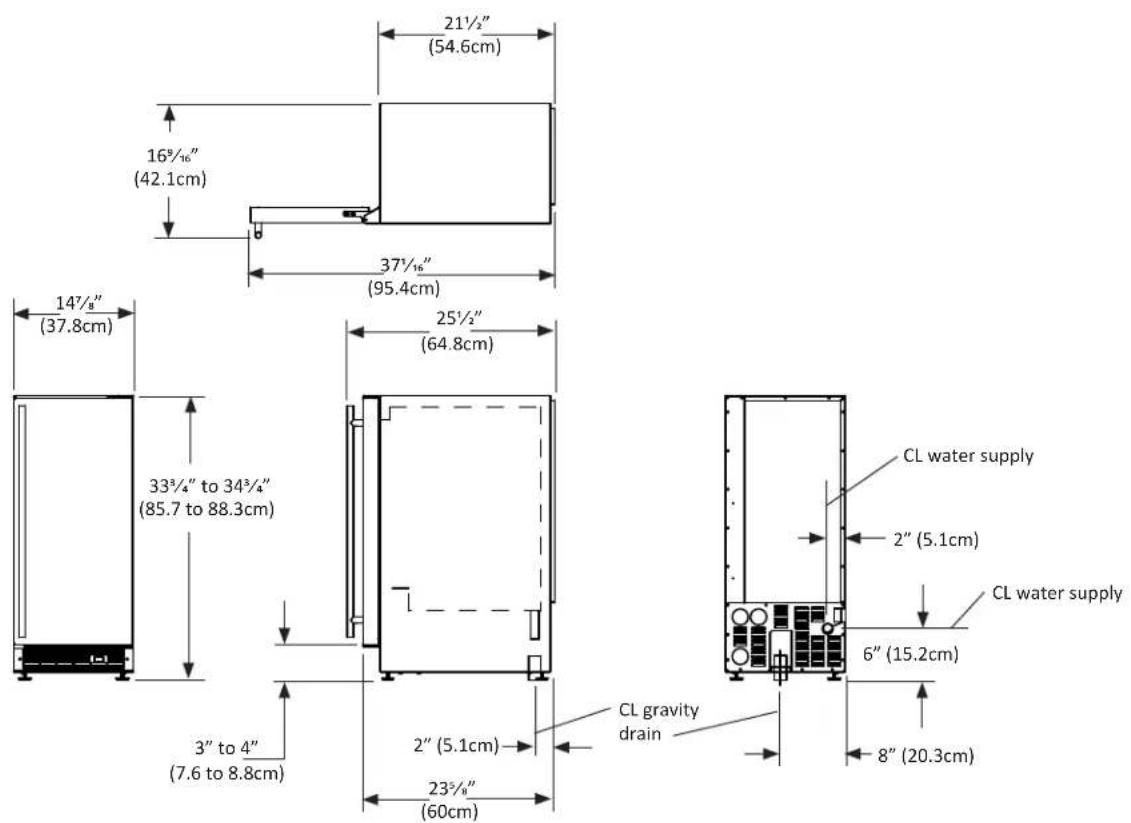
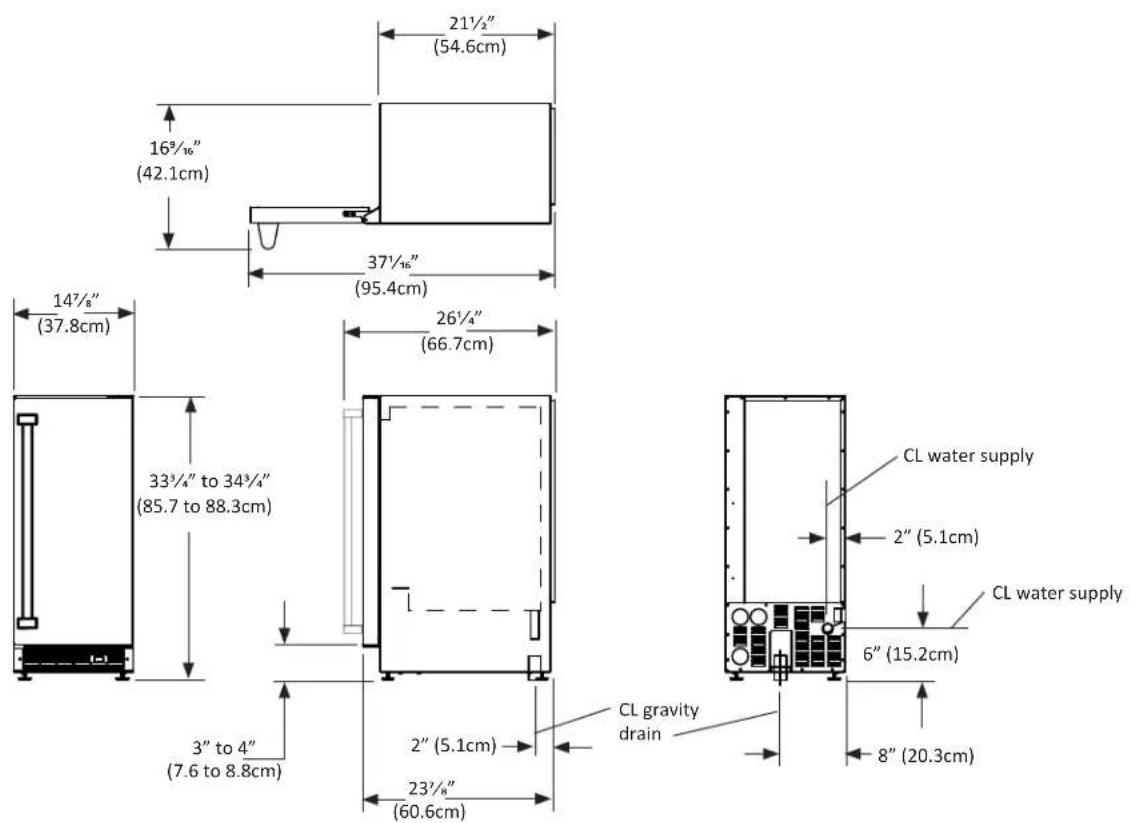
ROUGH IN OPENING DIMENSIONS, FOR 30IMT SOLID DOOR
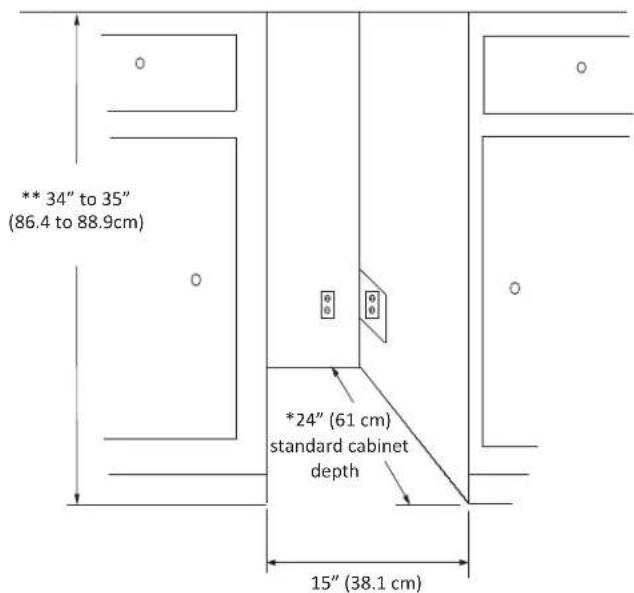

CAUTION
Electrical Requirements: A grounded 115 volt, 15 amp dedicated circuit is required. A GFCI receptacle may be required for outdoor models.
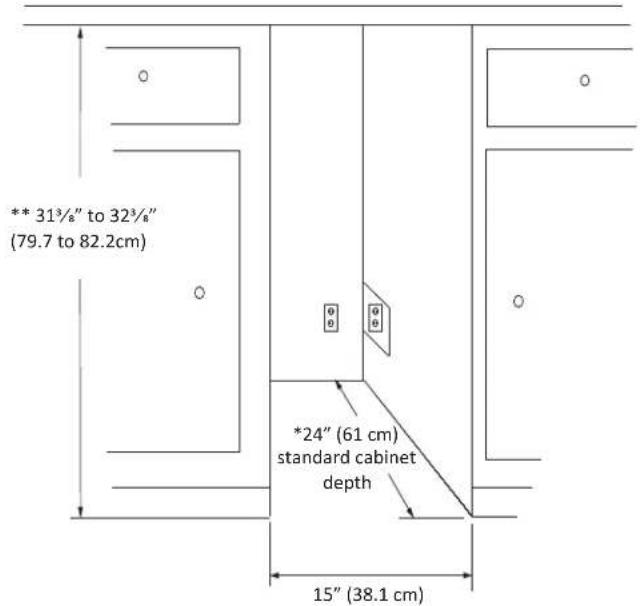
Power outlet can be located in the back wall behind the ice machine. Add 1" to depth for thickness of plug, or recess outlet 1" into the wall. Power outlet can also be installed in adjacent cabinetry with a cutout for routing of power cord. Follow all local building codes when installing electrical and the ice machine.
Product weight = 100 lbs. (45.5 kg.)
- Depth dimension may vary depending on each individual installation.
** Minimum rough in opening required is to be larger than the adjusted height of the cabinet.
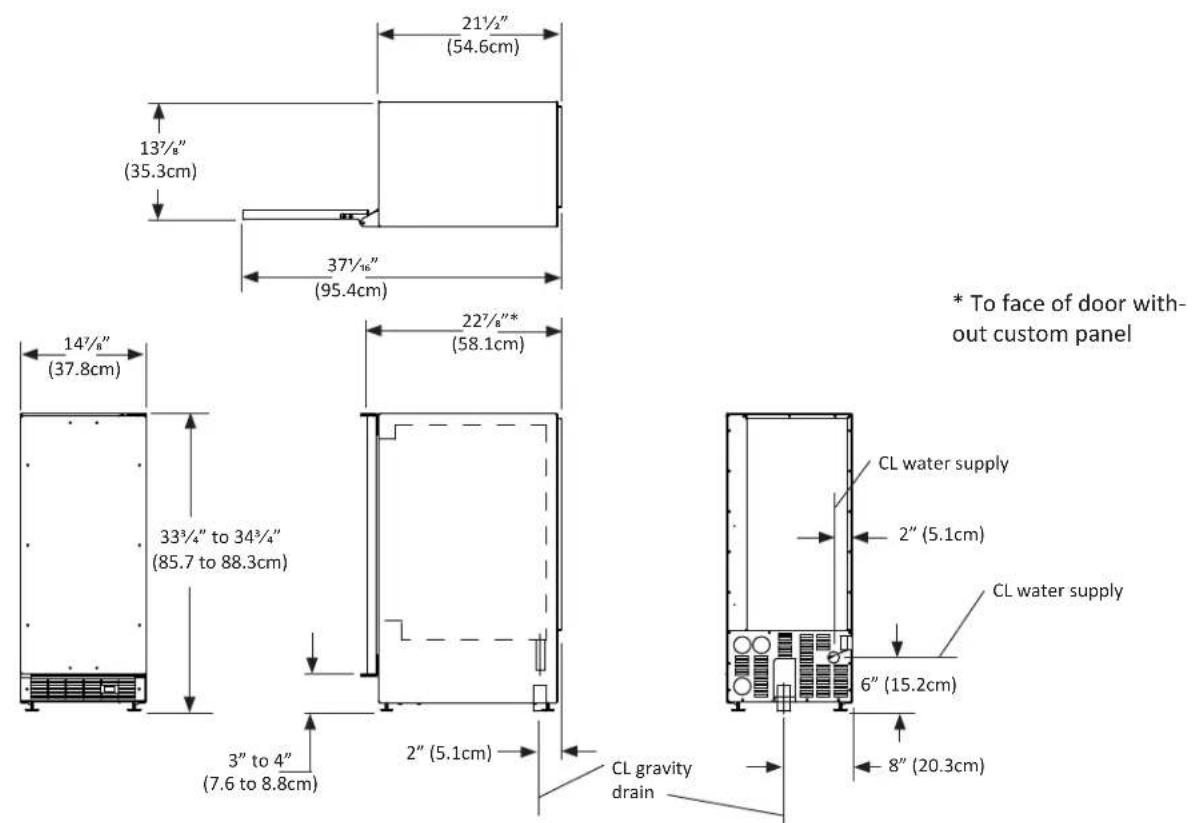
ROUGH IN OPENING DIMENSIONS, FOR 3OIMT AND MPRO30IMT SOLID DOOR
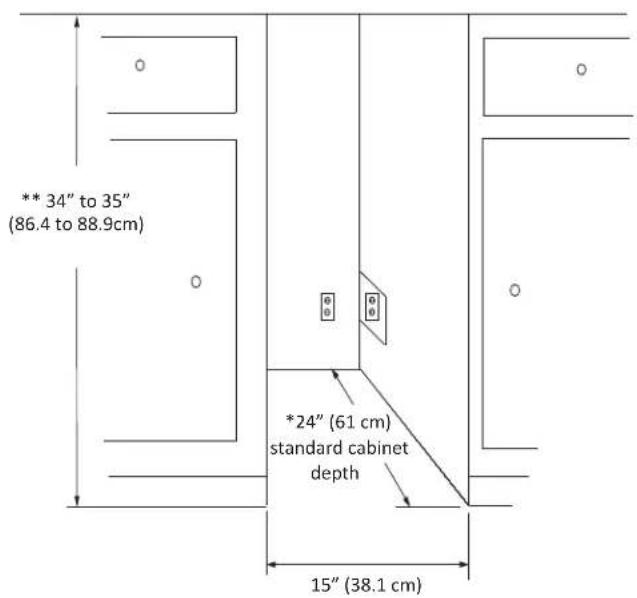

CAUTION
Electrical Requirements: A grounded 115 volt, 15 amp dedicated circuit is required. A GFCI receptacle may be required for outdoor models.
Power outlet can be located in the back wall behind the ice machine. Add 1" to depth for thickness of plug, or recess outlet 1" into the wall. Power outlet can also be installed in adjacent cabinetry with a cutout for routing of power cord. Follow all local building codes when installing electrical and the ice machine.
Product weight = 100 lbs. (45.5kg)
- Depth dimension may vary depending on each individual installation.
** Minimum rough in opening required is to be larger than the adjusted height of the cabinet.
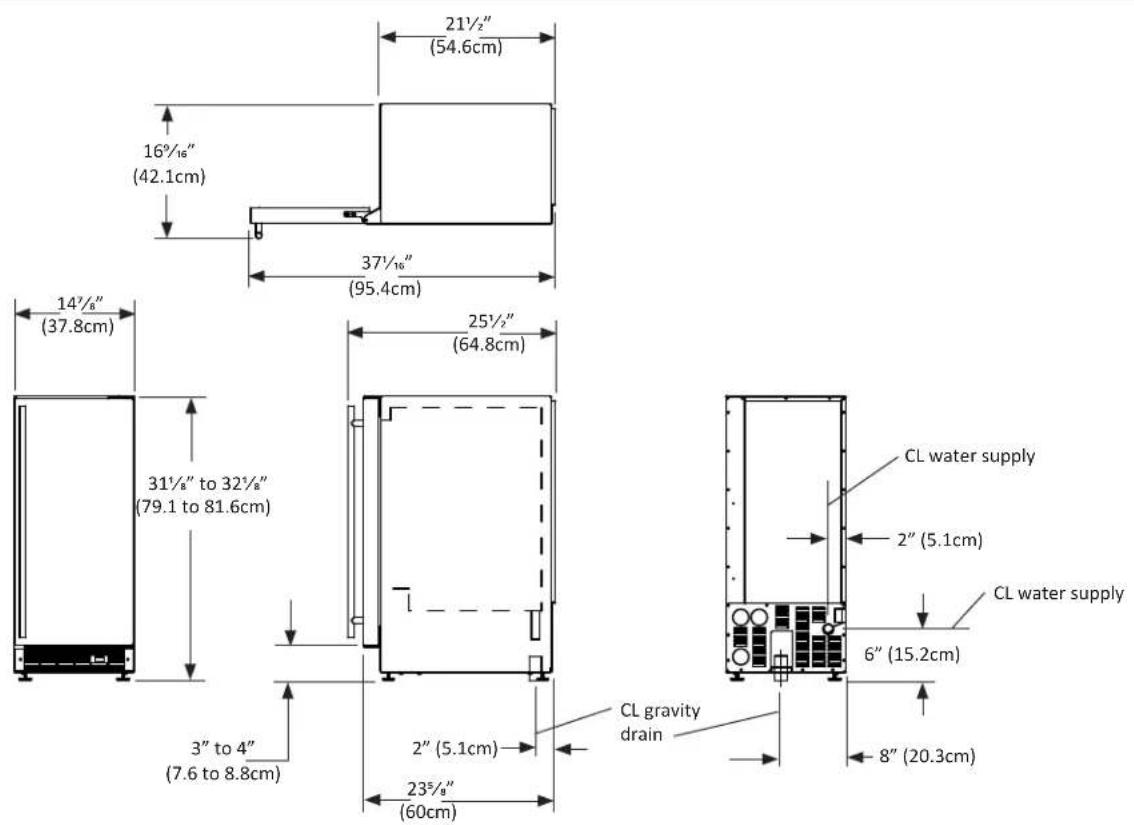
ROUGH IN OPENING DIMENSIONS, FOR 30IMT SOLID OVERLAY DOOR
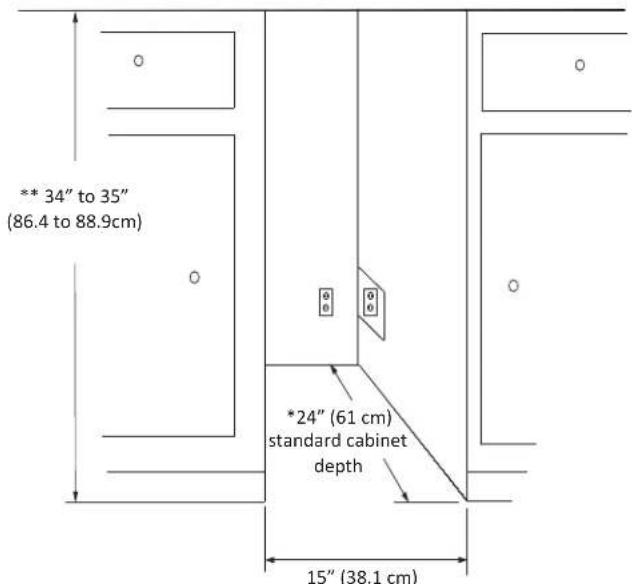
CAUTION
Electrical Requirements: A grounded 115 volt, 15 amp dedicated circuit is required.
Power outlet can be located in the back wall behind the ice machine. Add 1^ to depth for thickness of plug, or recess outlet 1^ into the wall. Power outlet can also be installed in adjacent cabinetry with a cutout for routing of power cord. Follow all local building codes when installing electrical and the ice machine. Product weight = 100 lbs. (45.5 kg.)
- Depth dimension may vary depending on each individual installation.
** Minimum rough in opening required is to be larger than the adjusted height of the cabinet.
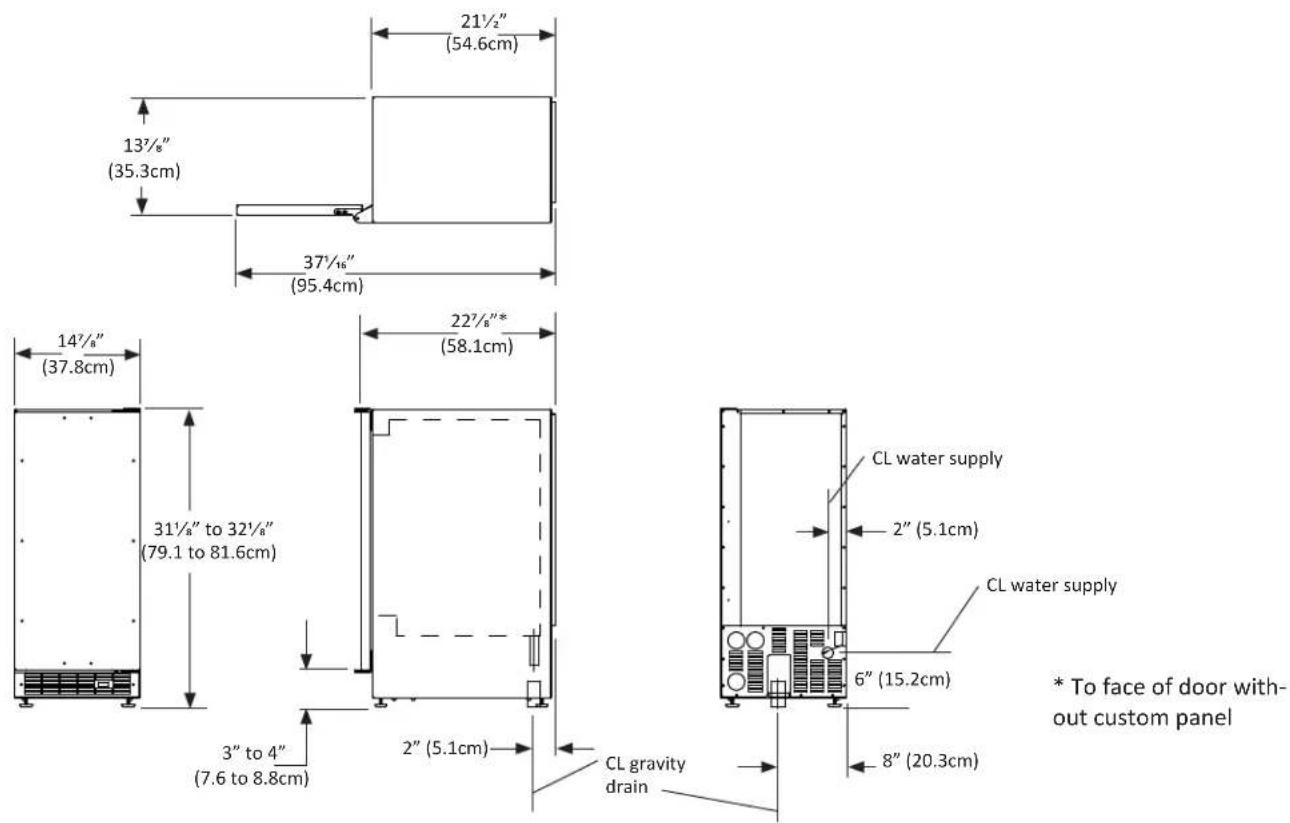
ROUGH IN OPENING DIMENSIONS, FOR 30IMAT SOLID DOOR
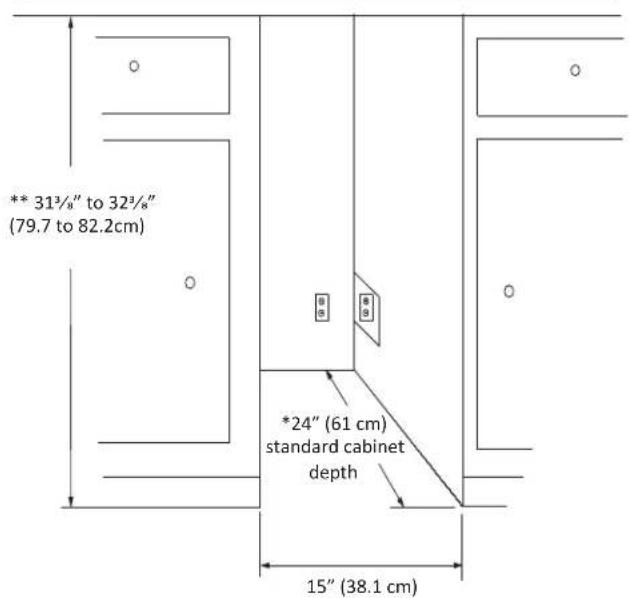

CAUTION
Electrical Requirements: A grounded 115 volt, 15 amp dedicated circuit is required.
Power outlet can be located in the back wall behind the ice machine. Add 1" to depth for thickness of plug, or recess outlet 1" into the wall. Power outlet can also be installed in adjacent cabinetry with a cutout for routing of power cord. Follow all local building codes when installing electrical and the ice machine.
Product weight = 100 lbs. (45.5kg)
- Depth dimension may vary depending on each individual installation.
** Minimum rough in opening required is to be larger than the adjusted height of the cabinet.
ROUGH IN OPENING DIMENSIONS, FOR 30IMAT SOLID OVERLAY DOOR

CAUTION
Electrical Requirements: A grounded 115 volt, 15 amp dedicated circuit is required.
Power outlet can be located in the back wall behind the ice machine. Add 1" to depth for thickness of plug, or recess outlet 1" into the wall. Power outlet can also be installed in adjacent cabinetry with a cutout for routing of power cord. Follow all local building codes when installing electrical and the ice machine.
Product weight = 100 lbs. (45.5 kg.)
- Depth dimension may vary depending on each individual installation.
** Minimum rough in opening required is to be larger than the adjusted height of the cabinet.

CAUTION
Step 1: Verify door alignment
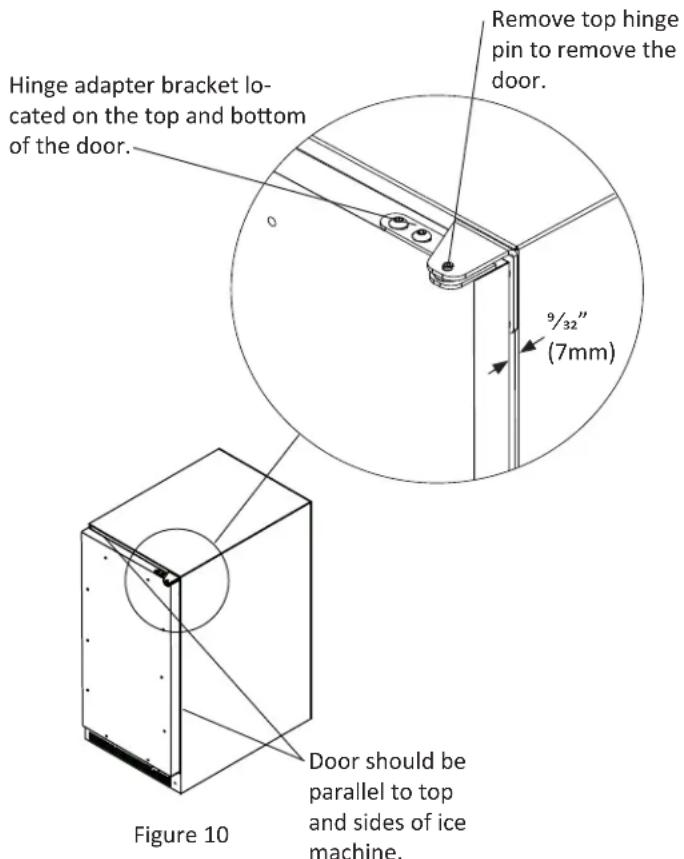
Verify that the door is aligned correctly with the cabinet prior to fabricating the custom panel. Failure to do so may result in mis-alignment of the custom panel with the hinge bracket. The door should be parallel to the sides and top of the ice machine. If alignment is necessary the door may be adjusted by loosening the 2 screws which secure the top and/or bottom hinge adapter brackets, located on the top and bottom of the door and adjusting the door side to side. Use a 5/32'' allen wrench, for this procedure. (See Figure 10 below). When finished aligning the door, tighten the screws securely.
Step 2: Remove door
Remove the top hinge pin from the hinge with an 1/8'' allen wrench. Remove the door by angling the top of the door outward and lifting the door off the bottom hinge. (See detail in Figure 10).
Step 3: Remove gasket
Lay the door on its front being careful not to scratch it. To gain access to the screw mounting holes remove the door gasket by peeling up and out of the channel.
Step 4: Cut overlay panel
Depending on the ice machine model cut the overlay panel to the dimensions shown in Figure 11 and Table A.
NOTE
For overlay with lock option panel thickness to be 3 / 4'' (19mm) maxi
mum to 5 / 8'' (16mm) minimum.

CAUTION
Weight of the overlay panel should not exceed 20 pounds (9.1 kilograms).
NOTE
For the door to work properly it is necessary to maintain a
minimum space of 9 / 32'' (7mm) between the door and cabinet flange as shown. This space can be adjusted by adjusting the top and bottom hinge adapters.
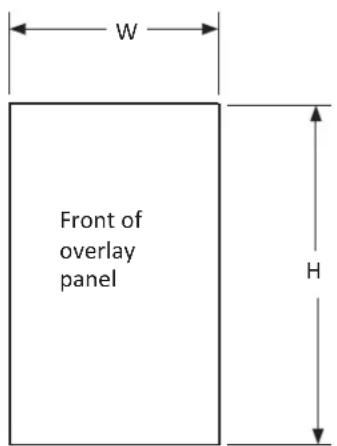
Figure 11
Table A
| Model W | H | |
| 30iMT | 145/8" (37.1cm) | 305/16" (77.0cm) |
| 30iMAT | 145/8" (37.1cm) | 271/16" (70.3cm) |
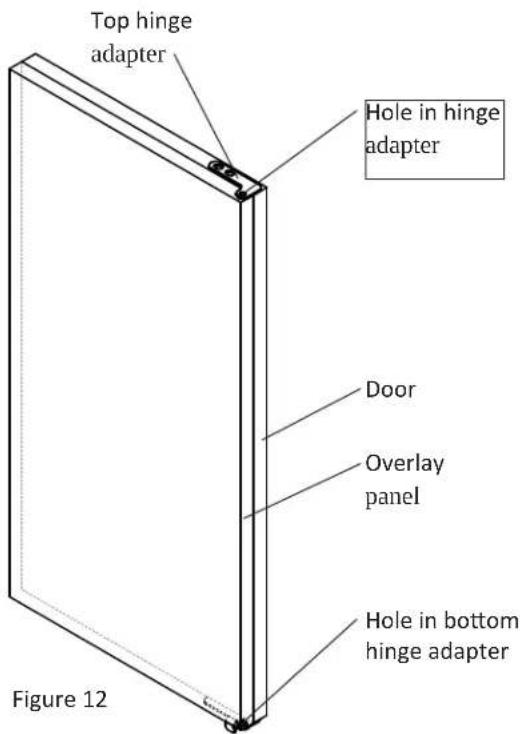
Step 5: Drill hinge clearance holes in overlay panel Set the overlay panel on the door front, align the edges, and clamp together. Clamp the panel firmly but be careful not to damage the door or the panel. Mark center of hinge adapter hole on wood panel, top and bottom. (See Figure 12.) Remove wood panel from door and drill 5 / 16'' (8mm) diameter clearance holes into the overlay panels 3 / 4'' (20mm) deep. These will be clearance holes for the top and bottom hinge pins.
This is also a convenient time to locate and drill the holes for your handle. Most often the handle is to match that of the surrounding cabinetry. If your handle attaches from the back-side of the custom panel, locate the mounting holes while the panel
is attached to the door and cabinet. After the panel is removed from the door, drill the mounting holes from the front, to the recommended diameter of the handle manufacturer. Counter bore the back-side of the panel so the screw heads do not interfere with the surface of the door.
Table B
| Material Type #8 | Wood Screw |
| Hardwood 1/8" (3.2mm) Diameter. Pilot Hole | |
| Softwood 7/64 (2 .8mm) Diameter. Pilot Hole | |
Step 6: Drill panel mounting holes
Re-clamp the panel to the door per step 5 and drill the screw pilot holes for attaching the overlay panel to the door. Select the size of the hole from Table B. Be careful not to drill the pilot holes through the overlay panel, (1/2'' (12.7mm) deep for 3/4'' (19mm) and 5/8'' (15.7mm) panels).
Step 7: Secure overlay panel to the door.
With the #10 wood screws provided, fasten the overlay panel to the door. (See Figure 13).
Press the door gasket into the door channel. Make certain the gasket corners are fully inserted. If applicable insert the key into the lock and make certain the lock operates properly.
Step 9: Install the door
Install the top and bottom hinge adapter bushings back into the hinge adapters that were removed in step 6. Install the door by reversing the procedure from step 2. Install the top hinge pin so the screw head is flush with the top surface of the hinge. If applicable insert key into lock and verify the lock cam works properly with the catch bracket on the front of the ice machine cabinet.
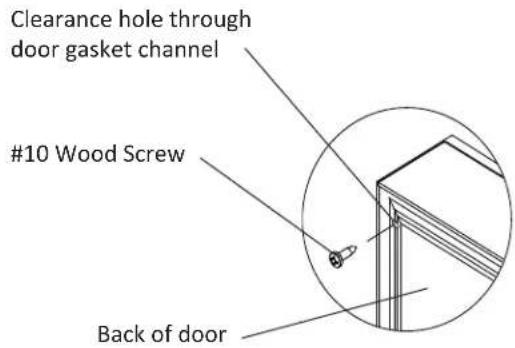
Figure 13
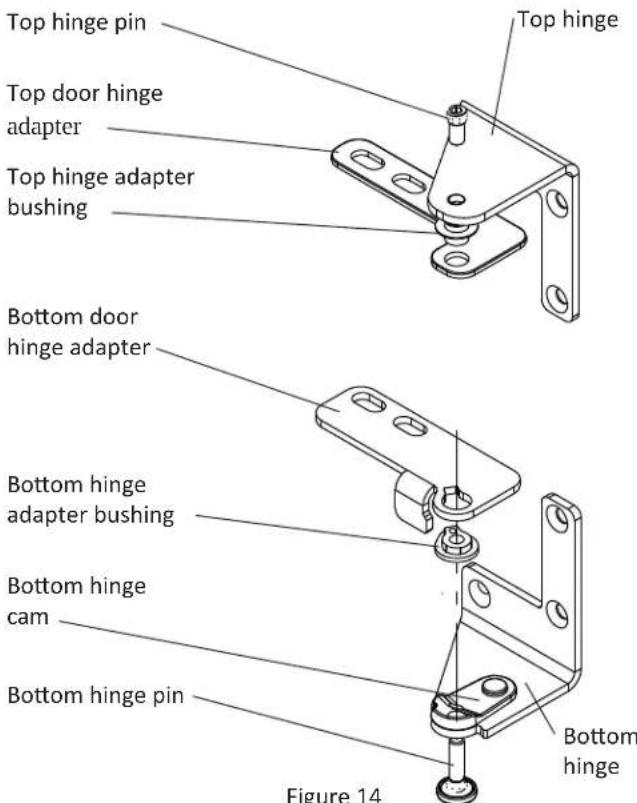
Figure 14 Right hand hinges shown
Operation (Turning on the ice machine)
Once the drain and water supply are connected, and the ice machine is in place and leveled, plug in the service cord. Place the switch to the "ON" position to turn on the ice machine. The switch is located in the front grille, see Figure 16 for location.
The Ice Making Process
Your ice machine is unique in how it forms ice with fractional freezing to form a slab of ice that is clear and has less mineral content than the water it is produced from. This is accomplished by running water over the cold evaporator plate (see Figure 15) which gradually freezes the water to produce the ice slab. Mineral deposits are left in the reservoir.
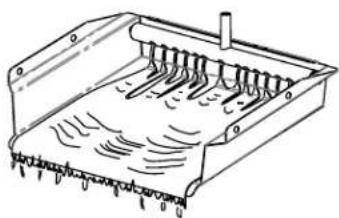
Figure 15
When the ice slab reaches the correct thickness, the ice sheet is released and slides onto the grid cutter (see Figure 17). Here, the ice slab is cut into squares by the grid cutter's heated wires (see Figure 18). The water containing the rejected minerals is drained after each freezing cycle. Fresh water enters the machine for the next ice making cycle.
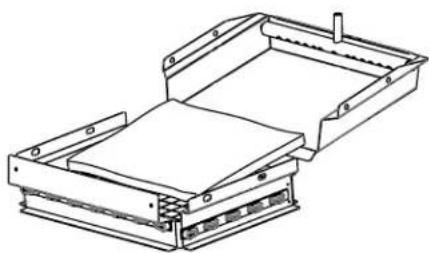
Figure 17
The ice machine will keep producing ice until the ice machine's bin is full and will restart automatically when ice needs to be replenished in the bin. The ice bin is not refrigerated, and some melting will occur. Allow your ice machine to run for 24-48 hours to accumulate ice in the ice machine's bin.
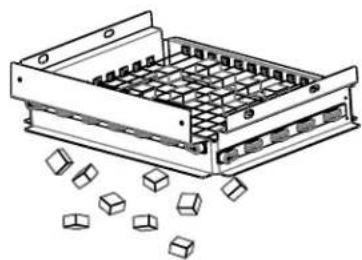
Figure 18
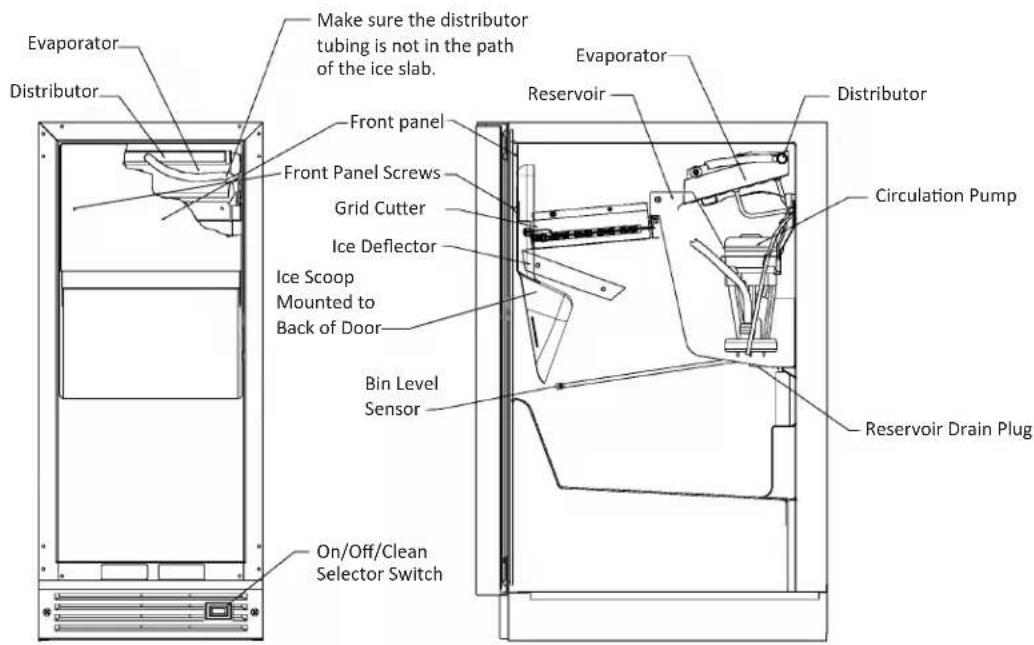
Figure 16
The bin level sensor is located in the ice bin, it senses when the ice supply is low or full and starts or stops the ice making process accordingly.
NOTE
If the water supply is turned off to the ice machine be sure to set the selector switch to the "OFF" position.
Ice Production
Your unit will produce 30 lbs of ice in a 24-hour period when installed in a 70^ ambient with a 55^ water supply.
NOTE
"Initial" ice production and ice accumulated in the storage bin will vary significantly. This is normal. During the first 24-hours of operation the unit will produce 30 lbs of ice at the above temperature conditions, but when starting with an empty ice storage bin, the storage bin may only accumulate 18 lbs of ice. By design, the ice storage bin is maintained at a temperature slightly above freezing to allow the stored ice to slowly melt, to preserve the clarity and assure a constant supply of fresh ice. As ice is accumulated in the bin, the ice production rate will overcome the ice melt and the storage bin will fill to capacity.
New Sounds
The ice machine will make sounds that are different than your household refrigerator. Because these sounds are new to you they may be of a concern but are most likely normal. Ice falling onto hard surfaces and water cascading across the evaporator will make sounds seem louder than they actually are. Following are some of the sounds that you may hear:
A buzzing sound will be heard when the water valve opens to fill the water reservoir.
You may hear a rattling noise which could be water flowing through the water line.
A splashing sound may be heard when water is flowing over the evaporator plate and into the water reservoir.
When the ice slab is released from the evaporator plate you may hear a "thud" as it slides onto the grid cutter.
At the end of an ice making cycle you may hear a gurgling sound which is refrigerant flowing in the ice machine.
When the condenser fan turns on you might hear the air circulating over the condenser.
Care of the Ice Machine
- Avoid leaning on the cabinet door. You may bend the door hinge or tip the ice machine.
- Exercise caution when sweeping, vacuuming or mopping near the front of the ice machine. Damage to the grille and/or switch can occur.
- Periodically clean the inside of the ice machine components and inside of the ice machine.
- If your ice machine has either a stainless steel door and/or cabinet, to keep it looking its best, we recommend periodically applying a stainless steel cleaner and a non-abrasive stainless steel polish. This is especially important for outdoor applications and locations near salt-water environments.
Cleaning the Ice Machine
This build-up will need to be removed in the ice machine and stick to the ice machine's parts over time. This build-up must be removed for proper ice production, ice quality, and ice machine life. Your ice machine is equipped with a cleaning mode that will help in cleaning out these impurities.
The impurities will need to be cleaned of this build-up regularly (at the very least, annually), depending on use and water hardness. Use a nickel safe ice machine cleaner, including but not limited to the following brands. Ice machine cleaners are available at most appliance retailers or through the cleaner manufacturers web site.
Kirby's Certified ice machine cleaner, 100% nickel safe
Nu-Calgon nickel safe ice machine cleaner
Franklin Machine Products nickel safe ice machine cleaner
To clean the ice machine:
- Switch the selector switch to the "OFF" position.
- Remove all the ice from the bin.
- Remove the front panel by removing the 2 screws. (See Figure 19).
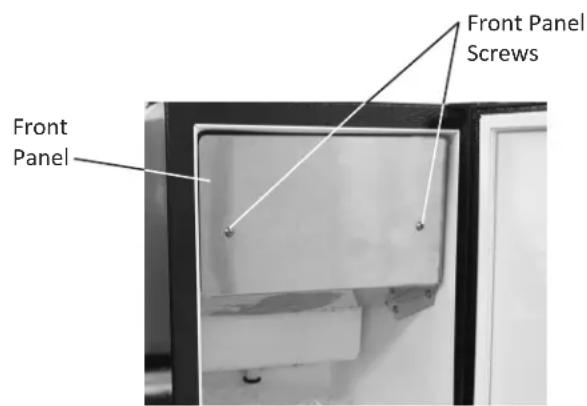
Figure 19
- Remove the drain plug at the bottom of the reservoir to drain any remaining water and then reinstall.
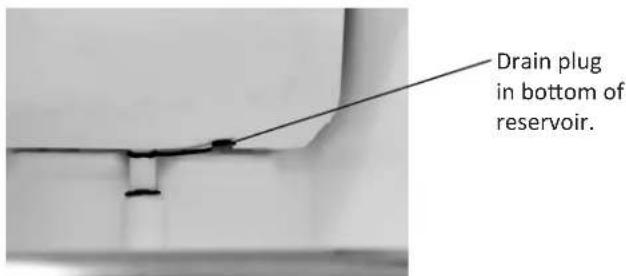
Figure 20
- Allow the ice to fall from the evaporator, remove and discard slab of ice. (See figures 21 and 22).
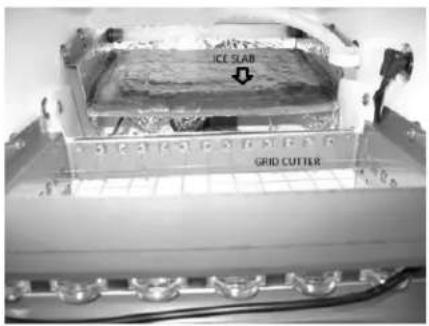
Allow ice slab to fall on to grid cutter
Figure 21
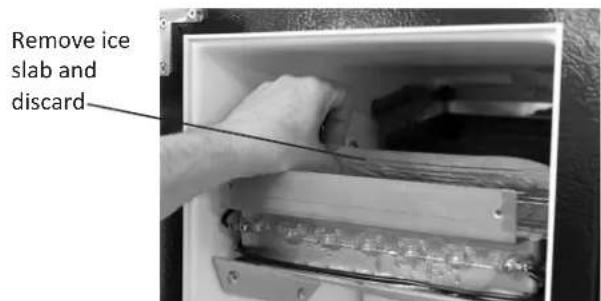
Figure 22
- Determine the proper amount of cleaner from the ice machine cleaner manufacturer's mixture ratio based on 34 gallon (2.81 liters) of water (refer to the manufacturer's mix ratio directions). Add the recommended amount of concentrated cleaning solution to the reservoir of the ice machine. This can be done by pouring the solution on the evaporator, which will flow down into the reservoir. (See figure 23).
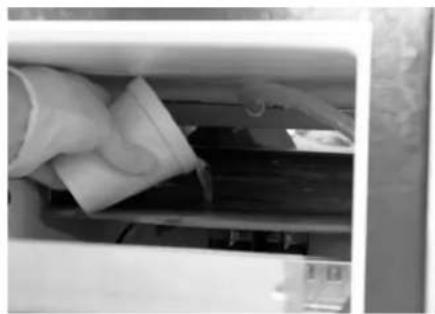
Figure 23
- Switch the selector switch on the grille of the ice machine to the "CLEAN" position. The ice machine will automatically start and stop the cleaning cycle and 34 of a gallon (2.81 liters) of water will automatically be added to the cleaning solution.
- The total cleaning time will end in 49 minutes. The cleaning cycle will automatically rinse the evaporator plate and also drain the cleaning solution and rinse the reservoir with water.
- After the cleaning cycle has ended check that the build-up has been removed. The evaporator plate should be clean, shiny, and smooth to the touch. If build-up is still visible, repeat the cleaning cycle above.
- Clean the ice machine's interior, ice scoop, interior door panel and door gasket with mild soap and water. Using two (2) tablespoons of baking soda in one (1) quart of warm water while cleaning will help remove odors. Rinse with fresh water. DO NOT USE ANY ABRASIVE CLEANING PRODUCTS.
- Replace the front panel.
- Your ice machine is now clean and sanitized and may be put back into operation by switching the selector switch to the "ON" position.
NOTE
Discard the first batch of ice. In the unlikely event a power
interrupt occurs during the clean cycle, you need to start over from the beginning to assure complete cleaning and rinsing of the cleaning agent from the machine.
Energy Saving Tips
The following suggestions will minimize the cost of operating your ice machine appliance.
- Do not install your appliance next to a hot appliance, (cook- er, dishwasher, etc.). heating air duct, or other heat sources.
- Install product out of direct sunlight.
- Assure the front grille vents at front of the ice machine beneath the door are not obstructed and kept clean to allow ventilation for the refrigeration system to expel heat.
- Plug your appliance into a dedicated power circuit. (Not shared with other appliances).
- Minimize door openings and duration of door openings.
- Set the control to the "off" position if cleaning the ice machine requires the door to be open for an extended period of time.
Filler Panel Kit
This Filler Panel Kit will add 3 inches to the width of the ice machine for installation into an 18 inch wide opening. Order one of the following part numbers for the color you require:
P/N 42242831 White Filler Panel Kit
P/N 42242832 Black Filler Panel Kit
P/N 42242833 Stainless Steel Filler Panel Kit
Optional Filler Panel kit includes the following:
quantity 2 Cabinet Extensions
quantity 2 Kick plate Extensions
quantity 6 #10 x .50" sheet metal screws
The following tools are needed:
Phillips screwdriver
Scribe or sharp pointed object
Sharp 1 / 8 diameter drill bit and drill.
To install the filler panel kit:
- Hold one cabinet extension to side of the ice machine, keeping the 12 diameter holes to the outside. Line up the top and front of the cabinet extension with the top and front of the ice machine. Mark the 3 hole locations with the scribe.
- Drill the scribed hole locations with the 1/8 diameter drill bit. DRILL ONLY ENOUGH TO GO THROUGH THE CABINETS OUTER SKIN. Do not drill past this point or you will drill to the inside of the ice machine.
- Reposition the cabinet extension to the ice machine and screw in place with 3 of the sheet metal screws. DO NOT OVER TIGHTEN THE SCREWS.
- Repeat steps 1 through 3 for the other side of the ice machine.
- Remove the screws securing the grille to the bottom of the ice machine. Slide the kick plate extensions behind the grille as shown. Replace the screws and tighten.
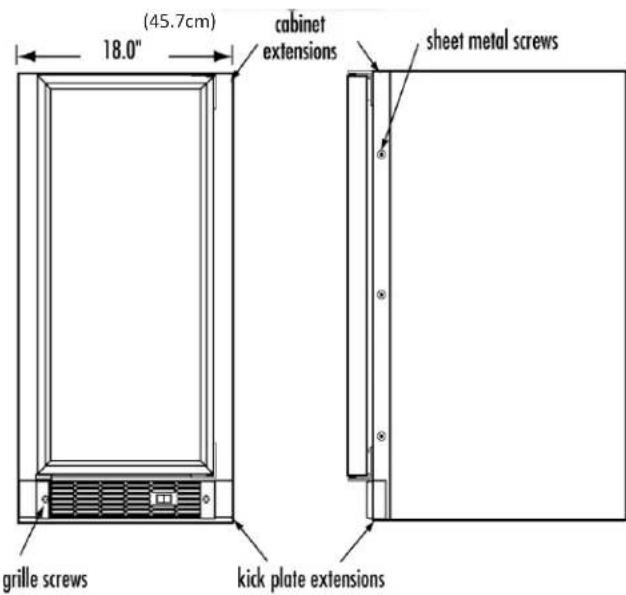
Figure 24
Before calling a service provider try the trouble shooting suggestions below.
Ice Machine Operation
Ice machine does not operate
Is the ice machine's power cord plugged in? Plug the power cord into a grounded 3 prong outlet.
Is the selector switch in the front grille set to the "ON" position? Check the switch to be sure it is in the "ON" position.
Is a fuse blown or a circuit breaker been tripped? Replace a blown fuse or reset a tripped circuit breaker.
Is the temperature of the room cooler than it normally is? The minimum room temperature is 55^ (13^) . The bin thermistor may be sensing the room temperature and shut off before the bin is full of ice. If the room temperature remains low the ice machine may not restart.
Is there a drain pump in the ice machine? If a large amount of water was added to the ice machine then you should wait a few minutes for the drain pump to dispose of it. If there is still water in the ice bin check the drain pump vent line and drain line for obstructions or kinking.
The ice machine is noisy
Many sounds of an ice machine are different than your household refrigerator. This subject is discussed on page 17, but check the following:
Do you hear water being circulated in the ice machine? This is a normal sound as water is added once every ice making cycle.
Is there a "whoosing" sound? Make sure water is getting to the ice machine. Also check to make sure the drain plug is fully seated in the water reservoir.
Is there an ice slab caught between the evaporator plate and the grid cutter? First check to see if the ice machine is level. If the ice machine is level run a cleaning cycle.
Ice Production
Little or no ice production from the ice machine
Is the selector switch set to the "ON" position? Check the switch to be sure it is in the "ON" position.
Is water getting to the ice machine? Make sure nothing is disrupting the water supply such as a closed water valve or a blown fuse or tripped circuit breaker.
Has the ice machine just been started? A typical ice production cycle can take up to 112 hours. Initial start up cycles can take longer. Check the ice machine after 24 hours for ice accumulation in the bin.
Is the reservoir drain plug in place? Check that the reservoir drain plug is properly seated.
Is the water distributor tube restricted? Run a cleaning cycle to clean the ice machine. Also check any filters to make sure they are not restricted.
Is the condenser fan air flow restricted? Make sure the grille in the front of the ice machine is open for proper air circulation.
Is the room and/or water temperature to warm? Move the ice machine to an area where the ambient temperature is below 90^ (32^) . The ice machine should not be placed next to a heat source such as an oven. Check the cold water connection.
Is there scale build up in the ice machine? If there is scale build up on the evaporator, the ice machine needs to be cleaned. See "Cleaning the Ice machine".
Ice Quality
Odor, grey color, or off taste in the ice
Is there mineral scale build up on the evaporator plate? The ice machine needs cleaning. See "Cleaning the Ice Machine".
Is there a high mineral content in the water? The water may need to be filtered.
Are food items being stored in the ice bin? Remove food from the ice bin.
Clumps of ice
Are there clumps of ice in the bin? If the ice isn't used on a regular basis it will melt and form into clumps. Break up the ice clumps with the ice scoop.
Ice cubes are too big, too small, or hollow
Is there low ice consumption? Ice is slowly melting in the ice bin which will affect the size of the cubes. This is normal operation. When the ice bin needs to be replenished, cubes will return to the regular size.
Is the ice slab releasing? Clean the evaporator. See "Cleaning the Ice Machine".
Is the distributor tube restricted? Check the water line to the ice machine to make sure there are no restrictions or kinks in the line. Check all filters to make sure they are not restricted. Check that the water flows evenly out of the distributor tube, if not, clean the ice machine. See "Cleaning the Ice Machine".
Plumbing Problems
Is the drain hose aligned over the drain? Move the ice machine to align the drain.
Is the ice machine draining properly? Check that there are no kinks or restrictions in the drain lines; this can cause water to back up in the ice bin. Check that foreign material is not blocking the ice bin drain located at the right rear corner of the ice bin. Check the drain pump discharge and vent line or any restrictions or kinks. Check that the drain pump is level.
NOTE
If there are plumbing issues outside of the ice machine, they cannot be repaired by the service technician. A qualified plumber will have to be called.
If the ice machine is moved, not used for an extended period of time, or will be in an area that will be near freezing temperatures, it is necessary to remove any remaining water in the icemaking system.

CAUTION
This ice machine must have all water drained and removed to prevent ice machine damage as well as possible water damage to the surrounding area in freezing conditions. These damages are not covered under warranty.

CAUTION
Do not use any type of anti-freeze or other solution as a substitution for properly draining the ice machine.
Clean the Ice Machine
Cleaning the ice machine will help prevent mold and mildew growth as well as sanitize the ice machine for storage or when it is put back into service. See page 17 for instructions for cleaning the ice machine.

WARNING
Risk of electrical shock or personal injury could occur due to moving components, if machine compartment access cover is removed before unplugging the ice machine.
Draining and Removing Water from the Ice-Making System with a Gravity Drain.
- Turn off water supply to the ice machine.
- Disconnect the water supply fitting at the inlet of the water valve.
- Switch the rocker switch to CLEAN for approximately one (1) minute. This will energize and open the water valve and remove most of the water from the water valve and the water valve's outlet water line to the reservoir.
- Switch the rocker switch to OFF position. This will energize and open the drain valve to drain the reservoir and the ice machine drain system.
- Unplug the ice machine from the electrical outlet.
- Remove the access cover from the rear of the ice machine. (See page 5).
- Disconnect the water valve's outlet water line to the reservoir and drain the remaining water left in the water line trap area.
- Reconnect the water valve outlet water line and tighten the
compression nut to a watertight seal.
- Reinstall the ice machine's access cover.
- Clean and dry the ice machine's storage bin.
- Prop the door open for air circulation to prevent mold and mildew.
- Leave the water supply line disconnected or reconnect the supply line and leave it shut off. Do NOT turn the water on and allow water to enter back into the water valve.
Draining Water for Factory Installed Drain Pump Applications
Follow steps 1 through 12 for the gravity drain then do the following:
- Remove the drain pump from the ice machine (refer to Drain Pump Removal Instructions on page 24).
- Drain the water in the drain pump's reservoir by turning the pump upside down and allowing water to drain through the pump's inlet and vent tube fittings.
- After all water is drained, reinstall the drain pump. Make certain all tubing is installed and all hose clamps are tight (refer to Drain Pump removal Instructions on page 24).
To Restart the Ice Machine
- With the rocker switch in the OFF position, plug the ice machine into an electrical outlet.
- Reconnect or turn on the water supply line.
- Reconnect drain tubing if removed.
- Turn the rocker switch to the ON position.
- Check the water inlet, drain lines, and fittings for any water leaks.
- Check drain pump (if equipped) operation by pouring approximately two (2) quarts of water into the ice storage bin. The drain pump should activate and discharge water (refer to Drain Pump on page 6). Check for water leaks at all hose connections.
Drain Pump Removal Instructions:
- Unplug ice machine from the electrical supply and remove the rear access cover from the ice machine. (See page 5 for instructions).
- Unscrew the leveling leg in the back corner until the end of the threaded portion is flush with the threaded nut insert in the base. (see Figure 26).
- Unscrew the 4 hose clamps and remove the 3 hoses from the front of the drain pump. (See Figure 26).
- Rotate the drain pump and remove from the ice machine, (See Figure 25). It may be necessary to disconnect the ground wire connection in the back flange of the cabinet. (See Figure 26).
- Disconnect the ice machine power cord from the drain pump (See Figure 27).
- To drain water from the pump follow step 14 and 15 on page 23.
- Installation of drain pump is reverse of this procedure.
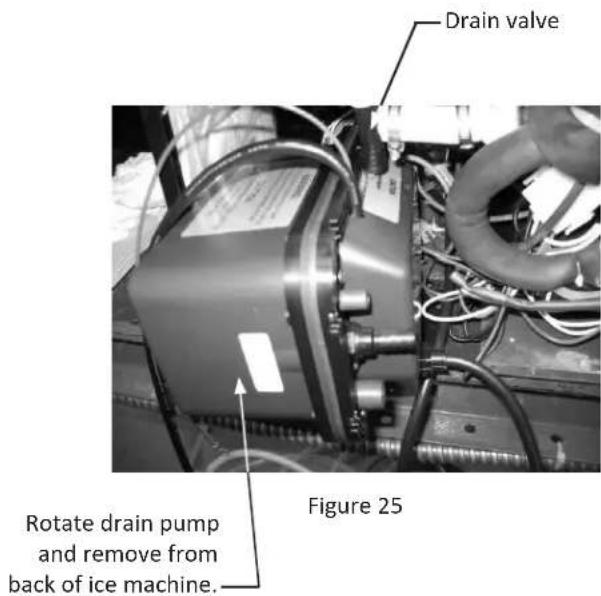
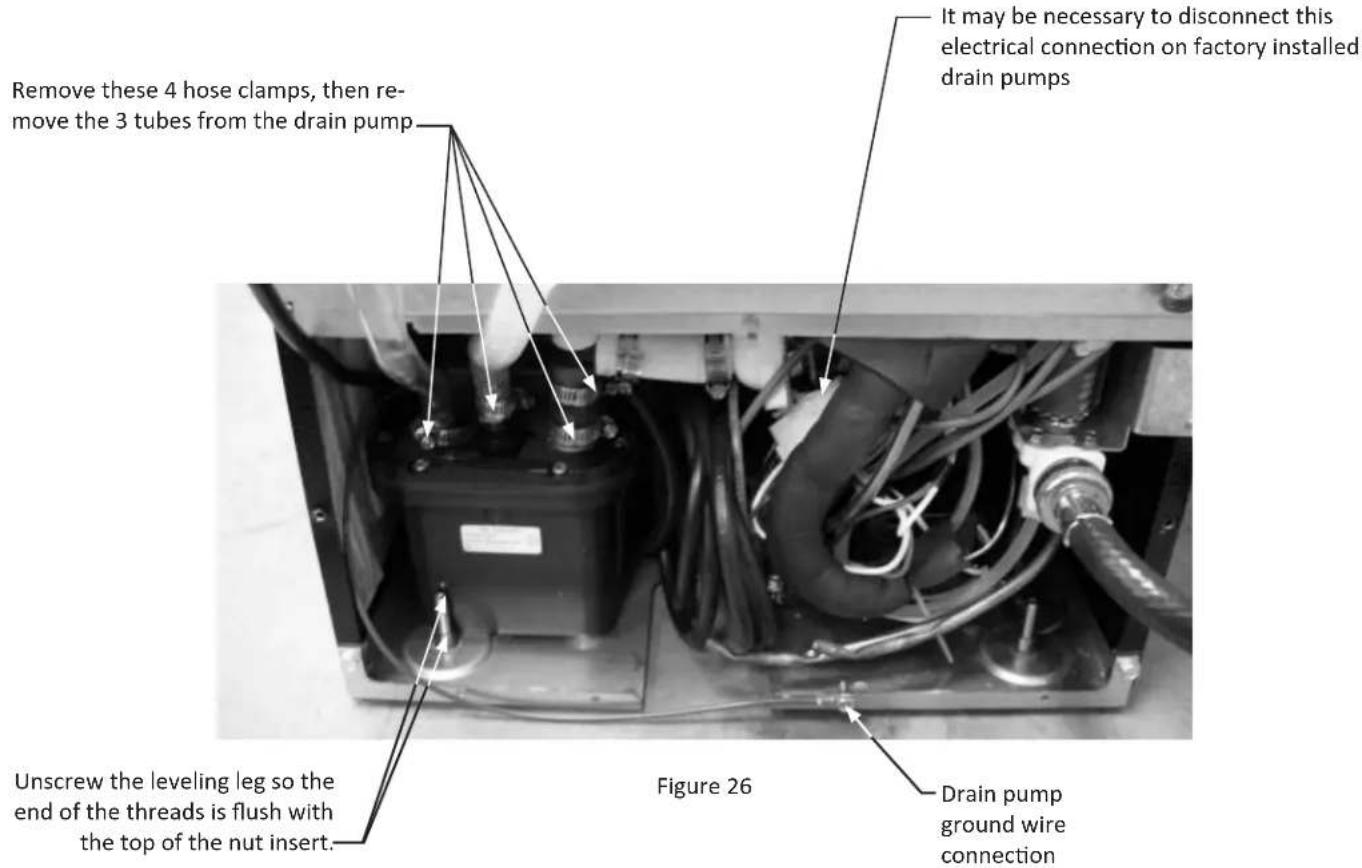
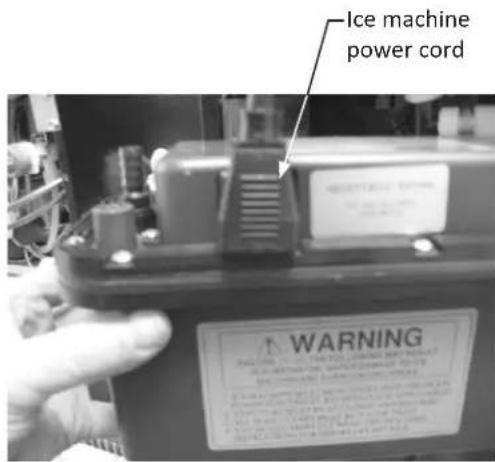
Figure 27
Additional issues to be inspected by the installer upon service replacement:
1) The drain pump must be level.
2) No pinched water lines.
3) No interference with electrical cords or wiring.
4) The drain pump should not set on any obstacles, wiring, etc.
5) Secure all hose clamps leading to and from the drain pump.
6) Insure that the vent tube height is adequate - 18 inch minimum.
7) Insure that drain height is adequate - maximum of 8 foot.
8) Insure that drain length is adequate - maximum of 20 foot.
9) Checked for water leaks after installation of the drain pump.
10) Check for vibrations caused by improper installation.
11) Insure that there is no interference with back access cover.
12) Insure that the hole grommets are in place at each location so that any vent or drain tubes do not rub on any sharp surfaces.
Before Calling for Service
Before calling for service, check the following items:
- Make sure the ice machine is plugged into an outlet.
- Check the outlet for power. Test outlet with lamp to make certain outlet has power.
- Make sure ice machine's switch is in the "ON" position.
- Make sure that there is cold water supplied to the ice machine.
- Make sure drain plug on bottom of reservoir is inserted.
- Make certain the ice machine is level from front to back and side to side.
- Make certain that the drain line to the ice machine is not restricted or kinked.
If you are not able to correct the problem, contact your dealer or the manufacturer. Be sure to have the model number and the serial number handy before you call. The model and the serial number are located inside the ice machine on the left side of the liner.
If You Do Need Service
If you do need service, contact your dealer or AGA MARVEL. In any correspondence, refer to the model number and serial number of your ice machine which is located on the upper left hand side of the wall liner. Retain your proof of purchase. You may want to record these numbers in Table D below.
Table D
| For Your Records | |
| Date of Purchase | |
| Dealer's Name | |
| Dealer's Address | |
| Dealer's City | |
| Dealer's State | |
| Dealer's Zip | |
| Appliance Serial Number | |
| Model Number | |
| Date Warranty Card Sent (Must be within 10 Days of Purchase) | |
How to Obtain Service
Your ice machine requires little service because the best and most up to date materials, equipment and quality methods are employed throughout the manufacturing process.
If trouble occurs during normal operation, first check the troubleshooting guide on page 21 to see if any of these simple steps may correct the problem. If service becomes necessary:
- If the product is within the first year warranty period, please call AGA MARVEL Customer Service at 800.223.3900 for directions on how to obtain warranty coverage in your area.
- If the product is outside of the first year warranty period, AGA MARVEL Customer Service can provide recommendations of service centers in your area. A listing of authorized service centers is also available at www.agamarvel.com under the service and support section.
- In all correspondence regarding service, be sure to give the model number, serial number, located on your product's serial plate, and proof of purchase.
- Try to have information or description of the nature of the problem, how long the ice machine has been running, the room temperature, water temperatures, and any additional information that may be helpful in quickly solving the problem.
Entire Product
Limited One Year Parts and Labor Warranty
AGA MARVEL warrants that it will supply all necessary parts and labor to repair or replace in the end user's home or office, any component which proves to be defective in material or workmanship, subject to the condition and exclusions stated below, for a period of one year from the date of purchase by the end user.
Additional Second Through Fifth Year Limited Parts Only Warranty
During the four years following expiration of the one year limited warranty, AGA MARVEL will supply replacement parts for the hermetically sealed refrigeration system which consists of the compressor, condenser, drier, accumulator, bypass valve, connecting tubing and the evaporator that are proven to be defective due to workmanship or materials subject to the conditions and exclusions below.
The above warranties do not cover:
- Shipping costs of replacement parts or returned defective parts.
- Customer education or instructions on how to use the appliance.
- Any content loss due to product failure.
- Removal or installation.
Nor do the above warranties cover failure of this product or its components due to:
- Transportation or subsequent damages.
- Commercial use or use other than normal household or small office.
- Improper installation, misuse, abuse, accident or alteration, use on wiring not conforming to electrical codes, low or high voltages, failure to provide necessary maintenance, or other unreasonable use.
Parts or Service
Not Supplied or Designated by AGA MARVEL
The above warranties also do not apply if:
- The original bill of sale, deliver date, or serial number cannot be verified.
Defective parts are not returned for inspection if so requested by AGA MARVEL. - The refrigeration equipment is not in the possession of the original end use purchaser.
The warranties set forth herein are the only warranties extended by AGA MARVEL. Any implied warranties, including the implied warranty of merchantability, are limited to the duration of these express warranties. In no event shall AGA MARVEL be liable for any consequential or incidental damages or expenses resulting from breach of these or any other warranties, whether express or implied.
Some states do not allow the exclusion or limitation of consequential damages or a limitation on how long an implied warranty lasts, so the above exclusion or limitation may not apply to you. This warranty gives you specific legal rights and you may have other rights that may vary from state to state.
No person, firm, or corporation is authorized to make any other warranty or assume any other obligation for AGA MARVEL. These warranties apply only to products used in any of the fifty states of the United States and the District of Columbia.
To obtain performance of this warranty, report any defects to:
AGAMARVEL
1260 E. VanDeinse St.
Greenville MI 48838
Phone: 800.223.3900



www.agamarvel.com
AGAMARVEL
1260 E. VanDeinse St.
Greenville MI 48838
800.223.3900
41012687-EN revB
2/14/12
All specifications and product designs subject to change without notice. Such revisions do not entitle the buyer to corresponding changes, improvements, additions, replacements or compensation for previously purchased products.
Telephone:800.223.3900



www.agamarvel.com
AGAMARVEL
1260 E. VanDeinse St.
Greenville MI 48838
800.223.3900
41012687-CFR revB 3/9/12

- CONTENTS
- Important Safety Instructions
- Recognize Safety Symbols, Words, and Labels.
- WARNING
- CAUTION
- NOTE
- Remove Interior Packaging
- Important
- Note to Customer
- Warranty Registration
- Help Prevent Tragedies
- Select Location
- Outdoor Installation
- Winterizing Your Outdoor Ice Machine
- Cabinet Clearance
- FrontGrille
- Leveling Legs
- Electrical Connection
- Drain Plumbing
- Gravity Drain, no drain pump.
- With a factory installed drain pump.
- Conversion of factory installed system to a gravity drain system
- Optional Drain Pump.
- Maintenance
- Troubleshooting the Drain Pump
- Water Supply
- Step 1: Verify door alignment
- Step 2: Remove door
- Step 3: Remove gasket
- Step 4: Cut overlay panel
- Step 6: Drill panel mounting holes
- Step 7: Secure overlay panel to the door.
- Step 9: Install the door
- Operation (Turning on the ice machine)
- The Ice Making Process
- Ice Production
- New Sounds
- Care of the Ice Machine
- Cleaning the Ice Machine
- To clean the ice machine:
- Energy Saving Tips
- The following suggestions will minimize the cost of operating your ice machine appliance.
- Filler Panel Kit
- To install the filler panel kit:
- Ice Machine Operation
- Ice machine does not operate
- The ice machine is noisy
- Little or no ice production from the ice machine
- Ice Quality
- Odor, grey color, or off taste in the ice
- Clumps of ice
- Ice cubes are too big, too small, or hollow
- Plumbing Problems
- Clean the Ice Machine
- Draining and Removing Water from the Ice-Making System with a Gravity Drain.
- Draining Water for Factory Installed Drain Pump Applications
- To Restart the Ice Machine
- Drain Pump Removal Instructions:
- Additional issues to be inspected by the installer upon service replacement:
- Before Calling for Service
- If You Do Need Service
- How to Obtain Service
- Entire Product
- Limited One Year Parts and Labor Warranty
- Additional Second Through Fifth Year Limited Parts Only Warranty
- Parts or Service
- Not Supplied or Designated by AGA MARVEL
- AGAMARVEL
Brand : Marvel
Model : 30iMAT
Category : Ice machine