Dustbuster DVJ315J - Hand vacuum cleaner BLACK & DECKER - Free user manual and instructions
Find the device manual for free Dustbuster DVJ315J BLACK & DECKER in PDF.


User questions about Dustbuster DVJ315J BLACK & DECKER
0 question about this device. Answer the ones you know or ask your own.
Ask a new question about this device
Download the instructions for your Hand vacuum cleaner in PDF format for free! Find your manual Dustbuster DVJ315J - BLACK & DECKER and take your electronic device back in hand. On this page are published all the documents necessary for the use of your device. Dustbuster DVJ315J by BLACK & DECKER.
USER MANUAL Dustbuster DVJ315J BLACK & DECKER
natural_image
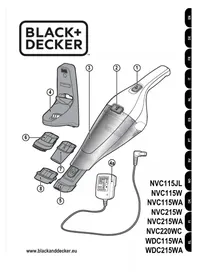
Technical line drawing of a vacuum cleaner device with internal components and a separate connector (no text or symbols)DVJ215J
DVJ315J
DVJ320J
DVJ325J
DVJ325BF
DVJ325BFS
text_image
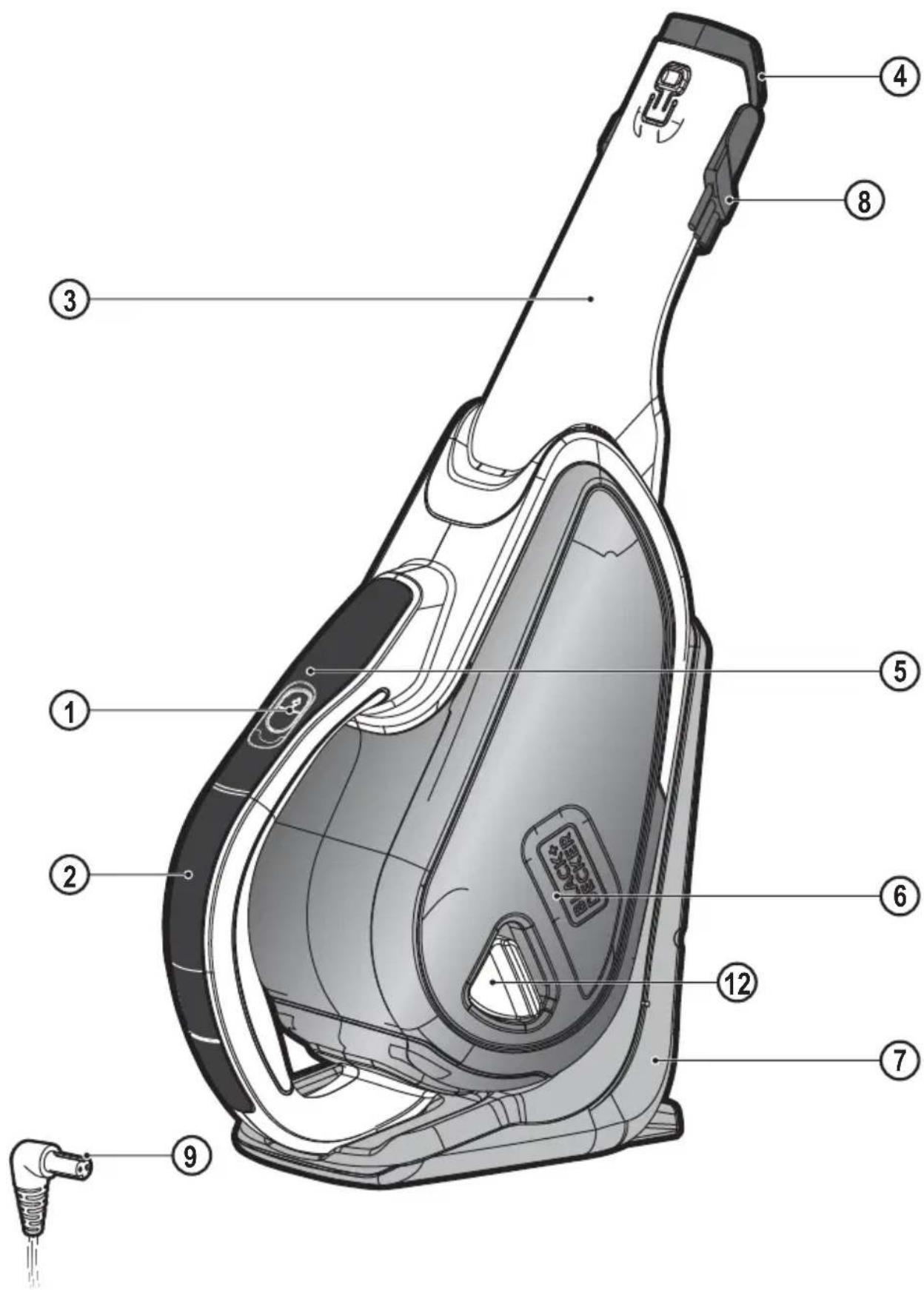
Technical diagram of a vacuum cleaner with numbered parts for identification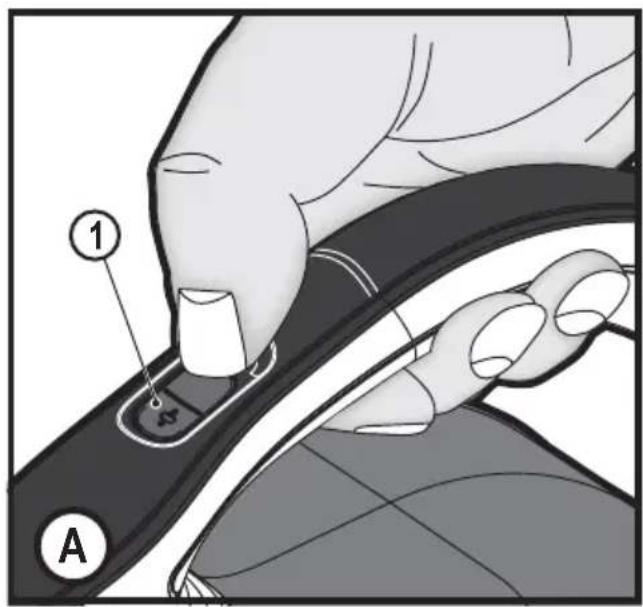
text_image
① A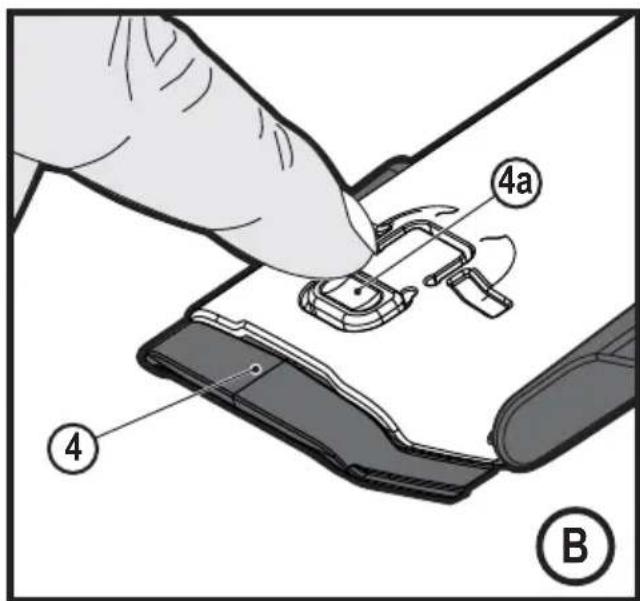
text_image
4a ④ B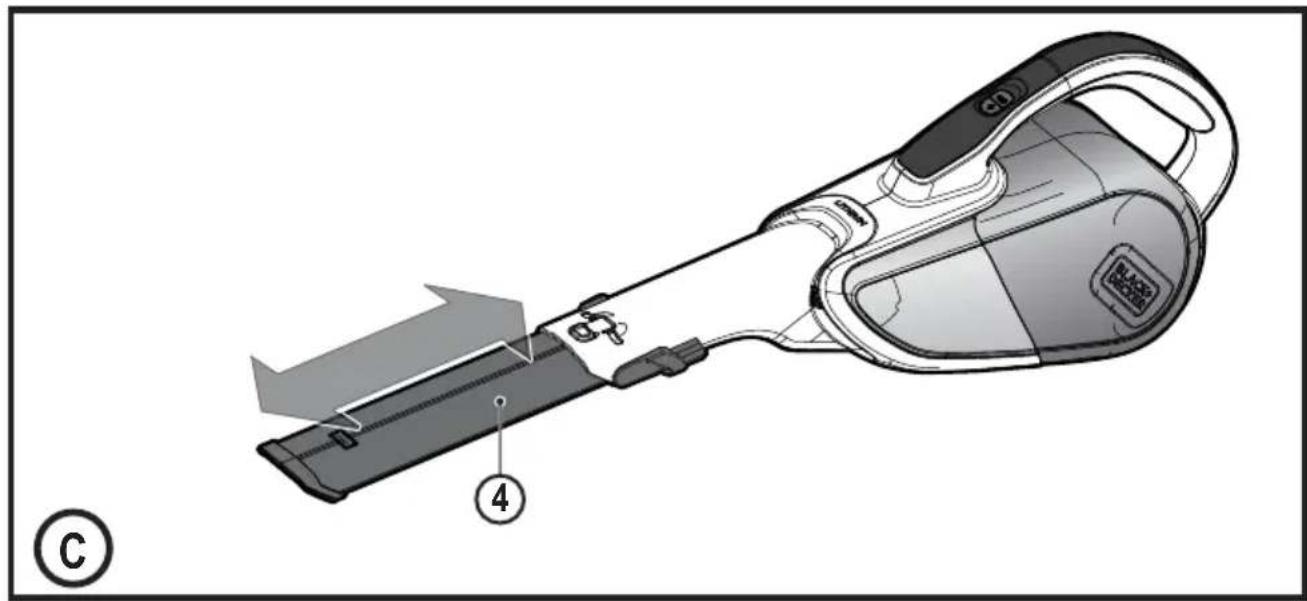
natural_image
Illustration of a handheld electric shaver with labeled parts (no text or symbols beyond labels)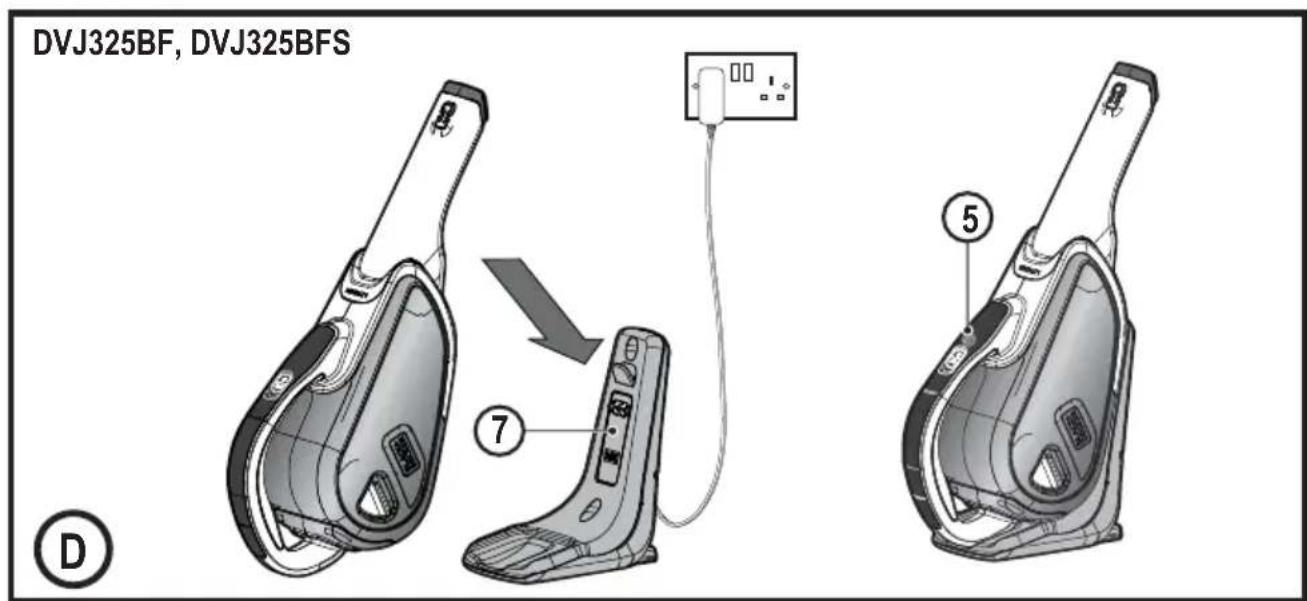
text_image
DVJ325BF, DVJ325BFS ⑦ ⑤ D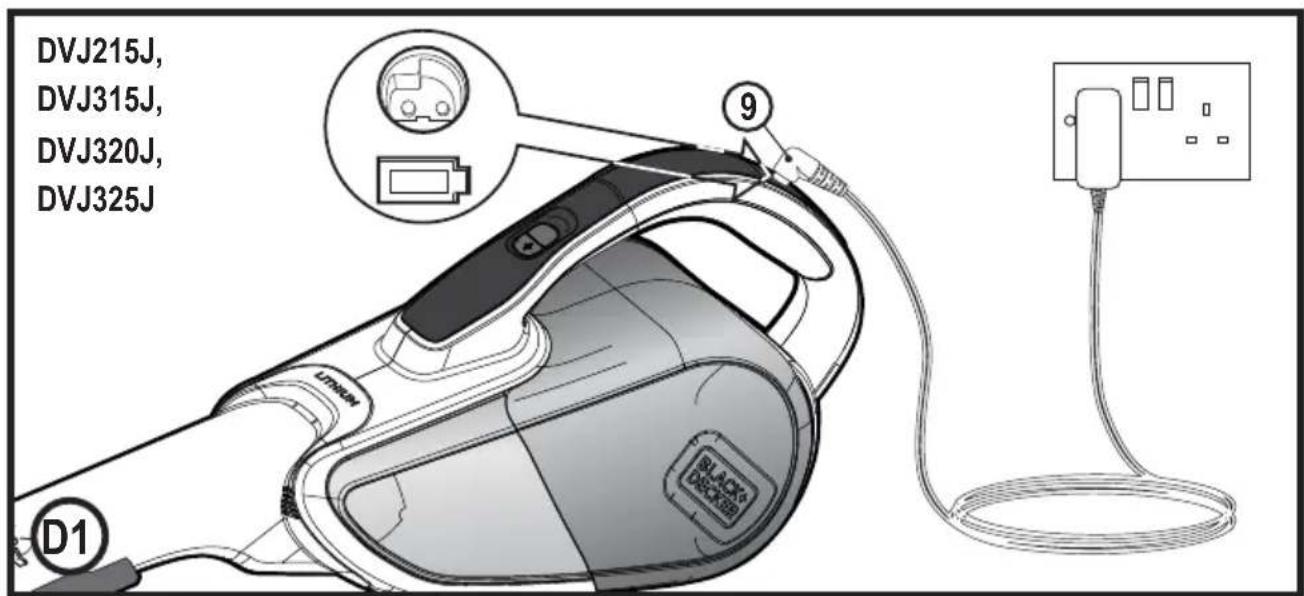
text_image
DVJ215J, DVJ315J, DVJ320J, DVJ325J 9 D1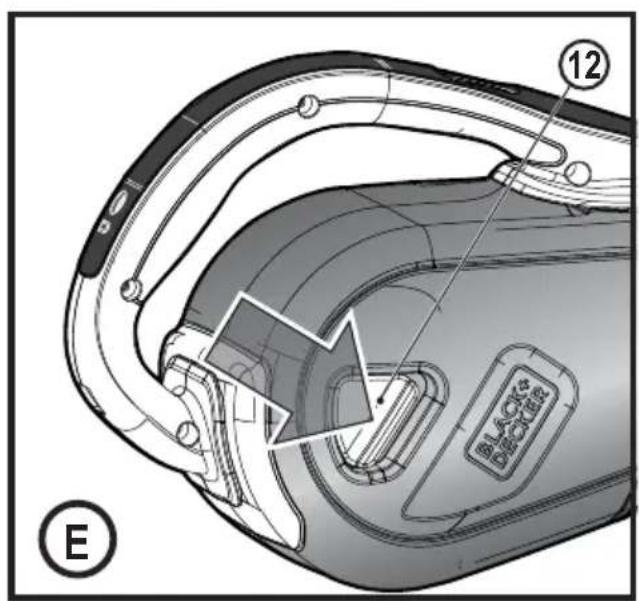
text_image
12 BLACK & DECOONE E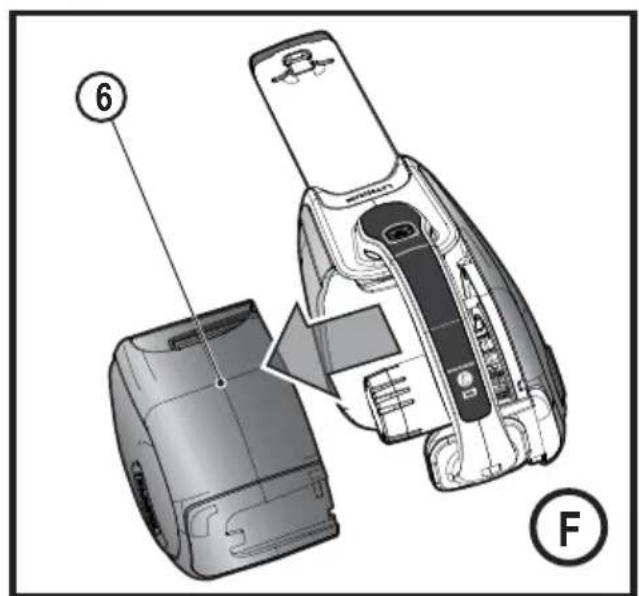
text_image
⑥ ⑤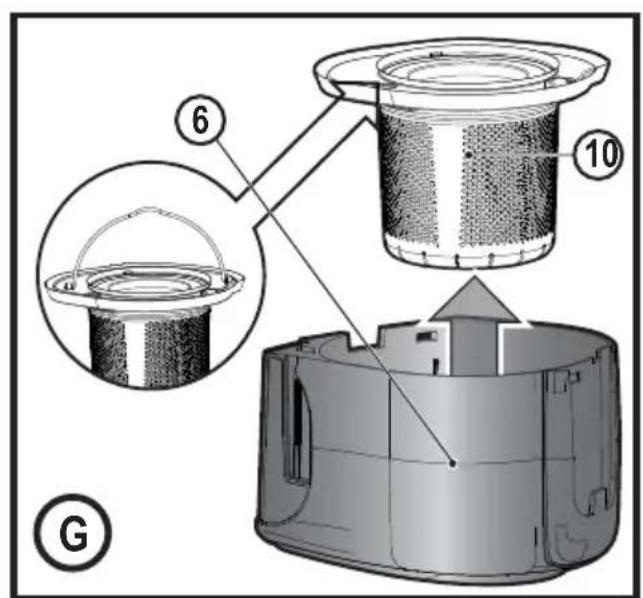
text_image
6 10 G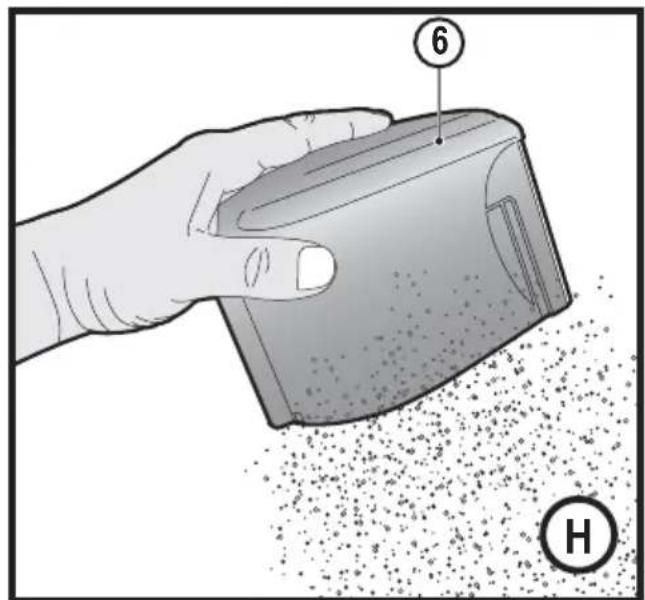
text_image
⑥ H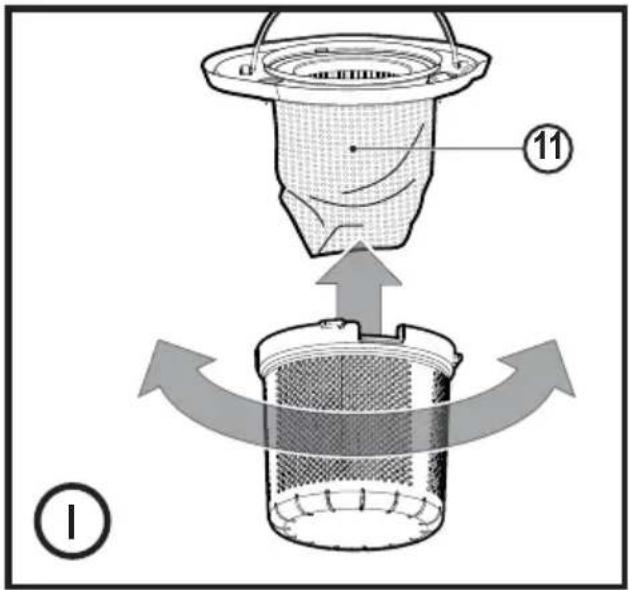
text_image
Diagram illustrating a mechanical or filtration process with labeled components and directional arrows indicating flow or movement.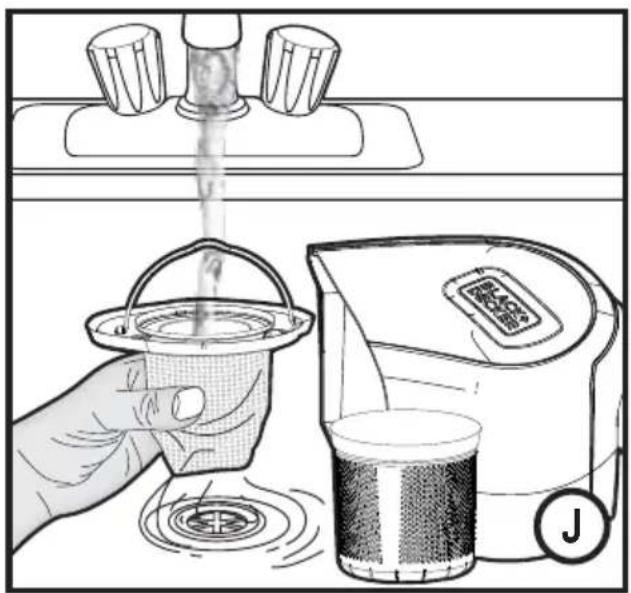
text_image
Illustration showing a hand pouring liquid into a bucket and a digital water dispenser with a logo, labeled 'J' in the corner.Intended use
Your BLACK+DECKER™ DVJ215J, DVJ315J, DVJ320J, DVJ325J, DVJ325BF and DVJ325BFS Dustbuster® hand-held vacuum cleaners have been designed for vacuum cleaning purposes. These appliances are intended for household use only.
Read all of this manual carefully before operating the appliance
Safety instructions

Warning! Read all safety warnings and all instructions. Failure to follow the warnings and instructions listed below may result in electric shock, fire and/or serious injury.
- The intended use is described in this manual. The use of any accessory or attachment or the performance of any operation with this appliance other than those recommended in this instruction manual may present a risk of personal injury.
- Retain this manual for future reference.
Using your appliance
- Do not use the appliance to pick up liquids or any materials that could catch fire.
- Do not use the appliance near water.
- Do not immerse the appliance in water.
- Never pull the charger lead to disconnect the charger from the socket. Keep the charger lead away from heat, oil and sharp edges.
- This appliance can be used by children aged from 8 years and above and persons with reduced physical, sensory or mental capabilities or lack of experience and knowledge if they have been given supervision or instruction concerning use of the appliance in a safe way and understand the hazards involved. Children shall not play with the appliance. Cleaning and user maintenance shall not be made by children without supervision.
Inspection and repairs
Before use, check the appliance for damaged or defective parts. Check for breakage of parts, damage to switches and any other conditions that may affect its operation.
- Do not use the appliance if any part is damaged or defective.
- Have any damaged or defective parts repaired or replaced by an authorized repair agent.
- Regularly check the charger lead for damage. Replace the charger if the lead is damaged or defective.
- Never attempt to remove or replace any parts other than
those specified in this manual.
Additional safety instructions
After use
- Unplug the charger before cleaning the charger or charging base.
- When not in use, the appliance should be stored in a dry place.
• Children should not have access to stored appliances.
Residual risks
Additional residual risks may arise when using the tool which may not be included in the enclosed safety warnings. These risks can arise from misuse, prolonged use etc.
Even with the application of the relevant safety regulations and the implementation of safety devices, certain residual risks can not be avoided. These include:
- Injuries caused by touching any rotating/moving parts.
- Injuries caused when changing any parts, blades or accessories.
- Injuries caused by prolonged use of a tool. When using any tool for prolonged periods ensure you take regular breaks.
- Impairment of hearing.
- Health hazards caused by breathing dust developed when using your tool (example:- working with wood, especially oak, beech and MDF.)
Chargers
Your charger has been designed for a specific voltage. Always check that the mains voltage corresponds to the voltage on the rating plate.
Warning! Never attempt to replace the charger unit with a regular mains plug.
- Use your BLACK+DECKER charger only to charge the battery in the appliance with which it was supplied. Other batteries could burst, causing personal injury and damage.
- Never attempt to charge nonrechargeable batteries.
- If the supply cord is damaged, it must be replaced by the manufacturer or an authorised BLACK+DECKER Service Centre in order to avoid a hazard.
- Do not expose the charger to water.
- Do not open the charger.
- Do not probe the charger.
- The appliance/battery must be placed in a well ventilated area when charging.
Electrical safety
Symbols on the charger

Read all of this manual carefully before using the appliance.

This tool is double insulated; therefore no earth wire is required. Always check that the power supply corresponds to the voltage on the rating plate.

Short circuit proof safety isolating transformer. The mains supply is electrically separated from the transformer output.

The charger automatically shuts off if the ambient temperature becomes too high. As a consequence the charger will be inoperable. The charging base must be disconnected from the mains supply and taken to an authorised service centre for repair.

The charging base is intended for indoor use only.
Labels on appliance
The following symbols appear on this appliance along with the date code

Read all of this manual carefully before using the appliance
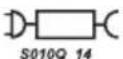
Only use with charger S010Q 14
Features
This tool includes some or all of the following features.
- On/off power switch
- Handle
- Nozzle
- Pull out crevice tool
- LED charging indicator
- Dust bowl
- Charging base
- Flip down brush
- Charger
Use
Switching on and off (Fig. A)
- Press the button to turn, on the unit operates in slow speed, low power mode, conserving the battery life.
- Press the button again, and the unit goes to a BOOST mode.
- Pressing the button again will turn the product off.
Using the pull out crevice tool (Fig. B,C)
- Extend the crevice tool (4) as shown in figure C, until it clicks in place.
- To retract the crevice tool (4) press the crevice tool release button (4a) allowing it to return to its normal position (Fig. B).
Note: The flip down brush (8) can only be utilised when the crevice tool is in the retracted position.
Charging DVJ325BF, DVJ325BFS (Fig. D)
- Place the appliance onto the charging base (7) and plug into the electrical outlet.
- Switch the electrical outlet on. The LED charging indicator (B) will illuminate.
Charging DVJ215J, DVJ315J, DVJ320J, DVJ325J (Fig. D1)
- Place the charger (9) into the charging port at the rear of the handle (2) and plug into the electrical outlet.
- Switch the electrical outlet on. The LED charging indicator (B) will illuminate.
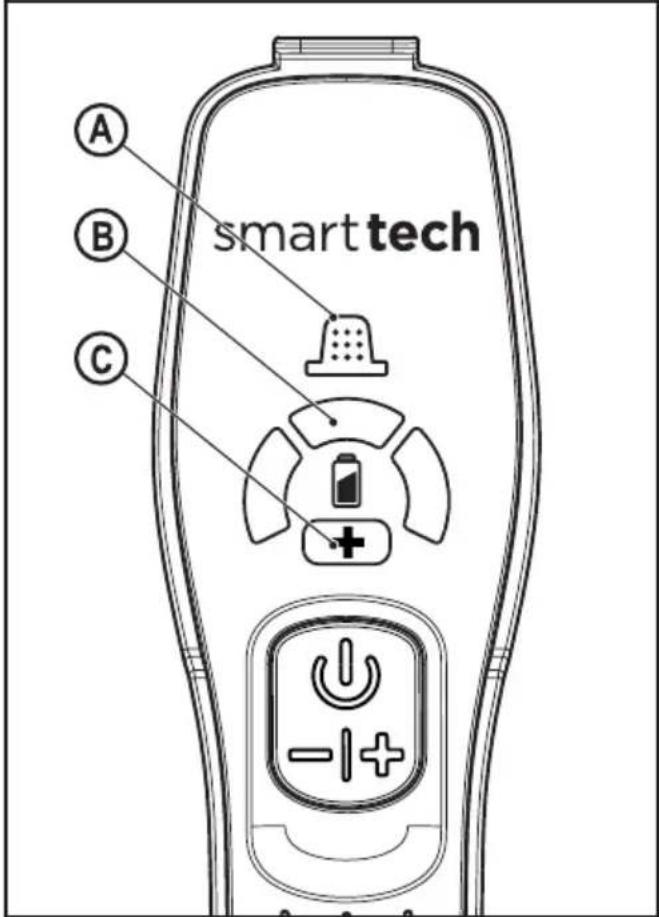
Multi LED Display - DVJ325BF, DVJ325BFS
text_image
A B C smart techA. Filter sensor
Whenever a filter is Blocked and needs cleaning, the red filter LED (A) in the handle will illuminate. Clean fine dust from filter (See section on 'cleaning filters' in this manual).
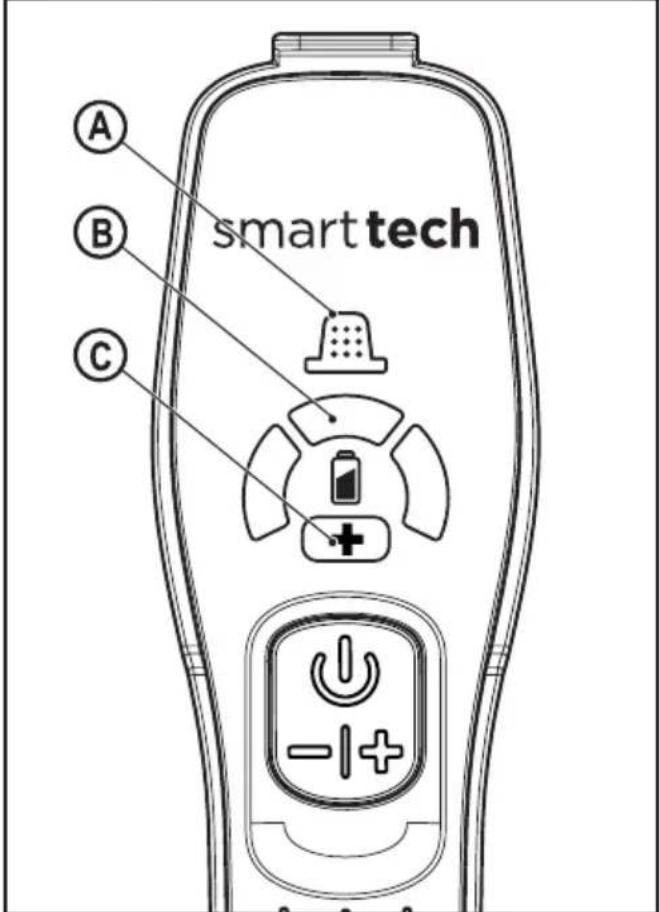
B. LED Charging display
The charging display LED (B) will illuminate when the unit is charging and will indicate (flash) when further charging is required.
C. BOOST mode
LED (C) Illuminates when the appliance is in BOOST mode.
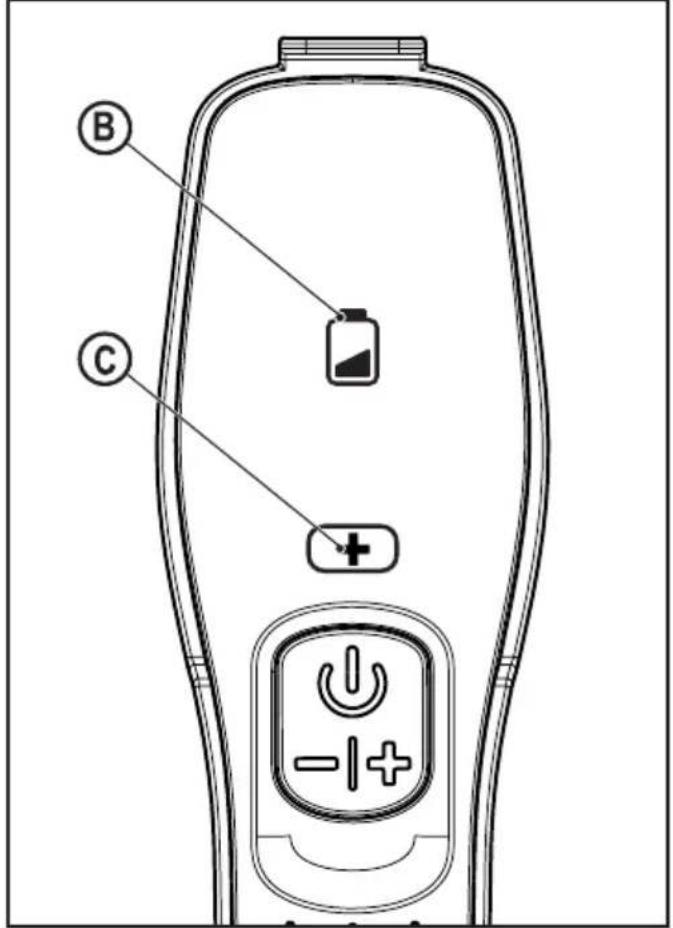
Dual LED Display - DVJ215J, DVJ315J, DVJ320J, DVJ325J
text_image
B CB. LED Charging display
Battery icon will flash when the battery is almost depleted charging. It will also flash during charging (See LED pattern chart in this manual).
C. BOOST mode
Illuminates when the appliance is in BOOST mode.
| LED Patterns | |
| Charging | |
| Battery Fault | |
| Charger Fault | |
| Battery Hot | |
Cleaning the filters (Fig. E, F, G, H, I, J)
- Press the dust bowl release button (12) (Fig. E)
- Eject the dust bowl (6) (Fig.F)
- Lift the filter assembly (10) using the metal handle provided from the dust bowl (6)
Note: On unit DVJ325BFS the pre filter is impregnated with a fragrance allowing for a pleasing odour to be released when the appliance is in use.
- Empty the dust bowl (6) by lightly shaking over a dustbin (Fig. H).
- The filter (11) can now be removed from the filter assembly (10)
DVJ215J, DVJ315J, DVJ320J, DVJ325J (Fig.11). DVJ325BF, DVJ325BFS (Fig. I).
• Empty any remaining dust from the dust bowl.
- Rinse out the dust-bowl with warm soapy water.
- Wash the filters with warm soapy water (Fig. J).
• Make sure the filters are dry
• Refit the filters into the appliance.
- Close the dust-bowl. Make sure the release latch (8) clicks into place.
Warning! Before performing any maintenance or cleaning on the appliance, unplug the appliance.
From time to time wipe the appliance with a damp cloth. Do not use any abrasive or solvent-based cleaner. Do not immerse the appliance in water
Maintenance
Your BLACK+DECKER cordless appliance has been designed to operate over a long period of time with a minimum of maintenance. Continuous satisfactory operation depends upon proper tool care and regular cleaning.
Warning! Before performing any maintenance on cordless appliances:
- Run the battery down completely if it is integral and then switch off.
- Unplug the charger before cleaning it. Your charger does not require any maintenance apart from regular cleaning.
- Regularly clean the ventilation slots in your appliance/charger using a soft brush or dry cloth.
- Regularly clean the motor housing using a damp cloth. Do not use any abrasive or solvent-based cleaner.
Protecting the environment
Separate collection. This product must not be disposed of with normal household waste.
Should you find one day that your BLACK+DECKER product needs replacement, or if it is of no further use to you, do not dispose of it with other household waste. Make this product available for separate collection.
- BLACK+DECKER provides a facility for recycling BLACK+DECKER products once they have reached the end of their working life. This service is provided free of charge. To take advantage of this service please return your product to any authorised repair agent who will collect them on our behalf.
- You can check the location of your nearest authorised repair agent by contacting your local BLACK+DECKER office at the address indicated in this manual. Alternatively, a list of authorized BLACK+DECKER repair agents and full details of our after-sales service and contact are available on the Internet at: www.2helpU.com.
Replacing the filters
The filters should be replaced every 6 to 9 months and whenever worn or damaged.
Replacement filters are available from your BLACK+DECKER dealer (cat. noVBF10).
There are also pre-scented filters available to be purchased (cat. no: VSPF10LC). These fit all units. When these filters reach the end of their lifespan they must be disposed of at a local recycling centre.
Warning!

Cotton linen fragrance. Wash face, hands and any exposed skin thoroughly after handling. Wear protective gloves/protective clothing/eye protection/face protection. If in eyes: Rinse cautiously with water for several minutes. Remove contact lenses if present and easy to do. Continue rinsing. If skin irritation occurs: Get medical advice/attention. Avoid release into the environment. Do not ingest.
- Remove the old filters as described above.
- Fit the new filters as described above.
Technical Data
| DVJ215J | |
| Voltage 7.2V | |
| Current 1.5Ah | |
| Watt Hours 10.8Wh | |
| Weight 1.0Kg | |
| DVJ315J | |
| Voltage 10.8V | |
| Current 1.5Ah | |
| Watt Hours 16.2.Wh | |
| Weight 1.1Kg | |
| DVJ320J | |
| Voltage 10.8V | |
| Current 2Ah | |
| Watt Hours 21.6.Wh | |
| Weight 1.1Kg | |
| DVJ325J | |
| Voltage 10.8V | |
| Current 2.5Ah | |
| Watt Hours 27.Wh | |
| Weight 1.1Kg | |
| DVJ325BF | |
| Voltage 10.8V | |
| Current 2.5Ah | |
| Watt Hours 27.Wh | |
| Weight 1.1Kg | |
| DVJ325BFS | |
| Voltage | 10.8V |
| Current | 2.5Ah |
| Watt Hours | 27.Wh |
| Weight | 1.1Kg |
Warranty
BLACK+DECKER is confident of the quality of its products and offers an outstanding warranty.
This warranty statement is in addition to and in no way prejudices your statutory rights.
If a BLACK+DECKER product becomes defective due to faulty materials, workmanship or lack of conformity, within 24 months from the date of purchase, BLACK+DECKER warranty to replace defective parts, repair products subjected to fair wear and tear or replace such products to ensure minimum inconvenience to the customer unless:
The product has been used for trade, professional or hire purposes;
The product has been subjected to misuse or neglect;
The product has sustained damage through foreign objects, substances or accidents;
Repairs have been attempted by persons other than authorised repair agents or BLACK+DECKER service staff.
To claim on the warranty, you will need to submit proof of purchase to the seller or an authorised repair agent. You can check the location of your nearest authorised repair agent by contacting your local BLACK+DECKER office at the address indicated in this manual.
Alternatively, a list of authorised BLACK+DECKER repair agents and full details of our after-sales service and contacts are available on the Internet at: www.2helpU.com.
Utilisation prévue
Mise en charge DVJ325BF, DVJ325BFS (Fig. D)
Affichage de plusieurs voyants - DVJ325BF, DVJ325BFS
text_image
A B C smart techA. Capteur Filtre
| DVJ320J | |
| Tension 10.8V | |
| Courant 2.0Ah | |
| Watt-heures 21.6Wh | |
| Poids 1.1Kg | |
| DVJ325J | |
| Tension 10.8V | |
| Courant 2.5Ah | |
| Watt-heures 27Wh | |
| Poids 1.1Kg | |
| DVJ325BF | |
| Tension 10.8V | |
| Courant 2.5Ah | |
| Watt-heures 27Wh | |
| Poids | 1.1Kg |
| DVJ325BFS | |
| Tension | 10.8V |
| Courant | 2.5Ah |
| Watt-heures | 27Wh |
| Poids | 1.1Kg |
Garantie
(D الشكل DVJ325BFS)DVJ325BF شحن
Names & Addresses for BLACK + DECKER Service Concessionaries
COUNTRY NAME ADDRESS TELEPHONE NO. EMAIL
| BAHRAIN | Alfouz Services Co. WLL | P.O. Box 26562, Tubli, Manama | (00973) 17783562 / 17879987 | alfouz@batelco.com.bh |
| BAHRAIN | Kewalram & Sons Co. WLL | P.O. Box 84, Manama,Kingdom of Bahrain | (00973) 1721311017210617 | kewalram02@batelco.com.bhkewalram@batelco.com.bh |
| EGYPT | Anasia Egypt for TradingS.A.E. (Mentrade) | P.O. Box 2443, 9, Mostafa Refaat Street,Sheraton Heliopolis 11361, Cairo | (00202) 22684159Hotline19311 | wael.salah@anasia.comnevien.elbeshbishy@anasia.com |
| JORDAN | Mega Hardware - (Sami Bashiti & Partners Co.) | 93 King Abdullah II St.,P.O.BOX 3005 AMMAN 11953 | (009626) 5349098 | info@mega-hardware.comwww.mega-hardware.com |
| KSA | Fawaz Ebrahim Al Zayani Trading Est. | P.O. Box 76026, Al Raka : 31952 | (009663) 8140914 | dewaltdammam@hotmail.comwww.fawazalzayanigroup.com |
| KSA | United Trading & Marketing Co; (U-MARK) | #15, Khamis Mushait 62411, Abha,Military city road – Near City maxand Ghunaim Market | (00966) 172500378 | serviceabha@u-mark.net |
| KSA | United Trading & Marketing Co; (U-MARK) | #116, Prince Fahad Ibn IbrahimAl Saud Street - Near Nawan Hotel | (00966) 11473-3258 | malazservice@u-mark.ne |
| KSA | United Trading & Marketing Co; (U-MARK) | Ash Shiqah, Al Hamr, Buraydah52371 Al Hamr Road near JaryatAl Umran & Khub Ath Thinayan | (00966) 16-3694969 | serviceqaseem@u-mark.net |
| KSA | United Trading & Marketing Co; (U-MARK) | King Abdulaziz St, Al AziziyahDammam 32424 near Dat ASSihha Medical Center | (00966) 138179319138172654 | servicedammam@u-mark.net |
| KSA | United Trading & Marketing Co; (U-MARK) | Jabal Ar-Rubabah, Misrifah,Jeddah 23331 Falastin Road NearNew Jeddah National Hospital | (00966) 126612552 | servicejeddah@u-mark.net |
| KSA | United Trading & Marketing Co; (U-MARK) | #356, Al Talah Medina 42322 | (00966) 148423339 | servicemadina@u-mark.net |
| KUWAIT | Al Omar Technical Co. | P.O. Box 4062, Safat 13041, Kuwait | (00965) 24848595 / 24840039 | alexotc@usa.net |
| KUWAIT | The Sultan Centre | P.O. Box 26567-13126 Safat, Kuwait | (00965) 24343155Etn. 432 | allina@sultan-center.comnedalt@sultan-center.com |
| LEBANON | Aces Service Centre(Est. F.A.Ketaneh SA) | P.O. Box 90-102, Nahr El Mot,Seaside Highway, PharaonBuilding, Beirut | (009611) 898989 / 262626 | nissrine.hajj@aces.com.lbnassim.aziz@Aces.com.lb |
| LIBYA | Homeworld Co. | Senidal St. Amr Ibn Elaas Road,Benghazi, Libya (P.O. Box 18182 Salmany) | (0021861) 9094183ext. 103 | nissrine.hajj@aces.com.lb |
| LIBYA | North Africa Trading(El Ghoul Brothers) | P.O. Box 348, 7 OctoberStreet 11, Benghazi | (00218061) 3383994 | nissrine.hajj@aces.com.lb |
| LIBYA | North Africa Trading(El Ghoul Brothers) | AlBarniq Dewalt Center,Mokhazin-elsukar St. ElFallah, Tripoli | (00218021) 3606430 | nagte.ly@gmail.comnagte.dpt@gmail.com |
| MAURITIUS | The Brandhouse Ltd. | Rogers Industrial Park 1, RicheTerre, Mauritius | (00230) 20694502071700 | claims(service.centre@goupille.mustephanie.bijou@gmail.com |
| MOROCCO | Electronia | Bd, Sidi Abdelrahman- Gr ceintureresidence Rio - Ain Diab - 20050.Casa Blanca | (00212) 618532680 | r.makhlouti@electronia.ma |
| OMAN | Oman Marketing & Service Co.(Omasco) | P.O. Box 2734,Behind HondaShowroom,Wattayah,Oman | (00968) 2456023224560255 | npservice@omasco.com.omashok.balan@omasco.com.om |
| OMAN | Oman Marketing & Service Co. (Omasco) | Al Ohi, Sohar,Oman | (00968) 26846379 | sooraj.neeran@omasco.com.om |
| OMAN | Oman Marketing & Service Co. (Omasco) | Sanaya, Salalah,Oman | (00968) 23212290 | rajagopal.pr@omasco.com.om |
| PAKISTAN | Ammar Service & Spares | Office No 6068 6th Floor CentralPlaza Behind Gul Plaza MarstonRoad.KARACHI | (009221) 32775252 | babji93@yahoo.com |
| QATAR | Al Muftah Service Centre | Al Wakrah Road, P.O. Box 875,Doha,Qatar | (00974) 4465088044650110 | service@almuftah.comalmuftah@almuftah.com |
| SRI LANKA | Delmege Forsyth & Co. Ltd | Delmege Forsyth & Co. LtdLifestyle Cluster 101, VinayalankaraMawatha Colombo 10 Sri Lanka | (009477) 2211111 | dgeservice@delmege.comjayantha.lifestyle@delmege.com |
| TUNISIA | Societe Tunisienne De Maintenance(STM) | RUE DE LA.PHYSIQUE. NOUVELLE ZONE INDUSTRIELLE BEN AROUS.2013 BEN AROUS, TUNISIA. | (0021679) 389687 | importa@stqu.com |
| UAE | Light House Electrical | P.O. Box 120, Abu Dhabi | (009712) 6726131 | dewalt_lhe@hotmail.com |
| UAE | Light House Electrical | P.O. Box 120, Abu Dhabi | (009712) 5548315 | dewalt_lhe@hotmail.com |
| UAE | Black & Decker (Overseas) GmbH | P.O. Box 5420, Dubai | (009714) 8127400 / 8127406 | service.mea@sbdinc.com |
| UAE | Zillion Equipment and | P.O. Box 10584, Ras Al Khaimah | (009717) 2277095 | zillionrak@gmail.com |
| UAE | Zillion Equipment and Spare Parts Trading LLC | P.O. Box 19740, Opp. Bin Sadal /Trimix Redymix Sanaiya, Al Ain | (009713) 7216690 | zilliontrdg@gmail.com |
| YEMEN | Middle East Trading Co. (METCO) | 5th Flr.Hayel Saeed AnamBldg. Al-Mugamma St. Taiz, Yemen | (009674) 213455 | metco@metcotrading.comsami@metcotrading.com |
| YEMEN | Middle East Trading Co. (METCO) | Mualla Dakka, Aden | (009672) 222670 | metco@metcotrading.comsami@metcotrading.com |
| YEMEN | Middle East Trading Co. (METCO) | Hayel st.,Sana'a,Yemen | (009671) 204201 | metco@metcotrading.comsami@metcotrading.com |
WARRANTY REGISTRATION CARD
YOUR NAME/ VOTRE NOM/الإسم
YOUR ADDRESS/ VOTRE ADRESSE/العنوان