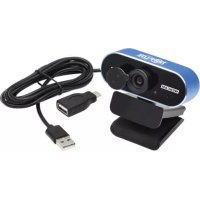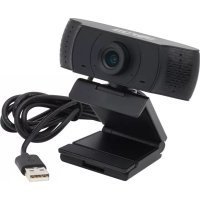
AWC001 - Webcam Tripp Lite - Free user manual and instructions
Find the device manual for free AWC001 Tripp Lite in PDF.


| Product Type | Webcam |
| Resolution | 1080p HD (1920×1080) at 30 fps, 2 megapixels |
| Viewing Angle | 70° wide-angle |
| Microphone | Built-in with noise reduction, range up to 6 m |
| Interface | USB 2.0 (backward compatible with USB 1.1) |
| System Compatibility | Windows 7/8/10, Mac OS 10.10+, Android 5.0+, Chrome OS |
| Supported Applications | Skype, Zoom, YouTube |
| Mounting | Rotating clip for monitor + tripod thread |
| Cable Length | 1.5 m |
| Power Supply | 5 V DC, 200 mA (via USB) |
| Video Compression | H.264 |
| Operating Temperature | -10 to 60 °C |
| Pixel Size | 2.8 μm × 2.8 μm |
| Supported Resolutions | 320×240, 640×480, 1280×720, 1920×1080 |
| Frame Rate | 30 fps |
| Lens Size | 7.6 mm |
| Warranty | 1 year limited |
Frequently Asked Questions - AWC001 Tripp Lite
User questions about AWC001 Tripp Lite
0 question about this device. Answer the ones you know or ask your own.
Ask a new question about this device
Download the instructions for your Webcam in PDF format for free! Find your manual AWC001 - Tripp Lite and take your electronic device back in hand. On this page are published all the documents necessary for the use of your device. AWC001 by Tripp Lite.
USER MANUAL AWC001 Tripp Lite
USB 2.0 Desktop/Laptop 1080p Webcam with Internal Microphone
Model: AWC-001
Register your product today and be automatically entered to win an ISOBAR® surge protector in our monthly drawing! tripplite.com/warranty


1111 W. 35th Street, Chicago, IL 60609 USA tripplite.com/support
Copyright © 2021 Tripp Lite.
All trademarks are the sole property of their respective owners.
Package Contents
- AWC-001 USB 2.0 Webcam
- Owner's Manual
Product Features
- Captures High-Definition (HD) 1080p video at 30 frames per second and 2 megapixel images for livestreaming or conference calls.
- 70^ wide-angle lens reduces dead angles and advanced H.264 video compression ensures high-quality transmission.
- Rotatable clip makes it easy to mount onto laptops or monitor screens and tripod threads allow the webcam to mount onto a tripod for extra stability.
- Built-in noise reduction microphone captures audio within 20 ft. to ensure clear communication and sound quality.
- Compatible with Windows® and Mac® operating systems and Skype, Zoom and YouTube software.
- Plug-and-play—no software or drivers to install.
System Requirements
- USB 2.0 port or later
- Windows 7, 8, 10 or later
Mac 10.10 or later
AndroidTM 5.0 or later - Chrome OS
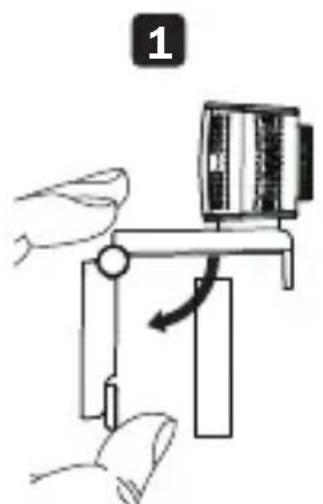
Mounting Instructions
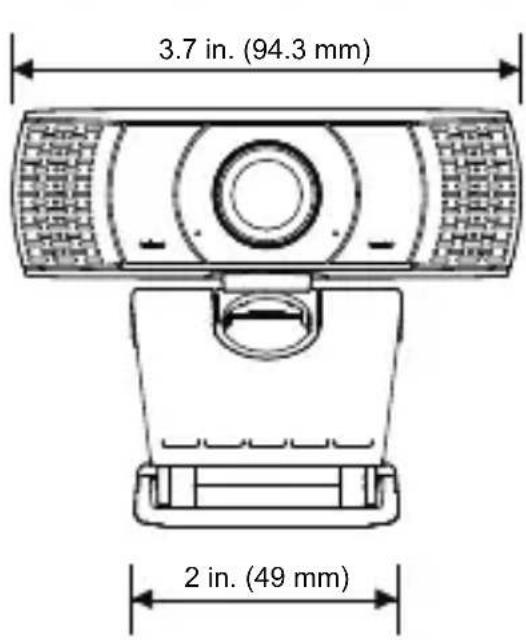
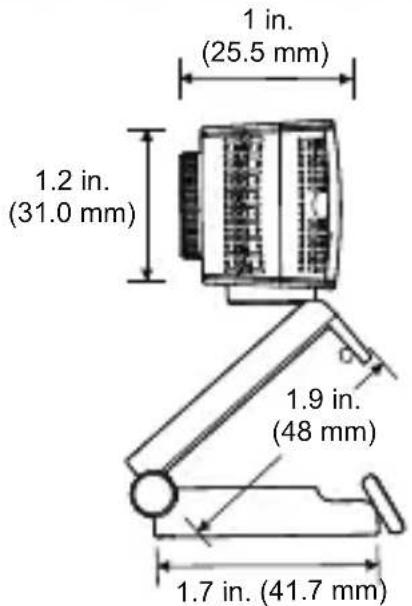
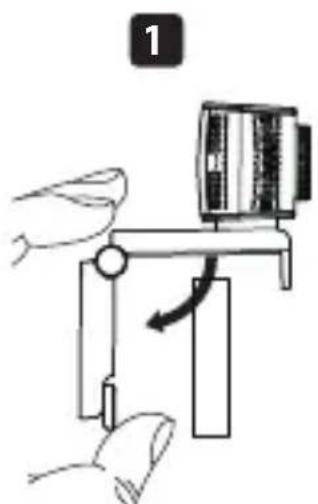
1 Open the clip base.
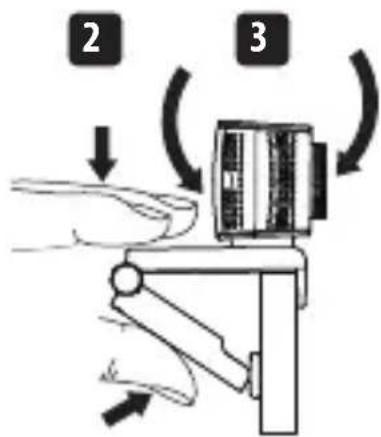
2 Mount the webcam to the monitor or laptop.
Note: Make sure the foot on the clip base is flush with the back of your monitor.
3 Rotate the webcam to the desired angle.
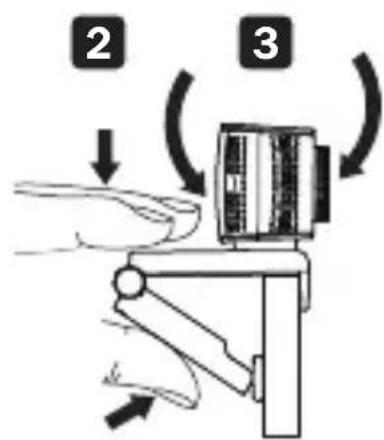
Note: Tripod threads on the bottom of the clip base allow the webcam to be mounted onto a tripod.
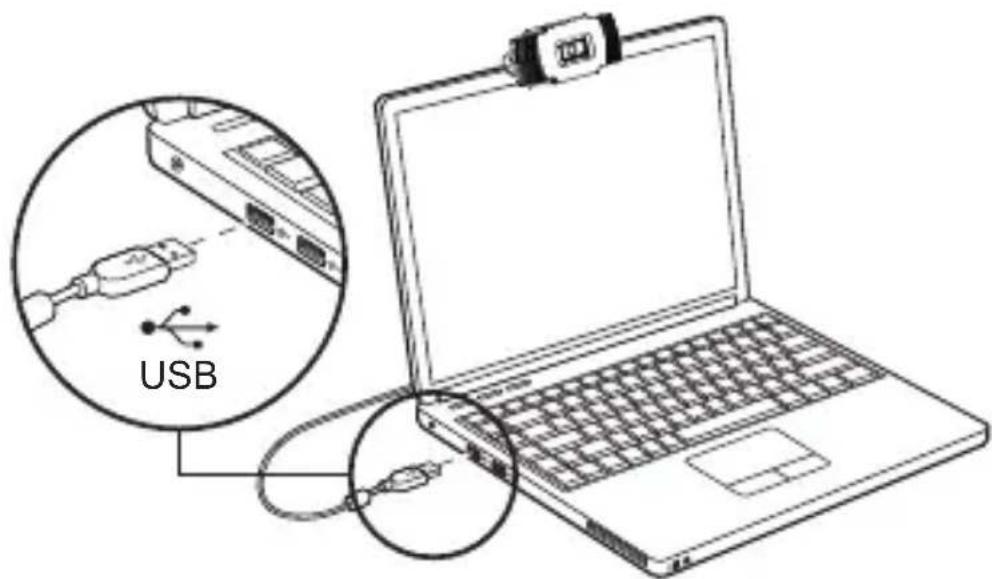
Connection/Installation
Plug the webcam into a USB-A interface on your PC, laptop or TV STB. The webcam will install automatically in about 60 seconds.
Video Calling
To take advantage of livestreaming or video calls, both you and the recipient must install video-calling applications (such as Skype or Zoom) and webcam hardware.
Frequently Asked Questions
Q: How do I know if my camera is recognized by the operating system?
A: Connect the webcam to any USB 2.0/3.0 port. Once the webcam is connected, it may take a moment before it is recognized by the computer. To check if the webcam is recognized by your computer's operating system, check the following:
Control Panel>System and Security>System>Device Manager
Q: How do I know if my video calling application is using my webcam?
A: All video applications include an option setting to review the audio and video device. When using the video application, review the following:
The audio selection to ensure the webcam microphone is selected.
- If not, change the selection to the AWC-001 webcam.
The video selection to ensure the webcam is selected.
- If not, change the selection to the AWC-001 webcam.
Frequently Asked Questions
Q: How do I determine if the webcam is properly installed on my computer?
A: For Windows operating systems: Go to: Computer Management>Device Manager>C Cameras.
A: For Mac operating systems: Click on the Finder icon in the Dock. From the Finder window sidebar, click on Applications and open the Photo Booth app. Click on the Camera dropdown from the Photo Booth toolbar. "USB 2.0 Camera" should be listed as the default webcam.
Q: Why is my webcam not working with Skype or Facebook?
A: Software like Skype and Facebook often use the integrated webcam by default. To use the AWC-001 webcam, go to the software's video settings and select the AWC-001 webcam as the video source. For example, with Skype, go to: Settings>Audio & Video to select the video source.
Specifications
| Pixel Size 2.8 μm x 2.8 | μm |
| Operating & Storage Temperature | 14°F to 140°F (-10°C to 60°C) |
| Image Resolution | 2 megapixels |
| Pixel Range | 320 x 240, 640 x 480, 1280 x 720, x 1920 x 1080 |
| Frame Rate | 30 fps |
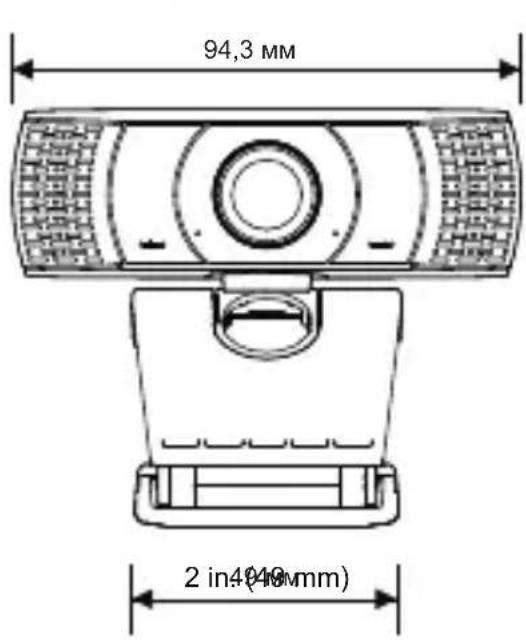
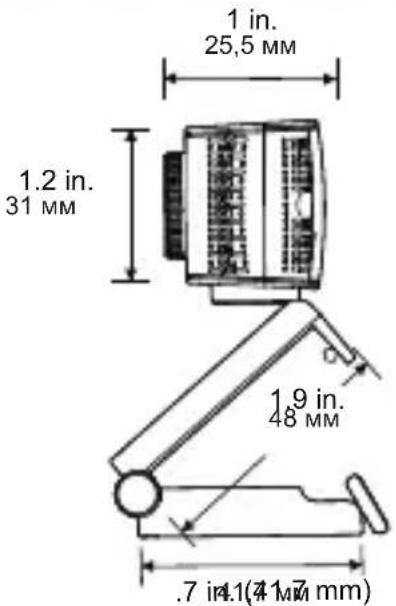
| Lens Size 0.3 in. (7.6 mm) | |
| Interface USB 2.0 (backwards compatible with USB 1.1) | |
| Data Format YUY2/MJPEG | |
| Viewing Angle 70° | |
| DC Voltage 5V | |
| Current 200mA | |
| Cable Length 4.9 ft. (1.5 m) | |
| USB Specification USB 2.0 (backward compatible with USB 1.1) | |
Warranty and Product Registration
1-Year Limited Warranty
TRIPP LITE warrants its products to be free from defects in materials and workmanship for a period of one (1) year from the date of initial purchase. TRIPP LITE's obligation under this warranty is limited to repairing or replacing (at its sole option) any such defective products. To obtain service under this warranty, you must obtain a Returned Material Authorization (RMA) number from TRIPP LITE or an authorized TRIPP LITE service center. Products must be returned to TRIPP LITE or an authorized TRIPP LITE service center with transportation charges prepaid and must be accompanied by a brief description of the problem encountered and proof of date and place of purchase. This warranty does not apply to equipment, which has been damaged by accident, negligence or misapplication or has been altered or modified in any way.
EXCEPT AS PROVIDED HEREIN, TRIPP LITE MAKES NO WARRANTYES, EXPRESS OR IMPLIED, INCLUDING WARRANTYES OF MERCHANTABILITY AND FITNESS FOR A PARTICULAR PURPOSE.
Some states do not permit limitation or exclusion of implied warranties; therefore, the aforesaid limitation(s) or exclusion(s) may not apply to the purchaser.
EXCEPT AS PROVIDED ABOVE, IN NO EVENT WILL TRIPP LITE BE LIABLE FOR DIRECT, INDIRECT, SPECIAL, INCIDENTAL OR CONSEQUENTIAL DAMAGES ARISING OUT OF THE USE OF THIS PRODUCT, EVEN IF ADVISED OF THE POSSIBILITY OF SUCH DAMAGE. Specifically,
Warranty and Product Registration
TRIPP LITE is not liable for any costs, such as lost profits or revenue, loss of equipment, loss of use of equipment, loss of software, loss of data, costs of substitutes, claims by third parties, or otherwise.
Product Registration
Visit tripplite.com/warranty today to register your new Tripp Lite product. You'll be automatically entered into a drawing for a chance to win a FREE Tripp Lite product!*
- No purchase necessary. Void where prohibited. Some restrictions apply. See website for details.
Compliance
FCC Notice, Class B
This device complies with part 15 of the FCC Rules.
Operation is subject to the following two conditions:
(1) This device may not cause harmful interference, and
(2) this device must accept any interference received, including interference that may cause undesired operation.
Note: This equipment has been tested and found to comply with the limits for a Class B digital device, pursuant to part 15 of the FCC Rules. These limits are designed to provide reasonable protection against harmful interference in a residential installation. This equipment generates, uses and can radiate radio frequency energy and, if not installed and used in accordance with the instructions, may cause harmful interference to radio communications. However, there is no guarantee that interference will not occur in a particular installation. If this equipment does cause harmful interference to radio or television reception, which can be determined by turning the equipment off and on, the user is encouraged to try to correct the interference by one or more of the following measures:
- Reorient or relocate the receiving antenna.
- Increase the separation between the equipment and receiver.
- Connect the equipment into an outlet on a circuit different from that to which the receiver is connected.
- Consult the dealer or an experienced radio/TV technician for help. Any changes or modifications to this equipment not expressly approved by Tripp Lite could void the user's authority to operate this equipment.
Compliance
WEEE Compliance Information for Tripp Lite Customers and Recyclers (European Union)
Under the Waste Electrical and Electronic Equipment (WEEE) Directive and implementing regulations, when customers buy new electrical and electronic equipment from Tripp Lite they are entitled to:
- Send old equipment for recycling on a one-for-one, like-for-like basis (this varies depending on the country).
- Send the new equipment back for recycling when this ultimately becomes waste.
Use of this equipment in life support applications where failure of this equipment can reasonably be expected to cause the failure of the life support equipment or to significantly affect its safety or effectiveness is not recommended.
Tripp Lite has a policy of continuous improvement. Specifications are subject to change without notice. Photos and illustrations may differ slightly from actual products.


1111 W. 35th Street, Chicago, IL 60609 USA tripplite.com/support
1111 W. 35th Street, Chicago, IL 60609, EE UU tripplite.com/support
1111 W. 35th Street, Chicago, IL 60609, EE UU tripplite.com/support
1111 W. 35th Street, Chicago, IL 60609 USA tripplite.com/support
1111 W. 35th Street, Chicago, IL 60609 USA tripplite.com/support
20-09-278 93-3CF6RevA
PykoBODCTBO N0Ib30BaTeJIa
Be6-kaMepa 1080p ДдЯ NaCTOЛьнblIX/
NopTaTUBHbIX KOMNbIOTepoB C
nHTepfeycom USB 2.0
(cBHyTpEHHM MKNpOΦOHOM)
Mодenvb:AWC-001
English 1 · Espanol 12
Français 22·Deutsch 42
EAC


[1]DCCYKAPH MURUOLIO 60-8738,
1111 W. 35th Street, Chicago, IL 60609 USA
tripplite.com/support
OxpaHaeTc aBTopckm npaBOM © 2021 Tripp Lite.
Bce ToproBbIe 3nAKn ABJIIOCTcN CKJIIOHTeBHO Co6CTBEHHO CBOX COOTBeTCTBYIOUX BJaDeNbCeB.
CopeKIMoe ynaKOBKN
- Be6-kamepa moi. AWC-001 c nHTepfeycom USB 2.0
PykoB0DCTBO nOJIb3OBaTeJRA
XapakTepnCTnKn n3dennr
- Празьогд ВидаocbemkyВ сандарTe BbICOKочETKoctn (HD)c pa3peшем 1080p u chToToi 30 kaIpoB B ceKyHdy c noIyueHneM 2-MeranIKcehblix n3O6paXeHni ДяnotOKOBOro BeuaHnaI INI TelekoHphiepenu.
06bektub cyIOM nOJIa 3peHn70° yMeHbIaET MeptBbIe 30HbI, a yCOBepWeHCTBOBaHHaTexHOJOrnA CKaTINBnEO H.264 oBeCneuNBAe T BblcOKoKaueCTBeHHyIO nepeDaUy CnHaJa. - Поворотьи зжим облелчает поцess Креленя K HoуТбуКам Или
- Краham MOHITOPOB, a pe36a поштав obecneuBAe T BO3MOxHOCtby UCTaHOBKN KaMepbl Ha StTaTnBE ДЯ NOBbIWeHIN YCTOuHBOCTN.
BCTpoeHHbI 7yMOnoDaBnIouuM MInKpOoh ynaBnBaet 3ByK B paDnCe 6 MeTPOB, o6ecneuBAra CBa3b 6e3 NOMEx I BblcOKoe KaueCTBO 3ByaHn. - CobmecTIma c onepaunOHbIMn cnCTeMaMn Windows 念 Mac n nporpaMMhIM obecneueHem Skype,Zoom n YouTube.
- Поклочаетс no texholorn Plug-and-play 6e3 Heo6xOIMoctn yctahOBKn KaKOro-ln60 nporpaMMHoro obecneueHn Inn dpaBepOB.
CnCTeMHbIe Tpe6oBaHnIa
- IopT USB 2.0 nIII 6oJIe nO3dHeBepn
- Windows 7, 8, 10 milli 60onee no3dHex Bepn
Mac 10.10 nnn 6oJee no3dHnx Bepn
AndroidTM5.0 nnn 60nee no3dHex Bepn - Chrome OS
yka3aHnno MoHTaJxU
1ACKPOIte OCHOBaHHe c 3aXMMOM.
2Пикpenite Be6-KaMepy K MOHITOpy nIIN HOYt6yKy.
PpmeaHne. PAtka OCHOBaHnC 3axMMOM DOJXHa pnxKMaTbCn NO BcE CBOe PlouaN K 3aDHe NOBepxHOCTM MOHTopa.
3OBepHnTe Be6-KaMepy Ha Huxhbl yroI.
PpimeyaHne. Pe3b6a noD uTATNB C HxKHei CTOpOhbl OCHOBaHN C 3axMOM oBecneuBaet BO3MOxHOCTb yCTAHOBKn Be6-KaMepbHa uTATNB.
BbI6paHHe aynoyctpoCTBO C cenbIO y6eINTbcra B TOM, YTO Bbl6paH BcTpoEHhBI MmKpOfoH Be6-KaMepbl.
- Ecni HeT, n3MeHnte Bbl6paHHbI BapnaHT Ha Be6-Kamepy AWC-001.
BbI6paHHe BnDeOyCtPoIcTBO C cIeIbIO y6eIITbcra B TOM, YTO Bbl6paHa daHHa Be6-Kamepa.
- Ecni HeT, n3MeHnTe Bbl6paHHbI BapnaHT Ha Be6-KaMepy AWC-001.
BonpoCbI nOTBeTbl
B: KaK onpeJeNTb, npaBnIbHo Iu yCTaHOBJIeHa Be6-KaMepa Ha KompbItepe?
0: Д�� onepaцноньix систem Windows: поейдnteВ Computer Management>Device Manager>Camasas (Уразвлени Комьютөм >Диспетчep устор CB >Камерbl).
0:ДЯ onepaunonHbIX CnCTem Mac: HaxMITE Ha 3NaUOK Finder Ha naHeiDock.Ha 6okOBn naneN OKHa Finder haxMITE Applications (PporpaMMbl) n otKpoIe npINOKeHne Photo Booth. Ha INCTpyMeHTaJIbHOI naneN npINOKeHnA Photo Booth haxMITE Ha BbIpaIauOoee MeHIO Camera (KaMepa).B KaueCTBe KaMepbI no yMOJuaHIO doJxHo 6bITb yka3aHO "USB 2.0 Camera".
B: Почему Be6-Камера не паветает с пиюженин Skype улл Facebook?
0: Порогамь TIпа Skype n Facebook часо ИспльзуOT по умочию Bстpoehну Вe6-Камеру. Ддя Испльзованя Be6-Kamepы AWC-001 NepeйдITEВидаонactpoшкп роргамьи Вьберпte Be6-Kamepy AWC-001ВкачестBEИСТОЧИКА ВИDEOCINHana.
Hapimep,ДЯ Вьбopa Источиka BndeocnHaJa B Skype cIeNyTe npeiTuB: Settings>Audio & Video (Hac tropki: 3Byk n Bndeo).
TexHnueckne Tpe6oBaHna
TapaHTnHbIe 06aTeJIbCTBa
OrpaHnueHHa rapaHTnca pOKom 1 roD
KoMaHnIaTRIPP LITE rapaHTnpyeOTcyTCTBVE deeKToB MaTePnaNoB u
N3rOToBHeHnB TeueHne Ondoro (1) rOda c MOMeNTa nepBOHaaybHOJ
Nokyn.ObaTeNbCTBa KOMnHn TRIPP LITE no HactoJe rapaHTn
OrpaHnUBAOTcpeMOhON 3aMeHOJ (no ee eDInHOJIuHOMy UCMOTpeHIO)
IIO6bIX TaKHX DeeKTHbIX N3dEJI.N.Dla No IOnyehn yCnyr NO daHHo rapaHTn
Heo6xOAnMo nOlyuHTb Homep Returneded Material Authorization (RMA —
pa3peSeHne Ha Bo3BpaT MaTePnaNoB) ot KomnHn TRIPP LITE nn ee
aBTOpN3OBaHHORo cepBnCHOrO ueHTpa. N3deJIy DoJIXHy 6bITb BO3BpaUeHbI
B KOMnHIO TRIPP LITE nn ABTOpN3OBaHHbI CepBnCHbI ceHTp TRIPP
LTE c npedonlatoT TpaHCnOpTbIX paCXoOB u COnpoBXDaTbcra KpaTKIM
OncsAHmE Bo3NHkUe IIpo6JIeMbI INoKUMeHTOM, NOdTBePjKaIOUIm
DatY n MeTo erO npio6peTeHn. DeiCTBVe hAcToaJe rapaHTn He
pacnPoCTpaHareTcRa Na O6OpUdoBAnHe, NOBpeKDeHHoe B pe3yNbTaTe aBapnn,
He6peXHoRO o6paUeHn NN HeNPaBnBHO rCNOJb3OBaHN, a TaKKe
BNDOn3MeHHeHoe KaKIM 6bl To HN 6blIO o6pa30M.
3A NCKJIIOUYEHm IPEyUCMOTPEHHbIX 3DECb CJUYAEVB KOMnAHn TRIPP
LTE HE IPEIOCTABJIeT KAKIX-JIbO YRBbIX NII NODPA3YMEBAEMbIX
TAPAHn, BKJIIOUAY IAPAHTN KOMMEPUECKOI PNIFOJHOCTN I
IPINrOHOCTN DJIa KAKOI-JINBO KOHKPETHOJ CEJI.
B HeKOtopbix ShTaTAX/rocydapCTBax OrpaHnueHne NN NCKIoUeHne
IOpaZymeBaembIX rapaHTn He dOnyckaetc; cIeIOBaTeJIbHO,
BbIweKa3aHHoe(-bie) orpaHnueHne(-) NN NCKIoUeHne(-) MoTy He
pacnpocTpaHantbcNa H NOKyNaTeJI.
TapaHTnHbIe 06aTeJIbCTBa
3A NICKJIIOUeyHnEM IPEyCMOTPEHbIX BblIe CJIyAEB KOMNAHnTRIPP LITE HN IPIK KAKNX OBCTOATEJBCTBAX HE HECET OTBETCTBEHHOCTH3A IIPMByE, KOCBEHNbIE, CJIyAHbIE IIN IOBOuHbIE YbBITKN IIN60YbBITKN, ONPEDEJREMBIE OCObIMN OBCTOATEJBCTBAMN, BO3HNIKAIOUINEBCB3N C NcNoJIb3OBAHnEM DAHHORO IN3DEJIIN, IAXE B CJIyAE EEINΦOPMnPOBAHnO BO3MOxHOCTIn HACTUYJIENHnTAKNX YbBITKOB. B qactHOCTn, KomnaHn TRIPP LITE He Hecet OTBETCTBeHHOCTH 3a KaKneIIN60 IN3depKKn, TAKNE KaK yNuSeHHbIe Ppi6bln IIN DoXoDbI, NoTeprObopydoBaHn, NOteprB03MOxHOCTn INCNoJIb3OBaHnR O6OpydoBaHn, NoTeprIporpaMMHOro oBeCneueHn, NoTepr DaHHbIX, paCXoDbI Ha 3aMeHnteIN, ypeyIpnoBaHne npTeH3n TpeTbIX nIuc n Ip.
HopmatNBHoe COOTBETCTBVE
1111 W. 35th Street, Chicago, IL 60609 USA
triplite.com/support
Benutzerhandbuch
1111 W. 35th Street, Chicago, IL 60609 USA tripplite.com/support
Copyright © 2021 Tripp Lite.
1111 W. 35th Street, Chicago, IL 60609 USA tripplite.com/support
20:09-278 93-3CF6RevA