HC 1080 - Fridge LIEBHERR - Free user manual and instructions
Find the device manual for free HC 1080 LIEBHERR in PDF.



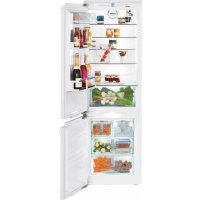
| Product type | Integrated combined fridge-freezer |
| Brand | Liebherr |
| Model | HC 1080 |
| Climate class | SN, N, ST, T (from 10 °C to 43 °C) |
| Refrigerant | R 600a (flammable) |
| Energy consumption | Low consumption, energy class not specified |
| Freezing capacity | Up to 25 kg per bin, 35 kg per shelf |
| Main functions | SuperCool, SuperFrost, NoFrost, IceMaker, Sabbath mode, child lock, door and temperature alarm |
| Interior lighting | LED |
| Defrost | Automatic (NoFrost) |
| Water connection | Required for IceMaker |
| Maintenance | Manual cleaning, do not use steam cleaner |
| Safety | Child lock, door alarm, temperature alarm, Sabbath mode |
| Spare parts and repairability | 2-year parts and labor warranty, 5-year sealed system, 6 to 12-year sealed system parts |
| General information | Manufactured without HCFC, efficient insulation, compatible with Star-K standards |
Frequently Asked Questions - HC 1080 LIEBHERR
User questions about HC 1080 LIEBHERR
0 question about this device. Answer the ones you know or ask your own.
Ask a new question about this device
Download the instructions for your Fridge in PDF format for free! Find your manual HC 1080 - LIEBHERR and take your electronic device back in hand. On this page are published all the documents necessary for the use of your device. HC 1080 by LIEBHERR.
USER MANUAL HC 1080 LIEBHERR
Combined fridge-freezer for integrated use, door-on-door
1 The appliance at a glance. 2
1.1 Additional benefits 2
1.2 Overview of appliances and equipment items.. 3
1.3 Range of appliance use.. 3
1.4 Conformity 3
1.5 Energy saving 3
1.6 Arranging Food 4
2 General safety information. 4
3 Controls and displays. 5
3.1 Operating and control elements.. 5
3.2 Temperature display 6
4 Start-up 6
4.1 Switching on the appliance 6
5 Operation 6
5.1 Temperature display unit.. 6
5.2 Child-proof lock.. 6
5.3 Door alarm.. 7
5.4 Temperature alarm.. 7
5.5 Sabbath Mode 7
5.6 Fridge compartment.. 7
5.7 Freezer compartment 10
6 Maintenance. 13
6.1 Defrosting with NoFrost. 13
6.2 Cleaning the appliance.. 13
6.3 Cleaning the IceMaker 13
6.4 Customer service.. 14
6.5 Appliance Information 14
7 Troubleshooting. 14
8 Putting appliance out of service. 18
8.1 Vacation Tips. 18
8.2 Shut off the water intake 18
8.3 Switching off the appliance 18
8.4 Decommissioning 18
9 Disposing of the appliance. 18
10 Liebherr Warranty Plan. 18
Congratulations on the purchase of your new appliance. With this purchase, you have chosen all the advantages of the latest refrigeration technology, guaranteeing you a high-quality appliance with a long life span and high operating safety.
The equipment of your appliance gives you the highest level of day-to-day ease of operation.
Together we are making an active contribution to the conservation of our environment by purchasing this appliance which is manufactured in an environmentally friendly process with the use of recyclable materials.
We hope you enjoy your new appliance.
The manufacturer is constantly working to improve all models. Therefore please understand that we reserve the right to make design, equipment and technical modifications.
To get to know all the benefits of your new appliance, please read the information contained in these instructions carefully.
The instructions apply to several models, so there may be differences. Sections which only apply to certain appliances are indicated with an asterisk (^*)
Instructions for action are marked with a the results of action are marked with a
1 The appliance at a glance
1.1 Additional benefits
CFC free
- Energy-optimized refrigerant circuit
- Energy-efficient insulation
- Low energy consumption
-User-friendly electronic controls
- Temperature can be controlled in the appliance independent of ambient conditions according to its climate rating - Temperature can be displayed as ^ C or ^ F
- The appliance defrosts automatically - no need to spend time defrosting
Large refrigeration capacity
- Safety glass storage shelves
Large freezing capacity
- Shelves can be removed to make space for large items.
- Freezer over-temperature alarm
- Quick-freeze feature for fresh food (SuperFrost)
- Frozen food temperature indicator
- Power failure/frost-control display
- All freezer drawers suitable for quick-freeze
- Freezer compartment light
- Bright LED interior light
- Door ajar alarm
- Handle grips on all extra-large drawers for easy transport
- Integrated transport grips on appliance housing
- Transport castors at back
Easy to clean
- Door hinges can be reversed
- Door-on-door system for easy kitchen cabinet installation
- Soft stop mechanisms
- This unit is certified as Sabbath compliant by the Star-K organization thus allowing the appliance to be used during religious holidays. For more information please visit Star-K on the web at www.star-k.org.

1.2 Overview of appliances and equipment items
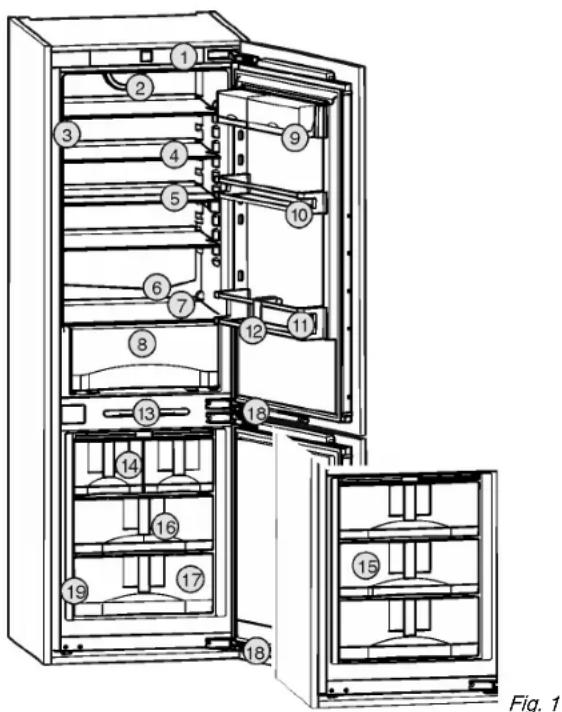
(1) Operating and control elements
(11)Bottle shelf
(2) Fan (12)Bottle rack
(3) LED light column (13)LED lighting freezer compartment
(4) Shelf (14) IceMaker
(5) Shelf, can be split (15) Refrigerant accumulators
(6) Drain hole (16)InfoSystem
(7) Coldest zone (17) Freezer compartment
(8) Vegetable tray (18)Closing damper
(9) Container shelf (19)Rating plate
(10)Storage rack for jars
Note
Shelves, drawers, and baskets are arranged for optimal energy efficiency in the factory configuration.
1.3 Range of appliance use
Normal use
The appliance is only suitable for cooling food for residential or other similar environments. This includes the following types of uses
- in staff kitchens, bed and breakfasts,
-
by guests in country homes, hotels, motels and other types of accommodations,
-
for catering and similar wholesale services.
All other types of uses are not permitted.
Foreseeable misuse
The following uses are specifically prohibited:
-
Storage and cooling of medication, blood plasma, laboratory preparations or similar substances and products in accordance with the CMDCAS and FDA 510(k)
-
Use in areas at risk of explosion
Incorrect appliance use can cause damage to the stored products or cause them to spoil.
Climate ratings
The appliance is set to operate within specific ambient temperature limits according to its climate rating The climate rating for your appliance is printed on the rating plate
Note
To guarantee trouble-free operation, comply with the indicated ambient temperatures.
| Climate rating | for ambient temperatures from |
| SN | 50 °F (10 °C) to 90 °F (32 °C) |
| N | 61 °F (16 °C) to 90 °F (32 °C) |
| ST | 61 °F (16 °C) to 101 °F (38 °C) |
| T | 61 °F (16 °C) to 110 °F (43 °C) |
1.4 Conformity
The refrigerant circuit has been tested for leaks. When installed, the appliance complies with the relevant safety regulations and the safety standards CAN/CSA-C22.2 No.60335-1-11, 60335-2-24-06 and UL 60335-1, UL 60335-2-24.
Instructions for testing institutes:
Tests must be carried out in accordance with the applicable standards and guidelines.
The preparation and testing of the appliance must be carried out taking account of the manufacturer's loading plans and the instructions in the operating manual.
1.5 Energy saving
- Always ensure good ventilation. Do not obstruct ventilation openings or grilles.
- Never block air slits in the fan.
- Do not install the appliance in direct sunlight or next to an oven, heater, or similar heat source.
-
Energy consumption depends on installation conditions such as the ambient temperature (see 1.3).
-
Avoid opening the appliance door for any longer then necessary
- The lower the temperature is set the higher the energy consumption.
- Store food logically (see The appliance at a glance).
- All food stored in the appliance should be well wrapped and covered. This prevents frost buildup.
Only take food out for as long as necessary so that it does not get too warm. - Insertion of warm foods: first let the food cool down to room temperature.
- Defrost frozen food in the fridge
- If you intend to be away for an extended period, empty the fridge compartment and switch it off.
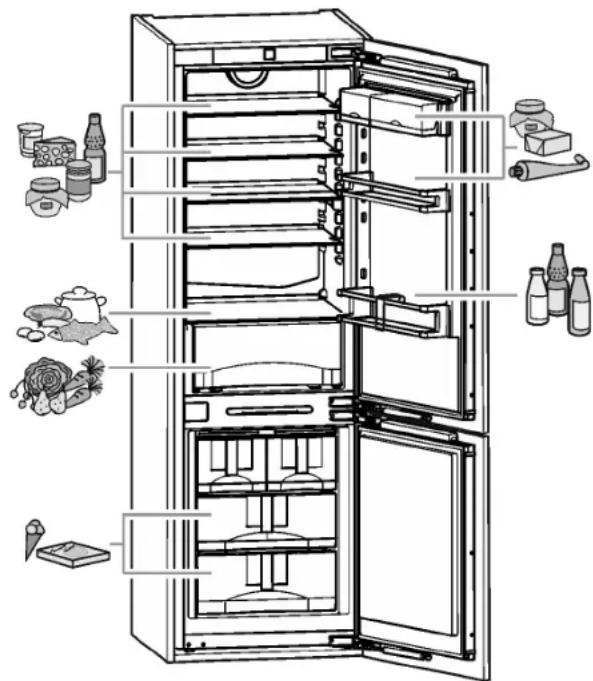
1.6 Arranging Food
Fig. 2
2 General safety information
Read and follow these instructions. They contain safety advice which is important for safe and problem-free installation and operation. Always read and follow the safety advice.
Dangers for the user:
- This appliance can be operated by children 8 years and older as well as by persons with reduced physical, sensory or mental capabilities or lack of experience and knowledge if they are supervised or have been instructed in
the safe use of the appliance and understand the associated risks. Children must not play with the appliance. Cleaning and user maintenance must not be performed by children unless they are supervised.
- When disconnecting the appliance from the outlet, always take hold of the plug. Do not pull on the cable.
- Disconnect the power plug or switch off the power if a fault occurs.
- Do not damage the mains power line. Do not operate the appliance from a defective mains power line.
- Repairs, work on the appliance and replacement of the power cord should only be carried out by the customer service department.
- Only install, connect and dispose of the appliance in accordance with the instructions.
- Only operate the appliance after it has been installed.
- Please keep the instructions and pass them on to any future owner.
- All repairs to or work on the IceMaker must only be carried out by the customer service department or other specialist engineers trained to do this.*
- The manufacturer is not liable for damage arising from incorrect connection to the water supply.*
- Special-purpose lamps (filament lamps, LEDs, and fluorescent lamps) inside the appliance are intended to illuminate its interior compartments and are unsuitable for room illumination.
Risk of fire:
-
The refrigerant contained within the appliance, R 600a, is environmentally friendly, but flammable. Leaking refrigerant can ignite.
-
Do not damage the pipes of the refrigerant circuit.
- Do not handle naked flames or ignition sources inside the appliance.
- Do not use electrical devices inside the appliance (e.g., steam cleaners, heaters, ice cream makers, etc.).
-
If refrigerant leaks: Remove naked flames or ignition sources from near where the appliance is installed Air the room well Contact the customer service department.
-
Do not operate the appliance near explosive gases.
-
Do not store or use gasoline or other flammable vapors and liquids in the vicinity of this appliance.
- Do not store explosive materials or spray cans with flammable propellants, such as e.g. butane, propane, pentane, etc. in the appliance. You can recognize such spray cans by the printed contents or a flame symbol. Any leaking gasses can be ignited by electrical components.
- Alcoholic beverages or other containers holding alcohol must always be tightly sealed for storage purposes. Any leaking alcohol can be ignited by electrical components
Tipover hazard:
- Do not stand or climb on the base, drawers, doors, etc. This applies in particular to children.
Risk of food poisoning:
- Do not consume food that has passed its best before date.
Danger of frostbite, feelings of numbness and pain:
- Avoid continued skin contact with the cold surfaces or chilled/frozen food or adopt protective measures, e. g. use gloves. Do not consume ice cream (especially sherbets) and ice cubes immediately when they are too cold.
Risk of injury and damage:
- Hot steam may lead to injuries. Do not use any electrical heating or steam cleaning equipment, naked flames or defrosting sprays for defrosting
- Do not remove ice with sharp objects
Risk of crushing:
- Do not hold onto the hinge when opening and closing the door. Fingers may get caught.
Symbols on the device:
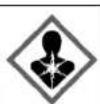
The symbol can be on the compressor. It refers to the oil in the compressor and refers to the following danger: Can be lethal if swallowed or inhaled. This notice only applies for recycling. There is no danger during normal operation.
Follow the specific instructions in the other sections:

DANGER indicates a hazardous situation, which if not avoided, will result in death or serious injury.
| WARNING indicates a hazardous situation, which if not avoided, could result in death or serious injury. |
| CAUTION indicates a hazardous situation, which if not avoided, will result in minor or moderate injury. |
| NOTICE indicates a hazardous situation, which if not avoided, could result in damage to property. |
| Note indicates useful advice and tips. |
3 Controls and displays
3.1 Operating and control elements
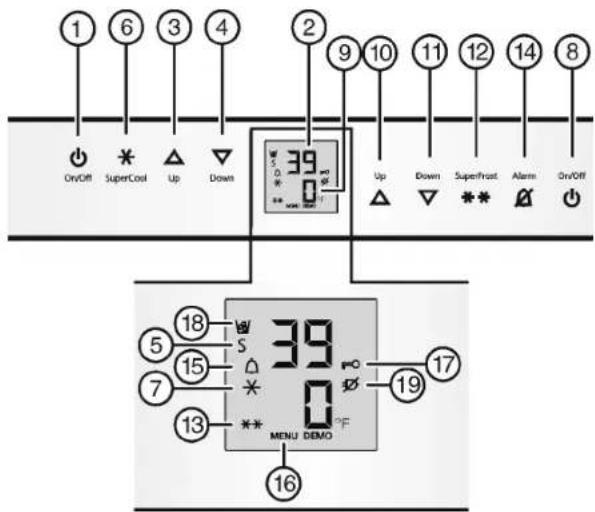
Fig. 3
(1)Fridge compartment On/Off button
(2) Fridge compartment temperature display
(3)Fridge compartment Up
(4)Fridge compartment Down set button
(5) Sabbath mode symbol
(6) SuperCool button
(7) Symbol SuperCool
(8) Freezer compartment On/Off button
(9) Freezer compartment temperature display
(10)Freezer compartment Up set button
(11)Freezer compartment Down button
(12)SuperFrost button
(13)SuperFrost symbol
(14)Alarm button
(15)Alarm symbol
(16)Menu symbol
(17)Child safety symbol
(18)IceMaker symbol*
(19)Symbol Power failure
Start-up
3.2 Temperature display
The following is displayed in normal operation:
- the highest freezer temperature
- the average fridge temperature
The freezer compartment temperature display is flashing:
- the temperature setting has been changed
- after switch-on the temperature is not yet cold enough
- the temperature has risen several degrees
Dashes are shown on the display:
- the freezer temperature is above 32^ (0^) .
The following displays indicate malfunction. Possible causes and corrective actions: (see Troubleshooting).
- F0 through F9
- FE*
The power failure symbol flashes.
4 Start-up
4.1 Switching on the appliance
Note
To switch on the entire appliance, only the freezer compartment needs to be switched on.
Switch on the appliance 2 hours before loading with frozen food for the first time.
Do not load frozen foods until the temperature display reads 0^(-18^)
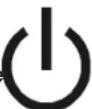
4.1.1 Switching on the freezer compartment
Open the door.
Press On/Off button, freezer compartment Fig. 3 (8).
The fridge compartment temperature display shows the current temperature in the interior.
The freezer compartment temperature display and the Alarm symbol will flash until the temperature is cold enough. If the temperature is greater than 32^ (0^) , flashing dashes will appear; if the temperature is lower than this, the current temperature will flash on the display.
4.1.2 Switching on the fridge compartment
If the chiller compartment was switched off (e.g. during prolonged absence such as vacation), it can be switched back on separately.
Open the door.
Press Fridge compartment On/Off button Fig. 3 (1).
The interior light comes on when the door is opened.
The temperature display flashes. The fridge compartment is switched on.
5 Operation
5.1 Temperature display unit
The temperature display can be changed from ^ F to ^ C .
5.1.1 To change the unit
Activate setting mode: Press SuperFrost button Fig. 3 (12) for about 5 seconds.
5 is displayed in the temperature display.
The Menu symbol Fig. 3 (16) lights up.
Using Freezer compartment Up button Fig.3 (10) Freezer compartment Down button Fig.3 (11)select ^o
To confirm: Briefly press SuperFrost button Fig.312
Using Freezer compartment Up button Fig.3 (10) Freezer compartment Down button Fig.3 (11)select ^ or ^ C
To confirm: Briefly press SuperFrost button Fig.3(12).
To exit setting mode: Press Freezer compartment On/Off button Fig. 3 (8).
-0
Wait 5 minutes.
The temperature is again displayed in the temperature display.
5.2 Child-proof lock
You can use the child-proof lock to lock the buttons. This means that children cannot accidentally switch off the appliance when playing.

5.2.1 Switching on the child-proof lock
Activate setting mode: press and hold the SuperFrost button Fig. 3 (12) for approximately 5 s.
S is shown on the display.
The Menu symbol Fig. 3 (16) lights up.
Using the Freezer compartment Up button Fig. 3 (10) or Freezer compartment Down button Fig. 3 (11), select c.
Press the SuperFrost button Fig. 3 (12) briefly to confirm.
When cl is shown on the display:
To switch on the child-proof lock, press the SuperFrost button Fig. 3 (12)briefly.

The Child safety symbol Fig. 3 (17) lights up. c flashes on the display. When c0 is shown on the display:
To switch off the child-proof lock, press the SuperFrost button Fig. 3 (12) briefly.
The Child safety symbol Fig. 3 (17) goes out. c flashes on the display.
Deactivate setting mode: press the Freezer compartment On/Off button Fig. 3 (8).
-or-
Wait 5 min.
The temperature is again displayed on the temperature display.
5.3 Door alarm
For fridge and freezer compartments If the door is open for longer than 180 seconds, the acoustic warning sounds.
The acoustic warning stops automatically when the door is closed
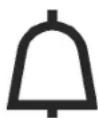
5.3.1 Switching off the door alarm
The acoustic warning can be switched off when the door is open. The acoustic warning remains switched off as long as the door is open. When the door is closed, the alarm function is active again.
Press Alarm button Fig. 3 (14).
The door alarm stops.
5.4 Temperature alarm
If the freezer temperature is not cold enough, the audible warning sounds.
At the same time, the Alarm symbol Fig.3 (15) will flash.
The cause of a temperature being too high may be:
- Hot fresh food was placed in the appliance.
- When sorting and removing food from the appliance, too much warm ambient air got in.
- The power was cut off for a while.
- The appliance is faulty.
The audible warning automatically ceases, the Alarm symbol Fig. 3 (15) goes out, and the temperature display stops flashing when the temperature is cold enough again.
If the alarm status remains: (see Troubleshooting).
Note
If the temperature is not cold enough, food may spoil.
Check the quality of the food. Do not consume spoiled food.
5.4.1 Switching off the temperature alarm
The acoustic warning can be switched off. When the temperature is cold enough again, the alarm function is active again.
Press Alarm button Fig. 3 (14).
The acoustic warning ceases.
5.5 Sabbath Mode
This function meets the religious requirements on the Sabbath and Jewish festivals. When the appliance is in Sabbath mode some control electronic functions are switched off. After setting Sabbath mode you no longer
need to worry about indicator lights, figures, symbols, displays, alarm messages and fans. The thawing cycle only operates at the specified time without taking refrigerator use into account. After a power cut the appliance automatically switches on again in Sabbath mode.
WARNING
Danger of food poisoning!
No record will be kept of a power failure during Sabbath Mode. Thus, during Sabbath mode, if a power failure occurs that you are not aware of, when the power comes back on, the unit will continue to be in Sabbath Mode but when Sabbath Mode is ended there will be no indication that a power failure occurred.
If a power failure occurs during Sabbath mode:
Check the quality of the food. Do not consume spoiled food!
- All functions are blocked until Sabbath mode is switched off.
- If the unit is currently running in a mode such as Superfrost, Supercool or the Ventilation is enabled these functions will continue and finish their timed cycles independent of now being in Sabbath mode.
- The Ice Maker is disabled.*
- No audible signals are emitted, and the temperature display does not indicate any warnings or settings (such as a temperature alarm or door alarm).
Light does not operate.
5.5.1 Setting Sabbath mode
To activate setting mode: Press and hold the SuperFrost button Fig. 3(12) for approx. 5 s.
5 flashes on the display.
The Menu symbol Fig. 3 (16) lights up.
To access the Sabbath mode function: Briefly press theSuperFrost button Fig. 3 (12). When SI is shown on the display:
To turn on Sabbath mode, briefly press the SuperFrost button Fig. 3 (12). When 50 is shown on the display:
To turn off Sabbath mode, briefly press the SuperFrost button Fig. 3 (12).
To deactivate setting mode: Press the Freezer compartment On/Off button Fig. 3 (8).
-or-
Wait 5 min.
The Sabbath Mode symbol Fig. 3 (5) appears on the temperature display as long as Sabbath Mode is active.
Sabbath mode switches off automatically after 120 hours if it is not manually switched off beforehand.
5.6 Fridge compartment
The natural circulation of air in the refrigerator compartment results in zones with differing temperatures. It is coldest directly above the vegetable drawers and at the
Operation
rear wall. It is warmest at the top front of the compartment and in the door.
5.6.1 Refrigerating food
Note
Do not load the door with more than 35 lbs (16 kg) of food.

WARNING
Danger of fire
Do not use electrical appliances inside the food storage compartments of the appliance, unless they are of the type recommended by the manufacturer.
Note
Insufficient ventilation results in an increase in energy consumption and reduction of the refrigerating performance.
Never block the air slits in the fan.
Use recyclable plastic, metal, aluminum and glass containers and cling film to wrap foods.
Always use closed containers for liquids and for food that may give off or be tainted by odor or flavor transfer or cover them.
Foods which give off a large amount of ethylene gas and those that are sensitive to this gas, such as fruit, vegetables and salad, should always be separated or wrapped so as not to reduce the storage life; for example, do not store tomatoes together with kiwi fruits or cabbage.
- Use the front floor area of the fridge compartment only to set down food to be refrigerated temporarily, e.g., when rearranging or sorting the contents of the fridge. Do not leave the food there, as it may be pushed back or tipped over when the door is closed.
Do not store food too close together to enable sufficient air circulation.
5.6.2 Setting the temperature
The temperature depends on the following factors:
- the number of times the door is opened
- the room temperature of the installation location
- the type, temperature and amount of food.
The temperature can be set from 45^ (9^) to 34^ (1^) , Recommended temperatures are 39^ (4^)
To set a higher temperature: press the Fridge compartment Up button Fig. 3 (3).
To set a lower temperature: press the Fridge compartment Down button Fig. 3 (4).
When pressed once the previously set fridge compartment temperature display value will flash.
To change the temperature in 1^ (1^) increments: briefly press the button.
To change the temperature continuously: hold the button down.
The value is displayed flashing during the setting operation.
The actual temperature is displayed about 5 seconds after the last press of a button. The temperature slowly adjusts to the new value.
5.6.3 SuperCool
With SuperCool you switch to the highest cooling performance to reach lower cooling temperatures. Use SuperCool to rapidly cool large quantities of food.

If SuperCool is on, the fan* may come on. The appliance works at maximum refrigerating power. The sound of the refrigeration unit may be temporarily louder as a result.
SuperCool will use more energy than normal operation.
Cooling with SuperCool
Briefly press the SuperCool button Fig. 3 (6).
The SuperCool symbol Fig. 3 (7) lights up in the display.
The cooling temperature drops to the coldest value. SuperCool is switched on.
SuperCool switches itself off automatically after 12 hours. The appliance continues to work in normal energy-saving mode.
To prematurely switch off SuperCool
Briefly press the SuperCool button Fig. 3 (6).
The SuperCool symbol Fig. 3 (7) goes out in the display.
SuperCool is switched off.
5.6.4 Shelves
Shifting or removing shelves

CAUTION
Danger of lacerations!
The storage shelf can shatter if dropped or mishandled. You could cut yourself on the pieces of broken glass.
- Only remove storage shelves when there is nothing on them.
Extension stops secure the shelves against being accidentally pulled out.
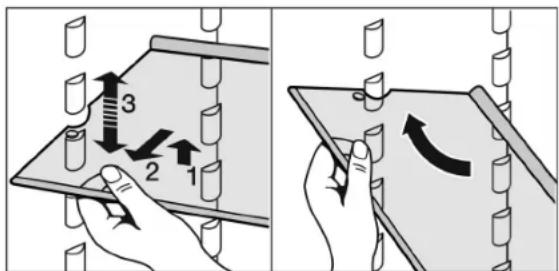
Fig. 4
Lift up the shelf and pull it slightly forward.
Adjust the shelf height by shifting the spacers in the runners.
To remove the shelf completely, set it at an angle and pull it out towards you.
Insert the shelf with the raised edge to the back pointing upwards.
This prevents food from contacting and freezing to the back wall.
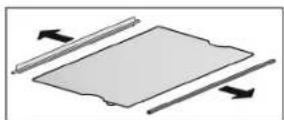
To dismantle shelves
The shelves can be dismantled for cleaning.
5.6.5 Using the split shelf

CAUTION
Danger of lacerations! The storage shelf can shatter if dropped or mishandled. You could cut yourself on the pieces of broken glass.
Only remove storage shelves when there is nothing on them.
Push the split shelf underneath as in the illustration.
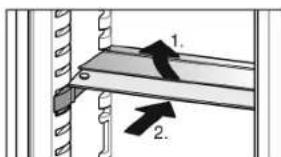
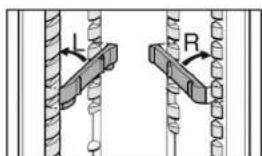
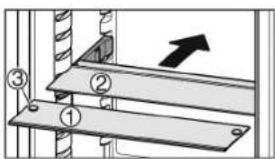
Fig. 5
Attach support bars supplied, ensuring right (R) and left (L) parts are correctly positioned.
The glass shelf with stop face (2) has to be at the back.
The glass plate (1) with the pull out stops must be at the front so that the stops (3) point downward.
5.6.6 Door racks
Note
Do not load the door with more than 35 lbs (16 kg) of food.
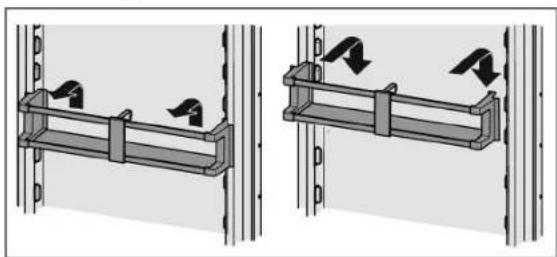
Repositioning the door racks
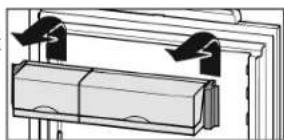
Fig. 6
The container trays can be removed and placed on the table as a unit.
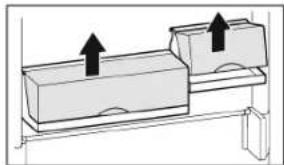
It is possible to use one or both boxes. If unusually tall bottles are to be stored, only suspend one box above the bottle rack.
To swap containers: pull up to remove and reinsert in the desired position.
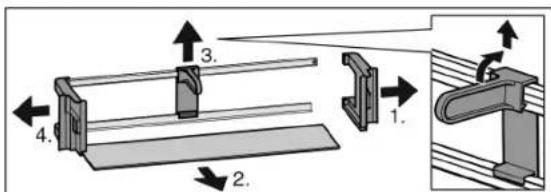
To dismantle door racks
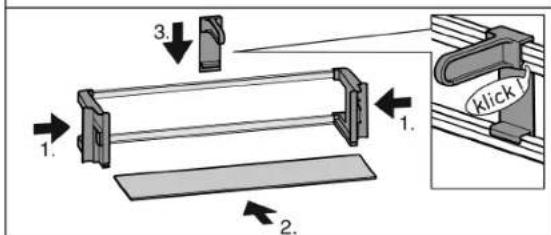
Fig. 7
Operation
Fig. 8
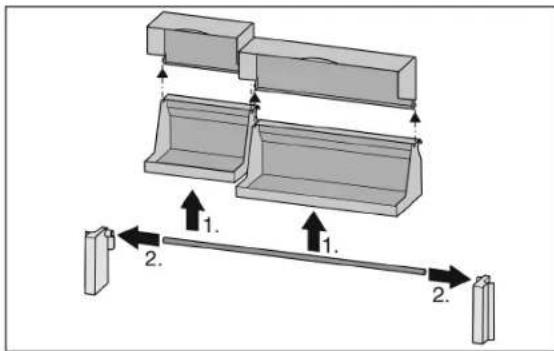
The door racks can be dismantled for cleaning.
5.6.7 Use the bottle holder
To prevent bottles from tipping over, move the bottle holder.
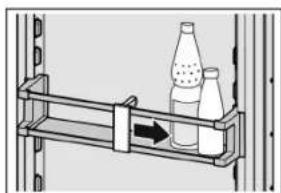
5.6.8 Vegetable trays on telescopic rails
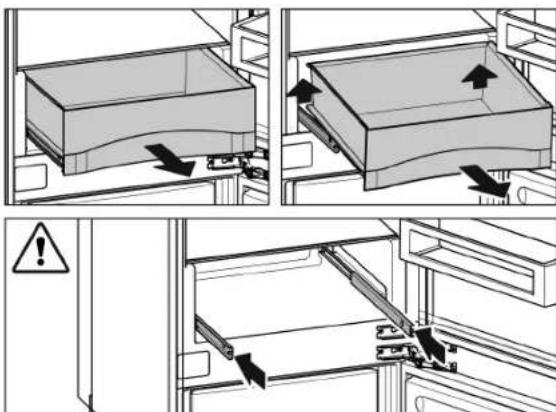
Fig. 9
5.7 Freezer compartment
You can store frozen food, make ice cubes and freeze fresh food in the freezer compartment.
5.7.1 Freezing food
Each drawer can hold up to 55.12 lbs (25 kg) of frozen food; each plate can hold up to 77.16 lbs (35 kg).
After the door is closed, a vacuum is created. After closing the door, wait about 1 minute, then the door is easier to open.
Danger of fire
Do not use electrical appliances inside the food storage compartments of the appliance, unless they are of the type recommended by the manufacturer.
There is a risk of injury from pieces of broken glass. Bottles and cans containing drinks can split or crack when frozen. This applies in particular to carbonated drinks.
Do not freeze bottles and cans containing drinks.
So that the food is rapidly frozen through to the core, do not exceed the following quantities per pack:
- fruit, vegetables up to 2.2 lb (1 kg)
- meat up to 5.51 lbs (2.5 kg)
Pack the food in portions in freezer bags, reusable plastic, metal or aluminum containers.
5.7.2 Defrosting food
- in the fridge compartment
-in the microwave - in the oven/fan oven
- at room temperature
Danger of food poisoning!
Do not re-freeze defrosted food.
Only take out the amount of food that is required. Use defrosted food as quickly as possible.
5.7.3 Setting the temperature
The appliance is set as standard for normal operation.
The temperature can be set from 7^ (-15^) to -16^ (-26^) . Recommended temperatures are 0^ (-18^) .
To set a higher temperature: press the Freezer compartment Up button Fig. 3(10).
To set a lower temperature: press the Freezer compartment Down button Fig. 3 (11).
When the button is pressed for the first time, the previous value is indicated on the freezer compartment temperature display.
To change the temperature in 1^ (1^) increments: briefly press the button.
-or-
To change the temperature continuously: hold the button down.
The value is displayed flashing during the setting operation.
The actual temperature is displayed about 5 seconds after the last press of a button. The temperature slowly adjusts to the new setting.
5.7.4 SuperFrost
With this function you can rapidly freeze fresh food through to the core. The appliance works with maximum refrigerating performance. The sound of the refrigeration unit may be temporarily louder as a result.
Depending on how much fresh food is to be frozen you must switch SuperFrost on in advance - for a small amount of food to be frozen, about 6 hours, for the maximum amount about 24 hours before putting the food in.
Package the food and place it inside across as wide an area as possible. Do not bring food that is to be frozen into contact with products that are already frozen to prevent these items from starting to thaw.
You do not need to switch SuperFrost on in the following cases:
- when placing frozen food in the freezer
- when freezing up to about 2kg of fresh food a day
Freezing with SuperFrost
Briefly press the SuperFrost button Fig. 3 (12) once.
The SuperFrost symbol Fig. 3 (13) lights up.
The freezing temperature drops and the appliance operates at its maximum refrigeration power rating. When a small amount of food is to be frozen.
Wait approx. 6 hrs.
Place packaged food in the upper drawers. When the maximum amount of food is to be frozen.
Wait approx. 24 hrs.
Remove upper drawers and place the food directly onto the upper shelves.
SuperFrost is automatically switched off. At the earliest after 30 hours, at the latest after 65 hours, depending on the quantity placed inside the appliance.
The SuperFrost symbol Fig. 3 (13) goes out when the freezing process is complete.
Place food inside the drawers and push them closed again.
The appliance returns to work in the energy-saving normal mode.
5.7.5 Drawers
Note
Insufficient ventilation results in an increase in energy consumption and reduction of the refrigerating performance.
For appliances with NoFrost:
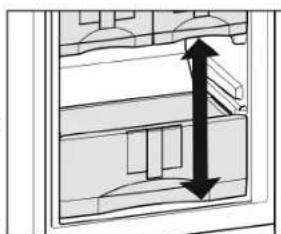
Leave the bottom drawer in the appliance.
Never block the air slits in the fan on the rear wall.

To store frozen food directly on the shelves: pull the drawer forward and lift it out.
5.7.6 Shelves
To remove shelf: lift it at the front and pull out forward.
To reinsert shelf: simply slide it in as far as it will go.
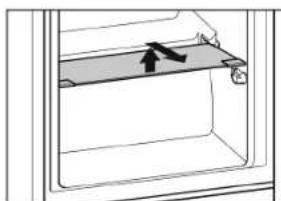
5.7.7 VarioSpace
In addition to the drawers, you can also take out the shelves. This gives you space for large frozen items. Poultry, meat, large joints of game and tall bakery items can be frozen and then presented whole.
Each drawer can hold up to 55.12 lbs (25 kg) of frozen food; each plate can hold up to 77.16 lbs (35 kg).
5.7.8 Info system
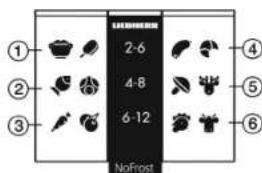
(1) Ready meals, ice cream
(2) Pork, fish (5) Game, mushrooms
(3) Fruit, vegetables (6) Poultry, beef/veal
The numbers indicate the storage time in months for different types of frozen foods. The storage times given are guidelines.
5.7.9 Refrigerant accumulators*
These refrigerant accumulators prevent the temperature from rising too fast when power failures occur.
Using refrigerant accumulators*
Place the frozen refrigerant accumulators in the top front area of the freezer compartment on top of the freezer goods.
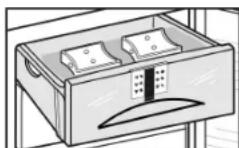
5.7.10 IceMaker*
The IceMaker is in the top drawer. The drawer is labeled "IceMaker".
Make sure that the following conditions are fulfilled:
The appliance is level.
- The appliance is connected to the electricity supply.
- The freezer compartment is switched on.
- The minimum freezer temperature is 14^ (-10^)
- All air was bled from the waterline before starting the icemaker. The icemaker will only work if there is no air in the waterline.
Switching on the IceMaker*
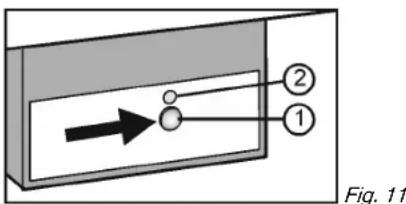
Pull out the drawer.
Press On/Off button Fig. 11 (1) so that the LED Fig. 11 (2) lights up.
Push in the drawer.
The IceMaker symbol Fig. 3 (18) shines.
Note
The IceMaker only produces ice cubes when the drawer is completely closed.
Producing ice cubes*
The production capacity depends on the freezer temperature. The lower the temperature, the more ice cubes can be produced in a certain period.
The production capacity is 90-100 ice cubes in 24 hours at a freezing temperature of 0^(-18^)
To have the maximum capacity of approx. 130 ice cubes in 24 hours, activate the SuperFrost Function. Be aware that this increases the energy consumption because the compressor will run constantly.
The ice cubes fall out of the IceMaker into the drawer. When the ice cubes reach a certain height in the drawer, no more ice cubes can be produced. The IceMaker will not fill the drawer to the top.
If large quantities of ice cubes are required, the complete IceMaker drawer can be swapped with the neighboring drawer. When you close the drawer, the IceMaker automatically restarts production.
When the IceMaker is switched on for the first time, it may take up to 24 hours for the first ice cubes to be produced.
Note
Particles may accumulate in the IceMaker or water line the first time the appliance is used or after an extended period out of service.
To achieve this, do not consume or use the ice cubes that are produced within 24 hours.
Setting the water supply time*
The opening time of the valve on the IceMaker can be adjusted if, for example, the water pressure in the pipe is too low or too high.
The water supply time can be set in stages from E1 (short supply time) to E8 (long supply time). The default setting is E3.
Activate setting mode: press and hold the SuperFrost button Fig. 3(12) for approximately 5 s.
5 is shown on the display.
The Menu symbol Fig. 3 (16) lights up.
Using the Freezer compartment Up button Fig. 3 (10) or Freezer compartment Down button Fig. 3 (11), select E.
To confirm: briefly press the SuperFrost button Fig.3 (12).
To increase the water supply time: press the Freezer compartment Up button Fig. 3 (10).
To decrease the water supply time: press Freezer compartment Down button Fig. 3 (11).
To confirm: press the SuperFrost button Fig.3(12).
Deactivate setting mode: press the Freezer compartment On/Off button Fig. 3 (8).
-or-
Wait 5 mins.
The temperature is again displayed on the temperature display.
Switching off the IceMaker*
If ice cubes are not required, the IceMaker can be switched off independently of the freezer compartment.
When the IceMaker is switched off, the drawer of the IceMaker can also be used for freezing and storing food.
Press the On/Off button for about 1 second until the LED goes out.
The IceMaker symbol Fig. 3 (18) goes out.
Clean the IceMaker.
This ensures that no water or ice remains in the IceMaker.
6 Maintenance
6.1 Defrosting with NoFrost

WARNING
Risk of injury and damage
Do not use mechanical devices or other means to accelerate the defrosting process, other than those recommended by the manufacturer.
Do not use any electrical heating or steam cleaning equipment, naked flames or defrosting sprays for defrosting.
Do not remove ice with sharp objects.
The NoFrost system defrosts the appliance automatically.
Fridge compartment:
The defrosted water is evaporated by the heat of the compressor. Drops of water on the back wall are a functional feature and completely normal.
Clean the drain opening regularly so that the defrosted water can flow away (see 6.2).
Freezer compartment:
The moisture condenses on the evaporator and is periodically defrosted and evaporated.
The appliance does not need to be defrosted manually.
6.2 Cleaning the appliance

WARNING
Danger of electric shock.
Unplug refrigerator or disconnect power.

WARNING
Danger of fire
Do not damage the refrigerant circuit.

WARNING
Risk of injury or damage due to hot steam.
Hot steam can cause scalding/burns and damage to surfaces.
Do not use steam cleaners.
NOTICE
Incorrect cleaning damages the appliance.
Do not use concentrated cleaning agents.
Do not use steel wool or sponges that scour or scratch.
Do not use caustic or abrasive cleaning materials or those containing sand, chloride, or acids.
Do not use chemical solvents.
Do not damage or remove the rating plate on the inside of the appliance. It is vital for the customer service department.
Do not pull off, kink or damage any cables or other components.
Do not let cleaning water get into the drain gutter, the ventilation grille and electrical parts.
Use soft cleaning cloths and a multi-purpose cleaning agent with a neutral pH value.
- Only use food-compatible cleaning and care agents inside the appliance.
Empty the appliance.
Disconnect the power plug.

Clean the plastic surfaces, outside and inside, by hand using lukewarm water and a little dish washing liquid.
To clean the drain opening: Remove deposits with a thin instrument, e.g. a cotton bud.
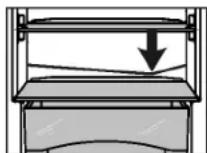
Most of the equipment parts can be dismantled for cleaning: see the respective chapter.
Clean the drawers by hand using lukewarm water and a little dish washing liquid.
The remaining fittings are dishwasher suitable.
- Clean the telescopic rails with a damp cloth only. The grease in the tracks is for lubrication purposes and should not be removed.
After cleaning:
Wipe the appliance and accessories dry.
Connect the appliance and switch it on again.
Switch on SuperFrost (see 5.7.4). When the temperature is sufficiently o
put the food back in the appliance.
6.3 Cleaning the IceMaker*
The IceMaker drawer must be emptied and pushed in.
Activate setting mode: press and hold the SuperFrost button Fig. 3 (12) for approximately 5 s.
5 is shown on the display.
The Menu symbol Fig. 3 (16) lights up.
Using the Freezer compartment Up button Fig. 3 (10) Freezer compartment Down button Fig. 3 (11), select I.
To confirm: press the SuperFrost button Fig. 3 (12).
Using the Freezer compartment Up button Fig.3 (10) Freezer compartment Down button Fig.3 (11),select Ic.
1c
Troubleshooting.
To confirm: press the SuperFrost button Fig.3(12).
The IceMaker moves into cleaning position and shuts off.
Deactivate setting mode: press the Freezer compartment On/Off button Fig. 3 (8).
The temperature is again displayed on the temperature display.
Take out the drawer.
Clean the ice compartment and drawer with warm water. If necessary, use a mild dishwashing liquid. Then rinse.
▶ Slide the drawer back in.
Leave the IceMaker switched off in this position. -or-
NOTICE
Residual dishwashing liquid in the ice tray and drawer. Nausea or irritation of the mucous membrane.
Eliminate any residual dishwashing liquid: Throw away the first three batches of ice cubes.
Switching on the IceMaker (see 5.7.10).
6.4 Customer service
First check whether you can remedy the fault yourself (see Troubleshooting). If this is not the case, please contact a qualified service provider.

WARNING
Risk of injury from repairs by non-professionals.
Repairs and work on the appliance and the power supply cable not described in the Manual (see Maintenance) should only be carried out by a qualified service provider.
Read the appliance designation
Fig. 12 (1), service no. Fig. 12 (2) and serial no. Fig. 12 (3) from the rating plate. The rating plate is located inside the appliance on the left-hand side.
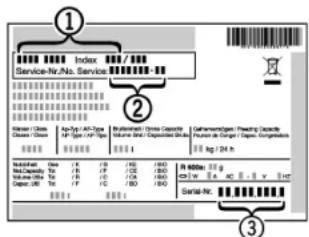
Fig. 12
Notify a qualified service provider, specifying the fault, appliance designation Fig. 12 (1), service no. Fig. 12 (2) and serial Fig. 12 (3) no.
This will help us to provide you with a faster and more accurate service.
- Keep the appliance closed until the Customer Service engineer arrives.
The food will stay cool longer.
Disconnect the power plug (do not pull on the power cord to do this) or switch off the fuse.
6.5 Appliance Information
Make a note of this information when the appliance is installed:
Type Designation:
Service Number:
Appliance / Serial Number:
Date of purchase:
Where purchased:
7 Troubleshooting.
Your appliance is designed and manufactured for reliable operation and a long lifespan. If a malfunction nonetheless occurs during operation, please determine if the malfunction is due to an operating error. If a service call determines operator error, you will be charged for the costs incurred, even during the warranty period. You may be able to rectify the following problems yourself:
| Problem | Possible Cause | Correction |
| The appliance does not work. | The appliance is not switched on. | ► Switch on the appliance. |
| The power plug is not properly inserted in the wall socket. | ► Check the power plug. | |
| The fuse in the wall socket is not OK. | ► Check the fuse. | |
| Power failure | ► Keep the appliance closed. | |
| Problem Possible | Cause Correction | |
| Protect the food: place dry ice on top of the food or use an alternate freezer, if the power failure persists for some time. Do not re-freeze defrosted food. | ||
| The compressor runs for a long time. | When less refrigeration is required, the speed-controlled compressor switches to a low speed. Although the running time is increased as a result, energy is saved. | This is normal in energy-saving models. |
| SuperFrost function is activated. | The compressor runs long to rapidly freeze food. This is normal. | |
| SuperCool function is activated. | The compressor runs long to rapidly cool food. This is normal. | |
| An LED at the lower rear of the appliance (near the compressor) flashes regularly every 5 seconds*. | There is a fault. | Contact the customer service department (see Main-tenance). |
| Noises are too loud. | The different speed levels of speed-controlled* compressors can cause them to generate various noises during operation. | These noises are normal. |
| A gurgling sound | This sound comes from the refrigerant flowing in the refrigeration circuit. | The sound is normal. |
| A faint clicking sound | The sound always occurs when the refrigeration unit (the motor) automatically switches on or off. | The sound is normal. |
| A hum. It is briefly a little louder when the refrigeration unit (the motor) switches on. | The refrigeration increases automatically when the SuperFrost function is activated, fresh food has just been placed in the appliance or the door has been left open for a while. | The sound is normal. |
| The refrigeration increases automatically when the SuperCool function is activated, fresh food has just been placed in the appliance or the door has been left open for a while. | The sound is normal. | |
| The ambient temperature is too high. | Solution: (see 1.3) | |
| A low hum | The sound occurs as a result of fan air flow. | The sound is normal. |
| Vibration noise | The appliance is not standing firmly on the floor As a result, adjoining units or objects are set into vibration by the running refrigeration unit | Check the installation and, if necessary, re-align the appliance. Move bottles and containers apart. |
| Flow noise on the soft stop mechanism. | The sound is caused by the soft stop mechanism. | The sound is normal. |
| The temperature display indicates: F0 to F9. | There is a fault. | Contact the customer service department (see Main-tenance). |
| The temperature display reads: FE* | There is a fault. | Contact the customer service department (see Main-tenance). |
| The temperature display shows a flashing power failure symbol ∅. The warmest temper- ature reached during the power failure is displayed in the temperature display. | The freezer temperature rose too high during the last hours or days due to power failure or power inter- ruption. When the power interruption is over, the appliance will continue to operate at the last temperature setting. | To delete the display of the warmest temperature: Press the Alarm button Fig. 3(14).Check the quality of the food. Do not consume spoiled food. Do not re-freeze defrosted food. |
| DEMO lights up in the tempera- ture display. | The demo mode is activated. | Contact the customer service department (see Main- tenance). |
| The outside surfaces of the appliance are hot*. | The heat of the refrigerant circuit is used to prevent condensate from forming. | This is normal. |
| The IceMaker cannot be switched on.* | The appliance and therefore the IceMaker are not connected. | Connect the appliance (see Start-up). |
| The IceMaker is not making ice cubes.* | The IceMaker is not switched on. | Switch the IceMaker on. |
| The drawer of the IceMaker is not properly closed. | Close the drawer properly. | |
| The water connection is not open. | Open the water connection. | |
| The water supply to the IceMaker was interrupted. | There is a blocked filter at the end of the water supply hose or at the connecting part on the machine. | |
| There is a blocked filter at the end of the water supply hose or at the connecting part on the machine. | Clean the filters. | |
| The waterline was not bled of all air during installation | Please contact your qualified installation plumber to ensure the above criteria is met before calling for service. | |
| The temperature is not cold enough. | The door of the appliance is not closed properly. | Close the appliance door. |
| Insufficient ventilation. | Clear and clean the ventilation grille. | |
| The ambient temperature is too high. | Solution: (see 1.3) | |
| The appliance was opened too frequently or for too long. | Wait to see whether the required temperature resets itself by itself. If not, contact the customer service department (see Maintenance). | |
| Too much fresh food was placed inside without SuperFrost. | Solution: (see 5.7.4) | |
| The temperature is incorrectly set. | Set to a colder temperature and check after 24 hours | |
| The appliance is too near to a heat source (stove, heater etc). | Change location of appliance or the heat source. | |
| The appliance was not properly installed in the recess. | Make sure the appliance was installed correctly and the door closes properly. | |
| The interior light does not turn on. | The appliance is not switched on. | Switch on the appliance. |
| The door was open for longer than 15 minutes. | The interior light automatically switches itself off if the door has been open for about 15 minutes. | |
| The LED interior light is faulty or the cover is damaged | WARNING Risk of injury from electrical shock. Live parts are under the cover. The LED interior light should only be replaced or repaired by the Customer Service department or by engineers trained to do so. | |
| WARNING Risk of injury from LED lamp! The lighting intensity of the LED light complies with laser class 1/1M. If the cover is faulty: Do not gaze directly at this lighting unit with optical lenses while very close to the light source. This can cause damage to your eyes. | ||
| The door seal is faulty or needs to be replaced for other reasons. | On some appliances the door seal is interchangeable. You can replace it without the use of any special tools. | Contact the customer service department (see Main-tenance). |
| The appliance is iced up or condensation is building. | The door seal may have slipped out of its groove. | Check the door seal is well placed in the groove. |
Putting appliance out of service
8 Putting appliance out of service
8.1 Vacation Tips
Short vacations: If you will be away for less than four weeks
Use all perishables.
Freeze other items.
Turn off the refrigerator compartment.
Turn off the icemaker.
Shut down the water supply to the icemaker.*
Long vacations: If you will be away for a month or more
Remove all food from the appliance.
Turn OFF the appliance.
Clean the appliance (see 6.2).
Leave the door open to prevent unpleasant odors.
This will also keep mold from building up.
Turn off the icemaker.
Shut off the water supply to the icemaker.
8.2 Shut off the water intake*
NOTICE
Malfunction of the water intake!
If the water intake is shut off during operation but the IceMaker remains in operation, the water intake pipe may ice up.
- Switch off the IceMaker if the water supply is interrupted (e.g. holiday).
8.3 Switching off the appliance
Note
To switch off the entire appliance, only the freezer compartment needs to be switched off.
8.3.1 Switching off the freezer compartment
A long beep sounds. The temperature displays are dark. The appliance is switched off.
If the device does not switch off, the child safety feature is enabled (see 5.2).
8.3.2 Switching off the fridge compartment
Note
The fridge compartment can be switched off independently of the freezer.
Press and hold down the chiller compartment On/Off button Fig. 3 (1) for approx. 2 seconds.
The fridge compartment temperature display Fig. 3 (2) is dark. The fridge compartment is switched off.
8.4 Decommissioning *
Empty the appliance.
Put the IceMaker in the cleaning position (see Maintenance).
Switch off the appliance (see Putting appliance out of service).
Pull out the power plug.
Clean the appliance (see 6.2).

Leave the door open to prevent bad smells.
9 Disposing of the appliance
Follow the local regulations for the disposal of appliances. Old appliances can be dangerous. Contact the local refuse collection department for additional information.

DANGER
There is a risk of suffocation.
Children playing can shut themselves in and suffocate.
Take the door(s) off.
Remove the drawers.
- Leave the storage shelves in the appliance so that children cannot easily climb into the appliance.

WARNING
Danger of electric shock.
Cut off the plug from the power cord and discard.
Cut off the power cord from the discarded appliance. Dispose of separately from the appliance.
Ensure during and after disposal that the appliance isn't stored in the vicinity of gasoline or other flammable vapors and liquids.
When disposing of the appliance, ensure that the refrigeration circuit is not damaged to prevent uncontrolled escape of the refrigerant it contains (data on type plate) and oil.
10 Liebherr Warranty Plan
FULL TWO YEAR WARRANTY - For two years from the date of original purchase, your Liebherr warranty covers all parts and labor to repair or replace any part of the product which proves to be defective in materials or workmanship.
FULL FIVE YEAR WARRANTY - For five years from the date of original purchase, your Liebherr warranty covers all parts and labor to repair or replace any components that prove to be defective in materials or workmanship in the sealed system. The "Sealed System" means only the compressor, condenser, evaporator, drier and all connecting tubing.
LIMITED 6TH THROUGH 12TH YEAR WARRANTY - From the 6^th through 12^th year from the date of original
purchase, your Liebherr warranty covers all parts that prove to be defective in materials or workmanship in the Sealed System (parts only).
TERMS APPLICABLE TO EACH WARRANTY
All service provided by Liebherr under the warranty must be performed by authorized Liebherr service representatives, unless otherwise specified by Liebherr. Service will be provided in the home during normal business hours. This warranty applies only to products installed for normal residential use. Details regarding a non-residential warranty are available on request.
The warranty applies only to products installed in any one of the fifty states of the United States or the District of Columbia. The warranty does not cover any parts or labor to correct any defect caused by negligence, accident or improper use, maintenance, installation, service or repair, including but not limited to improper removal and reinstallation of the condensing unit.
THE WARRANTY DESCRIBED ABOVE ARE MADE EXPRESSLY IN LIEU OF ANY OTHER WARRANTYES, EXPRESSED OR IMPLIED, INCLUDING ANY IMPLIED WARRANTY OF MERCHANTABILITY OR FITNESS FOR A PARTICULAR PURPOSE, AND OF ANY OTHER OBLIGATION OR LIABILITY ON THE PART OF LIEBHERR. IN NO EVENT SHALL LIEBHERR BE LIABLE FOR SPECIAL, INCIDENTAL OR CONSEQUENTIAL DAMAGES ASING FROM THE BREACH OF THESE WARRANTYES OR ANY OTHER WARRANTYES, WHETHER EXPRESS, IMPLIED OR STATUTORY.
Some states do not allow the exclusion or limitation of incidental or consequential damages so the above limitation or exclusion may not apply to you. This warranty gives you specific legal rights and you may also have other legal rights which vary from state to state.
To receive parts and/or service and the name of the Liebherr authorized service representative nearest you, contact your Liebherr dealer or distributor or contact the Liebherr designated national service provider:
in the US: Service-appiances.us@lieb Herr.com or call 1-866-LIEBHER (1-866-543-2437).
in Canada: www.euro-parts.ca or call 1-888-LIEBHER (1-888-543-2437).
LIEBHERR
8Mise horservice. 58
For Service in the U.S.:
Lieb Herr Service Center
Toll Free: 1-866-LIEBHER or 1-866-543-2437
Service-appiances.us@lieb Herr.com
PlusOne Solutions, Inc.
3501 Quadrangle Blvd, Suite 120
Orlando, FL 32817
For Service in Canada:
Liebherr Service Center
Toll Free: 1-888-LIEBHER or 1-888-543-2437
www.euro-parts.ca
EURO-PARTS CANADA
39822 Belgrave Road
Belgrave, Ontario, N0G 1E0
Phone: (519) 357-3320
Fax: (519) 357-1326
- The appliance at a glance
- Additional benefits
- Overview of appliances and equipment items
- Note
- Range of appliance use
- Normal use
- Foreseeable misuse
- Climate ratings
- Conformity
- Instructions for testing institutes:
- Energy saving
- General safety information
- Dangers for the user:
- Risk of fire:
- Tipover hazard:
- Risk of food poisoning:
- Danger of frostbite, feelings of numbness and pain:
- Risk of injury and damage:
- Risk of crushing:
- Symbols on the device:
- Follow the specific instructions in the other sections:
- Controls and displays
- Operating and control elements
- Fig. 3
- Start-up
- Temperature display
- Start-up
- Switching on the appliance
- Switching on the freezer compartment
- Switching on the fridge compartment
- Operation
- Temperature display unit
- To change the unit
- Child-proof lock
- Switching on the child-proof lock
- Door alarm
- Switching off the door alarm
- Temperature alarm
- Switching off the temperature alarm
- Sabbath Mode
- WARNING
- Setting Sabbath mode
- -or-
- Fridge compartment
- Operation
- Refrigerating food
- Danger of fire
- Setting the temperature
- SuperCool
- Cooling with SuperCool
- To prematurely switch off SuperCool
- Shelves
- Shifting or removing shelves
- CAUTION
- To dismantle shelves
- Using the split shelf
- Door racks
- Use the bottle holder
- Vegetable trays on telescopic rails
- Freezer compartment
- Freezing food
- Defrosting food
- Setting the temperature
- SuperFrost
- Freezing with SuperFrost
- Drawers
- Shelves
- VarioSpace
- Info system
- Refrigerant accumulators*
- Using refrigerant accumulators*
- IceMaker*
- Switching on the IceMaker*
- Producing ice cubes*
- Setting the water supply time*
- Switching off the IceMaker*
- Maintenance
- Defrosting with NoFrost
- Fridge compartment:
- Freezer compartment:
- Cleaning the appliance
- NOTICE
- After cleaning:
- Cleaning the IceMaker*
- Troubleshooting.
- Customer service
- Appliance Information
- Troubleshooting.
- Putting appliance out of service
- Putting appliance out of service
- Vacation Tips
- Shut off the water intake*
- Switching off the appliance
- Switching off the freezer compartment
- Switching off the fridge compartment
- Decommissioning *
- Disposing of the appliance
- DANGER
- Liebherr Warranty Plan
- TERMS APPLICABLE TO EACH WARRANTY
- LIEBHERR
Brand : LIEBHERR
Model : HC 1080
Category : Fridge