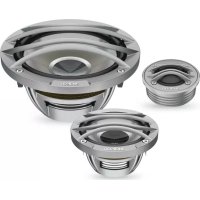
Thesis TH K3 II A Orchestra - Loudspeaker AUDISON - Free user manual and instructions
Find the device manual for free Thesis TH K3 II A Orchestra AUDISON in PDF.


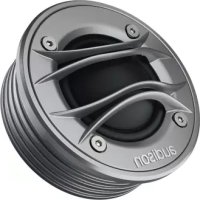
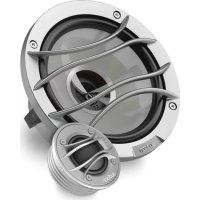
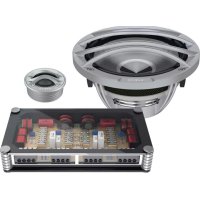
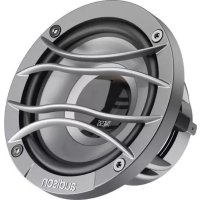
| Product type | 3-way speaker (component kit) |
| Brand | Audison |
| Model | Thesis TH K3 II A Orchestra |
| Category | Speaker |
| RMS power (W) | 150 W |
| Peak power (W) | 450 W |
| Impedance (Ω) | 4 Ω |
| Frequency response (Hz) | 40 Hz - 20 kHz |
| Sensitivity (dB) | 92 dB |
| Woofer diameter (cm) | 16.5 cm |
| Tweeter diameter (cm) | 2.5 cm |
| Cone material | Fiberglass / Carbon |
| Protective grille | Included for tweeter |
| Filter dimensions (L x W x H mm) | 120 x 80 x 35 mm |
| Maintenance and cleaning | Clean with a soft, dry cloth. Avoid solvents. |
| Safety | Secure fastening mandatory. Avoid moisture and dust. |
| Repairability | Spare parts available from Audison after-sales service. |
| General information | User manual available in PDF. Warranty: check Audison website. |
Frequently Asked Questions - Thesis TH K3 II A Orchestra AUDISON
User questions about Thesis TH K3 II A Orchestra AUDISON
0 question about this device. Answer the ones you know or ask your own.
Ask a new question about this device
Download the instructions for your Loudspeaker in PDF format for free! Find your manual Thesis TH K3 II A Orchestra - AUDISON and take your electronic device back in hand. On this page are published all the documents necessary for the use of your device. Thesis TH K3 II A Orchestra by AUDISON.
USER MANUAL Thesis TH K3 II A Orchestra AUDISON
Congratulations on purchasing our product. Your satisfaction is the first requirement that our products must meet: the same satisfaction as the one gained by those who long for experiencing the car audio emotion. This manual has been drawn to provide the main instructions required to install and use the system properly. However, the range of possible applications is wide; for further information, please feel free to contact your trusted dealer or our technical support at the email support@elettromedia.it Before installing the components, please carefully read all of the instructions contained in this manual. Failure to respect these instructions may cause unintentional harm or damage to the product.
-
All components must be firmly secured to the vehicle structure. Do the same when installing any custom structures you may have built. Confirm your installation is solid and safe. A component coming loose while driving may cause serious damage to the passengers, as well as to other vehicles.
-
Always wear protective eyewear when using tools, as splints or product residue may become airborne.
-
In order to avoid incidental damage, keep the product in the original packaging until you are ready for the final installation.
-
Do not carry out any installation inside the engine compartment.
-
Before starting with the installation turn the head unit and all other audio system devices off, avoiding any possible damage.
-
Make sure that the location you choose to install the components does not interfere with the normal operation of any mechanical or electrical devices of the vehicle.
-
Do not install loudspeakers where they may be exposed to water, excessive humidity, dust or dirt.
-
Do not install the tweeter without the protective grille
-
Do not install the components or make cable run close to electronic or mechanical devices of the vehicle.
-
Be very cautious when drilling or cutting into the vehicle chassis, making sure there are no cables or structural elements essential to the vehicle underneath or in the selected area.
-
When routing cables, make sure that the cable does not come in contact with sharp edges or near moving mechanical devices. Make sure that it is firmly attached and protected along its entire length and its insulation is self-extinguishing.
-
Only use cables with the proper section (AWG) indicated herein
-
When running the cable through a hole in the vehicles chassis, protect the cable with a rubber ring (grommet). Be sure to provide proper protection for cables running close to heat-generating devices.
-
Do not run the wires outside of the vehicle.
-
Use top quality cables, connectors and accessories such as found in the Connection catalogue.
-
Warranty certificate: For more information visit the Audison website.
SAFE SOUND
USE COMMON SENSE AND PRACTICE SAFE SOUND. PLEASE REMEMBER THAT LONG EXPOSURE TO EXCESSIVELY HIGH SOUND PRESSURE LEVELS MAY DAMAGE YOUR HEARING. SAFETY MUST BE AT THE FOREFRONT WHILE DRIVING.

Information on electrical and electronic equipment waste (for those European countries which organize the separate collection of waste)
Products which are marked with a wheeled bin with an X through it can not be disposed of together with ordinary domestic waste. These electrical and electronic products must be recycled in proper facilities, capable of managing the disposal of these products and components. In order to know where and how to deliver these products to the nearest recycling grid/disposal site please contact your local municipal office. Recycling and disposing of waste in a proper way contributes to the protection of the environment and to prevent harmful effects on health.
Eesti / Estonian
n nnnn nn nnnn nnnn nnnn nnnn nnnn nnnn nnnn
y
Hn Hn Hn Hn Hn Hn Hn Hn Hn Hn Hn Hn Hn Hn Hn Hn Hn Hn Hn Hn Hn Hn Hn Hn Hn Hn Hn Hn Hn Hn Hn Hn Hn Hn Hn Hn Hn Hn Hn Hn Hn Hn Hn Hn Hn Hn Hn Hn Hn Hn Hn


Portugues / Portuguese
The Audison products are warranted, under normal functioning conditions, for the period of time as set by the laws in force, against defects concerning materials or their manufacturing. The warranty is valid from the date of purchase, certified by receipt.
The warranty is not valid if:
- the product is damaged by incidents, installations and/or improper use, or by any other causes not depending on materials or manufacturing defects;
the product is modified or tampered with by unauthorised people;
- its serial number has been altered or cancelled.
While the product is under warranty, defective parts will be repaired or replaced at the manufacturer's discretion.
The defective product, along with notification about it, must be returned to the dealer from which it was purchased together with the warranty certificate duly filled in. If the product is no longer under warranty, it will be repaired at the current costs.
Elettromedia s.r.l. does not undertake any liability for damages due to transportation. Elettromedia s.r.l. does not take any responsibility for: costs or loss of profit due to the impossibility to use the product, other accidental or consequential costs, expenses or damages suffered by the customer.
Warranty according to laws in force.
For more information visit the Audison website.
Fapantua Audison
PpOdykunrAudlson oBnadaet rapaHTne B TeueHne yCTaBHeHHOro TEkyuMM 3aKOHAMn Cpoka, pN HopMaIbHbIX YCNOBnX UcNoIb3OBAHnE, eCNI OHa BbI3BaHa depeKTamM MaTePnaJIO IN Nx npOn3BOJCTBa. FapAHTnJeCTBNTeJIbHa C DaTbI NOKyIKN, NOITBePKDeHHO YekOM. FapAHTn HeJeCTBNTeJIbHa B CNeDyOUnx CNYaX:
-
npOdyKT NOBpeKJH B pe3yIbTaTe INHcUeHTOB, He KacaKoWIMcMaTePnAIOB nIN pON3BOIDCTBeHHbIX DepeKTOB;
-
npOdyKT n3MeHeH nn pIaIbCSnCpUPOBaH HeynoJIHOMOeHHbIMN IINaAMN;
eRo cepuHbHOMepn3MeHeHnnCTepT.
Ecnn Ha npOyKt pacnpocTpaHareTc rapaHTn,ero npOn3BOUnteB npHHMaet peueHne O pemOHte Hn3Ame Heo HncpabHbIX Detanei. HncpabHbI npOdyKT Heo6xOIMO nepeNaTb pacnpocTpaHntTeIO, rde OH bIn KynIe, npEnbYBaN BnHOCTbIO 3anONHeHHbIraPANTnHbI ceTpDnKAT. B Cnyae ecnnepaHTn 60JIwe He npCpocTpaHreTc H npOyKt, OH 6yDet OTpemOHTOpOBaHn Toekyuwe CTOMMOCTN. Mbl He npHHMaem HA c6e8 o63aTeNbCTBa, CB7aHHbIe C nobPexJeHNm BCNECTBne TPAHCNOPTNPOBKn. Mbl He Hecem OTBeTCTBEHHOCTH 3a:pacXoJbI INI NOTepr npBbJIe NBCNECTBne HEBO3MOXHOCTN NOlb3OBaHn
dAnHHbIM npOdyKTOM, pOChne CUYaHbIe NIN BO3MOXHbIe N3dePckN, paCXoDbI INIOBpeKJeHn, nOKpbITbIe KJIneHTOM. rapaHTnB COOTBeTCTBmC DeiCTByHOWM 3aKOHOdaTeJIbCTBOM.
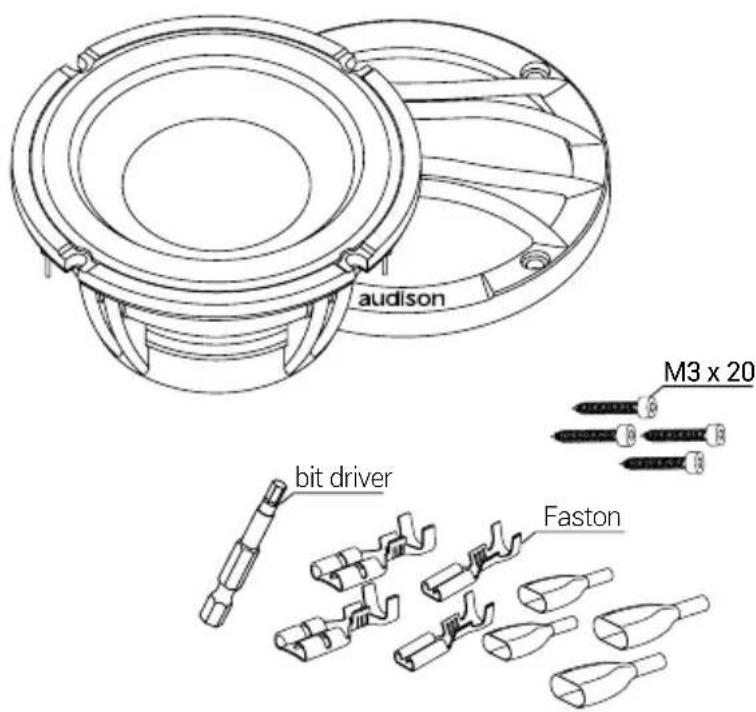
CbBpKaHnHa onakOBkTa/包装内容/内装物/Sadrzaj pakiranja/Obsah baleni/Pakkens indhold/Pakket inhoud /Packaging contents/Pakendi sisu/Pakkauksen sisalto/Contenu de I'emballage/Verpackungsinhalt/Ipexóva ouokcuociaç/nnnpn/Acsomag tartalma/Isi kemasan/Contenuto dell'imballo/巴咔内容/扎TlN Lepakojuma sats/Pakuotés turinys/Innhold/Zawartosc opakowania/Conteudo da embalagem/Continutul sachetului/KomnneKtaun/Obsah balenia/Vsebina embalaze/Contenido del embalaje/Forpackingens innehali/Zaunnaaann
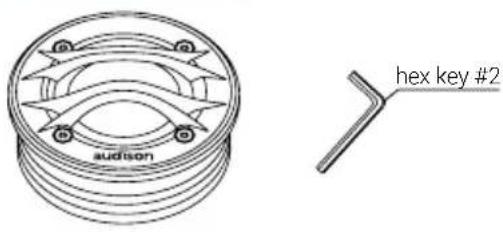
TH 1.5.11 Violino
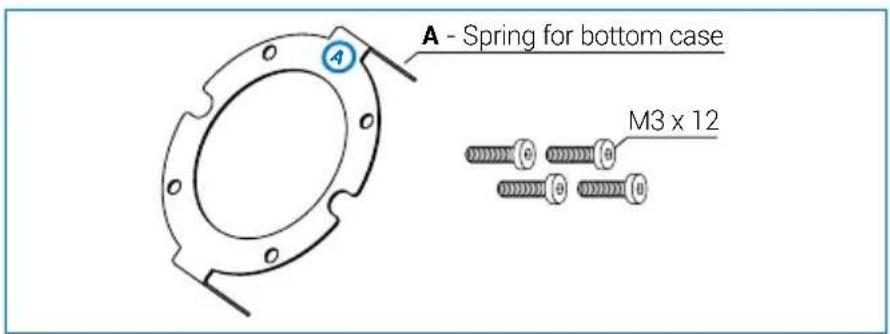
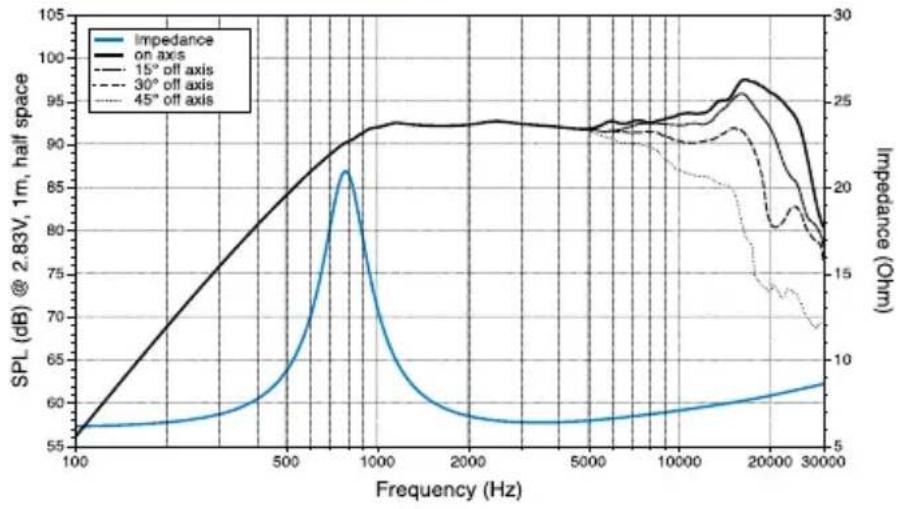
TH 1.5.1 Violino - Bottom case
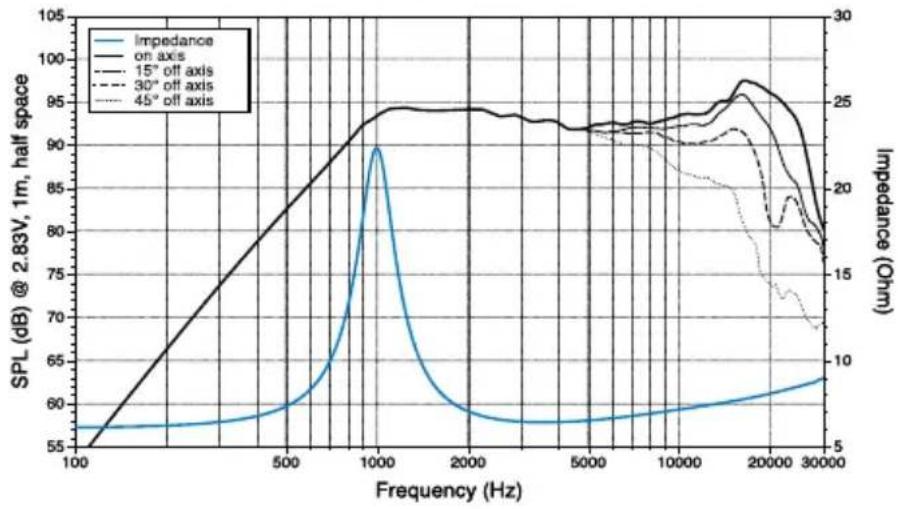
TH 1.5.11 Violino - Bottom disc
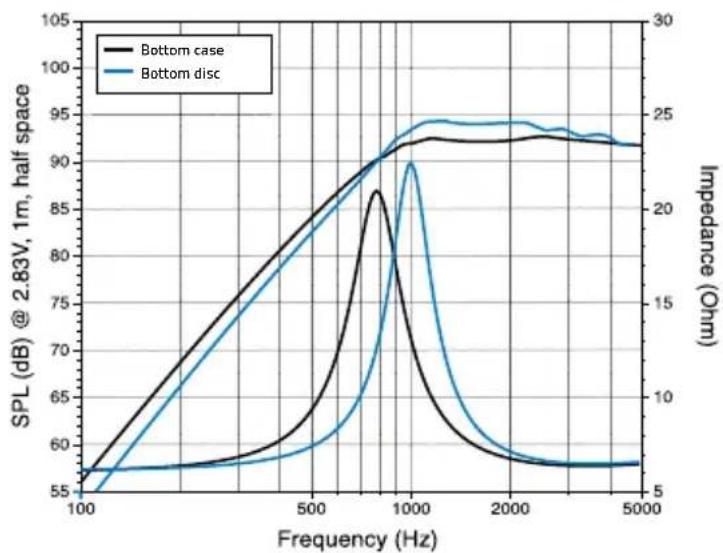
TH 1.5.11 Violino - Bottom case vs Bottom disc
/ Pa3mep / 尺寸 / 规格 / Velicina / Velikost / Storrelse / Afmetingen / Size / Suurus / Koko / Dimensions / Groß / Διασταεις / Μιδι / Meretek / Ukuran / Ingombro / ナイス / ハリ / Izmērs / Dydis / Storrelse / Wielkóc / Dimensão / Dimensiuni / Pa3mep / Rozmery / Velikost / Tamaño / Storlek / Ebat
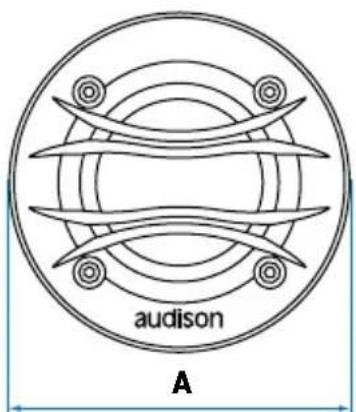
TH 1.5 II Violino with bottom case
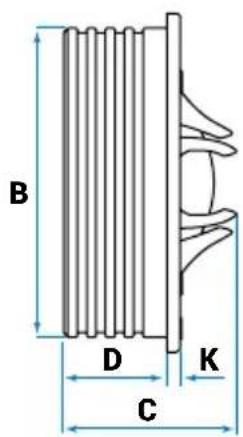
| TH 1.5 II Violino | 71,86637422,44mm | |||
| 2.83261.470880.16in. |
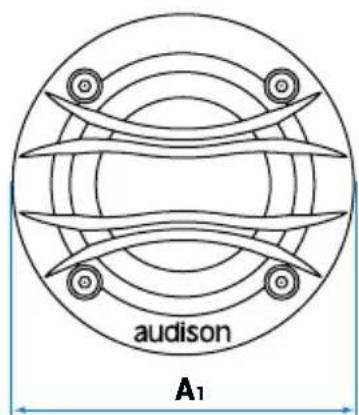
TH 1.5 II Violino - with bottom disc
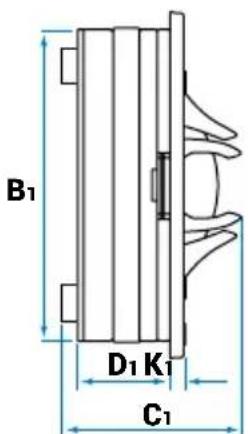
| A1 | B1 | C1 | D1 | K1 | |
| TH 1.5 II Violino | 66 60 | 33 19,5 | 2,2 mm | ||
| 2.6 2.86 | 1.3 0.77 | 0.09 in. |
Owner's Manual
■ / Montax/ 安裝/ 安装/ Montaza/ Montaz/ Montering / Montage / Mounting / Paigaldamine / Kiinnitsy / Montage / Tomoetn / Beszereles / Pemasangan / Montaggio / マウト / Uzstadisana / Montavimas / Montering / Montaz / Montagem / Montaj / Montaz / Namestitev / Montaje / Montering / Montaj
TH 1.5 II Violino
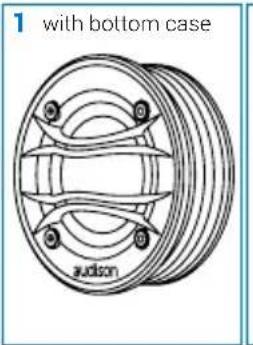
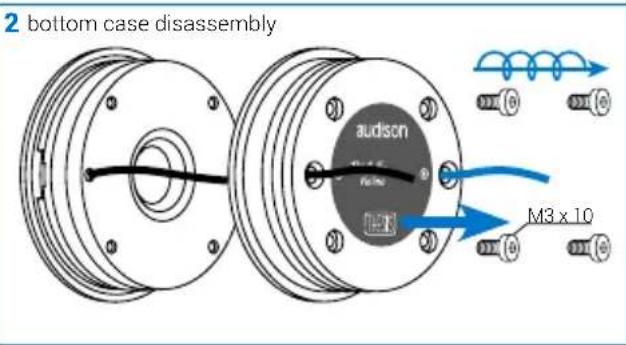
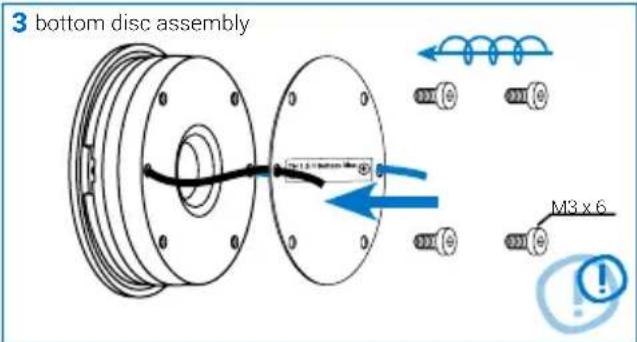
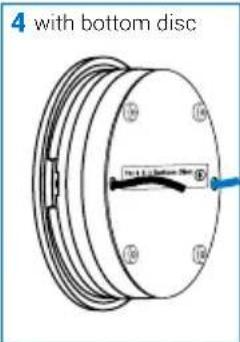
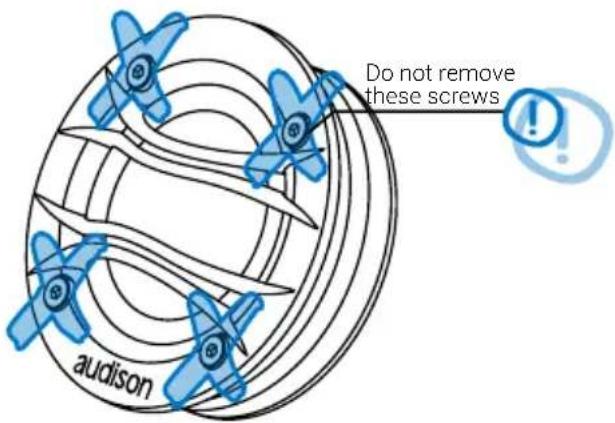
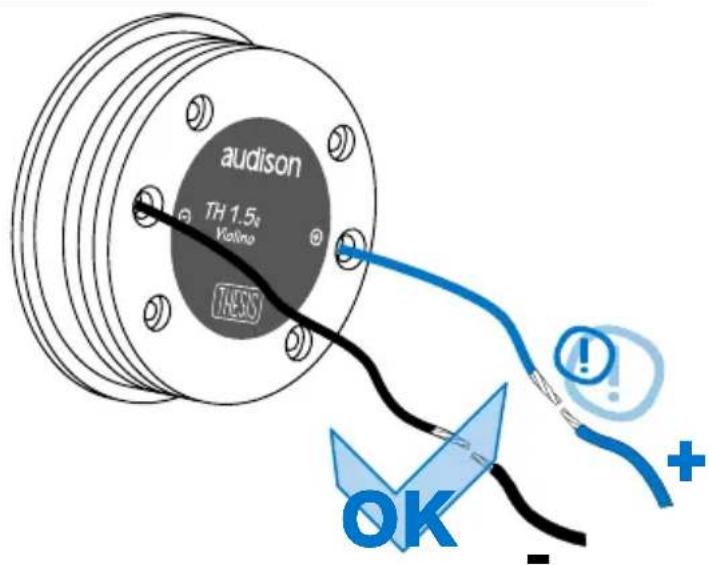
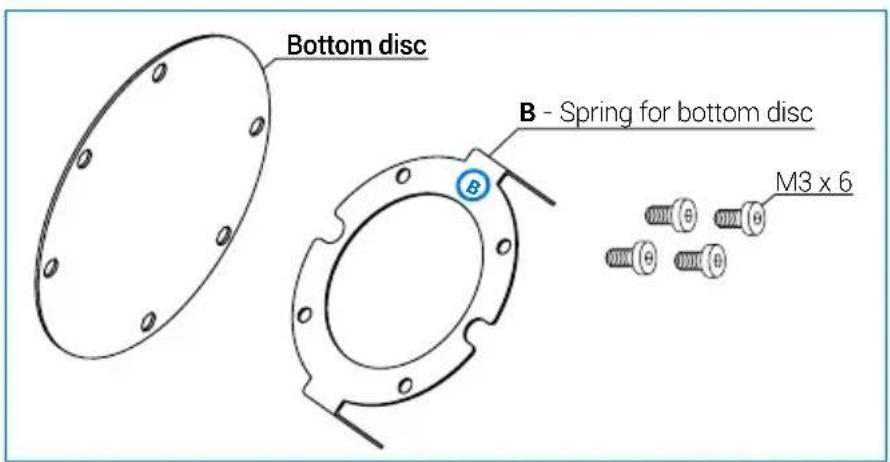
Bottom case spring assembly
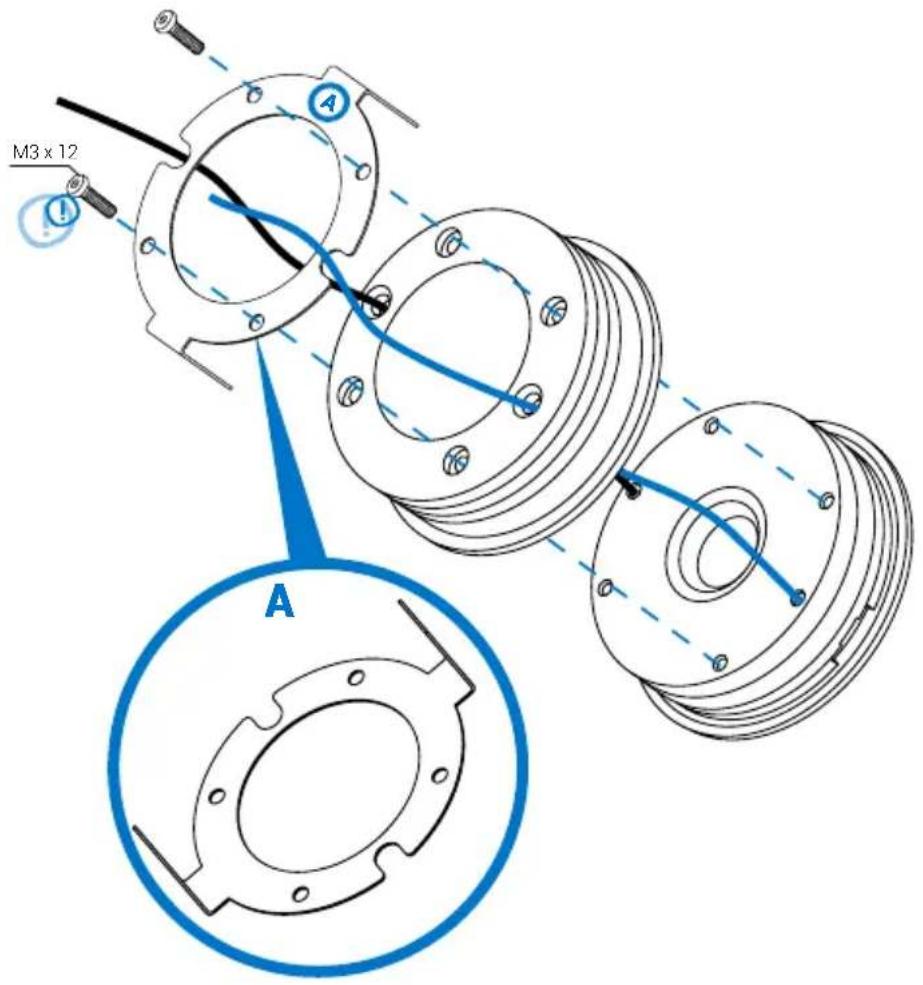
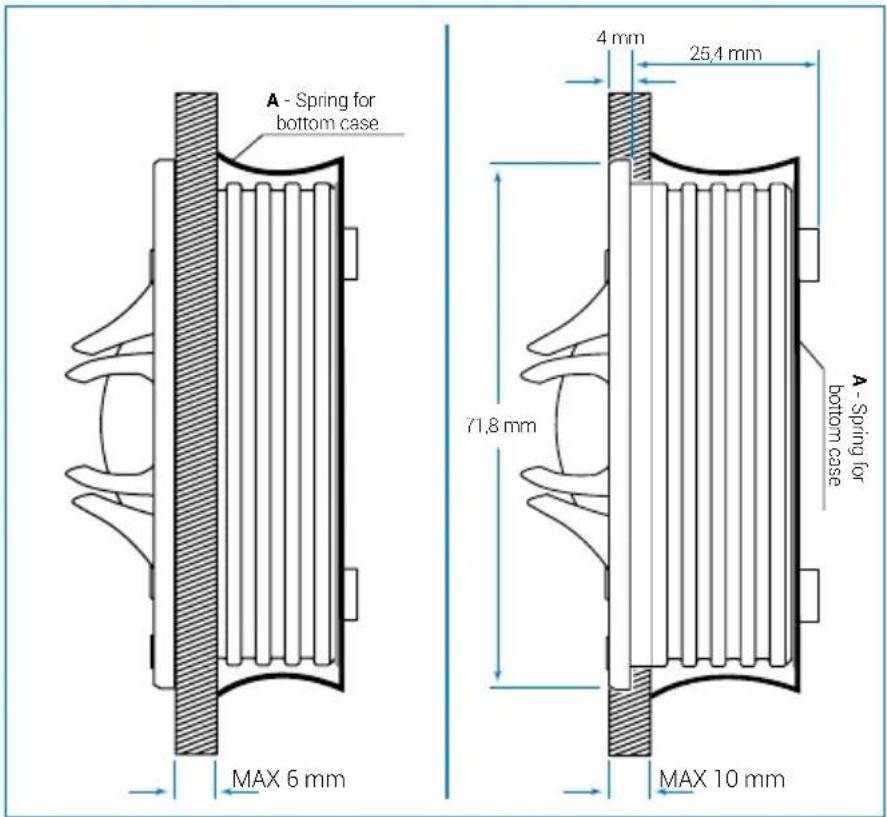
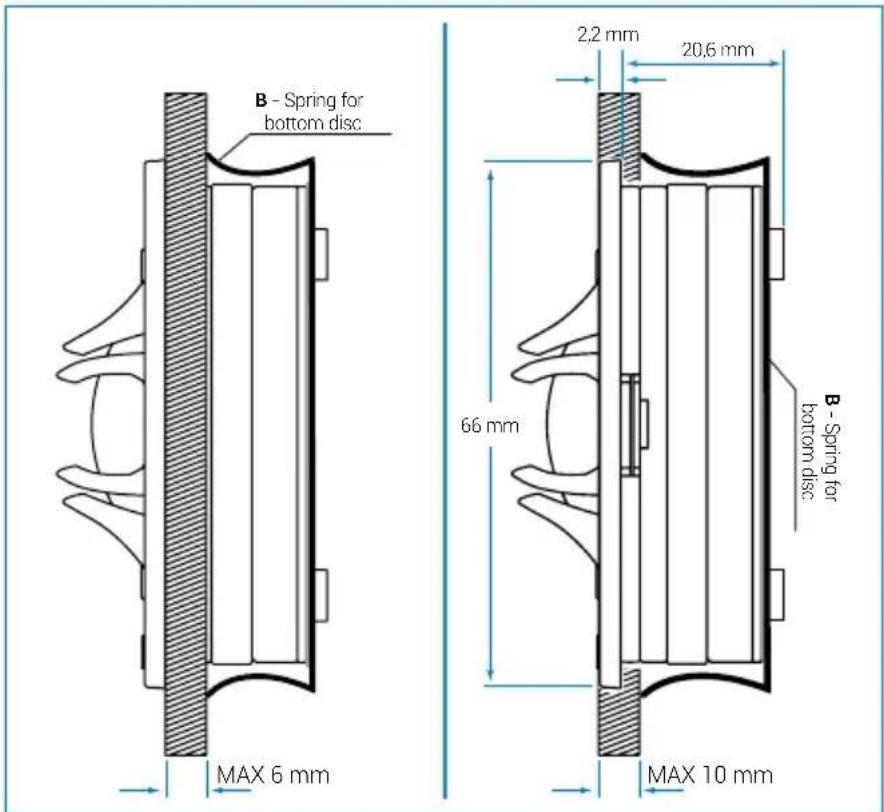
Panel Mounting with bottom case
Bottom disc spring assembly
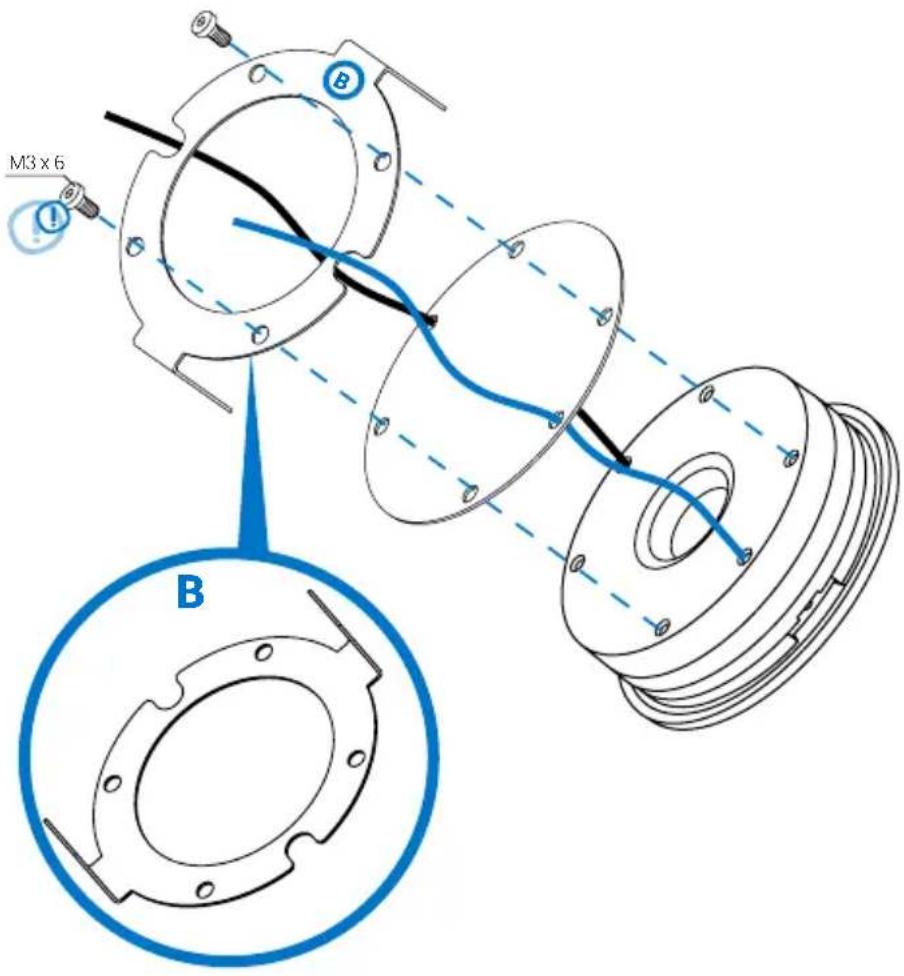
Panel Mounting with bottom disc
i yj CbBpKaHnHe Ha onaKOBkTa/包装内容/内装物/Sadrzajpakiranja/Obsah baleni/Pakkens indhold/Pakket inhoud /Packaging contents/Pakendi sisu/Pakkauksen sisalto/Contenu de l'emballage/Verpackungsinhalt/Neipexóμεva ouokεuaioac/nnn pIn Acsomag tartalma/Isi kemasan/Contenuto dell'imballo/巴卡的内容/贝列T山号/Lepakojuma sats/Pakuotés turinys/Innhold/Zawartosc opakowania /Conteido embalagem/Continutul sachetului/KomnneKTaun/Obsah balenia/Vsebina embalaze/Contenido del embalaje/Forpackingens inehall/
TH 3.0 II Voce
TH 3.0 II Voce
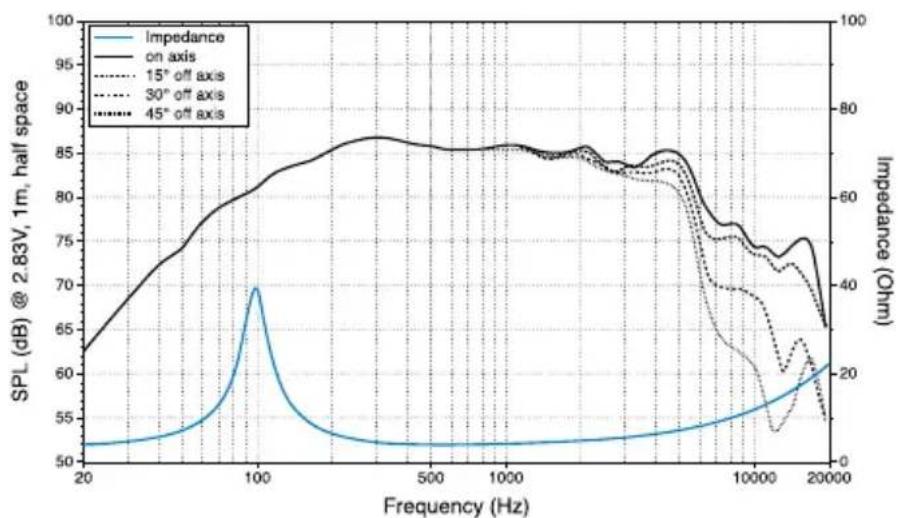
Owner's Manual
Pa3Mep /尺寸/规/ Velicina/Velikost/Storrelse/Afmetingen/Size/Saurus/Koko/Dimensions/GroBe/Diaotarci/Meretek/Ukuran/Ingombro/sus/Izmers/Dydis/Storrelse/Wielko/Cdimensao/Dimensiuni/Pa3Mep/Rozmery/Velikost/Tamao/Starlek/Ebat
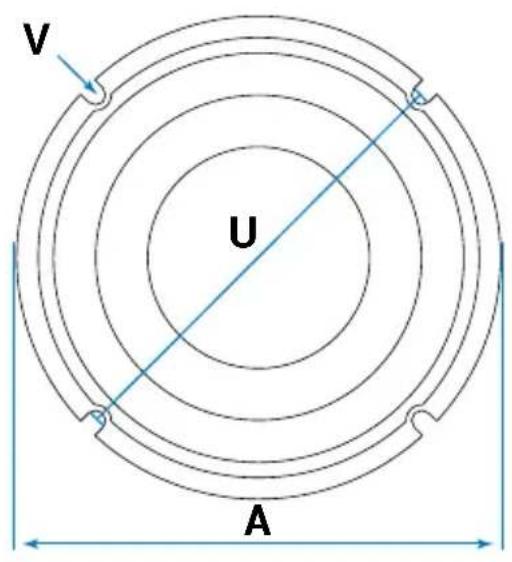
TH 3.0 II Voce
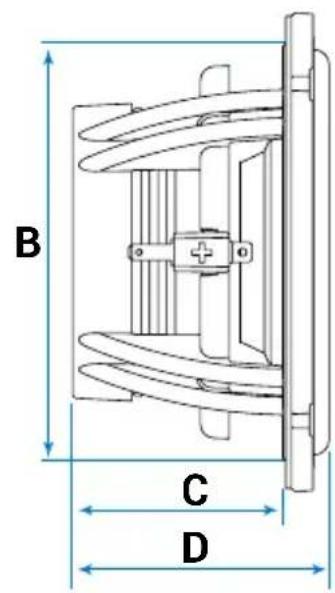
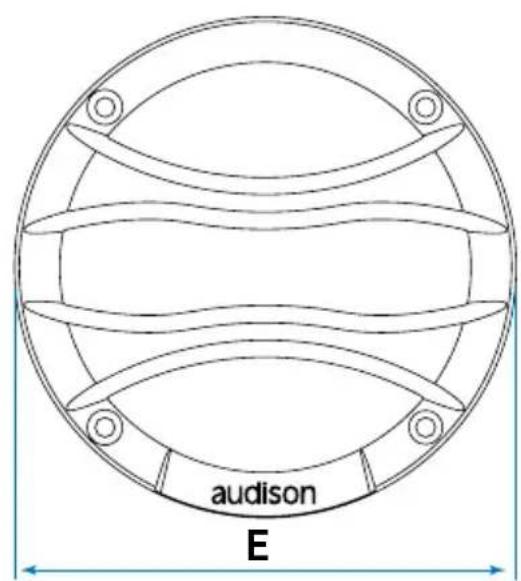
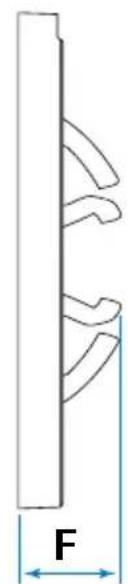
| A B C D E F U V | |||||||||
| TH 3.0 II Voce | 84 | 73.5 | 37 | 45 | 89 | 18 | 80 | 3.5 mm | |
| 3.31 | 2.89 | 1.46 | 1.77 | 3.5 | 0.71 | 3.15 | 0.14 | in. | |
/ Montax / 安裝 / 安装 / Montaza / Montaz / Montering / Montage / Mounting / Paigaldamine / Kiinnitys / Montage / Montage / ToTROETN / Uzstadisana / Montavimas / Montering / Montaz / Montagem / Montaj / Monrax / Montaz / Namestitev / Montaje / Montering / nntalwn / Montaj
TH 3.0 II Voce
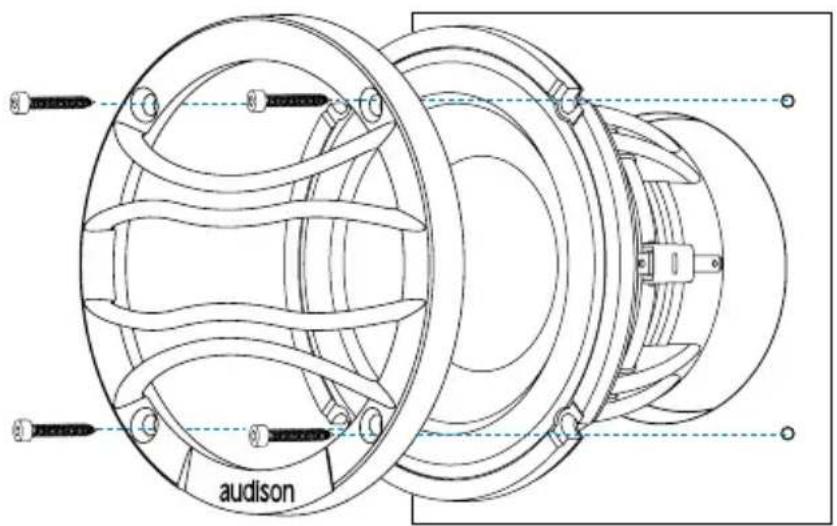
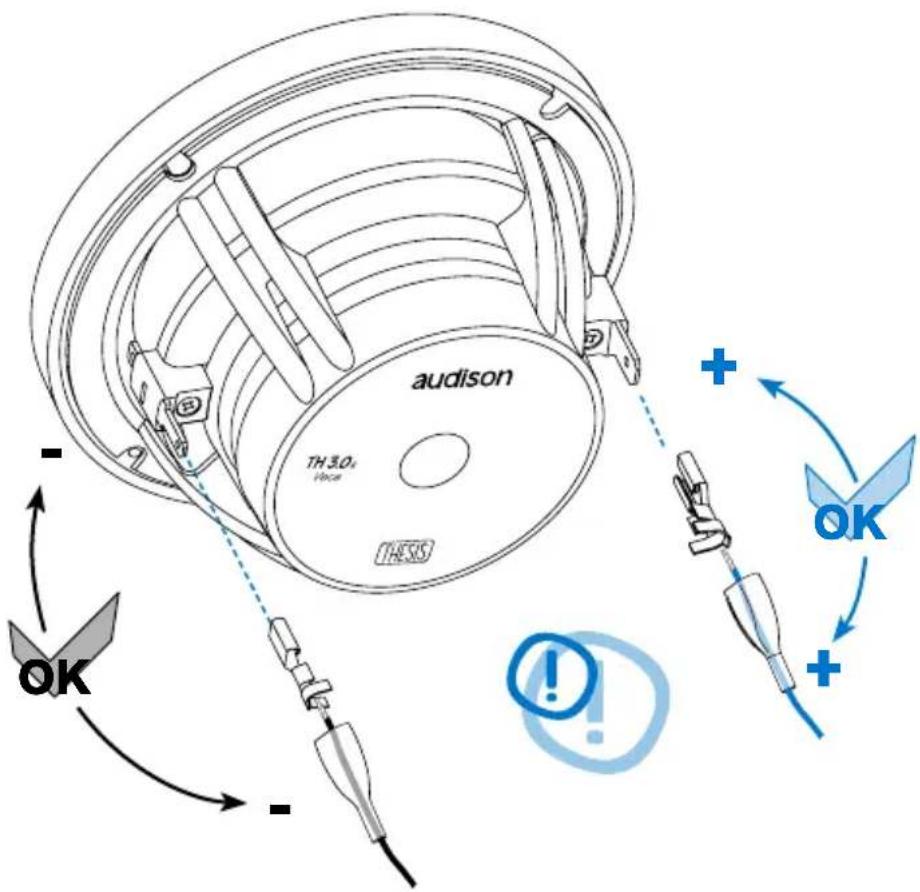
Owner's Manual
sai CbBpKaHnE Ha onaKOBkTa/包装内容/内装物/Sadrzaj pakiranja/Obsah baleni/Pakkens indhold/Pakket inhoud /Packaging contents/Pakendi sisu/Pakkauksen sisalto/Contenu de I'emballage/Verpackungsinhalt/Neipexóμεva ouokcuáios/nmknpn/Acsomag tartalma/Isi kemasan/Contenuto dell'imballo/巴卡内容/扎TlL Lepakojuma sats/Pakuotés turins/Innhold/Zawartosc opakowania/ Conteudo da embalagem/Continutul sachetului/KomnneKTauŋ/Obsah balenia/Vsebina embalaze/Contenido delembalaje/Forpackningens inneha/
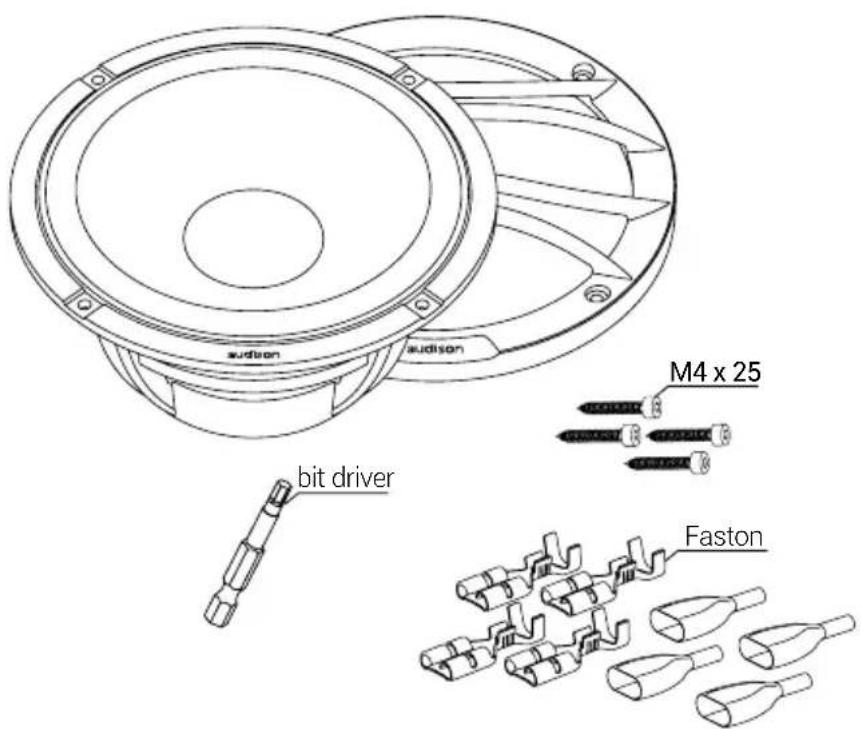
TH 6.5 II Sax
TH 6.5 II Sax
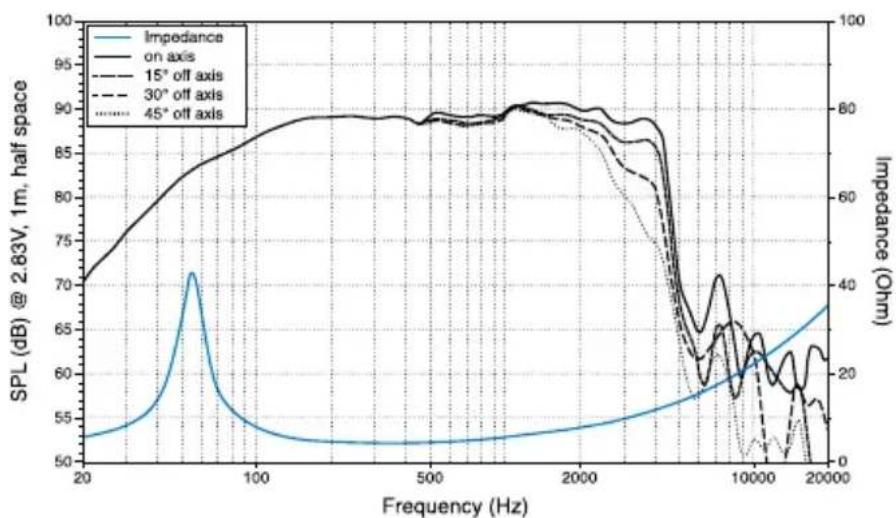
/ Pa3mep /尺寸/规格/Velicina/Velikost/Storrelse/Afmetingen/Size/Suurus/Koko/Dimensions/GroBe/Diaotaoic/Meretek/Ukuran/Ingombro/s4x/ZI/Izmers/Dydis/Storrelse/Wielko/Cdimensao/Dimensiuni/Pa3mep/Rozmery/Velikost/Tamaio/Starlek/Ebat
TH 6.5 II Sax
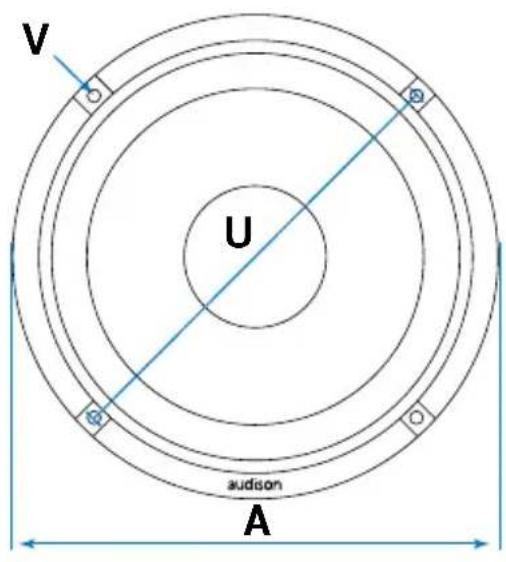
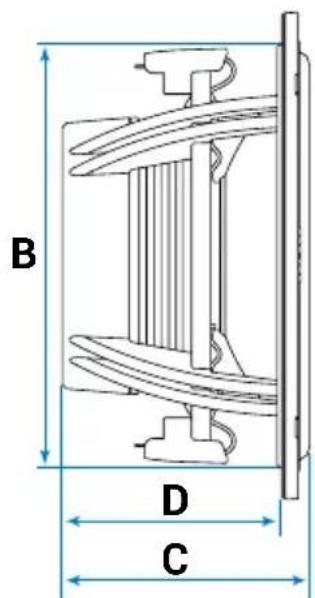
B
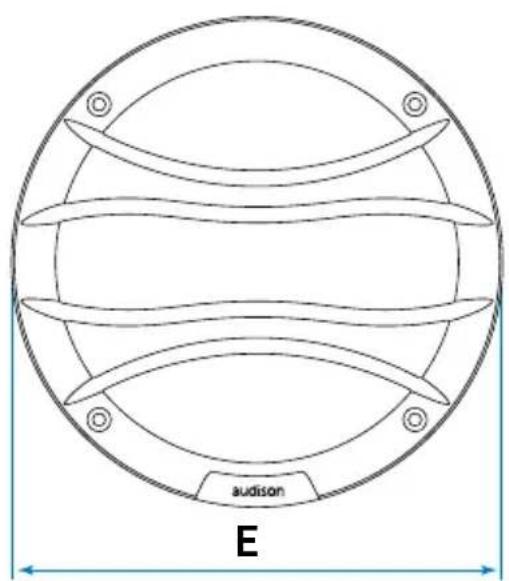

| ABCDEFUV | |||||||||
| TH 6.5 II Sax | 165 | 143 | 84 | 74,5 | 170,5 | 30 | 155 | 4,5 mm | |
| 6.5 | 5.63 | 3.31 | 2.93 | 6.71 | 1.18 | 6.1 | 0.18 | in. | |
Owner's Manual
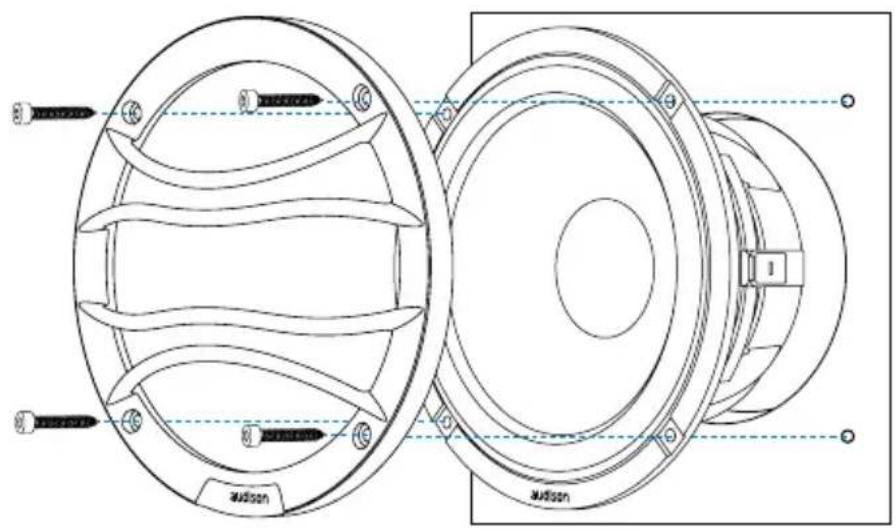
MONTAX/安裝/安装/Montaz/Montaz/Montering/Montage/Mounting /Paigaldamine/Kiinnits/Montage/Montage/Torroetnog/NB/ Beszereles /Pemasangan/Montaggio/Monstun/ Uzstadisana/Montavimas/Montering/Montaz/Montagem/Montaj/Montaz/Montaz/Namestitev/Montaje/Montering/mstadisana/Montaj
TH 6.5 II Sax
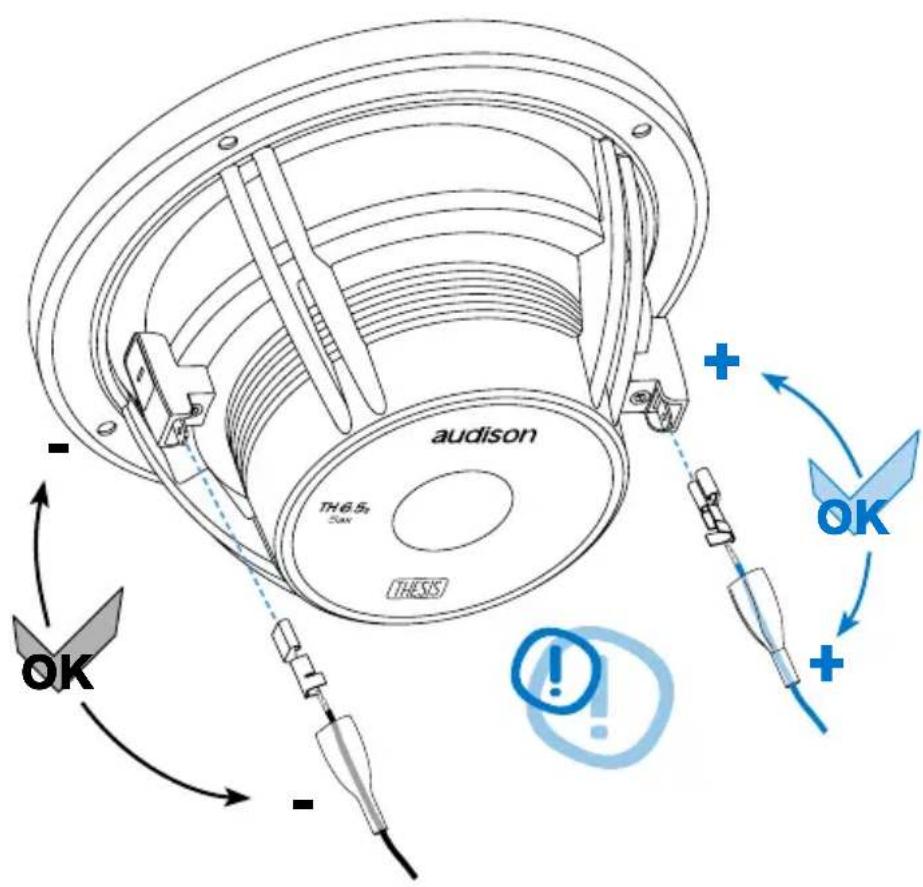
CbBp3BaHe Ha cnCTemTa / 连接系統 / 連接系統 / Prikljucivanje sustava / Pripojeni systemu / Forbinding af systemer / Aansluiten van de systemen / Connecting the systems / Susteemi uhendamine / Jarjestelman kytkeminen / Branchement du système / System anschlieBen / ÜvðeON tou συστμatoc / NcAyendszern csatlakoztatasa / Menghubungkan system / Collegamenti dei filtri / 斯テムの接続 / Si'sελδπen/ Sistemas pievienvsana / Sistemas sujungimas / Oppkobling av systemet / Podlaczajac system / Ligar o systemd/a Conexiunea systemului / Повлочене cnCTemBi / Pripojeni systemu / Prikljucevanje systemd/a Conexión del systemd/a Anslut systemet / Sistemina/ Sistemin baglanmasi
TH 1.5 II Violino / TH 6.5 II Sax - IN CAR SET-UP
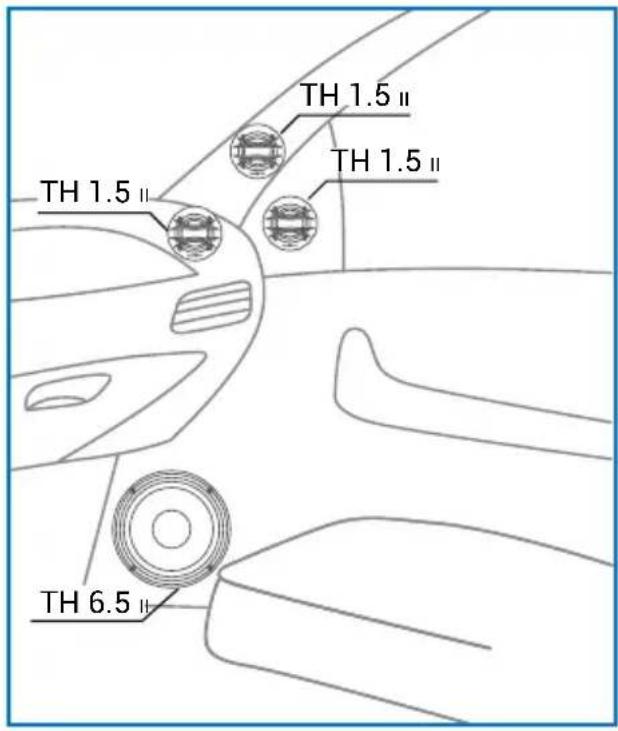
SUGGESTED POSITION
TH 1.5 II Violino / TH 3.0 II Voce / TH 6.5 II Sax - IN CAR SET-UP
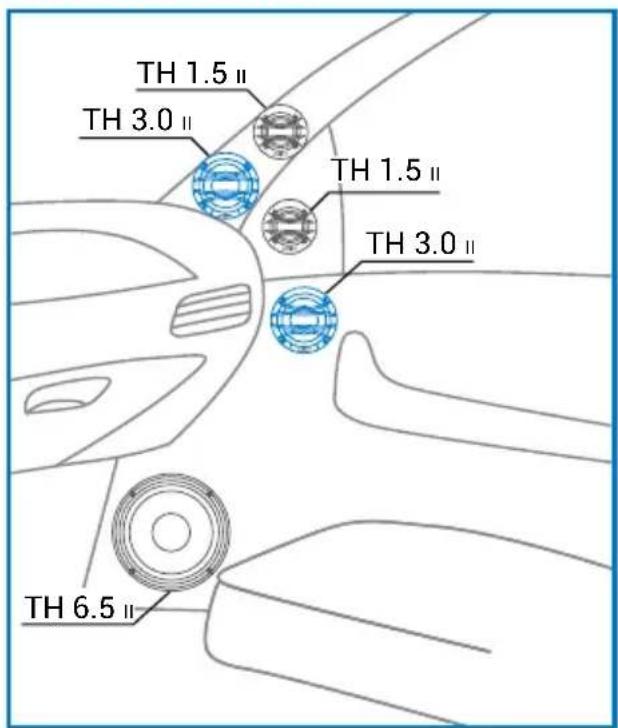
SUGGESTED POSITION
TH 1.5 II Violino - IN CAR SET-UP
SUGGESTED ANGLE
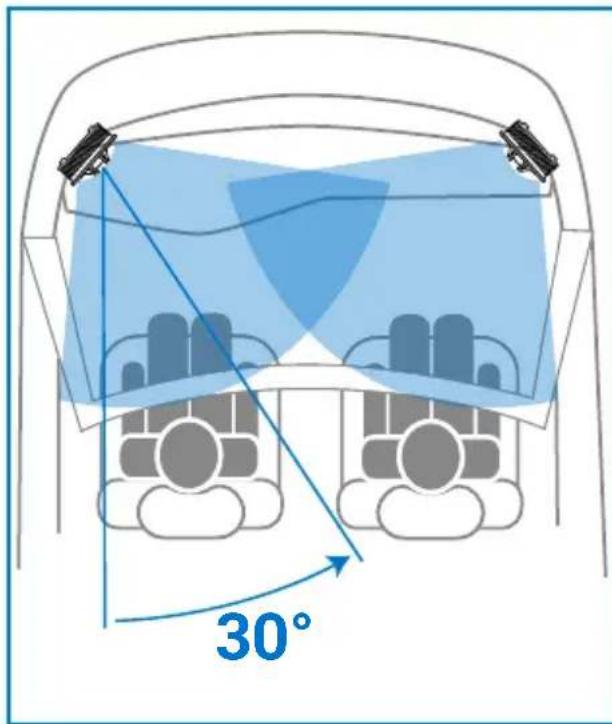
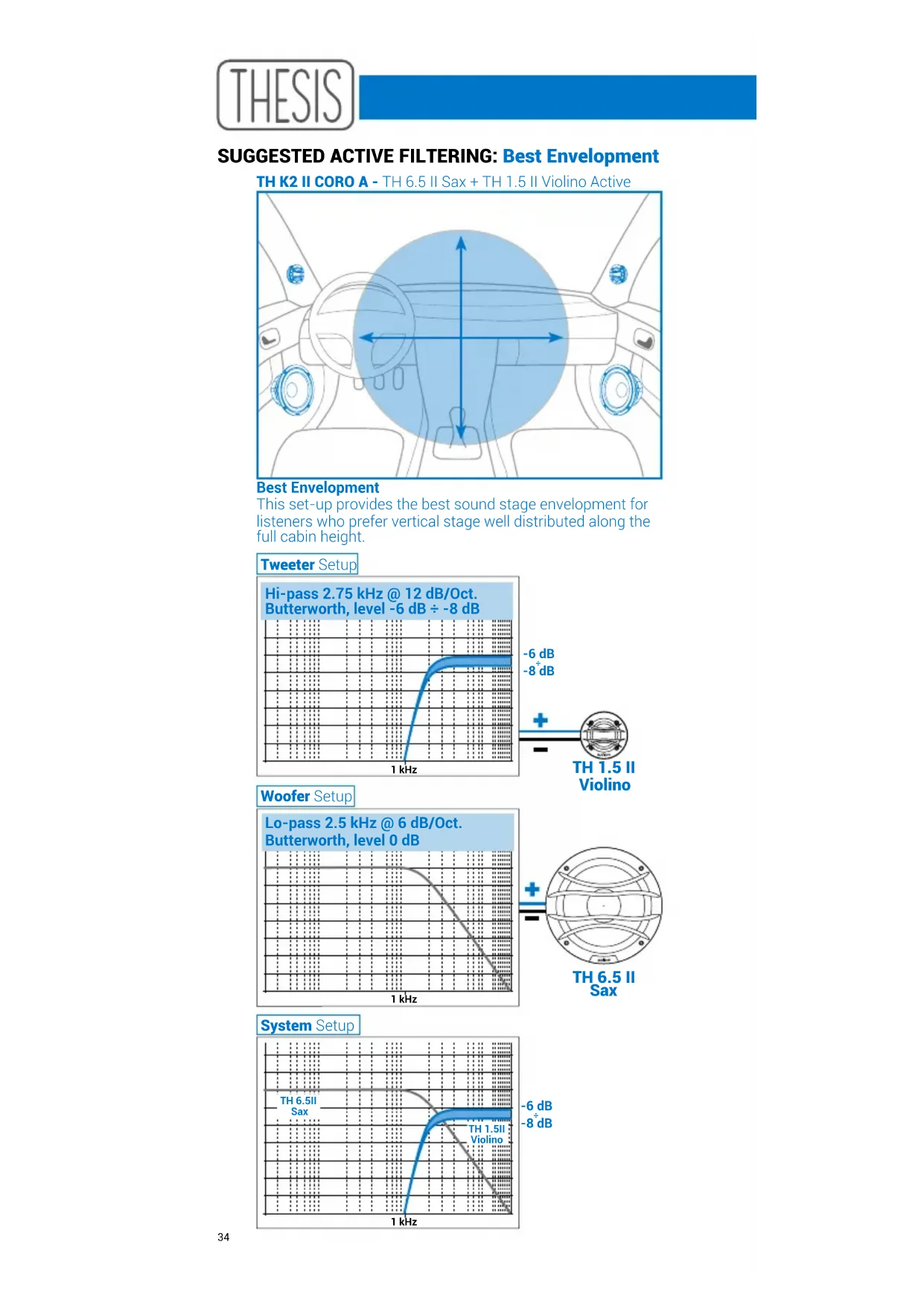
SUGGESTED ACTIVE FILTERING: Best Envelopment
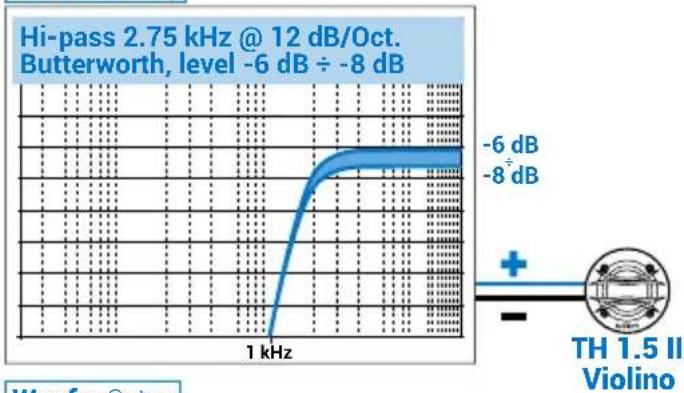
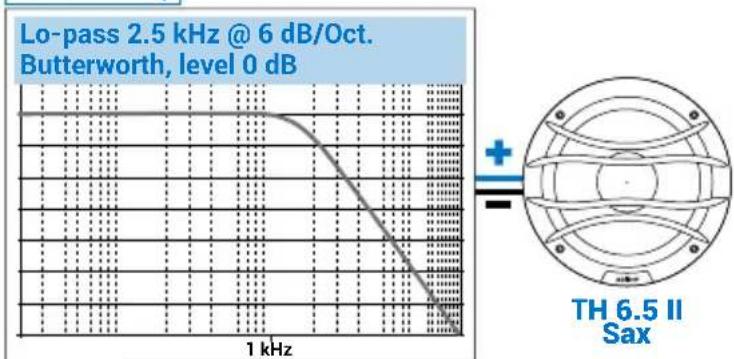
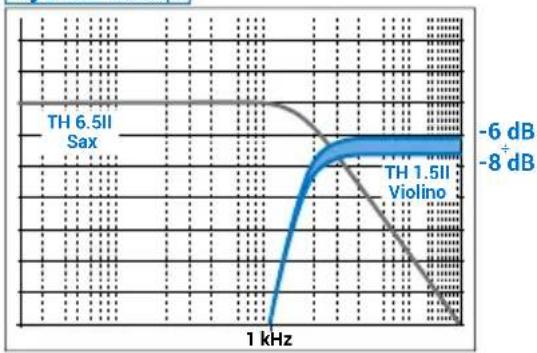
TH K2 II CORO A - TH 6.5 II Sax + TH 1.5 II Violino Active
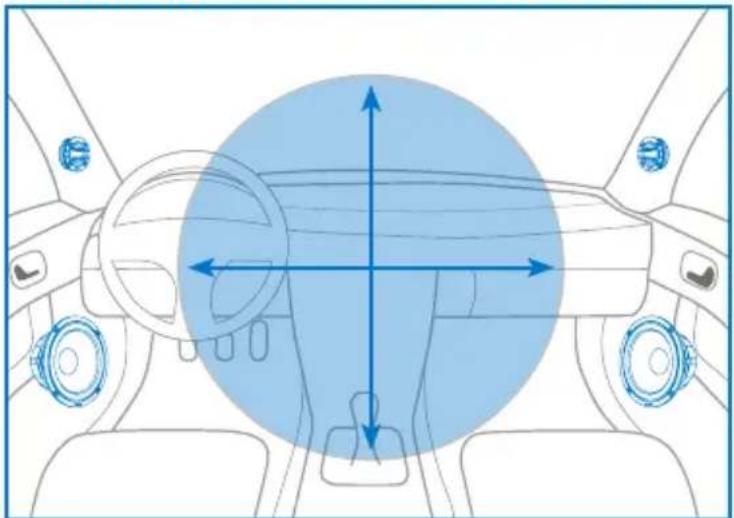
Best Envelopment
This set-up provides the best sound stage envelopment for listeners who prefer vertical stage well distributed along the full cabin height.
Tweeter Setup
Woofer Setup
System Setup
SUGGESTED ACTIVE FILTERING: Best Focus
TH K2 II CORO A - TH 6.5 II Sax + TH 1.5 II Violino Active
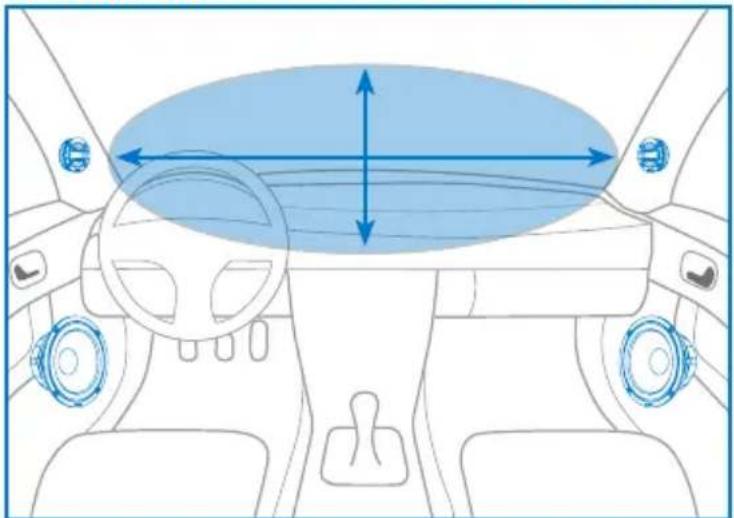
Best Focus
This set-up provides the best sound stage focus for listeners who prefer vertical stage well focused above of the dashboard and a wider horizontal stage.
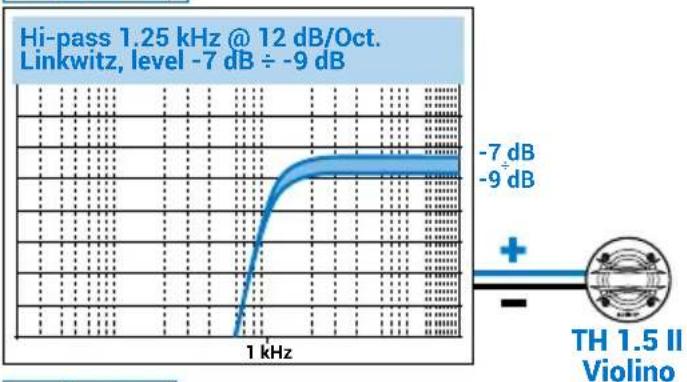
Tweeter Setup
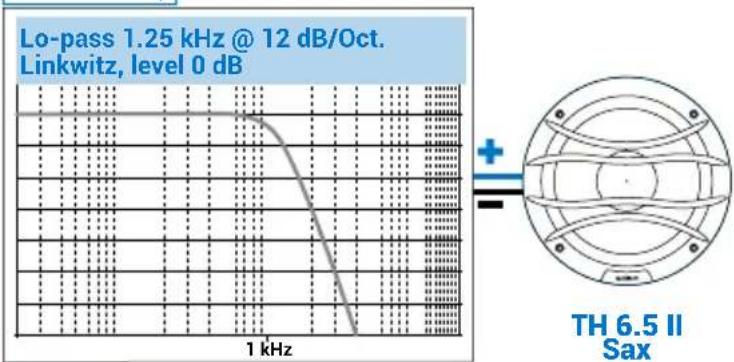
Woofer Setup
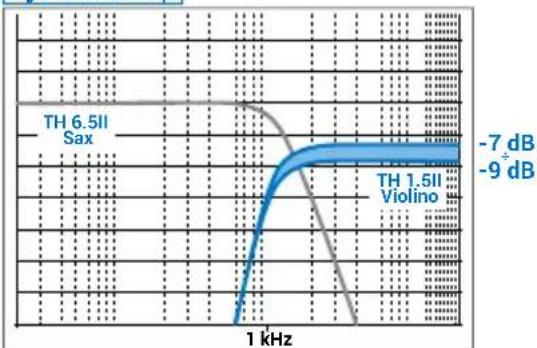
System Setup
SUGGESTED ACTIVE FILTERING:
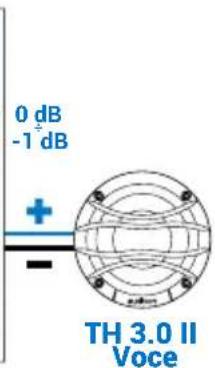
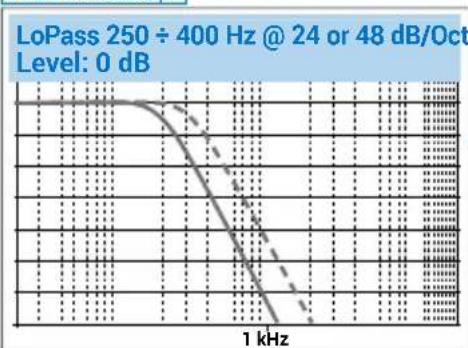
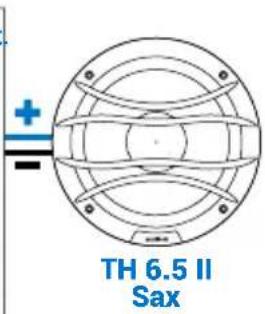
TH K3 II ORCHESTRA A: TH 6.5 II Sax + TH 3.0 II Voce + TH 1.5 II Violino
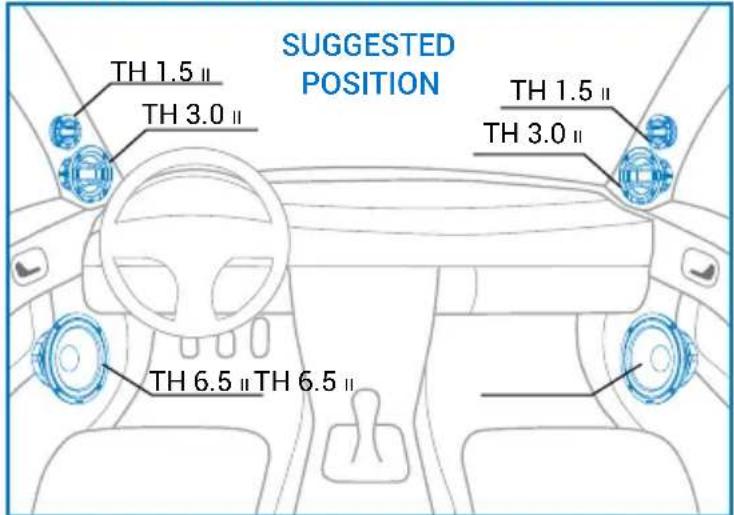
For below active filterings we strongly suggest to use FIR filter provided with Audison bit One HD and bit One HD Virtuoso.
Tweeter Setup
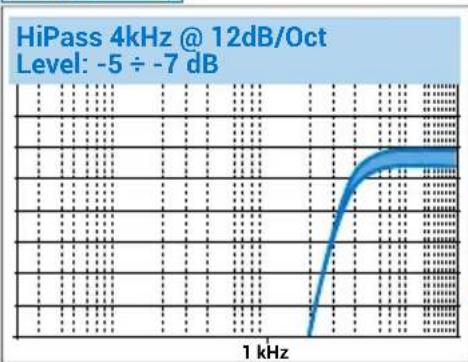
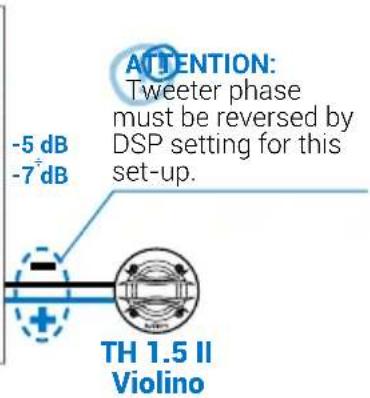
Midrange Setup
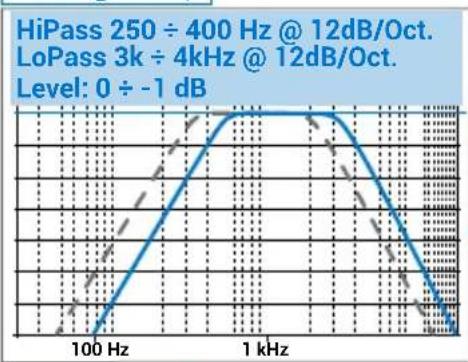
Woofer Setup
Owner's Manual
EeKtpo-akcyTnH npameTp / 电声参数 / Elektroakusticki parametri / Elektroakustické parametry / Electro-Acoustic parametre / Elektroakoestische parameters / Electro-Acoustic parameters / Elektroakustilised parameetrid / Sähkoakustiset parametrit / Paramétres electro-acoustiques / Elektro-akustische Parameter / HLeKtpo-akouotikc / PpOxDy / Elektro-akusztikus parameterek / Parameter elektro-akustik / Parametri elettoacustici / 電気音響/ ロマ・夕 / 目前あらスリフロー / Elektro-akustiskie parametri / Elektriniai-akustiniai paremetrai / Elektro-akustiske parametre / Parametry elektro-akustyczne / Parametros electro-acusticos / Specificati tehnice / 3NeKtpoakcyTneckne npaMeTpbl / Elektro-akustické parametre / Elektro-akustici parometri / Parametros electroacusticos / Elektroakustiska parametrar / aanTnTnTnTnTnTnTnTnTnTnTnTnTnTnTnTnTnTnTnTnTnTnTnTnTnTnTnTnTnTnTnTnTnTnTnTnTnTnTnTnTnTnTnTnTnTnTnTnTnTnT
| TH 1.5 II Violino | TH 3.0 II Voce | TH 6.5 II Sax | ||
| Bottom Case | Bottom Disc | |||
| D mm | 38 38 | 66,75 130 | ||
| Xmax mm | - - 3 | 3 5,4 | ||
| Re Ω | 6,1 6,1 | 3,4 3,8 | ||
| Fs Hz | 780 980 | 100 55 | ||
| Le mH | 0,025 0,025 0,18 | 0,43 | ||
| Vas I | 0,019 0,013 1,01 | 8,6 | ||
| Mms g | 0,43 0,43 | 4,3 24,2 | ||
| Cms mm/N | 0,09 | 0,062 0,59 0,35 | ||
| BL T·m | 3,32 3,44 | 4,2 8,2 | ||
| Qts | 0,83 0,97 | 0,48 0,43 | ||
| Qes | 1,2 1,8 | 0,52 0,47 | ||
| Qms | 2,9 3,5 5,5 5,3 | |||
| Spl dB/1W/1m | 92,5 | 93 | 85,6 | 87 |
Téhnueckn CnueuΦkaun /技規格/ 技术规格 / Tehnicki podaci / Technické udaje / Tekniske speciifikationer / Technische specificaties / Technical specifications / Tehnilsed andmed / Tekniset tiedot / Caracteristiques techniques / Technische datum / Tεvika xapakntpiotika / Muszaki adatok / Spesifikasi teknis / Specifiche tecniche / 技術仕樣 / Tehniska speficifikacja / Techniniai duomenys / Tekniske spesiifikasjoner / Szcęgóy techniczné / Especificações技术水平 Parametrié electro-acustici / Texhnueckne ycnoBna / Technické informacja / Tehnicne speciifikacja / Especificações技术水平 Teknik veriler
| Component Size | Power handling Impedance Frequency | response | ||||
| Peak | Continuous | |||||
| mm (in.) W W Ω Hz | ||||||
| TH 1.5 IIViolino | Tweeter | Tweeter diaphragm38 (1.5) | 200 (HI-Pass filtered @ 1,8 kHz-12 dB Oct.) | 6 800÷26k | ||
| TH 3.0 IIVoice | Midrange 70 (3) 110 55 4 | 110 Hz-5700 Hz | ||||
| TH 6.5 II Sax | Woofer 165 (6.5) 300 150 4 | 40 Hz-4500 Hz | ||||
| Magnet size | Voice coil Ø | Magnet Cone Weight of | one component |
| mm (in.) mm (in.) Kg (lb.) | |||
| 60 x 36 x 5 (2.36 x 1.42 x 0.2) 34 (1.34) | Neodymium Tetolon | 0,355 (0.78) | |
| 29 x 6 x 8 (1.14 x 0.24 x 0.31) 30,5 (1.2) | Neodymium TPX | 0,25 (0.55) | |
| 80 x 54 x 4,5 (3.15 x 2.13 x 0.18) 50 (2) | Neodymium TPX | 1,25 (2.76) |
- SAFE SOUND
- Eesti / Estonian
- Portugues / Portuguese
- Fapantua Audison
- Owner's Manual
- TH 1.5 II Violino
- TH 3.0 II Voce
- TH 6.5 II Sax
- TH 1.5 II Violino / TH 6.5 II Sax - IN CAR SET-UP
- TH 1.5 II Violino / TH 3.0 II Voce / TH 6.5 II Sax - IN CAR SET-UP
- SUGGESTED ACTIVE FILTERING: Best Envelopment
- Best Envelopment
- Tweeter Setup
- Woofer Setup
- System Setup
- SUGGESTED ACTIVE FILTERING: Best Focus
- Best Focus
- SUGGESTED ACTIVE FILTERING:
- Midrange Setup
Brand : AUDISON
Model : Thesis TH K3 II A Orchestra
Category : Loudspeaker