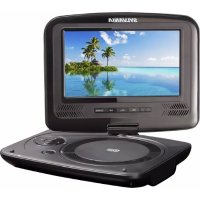
SDVD7030 - Portable DVD Player SYLVANIA - Free user manual and instructions
Find the device manual for free SDVD7030 SYLVANIA in PDF.


| Product Type | Portable DVD Player |
| Brand | Sylvania |
| Model | SDVD7030 |
| Power Supply | DC 9~12V / AC 100-240V, 50/60 Hz (adapter included) |
| Power Consumption | < 10 W |
| Signal System | NTSC / PAL |
| Laser | Semiconductor laser, wavelength 650 nm |
| Frequency Response | 20 Hz to 20 kHz (±1 dB) |
| Signal-to-Noise Ratio | > 80 dB (analog outputs) |
| Dynamic Range | > 85 dB (DVD/CD) |
| Video Output | 1 Vpp (75 Ω) |
| Audio Output | 1.4 Vrms (1 kHz, 0 dB) |
| Built-in Speakers | 2 × 1 W |
| Headphone Jack | Yes |
| Disc Types Readable | DVD, VCD, Audio CD, DVD±R/RW, CD-R/RW, SVCD, Kodak Picture CD, MP3, JPEG |
| USB / Memory Card Inputs | USB, SD/MMC/MS |
| Rechargeable Battery | Lithium-ion (7.4 V) |
| Battery Charging Time | 2 h to 4 h |
| Battery Discharging Time | Approximately 2 h |
| Included Accessories | Video/audio cable, remote control, car bag, stereo headphones, AC/DC adapter, cigarette lighter adapter |
| Operating Humidity | 5% to 90% |
| Safety | Do not open the case (laser radiation), do not expose to rain or moisture, do not block ventilation openings, use only the supplied adapter, replace battery with same type. |
| Maintenance and Cleaning | Clean with a soft, dry cloth. Do not use solvents. |
| Spare Parts and Repairability | No user-serviceable parts. Contact a qualified technician. Battery replaceable only with an equivalent. |
Frequently Asked Questions - SDVD7030 SYLVANIA
User questions about SDVD7030 SYLVANIA
0 question about this device. Answer the ones you know or ask your own.
Ask a new question about this device
Download the instructions for your Portable DVD Player in PDF format for free! Find your manual SDVD7030 - SYLVANIA and take your electronic device back in hand. On this page are published all the documents necessary for the use of your device. SDVD7030 by SYLVANIA.
USER MANUAL SDVD7030 SYLVANIA
USER'S MANUAL SDVD7030
Table of Contents
Contents
Table of Contents. .P1
Safety Precautions. .P2-3
Identification of Controls. P4-P7
Main Unit. P4
Remote control unit.. .P6
SETUP Menu Setting. P7
General Setup Page.. .P8
Audio Setup Page. P9
Video Setup Page. .P9
Preference Page. P9-P10
Password Setup Page. .P10
Parameters and specifications.. .P11
Important Safety Instructions

Warning: To reduce the risk of electric shock, do not remove the cover or back. There are no user-serviceable parts inside. Refer servicing to qualified personnel.

Warning: To prevent fire or electric shock hazard, do not expose the unit to rain or moisture.
Do not expose the Adaptor and portable DVD to water (dripping or splashing) and no objects filled with liquids, such as vases, should be placed on the unit.
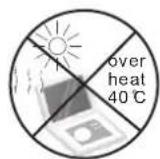
- Keep the portable DVD away from direct sunlight and heat source such as radiators or stoves.
Do not block the ventilation openings. Slots and openings on the unit are provided for ventilation. The openings should never be blocked by placing your portable DVD on a cushion, sofa or other similar surface.
Do not place the portable DVD on unstable cart, stand, tripod, bracket or table. The unit may fall, resulting in possible damage or injury.
Never place heavy or sharp objects on the LCD panel or frame.
Only use the AC adapter included with portable DVD. Using any other adapter will void your warranty.
The plug of AC adaptor is used as the disconnect device, the disconnect device shall remain readily operable.
Unplug the power from the outlet when the unit is not in use.
Attention should be drawn to the environmental aspects of battery disposal.

CAUTION: Danger of explosion if battery is incorrectly replaced. Replace only with the same or equivalent type.

WARNING: The battery (battery or batteries or battery pack) shall not be exposed to excessive heat such as sunshine, fire or the like.

WARNING: Excessive sound pressure from earphones or headphones can cause hearing loss.

WARNING: Only use attachments/accessories specified provided by the manufacturer, the portable DVD is supplied by AC adapter, the AC adapter is used as disconnect device, the disconnect device shall remain readily operable.

Caution: Danger of explosion if battery is incorrectly replaced, replaced only with the same or equivalent type (Lithium battery)

This marking indicates that this product should not be disposed with other household wastes throughout the EU. To prevent possible harm to the environment or human health from uncontrolled waste disposal, recycle it responsibly to promote the sustainable reuse of material resources. To return your used device, please use the return and collection systems or contact the retailer where the product was purchased. They can take this product for environmental safe recycling.

Safety Precautions
WARNING
RISK OF ELECTRIC SHOCK
DO NOT OPEN

Warning: This digital video disc player employs a laser system. Use of controls, adjustments, or the performance of procedures other than those specified herein may result in hazardous radiation Exposure.

Warning: To prevent direct exposure to laser beam,do not open the enclosure.Visible laser radiation when open.

Warning: Never stare directly into the laser beam.

Caution: Do not install this product in a confined space such as a book case or similar unit.

Warning: when the unit using by child, parents must make sure to let the child understand all contents in Instruction book how battery using to guarantee using battery correctly all the time.

Warning: when find battery overheal, swell or dour, please stop using battery and contact service centre for getting replacement.

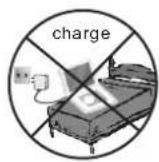
Warning: do not charging battery on the place of insufficient ventilation such as: mattress, sofa, cushion, soft mat....

Warning: we will not take any responsibility if user incorrectly use battery, not following our warning instruction label on the battery case.

Notes on Copyrights:
It is forbidden by law to copy, broadcast, show, broadcast via cable, play in public, or rent copyrighted material without permission.
This product features the copy protection function developed by Macrovision. Copy protection signals are recorded on some discs. When recording and playing the pictures of these discs picture noise will appear. This product incorporates copyright protection technology that is protected by method claims of certain U.S. Patents and other intellectual property rights owned by Macrovision Corporation and other rights owners. Use of this copyright protection technology must be authorized by Macrovision Corporation, and is intended for home and other limited viewing uses only unless otherwise authorized by macrovision Corporation. Reverse engineering or disassembly is prohibited.
SERIAL NUMBER:
You can find the serial number on the back of the unit. This number is unique to this unit and not available to others. You should record requested information here and retain this guide as a permanent record of your purchase.
Model No.
Serial No.
Date of Purchase


Identification of Controls
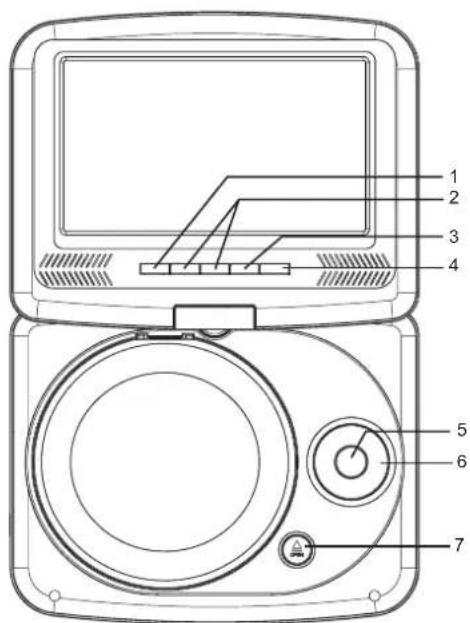
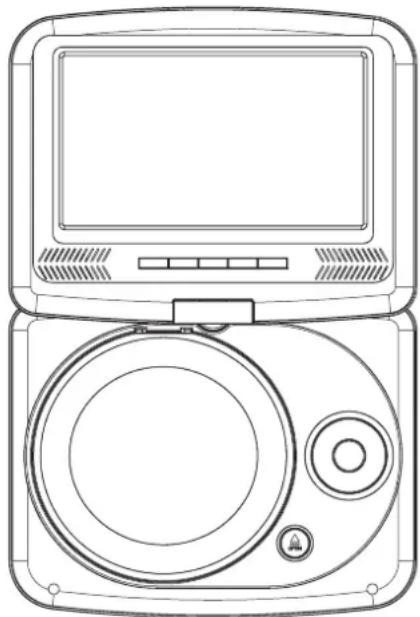
Main Unit

-
REMOTE SENSOR
-
VOL-/VOL+
-
PLAY/PAUSE
-
SOURCE
-
OK
-
▲/▼/▲/▶(up/down/right/left)
Select an item in the menu. OK key
confirms menu selection.
when playing,VCD,DVD,if available:
right: fast forward
left: fast reverse
up: previous track
down: next track
- OPEN
8.SD/MMC/MS
9.USB
10.AVOUT
-
Earphone Socket
-
COAXIAL
13.ON/OFF
14.DC IN 9-12V
Identification of Controls
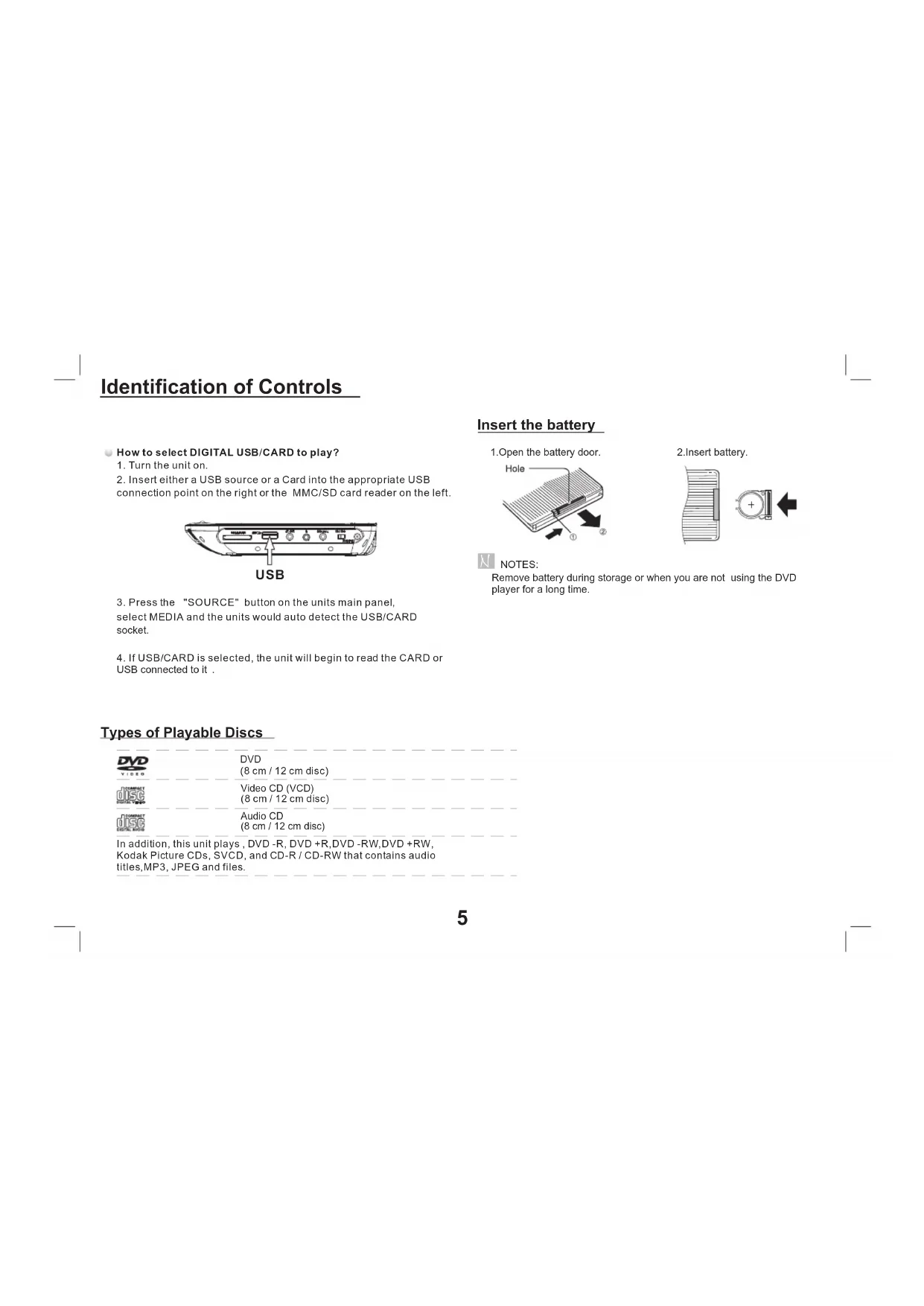
How to select DIGITAL USB/CARD to play?
- Turn the unit on.
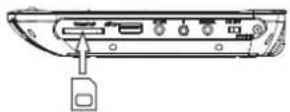
- Insert either a USB source or a Card into the appropriate USB connection point on the right or the MMC/SD card reader on the left.
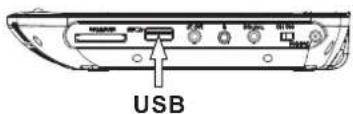
- Press the "SOURCE" button on the units main panel, select MEDIA and the units would auto detect the USB/CARD socket.
- If USB/CARD is selected, the unit will begin to read the CARD or USB connected to it.
Insert the battery
- Open the battery door.
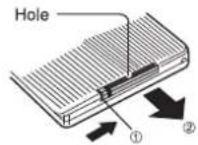
2.Insert battery.
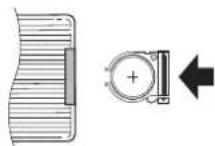

NOTES:
Remove battery during storage or when you are not using the DVD player for a long time.
Types of Playable Discs
| DVD Video | DVD (8 cm / 12 cm disc) |
| Video CD (VCD) (8 cm / 12 cm disc) | |
| Audio CD (8 cm / 12 cm disc) | |
| In addition, this unit plays , DVD -R, DVD +R,DVD -RW,DVD +RW, Kodak Picture CDs, SVCD, and CD-R / CD-RW that contains audio titles, MP3, JPEG and files. | |
Identification of Controls
Remote control unit
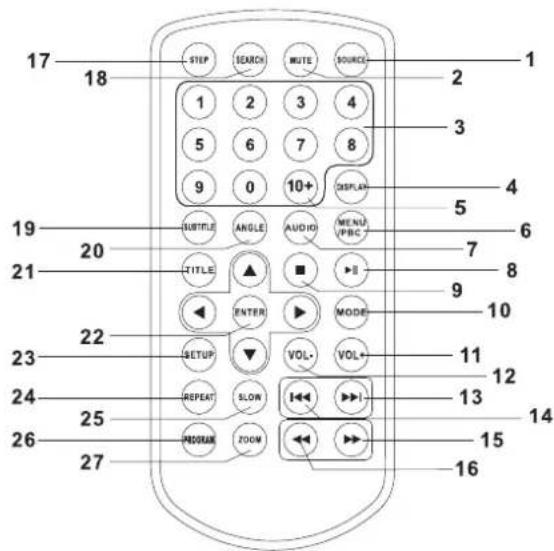
1. SOURCE
DVD/CARD/USB.
2. MUTE
Disable Audio output.
3.0-9 NUMBER BUTTON
Selects numbered items in a menu.
4.DISPLAY
To display the playtime and status information.
5.10+ BUTTON
In order to select a track 10 or greater, first press 10+ . For example; select track 12, first press 10+ , and then press number 2 button.
6. MENU/PBC
Return to DVD root menu(DVD).
PBC on/off switch (VCD).
7.AUDIO
DVD Press AUDIO repeatedly during playback to hear a different audio language or audio track, if available.
MP3 VGDC Press AUDIO repeatedly during playback to hear a different audio channel (Left,Right,Mix,Stereo).
8. PLAY/PAUSE
Press PLAY/PAUSE once to pause playback, pressing PLAY/
PAUSE second time will resume the playback.
9.STOP
When this button is pressed once, the unit records the stopped point.from where playback will resume if PLAY() is pressed after wards. But if STOP button is pressed again instead of PLAY(), button, there will be no resume function.
10.MODE
Set LCD parameter(adjust brightness, contrast, and saturation).
11.VOL+
12.VOL-
Adjust volume
13.Forward Skip
Go to next chapter/ track.
14.Reverse Skip
Go to previous chapter/ track to the beginning.
15. BUTTON
Press BUTTON allow skipping ahead at 5-level speed(X2->X4->
X8->X16->X32->PLAY), press PLAY button return to normal playback.
Identification of Controls
Remote control unit
16. BUTTON
Press BUTTON allow skipping back at 5-level speed (X2->X4->X8->X16->X32->PLAY) , press PLAY button return to normal playback.
17.STEP
Step the motion in DVD mode.
18.SEARCH
Goto time point, title or chapter you want in DVD Mode.
19.SUBTITLE
Press SUBTITLE repeatedly during playback to hear a different subtitle languages.
20.ANGLE
DVD:Press ANGLE will change the view angle, on DVDs that support this feature.
21. TITLE
Return to DVD title menu
22.ENTER
Confirms menu selection.
23. Setup
Accesses or removes setup menu.
24.REPEAT
Press REPEAT during playback to select a desired repeat mode.
DVD : you can play select repeat chapter/title/off.
VCD : you can select repeat single/all/off.
CD MP3 : you can select repeat single/folder/off.
25.SLOW
Press Slow button repeatedly to enter slow playback, and cycle between different speeds. The speeds are 1/2, 1/4, 1/8, 1/16, and normal.
26.PROGRAM
DVD CD :The program function enables you to store your favourite tracks from the disc. Press PROGRAM button ,then PROGRAM MENU will appear on screen, now you can use the number key to direct input the titles, chapters or tracks number and select PLAY option. TO resume normal playback, press PROGRAM and select clear program option on the program menu,press PROGRAM again to exit program menu.
27.ZOOM
DVD CD : Use ZOOM to enlarge or shrink the video image. 1. Press ZOOM during playback or still playback to activate the Zoom function. The square frame appears briefly in the right bottom of the picture. 2. Each press of the ZOOM button changes the TV screen in the following sequence:
2X size 3X size 4X size 1 / 2 size 1 / 3 size 1 / 4 size normal size
JPEG: Use ZOOM to enlarge or shrink the picture.
1.Press 'ZOOM'.
- Used " to enlarge,or " to shorten the picture. Use the button to move through the zoomed picture.
SETUP Menu Setting
General Setup Page
Press SETUP button to get the setup menu. Use direction buttons
to select the preferred item. After finishing settings, press
SETUP again to normal display.
The following menu items can be changed:
GENERAL: selects the GENERAL PAGE menu.
AUDIO: selects the AUDIO PAGE menu.
VIDEO: selects the VIDEO PAGE menu.
PREFERENCE : selects the PREFERENCE PAGE menu.
password: selects the PASSWORD PAGE menu.
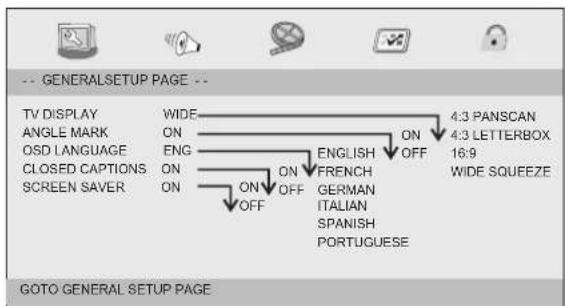
General Setup Page
TV DISPLAY: selects the aspect ratio of the playback picture.
4:3 PANSCAN: if you have a normal TV and want both sides of the picture to be trimmed or formatted to fit your TV screen.
4:3 LETTERBOX: if you have a normal TV. In this case, a wide picture with black bands on the upper and lower portions of the TV screen will be displayed.
16:9:wide screen display.
Wide Squeeze: Set screen mode to 4:3.
Angle Mark
Displays current angle setting information on the right hand corner of the TFT screen if available on the disc.
OSD Language
You can select your own preferred language settings.
Closed Captions
Closed captions are data that are hidden in the video signal of some discs.Before you select this function,please ensure that the disc contains closed captions information and your TV set also has this function.
Screen Saver
This function is used to turn the screen saver On or Off.
Audio Setup Page
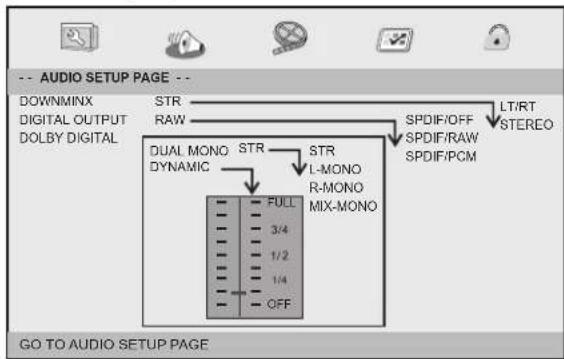
Audio Setup Page
SETUP Menu Setting
Audio Setup Page
Downmix
This options allows you to set the stereo analog output of your DVD Player.
LT/RT:Select this option if your DVD Player is connected to a Dolby Pro Logic decoder.
Stereo: Select this option when output delivers sound from only the two front speakers.
Digital Output
The function is used to select the SPDIF Output:SPDIF Off,SPDIF /RAW,SPDIF/PCM.
SPDIF Off: Turns off the SPDIF output.
→SPDIF/RAW: If you have connected your DIGITAL AUDIO OUT to a multi-channel decoder/receiver.
→SPDIF/PCM: Only if your receiver is not capable of decoding multi-channel audio.
Dolby digital
The options included in Dolby Digital Setup are: and'Dual Mono 'Dynamic'.
Dual Mono
Stereo: Left mono sound will send output signals to Left speaker and Right mono sound will send output signals to Right speaker.
L-Mono: Left mono sound will send output signals to Left speaker and Right speaker.
R-Mono:Right mono sound will send output signals to Left speaker and Right speaker.
Mix-Mono: Left and Right mixed mono sound will send output signals to Left and Right speakers.
Dynamic
Dynamic range compression
Video Setup Page
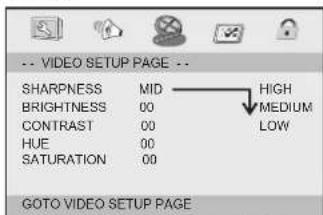
Video Setup Page
Sharpness, Brightness, Contrast, Hue, Saturation:setting the video quality.
Preference Page
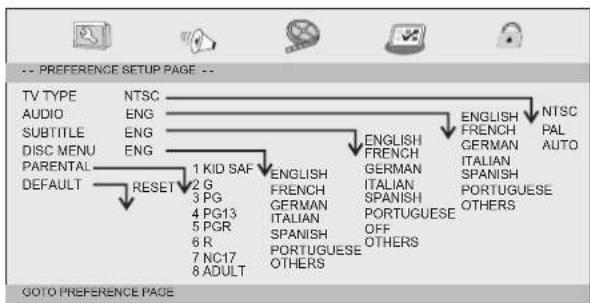
Preference Page
TV Type
Selecting the colour system that corresponds to your TV when AV outputs. This DVD Player is compatible with both NTSC and PAL.
SETUP Menu Setting
Preference Page
PAL - Select this if the connected TV is PAL system.It will change the video signal of a NTSC disc and output in PAL format.
NTSC-Select this if the connected TV is NTSC system.It will change the video signal of a PAL disc and output in NTSC format.
Auto:Chang the video signal output automatic according to the playing disk format.
Audio:Selects a language for audio (if available).
Subtitle:Selects a language for subtitle (if available).
Disc Menu:Selects a language for disc menu (if available).
Parental
Some DVDs may have a parental level assigned to the complete disc or to certain scenes on the disc. This feature lets you set a playback limitation level. The rating levels are from 1 to 8 and are country dependent. You can prohibit the playing of certain discs that are not suitable for your children or have certain discs played with alternative scenes.
Default:Back to the factory setting.
Password Setup Page
Password Setup Page
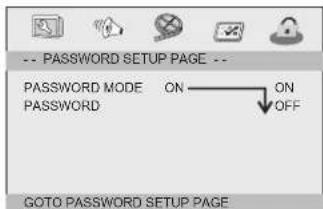
- Password mode: Set password mode on/off. If set to off, change parental level will not check password.
Password Setup Page
Password: select the menu password change page.
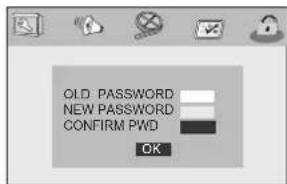
OLD PASSWORD: Enter the OLD password, (Factory setting is 1369), and the cursor will jump automatically to NEW PASSWORD
NEW PASSWORD: Enter the NEW password. Enter 4 digits from the remote control unit numeric buttons, and the cursor will automatically jump to CONFIRM PASSWORD.
CONFIRM PASSWORD: Confirm the NEW password by entering it again. If the confirmation is incorrect, the cursor will stay in this column. After entering, the correct new password again, the cursor will jump automatically to OK.
OK: When cursor is on this button, press ENTER key to confirm setting.
Note: If the password has been changed, the parental and disc lock code will also be changed.
The default password(1369)is always active even the password has been changed.
Parameters and specifications
Electronical parameters
| Item | Standard requirement | |
| Power requirements | :DC 9~12V / AC 100-240V, 50/ 60Hz (adapter) | |
| Power consumption | :<10W | |
| Operating humidity | :5 % to 90 % | |
| Output | VIDEO OUT | :1Vp-p(75Ω) |
| AUDIO OUT | :1.4 Vrms (1 KHz, 0 dB) | |
| Audio | :Speaker:1WX2, outputHeadphones | |
System
| Laser | :Semiconductor laser, wavelength 650 nm |
| Signal system | :NTSC / PAL |
| Frequency response | :20Hz to 20 kHz(1dB) |
| Signal-to-noise ratio | :More than 80 dB (ANALOG OUT connectors only) |
| Dynamic range | :More than 85 dB (DVD/CD) |
| Accessories | : Video/Audio cable,Remote control,Car Bag, Stereo headphone,AC/DC Adapter,Car Adapte |

Note: Design and specifications are subject to change prior notice.
Battery Parameters
Battery Specifications: Output: 7.4V
Standard charge time: 2h 4h (Varies according to battery capacity)
Discharge Time: About 2h (Varies according to battery capacity)
Storage and work circumstances: 1. Storage circumstances Temperature Humidity 6 months -20^ +45^ 65 ± 20% 1 week -20^ +65^ 65 ± 20%
2.Work circumstances Temperature Humidity Standard charge 0^ +45^ 65± 20% Standard discharge -20^ +65^ 65± 20%
Mounting method with diagram for the carbag
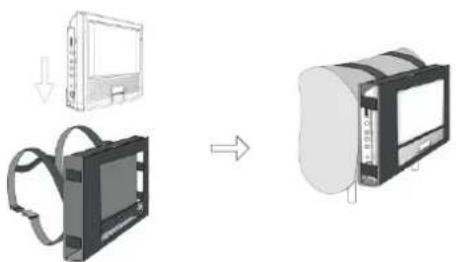
This device complies with Part 15 of the FGC Rules. Operation is subject to the following two conditions:
(1) This device may not cause harmful interference
(2) This device must accept any interference received, including interference that may cause undesired operation.
SYLVANIA
FRANCAIS
GUIDE DE L'UTILISATEUR
DU LECTEUR DVD PORTATIF
SDVD7030
- Lecure/Pause (PLAY/PAUSE)
13.Saut avant (forward Skip)
24.REPÉTITION (REPEAT)
- Press ZOOM during playback or still playback to activate the
Zoom function. The square frame appears briefly in the right bottom of the picture.
- Each press of the ZOOM button changes the TV screen in the
following sequence:
2X size 3X size 4X size 1 / 2X size 1 / 3 size 1 / 4 size normal size
JPEG: Use ZOOM to enlarge or shrink the picture.
- Press 'ZOOM'
2,Used"to enlarge,or" to shorten the picture
Use the button to move through the zoomed picture.

- Table of Contents
- Contents
- Important Safety Instructions
- Safety Precautions
- WARNING
- Notes on Copyrights:
- Identification of Controls
- Insert the battery
- Types of Playable Discs
- Remote control unit
- BUTTON
- 17.STEP
- 18.SEARCH
- 19.SUBTITLE
- 20.ANGLE
- TITLE
- 22.ENTER
- Setup
- 24.REPEAT
- 25.SLOW
- 26.PROGRAM
- 27.ZOOM
- SETUP Menu Setting
- General Setup Page
- Audio Setup Page
- Downmix
- Digital Output
- Dolby digital
- Dual Mono
- Dynamic
- Video Setup Page
- Preference Page
- TV Type
- Password Setup Page
- Parameters and specifications
- Electronical parameters
- Battery Parameters
- Mounting method with diagram for the carbag
- SYLVANIA
Brand : SYLVANIA
Model : SDVD7030
Category : Portable DVD Player