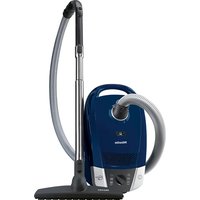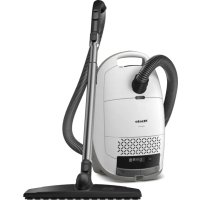
Guard M1 Parquet XL - Vacuum without a bag MIELE - Free user manual and instructions
Find the device manual for free Guard M1 Parquet XL MIELE in PDF.



User questions about Guard M1 Parquet XL MIELE
0 question about this device. Answer the ones you know or ask your own.
Ask a new question about this device
Download the instructions for your Vacuum without a bag in PDF format for free! Find your manual Guard M1 Parquet XL - MIELE and take your electronic device back in hand. On this page are published all the documents necessary for the use of your device. Guard M1 Parquet XL by MIELE.
USER MANUAL Guard M1 Parquet XL MIELE
a) EN 60312-1 Vacuum cleaners for household use - Part 1: Dry vacuum cleaners - Methods for measuring the performance
b) EN 60704-2-1 Household and similar electrical appliances - Test code for the determination of airborne acoustical noise - Part 2-1: Particular requirements for vacuum cleaners
c) EN 60335-2-2 Household and similar electrical appliances - Safety - Part 2-2: Particular requirements for vacuum cleaner and water suction appliances
Warning and Safety instructions 29
Sustainability and environmental protection 35
Guide to the appliance 36
Notes on the European Regulation (EU) No. 666/2013 38
Illustrations 38
Familiarisation 38
Accessories included 39
3D4U 39
How the timestrip® filter change indicator works (depending on the model) .... 39
How the vacuum cleaner bag change indicator works 39
Commissioning 39
Attaching the suction hose 39
Removing the suction hose 40
Connecting the suction hose to the handle 40
Connecting the handle to the suction tube 40
Connecting the suction tube to the adjustable floorhead 40
Activating the timestrip® filter change indicator (depending on the model) 40
Operation 40
Positioning the accessories holder 41
Using the dusting brush integrated in the EcoComfort handle (depending on the model) 41
Using the dusting brush integrated in the Comfort handle 2.0 (depending on the model) 41
Adjusting the telescopic tube (depending on the model) 41
Adjusting the floorhead 41
Vacuuming staircases 41
Unwinding the mains cable 42
Rewinding the mains cable 42
Switching on and off 42
Selecting the suction power 42
Interim suction power levels 42
Setting down, transportation and storage 43
Park system for pauses during vacuuming 43
Park system for storage 43
Cleaning and care 43
Purchasing accessories 44
Changing the vacuum cleaner bag 44
Removing the vacuum cleaner bag 44
Inserting the vacuum cleaner bag 45
When to replace the exhaust filter 45
Replacing the AirClean exhaust filter 45
Replacing the AirClean Plus 50, Silence AirClean 50, Active AirClean 50 and
HEPA AirClean 50 exhaust filters 46
Replacing one type of exhaust filter with another 46
Replacing the motor protection filter (if necessary) 46
Replacing the thread lifters 47
Cleaning the vacuum cleaner and accessories. 47
Troubleshooting 48
Service 49
Contact in case of malfunction 49
Warranty 49
Warranty in the UAE 49
Optional accessories 49
Purchasing accessories. 49
Electrical connection for the UK 51
Electrical connection AU, NZ 51
This vacuum cleaner conforms to current safety requirements. Inappropriate use can lead to personal injury and damage to property.
Please read the operating instructions before using the vacuum cleaner for the first time. They contain important information on the safety, use, cleaning and care of the vacuum cleaner. This will prevent both personal injury and damage to the appliance.
In accordance with standard IEC 60335-1, Miele expressly and strongly advises that you read and follow the instructions in the "Commissioning" section as well as the warning and safety notes.
Miele cannot be held liable for injury or damage caused by non-compliance with these instructions.
Keep these operating instructions in a safe place and pass them on to any future owner.
Always disconnect the vacuum cleaner from the power supply when you have finished using it, before changing any accessories and before performing cleaning, care and troubleshooting. Remove the plug from the socket.
Correct application
This vacuum cleaner is intended for cleaning flooring in domestic households and similar residential environments. This vacuum cleaner is not suitable for use on construction sites.
This vacuum cleaner can be used for all normal cleaning of carpets, rugs and robust hard flooring.
This vacuum cleaner is not intended for outdoor use.
This vacuum cleaner is intended for use at altitudes of up to 4000m above sea level.
The vacuum cleaner must only be used to vacuum dry floor surfaces. Do not vacuum people or animals. Any other types of use, modifications or alterations are not permitted.
The vacuum cleaner can only be used by people (including children) with reduced physical, sensory, or mental capabilities, or lack of experience or knowledge, if they are supervised whilst using it or have been shown how to use it in a safe way and understand and recognise the consequences of incorrect operation.
Safety with children
Danger of suffocation. Packaging, e.g. plastic wrappings, must be kept out of the reach of babies and children. Whilst playing, children could become entangled in packaging or pull it over their head and suffocate.
Children under 8 years of age must be kept away from the vacuum cleaner unless they are constantly supervised.
Children aged 8 and older may only use the vacuum cleaner without supervision if they have been shown how to use it in a safe manner. Children must be able to understand and recognise the possible dangers caused by incorrect operation.
Children must not be allowed to clean or maintain the vacuum cleaner unsupervised.
Please supervise children in the vicinity of the vacuum cleaner and do not let them play with it.
Technical safety
- Check both the vacuum cleaner and all accessories supplied with it for any visible signs of damage before use. Do not use a damaged vacuum cleaner or damaged accessory.
Compare the connection data on the data plate of the vacuum cleaner (mains voltage and frequency) with that of the mains electricity supply. This data must match exactly. Without modifications, the vacuum cleaner is suitable for 50Hz or 60Hz .
The mains electrical plug must be fitted with an appropriate fuse.
AU/NZ: The mains electrical outlet must be fitted with an appropriate circuit breaker.
Temporary or permanent operation on an autonomous power supply system or a power supply system that is not synchronised with the mains power supply (e.g. island networks, back-up systems) is possible. A prerequisite for operation is that the power supply system complies with the specifications of EN 50160 or an equivalent standard.
The function and operation of the protective measures provided in the domestic electrical installation and in this Miele product must also be maintained in isolated operation or in operation that is not synchronised with the mains power supply, or these measures must be replaced by equivalent measures in the installation. As described, for example, in the current version of BS OHSAS 18001-2 ISO 45001.
AU/NZ: Temporary or permanent operation with a self-sufficient or non-mains synchronous energy supply system (e.g. isolated networks, back-up systems) is possible. A requirement for the operation is that the energy supply system complies with all current local and national requirements that apply to stand-alone, solar and/or battery systems.
The protective measures provided in the domestic installation and in this Miele product must also be assured in their function and operation in isolated operation or in non-mains synchronous operation, or replaced with equivalent measures in the installation.
While the vacuum cleaner is under warranty, repairs should only be undertaken by a Miele authorised service technician. Otherwise the warranty will be invalidated.
Do not use the vacuum cleaner if the cable is damaged. If the cable is damaged it must be replaced together with a complete cable rewind. For safety reasons this must only be done by Miele Service or a Miele authorised service technician.
Do not pull or carry the vacuum cleaner by the cable, and be careful not to damage the cable when withdrawing the plug from the socket. Keep the cable away from sharp edges and do not let it get squashed, for example, under a door. Avoid running the vacuum cleaner over the cable. This could damage the cable, plug or socket. The appliance must not be used if any of these have suffered damage.
Repairs should only be carried out by a Miele authorised service technician. Repairs and other work by unqualified persons can cause considerable danger to users.
Correct use
Do not use the vacuum cleaner without the vacuum cleaner bag, motor protection filter and exhaust filter in place.
It is not possible to close the dust compartment lid if the vacuum cleaner bag is not inserted. Do not force it.
Before closing the dust compartment lid, always make sure that the vacuum cleaner bag has been inserted far enough and has clearly clicked into position.
Do not vacuum up anything which has been burning or is still glowing e.g. cigarettes, ashes or coal, whether glowing or apparently extinguished.
Do not use the vacuum cleaner to vacuum toner dust. Toner, such as that used in printers and photocopiers, can conduct electricity.
Do not use the vacuum cleaner to vacuum up any water, liquid or damp dirt. Wait until any freshly cleaned or shampooed rugs or carpets are completely dry before attempting to vacuum.
- Do not vacuum up any inflammable or combustible liquids or gases and do not vacuum in areas where such substances are stored.
Do not vacuum at head height and do not let the suction get anywhere near a person's head.
Cleaning
Do not immerse the vacuum cleaner or any accessories supplied with it in water. Clean the vacuum cleaner and accessories only with a dry or slightly damp cloth when disconnected from the power supply.
Accessories and spare parts
It is not advisable to vacuum directly with the handle, i.e. without an accessory attached as the rim could get damaged and you could hurt yourself on sharp edges.
Only use vacuum cleaner bags, filters and original accessories bearing the Miele logo on the packaging. The manufacturer cannot otherwise guarantee the safety of the product.
Miele can only guarantee the safety of the appliance when genuine Miele replacement parts are used. Faulty components must only be replaced with genuine Miele replacement parts.
Miele will guarantee to supply functional spare parts for a minimum of 10 years and up to 15 years following the discontinuation of your vacuum cleaner.
Transport
The packaging material protects the vacuum cleaner from transport damage. We recommend you keep the packaging for transport purposes.
Disposing of the packaging material
The packaging material is used for handling and protects the appliance from transport damage. The packaging material used is selected from materials which are environmentally friendly for disposal and can generally be recycled.
Recycling the packaging material reduces the use of raw materials. Use material-specific collection points for valuable materials and take advantage of return options.
We recommend you keep the packaging material for transport purposes.
Disposing of the vacuum cleaner bags and filters
Vacuum cleaner bags and filters are made from environmentally friendly materials. You can dispose of the filters with normal household waste. You can also dispose of the vacuum cleaner bag with normal household waste, providing it contains general household dust only.
Disposing of your old appliance
Electrical and electronic appliances contain many valuable materials. They also contain certain materials, compounds and components which were essential for their correct functioning and safety. These could be hazardous to human health and to the environment if disposed of with household waste or if handled incorrectly. Please do not, therefore, dispose of your old appliance with household waste.
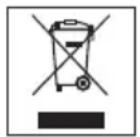
Instead, please make use of officially designated collection and disposal points to dispose of and recycle electrical and electronic appliances in your local community, with your dealer or with Miele, free of charge. By law, you are solely responsible for deleting any personal data from the old appliance prior to disposal. You are legally obliged to remove any old batteries which are not securely enclosed by the appliance and to remove any lamps without destroying them, where this is possible. These must be taken to a suitable collection point where they can be handed in free of charge. Please ensure that your old appliance poses no risk to children while being stored for disposal.
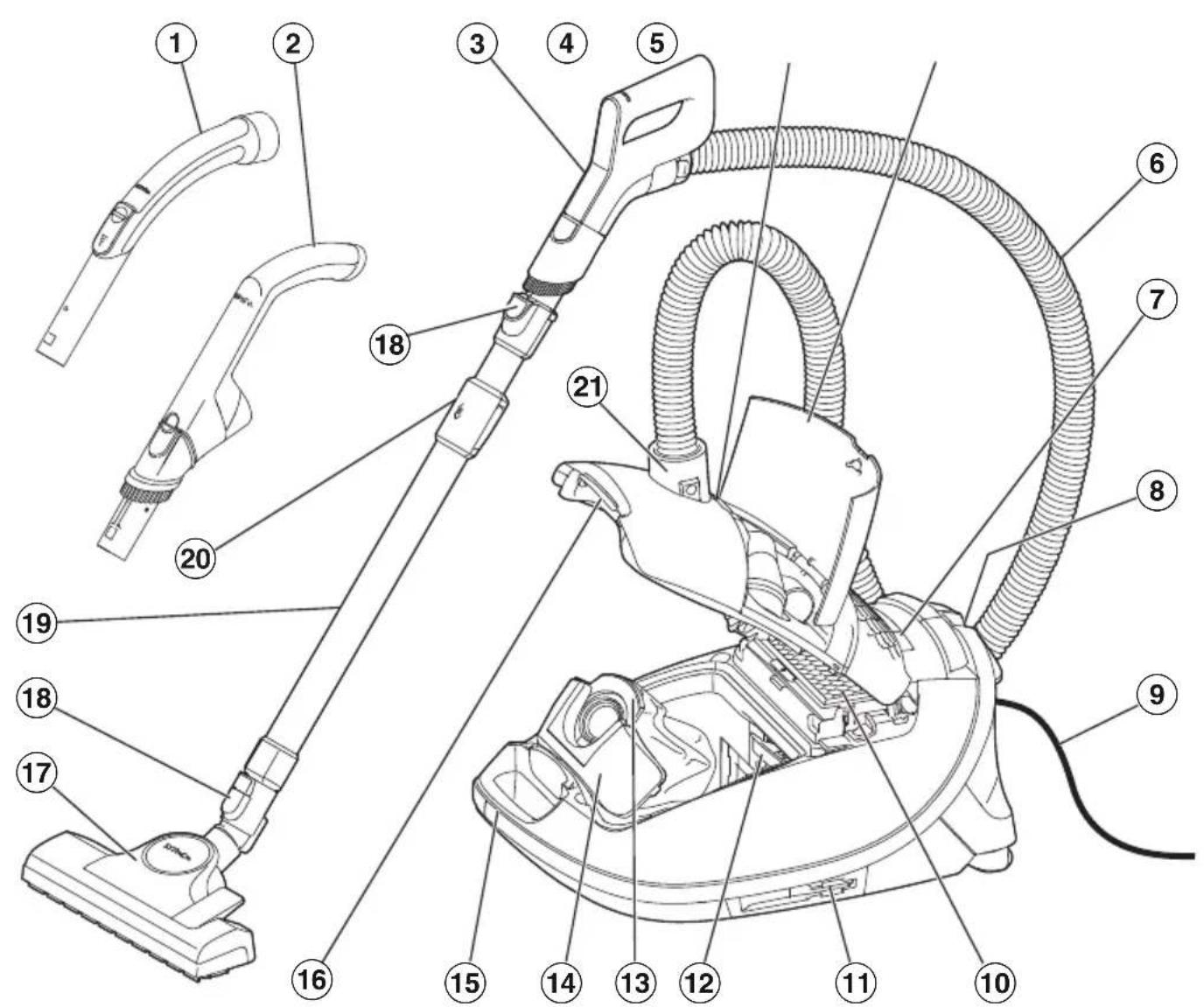
① Handle
② EcoComfort handle
③ Comfort handle
④ Vacuum cleaner bag change indicator
⑤ Accessories compartment
⑥ Suction hose
⑦ Display
Park system for vacuum cleaning breaks
⑨ Mains cable
10 Original Miele exhaust filter
⑪ Park system for storage (on both sides of the vacuum cleaner)
⑫ Motor protection filter
Original Miele vacuum cleaner bag
Catch element
15 Handle
Dust compartment lid release button
⑰ Floorhead
18 Release buttons
19 Telescopic tube
20 Telescopic tube release mechanism
② Intake connection
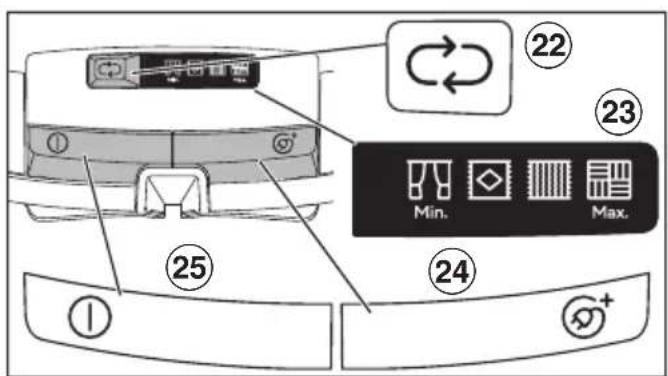
22 Suction power selector button
^23 Display for power levels
24 Foot switch for automatic cable rewind
25 On/Off foot switch ①
- These features depend on the model and may vary or may not be available on your vacuum cleaner.
Notes on the European Regulation (EU) No. 666/2013
This vacuum cleaner is a domestic vacuum cleaner and is classified as a universal vacuum cleaner in accordance with the above-mentioned regulation.
These operating instructions and additional information are available to download from the Miele website at www.miele.com.
The annual energy consumption stated in the regulation describes the indicative annual energy consumption (kWh per year), based on 50 cleaning cycles. Actual energy consumption depends on how the vacuum cleaner is used.
All tests and calculations were carried out according to the following harmonised standards applicable at the time in due consideration of the published regulation guidelines of the European Commission from September 2014:
a) EN 60312-1 Vacuum cleaners for household use - Part 1: Dry vacuum cleaners - Methods for measuring the performance.
b) EN 60704-2-1 Household and similar electrical appliances - Test code for the determination of airborne acoustical noise - Part 2-1: Particular requirements for vacuum cleaners.
c) EN 60335-2-2 Household and similar electrical appliances - Safety - Part 2-2: Particular requirements for vacuum cleaner and water suction appliances
Not all floorheads and accessories supplied with the vacuum cleaner are intended for intensive cleaning of carpets or hard floors as described in the regulation. The following floorhead and setting were used to determine the values:
For energy consumption and cleaning class on carpet and hard floors and sound power level on carpet, the adjustable floorhead was used with the brush retracted (press the foot switch).
The data given in the regulation refers exclusively to the combinations and settings of the floorhead on the different floorings described here.
Only original Miele vacuum cleaner bags, motor protection filters and exhaust filters were used for all measurements.
Illustrations
The illustrations referred to in the text are shown on the fold-out pages at the end of these operating instructions.
Familiarisation
This vacuum cleaner can be used for daily cleaning of carpets, rugs and robust hard floors.
Miele offers a range of suitable accessories for many special applications (see "Optional accessories").
Certain models are supplied as standard with a turbobrush which is not illustrated.
The turbobrush is supplied with its own set of operating instructions.
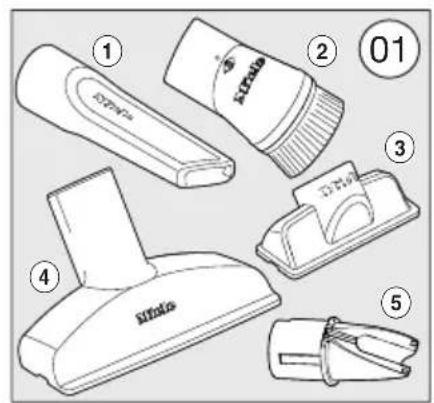
Accessories included (Fig. 01)
① Crevicenozzle
Accessory for cleaning in folds, crevices or corners.
Dusting brush
Accessory for vacuuming skirting boards, carved furniture or ornaments.
The head can be swivelled to adjust the angle.
Dusting brush on the handle (depending on the model)
Accessory for vacuuming scratch-resistant surfaces, e.g. keyboards or vacuuming up crumbs.
③ Upholstery nozzle (depending on the model)
Accessory for cleaning upholstery, mattresses and cushions.
④ Upholstery nozzle, supplied loose (depending on the model)
For cleaning upholstery, mattresses, cushions, curtains, etc.
⑤ Accessories holder for the upholstery nozzle (depending on the model)
Accessory for storing the upholstery nozzle supplied loose
3D4U
With 3D4U, Miele offers free accessories to download for your 3D printer (www.miele.com, Service, 3D4U).

3D4U
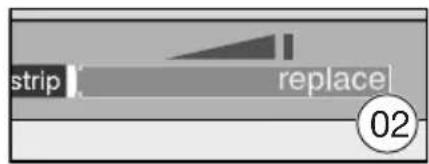
How the timestep® filter change indicator works (depending on the model) (Fig. 02)
The timestrip® filter change indicator shows the remaining functional life of the exhaust filter. After approx. 50 operating hours, the display on the exhaust filter will be completely filled with red. At this point, the exhaust filter needs to be replaced. 50 operating hours equates to approximately one year of use.
How the vacuum cleaner bag change indicator works
The vacuum cleaner bag change indicator is set for normal household dust. This generally contains a mixture of dust, hair, threads, carpet fluff, grit, etc. However, if the vacuum cleaner has been used to vacuum up fine dust, such as drilling dust, sand, plaster dust or flour, the pores of the vacuum cleaner bag will become blocked very quickly. The indicator will indicate that the vacuum cleaner bag is "full" even when it is not. The vacuum cleaner bag must be replaced if this is the case.
If, on the other hand, you vacuum up a significant amount of hair, carpet lint, etc., the vacuum cleaner bag will be full to bursting before the indicator reacts.
Commissioning
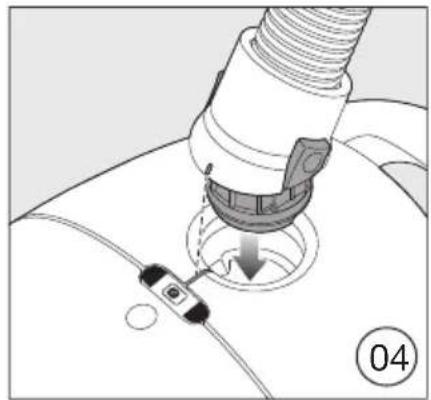
Attaching the suction hose (Fig. 04)
Insert the hose connector into the suction opening on the vacuum cleaner until it clicks into position. To do this, line up the guides on the two pieces.
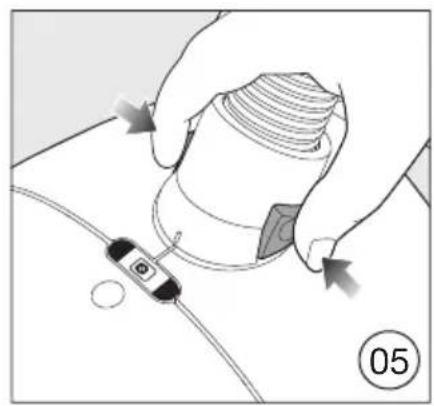
Removing the suction hose (Fig. 05)
Press the release buttons at the side of the hose connector, and lift the hose from the suction opening.
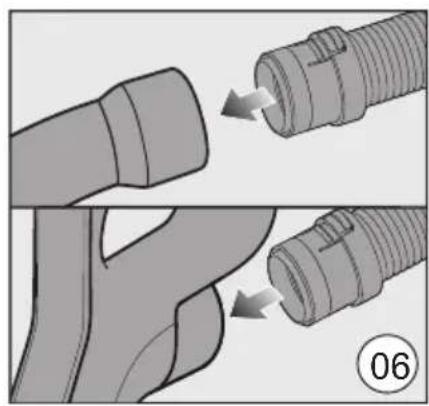
Connecting the suction hose to the handle (Fig. 06)
Fit the suction hose connector into the handle until it clicks into position.
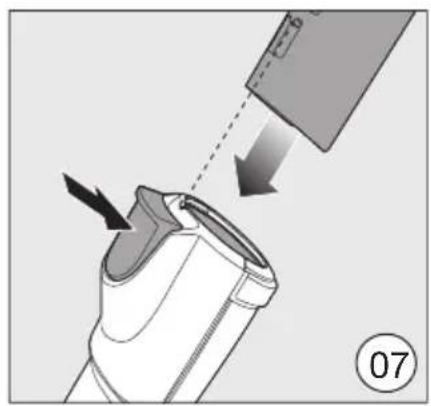
Connecting the handle to the suction tube (Fig. 07)
Insert the handle into the suction tube until it clicks into position. To do this, line up the guides on the two pieces.
To detach the handle from the suction tube, press the release button and pull the handle out of the suction tube, twisting it slightly as you do so.
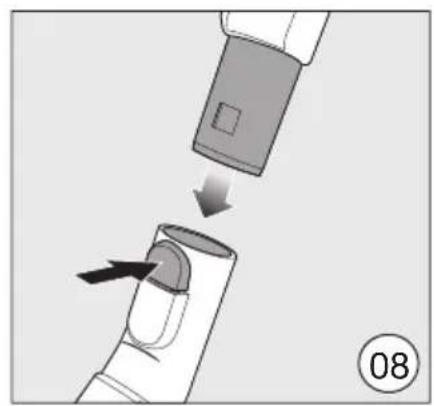
Connecting the suction tube to the adjustable floorhead (Fig. 08)
Push the suction tube into the floorhead and turn it clockwise or anticlockwise until it clicks into position.
To separate the suction tube from the floorhead, press the release button and pull the suction tube away from the floorhead, twisting it slightly as you do so.
Activating the timestrip® filter change indicator (depending on the model) (Fig. 03, 09-12)
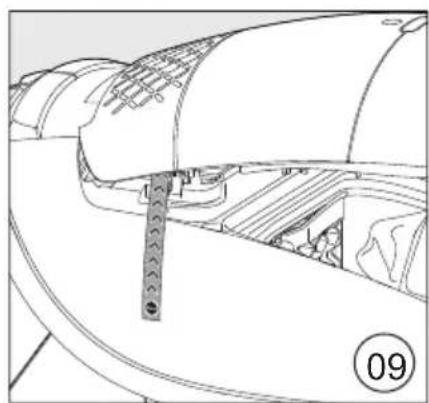
If an indicator strip is protruding from the dust compartment at the side of your vacuum cleaner, you need to activate the timestrip® filter change indicator. (Fig. 09)
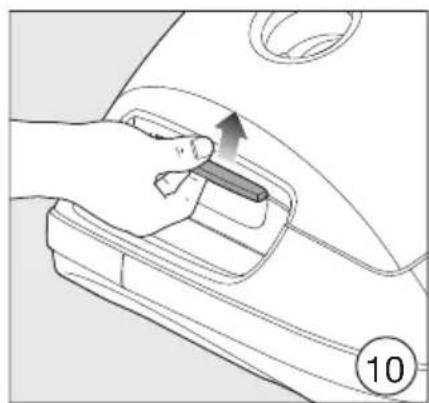
Press the release button in the recessed grip for the dust compartment lid and raise the lid as far as it will go. (Fig. 10)
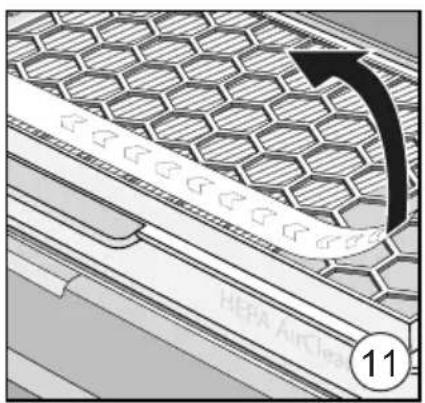
Remove the indicator strip. (Fig. 11)
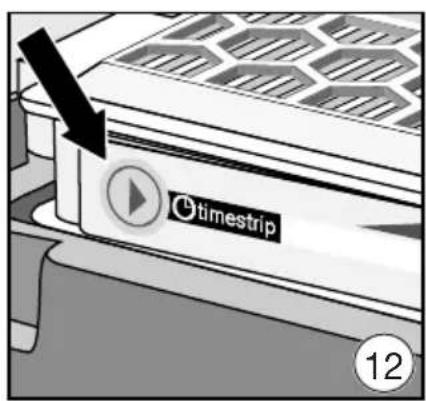
Press the timestep® filter change indicator. (Fig. 12)
After approx. 10-15 seconds, a thin red line will appear in the left-hand side of the display. (Fig. 03)
Damage due to contamination in the dust compartment.
Large quantities of dust may get into the dust compartment and damage components if the vacuum cleaner bag has not clicked into position.
Before closing the dust compartment lid, always make sure that the vacuum cleaner bag has been inserted and the catch element is closed.
- Close the dust compartment lid securely, making sure it clicks into position. Take care not to trap the vacuum cleaner bag when doing so.
Operation
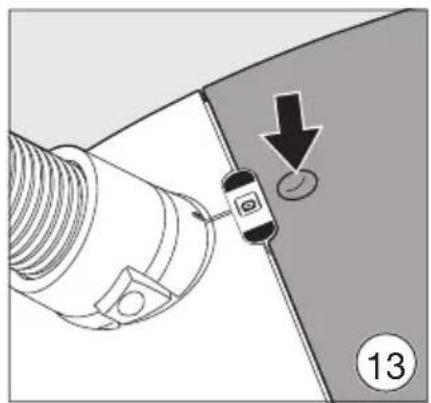
Removing accessories (Fig. 13)
Press the release button on the accessories compartment lid.
The accessories compartment will then open.
Take out the accessory you require.
Press down firmly on the accessories compartment lid to close it.
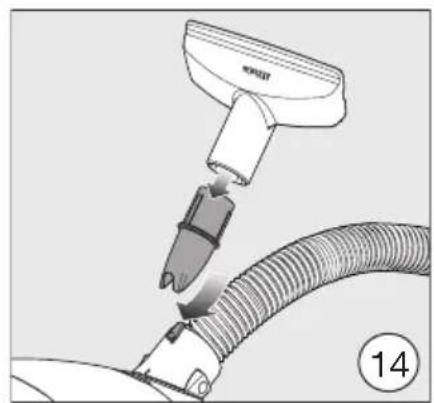
Positioning the accessories holder (Fig. 14)
- Attach the accessories holder to the hose connector socket on the vacuum cleaner if necessary.
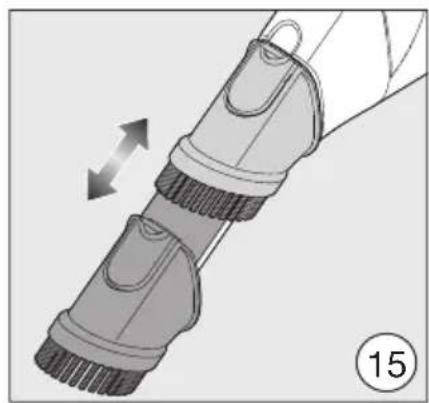
Using the dusting brush integrated in the EcoComfort handle (depending on the model) (Fig. 15)
Press the release button on the dusting brush and push the brush out until it clearly engages in position.
When you have finished dusting press the release button and push the dusting brush back into its original position until it clicks into place.
Using the dusting brush integrated in the Comfort handle 2.0 (depending on the model)
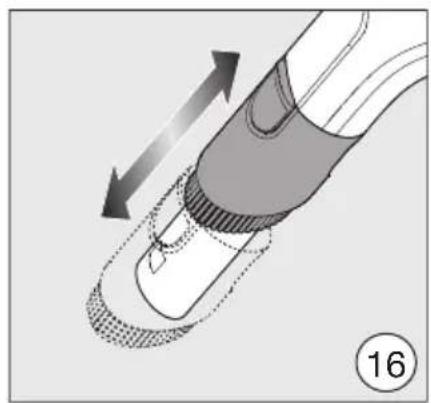
Press the release button on the dusting brush and push the brush out until it clearly engages in position. (Fig. 16)
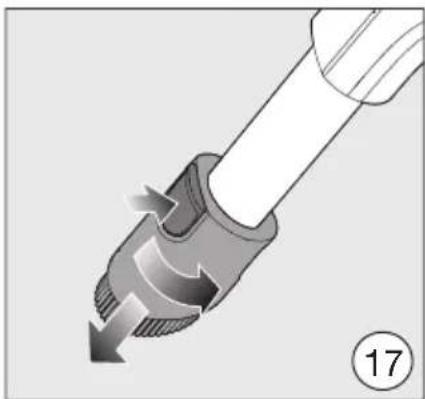
Press the release button and turn the dusting brush to the side. (Fig. 17)
Push the dusting brush down over the guide until it releases from the handle. (Fig. 17)
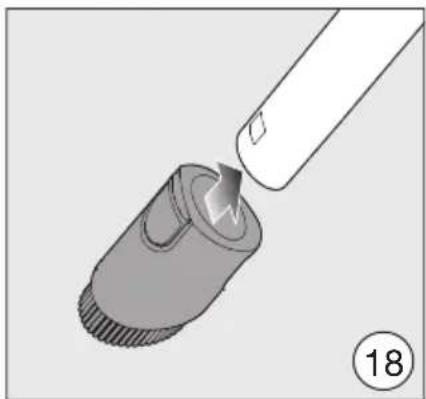
Push the dusting brush onto the suction tube until it clicks into place. (Fig. 18)
When you have finished dusting
Press the release button and pull the dusting brush off the suction tube.
Push the dusting brush back onto the Comfort handle 2.0 until it clicks into place.
Push the dusting brush to its original position so the handle can be pushed back into the suction tube.
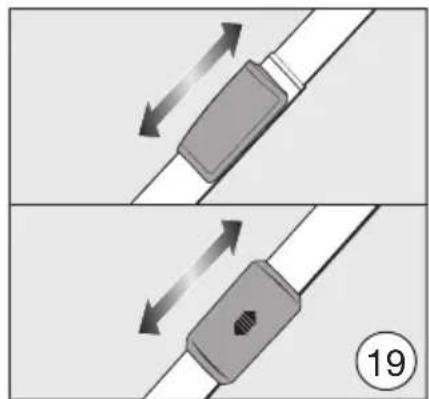
Adjusting the telescopic tube (depending on the model) (Fig. 19)
One part of the telescopic tube is packed inside the other, and it can be adjusted to suit your height for comfortable vacuuming.
- Grasp the release mechanism and adjust the telescopic tube to the required length.
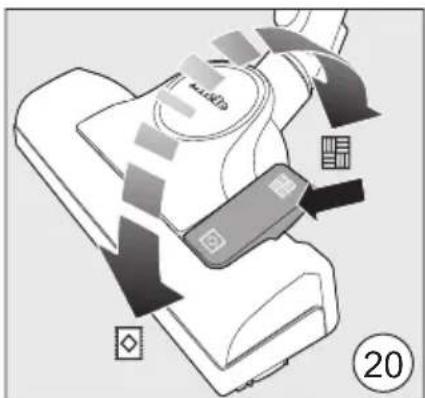
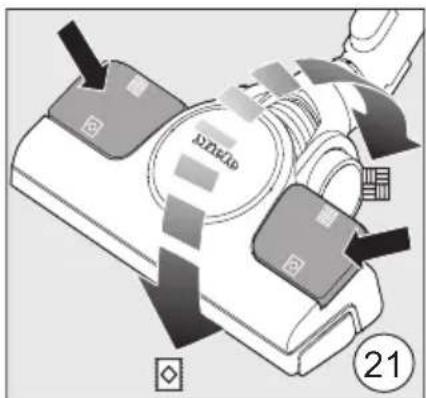
Adjusting the floorhead (Fig. 19 + 20)
Depending on the model, your vacuum cleaner will be fitted as standard with one of the floorheads illustrated.
Please observe the flooring manufacturer's cleaning and care instructions.
Clean hard flooring which is not susceptible to scratching, as well as flooring with gaps or deep crevices in it, with the brush protruding:
Press the foot switch.
Vacuum carpets and rugs with the brush retracted:
Press the foot switch.
If the suction power of the floorhead seems too high, reduce it until the floorhead is easier to manoeuvre (see "Selecting the suction power").
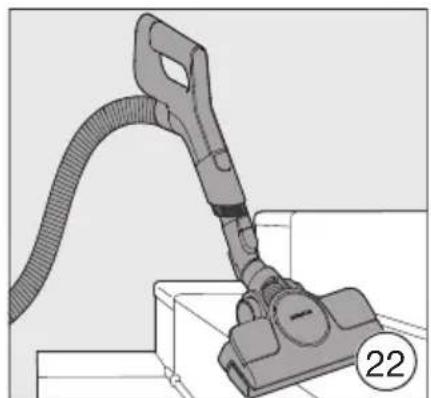
Vacuuming staircases (Fig. 22)
Risk of injury caused by falling vacuum cleaner.
You or others may be injured if the vacuum cleaner should fall from the stairs.
When vacuuming stairs, it is best to start at the bottom of the stairs and move upwards.
The adjustable floorhead can also be used for vacuuming the stairs.
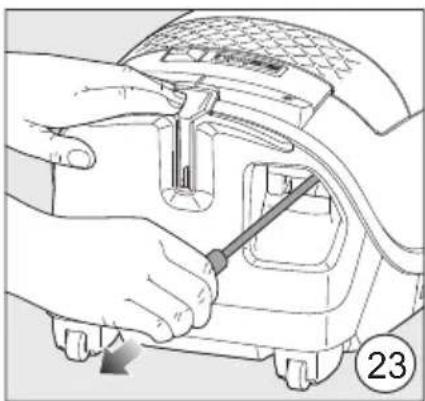
Unwinding the mains cable (Fig. 23)
Pull the mains cable out to the required length.
Insert the power plug into the socket.
! ing.
Risk of damage due to overheat
The mains cable may overheat after a long period of use.
If vacuuming for longer than
30 minutes, the cable must be pulled out all the way.
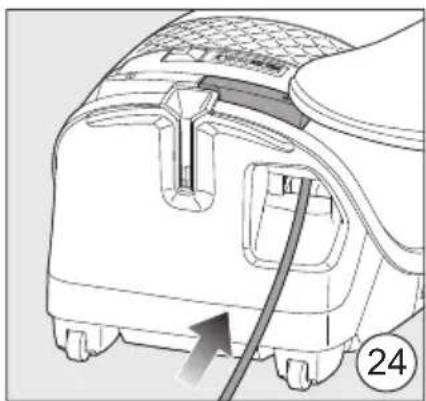
Rewinding the mains cable (Fig. 24)
Remove the plug from the socket.
Step briefly on the cable rewind foot switch.
The cable will then retract itself fully into the vacuum cleaner.
You can interrupt the cable rewind at any point.
Give the cable a short pull while rewinding.
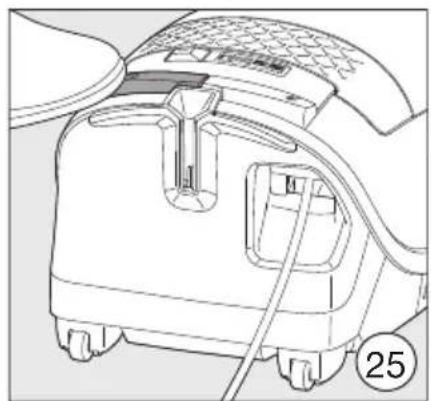
Switching on and off (Fig. 25)
Press the On/Off foot switch ①.
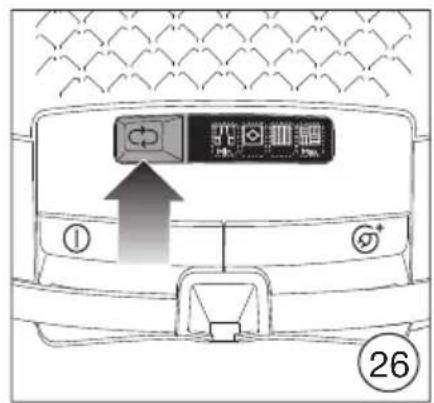
Selecting the suction power (Fig. 26)
The suction power can be regulated to suit the type of flooring being cleaned.
Reducing the suction power reduces the amount of effort required to manoeuvre the floorhead.
When using the adjustable floorhead, if the suction seems too high, reduce the suction power until the floorhead is easier to manoeuvre.
The vacuum cleaner has symbols on the controls which indicate the type of use the power levels are suitable for.
Curtains, fabric
Cut pile carpets, rugs and runners
Loop pile carpet and rugs
Hard floors and heavily soiled carpets and rugs
When the vacuum cleaner is switched on, the highest power level will be selected automatically.
Press the button until the required power level has been reached.
The power level selected will light up yellow.
The next time the vacuum cleaner is used, it will switch on at the power level which was used previously.
Interim suction power levels
You can deviate from the preset power levels and customise the suction power of your vacuum cleaner to meet your individual requirements.
To do this, proceed as follows:
Press the foot switch until the minimum power level is reached.
Hold the foot switch down until the symbol for the higher power level starts to flash.
Then release the foot switch.
Press the foot switch until the required power level is reached.
Wait 30 seconds and do not touch the controls; the suction power interim setting will be saved to the next highest power level. The flashing will stop.
The next time the vacuum cleaner is used it will switch on with the saved interim suction power level.
This setting will be deleted if you then select one of the standard power levels.
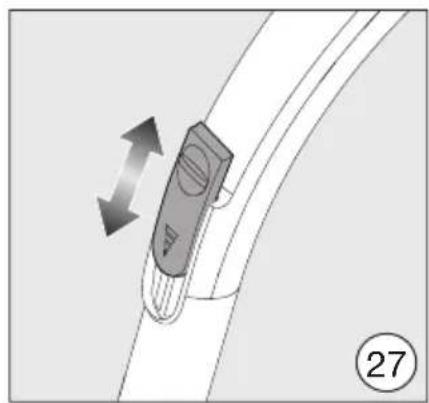
Opening the air inlet valve (Fig. 27)
(not on models with EcoComfort handle or Comfort handle 2.0)
It is easy to reduce the suction power for a short time, e.g. to prevent rugs or other textile flooring being sucked into the vacuum cleaner.
- Open the air inlet valve on the handle far enough to reduce the suction power.
The floorhead will be easier to manoeuvre.
Setting down, transportation and storage
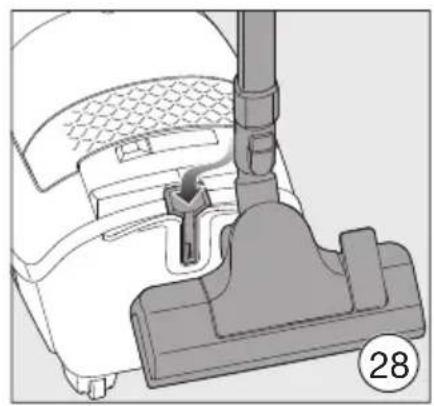
Park system for pauses during vacuuming (Fig. 28)
The park system allows you to conveniently park the suction tube and floorhead during pauses.

Risk of injury caused by vacuum or falling over.
Do not use the park system if the vacuum cleaner is on a sloping surface, e.g. a ramp.
Slot the floorhead into the park system on the vacuum cleaner.
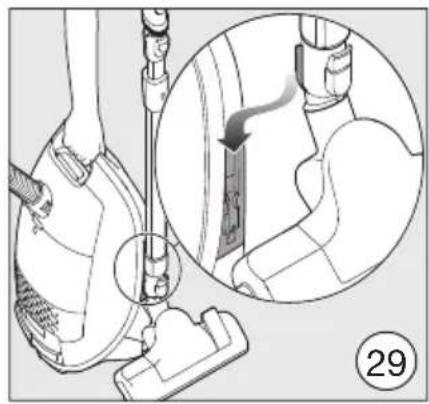
Park system for storage (Fig. 29)
The park system allows you to park the suction tube and floorhead for transport or storage purposes.
Risk of electric shock from mains voltage.
The mains voltage is applied to the vacuum cleaner even if it is switched off.
Always disconnect the vacuum cleaner from the power supply when you have finished using it. Remove the plug from the socket.
Stand the vacuum cleaner upright.
Retract the telescopic tube fully.
Slot the floorhead downwards into one of the parking attachments.
This makes the vacuum cleaner easier to carry or store.
Cleaning and care
Risk of electric shock from mains voltage.
The mains voltage is applied to the vacuum cleaner even if it is switched off.
Always switch the vacuum cleaner off before cleaning and caring for it. Remove the plug from the socket.
The Miele filter system consists of 3 accessories:
- Original Miele vacuum cleaner bag (model CO)
- Original Miele exhaust filter
- Motor protection filter
The vacuum cleaner bag and exhaust filter will need to be replaced from time to time to ensure that your vacuum cleaner performs efficiently.
We recommend using only genuine Miele accessories bearing the Miele logo on the packaging. Only these will guarantee the optimum suction power of your vacuum cleaner and the best possible cleaning results.
Vacuum cleaner bags with the Miele logo on the packaging are not made from paper or paper-based materials, nor do they have a cardboard collar. This is why Miele dustbags are particularly long-lasting and reliable.
Please note that faults and damage caused by use of accessories which do not bear the Miele logo on the packaging are not covered by the vacuum cleaner warranty.
Purchasing accessories
You can order genuine Miele accessories from the Miele online shop, Miele Customer Service or your Miele dealer.
You can identify genuine Miele accessories by the Miele logo on the packaging.
Every packet of original Miele vacuum cleaner bags contains 4 vacuum cleaner bags and one AirClean exhaust filter. Original Miele multipacks contain 16 vacuum cleaner bags and 4 AirClean exhaust filters.
For information on purchasing genuine Miele exhaust filters, see the sales designations in "Optional accessories" - "Filters".
Changing the vacuum cleaner bag (Fig. 30)
Change the vacuum cleaner bag when the colour marker in the vacuum cleaner bag change indicator turns red.
Reduced suction power due to blocked pores in the vacuum cleaner bag.
Do not attempt to re-use vacuum cleaner bags.
To check the airflow indicator
- Attach the standard adjustable floorhead to the vacuum cleaner.
- Switch the vacuum cleaner on and select the highest power setting.
Lift the floorhead off the floor a little.
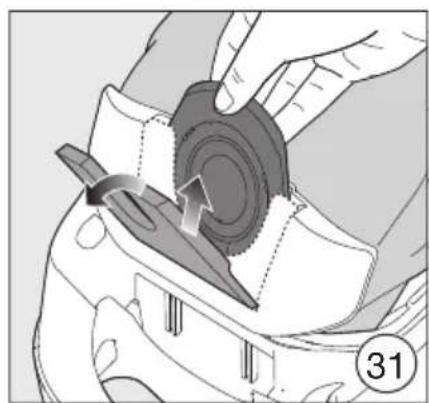
Removing the vacuum cleaner bag (Fig. 31)
Press the release buttons at the side of the hose connector and pull the hose out of the suction opening. (Fig. 05)
Press the release button in the recessed grip for the dust compartment lid and raise the lid as far as it will go. (Fig. 10)
While the dust compartment lid is open, the brown catch element lifts up automatically so that the vacuum cleaner bag can be removed.
Pull the vacuum cleaner bag out of the vacuum cleaner bag holder by the grip. (Fig. 31)
The brown catch element prevents the dust compartment lid from closing when there is no vacuum cleaner bag inserted.
Do not force it.
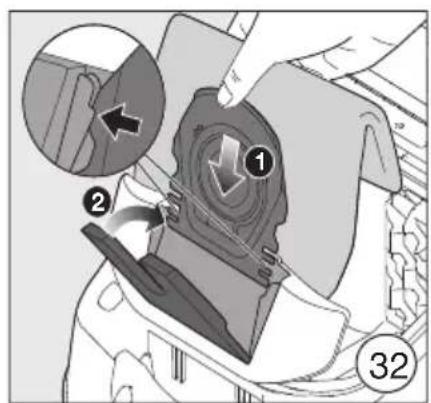
Inserting the vacuum cleaner bag (Fig. 32)
Insert the new vacuum cleaner bag into the raised vacuum cleaner bag holder as far as it will go. Leave the vacuum cleaner bag folded up when you take it out of the packet.
Make sure that the collar of the vacuum cleaner bag is fully inserted into the guide on both sides.
The brown catch element closes and clicks into position.
- Close the dust compartment lid securely, making sure it clicks into position. Take care not to trap the vacuum cleaner bag when doing so.
Insert the hose connector into the suction opening on the vacuum cleaner until it clicks into position. To do this, line up the guides on the two pieces. (Fig. 04)
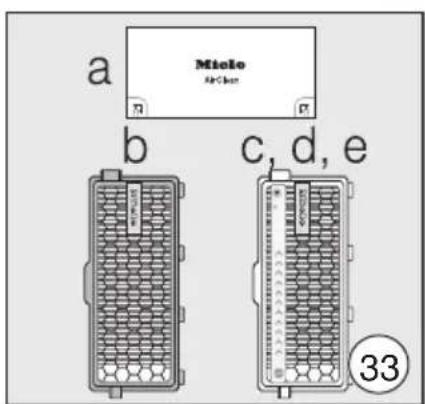
When to replace the exhaust filter (Fig. 33)
Depending on the model, your vacuum cleaner will be fitted as standard with one of the following exhaust filters:
a AirClean
Replace this filter every time you start a new packet of Miele vacuum cleaner bags. Every packet of original Miele vacuum cleaner bags contains one AirClean exhaust filter. Multipacks contain 4 AirClean filters.
b AirClean Plus 50 (light blue)
Replace this exhaust filter after approx. one year. Make a note of the date on the exhaust filter.
c Silence AirClean 50 (grey)
d Active AirClean 50 (black)
e HEPA AirClean 50 (white)
Replace these filters when the
tstrip® filter change indicator is completely red (Fig. 02). You can continue vacuuming when the light comes on. However, the suction power will be reduced, as will the effectiveness of the filter if it is not replaced in good time.
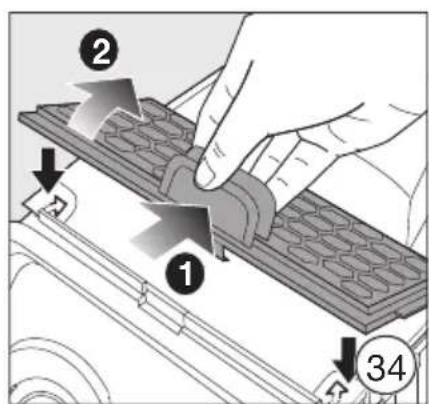
Replacing the AirClean exhaust filter (Fig. 33 + 34)
Do not use more than one exhaust filter at a time.
Open the dust compartment lid. (Fig. 10)
If you wish to fit an AirClean Plus 50, Silence AirClean 50, Active AirClean 50 or HEPA AirClean 50 exhaust filter, see the "Replacing one type of exhaust filter with another" section.
Press the release catch on the filter grille and open the grille. (Fig. 34)
- Grasp the used AirClean exhaust filter by one of the clean, unsoiled sections and take it out. (Fig. 34)
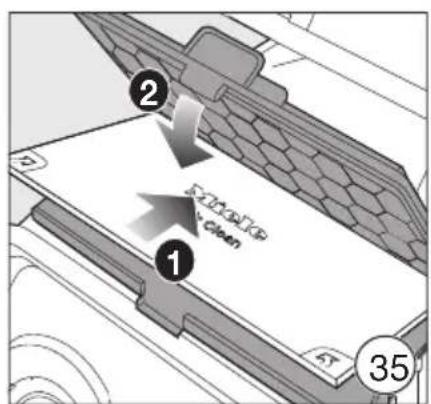
Insert a new exhaust filter AirClean, making sure it goes in properly. (Fig. 35)
Close the filter grille. (Fig. 35)
Damage due to contamination in the dust compartment.
Large quantities of dust may get into the dust compartment and damage components if the vacuum cleaner bag has not clicked into position. Before closing the dust compartment lid, always make sure that the vacuum cleaner bag has been inserted and the catch element is closed.
- Close the dust compartment lid securely, making sure it clicks into position. Take care not to trap the vacuum cleaner bag when doing so.
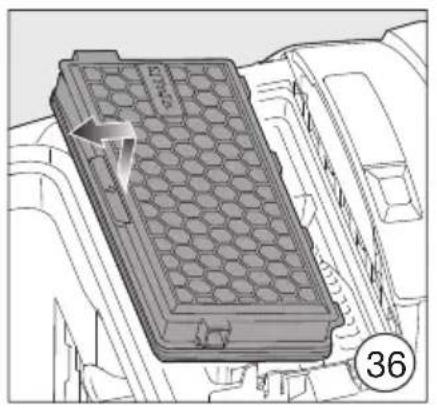
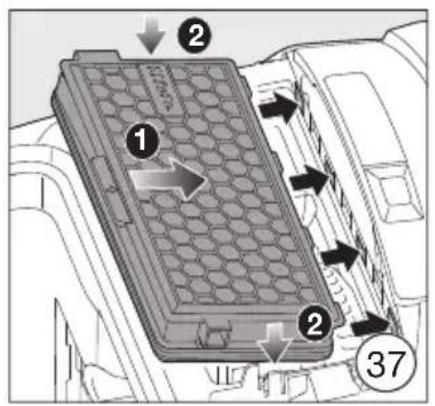
Replacing the AirClean Plus 50, Silence AirClean 50, Active AirClean 50 and HEPA AirClean 50 exhaust filters (Fig. 35 + 36)
Do not use more than one exhaust filter at a time.
Open the dust compartment lid. (Fig. 10)
If you wish to fit an AirClean exhaust filter, see "Replacing one type of exhaust filter with another".
Lift the exhaust filter and remove it. (Fig. 36)
Insert a new exhaust filter, making sure it goes in properly, then press it down into position. (Fig. 37)
If you are using exhaust filter c, d or e, you must activate the timestrip® filter change indicator. (Fig. 12)
After approx. 10-15 seconds, a thin red line will appear in the left-hand side of the display. (Fig. 03)
Damage due to contamination in the dust compartment.
Large quantities of dust may get into the dust compartment and damage components if the vacuum cleaner bag has not clicked into position.
Before closing the dust compartment lid, always make sure that the vacuum cleaner bag has been inserted and the catch element is closed.
- Close the dust compartment lid securely, making sure it clicks into position. Take care not to trap the vacuum cleaner bag when doing so.
Replacing one type of exhaust filter with another (Fig. 33)
Do not use more than one exhaust filter at a time.
Depending on the model, your vacuum cleaner will be fitted as standard with one of the following exhaust filters:
a AirClean
b AirClean Plus 50 (light blue)
c Silence AirClean 50 (grey)
d Active AirClean 50 (black)
e HEPA AirClean 50 (white)
- If you wish to replace exhaust filter a with filter b, c, d or e, it is essential that you remove the filter grille before you fit the new exhaust filter.
If you are using exhaust filter c, d or e, you must also activate the timestrip® filter change indicator. (Fig. 12)
-
If you wish to replace exhaust filter b, c, d or e with filter a, it is essential that you also fit the filter grille*. (Fig. 35)
-
Filter grille - see "Optional accessories", "Filters"
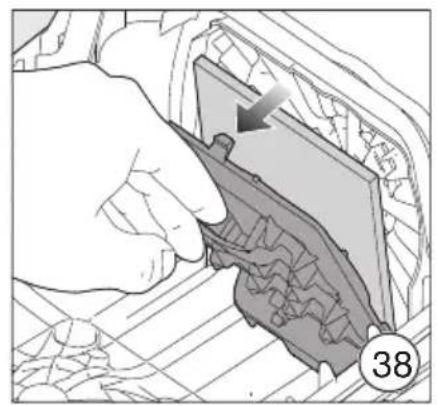
Replacing the motor protection filter (if necessary) (Fig. 38)
Open the dust compartment lid. (Fig. 10)
Pull the vacuum cleaner bag out by the grip on the holder. (Fig. 31)
- Lift up the filter frame until it clicks and remove the old motor protection filter. (Fig. 38)
Replace with a new motor protection filter.
Close the filter frame.
Insert the vacuum cleaner bag into the holder until the catch element is firmly closed. (Fig. 32)
Damage due to contamination in the dust compartment.
Large quantities of dust may get into the dust compartment and damage components if the vacuum cleaner bag has not clicked into position.
Before closing the dust compartment lid, always make sure that the vacuum cleaner bag has been inserted and the catch element is closed.
- Close the dust compartment lid securely, making sure it clicks into position. Take care not to trap the vacuum cleaner bag when doing so.
Replacement parts are available from your Miele dealer or from the Miele Spare Parts Dept.
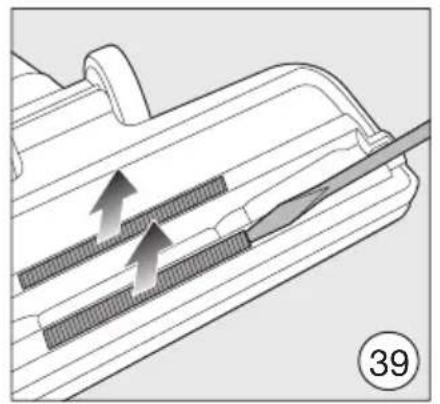
Replacing the thread lifters (Fig. 39)
The thread lifters on the suction inlet to the floorhead can be replaced. Replace the thread lifters if the pile has worn down.
Lever the thread lifters from the slots. To do this, use a suitable tool, e.g. a flat-head screwdriver.
Fit new thread lifters.
Cleaning the vacuum cleaner and accessories
Risk of electric shock from mains voltage.
The mains voltage is applied to the appliance even if it is switched off.
Before cleaning, switch the appliance off at the wall socket and unplug it.
Risk of electric shock from mains voltage.
If moisture gets into the vacuum cleaner, there is a risk of electric shock.
Do not let the vacuum cleaner get wet.
The vacuum cleaner and all plastic accessories should be cleaned with a commercially available cleaner suitable for plastic.
Damage due to unsuitable cleaning agents.
All surfaces are susceptible to scratching. Contact with unsuitable cleaning agents can alter or discolour the external surfaces.
Do not use abrasive cleaning agents, glass cleaning agents, all-purpose cleaners or oil-based care products.
Cleaning the dust compartment
The dust compartment can, if necessary, be cleaned using a dry duster, brush or, if available, a second vacuum cleaner to vacuum the dust out.
Troubleshooting
Many malfunctions and faults that can occur in daily operation can be easily remedied. You can save time and money in many cases, as you do not need to call the Miele Customer Service Department.
Information to help you remedy faults yourself can be found at www.miele.com/ service.
The following tables are designed to help you to find the cause of a malfunction or a fault and to resolve it.
Risk of electric shock from mains voltage.
The mains voltage is applied to the appliance even if it is switched off.
Before dealing with any problems, switch the appliance off at the wall socket and unplug it.
| Problem Cause and remedy | |
| The vacuum cleaner switches off automatically. | A temperature limiter switches the vacuum cleaner off automatically if it gets too hot. This can occur if, for instance, large objects block the suction tube or when the vacuum cleaner bag is full or contains particles of fine dust. A heavily soiled motor protection filter or exhaust filter can also be the cause of overheating. ■ Switch the vacuum cleaner off immediately using the On/Off foot switch ①. Switch off at the wall socket and unplug it. After removing the cause, wait for approximately 20–30 minutes to allow the vacuum cleaner to cool down. It can then be switched on again. |
Service
Information to help you rectify faults yourself and about Miele spare parts can be found at www.miele.com/service.
Contact in case of malfunction
In the event of any faults which you cannot remedy yourself, please contact your Miele Dealer or Miele Service.
Contact information for Miele Service can be found at the end of this document.
Please note that telephone calls may be monitored and recorded for training purposes and that a call-out charge will be applied to service visits where the problem could have been resolved as described in this booklet.
Warranty
For information on the appliance warranty specific to your country please contact Miele. See back cover for address.
In the UK, your appliance warranty is valid for 2 years from the date of purchase. However, you must activate your cover by calling 0330 160 6640 or registering online at www.miele.co.uk.
Warranty in the UAE
The appliance warranty is valid for 2 years from date of purchase.
For more information on country specific warranty terms and conditions, please contact Miele Customer Service. See end of this document for contact details.
Optional accessories
Follow the flooring manufacturer's cleaning and care instructions.
We recommend using only genuine Miele accessories bearing the Miele logo on the packaging. Only these will guarantee the optimum suction power of your vacuum cleaner and the best possible cleaning results.
Please note that faults and damage caused by use of accessories which do not bear the Miele logo on the packaging are not covered by the vacuum cleaner warranty.
Purchasing accessories
You can order genuine Miele accessories from the Miele online shop, Miele Customer Service or your Miele dealer. You can identify genuine Miele accessories by the Miele logo on the packaging. Certain models are supplied with one or more of the following accessories as standard.
Floorheads / brushes
(only available in selected countries)
AllFloor (SBD AF) floorhead
Flat floorhead for cleaning underneath very low furniture. It is also quiet, light and stands out due to its very good pick-up of coarse dirt.
TurboTeQ Turbobrush (STB 305-3)
This brush is ideal for cleaning cut pile carpet.
Parquet Twister floorbrush with swivel action (SBB 300-3)
With natural bristles for vacuuming smooth hard floors and small gaps.
Parquet Twister XL floorbrush with swivel action (SBB 400-3)
With natural bristles for quickly vacuuming smooth hard floors and small gaps.
Other accessories
(only available in selected countries)
Turbo Mini hand turbobrush (STB 101)
For vacuuming upholstery, mattresses or car seats, etc.
Universal brush (SUB 20)
For dusting books, shelves, etc.
Radiator brush (SHB 30)
For dusting radiators, narrow shelves and crevices.
Mattress nozzle (SMD 10)
For vacuuming upholstery, mattresses, cushions, curtains, covers etc.
Crevice nozzle, 300mm (SFD 10)
Extra long crevice nozzle for cleaning in folds, crevices and corners.
Crevice nozzle, 560~mm (SFD 20)
Flexible crevice nozzle for vacuuming hard to reach places.
XL upholstery nozzle (SPD 20)
Wide upholstery nozzle for cleaning upholstery, mattresses and cushions.
Comfort handle with lighting (SGC 20)
Lights up the area being vacuumed.
Filters
AirClean Plus 50 exhaust filter (SF-AP 50)
Effective filtration for particularly clean room air.
Exhaust filter Silence AirClean 50 (SF-SA 50)
For a significant reduction in noise whilst vacuuming.
Active AirClean 50 exhaust filter (SF-AA 50)
For a significant reduction of unpleasant odours. Ideal for households with pets or smokers.
HEPA AirClean 50 exhaust filter (SF-HA 50)
Effectively filters fine dust and allergens. Ideal for people allergic to house dust.
Filter grille
This is required if you wish to replace an AirClean Plus 50, Silence AirClean 50, Active AirClean 50 or HEPA AirClean 50 filter with an AirClean filter.
Electrical connection for the UK
All electrical work should be carried out by a suitably qualified and competent person in strict accordance with current national and local safety regulations (BS 7671 in the UK). The voltage and frequency are given on the data plate located underneath the vacuum cleaner. Please ensure that these match the household mains supply. The fuse rating is quoted on the plug. The appliance is supplied with a cable and moulded plug ready for connection to a 230-240 V/50 Hz a.c. single phase supply.
Electrical connection AU, NZ
All work must be carried out by a suitably qualified and competent person in strict accordance with national and local safety regulations. The voltage and rated load are given on the data plate located underneath the vacuum cleaner. Please ensure that these match the household mains supply. The appliance is supplied with a cable and moulded plug ready for connection to a 230V/50Hz AC single phase supply.
Test Marks Electrical safety
RCM Mark
Electrically sup
pressed
AS/NZSCISPR
according to
14.1
Commanded accessoires
Commanded accessoires
a) EN 60312-1 Vacuum cleaners for household use - Part 1: Dry vacuum cleaners - Methods for measuring the performance
b) EN 60704-2-1 Household and similar electrical appliances - Test code for the determination of airborne acoustical noise - Part 2-1: Particular requirements for vacuum cleaners
c) EN 60335-2-2 Household and similar electrical appliances - Safety - Part 2-2: Particular requirements for vacuum cleaner and water suction appliances
a) EN 60312-1 Vacuum cleaners for household use - Part 1: Dry vacuum cleaners - Methods for measuring the performance
b) EN 60704-2-1 Household and similar electrical appliances - Test code for the determination of airborne acoustical noise - Part 2-1: Particular requirements for vacuum cleaners
c) EN 60335-2-2 Household and similar electrical appliances - Safety - Part 2-2: Particular requirements for vacuum cleaner and water suction appliances
Controle of de stofzuigerzak vol is
e HEPA AirClean 50 (wit)
e HEPA AirClean 50 (wit)
Miele Australia Pty. Ltd.
ACN 005 635 398
ABN 96 005 635 398
Level 4, 141 Camberwell Road
Hawthorn East, VIC 3123
Tel: 1300 464 353
E-mail: info@miele.com.au
Internet: www.miele.com.au
China Mainland
Miele Electrical Appliances Co., Ltd.
1-3 Floor, No. 82 Shi Men Yi Road, Jing'an District
200040 Shanghai, PRC
Tel: +86 21 6157 3500
Fax: +86 21 6157 3511
E-mail: info@miele.cn
Kowloon Bay, Hong Kong
Tel: (852) 2610 1025
Fax: (852) 35791404
E-mail:
customerservices@miele.com.hk
Website: www.miele.hk
India
Miele India Pvt. Ltd.
1st Floor, Copia Corporate Suites,
Commercial Plot 9, Mathura Road, Jasola, New Delhi - 110025
E-mail: customercare@miele.in
Website: www.miele.in
Ireland
Miele Ireland Ltd.
2024 Bianconi Avenue
Citywest Business Campus
Dublin 24
Tel: (01) 461 07 10
Fax: (01) 4610797
E-mail: info@miele.ie
Internet: www.miele.ie
Malaysia
Miele Sdn Bhd
Suite 12-2, Level 12
Menara Sapura Kencana
Petroleum
Solaris Dutamas No.1
Jalan Dutamas 1
50480 Kuala Lumpur, Malaysia
Phone: +603-6209-0288
Fax: +603-6205-3768
New Zealand
Miele New Zealand Limited
IRD 98 463 631
8 College Hill
Freemans Bay, Auckland 1011
Tel: 0800 464 353
E-mail: customercare@miele.co.nz
Internet: www.miele.co.nz
Singapore
Miele Pte. Ltd.
29 Media Circle
11-04 ALICE@Mediapolis
Singapore 138565
Tel: +65 6735 1191
Fax: +65 6735 1161
E-mail: info@miele.com.sg
Internet: www.miele.sg
South Africa
Miele (Pty) Ltd.
63 Peter Place, Bryanston 2194
P.O.Box 69434, Bryanston 202
Tel: (011) 875 9000
Fax: (011) 875 9035
E-mail: info@miele.co.za
Internet: www.miele.co.za
Thailand
Miele Appliances Ltd.
BHIRAJ TOWER at EmQuartier
43rd Floor Unit 4301-4303
689 Sukhumvit Road
North Klongton Sub-District
Vadhana District
Bangkok 10110, Thailand
United Arab Emirates
Miele Appliances Ltd.
Showroom 1, Eiffel 1 Building
Sheikh Zayed Road, Umm Al She
P.O.Box 114782Dubai
Tel. +971 4 3044 999
Fax. +971 4 3418 852
800-MIELE (64353)
E-mail: info@miele.ae.
Website: www.miele.ae
Manufacturer: Miele & Cie. KG, Carl-Miele-Straße 29, 33332 Gutesloh, Germany

Miele
Deutschland:
Miele & Cie. KG