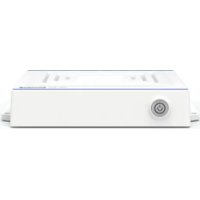
USM100H - Medical computer Advantech - Free user manual and instructions
Find the device manual for free USM100H Advantech in PDF.


| Product Type | Medical Computer |
| Brand | Advantech |
| Model | USM-100H |
| Processor | Intel® Core™ i5-1245UE or i7-1265UE (10 cores, up to 4.70 GHz) |
| Memory (RAM) | 8 GB DDR5 standard, expandable up to 32 GB DDR5 SODIMM |
| Main Storage | 256 GB NVMe M.2 SSD (max. 2 TB) |
| Operating System | Windows 10 LTSC, Windows 11 Pro, Ubuntu 20.04 |
| Dimensions (W x H x D) | 169.5 x 230.6 x 43 mm |
| Weight | 1.5 kg |
| Power Supply | AC 100-240 V, 96 W power adapter, DC 12 V output, lockable plug, medical grade |
| VESA Mounting | 100 x 100 mm and 75 x 75 mm |
| I/O Ports | 4 x USB 3.1 Gen2 (Type A), 1 x USB 3.1 Type C (display), 1 x COM RS232, 1 x HDMI, 2 x LAN 1 GbE, 1 x microphone input/headphone output |
| Wireless Connectivity | Wi-Fi (M.2 2230, optional) and Bluetooth 5.3 (optional) |
| Certifications | Medical CE, FCC, IEC/EN 60601-1-2 (4.1e), IEC/EN 60601-1 (3.2e) |
| Operating Temperature | 0 to 40 °C |
| Storage Temperature | 0 to 50 °C |
| Operating Humidity | 10 to 95% at 40 °C |
| Storage Humidity | 5 to 95% at 60 °C |
| Shock Resistance | 10 G (peak acceleration, 11 ms duration) |
| Cooling | Passive thermal convection (fanless) |
| Warranty | 2 years (system) |
| Maintenance and Cleaning | Use a soft, damp cloth, without harsh detergents, phenol, or solvents. Do not immerse. Disconnect before cleaning. |
| Safety | Do not open the case while powered on, use a grounded outlet, avoid liquids, follow the instructions in the manual. |
Frequently Asked Questions - USM100H Advantech
User questions about USM100H Advantech
0 question about this device. Answer the ones you know or ask your own.
Ask a new question about this device
Download the instructions for your Medical computer in PDF format for free! Find your manual USM100H - Advantech and take your electronic device back in hand. On this page are published all the documents necessary for the use of your device. USM100H by Advantech.
USER MANUAL USM100H Advantech
Professional Mini Medical Computer
Instructions for the User
The document combines text and illustrations, providing a comprehensive overview of the system. The information is presented as a sequential series of actions, allowing the user to learn directly how to use the device.
The text provides explanations and instructs the user step-by-step in the practical use of the product, with short, clear instructions in an easy-to-follow sequence.
Warning! A WARNING statement provides important information about a potentially hazardous situation which, if not avoided, could result in death or serious injury.
Caution! A CAUTION statement provides important information about a potentially hazardous situation which, if not avoided, may result in minor or moderate injury to the user or patient or in damage to the equipment or other property.
Note! A NOTE provides additional information intended to avoid inconveniences during operation.
Acknowledgements
Intel and Pentium are trademarks of Intel Corporation.
Microsoft Windows and MS-DOS are registered trademarks of Microsoft Corp.
All other product names or trademarks are properties of their respective owners.
Product Warranty (2 years)
Advantech warrants the original purchaser that each of its products will be free from defects in materials and workmanship for two years from the date of purchase.
This warranty does not apply to any products that have been repaired or altered by persons other than repair personnel authorized by Advantech, or products that have been subject to misuse, abuse, accident, or improper installation. Advantech assumes no liability under the terms of this warranty as a consequence of such events.
Because of Advantech's high quality-control standards and rigorous testing, most customers never need to use our repair service. If an Advantech product is defective, it will be repaired or replaced at no charge during the warranty period. For out-of-warranty repairs, customers are billed according to the cost of replacement materials, service time, and freight. Please consult your dealer for more details.
If you believe your product to be defective, follow the steps below.
- Collect all the information about the problem encountered. (For example, CPU speed, Advantech products used, other hardware and software used, etc.) Note anything abnormal and list any onscreen messages displayed when the problem occurs.
- Call your dealer and describe the problem. Have the manual, product, and any helpful information to hand when you call.
- If your product is diagnosed as defective, obtain a return merchandise authorization (RMA) number from your dealer. This allows us to process your return more quickly.
- Carefully pack the defective product, a completed Repair and Replacement Order Card, and a proof of purchase date (such as a photocopy of your sales receipt) in a shippable container. Products returned without a proof of purchase date are not eligible for warranty service.
- Write the RMA number clearly on the outside of the package, then ship it prepaid to your dealer.
Declaration of Conformity
FCC Class B
This equipment has been tested and found to comply with the limits for a Class B digital device, pursuant to part 15 of the FCC Rules. These limits are designed to provide reasonable protection against harmful interference in residential installations. This equipment generates, uses, and can radiate radio frequency energy and, if not installed and used in accordance with the instructions, may cause harmful interference to radio communications. However, there is no guarantee that interference will not occur in a particular installation. If this equipment does cause harmful interference to radio or television reception, which can be determined by turning the equipment off and on again, users are encouraged to try to correct the interference using one or more of the following measures:
Reorient or relocate the receiving antenna.
Increase the distance between the equipment and receiver.
Connect the equipment to an outlet on a circuit that differs from that to which the receiver is connected.
Consult the dealer or an experienced radio/TV technician for assistance.
Warning! Any changes or modifications made to the equipment that are not expressly approved by the relevant standards authority may void your

authority to operate the equipment.
Technical Support and Assistance
- Visit the Advantech website at www.advantech.com/support to obtain the latest product information.
-
Contact your distributor, sales representative, or Advantech's customer service center for technical support if you need additional assistance. Please have the following information ready before calling:
-
Product name and serial number
-
Description of your peripheral attachments
- Description of your software (operating system, version, application software, etc.)
- Comprehensive description of the problem
- The exact wording of any error messages
Safety Instructions
- Strictly follow these Instructions for Use; please read these safety instructions carefully.
- Please keep this User Manual for later reference; any use of the product requires full understanding and strict observation of all portions of these instructions. Observe all WARNINGS and CAUTIONS as rendered throughout this manual and on labels on the equipment.
- Repair of the device may only be carried out by trained service personnel. Advantech recommends that a service contract be obtained with Advantech Service and that all repairs also be carried out by them. Otherwise the correct functioning of the device may be compromised.

Warning! Because of the danger of electric shock, never remove the cover of a device while it is in operation or connected to a power outlet.
- If one of the following situations arises, have the equipment checked by service personnel:
The power cord or adaptor is damaged.
Liquid has penetrated into the equipment.
The equipment has been exposed to moisture.
The equipment does not work well, or you cannot get it to work according to the user manual.
The equipment has been dropped and damaged.
The equipment has obvious signs of breakage.
- Disconnect this equipment from any DC outlet before cleaning. Use a damp cloth. Do not use liquid or spray detergents for cleaning and keep this equipment away from humidity.
Caution! To avoid short-circuiting and otherwise damaging the device, do not allow fluids to come in contact with the device. If fluids are accidentally spilled on the equipment, remove the affected unit from service as soon as possible and contact the service personnel to verify that patient safety is not compromised.
- Put this equipment on a reliable surface during installation. Dropping it or letting it fall may cause damage. For plug-in equipment, the power outlet socket must be located near the equipment and must be easily accessible.
Caution! To prevent overheating, do not cover the openings or place the device in direct sunlight or near radiant heaters.

- Make sure the voltage of the power source is correct before connecting the equipment to the power outlet. Position the power cord so that people cannot step on it. Do not place anything over the power cord. If the equipment is not used for a long time, disconnect it from the power source to avoid damage by transient over voltage.
Caution! Do not leave this equipment in an uncontrolled environment where the storage temperature is below -40^ (-40^) or above 70^ (156^) . This may damage the equipment.
-
If your computer does not keep the correct time or the BIOS configuration has been reset to default, the battery may have no charge.
-
Classification:
1). Class I DC power adaptor
2). No applied part
3). Continuous Operation
4). Not AP or APG category
Warning! This device is not suitable for use in the presence of flammable anesthetic mixture with air, oxygen, nitrous oxide, or for life support systems.

- Environmental protection: follow national requirements to dispose of unit.
- Maintenance: to properly maintain and clean the surfaces, use only the approved products or clean with a dry applicator.
Caution! When servicing the device, always use replacement parts that are qualified to Advantech standards. Advantech Digital Healthcare cannot warrant or endorse the safe performance of third-party replacement parts for use with our medical device.
- Make sure the user does not allow contact between SIP/SOPs and the patient at the same time.
-
When networking with electrical devices, the operator is responsible for ensuring that the resulting system meets the requirements set forth by the following standards:
-
EN 60601-1 (IEC 60601-1) Medical electrical equipment Part 1: General requirements for safety
- EN 60601-1-1 (IEC 60601-1-1) Medical electrical equipment Part 1-1: General requirements for safety Collateral standard: Safety requirements for Medical electrical systems
- EN 60601-1-2 (IEC 60601-1-2) Medical electrical equipment Part 1-2: General requirements for safety Collateral standard: Electromagnetic compatibility; Requirements and test

MEDICAL - GENERAL MEDICAL EQUIPMENT WITH RESPECT TO ELECTRICAL SHOCK, FIRE AND MECHANICAL HAZARDS ONLY IN ACCORDANCE WITH ANSI/AAMI ES60601-1:2005/(R)2012 and A1:2012/(R)2012 and A2:2021, CAN/CSA-C22.2 No. 60601-1 (Amendment 2:2022 (MOD) to CAN/CSA-C22.2 No. 60601-1:14)
- Accessory equipment connected to analog and digital interfaces must be in compliance with the respective nationally harmonized IEC standards (i.e. IEC 60950 for data processing equipment, IEC 60065 for video equipment, IEC 61010-1 for laboratory equipment, and IEC 60601-1 for medical equipment.)
Furthermore all configurations shall comply with the system standard IEC 60601-1-1. Anyone who connects additional equipment to the signal input part or signal output part is configuring a medical system, and is therefore, responsible that the system complies with the requirements of the system standard IEC 60601-1-1. The unit is for exclusive interconnection with IEC 60601-1 certified equipment in the patient environment and IEC 60XXX certified equipment out-side of the patient environment. If in doubt, consult the technical services department or your local representative.
Caution! Use suitable mounting apparatus to avoid risk of injury.

- Grounding reliability can only be achieved when the equipment is connected to an equivalent receptacle marked "Hospital Only" or "Hospital Grade".
- Use a power cord that matches the voltage of the power outlet, which has been approved and complies with the safety standard of your particular country.
Note! Environmental protection

Follow national requirements to dispose of unit.
- "WARNING - Do not modify this equipment without authorization of the manufacturer."
- "WARNING - To avoid risk of electric shock, this equipment must only be connected to a supply mains with protective earth.
- Pressing the power button on the front cover for turn off the device back to standby mode. Remove the DC power adaptor fully turn off the device.
- Installation is only to be carried out by trained and authorized personnel.
- CAUTION! WARNING! If this device was not used in the manner which manufacturer suggested, the end system shall evaluate for further compliance.
Explanation of Graphical Symbols
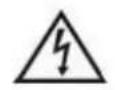
IEC 60878 and ISO 3864-B.3.6: Warning: dangerous voltage

ISO 7000-0434:Caution,consult ACCOMPANYING DOCUMENTS.

IEC 60417-5009:STAND-BY.

IEC 60417-5032 : Alternating Current
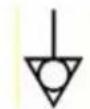
IEC 60417-5021: Equipotentiality.
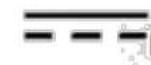
IEC 60417-5031 Direct Current

ISO 7010-M002: Follow instructions for us

ISO 15223-1 Medical Device
Environmental Protection
Follow national requirements for disposing of this unit.
Disposing of Old Products
Within the European Union
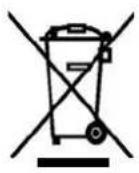
EU-wide legislation, as implemented in each member state, requires that all waste electrical and electronic products bearing the mark shown on the left be disposed of separately from normal household waste. This includes monitors and electrical accessories, such as signal cables or power cords. To dispose of display products, follow the guidelines specified by your local authority, or ask the original equipment vendor for assistance, or if applicable, follow any agreements between yourself and the manufacturer.
The above mark for electrical and electronic products is only applicable in current European Union member states.
Contents
- INTRODUCTION 13
- INTENDED USE 14
2.1 Intended User Profile 14
2.2 Medical Installation 14 - SYSTEM COMPONENTS 15
3.1 Specification 15
3.2 Dimension 15
3.3 Optional Add-on Cards 16
3.4 Cleaning and Maintenance 17
3.5 EMC Notice 18
3.4 Warm Surface Notice 18 - SYSTEM SETUP 20
4.1 A Quick Tour of the USM-100 20 - INSTALLATION PROCEDURE 23
5.1 Connecting Power Cord 23
5.2 Connection Ground Pin 24
5.3 Running BIOS Setup 25
5.4 Install System Software 26
5.5 Install Driver 27 - OPERATION AND SAFETY 28
6.1 General Safety Guide 28
6.2 Thermal 28
6.3 Running BIOS Setup 29
6.4 Disconnect Power 29
6.5 Proper Handling 29 - CERTIFICATIONS AND APPROVAL 30
7.1 EMC Declaration of Conformity 30
7.2 Manufacturing 30
1. INTRODUCTION
Advantech's USM-100H of the industries medical grade slim mini-computer for hospital, clinic, and Cart application and healthcare environment.
Intel® 12th Gen Alder lake, Core™ i7-1265UE /I5-1245UE, owns powerful performance
The slim dimension, 230167.843mm can be installed at desk, Cart, any tiny space.
USM-100H features DDR 5 4800, NVME SSD and WIFI 6E & Bluetooth 5.2 to enhance capability. The design of fanless doesn't have rumble voice. The top side of system equips the VESA 75 x 75 and 100 x100 to mount in Cart. In addition, USM-100H is medical safety standard certified (IEC-60601-1-2; Edition 4), and deployable as an intelligent operating room solution. USM-100H is capable of using Windows 10 or Linux OS to deliver an open source environment that eases software development. With 10 years of longevity support, Advantech's USM-100H is an excellent, advanced, and powerful solution for medical applications.
WARNING!

Before unpacking and using the USM-100 equipment, read these user instructions to ensure correct usage. After reading these instructions, store them in a safe place for future reference. Incorrect handling of this product could possibly result in personal injury or physical damage. The manufacturer assumes no responsibility for any damage caused by mishandling that is beyond normal usage defined in these manuals.
ATTENTION!
Shut down your equipment immediately if it produces smoke, a strange odor, or unusual noise. Continued use may lead to fire. Immediately unplug the equipment and contact your dealer. Never attempt to repair this product yourself. Improper repair work can be dangerous. Never disassemble or modify this product. Tampering with this product may result in injury or fire. Be sure to use the power source delivered. Connection to an improper power source may cause fire. If water or other liquid spills into this equipment, do not continue to use it. Continued use may lead to fire. Unplug the power cord immediately and contact your dealer.
ATTENTION!
USM-100H is intended to serve as a medical computer integration with hospital systems. USM-100H is designed for general purpose used in medical computer related application in the hospital environment, for data collection and for dis-playing information via connecting a display.
It should not be used as a life-support system.

The USM-100 system and its components have CE approval and comply with IEC60601-1-2. Installers, system integrators, and OEMs have to mitigate system and application specific risks. For critical systems, installers and system integrators are advised to consider arranging additional risk control measures, like external back-up system(s).
2.1 Intended User Profile
Intend user profile:
Age: 18 to 55
Weight: not relevant
Health: not relevant
Nationality: Global
Patient state: patient will not be the operator.
Occupation: medical IT engineer
Part of the body or type of tissue applied to or interacted with: hands, expected contact time shall be less than 1 min, and will not touch USM-100H so frequently once it is set up.
Education level: at least 8 years intensive reading experience (school)
Knowledge:
Minimum - read and understand "westernized Arabic" numerals when written in Arial font
- can distinguish: every parts of body as described in user manual
-trained and authorized by manufacturer only.
To be considered as trained and authorized, they must complete the training course of the manufacturer; see document number USM-100H_User Manual for qualification method, when considered necessary by the manufacturer, technician shall be called back for retraining and annual training is also considered necessary.
Language understanding: English, whenever other languages are required, professional translation company shall translate and review by the manufacturer, see SOP document number: SOP_Writing_Guidelines-ed.3
Experience: Mentally and physical competent, specific medical training to understand basic knowledge for symbols.
Permissible impairments:
- Mild reading vision impairment or vision corrected to log MAR 0,2 (6/10 or 20/32)
Average degree of aging-related short term memory impairment - impaired by 40% resulting in 60% of normal hearing at 500Hz to 2kHz
2.2 Medical Installations
For integration into an IEC60601-1-compliant Medical Electrical System, the USM-100H have been tested and are compliant with IEC 60601-1-2in combination with the power supply delivered. This power supply has a low leakage current (<50uA@264VAC) and is double isolated (MOOP&MOPP).

The system integrators (RESPONSIBLE ORGANIZATIONS) are reminded that the assembly of ME SYSTEMS and modifications during the actual service life must be checked for compliance with the requirements of IEC 60601-1. The standard gives more information about the general safety requirements for ME systems.
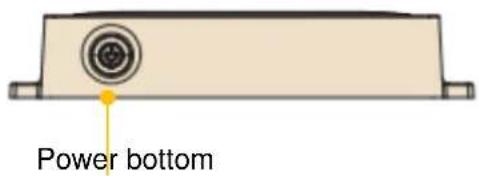
Figure 3-1 Dimensions of the USM-100H
Figure 3-2 USM-100H Front Panel
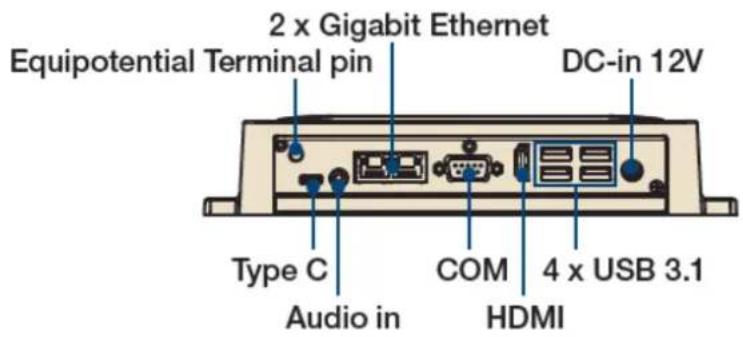
Figure 3-3 USM-100 Rear Panel

Before cleaning the USM-100, first disconnect the power supply, and then disconnect all other cables.

Use only a moist, soft, and lint-free cloth. Avoid abrasive cloths, towels, paper towels, and similar items that might cause damage to the aluminum housing. Ensure that no moisture enters any opening and only use mild cleaning agents.
The enclosure of USM-100 is made of aluminum that can help heat dissipation. Please provide regular maintenance to remove any dirt or dust on the enclosure that can reduce the cooling capacity of the enclosure.
- Prepare cleaning water
- Wipe USM-100H with a clean cloth that has been moistened in the pure water.
- Wipe thoroughly with a clean cloth.

Caution!
- Do not immerse or rinse the USM-100H or its peripherals. If you accidentally spill liquid on the device, disconnect the unit from the power source. Contact your IT support department regarding the continued safety of the unit before placing it back in operation-Do not spray cleaning agent on the chassis.
Do not use disinfectants that contain phenol.
- Do not autoclave or clean the USM-100H or its peripherals with strong aromatic, chlorinated, ketone, ether, or ether solvents, sharp tools or abrasives. Never immerse electrical connectors in water or other liquids.
ATTENTION!

USM-100 Pass Cleaning verification test
Test Standard: Reference ASTM D 4752-03 and in house test method of Advantech
Test Solvent:
- AHP Accel TB (CAS Number:7722-84-1)
- 75% Alcohol (CAS Number: 64-17-5)
- Glutaral dehyde [C5H8O2], 2% concentration (CAS Number:111-30-8)
- Isopropyl alcohol [(CH3)2CHOH], 70% concentration (CAS Number:7681-52-9)
- Sodium hypochlorite [NaOCl], 10% concentration (CAS Number:2893-78-9)
- CHLOR-CLEAN-1.7g NaDCC(1000 ppm available chlorine) (CAS Number:2893-78-9)
- Clorox Healthcare® Hydrogen Peroxide (CAS Number:7722-84-1)
- Clorox Healthcare® VersaSure
- Clorox Healthcare® Bleach Germicidal Wipes
3.4 EMC Notice

The USM-100H are IEC 60601-1-2; EN 60601-1-2 products.
The Recorder are designed for use in general light industrial and medical environments according to the CENELEC standard definition.
Only use the power supply unit that was delivered with the Recorder, otherwise EMC compliance and warranty can be void.
3.5 Warm Surface Notice

CAUTION!
This USM-100 are passively cooled by heat convection via the enclosure
of the product. The temperature of the enclosure can rise to nearly 50^
at an ambient temperature of 40^ without air flow.

MISE EN GARDE!
4.1 A Quick Tour of the USM-100
Before you start to set up the USM-100, take a moment to become familiar with the locations and purposes of the controls, drives, connections and ports, which are illustrated in the figures below.
When you place the USM-100 upright on the desktop, its front panel appears as shown in Figure 4.1.
4.1.1 Front View
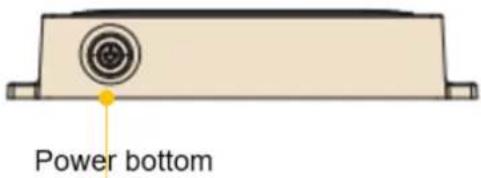
Figure 4-1 Front View of the USM-100H
4.1.2 Rear View
Most of I/O ports of USM-100H are located at the rear cover, including D, COM port, HDMI port, Ethernet ports, USB ports, USB-C and so on. Apart from the I/O ports shown in below fig 4.2,
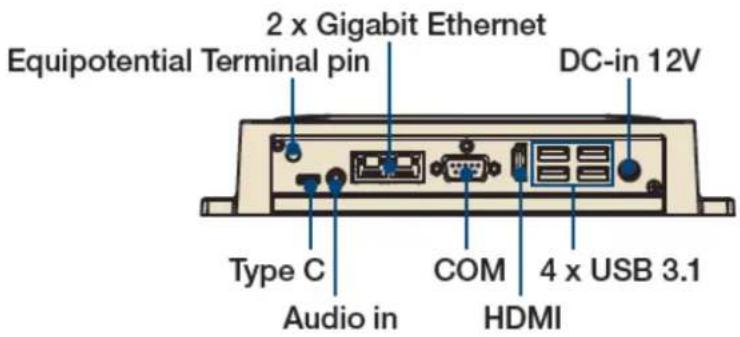
Figure 4-2 Rear View of the USM-100
NOTE: Equipotential terminal need link to hospital ground/earth system before system boot to protect operator and system.

CAUTION! Please ensure that sufficient space is available around the USM-100H for heat convection. Do not stack the USM-100H.
The mains coupler is used as "disconnect device", and must be available as such, or the socket outlet must be installed near the equipment and must be easily accessible, or an appropriate external disconnect device must be externally added in the installation.
MISE EN GARDE!
5.1 Connecting the DCIN (Medical Type)
The USM-100H SERIES can only be powered by AC adapter (FSP Model no. FSP120M-KHA). Be sure to always handle the power cords by holding the plug ends only.
Follow these procedures in order:
- Connect the female end of the power cord to AC adapter.
- Connect the 3-pin male plug of the power cord to an electrical outlet.

Note! This adaptor is optional, if with cart and equipment products direct DC 12V power supply, do not need to use this adapter.
The cart and equipment must meet the IEC60601-1 certification to provide POC DC power.
5.2 Connecting the Ground Pin
Step1. System ready and find the Equipotential Terminal on rear side of USM-100H. An Equipotential Terminal is provided to optionally connect to a hospital ground/earth system.
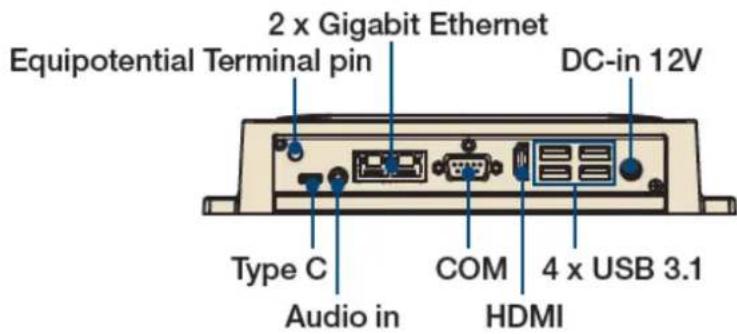
Figure 5-1: USM-100H Equipotential Terminal Pin
Step2. Prepare the Grounding cable and the other terminal link to hospital ground/earth system.
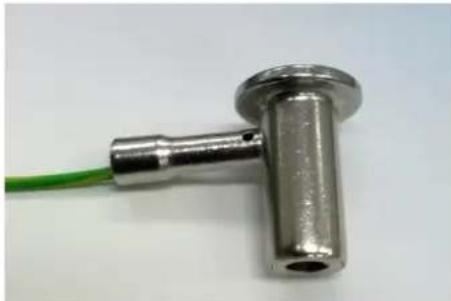
Figure 5-2: Grounding cable with connector
Step3. Grounding cable plug with USM-100H Equipotential Terminal (See Figure 5-1)
5.3
Running BIOS Setup Program
Your USM-100H SERIES was probably set up and configured by your dealer prior to delivery. You may still find it necessary to use the BIOS (Basic Input-Output System) setup program to change system configuration information, such as the current date and time or your type of hard drive. The setup program is stored in read-only memory. It can be accessed either when you turn on or reset the panel PC, by pressing the "Del" key on your keyboard immediately after powering on the computer.
5.4
Install System Software
Recent releases of operating systems from major vendors include setup programs which load automatically and guide you through hard disk preparation and operating system installation. The guidelines below will help you determine the steps necessary to install your operating system on the panel PC hard drive.
Note! Some distributors and system integrators may have already preinstalled system software prior to shipment of your panel PC.
If required, insert your operating system's installation or setup diskette into the external diskette drive until the release button pops out.
The BIOS supports system boots up directly from the Flash disk. You may also insert your system installation Flash disk into USB port.
Power on or reset the system by pressing the "Del" key to boot into BIOS menu and adjust the boot device sequence.
You can also press F12 key when booting; a bootable device popup menu will appear, you can select bootable device that you want. The Point-of-Care Terminal will automatically load the operating system from the Flash disk.
If you are presented with the opening screen of a setup or installation program, follow the instructions on screen. The setup program will guide you through preparation of your hard drive, and installation of the operating system.
5.5
Install Driver
After installing your system software, you will be able to set up the
Chipset, Graphics, Ethernet, and Audio functions from your own external
CD-ROM drive. All the drivers can be downloaded via Advantech official website.
After installing your system software, you will be able to set up the Chipset, Graphics, Ethernet, Audio functions by driver.
The standard automatic installation procedures for installing the drivers are described in Chapter 3.
The various drivers and utilities in the CD-ROM disc have their own text files which help users install the drivers and understand their functions. These files are a very useful supplement to the information in this manual
All driver could download from Advantech website
Guidance and Manufacturer's Declaration - Electromagnetic Emissions
| Emissions Test | Compliance | Electromagnetic Environmental Guidance |
| RF emissions CISPR 11 | Group 1 | USM-100H uses RF energy only for its internal function. Therefore, its RF emissions are very low and are not likely to cause any interference in nearby electronic equipment. |
| RF emissions CISPR 11 | Class B | USM-100H is suitable for use in all establishments, including domestic establishments and those directly connected to the public low-voltage power supply network that supplies buildings used for domestic purposes. |
| Harmonic emissions IEC 61000-3-2 | Class D | |
| Voltage fluctuations/ flicker emissions IEC 61000-3-3 | Meet the requirements | |
| Recommended Separation Distances Between Portable and Mobile RF Communications Equipment and the USM-100H | ||
| Rated Maximum Output Power of Transmitter W | Separation Distance According to Frequency of Transmitter m | ||
| 150 kHz to 80 MHz d = 1,2 P | 80 MHz to 800 MHz d = 1,2 P | 800 MHz to 2,5 GHz d = 2,3 P | |
| 0,01 | 0,12 | 0,12 | 0,23 |
| 0,1 | 0,38 | 0,38 | 0,73 |
| 1 | 1,2 | 1,2 | 2,3 |
| 10 | 3,8 | 3,8 | 7,3 |
| 100 | 12 | 12 | 23 |
For transmitters rated at a maximum output power not listed above, the recommended separation distance d in meters (m) can be estimated using the equation in the table above applicable to the frequency of the transmitter, where is the maximum output power rating of the transmitter in watts (W) according to the transmitter manufacturer.
NOTE 1 At 80 MHz and 800 MHz, the separation distance for the higher frequency range applies.
NOTE 2 These guidelines may not apply in all situations. Electromagnetic propagation is affected by absorption and reflection from structures, objects and people.
Guidance and Manufacturer's Declaration - Electromagnetic Immunity
USM-100H is intended for use in the electromagnetic environment specified below. The customer or the user of the model USM-100H should assure that it is used in such an environment.
| Immunity Test | IEC 60601 Test Level | Compliance Level | Electromagnetic Environmental Guidance |
| Electrostatic discharge (ESD) IEC 61000-4-2 | ±8 kV contact ±15 kV air | ±8 kV contact ±15 kV air | Floors should be wood, concrete or ceramic tile. If floors are covered with synthetic material, the relative humidity should be at least 30%. |
| Electrical fast transient/burst IEC 61000-4-4 | ±2 kV for power supply lines ±1 kV for input/output lines | ±2 kV for power supply lines ±1 kV for input/output lines | Main power quality should be that of a typical commercial or hospital environment. |
| Surge IEC 61000-4-5 | ±1 kV line(s) to line(s) ±2 kV line(s) to earth | ±1 kV line(s) to line(s) ±2 kV line(s) to earth | Main power quality should be that of a typical commercial or hospital environment. |
| Interruptions and voltage variations on power supply input lines IEC 61000-4-11 | Voltage Dips: i) 0% reduction for 0.5 cycle at 50Hz, 0% reduction for 1 cycle at 50Hz Performance Criterion B ii) 70% reduction for 25/30 cycles at 50/60Hz Performance Criterion C Voltage Interruptions: 0% reduction for 250/300 cycles at 50/60Hz Performance Criterion C | Voltage Dips: i) 0% reduction for 0.5 cycle at 50Hz, 0% reduction for 1 cycle at 50Hz Performance Criterion B ii) 70% reduction for 25/30 cycles at 50/60Hz Performance Criterion C Voltage Interruptions: 0% reduction for 250/300 cycles at 50/60Hz Performance Criterion C | Main power quality should be that of a typical commercial or hospital environment. If the user of the model USM-100 requires continued operation during main power interruption, it is recommended that the model USM-100 be powered from an uninterruptible power supply. |
| Power frequency (50/60 Hz) magnetic field IEC 61000-4-8 | 30A/m | 30A/m | Power frequency magnetic fields should be at levels characteristic of a typical location in a typical commercial or hospital environment. |
NOTE U_T is the A.C. main voltage prior to application of the test level.
The model USM-100H is intended for use in the electromagnetic environment specified below. The customer or the user of the model USM-100H should assure that it is used in such an environment.
| Immunity test | IEC 60601 Test Level | Compliance Level | Electromagnetic Environmental Guidance |
| Conducted RF IEC 61000-4-6 | 3 and 6 Vrms150 kHz to 80 MHz and specific ISM, AM frequency | 3 and 6 Vrms150 kHz to 80 MHz and specific ISM, AM fre- quency | Portable and mobile RF commu- nications equipment should be used no closer to any part of the model POC-421-12/POC-424-12 SERIES, including cables, than the recommended separation distance calculated from the equation applicable to the fre- quency of the transmitter.Recommended Separation Dis- tance\(d = 1,2\) \(d = 1,2,80\mathrm{MHz}\) to 800 MHz\(d = 2,3,800\mathrm{MHz}\) to 2,5 GHz where \(P\) is the maximum output power rating of the transmitter in watts (W) according to the trans- mitter manufacturer and d is the recommended separation dis- tance in meters (m). |
| Radiated RF IEC 61000-4-3 | 3V/m80 MHz to 2.7 GHz, and specific frequency | 3V/m80 MHz to 2.7 GHz, and specific frequency | Field strengths from fixed RF transmitters, as determined by an electromagnetic site survey,\(^a\) should be less than the compli- ance level in each frequency range.\(^b\) Interference may occur in the vicinity of equipment marked with the following sym- bol: |
| NOTE 1: At 80 MHz and 800 MHz, the higher frequency range applies.NOTE 2: These guidelines may not apply in all situations. Electromagnetic propagation is affected by absorption and reflection from structures, objects and people. | |||
a. Field strengths from fixed transmitters, such as base stations for radio (cellular/cordless) telephones and land mobile radios, amateur radio, AM and FM radio broadcast and TV broadcast cannot be predicted theoretically with accuracy. To assess the electromagnetic environment due to fixed RF transmitters, an electromagnetic site survey should be considered. If the measured field strength in the location in which USM-100 is used exceeds the applicable RF compliance level above, USM-100 should be observed to verify normal operation. If abnormal performance is observed, additional measures may be necessary, such as reorienting or relocating the unit.
b.Over the frequency range 150kHz to 80MHz field strengths should be less than 3V / m
6.
6.1 General Safety Guide
For your own safety and that of your equipment, always take the following precautions. Disconnect the power plug (by pulling the plug, not the cord), from your computer if any of the following conditions exists:
a. The power cord or plug becomes frayed or otherwise damaged
b. You spill something into the case
c. Your computer has been dropped or the case has been otherwise damaged
d. You suspect that your computer needs service or repair
e. You want to clean the computer
f. You want to remove/install any parts
6.2 Thermal
The vent hole on the rear cover of USM-100H as well as system fans, CPU fan function as a cooling air flow inlet and outlet. These air inlets and outlets transfer heat from inside the computer to the cooler air outside. Do not block these holes/vents with any soft material, nor should its system fans and CPU fan be removed arbitrary.
Warning! Do not place your USM-100H system on a pillow or other soft material when it is on, as the material may block the airflow and cause the computer to overheat.
6.3 Disconnect the Power
The only way to disconnect power completely is to unplug the power cord. Make sure at least one end of the power cord is within easy reach so that you can unplug the computer when you need to.
Warning! Your DC adaptor came equipped with a three-wire grounding plug (a plug that has a third grounding pin). This plug will fit only a grounded AC outlet. If you are unable to insert the plug into an outlet because the outlet is not grounded, contact a licensed electrician to replace the outlet with a properly grounded outlet. Do not defeat the purpose of the grounding plug.
Warning! Never push objects of any kind into this product through the openings in the case. Doing so may be dangerous and result in fire or a dangerous electric shock.

Handle your USM-100H with care. It is made of metal, and has
sensitive electronic components inside.
Don't use a damaged USM-100H.
Set USM-100H on a stable work surface.
Do not push objects into the ventilation openings.
To lift or move your system, hold its sides.
7. CERTIFICATIONS AND APPROVALS
7.1 EC Declaration of Conformity
USM-100 comply to the following standards and regulations:
2014/30/EU EMC directive
IEC 60601-1-2: 2014 + A1: 2020
EN 60601-1-2: 2015 + A1: 2021
BS EN 60601-1-2: 2015 + A1: 2021
CISPR 11:2015 + A1:2016 + A2:2019 (Ed 6.2)
IEC 61000-3-2:2018
IEC 61000-3-3:2013 + A1:2017
IEC 61000-4-2: 2008
IEC 61000-4-3:2006 + A1:2007 + A2:2010
IEC 61000-4-4:2012
IEC 61000-4-5:2014 + A1:2017
IEC 61000-4-6:2013 + COR1:2015
IEC 61000-4-8:2009
IEC 61000-4-11:2004 + A1:2017
2011/65/EC RoHS directive
2012/19/EU WEEE directive
2001/95/EC General product safety
IEC 60601-1:2005 + A1:2012 + A2:2020
EN 60601-1:2006+A11:2011+A1:2013+A12:2014+A2:2021
ANSI/AAMI ES60601-1:2005/(R)2012 and A1:2012/(R)2012 and A2:2021;
CAN/CSA-C22.2 No. 60601-1 (Amendment 2:2022 (MOD) to CAN/CSA
C22.2 No. 60601-1:14)
CAN/CSA C22.2 No. 62368-1-14
UL 62368-1, Second Edition
J62368-1 (2020)
EN 62368-1:2014+A11:2017,BS EN 62368-1:2014+A11:2017
AS/NZS 62368.1:2018
CEI EN 62368-1:2016
7.2 Manufacturing
USM-100H have been manufactured in compliance with ISO13485.
Please verify specifications before quoting. This guide is intended for reference purposes only.
All product specifications are subject to change without notice.
No part of this publication may be reproduced in any form or by any means, such as electronically, by photocopying, recording, or otherwise, without prior written permission from the publisher.
All brand and product names are trademarks or registered trademarks of their respective companies.
Advantech Co., Ltd. 2020
- Professional Mini Medical Computer
- Instructions for the User
- Acknowledgements
- Product Warranty (2 years)
- Declaration of Conformity
- FCC Class B
- Technical Support and Assistance
- Safety Instructions
- Explanation of Graphical Symbols
- Environmental Protection
- Disposing of Old Products
- Contents
- INTRODUCTION
- WARNING!
- ATTENTION!
- Intended User Profile
- Intend user profile:
- Medical Installations
- Caution!
- USM-100 Pass Cleaning verification test
- EMC Notice
- Warm Surface Notice
- MISE EN GARDE!
- A Quick Tour of the USM-100
- Front View
- Rear View
- Connecting the DCIN (Medical Type)
- Connecting the Ground Pin
- Running BIOS Setup Program
- Install System Software
- Install Driver
- Guidance and Manufacturer's Declaration - Electromagnetic Immunity
- 6.
- General Safety Guide
- Thermal
- Disconnect the Power
- CERTIFICATIONS AND APPROVALS
- EC Declaration of Conformity
- Manufacturing
Brand : Advantech
Model : USM100H
Category : Medical computer