USER MANUAL AIM77S Advantech
For more information on this and other Advantech products, please visit our website at:
http://www.advantech.com
For technical support and service, please visit our support website at:
http://support.advantech.com
This manual is for AIM-77S Series
First Edition March 2025
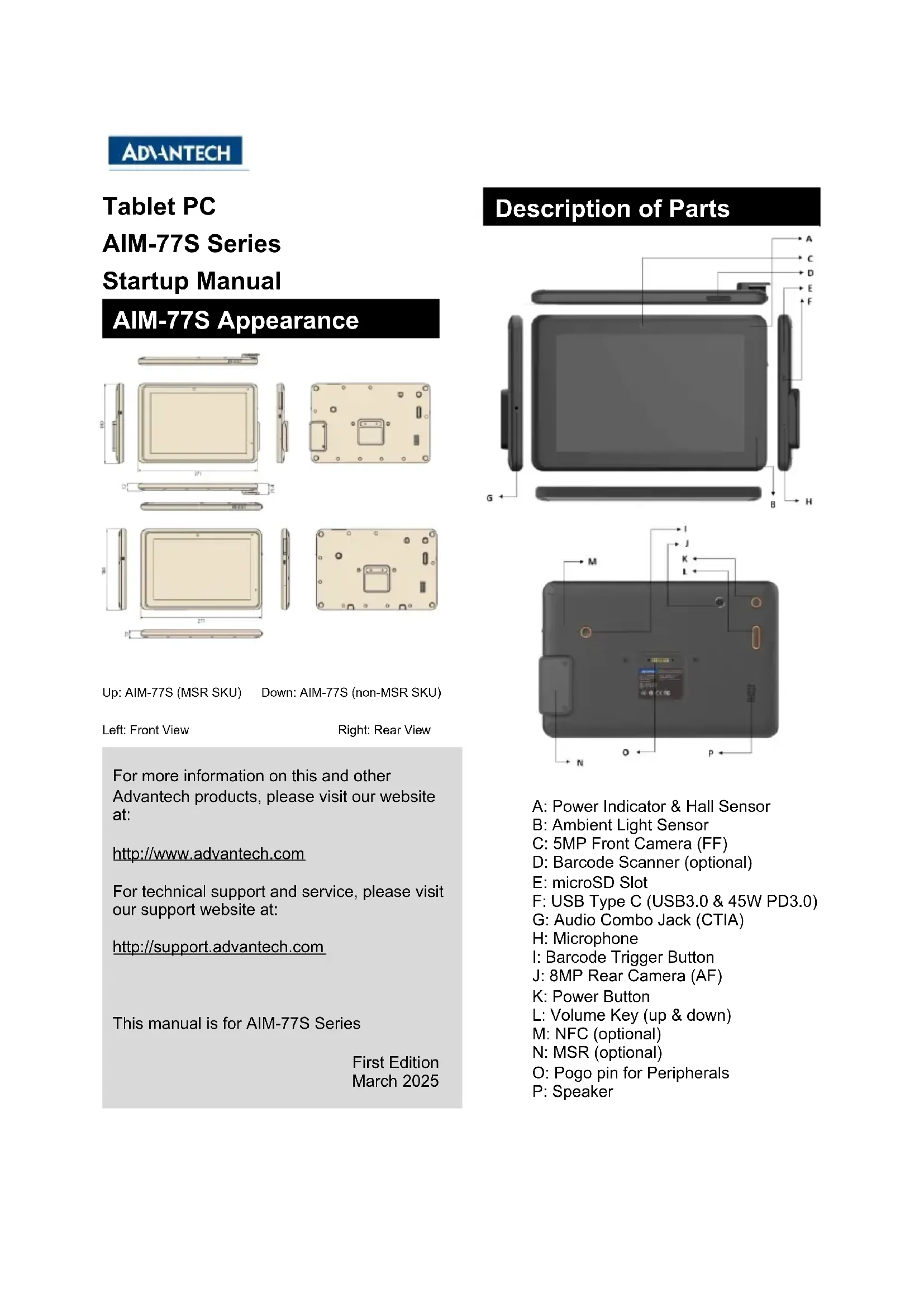
Description of Parts
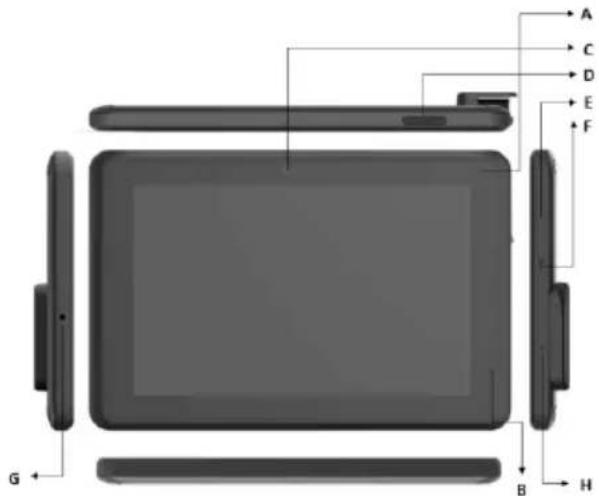

A: Power Indicator & Hall Sensor
B: Ambient Light Sensor
C:5MP Front Camera (FF)
D:Barcode Scanner (optional)
E: microSD Slot
F: USB Type C (USB3.0 & 45W PD3.0)
G: Audio Combo Jack (CTIA)
H: Microphone
I:Barcode Trigger Button
J: 8MP Rear Camera (AF)
K:PowerButton
L: Volume Key (up & down)
M: NFC (optional)
N: MSR (optional)
O: Pogo pin for Peripherals
P:Speaker
Easy Setup
Power on Computer
- Model: AIM-77S Rating
From Type C: 15 Vdc / 3 A
From Pogo Pin (Docking): 12 Vdc / 3.75A
- This product is intended to be supplied by a UL Listed Power Adapter (FSP / FSP045-A2BR3, 15Vdc/3A output, Tmax: 40^ , Altitude: 2000 meters) for model AIM-77S. Please contact Advantech for further information and assistance.
- When you power on the AIM-77S for the first time, please charge the computer's embedded battery via the Type C adapter or Docking to release the battery shipping mode. Then push the Power button ("K" on description of parts.) for 2~3 seconds to start the computer.
- The product is equipped with a 10.1" Capacitive Touch Panel. Use finger to touch the Active Area to operate the computer.
- The product is equipped with two LED indicator for power status and barcode scanning status. Power LED:
a) The RED LED blinks when internal battery capacity is below 10% to warn the user to charge.
b) The Blue LED lights up when internal battery is being charged.
c) The Green LED lights up when internal battery is full.
d) When the computer is turned on and the battery capacity is above 81% , after the user inserts the Type C Power adapter to charge, the green LED lights up and remains in the non-charging state.
e) When the computer is turned on and the battery capacity is above 81% , after the user put the computer on thermal printer docking or magnet cradle to charge, the green LED lights up and remains in the non-charging state. Then in docking mode, the green LED light will turn off after 5 minutes.
Barcode LED: When built-in barcode scan successfully, BCR LED will flash red color.
- When the computer is running, pressing and holding the power button for 1 second will turn off the LCD backlight to save power. Pressing the power button again will re-enable the backlight; holding the power button for 10 seconds while the computer is running will reset(reboot) the system.
- Environment:
Operating Temperature: -0^ +40^
Humidity: 90% at 40^ (non-condensing)
Storage/Transportation Temperature:
-10°C ~ +60°C.
If you encounter any system failure or serious incident related to the equipment, please report it to the manufacturer or local agent.
Battery Caution
CAUTION!
AIM-77S is designed with built-in non-replaceable battery. Please do not replace the battery by yourself. Please contact a qualified technician or your retailer for help. There is a danger of explosion if battery is incorrectly replaced. Replace only with same or equivalent type recommended by the manufacturer
(1) Leaving AIM-77S and its Battery in an extremely high temperature surrounding environment that can result in an EXPLOSION or the leakage of flammable liquid or gases.
(2) If AIM-77S and its Battery are subject to extremely low air pressure, it may result in explosion or leakage of flammable liquids or gases.
Only qualified personnel should replace the battery. Please consult local authorities for disposal instructions. Do not dispose of batteries in fire.
Battery Charging Notice
It is important to consider the environment temperature whenever you are charging the Li-ion battery pack. The process is more efficient at normal room temperature (22^ 28^) or slightly cooler. It is essential that you charge batteries within the stated range of 0^ to 40^ . Charging batteries outside of the specified range could damage the batteries and shorten their charging life cycle.
Storage and Safety Notice
the battery capacity may be depleted due to the accumulation of internal resistance. If this happens, Must be recharged before use.
Lithium-ion batteries can be stored in an environment of -10^ +60^ , but if they are close to the upper or lower limit of this temperature range, the power will be consumed faster.
It is recommended to store AIM-77S within normal room temperature ranges.
Wireless Network Settings
- While using Wi-Fi 6GHz bands, please connect to your router with AX or AX mixed mode.
- When connecting a Bluetooth device, please avoid interference from other 2.4GHz devices.
Image Update
- The shipping image can be updated by OTA via DeviceOn (Advantech MDM tool) or by USB drive or by anther PC.
- Calibration: It is suggested to be carried out by manufacturer authorized and trained personnel.
Battery Caution
ATTENTION!
Please read these safety instructions carefully and follow these instructions for use. Repair of the device may only be carried by trained service personnel. Advantech recommends that a service contact be obtained with Advantech service and that all repairs also be carried out by them; otherwise the correct functioning of the device may be compromised.
WARNING! Because of the danger of electrical shock, never remove the cover of a device while it is in operation or connected to a power outlet.
If one of the following situations arises, have the equipment checked by service personnel:
- The power cord or plug is damaged.
- Liquid has penetrated the equipment.
- The equipment has been exposed to moisture.
- The equipment does not work well, or you cannot get it to work according to the user's manual.
- The equipment has been dropped and damaged.
- The equipment has obvious signs of breakage.
CAUTION! To avoid short-circuits and otherwise damaging the device, do not allow fluids to come inside of the device. If fluids are accidentally spilled on the equipment, remove the affected unit from service as soon as possible and contact service personnel to verify that patient safety is not compromised.
Cleaning and Disinfecting
Turn off the AIM-77S and Disconnect this equipment from any AC outlet before cleaning.
Use a damp cloth. Do not use liquid or spray detergents for cleaning and keep this equipment away from humidity.
Do not use disinfectants containing phenol.
Do not immerse or rinse the AIM-77S tablet or its peripherals.
Do not autoclave or clean the AIM-77S Tablet or its peripherals with strong aromatic, chlorinated, ketone, ether, or ether solvents, sharp tools or abrasives.
Tablet Specifications
| Processor | Fockchip FK3568 (Dual-sites Center-A55 up to 2.0GHz) |
| Memory | 4GB LPDDR4 (Optosat BGE) |
| OS | Android 12 |
| eMMC | 64GB eMMC S 1 (Options: 128GB) |
| microSD | Support (Up to 1 TB) |
| Type | 10.1" IPS TFT LCD Panel |
| Resolution | WMSA, 128x64 |
| Brightness | 350m/s (LCM Typical) |
| Touch Type | 10-point multi-touch P-CAP touch control |
| Glass Type | Corning Gorilla Glass, 3 |
| WLAN | Wi-Fi 6E, IEEE 802.11 a/w/gyroscope |
| Bluetooth | Bluetooth® v5.3 |
| NFC (Optional) | 13.59 MHz, compatible with ISO15093, ISO1443A, ISO 1443B, FidelCu |
| Standard I/O | 1 x USB 3.0 Type C (for Charging and Data) |
| Clocking | 1 x USB 3.015-pin Propio Connector (for Charging and Data) |
| Speaker | 1 x Internal Speaker (2W) |
| Audio Jack | 1 x Audio combo jack (continues stereo audio output and mono microphone input) |
| Microphone | 1 x Digital-Microphone |
| Front | 5.0-megahead fixed-focus camera |
| Peer | 80-megahead audio-locus camera |
| Sensors | Ambient Light Sensor, G-sensor, Gyroscope + a-Compex, Hall Sensor |
| Barcode Scanner (Optional) | Embedded 10xCD Barcode Reader |
| MSR (Optional) | Embedded 3 track MSR module |
| 1 x Power button, 1 x Volumetry (Up & Down) |
| 1 x programmable function key (default: Barcode Scanner trigger) |
| Power/Battery LED | System On: 100% (Green), Charging (Blue) |
| System On: ≥81% (Green), Charging (Blue), ≤10% (Blinking Red) |
| Input Voltage | USB Type C, 45W PO.3.0 15V/3A |
| Docking (Vipin Page); 45W 12V/3.75A |
| Battery | Embedded Li-ion Polymer battery, 25HP, 7.2V, 440mAh (H: 19Wh) |
| Operating time up to 8 hours (depending on user scenario) |
| Charging time: 30mins to 500h, 2.5hrs to 100% |
| Operating Temperature | 0°C - 40°C (52°F - 104°F) |
| Storage Temperature | -10°C - 60°C (14°F - 140°F) |
| Humidity | 90% at 40°C (non-condensing) |
| Drop Protection | 75cm (with Pugged case up to 120cm onto plywood) |
| Dimension (W x D x H) | 271 x 180 x 17 (mm) |
| Weight | 885g (non-MSR, 910g, MSR) |
Power Cord
Please select a power cord that has been certified locally. (For example, use a UL-certified power cord in the United States)
The equipment power cord shall be connected to a socket-outlet with earthing connection.
Disposing of Old Products
Within the European Union
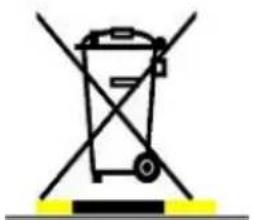
EU-wide legislation, as implemented in each member state, requires that waste electrical and electronic products carrying the mark shown at left must be disposed of separately from normal household waste. This includes
monitors and electrical accessories, such as signal cables or power cords. When you need to dis-pose of your display products, please follow the guidance of your local authority, or ask the shop where you purchased the product, or if applicable, follow any agreements made between you and the provider.
The mark on electrical and electronic products only applies to the current European Union Member States.
Radio products with the CE alert marking comply with the RED Directive (2014/53/EU) issued by the Commission of the European Community. Compliance with this directive implies conformity to the following European Norms (in brackets are the equivalent international standards).
- EN 62368-1 (IEC62368-1) - Product Safety
ETSI EN 300 328 Technical requirement for radio equipment
- ETSI EN 301 893 Technical requirement for radio equipment
- ETSI EN 300 330 Short Range Devices (SRD)
ETSI EN 300 440 Short Range Devices (SRD)
ETSI EN 303 687 6GHz WAS/RLAN
ETSI EN 301 489 General EMC requirements for radio equipment
Products that contain the radio transmitter are labeled with CE alert marking and may also carry the CE logo.
The full text of the EU declaration of conformity is available at the following internet address: https://www.advantech.com
The device is restricted to indoor use only when operating in the 5150 to 5350MHz frequency range. This device is intended for indoor use only when operating in the frequency range (5945-6425 MHz) which is applicable in countries that support WiFi 6E.
The Power adapter shall be installed near the equipment and shall be easily accessible.
Caution - Risk of explosion if battery is replaced by an incorrect type.
Dispose of used batteries according to the instructions.
The transmission of radio equipment is indoors use only SW version: 18.42
| Maximum Power Output |
| (2400 - 2483.5 MHz)IEEE802.11 b/g/n/ax modeBluetooth | 20dBm EIRP max (100mW) |
| (2400 - 2483.5 MHz) +BLE | 10dBm EIRP max (10mW) |
| (5150 - 5725 MHz) +IEEE802.11 a/n/ac/ax mode | 23dBm EIRP max (200mW) +The low band 5.15 - 5.35 GHz is forIndoor use only |
| (5725 - 5875 MHz) +IEEE802.11 a/n/ac/ax mode | 13.98 dBm EIRP Max (25mW) +For the standard EN 300 440, thedevice operating in 5.8 GHz isconsidered a category 2 receiver |

| AT | BE | BG | CH | CY | CZ | DK | DE |
| EE | EL | ES | FI | FR | HR | HU | IE |
| IS | IT | LT | LU | LV | MT | NL | PL |
| PT | RO | SI | SE | SK | NI | | |
CE RF Exposure warning
This device meets the EU requirements (2014/53/EU) on the limitation of exposure of the public to electromagnetic fields by way of health protection.
The limits are part of extensive recommendations for the protection of the public. These recommendations have been developed and checked by independent scientific organizations through regular and thorough evaluations of scientific studies. The unit of measurement for the European Council's recommended limit for mobile devices is the "Specific Absorption Rate" (SAR), and the SAR limit is 2.0 W/Kg averaged over 10 grams of body tissue. It meets the requirements of the International Commission on Non-Ionizing Radiation Protection (ICNIRP).
For next-to-body operation, this device has been tested and meets the ICNRP exposure guidelines and the European Standard EN 62209-2. SAR is measured with the device directly contacted to the body while transmitting at the highest certified output power level in all frequency bands of the mobile device.
FCC Compliance Statement
This equipment has been tested and found to comply with the limits for a Class B digital device, pursuant to part 15 of the FCC Rules. These limits are designed to provide reasonable protection against harmful interference in a residential installation. This equipment generates, uses and can radiate radio frequency energy and, if not installed and used in accordance with the instructions, may cause harmful interference to radio communications. However, there is no guarantee that interference will not occur in a particular installation. If this equipment does cause harmful interference to radio or television reception, which can be determined by turning the equipment off and on, the user is encouraged to try to correct the interference by one or more of the following measures:
-Reorient or relocate the receiving antenna.
-Increase the separation between the equipment and receiver.
-Connect the equipment into an outlet on a circuit different from that to which the receiver is connected.
-Consult the dealer or an experienced radio/ TV technician for help.
To assure continued compliance, any changes or modifications not expressly approved by the party responsible for compliance could void the user's authority to operate this equipment. (Example: use only shielded interface cables when connecting to computer or peripheral devices).
This device complies with Part 15 of the FCC Rules. Operation is subject to the following two conditions:
1) This device may not cause harmful interference, and
2) This device must accept any interference received, including interference that may cause undesired operation.
15.21
Any changes or modifications not expressly approved by the party responsible for compliance could void the authority to operate equipment.
This device and its antenna must not be co-located or operating in conjunction with any other antenna or transmitter.
End-users and installers must be provided with antenna installation instructions and transmitter operating conditions for satisfying RF exposure compliance. For product available in the USA/Canada market, only channel 1~11 can be operated. Selection of other channels is not possible.
This device is slave equipment, the device is not radar detection and not ad-hoc operation in the DFS band.
Operation of transmitters in the 5.925-7.125 GHz band is prohibited for control of or communications with unmanned aircraft systems.
FCC Radiation Exposure Statement
This equipment complies with FCC RF radiation exposure limits set forth for an uncontrolled environment for body-worn configuration in direct contact to the phantom. This device complies with FCC radiation exposure limits set forth for an uncontrolled environment.
This equipment complies with FCC radiation exposure limits set forth for an uncontrolled environment. End user must follow the specific operating instructions for satisfying RF exposure compliance. This transmitter must not be co-located or operating in conjunction with any other antenna or transmitter.
The portable device is designed to meet the requirements for exposure to radio waves established by the Federal Communications
Commission (USA). These requirements set a SAR limit of 1.6 W/kg
averaged over one gram of tissue. The highest SAR value reported under this standard during product certification for use when properly worn on the body
The FCC has granted an Equipment Authorization for this device with all reported SAR levels evaluated as in compliance with the FCC RF exposure guidelines. SAR information on this device is on file with the FCC and can be found under the Display Grant section of https://apps.fcc.gov/oetcf/eas/reports/GenericSearch.cf m after searching on FCC ID: M82-AIM77S
IC warning statement
This device complies with Industry Canada's licence-exempt RSSs. Operation is subject to the following two conditions: (1) This device may not cause interference; and (2) This device must accept any interference, including interference that may cause undesired operation of the device.
This radio transmitter has been approved by Industry Canada to operate with the antenna types listed below with the maximum
permissible gain and required antenna impedance are strictly prohibited for use with this device.
(i) the device for operation in the band 5150-5250 MHz is only for indoor use to reduce the potential for harmful interference to co-channel mobile satellite systems; (For devices installed in vehicles point i. is not required.)
Users should also be advised that high-power radars are allocated as primary users (i.e. priority users) of the bands 5250-5350 MHz and 5650-5850 MHz and that these radars could cause interference and/or damage to LE-LAN devices.
Devices shall not be used for control of or communications with unmanned aircraft systems.
This EUT is compliance with SAR for general population/uncontrolled exposure limits in IC RSS-102. This equipment should be installed and operated with minimum distance 0 cm between the radiator & your body.
This equipment complies with ISED radiation exposure limits set forth for an uncontrolled environment. End user must follow the specific operating instructions for satisfying RF exposure compliance. This transmitter must not be co-located or operating in conjunction with any other antenna or transmitter.
The portable device is designed to meet the requirements for exposure to radio waves established by the ISED. These requirements set a SAR limit of 1.6 W/kg averaged over one gram of tissue. The highest SAR value reported under this standard during product certification for use when properly worn on the body.
Contact your distributor, sales representative, or Advantech's customer service center for technical support if you need additional assistance. Please have the following information ready before you call:
Product name and serial number
Description of your peripheral attachments
Description of your software (operating system, version, application software, etc.)
A complete description of the problem
The exact wording of any error messages
This equipment is a source of electromagnetic waves. Before use please, make sure that there are not EMI sensitive devices in its surrounding which may malfunction therefore.
Environmental protection
Follow national requirements to dispose of unit.
Manufacturer:
Advantech Co., Ltd.
No.1, Alley 20, Lane 26, Rueiguang Road Neihu District, Taipei, Taiwan 114, R.O.C.
TEL: (02) 7732-3399
Distributed in Europe by:
Advantech Europe GmbH Kolberger Straße 7
D-40599 Düsseldorf, Germany
Tel: 49-211-97477350
Fax: 49-211-97477300
Visit the Advantech websites at www.advantech.com or www.advantech.com.tw if you need more information.
ADVANTECH
平板電腦 AIM-77S 系列
快速入門手冊
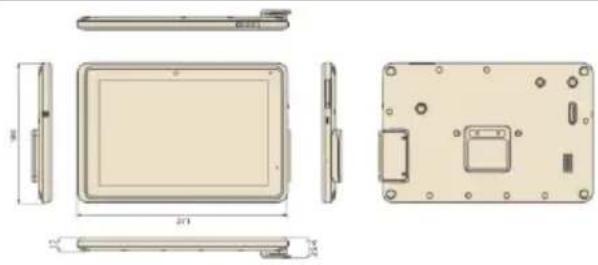
AIM-77S 外觀

AIM-77S (MSR)
AIM-77S (non-MSR)
左邊:前視圖 右邊:後視圖
http://support.advantech.com
本手册適用於 AIM-77S 系列。
台湾印刷
第一版
2025年3月
申請商:研華股份有限公司
| Processor | Radeon R3686 (Quad-core Core-A55 up to 2.0GHz) |
| Memory | 4GB LPDDR4 (Optional: 8GB) |
| OS | Android 12 |
| eMMC | 64GB eMMC5.1 (Optional: 128GB) |
| microSD | Support (Up to 1TB) |
| Type | 10.1" IPS FET LCD Panel |
| Resolution | W30A, 1280x100 |
| Brightness | 350mΩ (LCM Typical) |
| Touch Type | 19-point multi-touch P-CAP touch control |
| Glass Type | Corning Gorilla Glass 3 |
| WLAN | WiFi 66, IEEE 802.11 a/b/g/m/c |
| Bluetooth | Bluetooth v5.3 |
| NFC (Optional) | 1.356 MHz, compatible with ISO15563, ISO14443A, ISO 14443B, RFC 60 |
| Standard i/O | 1 x USB 3.0 Type C (for Charging and Data) |
| Dosing | 1 x USB 3.0 16-pin Ports Connector for Charging and Data |
| Speaker | 1 x Internal Speaker (2W) |
| Audio Jack | 1 x Audio combo jack (combines stereo audio output and more microphone input) |
| Microphone | 1 x Digital-Microphone |
| Front | 5.0-megapot fixed-focus camera |
| Polar | 8.0-megapot auto-fove lens camera |
| Sensors | Ambient Light Sensor, G-sensor, Gyroscope + - Compass, Hall Sensor |
| Barcode Scanner (Optional) | Embedded 10,2CD Barcode Reader |
| MSR (Optional) | Embedded 3-track MSR module |
| 1 x Power button, 1 x Volume key (Up & Down) |
| 1 x Programmable钮 turn key (Hot Start, Bar code scanner trigger) |
| Power/Battery LED | System On: 100% (Green), Charging (Blue) |
| System On: ≥ 61% (Green), Charging (Blue), ≤ 10% (Blinding Red) |
| Input Voltage | USB Type C: 45W PCB 15VGA |
| Docking (16pin Pop! 45W 12V3.75A |
| Battery | Embedded Li-on Polymer battery, 25TH, 7V, 444mAh (34.19Wh) |
| Opening time: up to & hours (depending on user scenario) |
| Charging time: 36hrs to 58% 2.5hrs to 100% |
| Operating Temperature | 0°C - 40°C (32°F - 194°F) |
| Storage Temperature | -10°C - 60°C (14°F - 140°F) |
| IP Rating | IP54 (non-MSR SKU) |
| Humidity | 90% at 40°C (non-condensing) |
| Deep Protection | 75cm (with Rugged case, up to 120cm onto plywood) |
| Dimension (W×O×H) | 271×180×17(mm) |
| Weight | 855g (no-MSR, 910g, MSR) |
限用物質含有情況標示聲明
| 欧姆名称:Equipment name | 平板電器型號(型式):AIM-77SType designation (Type) |
| 单元Unit | 限制用途及其化学导线Restricted substances and its chemical symbols |
| 铂Lead(Pb) | 汞Mercury(Hg) | 镉Cadmium(Cd) | 六价铬Hazardous elements(Cr2+) | 多溴氰苯Polybrominated biphenyls(PBB) | 多溴二苯醚Polybrominated diphenyls ether(PBDE) |
| 雷路段 | - | ○ | ○ | ○ | ○ | ○ |
| 面板 | - | ○ | ○ | ○ | ○ | ○ |
| 内外部(外接、内部柜架—套) | ○ | ○ | ○ | ○ | ○ | ○ |
| 其它固定组件(螺丝) | - | ○ | ○ | ○ | ○ | ○ |
| 球材 | ○ | ○ | ○ | ○ | ○ | ○ |
| 绝缘明確損損 | - | ○ | ○ | ○ | ○ | ○ |
| 绝缘摩擦損損 | - | ○ | ○ | ○ | ○ | ○ |
| 短線損損 | ○ | ○ | ○ | ○ | ○ | ○ |
| 电源供應器 | - | ○ | ○ | ○ | ○ | ○ |
| 電容器 | ○ | ○ | ○ | ○ | ○ | ○ |
| 参考1.“超出0.01 wt%”及“超出0.01 wt%”指在原辅料货之百分比含量超出百分之百含量基准值。See Note 1:"Including 0.01 wt% "and "Including 0.01 wt% "indicate that the percentage content of the remaining substance exceeds the reference percentage value of present condition。See Note 2:"Toxicity that the percentage content of the remaining substance does not exceed the percentage of reference value of present condition."See Note 3:"Toxicity that the remaining substance is in排除项目。See Note 4:"Toxicity that the remaining substance is in排除项目"to the exception。 |
BSMI 系列型號
| 1 | AIM-77S-MW00000 | 11 | AIM-77S-MW01000 |
| 2 | AIM-77S-MW00001 | 12 | AIM-77S-MW01001 |
| 3 | AIM-77S-MW00010 | 13 | AIM-77S-MW01010 |
| 4 | AIM-77S-MW00011 | 14 | AIM-77S-MW01011 |
| 5 | AIM-77S-MW00020 | 15 | AIM-77S-MW01020 |
| 6 | AIM-77S-MW00021 | 16 | AIM-77S-MW01021 |
| 7 | AIM-77S-MW00100 | 17 | AIM-77S-MW01100 |
| 8 | AIM-77S-MW00101 | 18 | AIM-77S-MW01101 |
| 9 | AIM-77S-MW00110 | 19 | AIM-77S-MW01110 |
| 10 | AIM-77S-MW00111 | 20 | AIM-77S-MW01111 |
| 21 | AIM-77S-MW10000 | 31 | AIM-77S-MW11000 |
| 22 | AIM-77S-MW10001 | 32 | AIM-77S-MW11001 |
| 23 | AIM-77S-MW10010 | 33 | AIM-77S-MW11010 |
| 24 | AIM-77S-MW10011 | 34 | AIM-77S-MW11011 |
| 25 | AIM-77S-MW10020 | 35 | AIM-77S-MW11020 |
| 26 | AIM-77S-MW10021 | 36 | AIM-77S-MW11021 |
| 27 | AIM-77S-MW10100 | 37 | AIM-77S-MW11100 |
| 28 | AIM-77S-MW10101 | 38 | AIM-77S-MW11101 |
| 29 | AIM-77S-MW10110 | 39 | AIM-77S-MW11110 |
| 30 | AIM-77S-MW10111 | 40 | AIM-77S-MW11111 |
| 41 | AIM-77S-SW00000 | 51 | AIM-77S-SW01000 |
| 42 | AIM-77S-SW00001 | 52 | AIM-77S-SW01001 |
| 43 | AIM-77S-SW00010 | 53 | AIM-77S-SW01010 |
| 44 | AIM-77S-SW00011 | 54 | AIM-77S-SW01011 |
| 45 | AIM-77S-SW00020 | 55 | AIM-77S-SW01020 |
| 46 | AIM-77S-SW00021 | 56 | AIM-77S-SW01021 |
| 47 | AIM-77S-SW00100 | 57 | AIM-77S-SW01100 |
| 48 | AIM-77S-SW00101 | 58 | AIM-77S-SW01101 |
| 49 | AIM-77S-SW00110 | 59 | AIM-77S-SW01110 |
| 50 | AIM-77S-SW00111 | 60 | AIM-77S-SW01111 |
| 61 | AIM-77S-SW10000 | 71 | AIM-77S-SW11000 |
| 62 | AIM-77S-SW10001 | 72 | AIM-77S-SW11001 |
| 63 | AIM-77S-SW10010 | 73 | AIM-77S-SW11010 |
| 64 | AIM-77S-SW10011 | 74 | AIM-77S-SW11011 |
| 65 | AIM-77S-SW10020 | 75 | AIM-77S-SW11020 |
| 66 | AIM-77S-SW10021 | 76 | AIM-77S-SW11021 |
| 67 | AIM-77S-SW10100 | 77 | AIM-77S-SW11100 |
| 68 | AIM-77S-SW10101 | 78 | AIM-77S-SW11101 |
| 69 | AIM-77S-SW10110 | 79 | AIM-77S-SW11110 |
| 70 | AIM-77S-SW10111 | 80 | AIM-77S-SW11111 |
81 AIM-77S-MW00000BS01 87 AIM-77S-SW00000BS01
82 AIM-77S-MW01000BS01 88 AIM-77S-SW01000BS01
83 AIM-77S-MW11000BS01 89 AIM-77S-SW11000BS01
84 AIM-77S-SW00001BS01 90 AIM-77S-SW00001BS02
85 AIM-77S-SW01001BS01 91 AIM-77S-SW01001BS02
86 AIM-77S-SW11001BS01 92 AIM-77S-SW11001BS02
93 AIM-77S-SW0000BS02
94 AIM-77S-SW01000BS02
95 AIM-77S-SW11000BS02
96 AIM-77S-MW00001BS01
97 AIM-77S-MW00001BS02
98 AIM-77S-MW00001BS03