USER MANUAL MDT24P3CST MIDEA
Capacity: 16 Place Settings
Warning:
Before using this product,
please read this manual carefully
and keep it for future reference.
The design and specifications
are subject to change without
prior notice for product
improvement. Consult with your
dealer or manufacturer for
details.
USER MANUAL
Dear Valued Customer
THANK YOU and CONGRATULATIONS on your purchase of this high-quality Midea product. Your Midea dishwasher represents the state of the art, and is designed for reliable, trouble-free performance. Please take a moment to register your new dishwasher.
Register your new dishwasher at https://us.midea.com/support under the Support tab.
For future reference, record your product model and serial numbers located on the inside frame of the dishwasher.
Model Number
Serial Number
SAFETY PRECAUTIONS. 3
OPERATING REQUIREMENTS 7
Electrical Requirements. 7
Location Requirements 7
Water Supply Requirements 7
PARTS AND FEATURES 8
START UP GUIDE 10
How Your Dishwasher Cleans 10
Before Using Your Dishwasher 10
Using Your New Dishwasher 10
OPERATING INSTRUCTIONS 11
Control Panel. 11
LED Indicator Lights. 16
Cycle and Option Charts 17
Loading Suggestions 18
Upper Rack 19
Lower Rack 23
Loading Silverware 25
Recommended Loading Patterns 27
APP SETUP AND OPERATION 29
How to Connect with SmartHome App. 29
Remote Start Commissioning and Usage 32
My Wash Setup And Use 33
DISHWASHER USE 34
Proper Use Of Detergent 34
Proper Use of Rinse Aid 35
Washing Special Items 37
DISHWASHER CARE 39
Cleaning 39
Storing 41
GENERAL TROUBLESHOOTING 42
Error Codes 47
WARRANTY 48
SAFETY PRECAUTIONS
YOUR SAFETY AND THE SAFETY OF OTHERS ARE VERY IMPORTANT
To prevent injury to the user or other people and property damage, the instructions shown here must be followed. Incorrect operation due to ignoring of instructions may cause harm or damage, including death.
The level of risk is shown by the following indications.

This symbol indicates the possibility of death or serious injury.
WARNING

This symbol indicates the possibility of injury or damage to property.
CAUTION

This symbol indicates the possibility of dangerous voltage constituting a risk of electrical shock is present that could result in death or serious injury.
WARNING

WARNING/GROUNDING INSTRUCTIONS
Improper connection of the equipment-grounding conductor can result in a risk of electric shock. Check with a qualified electrician or service representative if you are in doubt whether the appliance is properly grounded. Do not modify the plug if provided with the appliance. If the plug will not fit the outlet, use a proper outlet installed by a qualified electrician.
For a grounded, cord-connected appliance:
This appliance must be grounded. In the event of a malfunction or breakdown, grounding will reduce the risk of electric shock by providing a path of least resistance for electric current. If this appliance is equipped with a cord having an equipment-grounding conductor and a grounding plug, the plug must be plugged into an appropriate outlet that is installed and grounded in accordance with all local codes and ordinances.
For a permanently connected appliance:
This appliance must be connected to a grounded metal, permanent wiring system, or an equipment-grounding conductor must be run with the circuit conductors and connected to the equipment-grounding terminal or lead on the appliance.
IMPORTANT SAFETY INSTRUCTIONS

WARNING
When using your dishwasher, follow basic precautions, including the following:
- Read all instructions before using the dishwasher.
- Use the dishwasher only for its intended function.
- Use only detergents or rinse/wetting agents recommended for use in a dishwasher and keep them out of the reach of children.
- When loading items to be washed:
- Locate sharp items so that they are not likely to damage the door seal.
- Load sharp knives with the handles up to reduce the risk of cut-type injuries.
- Do not wash plastic items unless they are marked "Dishwasher Safe" or the equivalent. For plastic items not so marked, check the manufacturer's recommendations.
- Items that are not dishwasher safe may melt and create a potential fire hazard.
- Do not touch the heating element during or immediately after use.
- Do not operate your dishwasher unless all enclosure panels are properly in place.
- Do not tamper with controls.
- Do not abuse, sit on, or stand on the dishwasher door, or dish racks.
- To reduce the risk of injury, do not allow children to play in or on a dishwasher.
- Under certain conditions, hydrogen gas may be produced in a hot-water system that has not been used for two weeks or more. HYDROGEN GAS IS EXPLOSIVE. If the hot-water system has not been used for such a period, before using the dishwasher turn on all hot-water faucets and let the water flow from each for several minutes. This will release any accumulated hydrogen gas. As the gas is flammable, do not smoke or use an open flame during this time.
- Severe product damage and/or injury could result from the use of unqualified service technicians or non-original replacement parts. All repairs must be performed by a qualified service technician using only original equipment factory replacement parts.
- Do not store or use combustible materials, gasoline or other flammable vapors and liquids in the vicinity of this or any other appliance.
- Do not use the dishwasher if it has a damaged power line or plug, and do not plug the dishwasher into a damaged outlet. Failure to observe these instructions may result in electrical shock.
- This manual does not cover every possible condition or situation that may occur.
- Remove the door to the washing compartment when removing an old dishwasher from service or discarding it.
SAVE THESE INSTRUCTIONS
THIS APPLIANCE IS FOR HOUSEHOLD USE ONLY

WARNING

Tip Over Hazard
- Do not use dishwasher until completely installed.
- Do not push down on open door.
- Doing so can result in serious injury or cuts.
State of California Proposition 65 Warnings:
WARNING: This product may contain one or more chemicals known to the State of California to cause cancer.

WARNING: Cancer and Reproductive Harm

WARNING
Suffocation Hazard
- Before you throw away your old appliance, remove the door or lid so that children cannot hide or get trapped inside your old appliance.
- Failure to follow these instructions can result in death or brain damage.

CAUTION
- Never use harsh chemicals to clean your dishwasher. Some chloride-containing products can damage your dishwasher and may present health hazards!
- Never use steam cleaning products to clean your dishwasher. The manufacturer will not be responsible for the possible damages or consequences.
- To avoid possible dishwasher damage, do not use abrasive cleaners, scouring pads (metal or plastic), or abrasive cloths/paper towels on your dishwasher's exterior door panel. Your dishwasher's exterior door panel can be damaged by doing so.
- It is highly recommended that the user become familiar with the procedure to shut off the incoming water supply and the procedure to shut off the incoming power supply. See the Installation Instructions or contact your installer for more information.
- If the dishwasher drains into a food dispenser, make sure dispenser is completely empty before running dishwasher. NSF/ANSI 184 Certified residential dishwashers are not intended for licensed food establishments.
- Protect your dishwasher from the elements. Protect against freezing to avoid possible damage to the fill valve. Damage caused by freezing is not covered by the warranty.
- Not for outdoor use.
OPERATING REQUIREMENTS
ELECTRICAL REQUIREMENTS

WARNING
Electrical Shock Hazard
Electrically ground dishwasher. - Connect ground wire to green ground connector in terminal box. - Do not use an extension cord. - Failure to follow these instructions can result in death, fire, or electrical shock.
This dishwasher is designed for operation on an adequately wired individual 120V, 60Hz, 15 or 20-amp fused electrical supply with copper wire only. It is recommended that a time-delay fuse or circuit breaker is used, and that a separate circuit serving only this appliance is provided. If an outlet is used, the outlet should be placed in adjacent cabinet.
For safety, the dishwasher must be connected to a GFCI (Ground Fault Circuit Interrupter) outlet, as required by electrical codes in many regions.
LOCATION REQUIREMENTS
- Install where dishwasher is protected from the elements. Protect against freezing to avoid possible rupture of fill valve. Such ruptures are not covered by the warranty. For winter storage information, see "Storing" in the "Dishwasher Care" section.
- Install and level dishwasher on a floor that will hold the weight and in an area suitable for its size and use.
WATER SUPPLY REQUIREMENTS
- The water supply temperature should be 120°F to 150°F (49°C to 65.5°C).
- The water supply must maintain water pressure between 20 and 80 psi for sufficient flow.
PARTS AND FEATURES
When your dishwasher has been unpacked, make sure you've received all the parts shown below.
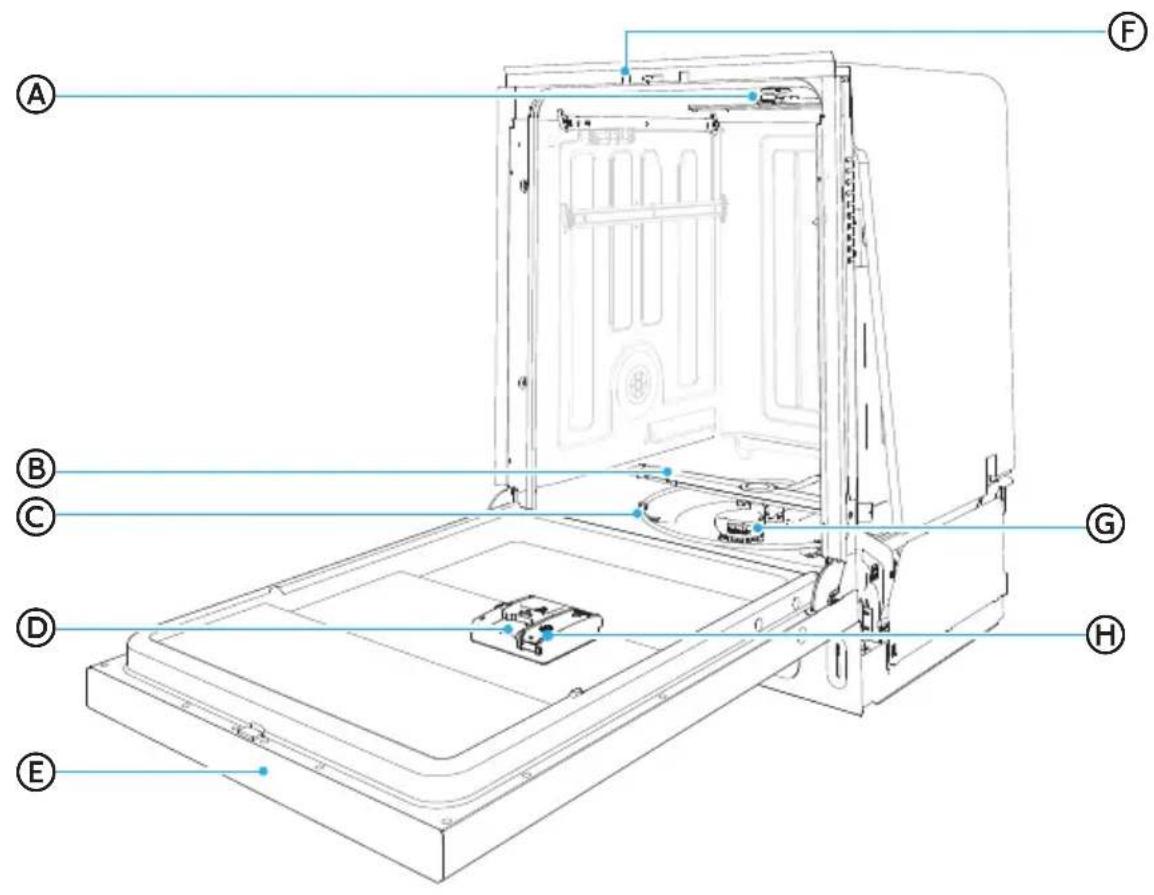
A Upper Spray Arm
E Control Panel
B Lower Spray Arm
F Auto Open Mechanism
Heating Element
G Filter System
Detergent Dispenser
Rinse Aid Dispenser
Upper Rack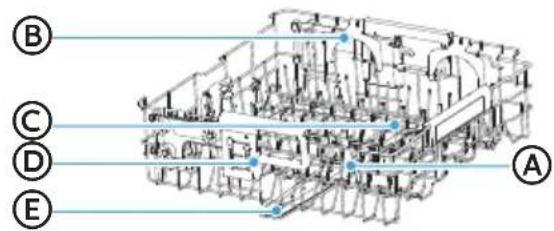
A Wine Glass Holder, B Bottle Wash Holder, C Bottle Wash, D 3-Level Adjustable Mechanism, E Middle Spray Arm
Lower Rack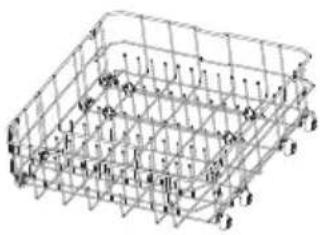
3rd Rack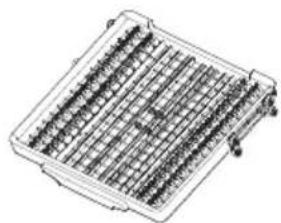
Silverware Basket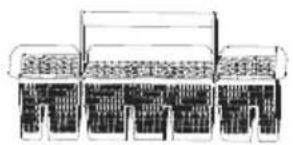
NOTE:
The accessory kits include installation manual and kit plate, which are not shown in the above picture.
SPECIFICATIONS
| Capacity: | 16 Place Settings |
| Dimensions (WxDxH): 23 | 3 1/8" × 24½" × 33¾" (606 × 623 × 857 mm) |
| Weight Unpacked: | 88 lb |
| Power Supply: | 120 V, 60 Hz |
| Water Pressure: | 20 - 80 psi (138 - 552 kPa) |
START UP GUIDE
IMPORTANT:
- Properly dispose of/recycle all packing material.
- Read this entire User Manual. You will find important safety information and useful operating tips.
HOW YOUR DISHWASHER CLEANS
Your dishwasher cleans by spraying a mixture of hot water and detergent through the spray arms against soiled surfaces.
The dishwasher fills with water covering the filter area. Water is then pumped through the multiple filters and spray arms. Soil particles are separated from the water and go down the drain as the water is pumped out and replaced with clean water.
The number of water fills will vary depending on the cycle selected.
BEFORE USING YOUR DISHWASHER
- Check the filters for debris that may have been introduced from the packaging or during installation. See the "Clean Filters" section on page 40.
- Add Rinse Aid. See "Proper Use of Rinse Aid" section on page 35.
USING YOUR NEW DISHWASHER
NOTE: To decrease cycle time and possibly improve performance, turn on the hot water faucet nearest to the dishwasher until the water runs hot. Turn off the water.
- Load dishwasher. See "Dishwasher Loading" section on page 18.
- Add detergent. See "Proper Use of Detergent" on page 34.
- Select desired CYCLE and OPTIONS. See "Cycle and Option Charts" on page 17.
- Only the Options available for the Cycle selected will illuminate.
- Some options are not available for some cycles.
- Press START.
IMPORTANT: For the dishwasher to begin operating, the door must be closed within 4 seconds after pressing Start/Cancel.
- Close the door firmly to latch.
OPERATING INSTRUCTIONS
CONTROL PANEL
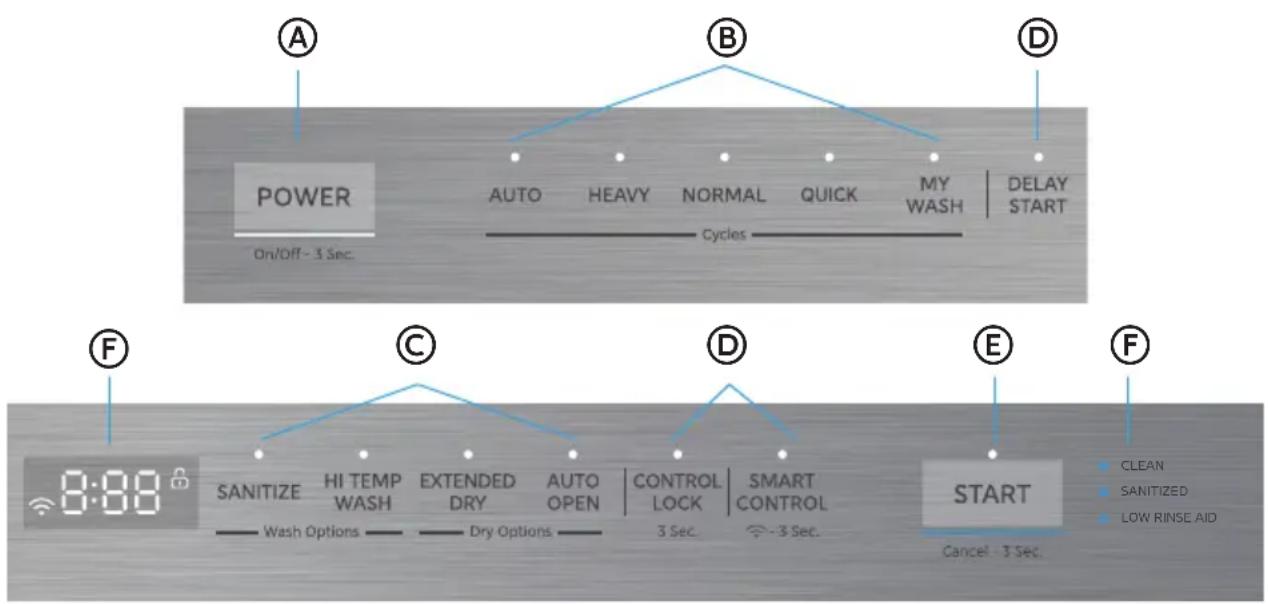
NOTE: When operating directly on the machine, the dishwasher controls can only be accessed and operated with the dishwasher door open.

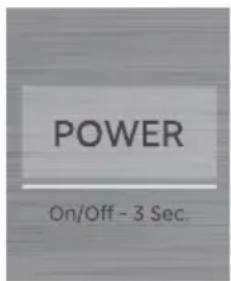
POWER
Press and hold POWER button to turn on/off the dishwasher.

CYCLES
- Press the control for the desired wash cycle. The control illuminates to indicate the cycle selected.
AUTO
Auto cycle uses sensors in the dishwasher to determine the soil level of the dish load, and then adjusts the wash cycle to optimize wash performance, water and energy usage.
HEAVY
Heavy cycle is for pots, pans, casseroles and dinnerware with dried-on or baked on soil.
NORMAL
Normal cycle with only the Auto Open option selected is recommended to completely wash and dry a full load of normally soiled dishes. The energy usage label is based on this cycle and option combination.
QUICK
Quick cycle is for lightly soiled or well-rinsed dish loads.
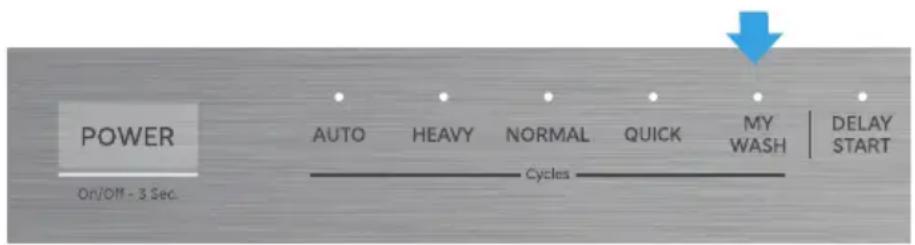
MY WASH
My Wash allows you to create a custom cycle on the SmartHome App that can be saved and loaded on to your dishwasher so that your favorite or specialty cycle can be right at your fingertips. The default MY WASH cycle is a NORMAL cycle with AUTO OPEN and EXTENDED DRY options selected.
To change My Wash, open the app and once connected, click on the more button next to cycles on the dishwasher status page. Click on My Wash and select Settings. You can now edit My Wash to set the cycle, options, and times you prefer.
Click Upload when complete, and the cycle will be saved in the app and uploaded to the My Wash button on your dishwasher.
For more information, please refer to "My Wash Function" in the APP SETUP AND OPERATION section on page 29.

OPTIONS
Options enhance the wash cycle. Some Options are available with only certain Wash Cycles. Refer to the "Cycle and Options Charts" section on Page 17 to see which Options are available for the wash cycle you selected.
- Press the desired Option and the selected Option(s) illuminate to indicate which option(s) have been selected.
SANITIZE
WARNING: Only sanitizing cycles have been designed to meet the requirements for soil removal and sanitization efficacy. There is no intention, either directly or indirectly, that all cycles on a certified machine have passed the sanitization performance test.
The sanitize option sanitizes dishes and glassware in accordance with NSF International NSF/ANSI Standard 184 for Residential Dishwashers. Certified residential dishwashers are not intended for use in licensed food establishments.
When the Sanitize option is selected, the water temperature will reach a maximum of 158°F (70°C).
The Sanitize Control illuminates to indicate when the wash cycle with the Sanitize option is completed. The light will turn off 60 seconds after the door is manually opened or when any button is pressed.
NOTE: It is possible that the water will not reach 158°F (70°C) in the Sanitize mode if the temperature of the incoming hot water does not meet the minimum requirement of 120°F (49°C).
HI TEMP WASH
Increases the main wash temperature to enhance cleaning performance for loads with tough, baked-on food.
AUTO OPEN
When the Auto Open option is selected, the door of your dishwasher will open at the end of the wash or wash/dry cycle to allow the hot, humid air to escape from the unit and accelerate the drying of dishes without use of additional energy.
EXTENDED DRY
When the Extended Dry option is selected, the heater will be extended to improve drying performance during the drying process.
NOTE: For optimal drying performance, select both EXTENDED DRY and AUTO OPEN. For even better results, use with rinse aid. The Extended Dry is not recommended for daily use.

ADDITIONAL FEATURES
SMART CONTROL
Using this feature, you can monitor and control the dishwasher remotely through a wireless connection.
For more information, refer to "Smart Control Function" in the APP SETUP AND OPERATION section on Page 29.

CONNECTING TO NETWORK
To connect the appliance to the network, press and hold the SMART CONTROL button for more than 3 seconds. After a brief beep, the Wi-Fi icon on the display will begin blinking slowly, indicating the unit is connecting to the app. Once the network connection is successful, the Wi-Fi icon will remain lit. If setting up for the first time, this icon will be blinking for 10 minutes.
For more details, refer to "How to Connect with the SmartHome App" in the APP SETUP AND OPERATION section on Page 29.
DELAY START
The Delay Start feature allows you to delay starting a selected wash cycle for up to 12 hours later. Press the DELAY START button until the desired delay time is shown on the display. After setting the delay time, press the start button and close the door within 4 seconds to start the cycle.
- Open the door and press the Delay Start button to set the time. Each press increases the delay by 1 hour, cycling from "H:01 → H:12 → H:00" repeatedly. Hold the button to rapidly cycle through.
- When the delay is set to "H:00," if no buttons are pressed for 3 seconds, the total time of the selected program will display. The Delay Start indicator will turn off.
CONTROL LOCK
The Control Lock feature locks all controls to avoid unintentionally changing the dishwasher cycle or starting the dishwasher. The LED next to Control Lock and the LOCK icon in the screen will illuminate to indicate the control panel is locked.
- Press and hold CONTROL LOCK button for 3 seconds to either activate or cancel the Control Lock option.
TURNING OFF SOUNDS
- Press and hold the AUTO and NORMAL buttons simultaneously for 3 seconds to deactivate or activate the control tones and the end-of-cycle tone.
E START
START - Press START once and close the door. The cycle will begin.
NOTE: You must close the door within 4 seconds of pressing START.
PAUSE - If you need to pause or cancel a dishwasher cycle in process:
- Open the door slightly and wait a few seconds until the wash action stops.
- Open the door fully to add or remove items.
- Press START, and then close the door within 4 seconds.
- The wash cycle will automatically resume.
IMPORTANT: Open the door slightly, and then wait for the spray arms and wash action to stop before opening the door completely. Doing this will help keep you from being splashed with hot water.
CANCEL - To cancel a cycle while the dishwasher is running, open the door slowly. Press and hold the START button for 3 seconds, then close the door. The drain pump will run for 60 seconds, and a 60-second countdown will be displayed on the screen.
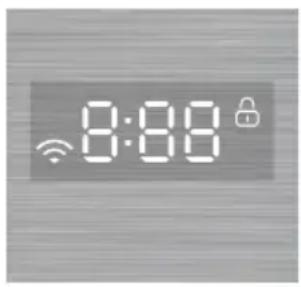
The display shows remaining time, delay time, error codes, and other important information. The screen will also show relevant details, like at the end of the cycle, it will display "END", or during Auto Open it will display "AO dry".

Connect
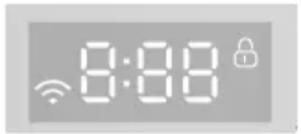
The icon " " indicates the status of the network connection:
- Quick Flash - Connecting to the router
- Slow Flash - Connecting to the server. Light on - Successfully connected to the network.
- Light off - Wireless module is powered off.

Control Lock
The Control Lock indicator "П”¦" illuminates to indicate the Control Panel is locked. Press and hold the CONTROL LOCK button for 3 seconds to unlock the control panel.
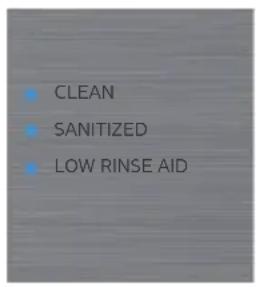
Clean
The CLEAN indicator illuminates when the cycle is completed. The light will remain on until the door is manually closed or a button is pressed while the door is open.
Sanitized
At the end of a full cycle, the Sanitized indicator light illuminates when the cycle uses the Sanitize option and the rinsing temperature reaches 158°F (70°C). The light will remain on until the door is manually closed or a button is pressed while the door is open.
Low Rinse Aid
The Low Rinse Aid indicator light turns on when the rinse aid level is low. Rinse aid should be added to the rinse aid dispenser. To add rinse aid, see Page 36.
LED INDICATOR LIGHTS
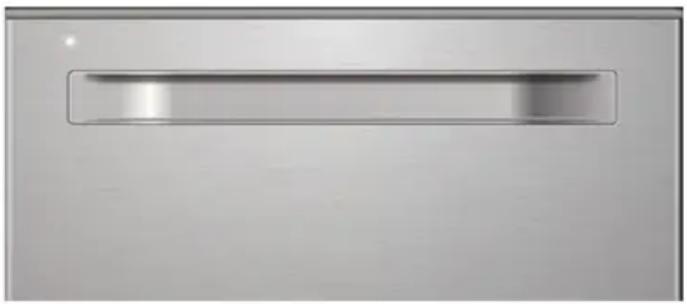
The LED light on the front of the door indicates the progress of the current cycle or alerts you to any malfunctions. It has two colors: blue and white. The indicator light status means:
- OFF: The dishwasher is either turned off or in standby mode.
- White Light (Solid): The dishwasher is running.
- White Light (Blinking): The cycle is paused.
- Blue Light (Solid): The cycle is complete. The light will remain on until the door is manually closed or a button is pressed while the door is open.
- Blue Light (Blinking): There is a malfunction critical to the dishwasher's function and safe operation. The control will shut down, and an error code will be displayed. Refer to "Error Codes" in the Troubleshooting section on Page 42.
CYCLE AND OPTION CHARTS
The Cycle and Option Charts below show the available options for each cycle. Cycle times are approximate and may vary based on the selected wash cycle and options.
| CYCLE | AUTO | NORMAL | HEAVY | QUICK | RINSE(□) |
| Water Usage [gal/(L)] | 2.91-5.68 gal (11-21.5)L | 2.67-5.57 gal (10.1-21.1)L | 5.57 gal 21.1L 15.3L | 4.04 gal 7.9L | 2.09 gal |
| Cycle Time (Mins) | 84-114 | 91-130 | 119 60 | | 17 |
| AVAILABLE OPTIONS | SANITIZE | ✓ | ✓ | ✓ | Not Available | Not Available |
| HI TEMP WASH | ✓ | ✓ | ✓ | Not Available | Not Available |
| EXTENDED DRY | ✓ | ✓ | ✓ | ✓ | Not Available |
| AUTO OPEN | ✓ | ✓ | ✓ | ✓ | Not Available |
NOTE:
- RINSE (□) can only be selected using My Wash. To set up, use the SmartHome App.
- A " " shows the option can be selected in each cycle.
- Added Options will add more time and use more water.
- Hot Water is necessary to activate the dishwasher detergent and dissolve fatty food residue. An automatic sensor checks the temperature of the incoming water. If the water is not hot enough, the cycle will be lengthened to heat the water for the main wash.
- The Smart Wash Sensor detects the soil level of the dishes and adjusts the cycle time based on soil level if additional time and/or water fills are needed. The NORMAL and AUTO cycles will automatically detect the soil level.
LOADING SUGGESTIONS
PREPARE DISHES
- Empty liquids from glasses and cups.
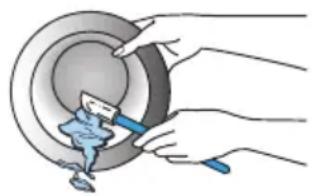
- Remove leftover food, bones, toothpicks and other hard items from the dishes and discard.
- It is not necessary to hand-rinse dishes before loading them into the dishwasher with the following exceptions:
- Foods such as mayonnaise, mustard, vinegar, lemon juice and tomato-based products may discolor stainless steel and plastics if allowed to remain on them for any length of time.
- Burnt-on foods should be loosened before loading the cookware into the dishwasher.
LOAD DISHES
- It is IMPORTANT for the water spray to reach all soiled surfaces.
- Load dishes so they are not stacked or overlapping if possible. For best drying results, water must be able to drain from all surfaces.
- Load heavy pots and pans carefully. Heavy items can dent the stainless steel interior of the door if they are dropped or bumped.
- Make sure pot lids and handles, pizza pans, cookie sheets, or other tall items do not interfere with the spray arm rotation.
- Make sure both the upper and lower spray arms are not blocked and move freely.
- Do not load tall items in the front of the lower rack that may block the detergent dispenser from opening.
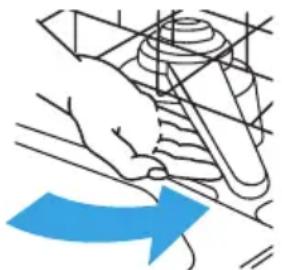
To avoid thumping/clattering noises during operation:
- Make sure lightweight items are secured in the racks.
- Make sure pot lids and handles, pizza pans, cookie sheets, etc., do not touch interior walls or interfere with the rotation of the spray arm.
- Load dishes so they do not touch one another.
NOTE: For built-in models, keep sink drain plugs closed during dishwasher operation to prevent noise transfer through drains.
UPPER RACK
The upper dishwasher rack is designed for cups, glasses, small plates, bowls and plastic items marked dishwasher safe.
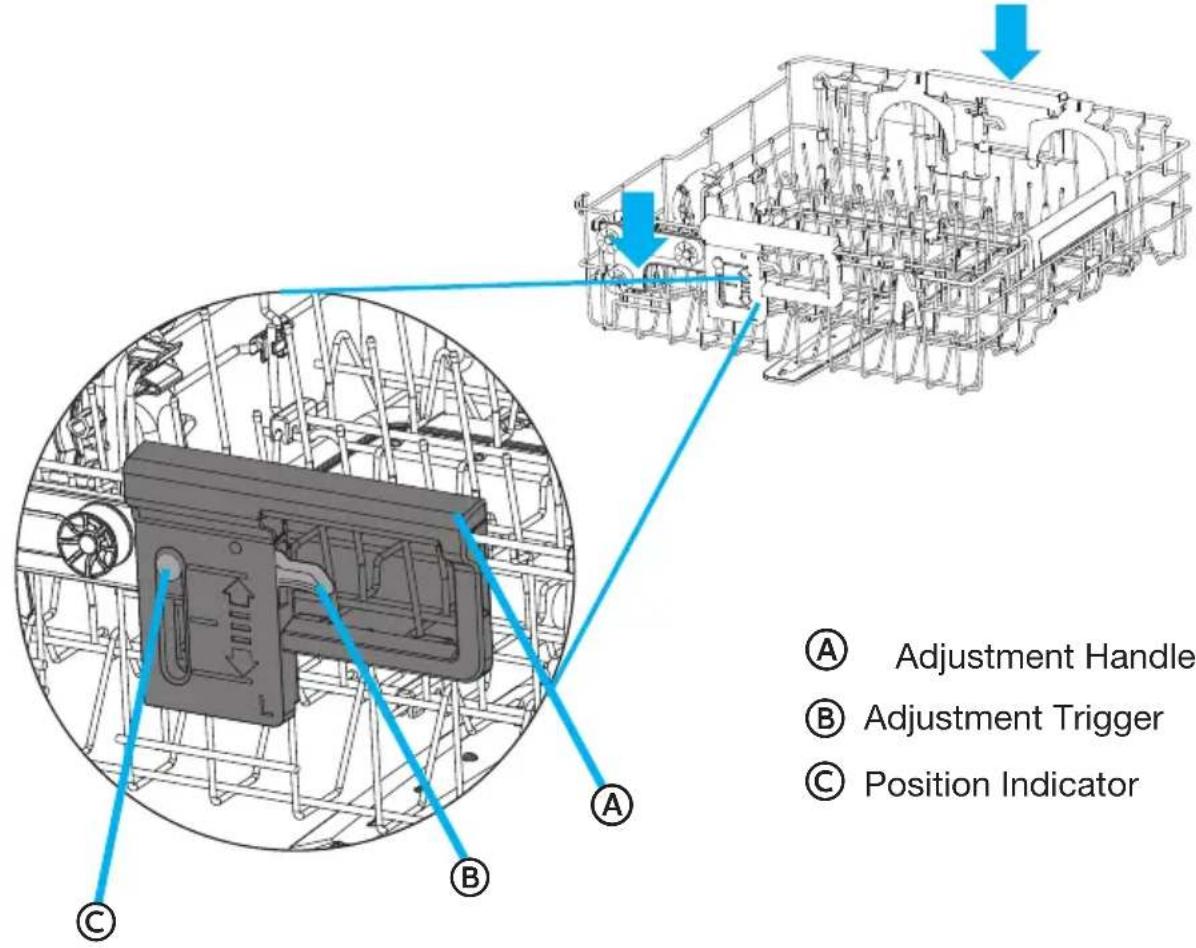
The upper rack can be easily adjusted up or down approximately 2 inches to accommodate taller items in either the top or bottom rack. The rack has three (3) adjustable positions for flexibility.
ADJUST UPPER RACK
IMPORTANT:
- Remove all items before adjusting the rack. The rack must be empty.
- Do NOT engage the Adjustment Trigger when raising the upper rack. Engaging the Adjustment Trigger will prevent the upper rack from engaging properly, and damage to dishware could result if the upper rack releases.
To Raise the Upper Rack:
- Grasp the Adjustment Handle on each side of the upper rack, then lift up until you hear a click on both sides. The rack has 3 adjustable positions for added flexibility.
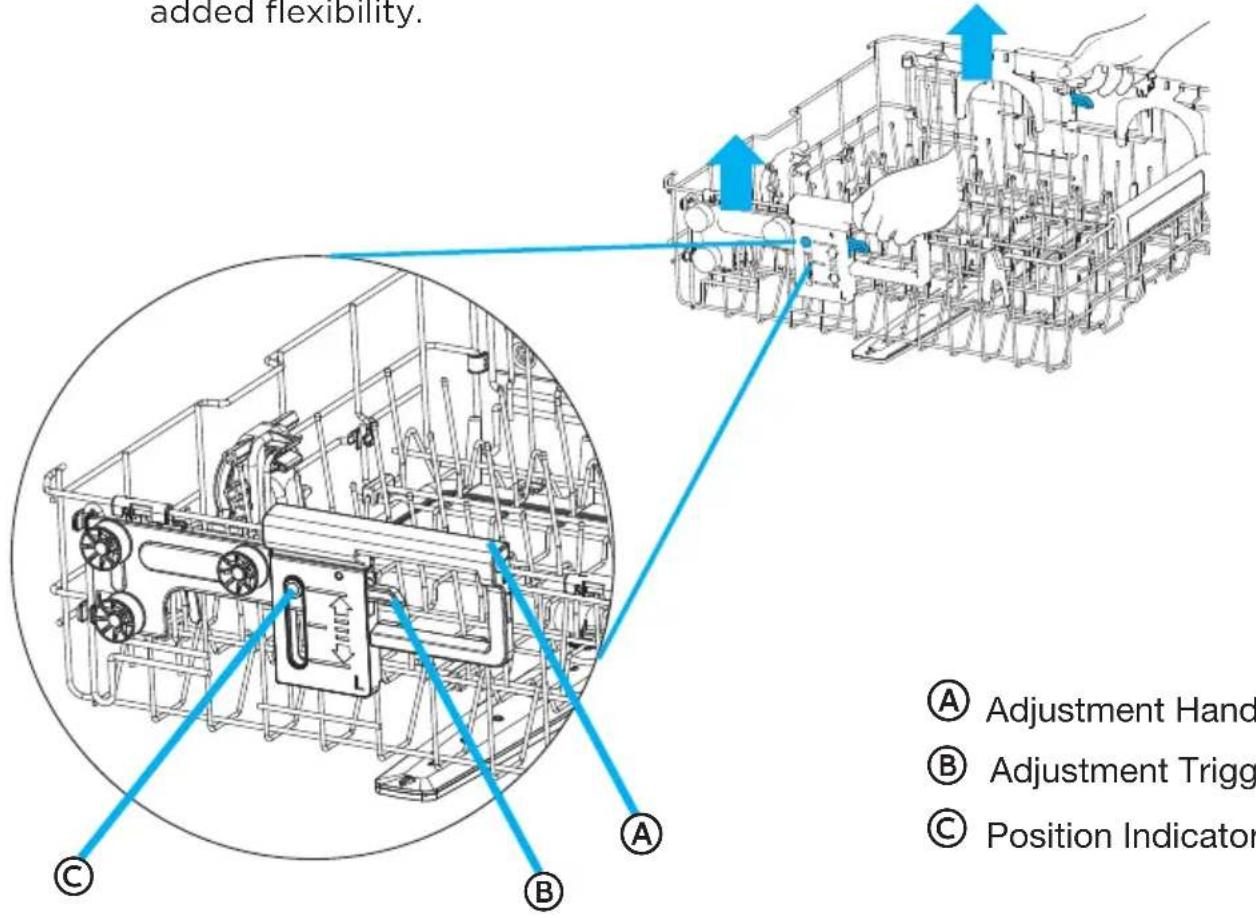
A Adjustment Handle B Adjustment Trigger C Position Indicator
To Lower the Upper Rack:
- Pull the Adjustment Trigger located on each side of the upper rack.
- Lower the upper rack until the rack is level in the desired position.
WINE GLASS HOLDER
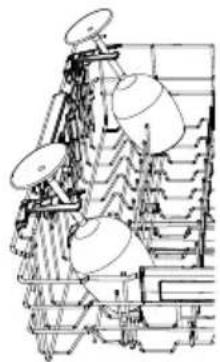
The upper rack includes two Wine Glass Holders on the left side to securely accommodate wine glasses.
To Engage Wine Glass Holder:
- Adjust the upper rack to the lowest position.
- Rotate the Wine Glass Holder to the upper position.
- Place the wine glass onto the holder. For larger wine glasses, you may need to lower the flip tines and place the glass at an angle.
IMPORTANT:
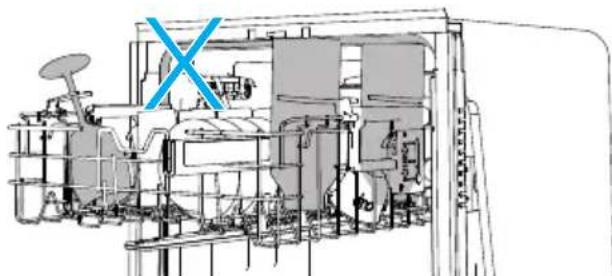
Do NOT recommend loading wine glasses when the rack is adjusted to the upper position, as it may interfere with the 3rd rack. Please lower the wine glass holder when the rack is in the upper position.
BOTTLE WASH
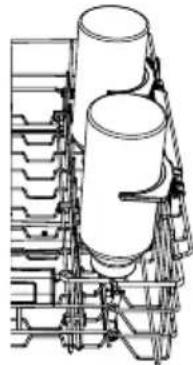
The upper rack includes a bottle wash feature and bottle holders on the right side to securely hold bottles. It supports washing up to 4 long bottles at the same time.
To Engage Bottle Wash:
- Adjust the upper rack to the lowest position.
- Lift the bottle/tumbler holder.
- Position the bottle so that the spray jet will spray into the bottle. To secure slender bottles, place them onto the holder to keep them in place.
IMPORTANT:
Make sure the bottles loaded in the upper rack do not interfere with the 3rd rack. It's not recommended to load bottles when the rack is adjusted to the upper position. Please lower the bottle holders when the rack is in the upper position.
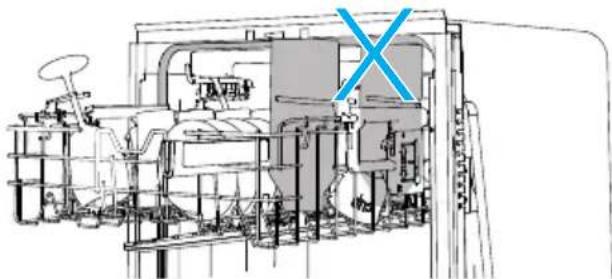
LOAD UPPER RACK
NOTE: The features on your dishwasher rack may vary from the drawings shown.
12 Place Settings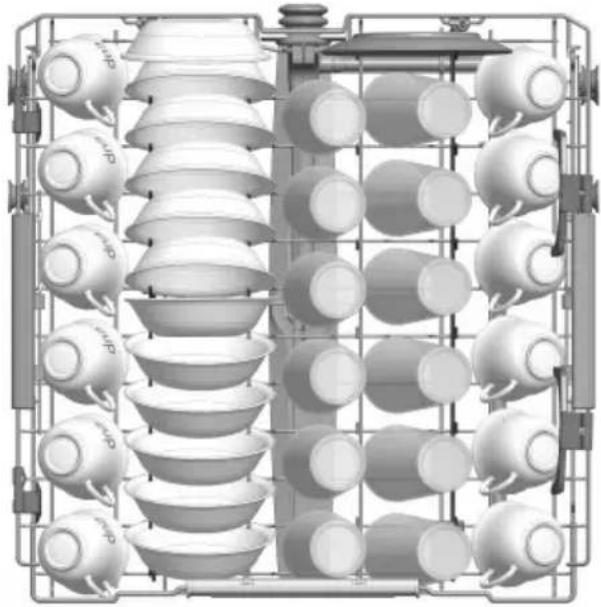
IMPORTANT: Make sure the items loaded in the upper rack do not interfere with the rotation of the middle spray arm located beneath the upper rack. Check for interference by turning spray arm by hand.
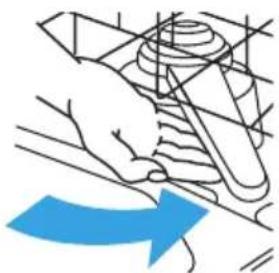
- Place items so that the open ends face downward for cleaning and draining.
- Place cups and glasses in the rows between tines. Placing them over the tines can lead to breakage, water spots, and poor cleaning.
- Small bowls, pans and other utensils can be placed in the top rack. Load bowls in the center section for best stability.
- China, crystal and other delicate items must not touch each other during dishwasher operation. Damage may occur.
- Load plastic items so the force of the spray does not move them during the cycle.
LOWER RACK
The lower rack is designed for plates, soup bowls, cookware and bakeware.
The adjustable upper rack allows you to load items up to 13" in height in the lower rack.
IMPORTANT: Items in the lower rack must be placed so that they do not interfere with the rotation of the spray arms, block the water inlet, or keep the water spray from reaching the detergent dispenser.
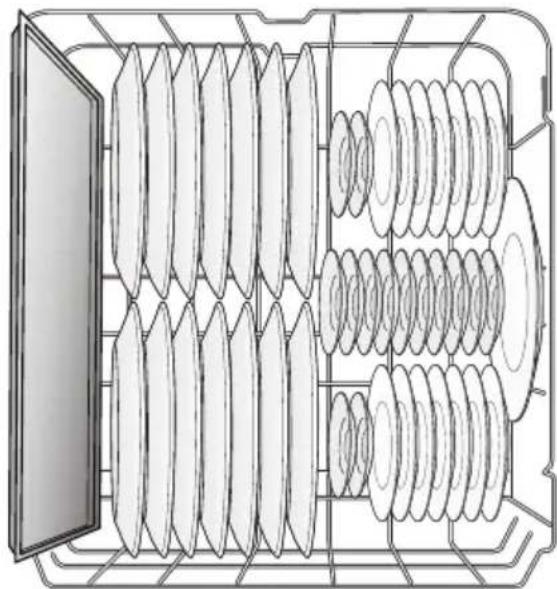
12 Place Settings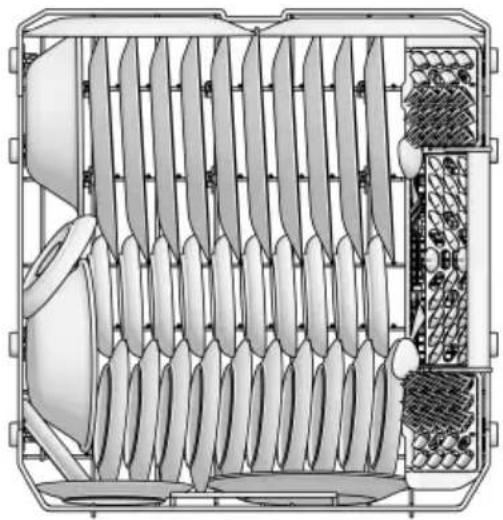
LOAD LOWER RACK
NOTE: The features on your dishwasher rack may vary from the drawings shown.
- Load small items in the lower rack only if they are secured in place.
- Load plates, soup bowls, etc. between tines. Do not nest bowls because the spray will not reach all surfaces.
- Do not load items between the bottom rack and the side of the dishwasher tub.
- Place heavily soiled cookware face down in the rack.
- Load cookie sheets, cake pans, and other large items along the sides and back of the lower rack.
ADJUSTABLE RACK TINES
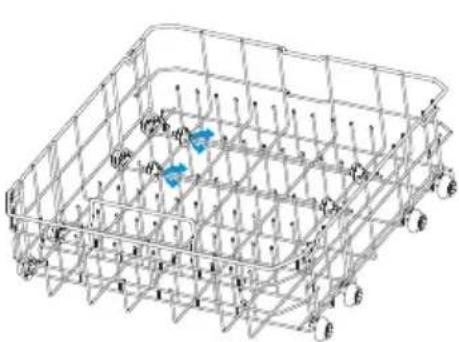
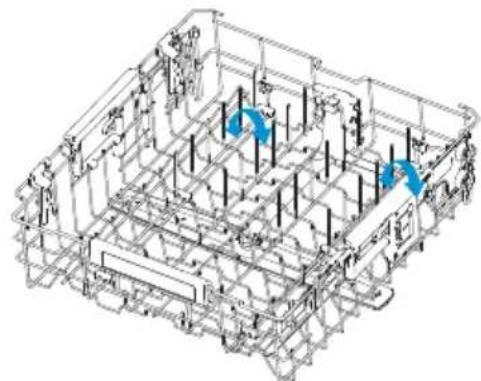
The fold-down tines in the lower rack and upper rack make it easier to load extra large or hard-to-fit items such as serving bowls and roasting pans. The tines may be left in the up position for normal use, or folded down for more flexible loading.
To Lay Tines Down: Grasp the tip of the tine, gently pull the tine out of the tine holder and rotate the tine to the side.
- Upper Rack - Push the tines to the center of the rack.
- Lower Rack - Push the tines to the back of the rack.
To Stand Tines Upright: Grasp and pull the tine until it is vertical and/or you feel it click into place. Verify the tines are secure before loading.
- Upper Rack - Push the tines to the side of the rack.
- Lower Rack - Pull the tines to the front of the rack.
LOADING SILVERWARE
NOTES:
- Do not load silver or silver-plated silverware with stainless steel. These metals can be damaged by contact with each other during washing.
THIRD RACK
The Third Rack can be used to load cutlery or other accessories such as spatulas or cooking spoons.
Silverware, knives, and utensils should be loaded in the Third Rack separate from each other in the appropriate positions so they do not nest together.
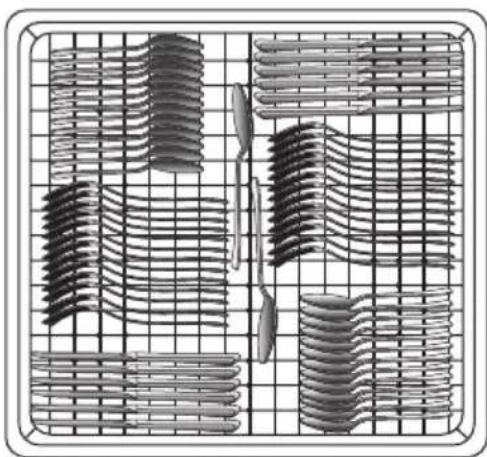
THREE-PIECE SILVERWARE BASKET
The silverware basket consists of three separate sections. For optimum loading flexibility, the center section of the basket can be used individually, joined with one or both side sections, or removed.
- Lift handle to remove the silverware basket and set the basket on a counter or table top.
- Lift up on each side section to disengage the center section from the keyhole slots in the side sections.
- Either replace the section(s) in the bottom rack and load the silverware, OR load the silverware while the section(s) are on the countertop and then replace the basket in the bottom rack.
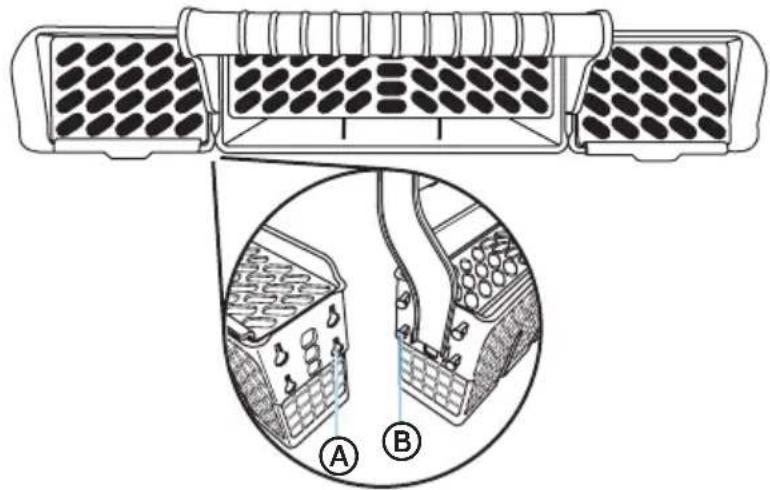
A Keyhole Slots
B Prongs
For Best Results:
- Load spoons and forks with handles down, knives tip down.
- Place small items such as baby bottle caps, jar lids, corncob holders, etc. in the section(s) with hinged cover(s). Close the cover to hold small items in place.
- Pay careful attention to ensure silverware is not nested. Water cannot reach nested items to clean them effectively.
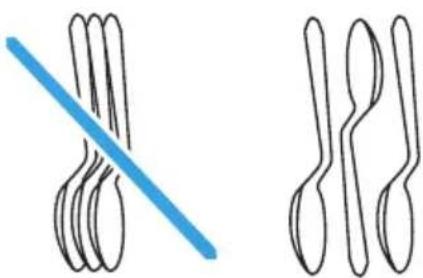
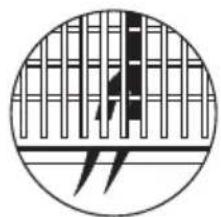
IMPORTANT: Always load sharp items (knives, skewers, etc.) pointing down. Be sure that nothing protrudes through bottom of the basket or rack that may block the wash arm.
RECOMMENDED LOAD PATTERNS
Upper Rack 8 place settings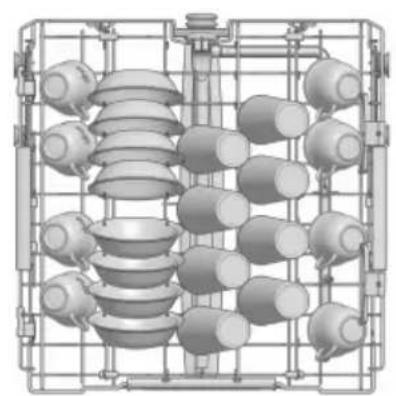
Lower Rack 8 place settings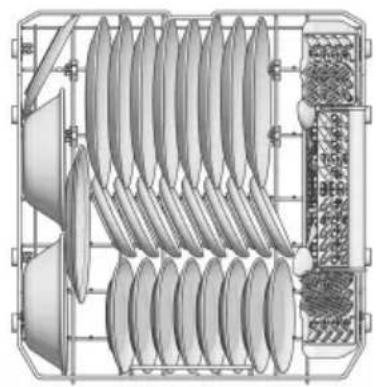
Upper Rack 10 place settings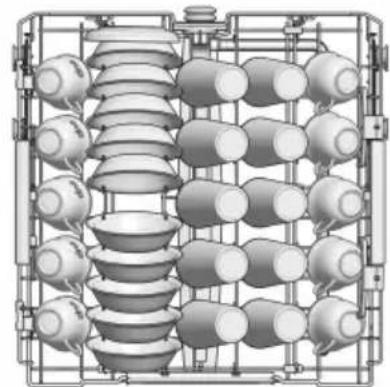
Lower Rack 10 place settings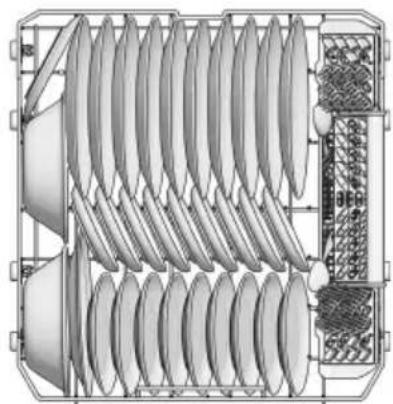
Upper Rack 12 place settings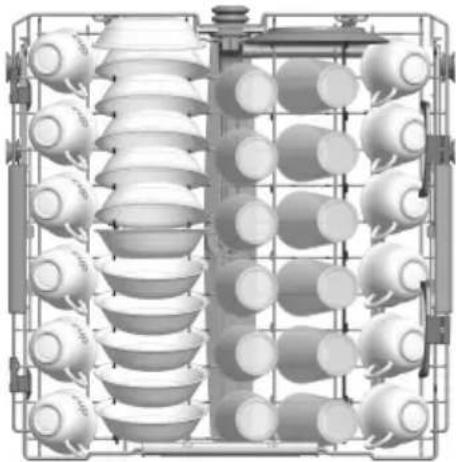
Lower Rack 12 place settings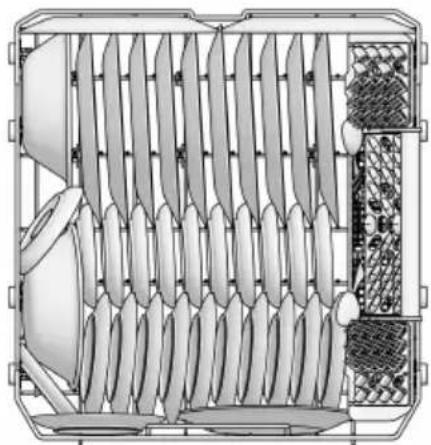
123465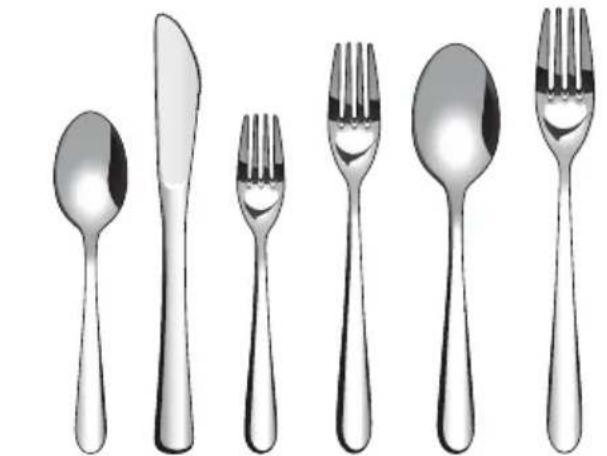
- Spoons
- Knives
- Salad Forks
- Forks
- Large Spoons
- Large Forks
8 Place Settings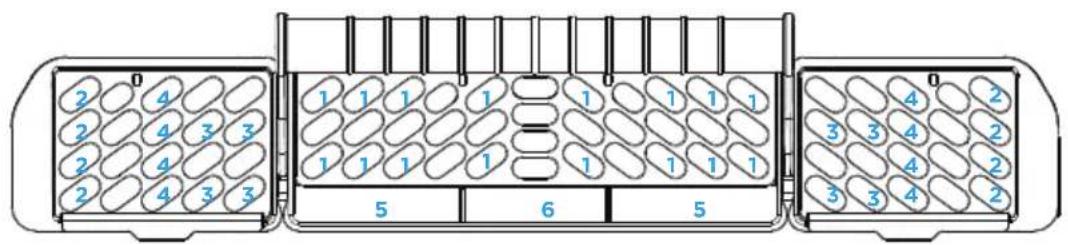
10 Place Settings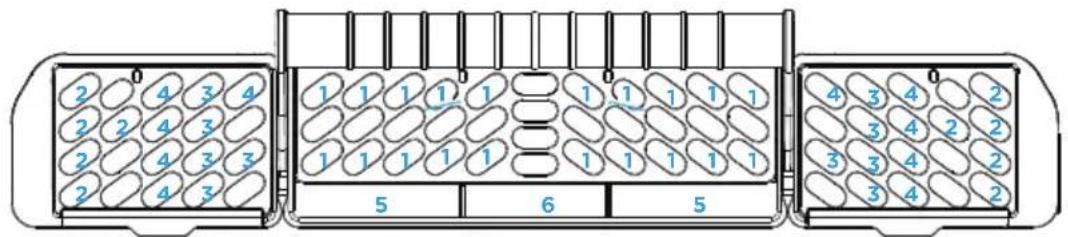
12 Place Settings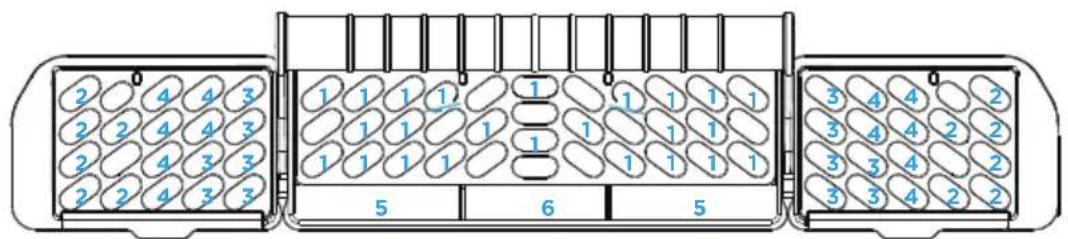
APP SETUP AND OPERATION
How to Connect with SmartHome App
Before you start, make sure that:
- Your smartphone is connected to your home network, and you know the password.
- You are near the appliance.
- The 2.4GHz wireless signal is enabled on your router.
- Bluetooth is turned on, and the app has permission to discover nearby smart devices.
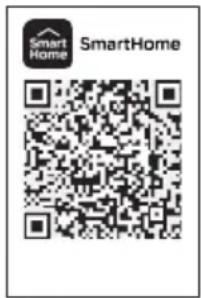
Download the SmartHome app
In the app store (Google Play Store or Apple App Store), search for SmartHome. Download and install it on your phone. You can also download the app by scanning the QR code below.


Register and log in
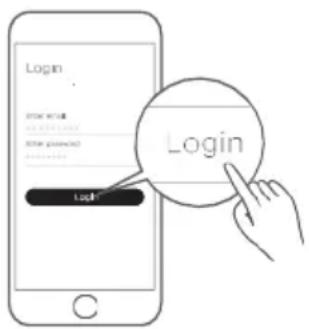
Open the SmartHome app and create a new account to get started (you can also register using a third-party account). If you already have an account, simply log in.
CONNECT YOUR DEVICES TO SMARTHOME
- Ensure your mobile phone is connected to a wireless network. If not, go to Settings and enable wireless and Bluetooth.
- Power on your dishwasher.
The icon "" indicator in the screen blinking will be activated automatically every time power on the dishwasher, which means the dishwasher is ready to connect to the network.
NOTE: The icon indicator light will turn off if no network connection operation is not completed after 10 minutes. You can press and hold the SMART CONTROL button for 3 seconds to activate it again.
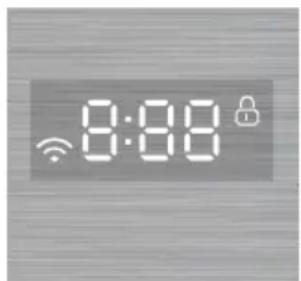
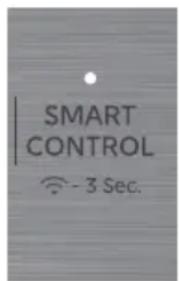
The icon "" Status Explanation:
- Quick Flash - Connecting to the router
- Slow Flash - Connecting to the server
- Light on - Successfully connected to the network
- Light off - Wireless module is powered off
- Open the SmartHome app on your phone.
- If a message saying "Smart devices discovered nearby" appears, click on it to add the device.
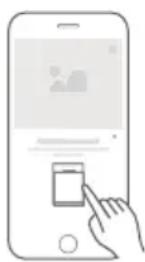
- If no message appears, tap the "+" icon on the page and select your device from the list of nearby available devices. If your device is not listed, add it manually by selecting the device category and model.
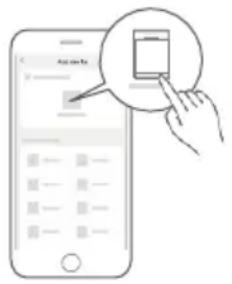
- Connect your device to the wireless network according to the instructions in the app. If the connection fails, please follow the troubleshooting instructions provided by the app and continue the process. Once the network connection is successful, the "" icon will remain solid on.
Turning Off the Network Connection (Temporarily):
With the door open and the machine powered off, press and hold the SMART CONTROL button for 10 seconds to disconnect the wireless module's power. To restore the network connection, press and hold the SMART CONTROL button for another 10 seconds, or turn the machine on and press the SMART CONTROL button for 3 seconds to reconnect to the network.
Canceling or Resetting the Network Connection:
With the door open and the power on, press and hold the SMART CONTROL button for 15 seconds. This will disconnect the network and reset it to factory default settings.
REMOTE START COMMISSIONING AND USAGE
Using this feature, you can monitor and control the dishwasher remotely through a wireless connection.
Remote Control Levels and Settings
The remote control feature has three levels: Off, One Time, and Permanent. These can only be adjusted through the app.
- Off: When set to Off in the app, you can only check the device status. Remote operation is disabled. The Smart Control indicator will be off.
- One Time: When One Time is selected, pressing the Smart Control button will turn on the indicator light, enabling remote control. However, remote control will be disabled if the door is opened or power down. To reactivate, press the Smart Control button and close the door.
- Permanent: When Permanent is selected, the Smart Control indicator will flash for 15 minutes. Within this time, press the Smart Control button on the dishwasher to permanently enable remote control without needing to press the button again for future operations.
Commissioning and Using Permanent Remote Start
By setting Permanent Remote Control, you can always control the device remotely through the app, and once the Permanent Remote Start is enabled, you won't need to repeatedly press the Smart Control button unless you decide to deactivate it. The Remote Start feature allows you to start a cycle from anywhere as long as the door is shut and the feature is enabled.
To enable remote control permanently,
- Connect the unit to the app.
- In the app, navigate to the Smart Control page.
- Select and enable Permanent Remote Start in the app.
- Once Permanent Remote Start is enabled, press the Smart Control button on the unit within 15 minutes of enabling.
- Permanent Remote Start is now active until turned off.
MY WASH SETUP AND USE
My Wash allows you to create a custom cycle on the SmartHome App that can be saved and loaded on to your dishwasher so that your favorite or specialty cycle can be right at your fingertips. The default MY WASH cycle is a NORMAL cycle with AUTO OPEN and EXTENDED DRY options selected.
To use My Wash,
- Click on the more button next to cycles on the dishwasher status page.
- Click on My Wash and select Settings. You can now edit My Wash to set the cycle, options, and bottle wash times you prefer.
- Click Upload when complete, and the cycle will be saved in the app and uploaded to the My Wash button on your dishwasher.
DISHWASHER USE
PROPER USE OF DETERGENT
IMPORTANT:
- Use automatic dish washing detergent only. Other detergents can produce excessive suds that can overflow out of the dishwasher and reduce washing performance. Dishwasher pods are recommended for optimal performance.
- Add detergent just before starting a cycle. Ensure the detergent is dry before adding detergent. Wet detergent can stick to the detergent cup and have difficulty washing out.
- Store detergent in a tightly closed container in a cool, dry place. Fresh automatic dishwasher detergent results in better cleaning.
DETERGENT DISPENSER
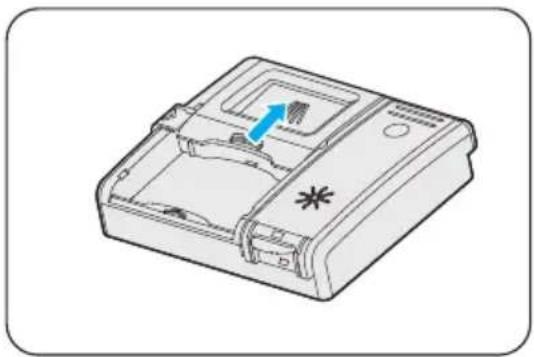
- If the dispenser cover is closed, open it by pressing the button. The cover will slide open.
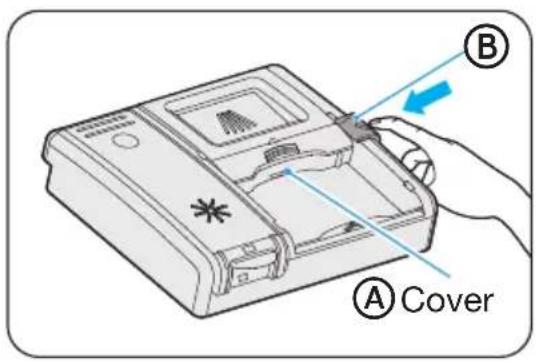
A Cover B Button
- Add the recommended amount of detergent to the detergent cup.
NOTE: If using dishwasher detergent in the tablet or pods form, place the detergent in the detergent cup, NOT in the tub to maximize the performance of the detergent.
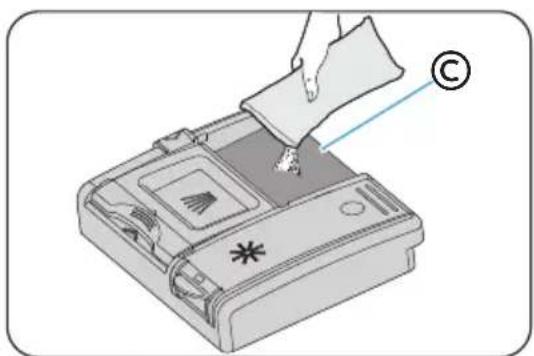

Detergent Cup
- Slide the dispenser cover to close it.
HOW MUCH DETERGENT TO USE
The amount of detergent to use depends on the soil level of your load, the type of detergent used and the hardness of your water.
- If you use too little detergent, dishes won't be clean.
- If you have soft water and use too much detergent, glassware can etch.
Water Hardness
Water hardness varies depending on your water source. For the best results, your dishwasher is designed to operate with water that has a hardness of no more than 7 grains per gallon. Test kits are available from all major appliance parts retail outlets. If your water has a hardness over 8 grains per gallon, you may consider installing a water softener or regularly use an additive to enhance the performance of your detergent.
PROPER USE OF RINSE AID
Rinse aid prevents water from forming droplets that can dry as spots or streaks. A small amount of the rinse aid is released into the final rinse water, which aids water to drain from the dishes.
Rinse aid greatly improves drying performance.
Your dishwasher is designed to use a LIQUID rinse aid. Do not use a solid or bar-type rinse aid.
RINSE AID DISPENSER
Under normal conditions, you will need to fill the rinse aid dispenser approximately once a month. Rinse aid is released through an opening in the dispenser. You do not need to wait until the dispenser is empty to refill it. Try to keep it full, but be careful not to overfill it.
- Open the dishwasher door.
- Flip rinse aid lid open.
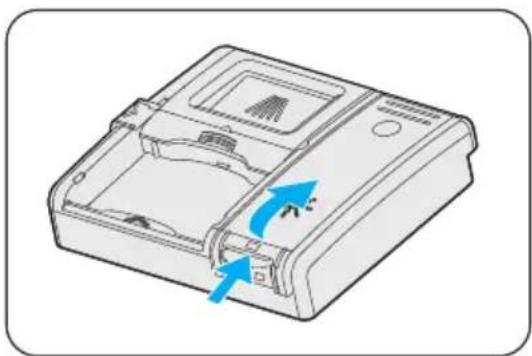
- Pour rinse aid into the dispenser until the sight window indicates FULL.
NOTE: Do NOT overfill. Excess rinse aid can overflow during the wash cycle.
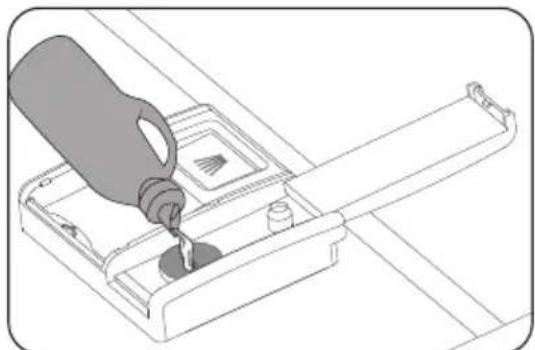
- You can adjust the amount of the rinse aid released during the rinse. The higher the number, the greater the amount of rinse aid released.
- If your glassware has spots following the cycle, increase the rinse aid setting. If your glassware has streaks after the cycle, decrease the rinse aid setting.
Rinse Aid Setting Method:
1) Open the door and turn on the dishwasher. 2) Within 60 seconds, press and hold the MY WASH button for 5 seconds to enter setting mode. The Low Rinse Aid indicator will flash, and the current level will display. The default level is d5, which is the highest level. 3) Press the MY WASH button to cycle through the levels:
d5 → d1 → d2 → d3 → d4 → d5.
4) If no buttons are pressed for 5 seconds or power off, the selected level is saved, and the system exits the settings mode.
- Clean up any spilled rinse aid with a damp cloth.
- Close the rinse aid door.
If you have doubts about washing a particular item, check with the dishware manufacturer to make sure it is dishwasher safe.
| Material | Dishwasher Safe | Comments |
| Aluminum Possible | High water temperature and detergents can affect the finish of anodized aluminum. Unfinished aluminum will be discolored. |
| Disposable Aluminum | No Do not wash disposable aluminum pans in the dishwasher. These might shift during washing and transfer black marks to dishes and other items. |
| Bottles and Cans | No | Wash disposable bottles and cans by hand. Labels attached with glue can loosen and clog the spray arms or pump, reducing washing performance. |
| Cast Iron No | Seasoning will be removed and iron will rust. |
| China / Stoneware | Yes | Always check manufacturer's recommendations before washing. Antique, hand-painted, or over-the-glaze patterns may fade, and gold leaf can discolor or fade. |
| Crystal Yes Check manufacturer's recommendations before washing. Some types of leaded crystal can etch with repeated washing. |
| Gold No Gold-colored flatware will discolor. |
| Glass Yes Milk glass yellows with repeated dishwasher washing. |
| Hollow- Handle Knives | No Handles of some knives are attached to the blade with adhesive that can loosen if washed in the dishwasher. |
| Pewter Brass, Bronze | No High water temperatures and detergent can discolor or pit the finish. |
| Disposable Plastics | No Cannot withstand high water temperatures and detergents. |
| Plastics Yes Always check manufacturer's recommendations before washing. Plastics vary in their capacity to withstand high temperatures and detergents. Load plastics in top rack only. |
| Stainless Steel | Yes Run a rinse cycle if not washing immediately. Prolonged contact with food containing salt, vinegar, milk products, or fruit juice can damage finish. |
| Safety
Precautions | Operating
Requirements | Parts and
Start Up
Features | Operating
Instructions | App Setup | Dishwasher | Dishwasher
Use | Dishwasher
Care | General
Troubleshooting |
| Material | Dishwasher Safe | Comments |
| Sterling Silver or Silver Plate | Yes Run a rinse cycle if not washing immediately. Prolonged contact with food containing salt, acid, or sulfide (eggs, mayonnaise, and seafood) can damage finish. | |
| Tin No Can rust. | |
| Wooden Ware | No Wash by hand. Always check manufacturer's instructions before washing. Untreated wood can warp, crack, or lose its finish. | |
DISHWASHER CARE
CLEANING
CLEANING THE EXTERIOR
- In most cases, regular use of a soft, damp cloth or sponge and a mild detergent is all that is necessary to clean outside of your dishwasher.
- Clean the stainless steel door and handle regularly with a clean, soft cloth to remove debris.
IMPORTANT: Do not use appliance wax, polish, bleach, or products containing chlorine to clean the stainless steel door.
- Gently clean the control panel with a clean, soft cloth.
CLEANING THE INTERIOR
- The tub is made of stainless steel and is designed to resist rust and corrosion if the dishwasher is scratched or dented.
- Hard water minerals can cause a white film to build up on the inside surfaces, especially just beneath the door area.
- Do not clean the dishwasher interior until it has cooled. Wear rubber gloves. Do not use any type of cleanser other than dishwasher detergent because it may cause foaming or create suds.
- Clean the steel inner door and tub with a clean, soft damp cloth.
- Using a damp cloth, clean around the door gasket regularly to remove food particles.
CLEANING THE FILTERS
Your dishwasher has a multi-filter system, which helps your dishwasher perform better using less water and less energy. The features on your dishwasher may vary from the drawings shown below.
Check and clean the filters regularly for best performance.
- Remove the lower dishwasher rack.
- Rotate the Cylinder Filter counterclockwise a quarter turn and lift up to remove.
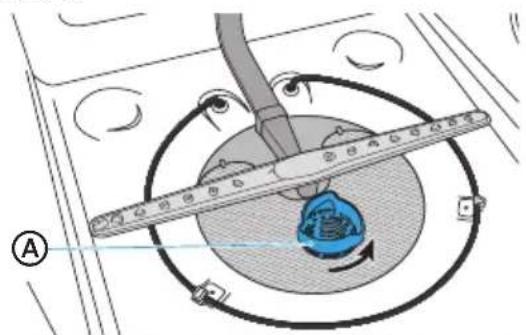
A Cylinder Filter
- Empty the Cylinder Filter and rinse it under running water.
- Remove the Fine Filter.
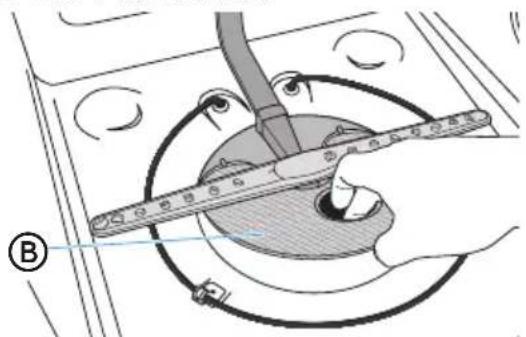
B Fine Filter
- Remove the Micro Filter from the bottom of the tub.
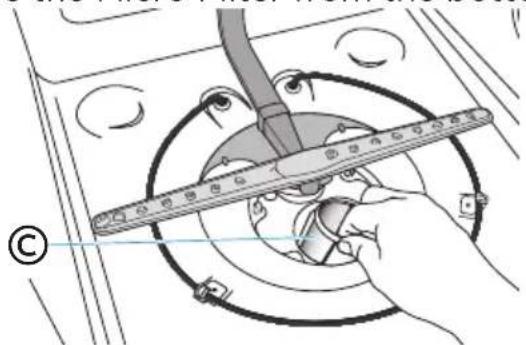
Micro Filter
- Inspect both the Fine Filter and the Micro Filter for debris, and then clean them by holding the filters under slow running warm water.
NOTE: A stiff, plastic bristle brush may be needed to remove some debris.
- Reinstall the filters in reverse order making sure the Cylinder Filter locks into place.
DRAIN AIR GAP
Check the drain air gap anytime your dishwasher isn't draining well. Some state or local plumbing codes require the addition of a drain air gap between a built-in dishwasher and the home drain system. If a drain is clogged, a drain air gap prevents water from backing up into the dishwasher.
The drain air gap is usually located on top of the sink or countertop near the dishwasher.
NOTE: The drain air gap is an external plumbing device that is not part of your dishwasher. The warranty provided with your dishwasher does not cover service costs directly associated with the cleaning or repair of the external drain air gap.
To Clean the Drain Air Gap:
Clean the drain air gap periodically to ensure proper drainage of your dishwasher. Follow the cleaning instructions provided by the manufacturer.
With most types:
- Turn off the dishwasher.
- Lift off the metal cover, and then unscrew the plastic cap.
- Clean the plastic cap with a toothpick.
STORING
STORING FOR THE SUMMER
Protect your dishwasher during the summer months by turning off the water supply and power supply to the dishwasher.
WINTERIZING YOUR DISHWASHER
Protect your dishwasher and home against water damage caused by freezing water lines. If your dishwasher is left in a seasonal dwelling or could be exposed to near freezing temperatures, have your dishwasher winterized by authorized service personnel.
Prepare for Storage:
- Turn off electrical power to the dishwasher.
- Turn off the water supply.
- Place a pan under the inlet valve, and then disconnect the water line from the inlet valve.
- Disconnect the drain line from the pump and drain water into the pan.
Prepare for Use:
- Reconnect the water, drain and electrical power supply.
- Turn on water and electrical power supply.
- Fill detergent cup and run the dishwasher through a heated wash cycle.
- Check connections for leaks.
GENERAL TROUBLESHOOTING
DISHWASHER NOT OPERATING PROPERLY
| PROBLEM POSSIBLE CAUSE SOLUTION |
| Dishwasher does not run or stops during a cycle | There is no power to the dishwasher. | Replace the fuse, reset the circuit breaker, reset the GFCI, and ensure the dedicated dishwasher switch is turned on, if your home has one. |
| The door is not closed tightly and latched. | Close and latch the door. |
| Most cycles pause for 5 minutes near the start of a cycle to let the dishes soak. | This is normal, and reduces the energy required to clean the dishes. |
| Certain cycles may repeatedly sound paused during the cycle. | This is normal. |
| The Delay feature is selected. | To reset, see “Options” in the Controls section in Page 12. |
| Dishwasher does not start a cycle | Control Lock feature is activated. | Deactivate Control Lock. See “Additional Features” in the Controls section in Page 13. |
| Door not closed within 4 seconds of START button being pressed | Close door within 4 seconds of pressing START. |
| Dishwasher will not fil | The water shutoff valve is not turned on. | Turn on the water shutoff valve. |
| The door is not closed tightly and latched. | Close and latch the door. |
| Water pressure is too low. | Verify a minimum of 20 psi water pressure is maintained during the filling operation. |
| Dishwasher seems to run too long | The water supplied to the dishwasher is not hot enough. | The dishwasher will add time to your cycle to heat water if your inlet water temp is too low. Run the water in the adjacent sink until it gets hot before turning on the dishwasher. |
| The Sanitize option is selected. | The cycle time increases to heat the water to the correct temperature for sanitizing. |
| The cycle time will vary depending on soil level. | When heavy soil is detected, the Normal and Auto cycles cycles will automatically increase the cycle time. |
| Water remains in the dishwasher | The cycle is not complete or it is in a paused state. | The water will drain when the cycle is completed. |
| NOTE: A small amount of clean water around the outlet in the bottom of the tub is normal. It keeps the seal lubricated. | The drain hose is kinked. Straighten the drain hose. The knockout plug is still in the garbage disposal. Drain hose is connected to the garbage disposal, and the garbage disposal is not empty. Drain is clogged. Filter is not installed correctly and soil has breached and clogged the drain pump. | Remove the knockout plug. Run the garbage disposal until it is empty. Check the air gap and drain pipes for a clog. |
| Detergent remains in the dispenser | The cycle has not completed. The detergent is damp or has clumped or hardened. An item was blocking the dispenser. The spray arm is blocked. Load the dishes in a manner that does not block the spray arm from rotating freely. The pod was used in a cycle that was not long enough to dissolve it properly, such as the Rinse cycle. | Close the door and press START to complete cycle. Remove detergent and replace with fresh dry dishwasher detergent. Remove item. Remove detergent and replace with fresh dry dishwasher detergent. |
| Grinding, grating, crunching or buzzing sounds | A hard object or powder detergent granules have entered the wash or drain pump. | IMPORTANT: Clear glass is hard to see in water. and could result in a cut wound.
Using care, remove the hard object. If the noise was caused by detergent granules, the noise should stop once the detergent is ground up.
Objects could be in or below filters.
NOTE: If the noise persists after a complete cycle, call for service. |
| Beeps | Indicates the wash cycle is completed, or user has interacted with the dishwasher or app.
NOTE: A rapid beep indicates an error condition. | This is normal.
See “Error Codes” in your user manual for further direction in Page 47. |
| Suds in the Tub | Used wrong type of detergent, or use too much detergent. | Use only detergent approved for automatic dishwashers. |
| Dishwasher Leaks | Excessive suds caused by using improper detergent.
Dishwasher is not level.
Water/drain connection is leaking.
Door gasket is breached or has come out. | Use only detergent approved for automatic dishwashers.
Level the Dishwasher. See Installation Instructions.
Ensure the gasket is properly aligned in its groove, and replace it if damaged. |
| Rinse Aid light is on | The Rinse Aid level is low. Add liquid Rinse Aid. |
DISHES ARE NOT COMPLETELY CLEAN
| PROBLEM | POSSIBLE CAUSE | SOLUTION |
| Food residue remains on the dishes | Dishwasher is not loaded correctly. | See "Dishwasher Loading" in Page 18. |
| The wrong wash cycle for the dish load was selected. | Select the wash cycle based on the most difficult soil in the dishwasher load. If you have some items with heavier soils, use a heavier washing cycle. |
| Temperaturelow. | For best results, the temperature of the incoming water should be a minimum of 120°F (49°C). |
| Used incorrect amount of detergent. | Use a minimum of 1 Tbsp. (15 g) detergent per load. Heavy soil and/or hard water generally requires additional detergent. |
| PROBLEM POSSIBLE CAUSE SOLUTION |
| Food residue remains on the dishes (cont.) | Detergent is too old. | Detergent must be fresh to be effective. Store detergent in a cool, dry area. |
| Detergent is caked in the dispenser. | Do not allow detergent to sit for several hours in a wet dispenser. Clean dispenser and refill with fresh, dry detergent. |
| Foreign objects clogging the pump or spray arms. | Check pump and spray arm for foreign objects and remove the them. |
| Water level is too low. | Water pressure should be 20 to 80 psi (138 to 552 kPa) for proper dishwasher fill. A booster pump on the water supply can be added if pressure is too low. |
| High suds are slowing the wash arm. | Use only detergent recommended for the dishwasher. Do not use soap or laundry detergents. |
| Filter is not installed correctly | Check that all components of the filter are correctly installed, so that no soil can breach the filters and redeposit on dishware |
| Dishes are placed too closely together or overlapping. | For best results, follow the manufacturer's recommended loading guidelines. |
SPOTS AND STAINS ON DISHES
| PROBLEM POSSIBLE CAUSE SOLUTION |
| Spotting and filming on dishe | Rinse Aid dispenser is empty. Hard water. High mineral content in your water | Add a liquid rinse aid to the dispenser. Use a rinse aid and keep the dispenser filled to help eliminate spotting and filming. Increase setting on Rinse aid dispenser 1 number per cycle until spotting is eliminated. NOTE: If your water hardness is 13 grains (223 ppm) or above, it is strongly recommended that you install a home water softener. |
| Water temperature is too low. Did not use enough detergent. | For best results, water should be a minimum 120°F (49°C) as it enters the dishwasher. Use a minimum of 1 Tbsp. (15 g) of detergent per load. Heavy soil and/or hard water generally require extra detergent. |
| Spotting and filming on dishes (cont.) | Detergent is too old. Home water pressure is too low to fill dishwasher properly. | Detergent must be fresh and dry to be effective. Store detergent in a cool, dry area. Water pressure to the home should be 20 to 80 psi (138 to 552 kPa) for proper dishwasher fill. A booster pump on the water supply can be added if pressure is too low. |
| Silica film or etching | Using too much detergent The inlet water temperature exceeds 150°F (65°C). | If you have soft water use less detergent, but do not use less than 1 Tbsp. (15 g) per load. Lower the incoming water temperature. |
| Black or gray marks on dishes | Aluminum items rubbing dishes during washing. Disposable aluminum items can break down in the dishwasher and cause marking. | Hand wash aluminum items. Remove aluminum markings by using a mild abrasive cleaner. |
| Orange stains on plastic dishes or dishwasher interior | Large amounts of tomato-based foods on dishes placed in the dishwasher. | Use a stain removal product to remove stains from your dishwasher. Stains will not affect dishwasher performance. |
DISHES DO NOT DRY COMPLETELY
| PROBLEM POSSIBLE CAUSE SOLUTION |
| Dishes are not completely dry | Dishes are not loaded properly to allow water drainage. | Do not overload dishwasher. Place glasses and cups in the rack so that the bottom surface is slanted to allow water to run off. |
| NOTE: Plastics often need towel drying. | Rinse Aid not used or dispenser is empty. | Use a liquid rinse aid to speed drying and keep the dispenser full. |
| Did not use any dry options. | Use Auto Open and/or Extended Dry to improve dry performance. |
DISHES ARE DAMAGED DURING A CYCLE
| PROBLEM POSSIBLE CAUSE SOLUTION |
| Dishes are chipped
NOTE: Some types of china and glassware might be too delicate for automatic dish washing. Wash by hand. | Dishes not loaded properly.
Moving the rack in or out of the dishwasher too quickly. | Load the dishes and glasses so they are stable and will not strike together from washing action.
Minimize chipping by moving the rack in and out slowly. |
ERROR CODES
Error codes will display on the dishwasher control and may be accompanied by a series of beeps to alert users of an error.
| Code Meanings Cause Solution | | |
| E1 | Not enough water flow in allotted time | Low or No water flow. | Confirm water is turned on to the dishwasher. Verify water pressure. NOTE: Water supply must maintain water pressure between 20 and 80 psi for sufficient flow. |
| E4 | Overflow or leak sensor activated | Too much water in the tub or a leak. | First, turn off water to the dishwasher. Check filter system for blockage. IMPORTANT: Watch for broken glass in the filter. If there is no water in the tub, contact Customer Service. |
| Ed | Communication exception | When the main or control board loses signal for more than 20 seconds, the "Ed" error will display. | Contact Customer Service. Telephone: 1-866-646-4332. |
2 YEAR LIMITED WARRANTY
This warranty is provided to the original purchaser at retail (the "Purchaser" or "you") by Midea America Corp. ("Midea" or "we"), which warrants all parts of this Product, as described below. Midea warrants this Product to the Purchaser for personal, family or household use. This warranty covers performance and quality issues in materials and workmanship that appear under normal use and maintenance appearing within two years from the date of delivery. This warranty gives you specific rights, and you may also have other rights that vary from state to state.
WARRANTY LIMITATIONS
This warranty is given only to the original purchaser at retail in either the United States or Canada and may not be transferred to any subsequent buyer. This warranty does not apply to purchasers of our products for use or resale in a business; a separate commercial warranty may protect those purchasers.
This warranty does not cover any Product failure caused by:
(a) Abuse, damage or use of the Product in violation of the Product instructions. (b) Modification to any Product or part. (c) Failure to maintain the Product or part as described in accordance with the Product instructions. (d) Faulty installation or application. (e) Use of parts or accessories not compatible with this Product. (f) Floods, fires, winds, lightning, accidents, corrosive atmosphere, or other conditions beyond Midea's control. (g) Interruption in electrical service or inadequate electrical service. (h) Replacement of fuses and replacement or resetting of circuit breakers. (i) Frozen or broken water pipes, water damage, moisture intrusion, mold or other biological growth. (j) The use, combination or linking of the Product to other products, processes or materials not provided by Midea.
WARRANTY REMEDY
If any quality or performance issue covered by this warranty is discovered during the warranty period, we will, at our option, repair or replace any such Product. This warranty is limited to Product repair or replacement by an authorized Midea servicer or dealer and does not cover any shipping cost, labor cost, customs duties, inland logistics cost, or cost of service, including any diagnostics, removal, transportation, or reinstallation costs. If we ask, you must return the Product to us.
WARRANTY DISCLAIMER; EXCLUSION OF DAMAGES
This is the only express warranty to consumers that we offer on our Products. ANY IMPLIED WARRANTY BY MIDEA, INCLUDING BUT NOT LIMITED TO WARRANTIES OF MERCHANTABILITY AND FITNESS FOR PARTICULAR PURPOSE, ARE LIMITED TO THE DURATION OF THIS EXPRESS WARRANTY. Some states and provinces do not allow the exclusion of express warranties and/or limitations on how long an implied warranty lasts, so the above exclusion and/or limitation may not apply to you.
THE REMEDY DESCRIBED ABOVE IS THE ONLY ONE THAT WE WILL PROVIDE, EITHER UNDER THIS WARRANTY OR UNDER ANY WARRANTY ARISING BY OPERATION OF LAW. WE WILL NOT BE RESPONSIBLE FOR ANY CONSEQUENTIAL OR INCIDENTAL DAMAGES ARISING FROM THE BREACH OF THIS WARRANTY OR ANY OTHER WARRANTY, WHETHER EXPRESS OR IMPLIED, NEGLIGENCE OR OTHER TORT, OR ON ANY STRICT LIABILITY THEORY, INCLUDING BUT NOT
LIMITED TO LOST PROFITS. Some states do not allow the exclusion or limitation of incidental or consequential damages, so the above exclusion may not apply to you.
WARRANTY CLAIMS PROCESS
For more information or to make a warranty claim, please visit:
https://www.midea.com/us/support
Or contact us at:
Telephone: 1-866-646-4332
Email: customerserviceusa@midea.com
You must have your bill of sale, delivery slip, or appropriate proof of purchase to submit a warranty claim. The date of delivery establishes the warranty period, should service be required.
DISPUTE RESOLUTION
ARBITRATION CLAUSE. IMPORTANT. PLEASE REVIEW THIS ARBITRATION CLAUSE. IT AFFECTS YOUR LEGAL RIGHTS.
(a) Parties: This arbitration clause (this "Arbitration Clause") affects your rights against Midea and any of its affiliates or employees or agents, successors, or assigns, all of whom together are referred to below as "we" or "us" for ease of reference.
(b) ARBITRATION REQUIREMENT: EXCEPT AS STATED BELOW, ANY DISPUTE BETWEEN YOU AND ANY OF US SHALL BE DECIDED BY NEUTRAL, BINDING ARBITRATION RATHER THAN IN COURT OR BY JURY TRIAL. "Dispute" will be given the broadest possible meaning allowable by law. It includes any dispute, claim, or controversy arising from or relating to your purchase of this Product, any warranty upon the Product, or the Product's condition. It also includes determination of the scope or applicability of this Arbitration Clause. The arbitration requirement applies to claims in contract and tort, pursuant to statute, or otherwise.
(c) CLASS-ARBITRATION WAIVER: ARBITRATION IS HANDLED ON AN INDIVIDUAL BASIS. IF A DISPUTE IS ARBITRATED, YOU AND WE EXPRESSLY WAIVE ANY RIGHT TO PARTICIPATE AS A CLASS REPRESENTATIVE OR CLASS MEMBER ON ANY CLASS CLAIM YOU MAY HAVE AGAINST US OR WE AGAINST YOU, OR AS A PRIVATE ATTORNEY GENERAL OR IN ANY OTHER REPRESENTATIVE CAPACITY, TO THE MAXIMUM EXTENT PERMITTED BY LAW. YOU AND WE ALSO WAIVE ANY RIGHT TO CLASS ARBITRATION OR ANY CONSOLIDATION OF INDIVIDUAL ARBITRATIONS.
(d) Discovery and Other Rights: Discovery and rights to appeal in arbitration are generally more limited than in a lawsuit. This applies to both you and us. Other rights that you or we would have in court may not be available in arbitration. Please read this Arbitration Clause and consult the rules of the arbitration organizations listed below for more information.
(e) SMALL CLAIMS COURT OPTION: YOU MAY CHOOSE TO LITIGATE ANY DISPUTE BETWEEN YOU AND ANY OF US IN SMALL CLAIMS COURT, RATHER THAN IN ARBITRATION, IF THE DISPUTE MEETS ALL REQUIREMENTS TO BE HEARD IN SMALL CLAIMS COURT.
(f) Governing Law: For residents of the United States, the procedures and effect of the arbitration will be governed by the Federal Arbitration Act (9 U.S.C. § 1 et seq.) rather than by state law concerning arbitration. For residents of Canada, the procedures and effect of the arbitration will be governed by the applicable arbitration law of the province in which you purchased your Product. The law governing your substantive warranty rights and other claims will be the law of the state or province in which you purchased your Product. Any court having jurisdiction may enter judgment on the arbitration award.
(g) Rules of the Arbitration: If the amount in controversy is less than 250,000, the arbitration will be decided by a single arbitrator. If the amount in controversy is greater than or equal to250,000, the arbitration will be decided by a panel of three arbitrators. The arbitrator(s) will be chosen pursuant to the rules of the administering arbitration organization. United States residents may choose JAMS (1920 Main Street, Ste. 300, Irvine, CA 92614, www.jamsadr.com), or, subject to our approval, any other arbitration organization. In addition, Canadian residents may choose the ADR Institute of Canada (234 Eglinton Ave. East, Suite 405, Toronto, Ontario, M4P 1K5, www.amic.org). These organizations' rules can be obtained by contacting the organization or visiting its website. If the chosen arbitration organization's rules conflict with this Arbitration Clause, the provisions of this Arbitration Clause control. The award of the arbitrator(s) shall be final and binding on all parties. (h) Location of the Arbitration Hearing: Unless applicable law provides otherwise, the arbitration hearing for United States residents will be conducted in the federal judicial district in which you reside (in your hometown area) or, for Canadian residents, in the province in which you reside, and, if you choose, will be in-person. (i) Costs of the Arbitration: Each party is responsible for its own attorney, expert, and other costs and fees unless applicable law requires otherwise. Notwithstanding the preceding sentence, and unless applicable law requires otherwise, if you are a consumer under the JAMS rules or the rules of another agreed upon arbitration administrator, Midea will pay or reimburse you for all reasonable fees or costs to the extent required by law or the applicable arbitration administrator's rules. Whether or not required by law or such rules, if you prevail at arbitration on any claim against Midea, Midea will reimburse you for any reasonable fees paid to the arbitration administrator in connection with the arbitration proceedings. Under no circumstances will Midea seek from you payment or reimbursement of any reasonable fees that Midea incurs in connection with the arbitration. If you are required to advance any fees or costs to JAMS or other agreed upon arbitration administrator, but you ask Midea to do so in your stead, Midea will consider and respond to your request. (j) Survival and Enforceability of this Arbitration Clause: This Arbitration Clause shall survive the expiration or termination, or any transfer, of the warranty on your Product. If any part of this Arbitration Clause, except waivers of class-action rights, is found to be unenforceable for any reason, the remainder of this clause and the warranty shall remain enforceable. If, in a case in which class-action allegations have been made, the waiver of class-action rights under this warranty is found to be unenforceable with respect to any part of the dispute, the parts of the dispute as to which the waiver of class-action rights have been found unenforceable will be severed and will proceed in court without reference or application of this Arbitration Clause. Any remaining parts will proceed in arbitration.
QUEBEC RESIDENTS
The arbitration provisions of this warranty shall not apply to residents of Quebec.
Federal Communications Commission (FCC) Compliance Statement for USA
This equipment has been tested and found to comply with the limits for a Class B digital device, pursuant to Part 15 of the FCC Rules. These limits are designed to provide reasonable protection against harmful interference in a residential installation. This equipment generates, uses and can radiate radio frequency energy and, if not installed and used in accordance with the instructions, may cause harmful interference to radio communications. However, there is no guarantee that interference will not occur in a particular installation. If this equipment does cause harmful interference to radio or television reception, which can be determined by turning the equipment off and on, the user is encouraged to try to correct the interference by one or more of the following measures:
- Reorient or relocate the receiving antenna.
- Increase the separation between the equipment and receiver.
- Connect the equipment into an outlet on a circuit different from that to which the receiver is connected.
- Consult the dealer or an experienced radio/TV technician for help.
CAUTION:
Changes or modifications not expressly approved by the party responsible for compliance could void the user's authority to operate the equipment.
Unique Identifier
Product name: Dishwasher
Product mode: MDT24P3CST
Wi-Fi module: MWB-S-WB01
Responsible Party - U.S. Contact Information
Midea America Corp.
Parsippany, NJ, USA 07054
1-866-646-4332
https://www.midea.com/us/support
FCC Compliance Statement
This device complies with part 15 of the FCC Rules. Operation is subject to the following two conditions:
- This device may not cause harmful interference.
- This device must accept any interference received, including interference that may cause undesired operation.
Radiofrequency radiation exposure evaluation: portable devices. This equipment complies with FCC radiation exposure limits set forth for an uncontrolled environment. This equipment should be installed and operated with a minimum distance of 20 cm between the radiator and your body. This transmitter must not be co-located or operating in conjunction with any other antenna or transmitter.
https://www.midea.com/us/support
https://www.midea.com/us/support
https://www.midea.com/us/support
Or contact us at:
https://www.midea.com/us/support
make yourself at home