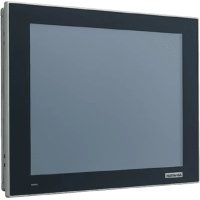
FPM212R8AE - Monitor Advantech - Free user manual and instructions
Find the device manual for free FPM212R8AE Advantech in PDF.


| Product Type | Industrial LCD Monitor |
| Brand | Advantech |
| Model | FPM212R8AE |
| Screen Size | 12.1 inches |
| Power Supply | 12 V DC, 3 A min (UL certified source) |
| Operating Temperature | 0 °C to 50 °C |
| Storage Temperature | 0 °C to 50 °C |
| Mounting Type | Panel, wall, desktop, VESA 75x75 mm |
| VESA Standard | MIS-D 75, M4 screws, depth 6 mm max |
| Panel Mounting | 10 clamps with M4 x 25 mm screws |
| Wall Mounting (optional) | Kit FPM-1000T, M4 x 6-10 mm screws |
| Desktop Mounting (optional) | Kit FPM-1000T, 2 M4 x 6-10 mm screws |
| Power Cable | 22 AWG, green/yellow conductor |
| Cleaning | Damp cloth, no liquid or spray detergent |
| Safety Instructions | Read the manual carefully, do not open, do not cover openings |
| Protection | Unplug before cleaning, avoid shocks, do not expose to moisture |
| Repairs | Only by qualified personnel |
| Battery | Replace with same type, contact Advantech |
| Environment | Avoid prolonged exposure to direct sunlight |
| Warranty | See supplier terms |
Frequently Asked Questions - FPM212R8AE Advantech
User questions about FPM212R8AE Advantech
0 question about this device. Answer the ones you know or ask your own.
Ask a new question about this device
Download the instructions for your Monitor in PDF format for free! Find your manual FPM212R8AE - Advantech and take your electronic device back in hand. On this page are published all the documents necessary for the use of your device. FPM212R8AE by Advantech.
USER MANUAL FPM212R8AE Advantech
FPM-212/215/217 Series
12" XGA/ 15" XGA/ 17" SXGA Industrial Monitor with Resistive Touch Screen, VGA, DP, or HDMI Display Port, and 12 V DC input
顯示器
申請商:研華股份有限公司
Declaration of the Presence Condition of the Restricted Substances Marking
| 設備名稱:顯示器Equipment name | 型號(型式):FPM-212Type designation (Type) | |||||
| 單元Unit | 限用物質及其化學符號Restricted substances and its chemical symbols | |||||
| 鉛Lead(Pb) | 汞Mercury(Hg) | 鎘Cadmium(Cd) | 六價鉻Hexavalent chromium( Cr+6 ) | 多溴聯苯Polybrominated biphenyls(PBB) | 多溴二苯醚Polybrominated diphenyl ethers (PBDE) | |
| 電路板-○○ | ○○○ | |||||
| 液晶面板-○○ | ○○○ | |||||
| 內外殼(外殼、內部框架...等) | ○○ | ○○○○ | ||||
| 其它固定組件(螺絲、夾具、卡榫) | -○ | ○○○○ | ||||
| 線材-○○○ | ○○ | |||||
| 觸控模組-○○ | ○○○ | |||||
| 電源供應器-○ | ○○○○ | |||||
| 備考1.“超出0.1wt%”及“超出0.01wt%”係指限用物質之百分比含量超出百分比量基準值。Note 1:“Exceeding 0.1 wt %” and “exceeding 0.01 wt %” indicate that the percentage content of the restricted substance exceeds the reference percentage value of presence condition.備考2.“○”係指該項限用物質之百分比含量未超出百分比含量基準值。Note 2:“○”indicates that the percentage content of the restricted substance does not exceed the percentage of reference value of presence.備考3.“-”係指該項限用物質為排除項目。Note 3:The “-”indicates that the restricted substance corresponds to the exemption. | ||||||
限用物質含有情況標示聲明書
Declaration of the Presence Condition of the Restricted Substances Marking
| 設備名稱:顯示器Equipment name | 型號(型式):FPM-215Type designation (Type) | |||||
| 單元Unit | 限用物質及其化學符號Restricted substances and its chemical symbols | |||||
| 鉛Lead(Pb) | 汞Mercury(Hg) | 鎘Cadmium(Cd) | 六價鉻Hexavalent chromium( Cr+6 ) | 多溴聯苯Polybrominated biphenyls(PBB) | 多溴二苯醚Polybrominated diphenyl others (PBDE) | |
| 電路板-○○ | ○○○ | |||||
| 液晶面板-○○ | ○○○ | |||||
| 內外殼(外殼、內部框架...等) | ○○ | ○○○○ | ||||
| 其它固定組件(螺絲、夾具、卡榫) | -○ | ○○○○ | ||||
| 線材-○○○ | ○○ | |||||
| 觸控模組-○○ | ○○○ | |||||
| 電源供應器-○ | ○○○○ | |||||
| 備考1.“超出0.1wt%”及“超出0.01wt%”係指限用物質之百分比含量超出百分比量基準值。Note 1:“Exceeding 0.1 wt %”and“exceeding 0.01 wt %”indicate that the percentage content of the restricted substance exceeds the reference percentage value of presence condition.備考2.“○”係指該項限用物質之百分比含量未超出百分比含量基準值。Note 2:“○”indicates that the percentage content of the restricted substance does not exceed the percentage of reference value of presence.備考3.“-”係指該項限用物質為排除項目。Note 3:The “-”indicates that the restricted substance corresponds to the exemption. | ||||||
限用物質含有情況標示聲明書
Declaration of the Presence Condition of the Restricted Substances Marking
| 設備名稱:顯示器Equipment name | 型號(型式):FPM-217Type designation (Type) | |||||
| 單元Unit | 限用物質及其化學符號Restricted substances and its chemical symbols | |||||
| 鉛Lead(Pb) | 汞Mercury(Hg) | 鎘Cadmium(Cd) | 六價鉻Hexavalent chromium( Cr+6 ) | 多溴聯苯Polybrominated biphenyls(PBB) | 多溴二苯醚Polybrominated diphenyl ethers (PBDE) | |
| 電路板-○○ | ○○○ | |||||
| 液晶面板-○○ | ○○○ | |||||
| 內外殼(外殼、內部框架...等) | ○○ | ○○○○ | ||||
| 其它固定組件(螺絲、夾具、卡榫) | -○ | ○○○○ | ||||
| 線材-○○○ | ○○ | |||||
| 觸控模組-○○ | ○○○ | |||||
| 電源供應器-○ | ○○○○ | |||||
| 備考1.“超出0.1wt%”及“超出0.01wt%”係指限用物質之百分比含量超出百分比量基準值。Note 1:“Exceeding 0.1 wt %” and “exceeding 0.01 wt %” indicate that the percentage content of the restricted substance exceeds the reference percentage value of presence condition.備考2.“○”係指該項限用物質之百分比含量未超出百分比含量基準值。Note 2:“○”indicates that the percentage content of the restricted substance does not exceed the percentage of reference value of presence.備考3.“-”係指該項限用物質為排除項目。Note 3:The “-” indicates that the restricted substance corresponds to the exemption. | ||||||
Copyright
The documentation and the software included with this product are copyrighted 2020 by Advantech Co., Ltd. All rights are reserved. Advantech Co., Ltd. reserves the right to make improvements in the products described in this manual at any time without notice. No part of this manual may be reproduced, copied, translated or transmitted in any form or by any means without the prior written permission of Advantech Co., Ltd. Information provided in this manual is intended to be accurate and reliable. However, Advantech Co., Ltd. assumes no responsibility for its use, nor for any infringements of the rights of third parties, which may result from its use.
Acknowledgments
Intel® and Pentium® are trademarks of Intel® Corporation.
Microsoft Windows® is a registered trademark of Microsoft Corp.
All other product names or trademarks are properties of their respective owners.
This manual details information on the following products:
FPM-212-R8AE
FPM-212
FPM212R8A2001-T, FPM212R8A2002-T, FPM212R8A2003-T,
FPM212R8A2004-T, FPM212R8A2005-T, FPM212R8A2006-T,
FPM212R8A2101-T, FPM212R8A2102-T, FPM212R8A2103-T,
FPM212R8A2104-T, FPM212R8A2105-T, FPM212R8A2106-T,
FPM212R8A2201-T, FPM212R8A2202-T, FPM212R8A2203-T,
FPM212R8A2204-T, FPM212R8A2205-T, FPM212R8A2206-T,
FPM212R8A2301-T, FPM212R8A2302-T, FPM212R8A2303-T,
FPM212R8A2304-T, FPM212R8A2305-T, FPM212R8A2306-T,
FPM212R8A2401-T, FPM212R8A2402-T, FPM212R8A2403-T,
FPM212R8A2404-T, FPM212R8A2405-T, FPM212R8A2406-T,
FPM212R8A2501-T, FPM212R8A2502-T, FPM212R8A2503-T,
FPM212R8A2504-T, FPM212R8A2505-T, FPM212R8A2506-T,
FPM212R8A2601-T, FPM212R8A2602-T, FPM212R8A2603-T,
FPM212R8A2604-T, FPM212R8A2605-T, FPM212R8A2606-T
FPM-215-R8AE
FPM-215
FPM215R8A2001-T, FPM215R8A2002-T, FPM215R8A2003-T,
FPM215R8A2004-T, FPM215R8A2005-T, FPM215R8A2006-T,
FPM215R8A2101-T, FPM215R8A2102-T, FPM215R8A2103-T,
FPM215R8A2104-T, FPM215R8A2105-T, FPM215R8A2106-T,
FPM215R8A2201-T, FPM215R8A2202-T, FPM215R8A2203-T,
FPM215R8A2204-T, FPM215R8A2205-T, FPM215R8A2206-T,
FPM215R8A2301-T, FPM215R8A2302-T, FPM215R8A2303-T,
Part No. 2003021200 Edition 1
Printed in China September 2020
FPM215R8A2304-T, FPM215R8A2305-T, FPM215R8A2306-T, FPM215R8A2401-T, FPM215R8A2402-T, FPM215R8A2403-T, FPM215R8A2404-T, FPM215R8A2405-T, FPM215R8A2406-T, FPM215R8A2501-T, FPM215R8A2502-T, FPM215R8A2503-T, FPM215R8A2504-T, FPM215R8A2505-T, FPM215R8A2506-T, FPM215R8A2601-T, FPM215R8A2602-T, FPM215R8A2603-T, FPM215R8A2604-T, FPM215R8A2605-T, FPM215R8A2606-T
FPM-217-R8AE
FPM-217
FPM217R8A2001-T, FPM217R8A2002-T, FPM217R8A2003-T, FPM217R8A2004-T, FPM217R8A2005-T, FPM217R8A2006-T, FPM217R8A2101-T, FPM217R8A2102-T, FPM217R8A2103-T, FPM217R8A2104-T, FPM217R8A2105-T, FPM217R8A2106-T, FPM217R8A2201-T, FPM217R8A2202-T, FPM217R8A2203-T, FPM217R8A2204-T, FPM217R8A2205-T, FPM217R8A2206-T, FPM217R8A2301-T, FPM217R8A2302-T, FPM217R8A2303-T, FPM217R8A2304-T, FPM217R8A2305-T, FPM217R8A2306-T, FPM217R8A2401-T, FPM217R8A2402-T, FPM217R8A2403-T, FPM217R8A2404-T, FPM217R8A2405-T, FPM217R8A2406-T, FPM217R8A2501-T, FPM217R8A2502-T, FPM217R8A2503-T, FPM217R8A2504-T, FPM217R8A2505-T, FPM217R8A2506-T, FPM217R8A2601-T, FPM217R8A2602-T, FPM217R8A2603-T, FPM217R8A2604-T, FPM217R8A2605-T, FPM217R8A2606-T
Product Warranty (2 years)
Advantech warrants to you, the original purchaser, that each of its products will be free from defects in materials and workmanship for two years from the date of purchase.
This warranty does not apply to any products which have been repaired or altered by persons other than repair personnel authorized by Advantech, or which have been subject to misuse, abuse, accident or improper installation. Advantech assumes no liability under the terms of this warranty as a consequence of such events.
Because of Advantech's high quality-control standards and rigorous testing, most of our customers never need to use our repair service. If an Advantech product is defective, it will be repaired or replaced at no charge during the warranty period. For out-of-warranty repairs, you will be billed according to the cost of replacement materials, service time and freight. Please consult your dealer for more details.
If you think you have a defective product, follow these steps:
- Collect all the information about the problem encountered. (For example, CPU speed, Advantech products used, other hardware and software used, etc.) Note anything abnormal and list any onscreen messages you get when the problem occurs.
- Call your dealer and describe the problem. Please have your manual, product, and any helpful information readily available.
- If your product is diagnosed as defective, obtain an return merchandise authorization (RMA) number from your dealer. This allows us to process your return more quickly.
- Carefully pack the defective product, a fully-completed Repair and Replacement Order Card and a photocopy proof of purchase date (such as your sales receipt) in a shippable container. A product returned without proof of the purchase date is not eligible for warranty service.
- Write the RMA number visibly on the outside of the package and ship it prepaid to your dealer.
Declaration of Conformity
FCC Class A
Note: This equipment has been tested and found to comply with the limits for a Class A digital device, pursuant to part 15 of the FCC Rules. These limits are designed to provide reasonable protection against harmful interference when the equipment is operated in a commercial environment. This equipment generates, uses, and can radiate radio frequency energy and, if not installed and used in accordance with the instruction manual, may cause harmful interference to radio communications. Operation of this equipment in a residential area is likely to cause harmful interference in which case the user will be required to correct the interference at his own expense.
Technical Support and Assistance
- Visit the Advantech web site at www.advantech.com/support where you can find the latest information about the product.
- Contact your distributor, sales representative, or Advantech's customer service center for technical support if you need additional assistance. Please have the following information ready before you call:
– Product name and serial number
– Description of your peripheral attachments
– Description of your software (operating system, version, application software, etc.)
– A complete description of the problem
– The exact wording of any error messages
Safety Instructions
- Read these safety instructions carefully.
- Keep this User Manual for later reference.
- Disconnect this equipment from any AC outlet before cleaning. Use a damp cloth. Do not use liquid or spray detergents for cleaning.
- For plug-in equipment, the power outlet socket must be located near the equipment and must be easily accessible.
- Keep this equipment away from humidity.
- Put this equipment on a reliable surface during installation. Dropping it or letting it fall may cause damage.
- The openings on the enclosure are for air convection. Protect the equipment from overheating. DO NOT COVER THE OPENINGS.
- Make sure the voltage of the power source is correct before connecting the equipment to the power outlet.
- Position the power cord so that people cannot step on it. Do not place anything over the power cord.
- All cautions and warnings on the equipment should be noted.
- If the equipment is not used for a long time, disconnect it from the power source to avoid damage by transient over-voltage.
- Never pour any liquid into an opening. This may cause fire or electrical shock.
- Never open the equipment. For safety reasons, the equipment should be opened only by qualified service personnel.
- If one of the following situations arises, get the equipment checked by service personnel:
■The power cord or plug is damaged.
■Liquid has penetrated into the equipment.
■The equipment has been exposed to moisture.
■The equipment does not work well, or you cannot get it to work according to the user's manual.
■The equipment has been dropped and damaged.
■The equipment has obvious signs of breakage.
-
DO NOT LEAVE THIS EQUIPMENT IN AN ENVIRONMENT WHERE THE STORAGE TEMPERATURE DROPS BELOW 0 °C (32 °F) OR ABOVE 50 °C (122 °F). THIS COULD DAMAGE THE EQUIPMENT. THE EQUIPMENT SHOULD BE IN A CONTROLLED ENVIRONMENT.
-
The sound pressure level at the operator's position according to IEC 704-1:1982 is no more than 70 dB (A).
DISCLAIMER: This set of instructions is given according to IEC 704-1. Advantech disclaims all responsibility for the accuracy of any statements contained herein.
By means of a power cord connected to a socket-outlet with a grounded connection.
Note!
This product is intended to be supplied by an UL certified power supply or DC source suitable for use at minimum Tma 50 °C (122 °F) whose output meets SELV or ES1, LPS or PS2 and is rated 12Vdc, 4A min., if users need further assistance they should contact Advantech for further information.

Warning! Using an exclusively DC current for the solution may cause radio inter-

ference. Users choosing this option must adapt accordingly and take adequate precautions.
Warning! If the user needs to use a power adapter, please use the one listed on

the product datasheet. If the user chooses a power adapter not listed on the product datasheet, it may cause the radio interference. In these cases, the customer should take adequate precautions.
Warning! Avoid exposing FPM-200 to direct sunlight for long periods of time.

Exposing the LCD screen to direct sunlight can cause it to become very hot and cause physical damage. LCD components are not designed to tolerate high heat. High heats can shorten LCD lifespans.
Warning! The wire of the protective bonding conductor should be green-and-yel-

low, 22 AWG / 0.3 (mm2) min.
Chapter 1 General Information ....1
1.1 Introduction ...... 2
1.2 Specifications.... 2
1.2.1 General 2
1.2.2 Touchscreen (Optional) 2
1.3 LCD Specification.... 3
1.4 Connectors....3
1.5 Interface 4
Figure 1.1 FPM-200 - I/O Port Arrangement .... 4
1.6 Dimensions 4
1.6.1 12" Model....4
Figure 1.2 FPM-212 Dimensions....4
1.6.2 15" Model....5
Figure 1.3 FPM-215 Dimensions.... 5
1.6.3 17" Model....5
Figure 1.4 FPM-217 Dimensions....5
Chapter 2 Mounting Methods......7
2.1 Mounting the Monitor / Monter le Moniteur 8
2.1.1 Panel Mounting / Montage Sur Panneau....8
Figure 2.1 Panel Mounting....8
2.1.2 Wall Mounting / Montage mural 9
Figure 2.2 Wall Mounting....9
2.1.3 Desktop Stand Mounting / Montage du support de bureau ..... 10
Figure 2.3 Desktop Stand Mounting 10
2.1.4 VESA Mounting / Montage VESA.... 11
Figure 2.4 VESA Mounting 11
2.1.5 Power Adapter Bracket Mounting (Optional) 12
Figure 2.5 Power Adapter Bracket Mounting.... 12
Appendix A Touchscreen ....13
A.1 Introduction 14
A.2 Touchscreen Specifications (12"/15"/17") 14
A.2.1 Typical Optical Features 14
A.2.2 Electrical Specifications 14
A.2.3 Environment Specifications.... 14
A.3 Installing Drivers for Windows OS.... 14
Chapter 1
General Information
Sections include:
Introduction
Specifications
LCD Specification
Connectors
Dimensions
1.1 Introduction
Advantech's FPM-212/215/217 are a series of industrial-grade monitors with sleek, simple lines, and true-flat touchscreens.
Equipped with durable resistive touch control and an IP66-rated front bezel, FPM-212/215/217 series is designed for intuitive operation in industrial environments such as smart factories and machine automation display applications.
1.2 Specifications
1.2.1 General
| Specifications FPM-200 series | |
| Construction Die-cast aluminum | |
| Front Panel Die-cast aluminum - IP66 | |
| Video Port HDMI/VGA/DP | |
| Mounting Panel Stand, Wall, Panel and VESA arm (75 x 75 mm/ 2.95 x 2.95 in) | |
| FPM-212 Dimensions | (W x H x D) 311 x 238 x 53 mm (12.27 x 9.37 x 2.08 in) |
| FPM-215 Dimensions | (W x H x D) 383 x 307 x 53.2 mm (15 x 12 x 2 in) |
| FPM-217 Dimensions | (W x H x D) 410 x 343 x 54 mm (16.1 x 13.5 x 2.12 in) |
1.2.2 Touchscreen (Optional)
| Specifications | FPM-200 series |
| Type | 5-wire analog resistive |
| Interface | USB |
| Light Transmission | Above 75% |
| OS Support | Windows XP, Vista,7, 8,10,XPe and Linux |
1.3 LCD Specification
| Specifications | 12" LCD(LED Backlight) | 15" LCD(LED Backlight) | 17" LCD(LED Backlight) |
| Display Type XGA TFT LCD XGA TFT LCD SXGA TFT LCD | |||
| Display Size 12" 15" 17" | |||
| Max. Colors 16.2M Max 16.2M Max | 16.7M Max | ||
| Resolution | 1024 x 768 1024 x 768 | 1280 x 1024 | |
| View Angle (H/V°) | 178°(V), 178°(H) | 176°(V), 176°(H) | 170°(V), 170°(H) |
| Luminance | 600 cd/m2 | 300 cd/m2 | 250 cd/m2 |
| Storage Temperature | -20 ~ 60 °C(-4 ~ 140°F) | -20 ~ 60 °C (-4 ~ 140 °F) | -20 ~ 60 °C(-4 ~ 140 °F) |
| Operating Temperature | 0 ~ 50 °C (32 ~ 122°F) | 0 ~ 50 °C (32 ~ 122°F) | 0 ~ 50 °C (32 ~ 122°F) |
| Contrast Ratio | 1000:1 | 2000:1 | 1000:1 |
| Backlight Life | 50,000 hr | 50,000 hr | 30,000 hr |
1.4 Connectors
The following connectors are situated on the bottom of FPM-212/215/217:
DP or HDMI port
DP or HDMI port are connected with a standard DP or HDMI connector through unit I/O port located on the bottom side of the system.
VGA Port (DB-15)
DB-15 connector can be connected to the system via the external 15-pin DB-15 connector located on the bottom side of the system.
■ Touchscreen Connector (USB)
This connector will be present only if the touchscreen is installed. It must be connected to the PC's USB port. A touchscreen cable is included with all orders.
■ DC 12 V Power Input Connector
This connector must be connected to 12 Vdc power supply.
Warning! Please note before connecting the monitor and PC with a HDMI / DP or VGA cable:

-
If the PC has an installed operation system, please confirm its portrait frequency within an acceptable range.
-
If the PC has an installed operation system, users need to adjust the portrait frequency within an acceptable range.
1.5 Interface
The I/O port arrangement is demonstrated below:
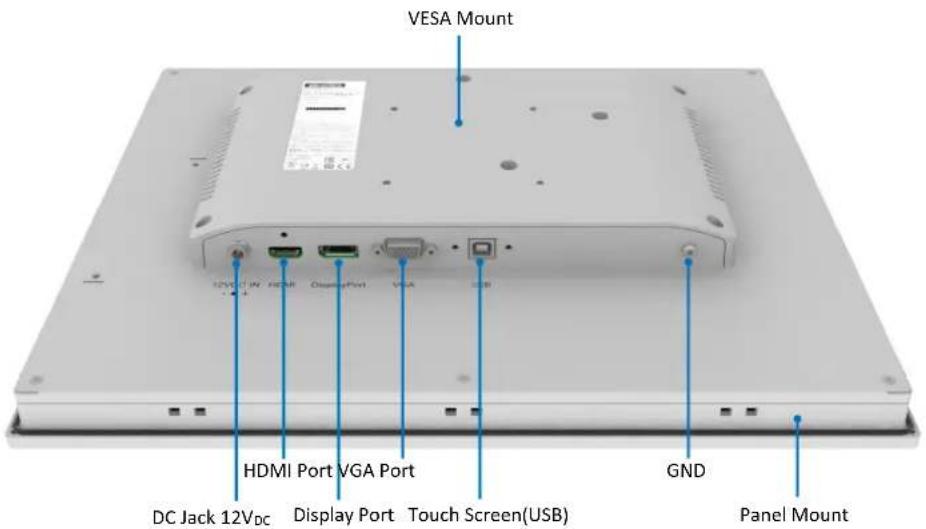
Figure 1.1 FPM-200 - I/O Port Arrangement
1.6 Dimensions
1.6.1 12" Model
FPM-212-R8AE Dimensions
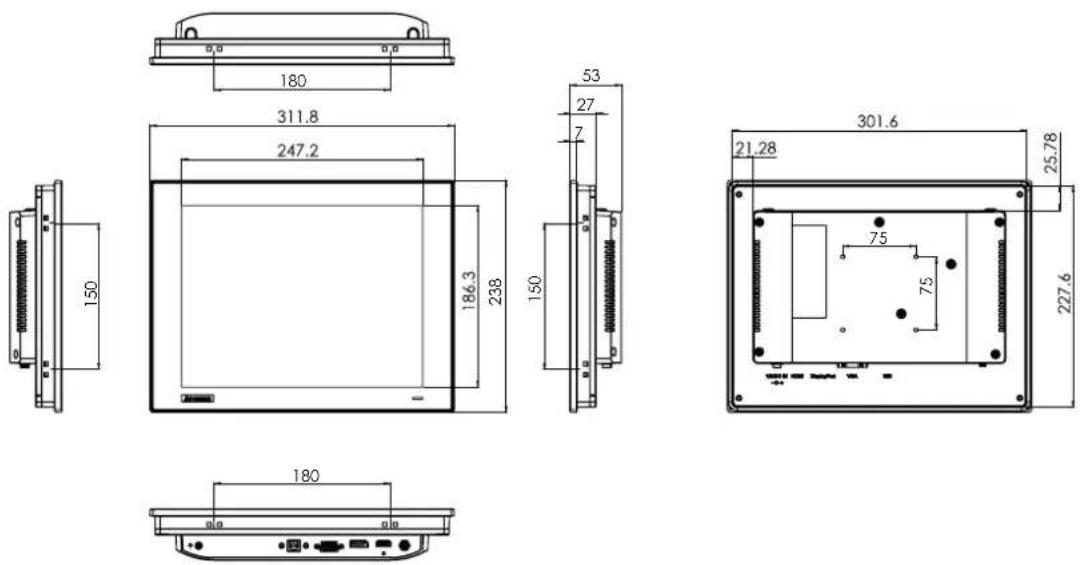
Figure 1.2 FPM-212 Dimensions
1.6.2 15" Model
FPM-215-R8AE Dimensions
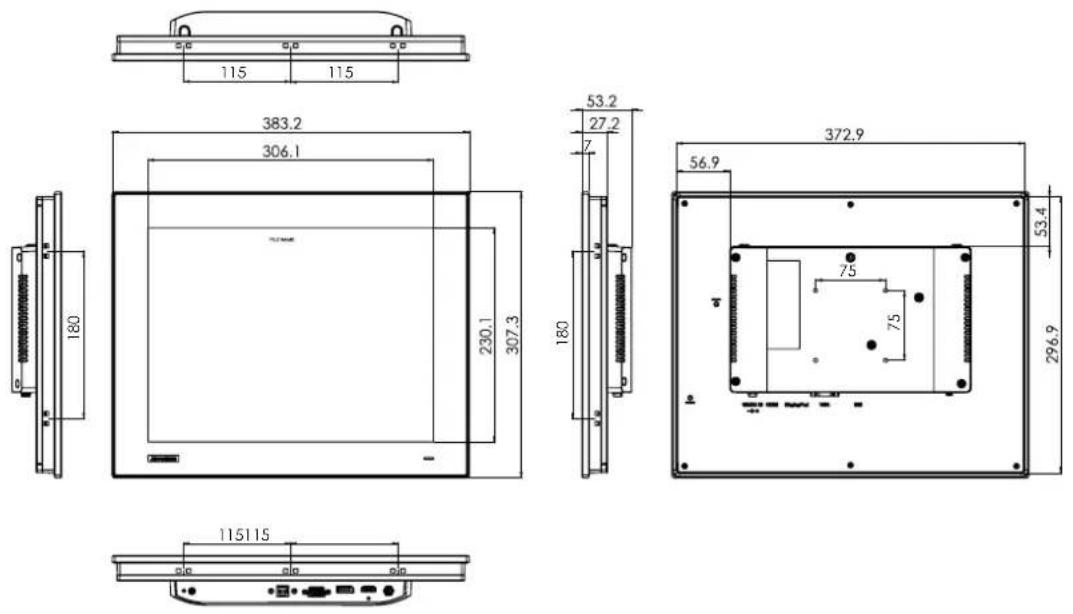
Figure 1.3 FPM-215 Dimensions
1.6.3 17" Model
FPM-217-R8AE Dimensions
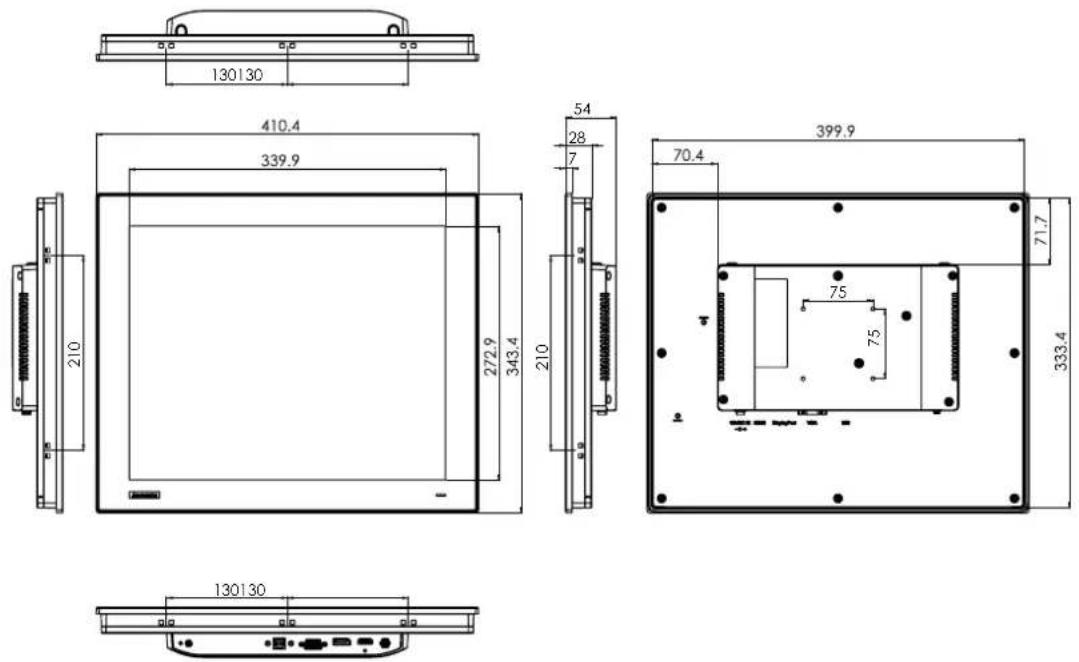
Figure 1.4 FPM-217 Dimensions
Chapter 2
Mounting Methods
Sections include:
Panel Mounting
Wall Mounting
■ Desktop Stand Mounting
■ VESA Mounting
■ Power Adapter Bracket Mounting (Optional)
2.1 Mounting the Monitor / Monter le Moniteur
The FPM-200 series can be mounted in numerous ways. The FPM-200 can be mounted almost anywhere.
When installing the FPM-212/215/217 series in a panel, release the mounting brackets by detaching 4x screws on rear side and fix them on the top and bottom with screws. Installing the panel mount requires 10x clampers with M4 * 25 mm screws.
Figure 2.1 Panel Mounting
Panel Mounting
10x clampers with M4 * 25mm screws.
Diameter of screw = M4 min.
Length of screw = 25.0 min.
Montage sur panneau
2.1.2 Wall Mounting / Montage mural
Use the FPM-1000T mounting kit, which is offered as an optional accessory, when installing the FPM-212/215/217 on a wall. You need to secure this metal bracket to the wall first, then fasten the FPM-212/215/217 with the included screws. The metal bracket secures the FPM-212/215/217 to the wall.
Please refer to Figure 2.2 and follow the following steps to mount FPM-212/215/217 on a wall:
Figure 2.2 Wall Mounting
Wall Mounting
Screw to fix mounting kit
Diameter of screw = M4.
Length of screw = 6-10 mm
Montage mural
Use the FPM-1000T mounting kit in desktop mounting. Secure the stand with 2x M4 screws to the desk to attach the mount.
to the FPM-212/215/217.
(p.s FPM-1000T Mounting kit is offered as an optional accessory for FPM-212/215/217.)
Figure 2.3 Desktop Stand Mounting
Desktop Stand Mounting
Screw to fix mounting kit (2 pcs)
Diameter of screw = M4.
Length of screw = 6-10 mm
These monitors can also be VESA mounted. FPM-212/215/217 is a VESA MIS-D, 75, C compliant display equipped with 75 x 75 mm (2.95 x 2.95 in) square hole pattern. Use 4x M4 screws to attach the mount to the FPM-212/215/217.
Figure 2.4 VESA Mounting
Warning! Use a suitable mounting apparatus to avoid risk of injury.

Warning! VESA screw mounting specifications: M4. Depth of the screw hole: 6 mm/0.23 in (Max.).

2.1.5 Power Adapter Bracket Mounting (Optional)
A metal bracket is offered as an optional accessory for FPM-215 and FPM-217. This bracket helps secure power cords without hanging wires. This metal bracket can be mounted on the back of the monitor in 2 simple steps:
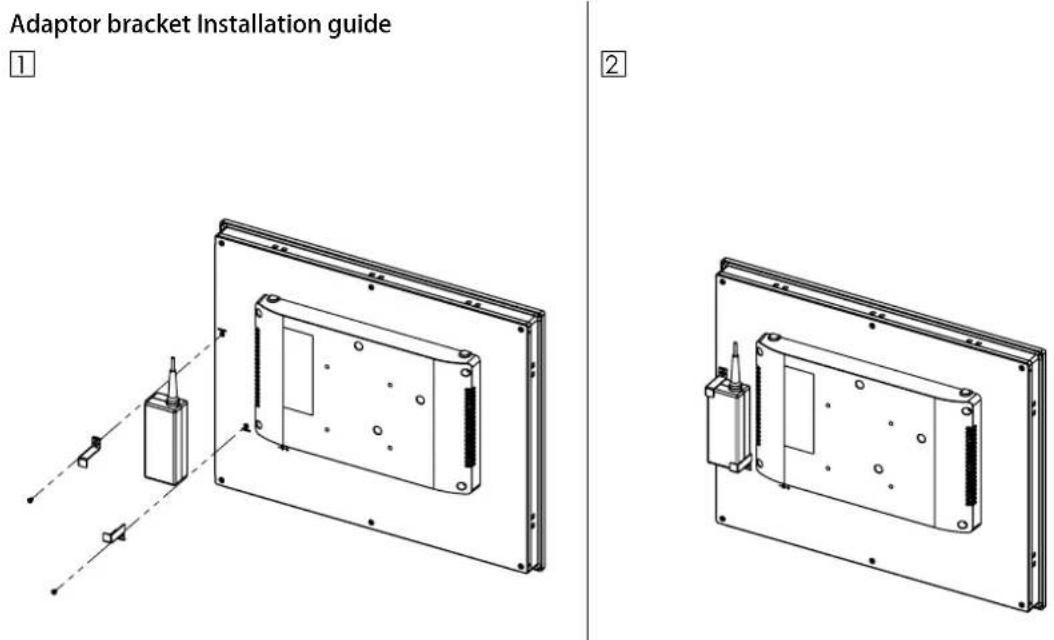
Figure 2.5 Power Adapter Bracket Mounting
-
Place the metal bracket on top of the power adapter and position it against the dedicated holes
-
Secure the metal bracket with the included screws and complete the metal bracket installation
Appendix
A
Touchscreen
A.1 Introduction
The FPM-212/215/217 touchscreen uses advanced 5-wire resistive technology. It features a more accurate sensing capacity than comparable technologies. The touchscreen is designed for rugged industrial environments, and adheres to FCC Class A standards.
A.2 Touchscreen Specifications (12"/15"/17")
A.2.1 Typical Optical Features
Specification 12" 15" 17"
| Light Transmission Above 75% | Above 75% | Above 75% | |
| Haze | < 1% < 1% | < 1% | |
A.2.2 Electrical Specifications
| Specification | 12” | 15” | 17” |
| Operation Voltage | 5.5 V or below | 5.5 V or below | 5.5 V or below |
| Contact Current | 70 mA (Maximum) | 70 mA (Maximum) | 70 mA (Maximum) |
A.2.3 Environment Specifications
| Specification | 12” | 15” | 17” |
| Operating Temperature | 0 ~ 50 °C (32 ~ 122°F) | 0 ~ 50 °C (32 ~ 122°F) | 0 ~ 50 °C (32 ~ 122°F) |
| Storage Temperature | -20 ~ 60 °C (-4 ~ 140°F) | -20 ~ 60 °C (-4 ~ 140°F) | -20 ~ 60 °C (-4 ~ 140°F) |
| Humidity | 10 ~ 95%, non-condensing | ||
A.3 Installing Drivers for Windows OS
This touchscreen features drivers for Windows 7/8/10 and ADV Linux users. The FPM-212/215/217 series requires the installation of the Penmount 6000 driver. Please check the website below to download the Penmount 6000 driver.
https://support.advantech.com/support/new_default.aspx
www.advantech.com
Please verify specifications before quoting. This guide is intended for reference purposes only.
All product specifications are subject to change without notice.
No part of this publication may be reproduced in any form or by any means, electronic, photocopying, recording or otherwise, without prior written permission from the publisher.
All brand and product names are trademarks or registered trademarks of their respective companies.
© Advantech Co., Ltd. 2020
- FPM-212/215/217 SERIES
- 限用物質含有情況標示聲明書
- COPYRIGHT
- ACKNOWLEDGMENTS
- FPM-212-R8AE
- FPM-215-R8AE
- FPM-217-R8AE
- PRODUCT WARRANTY (2 YEARS)
- DECLARATION OF CONFORMITY
- FCC CLASS A
- TECHNICAL SUPPORT AND ASSISTANCE
- SAFETY INSTRUCTIONS
- CHAPTER 1 GENERAL INFORMATION ....1
- CHAPTER 2 MOUNTING METHODS......7
- APPENDIX A TOUCHSCREEN ....13
- CHAPTER 1
- GENERAL INFORMATION
- SECTIONS INCLUDE
- 1.1 INTRODUCTION
- 1.2 SPECIFICATIONS
- 1.2.1 GENERAL
- 1.2.2 TOUCHSCREEN (OPTIONAL)
- 1.3 LCD SPECIFICATION
- 1.4 CONNECTORS
- DP OR HDMI PORT
- VGA PORT (DB-15)
- TOUCHSCREEN CONNECTOR (USB)
- DC 12 V POWER INPUT CONNECTOR
- 1.5 INTERFACE
- 1.6 DIMENSIONS
- 1.6.1 12" MODEL
- 1.6.2 15" MODEL
- 1.6.3 17" MODEL
- CHAPTER 2
- MOUNTING METHODS
- 2.1 MOUNTING THE MONITOR / MONTER LE MONITEUR
- 2.1.2 WALL MOUNTING / MONTAGE MURAL
- 2.1.5 POWER ADAPTER BRACKET MOUNTING (OPTIONAL)
- APPENDIX
- A
- A.1 INTRODUCTION
- A.2 TOUCHSCREEN SPECIFICATIONS (12"/15"/17")
- A.2.1 TYPICAL OPTICAL FEATURES
- A.2.2 ELECTRICAL SPECIFICATIONS
- A.2.3 ENVIRONMENT SPECIFICATIONS
- A.3 INSTALLING DRIVERS FOR WINDOWS OS
- WWW.ADVANTECH.COM
Brand : Advantech
Model : FPM212R8AE
Category : Monitor