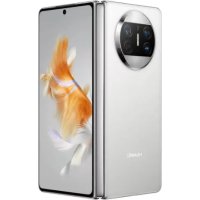
Mate X3 - Phone HUAWEI - Free user manual and instructions
Find the device manual for free Mate X3 HUAWEI in PDF.



| Product Type | Foldable Phone |
| Brand | Huawei |
| Model | Mate X3 |
| Dimensions (unfolded) | 156.9 × 141.5 × 5.3 mm |
| Dimensions (folded) | 156.9 × 72.4 × 11.8 mm |
| Weight | Approx. 239 g |
| Main Display | 7.85-inch foldable OLED, 2496 × 2224 pixels |
| External Display | 6.4-inch OLED, 2504 × 1080 pixels |
| Processor | Qualcomm Snapdragon 8+ Gen 1 |
| RAM | 12 GB |
| Internal Storage | 256 GB / 512 GB |
| Rear Camera | 50 MP (wide-angle) + 13 MP (ultra wide-angle) + 12 MP (telephoto) |
| Front Camera | 8 MP (on external and internal display) |
| Battery | 4800 mAh, 66 W wired fast charging, 50 W wireless |
| Operating System | HarmonyOS 3.1 (without Google services) |
| Connectivity | 5G, Wi-Fi 6E, Bluetooth 5.2, NFC, USB-C 3.1 |
| Sensors | Fingerprint (side-mounted), accelerometer, gyroscope, proximity, compass, barometer |
| Power Supply | USB-C, recommended 66 W power adapter |
| Operating Temperatures | 0 °C to 35 °C |
| Storage Temperatures | -10 °C to 45 °C |
| Care and Cleaning | Avoid moisture, dust, and magnetic fields; clean with a soft, dry cloth |
| Security | Side fingerprint reader, facial recognition |
| Regulatory Information | CE compliant (EMC, LVD, RoHS, ErP), model XWU-CAA/XWU-CBA |
| Recycling | Do not dispose of with household waste; use local collection points |
Frequently Asked Questions - Mate X3 HUAWEI
User questions about Mate X3 HUAWEI
0 question about this device. Answer the ones you know or ask your own.
Ask a new question about this device
Download the instructions for your Phone in PDF format for free! Find your manual Mate X3 - HUAWEI and take your electronic device back in hand. On this page are published all the documents necessary for the use of your device. Mate X3 by HUAWEI.
USER MANUAL Mate X3 HUAWEI
Before using the device, review and download the latest user guide at https://consumer.huawei.com/en/support/. When using your display, plug it in to a power supply and then press the five-way joystick to turn it on.

- Some cables need to be purchased separately.
- To remove the base, find the quick release button at the rear of the display, push the button upwards, lift the bottom of the base support, and remove the base.
Safety Information
To prevent possible hearing damage, do not listen at high volume levels for long periods.
- Please consult your doctor and the device manufacturer to determine if using your device may interfere with the operation of your medical device.
- Avoid using the device in a dusty, damp, or dirty place, or near a magnetic field.
- Ideal temperatures: 0^ to 35^ for operating, -10^ to +45^ for storage.
The USB-C port can provide 5V DC/2A MAX power to other devices.
- The power plug is used as the disconnect device. The socket-outlet shall be installed near the device and be easy to operate.
- Unplug the power adapter from electrical outlets and the device when not in use.
- The power plug should connect to a socket outlet with an earth connection.
- The device nameplate is on the rear side of the display. It can be viewed after the cable-management cover is removed.
Disposal and recycling information

The symbol on the product, battery, literature, or packaging means that the products and batteries should be taken to separate waste collection points designated by local authorities at the end of the lifespan. This will ensure that EEE waste is recycled and treated in a manner that conserves valuable materials and protects human health and the environment. For more information, please contact your local authorities, retailer, or household waste disposal service or visit the website https://consumer.huawei.com/en/.
EU Regulatory Conformance
Hereby, Huawei Device Co., Ltd. declares that this device XWU-CAA/XWU-CBA is in compliance with the following Directive: EMCD 2014/30/EU, LVD 2014/35/EU, RoHS 2011/65/EU, ErP 2009/125/EC. The full text of the EU declaration of conformity, the detailed ErP information and most recent information about accessories & software are available at the following internet address: https://consumer.huawei.com/certification.
EU product database for energy lable and product information sheet
XWU-CAA: https://eprel.ec.europa.eu/qr/753287
XWU-CBA: https://eprel.ec.europa.eu/qr/817645
ISED Canada Compliance
ISED Statement
This device complies with CAN ICES-3 (B)/NMB-3(B).
This device complies with the Innovation, Science and Economic Development Canada (ISED) license-exempt RSS standard(s). Operation is subject to the following two conditions: (1) this device may not cause interference, and (2) this device must accept any interference, including interference that may cause undesired operation of the device.
Disposal and recycling information (India)
This symbol on the device or on its packaging indicates that the device (including its electrical accessories) should not be disposed of as normal household garbage.
Do not dispose this product with Regular Household, Dry and Wet Waste. If you wish to discard this product, please contact on the details below and follow the correct method of disposal as guided:
E-mail: service.hw.in@huawei.com, Service hotline: 1800-209-6555 (Toll-Free) 9AM-9PM all 7 days, except public holidays.
For further information, log on to:
Huawei E-waste Policy: https://consumer.huawei.com/in/support/e-waste-process-policy/.
Official Recycling Partner: Reteck Envirotech Private Limited.
Plot-4A, Sanghi Udyog, Near Navade Railway Station, Tal-Panvel, Dist. - Raigad, Taloja MIDC-410208.
info@reteck.in
www.reteck.in / www.reteck.co
Reduction of hazardous substances(India)
This device is compliant with the E-Waste (Management) Rules, 2016 and does not contain hazardous substances regulated by the Rules except for the applications of exemption.
English (United Kingdom)
Before using the device, review and download the latest user guide at https://consumer.huawei.com/uk/support/. When using your display, plug it in to a power supply and then press the five-way joystick to turn it on.

- Some cables need to be purchased separately.
- To remove the base, find the quick release button at the rear of the display, push the button upwards, lift the bottom of the base support, and remove the base.
Safety Information
To prevent possible hearing damage, do not listen at high volume levels for long periods.
- Please consult your doctor and the device manufacturer to determine if using your device may interfere with the operation of your medical device.
- Avoid using the device in a dusty, damp, or dirty place, or near a magnetic field.
- Ideal temperatures: 0^ to 35^ for operating, -10^ to +45^ for storage.
- The USB-C port can provide 5V DC/2A MAX power to other devices.
- The power plug is used as the disconnect device. The socket-outlet shall be installed near the device and be easy to operate.
- Unplug the power adapter from electrical outlets and the device when not in use.
- The power plug should connect to a socket outlet with an earth connection.
- The device nameplate is on the rear side of the display. It can be viewed after the cable-management cover is removed.
Disposal and recycling information

The symbol on the product, battery, literature, or packaging means that the products and batteries should be to separate waste collection points designated by local authorities at the end of the lifespan. This will ensure that waste is recycled and treated in a manner that conserves valuable materials and protects human health and the environment. For more information, please contact your local authorities, retailer, or household waste disposal service the website https://consumer.huawei.com/en/.
EU Regulatory Conformance
Hereby, Huawei Device Co., Ltd. declares that this device XWU-CAA/XWU-CBA is in compliance with the following Directive: EMCD 2014/30/EU, LVD 2014/35/EU, RoHS 2011/65/EU, ErP 2009/125/EC. The full text of the EU declaration of conformity, the detailed ErP information and most recent information about accessories & software are available at the following internet address: https://consumer.huawei.com/certification.
UK Regulatory Conformance
Hereby, Huawei Device Co., Ltd. declares that this radio equipment is in compliance with the relevant statutory requirements in the UK. The full text of the declaration of conformity is available at the following internet address: https://consumer.huawei.com/certification.
EU and UK product database for energy lable and product information sheet
XWU-CAA:https://eprel.ec.europa.eu/qr/753287
XWU-CBA:https://eprel.ec.europa.eu/qr/817645
Français
https://consumer.huawei.com/pt/support/.
https://consumer.huawei.com/certification.
https://consumer.huawei.com/certification.
Ba3a daHHn Ha EC 3a eHeprnHna etNKeT n HhOpMaunOHnJnCT Ha npOdyKTa
XWU-CAA: https://eprel.ec.europa.eu/qr/753287
XWU-CBA: https://eprel.ec.europa.eu/qr/817645
Latviešu
Pirms ierices lietosanas lejupieladejiet un izskatiet jaunako lietoasanas pamacibu, kas ir pieejama vietne https://consumer.huawei.com/lv/support/.
Lai ieslgtu displeju, pievienojiet to strvas avotam un pec tam nospiediet pogu five-way joystick.

-Da zi kabeli var but jaiegadajas atseviški.
- Lai nonemtu pamatni, atrodiet atras atvienosanas pogu displeja aizmugure, spiediet pogu uz augsu, paceliet pamatnes balsta apaksu un nonemiet pamatni.
Drosibas informacija

Lai noverstu iespjanos dzirdes bojajumus, neklausieties lielakulma ilgu laika posmu.
Lai noteiktu, vai jusu icerice lietošana var ietekmet jusu izmantotas mediciniskas icerces darbibu, szainieties ar arstu un icerice ražotaju.
https://consumer.huawei.com/si/support/.
Preden začnete uporabljati zaslon, ga prikljucite v vir napajanja in nato pritisnite five-way joystick, da ga vklopite.

https://consumer.huawei.com/tr/support/warranty-policy/
https://consumer.huawei.com/tr/legal/privacy-policy/
No.2 of Xincheng Road, Songshan Lake Zone, Dongguan, Guangdong 523808, People's Republic of China
Tel:0086-755-28780808
Web: www.huawei.com
E-mail: mobile.tr@huawei.com
https://consumer.huawei.com/tr/
mobile.tr@huawei.com

Yetkili Servisler:
HnctpyKcnn no ytnln3aun
3TOT CnMBOJ Ha yCTpoIcTBe, 6aTapee, INHCTpyKUIN IIN yNAKOBe O3Haayet, YTO cAmO yCTpoIcTBo I eRO 6aTapeJ no nCTeueHHn CpOKa CnyXbI DoJXHbI 6bITb yTNIn3NpOBaHBi B CneuaJIbHbIX NyHKTx npEma, UypeJdeHHbIX rOpOdCKo aDMHNCTpaUneH. 3To o6ecneuBAET HAdJeKaUIN C6Op I yTNIn3aUIN OJIeKTPOHOrO I neKTPnueCKOrO o6OpYIOBaHH, I03BOJAE T NOBTOHO NCNoJIb3OBaTB CEHHbIE MaTePnaJIbI N 3aUNITb 3DOpOBBe YenOBeka I OKpykaIOU cyEdu. IAnI NoLyehn 6Oee NoIPO6HO IHΦOPMaUN ObaAaNTecB M MeCTHyO rOpOdCKyIO aDMHNCTpaUIO, CnyXbI yNHUToxeHH 6bITOBbIX OTxOIOB IIN MaRa3IN P03HNUOH TOPROBJN, B KOTOpOM 6blno pnpOBeTeHO yCTpoIcTBo, IIN6o NocETnTE Be6-caIT https://consumer.huawei.com/en/.
DeklapauncooTBetCTBNEC
Kompania Huawei Device Co., Ltd. HactorynIM 3aBnE, yTO yCTpoCtBO XWU-CAA/XWU-CBA OTBeuaet OCHOBHbIM Tpe6oBaHnM n COOTBeTCTByOuNIM NOLOXeHnA M CNEyOuNix DInpeKTNB: INpeKTNBbl O Hn3KOBoNtHom o6OpudobAHn n CnTeMax EMCD 2014/30/EU, INpeKTNBbl o6 3JeKTPomarHHTHO CoBMecTmocTn EC LVD 2014/35/EU, INpeKTNBbl o6 ORpaHnueHn coepxahn BpeNbIX BeueCTB RoHS 2011/65/EU, INpeKTNBbl o6 3HeprnoTpe6IauNx yCTpoCtBax ErP 2009/125/EC. POnHbI TeKCT DeKnapaun COOTBeTCTBn, noDpo6HbIe CBeDeHnIN DInpeKTNBbl ErP n AkTyalbHyIO nHΦopMaunio O6 akceccyapax n nporpaMMHom o6ecneueHn MoXHo NOCMTpeTb Ha Be6-caIte: https://consumer.huawei.com/certification.
YCTPOINCTBO COOTBeTCTByeT
YcTpoIcTBcooTBeCTByeT TP TC 020/2011 «3JIeKtpomarHnTHaR COBmecTmOCTb TexHnuecknx cpeCDTB; TP EA3C 037/2016 «O6 orpaHnueHn npImeHnnaOnaChbIX BeIeCTB B n3dEInx 3JIeKtpoTeXnHKn I paDIO3JIeKTPoHnKn).
AanTep nntaHncooTBeTcTByET
TP TC 004/2011 «O 6e3oNaChocn Hn3KobolbTHoro o6OpydoBaHnra»; TC 020/2011 «3NeKtpomarHnTHaorcoBMeCTmOcTb TexHnuecknx cpeDCTb»; TP EA3C 037/2016 «O6 orpaHnueHn npImeHnnaOnchbIX BeIecTB IV3dJIInx 3NeKtpoTeXnKn n paAno3NeKtpoHnKn.
N3rTOBnteJIb
Huawei Device Co., Ltd.
XyaB3n DeBaic Ko.,IITK, KHP, 523808, r. DyHryaHb, ryaHdyH, AdmHnCTpaTnBHOe 3daHne N°2.
Ten.: +86-755-28780808
UmmopTeB PΦ
OOO «Texkompanna XyaB3》,PocnckaФeepaun,121614,r.MockBa,yn.KpbinaTcka,d.17,kopn.2,OPPH 1027739023212.IHΦopMaunДЯ CB3n:+7(495)234-0686,CISSupport@huawei.com.
UmmopTeB P6
COOO «Mo6nIbHbIe TeIeCnCTembl》,np-T He3aBcNmocTn,95-4,r.MnHck,220043 Pecny6nka Benapycb
YnHTapHoe npednpnTne A1》,220030,Pecny6nka Benapycb,r.MmHck,yI.NHTepHaOnoHaJIbHa,36-2.
OOO «TpaДeКcБeNПиOC», 223016, Мнский paон HOBOДВорСКИ c/c 33/1-8 kom.64, paон d.bolьшоe
CTNKJIeBO
Ha3NaueHne:
MOnHTop HUAWEI MoeJIb XWU-CAA, XWU-CBA — 3TO uBeTHoN JxuDKoKpncTaJIHueckn MOHITOp, npEHa3HaueHHbI dIa BocPon3BedeHnBnDEOcHnHaJa n Bu3yAanbHOrO OTo6paXeHn INΦOpMaun, noJyehHoN OT nepcoHaJIbHOrO KOMNbIoTepa.
OchOBhIe TexHnueckNe xapaKTepeNCTNK:
XWU-CAA:
IITAHHe:OT aAnTepa IITAHn
Ha BxoJe: 100-240 B nepemEnHoro ToKa, 50-60 T
Ha BbIXOe: MaKc. 20 B, 6,75 A
XWU-CBA:
Ntahne:OTaanTepa Ntahn
Ha Bxode: 100-240 B nepemehnoro Toka, 50-60 T
Ha BbIXoJe: 20 B, 3,25 A
Komnlektaenia
XWU-CAA:
MOnHTop - 1 wT.
Ka6eJb USB-C-USB-C -1 wtT.
Ka6eIb USB-C - USB-A - 1 wt.
AanTep nTaHn-1 wT.
Ka6eIb DP - 1 wT.
3KcnnyaTaauHnHbIe DOkymHeTbl.
XWU-CBA:
MOnHToP-1uT.
Ka6eJb USB-C-USB-C -1 wtT.
AanTep nTaHn-1 wt.
Ka6enb DP-1 wT.
3KcNJIyatauHnHbIe DOKymeHTbl.
*KOMnJIeKT NOCTABKN MOKeT OTJINuATbC B 3aBUNMOCTN OT CTpaHbI INI perNoHa peaIn3aUIN.
AaTep nTaHn: YnoHMOueHHb IpeCTaBnteB E A3C
OOO «Texkompanya Xyab》,Pocncka,121614,r. MockBa,yn. KpbnaTcKa,d.17,Kopn.2,OPH 1027739023212.INΦopMaquaIgIaIcBzI:+7(495)234-0686,CISSupport@huawei.com.
Aaantep N3roTOBnteJb
XWU-CAA:
AanTep IV3roTOBnteIb
Huawei Device Co., Ltd.
Iincnnei naaanaHfAH Ke3e, OHbI KyaT Ke3iHe Kocblb3, coaH KeiH Kocy yuH five-way joystick Tymecih 6acblb3.

Ke6ip ka6ebnIbepi 6eNEk catbn any KepeK.
Herizdi KIOO yuH dncnneiH apTBHdaFb XbIaam 6ocaty TyMecih 6acbin, TyMeHi Xofapbi kapa nTepin, Heri3 TiperHH actbH KeTepin, Herizdi aIbHbI3.
Kayinci3ik TypalbI aKnapaT

Ecty kaBineTInH bIKTmAn 3aKbIMdaJyBH 6oNdbIpMay ywiH Xofapbl Dbl6bc DeHreHne y3ak yaKbIT HnHaMaHbI3.
KypbIbHb3dbnaiDanaHybHb3MeDnUHaNbIK KypbIFbIXyMbICbHaKeepri KeTIpeTHiH aHbIKay ywiH dApirepre XHe KypblfBt EHDipywiciHe xa6apnaCbHb3.
KypbIfBbHbI WaHdbI, DbIMkbIn Hemece lac opbIHda He MarHHTTIK epicke XaKbIH naHaanahyfa 6oImMaHdbI.
KoaiIbTeMnepaTpaIap: naIaIaNHy ywiH 0-35°C, caKay ywiH -10-+45°C.
USB-C nopTbI 6acka Kypblfbnapra 5V DC/2AMAK Kyaattbl KaMtaMaCb3 eTe aNaBbl.
Kyaat aawacby axbipaty Kypblfbcbi peHde naaHaHaHaJa. Po3eTKa Kypblfifa XaKbIH XaHe OaHn nndaHaHbInaTbH etin opHaTbNyI KepeK.
KyaT aadantepiH XHE KypbIrfHbI naDanaHaBImaH Ke3e 3neKtp po3eTKacbHaH axbipatbHbI3.
Kyaat aawacbi Xepre TybikTanraH po3eTKaFA Kocblnyi KepeK.
KypbIbHbIH aTay TaKTacbl DnCnIeH apTKbl KaFbIHda opHaIaCKaH. Ka6enbl 6ackapy KaKaNaFBH anFaHHaH KeiH OHbl Kepyre 60anaBl.
KoIO KHe KaTaNeHDey TpyaBIAknapaT

ΘHIMderi, 6aTapeaTaBbl, OKyIbIKTaBbl Hemece 6yMaJaTaBt TaH6a ΘHIMdep MeH 6aTapeaapDbkbl3MeT
Mep3iMoHbHaJzepriikti oprAhap KOpceTKeH 6eNeK KObIC KInHay nyHKTepine anapy KepeKtrih 6inDipei. Byan TaHba EEE KObicBbIH KyHdb MaTePnAaDapDb CaKaTbIH XHe aam DeHCayNbIFb MeH KopwaraH opTaHbI KopraTbIH KOnMeH eHdEnyIH XHe KaTb OHe LyH KamTaMaacb3 eteDi. KocbIma aknapat any ywiH xepriikti 6nIK oprAhapbHa, catyubifa Hemece TyPmbICTbIK KObICTbIK OBO KbI3MeTHe xaabapnaCbHb3 Hemece https://consumer.huawei.com/en/Be6-caTbHa KpiH3.
EO perlaemTepine caikectik
OcbiNaIa, Huawei Device Co., Ltd. Kompanhncb6yXWU-CAA/XWU-CBA KypblfbcihbH MbiHa DnpeKTHBaF aCaikec eken H mIImdei: EMCD 2014/30/EU, LVD 2014/35/EU, RoHS 2011/65/EU, ErP 2009/125/EC. EO caikectik deknapauncibHbH ToBbIK MToHl, ErP TypabI ToBbIK aknapat XHe KepeK-XapaKTap MeH 6afdaplaMaBbIK Kypal TpybI eH COHbI aknapaT MbHa INHTepHET MeKeHxAahbIHda KOJKeTIMdi: https://consumer.huawei.com/certification.
Tiéng Viet
Truoc khi su dung thiet bi, hay kiem tra va tai xuong hong dan su dung moi nhat tai https://consumer.huawei.com/vn/support/.
Khi su dung man hinh, hay cam ngon roi nhan five-way joystick de bat man inh.
- Môt sô loai cap can duoc mua rieng.

- De thao phan de, hay tim nut thao lap nanhphia sau man sinh, day nut len tren, nhac phan duoi cua chan de len roi thao phan de.
Thong tin an toan

- De tranh viec co they ton thuong thinh luc, khong nghe o cac muc am thanh lon trong thoi bian dai.
Vui long tham khao y kien bac si va nha san xuat thiet bi de xac dinh xem viec su dung thiet bi co the anh huong toi viec van hanh thiet bi y te cua ban khong.
Tranh su dung thiet bi o' noi bui bam, am uot, ban hoac gan tu truong. - Nhiét do ly tóng: Nhiét do vanh hàn hú 0°C dén 35°C, nhiet do bǎo quán tú -10°C dén +45°C.
- Cong USB-C có the cung cap cong suat TOL DA 5V DC/2A cho cac thiet bj khac.
- Phich cam duoc dung lam thiet bj ngat ket noi. O cam chim thai duoc lap gan thiet bi va de thao tac.
Rut bo doi nguon ra khoi cac o cam dien va khi khong su dung thiet bi. - Phích cām phài két néi vò ācām có néi dát.
Bien ten thiét bj nám o mát sau mam hinh. Ban co the nhin thay bién ten sau khi thao nap quan ly cap.
https://consumer.huawei.com/br/support/.
https://consumer.huawei.com/th/support/
https://consumer.huawei.com/certification
y
G
00003222:8g6400000000000000000000000000000000000000000000000000000000000000000000000000000000
EU 02:02:02:02:02:02:02:02:02:02:02:02:02:02:02:02:02:02:02:02:02:02:02:02:02:02:02:02:02:02:02:02:02:02:
Huawei Device Co., Ltd. 630001 COO:2000000000XWU-CAA/XWU-CBA EMCD 2014/30/EUI LVD 2014/35/EUI RoHS 2011/65/EUI ErP
2009/125/ECII EU COO:2000000000c:200000ErP 3200000000c:2000000000c:2000000000c:2000000000c:20000000c:2000000c:2000-
https://consumer.huawei.com/certification
Bahasa Melayu
Sebelum mencarbonan peranti, semak dan muat turun panduan pengguna terkini di https://consumer.huawei.com/my/support/.
Apabila'Neill, a tall, 18-year-old man, was on his way to the hospital. "I'm sorry for it," he said, and he turned away from the room, then turned back to his parents. "It's my first time seeing you," he said. "I'm sorry for it."

Sesetengah kabel perlu dibeli berasingan.
PT Huawei Tech Investment
Gedung Wisma Mulia 2, lantai 37, S.3701
JL. Jend. Gatot SubROTO No.40
- Safety Information
- Disposal and recycling information
- EU Regulatory Conformance
- EU product database for energy lable and product information sheet
- ISED Canada Compliance
- ISED Statement
- Disposal and recycling information (India)
- Reduction of hazardous substances(India)
- English (United Kingdom)
- UK Regulatory Conformance
- EU and UK product database for energy lable and product information sheet
- Français
- Ba3a daHHn Ha EC 3a eHeprnHna etNKeT n HhOpMaunOHnJnCT Ha npOdyKTa
- Latviešu
- Drosibas informacija
- Yetkili Servisler:
- HnctpyKcnn no ytnln3aun
- DeklapauncooTBetCTBNEC
- YCTPOINCTBO COOTBeTCTByeT
- AanTep nntaHncooTBeTcTByET
- N3rTOBnteJIb
- UmmopTeB PΦ
- UmmopTeB P6
- Ha3NaueHne:
- OchOBhIe TexHnueckNe xapaKTepeNCTNK:
- Komnlektaenia
- AaTep nTaHn: YnoHMOueHHb IpeCTaBnteB E A3C
- Aaantep N3roTOBnteJb
- Kayinci3ik TypalbI aKnapaT
- KoIO KHe KaTaNeHDey TpyaBIAknapaT
- EO perlaemTepine caikectik
- Tiéng Viet
- Thong tin an toan
- G
- EU 02:02:02:02:02:02:02:02:02:02:02:02:02:02:02:02:02:02:02:02:02:02:02:02:02:02:02:02:02:02:02:02:02:02:
- Bahasa Melayu
Brand : HUAWEI
Model : Mate X3
Category : Phone