BBB87740X1 - Clock LA CROSSE TECHNOLOGY - Free user manual and instructions
Find the device manual for free BBB87740X1 LA CROSSE TECHNOLOGY in PDF.

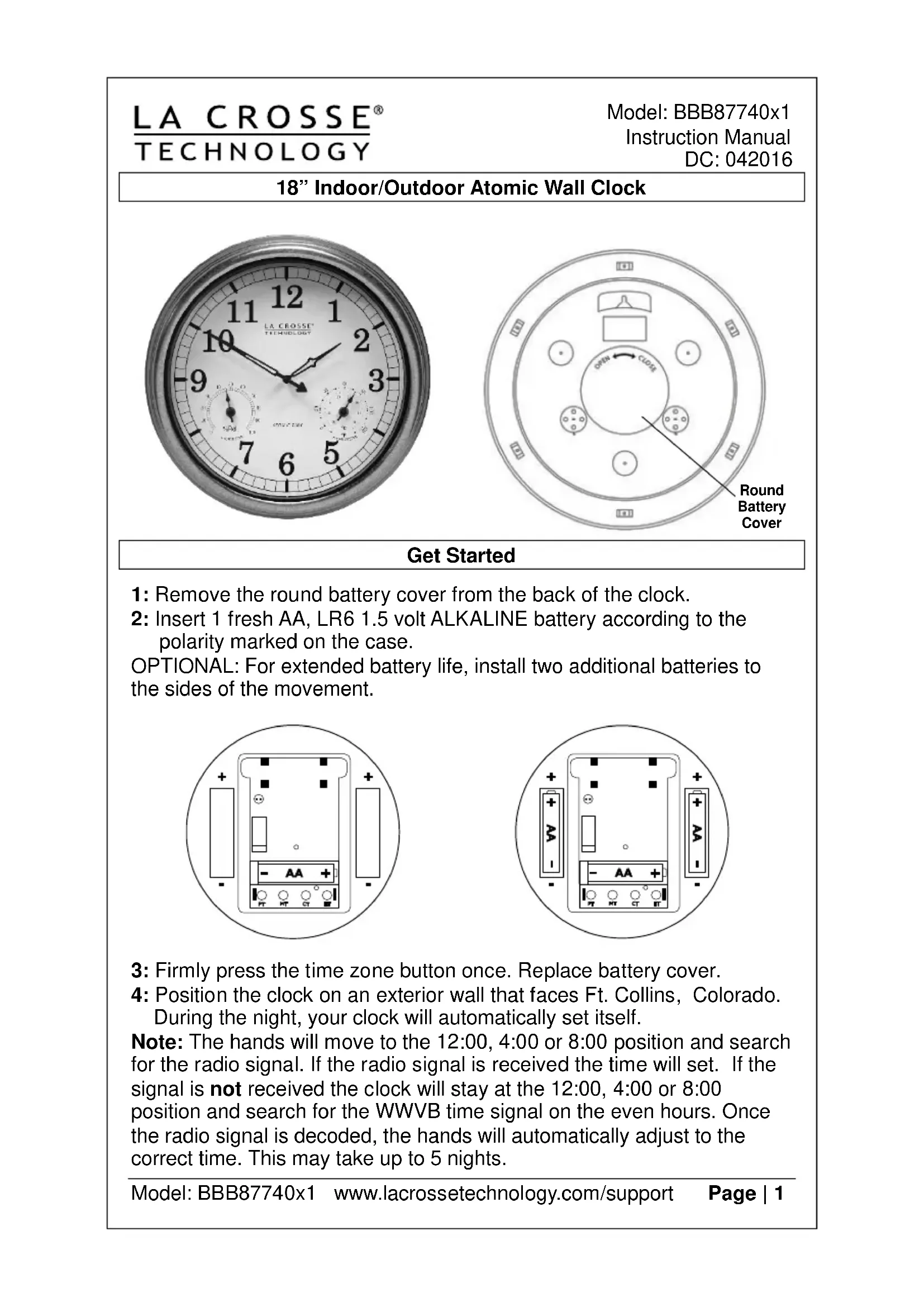


| Brand | La Crosse Technology |
| Model | BBB87740X1 |
| Product Type | Analog Atomic Clock |
| Dial Dimensions | 18 inches (45.7 cm) diameter |
| Power Source | 1 AA (LR6) 1.5 V alkaline battery, possibility to add 2 extra batteries for extended life |
| Main Functions | Analog time display, WWVB radio reception (atomic time signal), temperature and humidity display, manual setting, 4 time zones (PT, MT, CT, ET), automatic DST adjustment |
| Sensors | Built-in thermometer and hygrometer, factory calibrated, manually adjustable |
| Usage | Indoor and outdoor (with weather protection) |
| Installation | Wall mounting via hanging hole at back, orientation towards Ft. Collins, Colorado for best WWVB signal reception |
| Maintenance and Cleaning | Clean battery contacts before installation; do not mix old and new batteries or different battery types |
| Safety | Observe battery polarity; remove used batteries immediately; do not open the clock (voids warranty) |
| Warranty | 1 year limited (manufacturing and material defects) from date of purchase |
| General Information | Radio-controlled clock; WWVB signal reception from Fort Collins, Colorado; can be used as standard quartz clock if signal is not received |
Frequently Asked Questions - BBB87740X1 LA CROSSE TECHNOLOGY
User questions about BBB87740X1 LA CROSSE TECHNOLOGY
0 question about this device. Answer the ones you know or ask your own.
Ask a new question about this device
Download the instructions for your Clock in PDF format for free! Find your manual BBB87740X1 - LA CROSSE TECHNOLOGY and take your electronic device back in hand. On this page are published all the documents necessary for the use of your device. BBB87740X1 by LA CROSSE TECHNOLOGY.
USER MANUAL BBB87740X1 LA CROSSE TECHNOLOGY
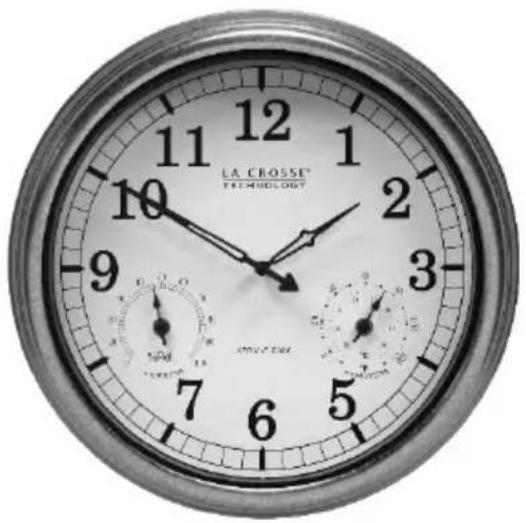
18" Indoor/Outdoor Atomic Wall Clock
natural_image
Close-up of a classic analog wall clock showing time, duration, and dial (no text or symbols beyond labels)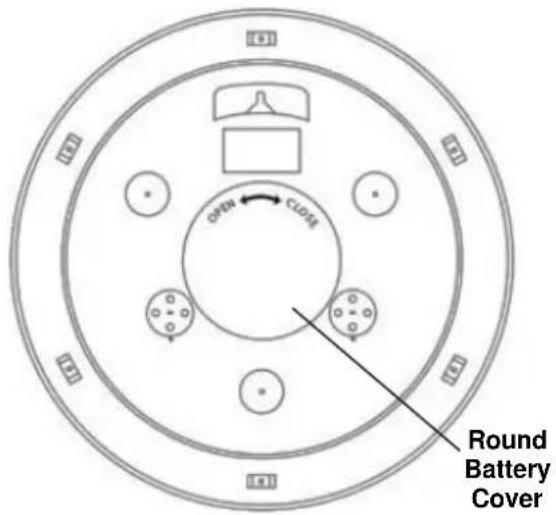
Get Started
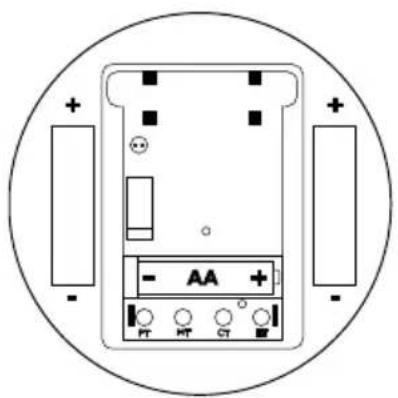
1: Remove the round battery cover from the back of the clock.
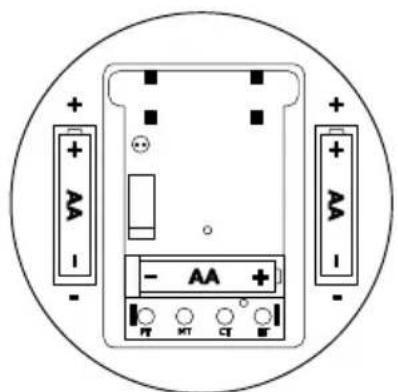
2: Insert 1 fresh AA, LR6 1.5 volt ALKALINE battery according to the polarity marked on the case.
OPTIONAL: For extended battery life, install two additional batteries to the sides of the movement.
natural_image
Diagram of an electronic device with battery, indicator lights, and power connections (no text or symbols)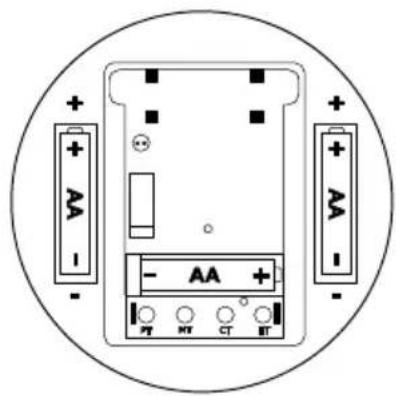
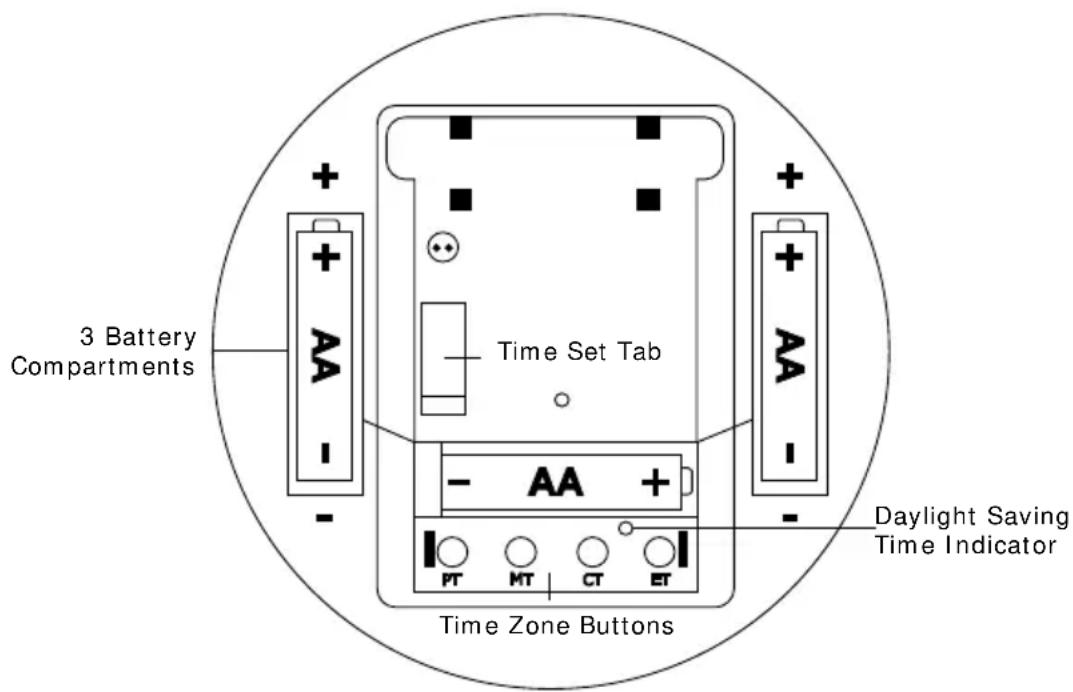
3: Firmly press the time zone button once. Replace battery cover.
4: Position the clock on an exterior wall that faces Ft. Collins, Colorado. During the night, your clock will automatically set itself.
Note: The hands will move to the 12:00, 4:00 or 8:00 position and search for the radio signal. If the radio signal is received the time will set. If the signal is not received the clock will stay at the 12:00, 4:00 or 8:00 position and search for the WWVB time signal on the even hours. Once the radio signal is decoded, the hands will automatically adjust to the correct time. This may take up to 5 nights.
5: The default time zone is Pacific Time. If the clocks sets itself and the hours are off, hold the correct time zone button for 5 seconds to correct.
Position Clock
- Indoor: Choose a location 6 feet or more from electronics such as cordless phones, wireless gaming systems, televisions, microwaves, routers, baby monitors, etc., which can prevent signal reception.
- Position near an exterior wall that faces Ft. Collins, Colorado for WWVB time signal reception.
- The antenna is available for signal reception when the front or back of the clock faces Colorado.
- Outdoor: Choose a location with an overhang to protect the clock from the overhead sun or standing snow or rain.
- A shaded location will prevent inaccurate temperature readings. Mount the clock on a wall with the hanging hole on the back of the clock. Be sure the battery cover is on snug.
Manual Set Time
On rare occasions in certain areas, the clock may not be able to receive the radio controlled time signal due to the strength of the signal or the geographic location.
In this case, the clock can be set manually and used as a regular quartz wall clock.
Note: Allow up to five nights for the clock to receive the WWVB signal before manually setting the time.
Set the clock manually:
- Remove battery for 15 minutes and press the Time Set Button 20 times.
- After 15 minutes, insert the battery and allow the clock to spin to 12:00, 4:00 or 8:00.
- Hold the Time Set Tab and the hands will spin. Continue holding until the correct time is achieved.
Note: You can only set the clock manually for about 2 minutes after the battery is inserted. If the clock receives the WWVB time signal, this signal will override manually set time.
Temperature and Humidity
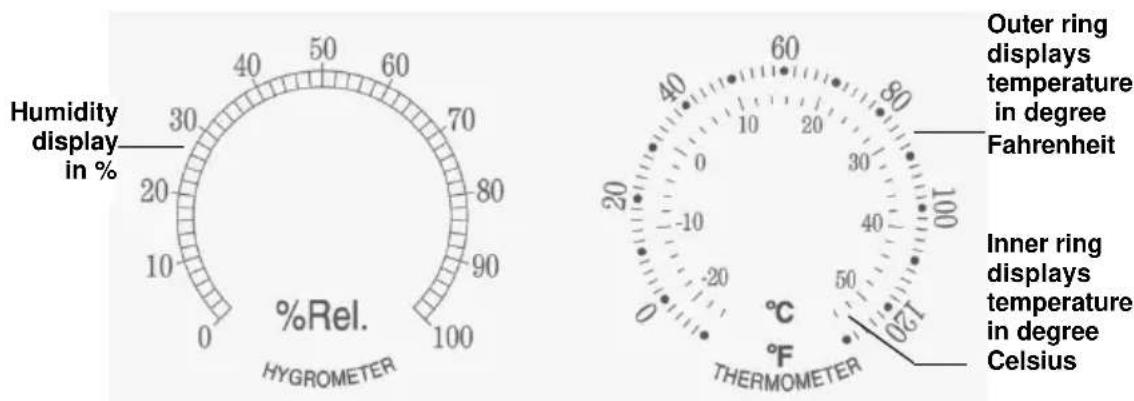
The La Crosse Technology® atomic wall clock has two analog sensors that measure surrounding temperature and humidity. The temperature information is displayed in degrees Fahrenheit and Celsius, and humidity data is displayed in percentage.
gauge
| Metric | Value | |--------|-------| | Humidity display in % | 30 | | Temperature in °C | -20 | | Outer ring displays temperature in degree Fahrenheit | 60 | | Inner ring displays temperature in degree Celsius | 120 |The thermometer and hygrometer have been calibrated at the factory. To check the sensors accuracy, tune to your local weather forecast information broadcast for the latest weather information. The sensors may be adjusted.
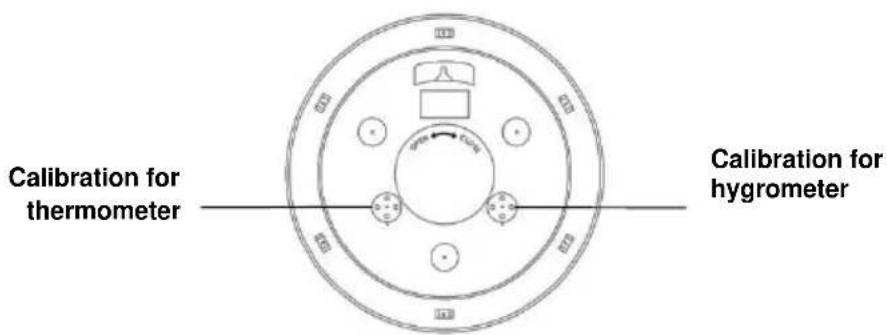
To manually adjust the sensors, gently turn the temperature or humidity sensor adjustment at the back of the clock until desired setting has been reached.
Daylight Saving Time
The National Institute of Standards and Technology and WWVB encode a special DST “bit” in the WWVB transmission for DST. Your clock will read this information and automatically advance the hands one hour in the spring and eleven hours in the fall.
Arizona: If you live in an area that does not recognize DST, you must press the DST button one time only to turn OFF.
Manual WWVB Time Signal Search
For information about WWVB, visit: www.nist.gov/pml/div688/grp40/wwvb.cfm
Signal Interference
In some cases, the signal is affected by weather conditions and electrical interferences, or the location of the clock itself may result in poor reception. If the clock has not synchronized to the correct time within a few days of activation, you may need to move the clock to a different location.
Frequently Asked Questions
Q. How long will the battery last?
A. A good AA alkaline battery will last over 12 months.
Q: Is there a version of analog clock with more than the four continental US times zones?
A: La Crosse Technology ^® does not make an analog clock with more than four time zones. These time zones are PT (Pacific Time), MT (Mountain Time), CT (Central Time), and ET (Eastern Time).
Q: Can I shut off the WWVB signal?
A: No. If you manually set the time, when the clock receives a WWVB signal, that signal will override the manual set.
Q: Is there a booster antenna to receive the WWVB signal in a difficult location?
A: No, the clock cannot work with a booster antenna. Opening the clock or movement voids the warranty.
Q: Can I wire a control timing circuit to the La Crosse Technology® atomic clock?
A: No, the clock cannot work on a timing circuit. Opening the clock voids the warranty.
Q: Why do the hands spin?
A: When the hands spin about the same time every day the clock is
auto-correcting the time. The hour hand should not spin more than twice around the clock.
A: Hands may spin if the battery is under powered or over powered. Use only Alkaline batteries in the clock.
Q: How do I adjust the Temperature or Humidity?
A: Gently turn the temperature or humidity sensor adjustment at the back of the clock until desired setting has been reached.
Troubleshooting
The wonderful advantage of owning a radio-controlled clock is that it is virtually trouble free. If the clock receives a clear time signal, it will set itself perfectly. If it does not receive a time signal, consider the following:
- Battery: The clock must have a fresh battery to receive and process the time signal.
- Location: Try a different location, ideally near a window. Your clock should be at least six feet from computers, TVs, air conditioners, other radio-controlled clocks and other electrical appliances that cause interference.
- Weather: Electrical storms between you and Colorado during the night will interfere with the WWVB signal.
Care and Maintenance
- Do not mix old and new batteries
• Do not mix Alkaline, Standard, Lithium or Rechargeable Batteries - Always purchase the correct size and grade of battery most suitable for intended use.
- Replace all batteries of a set at the same time.
- Clean the battery contacts and also those of the device prior to battery installation.
- Ensure the batteries are installed with correct polarity (+and -).
- Remove batteries from equipment with is not to be used for an extended period of time.
- Remove expired batteries promptly.
Warranty and Support Information
La Crosse Technology, Ltd. provides a 1-year limited time warranty (from date of purchase) on this product relating to manufacturing defects in materials & workmanship.
View full warranty details online at:
www.lacrossetechnology.com/warranty_info.pdf
Online Product Support:
www.lacrossetechnology.com/support
For warranty work, technical support or other information contact:
La Crosse Technology, Ltd
2830 26 ^th Street S.
La Crosse, WI 54601
Contact Support:
1-608-782-1610
Product Registration:
www.lacrossetechnology.com/support/register

natural_image
Close-up of a classic analog wall clock showing time, hour, minute, and second hands (no text or symbols beyond clock numerals)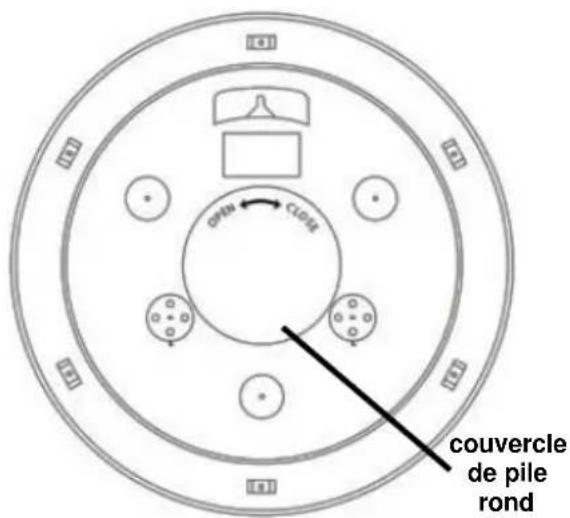
Commencer
natural_image
Diagram of an electronic device with battery, display panel, and two external components (no text or symbols)
www.lacrossetechnology.com/warranty_info.pdf
La Crosse Technology, Ltd
2830, rue 26 S.
La Crosse, WI 54601
Contacter le soutien:
1-608-782-1610
natural_image
Close-up of a wall clock face showing time, hour, minute, and second hands (no text or symbols beyond clock numerals)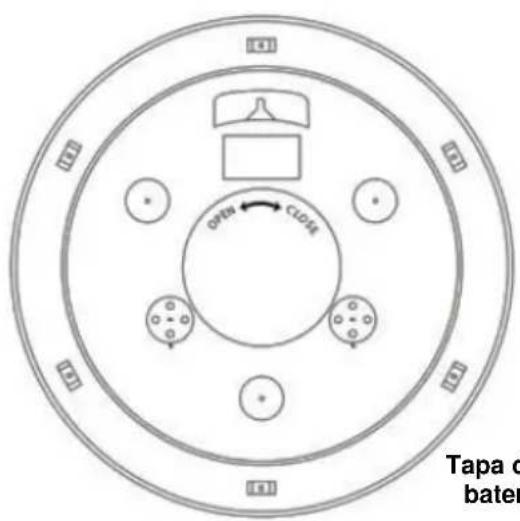
Tapa de la batería.
Instalación Rápida
www.lacrossetechnology.com/warranty_info.pdf
La Crosse Technology, Ltd
2830 26 ^th Street S.
La Crosse, WI 54601
- 18" Indoor/Outdoor Atomic Wall Clock
- Get Started
- Position Clock
- Manual Set Time
- Set the clock manually:
- Temperature and Humidity
- Daylight Saving Time
- Manual WWVB Time Signal Search
- Signal Interference
- Frequently Asked Questions
- Q: How do I adjust the Temperature or Humidity?
- Troubleshooting
- Care and Maintenance
- Warranty and Support Information
- Online Product Support:
- Contact Support:
- Product Registration:
- Commencer
- Instalación Rápida
Brand : LA CROSSE TECHNOLOGY
Model : BBB87740X1
Category : Clock