MCUG383 - Vacuum Cleaner PANASONIC - Free user manual and instructions
Find the device manual for free MCUG383 PANASONIC in PDF.


User questions about MCUG383 PANASONIC
0 question about this device. Answer the ones you know or ask your own.
Ask a new question about this device
Download the instructions for your Vacuum Cleaner in PDF format for free! Find your manual MCUG383 - PANASONIC and take your electronic device back in hand. On this page are published all the documents necessary for the use of your device. MCUG383 by PANASONIC.
USER MANUAL MCUG383 PANASONIC
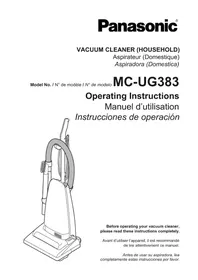
Operating Instructions
natural_image
Line drawing of a vacuum cleaner with handle and base (no text or symbols)Before operating your vacuum cleaner, please read these instructions completely.
This product contains a chemical known to the State of California to cause cancer and birth defects or other reproductive harm.

AVERTISSEMENT
IMPORTANT SAFETY INSTRUCTIONS 9
PARTS IDENTIFICATION.... 12-13
ASSEMBLY 14
Attaching Handle 14
FEATURES 16
Using Cord Hook 16
Automatic Self-Adjusting Nozzle 16
Handle Adjustments 22
ROUTINE CARE OF VACUUM CLEANER 24
Cleaning Secondary Foam Filter....24
Changing Dust Bag 24,26
Removing and Installing Lower Plate....28
Replacing Headlight Bulb 30
Replacing Belt 30-32
Cleaning Agitator....32
Replacing Agitator....34
Agitator Assembly 34
Cleaning Exterior....34
Removing Clogs 36
BEFORE REQUESTING SERVICE....38
NOTES 41
WARRANTY 42-43
WHAT TO DO WHEN SERVICE IS NEEDED 48
Table des matières
Please read IMPORTANT SAFETY INSTRUCTIONS on page 5 before use. Read and understand all instructions.
TO OUR VALUED CUSTOMER
We are very pleased to welcome you to the Panasonic family of products. Thank you for purchasing this product. Our intent is that you become one of our many satisfied customers.
Proper assembly and safe use of your vacuum cleaner are your responsibilities. Your vacuum cleaner is intended only for household use. The vacuum cleaner should be stored in a dry, indoor area. Read the Operating Instructions carefully for important use and safety information.
Special care is required when vacuuming certain types of carpet or floor covering. Always check the carpet or floor covering manufacturer's recommended cleaning instructions before vacuuming.
PLEASE PAY CLOSE ATTENTION TO ALL WARNING AND CAUTION STATEMENTS.
WARNING
WARNING statements are designed to alert you to the possibility of personal injury, loss of human life, and/or damage to the vacuum cleaner and/or personal property if the instructions given are not followed.
CAUTION
CAUTION statements are designed to alert you to the possibility of damage to the vacuum cleaner and/or personal property if the instructions given are not followed.
WARNING
TO AVOID ELECTRICAL SHOCK
Never vacuum damp or wet surfaces or liquids.
DO NOT store vacuum cleaner outdoors.
Replace worn or frayed power cord immediately.
Unplug from outlet when not in use and before servicing.
TO AVOID ACCIDENTS
Except for hand-held cleaners, keep vacuum cleaner on floor – not chairs, tables, steps, stairs, etc.
Store vacuum cleaner promptly after each use to prevent accidents such as tripping over power cord or vacuum cleaner.
Use vacuum cleaner and accessories only in a manner intended by the manufacturer.
The use of an extension cord is not recommended.
IMPORTANT SAFETY INSTRUCTIONS
When using your vacuum cleaner, basic precautions should always be followed. Read all instructions in this manual before assembling or using your vacuum cleaner.
WARNING
To reduce the risk of fire, electrical shock, injury:
- Use your vacuum cleaner only as described in this manual. Use only with Panasonic recommended attachments.
- Disconnect electrical supply before servicing or cleaning out the brush area. Failure to do so could result in electrical shock or the brush suddenly starting.
- Do not leave vacuum cleaner when plugged in. Unplug from outlet when not in use and before servicing.
- To reduce the risk of electrical shock - Do not use outdoors or on wet surfaces.
- Do not allow to be used as a toy. Close attention is necessary when used by or near children.
- Do not use with a damaged cord or plug. If vacuum cleaner is not working as it should, has been dropped, damaged, left outdoors, or dropped in water, return it to a Panasonic Service Center.
- Do not pull or carry by cord, use cord as a handle, close a door on cord, or pull cord around sharp edges or corners. Do not run vacuum cleaner over cord. Keep cord away from heated surfaces.
- Do not unplug by pulling on cord. To unplug, grasp the plug, not the cord.
- Do not handle plug or vacuum cleaner with wet hands.
- Do not put any objects into openings.
- Do not use with any opening blocked; keep free of dust, lint, hair, and anything that may reduce air flow.
- Keep hair, loose clothing, fingers, and all parts of body away from openings and moving parts.
- Turn off all controls before unplugging.
- Use extra care when cleaning on stairs. Do not put on chairs, tables, etc. Keep on floor.
- Do not use vacuum cleaner to pick up flammable or combustible liquids (gasoline, cleaning fluid, perfumes, etc.), or use in areas where they may be present. The fumes from these substances can create a fire hazard or explosion.
- Do not pick up anything that is burning or smoking, such as cigarettes, matches, or hot ashes.
- Do not use vacuum cleaner without dust bag and/or filters in place.
- Do not operate vacuum cleaner without the belt access door properly installed (if applicable).
- Unplug before connecting Air Turbine. (if applicable).
- You are responsible for making sure that your vacuum cleaner is not used by anyone unable to operate it properly.
SAVE THESE INSTRUCTIONS
THIS VACUUM CLEANER IS INTENDED FOR HOUSEHOLD USE ONLY
NOTE: Before you plug in your Panasonic vacuum cleaner, make sure that the voltage indicated on the rating plate located at the back of the vacuum cleaner is the same as your local electrical supply.
text_image
Wand Tube TuboDusting
Brush →
Brosse à épousseter
Cepillo para secudor

Crevice Tool
Suceur plat
Herramienta para
hendiduras
| FEATURE CHART | |||
| Power | Motor Protector | Cord Length | Tools |
| 120V AC(60Hz) | Yes | 7.6 m (25 Ft.) | Yes |
➢ DO NOT plug in until assembly is complete.
Remove handle screw.
➢ Insert handle with cord hooks to the back of the vacuum cleaner.
Insert screw.
▶ Tighten screw.
text_image
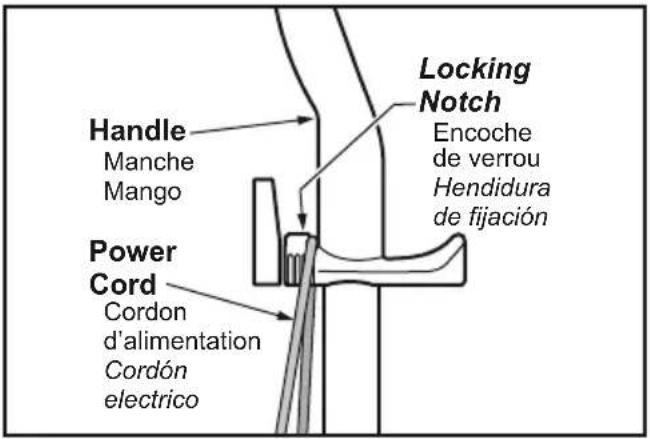
Handle Manche Mango Power Cord Cordon d'alimentation Cordón electrico Locking Notch Encoche de verrou Hendidura de fijación➢ Push power cord into cord clip.
Wrap power cord around cord hooks.
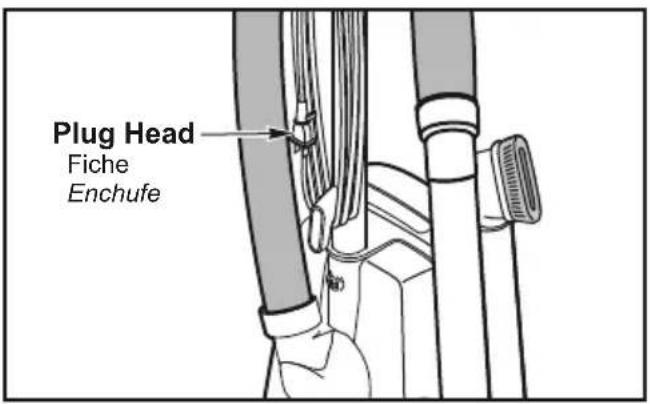
text_image
Plug Head Fiche Enchufe➢ Secure retainer (plug head) to power cord.
Assemblage
Montage du manche
➢ Detach plug head from power cord.
Rotate cord hook down to release cord.
➢ Return the cord hook to the upright position before attempting to rewind the cord.
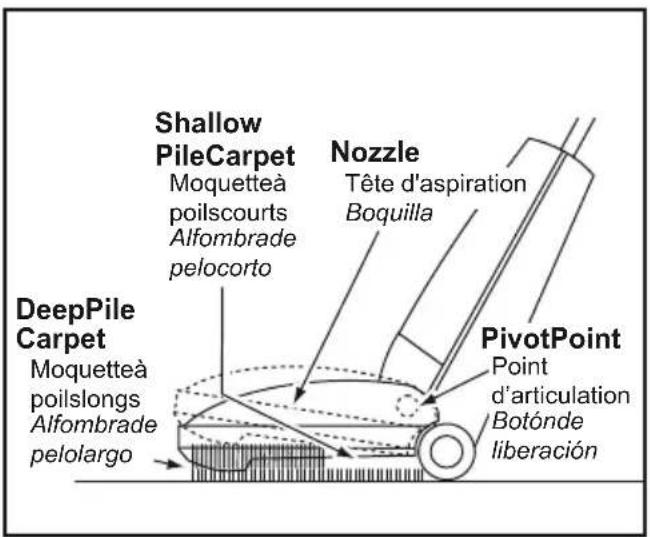
Automatic Self-Adjusting Nozzle
text_image
Shallow PileCarpet Moquetteà poilscourts Alfombrade pelocorto Nozzle Tête d'aspiration Boquilla DeepPile Carpet Moquetteà poilslongs Alfombrade pelolargo PivotPoint Point d'articulation Botónde liberaciónThe nozzle of your Panasonic upright vacuum cleaner automatically adjusts to any carpet pile height.
➢ Feature allows nozzle to float evenly over carpet pile surfaces.
No manual adjustments required.
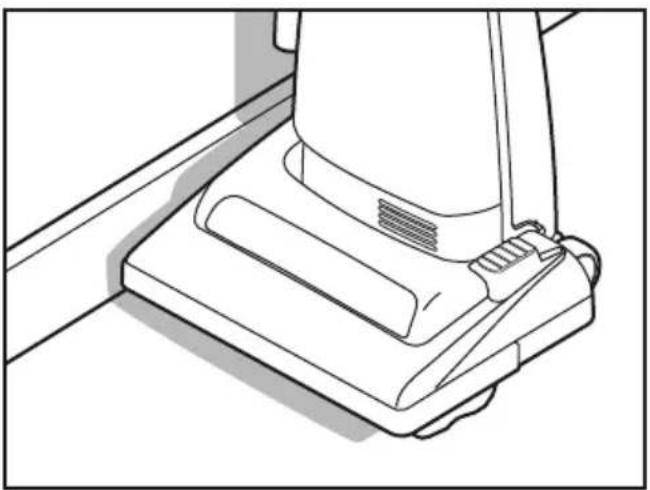
Edge Cleaning
natural_image
Line drawing of a vacuum cleaner's base panel with mounting bracket (no text or symbols)➢ Edge cleaning feature enables improved cleaning of carpets near walls and furniture.
Caractéristiques
The motor protector automatically opens to provide cooling air to the motor when a clog occurs or when dust bag needs changing.
➢ Motor protector may open when using tools.
If motor protector opens, the vacuum cleaner will make a slightly different sound.
Note: Do not block motor protector.
Thermal Protector
If a clog prevents the normal flow of air to the motor, the thermal protector turns the motor off automatically to allow the motor to cool in order to prevent possible damage to the vacuum cleaner.
To correct problem, turn off and unplug vacuum cleaner, remove clogs, and/or clean/replace filters.
➢ Replace full bag if necessary.
Wait approximately fifty (50) minutes, plug vacuum cleaner in, turn on to see if thermal protector has reset. Thermal protector will not reset if vacuum cleaner is not turned off even if vacuum cleaner cools down.
NOTE: To reduce the risk of electrical shock, this vacuum cleaner has a polarized plug, one blade is wider than the other. This plug will fit in a polarized outlet only one way. If the plug does not fit fully in the outlet, reverse the plug. If it still does not fit, contact a qualified electrician to install the proper outlet. DO NOT CHANGE THE PLUG IN ANY WAY. Only use outlets near the floor.
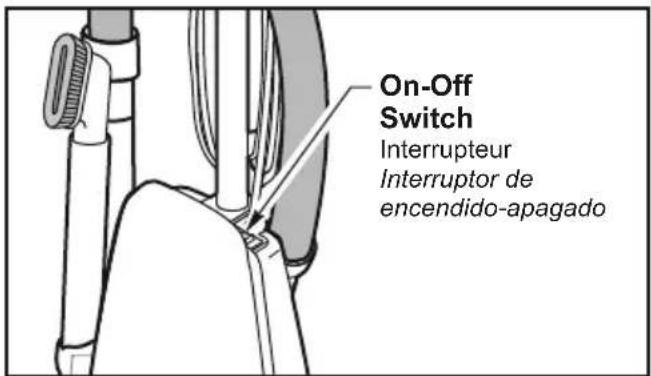
ON-OFF Switch
text_image
On-Off Switch Interrupteur Interruptor de encendido-apagado➢ Ensure ON-OFF switch is OFF.
➢ Plug the power cord into 120V outlet.
➢ ON position turns vacuum cleaner on.
➢ OFF position turns vacuum cleaner off.
Fonctionnement
natural_image
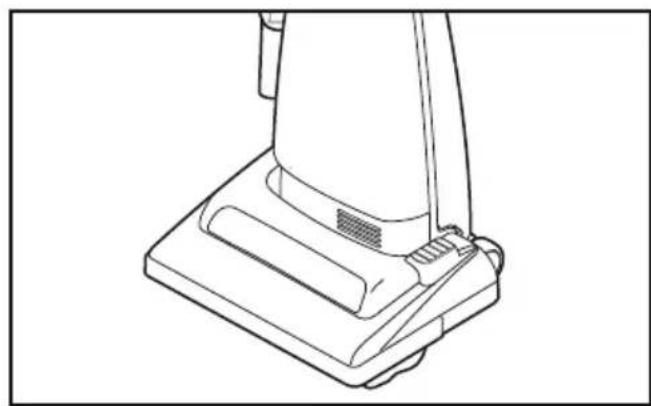
Line drawing of a hand pressing down on a mechanical component (no text or symbols)Step on handle release foot step to change handle position.
natural_image
Line drawing of a vacuum cleaner's base with handle and ventilation slots (no text or symbols)➢ Move vacuum cleaner to upright position for storage and tool use.
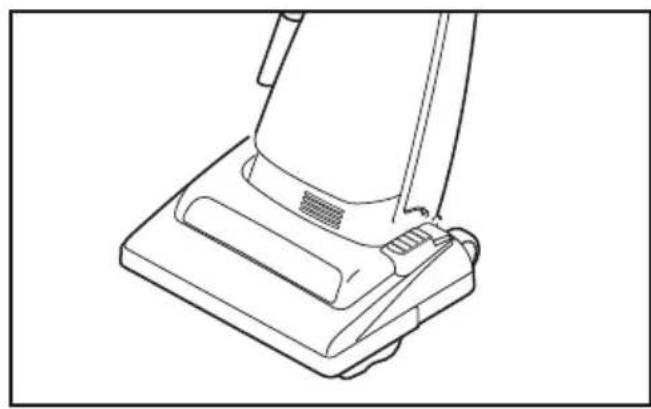
natural_image
Line drawing of a vacuum cleaner's base with handle and ventilation slots (no text or symbols)➢ Move vacuum cleaner to middle position for normal use.
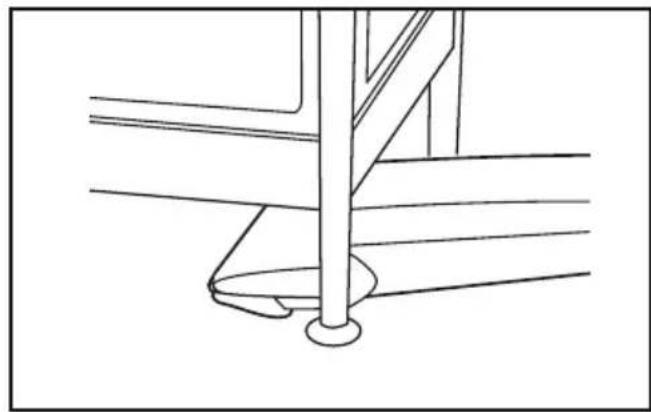
natural_image
Technical line drawing of a mechanical assembly with a vertical rod and base plate (no text or symbols)➢ Use low position for cleaning under furniture.
Performing the following tasks will keep your new Panasonic vacuum cleaner operating at peak performance levels and will ensure these high levels for years to come. Check the BEFORE REQUESTING SERVICE section in this manual for recommendations on performing some of these tasks to help solve various problems that may occur.
Cleaning Secondary Foam Filter
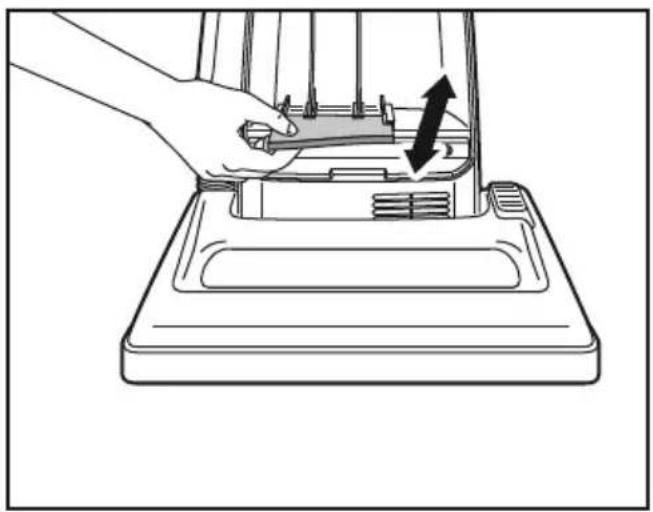
natural_image
Line drawing of a hand pressing down on a mechanical device component with an arrow indicating motion (no text or symbols)➢ Secondary foam filter protects motor.
➢ Check filter when installing a new dust bag.
If dirty, pull filter from bottom of dust compartment and clean by rinsing in water.
When dry, slide filter back into place.
➢ Ensure filter is fully inserted under plastic rib projections.
Changing Dust Bag
Always operate vacuum cleaner with genuine Panasonic Type U3 Standard or U6 Electrostatic dust bags installed. Panasonic dust bags may be purchased through any authorized Panasonic dealer or ordered from service company.
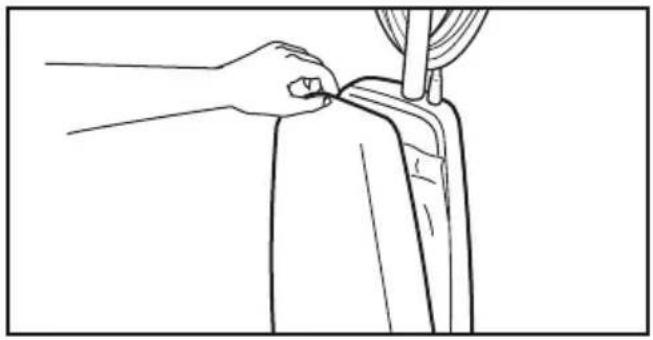
natural_image
Line drawing of a hand adjusting a curtain on a chair, with no text or symbols present➢ Pull outward on dust cover grip to remove the dust cover.
natural_image
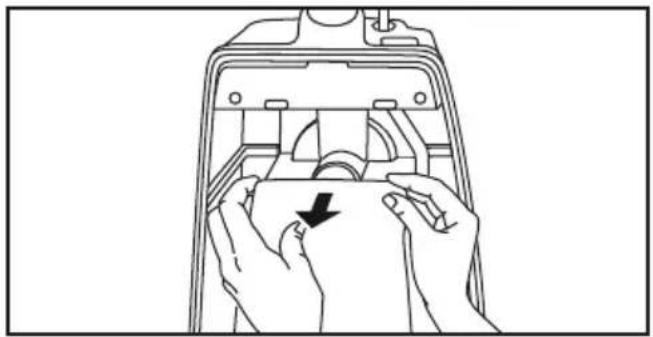
Line drawing of hands installing or adjusting a component inside a device casing (no text or symbols)➢ Remove dust bag by grasping cardboard portion and pulling out.
natural_image
Line drawing of a person holding a rectangular object with internal compartments and buttons, no text or symbols present➢ Spread out new dust bag, taking care not to tear bag.
natural_image
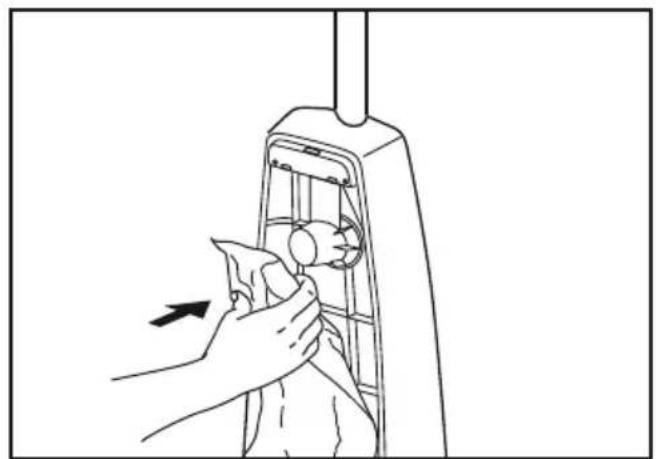
Line drawing of a hand cleaning a mechanical device with a tool, showing no text or symbols➢ Attach new dust bag onto bag holder by holding cardboard portion and pushing back.
text_image
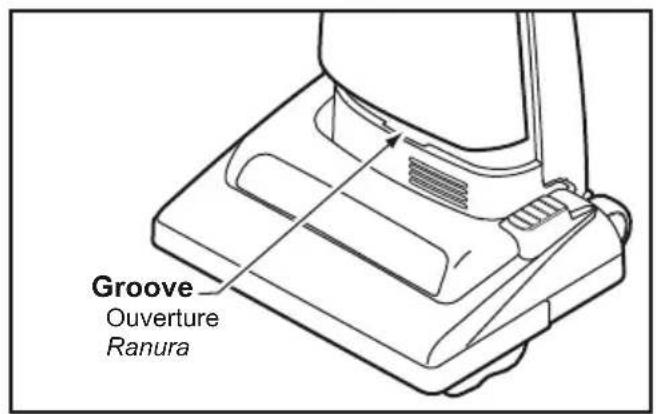
Groove Ouverture Ranura➢ Reinsert tab on end of dust cover into groove on dust compartment to allow cover to rotate closed.
natural_image
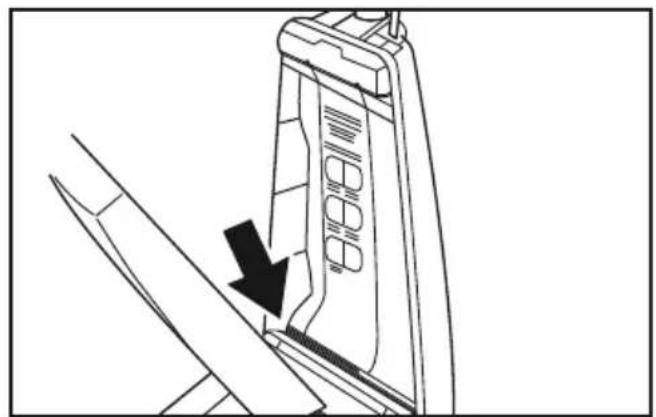
Technical line drawing of a mechanical component with a black arrow indicating a downward motion (no text or symbols present)➢ Press dust cover into place without pinching dust bag.
Electrical Shock or Personal Injury Hazard
Disconnect the electrical supply before servicing or cleaning the vacuum cleaner. Failure to do so could result in electrical shock or personal injury from vacuum cleaner suddenly starting.
natural_image
Line drawing of a vehicle interior with a hand holding a device and a prohibition symbol overlay (no text or labels)CAUTION
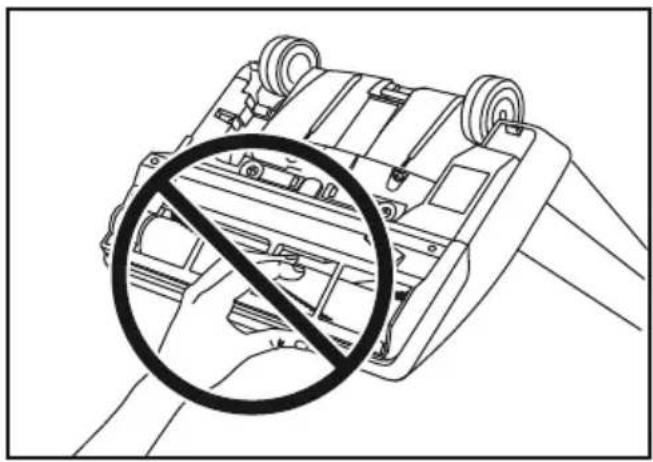
Moving parts! To reduce the risk of personal injury, DO NOT touch the agitator when vacuum cleaner is on. Contacting the agitator while it is rotating can cut, bruise or cause other injuries. Always unplug from electrical outlet before servicing. Use caution when operating near small children.
Removing and Installing Lower Plate
text_image
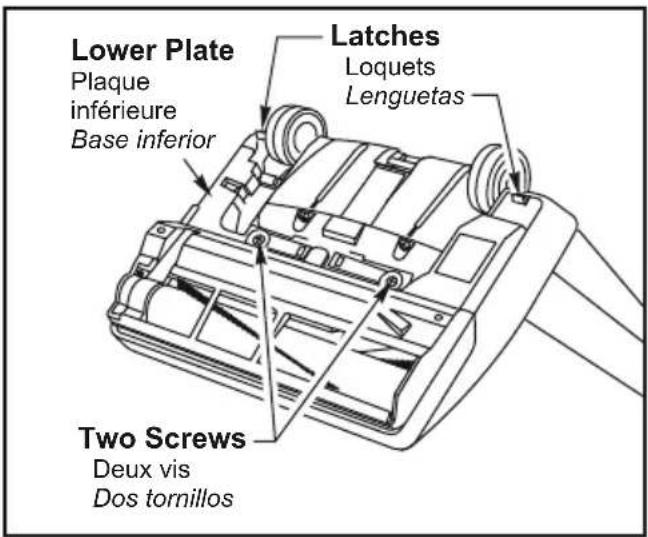
Lower Plate Plaque inférieure Base inferior Latches Loquets Lenguetas Two Screws Deux vis Dos tornillosBefore servicing any parts, disconnect vacuum cleaner from electrical outlet.
➢ Place paper under nozzle anytime lower plate is removed to protect floor.
➢ Place handle in upright position and turn vacuum cleaner over to expose lower plate.
➢ Remove two (2) screws and press latches downward to release lower plate.
Remove lower plate and remove any residue that may exist in belt area.
➢ Reinstall lower plate by hooking front end of lower plate into slots on front of nozzle housing.
➢ Press lower plate into place, snap latches into place, and reinstall two (2) screws.

AVERTISSEMENT
Remove lower plate.
➢ Remove bulb socket screw, grasp the bulb socket assembly and pull upward while moving it back and forth.
➢ Remove old bulb from the bulb socket assembly by pushing in while turning counter-clockwise.
➢ Replace bulb by pushing in while turning clockwise.
➢ Only use a bulb rated 130 V AC-15 Watts or less.
➢ Reinstall bulb socket assembly into nozzle housing by pushing it back down into slot and reinstall bulb socket screw.
➢ Reinstall lower plate.
Replacing Belt
text_image
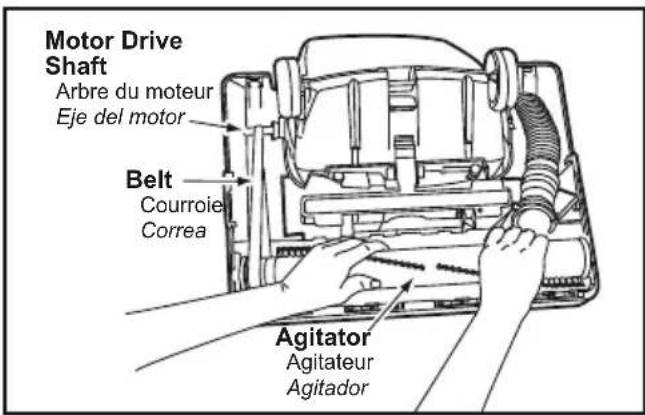
Motor Drive Shaft Arbre du moteur Eje del motor Belt Courroie Correa Agitator Agitateur AgitadorRemove lower plate.
➢ Remove agitator by carefully lifting out.
Remove worn or broken belt.
Loop new belt (Panasonic Type UB8 only) around motor shaft and belt pulley; see illustration for correct belt routing.
➢ Reinstall agitator back into nozzle housing grooves.
➢ After reinstalling the agitator, turn it by hand to make sure that belt is not twisted or pinched and that all rotating parts turn freely.
➢ Reinstall lower plate.
Cleaning Agitator
natural_image
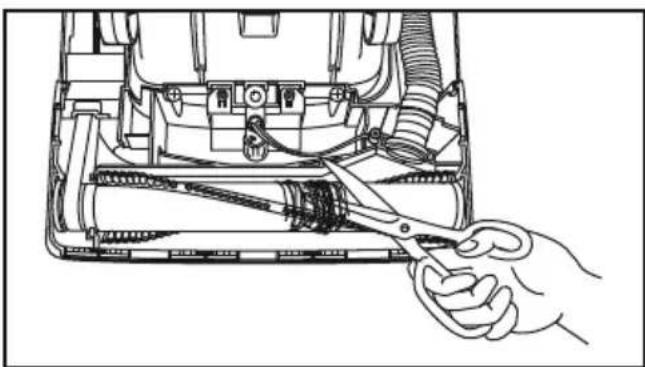
Line drawing of a hand using scissors to adjust internal components of a device (no text or symbols visible)➢ Clean agitator after every five uses and every time the belt is replaced.
Remove lower plate.
➢ Cut off any carpet pile and lint entangled around agitator with a pair of scissors.
Remove agitator.
➢ Remove any string or debris located on the end caps.
➢ Reinstall agitator and lower plate.
When the bristles on the agitator are worn so that they do not touch a card held across the lower plate, the agitator should be replaced.
➢ Remove lower plate and agitator.
➢ Position belt over belt pulley on the new agitator.
➢ Reinstall agitator and lower plate.
Agitator Assembly
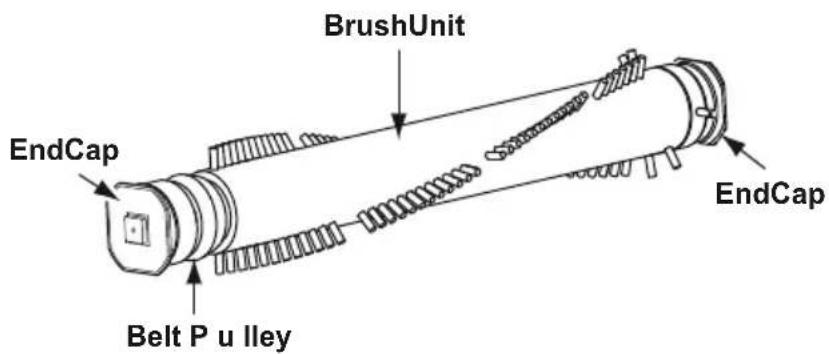
text_image
BrushUnit EndCap Belt P u lley EndCapCleaning Exterior
➢ Unplug cord from wall outlet.
Clean exterior using a clean, soft cloth that has been dipped in a solution of mild liquid detergent and water and wrung dry.
➢ DO NOT drip water on vacuum cleaner, wipe dry after cleaning.
➢ DO NOT clean tools in dishwasher or clothes washer.
➢ Wash tools in warm, soapy water, rinse and air dry.
➢ DO NOT use tools if they are wet.
Electrical Shock or Personal Injury Hazard
Disconnect the electrical supply before servicing or cleaning the vacuum cleaner. Failure to do so could result in electrical shock or personal injury from vacuum cleaner suddenly starting.
natural_image
Line drawing of a vacuum cleaner with airflow arrows indicating motion (no text or symbols)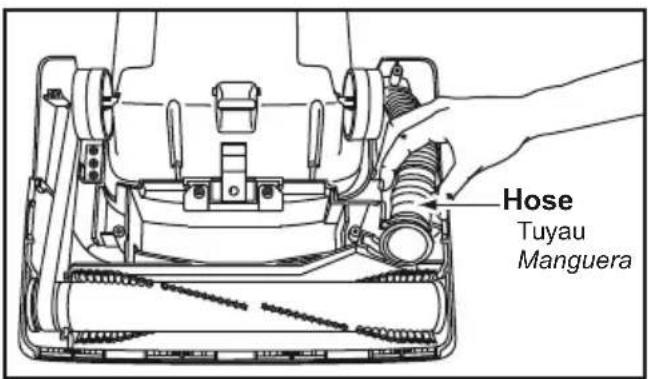
text_image
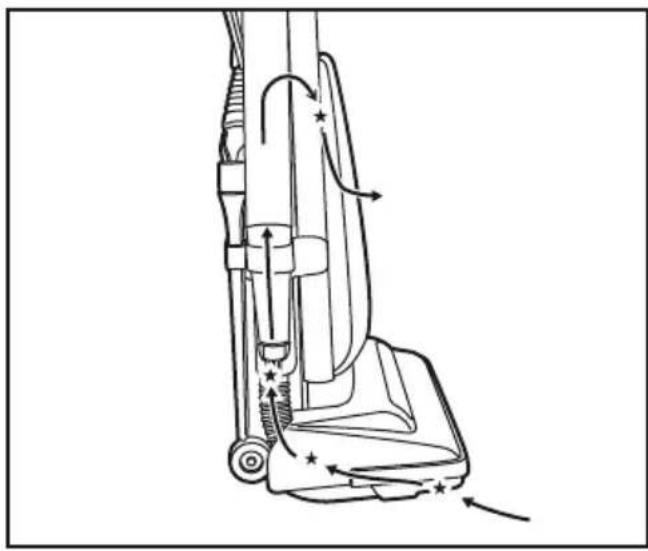
Hose Tuyau MangueraFor best cleaning results, keep the airflow passage clear.
▶ Unplug vacuum cleaner.
➢ Check each starred area occasionally for clogs.
➢ Disconnect the hose from the nozzle hose and check the hose for clogging.
➢ Inspect hose end and clear any obstructions.
➢ Reinstall hose and lower plate.
➢ While running the vacuum cleaner with the hose disconnected, stretch the hose in and out to remove the clog.
If the clog still exists, turn the vacuum cleaner OFF and unplug the power cord.
➢ Turn the vacuum cleaner over, exposing the underside.
➢ Remove the lower plate. Remove the short nozzle hose from the housing by lifting it straight up.
➢ Inspect the hose end and clear it of any obstructions. Reinstall the short nozzle hose and lower plate.

AVERTISSEMENT
Electrical Shock or Personal Injury Hazard
Disconnect the electrical supply before servicing or cleaning the vacuum cleaner. Failure to do so could result in electrical shock or personal injury from vacuum cleaner suddenly starting.
Review this chart to find do-it-yourself solutions for minor performance problems. Any service needed, other than those described in these Operating Instructions, should be performed by an authorized service representative.
| PROBLEM | POSSIBLE CAUSE | POSSIBLE SOLUTION |
| Vacuum cleaner will not run. | 1. Unplugged at wall outlet.2. ON-OFF switch not turned on.3. Tripped circuit breaker/blown fuse at household service panel. | 1. Plug in firmly. Push ON-OFF switch to On.2. Push ON-OFF switch to ON.3. Reset circuit breaker or replace fuse. |
| Poor job of dirt pickup. | 1. Full or clogged dust bag.2. Broken belt.3. Clogged hose or nozzle.4. Hose not inserted fully.5. Worn agitator.6. Dust cover improperly installed. | 1. Change bag.2. Replace belt.3. Clean hose or nozzle area.4. Insert hose.5. Replace agitator.6. Properly install dust cover. |
| Dust escapes the paper bag. | 1. Bag improperly installed.2. Bag torn. | 1. Properly install bag.2. Replace bag. |
Guide de dépannage

AVERTISSEMENT
Limited Warranty (Only For U.S.A.)
Panasonic Products Limited Warranty
Limited Warranty Coverage (For USA Only)
If your product does not work properly because of a defect in materials or workmanship, Panasonic Consumer Electronics Corporation (referred to as “the warrantor”) will, for the length of the period indicated on the chart below, which starts with the date of original purchase (“warranty period”), at its option either (a) repair your product with new or refurbished parts, (b) replace it with a new or a refurbished equivalent value product, or (c) refund your purchase price. The decision to repair, replace or refund will be made by the warrantor.
| Product or Part Name Parts Labor Motor | |||
| Vacuum Cleaner 1 year 1 year 1 | year | ||
During the “Labor” warranty period there will be no charge for labor. During the “Parts” warranty period, there will be no charge for parts.
This warranty only applies to products purchased and serviced in the United States. This warranty is extended only to the original purchaser of a new product which was not sold “as is”.
Carry-In or Mail in Service:
To find a service center please visit: http://shop.panasonic.com/support
When shipping the unit, carefully pack and send it in the original (or supplied) carton. Include a letter detailing the complaint along with the bill of sales and provide a daytime phone number where you can be reached. A valid registered receipt is required under the Limited Warranty.
When shipping Lithium Ion batteries please visit our web site at http://shop.panasonic.com/support as Panasonic is committed to providing the most up to date information.
IF REPAIR IS NEEDED DURING THE WARRANTY PERIOD, THE PURCHASER WILL BE REQUIRED TO FURNISH A SALES RECEIPT/PROOF OF PURCHASE INDICATING DATE OF PURCHASE, AMOUNT PAID AND PLACE OF PURCHASE. CUSTOMER WILL BE CHARGED FOR THE REPAIR OF ANY UNIT RECEIVED WITHOUT SUCH PROOF OF PURCHASE.
Limited Warranty Limits And Exclusions
This warranty ONLY COVERS failures due to defects in materials or workmanship, and DOES NOT COVER glass, plastic parts, temperature probes (if included) and normal wear and tear or cosmetic damage. The warranty ALSO DOES NOT COVER damages which occurred in shipment, or failures which are caused by products not supplied by the warrantor, or failures which result from accidents, misuse, abuse, neglect, bug infestation, mishandling, misapplication, alteration, faulty installation, set-up adjustments, maladjustment of consumer controls, improper maintenance, power line surge, lightning damage, modification, or commercial use (such as in a hotel, office, restaurant, or other business), rental use of the product, service by anyone other than a Factory Service center or other Authorized Servicer, or damage that is attributable to acts of God.
THERE ARE NO EXPRESS WARRANTIES EXCEPT AS LISTED UNDER “LIMITED WARRANTY COVERAGE”.
THE WARRANTYOR IS NOT LIABLE FOR INCIDENTAL OR CONSEQUENTIAL DAMAGES RESULTING FROM THE USE OF THIS PRODUCT, OR ARISING OUT OF ANY BREACH OF THIS WARRANTY. (As examples, this excludes damages for lost time, travel to and from the servicer, loss of or damage to media or images, data or other memory or recorded content. The items listed are not exclusive, but for illustration only.)
ALL EXPRESS AND IMPLIED WARRANTIES, INCLUDING THE WARRANTY OF MERCHANTABILITY, ARE LIMITED TO THE PERIOD OF THE LIMITED WARRANTY.
Some states do not allow the exclusion or limitation of incidental or consequential damages, or limitations on how long an implied warranty lasts, so the exclusions may not apply to you.
This warranty gives you specific legal rights and you may also have other rights which vary from state to state. If a problem with this product develops during or after the warranty period, you may contact your dealer or Service Center. If the problem is not handled to your satisfaction, then write to:
Consumer Affairs Department
Panasonic Consumer Marketing Company
661 Independence Pkwy
Chesapeake, VA 23320
PARTS AND SERVICE, WHICH ARE NOT COVERED BY THIS LIMITED WARRANTY, ARE YOUR RESPONSIBILITY.
Shop
Accessories!
for all your Panasonic gear
Go to
http://shop.panasonic.com/support
Get everything you need to get the most out of your Panasonic products
Accessories & Parts for your Camera,
Phone, A/V products, TV, Computers & Networking, Personal Care, Home
Appliances, Headphones, Batteries, Backup Chargers & more...
Customer Services Directory
For Product Information, Operating
Assistance, Parts, Owner's Manuals, Dealer and Service info go to
http://shop.panasonic.com/support
For the hearing or speech impaired
TTY: 1 877 833 8855
WARRANTY
Panasonic Canada Inc.
5770, Ambler Drive, Mississauga (Ontario) L4W 2T3
PANASONIC PRODUCT – LIMITED WARRANTY
EXCHANGE PROGRAM
Panasonic Canada Inc. warrants this product to be free from defects in material and workmanship under normal use and for a period as stated below from the date of original purchase agrees to, at its option either (a) repair your product with new or refurbished parts, (b) replace it with a new or a refurbished equivalent value product, or (c) refund your purchase price. The decision to repair, replace or refund will be made by Panasonic Canada Inc.
Vacuum Cleaner
One (1) year
This warranty is given only to the original purchaser, or the person for whom it was purchased as a gift, of a Panasonic brand product mentioned above sold by an authorized Panasonic dealer in Canada and purchased and used in Canada, which product was not sold "as is", and which product was delivered to you in new condition in the original packaging.
IN ORDER TO BE ELIGIBLE TO RECEIVE WARRANTY SERVICE HEREUNDER, A PURCHASE RECEIPT OR OTHER PROOF OF DATE OF ORIGINAL PURCHASE, SHOWING AMOUNT PAID AND PLACE OF PURCHASE IS REQUIRED
LIMITATIONS AND EXCLUSIONS
This warranty ONLY COVERS failures due to defects in materials or workmanship, and DOES NOT COVER normal wear and tear or cosmetic damage. The warranty ALSO DOES NOT COVER damages which occurred in shipment, or failures which are caused by products not supplied by Panasonic Canada Inc., or failures which result from accidents, misuse, abuse, neglect, mishandling, misapplication, alteration, faulty installation, set-up adjustments, misadjustment of consumer controls, improper maintenance, power line surge, lightning damage, modification, introduction of sand, humidity or liquids, commercial use such as hotel, office, restaurant, or other business or rental use of the product, or service by anyone other than a Authorized Servicer, or damage that is attributable to acts of God.
Parts such as disposable dust bags, filters, belts, light bulbs and agitator brushes are not covered by this warranty.
THIS EXPRESS, LIMITED WARRANTY IS IN LIEU OF ALL OTHER WARRANTIES, EXPRESS OR IMPLIED, INCLUDING ANY IMPLIED WARRANTIES OF MERCHANTABILITY AND FITNESS FOR A PARTICULAR PURPOSE. IN NO EVENT WILL PANASONIC CANADA INC. BE LIABLE FOR ANY SPECIAL, INDIRECT OR CONSEQUENTIAL DAMAGES RESULTING FROM THE USE OF THIS PRODUCT OR ARISING OUT OF ANY BREACH OF ANY EXPRESS OR IMPLIED WARRANTY. (As examples, this warranty excludes damages for lost time, travel to and from the Authorized Servicer, loss of or damage to media or images, data or other memory or recorded content. This list of items is not exhaustive, but for illustration only.)
In certain instances, some jurisdictions do not allow the exclusion or limitation of incidental or consequential damages, or the exclusion of implied warranties, so the above limitations and exclusions may not be applicable. This warranty gives you specific legal rights and you may have other rights which vary depending on your province or territory.
CONTACT INFORMATION
For product information and operation assistance, please contact our Support page: www.panasonic.ca/english/support
For defective product exchange within the warranty period, please contact the original dealer.
Garantie
Panasonic Canada Inc.
5770, Ambler Drive, Mississauga (Ontario) L4W 2T3
PRODUIT PANASONIC - GARANTIE LIMITÉE
PROGRAMME D'ÉCHANGE
Consumer Affairs Department
Panasonic Consumer Marketing Company
661 Independence Pkwy
Chesapeake, VA 23320
PARTES Y SERVICIOS QUE NO ESTAN CUBIERTO POR ESTA GARANTIA LIMITADA, SON SU RESPONSABILIDAD.
If your Panasonic Vacuum Cleaner needs service, look in the yellow pages of the telephone book under HOME APPLIANCE SERVICE for your nearest Panasonic Corporation of North America authorized service center, or call, 1-800-211-PANA (7262) toll free to find a convenient servicenter. DO NOT send the product to the Executive or Regional Sales offices. They are NOT equipped to make repairs.
If you ship the product
Carefully pack and send it prepaid, adequately insured and preferably in the original carton. Attach a postage-paid letter to the outside of the carton, which contains a description of your complaint. DO NOT send the product to the Executive or Regional Sales Offices. They are NOT equipped to make repairs.
PANASONIC CORPORATION OF NORTH AMERICA
Two Riverfront Plaza
Newark, NJ 07102
World Wide Web Address
http://www.panasonic.com/repair
What to do when service is needed / Service après-vente (Canada)
WARRANTY SERVICE
For product operation and information assistance, please visit our Support page:
www.panasonic.ca/english/support
PRODUCT REPAIRS
Please locate your nearest Authorized Servicentre.
Link: panasonic.ca/english/support/servicentrelocator
SERVICE SOUS GARANTIE
Two Riverfront Plaza
Newark, NJ 07102
World Wide Web Address
http://www.panasonic.com/repair
AC01ZDFJZ000
C01ZDFJ60000
Printed in China
Imprimé en Chine
Impreso en China