RM23OR1 - Monitor REVO - Free user manual and instructions
Find the device manual for free RM23OR1 REVO in PDF.



| Product Type | Wide LED-TFT Monitor |
| Brand | REVO |
| Model | RM23OR1 |
| Screen Diagonal | 23 inches (58.4 cm) |
| Panel Type | AM-TFT (active matrix) |
| Maximum Resolution | 1920 x 1080 pixels (Full HD) at 60 Hz |
| Brightness | 250 cd/m² (nominal) |
| Contrast Ratio | 1000:1 (nominal) |
| Response Time | 5 ms (nominal) |
| Viewing Angles | 160° horizontal / 160° vertical |
| Scan Frequencies | Horizontal: 31 to 80 kHz; Vertical: 56 to 75 Hz |
| Video Inputs | VGA (RGB-PC), DVI (HDCP 1.2), HDMI 1.3 |
| Audio Input | PC Stereo In (3.5 mm jack) |
| Power Consumption | Active: < 24 W; Standby: < 1 W |
| Power Supply | 12 V DC, 2.0 A (AC adapter 100-240 V, 50/60 Hz) |
| Package Dimensions (L x W x H) | 600 x 160 x 460 mm |
| Net Weight | 5.7 kg |
| Gross Weight | 7.9 kg |
| Wall Mount Compatible | VESA 100 x 100 mm standard (M4 x 10 screws not included) |
| Tilt | -3° to 75° |
| OSD Control | On-screen menu: brightness, contrast, position, color, language (French, English, etc.) |
| Care and Cleaning | Clean with a dry, soft cloth. Unplug before cleaning. |
| Safety | Do not expose to water or moisture. Ensure at least 10 cm of ventilation around the device. |
| Included Accessories | Power cord, AC adapter, VGA cable, stand and screws, user manual |
Frequently Asked Questions - RM23OR1 REVO
User questions about RM23OR1 REVO
0 question about this device. Answer the ones you know or ask your own.
Ask a new question about this device
Download the instructions for your Monitor in PDF format for free! Find your manual RM23OR1 - REVO and take your electronic device back in hand. On this page are published all the documents necessary for the use of your device. RM23OR1 by REVO.
USER MANUAL RM23OR1 REVO
23-INCH WIDE TFT-LED MONITOR
USER MANUAL
23-INCH WIDE TFT-LED MONITOR
USER MANUAL
CONTENTS
SAFETYINSTRUCTION 2\~3
CAUTIONS 4
FCC RF INTERFERENCE STATEMENT 5
INSTALLATION 6
CONNECTING WITH EXTERNAL EQUIPMENT 7
CONTROLS AND FUNCTIONS 8~16
MOUNTING GUIDE 17
D-SUB CONNECTOR PIN ASSIGNMENTS 18
POWER MANAGEMENT 19
SPECIFICATIONS 20
TROUBLESHOOTINGGUIDE 21
This Monitor was
Manufactured by ISO 9001
Certified Factory
SAFETYINSTRUCTION
Important Safety Instruction
-
Read these instructions.
-
Keep these Instructions.
-
Heed all warnings.
-
Follow all instructions.
-
Do not use this apparatus near water.
-
Clean only with dry cloth.
-
Do not block any ventilation openings. Install in accordance with the manufacturer's instructions.
-
Do not install near any heat sources such as radiators, heat registers, stoves, or other apparatus (including amplifiers) that produce heat.
-
Do not ignore the safety purpose of the polarized or grounding-type plug. Apolarized plug has two blades with one wider than the other. Agrounding type plug has two blades and a third grounding prong. The wide blade or the third prong are provided for your safety. If the provided plug does not fit into your outlet, consult an electrician for replacement of the bsolete outlet.
-
Protect the power cord from being walked on or pinched particularly at plugs, convenience receptacles and the point where they exit from the apparatus.
-
Only use attachment/accessories specified by the manufacturer.
-
Use only with the cart, stand, tripod, bracket or table specified by the manufacturer or sold with the apparatus. When a cart is used, use caution when moving the cart/apparatus combination to avoid injury from tip-over.
-
Unplug this apparatus during lightning storms or when unused for long periods of time.
-
Refer all servicing to qualified service personnel. Servicing is required when the apparatus has been damaged in any way, such as power-supply cord or plug is damaged, liquid has been spilled or objects have fallen into the apparatus the apparatus has been exposed to rain or moisture does not operate normally or has been dropped.

SAFETYINSTRUCTION
- The apparatus shall not be exposed to dripping or splashing liquids. No objects filled with liquids, such as vases, shall be placed next to apparatus.
14 Minimum distances(e.g. 10cm) around the apparatus for sufficient ventilation.
"WARNING - To reduce the risk of fire or electric shock, do not expose the apparatus to rain or moisture."
"The apparatus shall not be exposed to dripping or splashing and no objects filled with liquids, such as vases, shall be placed on the apparatus."
This symbol is intended to alert the user to the presence of uninsulated: dangerous voltage with in the product's enclosure that may be of sufficient magnitude to constitute a risk of electric shock to persons.

This symbol is intended to alert the user to the presence of important operating and maintenance(servicing) instructions in the literature accompanying the appliance.
CAUTIONS
CAUTION
The power supply cord is used as the main disconnect device, ensure that the socket-outlet is located/installed near the equipment and is easily accessible.
ATTENTION
POWER SUPPLY CORD IS USED AS MAIN POWER DISCONNECT DEVICE IN THIS PRODUCT. UNPLUG THIS PRODUCT FROM THE WALL OUTLET BEFORE REMOivating THE BACK COVER AND SERVICING
EMISSION CHARACTERISTICS TESTED BY SEMKO
THIS PRODUCT HAS BEEN TESTED AND HAS SHOWN COMPLIANCE WITH THE NATIONAL SPECIFICATIONS SUCH AS SWEDISH MPR 1990.10.(MPR II)
NEVERREMOVE THE BACK COVER
Removal of the back cover should be carried out only by qualified personnel.
DO NOT USE IN HOSTILE ENVIRONMENTS
To prevent shock or fire hazard, do not expose the unit to rain or moisture.
This unit is designed to be used in the office or home. Do not subject the unit to vibrations or dust of corrosive gases.
- KEEP IN A WELL VENTILATED PLACE
Ventilation holes are provided on the cabinet to prevent the temperature from rising.
Do not cover the unit or place anything on the top of unit.
AVOID HEAT
Avoid placing the unit in direct sunshine or near a heating appliance.
TO ELIMINATE EYE FATIGUE
Do not use the unit against a bright back ground and where sunlight or other light sources will shine directly on the monitor.
BE CAREFUL OF HEAVY OBJECT
Neither the monitor itself nor any other heavy object should rest on the power cord.
Damage to a power cord can cause fire or electrical shock.
FCC RF
INTERFERENCE STATEMENT
NOTE
This equipment has been tested and found to comply with the limits for a Class A digital device, pursuant to Part 15 of the FCC Rules. These limits are designed to provide reasonable protection against harmful interference in a residential installation.
This equipment generates, uses and can radiate radio frequency energy and, if not installed and used in accordance with the instructions, may cause harmful interference to radio communications. However, there is no guarantee that interference will not occur in a particular installation.
If this equipment does cause harmful interference to radio or television reception which can be determined by turning the equipment off and on, the user is encouraged to try to correct the interference by one or more of the following measures.
- Reorient or relocate the receiving antenna.
- Increase the separation between the equipment and receiver.
- Connect the equipment into an outlet on a circuit different from that to which the receiver is connected.
- Consult the dealer or an experienced radio, TV technician for help.
- Only shielded interface cable should be used.
Finally, any changes or modifications to the equipment by the user not expressly approved by the grantee or manufacturer could void the users authority to operate such equipment.
DOC COMPLIANCE NOTICE
This digital apparatus does not exceed the Class A limits for radio noise emissions from digital apparatus set out in the radio interference regulation of Canadian Department of communications.
INSTALLATION
Before setting up the monitor, ensure that the power to the monitor and other attached devices are turned off.
※ Notice: Stand & Screws are optional
A. Connecting the stand
A-1. Place the monitor with its front facing downward on a soft cloth.
A-2. Assemble the Stand Base into the Stand Body in the correct direction using the included screws in the accessory box.
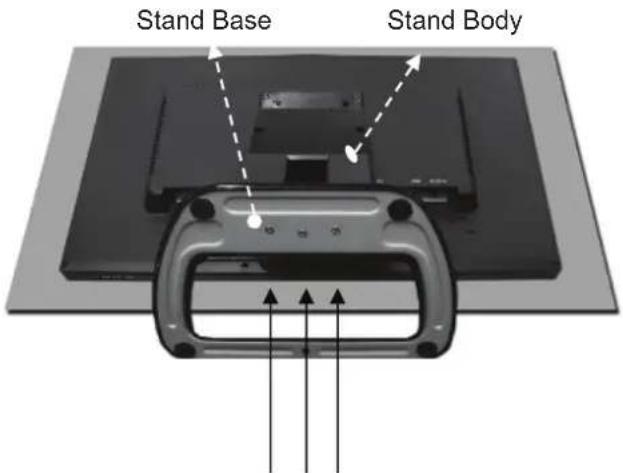
FS4x10 screws
A-3. Once assembled take the monitor up carefully and face the front side.
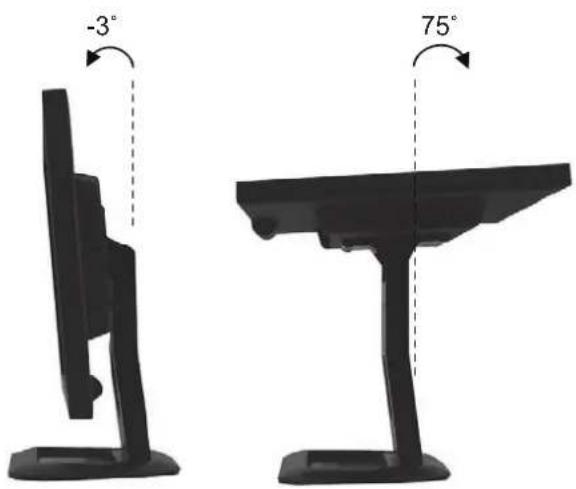
B. Positioning your display
Adjust the position of the panel in various ways for maximum comfort. (Tilt Range: -3irc 75irc
CONNECTING WITH EXTERNAL EQUIPMENT
1. Rear Connection
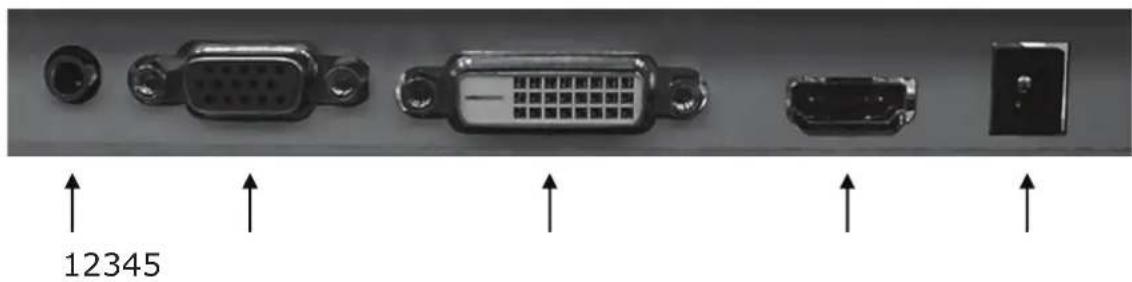
- PC STEROE IN.
2.VGA. - DVI.
4.HDMI.
5.DC12VIN.
CONTROLS AND FUNCTIONS
2. Bottom Key Control
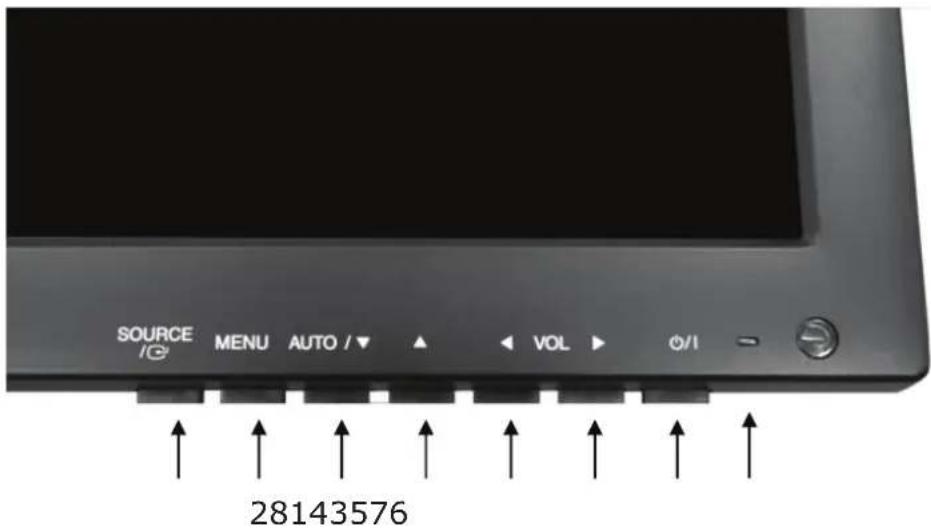
1. SOURCE/
Selects VGA, DVI and HDMI inputs.
Selects an option in the OSD.
2. MENU
Activates or exits the OSD.
Moves previous menu or status in the OSD.
3,4.AUTO/▼&
Moves another option in the OSD.
The button converts the aspect ratio as 16:9 or 4:3.
The AUTO/ button is auto adjustment function in the VGA input.
5, 6. VOL(-) & VOL(+)
Adjusts the volume and menu settings.
The VOL(-) button is the Sound off function.
7.1Φ
Turns the power on or off. There will be a few seconds delay before the display appears.
8. LED
Turned on with VGA, DVI and HDMI signals: blue color.
Turned on with no signal: red color.
Turned off: LED off.
CONTROLS AND FUNCTIONS
OSD Menu Description
All picture, sound settings and setup for the monitor can be adjusted in the OSD menu.
To adjust the OSD screen:
- Press the MENU button to enter the OSD menu.
- Press the / buttons to select the desired option. The selected option is yellow color.
- Press the SOURCE button twice to enter the sub-menu and adjust the item.
- Change the value you wish to adjust by using the VOL(-) & VOL(+) buttons.
- Press the MENU button twice to exit the sub-menu and the adjusted item.
- Press the MENU button again to exit the OSD menu.
1.Exit
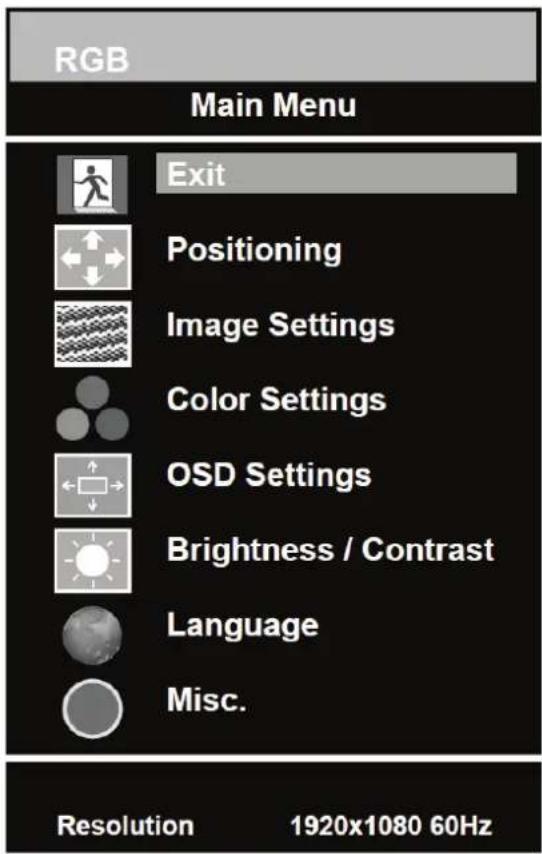
| Option Function |
| Exit Exits the OSD menu. |
CONTROLS AND FUNCTIONS
2. Positioning
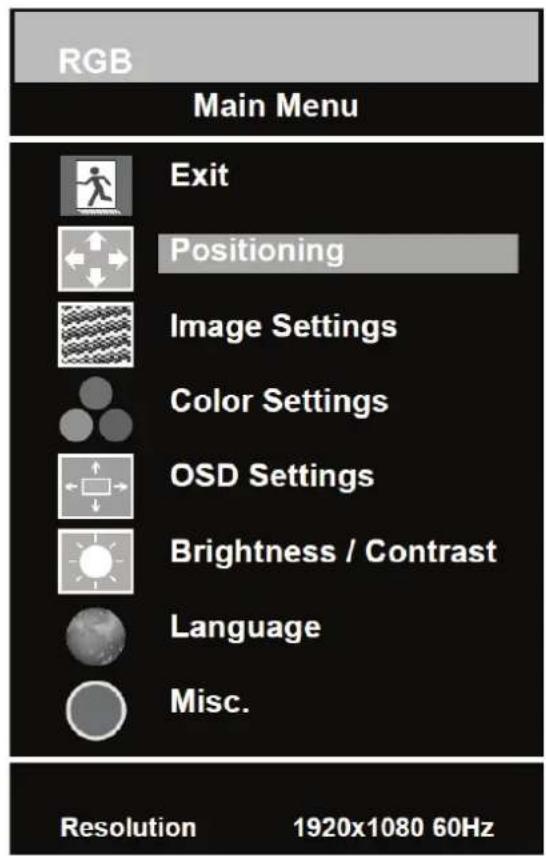
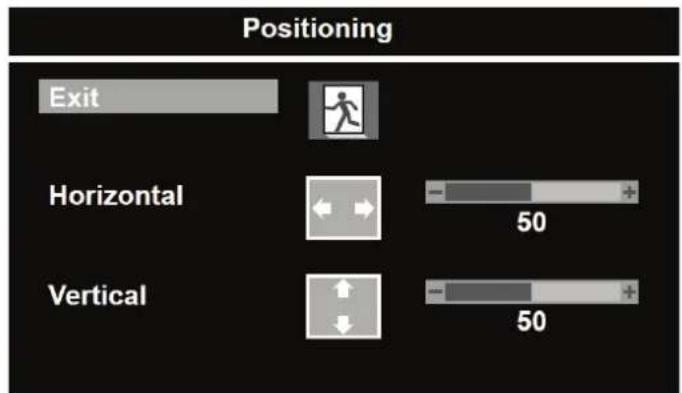
| Option Function Value | |
| Exit Returns to previous menu. | |
| Horizontal Adjusts the horizontally picture position. 0 ~ 100. | |
| Vertical Adjusts the vertically picture position. 0 ~ 100. |
※ Unavailable in DVI & HDMI inputs.
CONTROLS AND FUNCTIONS
3. Image Settings
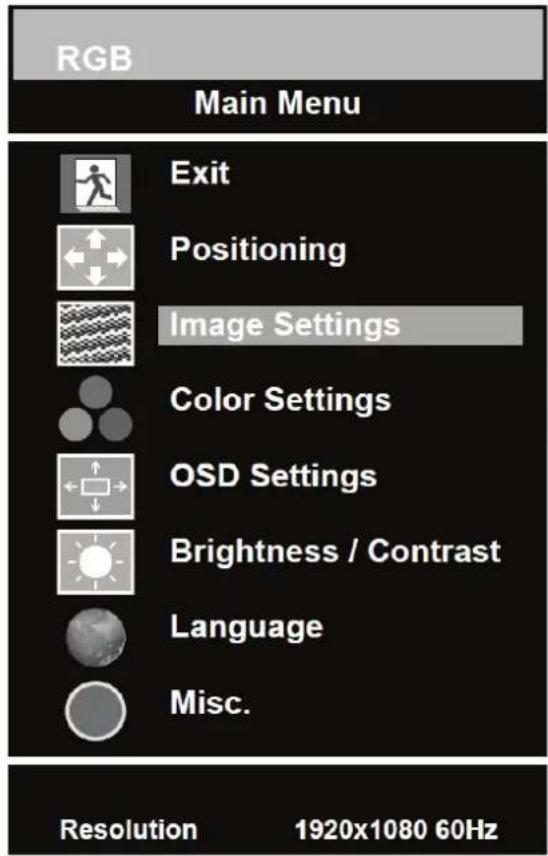
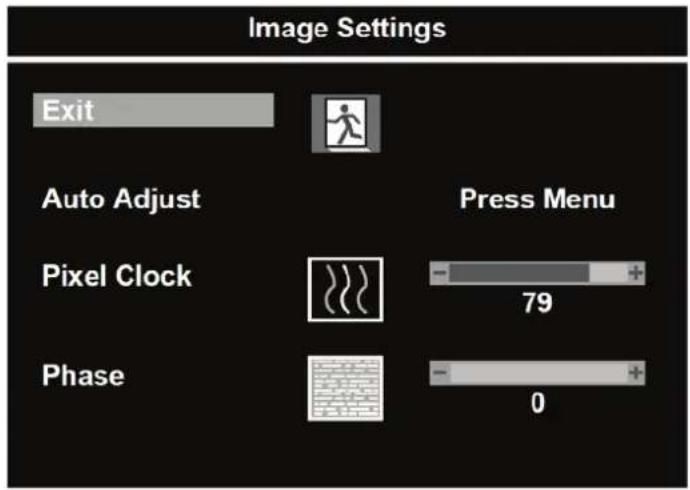
| Option Function Value | |
| Exit Returns to previous menu. | |
| Auto Adjust Auto geometry adjustment. | |
| Pixel Clock Adjusts the vertical noise of screen image. 0 ~ 100. | |
| Phase Adjusts the number of horizontal picture elements. 0 ~ 100. |
Unavailable in DVI & HDMI inputs.
CONTROLS AND FUNCTIONS
4. Color Settings
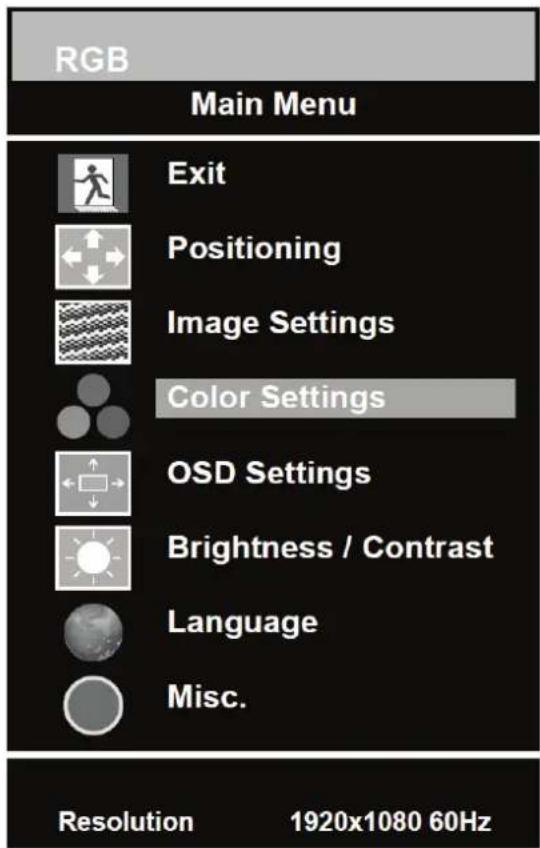
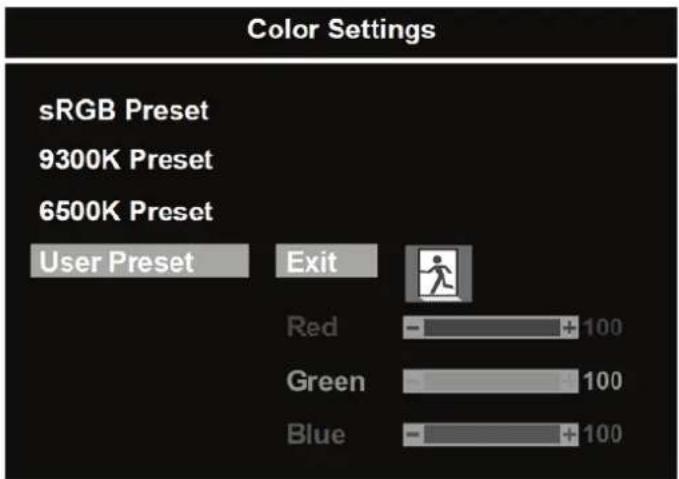
| Option Function Value | |
| Color Adjust Adjusts red, green & blue colors of the picture. 0 ~ 100. | |
| Color Temp Adjusts color temperature of the picture. | sRGB Preset, 9300K Preset, 6500K Preset, User Preset1). |
1)User Preset
| Option Function | Value | |
| Exit Returns to previous menu. | ||
| Red, Green, Blue Adjusts red, green & blue colors of the picture. 0 ~ 100. | ||
CONTROLS AND FUNCTIONS
5. OSD Settings
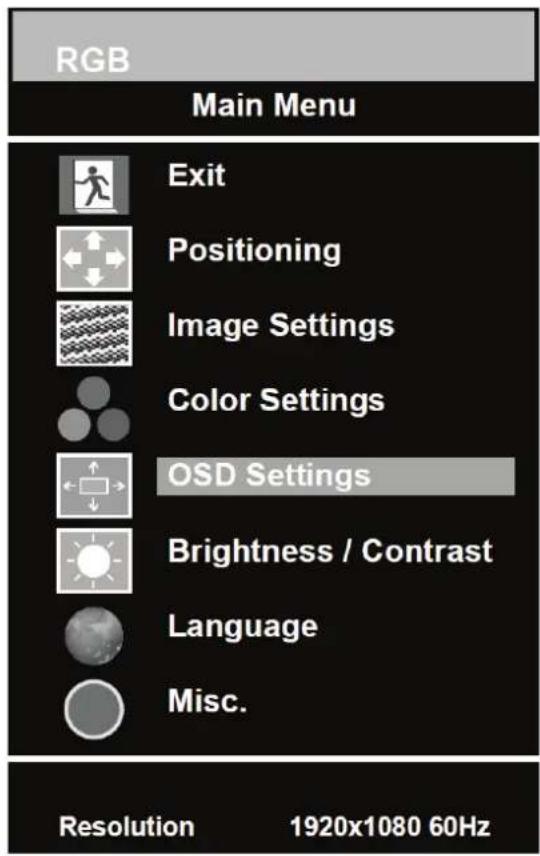
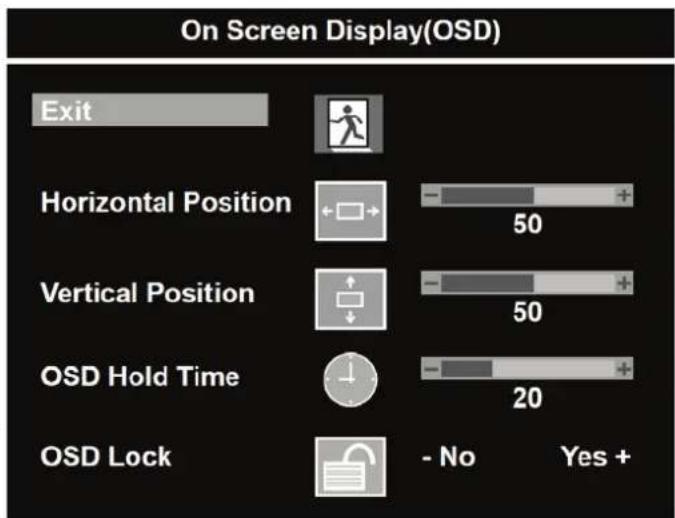
| Option Function Value | |
| Exit Returns to previous menu. | |
| Horizontal Position Moves the horizontally OSD position. 0 ~ 100. | |
| Vertical Position Moves the vertically OSD position. 0 ~ 100. | |
| OSD Hold Timer Adjusts the display time of OSD. 0 ~ 100. | |
| OSD Lock Displays the menu of OSD settings only. No / Yes |
CONTROLS AND FUNCTIONS
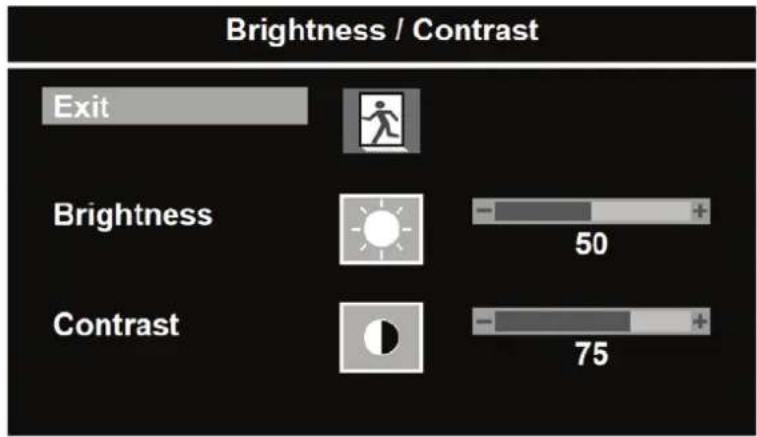
6. Brightness / Contrast
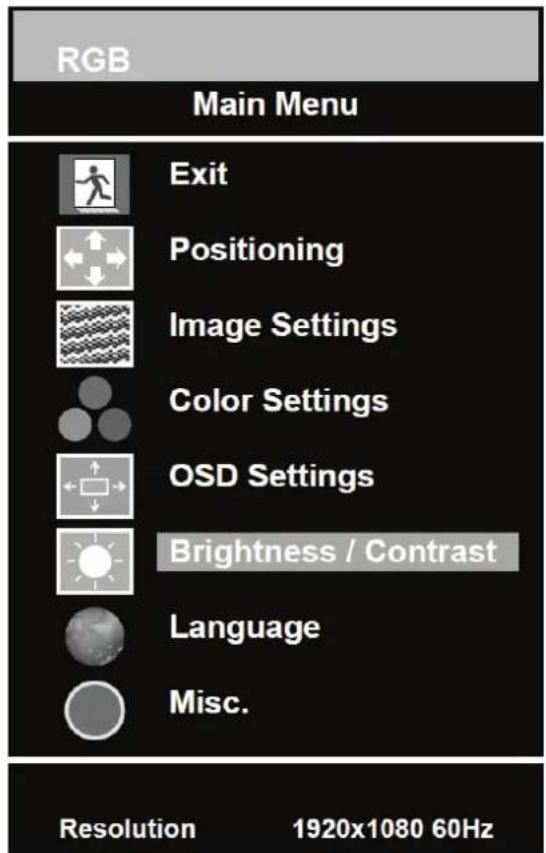
| Option Function Value | |
| Exit Returns to previous menu. | |
| Brightness Adjusts brightness of the screen. 0 ~ 100. | |
| Contrast Adjusts intensity of the image. 0 ~ 100. |
CONTROLS AND FUNCTIONS
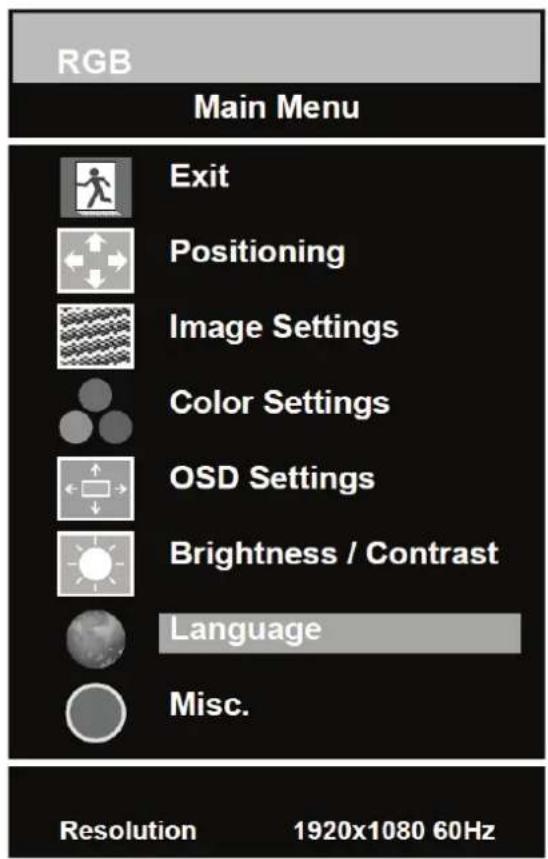
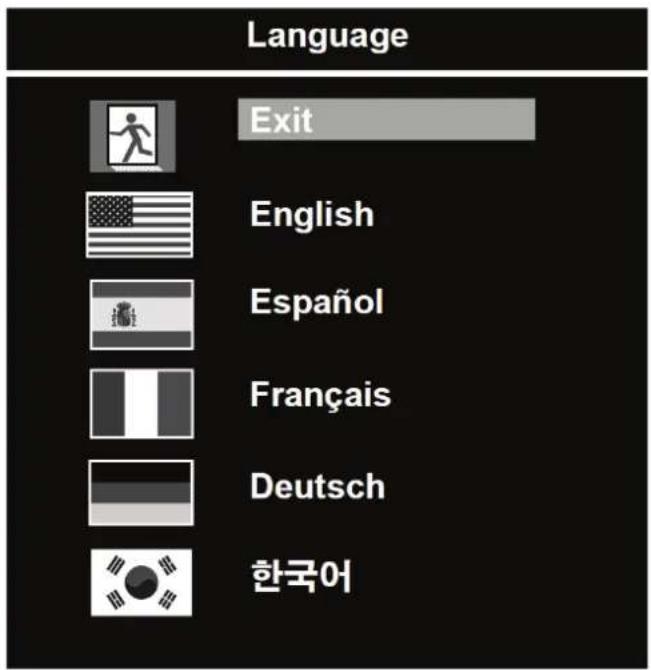
7. Language
| Option Function Value | |
| Exit Returns to previous menu. | |
| Language Sets the language of OSD menu. English, Spanish, French, Deutsch & Korean. | |
CONTROLS AND FUNCTIONS
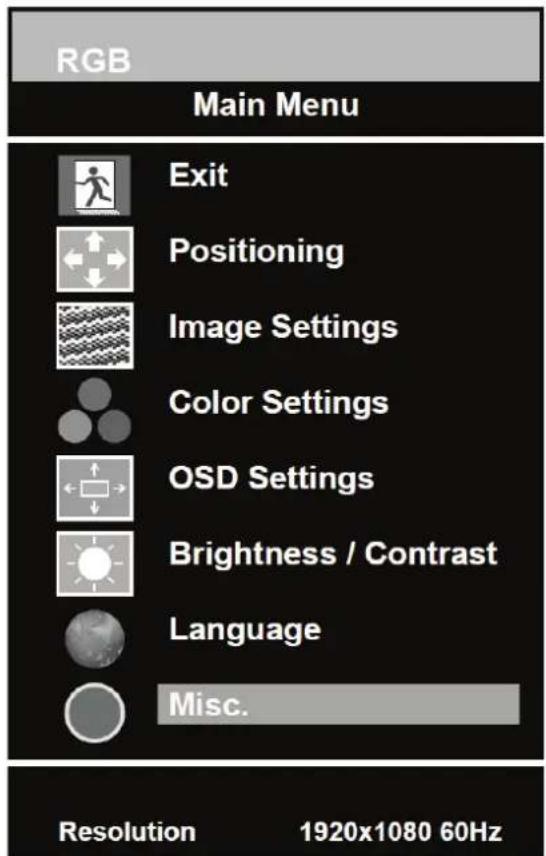
8. Misc.
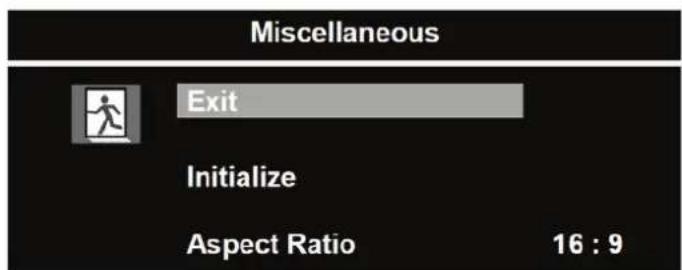
| Option Function Value | |
| Exit Returns to previous menu. | |
| Initialize Resets the monitor settings to the factory default. | |
| Aspect Ratio Converts the aspect ratio. 16:9 & 4:3 |
MOUNTING GUIDE
Wall mounting (Optional)
The LCD monitor is suitable for wall mounting by using the VESA 100 standard wall mount (not included in the delivery).
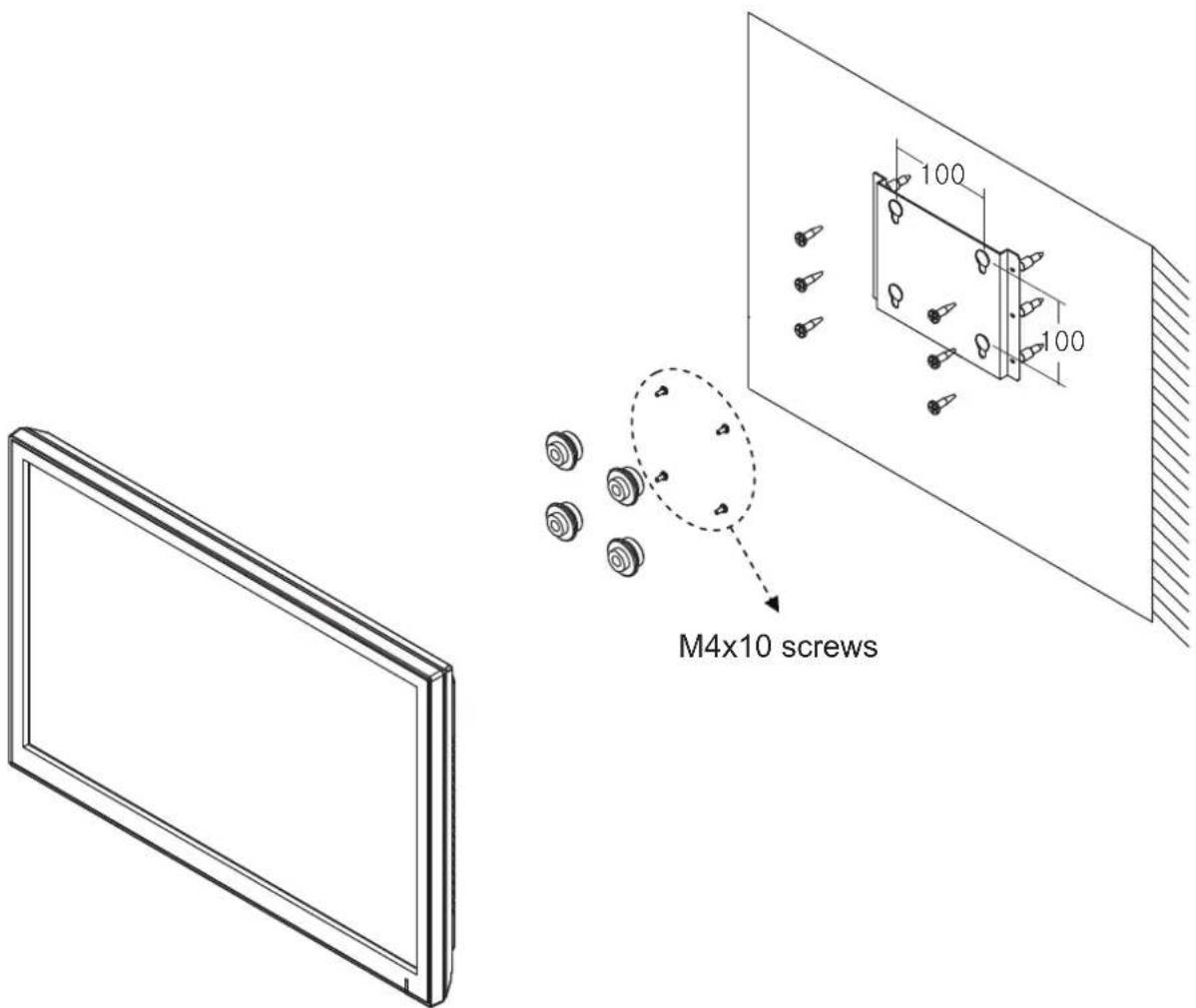
※ Attention!
You must use four M4x10 screws to assemble this monitor and the wall mount bracket.
D-SUB CONNECTOR
PIN ASSIGNMENTS
Assignments
This monitor features a power management system to "power down" upon receipt of the VESA DPMS(The display power management signaling) from a VESA DPMS video card.
The VESA DPMS-compliant video card performs this signaling system through not sending horizontal, vertical, or sync signal.
This monitor enters an appropriate mode through identifying each of the three modes of the signaling system.
Power Consumption
| Mode Power Consumption | |
| Turned On | < 24W |
| No Signal & Turned Off | < 1W |
LED Indicator
The power management feature of the monitor is comprised of three stages:
Turned on(blue), no signal(red) and turned off(LED off).
| Mode LED Monitor Operation | |||
| Turned On | Blue | Normal | Operation |
| No Signal | Red | Not | Operation |
| Turned Off | Off | Not | Operation |
SPECIFICATIONS
| 23" | |
| LCD Type | 23" Diagonal AM-TFT (Active-Matrix) |
| Pixel pitch(mm): 0.2655(H) x 0.2655(V) | |
| Brightness: 250cd/m² (Typical) | |
| Contrast ratio: 1000:1 (Typical) | |
| Viewing angle: 160°/160° (H/V) | |
| Response time: 5ms (Typical) | |
| Resolution (H x V) | 1920x1080 @60Hz |
| Frequency | Horizontal: 31~80kHzVertical: 56~75Hz |
| Input Signal | Digital Visual Interface (DVI 1.0 & HDCP 1.2) |
| VGA (RGB-PC) | |
| HDMI Visual Interface (HDMI 1.3) | |
| PC Stereo in | |
| Active Display Area (H x V) | 509.76mm x 286.74mm |
| Packing Dimensions (W x D x H) | 600mm x 160mm x 460mm (23.62" x 6.30" x 18.11") |
| Weight | Net: 4.56 kg (10.05 lbs) |
| Gross: 6.76kg (14.9 lbs) | |
| Electrical Ratings | 12V 2.0A (100-240V~, 50/60Hz) |
NOTE: Technical specifications are subject to change without notice.
TROUBLESHOOTING GUIDE
| TROUBLE | TROUBLESHOOTING TIP |
| No image on display screen | 1. Check that power cord of the Monitor have been connected securely into wall outlet or grounded extension cable or strip. 2. Power switch should be in the ON position and LED is lit. 3. Check that the Brightness and/or the Contrast adjustments of the Display have not been turned down to minimum levels. |
| “NO SIGNAL” message on screen | 1. The signal cable should be completely connected to the video card/computer. 2. The video card should be completely seated in its slot and the computer is switched ON. |
| Display image is not centered, too small or too large in PC mode | Push the down key in front side or Auto key in remote controller. |
| Vertical or Horizontal noise is present in the picture | Adjust Clock and Phase in the OSD. |
WEEE Symbols
Correct Disposal of This Product (Waste Electrical & Electronic Equipment) (Applicable in the European Union and other European countries with separate collection syster
This marking shown on the product or its literature, indicates that it should not be disposed with other household wastes at the end of its working life. To prevent possible harm to the environment or human health from uncontrolled waste disposal, please separate this from other types of wastes and recycle it responsibly to promote the sustainable reuse of material resources. Household users should contact either the retailer where they purchased this product, or their local government office, for details of where and how they can take this item for environmentally safe recycling. Business users should contact their supplier and check the terms and conditions of the purchase contract. This product should not be mixed with other commercial wastes for disposal.
MONITEUR LED-TFT GRAND ECRAN DE 23"
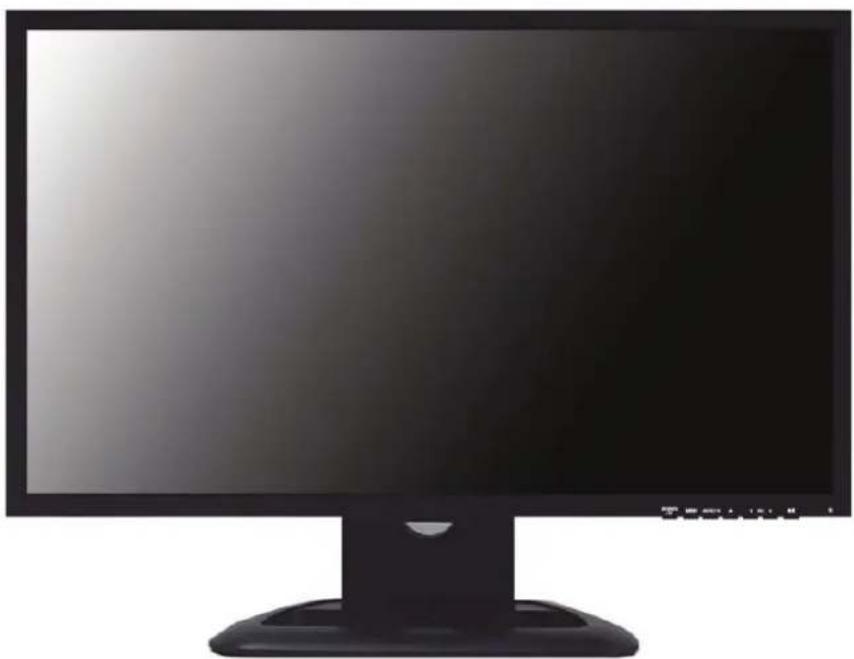
MANUEL DE L'UTILISATEUR
TABLE DES MATIERES
INSTRUCTIONS DE SECURITE 2 et 3
MISES EN GARDE 4
DECLARATION FCC DE RADIO-INTERFERENCE RF 5
INSTALLATION 6
CONNEXION A DES EQUIPEMENTS EXTERNES 7
CONTROLES ET FONCTIONS 8 a 16
GUIDE DE MONTAGE 17
ATTRIBUTIONS DES BROCHES DU CONNECTEUR D-SUB 18
GESTION DE L'ENERGIE 19
SPECIFICATIONS 20
GUIDE DE SOLUTION DE PROBLEMES 21
AVIS DE CONFORMITE DOC

- 23-INCH WIDE TFT-LED MONITOR
- CONTENTS
- SAFETYINSTRUCTION
- Important Safety Instruction
- CAUTIONS
- CAUTION
- ATTENTION
- EMISSION CHARACTERISTICS TESTED BY SEMKO
- NEVERREMOVE THE BACK COVER
- DO NOT USE IN HOSTILE ENVIRONMENTS
- - KEEP IN A WELL VENTILATED PLACE
- AVOID HEAT
- TO ELIMINATE EYE FATIGUE
- BE CAREFUL OF HEAVY OBJECT
- FCC RF
- INTERFERENCE STATEMENT
- NOTE
- DOC COMPLIANCE NOTICE
- INSTALLATION
- ※ Notice: Stand & Screws are optional
- Connecting the stand
- Positioning your display
- CONNECTING WITH EXTERNAL EQUIPMENT
- Rear Connection
- CONTROLS AND FUNCTIONS
- Bottom Key Control
- SOURCE/
- MENU
- 3,4.AUTO/▼&
- 5, 6. VOL(-) & VOL(+)
- 7.1Φ
- LED
- OSD Menu Description
- 1.Exit
- Positioning
- Image Settings
- Color Settings
- OSD Settings
- Brightness / Contrast
- Language
- Misc.
- MOUNTING GUIDE
- Wall mounting (Optional)
- D-SUB CONNECTOR
- PIN ASSIGNMENTS
- LED Indicator
- SPECIFICATIONS
- TROUBLESHOOTING GUIDE
- WEEE Symbols
- MONITEUR LED-TFT GRAND ECRAN DE 23"
- TABLE DES MATIERES
Brand : REVO
Model : RM23OR1
Category : Monitor