RTX1 - Multitools BLACK & DECKER - Free user manual and instructions
Find the device manual for free RTX1 BLACK & DECKER in PDF.


| Product Type | Multifunctional Rotary Tool |
| Brand | Black & Decker |
| Model | RTX1 |
| Category | Multifunctional Tools |
| Variable Speed | 6 Settings: 8,000 to 30,000 RPM |
| Power Supply | 120 V, 60 Hz (AC) |
| Collet | 0.32 cm (1/8 in) and 0.24 cm (3/32 in) |
| Double Insulation | Yes |
| Main Functions | Cutting, sanding, polishing, drilling, engraving, deburring, stripping, sharpening, rust removal |
| Maintenance | Clean with mild soap and a damp cloth; do not immerse |
| Safety | Wear safety goggles; use recommended accessories; do not force the tool |
| Replacement Parts | Use only identical replacement parts |
| Repairability | Have servicing performed by an authorized service center |
| Warranty | 5 years for residential use |
| Optional Accessories | Flexible Shaft RT5100 |
| Spindle Lock | Yes |
| Speed Control | Settings 1 to 6 on the internal control |
Frequently Asked Questions - RTX1 BLACK & DECKER
User questions about RTX1 BLACK & DECKER
0 question about this device. Answer the ones you know or ask your own.
Ask a new question about this device
Download the instructions for your Multitools in PDF format for free! Find your manual RTX1 - BLACK & DECKER and take your electronic device back in hand. On this page are published all the documents necessary for the use of your device. RTX1 by BLACK & DECKER.
USER MANUAL RTX1 BLACK & DECKER
IF YOU HAVE A SUGGESTION OR COMMENT,
GIVE US A CALL. YOUR FEEDBACK IS VITAL
TO THE SUCCESS OF BLACK & DECKER'S QUALITY
IMPROVEMENT PROGRAM.
KEY INFORMATION YOU SHOULD KNOW:
- Do not tighten the collet nut without an accessory bit in place.
- Do not engage spindle lock until tool has come to a complete stop.
SAVE THIS MANUAL FOR FUTURE REFERENCE.
VEA EL ESPANOL EN LA CONTRAPORTADA.
INSTRUCTIVO DE OPERACION, CENTROS DE SERVICIO Y POLISTA DE CARANTIA, LIPIDETRON, FASE SENTE INSTITUCIYO MATEO
DE GAHANTA. ADVERTENCA: LEASE ESTE INSTRUCTIVO ANTES DE USAR EL PRODUCTO.
CAT.NO.RTX FORM NO.397438-00 Copyright©2000 Black & Decker (JUNE 00 -1) PRINTED IN CHINA
GENERAL SAFETY RULES
WARNING: Read and understand all instructions. Failure to follow all instructions listed below may result in electric shock, fire and/or serious personal injury.
SAVE THESE INSTRUCTIONS
WORK AREA
- Keep your work area clean and well lit. Cluttered benches and dark areas invite accidents.
- Do not operate power tools in explosive atmospheres, such as in the presence of flammable liquids, gases, or dust. Power tools create sparks which may ignite the dust or fumes.
- Keep bystanders, children, and visitors away while operating a power tool. Distractions can cause you to lose control.
ELECTRICAL SAFETY
- Double Insulated tools are equipped with a polarized plug (one blade is wider than the other). This plug will fit in a polarized outlet only one way. If the plug does not fit fully in the outlet, reverse the plug. If it still does not fit, contact a qualified electrician to install a polarized outlet. Do not change the plug in any way. Double Insulation eliminates the need for the three wire grounded power cord and grounded power supply system.
- Avoid body contact with grounded surfaces such as pipes, radiators, ranges and refrigerators. There is an increased risk of electric shock if your body is grounded.
- Don't expose power tools to rain or wet conditions. Water entering a power tool will increase the risk of electric shock.
- Do not abuse the cord. Never use the cord to carry the tools or pull the plug from an outlet. Keep cord away from heat, oil, sharp edges or moving parts. Replace damaged cords immediately. Damaged cords increase the risk of electric shock.
- When operating a power tool outside, use an outdoor extension cord marked "W-A" or "W". These cords are rated for outdoor use and reduce the risk of electric shock.
PERSONAL SAFETY
-
Stay alert, watch what you are doing and use common sense when operating a power tool. Do not use tool while tired or under the Influence of drugs, alcohol, or medication. A moment of inattention while operating power tools may result in serious personal injury.
-
Dress properly. Do not wear loose clothing or jewelry. Contain long hair. Keep your hair, clothing, and gloves away from moving parts. Loose clothes, jewelry, or long hair can be caught in moving parts.
- Avoid accidental starting. Be sure switch is off before plugging in. Carrying tools with your finger on the switch or plugging in tools that have the switch on invites accidents.
- Remove adjusting keys or wrenches before turning the tool on. A wrench or a key that is left attached to a rotating part of the tool may result in personal injury.
- Do not overreach. Keep proper footing and balance at all times. Proper footing and balance enables better control of the tool in unexpected situations.
- Use safety equipment. Always wear eye protection. Dust mask, non-skid safety shoes, hard hat, or hearing protection must be used for appropriate conditions.
TOOL USE AND CARE
- Use clamps or other practical way to secure and support the workpiece to a stable platform. Holding the work by hand or against your body is unstable and may lead to loss of control.
- Do not force tool. Use the correct tool for your application. The correct tool will do the job better and safer at the rate for which it is designed.
- Do not use tool If switch does not turn it on or off. Any tool that cannot be controlled with the switch is dangerous and must be repaired.
- Disconnect the plug from the power source before making any adjustments, changing accessories, or storing the tool. Such preventive safety measures reduce the risk of starting the tool accidentally.
- Store idle tools out of reach of children and other untrained persons. Tools are dangerous in the hands of untrained users.
- Maintain tools with care. Keep cutting tools sharp and clean. Properly maintained tools with sharp cutting edges are less likely to bind and are easier to control.
- Check for misalignment or binding of moving parts, breakage of parts, and any other
condition that may affect the tool's operation. If damaged, have the tool serviced before using. Many accidents are caused by poorly maintained tools.
- Use only accessories that are recommended by the manufacturer for your model. Accessories that may be suitable for one tool may become hazardous when used on another tool.
SERVICE
- Tool service must be performed only by qualified repair personnel. Service or maintenance performed by unqualified personnel could result in a risk of injury.
- When servicing a tool, use only identical replacement parts. Follow instructions in the Maintenance section of this manual. Use of unauthorized parts or failure to follow Maintenance Instructions may create a risk of electric shock or injury.
SPECIFIC SAFETY RULES
- Accessories must be rated for at least the speed recommended on the tool warning label. Wheels and other accessories running over rated speed can fly apart and cause injury.
The label on your tool may include the following symbols.
V volts A. amperes
Hz . hertz W. watts
min............minutes
..direct current
Class II Construction
..safety alert symbol
...alternating current
no............no load speed
..earthing terminal
/min .revolutions or
reciprocations
per minute
ADDITIONAL SAFETY RULES FOR ROTARY TOOLS
ALWAYS WEAR EYE PROTECTION WHEN USING THIS TOOL!
- If accessory jams, turn tool off and disconnect from power supply before freeing accessory from the jam.
- Hold tool by insulated gripping surfaces when performing an operation where the cutting tool may contact hidden wiring or its own cord. Contact with a "live" wire will make exposed metal parts of the tool "live" and shock the operator.
- When using cutoff wheels always have the work securely clamped. Never attempt to hold the work with one hand while using any cutting accessory.
- Keep hands away from rotating accessories.
- Allow accessories and collets to cool before touching with bare hands. They will be hot after using.
- Insure there are no foreign objects in the workpiece such as nails which if hit could cause loss of control of unit.
- Always feed the cutter into the material in the same direction as the chips are being thrown. Feeding the tool in the wrong direction can cause loss of control.
- Keep handles dry, clean, free from oil and grease. This will enable better control of the tool.
- When cutting wood, extra care should be taken to avoid inhalation and minimize skin contact.
- Wear ear protection. Noise level may be amplified when using tool in enclosed spaces.
- The RTX has an internal speed control, never use an external speed control on this unit.
- Do not use worn accessories.
- Do not use grinding wheels that have cracks.
- When turning tool on, hold it away from your face, since a damaged accessory could come apart.
WARNING: Some dust created by power sanding, sawing, grinding, drilling, and other construction activities contains chemicals known to cause cancer, birth defects or other reproductive harm. Some examples of these chemicals are:
- lead from lead-based paints,
crystalline silica from bricks and cement and other masonry products, and
arsenic and chromium from chemically-treated lumber. (CCA)
Your risk from these exposures varies, depending on how often you do this type of work. To reduce your exposure to these chemicals: work in a well ventilated area, and work with approved safety equipment, such as those dust masks that are specially designed to filter out microscopic particles.
USE OF EXTENSION CORDS
Make sure the extension cord is in good condition before using. Always use the proper size extension cords with the tool - that is, proper wire size for various lengths of cord and heavy enough to carry the current the tool will draw. Use of an undersized cord will cause a drop in line voltage resulting in loss of power and overheating. For proper size cords see chart below.
Minimum Gage for Cord Sets
| Volts | Total Length of Cord in Feet | ||||
| 120V | 0.25 | 26-50 | 51-100 | 101-150 | |
| 240V | 0.50 | 51-100 | 101-200 | 201-300 | |
| Ampere Rating | |||||
| More | Not more | American Wire Gage | |||
| Than | Than | ||||
| 0 | 6 | 18 | 16 | 16 | 14 |
| 6 | 10 | 18 | 16 | 14 | 12 |
| 10 | 12 | 16 | 16 | 14 | 12 |
| 12 | 16 | 14 | 12 | Not Recommended | |
SPINDLE LOCK LEVER
TURN OFF AND UNPLUG TOOL FROM POWER SUPPLY.
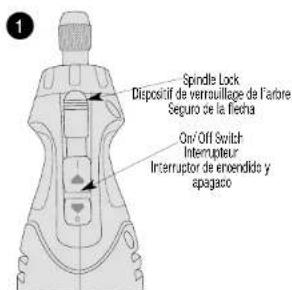
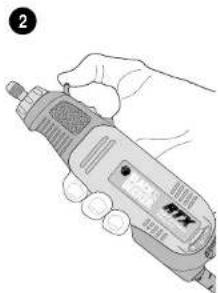
Fig.1 shows the ON/OFF switch and the spindle lock lever. To lock the spindle for changing accessories, pull back on the spindle lock lever as shown in Figure 2. With the lever in the full back position the spindle will lock. Install or remove the accessories as directed in this manual. Release the spindle lock lever and you're finished.
ON/OFF SWITCH
To turn the tool ON, slide the switch button forward. The tool will immediately run at the speed which is selected. Do not attempt to start tool with spindle lock engaged. It will not run.
SPEED SELECTION
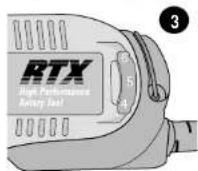
To operate the tool, select the speed setting you wish with the speed wheel, shown in Fig 3.1 and slide the ON/OFF switch forward. The speed setting can be adjusted either with the tool on or off.
CAUTION: Because the RTX has a separate speed wheel for setting the speed (8,000 - 30,000 RPM), the tool will start at the speed where the speed wheel is set. Be sure switch is fully OFF before plugging in.
The numbered positions, 1 through 6 inscribed on the switch speed wheel, do not indicate any precise speed but are good reference points. The higher the number, the higher the tool speed.
The approximate speed at each setting is:
SPEED SETTING 12 3456
Actual RPM's on your tool may vary.
Be sure to select the proper speed for your rotary tool operation. The following chart provides a speed guide for various operations.
If in doubt about the proper speed for your operation, test the performance at low speed settings and gradually increase until a comfortable speed is found.
Cutting Metal .5-6 Deburring 4-5
Sanding Wood . . . 5-6 Stripping Metal . . . 4-5
Sharpening 3-5 Engraying Metal 4-5
Polishing 1-2 Drilling Holes 4-5
Removing Rust. 1-2
CAUTION: Never exceed the speed rating of the accessory being used.
CHANGING ACCESSORIES
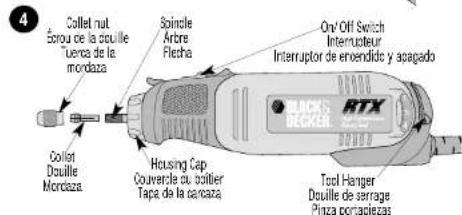
Accessories are held in place by a collet and collet nut as shown in Figure 4.
To Insert an accessory:
-
Turn off tool, allow it to come to a complete stop and disconnect from the power supply.
-
Pull back on the spindle lock lever (see Fig. 2) and grasp the collet nut.
-
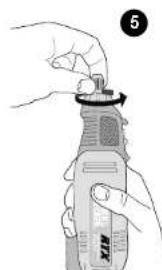
Turn the collet nut counter-clockwise as shown in Fig. 5 until it is loose.
-
Insert the new accessory into the collet as far as it will go.
-
Tighten (clockwise) the collet nut securely. NOTE: The collet was designed to be hand tightened and loosened only. Accessories naturally self tighten during use. A wrench is provided with the tool for loosening. You should never need to tighten the collet nut with the wrench. If a wrench is needed, use only the wrench provided. Do not use tools that will mar the finish and could break the collet. Always ensure there is some accessory in the collet before tightening. Tightening an empty collet can crack it.
-
Release the spindle lock lever and you're finished.
-
If an accessory causes vibration it can usually be improved by loosening the collet nut pushing the accessory in as far as it will go and rotating it 1/4 turn then retightening the collet.
CHANGING THE COLLET
Some accessories require different sized collets. The two collets used with Black & Decker accessories are 1/8 (used for most accessories) and 3/32 . Ensure your collet size matches your accessory.
To change the collet:
- Turn off tool, allow it to come to a complete stop and disconnect from power supply.
- Pull back on the spindle lock lever (see Fig. 2) and grasp the collet nut.
- Turn the collet nut counter-clockwise and remove the collet nut and the collet from the threaded spindle (see Fig. 4).
- Insert the new collet into the spindle.
- Screw on the collet nut.
- Release the spindle lock
USING THE ROTARY TOOL
WARNING: Always wear eye protection.
When operating the tool be sure to hold it securely. For detail work, grip the contoured area at the front of the tool, near the spindle. Before beginning a project, practice using the tool on some scrap material until you get the "feel" of the tool. The rotary tool is small and easy to use but don't be fooled; it's a real power tool and should be handled carefully and properly as described in this manual. Don't overload the tool. Performance is enhanced by letting the tool do the work.
FLEXIBLE SHAFT RT5100 FLEXIBLE ROTARY TOOL EXTENDER
(Available as a separate accessory and included with catalog number RTX-2 only)
FLEXIBLE SHAFT INSTALLATION INSTRUCTIONS
- Turn off tool, allow it to come to a complete stop and disconnect from power supply.
- Remove the collet nut and collet from the tool by first pulling back on the spindle lock lever and grasping the collet nut (Fig.2).
- Turn the collet nut counter-clockwise and remove the collet nut and the collet from the threaded spindle (see Fig. 4). Release the spindle lock.
- Remove the silver housing cap (Fig.4) by turning counterclockwise.
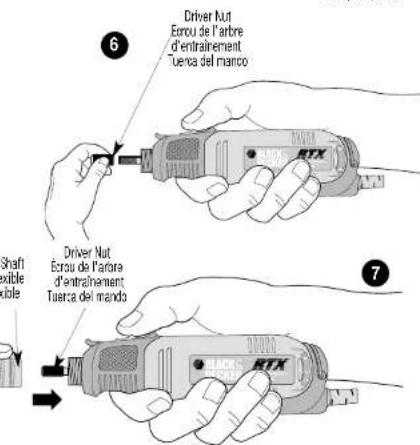
- Locate the driver nut and thread it onto the motor shaft (Fig. 6).
- Screw the FLEXIBLE SHAFT onto the rotary tool as shown in Fig. 7 insuring that the rotating center core engages the square hole socket in the driver nut (Fig. 7). NOTE: Use caution when screwing the metal housing of the shaft onto the threaded portion of the rotary tool. Avoid cross threading.
-
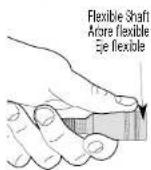
The FLEXIBLE SHAFT is now ready for use. To insert an accessory, Turn off tool, allow it to come to a complete stop and disconnect from power supply. Place the provided lock pin into the opening in the FLEXIBLE SHAFT hand piece and rotate collet nut until lockpin engages hole in spindle (Fig. 8). With the shaft locked, turn the collet nut counter-clockwise to loosen. Insert the accessory completely into the collet to avoid wobbling. Tighten collet nut securely by hand. Remove lock pin.
-
The Flexible Shaft collet can be changed as described in the "Changing the Collet" section.
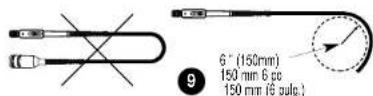
IMPORTANT: Avoid using the Flexible Shaft with a sharp bend as shown in Fig. 9. A radius of 6^ or larger is recommended. A tool hanger (Fig. 4) is provided to hang the tool when using the flex shaft. The hanger secures the tool and helps avoid sharp bends on the flex shaft.
NOTE: The rotating center core can come out of the FLEXIBLE SHAFT. This is not a problem. Simply reinsert it into the FLEXIBLE SHAFT. If the center core gets dirty, wipe it off and apply a very light film of high temperature grease. The square drive of the center core may not engage the hand piece. To get it to engage, apply a light force to the tip of the center core while rotating the handpiece collet nut.
MAINTENANCE
Use only mild soap and damp cloth to clean the tool. Never let any liquid get inside the tool; never immerse any part of the tool into a liquid.
IMPORTANT: To assure product SAFETY and RELIABILITY, repairs, maintenance and adjustment (other than those listed in this manual) should be performed by authorized service centers or other qualified service organizations, always using identical replacement parts. Unit contains no user serviceable parts inside.
ACCESSORIES
Black & Decker offers a large selection of accessories available at your local dealer or authorized service center at extra cost. Only Black & Decker accessories are recommended for use in the RTX or B&D Flexible Shaft.
If you need assistance regarding accessories, please call: 1-800-54-HOW TO (544-6986).
CAUTION: Use only those accessories rated at 30,000 RPM or greater. Exception: Do not operate wire brushes, brittle brushes, diamond dome sander, or 1-1/4" diamond wheels at speeds greater than 15,000 RPM (speed setting #2). Never exceed the speed rating of the accessory being used.
WARNING: The use of any accessory not recommended for use with this tool could be hazardous.
SERVICE INFORMATION
Black & Decker offers a full network of company-owned and authorized service locations throughout North America. All Black & Decker Service Centers are staffed with trained personnel to provide customers with efficient and reliable power tool service.
Whether you need technical advice, repair, or genuine factory replacement parts, contact the Black & Decker location nearest you.
To find your local service location, refer to the yellow page directory under "Tools-Electric" or call: 1-800-54-HOW TO (544-6986).
EULLFIVE-YEARHOMEUSEWARRANTY
Black & Decker (U.S.) Inc., warrants this product for five years against any defects in material or workmanship. The defective product will be replaced or repaired at no charge in either of two ways.
The first, which will result in exchanges only, is to return the product to the retailer from whom it was purchased (provided that the store is a participating retailer). Returns should be made within the time period of the retailer's policy for exchanges (usually 30 to 90 days after the sale). Proof of purchase may be required. Please check with the retailer for their specific return policy regarding returns that are beyond the time set for exchanges.
The second option is to take or send the product (prepaid) to a Black & Decker owned or authorized Service Center for repair or replacement at our option. Proof of purchase may be required. Black & Decker owned and authorized Service Centers are listed under "Tools-Electric" in the yellow pages of the phone directory.
This warranty does not apply to accessories. This warranty gives you specific legal rights and you may have other rights which vary from state to state. Should you have any questions, contact the manager of your nearest Black & Decker Service Center.
NOTE: This tool is designed, manufactured and tested to meet or exceed the needs of the do-it-yourself in the execution of projects and repairs in and around the home. With proper use it will provide the home owner with years of service. However, if you use tools for a living and use this product or any of Black & Decker's other Consumer Home Use tools ON THE
JOBSITE you should know that they CANNOT BE COVERED UNDER OUR WARRANTY.
Imported by
Black & Decker (U.S.) Inc., 701 E. Parkin Ave., San Diego, CA 95036
701E.8684 Toucoe:MD21388
1OW90H,MD21256U.S.A.
See 'Tools-Electric'
Yellow Pages
for Service & Sales
GUIDE D'UTILISATION
Modèle RTX
RENSEIGNEMENTS IMPORTANTS
CHANGEMENT D'ACCESSIONS
ANNULE DONC Toute GARANTIE.
BOSQUES DE CIDROS ACCESO RADIATAS NO.42
COL. BOSQUES DE LAS LOMAS
05120 MEXICO, D.R.
TEL:3267100
ESPECIFICACI


- KEY INFORMATION YOU SHOULD KNOW:
- SAVE THIS MANUAL FOR FUTURE REFERENCE.
- GENERAL SAFETY RULES
- SAVE THESE INSTRUCTIONS
- WORK AREA
- ELECTRICAL SAFETY
- PERSONAL SAFETY
- TOOL USE AND CARE
- SERVICE
- SPECIFIC SAFETY RULES
- ADDITIONAL SAFETY RULES FOR ROTARY TOOLS
- ALWAYS WEAR EYE PROTECTION WHEN USING THIS TOOL!
- USE OF EXTENSION CORDS
- SPINDLE LOCK LEVER
- ON/OFF SWITCH
- SPEED SELECTION
- SPEED SETTING 12 3456
- CHANGING ACCESSORIES
- CHANGING THE COLLET
- To change the collet:
- USING THE ROTARY TOOL
- FLEXIBLE SHAFT RT5100 FLEXIBLE ROTARY TOOL EXTENDER
- FLEXIBLE SHAFT INSTALLATION INSTRUCTIONS
- MAINTENANCE
- ACCESSORIES
- SERVICE INFORMATION
- EULLFIVE-YEARHOMEUSEWARRANTY
- Imported by
- GUIDE D'UTILISATION
- RENSEIGNEMENTS IMPORTANTS
- CHANGEMENT D'ACCESSIONS
- ANNULE DONC Toute GARANTIE.
- ESPECIFICACI
Brand : BLACK & DECKER
Model : RTX1
Category : Multitools