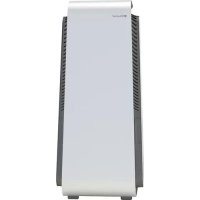
HealthProtect 7440i - Air purifier BLUEAIR - Free user manual and instructions
Find the device manual for free HealthProtect 7440i BLUEAIR in PDF.



| Product type | Air purifier |
| Brand | Blueair |
| Model | HealthProtect 7440i |
| Series | 7400 (Model 40) |
| Power supply | 100-127 VAC / 220-240 VAC, 50/60 Hz |
| Power consumption | 43 W |
| Recommended area | 38 m² |
| Air delivery (CADR) | Smoke: 455 m³/h, Dust: 465 m³/h, Pollen: 475 m³/h |
| Noise level | 25 - 45 dB(A) |
| Filters | Washable pre-filters + Main SmartFilter anti-particle and gas filter |
| Main filter lifespan | 6 to 12 months depending on usage |
| Functions | Wi-Fi, GermShield™, Auto Mode, Control via Blueair app |
| Sensors | Fine particles (PM1, PM2.5, PM10) |
| Display | Screen with air quality indicator and filter lifespan |
| Dimensions (W x D x H) | Approx. 33 x 33 x 53 cm (typical values) |
| Weight | Approx. 13 kg |
| Maintenance | Clean pre-filters regularly, replace main filter |
| Safety | Automatic shut-off when door opens, child lock via app |
| Connectivity | Wi-Fi 2.4 GHz, frequency 2402-2480 MHz |
| Warranty | See www.blueair.com/warranty |
Frequently Asked Questions - HealthProtect 7440i BLUEAIR
User questions about HealthProtect 7440i BLUEAIR
0 question about this device. Answer the ones you know or ask your own.
Ask a new question about this device
Download the instructions for your Air purifier in PDF format for free! Find your manual HealthProtect 7440i - BLUEAIR and take your electronic device back in hand. On this page are published all the documents necessary for the use of your device. HealthProtect 7440i by BLUEAIR.
USER MANUAL HealthProtect 7440i BLUEAIR
Hereby, Blueair AB, declares that the radio equipment types in the above table is in compliance with Directive 2014/53/EU.
The full text of the EU declaration of conformity is available at the following internet address: www.blueair.com/customer-support
Please read this user manual carefully and keep it for future reference.
The latest version of this user manual can be found on www.blueair.com
Note: There may be local variations of these models.
EN
Contents
Blueair HealthProtectTM 6
Safety instructions 8
Get started 10
Control panel 11
Filters 20
Move the air purifier 22
Cable winder 22
Care and maintenance 23
Troubleshooting 24
Disposal and recycling 25
Help and support 25
Warranty information 25
Specifications 26
Blueair HealthProtect™
Blueair HealthProtect™ air purifiers are available in three models, the 10-models, the 40-models and the 70-models. All models are Wi-Fi enabled, have a GermShield™ function to prevent bacterial growth, pre-filters and a main filter to purify air.
All HealthProtect™ models have control functions and built in sensors. The 40-models and the 70-models have additional indications for air quality data. The 40-models have a display for particulate matter data. The 70-models have a dynamic screen control, with additional functions for particles, gases (tVOC), temperature, relative humidity and filter lifetime.
You can change the air purifier settings at any time, using the control panel on the air purifier or remotely using the Blueair app. Additional functions are available for all models through the Blueair app.
Recommendations for best performance
- Use the air purifier in a room that does not exceed the room size recommendation.
- Place the air purifier in a location where air can circulate freely in, out and around the air purifier.
- Do not place the air purifier closer than 10cm to another object.
- During operation, keep doors and windows in the room with the air purifier closed.
- Run the air purifier 24 hours per day with the GermShield ™ function on.
- Only use genuine Blueair filters.
- Change the main filter when the filter replacement indicator appears on the control panel.
- Follow the maintenance instructions in this user manual.
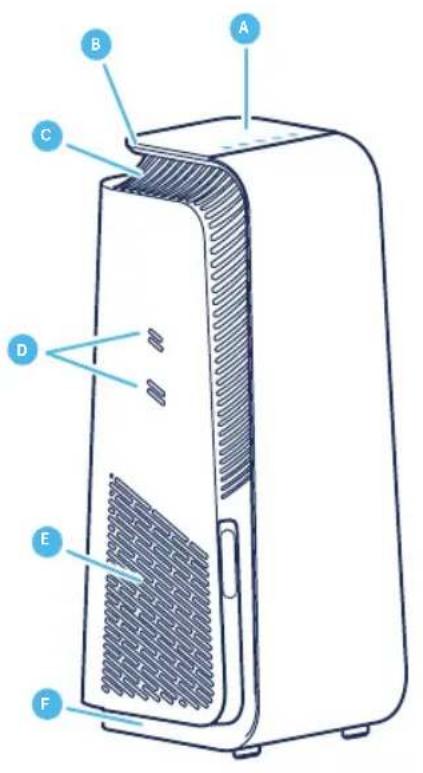
Blueair air purifiers are mainly composed of a motor, a fan and a filter. The air purifier removes contaminants from the air in a room to improve indoor air quality.
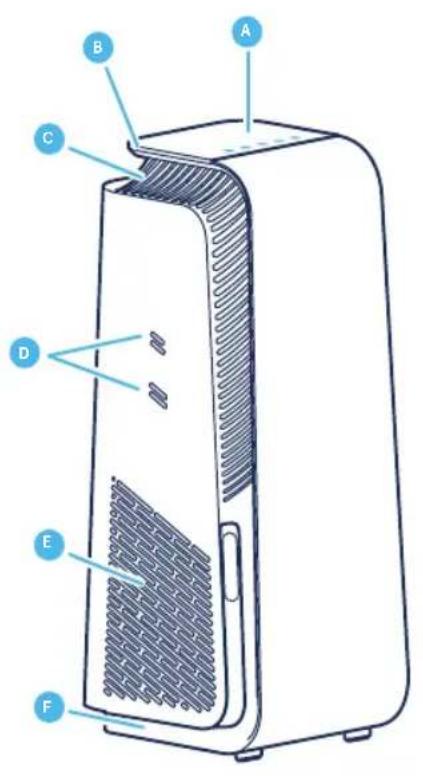
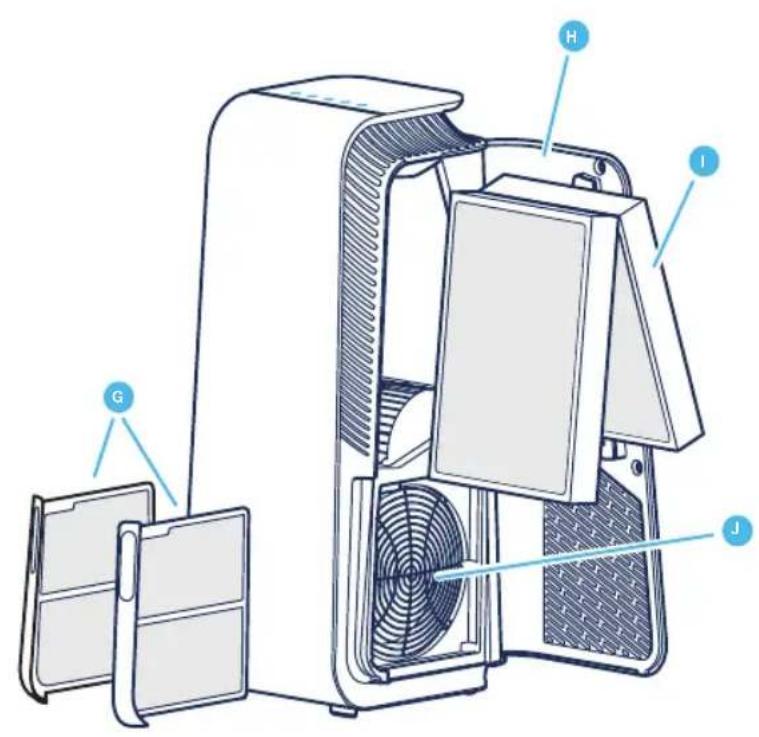
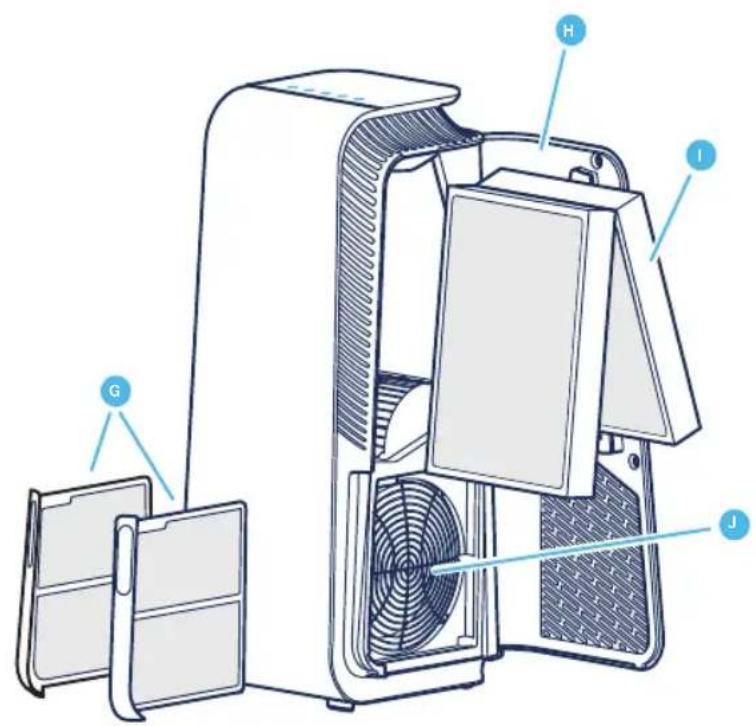
A Control panel G Pre-filters
B Handle H Filter door
C Air outlet I Main filter
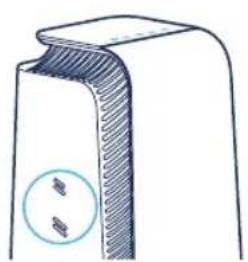
Air quality sensor inlets
E Air inlet K Power cable (not in picture)
F Feet and wheels
J Fan and motor
L User Manual (not in picture)
Safety instructionsSafety instructions
Blueair HealthProtect™ air purifiers are electrical appliances for indoor use only, take the necessary precautions to reduce the risk of fire, electric shock or injury.
- This appliance can be used by children aged from 8 years and above and persons with reduced physical, sensory or mental capabilities or lack of experience and knowledge if they have been given supervision or instruction concerning use of the appliance in a safe way and understand the hazards involved.
Children shall not play with the appliance. - Always disconnect the appliance from the power supply before maintenance.
- Do not alter the power plug in any way and do not attempt to open or service the appliance yourself. Service must be done by the manufacturer, service agent or similarly qualified person using only genuine Blueair spare parts.
- Ensure that the power cable and the power plug are not at risk of getting damaged. To avoid hazard, a damaged power cable must always be replaced by the manufacturer, service agent or similarly qualified person.
- If the appliance is damaged or malfunctions, turn it off, disconnect it from the power supply and contact Blueair.
- The power plug must be firmly inserted in the power socket.
- When disconnecting the unit from the power supply, do not pull the power cord, pull the power plug.
-
Use the grounded power cable provided with your Blueair air purifier to plug directly and firmly into an appropriate, grounded electrical outlet. Refer to the rating label on your appliance.
-
Do not use an extension cord or a power strip. Refer to the rating label on your appliance.
- Do not alter the power plug in any way. If the plug does not fit into the outlet, contact qualified personnel to install the proper outlet.
- Do not use the included power cord for anything else but the appliance.
- Do not allow objects to enter or block the air inlets and air outlets as this can cause electric shock or damage the appliance.
- Do not place any objects on top of or directly against the appliance.
- Do not sit on, stand, climb onto or hang from the appliance.
- Keep the appliance, including the power cable, at a safe distance from heated surfaces and open fire.
- Keep the appliance and power plug away from water and other liquids.
- Keep the appliance and power plug away from chemicals such as pesticides and deodorants.
- Place the appliance on the floor. The appliance must be placed on a stable surface.
- Do not use the appliance outdoors or in wet environments such as bathrooms, laundry rooms or pool areas.
- Cleaning and maintenance shall not be made by children without supervision.
Get started
Step 1
Open the filter door, pull out the main filter and remove the protective wrapping.
Step 2
Put the main filter back into the air purifier and close the filter door.
See section Filters for more information regarding filter handling.
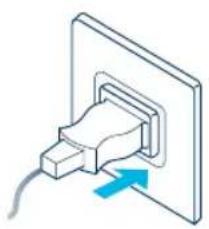
Plug into the power supply
Step 1
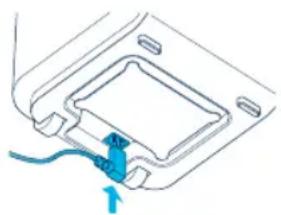
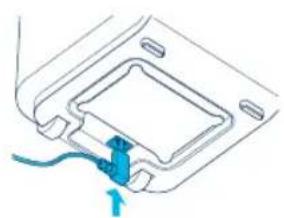
If your air purifier has a removable power cable, plug the cable firmly into the power cable socket on the air purifier.
Step 2
Plug the power cable into a grounded wall outlet.
Step 3
Press the On/Off button to turn the air purifier on.
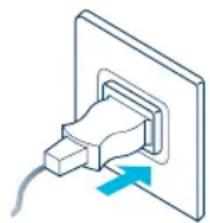
Note! For some markets, the air purifier is equipped with a fixed power cable due to regulatory requirements.
Tip! Store any excess cable length in the cable winder under the air purifier.
Connect to the Blueair app
Connecting the air purifier to the Blueair app allows you to control the air purifier and change the settings remotely. The app adds additional functions to the air purifier.
Step 1
Download the Blueair app from the App store or Google play.
Step 2
Open the Blueair app and follow the instructions to connect the air purifier.
Control panel
All HealthProtect™ models have controls, a filter indicator and air quality information. The 40-models and the 70-models have additional indications for air quality data. The 40-models have a display for particulate matter data. The 70-models have a dynamic screen control, with additional functions for particles, gases (tVOC), temperature, relative humidity and filter lifetime.
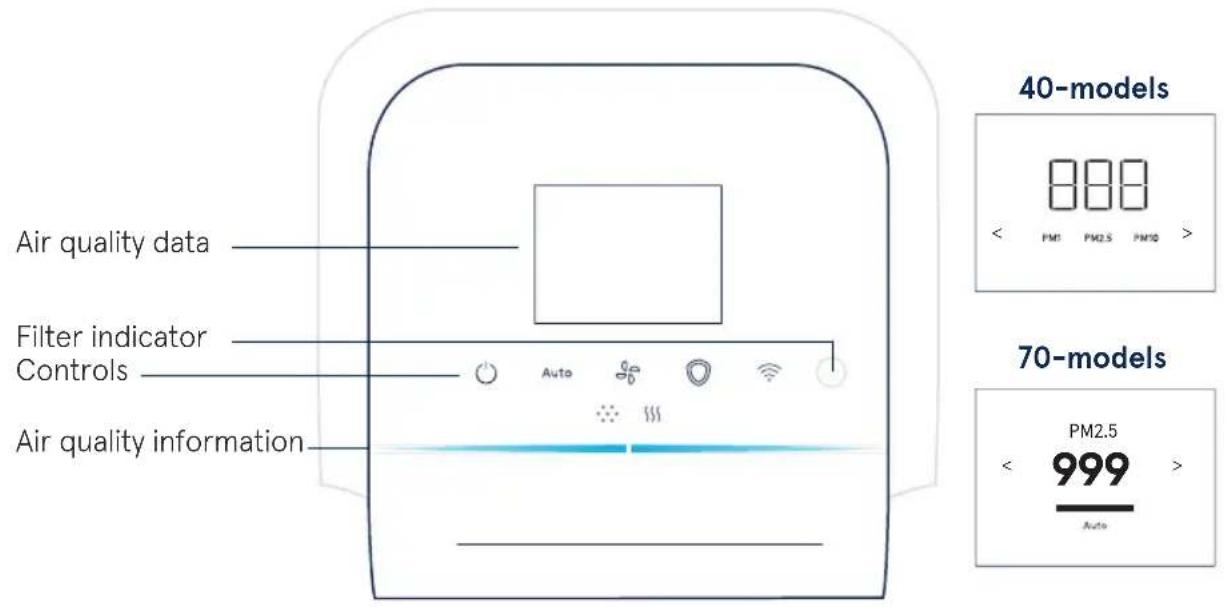
Controls
Control the air purifier using the buttons on the control panel or by using the Blueair app.

On/Off
Auto
Auto mode

Airflow speed

GermShieldTM

Wi-Fi
On/Off

Press to turn On or Off.
Note! Wi-Fi, sensors and the GermShield™ function continue to be in operation when the air purifier is turned off.
Auto mode
In auto mode the air purifier automatically controls the airflow based on air quality information from the sensor.
Auto
Press to Activate or Deactivate.
Indicators 10-models/40-models

Status White light On.

Status No light Off.
Indicators 70-models

Status checkmark On.
Status cross Off.
Airflow speed
Available airflow speed options are: 1, 2, 3 and 0.

Press to switch between the different airflow speeds.
Indicators 10-models/40-models Indicators 70-models
Speed: 1230
GermShield™
The air purifier has a GermShield™ function that activates when a germ-prone environment is detected. The 70-models have an additional indicator on the screen for showing when the GermShield™ function is in operation.

Press to Activate or Deactivate.
Indicators 10-models/40-models

Status White light On.

Status No light Off.
Indicators 70-models

Status checkmark On.

Status cross Off.
Note! When GermShield™ is activated, a light draft can come from the air purifier when detecting a germ prone environment.
Wi-Fi Connection
A Wi-Fi function is available on all models and allows the air purifier to connect to the Blueair app and to receive functional updates. If you do not wish to be connected to Wi-Fi, press the Wi-Fi button to disable the Wi-Fi function.
Button

Press for >15s to turn Wi-Fi on or off.
Indicators (10-models and 40-models)

Status White light
Connected to Wi-Fi network.

Status White fast "blinking" light
Failed to connect.

Status White "pulsating" light
Wi-Fi On, ready for onboarding.

Status No light
Wi-Fi functionality Off.
Indicators LCD screen (70-models) Indicators Buttons (70-models)

Status Green checkmark On.

Status White light Connected to Wi-Fi network.

Status Red cross Off.

Status White "pulsating" light Wi-Fi On, ready for onboarding.

Status Red exclamation Connection error.

Status dimmed light Wi-Fi functionality Off.

Status White fast "blinking" light Connection error.
See the Blueair app for further information regarding Wi-Fi connection. For support, visit www.blueair.com/customer-support
Filter indicator
The air purifier calculates the remaining lifetime of the filter based on usage and sensor readings, and indicates when it is time to replace the filter.
Indicators (10-models and 40-models) Indicators (70-models)

Status Filter replacement No lifetime left of the filter.
Status Filter replacement No lifetime left of the filter.

Status Filter replacement "blinking" Cannot recognize a Blueair filter /No filter detected.

Status New filter Filter change completed.

Status Filter warning Cannot detect a Blueair filter.

Status No filter No filter detected.
See Troubleshooting for more information on filter indicators.
Category indicators (70-models)
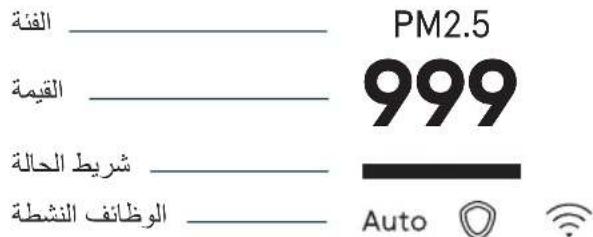
The categories of the different functions are indicated on the top of the screen- press the buttons on the control panel or on the left and right arrow to view the data for the chosen category.
PM1
Particle data

Gas data

Temperature

Filter lifetime

Relative humidity
Air quality information
The air quality levels for particulate matter (PM) and gases (tVOC) are indicated using a color scale on the control panel.
PM1
Particulate matter, particles with diameter of size 1 micrometer or less.
PM2.5
Particulate matter, particles with diameter of size 2.5 micrometers or less.
PM10
Particulate matter, particles with diameter of size 10 micrometers or less.
VOC
Volatile organic compounds, gases found in both outdoor and indoor air.
Indicators

Particulate matter indicator
SSS
Gases (tVOC) indicator
Air quality level
The air quality indicator bar for particles will show the highest pollution level out of PM1, PM2.5 and PM10.
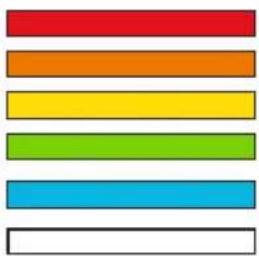
Very Polluted
Slightly Polluted
Moderate
Good
Excellent
Data not available
See the Blueair app for further information regarding air quality.
Air quality data 40-models and 70-models
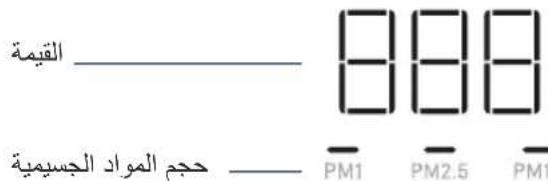
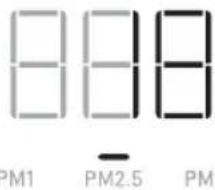
The 40-models have an additional display that shows measured values for PM1, PM2.5 and PM10. Press the left or right arrow to switch between the different particulate matter sizes.
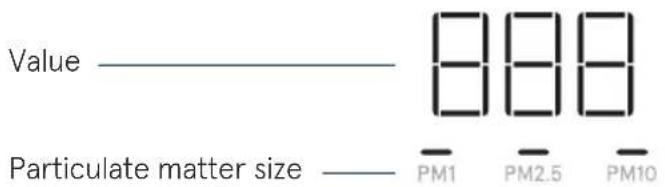
Indicators
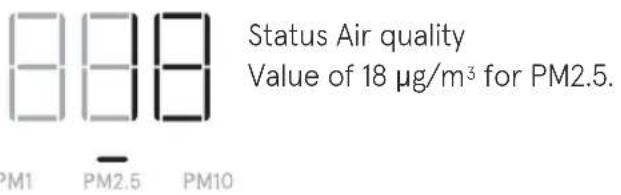
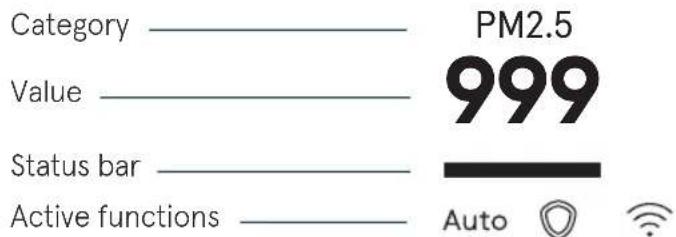
The 70-models have a dynamic screen control that shows additional values and statuses for different categories, and have additional indications to show active functions. Press the left or right arrow to switch between the different categories.
Particle data indicator
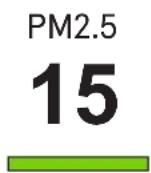
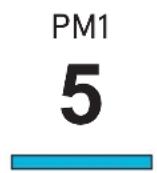
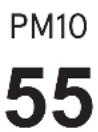
The air quality data for particles are indicated on the screen. Press the left or right arrow to switch to the Particle data category page. The screen shows measured values for PM1, PM2.5 and PM10, with its related air quality information indicated in the status bar.
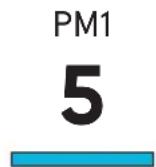
Category PM1 Value of 5 g / m^3 Status Excellent air quality.
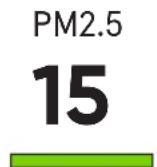
Category PM2.5 Value of 15 g / m^3 Status Good air quality.
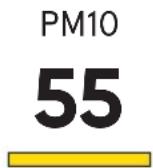
Category PM10 Value of 55 g / m^3 Status Moderate air quality.

Loading data /No data available.
See the Blueair app for more information.
Temperature indicator
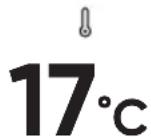
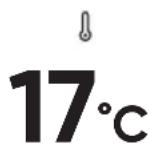
The room temperature is indicated on the screen. Press the left or right arrow to switch to the Temperature category page.
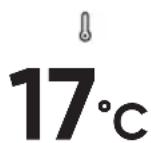
Category Temperature Value of 17 degrees Celsius/63 degrees Fahrenheit in the room.
Relative humidity indicator
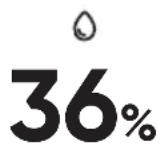
The relative humidity of the room is indicated on the screen. Press the left or right arrow to switch to the Relative humidity category page.
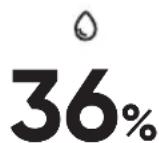
Category Relative humidity Value of 36% in the room.
Gas data indicator
The air quality data for gases (tVOC) is indicated on the screen. Press the left or right arrow to switch to the Gas data category page. The screen shows the different sensor readings of gases over time.
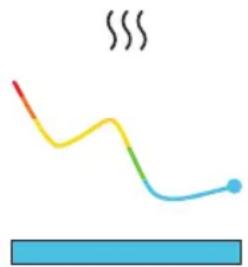
Category Gas data
Value of air quality levels for gases (tVOC) in the room over time.
Status Excellent air quality.
Filter lifetime indicator
The remaining lifetime of the filter is indicated on the screen. Press the left or right arrow to switch to the Filter lifetime category page. The air purifier will count down from 100% with a new filter, and indicate when it is time to change filter.
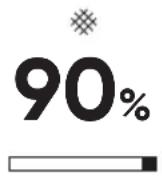
Category Filter lifetime
Value of 90% left of the filter.
Status bar counting down.
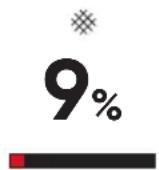
Category Filter lifetime
Value of 9% left of the filter.
Status bar counting down.
Filters
The air purifier is delivered with two pre-filters and one SmartFilter installed. The filters purify the air from both particles and gases. For best performance, clean the pre-filters regularly and change the main filter when the air purifier indicates filter change. To find the correct main filter for your air purifier, use the Blueair app or visit www.blueair.com.
The model number of your air purifier can be found on the rating label on the air purifier.
Blueair filter subscription program
Use the Blueair app or visit www.blueair.com to sign up for the Blueair filter subscription program. (Not available in all markets)
Important! Always turn off and disconnect the appliance from the power supply before changing filters, cleaning or carrying out maintenance procedures.
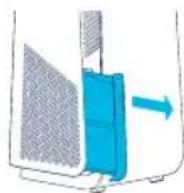
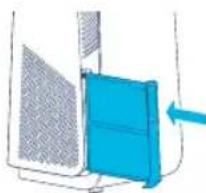
Clean the pre-filters
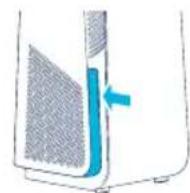
For best performance, clean the pre-filters regularly.
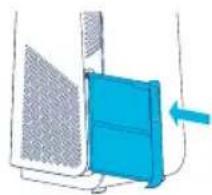
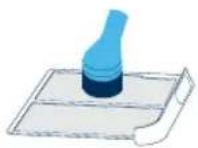
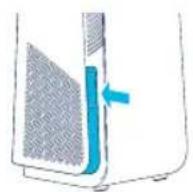
Step 1
Push the left or right side frame indent of the air purifier to release the pre-filter.
Step 3
Clean the pre-filter, by wiping with a dust cloth or vacuuming with a soft brush attachment.
Step 5
Push the pre-filter to lock it in position.
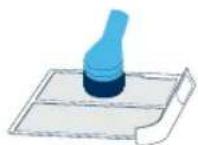
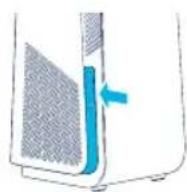
Step 2
Pull out the pre-filter from the slot.
Step 4
Place the pre-filter back into the slot.
Change the main filter
The air purifier calculates the remaining lifetime of the filter based on usage and sensor readings, and indicates when it is time to change filter. The recommended time for filter change is between 6-12 months depending on the indoor conditions. A filter replacement indicator appears on the control panel when it is time to change filter.

Filter replacement indicator (10-models and 40-models)

Filter replacement indicator (70-models)
Important! Use only original Blueair filters suitable for the model to ensure proper function and performance of the air purifier, and to qualify for full warranty coverage.
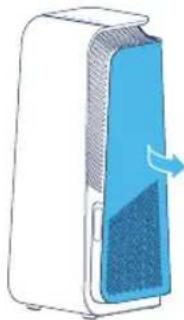
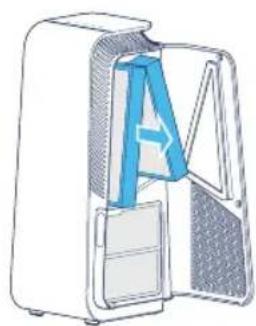
Step 1
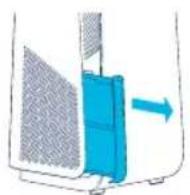
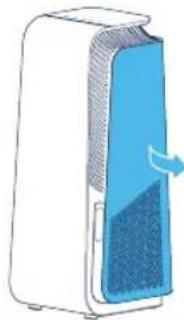
Open the filter door.
Note! The air purifier will turn off when the filter door is opened.
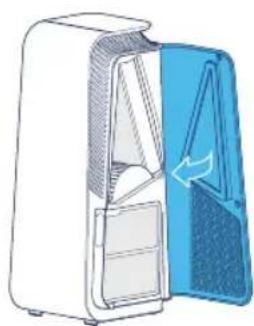
Step 2
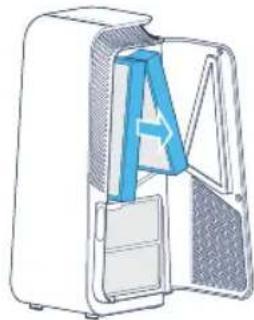
Remove the old main filter by pulling gently on to the two tabs.
Close the main filter to seal the pollutants inside.
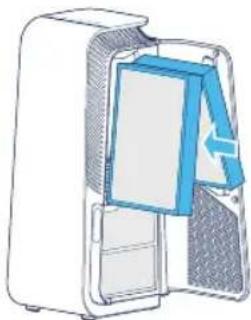
Step 3
Note! Remember to remove the protective plastic from the new main filter before use.
Insert the new main filter.
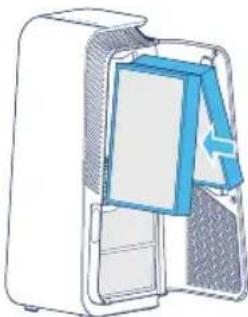
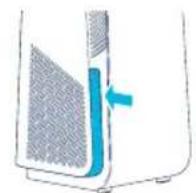
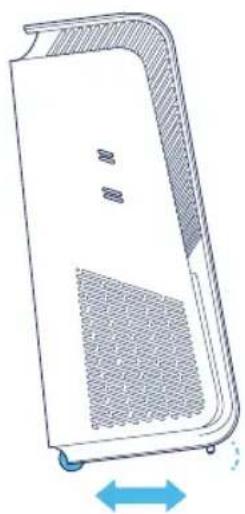
Step 4
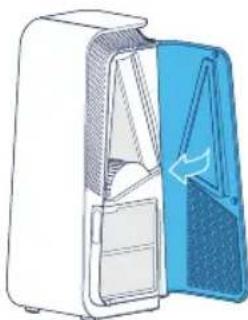
Close the filter door.
Note! The filter door needs to be closed for the air purifier to start again.
Move the air purifier
The air purifier has feet and wheels to enable moving.
Important!
- Unplug the air purifier before moving it.
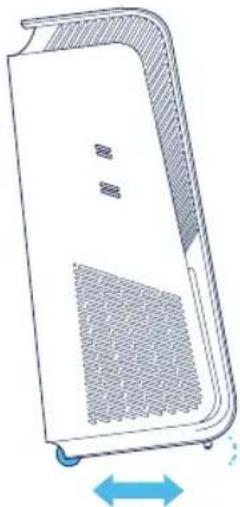
Make sure that the filter door on the air purifier is securely closed. - Move the air purifier by holding onto the handle at the top of the air purifier with two hands.
- Move the air purifier by tilting it backwards and rolling it on its wheels.
Cable winder
The air purifier has a manual cable winder to store away any excess cable length. The cable winder is at the bottom of the air purifier. Store any excess cable by wrapping it around the cable winder.
Care and maintenance
General
- Disconnect the air purifier from the power supply before maintenance.
- Do not allow foreign objects to enter the air inlets or air outlets. This may cause electric shock or damage the air purifier.
- Never clean with gasoline, chemical solvents or corrosive materials as these agents may damage the air purifier.
- Make sure the air purifier is completely dry before connecting it to power.
- Do not wash the main filter. The main filter is not washable or reusable.
Cleaning
- Clean the pre-filters by wiping with a dust cloth or vacuuming with a soft brush attachment.
- Wipe the exterior of the air purifier with a soft, clean, damp cloth.
- Open the door, clean the inside of the door with a soft, clean cloth.
Vacuum the small air inlets with a soft brush attachment.
Vacuum the inside of the air purifier with a soft brush attachment. - Clean and check the power cable and power plug for wear or damages.
- Clean the sensor when changing the main filter.
Air quality sensor
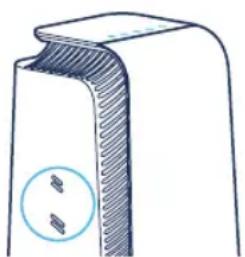
The inlet for the air quality sensor is located on the side of the air purifier. Vacuum the inlet with a soft brush attachment.
Troubleshooting
Trouble Possible cause Action
| The air purifier does not work. The power cable is not connected to the power supply. | Connect the power cable to the power supply. |
| The filter door is not closed on the air purifier. | Gently close the filter door completely. |
| The connection is not working. The Wi-Fi does not meet the requirements of the device. | Contact Blueair customer service. |
| The Blueair app does not have an updated version or have a temporary bug. | Check for updates. |
| The Blueair app has user account issues. | Contact Blueair customer service. |
| The air purifier is indicating that no data is available. | seconds for update. |
| Disconnect the power cable from the wall outlet and wait approximately five seconds before reconnecting the power cable. | |
| The filter indicator is blinking on the control panel and/or the air purifier has reduced airflow speed /or a filter warning is indicated on the screen. | Insert a main filter and/or check it is inserted properly in the air purifier. |
| Change to an original Blueair filter. | |
| The buttons on the control panel are blinking when pressed or the display indicates Child lock (not on all models). | off Child lock in the Blueair app. |
| The air purifier have lost Wi-Fi connection and Child lock is activated in the app. | wall outlet and wait approximately five seconds before reconnecting the power cable. |
For further support, please visit www.blueair.com/customer-support
Disposal and recycling
This air purifier should be disposed or recycled as electrical waste and the filter may be recycled as plastic. If you have questions regarding the disposal and recycling of this air purifier, please contact your local recycling facility for availability or Blueair dealer and ask for the correct method of recycling.

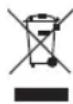
The crossed-out waste bin symbol on the appliance or on its packaging means that at the end of its useful lifespan, the product must be disposed of separately from ordinary household wastes.
Help and support
If you have questions about your product, please visit www.blueair.com or contact your local Blueair retailer.
To contact Blueair for personalized support, please visit www.blueair.com/customer-support
Warranty information
The Blueair Limited Warranty applies only if the air purifier is installed, used and maintained according to the instructions in this manual.
For warranty conditions visit www.blueair.com/warranty
Warranty and returns
If you purchased the air purifier at one of our authorized retailers, please contact the same store to request assistance.
Specifications
7400-series 7700-series
| Input voltage, Frequency 100-127VAC/ | 220-240VAC, 50/60Hz 100-127VAC/220 | 240VAC, 50/60Hz |
| Power consumption1 | 43W 72W | |
| Operating frequency 2402-2480 MHz | 13.56 MHz 2402-2480 MHz, 13.56 MHz | |
| Output power Max 5mW Max 5mW | ||
| Sound level (min-max)2 | 25dB(A)-45dB(A) 27dB(A)-55dB(A) | |
| Recommended room size3 | 38 m2 | 62 m2 |
| CADR Smoke3 | 455 m3/h 735 m | 3/h |
| CADR Dust3 | 465 m3/h >675 m | 3/h |
| CADR Pollen3 | 475 m3/h 735 m | 3/h |
^1 According to IEC 60335-1:2010
Sound pressure according to GB4214.1-2017
3 According to ANSI/AHAM AC-1-2019

Blueair HealthProtect™, séries 7400/7700
www.blueair.com/customer-support
Blueair HealthProtect 102
Blueair HealthProtect
www.blueair.com/customer-support
www.blueair.com/customer-support
Biała dioda stanu swieci Wf.

Dioda stanu nie swieci Wyl.
Biała dioda stanu swieci Wf.

Dioda stanu nie swieci Wyf.
www.blueair.com/customer-support
Indikatori (modeli,10"/,40")

Stanje: belo svetlo
Povezan na Wi-Fi mrežu.

Stanje: pulsirajuce belo svetlo
Wi-Fi mreza je uključena i Čecka se na povezivanje.

Stanje: ne svetli
www.blueair.com/customer-support
Odaganje i recikliranje
Ovaj prečistač vazduha treba da se reciklira kao elektronski oppad, dok se filter reciklira kao plastika. Ukoliko imate bilo kakvih pitanja u vezi sa odlaganjem i recikliranjem ovog prečistača vazduha, obratite se lokalmim postrojenjima za recikliranje ili prodavcu Blueair proizvoda i informisište se o pravlnom načinu za recikliranje.

Simbol precrtane korpe za otpatke na uredaju ili njegovom pakovanju označava da se uredaj na kraju njegovog radnog veka odlaže zasebno od komunalnog opada.
Pomoc i podrška
Ukoliko imate bilo kakvih pitanja o proizvodu, posetite veb-adresu www.blueair.com ili kontaktirajte prodavca Blueair proizvoda.
Posetite veb-adresu www.blueair.com/customer-support da biste stipili ukontakt sa korisnickom podrskom kompanije Blueair.
Informacije o garanciji
Ogranicena garancija kompanije Blueair je vazeca samo kada je precistač vazduha postavljen, korisćen i odžavan u skladu sa uputstvima navedenim u ovom prisćniku.
Uslove garancije mozte da procitate na web-adresi: www.blueair.com/warranty
www.blueair.com/customer-support
Status, nytt filter Filterbyte har utfords.

Status, filtrvarning
Kan inte hitta nagot Blueair-filter.

Status, inget filter Inget filter kanns av.
Se Felsökning for mer information om filterindikatorer.
Kategoriindikatorer (70-modeller)
Se Blueair-appen for mer information.
Temperaturindikator
Indikator for gasnivå
Förmer support, besök www.blueair.com/customer-support
Status filteradversel Finner okayne noe Blueair-filter.

Status:**
Ikke noe filter
Ike noe filter registrert.
Indicator for gasser (tVOC)
Luftkvalitetsnivá
Indicator for gassdata
www.blueair.com/customer-support
Se Blueair-appen for at fã mere information.
Temperaturindikator
Rumtemperaturen vises på skærmen. Tryk på venstre eller hjre pil for at skifte til sider Temperaturkategori.
Besøg blueair.com/customer-support for at fã personlig support
Garantiinformation
7700/7400 Blueair HealthProtect
:iiialpalj:jjblljjjbjll
| \( \mathbf{{240} - {220}} \) | 127-100 | -10 |
| 7410i74113710007421371000 | ||
| 7710i77113710007721371000 | ||
| -40 | ||
| 7712371000772371000 | 7440i74123710007422371000 | |
| 7740i | ||
| -70 | ||
| 74133520007423352000 | 7470i | |
| 74133520007423352000 | 7475i | |
| 77133520007723352000 | 7770i | |
| 77133520007723352000 | 7775i |
.EU/53/2014 1 1 1 1 1 1 1 1 1 1 1 1 1 1 1 1 1 1 1 1 1 1 1 1 1 1 1 1 1 1 1 1 1 1 1 1 1 1 1 1
aaii iiaii jn jie aie aie bail lalai jn kai
www.blueair.com/customer-support
AR
Jiaiwwll g 1y jy jy bla 1 y 1y 1 y 1 y 1 y 1 y 1 y 1 y 1 y 1 y 1 y 1 y 1 y 1 y 1 y 1 y 1 y 1 y 1 y 1 y 1 y 1 y 1 y 1 y 1 y 1 y 1 y 1 y 1 y 1 y 1 y 1 y 1 y 1 y 1 y 1 y
jolal oai yla cial yla jss a bdo
#
318 TMBlueair HealthProtect
320
322
323
332
334 1gell aai jgs
334 JSLI a
335 aillll, aiee
336 12x1, 91.11
337 1
337 a
337 jiaaii ci lae
338 1
Blueair HealthProtect
j j 70 j j j j j j j j j j j j j j j j j j j j j j j j j j j j j j j j j j j j j j j j j j j j j j j j j j j j j j j j j j j j j j j j j j j j j j j j j j j j j j j j j j j j j j j j j j j j j j j j j j j jj J
-70j jllg -40j jllg aiaa aaii aaii aai i aai i aai i aai i aai i aai i aai i aai i aai i aai i aai i aai i aai i aai i aai i aai i aai i aai i aai i aai i aai i aai i aai i aai i aai i aai i aai i aai i aai i aai i aai i aai i aai i aai i
gubbi pluuiy jgl gell aai jgl paili y gl uia i gell aai jgl cla! Blueair.
1
. 4gall a j
TM aalas jg 24 gall j
. jai
. laolg jglg
GermShield
Bluea
.
1.12 aieeial
a 1 1 1 1 1 1 1 1 1 1 1 1 1 1 1 1 1 1 1 1 1 1 1 1 1 1 1 1 1 1 1 1 1 1
G
H
J
J
(2) x1 = 12;x2 = - 12;x3 = 0 y1 = 12;y2 = 0 z1 = 0 z_2 = 0 ( 2k + 4) .
()
A
B
C
1 10000000000000000000000000000000000000000000000
e.o.
C. g_a a, b, c F
iXuill iLiaiey
y Blueair HealthProtect 8
1 1
.
8 8
jlll lalaii iie aiee g aiee eae eae eae eae eae eae
aiaiaaii jblall golg joljglalil
jglai
j
.
- slwai j1
Jdally Jn nn nnnn nn nnnn nn nnnnnnnnnnnnnnnnnnnnnnnnnnnnnnnnnnnnnnnnnnnnnnnnnnnnnnnnnnnnnnnnnnnnnnnnnnnnnnnnnnnnnnnnnnnnnnnnnnnnnnnnnnnnnnnnnnnnnnnnnnnnnnnnnnn
Blueair
i 1
Jgoo 1 g a dll 5 g g aal 4 r 1 jn o all l l
Jilao
j 1
. Blueair
·
.
A
Blueair 10000000000000000000000000000000000000000000000
e 1
.
J 1 J 1 J 1 J 1 J 1 J 1 J 1 J 1 J 1 J 1 J 1 J 1 J 1 J 1 J 1 J 1 J 1 J 1 J 1 J 1 J 1 J 1 J 1 J 1 J 1 J 1 J 1 J 1 J 1 J 1 J 1 J 1 J 1 J 1 J
.
·
. jie 1
·
.
aalol jgljg 1
Jii i aaii i ie 0i jie
则
a
则
.
则
.
.
3^x = - 2 + 22
.
p1
2g 1 gll aai jie j s jal o y wll jall
1 1
J 1
aaii jaae aagg
2gbsll bilal iai aibll 1s
3 0gai1
la/la jj lc lai
aai jia Jiaui Jiaii .gl
1 8h
aill llll 111 111 111 111 111 111 111 111 111 111
aai
Blueair
GermShieldTM aalw wwi-Fi 5y
a
a a a a a a a a a a a a a a a a a a a a a a a
biill 1
Auto
-70j#
-40j1/-10j1
aill jao 2o 1
Auto
1 1
a
Auto
g 2
1g 1
0.3,2,1
aalil algll lccn jnnn nnnn
品
-70j上山
-40j11/-10j11
0 3 2 1
GermShield™
-70jIgaiy. yll aie ie iie GermShieldTM ayalay e gll aay jay
Iyill 1
-70j山
-40j11/-10j11
aI aI 1
Q
1 1
aill 1
g 2y 2a11
e 15ie e gell aai jg jn 0i d GermShieldTM aalis buiu piu Loic Iaia Sla
Wi-Fi
.Wi-Fi Juaai jc Cloglal 1e JuaaBlueair 2u www.blueair.com/customer-support
(-70)
(-40jg-10j)
y
Jd
y j 1

S OBC = S COD + S BOC - S BOC
J 1

"jai jai jai jai jai jai
Blueair

Blueair
S APQ = S AQP + S_ QPQ
1


J 1
(-70jg)
p a 1
ailllll lllll
jll
PM1
S OBC = S COD + S_ BOC

A

glll 0g jc clogge
i 2.5
PM2.5
la jbi yll claiy 100
PM1
iJyIaia iGic CILs y 1s jall
jllglgll sdsgsgall jlll 1sll lglgll g 1yIbial
la jao jil 10
PM10
aagaaal (sall) jlll gaa 1
aasall gall

g1g11 52g2 s gina
2.5 aagaaaag aal gall 1 aagaaaag algall gale gaii gaii gaii gaii gaii gaii gaii gaii gaii gaii gaii gaii gaii gaii gaii gaii gaii gaii gaii gaii gaii gaii gaii gaii gaii gaii gaii gaii gaii gaii gaii gaii gaii gaii
Cui jiu gao
1.2.5 18
y 70 jll y jil
Caiyjll Cilily jy
2.5 a 100
3/100
.100
1 a 1000000000000000000000000000000000000000000000000000
J 1

10 a 55 a
a 55
J 1 J
a j 1
a a a a a a a a a a a a a a a a a a a a a a a
aill 63/ajg 17 a
a a
a a a a a a a a a a a a a a a a a a a a a a a a a a
aill aill a g b j 36%
jlll llll
jlll 15
e jll (o) l l l l l l l l l l l l l l l l l l l l l l l l l l l l l l l l l l l l l l l l l l l l l l l l l l l

g 100% no lgl jgl gll
jall jac a 9% a

jall jac a 90% a

#
aiaSmartFilter aiai jai iai jai jai jai jai jai jai jai jai jai jai jai jai jai jai jai jai jai jai jai jai jai jai jai jai jai jai jai jai jai jai jai jai jai jai jai jai jai jai jai jai jai jai jai jai jai jai jai jai jai jai
. www.blueair.com 8 Blueair
eell jie 10000000000000000000000000000000000000000000
Blueair
y) .Blueair c 111111111111111111111111111111111111111
(3) a_4 = 2
ailll j 1 1 1 1 1 1 1 1 1 1 1 1 1 1 1 1 1 1 1 1 1 1 1 1
auii
aaiy jai yai jai ai jai jai jai
2 aghil
aaii i 1
1
y
a1 = 12,a2 = 2,a_3 = 2( 2 - 1)
1
4 a gbiil
a
3 aghil
Jds Jg
J 1
aclll olall yolld
5 ogh
aai
4
1 1
jai jia jia jia 0
(-70;1)

jij 1
(-40j11g-10j11)

Jalllgall gail jaln jaiyall 15y g aial jalal jbal ayaiyaiyBlueair cai yao baii!
2 a
y
J 1
1
aai jie cai piai lao
4 a gbi
.
y jie! yj 1
3 isghil
all j! 1234567890
a
1
aui jll 1234567890
1gglj
aJaiil Jusoi Cxg aai ai ai gai jia
1 > a + b
Ai : ji = a + b
.
- jie jiè
a1^2 + a2^2 + a3^2 = 8b2^2 + 8b_3^2
AD = AQ, PAQ = 60^ PQA 为等腰三角形
1.511 2.51
aai jie jie jie jie jie jie jie jie jie jie jie jie jie jie jie jie jie jie jie jie jie jie jie jie jie jie jie jie jie jie jie jie jie jie jie jie jie jie jie jie jie jie jie jie jie jie jie jie
aIglllgl
#
g 1 g 1 g 1 g 1 g 1 g 1 g 1 g 1 g 1 g 1 g 1 g 1 g 1 g
aal gall g aillglll lal g 1 1 1 1 1
alai jie e 1gai jie jie jie
-ai
.
·A
·a1b1y4
P( x,y - 1)
i
aacilaljll
.
.
aill jll
.aaa jai aacilii
. 35 155
.
gglj 1
a 1
Aacll
g
1
| Jaçain Y. Jérôme Jusqu'au californien à l'origine du travail, jusqu'en cas de l'employeur, le travail ne constitue pas le travail du travail | ||
| ... | Jaçoin Y. Jérôme Jusqu'au californien à l'origine du travail, jusqu'en cas de l'employeur, le travail ne constitue pas le travail du travail | |
| Blueair e Xeac | ... | Jaçoin Y. Jérôme Jusqu'au californien à l'origine du travail, jusqu'en cas de l'employeur, le travail ne constitue pas le travail du travail |
| Blueair e Xeac bêzoue | ... | Jaçoin Y. Jérôme Jusqu'au californien à l'origine du travail, jusqu'en cas de l'employeur, le travail ne constitue pas le travail du travail |
| Blueair e Xeac d'air | ... | Jaçoin Y. Jérôme Jusqu'au californien à l'origine du travail, jusqu'en cas de l'employeur, le travail ne constitue pas le travail du travail |
| Blueair e Xeac hydromedical | ... | Jaçoin Y. Jérôme Jusqu'au californien à l'origine du travail, jusqu'en cas de l'employeur, le travail ne constitue pas le travail du travail |
| Blueair e Xeac hydromedical hydromedical | ... | Jaçoin Y. Jérôme Jusqu'au californien à l'origine du travail, jusqu'en cas de l'employeur, le travail ne constitue pas le travail du travail |
| Blueair e Xeac hydromedical hydromedical hydromedical hydromedical hydromedical hydromedical hydromedical hydromedical hydromedical hydromedical hydromedical hydromedical hydromedical hydromedical hydromedical hydromedical hydromedical hydromedical hydromedical hydromedical hydromedanical hydromedical hydromedical hydromedical hydromedical hydromedical hydromedical hydromedical hydromedical hydromedical hydromedical hydromedical hydromedical hydromedical hydromedical hydromedical hydromedical hydromedical hydromedical hydromedical hydromedikal hydromedical hydromedical hydromedical hydromedical hydromedical hydromedical hydromedical hydromedical hydromedical hydromedical hydromedical hydromedical hydromedical hydromedical hydromedical hydromedical hydromedical hydromedical hydromedical hydromedkal hydromedkal hydromedkal hydromedkal hydromedkal hydromedkal hydromedkal hydromedkal hydromedkal hydromedkal hydromedkal hydromedkal hydromedkal hydromedkal hydromedkal hydromedkal hydromedkal hydromedkal hydromedkal hydromedkal hydromedcal hydromedcal hydromedcal hydromedcal hydromedcal hydromedcal hydromedcal hydromedcal hydromedcal hydromedcal hydromedcal hydromedcal hydromedcal hydromedcal hydromedcal hydromedcal hydromedcal hydromedcal hydromedcal hydromedcal hydromedkal hydromedcal hydromedcal hydromedcal hydromedcal hydromedcal hydromedcal hydromedcal hydromedcal hydromedcal hydromedcal hydromedcal hydromedcal hydromedcal hydromedcal hydromedcal hydromedcal hydromedcal hydromedcal hydromedkal hydromedkal hydromedcal hydromedcal hydromedcal hydromedcal hydromedcal hydromedcal hydromedcal hydromedcal hydromedcal hydromedcal hydromedcal hydromedcal hydromedcal hydromedcal hydromedcal hydromedcal hydromedcal hydromedkal hydromedcal hydromedkal hydromedcal hydromedcal hydromedcal hydromedcal hydromedcal hydromedcal hydromedcal hydromedcal hydromedcal hydromedcal hydromedcal hydromedcal hydromedcal hydromedcal hydromedcal hydromedcal hydromedcal hydromedkal hydromedkal hydromedkal hydromedcal hydromedcal hydromedcal hydromedcal hydromedcal hydromedcal hydromedcal hydromedcal hydromedcal hydromedcal hydromedcal hydromedcal hydromedcal hydromedcal hydromedcal hydromedcal hydromedkal hydromedcal hydromedcal hydromedkal hydromedcal hydromedcal hydromedcal hydromedcal hydromedcal hydromedcal hydromedcal hydromedcal hydromedcal hydromedcal hydromedcal hydromedcal hydromedcal hydromedcal hydromedcal hydromedcal hydromedkal hydromedcal hydromedkal hydromedkal hydromedcal hydromedcal hydromedcal hydromedcal hydromedcal hydromedcal hydromedcal hydromedcal hydromedcal hydromedcal hydromedcal hydromedcal hydromedcal hydromedcal hydromedcal hydromedcal hydromedkal hydromedkal hydromedcal hydromedkal hydromedcal hydromedcal hydromedcal hydromedcal hydromedcal hydromedcal hydromedcal hydromedcal hydromedcal hydromedcal hydromedcal hydromedcal hydromedcal hydromedcal hydromedcal hydromedcal hydromedkal hydromedkal hydromedkal hydromedkal hydromedcal hydromedcal hydromedcal hydromedcal hydromedcal hydromedcal hydromedcal hydromedcal hydromedcal hydromedcal hydromedcal hydromedcal hydromedcal hydromedcal hydromedcal hydromedkal hydromedcal hydromedcal hydromedcal hydromedkal hydromedcal hydromedcal hydromedcal hydromedcal hydromedcal hydromedcal hydromedcal hydromedcal hydromedcal hydromedcal hydromedcal hydromedcal hydromedcal hydromedcal hydromedcal hydromedkal hydromedcal hydromedcal hydromedkal hydromedkal hydromedcal hydromedcal hydromedcal hydromedcal hydromedcal hydromedcal hydromedcal hydromedcal hydromedcal hydromedcal hydromedcal hydromedcal hydromedcal hydromedcal hydromedcal hydromedkal hydromedcal hydromedkal hydromedcal hydromedkal hydromedcal hydromedcal hydromedcal hydromedcal hydromedcal hydromedcal hydromedcal hydromedcal hydromedcal hydromedcal hydromedcal hydromedcal hydromedcal hydromedcal hydromedcal hydromedkal hydromedcal hydromedkal hydromedkal hydromedkal hydromedcal hydromedcal hydromedcal hydromedcal hydromedcal hydromedcal hydromedcal hydromedcal hydromedcal hydromedcal hydromedcal hydromedcal hydromedcal hydromedcal hydromedcal hydromedkal hydromedkal hydromedcal hydromedcal hydromedkal hydromedcal hydromedcal hydromedcal hydromedcal hydromedcal hydromedcal hydromedcal hydromedcal hydromedcal hydromedcal hydromedcal hydromedcal hydromedcal hydromedcal hydromedcal hydromedkal hydromedkal hydromedcal hydromedkal hydromedkal hydromedcal hydromedcal hydromedcal hydromedcal hydromedcal hydromedcal hydromedcal hydromedcal hydromedcal hydromedcal hydromedcal hydromedcal hydromedcal hydromedcal hydromedcal hydromedkal hydromedkal hydromedkal hydromedkal hydromedkal hydromedkal hydromedkal hydromedkal hydromedkal hydromedkal hydromedkal hydromedkal hydromedkal hydromedkal hydromedkal hydromedkal hydromedkal hydromedkal hydromedkal hydromedjalhydromedjalhydromedjalhydromedjalhydromedjalhydromedjalhydromedjalhydromedjalhydromedjalhydromedjalhydromedjalhydromedjalhydromedjalhydromedjalhydromedjalhydromedjalhydromedjalhydromedjalhydromedjalhydromedjalhydromedjal |
www.blueair.com/customer-support
#
aaiylln no ai yie aal yiydd olae! jayg ayiyyk ckiy o yiydd olae! gldc gell yjies no naiill
Lg 1
Blueair
i 15 i 15
Aalll jiall Caiill Juaia Kuiy jiall ao
a#
Blueair www.blueair.com s jy
S OBC = S COD + S_ BOC
www.blueair.com/customer-support 2
Jalal
128 10000000000000000000000000000000000000000000000000000000000000000
.
www.blueair.com/warranty 1
Ela 1yLg
sclalal al aai jnlll co laol gill yj cllnl jiaaall ai jzll jzai jg eel
#
7400 7700
| 100-127VAC/220-240VAC, 50/60Hz100-127VAC/220-240VAC, 50/60Hz2 | ||
| 1.4A 4310, 4320, 4330, 4340, 4350, 4360, 4370, 4380, 4390, 4400, 4410, 4420, 4430, 4440, 4450, 4460, 4470, 4480, 4490, 4500, 4510, 4520, 4530, 4540, 4550, 4560, 4570, 4580, 4590, 4600, 4610, 4620, 4630, 4640, 4650, 4660, 4670, 4680, 4690, 4700, 4710, 4720, 4730, 4740, 4750, 4760, 4770, 4780, 4790, 4800, 4810, 4820, 4830, 4840, 4850, 4860, 4870, 4880, 4890, 4900, 4910, 4920, 4930, 4940, 4950, 4960, 4970, 4980, 4990, 5000, 5010, 5020, 5030, 5040, 5050, 5060, 5070, 5080, 5090, 5100, 5110, 5120, 5130, 5140, 5150, 5160, 5170, 5180, 5190, 5200, 5210, 5220, 5230, 5240, 5250, 5260, 5270, 5280, 5290, 5300, 5310, 5320, 5330, 5340, 5350, 5360, 5370, 5380, 5390, 5400, 5410, 5420, 5430, 5440, 5450, 5460, 5470, 5480, 5490, 5500, 5510, 5520, 5530, 5540, 5550, 5560, 5570, 5580, 5590, 5600, 5610, 5620, 5630, 5640, 5650, 5660, 5670, 5680, 5690, 5700, 5710, 5720, 5730, 5740, 5750, 5760, 5770, 5780, 5790, 5800, 5810, 5820, 5830, 5840, 5850, 5860, 5870, 5880, 5890, 5900, 5910, 5920, 5930, 5940, 5950, 5960, 5970, 5980, 5990, 6000, 6010, 6020, 6030, 6040, 6050, 6060, 6070, 6080, 6090, 6100, 6110, 6120, 6130, 6140, 6150, 6160, 6170, 6180, 6190, 6200, 6210, 6220, 6230, 6240, 6250, 6260, 6270, 6280, 6290, 6300, 6310, 6320, 6330, 6340, 6350, 6360, 6370, 6380, 6390, 6400, 6410, 6420, 6430, 6440, 6450, 6460, 6470, 6480, 6490, 6500, 6510, 6520, 6530, 6540, 6550, 6560, 6570, 6580, 6590, 6600, 6610, 6620, 6630, 6640, 6650, 6660, 6670, 6680, 6690, 6700, 6710, 6720, 6730, 6740, 6750, 6760, 6770, 6780, 6790, 6800, 6810, 6820, 6830, 6840, 6850, 6860, 6870, 6880, 6890, 6900, 6910, 6920, 6930, 6940, 6950, 6960, 6970, 6980, 6990, 7000, 7010, 7020, 7030, 7040, 7050, 7060, 7070, 7080, 7090, 7100, 7110, 7120, 7130, 7140, 7150, 7160, 7170, 7180, 7190, 7200, 7210, 7220, 7230, 7240, 7250, 7260, 7270, 7280, 7290, 7300, 7310, 7320, 7330, 7340, 7350, 7360, 7370, 7380, 7390, 7400, 7410, 7420, 7430, 7440, 7450, 7460, 7470, 7480, 7490, 7500, 7510, 7520, 7530, 7540, 7550, 7560, 7570, 7580, 7590, 7600, 7610, 7620, 7630, 7640, 7650, 7660, 7670, 7680, 7690, 7700, 7710, 7720, 7730, 7740, 7750, 7760, 7770, 7780, 7790, 7800, 7810, 7820, 7830, 7840, 7850, 7860, 7870, 7880, 7890, 7900, 7910, 7920, 7930, 7940, 7950, 7960, 7970, 7980, 7990, 8000, 8010, 8020, 8030, 8040, 8050, 8060, 8070, 8080, 8090, 8100, 8110, 8120, 8130, 8140, 8150, 8160, 8170, 8180, 8190, 8200, 8210, 8220, 8230, 8240, 8250, 8260, 8270, 8280, 8290, 8300, 8310, 8320, 8330, 8340, 8350, 8360, 8370, 8380, 8390, 8400, 8410, 8420, 8430, 8440, 8450, 8460, 8470, 8480, 8490, 8500, 8510, 8520, 8530, 8540, 8550, 8560, 8570, 8580, 8590, 8600, 8610, 8620, 8630, 8640, 8650, 8660, 8670, 8680, 8690, 8700, 8710, 8720, 8730, 8740, 8750, 8760, 8770, 8780, 8790, 8800, 8810, 8820, 8830, 8840, 8850, 8860, 8870, 8880, 8890, 8900, 8910, 8920, 8930, 8940, 8950, 8960, 8970, 8980, 8990, 9000, 9010, 9020, 9030, 9040, 9050, 9060, 9070, 9080, 9090, 9100, 9110, 9120, 9130, 9140, 9150, 9160, 9170, 9180, 9190, 9200, 9210, 9220, 9230, 9240, 9250, 9260, 9270, 9280, 9290, 9300, 9310, 9320, 9330, 9340, 9350, 9360, 9370, 9380, 9390, 9400, 9410, 9420, 9430, 9440, 9450, 9460, 9470, 9480, 9490, 9500, 9510, 9520, 9530, 9540, 9550, 9560, 9570, 9580, 9590, 9600, 9610, 9620, 9630, 9640, 9650, 9660, 9670, 9680, 9690, 9700, 9710, 9720, 9730, 9740, 9750, 9760, 9770, 9780, 9790, 9800, 9810, 9820, 9830, 9840, 9850, 9860, 9870, 9880, 9890, 9900, 9910, 9920, 9930, 9940, 9950, 9960, 9970, 9980, 9990, 10010 | ||
1:2010-IEC 60335 ASJ
2017-GB4214.1 1
2019-ANSI/AHAM AC-1

Blueair
www.blueair.com
Blueair AB
Karlavagen 108
115 26 Stockholm
Sweden
Tel: +46 8679 4500
info@blueair.se
Blueair Asia Ltd.
Unit 8C, 8/F, MG Tower,
133HoiBunRoad
Kwun Tong, Kowloon.
Hong Kong
Tel: +852 2345 8988
blueairasia@blueair.se
Blueair Inc.
125 S Clark
Suite 2000
Chicago, IL 60603
USA
Tel: +18882583247
info@blueair.com
Blueair AB Middle East
Jafza One, Office No. AB1503
Jebel Ali Free Zone
P.O.Box No.263947
Dubai, United Arab Emirates
Tel:+971(4)8821244
salesme@blueair.se
Blueair (Shanghai) Trading Co. Ltd.
Room 1001, City Gateway
No. 398 North Caoxi Road
Xuhui Distr, Shanghai
China
Tel: 400 006 9693
info@unilever-le.com