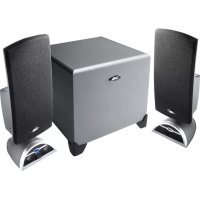
CA3080 - Loudspeaker Cyber Acoustics - Free user manual and instructions
Find the device manual for free CA3080 Cyber Acoustics in PDF.


| Product Type | 2.1 Audio System (2 satellite speakers + subwoofer) |
| Brand | Cyber Acoustics |
| Model | CA3080 |
| Power Supply | Included AC adapter (230 V, 50 Hz) |
| Source Connectivity | 3.5 mm jack plug (green connector) |
| Speaker Connectivity | Red DIN plug (subwoofer to right speaker) |
| Controls | On/Off, main volume, bass volume, headphone jack |
| Compatibility | Computer, CD/DVD/MP3 player, iPod, game consoles (with Y adapter) |
| Included Accessories | 2 satellite speakers, 1 subwoofer, AC adapter, user guide |
| Maintenance | Clean with a soft dry cloth; do not use solvents |
| Precautions | Do not expose to water, humidity, or heat sources |
| Intended Use | Audio enhancement for computers and portable sources |
| Speaker Type | Satellites: high-excursion speakers; Subwoofer: amplified |
| Positioning | Subwoofer on floor near a wall; satellites on either side of the source |
| Headphone Function | Automatically cuts sound to speakers when plugged in |
| LED Indicator | Blue (on) |
| Repairability | Contact Cyber Acoustics customer service (USA 360-823-4100) |
| Manufacturer Website | www.cyberacoustics.com |
Frequently Asked Questions - CA3080 Cyber Acoustics
User questions about CA3080 Cyber Acoustics
0 question about this device. Answer the ones you know or ask your own.
Ask a new question about this device
Download the instructions for your Loudspeaker in PDF format for free! Find your manual CA3080 - Cyber Acoustics and take your electronic device back in hand. On this page are published all the documents necessary for the use of your device. CA3080 by Cyber Acoustics.
USER MANUAL CA3080 Cyber Acoustics
Amplified Speaker System
Owners guide
CA-3080
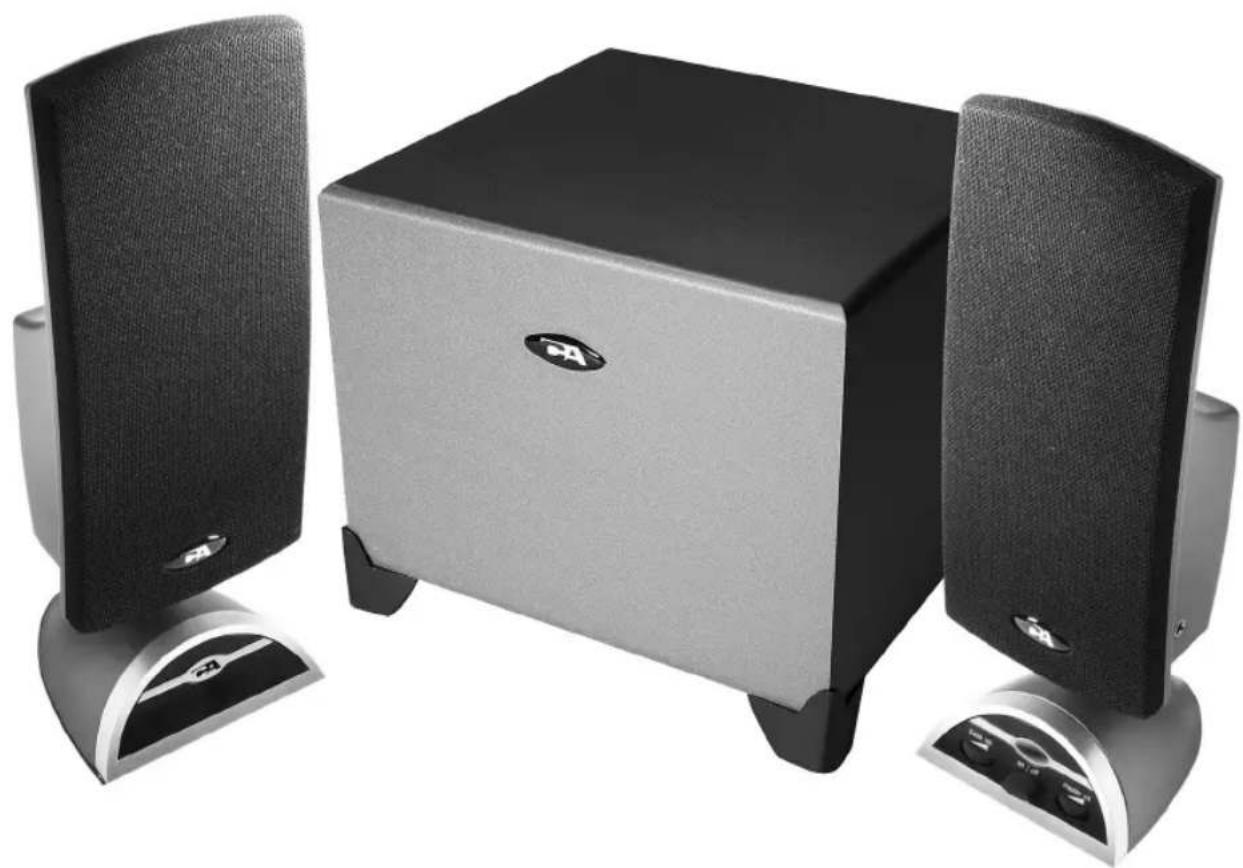
3 Piece System
2.1
performance


CA-3080
Three-Piece Audio System
INTRODUCTION
Welcome to the Cyber Acoustics CA-3080 speaker system.
This three-piece system is designed to deliver superior audio performance to computers, iPod ® , MP3 players, DVD players, and other portable audio devices. The system offers high efficient, long excursion drivers combined with a low distortion, high powered amplifier that provides deep base with clarity and greater dynamic range.
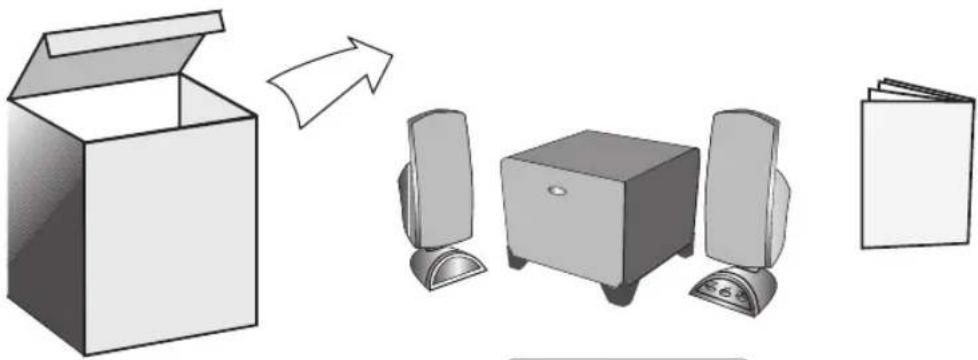
BOX CONTENTS
- Two Satellite Speakers
- One Subwoofer
- AC Adapter
- Owner's Guide with connection diagram
CAUTION
- Read Instructions Carefully – All safety and operating instructions should be read before this device is operated.
- Power Supply – Do not plug power supply in until all connections are made.
- Power Sources – Use only the AC power cord supplied with these speakers. Cyber Acoustics will not be held responsible for damage caused by another power supply.
- Heat – Keep speakers out of extreme heat, and away from sources producing extreme heat, such as, space heaters, radiators, stoves, and other devices emitting heat.
- Water and Moisture – Keep speakers out of the rain and humid conditions to avoid electric shock. Keep speakers away from water, such as, sinks, bathtubs, swimming pools, washing machines, tubs of water, etc. in order to avoid electric shock. Keep water from dripping on the device, do not put objects containing water, such as vases on top of the device, and do not put the device near standing water.
- Cleaning – Use a dry cloth for cleaning. Do not wipe any part of the system with cleaning solvents, such as, furniture wax, bleach, benzene, or ammonia.
SPEAKER PREPARATION
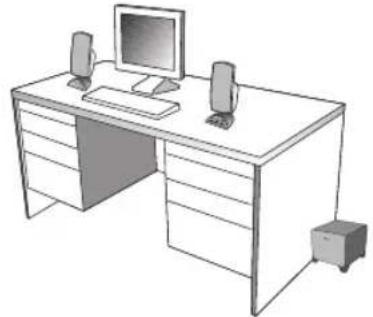
- Subwoofer – Place on the floor, near a wall, for optimum performance.
- Satellite Speakers – Usually are placed on opposite sides of the listening device. As far apart as possible is usually best. An example would be listening to the speakers using a computer: Place the left satellite speaker on the far left corner of the desk. Place the right satellite speaker on the far right corner of the desk.
7


SPEAKER CONNECTION
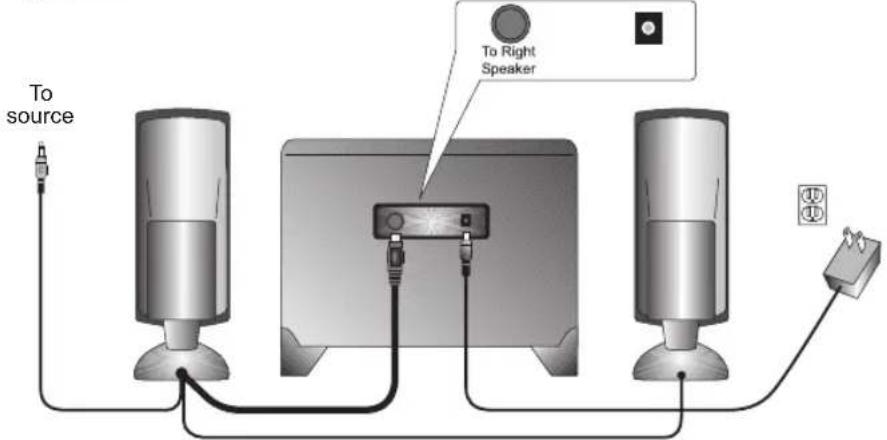
There are a variety of devices these speakers can connect to, such as, CD players, iPod, DVD players, MP3 players and portable audio devices. Please read the step by step instructions along with the diagrams provided to identify which diagram most closely matches your source.
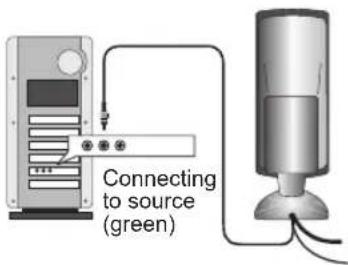
- Desktop Computers –
Take the cable with the green plug coming from the back of the right speaker and plug this into the green output/source jack in the back or front of the computer tower, also referred to as the sound/audio out jack.
Take the red plug from the right satellite speaker and plug this into the DIN jack labeled "To Right Speaker" on the back of subwoofer.
Take the AC power adapter cord and plug the black plug into the back of the subwoofer.
- Take the AC power adapter and plug into wall socket or power strip.
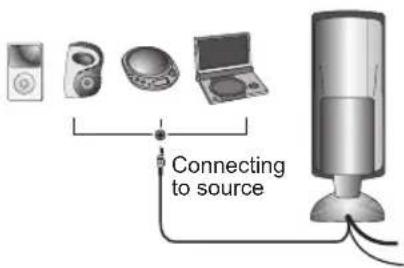
- CD player, DVD player, MP3 player –
Take the cable with the green plug coming from the back of the right speaker and plug this into the headphone jack of the audio device.
Take the red plug from the right satellite speaker and plug this into the DIN jack labeled "To Right Speaker" on the back of subwoofer.
Take the AC power adapter cord and plug the black plug into the back of the subwoofer.
- Take the AC power adapter and plug into wall socket or power strip.
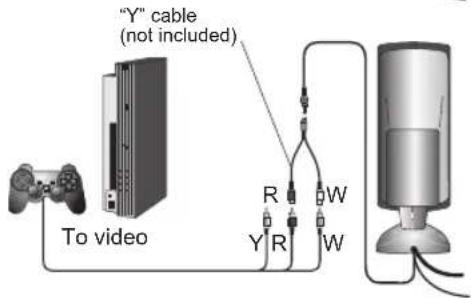
• Gaming System –
- A Console Gaming Adapter, also known as, a "Y" adapter, has dual-RCA outputs and is needed to connect these speakers to a gaming system. The adapter is sold separately.
- Turn off the power to your gaming system.
Take the end of the "Y" adapter with the dual-RCA outputs, one red, one white. Plug these outputs into the matching red and white RCA jacks on the gaming system.
Take the green stereo jack at the other end of the "Y" adapter and plug that into the cable with the green plug coming from the back of the right speaker.
Take the red plug from the right satellite speaker and plug this into the DIN jack labeled "To Right Speaker" on the back of subwoofer.
![graph TD A["To source"] --> B["Video Unit"] B --> C["Speaker"] C --> D["Computer"] D --> E["To Right Speaker"] E --> F["Connecting to source (green)"] F --> G["Video Device"] G --> H["To video"] H --> I["“Y” cable (not included)"] I --> J["Video Module"] J --> K["Connecting to source"] K --> L["Comp…](/content/2026/03/515737/images/bd13c979b666b5a797a65afb0c56bb672819f36ad8862823a7b801327d56f167.jpg)

CONTROLS & FEATURES
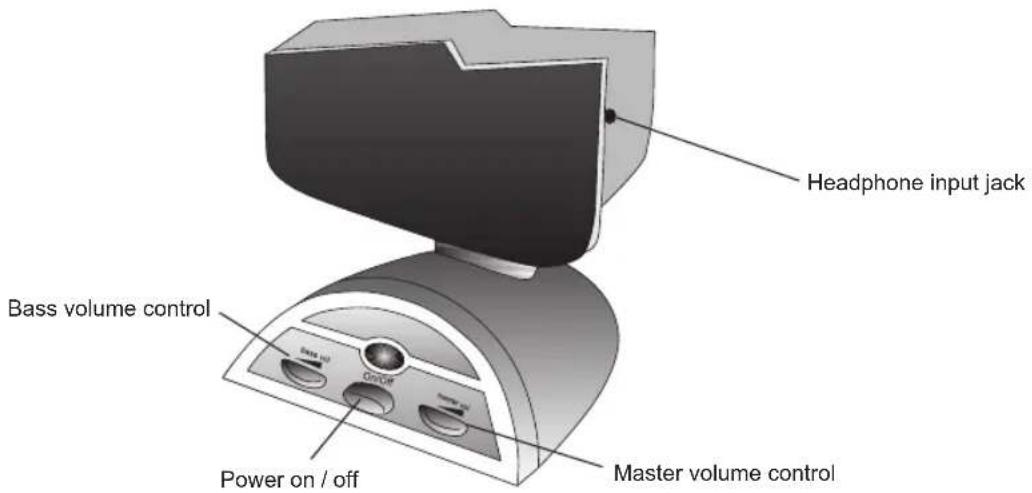
- Power – The on/off button is on the right satellite speaker. Press in to turn on. Press again to turn the system off.
- Master Volume Control – This control is on the right satellite speaker and is indicated by the word "volume". Rotate clockwise to turn volume up or counter-clockwise to turn volume down.
- Bass Volume Control – This control works similarly to the master volume control. Rotate to increase or decrease bass as preferred.
- Headphone Input Jack – The right satellite speaker has a headphone input jack. Connect your favorite headphones to this jack and they will mute the speaker system automatically. The master volume control can then be used to turn up or down the volume to your headphones.
TROUBLE SHOOTING
| Symptom Solution | |
| Speaker System Will Not Power On. | Power button is not turned on. Press in and check for blue LED indicator light to come on. |
| Verify the AC power adapter is plugged into the back of the subwoofer and it's plugged into the wall outlet. Verify you are using our Cyber Acoustics AC adapter; it will have our business name on it. | |
| Check if the wall outlet or power strip you are using is actually getting power. | |
| Speaker Does Not Produce Sound. | Verify the speaker is getting power. Check above steps. |
| Make sure the volume is turned up to audible listening level. | |
| Verify that all cables are plugged into the correct jacks. | |
| Many times users believe the speakers are not working, when in fact they are having trouble with the sound source. The most common problem when connecting to a computer sound card is the connections are incorrect. Make sure you are connected to the audio output jack from your computer sound card. Many times it has a green color to it. Also, make sure your media device or CD/DVD device is playing and the volume settings are turned up and not muted. | |
| If you still have problems, disconnect the speaker source cable from your computer and connect to a MP3, CD player, or anything else with a 3.5mm headphone jack. If your speakers work on this other source, you know the speakers are okay and the problem lies with your computer or the connections. | |
| Sound Is Distorted. | Turn the volume down 1/4 to 1/2 levels. If this does not work, also check the computer operating system volume level and decrease it if necessary. |
| Adjust the computer's master volume control by balancing the volume until it's centered, then adjust the volume levels on the speakers. | |
If you have questions or need assistance with your speakers, please call or consult our website for further troubleshooting tips.
Telephone
(USA) 360 823 4100
Website www.cyberacoustics.com
iPod is a trademark of Apple Inc., registered in the U.S. and other countries.
CA-3080
BRANCHEMENT DES ENCEINTES
9


ca 3080_3rd.FH9 Thu May 08 10:47:33 2008 Page 16


Cyber Acoustics
Amplified Speaker System




Brand : Cyber Acoustics
Model : CA3080
Category : Loudspeaker