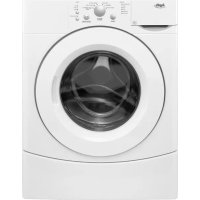
IFW7300WW - Washing machine IGNIS - Free user manual and instructions
Find the device manual for free IFW7300WW IGNIS in PDF.


| Brand | IGNIS |
| Model | IFW7300WW |
| Product Type | Built-in Dishwasher |
| Capacity | 12 place settings |
| Wash Programs | Pots & Pans, Normal, Rinse Only |
| Options | High Temperature Wash, Heated Dry, Delay Start (4 h), Control Lock |
| Wash Temperature | Up to 140°F (60°C) for Normal program, 145°F (63°C) with High Temp option |
| Detergent Dispenser | Dual section (pre-wash and main wash) |
| Rinse Aid Dispenser | 5 oz (150 mL) capacity, adjustable |
| Soil Sensor | Optical detection system automatically adjusting the cycle |
| Safety | Overflow protection device, control lock, mandatory grounding |
| Power Supply | 120 V, 60 Hz, AC, grounding required |
| Water Pressure Required | 20 to 120 psi (138 to 828 kPa) |
| Recommended Water Temperature | 120°F (49°C) at inlet |
| Water Consumption (Normal cycle) | 5.6 to 6.8 US gallons (21.2 to 25.7 liters) |
| Duration of Normal Cycle | 71 to 84 minutes (depending on conditions) |
| Maintenance | Exterior cleaning with soft cloth, interior with dishwasher detergent, periodic cleaning of anti-flood device |
| Warranty | 1 year limited (parts and labor) |
| Customer Service | 1-800-807-6777 (Canada) |
Frequently Asked Questions - IFW7300WW IGNIS
User questions about IFW7300WW IGNIS
0 question about this device. Answer the ones you know or ask your own.
Ask a new question about this device
Download the instructions for your Washing machine in PDF format for free! Find your manual IFW7300WW - IGNIS and take your electronic device back in hand. On this page are published all the documents necessary for the use of your device. IFW7300WW by IGNIS.
USER MANUAL IFW7300WW IGNIS
In Canada, for assistance, installation or service, call: 1-800-807-6777
or visit our website at...
www.inglis.ca
LAVE-VAISSELL
Before Using Your Dishwasher. 4
PARTS AND FEATURES. 5
START-UP GUIDE 6
Using Your New Dishwasher 6
Stopping Your Dishwasher 6
DISHWASHER LOADING. 6
Loading Suggestions 6
Loading Top Rack. 6
Loading Bottom Rack 7
Loading Silverware Basket 8
DISHWASHER USE. 9
Detergent Dispenser 9
Rinse Aid Dispenser. 10
Dishwasher Efficiency Tips 10
Cycle Selection Charts. 11
Canceling a Cycle 11
Changing a Cycle or Setting 11
Adding Items During a Cycle 12
Option Selections. 12
Cycle Status Indicators. 13
Sensor System. 13
Drying System. 13
Overfill Protection Float. 13
WASHING SPECIAL ITEMS. 14
DISHWASHER CARE 15
Cleaning. 15
Drain Air Gap. 15
Storing. 15
TROUBLESHOOTING 16
ASSISTANCE OR SERVICE. 18
Accessories. 18
WARRANTY 19
TABLE DES MATIÈRES
SECURITE DU LAVE-VAISSELLE 20
ASSISTANCE OU SERVICE. 35
Accessoires 35
GARANTIE. 36
DISHWASHER SAFETY
Your safety and the safety of others are very important.
We have provided many important safety messages in this manual and on your appliance. Always read and obey all safety messages.

This is the safety alert symbol.
This symbol alerts you to potential hazards that can kill or hurt you and others.
All safety messages will follow the safety alert symbol and either the word "DANGER" or "WARNING."
These words mean:
ADANGER
You can be killed or seriously injured if you don't immediately follow instructions.
WARNING
You can be killed or seriously injured if you don't follow instructions.
All safety messages will tell you what the potential hazard is, tell you how to reduce the chance of injury, and tell you what can happen if the instructions are not followed.
IMPORTANT SAFETY INSTRUCTIONS
WARNING: When using the dishwasher, follow basic precautions, including the following:
Read all instructions before using the dishwasher.
Use the dishwasher only for its intended function.
Use only detergents or rinse agents recommended for use in a dishwasher, and keep them out of the reach of children.
When loading items to be washed:
1) Locate sharp items so that they are not likely to damage the door seal; and
2) Load sharp knives with the handles up to reduce the risk of cut-type injuries.
- Do not wash plastic items unless they are marked "dishwasher safe" or the equivalent. For plastic items not so marked, check the manufacturer's recommendations.
- Do not touch the heating element during or immediately after use.
- Do not operate the dishwasher unless all enclosure panels are properly in place.
Do not tamper with controls.
- Do not abuse, sit on, or stand on the door, lid, or dish racks of the dishwasher.
To reduce the risk of injury, do not allow children to play in or on the dishwasher.
Under certain conditions, hydrogen gas may be produced in a hot water system that has not been used for two weeks or more. HYDROGEN GAS IS EXPLOSIVE. If the hot water system has not been used for such a period, before using the dishwasher turn on all hot water faucets and let the water flow from each for several minutes. This will release any accumulated hydrogen gas. As the gas is flammable, do not smoke or use an open flame during this time.
- Remove the door or lid to the washing compartment when removing an old dishwasher from service or discarding it.
SAVE THESE INSTRUCTIONS
WARNING

Tip Over Hazard
Do not use dishwasher until completely installed.
Do not push down on open door.
Doing so can result in serious injury or cuts.
WARNING

Electrical Shock Hazard
Electrically ground dishwasher.
Connect ground wire to green ground connector in terminal box.
Do not use an extension cord.
Failure to follow these instructions can result in death, fire, or electrical shock.
Install where dishwasher is protected from the elements.
Protect against freezing to avoid possible rupture of fill valve. Such ruptures are not covered by the warranty. See "Storing" section for winter storage information.
Install and level dishwasher on a floor that will hold the weight, and in an area suitable for its size and use.
■Remove all shipping plugs from hoses and connectors (such as the cap on the drain outlet) before installing. See Installation Instructions for complete information.
GROUNDING INSTRUCTIONS
For a grounded, cord-connected dishwasher:
The dishwasher must be grounded. In the event of a malfunction or breakdown, grounding will reduce the risk of electric shock by providing a path of least resistance for electric current. The dishwasher is equipped with a cord having an equipment-grounding conductor and a grounding plug. The plug must be plugged into an appropriate outlet that is installed and grounded in accordance with all local codes and ordinances.
WARNING: Improper connection of the equipment-grounding conductor can result in a risk of electric shock. Check with a qualified electrician or service representative if you are in doubt whether the dishwasher is properly grounded. Do not modify the plug provided with the dishwasher; if it will not fit the outlet, have a proper outlet installed by a qualified electrician.
For a permanently connected dishwasher:
The dishwasher must be connected to a grounded metal, permanent wiring system, or an equipment-grounding conductor must be run with the circuit conductors and connected to the equipment-grounding terminal or lead on the dishwasher.
SAVE THESE INSTRUCTIONS
PARTS AND FEATURES
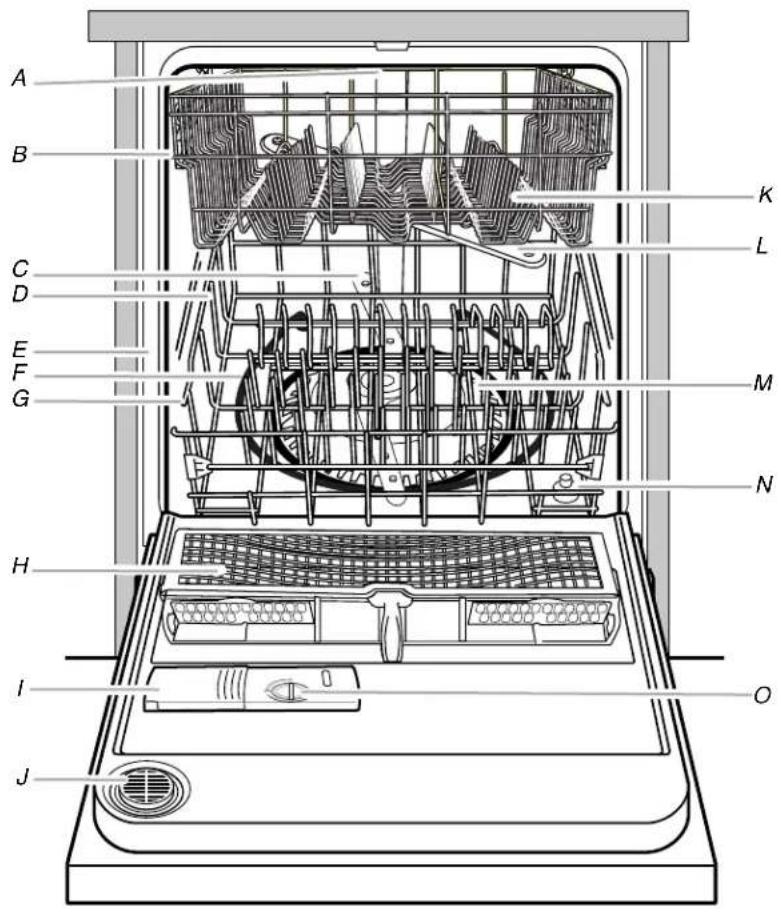
A. Upper level wash
B. Top rack
C. Lower spray arm
D. Bottom rack
E. Model and serial number label
F. Heating element
G. Water inlet opening (in tub wall)
H. Silverware basket
I. Detergent dispenser
J. Vent
K. Light item clips
L. Top spray arm
M. Filter module
N. Overfill protection float
O. Rinse aid dispenser
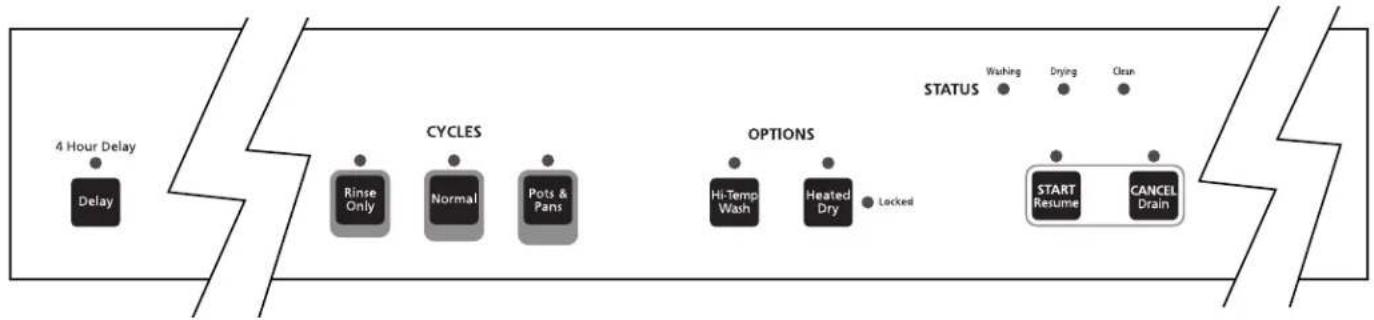
Control Panel
START-UP GUIDE
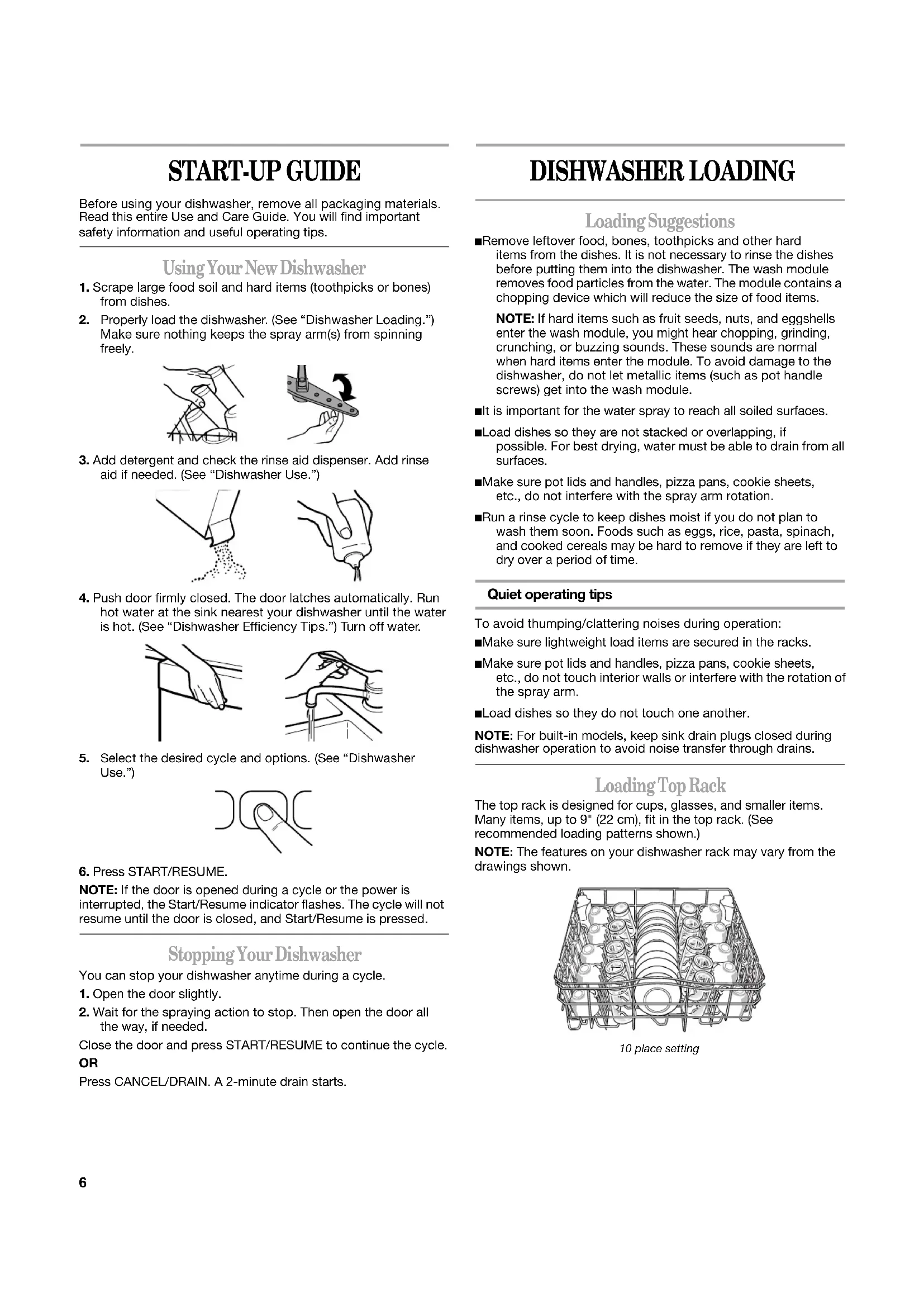
Before using your dishwasher, remove all packaging materials. Read this entire Use and Care Guide. You will find important safety information and useful operating tips.
Using Your New Dishwasher
- Scrape large food soil and hard items (toothpicks or bones) from dishes.
- Properly load the dishwasher. (See "Dishwasher Loading.") Make sure nothing keeps the spray arm(s) from spinning freely.
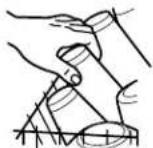
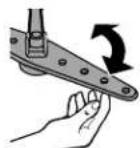
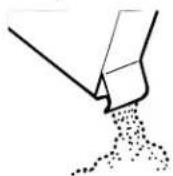
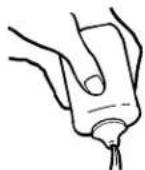
- Add detergent and check the rinse aid dispenser. Add rinse aid if needed. (See "Dishwasher Use.")
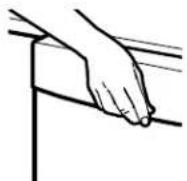
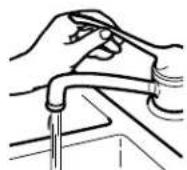
- Push door firmly closed. The door latches automatically. Run hot water at the sink nearest your dishwasher until the water is hot. (See "Dishwasher Efficiency Tips.") Turn off water.
- Select the desired cycle and options. (See "Dishwasher Use.")
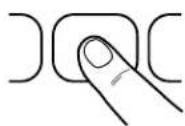
- Press START/RESUME.
NOTE: If the door is opened during a cycle or the power is interrupted, the Start/Resume indicator flashes. The cycle will not resume until the door is closed, and Start/Resume is pressed.
Stopping Your Dishwasher
You can stop your dishwasher anytime during a cycle.
- Open the door slightly.
- Wait for the spraying action to stop. Then open the door all the way, if needed.
Close the door and press START/RESUME to continue the cycle. OR
Press CANCEL/DRAIN. A 2-minute drain starts.
DISHWASHER LOADING
Loading Suggestions
Remove leftover food, bones, toothpicks and other hard items from the dishes. It is not necessary to rinse the dishes before putting them into the dishwasher. The wash module removes food particles from the water. The module contains a chopping device which will reduce the size of food items.
NOTE: If hard items such as fruit seeds, nuts, and eggshells enter the wash module, you might hear chopping, grinding, crunching, or buzzing sounds. These sounds are normal when hard items enter the module. To avoid damage to the dishwasher, do not let metallic items (such as pot handle screws) get into the wash module.
It is important for the water spray to reach all soiled surfaces.
Load dishes so they are not stacked or overlapping, if possible. For best drying, water must be able to drain from all surfaces.
Make sure pot lids and handles, pizza pans, cookie sheets, etc., do not interfere with the spray arm rotation.
Run a rinse cycle to keep dishes moist if you do not plan to wash them soon. Foods such as eggs, rice, pasta, spinach, and cooked cereals may be hard to remove if they are left to dry over a period of time.
Quiet operating tips
To avoid thumping/clattering noises during operation:
Make sure lightweight load items are secured in the racks.
Make sure pot lids and handles, pizza pans, cookie sheets, etc., do not touch interior walls or interfere with the rotation of the spray arm.
Load dishes so they do not touch one another.
NOTE: For built-in models, keep sink drain plugs closed during dishwasher operation to avoid noise transfer through drains.
Loading Top Rack
The top rack is designed for cups, glasses, and smaller items. Many items, up to 9" (22 cm), fit in the top rack. (See recommended loading patterns shown.)
NOTE: The features on your dishwasher rack may vary from the drawings shown.
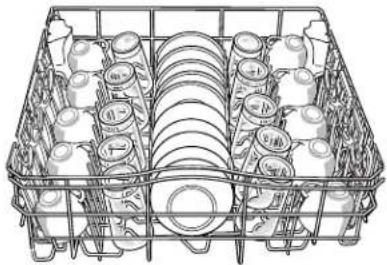
10 place setting
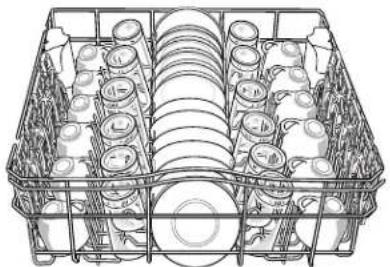
12 place setting
Place items so open ends face down for cleaning and draining.
Load glasses in top rack only. The bottom rack is not designed for glasses. Damage can occur.
Place cups and glasses in the rows between tines. Placing them over the tines can lead to breakage and water spots.
China, crystal, and other delicate items must not touch each other during dishwasher operation. Damage may occur.
Load lightweight plastic items in the top rack only. Only plastic items marked "dishwasher safe" are recommended.
Load plastic items so the force of the spray does not move them during the cycle.
■To avoid chipping, do not let stemware touch other items.
Small bowls, pans, and other utensils can be placed in the top rack. Load bowls in the center section for best stability.
Light item clips
The light item clips hold lightweight plastic items such as cups, lids, or bowls in place during washing.
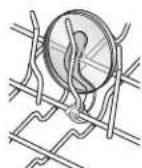
To move a clip
1.Pull the clip up and off the tine.
2. Reposition the clip on another tine.
Loading Bottom Rack
The bottom rack is designed for plates, pans, casseroles, and utensils. Many items, up to 13" (33 cm) tall, fit in the bottom rack. (See recommended loading patterns shown.)
NOTE: The features on your dishwasher rack may vary from the drawings shown.
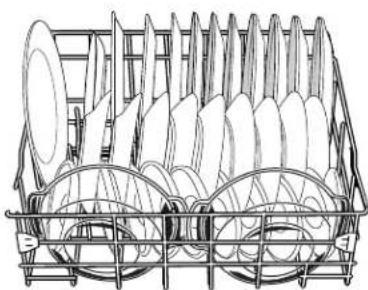
10 place setting
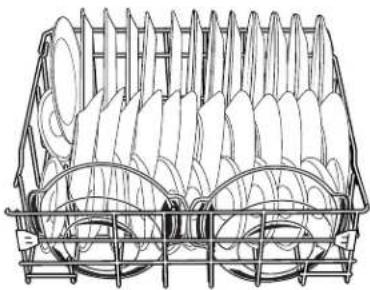
12 place setting
- Do not load glasses, cups, or plastic items in the bottom rack. Load small items in the bottom rack only if they are secured in place.
Load plates, soup bowls, etc., between tines.
Overlap the edges of plates for large loads.
Load soup, cereal, and serving bowls in the rack in a variety of ways depending upon their size and shape. Load bowls securely between the rows of tines. Do not nest bowls because the spray will not reach all surfaces.
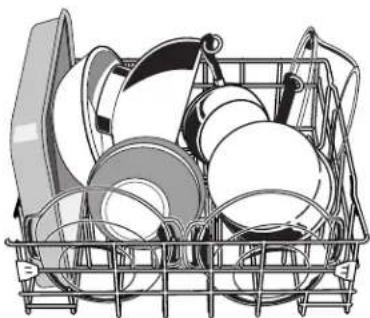
Utensil load
Load cookie sheets, cake pans, and other large items at the sides and back. Loading such items in front can keep the water spray from reaching the detergent dispenser.
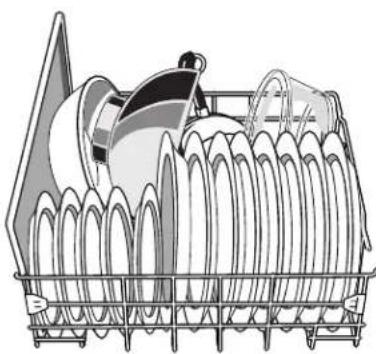
Mixed load
Secure heavily soiled cookware face down in the rack.
Make sure pot handles and other items do not stop rotation of the spray arm(s). The spray arm(s) must move freely.
Do not load items between the bottom rack and the side of the dishwasher tub because they might block the water inlet opening.
Loading Silverware Basket
Load the silverware basket while it is in the dishwasher or take the basket out for loading on a counter or table top.
NOTE: Unload or remove the basket before unloading the racks to avoid spilling water droplets onto the silverware.
To open the silverware basket
Unlock the latch.
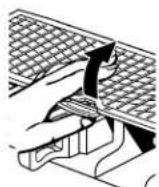
NOTE: Be sure the cover is completely latched before pulling out the bottom rack and before closing the dishwasher door.
Place small items such as baby bottle caps, jar lids, corncob holders, etc., in the section(s) with hinged cover(s). Close the cover to hold small items in place.
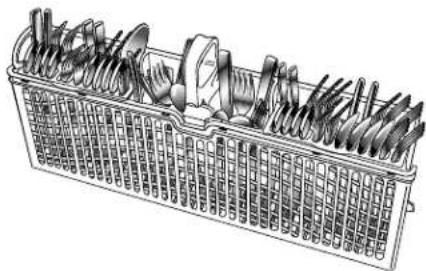
Use suggested loading patterns as shown to increase the washability of your silverware, if your silverware basket has these covers.
If your silverware basket does not have covers, or when covers are up, mix items in each section of the basket with some pointing up and some down to avoid nesting. Spray cannot reach nested items.
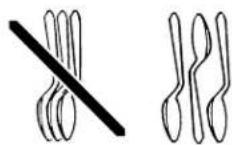
IMPORTANT: Always load items (knives, skewers, etc.) pointing down.
To remove the basket from the door
- Grasp the silverware basket by the handle. Slide it toward the top of the door.
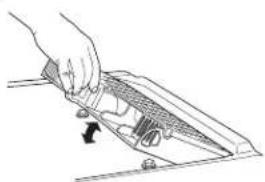
- Lift the basket off the holding buttons.
To replace the basket in the door
- Set the silverware basket on the holding buttons.
- Slide the basket toward the bottom of the door until it locks into place.
NOTES:
Do not load silver or silver-plated silverware with stainless steel. These metals can be damaged by contact with each other during washing.
Some foods (such as salt, vinegar, milk products, fruit juices, etc.) can pit or corrode silverware. Run a rinse cycle if you do not have a full load to wash immediately.
DISHWASHER USE
Detergent Dispenser
The detergent dispenser has two sections. The smaller Pre-Wash section empties detergent into the dishwasher when you close the door. The larger Main Wash section automatically empties detergent into the dishwasher during the wash. (See the "Cycle Selection Charts.")
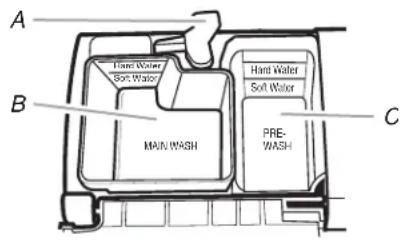
A. Cover latch
B. Main Wash section
C. Pre-Wash section
Use automatic dishwashing detergent only. Other detergents can produce excessive suds that can overflow out of the dishwasher and reduce washing performance.
Add detergent just before starting cycle.
■Store tightly closed detergent in a cool, dry place. Fresh automatic dishwasher detergent results in better cleaning.
NOTE: Do not use detergent with a rinse cycle.
Filling the dispenser
- If the dispenser cover is closed, open the cover by moving the cover latch to the right.
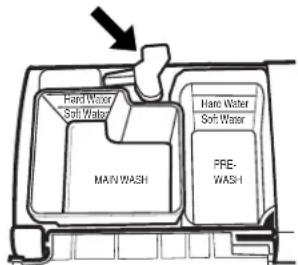
- Add the correct amount of detergent to the Main Wash section of the dispenser according to the chart below. If you are using a tablet detergent, it must be placed in the Main Wash section. (See "How much detergent to use.")
- Add the correct amount of detergent to the Pre-Wash section of the dispenser, if needed, according to the chart below.
- Close the dispenser cover.
It is normal for the cover to open partially when dispensing detergent.
NOTE: See the "Cycle Selection Charts" for which section to fill depending on the cycle selected..
How much detergent to use
The amount of detergent to use depends on the soil level of your dishes, hardness of your water, and the type of detergent. If you use too little, dishes will not be clean. If you use too much in soft water, glassware will etch.
Water hardness can change over a period of time. Find out your water's hardness by asking your local water department, water softener company, or county extension agent.
| Detergent Dispenser fill recommendations per dish load soil level and water hardness | ||||||
| Water Hardness | Light Soil or Prerinsed Normal Soil Heavy Soil | |||||
| Main Wash section | Pre-Wash section | Main Wash section | Pre-Wash section | Main Wash section | Pre-Wash section | |
| Soft (0-2 grains per U.S. gallon) | 4 tsp (20 mL) Fill to Soft Water line | Empty 6 tsp (30 mL) Fill above the Soft Water line | 2 tsp (10 mL) Fill to Soft Water line | 9 tsp (45 mL) Fill cup completely | 7 tsp (35 mL) Fill cup completely | |
| Medium (2-6 grains per U.S. gallon) | 6 tsp (30 mL) Fill above the Soft Water line | 2 tsp (10 mL) Fill to Soft Water line | 6 tsp (30 mL) Fill above the Soft Water line | 9 tsp (45 mL) Fill cup completely | 7 tsp (35 mL) Fill cup completely | |
| Hard (7 grains per U.S. gallon and above) | 8 tsp (40 mL) Fill to Hard Water line | 4 tsp (20 mL) Fill to Hard Water line | 9 tsp (45 mL) Fill cup completely | 7 tsp (35 mL) Fill cup completely | 7 tsp (35 mL) Fill cup completely | |
NOTE: Fill amounts shown are for standard powdered detergent. Amounts may vary if you use liquid or concentrated powdered detergent. Tablet detergents should be placed in the main wash section of the detergent dispenser with the cover closed. Follow instructions on the package when using liquid dishwasher detergent, concentrated powdered detergent or tablet detergent.
Rinse Aid Dispenser
IMPORTANT: Your dishwasher is designed to use a liquid rinse aid. The use of rinse aids greatly improves drying by allowing water to drain from the dishes after the final rinse. They also keep water from forming droplets that can dry as spots or streaks. Do not use a solid or bar-type rinse aid.
Filling the dispenser
The rinse aid dispenser holds 5 oz (150 mL) of rinse aid. Under normal conditions, this will last for about 1 to 3 months.
- Make sure the dishwasher door is fully open.
- Turn the dispenser knob to "Open" and lift it out.
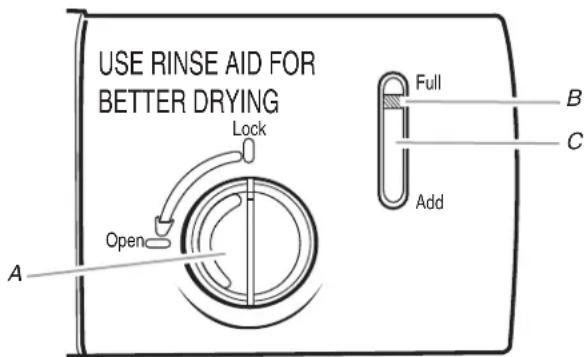
A. Dispenser knob
B. Indicator
C. Indicator window
- Pour rinse aid into the opening until the indicator points to "Full." Take care not to overfill. (When the rinse aid indicator drops to the "Add" level, add more rinse aid.)
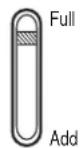
- Clean up any spilled rinse aid with a damp cloth.
- Place the knob back into the opening and turn to the "Lock" position.
Rinse aid setting
The amount of rinse aid released into the final rinse can be adjusted. For most water conditions, the factory setting of 2 will give good results. If you have hard water or notice rings or calcium spots on your glasses or dishes, try a higher setting.
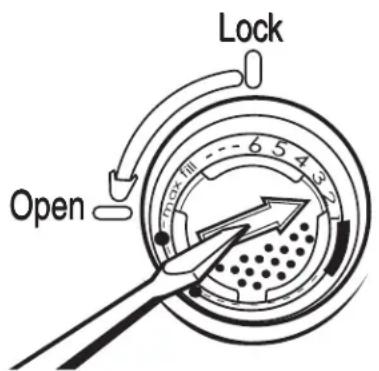
To adjust the setting
- Remove the dispenser knob.
-
Turn the arrow adjuster inside the dispenser to the desired setting by either using your fingers or inserting a flat-blade screwdriver into the center of the arrow and turning.
-
Replace the dispenser knob.
Dishwasher Efficiency Tips
Hot water dissolves and activates the dishwashing detergent. Hot water also dissolves grease on dishes and helps glasses dry spot-free. For best dishwashing results, water should be 120^ (49^) as it enters the dishwasher. Loads may not wash as well if the water temperature is too low. Water that is too hot can make some soils harder to remove and cause certain detergent ingredients not to function. If your water heater is located far from the dishwasher, it may be necessary to run the hot water at the faucet closest to the dishwasher to minimize the amount of cold water in the water line.
To check water temperature
- Run hot water at the faucet closest to your dishwasher for at least 1 minute.
- Place a candy or meat thermometer in a glass measuring cup.
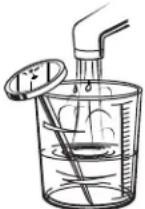
- Check the temperature on the thermometer as the water is running into the cup.
Additional efficiency tips
To save water and energy and time, do not rinse dishes before putting them into the dishwasher.
Use a low energy, quick, or short cycle whenever possible. These cycles use less hot water and energy than a normal cycle.
Use a delay feature (on some models) to run your dishwasher during off-peak hours. Local utilities recommend avoiding heavy usage of energy at certain times of day.
During the summer, run your dishwasher at night. This reduces daytime heat buildup in the kitchen.
Use the energy-saving dry option whenever possible. Allow longer drying times (overnight) when using these options. Use a rinse aid to improve drying.
Use cycles or options that add extra heat to the wash or rinse portion of the cycle only when needed.
■Run your dishwasher with full loads. Run a rinse cycle after meals until the dishwasher is full.
If your home is equipped with a water softener, you may want to avoid starting the dishwasher during the regeneration of the softener, since this may contribute to poor wash performance.
Cycle Selection Charts
Select the wash cycle and options desired and press START/RESUME. The dishwasher starts filling once you press START/RESUME, unless you select a delay wash. You can change cycles and options as the machine is filling.
After completing a wash cycle, the dishwasher remembers the cycle and options. It uses the same cycle and options again in the next wash cycle, if you press only START/RESUME.
NOTE: If the door is opened during a cycle or the power is interrupted, the Start/Resume indicator flashes. The cycle will not resume until the door is closed and Start/Resume is pressed.
A "●" shows what steps are in each cycle. Your model may have some or all of the cycles shown.
Display time is for models with the dual digit display on the console.
These models meet the ENERGY STAR® guidelines for energy efficiency.
Temperatures indicate where extra heat is added. The cycle countdown (on some models) pauses at these points until water reaches the temperature.
Water usage is shown in U.S. gallons/liters.
Pots & Pans
Use this cycle for hard-to-clean, heavily soiled pots, pans, casseroles, and regular tableware. During the wash, the wash action will repeatedly pause for several seconds. Initial display time after rotating clock pattern: 92-99 min.

Use both detergent dispenser sections.
| Pre-Wash | Main Wash | Rinse Rinse Final | Heated Rinse | Dry Mini-mum Time (min) | Water Usage (gal/L) | |
| ● | ●140°F (60°C) | ● | ●140°F (60°C) | ●99* Light soil | 6.9-7.8/26.1-29.6 | |
Normal
Use this cycle for loads with normal amounts of food soil. (The energy-usage label is based on this cycle.) During the wash, the wash action will repeatedly pause for several seconds. Initial display time after rotating clock pattern: 64-84 min.

Use both detergent dispenser sections.
| Pre-Wash | Main Wash | Purge Rinse Final | Heated Rinse | Dry Mini-mum Time (min) | Water Usage (gal/L) |
| ● | ● 120°F (49°C) | ● | ● 140°F (60°C) | ●71* | Light soil |
Rinse Only
Use this rinse cycle for rinsing dishes, glasses, and silverware that will not be washed right away.
Initial display time after rotating clock pattern: 3 min.

Do not use detergent with this cycle.
| Pre-Wash | Main Wash | Rinse Rinse Final | Heated Rinse | Dry Time (min) | Water Usage (gal/L) | ||
| ●10 1 | 8-/6.8 | ||||||
*If the incoming water is less than the recommended temperature or food soils are heavy, the cycle will automatically compensate by adding time, heat, and water as needed.
Canceling a Cycle
Anytime during a cycle, press CANCEL/DRAIN. Your dishwasher starts a 2-minute drain, if needed, and clears all indicators. Let the dishwasher drain completely.
NOTE: If your dishwasher does not need draining, the dishwasher stops and clears all indicators.
To stop the drain
You can press CANCEL/DRAIN again to stop the drain immediately. Be sure to drain the dishwasher before starting a new cycle.
To clear the indicators
Press CANCEL/DRAIN before starting the dishwasher to clear all options and cycles.
Changing a Cycle or Setting
During the first fill of a cycle
- Press a new cycle and/or options.
- Check the detergent dispensers. They must be filled properly for the new cycle.
- Press START/RESUME.
After the first fill of a cycle
- Press CANCEL/DRAIN. Your dishwasher starts a 2-minute drain, if needed, and clears all indicators. Let the dishwasher drain completely.
NOTE: If your dishwasher does not need draining, the dishwasher stops and clears all indicators. - Check the detergent dispensers. They must be filled properly for the new cycle.
- Press a new cycle and/or options.
- Press START/RESUME. (The door must be closed.)
Adding Items During a Cycle
You can add an item anytime before the main wash starts. Open the door and check the detergent dispenser. If the cover is still closed, you can add items.
To add items
- Lift up the door latch to stop the cycle. Wait for the spraying action to stop before opening the door.
- Open the door. If the detergent dispenser cover is still closed, add the item.
- Close the door firmly until it latches.
- Press START/RESUME. The dishwasher resumes the cycle after a 5-second pause.
Option Selections
You can customize your cycles by pressing an option. If you change your mind, press the option again to turn off the option, or select a different option if desired.
You can change an option anytime before the selected option begins. For example, you can turn off the drying option anytime before drying begins.
After a wash cycle, the dishwasher remembers the options used. It uses the same options in the next wash cycle, if you press only START/RESUME.
Hi-Temp Wash
Select this option to increase the target water temperature during the wash portions of the cycle. Hi-Temp Wash raises the target water temperature to 145^ (63^) in the main wash. Heating the water helps improve washing results. Hi-Temp Wash is useful when loads contain baked-on food.
This option adds heat, wash time and water to the cycle.
NOTE: Hi-Temp Wash is an option with Pots & Pans and Normal cycles.
Heated Dry
Select this option to dry dishes with heat.
Switching off Heated Dry skips the dry period. This is useful when loads contain plastic dinnerware that may be sensitive to high temperatures. The dishes take longer to dry, and some spotting may occur. Some items (such as plastics) may need towel drying.
For best drying, use a liquid rinse aid.
NOTE: Heated Dry is an option with all cycles, except the Rinse Only cycle. Heated Dry begins automatically with all cycles unless you switch it off.
Lock
Use the lock to avoid unintended use of the dishwasher. You can also use the lock feature to avoid unintended cycle or option changes during a cycle.
When the lock is lit, all buttons are disabled.
NOTES:
The dishwasher door can be opened while the controls are locked.
■You can turn on the lock while the dishwasher is running. If you open the door, unlock the controls and press START/RESUME to restart. You can lock controls again, if desired.
To turn on the lock
Press and hold HEATED DRY for 4 seconds. The lock glows. If you press any pad while your dishwasher is locked, the light flashes 3 times and the selection is ignored.
To turn off the lock
Press and hold HEATED DRY for 4 seconds. The light turns off.
Delay start
Select this option to run your dishwasher at a later time or during off-peak hours. You can add items to the load anytime during the delay countdown. After adding items, close the door firmly until it latches. The delay countdown will not continue if the door is not latched. Press START/RESUME. If the door is unlatched, the Start/Resume indicator flashes. The delay countdown stops until you latch the door and press START/RESUME.
To delay the start
- Press DELAY for a 4-hour delay. The number above or to the left of the 4 Hour Delay pad glows.
- Select a wash cycle and option or skip to Step 3 to use the cycle and options selected for last cycle.
- Press START/RESUME. (The door must be closed.) The delay countdown starts, and the cycle will begin after 4 hours.
NOTES:
To cancel the delay and cycle, press CANCEL/DRAIN.
To cancel the delay and start the cycle, press START/RESUME.
Cycle Status Indicators
Follow the progress of your dishwasher with the Cycle Status Indicators. Clean glows when a cycle is finished. The light turns off when you open the door or press CANCEL/DRAIN.
Washing
Drying
Clean
Washing
Washing glows while the dishwasher is washing or rinsing the dishes.
Drying
Drying glows while the dishwasher is drying your dishes.
Clean
Clean glows when a cycle is finished. The light turns off when you open the door or press CANCEL/DRAIN.
Sensor System
This dishwasher is equipped with an optical sensor wash that detects water temperature and the amount of soil and detergent. Wash cycles are adjusted based on what is sensed.
The dishwasher "senses" wash water quality during a series of pauses in the wash cycle. The sensor monitors water temperature and the amount of soil and detergent appearing in the wash water. It automatically adjusts the wash cycle for the best wash. Lightly soiled dishes will use less water and energy. Heavily soiled dishes will get more water and increased temperature and wash time. This dishwasher will automatically adjust the sensor approximately once a year to your water quality.
IMPORTANT: The very first wash cycle after installation in your home will be adjusted to include an additional 2 rinses. This cycle must not be interrupted for proper sensor adjustment. If this adjustment cycle is canceled or stopped before the Clean light comes on at the end of the cycle, the next wash cycle will repeat this sensor adjustment.
Drying System
During drying, you can see steam escaping through the vent at the upper left corner of the door. This is normal as the heat dries your dishes.
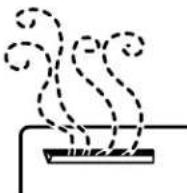
IMPORTANT: The vapor is hot. Do not touch the vent during drying.
Overfill Protection Float
The overfill protection float (in the front right corner of the dishwasher tub) keeps the dishwasher from overfilling. It must be in place for the dishwasher to operate.

Check under the float for objects that may keep the protector from moving up or down.
If you have doubts about washing a particular item, check with the manufacturer to see if it is dishwasher safe.
| Material Dishwasher Safe?/Comments | |
| Aluminum Yes | High water temperature and detergents can affect finish of anodized aluminum. |
| Disposable Aluminum | NoDo not wash throwaway aluminum pans in the dishwasher. These might shift during washing and transfer black marks to dishes and other items. |
| Bottles and Cans No | Wash bottles and cans by hand. Labels attached with glue can loosen and clog the spray arms or pump and reduce washing performance. |
| Cast Iron No | Seasoning will be removed, and iron will rust. |
| China/ Stoneware | YesAlways check manufacturer's recommendations before washing. Antique, hand-painted, or over-the-glaze patterns may fade. Gold leaf can discolor or fade. |
| Crystal Yes | Always check manufacturer's recommendations before washing. Some types of leaded crystal can etch with repeated washing. |
| Gold No | Gold-colored flatware will discolor. |
| Glass Yes | Milk glass yellows with repeated dishwasher washing. |
| Hollow-Handle Knives | NoHandles of some knives are attached to the blade with adhesives which can loosen if washed in the dishwasher. |
| Material Dishwasher Safe?/Comments | |
| Pewter, Brass, Bronze | No High water temperatures and detergent can discolor or pit the finish. |
| Disposable Plastics | No Cannot withstand high water temperatures and detergents. |
| Plastics Yes | Always check manufacturer's recommendations before washing. Plastics vary in their capacity to withstand high temperatures and detergents. Load plastics in top rack only. |
| Stainless Steel Yes | Run a rinse cycle if not washing immediately. Prolonged contact with food containing salt, vinegar, milk products, or fruit juice can damage finish. |
| Sterling Silver or Silver Plate | Yes Run a rinse cycle if not washing immediately. Prolonged contact with food containing salt, acid, or sulfide (eggs, mayonnaise, and seafood) can damage finish. |
| Tin | No Can rust. |
| Wooden Ware | No Wash by hand. Always check manufacturer's instructions before washing. Untreated wood can warp, crack, or lose its finish. |
DISHWASHER CARE
Cleaning
Cleaning the exterior
In most cases, regular use of a soft, damp cloth or sponge and a mild detergent is all that is necessary to keep the outside of your dishwasher looking nice and clean. If your dishwasher has a stainless steel exterior, a stainless steel cleaner is recommended.
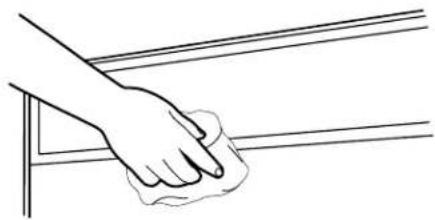
Cleaning the interior
Hard water minerals can cause a white film to build up on the inside surfaces, especially just beneath the door area.
Do not clean the dishwasher interior until it has cooled. You may want to wear rubber gloves. Do not use any type of cleanser other than dishwasher detergent because it may cause foaming or sudsing.
To clean interior
Make a paste with powdered dishwasher detergent on a damp sponge and clean.
OR
Use liquid automatic dishwasher detergent and clean with a damp sponge.
OR
See the vinegar rinse procedure in "Spotting and filming on dishes" in "Troubleshooting."
NOTE: Run a normal cycle with detergent after cleaning the interior.
Drain Air Gap
Check the drain air gap anytime your dishwasher isn't draining well.
Some state or local plumbing codes require the addition of a drain air gap between a built-in dishwasher and the home drain system. If a drain is clogged, the drain air gap protects your dishwasher from water backing up into it.
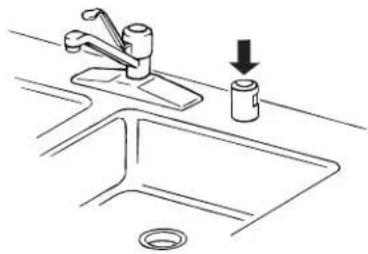
The drain air gap is usually located on top of the sink or countertop near the dishwasher. To order a drain air gap, contact your local dealer; or call us or your designated service center and ask for Part Number 300096. For more information, see "Assistance or Service."
NOTE: The drain air gap is an external plumbing device that is not part of your dishwasher. The warranty provided with your dishwasher does not cover service costs directly associated with the cleaning or repair of the external drain air gap.
To clean the drain air gap
Clean the drain air gap periodically to ensure proper drainage of your dishwasher. Follow the cleaning instructions provided by the manufacturer. With most types, you lift off the chrome cover. Unscrew the plastic cap. Then check for any soil buildup. Clean if necessary.
Storing
Storing for the summer
Protect your dishwasher during the summer months by turning off the water supply and power supply to the dishwasher.
Winterizing your dishwasher
Protect your dishwasher and home against water damage due to freezing water lines. If your dishwasher is left in a seasonal dwelling or could be exposed to near freezing temperatures, have your dishwasher winterized by authorized service personnel.
TROUBLESHOOTING
First try the solutions suggested here and possibly avoid the cost of a service call...
Dishwasher is not operating properly
Dishwasher does not run or stops during a cycle
Is the Start/Resume indicator flashing? Opening the door or interrupting the power stopped the cycle. Close the door and press START/RESUME.
Does the Start/Resume indicator flash 3 times when you press START/RESUME? The dishwasher is waiting for you to open the door after the last cycle. Open and close the door, then press START/RESUME.
Is the door closed tightly and latched?
(NOTE: On models with a dual-digit display, the control displays " - - " during a cycle if it believes the door is not latched.)
Is the right cycle selected? Refer to the "Cycle Selection Charts."
Is there power to the dishwasher? Has a household fuse blown, or has a circuit breaker tripped? Replace the fuse or reset the circuit breaker. If the problem continues, call an electrician.
Has the motor stopped due to an overload? The motor automatically resets itself within a few minutes. If it does not restart, call for service.
Is the water shutoff valve (if installed) turned on?
It is normal for certain cycles to repeatedly pause for several seconds during the main wash.
Clean light is flashing
The dishwasher has malfunctioned. Call for service to check heater circuit.
Dishwasher will not fill
Is the overfill protection float able to move up and down freely? Press down to release.
Dishwasher seems to run too long
Is the water supplied to the dishwasher hot enough? The dishwasher runs longer while heating water. Refer to the "Dishwasher Efficiency Tips" section.
A delay automatically occurs in some wash and rinse cycles until the water reaches the proper temperature.
Water remains in the dishwasher
Is the cycle complete?
Detergent remains in the covered section of the dispenser
Is the cycle complete?
Is the detergent lump-free? Replace detergent if necessary.
White residue on the front of the access panel
Was too much detergent used? Refer to the "Detergent Dispenser" section.
Is the brand of detergent making excess foam? Try a different brand to reduce foaming and eliminate buildup.
Odor in the dishwasher
Are dishes washed only every 2 or 3 days? Run a rinse cycle once or twice a day until you have a full load.
Does the dishwasher have a new plastic smell? Run a vinegar rinse as described in "Spotting and filming on dishes" later in this Troubleshooting guide.
Condensation on the kitchen counter (built-in models)
Is the dishwasher aligned with the countertop? Moisture from the vent in the dishwasher console can form on the counter. Refer to the Installation Instructions for more information.
Dishes are not completely clean
Food soil left on the dishes
Is the dishwasher loaded correctly? Refer to the "Dishwasher Loading" section.
Is the water temperature too low? For best dishwashing results, water should be 120^ (49^) as it enters the dishwasher. Refer to the "Dishwasher Efficiency Tips" section.
Did you use the correct amount of fresh detergent? Use recommended dishwasher detergents only. Refer to the "Detergent Dispenser" section. Detergent must be fresh to be effective. Store detergent in a cool, dry area. Heavy soil and/or hard water generally require extra detergent.
Do you have hard water? You may need to increase the amount of detergent you are using. Refer to the "Detergent Dispenser" section. Also, you may need to switch to a detergent with a phosphorus content of 8.7% .
Is detergent caked in dispenser? Use fresh detergent only. Do not allow detergent to sit for several hours in a wet dispenser. Clean dispenser when caked detergent is present.
Is the pump or spray arm clogged by labels from bottles and cans?
Is the home water pressure high enough for proper dishwasher filling? Home water pressure should be 20 to 120 psi (138 to 828kPa ) for proper dishwasher fill. If you have questions about your water pressure, call a licensed, qualified plumber.
Are high suds slowing the wash arm? Do not use soap or laundry detergents. Use recommended dishwasher detergents only.
Spots and stains on dishes
Spotting and filming on dishes
Is your water hard or is there a high mineral content in your water? Conditioning the final rinse water with a liquid rinse aid helps eliminate spotting and filming. Keep the rinse aid dispenser filled.
Is the water temperature too low? For best dishwashing results, water should be 120^ (49^) as it enters the dishwasher. Refer to the "Dishwasher Efficiency Tips" section.
Did you use the correct amount of effective detergent? Use recommended dishwasher detergents only. Refer to the "Detergent Dispenser" section. Detergent must be fresh to be effective. Store detergent in a cool, dry area. Heavy soil and/or hard water generally require extra detergent.
Is the home water pressure high enough for proper dishwasher filling? Home water pressure should be 20 to 120 psi (138 to 828kPa for proper dishwasher fill. If you have questions about your water pressure, call a licensed, qualified plumber.
NOTE: To remove spots and film from dishes, try a white vinegar rinse. This procedure is intended for occasional use only. Vinegar is an acid, and using it too often could damage your dishwasher.
- Wash and rinse dishes. Use an air-dry or an energy saving dry option. Remove all silverware or metal items.
- Put 2 cups (500~mL) white vinegar in a glass or dishwasher-safe measuring cup on the bottom rack.
- Run the dishwasher through a complete washing cycle using an air-dry or an energy saving dry option. Do not use detergent. Vinegar will mix with the wash water.
Silica film or etching (silica film is a milky, rainbow-colored deposit; etching is a cloudy film)
Sometimes there is a water/chemical reaction with certain types of glassware. This is usually caused by some combination of soft or softened water, alkaline washing solutions, insufficient rinsing, overloading the dishwasher, and the heat of drying. It might not be possible to avoid the problem, except by hand washing.
To slow this process use a minimum amount of detergent but not less than 1 tb (15 g) per load. Use a liquid rinse aid and underload the dishwasher to allow thorough rinsing. Silica film and etching are permanent and cannot be removed. Do not use heated drying.
■White spots on cookware with nonstick finish
Has the dishwasher detergent removed cookware seasoning? Reseason cookware after washing in the dishwasher.
■Brown stains on dishes and dishwasher interior
Does your water have high iron content? Rewash dishes using 1-3 tsp (5 - 15mL) of citric acid crystals added to the covered section of the detergent dispenser. Do not use detergent. Follow with a Normal wash cycle with detergent. If treatment is needed more often than every other month, the installation of an iron removal unit is recommended.
Black or gray marks on dishes
Are aluminum items rubbing dishes during washing?
Disposable aluminum items can break down in the
dishwasher and cause marking. Hand wash these items.
Remove aluminum markings by using a mild abrasive cleaner.
Orange stains on plastic dishes or dishwasher interior
Are large amounts of tomato-based foods on dishes placed in the dishwasher? Stains gradually fade over time. Regular use of heated drying will slow fading. Stains will not affect dishwasher performance. Regular use of a rinse cycle and an air-dry or energy-saving dry option will reduce the likelihood of staining.
Dishes do not dry completely
Dishes are not dry
Did you load your dishwasher to allow proper water drainage? Do not overload. Refer to the "Dishwasher Loading" section. Use a liquid rinse aid to speed drying.
- Are the plastics wet? Plastics often need towel drying.
- Is the rinse aid dispenser empty? Refer to the "Rinse & Dispenser" section.
Did you use an air-dry or energy-saving dry option? Use a heated drying option for dryer dishes.
Dishes are damaged during a cycle
■Chipping of dishes
Did you load the dishwasher properly? Load the dishes and glasses so they are stable and do not strike together from washing action. Minimize chipping by moving the rack in and out slowly.
NOTE: Antiques, feather-edged crystal, and similar types of china and glassware might be too delicate for automatic dishwashing. Wash by hand.
Noises
Grinding, grating, crunching or buzzing sounds
A hard object has entered the wash module (on some models). When the object is ground up, the sound should stop. If the noise persists after a complete cycle, call for service.
ASSISTANCE OR SERVICE
Before calling for assistance or service, please check
"Troubleshooting." It may save you the cost of a service call. If you still need help, follow the instructions below.
When calling, please know the purchase date and the complete model and serial number of your appliance. This information will help us to better respond to your request.
If you need replacement parts
If you need to order replacement parts, we recommend that you use only factory specified parts. These parts will fit right and work right because they are made with the same precision used to build every new INGLIS® appliance.
To locate factory specified parts in your area, call us or your nearest designated service center.
Call the Whirlpool Canada LP Customer Interaction Centre toll free: 1-800-807-6777.
Our consultants provide assistance with:
Features and specifications on our full line of appliances.
Warranty information.
Use and maintenance procedures.
■Accessory and repair parts sales.
Referrals to local dealers, repair parts distributors, and service companies. Whirlpool Canada LP designated service technicians are trained to fulfill the product warranty and provide after-warranty service, anywhere in Canada.
For further assistance
If you need further assistance, you can write to us with any questions or concerns at:
Customer Interaction Centre
Whirlpool Canada LP
1901 Minnesota Court
Mississauga, Ontario L5N 3A7
Please include a daytime phone number in your correspondence.
Accessories
To order accessories, call 1-800-807-6777 and ask for the appropriate part number or contact your authorized Inglis dealer.
INGLIS® MAJOR APPLIANCE WARRANTY
ONE YEAR LIMITED WARRANTY
For one year from the date of purchase, when this major appliance is operated and maintained according to instructions attached to or furnished with the product, Whirlpool Canada LP (hereafter "Whirlpool") will pay for factory specification replacement parts and repair labor to correct defects in materials or workmanship. Service must be provided by a Whirlpool designated service company.
ITEMS WHIRLPOOL WILL NOT PAY FOR
- Service calls to correct the installation of your major appliance, to instruct you how to use your major appliance, to replace or repair house fuses or to correct house wiring or plumbing.
- Service calls to repair or replace appliance light bulbs, air filters or water filters. Those consumable parts are excluded from warranty coverage.
- Repairs when your major appliance is used for other than normal, single-family household use.
- Damage resulting from accident, alteration, misuse, abuse, fire, flood, acts of God, improper installation, installation not in accordance with electrical or plumbing codes, or use of products not approved by Whirlpool.
- Any food loss due to refrigerator or freezer product failures.
- Replacement parts or repair labor costs for units operated outside Canada.
- Pickup and delivery. This major appliance is designed to be repaired in the home.
- Repairs to parts or systems resulting from unauthorized modifications made to the appliance.
- Expenses for travel and transportation for product service in remote locations.
- The removal and reinstallation of your appliance if it is installed in an inaccessible location or is not installed in accordance with published installation instructions.
DISCLAIMER OF IMPLIED WARRANTY; LIMITATION OF REMEDIES
CUSTOMER'S SOLE AND EXCLUSIVE REMEDY UNDER THIS LIMITED WARRANTY SHALL BE PRODUCT REPAIR AS PROVIDED HEREIN. IMPLIED WARRANTYES, INCLUDING WARRANTYES OF MERCHANTABILITY OR FITNESS FOR A PARTICULAR PURPOSE, ARE LIMITED TO ONE YEAR OR THE SHORTEST PERIOD ALLOWED BY LAW. WHIRLPOOL SHALL NOT BE LIABLE FOR INCIDENTAL OR CONSEQUENTIAL DAMAGES. SOME PROVINCES DO NOT ALLOW THE EXCLUSION OR LIMITATION OF INCIDENTAL OR CONSEQUENTIAL DAMAGES, OR LIMITATIONS ON THE DURATION OF IMPLIED WARRANTYES OF MERCHANTABILITY OR FITNESS, SO THESE EXCLUSIONS OR LIMITATIONS MAY NOT APPLY TO YOU. THIS WARRANTY GIVES YOU SPECIFIC LEGAL RIGHTS AND YOU MAY ALSO HAVE OTHER RIGHTS, WHICH VARY FROM PROVINCE TO PROVINCE.
Outside Canada, this warranty does not apply. Contact your authorized Whirlpool dealer to determine if another warranty applies. If you need service, first see the "Troubleshooting" section of the Use & Care Guide. After checking "Troubleshooting," additional help can be found by checking the "Assistance or Service" section or by calling Whirlpool at 1-800-807-6777. 8/05
Keep this book and your sales slip together for future reference. You must provide proof of purchase or installation date for in-warranty service.
Write down the following information about your major appliance to better help you obtain assistance or service if you ever need it. You will need to know your complete model number and serial number. You can find this information on the model and serial number label located on the product.
Dealer name
Address
Phone number
Model number
Serial number
Purchase date
SECURITE DU LAVE-VAISSELLE
ASSISTANCE OU SERVICE

- LAVE-VAISSELL
- TABLE DES MATIÈRES
- DISHWASHER SAFETY
- Your safety and the safety of others are very important.
- ADANGER
- WARNING
- IMPORTANT SAFETY INSTRUCTIONS
- SAVE THESE INSTRUCTIONS
- GROUNDING INSTRUCTIONS
- For a grounded, cord-connected dishwasher:
- For a permanently connected dishwasher:
- PARTS AND FEATURES
- START-UP GUIDE
- Using Your New Dishwasher
- Stopping Your Dishwasher
- DISHWASHER LOADING
- Loading Suggestions
- Quiet operating tips
- Loading Top Rack
- Light item clips
- To move a clip
- Loading Bottom Rack
- Loading Silverware Basket
- To open the silverware basket
- To remove the basket from the door
- To replace the basket in the door
- NOTES:
- DISHWASHER USE
- Detergent Dispenser
- Filling the dispenser
- How much detergent to use
- Rinse Aid Dispenser
- Rinse aid setting
- To adjust the setting
- Dishwasher Efficiency Tips
- To check water temperature
- Additional efficiency tips
- Cycle Selection Charts
- Pots & Pans
- Normal
- Rinse Only
- Canceling a Cycle
- To stop the drain
- To clear the indicators
- Changing a Cycle or Setting
- During the first fill of a cycle
- After the first fill of a cycle
- Adding Items During a Cycle
- To add items
- Option Selections
- Hi-Temp Wash
- Heated Dry
- Lock
- To turn on the lock
- To turn off the lock
- Delay start
- To delay the start
- Cycle Status Indicators
- Washing
- Drying
- Clean
- Sensor System
- Drying System
- Overfill Protection Float
- DISHWASHER CARE
- Cleaning
- Cleaning the exterior
- Cleaning the interior
- To clean interior
- OR
- Drain Air Gap
- To clean the drain air gap
- Storing
- Storing for the summer
- Winterizing your dishwasher
- TROUBLESHOOTING
- Dishwasher is not operating properly
- Dishwasher does not run or stops during a cycle
- Clean light is flashing
- Dishwasher will not fill
- Dishwasher seems to run too long
- Water remains in the dishwasher
- Detergent remains in the covered section of the dispenser
- White residue on the front of the access panel
- Odor in the dishwasher
- Condensation on the kitchen counter (built-in models)
- Dishes are not completely clean
- Food soil left on the dishes
- Spots and stains on dishes
- Spotting and filming on dishes
- Silica film or etching (silica film is a milky, rainbow-colored deposit; etching is a cloudy film)
- ■White spots on cookware with nonstick finish
- ■Brown stains on dishes and dishwasher interior
- Black or gray marks on dishes
- Orange stains on plastic dishes or dishwasher interior
- Dishes do not dry completely
- Dishes are not dry
- Dishes are damaged during a cycle
- ■Chipping of dishes
- Noises
- Grinding, grating, crunching or buzzing sounds
- ASSISTANCE OR SERVICE
- If you need replacement parts
- For further assistance
- Accessories
- INGLIS® MAJOR APPLIANCE WARRANTY
- ONE YEAR LIMITED WARRANTY
- ITEMS WHIRLPOOL WILL NOT PAY FOR
- DISCLAIMER OF IMPLIED WARRANTY; LIMITATION OF REMEDIES
- Keep this book and your sales slip together for future reference. You must provide proof of purchase or installation date for in-warranty service.
- SECURITE DU LAVE-VAISSELLE
- ASSISTANCE OU SERVICE
Brand : IGNIS
Model : IFW7300WW
Category : Washing machine