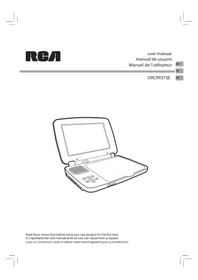
DRC99373E - Portable DVD Player RCA - Free user manual and instructions
Find the device manual for free DRC99373E RCA in PDF.



| Product Type | Portable DVD Player |
| Brand | RCA |
| Model | DRC99373E |
| Screen | LCD Screen |
| Compatible Disc Formats | DVD, Audio CD, CD-R/CD-ROM (JPEG) |
| Region Code | 1 |
| AC Power Supply | AC Adapter 100-120 V~, 50/60 Hz |
| Car Power Supply | Cigarette Lighter Adapter 12 V (negative ground) |
| Built-in Battery | Rechargeable, charging time about 4-5 hours |
| Connectivity | Audio/Video outputs (RCA), 3.5 mm headphone jack, DC 9-12 V input |
| Playback Functions | Normal playback, pause, stop, fast forward/reverse, track skip, JPEG slideshow |
| Settings | Language (menu, audio, subtitles), video (brightness, contrast), system (display format) |
| Included Accessories | AC adapter, car adapter |
| Laser Safety | Class 1 laser device |
| General Maintenance | Soft dry cloth, do not use solvents |
| Disc Cleaning | Wipe from center to edge with a soft cloth |
| Warranty | 1 year parts and labor |
Frequently Asked Questions - DRC99373E RCA
User questions about DRC99373E RCA
0 question about this device. Answer the ones you know or ask your own.
Ask a new question about this device
Download the instructions for your Portable DVD Player in PDF format for free! Find your manual DRC99373E - RCA and take your electronic device back in hand. On this page are published all the documents necessary for the use of your device. DRC99373E by RCA.
USER MANUAL DRC99373E RCA
natural_image
Line drawing of an open laptop with a closed lid and keypad (no text or symbols)Safety Instructions Safety Instructions
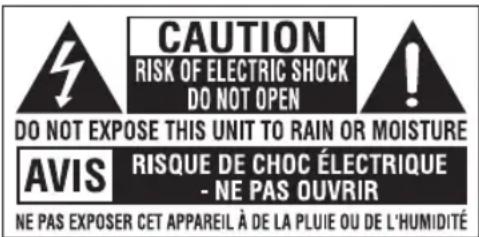
* SEE BOTTOM OF UNIT FOR GRAPHIC SYMBOLS *
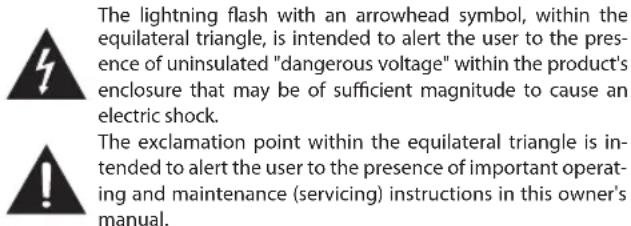
WARNING: Should any trouble occur, disconnect the AC power adapter and refer servicing to a qualified technician.
WARNING: TO PREVENT FIRE OR SHOCK HAZARD, DO NOT REMOVE COVER (OR BACK). NO USER-SERVICEABLE PARTS INSIDE. REFER SERVICING TO QUALIFIED SERVICE PERSONNEL.
WARNING: TO REDUCE THE RISK OF ELECTRIC SHOCK, DO NOT EXPOSE THIS APPLIANCE TO RAIN OR MOISTURE. DO NOT PLACE OBJECTS FILLED WITH LIQUIDS ON OR NEAR THIS UNIT.
CAUTION: USE OF CONTROLS OR ADJUSTMENTS OR PERFORMANCE OF PROCEDURES OTHER THAN THOSE SPECIFIED MAY RESULT IN HAZARDOUS RADIATION EXPOSURE.
CAUTION: DANGER OF EXPLOSION IF BATTERY IS INCORRECTLY REPLACED. REPLACE ONLY WITH THE SAME OR EQUIVALENT TYPE.
THIS CLASS B DIGITAL APPARATUS COMPLIES WITH CANADIAN ICES-003.
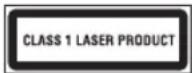
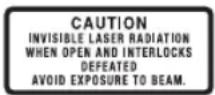

This product contains a low power laser device.
On Placement
- Do not use the unit in places that are extremely hot, cold, dusty or humid.
- Place the unit on a flat and even surface.
- Do not restrict the air flow of the unit by placing it in a place with poor air flow, by covering it with a cloth, or by placing it on carpeting.
- To avoid magnetizing, do not place the unit near speakers or magnets.
- Do not use this unit in direct sunlight or leave the unit in a closed automobile (or similar environments) where it would be exposed to high temperatures above 104°F (40°C).
- No naked flame sources such as lighted candles should be placed on the AC power adapter or the main unit.
- The AC/DC adaptor and apparatus should not be exposed to splashing or dripping liquids, and no objects filled with liquids, such as vases, should be placed on the AC/DC adaptor and apparatus.
- The apparatus should not be exposed to dripping or splashing and that no objects filled with liquids, such as vases, should be placed on apparatus.
On Safety
- When connecting or disconnecting the AC power adapter, grip the plug and not the cord itself. Pulling the cord may damage it and create a hazard.
- When you are not going to use the unit for a long period of time, disconnect the AC power adapter.
On Condensation
- When left in a heated room where it is warm and damp, water droplets or condensation may form inside the unit. When there is condensation inside the unit, the unit may not function normally. Let the unit stand for 1 to 2 hours before turning the power on, or gradually heat the room and allow the unit to dry before use.
Ventilation Warning
- Do not block the ventilation openings or holes. If the ventilation openings or holes are blocked by a newspaper or cloth, etc., the heat may not be able to get out.
- Do not operate the unit in a confined space, such as a bookcase or built-in cabinet. Allow about 4 inches (10cm) of free space all around the unit for adequate ventilation.
Rating Plate Location
• The rating plate is located on the bottom of unit.
FCC Statements
NOTE: This equipment has been tested and found to comply with the limits for a Class B digital device, pursuant to Part 15 of the FCC Rules. These limits are designed to provide reasonable protection against harmful interference in a residential installation. This equipment generates, uses and can radiate radio frequency energy and, if not installed and used in accordance with the instructions, may cause harmful interference to radio communications. However, there is no guarantee that interference will not occur in a particular installation. If this equipment does cause harmful interference to radio or television reception, which can be determined by turning the equipment off and on, the user is encouraged to try to correct the interference by one or more of the following measures:
– Reorient or relocate the receiving antenna.
– Increase the separation between the equipment and receiver.
- Connect the equipment into an outlet on a circuit different from that to which the receiver is connected.
- Consult the dealer or an experienced radio/TV technician for help.
Warning: Changes or modifications to this unit not expressly approved by the party responsible for compliance could void the user's authority to operate the equipment.
Notes on Copyright
It is forbidden by law to copy, broadcast, show, broadcast on cable, play in public, or rent copyrighted material without permission.
Apparatus Claims of U.S. Patent Nos. 6,836,549; 6,381,747; 7,050,698; 6,516,132 and 5,583,936 licensed for limited viewing uses only.
This product incorporates copyright protection technology that is protected by U.S. patents and other intellectual property rights. Use of this copyright protection technology must be authorized by Macrovision, and is intended for home and other limited viewing uses only unless otherwise authorized by Macrovision. Reverse engineering or disassembly is prohibited.
IMPORTANT SAFETY INSTRUCTIONS
- Read these instructions.
- Keep these instructions.
- Heed all warnings.
- Follow all instructions.
- Do not use this apparatus near water.
- Clean only with a dry cloth.
- Do not block the ventilation openings. Install in accordance with the manufacturer's instructions.
IMPORTANT SAFETY INSTRUCTIONS
- Do not install near any heat sources such as radiators, heat registers, stoves, or other apparatus (including amplifiers) that produce heat.
- Do not defeat the safety purpose of a polarized or grounding - type plug. A polarized plug has two blades with one wider than the other. A grounding type plug has two blades and a third grounding prong. The wide blade or the third prong are provided for your safety. If the provided plug does not fit into your outlet, consult an electrician for replacement of the obsolete outlet.
- Protect the power cord from being walked on or pinched particularly at plugs, convenience receptacles, and the point where they exit from the apparatus.
- Only use attachments/accessories specified by the manufacturer.
- Use only with a cart, stand, tripod, bracket, or table specified by the manufacturer, or sold with the apparatus. When a cart is used, use caution when moving the cart/ apparatus combination to avoid injury from tip-over.
- Unplug this apparatus during lightning storms or when unused for long periods of time.
- Refer all servicing to qualified service personnel. Servicing is required when the apparatus has been damaged in any way, such as the AC power cord or plug is damaged, liquid has spilled or objects have fallen into the apparatus, the apparatus has been exposed to rain or moisture, does not operate normally, or has been dropped.
Disc Formats
The unit can play back

VIDEO
DVDs
[8cm/12cm disc]

Audio CDs
[8cm/12cm disc]
CD-R CD-RW
Compatible
Region Management Information
Region Management Information: This unit is designed and manufactured to respond to the Region Management Information that is encoded on DVDs. If the region number printed on the DVD does not correspond to the region number of this unit, it cannot play that disc.
The region number of this unit is 1.
Disc Function or Operation That is Not Available
When the symbol ☐ appears on the screen, it indicates the function or operation attempted is not available at that time. This occurs because the DVD manufacturer determines the specific functions of DVDs. Certain functions may not be available on some DVDs. Be sure to read the documentation provided with the DVD.
Icons Used on DVDs
Sample Icons
Note:
When playing back a CD-G (Graphics) or CD EXTRA disc, the audio portion will be played, but the graphic images will not be shown
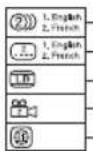
Language selections for audio
Language selections for subtitles
Screen aspect ratio
Multiple camera angles
Region code indicator
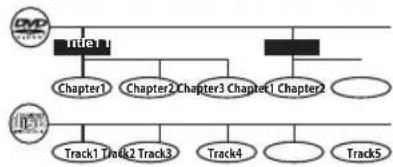
Titles, Chapters and Tracks
- DVDs are divided into "titles" and "chapters". If the disc has more than one movie on it, each movie would be a separate "title". "Chapters" are sections of titles.
Disc Formats
• Audio CDs are divided into "tracks". A "track" is usually one song on an Audio CD.
Note: Numbers identify each title, chapter, and
flowchart
graph TD
    A["Tube1"] --> B["Chapter1"]
    A --> C["Chapter2"]
    A --> D["Chapter3"]
    A --> E["Chapter4"]
    A --> F["Chapter5"]
    G["Tube2"] --> H["Track1"]
    G --> I["Track2"]
    G --> J["Track3"]
    G --> K["Track4"]
    G --> L["Track5"]
EN
track on a disc. Most discs have these numbers recorded on them, but some do not.
Note on Unauthorized Discs
You may not be able to play some DVDs on this unit, particularly if they were purchased from outside your geographic area or made for business purposes.
Accessories
Please check and identify the supplied accessories.
AC Power Adapter....x 1
□ar Power Adapter....x 1
Control Reference Guide
Unit
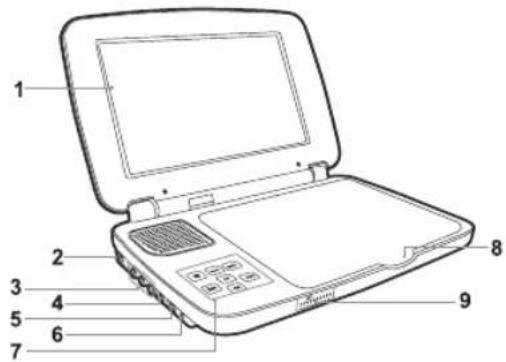
- LCD screen
- DC IN 9V - 12V jack
- AUDIO / VIDEO OUT jack
- CHARGE / STANDBY / ON switch
- VOLUME control
Adjusts the volume. - Headphone jack
- ■TOP button
Press to stop playing a disc.
MENU button
Accesses DVD Disc Menu if DVD disc is currently playing.
Accesses Setup menu if disc is not playing.
benton
Press to start or resume playback of a disc.
Pressing during playback of a disc will cause playback to be paused.
PREV button
Press to go back to the previous title / chapter / track.
In DVD Menu or Setup Menu, press to scroll left.
SEARCH button
Press to perform fast forward playback during CD playback or DVD playback.
In DVD Menu, Setup Menu or JPG Menu, press to scroll up.
Control Reference Guide Power Supply
NEXT button
Press to advance titles / chapters / tracks.
In DVD Menu or Setup Menu, press to scroll right.
SEARCH button
Press to perform fast reverse playback during CD playback or DVD playback.
In DVD Menu, Setup Menu or JPG Menu, press to scroll down.
- Disc Door
Lift the disc door up to open it.
- CHARGING indicator
Charge the rechargeable battery before using it for the first time. The normal charging time is approximately 4-5 hours. The charging light will go out when the battery becomes fully charged.
Power Supply
A. Using the AC Power Adapter
The supplied AC power adapter operates on AC 100-120V.
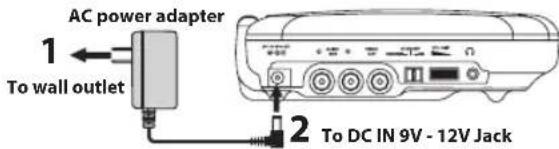
Caution:
- The AC power adapter included with this unit is for its use only. Do not use it with other equipment.
- When the unit is not going to be used for long time, disconnect the AC power adapter from the AC power outlet.
- When the AC power adapter is plugged in, the apparatus is not completely disconnected from the main power supply, even when the power is turned off.
Warning:
The AC power adapter is used as disconnect device and it should remain readily operable during intended used. In order to disconnect the apparatus from the mains completely, the AC power adapter should be disconnected from the mains socket outlet completely.
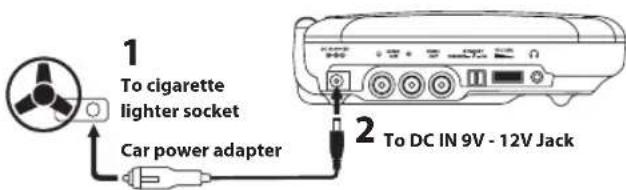
B. Using the Car Power Adapter
The 12V car power adapter allows the unit to be used with vehicles that have a 12V, negative ground electrical system.
Warning:
Disconnect the car power adapter when not in use. Not for use in 24V vehicles.
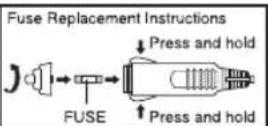
CAUTION:
For continued protection against risk of fire, replace only with same type and rating of fuse.
Caution:
- Use the provided 12V car power adapter only. Use with other car power adapters could damage the unit.
- The 12V car power adapter included with this unit is for its use only. Do not use it with other equipment.
- In the interest of traffic safety, do not operate this unit or view videos while driving a vehicle.
• Make sure the unit is securely fastened to prevent it from falling or flying through the air in the event of an accident. - When the inside of the cigarette lighter socket is dirty with ashes or dust, the plug section may become hot due to poor contact. Be sure to clean the cigarette lighter socket before use.
• After use, disconnect the 12V car power adapter from both the unit and cigarette lighter socket.
C. Using the Built-in Battery
The unit has a built-in, non-replaceable, rechargeable battery. Charge the built-in battery before using it for the first time. Complete charging typically takes approximately 4-5 hours. The charging light will go out when the built-in battery becomes fully charged.
To recharge the built-in battery
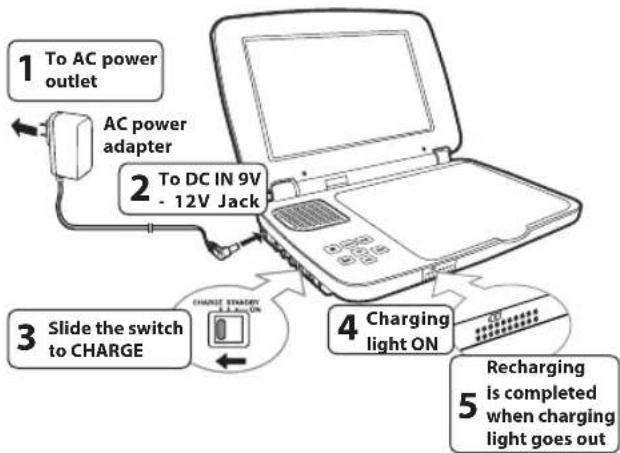
flowchart
graph TD
    A["1 To AC power outlet"] --> B["2 To DC IN 9V - 12V Jack"]
    B --> C["3 Slide the switch to CHARGE"]
    C --> D["4 Charging light ON"]
    D --> E["5 Recharging is completed when charging light goes out"]
    C --> F["CHARGE STORAGE & LAYOUT ON"]
Warning:
- The built-in battery can only be recharged when the unit is in CHARGE mode while using the AC power adapter.
- The built-in battery cannot be recharged when the unit is in ON mode.
- Do NOT recharge the built-in battery in a vehicle using the car power adapter.
- Batteries should not be exposed to excessive heat such as sunshine, fire or the like.
Note:
- When the built-in battery power is low, "Battery Low" will display on the screen and the unit will stop playing.
• Recharge the built-in battery when you are ready to use it again. - While using the built-in battery, the environmental temperature should be 41°F (5°C) to 95°F (35°C).
- To get the longest service life of the built-in battery, charge at indoor-temperature.
- The built-in battery in this device may present a risk of fire or chemical burn if mistreated. Do not disassemble, heat above 212°F (100°C), or incinerate.
- The unit should not be exposed to excessive heat such as sunshine, fire or the like.
- When discarding the unit, environmental problems must be considered and local rules or laws governing the disposal of such products must be strictly followed.
Power Supply
Turning on the Unit
-
Slide the CHARGE / STANDBY / ON switch on the left side of the unit to the ON position.
-
The start-up picture will appear on the screen.
-
After use, slide the CHARGE / STANDBY / ON switch to the STANDBY (power off) position.

Connections
A. Connecting a TV
If your TV has audio/video inputs, you can connect the unit to your TV using standard Audio/Video cables.
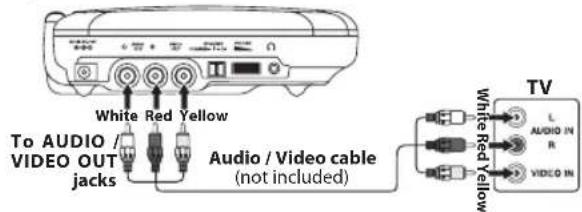
Watching a DVD on your TV
-
Turn on the unit.
-
Turn on the TV and follow the instructions included with it to watch video from external sources.
B. Using Headphones/Earphones
- Turn down the volume before connecting, and then adjust the level.
- When headphones/earphones are connected, no sound will be emitted from the unit's speaker.
Caution:
Avoid listening to sound at levels which may be harmful to your ears.
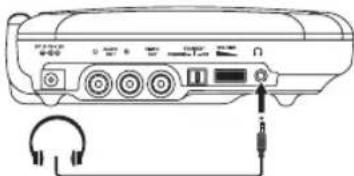
natural_image
Diagram of a portable audio device with headphones and a CD, showing no text or symbolsHeadphones/Earphones
(3.5mm diameter plug) (not included)
Playing a Disc (Basic Playback)
This owner's manual explains the basic instructions for operating this unit. Some DVDs are produced in a manner that allows specific or limited operation during playback. Therefore, this unit may not respond to all operating commands. THIS IS NOT A DEFECT. Please refer to the instructions accompanying the specific DVD in question for more information about the options available on that DVD.
" may appear on the screen during operation. A " means the desired operation is not permitted by the unit or disc.
Playing a Disc
- Slide the CHARGE / STANDBY / ON switch on the left side of the unit to the ON position.
See Customizing the function settings before proceeding to step 2.
2. Use your fingers to hold the disc door on the front of the unit and lift it up to open.
3. Hold the disc by its sides and carefully place it onto the spindle with the label side facing up, pushing gently until you hear a "click".
Playing a Disc (Basic Playback)
- Close the disc door. It takes a short while for your unit to load the disc. After loading, the unit will automatically bring you to the main menu of the DVD or start playing the DVD.
- If the unit does not automatically start playing the DVD, press the button.
Pausing Playback (Still Mode)
Press the button. To resume normal playback, press the button again.
EN
Stopping Playback
Press the ■STOP button at the location where you want to interrupt playback. To resume playback at the position where the disc was stopped, press the ▶button.
If you press the ■ STOP button twice, the unit's memory will be cleared and pressing the ▶ button will reset the DVD to the beginning.
Fast Forward / Fast Reverse
- Press the SEARCH >> or << SEARCH button when a disc is playing. Each time you press the SEARCH >> or << SEARCH button, the playback speed changes in the following sequence:
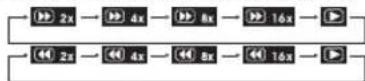
- Press the button twice on the unit when you reach the desired point to resume normal playback.
Notes:
- The DVD player mutes sound and subtitles during reverse and forward scan of DVDs.
• The fast playback speed may differ depending on the disc.
Skip (Forward / Reverse)
- Press the ➤ NEXT button to advance titles, chapters/tracks.
- Press the ◀ PREV button to go back to current or previous titles, chapters/tracks.
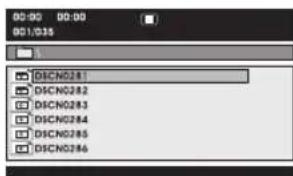
Viewing JPEG Files
This unit can play JPEG files recorded on a CD-R or CD-ROM disc (CD-RW is not recommended).
Viewing JPEG Files
- Use your fingers to hold the disc door on the front of the unit and lift it up to open.
- Hold a JPEG file disc by its edges and gently push it onto the spindle with the label side facing up until you hear a "click".
- Close the disc door. The JPEG files on the disc will be displayed one by one automatically. If the disc does not play automatically, press the button.
- Press the ■ STOP button to display a folder list. Press the ▶ / ◀ button to highlight a JPEG file to play. Press the ▶ button to start playback.
Notes:
- You can press the button to freeze the picture. Press the button again to resume picture slide show.
• You can press the STOP button to quit playback. - You can press the ◀ PREV or ▶ NEXT button to change the picture.
• Some discs may not permit this operation.
Customizing the Function Settings
Language Setup
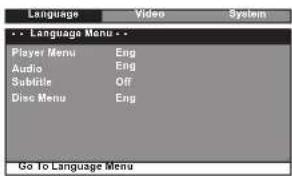
- Press the MENU button in stop mode (when disc is not playing).
- Press the◀ button to select Language Menu.
- Press the ▶ / ◀button to select the option (Player Menu, Audio, Subtitle or Disc Menu), th
- Press the ▶ button to select your preferred language, then press the ▶ button to confirm.
- Repeat steps 3 and 4 to adjust other options. Press the 🔊 button to return to the previous menu.
- Press the MENU button to exit the menu.
Notes:
- Some DVDs may not play in the audio language you selected. A prior language may be programmed on the disc.
- Some DVDs may be set to display subtitles in a language other than the one you selected. A prior subtitle language may be programmed on the disc.
- Some DVDs allow you to change subtitle selections using the disc menu only. If this is the case, press the MENU button and choose the appropriate subtitle language from the selection on the disc menu.
- Some DVDs may not include your pre-selected language. In this case, the DVD player automatically displays disc menus consistent with the disc's initial language setting.
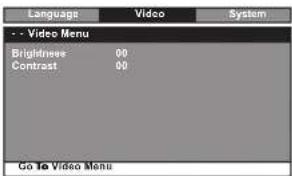
Video Setup
- Press the MENU button in stop mode (when disc is not playing).
- Press the button to select Video Menu.
- Press the ▶/ ◀button to select the option (Brightness or Contrast), then press the ▶button.
- Press the ◀◀ / ▶▶ button to adjust the setting, then press the ▶▶ button to confirm.
- Repeat steps 3 and 4 to adjust other options. Press the H button to return to the previous menu.
- Press the MENU button to exit the menu
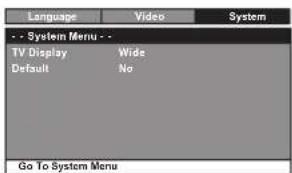
System Setup
- Press the MENU button on the unit in stop mode (when disc is not playing).
- Press the◀/ ▶button to select System Menu.
- Press the ▶/ ▶button to select the option (TV Display or Default), then press the ▶button.
- Press the ▶ / ◀ button to adjust the settings, then press the ▶ button to confirm.
- Repeat steps 3 and 4 to adjust other options. Press the 🔊 button to return to the previous menu.
- Press the MENU button to exit the menu.
Customizing the Function Settings
TV Display
Pan Scan
- When wide-screen video is played, this mode clips the right and left sides of the image so that it can be viewed on a conventional screen.
- Some wide-screen DVDs that do not permit Pan Scan mode playback are automatically played in letterbox mode (black bands that appear at the top and bottom of the screen).
Letter Box - When wide-screen video is played in this mode on a conventional screen, black bands appear at the top and bottom of the screen.
Wide Screen
- This is the correct mode for playing wide-screen videos on the unit screen or other external wide-screens.
Notes:
- The displayable picture size is preset on the DVD. Therefore the playback picture of some DVDs may not conform to the picture size selected.
- When you play DVDs recorded in the 4:3 aspect ratio, the playback picture will always appear in the 4:3 aspect ratio regardless of the TV display setting.
- Select Wide Screen to conform the LCD screen on the unit. Always be sure that your TV display conforms to the actual TV in use if you connect the unit to a TV.
Default
It takes 3-5 seconds to reset the DVD settings to the factory default.
Sound System
Dolby Digital
Dolby Digital is a technology developed by Dolby Laboratories. Soundtracks encoded in Dolby Digital can reproduce from one to 5.1 discrete channels of excellent quality audio.
The unit automatically recognizes the Dolby Digital bitstream and provides a downmix suitable for two-channel listening. An additional Dolby Digital decoder is required for reproduction of the discrete multi-channel soundtracks available on many DVDs.
Manufactured under license from Dolby Laboratories.
Dolby and the double-D symbol are trademarks of Dolby Laboratories.

Cut off when a wide-screen video image is played.
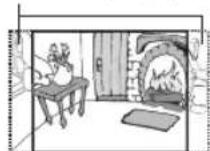
Pan Scan
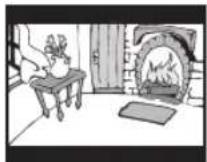
Letter Box
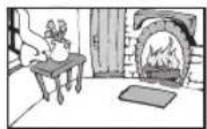
Wide Screen
Maintenance
Cleaning the Disc
A defective or soiled disc inserted into the unit can cause sound to drop out during playback.
Handle the disc by holding its inner and outer edges.
- Do NOT touch the surface of the unlabeled side of the disc.
• Do NOT stick paper or tape on the surface. - Do NOT expose the disc to direct sunlight or excessive heat.
- Clean the disc before playback. Wipe the disc from the center outward with a cleaning cloth.
- NEVER use solvents such as benzine or alcohol to clean the disc.
- Do NOT use irregular shaped discs (example: heart shaped, octagonal, etc.). They may cause malfunctions.
Cleaning the Unit
- Be sure to turn the unit off and disconnect the AC power adapter before cleaning the unit.
- Wipe the unit with a dry soft cloth. If the surfaces are extremely dirty, wipe clean with a cloth that has been dipped in a weak soap-and-water solution and wrung out thoroughly, then wipe with a dry cloth.
- Never use alcohol, benzine, thinner, cleaning fluid or other chemicals. Do NOT use compressed air to remove dust.
Important Note
- Before transporting the unit, remove the disc from the disc compartment.
Troubleshooting Guide
No power.
• Ensure the AC power adapter is connected.
• The unit is not turned on.
No sound or only a very low-level sound is heard.
- The volume control is located on the side of the unit – please try adjusting this.
- The system is in pause mode. Press the ▶ button to return to normal play mode.
- The unit is in fast-forward or fast-reverse mode. Press the ▶ button to return to normal play mode.
• Make sure the AUDIO/VIDEO output connections are correct.
• The DTS DVD cannot be decoded to have speaker output.
• The unit is too hot; shut off the unit for 30 minutes to cool it down.
No picture.
- The region number of the disc doesn't match the region number of this unit.

The picture is not clear.
- Clean the disc.
• The disc is scratched.
Severe hum or noise is heard.
- The plugs and jacks are dirty. Wipe them with a cloth slightly moistened with alcohol.
- Clean the disc.
The disc does not play.
• There is no disc inside ("No Disc" appears on the screen).
- Insert the disc correctly with the playback side facing down.
- Clean the disc.
- A non-NTSC disc has been inserted. The unit and disc region number are incompatible.
- Condensation may have formed inside the unit due to a sudden change in temperature. Wait about an hour for it to clear and try again.
Need More Help?
Please visit online help at
http://www.RCAav.com
Limited Warranty
AVC MULTIMEDIA ("AVC") makes the following limited warranty. This limited warranty extends to the original consumer purchaser and is limited to non-commercial use of the product.
One Year Parts & Labor Warranty
AVC products purchased in the United States are warranted to be free from defects in materials or workmanship for a period of one year from the date of their original retail purchase. If the unit fails to conform to this warranty, we will service the product using new or refurbished parts and products, at AVC's sole discretion.
During a period of one year from the effective warranty date, AVC will provide, when needed, service labor to repair a manufacturing defect at its designated Service Center. To obtain warranty service in the United States, you must first call our Customer Support Center at 1-800-506-5746 or 1-877-252-6873, during the hours listed in the box below. The determination of service will be made by AVC Customer Support. PLEASE DO
NOT RETURN YOUR UNIT TO AVC WITHOUT PRIOR AUTHORIZATION. New or remanufactured replacements for defective parts or products will be used for repairs by AVC at its designated Service Center for one year from the effective warranty date. Such replacement parts or products are warranted for an additional one year from the date of repair or replacement. The Customer will be required to ship the unit to the Service Center indicated at the time Customer Support is contacted to make the necessary repairs. The customer is responsible for all transportation charges to the service facility.
Packaging and Shipping Instruction
When you send the product to the AVC service facility you must use the original carton box and packing material or an equivalent as designated by AVC.
Your Responsibility
(1) You must retain the original sale receipt to provide proof of purchase.
(2) These warranties are effective only if the product is purchased and operated in the U.S.A. or Canada.
(3) Warranties extend only to defects in material or workmanship, and do not extend to any product or parts which have been lost or discarded, or damage to product or parts caused by misuse, accident, improper operation or maintenance, or use in violation of instructions provided with the product, or to product which has been altered or modified without authorization of AVC, or to products or parts thereof which have had the serial number removed or changed.
Out of Warranty
In the event your product requires repair after the limited warranty period has expired, please contact our Customer Support Center at 1-800-506-5746, 1-877-252-6873 or www.RCAav.com
Hours: Monday–Thursday: 9am–7pm, Friday: 9am–5pm, Saturday: 9am–NOON Eastern time.
Important: You are responsible for any transportation, shipping or insurance relative to the return of product to our Product Returns Center.
All warranties implied by state law, including the implied warranties of merchantability and fitness for a particular purpose, are expressly limited to the duration of the limited warranties set forth above. With the exception of any warranties implied by state law as hereby limited, the foregoing warranty is exclusive and in lieu of all other warranties, guarantees, agreements and similar obligations of manufacturer or seller with respect to the repair or replacement of any parts. In no event shall AVC be liable for consequential or incidental damages.
No person, agent, distributor, dealer or company is authorized to change, modify or extend the terms of these warranties in any manner whatsoever. The time within action must be commenced to enforce any obligation of AVC arising under the warranty or under any statute, or law of the United States or any state thereof, is hereby limited to one year from the date of purchase. This limitation does not apply to implied warranties arising under state law.
This warranty gives you specific legal rights and you may also have other rights, which may vary, from state to state. Some states do not allow limitation on how long an implied warranty lasts, when an action may be brought, or the exclusion or limitation of incidental or consequential damages, so the above provisions may not apply to you.
For more information on other products and services, please visit our web site at www.RCAav.com
Important: Also keep your "Bill of Sale" as proof of purchase.
Model no.... Product name....
Type of set.... Serial no....
Invoice no.... Date purchased....
Dealer name....
FOR SERVICE AND REPAIR, PLEASE VISIT www.RCAav.com
Specifications and external appearance are subject to change without notice.
© 2011 AVC MULTIMEDIA
Precauciones:
natural_image
Line drawing of a CD-ROM device with headphones and an attached cable (no text or symbols)© 2011 AVC MULTIMEDIA
natural_image
Line drawing of a CD-ROM with headphones and audio equipment (no text or symbols)© 2011 AVC MULTIMEDIA
- Safety Instructions Safety Instructions
- On Placement
- On Safety
- On Condensation
- Ventilation Warning
- Rating Plate Location
- FCC Statements
- Notes on Copyright
- IMPORTANT SAFETY INSTRUCTIONS
- Disc Formats
- Region Management Information
- Disc Function or Operation That is Not Available
- Icons Used on DVDs
- Titles, Chapters and Tracks
- Note on Unauthorized Discs
- Accessories
- Control Reference Guide
- Control Reference Guide Power Supply
- NEXT button
- SEARCH button
- Power Supply
- Using the AC Power Adapter
- Caution:
- Warning:
- Using the Car Power Adapter
- Using the Built-in Battery
- Note:
- Turning on the Unit
- Connections
- Connecting a TV
- Watching a DVD on your TV
- Using Headphones/Earphones
- Playing a Disc (Basic Playback)
- Playing a Disc
- Pausing Playback (Still Mode)
- Stopping Playback
- Fast Forward / Fast Reverse
- Notes:
- Skip (Forward / Reverse)
- Viewing JPEG Files
- Customizing the Function Settings
- Language Setup
- Video Setup
- System Setup
- TV Display
- Default
- Sound System
- Dolby Digital
- Maintenance
- Cleaning the Disc
- Cleaning the Unit
- Important Note
- Troubleshooting Guide
- No power.
- No picture.
- The picture is not clear.
- Severe hum or noise is heard.
- The disc does not play.
- Limited Warranty
- One Year Parts & Labor Warranty
- Packaging and Shipping Instruction
- Your Responsibility
- Out of Warranty
- Precauciones:
Brand : RCA
Model : DRC99373E
Category : Portable DVD Player