GC409GTQ - Fridge LG - Free user manual and instructions
Find the device manual for free GC409GTQ LG in PDF.


| Product Type | Refrigerator-Freezer |
| Brand | LG |
| Model | GC409GTQ |
| Power Supply | 230 V ~ 50 Hz |
| Temperature Control | Refrigerator (MIN to MAX) and freezer (5 levels) |
| Quick Freeze Function | Yes (QUICK FREEZE, 3 hours) |
| Vacation Mode | Yes (VACATION) |
| Self-Test | Yes (Self Test) |
| Door Alarm | Yes |
| Defrost | Automatic |
| Water Dispenser | Yes (4.5 L tank) |
| Interior Light | Yes (replaceable bulb) |
| Reversible Doors | Yes |
| Leveling Feet | Yes |
| Vegetable Crisper | Yes |
| Ice Tray | Yes |
| Door Basket | Yes |
| Egg Container | Yes |
| Cleaning | Soft cloth, warm water, mild detergent |
| Safety | Grounding required, do not use extension cord |
Frequently Asked Questions - GC409GTQ LG
User questions about GC409GTQ LG
0 question about this device. Answer the ones you know or ask your own.
Ask a new question about this device
Download the instructions for your Fridge in PDF format for free! Find your manual GC409GTQ - LG and take your electronic device back in hand. On this page are published all the documents necessary for the use of your device. GC409GTQ by LG.
USER MANUAL GC409GTQ LG
Please read this User's Guide carefully before operating and keep it handy for reference at all times.
REFRIGERATEUR- CONGELATEUR
Important Safety Instruction 4
Identification of Parts 6
Installation
Installation 7
Starting 7
Operation
Temperature Control 8
Quick Freeze 8
Vacation 9
Self Test 9
Door Alarm 9
Ice Making 9
Defrosting 9
Water Dispenser 10
Suggestion On
Storing Food 12
Food storage
Care and
General Information 13
Maintenance
Lamp Replacement 13
Cleaning 14
Trouble Shooting
Trouble Shooting 16
To Reverse the
Precaution 18
Doors
How to Reverse the Doors 18
Introduction
Registration
The model and serial number are found on the rear of this unit. This number is unique to this unit and not available to others. You should record requested information here and retain this guide as a permanent record of your purchase. Staple your receipt here.
Date of Purchase : ____
Dealer Purchased From : ____
Dealer Address : ____
Dealer Phone No. : ____
Model No. : ____
Serial No. : ____
Precaution
Important Safety Instruction
This fridge-freezer must be properly installed and located in accordance with the Installation Instruction before it is used.
Never unplug your fridge-freezer by pulling on the power cord. Always grip plug firmly and pull straight out from the outlet.
When moving your appliance away from the wall, be careful not to roll over or damage the power cord.
After your fridge-freezer is in operation, do not touch the cold surfaces in the freezer compartment, particularly when hands are damp or wet. Skin may adhere to these extremely cold surfaces.
Precaution
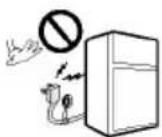
Do not modify or extend the Power Cord length
Don't Use an Extension Cord
Accessibility of Supply Plug
Supply Cord Replacement
Danger
Don't store
Grounding (Earthing)
Important Safety Instruction
Pull out the power plug prior to cleaning the fridge-freezer.
Never damage, serverely bend, pull out, or twist the power cord because power cord damage may cause a fire or electronic shock.
Never place glass products in the freezer because they may be broken when their inner contents are frozen.
It will cause electric shock or fire.
If possible, connect the fridge-freezer to its own individual electrical outlet to prevent it and other appliances or household lights from causing an overload.
The supply plug of the refrigerator-freezer should be placed in easy accessible position for quick disconnection in emergency.
If the supply cord is damaged, it must be replaced by the manufacturer or its service agent or a similarly qualified person in order to avoid a hazard.
Risk of child entrapment.
Before you throw away your old refrigerator or freezer:
Take off the doors.
Leave the shelves in place so that children may not easily climb inside.
Don't store or use gasoline or other flammable vapors and liquids in the vicinity of this or any other appliance.
In the event of an electric short circuit, grounding (earthing) reduces the risk of electric shock by providing an escape wire for the electric current. In order to prevent possible electric shock, this appliance must be grounded. Improper use of the grounding plug can result in an electric shock. Consult a qualified electrician or service person if the grounding instructions are not completely understood, or if you have doubts on whether the appliance is properly grounded.
Identification of Parts
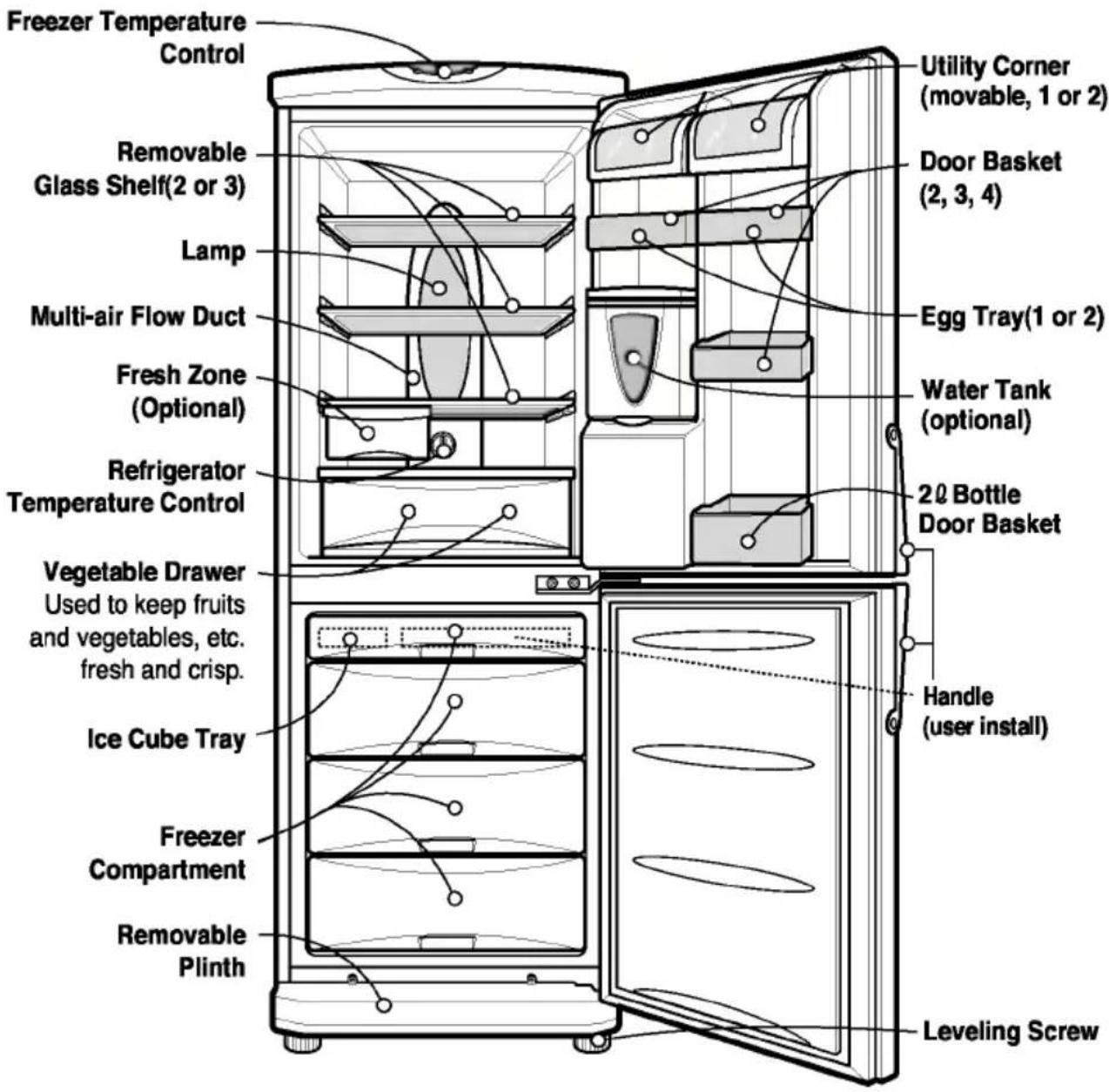
text_image
Freezer Temperature Control Removable Glass Shelf(2 or 3) Lamp Multi-air Flow Duct Fresh Zone (Optional) Refrigerator Temperature Control Vegetable Drawer Used to keep fruits and vegetables, etc. fresh and crisp. Ice Cube Tray Freezer Compartment Removable Plinth Utility Corner (movable, 1 or 2) Door Basket (2, 3, 4) Egg Tray(1 or 2) Water Tank (optional) 20 Bottle Door Basket Handle (user install) Leveling ScrewNOTE
If you found some parts missing from your unit, they may be parts only used in other models.
Installation
- Select a good location. Place your fridge-freezer where it is easy to use.
- Avoid placing the unit near heat sources, direct sunlight or moisture.
- There must be proper air circulation around your fridge-freezer to keep it operating efficiently.
- To avoid vibration, the unit must be leveled. If required, adjust the leveling screws to compensate for the uneven floor. The front should be slightly higher than the rear to aid in door closing. Leveling screws can be turned easily by tipping the cabinet slightly. Turn the leveling screws counterclockwise( ) to raise the unit, clockwise( ) to lower it.
- Clean your fridge-freezer thoroughly and wipe off all dust accumulated during shipping.
- Install accessories such as ice cube box, etc., in their proper places. They are packed together to prevent possible damage during shipment.
- Connect the power supply cord (or plug) to the outlet. Don't double up with other appliances on the same outlet.
- To ensure proper air circulation around the fridge - freezer, please maintain sufficient space on both the sides as well as top and maintain at least 2 inches (5 cm) from the rear wall.
Starting
When your fridge-freezer is installed, allow it 2-3 hours to stabilize at normal operating temperature prior to filling it with fresh or frozen foods. If power plug is disconnected, allow 5 minutes delay before restarting. Your fridge-freezer is now ready for use.
Temperature Control
Your fridge-freezer has two controls that let you regulate the temperature in the fridge and freezer compartments.
Fridge
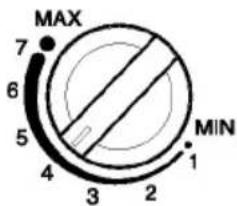
text_image
MAX 7 6 5 4 3 2 1 MINTEMP. CONTROL
- Initially set the TEMP. CONTROL at "4". Then adjust the compartment temperature according to your desire.
- If you want an inside temperature slightly less cold or colder, turn the knob towards MIN or MAX, respectively.
When the surrounding temperature is low, adjust the TEMP. CONTROL 'MIN'.
Freezer
- Freezer temperature control is on the top of the fridge-freezer. Initially set the Freeze Temp at mid-point. By pressing the Freezer Temp button, you can adjust the temperature of the Freezer as indicated by the numbers of lamps lit.(the setting is composed of five steps, 5 lamps lit indicates coldest.)
- When you starting the Fridge-Freezer or connecting the power plug to the outlet, temperature setting is automatically set to the mid-point.
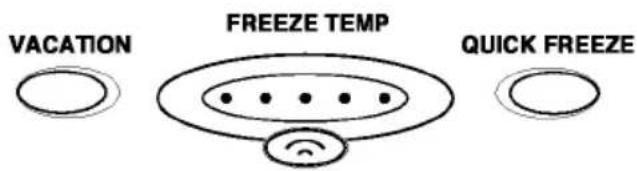
text_image
VACATION FREEZE TEMP QUICK FREEZEQuick Freeze
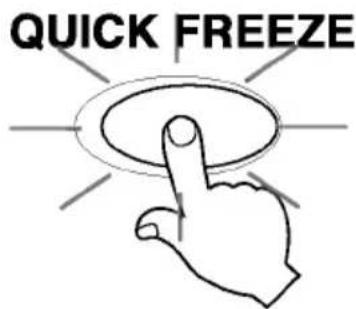
- This function is used when you want to freeze the foods quickly. Press the 'QUICK FREEZE' button once, and then the quick freeze operation starts with the lamp lit.
The quick freeze operation takes about 3 hours.
When its operation ends, it automatically returns to the normal state.
If you want to stop the quick freeze operation, press the 'QUICK FREEZE' button once more, the lamp goes out, and the quick freeze operation stops and the refrigerator returns to the normal state.
text_image
QUICK FREEZEVacation
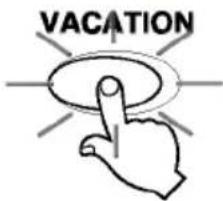
This function makes the fridge-freezer work in a power saving mode which is useful for when
you are away on holiday, by reducing energy consumption as much as possible.
Pressing 'VACATION' starts operation with lamp ON and pressing it again stops the operation.
text_image
VACATIONFor better functioning, you should set the TEMP. CONTROL to "MIN".
Self Test
This function allows you to check for operational problems. If you think you have a problem with your fridge-freezer, then press the temperature control button:
- If the indicate lights move up or down, then there is no problem with your fridge-freezer.
- If the indicate lights do not move up or down, then please leave the power connected and call your nearest service agent.
Door Alarm
When the door of the fridge is left opened for a while, the alarm sounds.
Ice Making
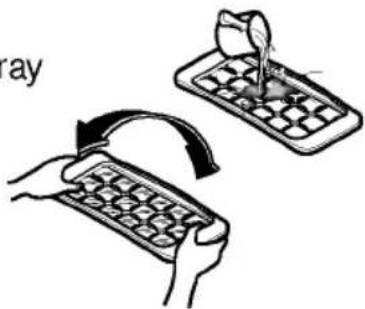
• To make ice cubes, fill the ice tray to the water level and place it in the freezer.
- If ice cubes are required fast, press the 'QUICK FREEZE button.
- To remove ice cubes, hold the tray at its ends and twist gently.
text_image
ray
To remove ice cubes easily, run water on the tray before twisting.
Defrosting
Defrosting takes place automatically.
The defrosting water flows down to the evaporating tray and is evaporated automatically.
Features
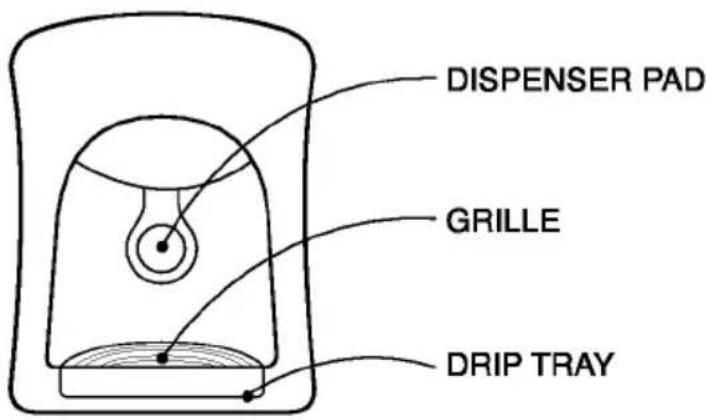
Water Dispenser (optional)
text_image
DISPENSER PAD GRILLE DRIP TRAY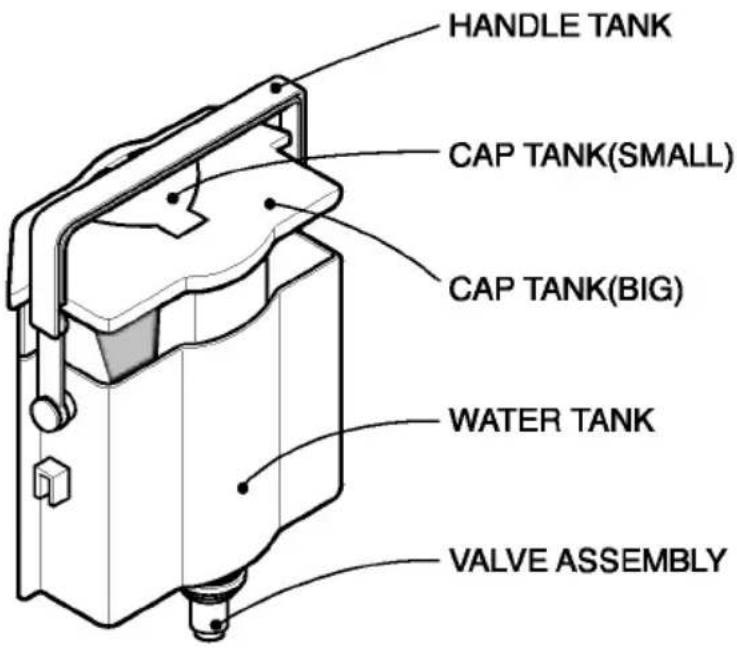
text_image
HANDLE TANK CAP TANK(SMALL) CAP TANK(BIG) WATER TANK VALVE ASSEMBLYInstall
Please assemble the VALVE ASSEMBLY after correctly adjusting it with a DOOR HOLE
Filling of WATER TANK
-
After turning the HANDLE Tank backward with the WATER TANK installed at the DOOR, Open the CAP TANK (SMALL) and then fill water using a kettle etc.
* Fill water while watching a sight glass on the front of the WATER TANK. * Water up to 4.5 ℓ can be filled. -
Press and fix the CAP TANK(SMALL).
-
After filling spring water, fix the HANDLE TANK at a proper position.
Drinking
- Press the Dispenser Pad with a cup.
- If pressing the Pad, water inside of the Dispenser is supplied.
- If slowly removing a cup from the Pad, water will not fall down.
Caution
Do not use other beverage (milk, juice, carbonated beverage etc) than spring water. Especially beverage including grain must not be used (may result in failure).
Storing Food
- Do not store food which goes bad easily at low temperature, such as banana, and melon.
- Allow hot food to cool prior to storing. Placing hot food in the fridge-freezer could spoil other food, and lead to higher electric bills.
- When storing the food, use a container with a lid. This prevents moisture from evaporating, and helps food to keep its taste and nutrients.
- Do not block air vents with food. Smooth circulation of cold air keeps fridge-freezer temperature even.
- Do not open the door frequently. Opening the door lets warm air enter the fridge-freezer, and cause temperature to rise.
- To adjust the temperature control easily, do not store food near the temperature control dial.
- Never keep too many foods in door rack, as this may stop the door from fully closing.
- Do not store bottles in the freezer compartment - they may break when frozen.
- Do not refreeze food that has been thawed. This causes loss of taste and nutrition.
NOTE
If you keep the fridge-freezer in a hot, and humid place, frequently open its door or put a lot of vegetables in it, dew may form in it, which has no effect on its performance.
Remove the dew with dust cloth free from care.
General Information
Power Failure
If You Move
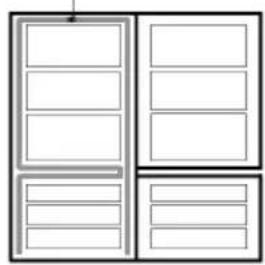
Anti Condensation Pipe
- 1\~2 hour power failure does no harm to the foods stores. Try to avoid opening and closing the door too frequently.
• Take out foods from the fridge-freezer and firmly fix the loose items with tape. -
Turn the leveling screws until they stop before moving the fridge-freezer. Otherwise the screw may scratch the floor or the fridge-freezer cannot move.
-
The Anti-Condensation pipe is installed around the front side of fridge-freezer as well as on the partition between fridge compartment and freezer compartment to prevent dewing.
- Especially after installation or when ambient temperature
is high, the fridge-freezer may feel hot, which is quite normal.
Anti-Condensation
Pipe
natural_image
Pure diagram of a cabinet or refrigerator with no text, numbers, or symbolsLamp Replacement
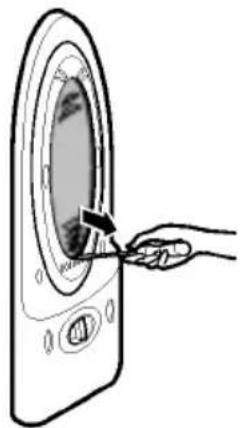
- Unplug the power cord from the outlet.
- Remove fridge shelves.
- To remove the lamp cover, insert type driver in the underside of the lamp cover and pull it out forwards.
- Turn the lamp counterclockwise.
- Assemble in reverse order of disassembly. Replacement lamp must be the same specification as original.
- You must check the O-RING,
which is made by rubber and prevent electric spark.
natural_image
Line drawing of a hand inserting a component into a circular device (no text or symbols)Cleaning
Before Cleaning
Exterior
Be sure to unplug the power.
Clean the outside of the fridge-freezer with a soft cloth soaked with hot water or liquid detergent. If you use a detergent, be sure to wipe it with a clean wet cloth.
Interior
As above.
After Cleaning
Check that the power cord is not damaged, power plug has not overheated, and that the power plug is tightly inserted into the outlet.
▲ Warning
Be sure to dry the appliance with a cloth after washing it with water.
Do not use abrasive, petroleum, benzene, thinner, hydrochloride acid, boiling water, rough brush, etc, as they may damage parts of the fridge-freezer.
Care and Maintenance
GRILLE and DRIP TRAY
- After removing the HOLE part of the GRILLE with the finger, slowly pull the DRIP TRAY out.
- After discharging Drip Water inside of the DRIP TRAY, clean and fully rinse the GRILLE and the DRIP TRAY.
- Wipe moisture out around the DOOR part and the DRIP TRAY using a clean cloth.
Exterior Dispenser
Wipe moisture etc out outside of Dispenser and on the Dispenser Pad using a cloth.
Water Tank
- Lift the WATER TANK up by pressing the fixing LEVER on the bottom of WATER TANK and then remove it.
- After removing the CAP TANK (BIG), clean and fully rinse the inside/outside part of the WATER TANK by using neutral cleansing agent.
Cap Tank(Big & Small)
Clean and fully rinse the Cap Tank (Big & Small) by using neutral cleansing agent. Especially for the groove part of the CAP TANK, it is convenient to cleanse it by using a small brush.
Valve Assembly
Clean and fully rinse the VALVE ASSEMBLY by using a small brush. Rinse it while operating the bottom part of the valve assembly. Always fix the Sealing Rubber separated for cleansing at the existing position (may result in water leakage).
Problem
Fridge-Freezer does not operate
Fridge or Freezer Compartment Temperature too warm
Vibration or Rattling or Abnormal Noise
Frost or Ice Crystals on frozen Food
Moisture forms on Cabinet Surface
Before calling for service, check this list.
It may save you both time and expense.
This list includes common occurrences that are not the result of defective workmanship or materials in this appliance.
Possible Causes
- Power plug may be unplugged from the electric outlet.
Plug it in securely.
• House fuse has blown or circuit breaker has tripped. Check and/or replace fuse and reset circuit breaker.
• Power cut. Check house lights.
- Temperature control not set on proper position. Refer to Temperature Control section.
- Appliance is placed close to heat source.
- Warm weather-frequent door openings.
- Door left open for a long time.
- Package holding door open or blocking air duct in freezer compartment.
- The floor on which the fridge-freezer is installed may be uneven or the fridge-freezer may be unstable. Make it even by rotating the leveling screw.
- Unnecessary objects placed in the back side of the fridge-freezer.
- Door may have been left ajar or package holding door open.
- Too frequent or too long door openings.
- Frost within package is normal.
- This phenomenon is likely to occur in a wet space. Wipe it with a dry towel.
Problem
Moisture collects inside
Fridge has odor
Door not closing properly
Interior light does not work
Possible Causes
- Too frequent or too long door openings.
- In humid weather, air carries moisture into fridge when doors are opened.
- Foods with strong odors should be tightly covered or wrapped.
- Check for spoiled food.
- Interior needs cleaning. Refer to CLEANING section
- Food package is keeping door open. Move packages that keep door from closing.
- Fridge-freezer is not level. Adjust the leveling screws.
- The floor on which the fridge-freezer is installed may be uneven or the fridge-freezer may be unstable. Slightly raise the front side with the leveling screw.
- No power at outlet.
- Light lamp needs replacing. Refer to the Lamp Replacement section.
natural_image
Symbol of a trash bin with crossed x-marks and a horizontal bar at the bottom (no text or labels)DISPOSAL OF YOUR OLD APPLIANCE
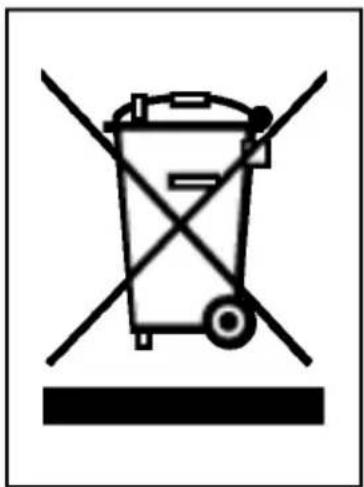
- When this crossed-out wheeled bin symbol is attached to a product it means the product is covered by the European Directive 2002/96/EC.
- All electrical and electronic products should be disposed of separately from the municipal waste stream via designated collection facilities appointed by the government or the local authorities.
- The correct disposal of your old appliance will help prevent potential negative consequences for the environment and human health.
- For more detailed information about disposal of your old appliance, please contact your city office, waste disposal service or the shop where you purchased the product.
To Reverse the Doors
Your fridge-freezer is designed with reversible doors, so that they may open from either the left of right hand side to suit your kitchen design.
Precaution
- Before reversing the door, first of all, you should take out food and accessories like shelves or trays which are not fixed in the fridge-freezer.
- Use Torque Wrench or Spanner to fix or remove the bolt.
- Do not lay the fridge-freezer down. This will cause problems.
- Be careful not to drop the doors in disassembling or assembling.
How to Reverse the Doors
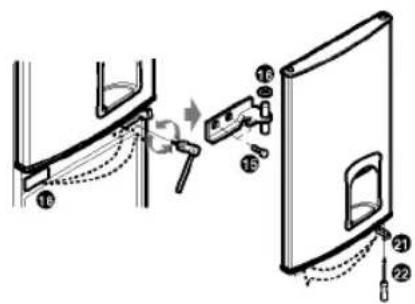
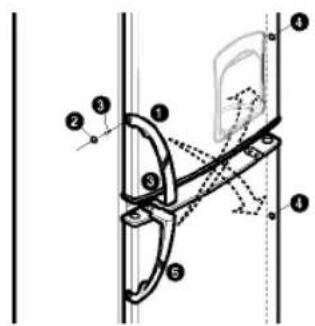
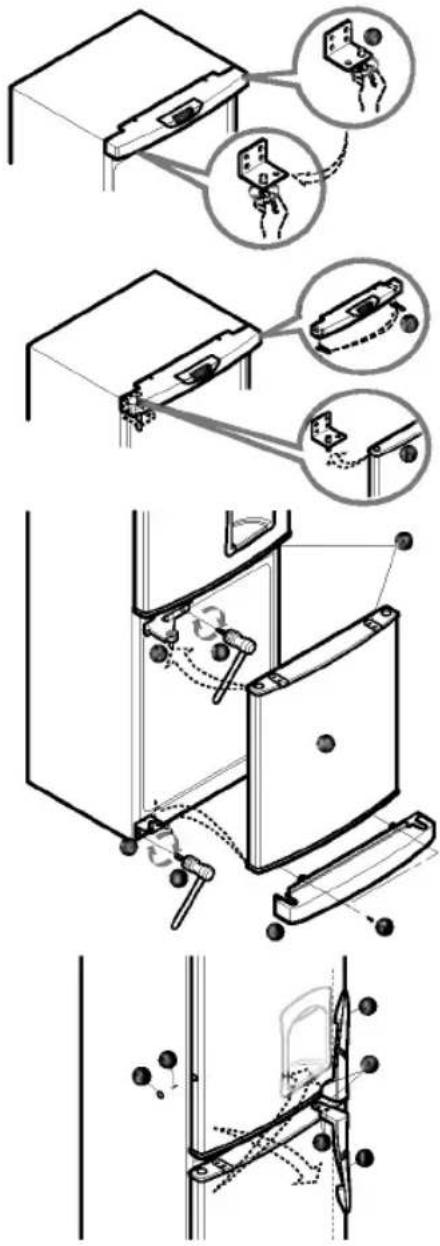
- Remove SCREWS ③ after removing a CAP ② from the right part of the refrigerator room HANDLE ①. Remove 2 SCREWS ③ on the bottom part of the refrigerator room HANDLE ①. The freezer room HANDLE ⑤ may be also separated in the same sequence as in the refrigerator room HANDLE ①.
- Remove screw ⑦ and remove Cover ⑥ and move Cap Cover ⑧. And, remove screw ⑨, Hinge-L ⑩, and remove pin ⑪. Remove the Freezer Door ⑫, and move the position of the cap ⑫. Move the position of bracket door ⑬ and screw ⑭.
- Remove bolt 15 and remove the Hinge-C 16 and the Fridge Door 17. Move the position of the cap 18. Move the position of bracket door 22 and screw 21.
text_image
Technical diagram showing labeled mechanical components with numbered parts and dashed alignment lines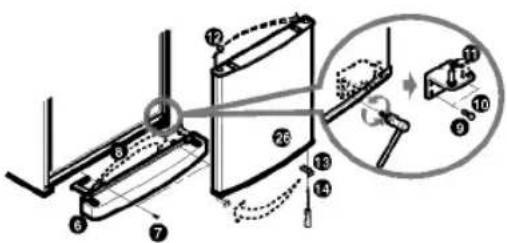
text_image
Technical diagram showing mechanical assembly with numbered components and a magnified inset view of a bracket assembly.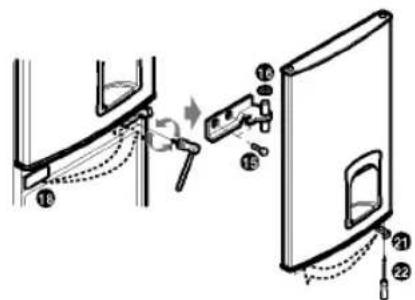
text_image
Diagram showing a door handle assembly with numbered parts and a close-up view of the door panel- Move the position of Hinge-U pin 19, and Cap, Top cover 20 Assemble the Fridge Door 17 Assemble Hinge-C 16 and bolt 15 Assemble F-Door 25. Assemble the Hinge-L 10 and bolt 9. Assemble Low Cover 6 and screw 7.
- Install HANDLES ⑤ installed at the existing freezer room, at the refrigerator room. Adjust the bottom part of HANDLES to the groove and then fasten 2 screws ③ after removing the CAP ⑦. After bolting SCREWS in the side of the refrigerator room DOOR, press and insert the CAP ②. Insert the CAP ④ to hole which the HANDLE ① was installed previous. The freezer room HANDLES ① are assembled in the same manner as above using the existing.
- Stop the groom where the existing HANDLE ①, ⑤ was installed at by using the CAP removed in the initial installation.
text_image
Technical diagram illustrating the installation and disassembly of a mechanical device, with labeled steps and component illustrations.Note
Reversing the doors is not covered by the warranty.
Table des matières
Introduction
Enregistrement 20
text_image
Tuyau anti- Condensationnatural_image
Line drawing of a hand inserting a small object into a circular device (no text or symbols)Soin et Entretien
Nettoyage
Avant de nettoyer
text_image
Warning symbol for a trash bin with crossed and uncorrected lines, indicating no waste or discharge.ÉLIMINATION DE VOTRE ANCIEN APPAREIL
text_image
Technical diagram showing labeled mechanical components with numbered parts and dashed alignment lines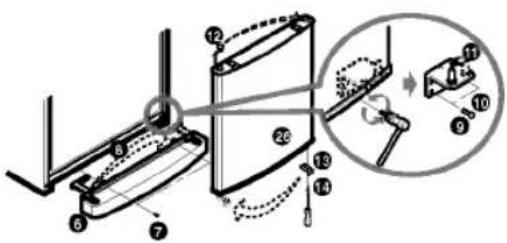
text_image
Technical diagram of a mechanical assembly with numbered components and a magnified inset showing a close-up view.