
XR-C503 - Car radio SONY - Free user manual and instructions
Find the device manual for free XR-C503 SONY in PDF.



| Product type | Cassette car stereo with FM/MW/LW tuner and CD/MD changer compatibility |
| Dimensions (W x H x D) | 188 x 58 x 177 mm |
| Mounting dimensions | 182 x 53 x 162 mm |
| Weight | 1.3 kg |
| Power supply | 12 V DC (car battery, negative ground) |
| Maximum output power | 35 W x 4 (at 4 ohms) |
| FM frequency ranges | 65.0 – 74.0 MHz (30 kHz step) and 87.5 – 108.0 MHz (50 kHz step) |
| MW / LW ranges | MW: 531 – 1602 kHz / LW: 153 – 281 kHz |
| Cassette section | 4 tracks, 2 stereo channels, response 30 – 20,000 Hz |
| Signal-to-noise ratio (Dolby B ON, type II/IV) | 67 dB |
| Tuning functions | BTM (best tuning memory), station memory, name list-up |
| Cassette playback functions | Intro Scan, Repeat, Shuffle, Blank Skip, ATA (auto tuner activation) |
| CD/MD changer functions | Intro Scan, Repeat, Shuffle, Disc Memo, Bank (track selection), list-up |
| Detachable front panel | Yes, with audible alarm if the key is turned off without removing the panel |
| Connector cleaning | Cotton swab soaked in alcohol, clean regularly to avoid display defects |
| Playback head maintenance | Use a Sony cleaning kit, once a month |
| Fuse | Replace with a fuse of the same amperage |
| Supplied remote controls | Rotary remote RM-X2S, wireless remote RM-X41 (optional) |
| BUS cable | Supplied with RCA cable for changer connection |
Frequently Asked Questions - XR-C503 SONY
User questions about XR-C503 SONY
0 question about this device. Answer the ones you know or ask your own.
Ask a new question about this device
Download the instructions for your Car radio in PDF format for free! Find your manual XR-C503 - SONY and take your electronic device back in hand. On this page are published all the documents necessary for the use of your device. XR-C503 by SONY.
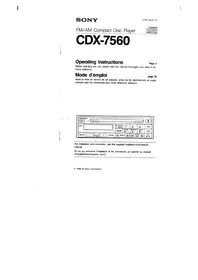
USER MANUAL XR-C503 SONY
For installation and connections, see the supplied installation/connections manual.
© 1996 by Sony Corporation
Welcome!
Thank you for purchasing the Sony Cassette Player. This unit lets you enjoy a variety of features by using either a rotary remote or a wireless remote.
In addition to the tape playback and the radio operations, you can expand your system by connecting an optional CD/MD changer.
Table of contents
This Unit Only
Getting Started
Resetting the unit 4
Detaching the front panel 4
Preparing the rotary remote 5
Setting the clock 5
Cassette Player
Listening to the tape 6
Playing the tape in various modes 7
Radio
Memorising stations automatically — Best Tuning Memory (BTM) 7
Memorising only the desired stations. 7
Receiving the memorised stations. 8
Storing the station names Station Memo 8
Locating a station by name -List-up 9
Other Functions
Using the rotary remote 9
Adjusting the sound characteristics 10
Muting the sound. 10
Changing the sound and display settings.... 11
With Optional Equipment
CD/MD Changer
Playing a CD or MD 11
Scanning the tracks — Intro Scan 12
Playing tracks repeatedly — Repeat Play 12
Playing tracks in random order — Shuffle Play 12
Labeling a CD — Disc Memo 13
Locating a disc by name — List-up 14
Selecting the specific tracks for playback — Bank 14
Additional Information
Precautions 15
Maintenance 15
Dismounting the unit 16
Location of controls 17
Specifications 19
Troubleshooting guide 20
Index 22
EN
Getting started
Resetting the unit
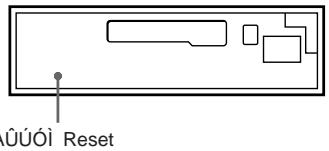
Before operating the unit for the first time or after replacing the car battery, you must reset the unit.
Press the reset button with a pointed object, such as a ballpoint pen.
Reset button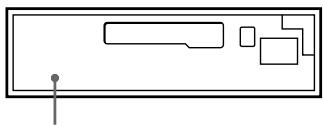
Note
Pressing the reset button will erase all the memory functions except for the preset stations.
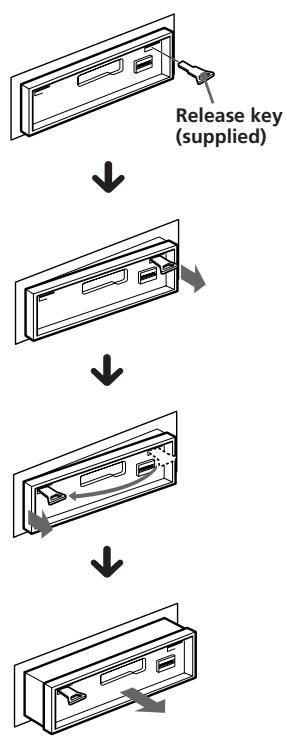
Detaching the front panel
You can detach the front panel of this unit to prevent the unit from being stolen.
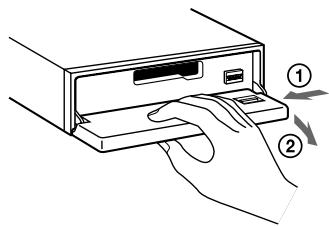
1 Press OFF.
2 Press OPEN to open the front panel, then slide the front panel to the left side, and pull out the right side of the front panel.
Notes
- Do not put anything on the inner surface of the front panel.
- Be sure not to drop the panel when detaching it from the unit.
- If you detach the panel while the unit is still on, the power will turn off automatically to prevent the speakers from being damaged.
- When you carry the front panel with you, put it in the supplied front panel case.
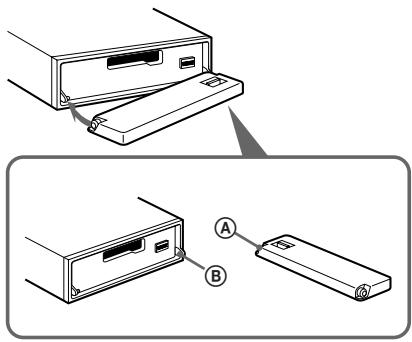
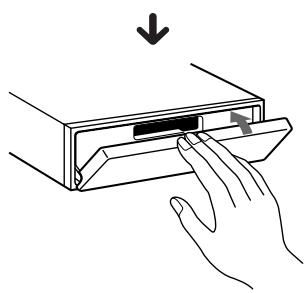
Attaching the front panel
Place the hole A in the front panel onto the spindle 8 on the unit as illustrated, then push the left side in.
Notes
- Be sure not to attach the front panel upside down.
- Do not press the front panel hard against the unit when attaching it. Press it lightly against the unit.
- Do not press hard or put excessive pressure on the display windows of the front panel.
- Do not expose the front panel to direct sunlight, heat sources such as hot air ducts, and do not leave it in a humid place. Never leave it on the dashboard of a car parked in direct sunlight where there may be a considerable rise in temperature.
Caution alarm
If you turn the ignition key switch to the OFF position without removing the front panel, the caution alarm will beep for a few seconds (only when the POWER SELECT switch is set to the A position).
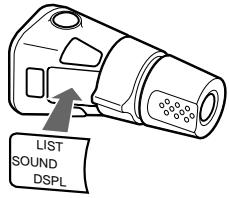
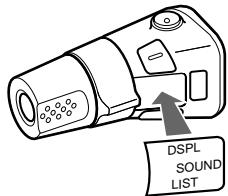
Preparing the rotary remote
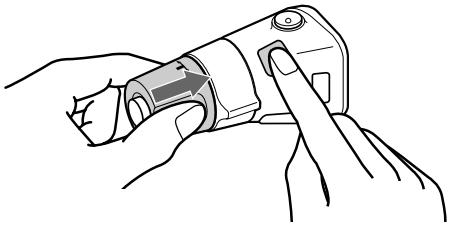
When you mount the rotary remote, attach the label in the illustration below.
Setting the clock
The clock has a 12-hour digital indication.
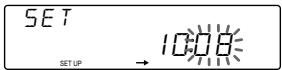
Example: Set the clock to 10:08
1 Press SHIFT, then press ② (SET UP).
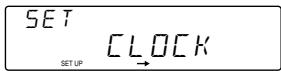
1 Press (4)(→)
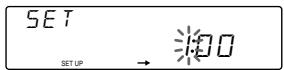
The hour digit flashes.
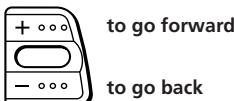
2 Set the hour.
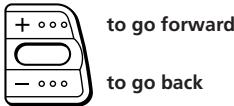
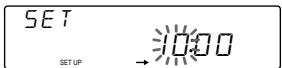
Press (4)(→)
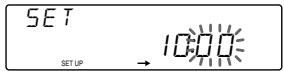
The minute digits flash.
4 Set the minute.
2 Press (SHIFT).
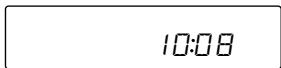
The clock starts.
Note
If the POWER SELECT switch on the bottom of the unit is set to the 5 position, turn the power on first, then set the clock.
Cassette Player
Listening to the tape
1 Press (OPEN) and insert the cassette.
Playback starts automatically.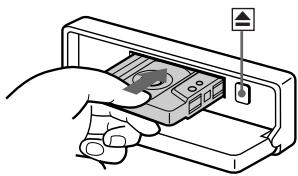
2 Close the front panel.
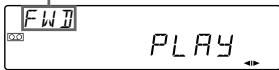
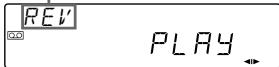
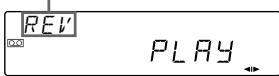
If the cassette is already inserted, press (SOURCE) until "FWD" or "REV" appears to start playback.
The side facing up is being played.
The side facing down is being played.
Tips
To change the tape transport direction, press (7) - "METAL" appears in the display when you insert the metal or CrO2 tape (Auto Metal function).
| To | Press |
| Stop playback | OFF |
| Eject the cassette | OPEN then▲ |
Fast-winding the tape
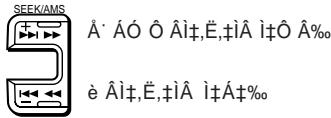
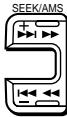
During playback, press either side of (SEEK/AMS) for one second.
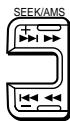
Fast-forward
Rewind
To start playback during fast-forwarding or rewinding, press (▶).
Locating the beginning of the tracks
Automatic Music Sensor (AMS)
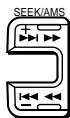
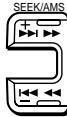
You can skip up to nine tracks at one time. During playback, press either side of (SEEK/AMS) momentarily.
To locate the succeeding tracks
To locate the previous tracks
Note
The AMS function may not work when: - the blanks between tracks are shorter than four seconds. - there are noises. - there are long sections of low volume or quiet sections.
Changing the displayed items
Each time you press DSPL, the item changes as follows:

- While the ATA function is activated.
Playing the tape in various modes
You can play the tape in various modes:
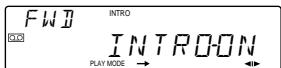
- INTRO (Intro Scan) lets you play the first 10 seconds of all the tracks.
- REP (Repeat Play) repeats the current track.
- NR (Dolby NR) lets you select the Dolby* NR B system.
- ATA (Automatic Tuner Activation) turns on the tuner automatically while fast-winding the tape.
- BL.SKP (Blank Skip) skips blanks longer than eight seconds.
- Dolby noise reduction manufactured under license from Dolby Laboratories Licensing Corporation. "DOLBY" and the double-D symbol □ are trademarks of Dolby Laboratories Licensing Corporation.
1 Press SHIFT.
Every time you press (SHIFT), only the items you can select light up.
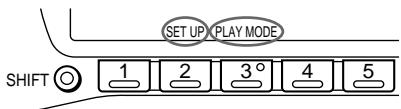
2 Press (3) (PLAY MODE), repeatedly until the desired play mode appears.
Each time you press ③ , the item changes as follows:
INTRO → REP → NR → ATA → BL.SKP
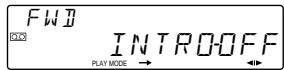
3 Press (4)(→)
to select "ON."
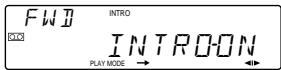
Playback starts.
To go back to the normal playback mode, select "OFF" in step 3 above.
Radio
Memorising stations automatically
Best Tuning Memory (BTM)
The unit selects the stations with the strongest signals and memorises them in the order of their frequencies. You can store up to 10 stations on each band (FM1, FM2, MW and LW).
Caution
When tuning in the station while driving, use Best Tuning Memory to prevent accidents.
1 Press (SOURCE) repeatedly to select the desired band (FM1, FM2, MW or LW). 2 Press SHIFT, then press 6 (BTM).
The unit stores stations in the order of their
frequencies on the number buttons.
A beep sounds and the setting is stored.
Notes
- The unit does not store stations with weak signals. If only a few stations are received, some number buttons remain empty.
- When a preset number is indicated in the display, the unit starts storing stations from the one currently displayed.
Memorising only the desired stations
You can store up to 10 stations on each band (20 for FM1 and FM2, 10 for MW or LW) in the order of your choice.
1 Press SOURCE repeatedly to select the desired band. 2 Press either side of (SEEK/AMS) to tune in the station that you want to store on the number button. 3 Keep the desired number button (1 to 10) pressed for two seconds until you hear a beep tone.
The number button indication appears in the display.
Note
If you try to store another station on the same number button, the previously stored station will be erased.
Receiving the memorised stations
1 Press (SOURCE) repeatedly to select the desired band. 2 Press the number button (1 to 10) momentarily, where the desired station is stored.
If you cannot tune in a preset station
Press either side of (SEEK/AMS) momentarily to search for the station (automatic tuning).
Scanning stops when the unit receives a station. Press either side of (SEEK/AMS) repeatedly until the desired station is received.
Note
If the automatic tuning stops too frequently, press (SHIFT), then press 3 (PLAY MODE) repeatedly until "LOCAL" (local seek mode) is displayed. Then press 4 (→) to select "ON."
Only the stations with relatively strong signals will be tuned in.
Tip
If you know the frequency of the station you want to listen to, press and hold either side of (SEEK/AMS) for two seconds, until the desired frequency appears (manual tuning).
Receiving FM stereo stations — POLAR modulation
The POLAR modulation function automatically changes and retunes the stations within 65.0 to 74.0 MHz in the PILOT tone mode or POLAR tone mode.
The stations within 87.5 to 108.0 MHz are received only in the PILOT tone mode.
If FM stereo reception is poor — Monaural Mode
1 Press SHIFT, then press 3 (PLAY MODE) repeatedly until "MONO" appears. 2 Press 4 (→) repeatedly until "MONO-ON" appears. The sound improves, but becomes monaural ("STEREO" disappears). To go back to the normal mode, select "MONO-OFF" in step 2 above.
Changing the displayed items
Each time you press DSPL, the item changes as follows:
Frequency ↔ Clock
Storing the station names
— Station Memo
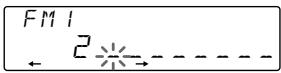
You can assign a name to each radio station and store it in memory. The name of the station currently tuned in appears in the display. You can store up to eight characters for a station.
Storing the station names
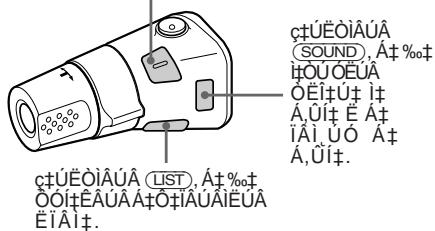
1 Tune in a station whose name you want to store. 2 Press LIST for two seconds.
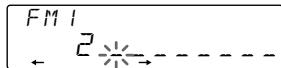
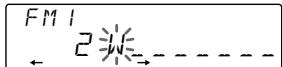
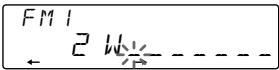
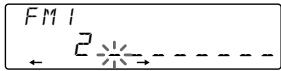
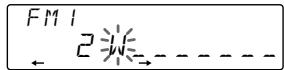
3 Enter the characters.
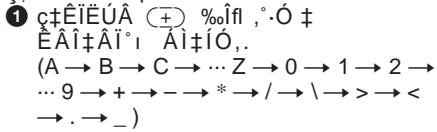
Press ┐+║ to select the desired characters.
(A → B → C → ... Z → 0 → 1 → 2 → ... 9 → + → - →* → / → → gt; → lt; → . →_ -)
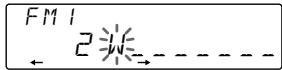
If you press ┐-║, the characters appear in the reverse order.
If you want to put a blank space between characters, select "_" (underbar).
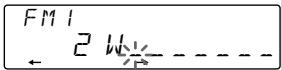
Press ④ (→) after locating the desired character.
The flashing cursor moves to the next space.
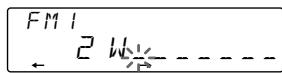
If you press 1 (←), the flashing cursor moves to the left.
Repeat steps 1 and 2 to enter the entire name.
4 To return to normal radio reception, press LIST for two seconds.
Tip
To erase or correct a name, enter "_" (underscore) for each character.
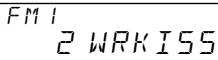
Displaying the station name
Press DSPL during radio reception.
FM1 2 WRK I55
Each time you press DSPL, the item changes as follows:
Station name* → Frequency → Clock
- If the station name is not stored, "NO NAME" appears in the display for one second.
Erasing the station name
1 Tune in any station and press (LIST) for two seconds. 2 Press DSPL for two seconds. 3 Press + or - to select the name that you want to erase. 4 Press ⑤ (ENTER) for two seconds.
The name is erased.
Repeat steps 3 and 4 if you want to erase other names.
5 Press LIST for two seconds.
The unit returns to normal radio reception mode.
Locating a station by name—List-up
1 Press LIST momentarily.
The name assigned to the station currently playing appears in the display.
The name assigned to the station currently playing appears in the display.
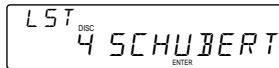
2 Press LIST repeatedly until you find the desired station. 3 Press ⑤ (ENTER) to tune in the desired station.
2 Press LIST repeatedly until you find the desired station. 3 Press ⑤ (ENTER) to tune in the desired station.
Once the station name or frequency has been displayed for five seconds, the display goes back to its normal mode. To turn off the display, press DSPL.
Once the station name or frequency has been displayed for five seconds, the display returns to its normal mode. To turn off the display, press DSPL.
Using the rotary remote
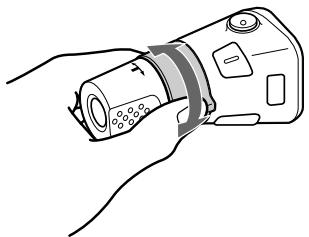
The rotary remote works by pressing buttons and/or rotating controls.
The rotary remote works by pressing buttons and/or rotating controls.
You can control the optional CD or MD changer with the rotary remote.
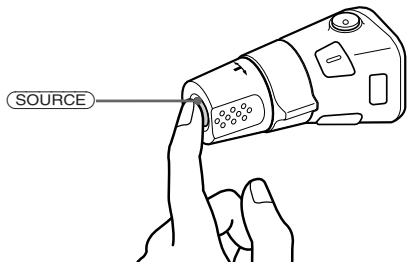
Each time you press SOURCE, the source changes as follows:
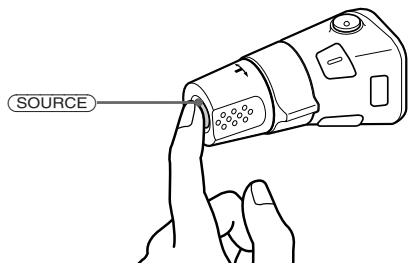
FM1 → FM2 → MW → LW → CD1 → CD2 → MD1 → MD2 → TAPE
FM1 → FM2 → MW → LW → CD1 → CD2 → MD1 → MD2 → TAPE
Tip
You can turn on this unit by pressing (SOURCE) on the rotary remote.
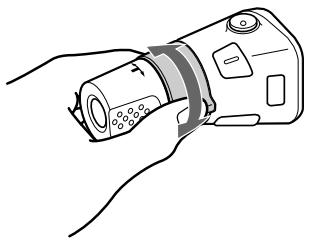
By rotating the control (the SEEK/AMS control)
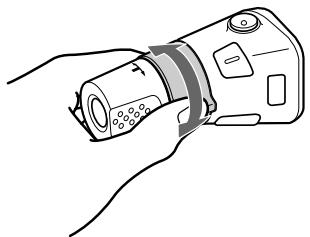
Rotate the control momentarily and release it to:
- Locate the beginning of the tracks on the tape. Rotate and hold the control, and release it to fast-wind the tape. To playback, rotate and hold the control again, and release it.
- Locate a specific track on a disc. Rotate and hold the control to locate the specific point in a track, then release it to start playback.
- Tune in the stations automatically. Rotate and hold the control to tune in the specific station.
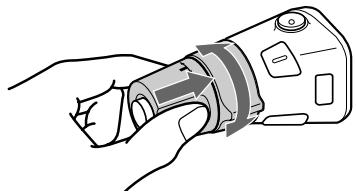
By rotating the control while pushing (the PRESET/DISC control)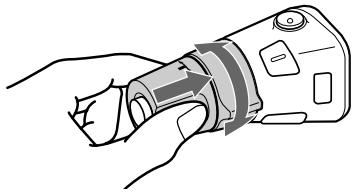
Rotate the control while pushing it to:
- Receive the stations memorised on the preset buttons.
- Change the disc.
Other operations Rotate the VOL control to adjust the volume.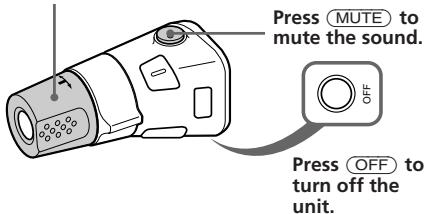
Press DSPL to change the displayed items. Changing the operative direction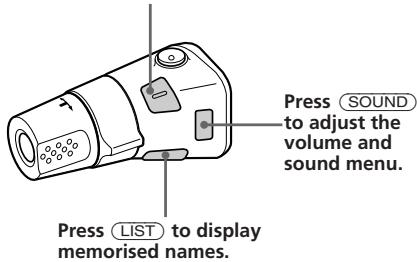
The operative direction of controls is factory preset as in the illustration below. To decrease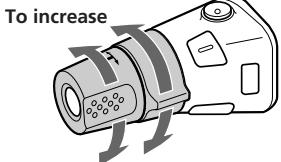
If you need to mount the rotary remote on the right of the steering column, you can reverse the operative direction of the controls.
Press DSPL for two seconds while pushing the VOL control.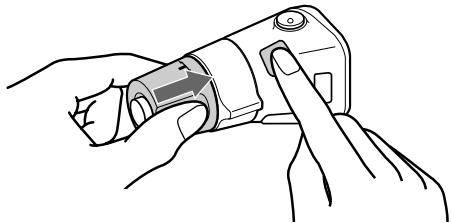
Tip
You can control the operative direction of controls with the unit.
Adjusting the sound characteristics
You can adjust the bass, treble, balance and fader.
Each source can store the bass and treble level respectively.
1 Select the item you want to adjust by pressing SOUND repeatedly. VOL (volume) → BAS (bass) → TRE (treble) → BAL (balance) → FAD (fader) 2 Adjust the selected item by pressing (+) or (-) . Adjust within three seconds after selecting. (After three seconds, the buttons work as volume control buttons.)
Muting the sound
Press MUTE.
"MUTE-ON" flashes.
To restore the previous volume level, press MUTE again.
Tip
The unit decreases the volume automatically when a telephone call comes in (Telephone-mute function).
Changing the sound and display settings
You can set:
- AMBER/GREEN to change the illumination colour to amber or green.
- BEEP to turn on or off the beeps.
- DIM (dimmer) to change the brightness of the display. D. INFO (dual information) to display the clock and the play mode at the same time (ON) or to display the information alternately (OFF).
- LOUD (Loudness) to enjoy bass and treble even at low volume. Bass and treble will be reinforced.
- RM (Rotary Remote) to change the operative direction of the controls of the rotary remote. — Select "NORM" to use the rotary remote as the factory preset position. — Select "REV" when you mount the rotary remote on the right of the steering column.
1 Press SHIFT, then press ② (SET UP). 2 Press (2) (SET UP) repeatedly until the desired setting mode appears.
Each time you press (2) (SET UP), the item changes as follows:
CLOCK → AMBER/GREEN → BEEP → DIM → D.INFO → LOUD → RM
3 Press (4) (→) to select the desired setting (for example: ON or OFF). 4 Press SHIFT. When the mode setting is complete, the normal playback mode appears.
With Optional Equipment
CD/MD Changer
You can control up to 10 CD changers and MD changers with this unit.
Playing a CD or MD
Press SOURCE until the desired changer appears.
CD/MD playback starts.
When a CD or MD changer is connected, all the tracks play from the beginning.
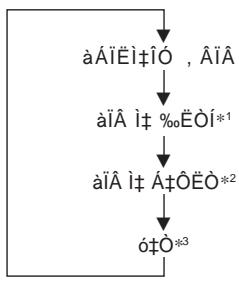
Changing the displayed items
Each time you press DSPL during CD/MD playback, the item changes as follows:
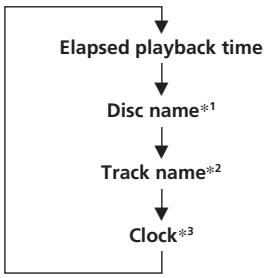
1 If there is no prerecorded name for a CD or MD, "NO NAME" appears in the display. 2 If the track name of an MD is not prerecorded, "NO NAME" appears in the display. *3 If the dual information is on, the clock does not appear in the display.
Tip
If the name of the MD is too long, you can scroll it across the display by pressing (SHIFT), then (1) (←).
Automatically scrolling a disc name — Auto Scroll
The Auto Scroll function automatically scrolls the disc or track name of the MD when you press DSPL and the name length exceeds eight characters.
1 Press SHIFT, then press 2 (SET UP) repeatedly until "A.SCRL" appears. 2 Press ④ (→) to select "A.SCRL-ON."
To cancel Auto Scroll, select "A.SCRL-OFF" in step 2 above.
Displaying the recording date of the currently selected MD
Press DSPL for two seconds during MD playback.
The recording date of the track is displayed for about three seconds.
Locating a specific track
Automatic Music Sensor (AMS)
During playback, press either side of (SEEK/AMS) once for each track you want to skip.
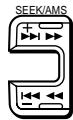
To locate succeeding tracks
To locate previous tracks
Locating a specific point in a track
— Manual Search
During playback, press and hold either side of (SEEK/AMS). Release the button when you have found the desired point.
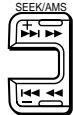
To search forward
To search backward
Locating a disc by disc number
Direct Disc Selection
Press the number button that corresponds with the desired disc number.
The desired disc in the currently selected changer begins playback.
Scanning the tracks
— Intro Scan
You can play the first 10 seconds of all the tracks on the currently selected disc.
1 During playback, press (SHIFT), then press ③ (PLAY MODE) repeatedly until "INTRO" appears.
2 Press (4) repeatedly until "INTRO-ON." Intro Scan starts.
To go back to the normal playback mode, select "INTRO-OFF" in step 2 above.
Playing tracks repeatedly
Repeat Play
You can select:
- REP-1 to repeat a track.
- REP-2 to repeat a disc.
- REP-3 to repeat all the discs in the current changer.
1 During playback, press (SHIFT), then press (3) (PLAY MODE) repeatedly until "REP" appears. 2 Press (4) (→) repeatedly until the desired setting appears.

Repeat play starts.
To go back to the normal playback mode, select "REP-OFF" in step 2 above.
Playing tracks in random order — Shuffle Play
You can select:
- SHUF-1 to play the tracks on the current disc in a random order.
- SHUF-2 to play the tracks in the current changer in a random order.
- SHUF-3 to play all the tracks in a random order.
1 During playback, press (SHIFT), then press (3) (PLAY MODE) repeatedly until "SHUF" appears. 2 Press (4) (→) repeatedly until the desired setting appears.

Shuffle play starts.
To go back to the normal playback mode, select "SHUF-OFF" in step 2 above.
Labeling a CD
— Disc Memo
(CD changer with custom file function)
You can label each disc with a personalized name. You can enter up to eight characters for a disc. If you label a CD, you can locate a disc by name and select the specific tracks for playback (page 14).
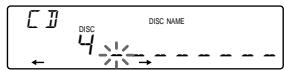
1 Play the CD and press LIST for two seconds.
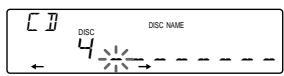
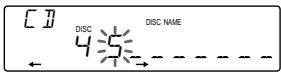
2 Enter the characters.
Press + to select the desired characters.
(A → B → C → ... Z → 0 → 1 → 2 → ... 9 → + → - → * → / → \ → > → < → . → _)
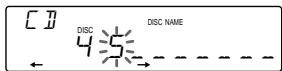
If you press -, the characters appear in the reverse order.
If you want to put a blank space between characters, select "_" (underbar).
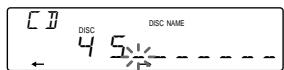
Press (4) (→) after locating the desired character.
The flashing cursor moves to the next space.
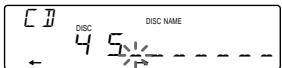
If you press ① (←), the flashing cursor moves to the left.
Repeat steps 1 and 2 to enter the entire name.
3 To return to the normal CD playback mode, press LIST for two seconds.
Tip
To erase/correct a name, enter " _ " (under-bar) for each character.
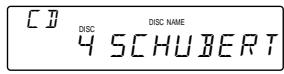
Displaying the disc memo
Press DSPL during CD playback.
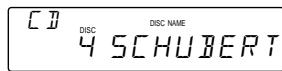
Each time you press DSPL during CD playback, the item changes as follows:

Erasing the disc memo
1 Press (SOURCE) to select the CD changer. 2 Press LIST for two seconds. 3 Press DSPL for two seconds. 4 Press ① or 一 to select the name that you want to erase. 5 Press ⑤ (ENTER) for two seconds.
The name is erased.
Repeat steps 3 and 4 if you want to erase other names.
6 Press LIST for two seconds.
The unit returns to the normal CD playback mode.
Locating a disc by name
List-up (CD changer with custom file function or MD changer)
You can use this function for the discs that have been assigned a custom name. For more information on disc names, refer to "Labeling a CD" (page 13).
1 Press LIST momentarily.
The name assigned to the disc currently playing appears in the display.
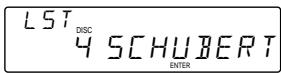
2 Press LIST repeatedly until you find the desired disc.
3 Press (5) (ENTER) to play back the disc.
Notes
- Once a disc name has been displayed for five seconds, the display goes back to its normal playback mode. To turn off the display, press DSPL.
- The track names are not displayed during MD playback.
- If there are no discs in the magazine, "NO DISC" appears in the display.
- If a disc has not been assigned a custom file, " * *" appears in the display.
- If the disc information has not been read by the unit, "NOT READ" appears in the display. To load the disc, first press the number button, then choose the disc that has not been loaded.
- The information appears only in upper cases. There are also some letters which cannot be displayed (during MD playback).
Selecting the specific tracks for playback
Bank
(CD changer with custom file function)
If you label the disc, you can set the unit to skip tracks and play only the tracks you want.
1 Start playing the disc and press SHIFT. Then press ③ (PLAY MODE) for two seconds.
Bank edit mode
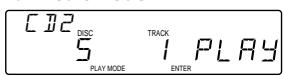
Note
If you have not labeled the disc, the bank edit mode does not appear.
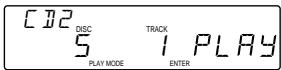
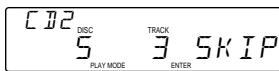
2 Press either side of (SEEK/AMS) to select the track number you want to skip and press (5) (ENTER).
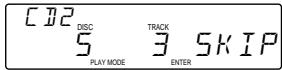
The indication changes from "PLAY" to "SKIP." If you want to return to "PLAY," press ⑤ (ENTER) again.
3 Repeat step 2 to set the "PLAY" or "SKIP" mode on all the tracks. 4 Press ③ (PLAY MODE) for two seconds.
Notes
- You can set the "PLAY" and "SKIP" mode on up to 24 tracks.
- You cannot set the "SKIP" mode on all the tracks.
Playing the specific tracks only
You can select:
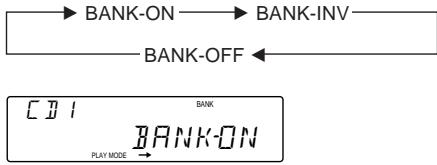
- BANK-ON to play the tracks with the "PLAY" setting.
- BANK-INV (inverse) to play the tracks with the "SKIP" setting.
1 During playback, press (SHIFT), then press (3) (PLAY MODE) repeatedly until "BANK" appears. 2 Press (4) (arrow right) repeatedly until the desired setting appears.
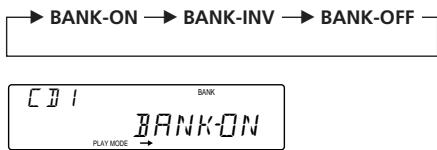
Playback starts from the track following the current one.
To go back to the normal playing mode, select "BANK-OFF" in step 2 above.
Additional Information
Precautions
- If your car was parked in direct sunlight resulting in a considerable rise in temperature inside the car, allow the unit to cool off before operating it.
- If no power is being supplied to the unit, check the connections first. If everything is in order, check the fuse.
- If no sound comes from the speakers of a two-speaker system, set the fader control to the centre position.
- If your car is equipped with a power aerial, note that it will extend automatically while the unit is operating.
If you have any questions or problems concerning your unit that are not covered in this manual, please consult your nearest Sony dealer.
Notes on cassette deck tape heads
- Long use of cassette tapes contaminates the tape head causing poor sound quality or complete sound dropout. Therefore, we recommend cleaning the tape head once a month or so with the separately available Sony Cassette Cleaning Set. If the sound does not improve after using a cleaning cassette, please consult your nearest Sony dealer.
- In case of old or inferior cassette tapes, the tape head gets contaminated much more quickly. Depending on the tape, one or two playbacks may cause poor sound.
Cassette care
- Do not touch the tape surface of a cassette, as any dirt or dust will contaminate the heads.
- Keep cassettes away from equipment with built-in magnets such as speakers and amplifiers, as erasure or distortion on the recorded tape could occur.
- Do not expose cassettes to direct sunlight, extremely cold temperatures or moisture.
- When the tape is played back for a long period, the cassette shell may become warm because of the built-in power amplifier. However, this is not a sign of a malfunction.
Cassettes longer than 90 minutes
The use of cassettes longer than 90 minutes is not recommended except for long continuous play. The tapes used for these cassettes are very thin and tend to be stretched easily. Frequent playing and stopping of these tapes may cause them to be pulled into the cassette deck mechanism.
Maintenance
Fuse replacement
When replacing the fuse, be sure to use one that matches the amperage described on the fuse. If the fuse blows, check the power connection and replace the fuse. If the fuse blows again after replacement, there may be an internal malfunction. In such a case, consult your nearest Sony dealer.
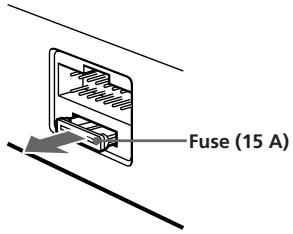
Warning
Never use a fuse with an amperage rating exceeding the one supplied with the unit as this could damage the unit.
Cleaning the connectors
The unit may not function properly if the connectors between the unit and the front panel are not clean. To prevent this, open the front panel by pressing (OPEN), then detach it and clean the connectors with a cotton swab dipped in alcohol. Do not apply too much force. Otherwise, the connectors may be damaged.
Main unit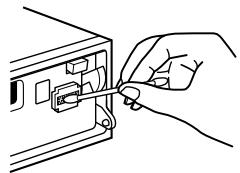
Back of the front panel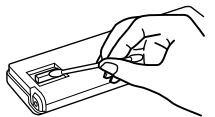
Dismounting the unit
Location of controls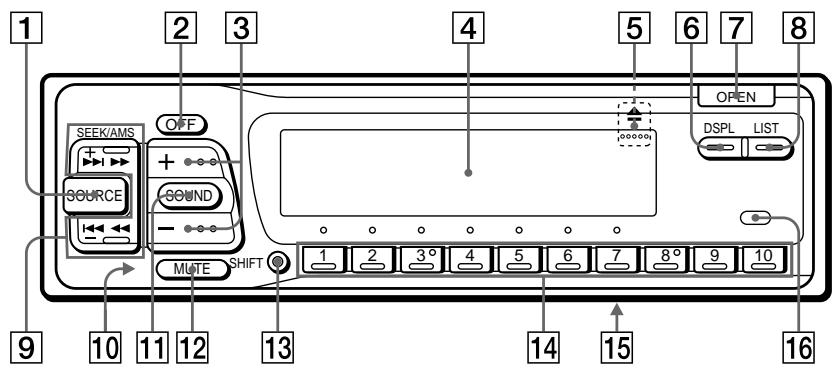
Refer to the pages for details.
SOURCE (source select) button 6, 7, 8, 11, 13 OFF button 4,6 3 (volume/bass/treble/balance/fader control) button 5,8,9,10,13 4 Display window 5 (eject) button (located on the front side of the unit hidden by the front panel) 6 DSPL (display mode change) button 6, 8, 9, 11, 12, 13 7 OPEN button 4,6,15 8 LIST button Disc Memo 13 List-up 9, 14 Station Memo 9 SEEK/AMS (seek/Automatic Music Sensor/manual search) button 6,7,8, 12,14
10 Reset button (located on the front side of the unit hidden by the front panel) 4 11 SOUND button 10 12 MUTE button 10 13 SHIFT button BTM7 SETUP5,11 PLAYMODE7,8,12,14 14 During radio reception: Preset number buttons 7,8 During CD/MD playback: Direct disc selection buttons 12 15 POWER SELECT switch (located on the bottom of the unit) See "POWER SELECT switch" in the Installation/Connections manual. 16 Receptor for optional wireless remote
EN
Location of controls
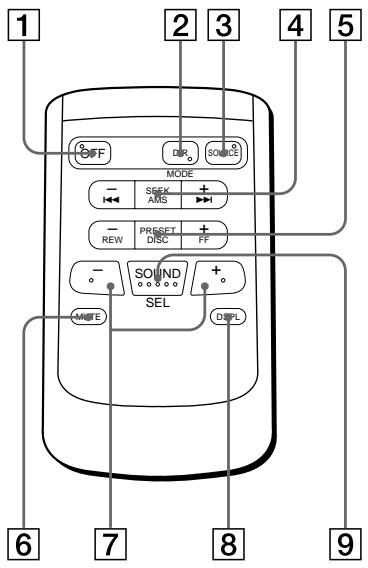
Optional wireless remote (RM-X41)
EN
Buttons with the same functions as those on this unit.
1 OFF button 3 SOURCE button 4 SEEK/AMS button 5 PRESET/DISC button You cannot do the manual search and manual tuning with the wireless remote. 6 MUTE button 7 + buttons 8 DSPL button 9 SOUND button
Buttons with different function than those on the master unit.
DIR button Changes the playback side of the cassette.
When the POWER SELECT switch is set to the B position, the unit cannot be operated with the wireless remote unless SOURCE on the unit is pressed or a cassette is inserted to activate the unit first.
Specifications
Cassette player section
Tape track
4-track 2-channel stereo
Wow and flutter
0.08% (WRMS)
Frequency response
30 - 20,000 Hz
Signal-to-noise ratio
| Cassette type | Dolby B NR | Dolby NR off |
| TYPE II, IV | 67 dB | 61 dB |
| TYPE I | 64 dB | 58 dB |
Tuner section
FM
Tuning range
65.0-74.0 MHz
(at 30 kHz step)
87.5-108.0 MHz
(at 50 kHz step)
External aerial connector
10.7 MHz
9 dBf
75 dB at 400 kHz
65 dB (stereo).
68 dB (mono)
Harmonic distortion at 1 kHz
0.5% (stereo),
0.3% (mono)
35 dB at 1 kHz
Frequency response
30 - 15,000 Hz
2 dB
- There are the numerical values measured at 87.5 - 108.0 MHz.
MW/LW
Tuning range
MW: 531 - 1,602 kHz
LW: 153 - 281 kHz
Aerial terminal
External aerial connector
10.71 MHz/450 kHz
Sensitivity
MW: 30 µV
LW: 50 µV
Power amplifier section
Outputs
Speaker outputs
(sure seal connectors)
Speaker impedance
4-8 ohms
Maximum power output 35 W × 4 (at 4 ohms)
General
Outputs
Line outputs (2)
Power aerial relay control lead
Power amplifier control lead
Tone controls
Bass ±8 dB at 100 Hz
Treble ±8 dB at 10 kHz
Power requirements
12 V DC car battery
Treble ±8 dB at 10 kHz
12 V DC car battery
(negative ground)
Approx. 188 x 58 x 177 mm
(w/h/d)
Approx. 182 x 53 x 162 mm
(w/h/d)
Mass
Approx. 1.3 kg
Parts for installation and
connections (1 set)
Front panel case (1)
Rotary remote RM-X2S
Wireless remote RM-X41
BUS cable (supplied with
an RCA pin cord)
Design and specifications are subject to change without notice.
EN
Troubleshooting guide
The following checks will help you remedy most problems that you may encounter with your unit. Before going through the checklist below, check the connections and operating procedures.
General
| Problem | Cause/Solution |
| No sound | • Adjust the volume with ⊙. • Set the fader control to the centre position for two-speaker systems. |
| The contents of the memory have been erased. | • The power cord or battery has been disconnected. • The reset button has been pressed. → Store again into the memory. |
| Indications do not appear in the display. | Remove the front panel and clean the connectors. See “Cleaning the connectors” (page 15) for details. |
Tape playback
| Problem | Cause/Solution |
| Playback sound is distorted. | Contamination of the tape head. → Clean the head. |
| The AMS does not operate correctly. | ·There is a noise in the space between tracks. ·A blank space is too short (less than four seconds). ·►on (SEEK/AMS) is pressed immediately before the following tracks. ·►on (SEEK/AMS) is pressed immediately after the track starts. ·A long pause, or a passage of low frequencies or very low sound level is treated as a blank space. |
Radio reception
| Problem | Cause/Solution |
| Preset tuning is not possible. | • Memorise the correct frequency. • The broadcast is too weak. |
| Automatic tuning is not possible. | The broadcast is too weak. → Use manual tuning. |
| The "STEREO" indication flashes. | • Tune in the frequency correctly. • The broadcast signal is too weak. → Set to the monaural mode (page 8). |
Error displays (when the optional CD/MD changer is connected) The following indications flash for about five seconds, and an alarm sound will be heard.
| Display | Cause | Solution |
| NO MAG | The disc magazine is not inserted in the CD/MD changer. | Insert the disc magazine with discs into the CD/MD changer. |
| NO DISC | No disc is inserted in the CD/MD changer. | Insert the discs in the CD/MD changer. |
| ERROR*1 | A CD is dirty or inserted upside down.*2 | Clean or insert the CD correctly. |
| An MD does not play because of some problem.*2 | Insert another MD. | |
| BLANK*1 | No tracks have been recorded on an MD.*2 | Playback an MD with recorded tracks on it. |
| RESET | The CD/MD changer cannot be operated because of some problem. | Press the reset button of the unit. |
| NO REACH | The lid of the MD changer is open or MDs are not inserted properly. | Close the lid or inserted the MDs properly. |
| HI TEMP | The ambient temperature is more than 50°C. | Wait until the temperature goes down below 50°C. |
1 When an error occurs during playback of an MD or CD, the disc number of the MD or CD does not appear in the display. 2 The disc number of the disc causing the error appears in the display.
If the above-mentioned solutions do not help improve the situation, consult your nearest Sony dealer.
Index
A
Automatic Music Sensor (AMS) 6, 12
Automatic tuning 8
Automatic Tuner Activation (ATA) 7
Auto Metal 6
Auto Scroll 11
B
Balance 10
Bank Play 14
Bass 10
Beep tone 11
Best Tuning Memory (BTM) 7
Blank Skip 7
C
Changing the displayed items 6,8,11
Caution alarm 4
CD playback 11
Clock 5
D, E
Direct disc selection 12
Disc Memo 13
Display 6,8,9,11
Dolby 7
Dual information 11
F, G, H
Fader 10
Front panel 4, 15
Fuse 15
I, J, K
Illumination colour 11
Intro Scan 7,12
L
List-up 9,14
Locating
a disc 12,14
a specific track 12, 14
a station 9
Loudness 11
M, N, O
Manual search 12
Memorising a station 7
METAL 6
MD playback 11
Monaural mode 8
Mute 10
P, Q
PLAY MODE
ATA 7
BANK 14
BL.SKP 7
INTRO 7,12
LOCAL 8
MONO 8
NR 7
REP 7,12
SHUF 12
POLAR modulation 8
R
Radio 7
Repeat Play 7,12
Reset 4
Rotary remote 5,9,11
s
SET UP
AMBER 11
A.SCRL 11
BEEP 11
CLOCK 5
DIM 11
D.INFO 11
GREEN 11
LOUD 11
RM 11
Shuffle Play 12
Station Memo 8
T, U
Tape playback 6
Telephone-mute 10
Treble 10
V
Volume 10
W, X, Y, Z
Wireless remote 18
Welcome!
Setting up the CD/MD
Playing CDs and MDs — Intro Scan 14
Playing tracks in random order — Repeat Play 14 Playing tracks in random order — Shuffle Play 14
— Shuffle Play. 14 Disc Memo. 14
Checking the remaining time — List-up 15
Storing stations in memory — Bank. 16
Listening to the radio
Setting the clock 17 Using the timer 18 Recording from the radio 18 Recording from CDs and MDs 21 Troubleshooting 22 Specifications 24
Additional information
Playing CDs and MDs
The unit can play both CDs and MDs. This section explains how to use the unit for playback.
__SUPPIMER__
1 OFF. 2 OPEN, and the switch is in the open position, the circuit is open. The switch is in the closed position, the circuit is closed.
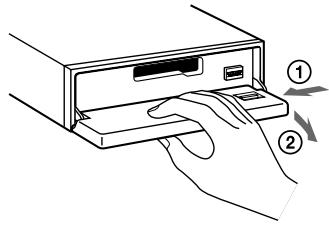
The switch is in the closed position, the circuit is closed. The switch is in the open position, the circuit is open. The switch is in the closed position, the circuit is closed. The switch is in the open position, the circuit is open.

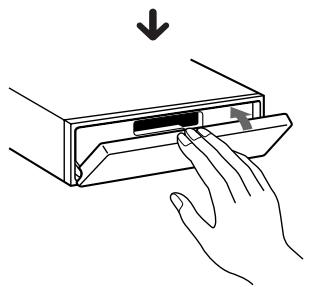
The switch is in the closed position, the circuit is closed. The switch is in the open position, the circuit is open. The switch is in the closed position, the circuit is closed. The switch is in the open position, the circuit is open.
OooUa,OOIOEaieA (A).
èO‰,óUÓ,í‡ i‡
OU+E0IOUO
UOU OEOU,OA
UO ,ÎÂÎ E
C·AÖ OÖÄ, Aɉ‡IAOU IAIU‡
1 c UÉOIÀUÀ (OPEN) E OO U†,AUA†OÀU†.
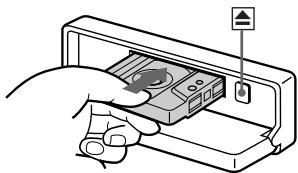
C'AO OEA, AEE%+I A/UO A+OO', +, UOi+UE'IO.
2 a†U,ô AUAO A%ó IÜO U‡ IÓA‡ UO ‡,IÁEÀ.
C OIU+E, A I OAU+U A, A' OOOU+,AI+, UEOIAUA (SOURCE) %OITUOAOOfl,fU "FWD" EIE "REV", A+ %O+ A'O'O-'A, AO OEAA%+I.A.
C:AO OEA,AE%o:t AOAU,Oi:tU,OU t:
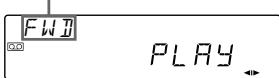
C:AO OEA,AE%oA OAU%oIiU OU iI.
e.AUE - àt%oI OIAIEU AOOOIOU tI %o,EEAI EA, IUEOIUA7 cA1i+OAOHn,tEi%Ei+EfUt,IO,uO OOOU,EUA iOAU+UEOIAU+IECrO2 (UII'En Auto Metal).
| ᇉ‡ | ç‡UÉÖIÀUÀ |
| ëÖAUÀ | OFF |
| ;ÁO ÓEA,ÄE‰‡IÀUÓ | |
| àÁ,‡‰ÉUÀ†‡OÀU‡Ü‡ | OPEN OÍA‰ ÚO,‡▲ |
A' AO O Aɪ+,E,ɪʌ Aɪ +ɪʌU+ʌ
eO,AIAI,'AOOEAAE%o,tIA, IUEOIIAA 工 _ 0 ^ 工 OU:UUOIEUA t (SEEK/AMS),O 工 _ 0 ^ 工 :IEAIIEA t Aoo t OAIUI%t.
At the same time, the automatic music sensor (AMS) is activated (▲▶).
This unit is equipped with the Automatic Music Sensor (AMS).
The AMS automatically detects and skips blank sections or pauses between tracks.
During playback, press the SEEK/AMS button to skip to the beginning of the current or next track.
Track number display
During playback, the track number is displayed.
Press the DSPL button to display the track number and elapsed time.
The display shows the track number and elapsed time.
To skip to the next track, press the SEEK/AMS button.
To skip to the previous track, press the SEEK/AMS button repeatedly.
The station memo function allows you to store and recall your favorite stations.
Station Memo
The station memo function automatically stores the stations you listen to most frequently.
To recall a stored station, press the corresponding preset button.
To store a station, press and hold the desired preset button until the display flashes.
The EIE,+EfiU iU OO OAEIAOU,
,fl,O.
3 eO, UO AUA OU OIE E2, A+‰
,AA%AUA^fIQUO EIA.
4 a%oOÀ , iAùA i'i o iTiIó
%EOO EAIiA,IUEOIUAU LIST
O O%o.1EAIIEA I%o.A OAIUI%o.E
e',A U a%E A U E A U A I O E, E, +U A E I A, ,A%oA U A "
(00 ‰) A U ) , IAOUO, OAI E AI I.
eOiA,iA iEIAUo i
%E0Ou+EfU+
cüÜÖIJAU (DSPL) OO, AïA Jt
O EAIiA i+‰EOOU±rEn.
COAIE O'U,IO'UO I'UEOIJAU (DSPL)
OoiA,t+U EiUO i+Efl O A O iAi fIiUO 0A%o,t:

CONTENTS, AND OPERATION INSTRUCTIONS, AND "NO NAME".
TABLE OF CONTENTS
OPERATION
1. Press the LIST key to display the list, and the display shows the list.
2. Press the DSPL key to display the display.
3. Press the ENTER key to select the displayed item.
4. Press the ENTER key to confirm the selection. The display updates. For steps 3 and 4, press the keys sequentially.
5. Press the LIST key to return to the list.
Note: The above operations are examples.
Display example.
Press the key to operate.
- List-up
1. Press the LIST key. The list of operation items is displayed. 2. Press the LIST key again to return to the previous list. 3. Press the ENTER key to select the item.
a. The display shows the selected item. b. Press the DSPL key to display the next item.
End of instructions.
Source selection (SOURCE)
Press the button to select the source.
Source selection order: FM1 → FM2 → MW → LW → CD1 → CD2 → MD1 → MD2 → TAPE
The display shows the current source and the selected source is indicated.
Press the button to select the seek mode (SEEK/AMS).
The tuner will automatically search for stations.
When a station is received, the search stops. To stop the search manually, press the same button again. The tuner will then stop at the received station. If no station is found, the search continues. To resume the search, press the button again. The tuner will then search for the next station. If the station is weak, the search may not stop. In that case, press the button repeatedly to tune in manually.
Press the button to select the preset mode (PRESET/DISC).
When a preset station is selected, the preset number and frequency are displayed. To select a preset station, press the button repeatedly.
Volume control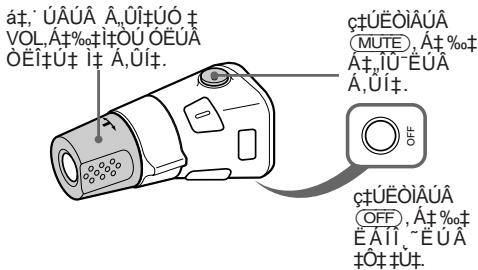
Press the DISPLAY button (DSPL) to change the display information.
Clock setting
Press the CLOCK button to set the clock. The time is displayed when the clock is set.
Audio, video, input
Audio input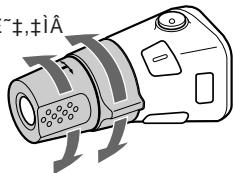
Control output, audio output, video output, and other connections are provided on the rear panel. Refer to the connection diagram for details.
Connect the DSP output to the audio input of the amplifier.
The audio input level can be adjusted with the volume control.
Control input, output, and remote control
The remote control unit uses two AAA batteries. Insert the batteries with the correct polarity as indicated inside the battery compartment.
1. Press the POWER button to turn on the unit. The SOUND VOL (volume) control adjusts the volume level: MIN (minimum) to MAX (maximum). 2. The unit has a built-in amplifier. The volume can be adjusted using the remote control or the front panel controls.
Audio output
MUTE button. Press to mute the audio output.
The MUTE button mutes the audio output.
The MUTE function can be activated via the remote control (telephone mute).
Remote control operation
The display shows the current status: AMBER/GREEN, etc. The BEEP sound is emitted when a button is pressed. The DIM function adjusts the brightness of the display. The LOUD function enhances low and high frequencies at low volume levels. The RM (remote) function allows control via the remote control. The NORM (normal) setting provides standard audio output. The REV (reverse) setting reverses the audio output phase.
1. Press the SHIFT button to access the second function (SET UP). 2. Press the SET UP button to enter the setup menu, then use the arrow keys to navigate and adjust settings.
CLOCK → AMBER/GREEN → BEEP → DIM → D.INFO → LOUD → RM
3 Press (→) to select the desired setting (ON or OFF). 4 Press (SHIFT). The setting will be stored, and the display will return to the previous screen.
Operating the CD/MD player
The following operations are possible within about 10 seconds after the CD or MD is loaded.
Loading a CD or MD
Press (SOURCE) to select the CD/MD player, then insert the disc.
When a disc is already loaded, press (SOURCE) to switch to the CD/MD player.
To display the disc title, press (DSPL) while the CD/MD is playing. The title will be displayed.
1 Press (SHIFT) to display the menu, then select "NO NAME" for the CD or MD. 2 Press (SHIFT) to display the menu, then select "NO NAME" for the MD. 3 Press (SHIFT) to display the menu, then select "NO NAME" for the CD.
Press (SHIFT) and then (←) to return to the previous display.
Auto Scroll: When the disc title is longer than the display, it will automatically scroll. To turn this function on or off, press (DSPL) while the disc is playing.
1 Press (SHIFT), then press (SET UP) to display the menu, and select "A. SCRL". 2 Press (→) to select "A. SCRL-ON".
To turn off Auto Scroll, press (SHIFT), then select "A.SCRL-OFF".
Displaying the disc title
Press (DSPL) to display the disc title. The title will be displayed for a few seconds, then the display will return to the normal playback display.
CD Player — Automatic Music Sensor (AMS)
The AMS function automatically detects and skips to the beginning of each track, allowing you to easily locate and play the desired track. Press the (SEEK/AMS) button to use this feature.
Repeat Play
This function repeats the current track or all tracks.
— Shuffle Play
There are three shuffle modes:
- SHUF-1: Repeats the current track or all tracks in random order. SHUF-2: Plays all tracks in random order once. SHUF-3: Plays the current track repeatedly in random order.
1. Press the (SHIFT) button, then press the (PLAY MODE) button repeatedly until "SHUF" appears. 2. Press the (ENTER) button to select the desired shuffle mode.

To cancel shuffle play, press the (PLAY MODE) button again until "SHUF-OFF" appears.
To cancel shuffle play, press the (PLAY MODE) button again until "SHUF-OFF" appears.
CD Player
— Disc Memo (You can store up to 16 characters for each CD.)
This function allows you to store a memo for each CD. When you insert a CD, the memo is displayed. You can store up to 16 characters for each CD.
1. Insert a CD and press the (LIST) button to display the memo list.
2. Use the (ENTER) button to select the desired memo.
1. The character input method is as follows: (A→B→C→...Z→0→1→2→…9→+→-→*→/→ → >><→.→)
The character input method (一) is used to input characters, numbers, and symbols. The character input method (二) is used to input letters, numbers, and symbols. The character input method (三) is used to input letters, numbers, and symbols. The character input method (四) is used to input letters, numbers, and symbols. (Note: The character input method is used to input letters, numbers, and symbols.)
2. The character input method (→) is used to input letters, numbers, and symbols. The character input method (←) is used to input letters, numbers, and symbols. The character input method (↑) is used to input letters, numbers, and symbols. The character input method (↓) is used to input letters, numbers, and symbols.
The character input method (1) is used to input letters, numbers, and symbols. The character input method (2) is used to input letters, numbers, and symbols. The character input method (3) is used to input letters, numbers, and symbols.
3. The character input method (1) and (2) are used to input letters, numbers, and symbols. The character input method (3) is used to input letters, numbers, and symbols.
3. The character input method (LIST) is used to input letters, numbers, and symbols. The character input method (LIST) is used to input letters, numbers, and symbols. The character input method (LIST) is used to input letters, numbers, and symbols.
The character input method (LIST) is used to input letters, numbers, and symbols. The character input method (LIST) is used to input letters, numbers, and symbols. The character input method (LIST) is used to input letters, numbers, and symbols.
The character input method (LIST) is used to input letters, numbers, and symbols.
The character input method (LIST) is used to input letters, numbers, and symbols. The character input method (LIST) is used to input letters, numbers, and symbols.
The character input method (DSPL) is used to input letters, numbers, and symbols. The character input method (DSPL) is used to input letters, numbers, and symbols. The character input method (DSPL) is used to input letters, numbers, and symbols.

The character input method (LIST) is used to input letters, numbers, and symbols.
1. The character input method (SOURCE) is used to input letters, numbers, and symbols. 2. The character input method (LIST) is used to input letters, numbers, and symbols. 3. The character input method (DSPL) is used to input letters, numbers, and symbols. 4. The character input method (ENTER) is used to input letters, numbers, and symbols. 5. The character input method (LIST) is used to input letters, numbers, and symbols. 6. The character input method (LIST) is used to input letters, numbers, and symbols.
- The character input method (LIST) is used to input letters, numbers, and symbols. The character input method (LIST) is used to input letters, numbers, and symbols. The character input method (LIST) is used to input letters, numbers, and symbols.
The character input method (LIST) is used to input letters, numbers, and symbols. The character input method (LIST) is used to input letters, numbers, and symbols. The character input method (LIST) is used to input letters, numbers, and symbols.
1. The character input method (LIST) is used to input letters, numbers, and symbols. The character input method (LIST) is used to input letters, numbers, and symbols. The character input method (LIST) is used to input letters, numbers, and symbols.
2 CUEOIUA (LIST), %OI O IAI EUA EAIZIEN%EI. 3 CUEOIUA (ENTER), ATOIUA, AO OEA, AECUA %EOI.
O O%o.1E+,+I+OIA%o,+U+OU+Ie+

a±·AIAEiE
CAOI E OIAOI UO EIAU OI %EOI A-EIOIAtIO,O%IEAIEA I OAU OAIUI%EAI tU OAI,OTIO,O,OfIO IAIAEIAt,AO OEA,A%Ia %EAIUEA AI tI,tUEOIUA (DSPL). aiAitAtAfoEUEUAOAOIAtUOO,AIA t:AO EAAEOI A OMD. C O I U E, Â ifi 1% EOIO,A, i,t,aEliOUO UO OEOU,O,iA t iO A OOf,fl.t "NO DISC". • COIU+E, I0, +UO i ‰%EOIIA A -EIO O EO, OAI0 EIAI +OO-OU, AI U+Ei, I ai +IOT A OONf, + C O IU-Te,IO, UO EIUOT-EIUT A % EOIATA AH 1EIT O'AUAIOTU+ITAI+OAOHn,tT "NOTREAD"at % AEAUEA % EOIt, IET-IOT A % tUEOIAUAIEiEIT-UOJ, OIA % UO,tEA-AUA % EOI,OAA-EIAt A\%AI. aiUO It EiU O A OoiA, t o iO O ,t iE -uiE. aiT, O' U+ tIIOE AI+ t, IOEUO IA IO,tU %o+ · 心 _ 0 + U OOIaTiA tAI t (OO,AIA t ; AO EOA,AE%oHA OU MD).
aA-E #IA iO O A%AIAEA+OEOEA+, AO OEAAE%+IA
—iUilEfl Bank (iOU OEOU, O A+ Oifl+ I+ CD O UUI Efl A+ OO.OU,AI U±E1)
C OIU+E, Ã iEIAIO,U A%EOI,CEA IOEAUA%oOU OEUAtO+U%oAOIOT ATOEOE Eoo, A OEA,A%oAOIEOAIIEUA ATOEOE
1 a†OÖIÀUÀ%o‡, 'AÖ EEA, AÉ%oú AÜ OÜ ‰EÖI‡ E I†UEOIÀUAA (SHIFT). eɪA%o UÖ, † I†UEOIÀUAA 3 (PLAY MODE), O O%o. iEAIEA I †, A OAIUI%oE. eAEEI A‡ A%oIüE tI A I † O%o. E tIéAUO
a+,AIAEi+ CIOU+E, AIA OUA I+EIAIO, EIOI, I+ A1+IA OAOIIA AEiAt A%oIUE iA iO%o. EtieAUO.
2 cUÉOIÁUAA%ó tOÜO tIeUA (SEEK/AMS), A t %o ëA. A U'A I OIA tI A tOEOt, IOEUXOEOI tUAA tO AOIO-EUA E tUÉOIÀU A 5 (ENTER).
ai‰Ei‡ EflU‡ OA OI¶I OU “PLAY” i‡ “SKIP”. c‡UEOIÁUÀ (5) (ENTER) OUIO, O, IÖ EOI‡ UA ‰ OA, IAU A I“PLAY”.
3 eO, UO AUA OU OI2, A+‰+I+OU OEUA A‰E I OU AEEIEUA "PLAY" EIE "SKIP" A+,OE~IE A+OEOE. 4 C UÉOIÀUÀ (3) (PLAY MODE), O 己 _ 0 ^ IÉAIÉA I ± % , OAIUI%E.
a±·AIAEiE
aOEAUA%tIou OEUAAEEIEUAPL"E "SKIP"A tIe-IIO,O24 ATOEo. cA A, AIOEIO % ± I+OU OEU,AE-iE A+OEOE, AEEI "SKIP".
C'AO OEA,AE%oI A OIO I OO A%AIAIIEAOTOEOE
BANK-ON, PLAY. BANK-INV (E,I,A OIO), A†‰†; AO OE,A,E%‡U,A,O'E'1E'A†OEOE0I†OU OE† "SKIP".
1 eO, AIA I†, 'AO OÉA, Aɉ‡IÀ, I†UÉOIÁUÀ (SHIFT), ‡OIA‰ UO; ‡OOIÀ‰O, ‡UAILO (3) (PLAY MODE), ‰OI‡UÖ OÄ OOf, E "BANK". 2 cúUEOiEUA OOIA%oO,úAIIO (4) →, %oIúUO OA OOf, E EAIiIuIou OEiI.
C'AO OEA,AE%tIAUOAtO'O, tOU OIA%,EflA tOEO,OfU OAIUEF.
a†‰†OÀ, iAúA Ó. tUíO, iO i†iAIAEEIáT, AÖ OÉA, AɉiA, EÁ-A AUA'BANK-OFF', OÜ Oɪt 2 OÖ,-O A.
OIA%oUO,+,OO,+,IAAUEO~EOUAU
O; A, EUA IAIIE O OiUI, iUOAOI
IIOI. C A O E I. EUA.OfIIO UOEIEA.C
eEOUE 4-OEOUE2-1iHIOU A O
NÀ,É+Éflo ÉU AÓUÁIà 0,08% (WRMS)
oAQUOUIiAiUt
C,E,O E,E,I±I-UI
| íEO lIÓAUÉ | Dolby B NR | Dolby NR ÓAII. |
| TYPE II, IV | 67 dB | 61 dB |
| TYPE I | 64 dB | 58 dB |
e+‰E0
FM*
é-1,úÁ ò ÷OÜ ìi ë 65,0-74,0 MHz
(± 30 kHz)
87.5-108.0 MHz
(± 50 kHz)
Antenna input impedance: 75 Ω
FM
Intermediate frequency: 10.7 MHz
Sensitivity: mono, stereo, quieting
9 dBf
75 dB at 400 kHz
Signal-to-noise ratio: 65 dB (mono),
68 dB (stereo)
Audio frequency response: 30 Hz to 15 kHz
0.5% (mono),
0.3% (stereo)
Distortion: 0.5%
35 dB @ 1 kHz
30-15,000 Hz
2 dB
87.5 - 108.0 MHz.
EC/NC
EC: 531 - 1,602 kHz
NC: 153 - 281 kHz
10.71 MHz/450 kHz
6U,OU,EUAIOO
EC: 30 μV
NC: 50 μV
iOeI, ± UA
aA, O%oE
aA0%EAt
EOOIO,O'O EUAIE(O'O
OÉ,UIO A±i,±iA)
eO OUE,IAEIAI.EOOIO,O,EUAIEUA
4-8 ohms
a+IOEiIIT EAI0%oI-TOIOU
35W × 4 (O E 4 ohms)
é·E
aA, O%oE
Frequency response: ±8 dB at 100 Hz
Frequency response: ±8 dB at 10 kHz
Power supply: +1 A, +1 AUO
12 VDC power input
Dimensions: 188 × 58 × 177 mm
Dimensions: 182 x 53 x 162 mm
(-1, / %)
Model 1.3I.
NOOUf,filEfiOAOE
NAU+EIEA+EIOU+EIA
E O, A, ±I A
(1 JóIoiIáIú)
aI'U A ± O A%oI'OUO
Ü ± IO (1)
JOU OEOUOAt
%EQUI EOIIO
UÖ ±.IÄIÉA RM-X2S
NOO'IIEUAIIE tIOAOE
AAAE'IO%EQUIEOJIO
UÖ ±IÄIÉR M-X41
RC-61 (1 I), RC-62 (2 I)
RC-63 (1 i), RC-64 (2 i),
RC-65 (5 i)
CD
CDX-71, CDX-72
CDX-81, CDX-91
(10%EOI)
CDX-T62, CDX-T65
(6‰EÖ݇)
MD
MDX-60
AA-O IEAUO-IEI
XA-C30, E'U.I.
I'ETU±O'ETA±O'AT±O'UO'ETO'OIAIE
IOIOU UREIU+EUAIE-AOIEUAI+IUAE OUUEI
A AAO A%EAAOUEA
E'IO,O%oOU,O A+ OUOU +IFL,IA I+ IAEAO+,IOOUE
NOIIEHU IOI U OAI IEOU 'A CE OIOI,IA %o† A'EU AOO,A'AUO O-IAI, OIOEUEOIEAUA%o† OAOIOTUAOE †OU T OCT EFl O+U. E A%oE%o†O +O, EUAO O, A I+OIOU OII EFlEOUO-O%OUI, O A AUAAEOU, EFlU+O0O, A,IAIUOE †OU T O+O+T U+
E·E
| è Ó-ɪʌi | è Ó-Éi‡/èʌ-AIΕʌ |
| çfl‡ Á, Üi | · éʌ, ÜiE †EUÀ OÉi‡út á, Üi‡ Õ Ñ. |
| · éOʊ†, AʌA, †fɪtɪO‡ IAɉU O À‰IÉUÀ EÁ †‰IÉUÀ IɔIóIÉ, O À‰IOOIÖEAIÉAO EOEOUA‡ Ú‰, †, EOOIé, O, O EUAfn. | |
| ë‰, ëtIÉAUÓ i‡ OɪIÀUúT A A‡IÉ-ÄIó. | · à‡, A‡U i‡ A.I. A‡†, tI, IAUO ëI‡ i‡ IUIIUTUO ‡ A - ëI †A‡-Al. |
| · AÜUOi' U A‡ O Oɪnt i‡ IOTU OÉi‡út A - ëI tUEOI‡ U. → e, †IAU'A OUIDO, O †IAUU‡. | |
| aI‰Ei‡-EEUÀ Ià OÀ OÖI‡A, tU i‡ A¶ i‡. | e,IUAO A‰IQUOúT-IQA‡UO ‡IAEA EÖO-ÉUÀUÀ O, 'A, †'EUA IIAE' (I‡ ÚU tI¶-‡ 18) A‡ O%o O-IOOUÉ. |
C:AO OEA,AE%+I A O'U IAIU+
| è Ú-ɪʌi | è ë-ΕΙ†/èʌ-AIΕʌ |
| a,üi-ú A O ëAí E,,fl,tɪEfl. | át+ó,flEfl OÓ ,l,tú+ú tɪ+óAúOúOí. →eO'ÉOU'AU,A,tú+ú. |
| ɪÜi-éflú+ AMS iA Uüi-éOIE ‡ ò,ÉiIó. | • ñi, ñAú+ú IAE‰úAúOÉOE. • ñAú+ú IAE‰úAúOÉOE Aú, ″‰Aí tú+ú (Oó-íflú+ó%o, A OAIú%oE). • ➔Ii (SEEK/AMS) A túUEOl+ú UO-tó O A%o ñOÀ%o, t'éU A tóOÉE. • ➔Ii (SEEK/AMS) A túUEOl+ú UO-tó O I%A‰ túO átOēOt A tóO'-tI. • Nt, ñOú+í ñEó ñOú ñIó ñOÉE ~AùOuÜE ñEIIó, ñOt+ú ñEiú ñAù ñEü túOʊOúT. |
E%%E0EEAITIA
| è Ó·ÎÄI | è É~É·/èÀ~ÂIë |
| è ʼn,† Eú· ièòU OÉi‡ iA A , 'ÂIÖÉi‡. | • àtÓtɪAùAUO ‡,ÉilúTú~ÂIàʊOú. • èt‰EÖEÂI~,TiAUO Å U, ‰Å Oî‡-Ó. |
| Ä,UÖiúE~üi‡ ièòU OÉi‡ iA A , 'ÂIÖÉi‡. | èt‰EÖEÂI~,TiAUO Å U, ‰Å Oî‡-Ó. →aAÖOIAU,tiEUA ~i tóU OÉi‡. |
| àI‰Éi‡~Efú† "STEREO" Ó,AÜÉ O IÉ,†~ ë,O,AUIÉi‡. | • c tÓU OÉUÅO ± EilóAùOúOúTú. • èE,ɪtɪ'U i t EAI~,tiA Å U, ‰Å Oî‡.. →e AïÉIÂUÅ, iOIO AEEI (Où ëIÉ~± 8). |
EOIA,IA II , A'IEUA (O E O, AIO %oO'HIIÉUAIIO UOU OEOU,A Ñ ÑFLI‡ ICD/MD)
EI Â% 0I EUA EI 已 EE O,AU I,U,O 己 IEAIAI OIOHOAU OAIUI 己 E O A\~U, % 0% 0% 0
| Öi ði | è E~Éi‡ | èA~AIEA |
| NO MAG | àt, tAEIQUOùOÜO, OEOU, OIAA OOU†, AIO, UOU OEOU, OUOÁ†, ùflit‡ t‡ CD/MD. | èO܆, AUA%oEOIó, Efn†, tAEI O' O At, A%oAIE%oEOIó, AUOU OEOU, OUO At, ùflit‡ t‡ CD/MD. |
| NO IISC | cflit, OOO†, AII %oEoi, UU OEOU, OUOÁ†, ùflit‡, CD/MD. | èO܆, AUA%oEOIó, AUOU OEOU, OUO At, ùflit‡ t‡ CD/MD. |
| ERROR*1 | aOIIOTIú %oEoi', U A AIT, OAI EIE A OOU†, AIO, ùUIO, *2 | èO'EOUAUEIIEOOU†, AUAO †, EIIO CD. |
| NEOI'U MD IÀ, A'OEA, AEE%o‡ O O ±%oE iñfí†, O O-IAI. *2 | èO܆, AUA%o U, MD. | |
| BLANK*1 | cflit, ATOEOE, i'U MD. *2 | èUOIUAIAT, 'AO OEA, AEE%oIIA MD O iT O, AIE ATOEOE iT I, O. |
| RESET | iOU OEOU, OUOÁ, ùflit‡, tCD/MD IAOEA%o, t: OUFUO, †%oE iñfí†, O O-IAI. | çtUEOIUA, 'UUO†, ATOI†, ùO'flit‡, t tOU OÉI†, U†, ùO†, ùT. |
| NO REACH | eU, O AI O I T- AUO I UOU OEOU, OUOÁ, ùflit‡, tMD EIE IA O T OOO†, AIE O, EIIO MD. | atU, O AUAI†, ùAUOEIEOOU†, AUA O †, EIIO MD. |
| HI TEMP | éIOLI†, UAIO, ùU, ùAO, A'AU 50, ±%oU†, AIAEE. | aA'tEUA%oI†, UOU'AIOA †UU †U O ADOIEEEO%o50, ±%oU†, AIAEE. |
¹ EÓ, AIA I†; ကO OÉA, Aɉ‡I A ÚCD/MD, IÖ, †ÚO OÀ OÖFL,E , A⁻†, I‡ AI †‡ I A OÀ OÖFL,FL,‡ IÓI A †‡ CD EĪE MD. ² CÓIÁ ðÚ ‰‰ÉÖI‡, IÖEUÖ O ʼnEÀ,EI † O ÛAɪ Û A O OOF, E I † AI †I.
COPYRIGHT NOTICE: This manual is copyrighted by Sony. All rights reserved.
A
A
A.UOiUE\~AI%uTUÉIÁ±AÖEO(AMS) 6.13
Auto Scroll
Bank 16
Disc Memo 14
Direct Disc Selection 13
Manual Search 13
Intro Scan 7,14
List-up 10, 15
Repeat Play 7,14
Shuffle Play 14
Station Memo 9
n
12 V DC power supply
o, o, o, o, u, u
5
dvzljsk!
BTM (Best Tuning Memory = best tuning memory)
programmable functions .... 7
Low frequencies at 100 Hz
±8 dB
High frequencies at 10 kHz
±8 dB
tremolo
12 V DC
car battery
(negative ground)
Dimensions
approx. 188 x 58 x 177 mm
(W x H x D)
approx. 182 x 53 x 162 mm
(W x H x D)
Installation values
approx. 1.3 kg
Mounting kit for
installation/
The following items are included in the package:
*The following items are included in the package.
Check the contents
for any damage.
Note:
If any item is missing or damaged, contact your dealer immediately. Do not install a damaged unit.
INTRODUCTION: Thank you for purchasing this unit. Please read this manual carefully before use and keep it for future reference. - REP (repeat) plays the current track, disc, or folder repeatedly. - NR (Dolby NR) reduces tape hiss. - ATA (automatic track selection) skips to the next or previous track. BL.SKP (blank skip) skips blank sections on a tape. *DOLBY, the double-D symbol, and the words "DOLBY" and "NR" are trademarks of Dolby Laboratories. Manufactured under license from Dolby Laboratories.
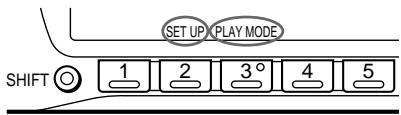
2. Press the TUNING button 3 (PLAY MODE) to select the play mode. The play mode changes in the following order: INTRO -> REP -> NR -> ATA -> BL.SKP.

3. Press the TUNING button (204) to turn the power on.
The power will turn on.
If no operation is performed for a few seconds, the display will show "OFF" and the unit will turn off automatically.
Press the TUNING button to select the desired band.
Press the BAND button to select the desired band (BTM).
The unit will automatically search for stations and store them in memory. The search will stop when a station is found. The unit will store up to 10 stations in each band (FM1, FM2, MW, LW).
The unit will automatically search for stations and store them in memory. The search will stop when a station is found. The unit will store up to 10 stations in each band.
1. Press the SOURCE button to select the desired band (FM1, FM2, MW, or LW).
2. Press the TUNING button 6 (BTM). The unit will automatically search for stations and store them in memory. The search will stop when a station is found. The unit will store up to 10 stations in each band.
The unit will automatically search for stations and store them in memory. The search will stop when a station is found. The unit will store up to 10 stations in each band. The unit will also automatically search for stations and store them in memory when the power is turned on.
The unit is a tuner, with 20 stations FM1 and FM2, 10 stations MW and LW, and a timer.
1. Press the SOURCE button to select the tuner. 2. To select a station, use the SEEK/AMS button to search for the next station, or use the manual tuning buttons. 3. The tuner can be set to receive FM, MW, or LW broadcasts.
The tuner has a built-in clock.
The tuner can be set to receive FM, MW, or LW broadcasts, and has a sleep timer.
The tuner has a built-in clock.
1. Press the SOURCE button to select the tuner. 2. To select a station, use the SEEK/AMS button to search for the next station, or use the manual tuning buttons.
The tuner has a built-in clock.
To select a station, use the SEEK/AMS button to search for the next station, or use the manual tuning buttons. The tuner can be set to receive FM, MW, or LW broadcasts.
The tuner has a built-in clock. To set the clock, press the SHIFT button, then press the PLAY MODE button to select "LOCAL" (for local time). Press the button to set the time. The clock can be set to 12-hour or 24-hour format.
The tuner has a built-in clock. To set the clock, press the SHIFT button, then press the PLAY MODE button to select "LOCAL" (for local time). Press the button to set the time. The clock can be set to 12-hour or 24-hour format.
The tuner can receive FM broadcasts in the 87.5 to 108.0 MHz range, and AM broadcasts in the 530 to 1600 kHz range.
The tuner has a built-in clock.
1. Press the SHIFT button, then press the PLAY MODE button to select "MONO".
2. Press the button to select "MONO-ON". To return to stereo, press the button again.
1. Press the button to select the desired source. 2. The list of sources appears.
3. Select the desired source.
Press the C button to select the previous source, or the Q button to select the next source. The selected source is displayed.
2. Press the TUNE button to adjust the frequency (→). The display shows the current frequency.
Press the C button (←) to return to the previous source.
Select the source using the SOURCE button.
The available sources are displayed in the following order:
FM1 → FM2 → MW → LW → CD1 → CD2 → MD1 → MD2 → TAPE
Press the SOURCE button repeatedly to cycle through the sources.
e OIOIO, t'AIIEfl A,UIfUO (A,UIfUO SEEK/AMS)
- A, UOI t E~A O I E e A U A I t I, I E eAIO (AMS)
Có, Aífí, OÓO ÓÉA, A%àIéfí lúEIEUÁ
Ió%oI U E A OUO OI IIT,E-E
SEEK/AMS OO%IOI U tAU tE%U.
%O OEEIU,IOUO U, C° IQUEUA
OOOUUEU,
Nif i1O'AEiEi
OOIAAU, EIOO EAI
Nif1tO'AEiEfl
O A%‰ U'Et %o OEAI
C1OÉ%AIIEA OO A%AIAIIO,O IAOU±
I 1 % O EEA—eU'IOE OOEOI
Có, Aín, ÓOÖ OÉA, A%o AIén I+EIEUÀ E
(3) (PLAY MODE) %oO O'fl, IAI'Efl
%EOOIAA "INTRO".
2 aiO,óí ÚIó iEiÉUÀ (4) → %o
Oófl,läiEfl‡‰EÖOIAA“INTRO-ON”.
EiAùOùIéO, iE A.
Nif,OA, ± Aiefi O.1oiAEEIU
eAIfEfl ± OAOUIO,OIAEA
aOIE AOU,O A,UIO,1%o OEAi
4-‰O OEA~1OÅ2-
j+1 JOA OUA AO
eɪt,ɪEÀ E‰ OÉtɪEÀ A,Uɪt
0.08% (WRMS)
oTOUOUIE%EToAoi
30-20.000 E
eUIO-AIEA OOIAAIO OEi+1-UUU
| iEOI‡OOAU | eEOUAI‡ Dolby B NR i, ~A i‡ | eEOUAI‡ Dolby N R ,°i1, ~A i‡ |
| TYPE II, IV | 67‰A | 61‰A |
| TYPE I | 64‰A | 58‰A |
éAíÉfī ±‰ EÖO EäiEi
65.0-74.0 MHz
(FM, 30 kHz)
87.5-108.0 MHz
(FM, 50 kHz)
AM, 10 kHz
FM, 50 kHz
AM
FM, 50 kHz
FM, 50 kHz
30-15,000 Hz
FM
FM, 50 kHz
- FM, 50 kHz, 87.5-108.0 MHz
4-8
(AMS) 6.13
Auto Metal 6
- WELCOME
- TABLE OF CONTENTS
- THIS UNIT ONLY
- GETTING STARTED
- CASSETTE PLAYER
- RADIO
- OTHER FUNCTIONS
- WITH OPTIONAL EQUIPMENT
- CD/MD CHANGER
- ADDITIONAL INFORMATION
- EN
- RESETTING THE UNIT
- NOTE
- DETACHING THE FRONT PANEL
- NOTES
- ATTACHING THE FRONT PANEL
- CAUTION ALARM
- PREPARING THE ROTARY REMOTE
- SETTING THE CLOCK
- LISTENING TO THE TAPE
- CLOSE THE FRONT PANEL
- TIPS
- FAST-WINDING THE TAPE
- LOCATING THE BEGINNING OF THE TRACKS
- CHANGING THE DISPLAYED ITEMS
- PLAYING THE TAPE IN VARIOUS MODES
- MEMORISING STATIONS AUTOMATICALLY
- BEST TUNING MEMORY (BTM)
- CAUTION
- MEMORISING ONLY THE DESIRED STATIONS
- RECEIVING THE MEMORISED STATIONS
- IF YOU CANNOT TUNE IN A PRESET STATION
- TIP
- RECEIVING FM STEREO STATIONS — POLAR MODULATION
- IF FM STEREO RECEPTION IS POOR — MONAURAL MODE
- STORING THE STATION NAMES
- STATION MEMO
- DISPLAYING THE STATION NAME
- ERASING THE STATION NAME
- LOCATING A STATION BY NAME—LIST-UP
- PRESS LIST MOMENTARILY
- ONCE THE STATION NAME OR FREQUENCY HAS BEEN DISPLAYED FOR FIVE SECONDS, THE DISPLAY GOES BACK TO ITS NORMAL MODE. TO TURN OFF THE DISPLAY, PRESS DSPL
- USING THE ROTARY REMOTE
- THE ROTARY REMOTE WORKS BY PRESSING BUTTONS AND/OR ROTATING CONTROLS
- EACH TIME YOU PRESS SOURCE, THE SOURCE CHANGES AS FOLLOWS
- BY ROTATING THE CONTROL (THE SEEK/AMS CONTROL)
- ADJUSTING THE SOUND CHARACTERISTICS
- MUTING THE SOUND
- CHANGING THE SOUND AND DISPLAY SETTINGS
- PLAYING A CD OR MD
- AUTOMATICALLY SCROLLING A DISC NAME — AUTO SCROLL
- DISPLAYING THE RECORDING DATE OF THE CURRENTLY SELECTED MD
- LOCATING A SPECIFIC TRACK
- AUTOMATIC MUSIC SENSOR (AMS)
- LOCATING A SPECIFIC POINT IN A TRACK
- MANUAL SEARCH
- LOCATING A DISC BY DISC NUMBER
- DIRECT DISC SELECTION
- SCANNING THE TRACKS
- INTRO SCAN
- PLAYING TRACKS REPEATEDLY
- REPEAT PLAY
- PLAYING TRACKS IN RANDOM ORDER — SHUFFLE PLAY
- LABELING A CD
- ERASING THE DISC MEMO
- LOCATING A DISC BY NAME
- SELECTING THE SPECIFIC TRACKS FOR PLAYBACK
- BANK
- PLAYING THE SPECIFIC TRACKS ONLY
- PRECAUTIONS
- NOTES ON CASSETTE DECK TAPE HEADS
- CASSETTE CARE
- CASSETTES LONGER THAN 90 MINUTES
- MAINTENANCE
- FUSE REPLACEMENT
- WARNING
- CLEANING THE CONNECTORS
- LOCATION OF CONTROLS
- BUTTONS WITH THE SAME FUNCTIONS AS THOSE ON THIS UNIT
- BUTTONS WITH DIFFERENT FUNCTION THAN THOSE ON THE MASTER UNIT
- SPECIFICATIONS
- CASSETTE PLAYER SECTION
- TUNER SECTION
- MW/LW
- POWER AMPLIFIER SECTION
- GENERAL
- TROUBLESHOOTING GUIDE
- INDEX
- A
- B
- C
- D, E
- F, G, H
- I, J, K
- L
- M, N, O
- P, Q
- R
- S
- T, U
- V
- W, X, Y, Z
- PLAYING CDS AND MDS
- SUPPIMER
- C·AÖ OÖÄ, Aɉ‡IAOU IAIU‡
- PRESS THE KEY TO OPERATE
- END OF INSTRUCTIONS
- CONTROL INPUT, OUTPUT, AND REMOTE CONTROL
- AUDIO OUTPUT
- REMOTE CONTROL OPERATION
- LOADING A CD OR MD
- THIS FUNCTION REPEATS THE CURRENT TRACK OR ALL TRACKS
- CD PLAYER
- USE THE (ENTER) BUTTON TO SELECT THE DESIRED MEMO
- AA-E #IA IO O A%AIAEA+OEOEA+, AO OEAAE%+IA
- E'IO,O%OOU,O A+ OUOU +IFL,IA I+ IAEAO+,IOOUE
- DV
- CHECK THE CONTENTS
- FOR ANY DAMAGE
- PRESS THE TUNING BUTTON TO SELECT THE DESIRED BAND
- THE TUNER HAS A BUILT-IN CLOCK
Brand : SONY
Model : XR-C503
Category : Car radio