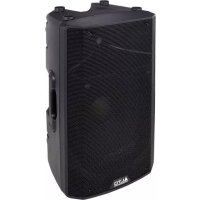
TX215 - Loudspeaker ALTO - Free user manual and instructions
Find the device manual for free TX215 ALTO in PDF.



| Product type | Active speaker of the TX2 series |
| Brand | ALTO Professional |
| Model | TX215 |
| Rated power (estimated) | 800 W RMS, 1600 W peak |
| Frequency response (estimated) | 50 Hz – 20 kHz |
| Speaker | 1x 15" woofer + 1x compression tweeter |
| Power supply | 100-240 V ~, 50/60 Hz |
| Input connector | 1x XLR/TRS combo (balanced) |
| Output connector | 1x XLR Link |
| Input selector | Line / Mic |
| Contour switch | +3 dB on bass and treble |
| Ground Lift | Yes (hum reduction) |
| LED indicators | Signal (green), Limit (red), Power |
| Mounting | On pole (35 mm socket), not suspendable |
| Dimensions (estimated) | 680 x 430 x 380 mm |
| Weight (estimated) | 25 kg |
| Box contents | Speaker, power cable, user guide |
| Maintenance | Clean with a dry cloth; do not block ventilation grilles |
| Safety | Integrated peak limiter, replaceable fuse |
Frequently Asked Questions - TX215 ALTO
User questions about TX215 ALTO
0 question about this device. Answer the ones you know or ask your own.
Ask a new question about this device
Download the instructions for your Loudspeaker in PDF format for free! Find your manual TX215 - ALTO and take your electronic device back in hand. On this page are published all the documents necessary for the use of your device. TX215 by ALTO.
USER MANUAL TX215 ALTO
TX208 TX212 TX210 TX215
User Guide
English (2 - 8)
Guía del usuario
Español (9 – 15)
Guide d'utilisation
Français (16 - 22)
Guida per l'uso
Italiano (23 - 29)
Benutzerhandbuch
Deutsch (30 - 36)
User Guide (English)
Introduction
Thank you for purchasing the TX2 Series loudspeaker. At Alto Professional, performance and reliability mean as much to us as they do to you. That's why we design our equipment with only one mind—to make your performance the best it can be.
Box Contents
TX2 Series Loudspeaker
Power Cable
User Guide
Safety & Warranty Manual
Support
For the latest information about this product (system requirements, compatibility information, etc.) and product registration, visit altoprofessional.com.
For additional product support, visit altoprofessional.com/support.
Important Safety Precautions
Please note: Alto Professional and inMusic are not responsible for the use of its products or the misuse of this information for any purpose. Alto Professional and inMusic are not responsible for the misuse of its products caused by avoiding compliance with inspection and maintenance procedures. Please also refer to the included safety and warranty manual for more information.

Caution: To reduce the risk of electric shock, do not connect a TX2 Series loudspeaker to a power outlet while the grille is removed.
Stand-Mounting
Important: Do not suspend a TX2 Series loudspeaker. It is not designed for suspended applications. We recommend our Truesonic (TS) Series or Black Series loudspeakers for suspended applications instead.
• Always install loudspeakers in accordance with applicable electrical and building codes.
- Install the loudspeaker according to its maximum weight. Check the specifications of your stand or pole to ensure it can support the loudspeaker's weight. Also, observe all safety precautions specified by the manufacturer.
- Do not mount multiple loudspeakers on the same stand or pole.
- Always verify that the stand or pole is on a flat, level, and stable surface. Also, fully extend the legs of tripod-style stands, and ensure its legs do not present a trip hazard.
- Inspect the stand (or pole and associated hardware) before each use and do not use equipment with worn, damaged, or missing parts.
- Always be cautious in windy, outdoor conditions. You may need to place additional weight (e.g., sandbags) on stand's base to improve stability. Do not attach banners or similar items to any part of a loudspeaker system. Such attachments could act as a sail and topple the system.
- Unless you are confident that you can handle the loudspeaker's weight, ask another person to help you lift it onto the stand or pole.
- Make sure your cables are out of the way of performers, production crew, and audience so they will not trip over them, pulling the loudspeaker off the stand or pole.
Sound Level
Permanent hearing loss may be caused by exposure to extremely high noise levels. The U.S. Occupational Safety and Health Administration (OSHA) has specified permissible exposures to certain noise levels. According to OSHA, exposure to high sound pressure levels (SPL) in excess of these limits may result in hearing loss. When using equipment capable of generating high SPL, use hearing protection while such equipment is under operation.
| Hours per day | SPL (dB) | Example |
| 8 | 90 | Small |
| 6 | 92 | Train |
| 4 | 95 | Subway |
| 3 | 97 | High-level |
| 2 100 Classical music concert | ||
| 1.5 | 102 | Riveting |
| 1 | 105 | Machine |
| 0.5 | 110 | Airport |
| 0.25 or less 115 Rock concert | ||
Setup
Volume Control (TX208 & TX210 only)
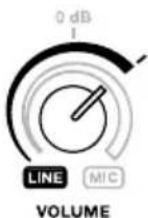
The TX208 and TX210 loudspeakers accept both line-level and mic-level audio sources. Before connecting your audio source, turn the Volume knob to the minimum position (fully counter-clockwise).
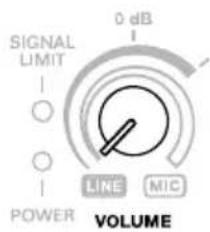
Line-Level Audio Source
When using an audio source such as a mixer, CD/MP3 player or audio preamp, follow the outer/Line level band indicator.
If the Signal Limit LED is on, do not advance the Volume knob any further. Doing so may damage your TX2 loudspeaker.
In most circumstances, you will not need to turn the volume beyond 0 dB.
If your audio source has unusually low output, you may turn the Volume knob past 0 dB, but not past the Signal Limit indicator (as explained above).

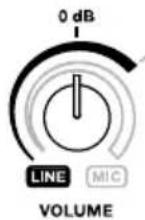
Mic-Level Audio Source
Important: If you are using an instrument with active preamp, treat the instrument as a line-level audio source (as explained above).
When using a microphone or instrument audio source, follow the inner/Mic level band indicator.
Because the mic and instrument level is typically lower than a line level, you can use the full rotation of the Volume knob.
As you turn up the Volume knob, please observe the Signal Limit indicator. If the Signal Limit LED is on, do not advance the Volume knob any further. Doing so may damage your TX2 loudspeaker.

Examples
Items not listed under Introduction > Box Contents are sold separately.
Note: These examples show the rear panel used by the TX212 and TX215 models, though all four models in the TX2 Series have the same input and output.
Example A: Two Loudspeakers
Connect each of your mixer's main outputs to the input on a TX2 loudspeaker. If you are using a TX208 or TX210, do not turn the Volume knobs past the 0 dB position. If you are using a TX212 or TX215, make sure the input selectors are set to Line.

flowchart
graph TD
    A["Microphones"] --> B["ALTO"]
    A --> C["LIVE802"]
    D["ALTO"] --> E["Power Supply"]
    F["ALTO"] --> G["Ground"]
    H["ALTO"] --> I["Power Supply"]
    J["ALTO"] --> K["Ground"]
Mixer Power Outlet Power Outlet
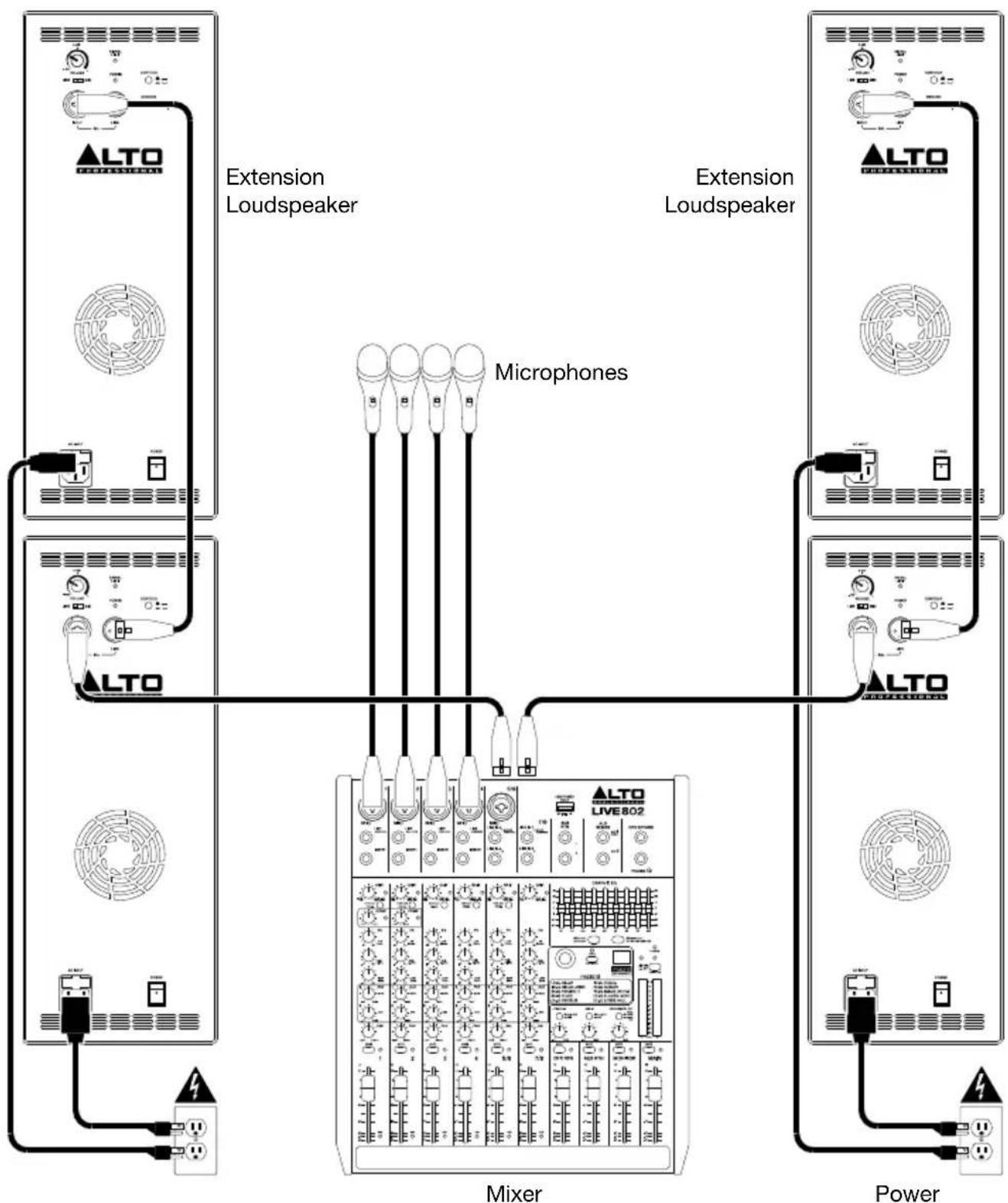
Example B: Two loudspeakers + Two extensions
Connect each of your mixer's main outputs to the input on a TX2 loudspeaker. If you are using a TX208 or TX210, do not turn the Volume knobs past the 0 dB position. If you are using a TX212 or TX215, make sure the input selectors are set to Line. Connect each of your TX2 loudspeakers' mix outs to the inputs of your extension loudspeakers.
flowchart
graph TD
    A["ALTO"] --> B["Extension Loudspeaker"]
    B --> C["Mixer"]
    C --> D["Microphones"]
    D --> E["Power"]
    style A fill:#f9f,stroke:#333
    style B fill:#ccf,stroke:#333
    style C fill:#cfc,stroke:#333
    style D fill:#fcc,stroke:#333
    style E fill:#ffc,stroke:#333
Features
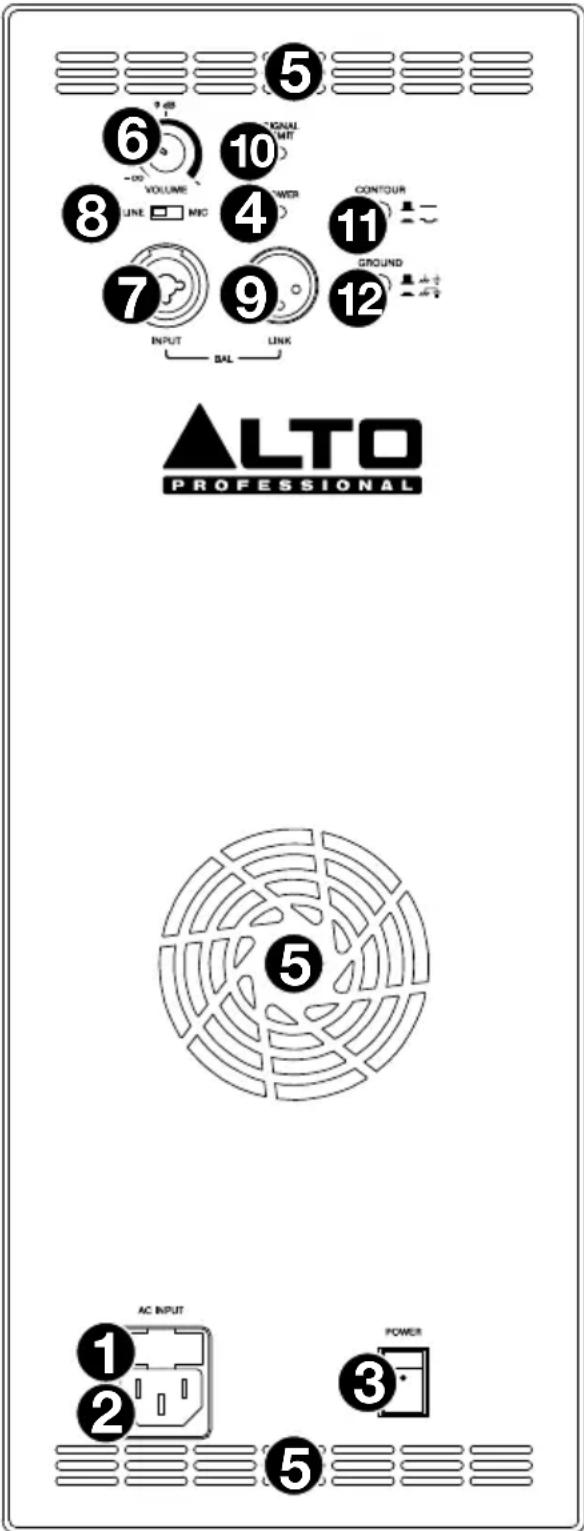
Rear Panel: TX208 & TX210
- AC Input: Use the included power cable to connect this input to a power outlet. Make sure the Power Switch is set to off when connecting or disconnecting the cable.
- Fuse: If the unit's fuse is broken, lift this tab to replace the fuse. Replace it with a fuse with an appropriate rating (printed under the unit's power cable input). Using a fuse with an incorrect rating can damage the unit and/or fuse.
- Power Switch: Use this switch to power the loudspeaker on or off. Make sure the Volume knob is set to its minimum (counterclockwise) position before turning it on.
- Power LED: This LED lights up when the loudspeaker is on.
- Cooling Vent: Keep the area in front of this vent clear from obstructions. The fan behind the vent cools the amplifier, preventing overheating.
- Volume: Turn this knob to adjust the loudspeaker's volume.
When using an audio source such as a mixer, CD/MP3 player or audio preamp, follow the outer/Line level band indicator. In most circumstances, you will not need to turn the volume beyond 0 dB. If your audio source has unusually low output, you may turn the Volume knob past 0 dB, but not past the Signal Limit indicator.
When using a microphone or instrument audio source, follow the inner/Mic level band indicator. Because the mic and instrument level is typically lower than a line level, you can use the full rotation of the Volume knob.
Please see Setup > Volume Control to learn more.
- Input: Use a standard XLR cable (not included) to connect your audio source to this input. Make sure to set the Volume knob to the correct position.
- Mix Out: Use a standard XLR cable (not included) to connect this output to the input of another loudspeaker (i.e., another TX2 loudspeaker).
- Signal/Limit LED: This LED lights up green when an audio signal is sent to the loudspeaker—it flashes at lower levels and lights solidly at higher levels. The LED lights up red when output limit/protection is active—if the LED is lit red continuously, reduce the volume of your audio source.
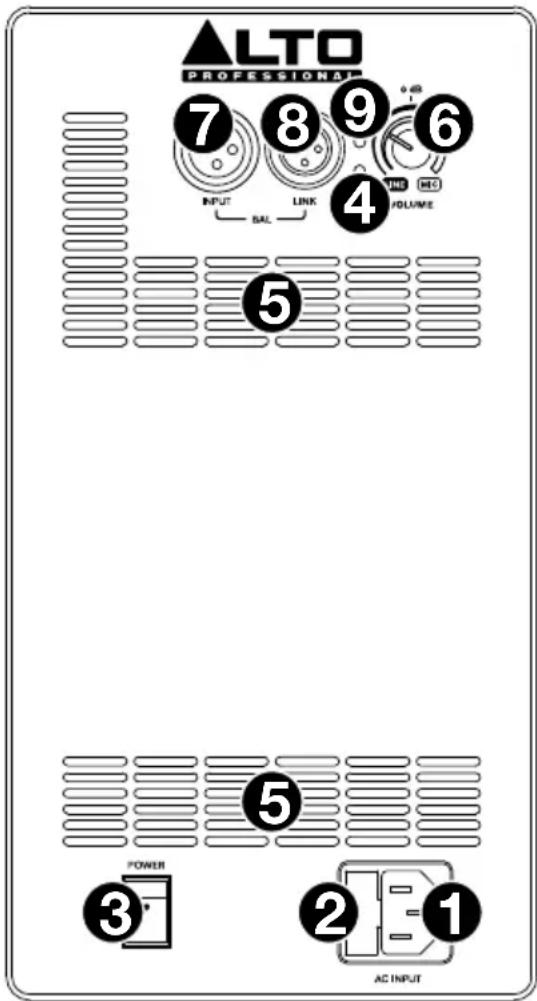
Rear Panel: TX212 & TX215
- AC Input: Use the included power cable to connect this input to a power outlet. Make sure the Power Switch is set to off when connecting or disconnecting the cable.
- Fuse: If the unit's fuse is broken, lift this tab to replace the fuse. Replace it with a fuse with an appropriate rating (printed under the unit's power cable input). Using a fuse with an incorrect rating can damage the unit and/or fuse.
- Power Switch: Use this switch to power the loudspeaker on or off. Make sure the Volume knob is set to its minimum (counterclockwise) position before turning it on.
- Power LED: This LED lights up when the loudspeaker is on.
- Cooling Vent: Keep the area in front of this vent clear from obstructions. The fan behind the vent cools the amplifier, preventing overheating.
- Volume: Turn this knob to adjust the loudspeaker's volume.
- Input: Use a standard XLR or 1/4" (6.35 mm) TRS cable (not included) to connect your audio source to this input. Make sure to set the Input Selector to the correct position.
- Input Selector: Set this switch to the Line position when using a line-level audio source connected to the Input. Set this switch to the Mic position when using a microphone connected to the Input.
- Mix Out: Use a standard XLR cable (not included) to connect this output to the input of another loudspeaker (i.e., another TX2 loudspeaker).
- Signal/Limit LED: This LED lights up green when an audio signal is sent to the loudspeaker—it flashes at lower levels and lights solidly at higher levels. The LED lights up red when output limit/protection is active—if the LED is lit red continuously, reduce the volume of your audio source.
- Contour: Engage (depress) this button to emphasize low and high frequencies by +3 dB. Disengage (raise) the switch for a flatter response for live performance or for maximum output.
- Ground Switch: Engage (depress) this switch to reduce hum or noise.
flowchart
graph TD
    A["Microphones"] --> B["ALTO"]
    A --> C["LIVE802"]
    D["ALTO"] --> E["Ground"]
    F["ALTO"] --> G["Ground"]
    H["Ground"] --> I["Ground"]
    J["Ground"] --> K["Ground"]
    L["Ground"] --> M["Ground"]
    N["Ground"] --> O["Ground"]
    P["Ground"] --> Q["Ground"]
    R["Ground"] --> S["Ground"]
    T["Ground"] --> U["Ground"]
    V["Ground"] --> W["Ground"]
    X["Ground"] --> Y["Ground"]
    Z["Ground"] --> AA["Ground"]
Line-Level-Audioquelle

Mic-Level Audioquelle
SIGNAL LIMIT I O


Technical Specifications
Specifications are subject to change without notice.
TX208
| System Type | 2-way active ported loudspeaker |
| Drivers | Low-Frequency: 8.0" (203 mm) driver, 1.5" (38 mm) voice coilHigh-Frequency: 1.0" (25 mm) titanium-diaphragm compression driver, 1.0" (25 mm) voice coil |
| Amplifier | 300 watts (peak), 150 watts (continuous), Class D power |
| Horn Coverage | 90° horizontal x 60° vertical (nominal) |
| Frequency Response | 75 Hz - 20 kHz (-3 dB) |
| Crossover Frequency | 2.5 kHz |
| Max SPL | 113 dB @ 1 m |
| Connectors | (1) XLR balanced input (Line/Mic)(1) XLR output (Link)(1) IEC power cable input |
| Controls | Power switch, volume control knob |
| Indicators | (2) power LEDs (1 front panel, 1 rear panel), clip limiter LED |
| Power | Connection: IECVoltage: 100 V, 110-120 V, or 220-240 V; 50/60 Hz, switchableFuse: 100-120V T1.6AL AC250V or 220-240V T800mAL AC250VConsumption: 150 W |
| Protection | Thermal, overload analog limiter/compressor |
| Enclosure | Injection-molded polypropylene, multi-angle for main or monitor applications, metal grille, rubber feet, 1 handle on top |
| Mounting/Installation | Standard 36 mm pole socket, wedge monitor |
| Dimensions (height x width x depth) | 16.6" x 10.7" x 9.7"422 x 272 x 252 mm |
| Weight | 13.9 lb.6.3 kg |
TX210
| System Type | 2-way active ported loudspeaker |
| Drivers | Low-Frequency: 10.0" (254 mm) driver, 1.5" (38 mm) voice coilHigh-Frequency: 1.0" (25 mm) titanium-diaphragm compression driver, 1.0" (25 mm) voice coil |
| Amplifier | 300 watts (peak), 150 watts (continuous), Class D power |
| Horn Coverage | 90° horizontal x 60° vertical (nominal) |
| Frequency Response | 75 Hz - 20 kHz (-3 dB) |
| Crossover Frequency | 2.5 kHz |
| Max SPL | 116 dB @ 1 m |
| Connectors | (1) XLR balanced input (Line/Mic)(1) XLR output (Link)(1) IEC power cable input |
| Controls | Power switch, volume control knob |
| Indicators | (2) power LEDs (1 front panel, 1 rear panel), clip limiter LED |
| Power | Connection: IECVoltage: 100 V, 110-120 V, or 220-240 V; 50/60 Hz, switchableFuse: 100-120V T1.6AL AC250V or 220-240V T800mAL AC250VConsumption: 150 W |
| Protection | Thermal, overload analog limiter/compressor |
| Enclosure | Injection-molded polypropylene, multi-angle for main or monitor applications, metal grille, rubber feet, 1 handle on top |
| Mounting/Installation | Standard 36 mm pole socket, wedge monitor |
| Dimensions (height x width x depth) | 18.2" x 11.3" x 10.9"462 x 287 x 277 mm |
| Weight | 16.7 lb.7.6 kg |
TX212
| System Type | 2-way active ported loudspeaker |
| Drivers | Low-Frequency: 12.0" (305 mm) driver, 2.0" (51 mm) voice coilHigh-Frequency: 1.0" (25 mm) neodymium compression driver, 1.0" (25 mm) voice coil |
| Amplifier | 600 watts (peak), 300 (continuous), Class D power |
| Horn Coverage | 90° horizontal x 60° vertical (nominal) |
| Frequency Response | 70 Hz - 20 kHz (-3 dB) |
| Crossover Frequency | 2.5 kHz |
| Max SPL | 118 dB @ 1 m |
| Equalization | Contour switch with low- and high-frequency +3 dB boost |
| Connectors | (1) XLR/TRS 1/4" (6.35 mm) balanced input (Line/Mic)(1) XLR output (Link)(1) IEC power cable input |
| Controls | Power switch, volume control knob, contour switch, ground-lift switch |
| Indicators | (2) power LEDs (1 front panel, 1 rear panel), clip limiter LED |
| Power | Connection: IECVoltage: 100 V, 110-120 V, or 220-240 V; 50/60 Hz, switchableFuse: 100-120V T4AL AC250V or 220-240V T2AL AC250VConsumption: 260 W |
| Protection | Thermal, overload analog limiter/compressor |
| Enclosure | Injection-molded polypropylene, multi-angle for main or monitor applications, metal grille, rubber feet, 2 handles (both sides) |
| Mounting/Installation | Standard 36 mm pole socket, wedge monitor |
| Dimensions (height x width x depth) | 23.7" x 15.0" x 13.7"602 x 381 x 348 mm |
| Weight | 31.3 lb.14.2 kg |
TX215
| System Type | 2-way active ported loudspeaker |
| Drivers | Low-Frequency: 15.0" (381 mm) driver, 2.0" (51 mm) voice coilHigh-Frequency: 1.0" (25 mm) neodymium compression driver, 1.0" (25 mm) voice coil |
| Amplifier | 600 watts (peak), 300 (continuous), Class D power |
| Horn Coverage | 90° horizontal x 60° vertical (nominal) |
| Frequency Response | 65 Hz - 20 kHz (-3 dB) |
| Crossover Frequency | 2.2 kHz |
| Max SPL | 119 dB @ 1 m |
| Equalization | Contour switch with low- and high-frequency +3 dB boost |
| Connectors | (1) XLR/TRS 1/4" (6.35 mm) balanced input (Line/Mic)(1) XLR output (Link)(1) IEC power cable input |
| Controls | Power switch, volume control knob, contour switch, ground-lift switch |
| Indicators | (2) power LEDs (1 front panel, 1 rear panel), clip limiter LED |
| Power | Connection: IECVoltage: 100 V, 110–120 V, or 220–240 V; 50/60 Hz, switchableFuse: 100–120V T4AL AC250V or 220–240V T2AL AC250VConsumption: 260 W |
| Protection | Thermal, overload analog limiter/compressor |
| Enclosure | Injection-molded polypropylene, multi-angle for main or monitor applications, metal grille, rubber feet, 2 handles (both sides) |
| Mounting/Installation | Standard 36 mm pole socket, wedge monitor |
| Dimensions (height x width x depth) | 24.7" x 15.2" x 14.6"627 x 386 x 371 mm |
| Weight | 32.34 lb.14.67 kg |
Trademarks & Licenses
Alto Professional is a trademark of inMusic Brands, Inc., registered in the U.S. and other countries. All other product names, company names, trademarks, or trade names are those of their respective owners.
altoprofessional.com
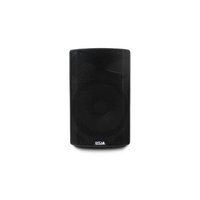
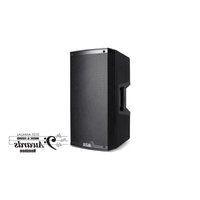
- TX208 TX212 TX210 TX215
- User Guide (English)
- Introduction
- Box Contents
- Support
- Important Safety Precautions
- Stand-Mounting
- Sound Level
- Setup
- Volume Control (TX208 & TX210 only)
- Line-Level Audio Source
- Mic-Level Audio Source
- Examples
- Example A: Two Loudspeakers
- Example B: Two loudspeakers + Two extensions
- Features
- Rear Panel: TX208 & TX210
- Rear Panel: TX212 & TX215
- Line-Level-Audioquelle
- Mic-Level Audioquelle
- Technical Specifications
- Trademarks & Licenses
- altoprofessional.com
Brand : ALTO
Model : TX215
Category : Loudspeaker