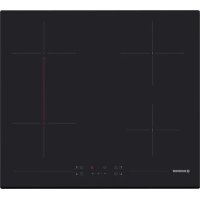
HOOVER HHOB 300 HH64BV - Cooker

HHOB 300 HH64BV - Cooker HOOVER - Free user manual and instructions

Find the device manual for free HHOB 300 HH64BV HOOVER in PDF.

English EN Download 💬 AI Question 10 questions ⚙️ Specs
📄

Document temporarily unavailable

The manual is currently being transferred to our new server. It will be accessible again in a few hours. Thank you for your patience.

Pick your language and provide your email: we'll send you a specifically translated version.
Product type Ceramic hob
Brand Hoover
Model HHOB 300 HH64BV
Number of cooking zones 4
Electrical supply 220-240 V ~ 50/60 Hz
Maximum power 7.2 kW (adjustable from 2.5 to 7.2 kW)
Cooking zone types Radiant zones, including one double and one triple
Dimensions (W x D) Approximately 59 x 52 cm (standard 60 cm)
Worktop thickness 25 to 45 mm
Power management function Yes (Power Management)
Timer Yes, up to 99 minutes
Child lock Yes (automatic activation after 15 min of stopping)
Bridge function Yes (to connect two zones)
Overflow safety Yes (automatic shutdown if key pressed >5 s)
Automatic shutdown Yes (according to heat level)
Residual heat indicator Yes (display 'H')
Cleaning Specific detergent and scraper at 30° angle
Control type Touch
Safety class Grounding mandatory
After-sales service Hoover authorized service center

Frequently Asked Questions - HHOB 300 HH64BV HOOVER

How to turn on a cooking zone?
Touch the corresponding control zone for 400 ms. A beep sounds and the figure '0' appears. Use the '+' and '-' keys to set the heat level.
How to set the maximum power management?
Within 30 seconds of power-on, touch the '-' key for 5 seconds. Use '+' and '-' to choose the power between 2.5 kW and the max power (e.g. 7.2 kW). Confirm by touching both keys simultaneously for 5 seconds.
What to do if the hob does not work?
Check the electrical supply (fuse, circuit breaker). Ensure the child lock is not activated. If the problem persists, contact the after-sales service.
How to clean the ceramic hob?
Let it cool down. Use a specific ceramic hob detergent and a scraper held at 30°. Wipe with a soft cloth. Avoid abrasive products.
What does the display 'H' on a zone mean?
The 'H' indicator signals residual heat (surface still hot, about >65°C). Do not touch the area while 'H' is displayed.
How to activate the child lock?
Press simultaneously the '+' and '-' keys to activate/deactivate. When locked, 'Lo' is displayed. It activates automatically 15 minutes after total shutdown.
Can I use aluminum pans?
Yes, but prefer extra-heavy models. Aluminum residues may scratch the surface; clean immediately. Avoid thin aluminum.
What to do in case of overflow on the keys?
If a liquid presses a key for more than 5 seconds, the hob beeps and turns off. Clean the surface and remove the object. The hob will restart normally.
How to use the bridge function?
Make sure both zones are off. Select a zone, then press the bridge key. Both zones turn on and synchronize. Adjust the heat with '+' and '-'.
Where to find the serial number?
The serial number is on the rating plate located under the hob casing. Note it for any after-sales service request.

User questions about HHOB 300 HH64BV HOOVER

0 question about this device. Answer the ones you know or ask your own.

Ask a new question about this device

The email remains private: it is only used to notify you if someone responds to your question.

No questions yet. Be the first to ask one.

Download the instructions for your Cooker in PDF format for free! Find your manual HHOB 300 HH64BV - HOOVER and take your electronic device back in hand. On this page are published all the documents necessary for the use of your device. HHOB 300 HH64BV by HOOVER.

USER MANUAL HHOB 300 HH64BV HOOVER

Manual assistant
Powered by Anthropic
Waiting for your message
Product information

Brand : HOOVER

Model : HHOB 300 HH64BV

Category : Cooker