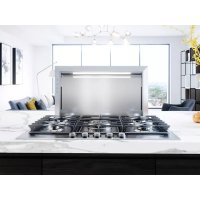
DLIE36ASX - Range hood Zephyr - Free user manual and instructions
Find the device manual for free DLIE36ASX Zephyr in PDF.



| Product Type | Downdraft Ventilation Hood |
| Brand | Zephyr |
| Model | DLIE36ASX |
| Width | 36 inches (91.4 cm) |
| Power Supply | 120 V, 60 Hz, 3 A (with DBI-600A blower) / 6 A max (with external or in-line blower) |
| Duct Diameter | 8 in (20.3 cm) for DBI-600A blower; 10 in (25.4 cm) for external/in-line blowers |
| Material | Stainless steel (standard finish) |
| Controls | Touch panel: fan +/-, 2-level lighting, chimney up/down button |
| Lighting | 2 brightness levels (multi-tap control) |
| Filter Cleaning Reminder | Yes, after 30 hours of operation; reset by long press |
| Fan Speeds | Multiple speeds (low, medium, high) with recall of settings after chimney rises |
| Chimney Height | Retractable; rises or lowers using the arrow button |
| Venting Types | Front, side, rear; with or without recirculation (optional ZRC-00LF kit) |
| Compatible Blowers | DBI-600A (internal), CBE-1000 (external), PBN-1000A (in-line) – sold separately |
| Filters | Metal grease filters, dishwasher safe |
| Maintenance | Clean filters and greasy surfaces regularly; do not use abrasive products |
| Safety | Grounding required; disconnect power before maintenance; use metal ductwork only |
| Warranty | 2 years parts, 1 year labor (see terms) |
| Weight (estimated) | Approximately 23 kg (50 lb) |
| Housing Dimensions (H x W x D) | Approximately 6.25 x 36 x 18 in (15.9 x 91.4 x 45.7 cm) |
Frequently Asked Questions - DLIE36ASX Zephyr
User questions about DLIE36ASX Zephyr
0 question about this device. Answer the ones you know or ask your own.
Ask a new question about this device
Download the instructions for your Range hood in PDF format for free! Find your manual DLIE36ASX - Zephyr and take your electronic device back in hand. On this page are published all the documents necessary for the use of your device. DLIE36ASX by Zephyr.
USER MANUAL DLIE36ASX Zephyr
For use with these blowers
(purchase blowers separately):
Model DBI-600A - Internal
Models CBE-1000 - External
Models PBN-1000A - In-Line

natural_image
Technical line drawing of a multi-panel electronic device with mounting brackets and ventilation slots (no text or symbols)APR19.0101
Français p. 35
Español p. 69
READ AND SAVE THESE INSTRUCTIONS
Register your product online at: www.zephyronline.com
Safety Information....3
Contents 4
Specifications 4
Tools Needed....4
Planning
Before You Begin 5
Taking Measurements....5
Ducting Configurations .... 5
Cabinet Cutouts 10
Preparing the Downdraft
Side or Rear Ducting....12
Front Ducting....12
Electrical Panel in Remote Location 13
Final Assembly....13
Installation
Cutting Countertop Opening....14
Install Housing into Cabinet....15
Install Finishing Trim 16
Installing Ductwork....16
Electrical Wiring Installation
Internal Blower Only 17
Exterior or In-Line Blower Only 18
Appliance Installation/Operation 19
Use and Care....20
Optional Accessories....21
Blower Duct Routing Configurations A - H 23
Wiring Diagram....31
Dimensional Drawing 32
Warranty 33


WARNING
TO REDUCE THE RISK OF FIRE, ELECTRIC SHOCK, OR INJURY TO PERSONS, OBSERVE THE FOLLOWING:
- Use this unit only in the manner intended by the manufacturer. If you have questions, contact the manufacturer at the address or telephone number on the back page.
- Before servicing or cleaning unit, switch power off at service panel and lock the service disconnecting means to prevent power from being switched on accidentally. When the service disconnecting means cannot be locked, securely fasten a prominent warning device, such as a tag, to the service panel.
- Installation work and electrical wiring must be done by a qualified person(s) in accordance with all applicable codes and standards, including fire-rated construction codes and standards.
- Sufficient air is needed for proper combustion and exhausting of gases through the flue (chimney) of fuel burning equipment to prevent backdrafting. Follow the heating equipment manufacturer's guideline and safety standards such as those published by the National Fire Protection Association (NFPA), and the American Society for Heating, Refrigeration and Air Conditioning Engineers (ASHRAE), and the local code authorities.
- When cutting or drilling into wall or ceiling, do not damage electrical wiring and other hidden utilities.
- Ducted fans must always be vented to the outdoors.
- To reduce the risk of fire, use only metal ductwork.
- Do not install this product with the activating switch directly behind a burner or element. Minimum distance between the switch and the edge of the burner should be 4 inches.
- Loose-fitting or hanging clothing should never be worn when operating this appliance. They may be ignited by burners/elements on cooktop.
- Children should not be left alone or unattended in the area where this appliance is in use.
- This unit must be grounded.
TO REDUCE THE RISK OF A RANGE TOP GREASE FIRE:
a) Never leave surface units unattended at high settings. Boil overs cause smoking and greasy spillovers that may ignite. Heat oils slowly on low or medium settings.
b) Always turn hood ON when cooking at high heat or when cooking flaming foods.
c) Clean ventilating fans frequently. Grease should not be allowed to accumulate on fan or filter.
d) Use proper pan size. Always use cookware appropriate for the size of the surface element.

TO REDUCE THE RISK OF INJURY TO PERSONS IN THE EVENT OF A RANGE TOP GREASE FIRE, OBSERVE THE FOLLOWING:
- SMOTHER FLAMES with a close-fitting lid, cookie sheet, or metal tray, then turn off the burner. BE CAREFUL TO PREVENT BURNS. If the flames do not go out immediately, EVACUATE AND CALL THE FIRE DEPARTMENT.
- NEVER PICK UP A FLAMING PAN - You may be burned.
- DO NOT USE WATER, including wet dishcloths or towels - a violent steam explosion will result.
- Use an extinguisher ONLY if:
A. You know you have a Class ABC extinguisher, and you already know how to operate it.
B. The fire is small and contained in the area where it started.
C. The fire department is being called.
D. You can fight the fire with your back to an exit. Based on "Kitchen Fire Safety Tips" published by NFPA.

CAUTION
- For indoor use only.
- For general ventilating use only. Do not use to exhaust hazardous or explosive materials and vapors.
- To avoid motor bearing damage and noisy and/or unbalanced impellers, keep drywall spray, construction dust, etc. off power unit.
- Clean filters and grease-laden surfaces frequently.
- Do not repair or replace any part of this appliance unless specifically recommended in this manual. All other servicing should be done by a qualified technician.
- Please read specification label on product for further information and requirements.
- To reduce the risk of fire and electric shock, install this downdraft only with blower models shown below. Other blower models cannot be substituted. (Blowers sold separately). Internal Blower Model DBI-600A, Exterior Blower Model CBE-1000, In-Line Blower Model PBN-1000A.
INSTALLER: Save this manual for Electrical Inspector and Homeowner to use.
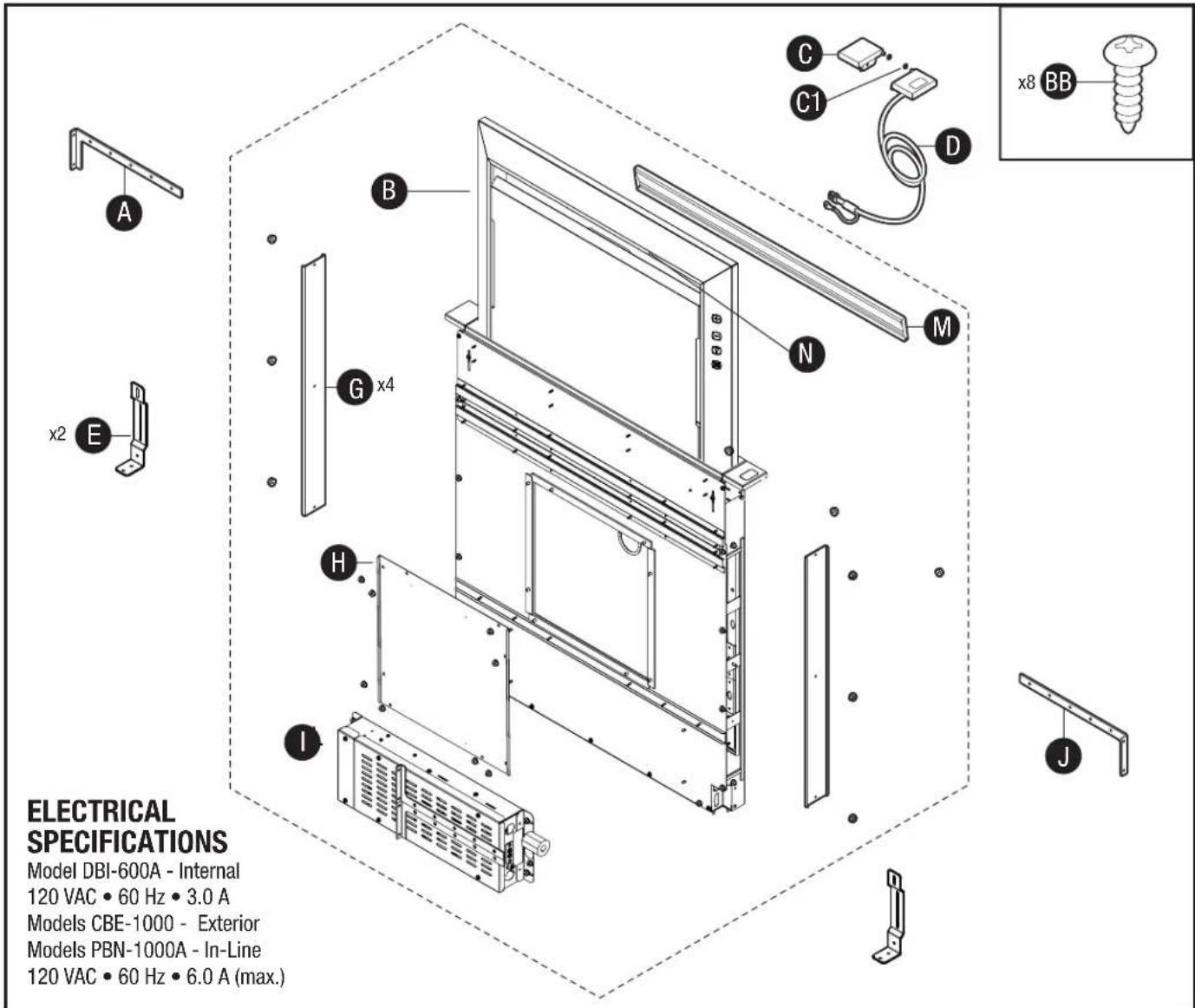
| Part Description | Quantity |
| A Upper support bracket (left) 1 | |
| B Downdraft ventilator housing 1 | |
| C End cap trim (left) 1 | |
| C1 End cap trim retaining washer 2 | |
| D End cap trim-up button (right) 1 | |
| E Support Leg 2 | |
| G Discharge cover 4 | |
| H Front panel cover 1 | |
| I Electrical panel 1 | |
| J Upper support bracket (right) 1 |
| Part Description | Quantity | |
| M | Flip door | 1 |
| N LED light strip | 1 | |
| BB | #10 x .50 Phillips round head screw | 8 |
Tools Needed
Measuring tape, pencil, Phillips screwdriver #2, nut drivers (11/32", 3/8", 7/16"), box-end wrench, saw, spirit-level, tin snips, work gloves, and aluminum tape. (DO NOT use insulating tape.)
Before You Begin
Due to its flexible design, this downdraft system can be used to exhaust airborne contaminants when cooking with a variety of gas or electric cooking appliances - including cooktops, rangetops, slide-in ranges and free-standing ranges.
It can be mounted in island, peninsula, or conventional wall locations. The blower (purchase separately) and electrical panel can be mounted to the downdraft unit, inside the cabinet, or in a convenient remote location.
This unit can be easily installed following these basic steps:
- Cut out the countertop opening.
- Mount the unit in the cabinet.
• Install the blower and electrical panel. - Connect the ductwork and electrical.
- Install the trim.
• Install the cooking appliance.
Note: the high level of air flow of this appliance may affect the gas flame on some types of gas cooktops. This is NORMAL and will cause no harm, but can be corrected by lowering the speed of the blower.
Gas Cooktop Seal Kit is recommended for use with all gas cooktops. The kit creates a seal between the cooktop and the lower cabinet. Includes trim bracket and trim seal. See Optional Accessories section.
Taking Measurements
- Refer to the cooktop installation instructions for dimensions of cooktop, countertop cut-out, and cabinet requirements. However, it is recommended that oversized cabinets be used for easier installation. Custom island designs need to account for deeper cabinets - especially when installed with a range in front of the downdraft or when mounting the blower behind the downdraft. You must also plan for an access door.
- Cooktop depth can vary greatly from one to another. This may cause the fit of these two appliances to be rather tight. Pay special attention to the areas of potential interference highlighted above. A countertop with (A) a raised lip and/or (B) a backsplash may not allow enough flat countertop for a proper installation. Note that 2-3/4" of flat countertop is required behind cooktop and that 2-1/2" is necessary between the back edge of the cooktop and the inside of cabinet back.

Ducting Configurations
- The downdraft blower system is designed for use with 8" round ductwork using a DBI-600A blower or 10" round ductwork using a remote blower. (Purchase blowers separately.)
- For best performance: Choose the ducting option which allows the shortest length of ductwork and a minimum number of elbows and transitions. Check location of floor joists, wall studs, electrical wiring or plumbing for possible interference.
Front Exhaust with Internal Blower

Ducting Configurations (continued)
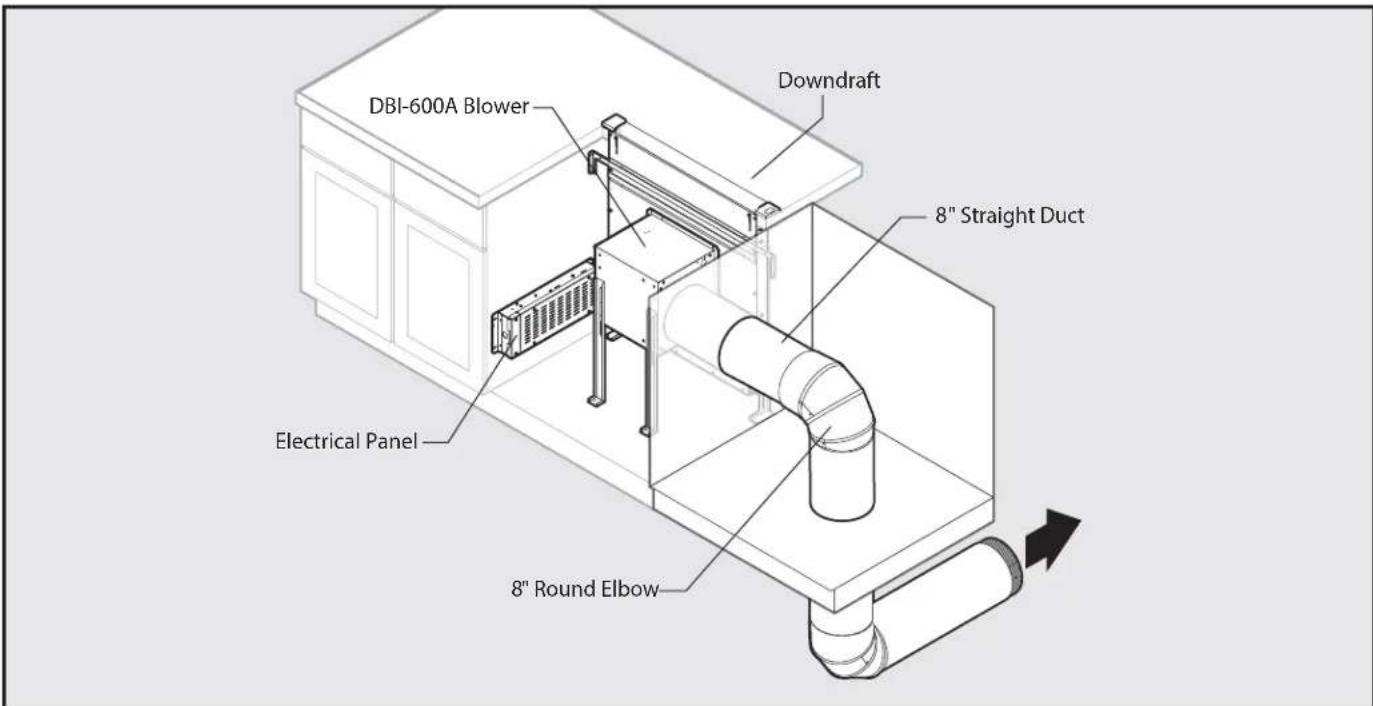
Front Exhaust with DBI-600A Blower (through cabinet)
Front Exhaust with DBI-600A Blower and Recirculating Kit

Front Exhaust with DBI-600A Blower (through cabinet) and Recirculating Kit
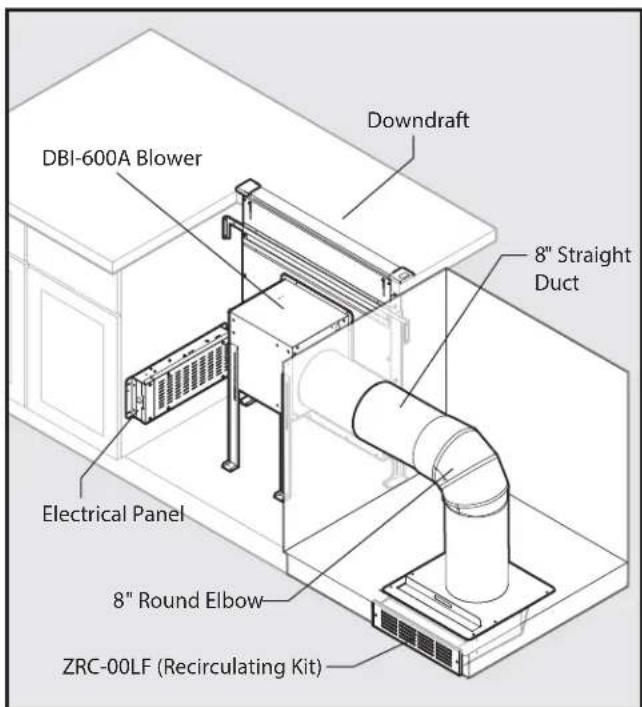
Refer to ZRC-00LF manual for further recirculating kit installation instructions.
Ducting Configurations (continued)
Side Exhaust with DBI-600A Blower

Rear Exhaust with DBI-600A Blower

Side Exhaust with DBI-600A Blower and Recirculating Kit

Refer to ZRC-00LF manaul for further recirculating kit installation instructions.
Ducting Configurations (continued)
Front Exhaust with Remote Blower

* To one of the following:
Model CBE-1000 External Blower
• Model PBN-1000A In-line Blower
Note: External or in-line blowers require 10" ducting.
Side Exhaust with Remote Blower

* To one of the following:
Model CBE-1000 External Blower
• Model PBN-1000A In-line Blower
Note: External or in-line blowers require 10" ducting.
Ducting Configurations (continued)
Rear Exhaust with Remote Blower

Note: External or in-line blowers require 10" ducting.
Below Exhaust with Remote Blower

Note: DBI-600A blower requires 8" ducting. External or in-line blowers require 10" ducting.
Cabinet Cutouts

CAUTION
BEFORE CUTTING HOLE IN CABINET FOR DUCTWORK, check for interference with floor joists, wall studs, electrical wiring, or plumbing.
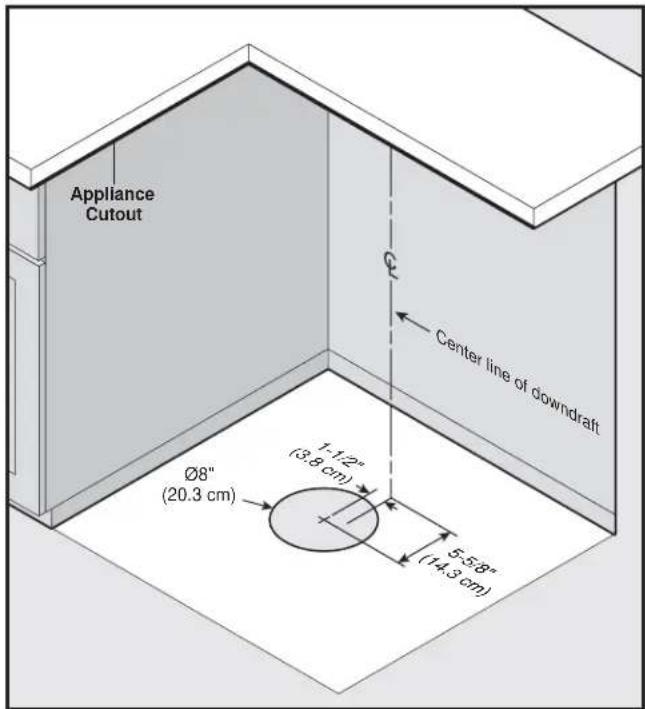
Use the dimensions in illustrations to help plan how and where to provide duct access through your cabinet. Generally, 1-7/8" x 19" rectangular duct will be used through left, right, below and back of cabinet - while 8" round duct will be used through cabinet floor using DBI-600A blower.
For left, right, below or rear exhaust: Allow at least 18" for transition and elbow or blower.
For left / right exhaust: a 30" deep cabinet is recommended to align properly with DBI-600A blower. DBI-600A blower can be mounted to rear cabinet wall or to a platform / frame (not provided) on the base of the cabinet floor. (See DBI-600A blower instructions).
Note: DBI-600A blower can only attach to the front of the down-draft.
Cabinet depths of 24" to 30" are required - depending on the type of cooking appliance.
If using a Recirculating Kit, see "Plan the installation" section of the installation instructions packaged with the kit.
Below, Side or Rear Ducting Cutouts

Cabinet Cutouts (continued)

Dimensions based off of - 10" round elbow
DBI-600A Blower Ducting - Remote Location Cutout

Dimensions based off of - 8" round elbow
DBI-600A Blower Ducting Cutout10" External or In-I
Side or Rear Ducting

Remove a discharge cover (G) from sides or rear of downdraft (B). Note: Only remove one cover.
Front Ducting

Remove front panel cover (H) from downdraft (B).

Install a transition and rectangular ductwork to downdraft (B). (Rectangular ductwork sold separately)

Install 8" or 10" remote discharge plate to downdraft (B). (Remote discharge plate sold separately)
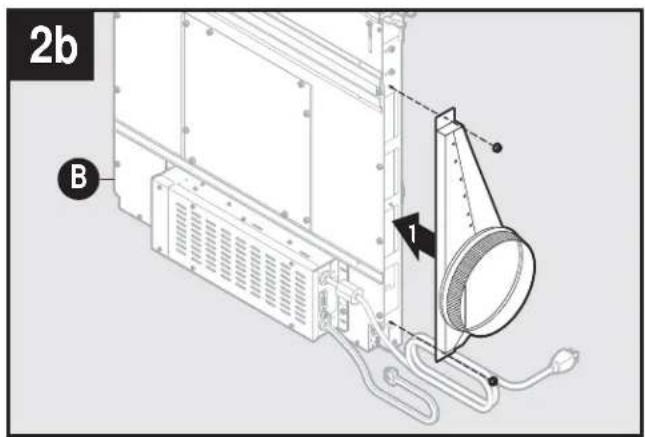
Install 1-7/8" to 8" or 10" round transition to downdraft (B). (Rectangular to round transitions sold separately)
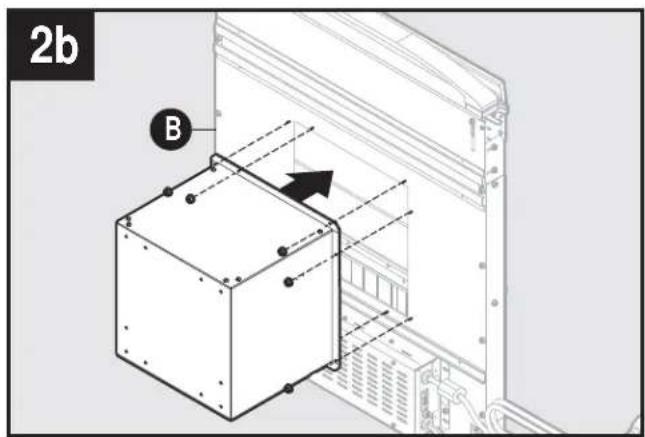
Install the DBI-600A blower to downdraft (B). Note: DBI-600A blower can be installed with duct to left, right or downward.
Electrical Panel in Remote Location
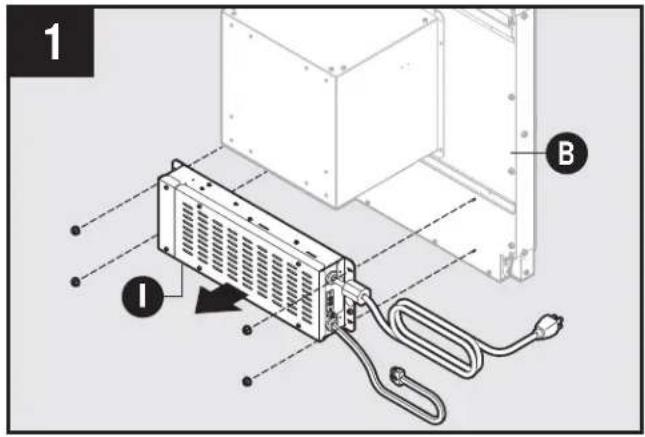
Remove electrical panel (I) from downdraft (B). Electrical panel connector cable length is 2 feet. Optional 5 foot cable extension available. Note: Option for most installations. Required for DBI-600A blower installations when discharge is down.
Final Assembly

Attach previously removed lower support legs (E) to downdraft (B) using one nut for each leg.

Slide upper support brackets (A,J) into side channels of downdraft (B).

If using DBI-600A blower, attach blower support legs with supplied screws.
Cutting Counter Top Opening
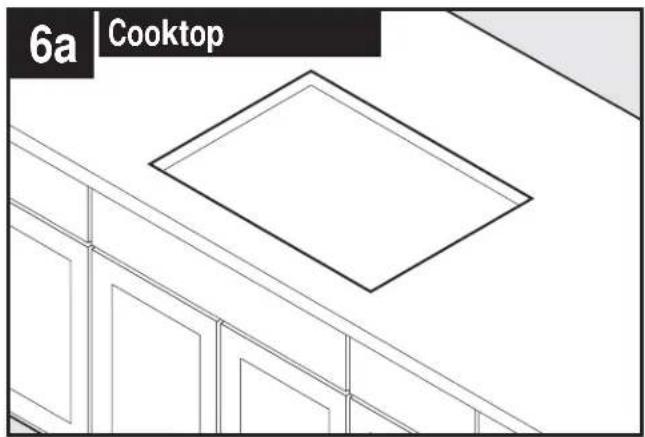
natural_image
Architectural floor plan view showing staircase and window with a central diamond-shaped ceiling (no text or symbols)Gass Cooktop seal kit is recommended if installing a gas cooktop. See Optional Accessory page for more information.

Range trim kit may be required. See Optional Accessory page for more information.

Gas Cooktop seal kit is recommended if installing a gas cooktop. See Optional Accessory page for more information.

natural_image
Isometric line drawing of a four-wheeled stove with control knobs and a downward arrow indicating cooling or ventilation (no text or symbols)Place appliance.
Note: Cook top shown.

natural_image
Isometric line drawing of a 3D room corner with a labeled section '6c Rangetop' (no other text or symbols)
Center template against the back flange and mark downdraft opening.
A = 1-7/8" B = 27-1/4" DLI-E30ASX, 33-1/4" DLI-E36ASX
Cutting Counter Top Opening (continued)
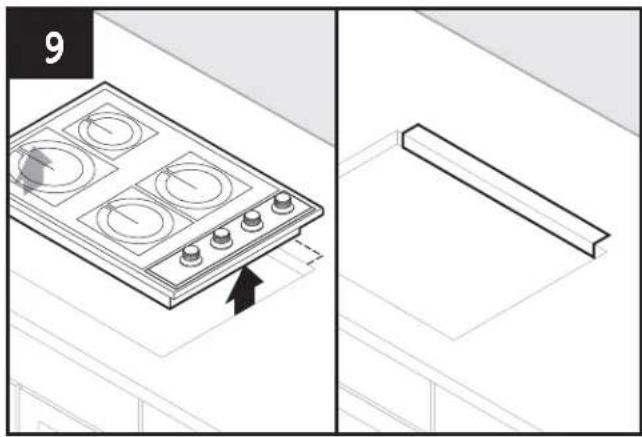
Remove cook top/appliance and cut opening.
Install Housing into Cabinet

natural_image
Isometric line drawing of a kitchen appliance with a door frame and ventilation system (no text or symbols)Set housing into cabinet.

natural_image
Technical line drawing of a cabinet or enclosure with control panel and buttons (no text or symbols)Level housing.
Note: Steps 11-15, right cabinet not shown for clarity.
Install Housing into Cabinet (continued)

Attach support legs (E) to bottom of cabinet with two screws (AA) per leg. Tighten hex screws. Note: If cabinet bottom is removed, use blocks as spacers between floor and support legs.

Extend upper support brackets (A) and attached to sides of cabinet with two screws (BB) per bracket.

Loosen four screws attaching blower support legs to DBI-600A blower. Extend legs and secure to bottom of cabinet with one screw through each bracket. Re-tighten four blower screws.
Installing Finish Trim
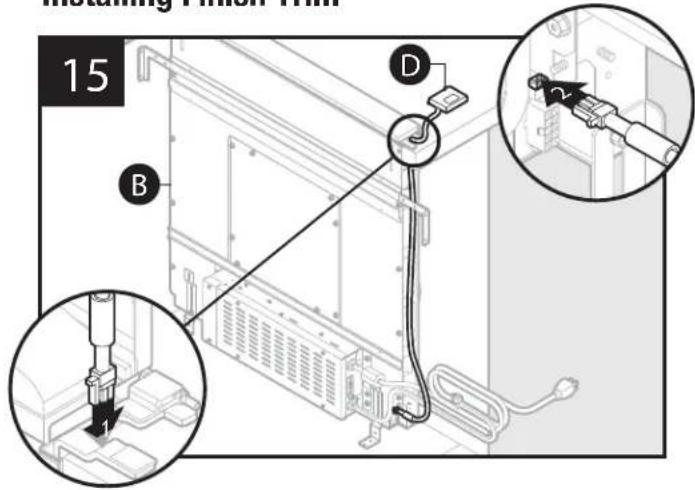

CAUTION
Only connect or disconnect UP BUTTON CABLE with main power off for at least 60 seconds.
Insert wiring harness with wire from right upper button (D) into opening in side of downdraft (B). Insert upper button (D) wiring harness into receptacle at lower right side of downdraft (B).
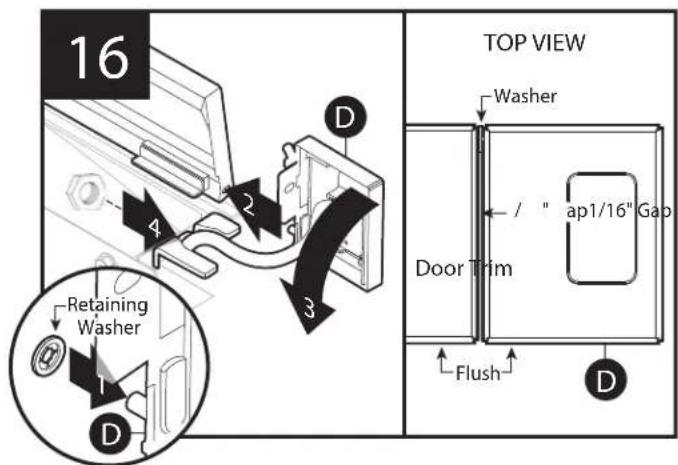
Position right trim cap (D). Place retaining washer on right trim cap. Insert hinge pin into slot of the flip door. Secure right trim cap by trim cap nut. Note: Make sure trim: sits flat on countertop surface, is flush with top door, has 1/16" GAP between trim and top door, and wiring is not pinched.
Installing Finish Trim (continued)

Place retaining washer on left trim cap (C). Insert hinge pin into slot of the flip door. Position left trim cap and flip door. Align trim caps and complete assembly by tightening trim cap nut.
Note: Make sure trim sits flat on countertop surface, is flush with top door, and has 1/16" GAP between trim and top door.
End cap trim peices are available, extending each trim by 1". See Optional Accessory page for more information.
Installing Ductwork

CAUTION
BEFORE CUTTING HOLE IN CABINET FOR DUCTWORK, check for interference with floor joists, wall studs, electrical wiring, or plumbing.
- Refer to Ductwork Configurations in the Planning section of this document.
- Cut hole in cabinet as well as holes in wall or floor as necessary.
- Mount the roof or wall cap and work back towards the cabinet, attaching all ductwork, elbows and transitions as previously planned. Tape all ductwork connections to make them secure and air tight.
- Connect ductwork (and transition, if required) to downdraft.
DBI-600A Blower only

CAUTION
All electrical wiring should be done by a qualified person(s) in accordance with all applicable codes and standards.
- This downdraft blower using the DBI-600A Blower (purchase separately) draws 3.0 Amps and requires a 120 VAC, 60 Hz circuit.
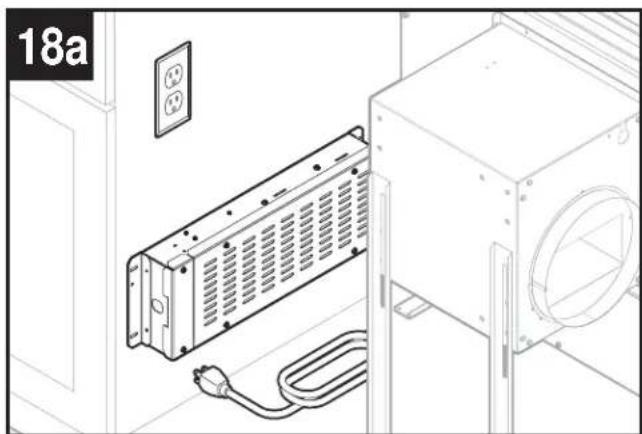
- The unit has a 30 in. long power cord with a 3-pronged plug attached to the electrical panel. Plan to provide a grounded outlet in a location which will allow the unit's power cord to reach.
• Install electrical box according to local codes.
natural_image
Technical line drawing of an electrical enclosure with a coiled cable and two outlets (no text or symbols)Mount a standard wiring box, with 3-pronged receptacle, within reach of downdraft's power cord. (Run appropriate power cable and connect it to receptacle.)

Remove electrical panel (I) cover and route blower wire into wiring box.
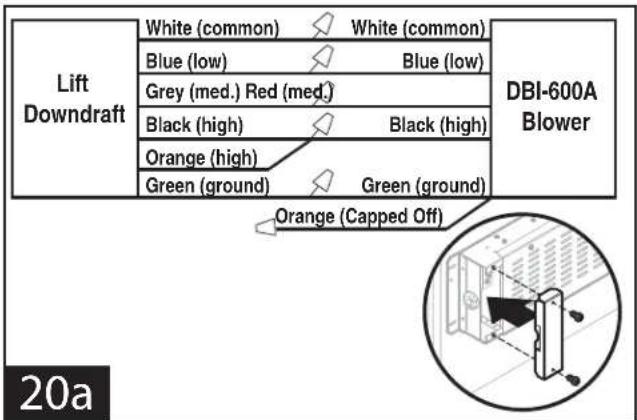
Connect blower wires to wires in electrical panel. Replace electrical panel cover.
Note: Orange wire from blower is capped off and not connected.
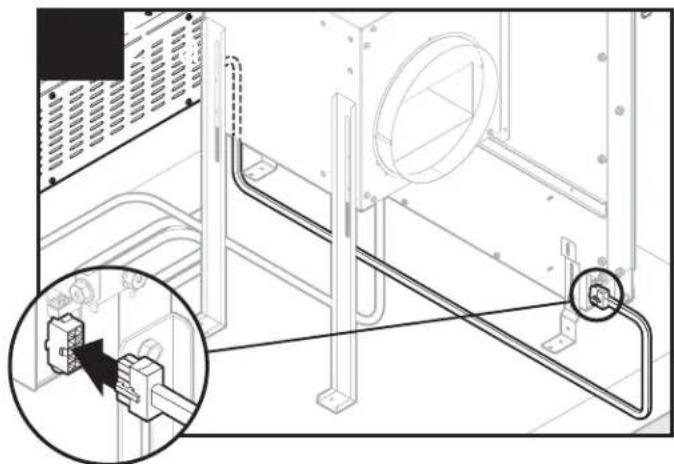
natural_image
Technical line drawing of an electrical cabinet with a magnified inset showing internal components (no text or symbols)Plug electrical panel cable into lower receptacle on side of downdraft.

Plug downdraft's power cord into outlet.
Note: Make sure that power cord is routed away from the heat generated by the cooktop.
Exterior or In-Line Blower only

CAUTION
All electrical wiring should be done by a qualified person(s) in accordance with all applicable codes and standards.
- If using a remote blower (purchase separately), the system draws 6.0 Amps (max.) and requires a 120 VAC, 60 Hz circuit.
- The unit has a 30 in. long power cord with a 3-pronged plug attached to the electrical panel. Plan to provide a grounded outlet in a location which will allow the unit's power cord to reach.
• Install electrical box according to local codes.

natural_image
Line drawing of an electrical enclosure with a coiled cable and power outlet, no text or symbols presentMount a standard wiring box, with 3-pronged receptacle, within reach of downdraft's power cord. Run appropriate power cable and connect it to receptacle.
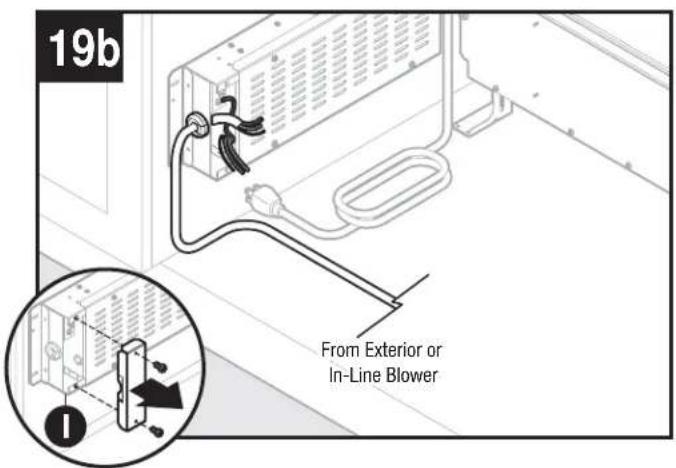
Remove wiring box cover and route blower wire into wiring box.
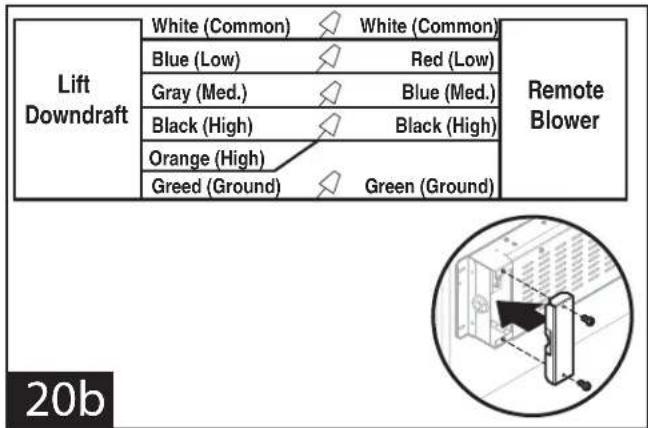
Connect blower wires to wires in wiring box. Replace wiring box cover.

natural_image
Technical line drawing of a mechanical assembly with a magnified inset showing a component detail (no text or symbols)Plug electrical panel cover into lower receptacle as shown.

Plug downdraft's power cord into outlet.
Note: Make sure that power cord is routed away from the heat generated by the cooktop.
Install Cooking Appliance
- Align the cooking appliance with downdraft and fasten appliance in place following appliance instructions.
Note: Accurate alignment of cooking appliance and downdraft is necessary to ensure that there is no interference when air vent is raised and lowered. There should be a gap of 1/32" - 1/16" between the back of the cooktop and the front of the downdraft cover.
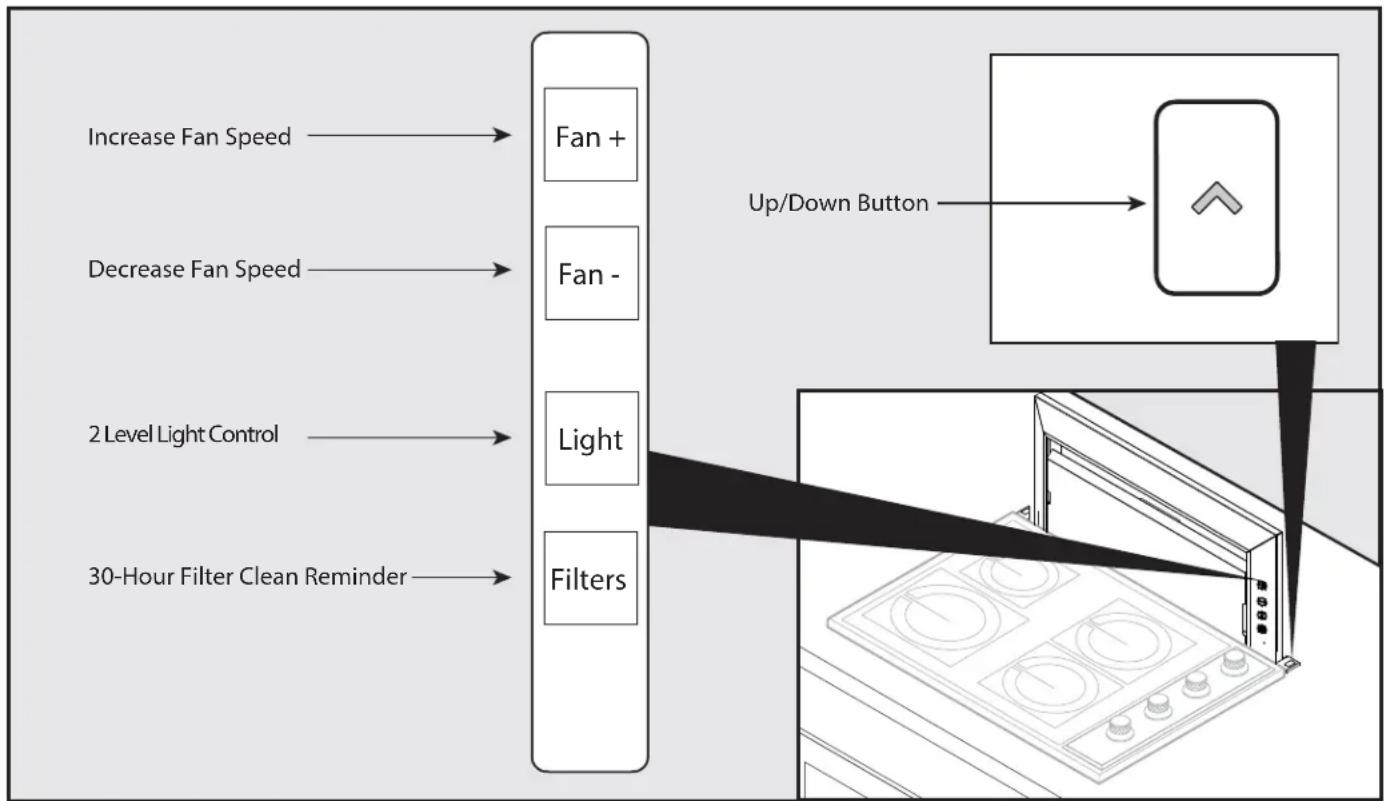
Control Panel and Up Button
Fan + Button
- Press to increase fan speed.
- After maximum speed is reached, press + button once more to turn fan off.
Fan - Button
- Press to decrease fan speed.
- After minimum speed is reached, press - button once more to turn fan off.
2 Level Light Control
- Press once for dim level.
- Press 2x for bright level.
- Press 3x to turn light off.
30-Hour Filter Clean Reminder
- After 30 hours of blower "ON" time, filter clean icon will blink continuously.
- To reset, touch and hold icon for 2 or more seconds. Indicator will turn off.
Up/Down Button
- To retract chimney, touch down button. Any feature that is active will shut off.
- Touch up button on right trim to raise chimney. All functions will return to their previous settings.
flowchart
graph LR
    A["Increase Fan Speed"] --> B["Fan +"]
    C["Decrease Fan Speed"] --> D["Fan -"]
    E["2 Level Light Control"] --> F["Light"]
    G["30-Hour Filter Clean Reminder"] --> H["Filters"]
    I["Up/Down Button"] --> J["Up/Down Button"]
Cooking

WARNING
Always disconnect electric power supply before cleaning and/or servicing unit.
Always turn the downdraft blower on before you begin cooking to establish an air flow in the kitchen. Let the blower run for a few minutes to clean the air after you turn the cooktop off. This will keep the whole kitchen cleaner and brighter.
It is recommended to use the rear burners when cooking with tall pots or when the cooking method will generate high amounts of smoke or steam. The combination of using the rear burners and operating the unit at high speed will increase the likelihood that all the smoke and steam will be removed by the downdraft.
Cleaning

CAUTION
To Clean grease filters:
Lift FRONT PANEL up and out and take out the GREASE FILTERS. Wash filters in a mild detergent solution or a dishwasher. Replace filters and front panel before using downdraft.


CAUTION
To clean inside chimney:
Lift FRONT PANEL up and out and take out the GREASE FILTERS. Use a mild detergent. DO NOT USE ABRASIVE CLOTH, STEEL WOOL PADS, OR SCOURING POWDERS. Replace filters and front panel before using downdraft.
Servicing
It may be necessary to remove the downdraft blower system from the cabinet in order to service components such as the blower motor or air vent mechanism.
Disconnect power to the cooktop and remove it first. Reverse the steps under "INSTALL HOUSING INTO CABINET" to remove the downdraft from the cabinet.
Optional Accessories
| Accessory Description | |
Model DDA-0002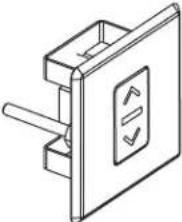 | REMOTE UP/DOWN CONTROLUse when you cannot reach the UP/DOWN Button on the downdraft chimney.Can be located on counter top, face of cabinetry or on the side cabinet of an island. Cut-out size: 2 1/4" H x 2" WCannot be used where remote control will interfere with cooking, where hot pans could be set, or where hot liquids could be spilled on the control.(Remote wiring connects with 6-pin connection) |
MODELSDDS-0030DDS-0036 | GAS COOKTOP SEAL KITRecommended for use with all gas cooktops. Includes trim bracket and trim seal.30", 36" widths. |
MODELSMUA008AMUA010A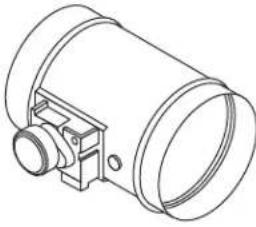 | MAKE-UP AIR DAMPERUse to provide make-up air (when called for) to keep the home comfortable by allowing the downdraft to operate at optimum levels. |
MODELSDDT-0030DDT-0036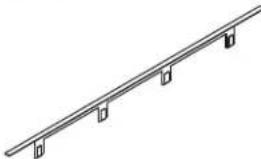 | RANGE TRIM KITUse with free-standing range - where a gap is present between back of range and downdraft.30", 36" widths. |
| Accessory Description | |
MODEL 11030132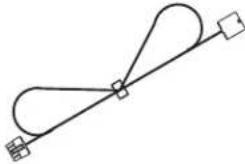 | EXTENSION CABLE - 5-FT.Use where electrical panel is remotely mounted. Extends electrical panel cable an additional 5 feet. |
MODEL ZRC-00LF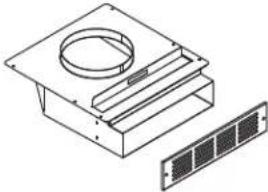 | NON-DUCT RECIRCULATING KITUse where ducting is not feasible or available. Mount to toe kick or base of a cabinet and attach directly to Model DBI-600A Blower using 8" round duct. Kit can be rotated so that the exhaust is not directly at your feet. Includes recirculating filter and decorative cover plate. |
MODEL ZOF-C006 | RECIRCULATION FILTER REPLACEMENTReplacement filter for ZRC-00LF Non-Duct Recirculating Kit. Use to effectively capture cooking contaminants. |
MODEL AK00070 | 1-7/8" X 19" TO 8" ROUND TRANSITIONRectangular to 8" round transition for left, right, or rear exhaust - using Model DBI-600A Blower. Can be attached to downdraft unit or rectangular duct (AK00072). Includes S-clips for easy, secure attachment. |
MODEL AK00071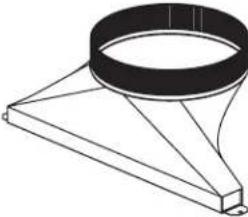 | 1-7/8" X 19" TO 10" ROUND TRANSITIONRectangular to 10" round transition for left, right, or rear exhaust - using external blower. Can be attached to downdraft unit or rectangular duct (AK00072). |
MODEL AK00072 | RECTANGULAR ADAPTOR FOR 1-7/8" X 19"Use to connect 1-7/8" x 19" rectangular duct directly to downdraft when using side or rear exhaust. |
Optional Accessories (continued)
| Accessory Description | |
MODEL DDE-0001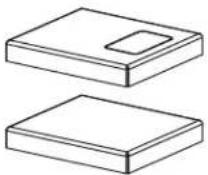 | END CAP TRIM EXTENSION +1"WIDTH - LH & RHUse left and right to increase the overall trim width by 1". |
MODEL 54190053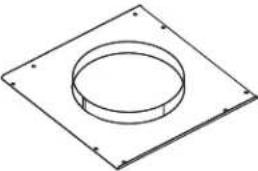 | FRONT PANEL ROUGH-IN PLATE -8" ROUNDUse where 8" round duct or elbow attaches to front of airbox (Model DBI-600A used as remote blower installation). |
MODEL 54190054 | FRONT PANEL ROUGH-IN PLATE -10" ROUNDUse where 10" round duct or elbow attaches to front of airbox (exterior or in-line blower installation). |
MODEL AK00080 | RECTANGULAR DUCT - 2-FT.SECTIONS (1-7/8" X 19")Galvanized steel construction. |
Internal Blower (DBI-600A) - Front Mounted to Downdraft

Internal Blower (DBI-600A) - Remote Mounted - Front Outlet

* As required - sourced locally
Internal Blower (DBI-600A) - Remote Mounted - Side Outlet
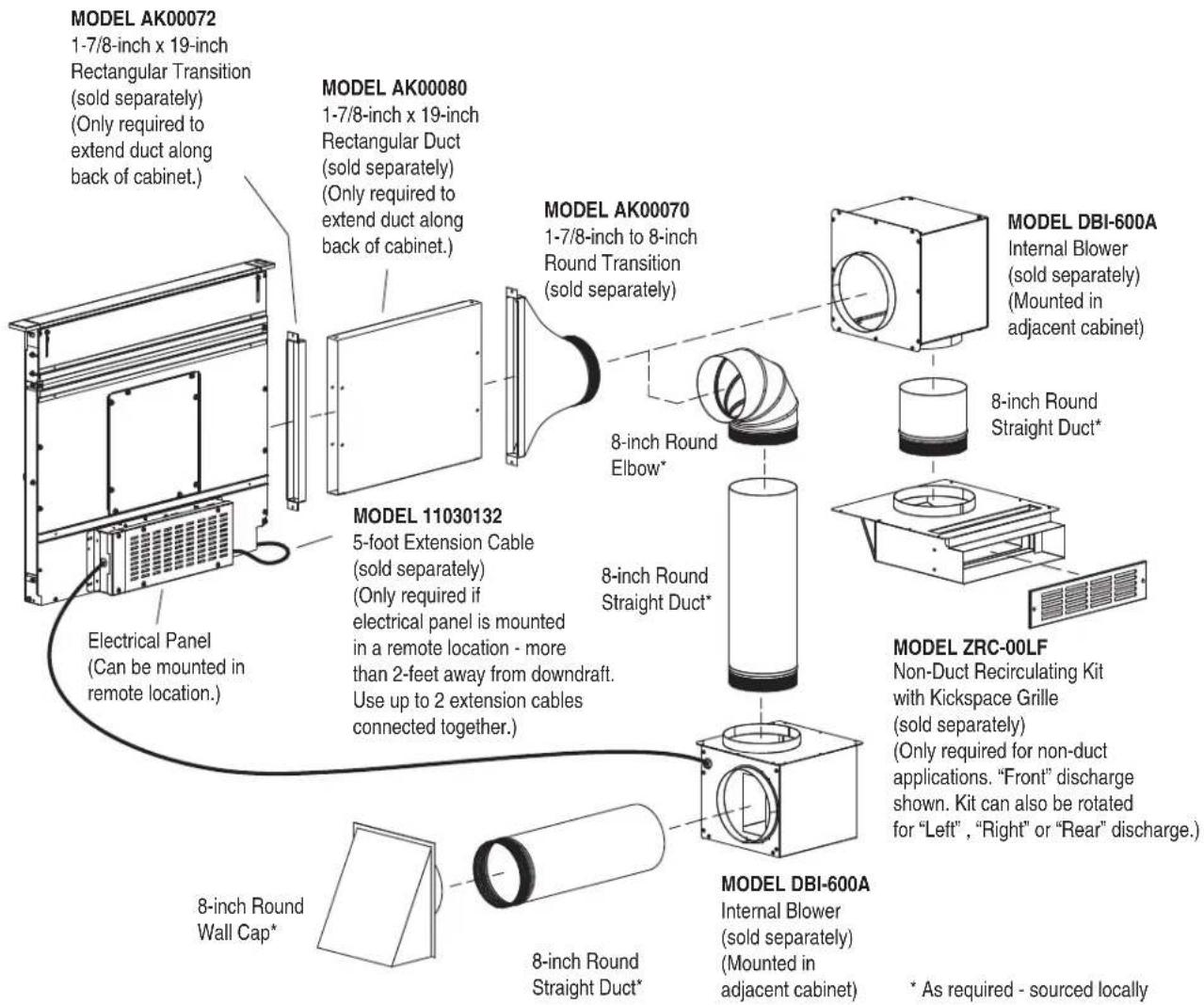
Internal Blower (DBI-600A) - Remote Mounted - Rear Outlet

flowchart
graph TD
    A["MODEL AK00072\n1-7/8-inch x 19-inch\nRectangular Transition (sold separately)"] --> B["MODEL AK00080\n1-7/8-inch x 19-inch\nRectangular Duct (sold separately)"]
    B --> C["MODEL AK00070\n1-7/8-inch to 8-inch\nRound Transition (sold separately)"]
    C --> D["MODEL DBI-600A\nInternal Blower (sold separately)\n(Mounted in adjacent cabinet)"]
    D --> E["MODEL ZRC-00LF\nNon-Duct Recirculating Kit with kickspace grille (sold separately)\n(Only required for non-duct applications. "Front" discharge shown. Kit can also be rotated for "Left", "Right" or "Rear" discharge.)"]
    E --> F["MODEL DBI-600A\nInternal Blower (sold separately)\n(Mounted in remote location)"]
    F --> G["MODEL DBI-600A\n8-inch Round Straight Duct*"]
    G --> H["8-inch Round Elbow*"]
    H --> I["8-inch Round Straight Duct*"]
    I --> J["8-inch Round Wall Cap*"]
* As required - sourced locally
Internal Blower (DBI-600A) - Remote Mounted - Below Outlet

External or In-Line Blower - Front Outlet
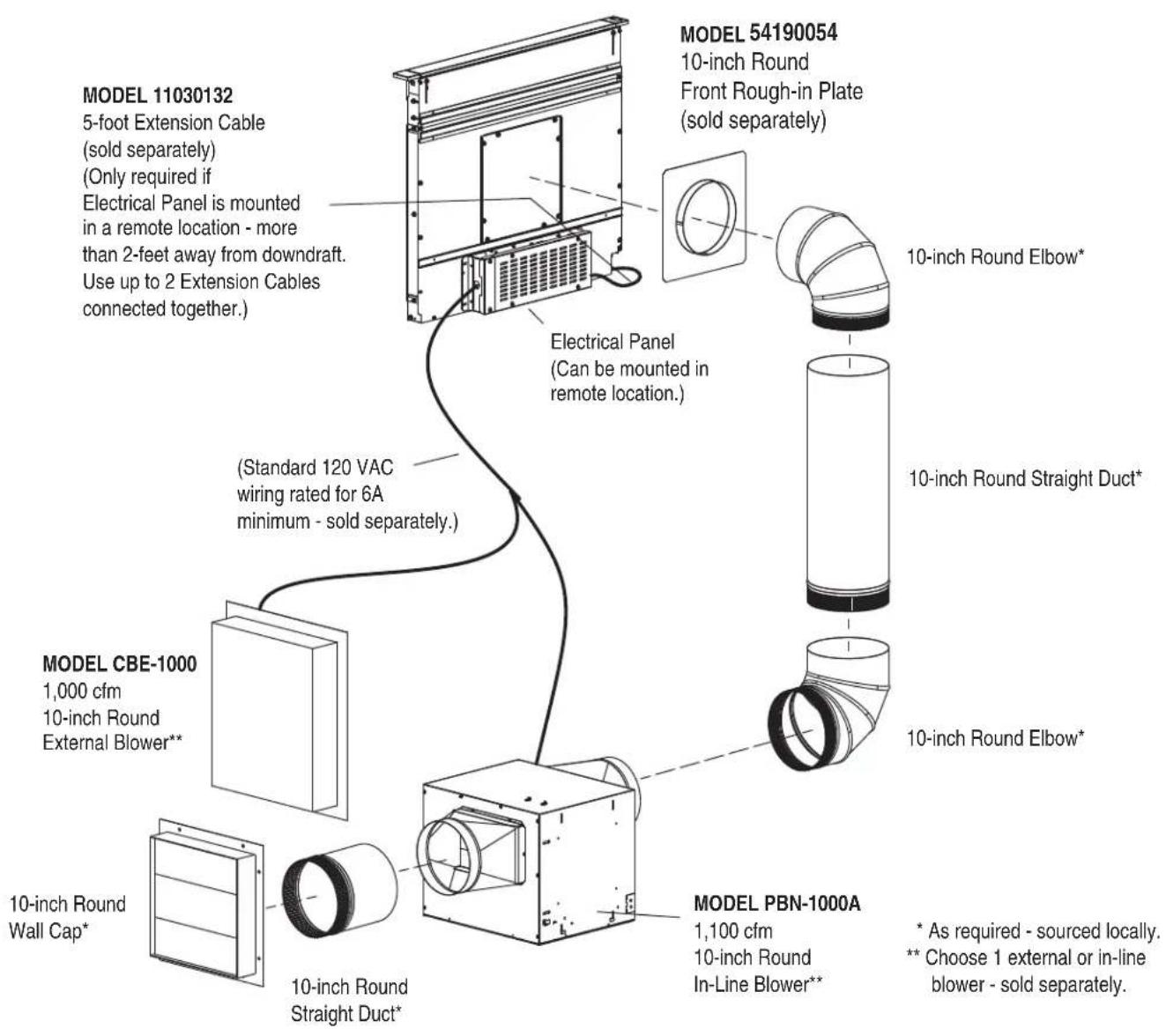
External or In-Line Blower - Side or Rear Outlet
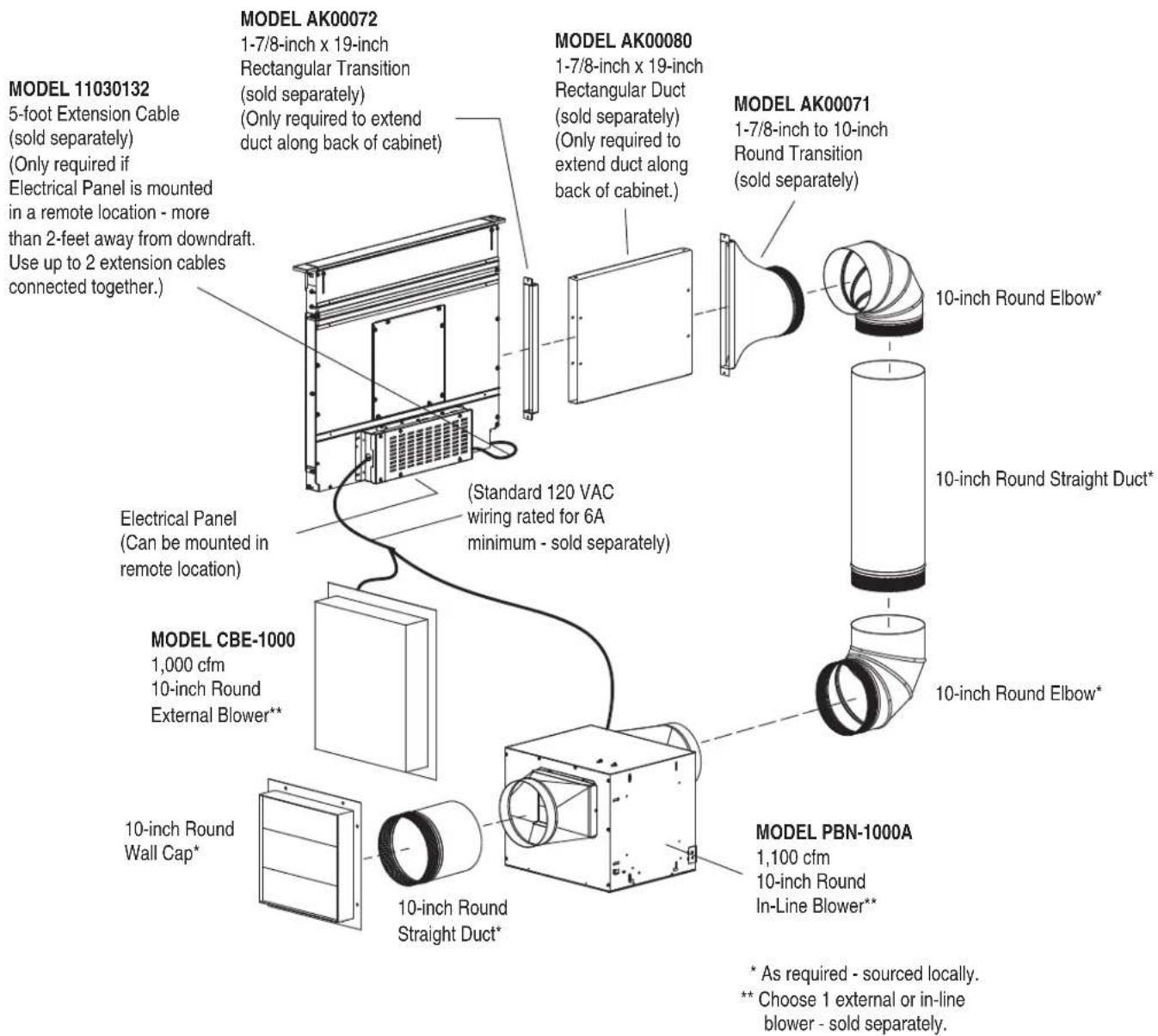
External or In-Line Blower - Below Outlet
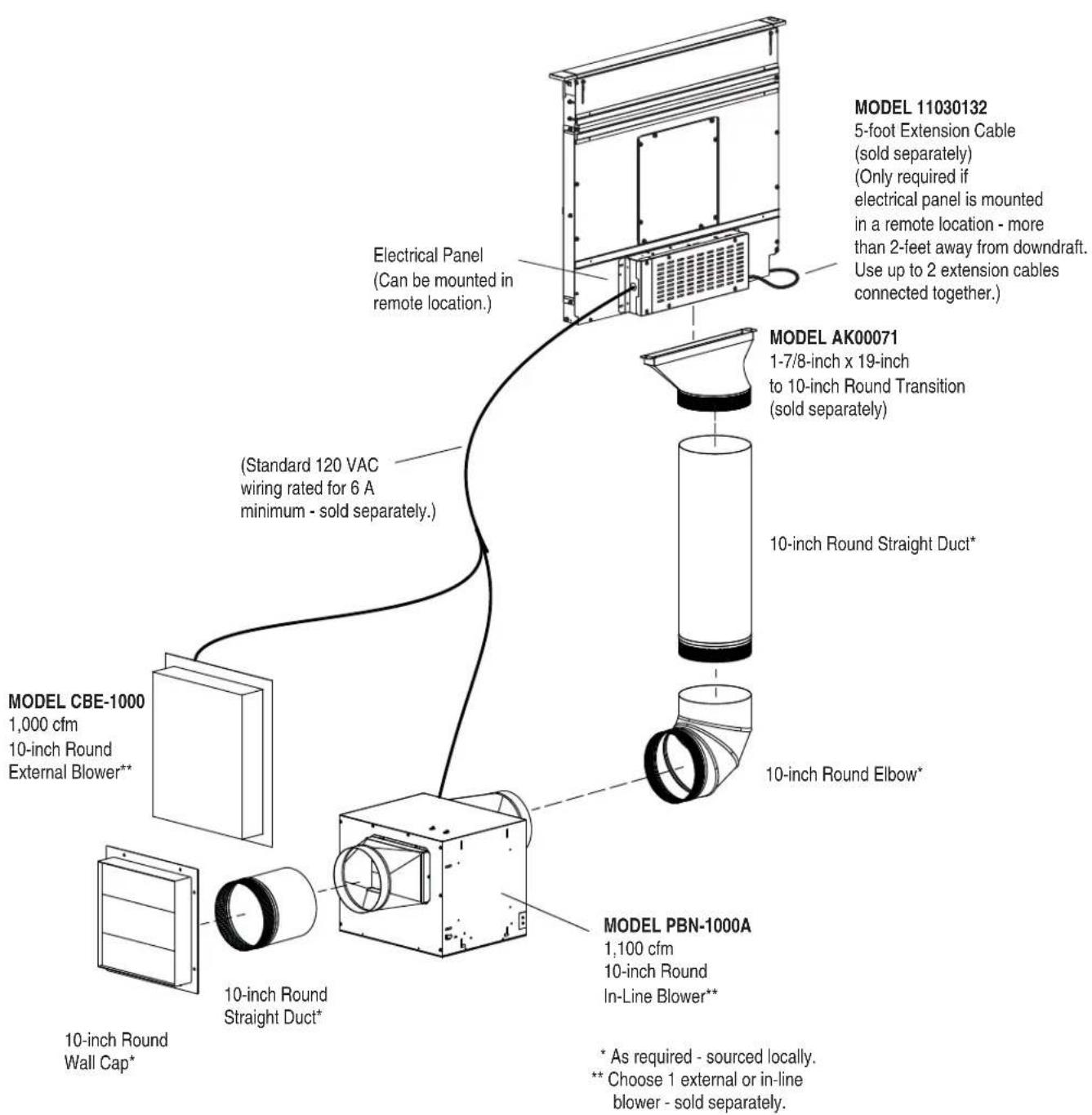

flowchart
graph TD
    A["CHIMNEY ACTUATOR"] --> B["CHIMNEY PINCH SWITCHES"]
    B --> C["BLACK"]
    B --> D["GREEN RED"]
    B --> E["WHITE"]
    B --> F["GREEN YELLOW"]
    B --> G["WHITE"]
    B --> H["GREEN YELLOW"]
    B --> I["WHITE"]
    B --> J["GREEN YELLOW"]
    B --> K["WHITE"]
    B --> L["GREEN YELLOW"]
    B --> M["WHITE"]
    B --> N["GREEN YELLOW"]
    B --> O["WHITE"]
    B --> P["GREEN YELLOW"]
    B --> Q["WHITE"]
    B --> R["GREEN YELLOW"]
    B --> S["WHITE"]
    B --> T["GREEN YELLOW"]
    B --> U["WHITE"]
    B --> V["GREEN YELLOW"]
    B --> W["WHITE"]
    B --> X["GREEN YELLOW"]
    B --> Y["WHITE"]
    B --> Z["GREEN YELLOW"]
    B --> AA["WHITE"]
    B --> AB["GREEN YELLOW"]
    B --> AC["WHITE"]
    B --> AD["GREEN YELLOW"]
    B --> AE["WHITE"]
    B --> AF["GREEN YELLOW"]
    B --> AG["WHITE"]
    B --> AH["GREEN YELLOW"]
    B --> AI["WHITE"]
    B --> AJ["GREEN YELLOW"]
    B --> AK["WHITE"]
    B --> AL["GREEN YELLOW"]
    B --> AM["WHITE"]
    B --> AN["GREEN YELLOW"]
    B --> AO["WHITE"]
    B --> AP["GREEN YELLOW"]
    B --> AQ["WHITE"]
    B --> AR["GREEN YELLOW"]
    B --> AS["WHITE"]
    B --> AT["GREEN YELLOW"]
    B --> AU["WHITE"]
    B --> AV["GREEN YELLOW"]
    B --> AW["WHITE"]
    B --> AX["GREEN YELLOW"]
    B --> AY["WHITE"]
    B --> AZ["GREEN YELLOW"]
    B --> BA["WHITE"]
    B --> BB["GREEN YELLOW"]
    B --> BC["WHITE"]
    B --> BD["GREEN YELLOW"]
    B --> BE["WHITE"]
    B --> BF["GREEN YELLOW"]
    B --> BG["WHITE"]
    B --> BH["GREEN YELLOW"]
    B --> BI["WHITE"]
    B --> BJ["GREEN YELLOW"]
    B --> BK["WHITE"]
    B --> BL["GREEN YELLOW"]
    B --> BM["WHITE"]
    B --> BN["GREEN YELLOW"]
    B --> BO["WHITE"]
    B --> BP["GREEN YELLOW"]
    B --> BQ["WHITE"]
    B --> BR["GREEN YELLOW"]
    B --> BS["WHITE"]
    B --> BT["GREEN YELLOW"]
    B --> BU["WHITE"]
    B --> BV["GREEN YELLOW"]
    B --> BW["WHITE"]
    B --> BX["GREEN YELLOW"]
    B --> BYB["WHITE"]
    B --> BZ["BLOVER CONNECTIONS"]
    BZ --> CA["BLOWER CONNECTIONS"]
    CA --> CB["MAIN PCBA"]
    CB --> CC["EMI FILTER"]
    CC --> DD["BLOVER CONNECTIONS"]
    DD --> DB["BLOVER CONNECTIONS"]
    DB --> DC["BLOVER CONNECTIONS"]
    DC --> DD
    style A fill:#f9f,stroke:#333
    style BB fill:#ccf,stroke:#333
    style BC fill:#cfc,stroke:#333
    style BD fill:#fcc,stroke:#333
    style BE fill:#cff,stroke:#333
    style BF fill:#ffc,stroke:#333

ZEPHYR
Limited Warranty
STAPLE YOUR RECEIPT HERE Proof of the original purchase date is needed to obtain service under warranty
TO OBTAIN SERVICE UNDER WARRANTY OR FOR ANY SERVICE RELATED QUESTIONS, please call: 1-888-880-8368
Zephyr Ventilation, LLC (referred to herein as "we" or "us") warrants to the original consumer purchaser (referred to herein as "you" or "your") of Zephyr products (the "Products") that such Products will be free from defects in materials or workmanship as follows:
Two Year Limited Warranty for Parts: For two years from the date of your original purchase of the Products, we will provide, free of charge, Products or parts (including LED light bulbs, if applicable) to replace those that failed due to manufacturing defects subject to the exclusions and limitations below. We may choose, in our sole discretion, to repair or replace parts before we elect to replace the Products.
One Year Limited Warranty for Labor: For one year from the date of your original purchase of the Products, we will provide, free of charge, the labor cost associated with repairing the Products or parts to replace those that failed due to manufacturing defects subject to the exclusions and limitations below. After the first year from the date of your original purchase, you are responsible for all labor costs associated with this warranty.
Warranty Exclusions: This warranty covers only repair or replacement, at our option, of defective Products or parts and does not cover any other costs related to the Products including but not limited to: (a) normal maintenance and service required for the Products and consumable parts such as fluorescent, incandescent or halogen light bulbs, mesh and charcoal filters and fuses; (b) any Products or parts which have been subject to freight damage, misuse, negligence, accident, faulty installation or installation contrary to recommended installation instructions, improper maintenance or repair (other than by us); (c) commercial or government use of the Products or use otherwise inconsistent with its intended purpose; (d) natural wear of the finish of the Products or wear caused by improper maintenance, use of corrosive and abrasive cleaning products, pads, and oven cleaner products; (e) chips, dents or cracks caused by abuse or misuse of the Products; (f) service trips to your home to teach you how to use the Products; (g) damage to the Products caused by accident, fire, floods, acts of God; or (h) Custom installations or alterations that impact serviceability of the Products. If you are outside our service area, additional charges may apply for shipping costs for warranty repair at our designated service locations and for the travel cost to have a service technician come to your home to repair, remove or reinstall the Products. After the first year from the date of your original purchase, you are also responsible for all labor costs associated with this warranty. All Products must be installed by a qualified professional installer to be eligible for warranty repairs or service.
Limitations of Warranty. OUR OBLIGATION TO REPAIR OR REPLACE, AT OUR OPTION, SHALL BE YOUR SOLE AND EXCLUSIVE REMEDY UNDER THIS WARRANTY. WE SHALL NOT BE LIABLE FOR INCIDENTAL, CONSEQUENTIAL OR SPECIAL DAMAGES ARISING OUT OF OR IN CONNECTION WITH THE USE OR PERFORMANCE OF THE PRODUCTS. THE EXPRESS WARRANTIES IN THE PRECEDING SECTION ARE EXCLUSIVE AND IN LIEU OF ALL OTHER EXPRESS WARRANTIES. WE HEREBY DISCLAIM AND EXCLUDE ALL OTHER EXPRESS WARRANTIES FOR THE PRODUCTS, AND DISCLAIM AND EXCLUDE ALL WARRANTIES IMPLIED BY LAW, INCLUDING THOSE OF MERCHANTABILITY AND FITNESS FOR A PARTICULAR PURPOSE.
Some states or provinces do not allow limitations on the duration of an implied warranty or the exclusion or limitation of incidental or consequential damages, so the above limitations or exclusions may not apply to you. To the extent that applicable law prohibits the exclusion of implied warranties, the duration of any applicable implied warranty is limited to the same two-year and one-year periods described above if permitted by applicable law. Any oral or written description of the Products is for the sole purpose of identifying the Products and shall not be construed as an express warranty. Prior to using, implementing or permitting use of the Products, you shall determine the suitability of the Products for the intended use, and you shall assume all risk and liability whatsoever in connection with such determination. We reserve the right to use functionally equivalent refurbished or reconditioned parts or Products as warranty replacements or as part of warranty service. This warranty is not transferable from the original purchaser and only applies to the consumer residence where the Product was originally installed located in the United States and Canada. This warranty is not extended to resellers.
To Obtain Service Under Limited Warranty: To qualify for warranty service, you must: (a) notify us at the address or telephone number stated below within 60 days of the discovery of the defect; (b) give the model number and serial number; and (c) describe the nature of any defect in the Product or part. At the time of the request for warranty service, you must present evidence of your proof of purchase and proof of the original purchase date. If we determine that the warranty exclusions listed above apply or if you fail to provide the necessary documentation to obtain service, you will be responsible for all shipping, travel, labor and other costs related to the services. This warranty is not extended or restarted upon warranty repair or replacements.
Please check our website for any additional Product information, www.zephyronline.com.
Zephyr Ventilation Service Department, 2277 Harbor Bay Parkway, Alameda, CA 94502 1-888-880-8368
natural_image
Technical line drawing of a multi-panel electronic device with mounting brackets and ventilation slots (no text or symbols)LIRE ET CONSERVER CES INSTRUCTIONS
natural_image
Isometric diagram of a four-wheeled electric stove with control knobs and a downward arrow indicating cooling or ventilation (no text or symbols)
natural_image
Isometric line drawing of a kitchen appliance with a wall-mounted unit and an arrow indicating direction (no text or symbols)natural_image
Technical line drawing of a cabinet or enclosure with mounting brackets and control panel (no text or symbols)natural_image
Technical line drawing of an electrical enclosure with a coiled cable and two outlets (no text or symbols)natural_image
Technical line drawing of an electrical cabinet with a magnified inset showing a component detail (no text or symbols)natural_image
Line drawing of an electrical outlet with a coiled cable and power plug, no text or symbols presentnatural_image
Technical diagram of a mechanical assembly with a magnified inset showing a component detail (no text or symbols present)natural_image
Line drawing of an electrical outlet connected to a wall-mounted device (no text or symbols)natural_image
Technical line drawing of a multi-panel electronic device with mounting brackets and internal components (no text or symbols)LEA Y GUARDE ESTAS INSTRUCCIONES
natural_image
Isometric line drawing of a kitchen appliance with four burners and a cooling fan (no text or symbols)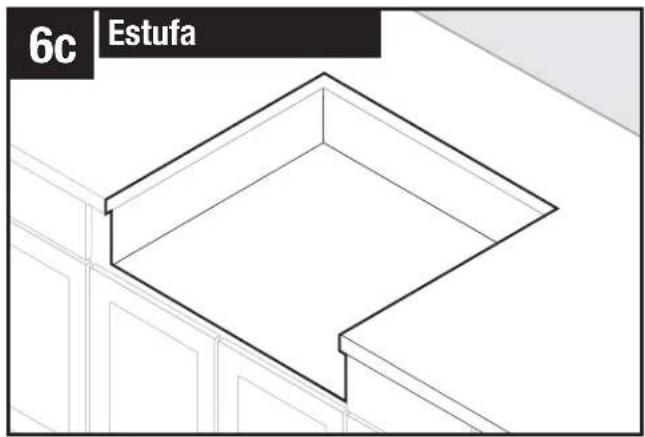
natural_image
Isometric line drawing of a window frame with no text or symbolsnatural_image
Isometric line drawing of a kitchen appliance with a door frame and ventilation system (no text or symbols)natural_image
Technical line drawing of a mechanical assembly with mounting brackets and control panel (no text or symbols)natural_image
Technical line drawing of an electrical enclosure with a wall-mounted power outlet and wiring (no text or symbols)natural_image
Technical diagram of an electrical cabinet with wiring and a magnified inset showing connection to a component (no text or symbols present)natural_image
Line drawing of an electrical outlet with a coiled cable and power plug, no text or symbols presentnatural_image
Technical line drawing of an electrical enclosure with a close-up inset showing a component detail (no text or symbols)natural_image
Line drawing of a wall-mounted electrical outlet connected to a power plug, showing wiring and ventilation slots (no text or symbols)Zephyr Ventilation Service Department, 2277 Harbor Bay Parkway, Alameda, CA 94502 1-888-880-8368

- READ AND SAVE THESE INSTRUCTIONS
- Planning
- Preparing the Downdraft
- Installation
- Electrical Wiring Installation
- WARNING
- TO REDUCE THE RISK OF FIRE, ELECTRIC SHOCK, OR INJURY TO PERSONS, OBSERVE THE FOLLOWING:
- TO REDUCE THE RISK OF A RANGE TOP GREASE FIRE:
- TO REDUCE THE RISK OF INJURY TO PERSONS IN THE EVENT OF A RANGE TOP GREASE FIRE, OBSERVE THE FOLLOWING:
- CAUTION
- INSTALLER: Save this manual for Electrical Inspector and Homeowner to use.
- Tools Needed
- Before You Begin
- Taking Measurements
- Ducting Configurations
- Ducting Configurations (continued)
- Side Exhaust with DBI-600A Blower
- Cabinet Cutouts
- BEFORE CUTTING HOLE IN CABINET FOR DUCTWORK, check for interference with floor joists, wall studs, electrical wiring, or plumbing.
- Cabinet Cutouts (continued)
- Only connect or disconnect UP BUTTON CABLE with main power off for at least 60 seconds.
- Installing Ductwork
- DBI-600A Blower only
- All electrical wiring should be done by a qualified person(s) in accordance with all applicable codes and standards.
- Exterior or In-Line Blower only
- Install Cooking Appliance
- Control Panel and Up Button
- Fan + Button
- Fan - Button
- Level Light Control
- 30-Hour Filter Clean Reminder
- Up/Down Button
- Cooking
- Always disconnect electric power supply before cleaning and/or servicing unit.
- Cleaning
- To Clean grease filters:
- To clean inside chimney:
- Servicing
- Optional Accessories
- Optional Accessories (continued)
- Internal Blower (DBI-600A) - Front Mounted to Downdraft
- Internal Blower (DBI-600A) - Remote Mounted - Front Outlet
- Internal Blower (DBI-600A) - Remote Mounted - Side Outlet
- External or In-Line Blower - Front Outlet
- External or In-Line Blower - Side or Rear Outlet
- ZEPHYR
- Limited Warranty
- TO OBTAIN SERVICE UNDER WARRANTY OR FOR ANY SERVICE RELATED QUESTIONS, please call: 1-888-880-8368
- LEA Y GUARDE ESTAS INSTRUCCIONES
Brand : Zephyr
Model : DLIE36ASX
Category : Range hood