CD380 - Sander BLACK & DECKER - Free user manual and instructions
Find the device manual for free CD380 BLACK & DECKER in PDF.


| Product Type | Orbital Sander |
| Brand | Black & Decker |
| Model | CD380 |
| Supply Voltage | 230 V |
| Rated Power Input | 125 W |
| No-Load Speed | 11,000 rpm |
| No-Load Orbits | 22,000 orbits/min |
| Sanding Pad Size | 90 x 187 mm |
| Weight | 1.2 kg |
| Double Insulation | Yes (no ground cable required) |
| Abrasive Paper Attachment Type | Clamping levers (toggles) |
| Dust Extraction System | Exhaust port with vacuum adapter |
| Variable Speed | No |
| On/Off Switch | Slider (forward/backward) |
| Sanding Materials | Wood, metal, plastic, painted surfaces |
| Intended Use | Domestic use only |
| Maintenance | Clean ventilation openings with a soft brush or dry cloth |
| Environmental Protection | Separate collection – do not dispose with household waste |
| Warranty | 24 months, covers material and manufacturing defects |
Frequently Asked Questions - CD380 BLACK & DECKER
User questions about CD380 BLACK & DECKER
0 question about this device. Answer the ones you know or ask your own.
Ask a new question about this device
Download the instructions for your Sander in PDF format for free! Find your manual CD380 - BLACK & DECKER and take your electronic device back in hand. On this page are published all the documents necessary for the use of your device. CD380 by BLACK & DECKER.
USER MANUAL CD380 BLACK & DECKER
English 3
Deutsch 7
Français 11
Italiano 15
Nederlands 19
Español 23
Português 27
Svenska 31
Norsk 35
Dansk 39
Suomi 43
Ελληνικα 47




ENGLISH
Intended use
Your Black & Decker sander has been designed for sanding wood, metal, plastics and painted surfaces. This tool is intended for consumer use only.
General safety rules
Warning! Read all instructions. Failure to follow all instructions listed below may result in electric shock, fire and/or serious injury. The term "power tool" in all of the warnings listed below refers to your mains operated (corded) power tool or battery operated (cordless) power tool. SAVE THESE INSTRUCTIONS.
1. Work area
a. Keep work area clean and well lit. Cluttered and dark areas invite accidents.
b. Do not operate power tools in explosive atmospheres, such as in the presence of flammable liquids, gases or dust. Power tools create sparks which may ignite the dust or fumes.
c. Keep children and bystanders away while operating a power tool. Distractions can cause you to lose control.
2. Electrical safety
a. Power tool plugs must match the outlet. Never modify the plug in any way. Do not use any adapter plugs with earthed (grounded) power tools. Unmodified plugs and matching outlets will reduce risk of electric shock.
b. Avoid body contact with earthed or grounded surfaces such as pipes, radiators, ranges and refrigerators. There is an increased risk of electric shock if your body is earthed or grounded.
c. Do not expose power tools to rain or wet conditions.
Water entering a power tool will increase the risk of electric shock.
d. Do not abuse the cord. Never use the cord for carrying, pulling or unplugging the power tool. Keep cord away from heat, oil, sharp edges or moving parts. Damaged or entangled cords increase the risk of electric shock.
e. When operating a power tool outdoors, use an extension cord suitable for outdoor use. Use of a cord suitable for outdoor use reduces the risk of electric shock.
3. Personal safety
a. Stay alert, watch what you are doing and use common sense when operating a power tool. Do not use a power tool while you are tired or under the influence of drugs, alcohol or medication. A moment of inattention while operating power tools may result in serious personal injury.
b. Use safety equipment. Always wear eye protection. Safety equipment such as dust mask, non-skid safety shoes, hard hat, or hearing protection used for appropriate conditions will reduce personal injuries.
c. Avoid accidental starting. Ensure the switch is in the off position before plugging in. Carrying power tools with your finger on the switch or plugging in power tools that have the switch on invites accidents.
d. Remove any adjusting key or wrench before turning the power tool on. A wrench or a key left attached to a rotating part of the power tool may result in personal injury.
e. Do not overreach. Keep proper footing and balance at all times. This enables better control of the power tool in unexpected situations.
f. Dress properly. Do not wear loose clothing or jewellery. Keep your hair, clothing and gloves away from moving parts. Loose clothes, jewellery or long hair can be caught in moving parts.
g. If devices are provided for the connection of dust extraction and collection facilities, ensure these are connected and properly used. Use of these devices can reduce dust related hazards.
a. Do not force the power tool. Use the correct power tool for your application. The correct power tool will do the job better and safer at the rate for which it was designed.
b. Do not use the power tool if the switch does not turn it on and off. Any power tool that cannot be controlled with the switch is dangerous and must be repaired.
c. Disconnect the plug from the power source before making any adjustments, changing accessories, or storing power tools. Such preventive safety measures reduce the risk of starting the power tool accidentally.
d. Store idle power tools out of the reach of children and do not allow persons unfamiliar with the power tool or these instructions to operate the power tool. Power tools are dangerous in the hands of untrained users.
e. Maintain power tools. Check for misalignment or binding of moving parts, breakage of parts and any other condition that may affect the power tools operation. If damaged, have the power tool repaired before use. Many accidents are caused by poorly maintained power tools.
f. Keep cutting tools sharp and clean. Properly maintained cutting tools with sharp cutting edges are less likely to bind and are easier to control.
4. Power tool use and care
ENGLISH
g. Use the power tool, accessories and tool bits etc., in accordance with these instructions and in the manner intended for the particular type of power tool, taking into account the working conditions and the work to be performed. Use of the power tool for operations different from those intended could result in a hazardous situation.
5. Service
a. Have your power tool serviced by a qualified repair person using only identical replacement parts. This will ensure that the safety of the power tool is maintained.
Additional safety instructions for sanders
◆Always wear a dust mask whenever sanding.
◆Thoroughly remove all dust after sanding.
Take special care when sanding paint which is possibly lead based or when sanding some woods and metal which may produce toxic dust:
- Wear a dust mask specifically designed for protection against lead paint dust and fumes and ensure that persons within or entering the work area are also protected.
- Do not let children or pregnant women enter the work area.
- Do not eat, drink or smoke in the work area.
- Dispose of dust particles and any other debris safely.
- This appliance is not intended for use by young or infirm persons without supervision. Children must be supervised to ensure they do not play with the appliance.
◆If the supply cord is damaged, it must be replaced by the manufacturer or an authorised Black & Decker Service Centre in order to avoid a hazard.
Electrical safety

This tool is double insulated; therefore no earth wire is required. Always check that the power supply corresponds to the voltage on the rating plate.
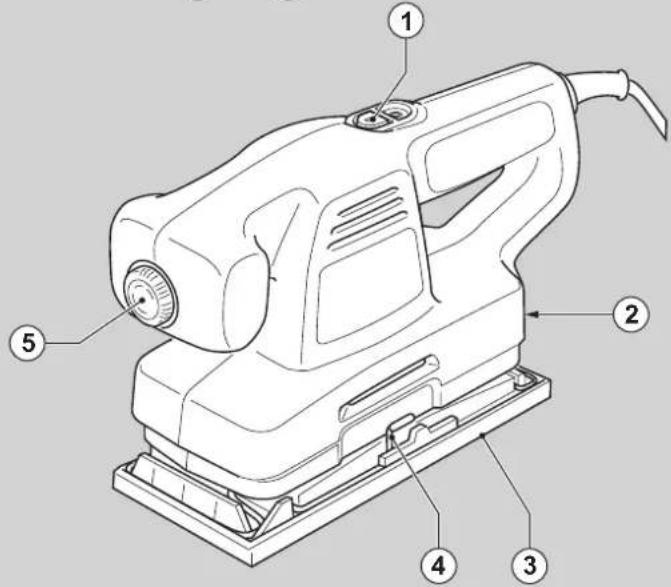
Features
- On/off switch
- Dust extraction outlet
- Sanding base
- Paper clamp lever
- Variable speed control knob (KA196E)
Assembly
Warning! Before assembly, make sure that the tool is switched off and unplugged.
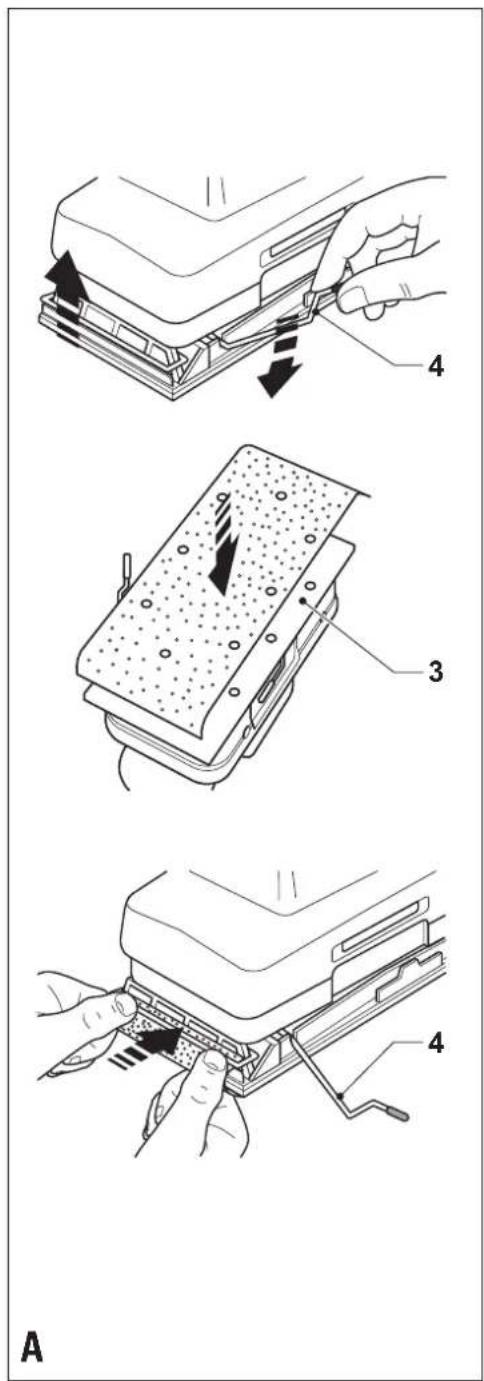
Fitting sanding sheets (fig. A & B)
Warning! Never use the tool without a sanding sheet or accessory in place.
Fitting regular sanding sheets (fig. A)
◆Make sure that the tool is switched off and unplugged.
- Soften the sanding sheet by rubbing its non-abrasive side over the edge of a worktop.
◆Press the paper clamp levers (4) upwards to release them from the retaining grooves and open the paper clamps by pressing them down.
◆Place the sheet onto the sanding base, making sure that the holes in the sheet line up with the holes in the base.
◆Insert the edge of the sanding sheet into the front paper clamp as shown.
◆Press the front paper clamp lever (4) downwards and locate it in the retaining groove.
◆While keeping a slight tension on the sheet, insert the rear edge of the sheet into the rear paper clamp.
◆Press the rear paper clamp lever (4) downwards and locate it in the retaining groove.
KA196/KA196E - Fitting sanding sheets with nylon loops (fig. B)
◆Make sure that the tool is switched off and unplugged.
◆Press the sheet firmly and evenly onto the sanding base (3), making sure that the holes in the sheet line up with the holes in the base.
Connecting a vacuum cleaner (fig. C)
◆Insert the adaptor (6) into the dust extraction outlet (2).
◆Connect the hose (7) of the vacuum cleaner to the adaptor.
Use
Warning! Let the tool work at its own pace. Do not overload.
KA196E - Variable speed control
The variable speed control allows you to adapt the speed of the tool to the workpiece material.
◆Set the control knob (5) to the desired setting. Use a high speed for wood, medium speed for veneer and synthetics and low speed for acrylic glass, non-ferrous metals and for removing paints.
Switching on and off
CD380/CD400/AST4XC
◆To switch the tool on, slide the on/off switch (1) forward (position I).
◆To switch the tool off, slide the on/off switch to the rear (position 0).
ENGLISH
KA196/KA196E
◆To switch the tool on, press the front part I of the on/off switch (1).
◆To switch the tool off, press the rear part O of the on/off switch.
Hints for optimum use
◆Always hold the tool with both hands (fig. D).
◆Do not exert too much pressure on the tool.
◆ Regularly check the condition of the sanding sheet. Replace when necessary.
◆Always sand with the grain of the wood.
- When sanding new layers of paint before applying another layer, use extra fine grit.
On very uneven surfaces, or when removing layers of paint, start with a coarse grit. On other surfaces, start with a medium grit. In both cases, gradually change to a fine grit for a smooth finish.
◆Consult your retailer for more information on available accessories.
Maintenance
Your tool has been designed to operate over a long period of time with a minimum of maintenance. Continuous satisfactory operation depends upon proper tool care and regular cleaning.
◆Regularly clean the ventilation slots in your tool using a soft brush or dry cloth.
◆Regularly clean the motor housing using a damp cloth. Do not use any abrasive or solvent-based cleaner.
Mains plug replacement (U.K. & Ireland only)
If a new mains plug needs to be fitted:
◆Safely dispose of the old plug.
◆Connect the brown lead to the live terminal in the new plug.
◆Connect the blue lead to the neutral terminal.
Warning! No connection is to be made to the earth terminal. Follow the fitting instructions supplied with good quality plugs. Recommended fuse: 5 A.
Protecting the environment

Separate collection. This product must not be disposed of with normal household waste.
Should you find one day that your Black & Decker product needs replacement, or if it is of no further use to you, do not dispose of it with household waste. Make this product available for separate collection.

Separate collection of used products and packaging allows materials to be recycled and used again. Re-use of recycled materials helps prevent environmental pollution and reduces the demand for raw materials.
Local regulations may provide for separate collection of electrical products from the household, at municipal waste sites or by the retailer when you purchase a new product.
Black & Decker provides a facility for the collection and recycling of Black & Decker products once they have reached the end of their working life. To take advantage of this service please return your product to any authorised repair agent who will collect them on our behalf.
You can check the location of your nearest authorised repair agent by contacting your local Black & Decker office at the address indicated in this manual. Alternatively, a list of authorised Black & Decker repair agents and full details of our after-sales service and contacts are available on the Internet at: www.2helpU.com
EC declaration of conformity
AST4XC/CD380/CD400/KA196/KA196E
Black & Decker declares that these products conform to: 98/37/EC, 89/336/EEC, 2002/95/EEC, EN 60745, EN 55014, EN 61000
L_FA (sound pressure) 78 dB(A), L_ A (acoustic power) 89 dB(A), hand/arm weighted vibration 6.86 m/s ^2 K_ A (sound pressure uncertainty) 3 dB(A), K_ A (acoustic power uncertainty) 3 dB(A)
Kevin Hewitt
Director of Consumer Engineering
Spennymoor, County Durham DL16 6JG,
United Kingdom
1-5-2005
Technical data
| AST4XC CD380 CD400 KA196 KA196E | |||||
| Voltage V | ^AC | 230 230 230 230 230 | |||
| Power input W 135 125 135 135 135 | |||||
| No-load speed min | ^1 | 11,000 11,000 11,000 11,000 6,500 - 11,000 | |||
| Oscillations (no load) min | ^-1 | 22,000 22,000 22,000 22,000 13,000 - 22,000 | |||
| Sanding base surface | mm | 90 x 187 | 90 x 187 | 90 x 187 | 90 x 187 |
| Weight | kg | 1.2 | 1.2 | 1.2 | 1.3 |



ENGLISH
Guarantee
Black & Decker is confident of the quality of its products and offers an outstanding guarantee. This guarantee statement is in addition to and in no way prejudices your statutory rights. The guarantee is valid within the territories of the Member States of the European Union and the European Free Trade Area.
If a Black & Decker product becomes defective due to faulty materials, workmanship or lack of conformity, within 24 months from the date of purchase, Black & Decker guarantees to replace defective parts, repair products subjected to fair wear and tear or replace such products to ensure minimum inconvenience to the customer unless:
◆The product has been used for trade, professional or hire purposes;
◆The product has been subjected to misuse or neglect;
◆The product has sustained damage through foreign objects, substances or accidents;
◆Repairs have been attempted by persons other than authorised repair agents or Black & Decker service staff.
To claim on the guarantee, you will need to submit proof of purchase to the seller or an authorised repair agent. You can check the location of your nearest authorised repair agent by contacting your local Black & Decker office at the address indicated in this manual. Alternatively, a list of authorised Black & Decker repair agents and full details of our after-sales service and contacts are available on the Internet at: www.2helpU.com
Please visit our website www.blackanddecker.co.uk to register your new Black & Decker product and to be kept up to date on new products and special offers. Further information on the Black & Decker brand and our range of products is available at www.blackanddecker.co.uk
DEUTSCH
Director of Consumer Engineering
Spennymoor, County Durham DL16 6JG,
Spennymoor, County Durham DL16 6JG,
Royaume Uni
1-7-2005
Garantie
Spennymoor, County Durham DL16 6JG,
Regno Unito
1-7-2005
Garanzia
Director of Consumer Engineering
Spennymoor, County Durham DL16 6JG,
Verenigd Koninkrijk
1-7-2005
Garantie
Director de Engenharia do Consumo
Spennymoor, County Durham DL16 6JG,
Reino Unido
1-7-2005
Garantia
Director of Consumer Engineering
Spennymoor, County Durham DL16 6JG,
Storbrittannien
1-7-2005
Reservdelar / reparationer
Spennymoor, County Durham DL16 6JG,
Storbritannia
1-7-2005
Director of Consumer Engineering
Spennymoor, County Durham DL16 6JG,
Storbritannien
1-7-2005
Reservedele / reparationer
Director of Consumer Engineering
Spennymoor, County Durham DL16 6JG,
Iso-Britannia
1-7-2005
Spennymoor, County Durham DL16 6JG,
Αγγλία
1-7-2005
50



Εγγύηση
natural_image
Pure color palette bar with no text or symbols, showing a gradient from black to yellow squares and a small square at the top (no text or symbols)


Australia Black & Decker (Australia) Pty. Ltd. Tel. 03-8720 5100
20 Fletcher Road, Mooroolbark, Victoria, 3138 Fax 03-9727 5940
België/Belgique Black & Decker (Belgium) N.V. Tel. 015 - 47 92 11
France Black & Decker (France) S.A.S.
B.P. 21, 69571 Dardilly Cédex
Tel. 04 72 20 39 20
Fax 04 72 20 39 00
Helvetia ROFO AG
Penrose, Auckland, New Zealand
34750 Küçükbakkalköy Kadıköy Istanbul
United Kingdom Black & Decker Tel. 01753 511234
210 Bath Road
Fax 01753 551155
Slough, Berkshire SL1 3YD
Helpline 01753 574277
Middle East & Africa Black & Decker (Overseas) A.G.
Tel. +971 4 2826464
PB 5420, Dubai, United Arab Emirates Fax +971 4 2826466
490284-00 07/05

natural_image
Blank white image with a thin border (no text, symbols, or markings)
- Data protection act: Tick the box if you prefer not to receive further information. - Bitte ankreuzen, falls Sie keine weiteren Informationen erhalten möchten. - Si vous ne souhaitez pas recevoir d'informations, cochez cette case. - Barrate la casella se non desiderate ricevere informazioni.
- A.u.b. dit vakje aankruisen indien u geen informatie wenst te ontvangen.
- Señale en la casilla sino quiere recibir información. - Por favor, assinale com uma cruz se não desejar receber informação. - Vänligen kryssa för i rutan om Ni inte vill ha information.
- Venligst kryss av dersom du ikke ønsker informasjon. - Venligst sæt kryds i ruden såfremt De ikke måtte ønske at modtage information.
- Merkitkää rasti ruutuum, mikäli ette halua vastaanottaa informaatiota.
- Popakalciste va onjmučišete eán dev želéte va náprete náproφορίες.
koneesi? ◆ Eívaí to εργαλείο autó η πρώτη σας αγορά? - Yes - Ja - Oui - Si - Ja - Si
- Sim - Ja - Ja - Ja - Kyllä - Naï
- No - Nein - Non - No - Nee
- No - Não - Nej - Nei - Nej
- Ei - Oxt
- Dealer address ◆ Händleradresse
- Cachet du revendeur ◆ Indirizzo del rivenditore ◆ Adres van de dealer
- Dirección del detallista ◆ Morada do revendedor ◆ Áterförsäljarens adress
- Forhandlerens adresse ◆ Forhandler adresse
- Jälleenmyiän oscite
- Διεύδυνη αντιπροσώπου
- Name - Name - Nom - Nome
- Naam - Nombre - Nome - Namn
- Navn - Navn - Nimi - Ovoμα:
- Address - Adresse - Adresse - Indirizzo -
- Adres - Dirección - Morada - Adress -
- Adresse - Adresse - Osoite - Διεύθυνση:
- Is this tool a gift? - Ist dieses Gerät ein Geschenk? - S'agit-il d'un cadeau? - Si tratta di un regalo? - Kreeg u de machine als cadeau? - ¿Ha recibido usted esta herramienta como regalo? - Recebeu esta ferramenta como presente? - Är verktyget en gåva?
- Er verktajet en gave? - Er verktajet en gave?
- Onko kone lahja?
- To εργαλείο είναι δώρο?
- Yes - Ja - Oui - Si - Ja - Sí
- Sim - Ja - Ja - Ja - Kyllä - Nat
- No - Néin - Nan - Na - Nee
- No - Nǎo - Naj - Nei - Nej
- Ei - Oχι
- Is this tool your first purchase? - Ist dieses


- Is this tool your first purchase? - Ist dieses Gerät ein Erstkauf? - Est-ce un ter achat? - Questo prodotto è il suo primo acquisto? - Is deze machine uw eerste aankoop? - ¿Es esta herramienta la primera de este tipo?
- Esta ferramenta è a sua primeira compra? - Är detta ditt första B&D-verktyg? - Er dette ditt første B&D verktey? - Er dette dit første B&D verktej? - Onko tämä ensimmäinen B&D-
♦ GUARANTEE CARO
♦ GARANTEEKART
♦ GARANITI KORT
♦ GARANTI KORT
♦ GARANTI DE GARANTIA
♦ TARGETA DE GARANTIA
♦ TAKUKORITI
♦ CARTAO DE GARAINTA
♦ CARTE DE GARANTIE
♦ TACILLANO DO GARANIZA
♦ GARANTIBEVS
♦ KAPITA ERFYHZH

- ENGLISH
- Intended use
- General safety rules
- Work area
- Electrical safety
- Personal safety
- Power tool use and care
- Service
- Additional safety instructions for sanders
- Electrical safety
- Features
- Assembly
- Fitting sanding sheets (fig. A & B)
- Fitting regular sanding sheets (fig. A)
- KA196/KA196E - Fitting sanding sheets with nylon loops (fig. B)
- Connecting a vacuum cleaner (fig. C)
- Use
- KA196E - Variable speed control
- Switching on and off
- CD380/CD400/AST4XC
- KA196/KA196E
- Hints for optimum use
- Maintenance
- Mains plug replacement (U.K. & Ireland only)
- Protecting the environment
- EC declaration of conformity
- Guarantee
- DEUTSCH
- Garantie
- Garanzia
- Garantia
- Reservdelar / reparationer
- Reservedele / reparationer
- Εγγύηση
Brand : BLACK & DECKER
Model : CD380
Category : Sander