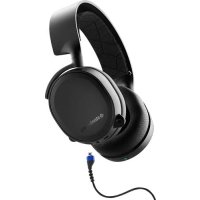
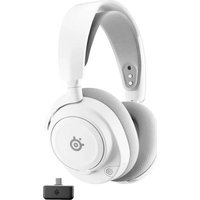
USER MANUAL arctis 3 Bluetooth STEELSERIES
PRODUCT INFORMATION GUIDE


CONTENTS
Welcome 2
SteelSeries Engine 3
Product overview 5-6
Setup 7-8
Microphone 9
Bluetooth
10
Ski goggle headband 11
Translations
Espanol 12
简体中文14
繁體中文 16
日本語 18
20
Deutsch 23
Pycckn 25
Français 27
Italiano 30
Portugues 32
Regulatory 35
WELCOME TO ARCTIS
Your new headset is the result of more than 15 years of gaming expertise and our unyielding pursuit of perfection.
We poured our hearts into making your new Arctis, giving
it the best gaming mic available, 7.1 surround sound and comfort and style unlike anything you've experienced be

find help at support.steelseries.com
PACKAGE CONTENTS
Headset
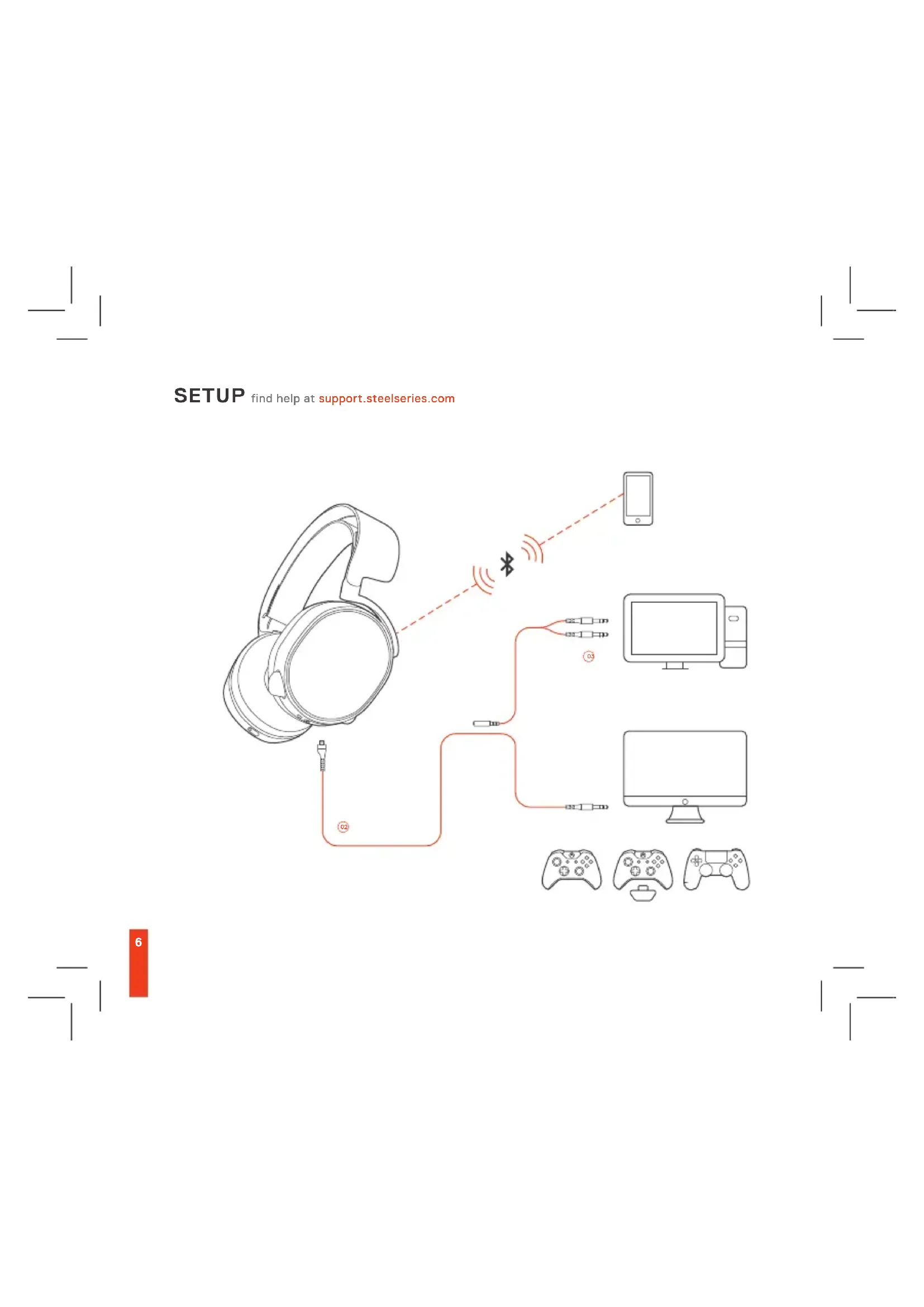
Main cable (1.2 m)
Dual 3.5 mm extension (1.8 m)
Micro USB charging cable
Product information guide
SYSTEM REQUIREMENTS // COMPATIBILITY
PC/Mac
PS4 / Switch / Xbox One
Mobile
PRODUCT OVERVIEW
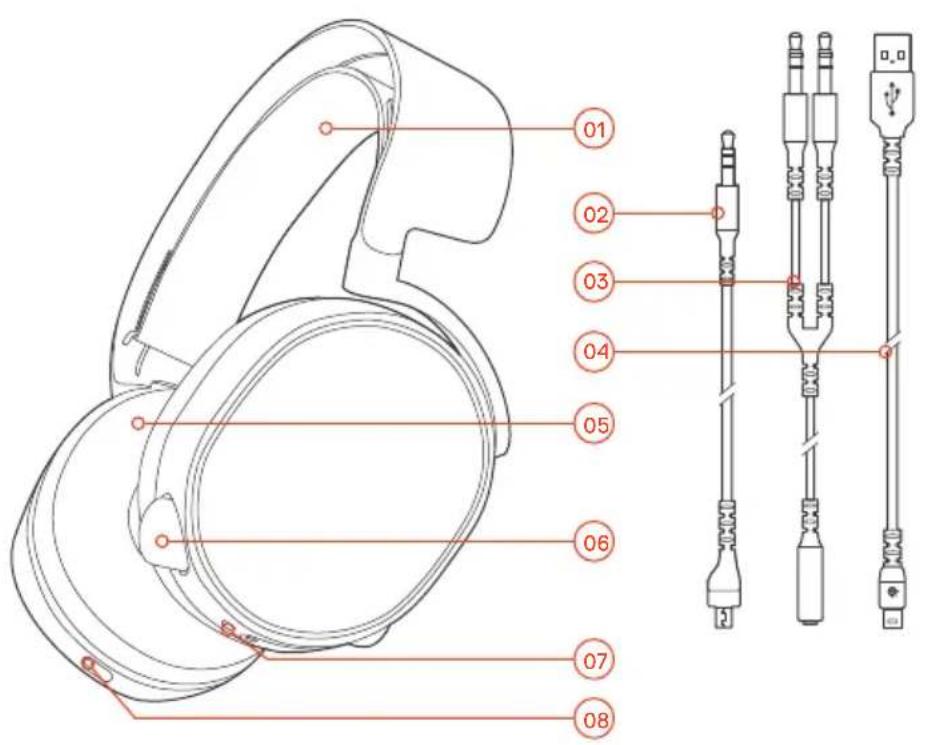
- Find accessories and replacement parts at steelseries.com
01 Ski goggle headband
02 Main headset cable
03 Dual 3.5 mm 'Y' extension cable
04 Micro USB charging cable
05 Breathable moisture-wicking ear cushions
06 Retractable microphone
07 USB charging port
08 Power button
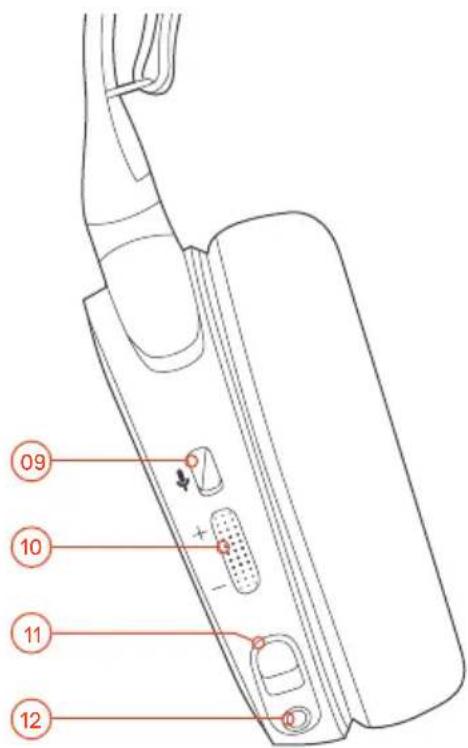
09 Microphone mute button
10 Volume control
11 Main cable jack
12 Headphone share jack
SETUP find help at support.steelseries.com
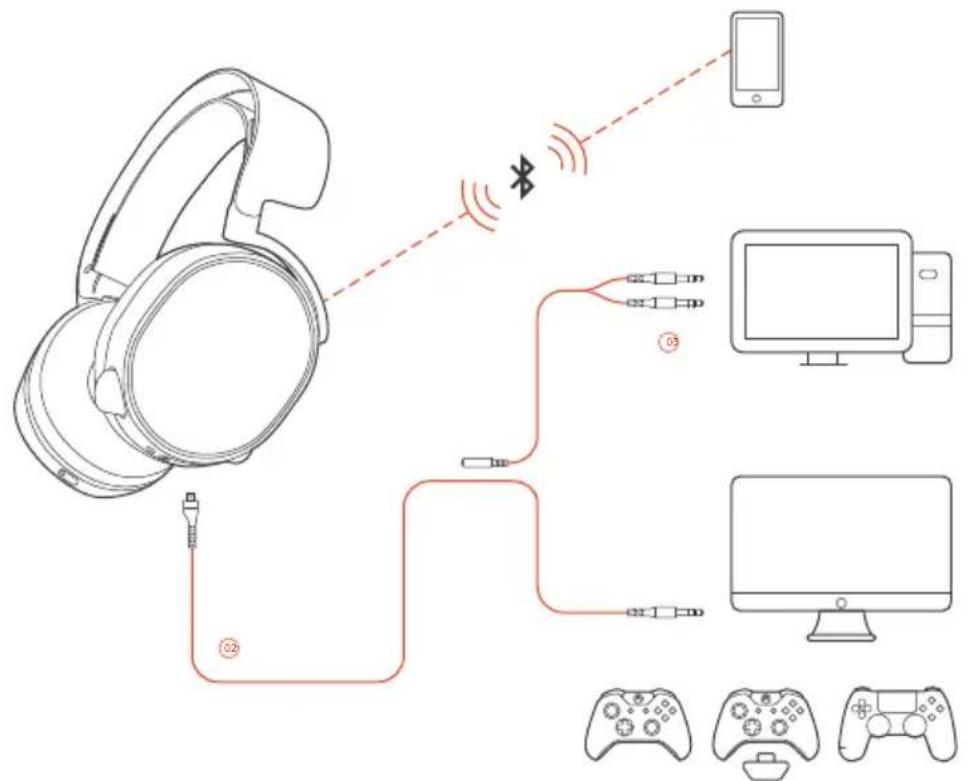
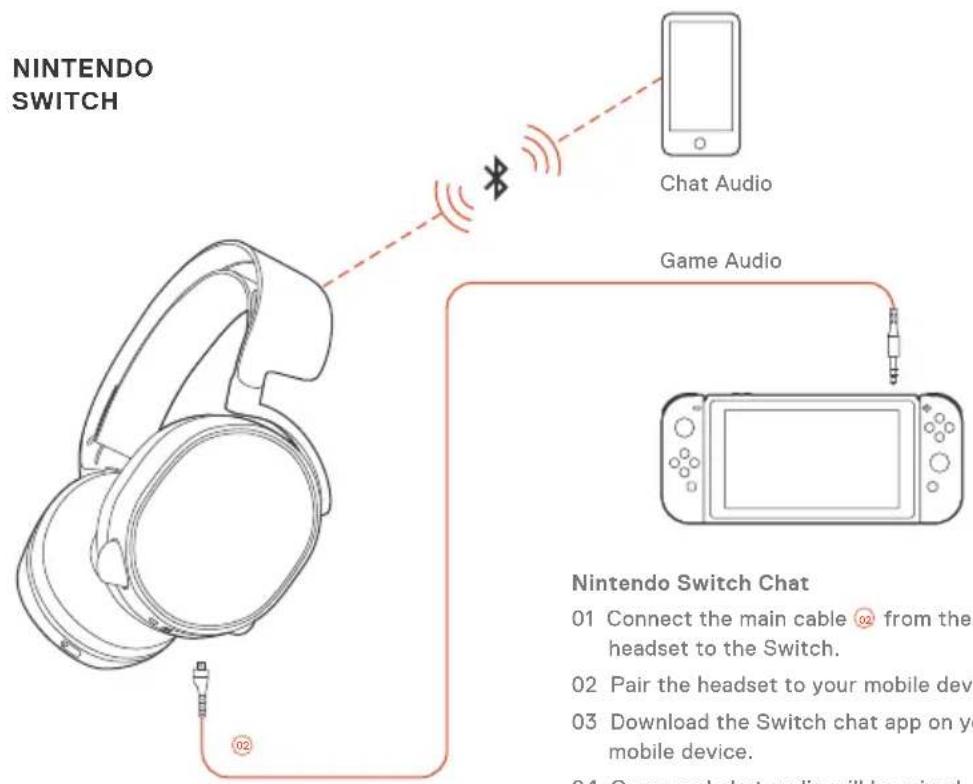
Nintendo Switch Chat
01 Connect the main cable from the headset to the Switch.
02 Pair the headset to your mobile device.
03 Download the Switch chat app on your mobile device.
04 Game and chat audio will be mixed together in the headset.
MICROPHONE
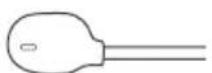
Retractable microphone Positioning
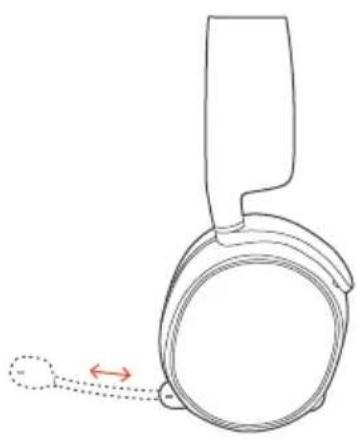

top view
Position the microphone close
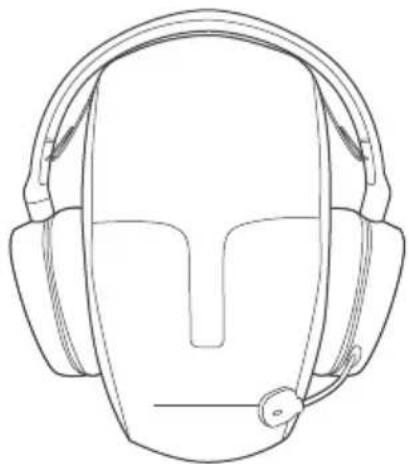
to the corner of your mouth with the flat surface facing you.
front view
BLUETOOTH
PAIRING
With headset off, press and hold the power button for 6 seconds (power LED will blink rapidly).
On your mobile device scan for Bluetooth headsets and select Arctis 3 Bluetooth.
CONTROL

ANSWER/END VOICE CALL single · press the power button

PLAY/PAUSE MUSIC single · press the power button

SKIP TRACK double··press power button
CHARGING
The power button color indicates your battery level:
Green 100 - 50%
Yellow 49 - 20%
Red 19-10%
Red (fast blink) 9-1%
To charge the headset connect the micro USB charging cable from the headset to a PC or any USB power source.
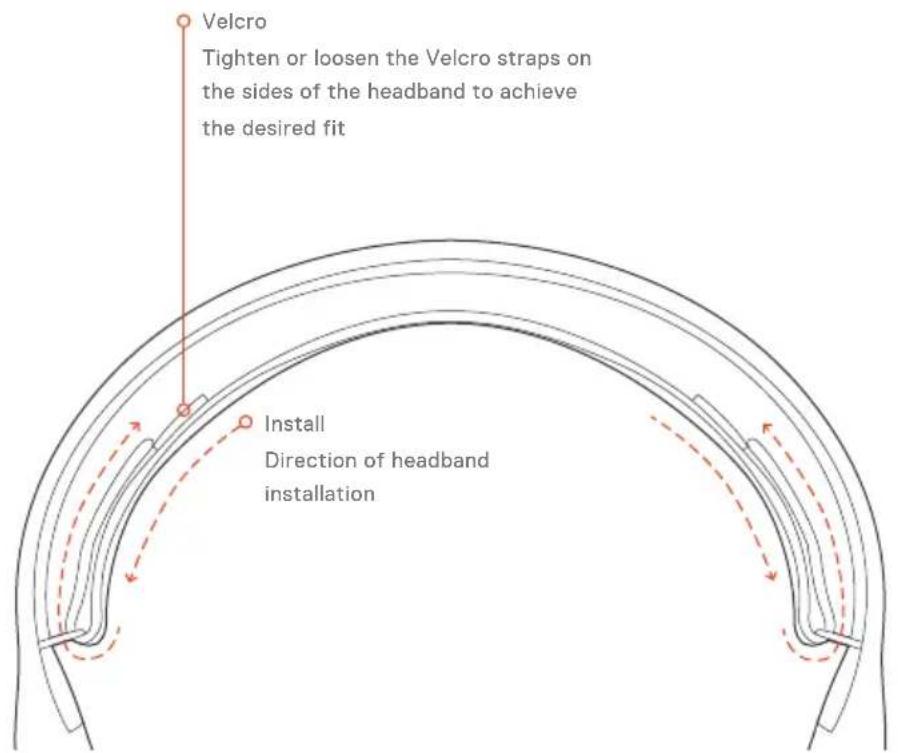
SKIGOGGLEHEADBAND
accessory headbands available at steelseries.com
ESPANOL
AkeccayapbI 3aHacTN MOXHO KyNTb Ha caTe steeleries.com
YCTAHOBKA
Yat Nintendo Switch
01 PoiKJIIOHIne OCHOBHO Ka6eJIb 0T HauHHIOB K INrpoBOI CnCTeMe Switch.
02 NpOdkJIIOHHTe HayUHHNK K MO6NJbHOMy yCTpoINCTBy.
03 YctaHOBNTe Ha MoBnJIbHoe ycTPOIcTBOpJIOXeHne nJa TaaSwitch.
04B HayHnKax 6yJeT OJHOpeMeHHO CJIiueH 3BykIrpyu 3BykHaTa.
3byk hata
3Byk nprbl
3a nomoubu obaauiTecb no aepcy support. steelserie.com
MINKPOΦOH
BbIDBnKHOI MKNPOdOH
Посиюнроваимe
BIDCBEpxy
BVD Cnpedei
PacnoJoxnTE MKNpOPOH 30 BoaJe yrJa pTa, nIOCKoN CTOpOH K Ce6e.
BLUETOOTH
PoiKJIIOUeHne
OTKIOHHTe HAYUHNKIN 3aXMMTE KHOIky BKNIOUeHNA6CEKYH(DCBETOINOHauHET 6bICTPO MIRAtb).
HaHnTe HauHnKn Bluteoth MoBnBbIM yCtpoCTBOM N BbEpeTe Arctis 3 Bluteoth.
Unpablenne
HAXMNTe Ha KHONKY BKNIOHEHnO 0DnH pa3
VrpaTb/OCTaHOBNTb My3bIKy HAKMITE Ha KHONKY BKIOOHeHn OINH pa3
IpoNcyTbKOMIO3uHnHOaKMITEHaKHONKYBKNIOeHnA DBaXkbI
3apnka
LBeT KONK BKNQeHnO 03HaayetypoBeHb 3apna batape:
3eHb100-50%
Kjellby 49-20%
Kpachb19-10%
KpaChBb(6bIcTpoMnraeT)9-1%
Tro6blapnHbHayuHKnnoKIOHOHTe 3apnHknKaBeIbMnKp-USBOT HayuHKnOB K PIININHomyNCTOCHNYAheprncnC npToM USB.
JbIXHOE OTOJIOBbE HAYHINKOB
Jinnyka
C NOMOJIIO JINIyEe NO 6OKAM MOXHO IN3MeHHTb pa3Mep OTOJIOBBy
PpncoeHHHeHne
HapabJIeHne npncOeHHHeHnHayuHnKOB
IOnONHnTEbHbIE OROIOBbMoKHO KyNTbHa caite steelseries.com
FRANÇAIS
Cable principal (1,2 m)
Double rallonge 3,5mm (1,8m)
Cable de chargement micro-USB
VUE D'ENSEMBLE DU PRODUIT
Federal Communication Commission Interference Statement
This device complies with Part 15 of the FCC Rules. Operation is subject to the following two conditions: (1) This device may not cause harmful interference, and (2) this device must accept any interference received, including interference that may cause undesired operation.
This equipment has been tested and found to comply with the limits for a Class B digital device, pursuant to Part 15 of the FCC Rules. These limits are designed to provide reasonable protection against harmful interference in a residential installation. This equipment generates, uses and can radiate radio frequency energy and, if not installed and used in accordance with the instructions, may cause harmful interference to radio communications. However, there is no guarantee that interference will not occur in a particular installation. If this equipment does cause harmful interference to radio or television reception, which can be determined by turning the equipment off and on, the user is encouraged to try to correct the interference by one of the following measures:
Reorient or relocate the receiving antenna.
Increase the separation between the equipment and receiver.
Connect the equipment into an outlet on a circuit different from that to which thereceiver is connected.
- Consult the dealer or an experienced radio/TV technician for help.
FCC Caution: Any changes or modifications not expressly approved by the party responsible for compliance could void the user's authority to operate this equipment.
This transmitter must not be co-located or operating in conjunction with any other antenna or transmitter.
Operations in the 5GHz products are restricted to indoor usage only.
Radiation Exposure Statement:
This equipment complies with FCC radiation exposure limits set forth for an uncontrolled environment. This equipment should be installed and operated with minimum distance 20cm between the radiator & your body.
Note: The country code selection is for non-US model only and is not available to all US model. Per FCC regulation, all WiFi product marketed in US must fixed to US operation channels only.
Industry Canada Statement:
This device complies with RSS-210 of the Industry Canada Rules. Operation is subject to the following two
conditions: (1) This device may not cause harmful interference, and (2) this device must accept any interference received, including interference that may cause undesired operation.
Radiation Exposure Statement:
This equipment complies with IC radiation exposure limits set forth for an uncontrolled environment. This equipment should be installed and operated with minimum distance 20cm between the radiator & your body.
This Class B digital apparatus complies with Canadian ICES-003.
This Class B digital apparatus complies with Canadian ICES-003.
Safety Guideline for Lithium Battery
Please keep follow all listed important warnings and cautions below while using this battery pack to avoid any damage or hazard.
This battery must not be disposed of with your other household waste or treat them in compliance with the local regulations or contact your local city office, your household waste disposal service or the shop where you purchased the product.
"CAUTION!" Risk of explosion if battery pack is not replace by same type as specified by the manufacturer.
-
The battery polarity (+) and (-) shall not be connected and charged reversely. Risk of explosion if the battery polarity (+) and (-) is reversed.
-
Please keep this battery pack away from fire and high heat sources due to explosion might happen. Do not place your battery pack close to any heater or hot location.
- This battery pack shall not be hit or impacted. This battery pack shall not be dealt with any sharp or keen objects either.
- This battery pack shall not be exposed to moisture, dripping or splashing.
- If any electrolyte flow out of this battery pack when touch the user's eyes and skin, please seek medical advice immediately.

Hereby, SteelSeries ApS, declares that the equipment which is compliance with directive RoHS 2.0 (2015/863/EU), R.E.D (2014/53/EU), EMC Directive (2014/30/EU), and LVD (2014/35/EU) which are issued by the Commission of the European Community.
The full text of the EU declaration of conformity is available at the following internet address: https:// steelseries.com/
SteelSeries ApS. hereby confirms, to date, based on the feedback from our suppliers indicates that our products shipping to the EU territory comply with REACH (Registration, Evaluation, Authorization, and Restriction of Chemicals - (EC) 1907/2006) compliance program. We are fully committed to offering REACH compliance on the products and posting accurate REACH compliance status for the all of products.

WEEE
This product must not be disposed of with your other household waste or treat them in compliance with the local regulations or contact your local city office, your household waste disposal service or the shop where you purchased the product.
This product is compliant with requirements of Circular No. 30/2011/TT-BCT Regulations "STIPULATING TEMPORARILY THE PERMISSIBLE CONTENT LIMITATION OF SOME TOXIC CHEMICALS IN THE ELECTRONIC, ELECTRICAL PRODUCTS"
ACMA Compliance (Australia/ New-Zealand)

Direct Current

*载藻電池请按照藻藥物管理辦法回收處理
番毫花诗情达
Operating Temperature: 0 to +40 °C

learn more at steelseries.com