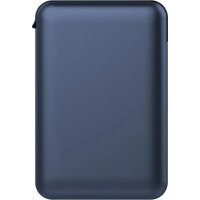
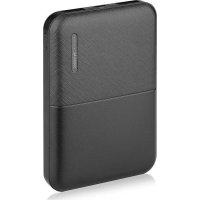
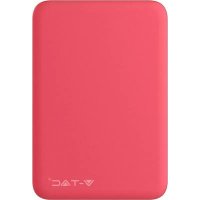
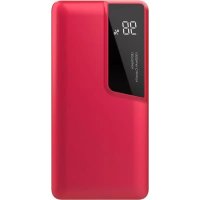
VT3510 - Power bank V-TAC - Free user manual and instructions
Find the device manual for free VT3510 V-TAC in PDF.



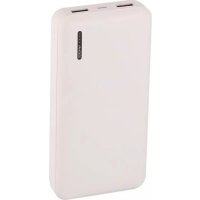
| Brand | V-TAC |
| Model | VT3510 |
| Product type | Portable battery / Power bank |
| Battery capacity | 5000 mAh |
| Nominal output capacity | 3250 mAh |
| Battery type | Li-Polymer |
| Input voltage | DC 5V, 2.0A |
| Output voltage | DC 5V, 2.1A (Port 1) |
| Number of output ports | 1 USB port |
| Battery level indicator | 4 LED |
| LED flashlight | Yes |
| Built-in protections | Short-circuit, overload, discharge, leakage, intelligent lithium protection |
| Compatible applications | iPhone, iPod, tablet, PSP, NDS, MP3/MP4, GPS, walkie-talkie, etc. |
| Full charge time (first use) | 8 to 10 hours |
| Operating temperature | -10°C to +45°C |
| Maintenance | Clean with a dry cloth; recharge at least once every 3 months if unused |
| Included cable | Micro USB or Type-C cable depending on version |
Frequently Asked Questions - VT3510 V-TAC
User questions about VT3510 V-TAC
0 question about this device. Answer the ones you know or ask your own.
Ask a new question about this device
Download the instructions for your Power bank in PDF format for free! Find your manual VT3510 - V-TAC and take your electronic device back in hand. On this page are published all the documents necessary for the use of your device. VT3510 by V-TAC.
USER MANUAL VT3510 V-TAC
Thank you for selecting and buying V-TAC Product. V-TAC will serve you the best. Please read these instructions carefully & keep this user manual handy for future reference. If you have any another query, please contact our dealer or local vendor from whom you have purchased the product. They are trained and ready to serve you at the best.

Multi-Language Manual QR CODE
Please scan the QR code to access the manual in multiple languages.
(HU) BEVEZETÉS
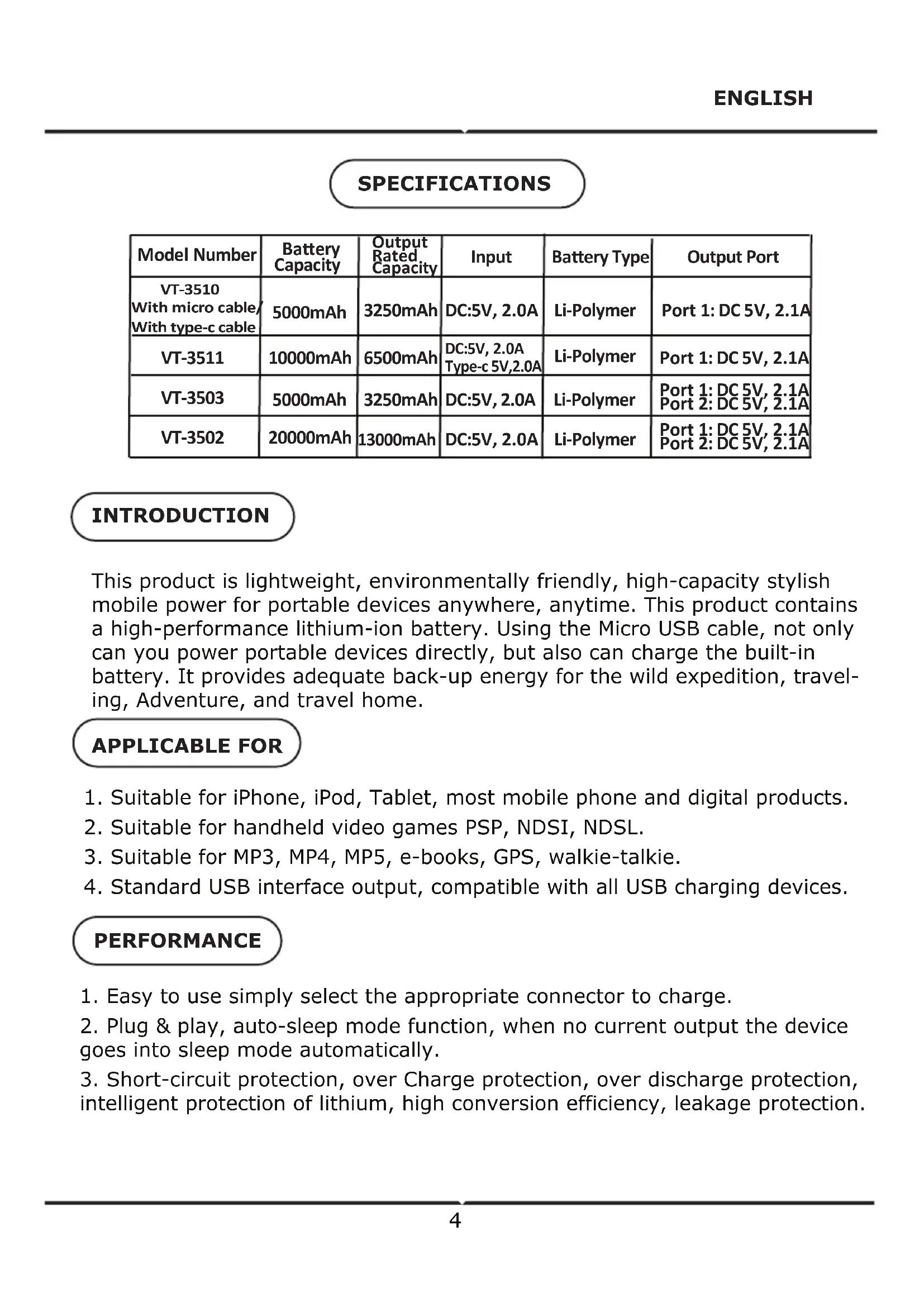
This product is lightweight, environmentally friendly, high-capacity stylish mobile power for portable devices anywhere, anytime. This product contains a high-performance lithium-ion battery. Using the Micro USB cable, not only can you power portable devices directly, but also can charge the built-in battery. It provides adequate back-up energy for the wild expedition, traveling, Adventure, and travel home.
APPLICABLE FOR
- Suitable for iPhone, iPod, Tablet, most mobile phone and digital products.
- Suitable for handheld video games PSP, NDSI, NDSL.
- Suitable for MP3, MP4, MP5, e-books, GPS, walkie-talkie.
- Standard USB interface output, compatible with all USB charging devices.
PERFORMANCE
- Easy to use simply select the appropriate connector to charge.
- Plug & play, auto-sleep mode function, when no current output the device goes into sleep mode automatically.
- Short-circuit protection, over Charge protection, over discharge protection, intelligent protection of lithium, high conversion efficiency, leakage protection.
HOW TO USE IT
- Display capacity (Note: Applicable for models with LED indicator): Press control button, capacity LED will be on, 10 seconds later they will be off automatically.
4 LEDs on: 75% 100% remained.
3 LEDs on: 50% 75% remained.
2 LEDs on: 25% - 50% remained.
1 LEDs on: less than 25%
-
LED lighting (Note: Applicable for models with LED flashlight) Press control button over 2 seconds, the flashlight will switch on. Press control button more than 2 seconds to switch off the flashlight.
-
Charge portable power bank
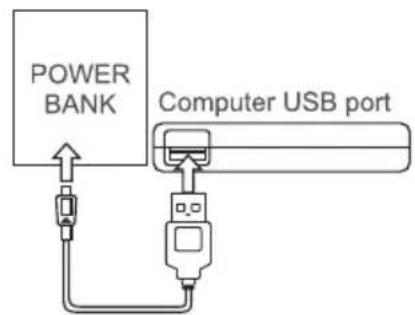
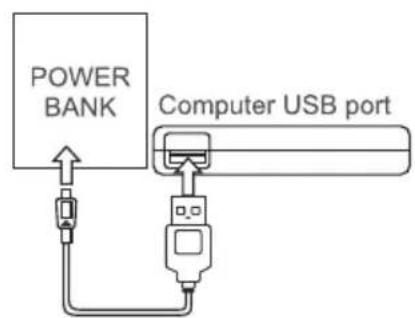
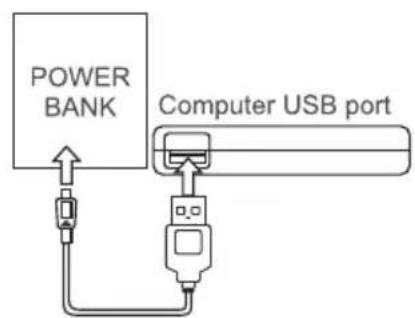
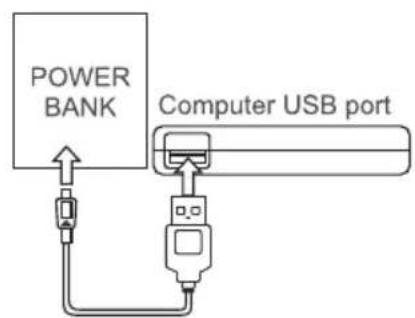
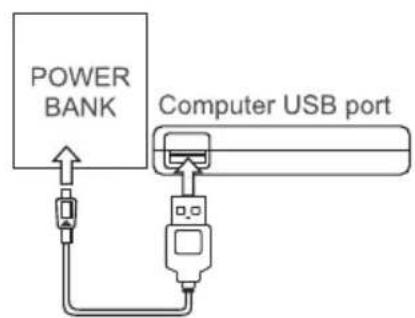
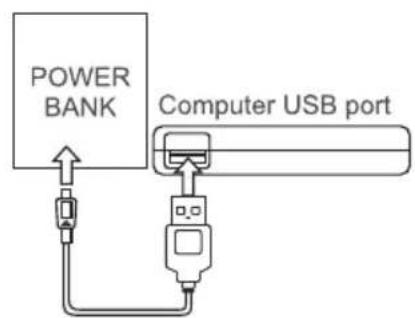
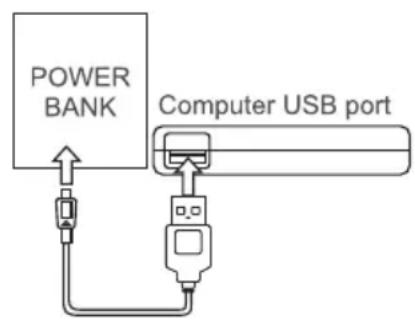
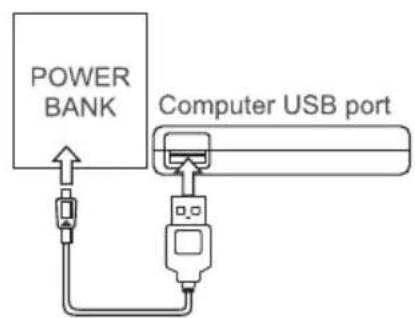
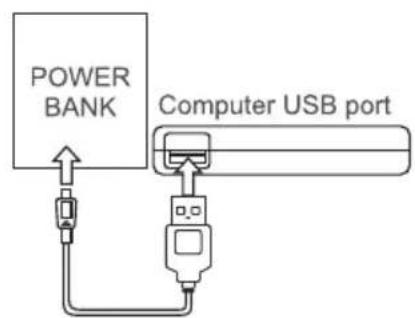
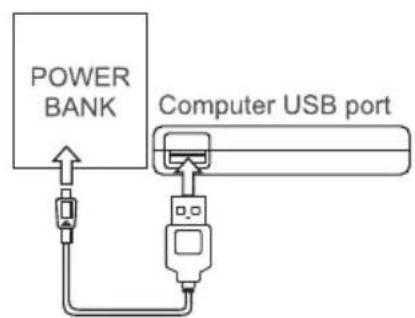
The applicable standard cable plug in the computer USB or USB charger, connect to the Micro USB of mobile power, automatic wake-up charge. During charging, the battery indicator light cycling starts; full power indicator light indicates charging completed.
- Use portable power bank to provide power to any digital device. Using the cable and adapter for the digital products, the electronic switch will be open automatically, output 5V voltage for use. (See Figure 3)
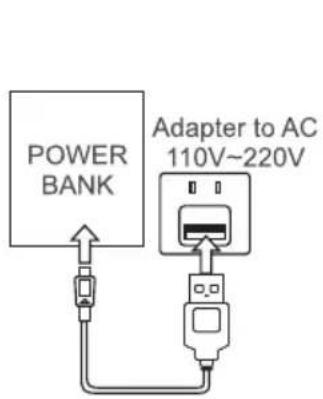
Figure 1 Adapter Charging
Connection diagram
Figure 2 USB Charging
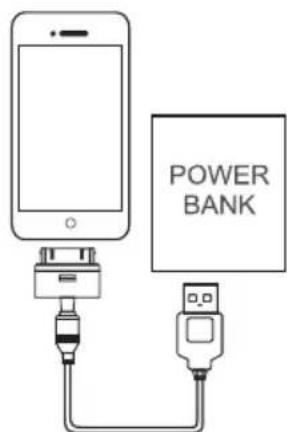
Figure 3 Charging Mobile phone
NOTICE:
Ensure the product's safe operation please read the manual carefully before using that:
A. Attention:
1. Mobile power bas built-in lithium-ion battery, do not use metal objects to short-circuit products, in order to avoid equipment failure and security risks.
2. Shall not be placed in hot and humid environment.
3. Shall not be demolish or mobile power transformation.
4. The equipment shall meet the specifications required to use DC power, the use of other power supply may cause fire or malfunction.
5. Heavy impact on the product may cause fire or explosion.
B. Terms of Use
1. If using the product for the first time or if it has not been used for a long time, the power bank needs 8-10 hours to charge fully.
2. Temperature range from -10^ to +45^ , for best charging results, please use the device in suitable temperature conditions.
3. When charging and using, this product may get slightly heated, which is normal and not malfunction.
4. If the products not in use for a long time, you need to charge at least once every three months to maintain its charge properties.
5. Mobile power bank left unused for a long time will suffer loss of power, which's normal self-discharge phenomenon, if ready to use, please charge again.
6. Keep the mobile power bank clean, please clean it with dry cloth before using if the port is dirty.
SPECIFICATION
| Model Number | Battery Capacity | Output Rated Capacity | Input | Battery Type | Output Port |
| VT-3510 With micro cable/ With type-c cable | 5000mAh | 3250mAh | DC:5V, 2.0A | Li-Polymer | Port 1: DC 5V, 2.1A |
| VT-3511 | 10000mAh | 6500mAh | DC:5V, 2.0A Type-c 5V,2.0A | Li-Polymer | Port 1: DC 5V, 2.1A |
| VT-3503 | 5000mAh | 3250mAh | DC:5V, 2.0A | Li-Polymer | Port 1: DC 5V, 2.1A Port 2: DC 5V, 2.1A |
| VT-3502 | 20000mAh | 13000mAh | DC:5V, 2.0A | Li-Polymer | Port 1: DC 5V, 2.1A Port 2: DC 5V, 2.1A |
INTRODUCTION
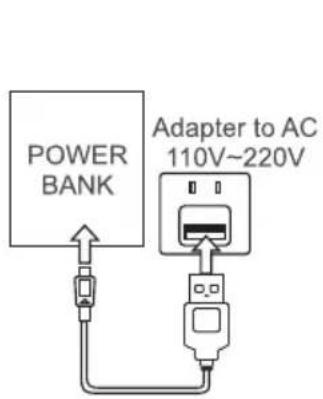
Figure 1 Adapter Charging
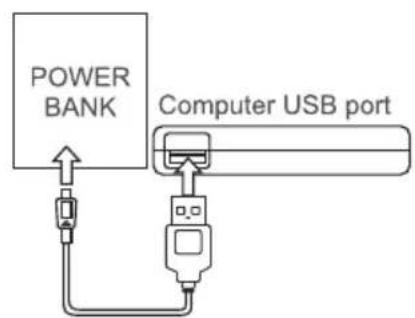
Connection diagram
Figure 2 USB Charging
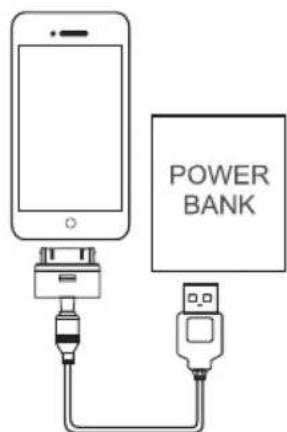
Figure 3 Charging Mobile phone
NOTICE:
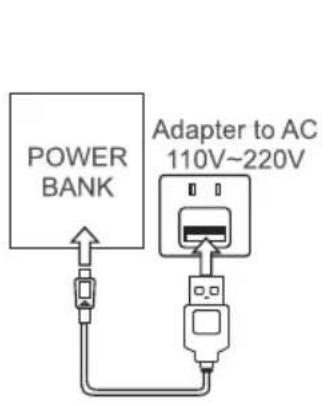
Figure 1 Adapter Charging

Connection diagram
Figure 2 USB Charging
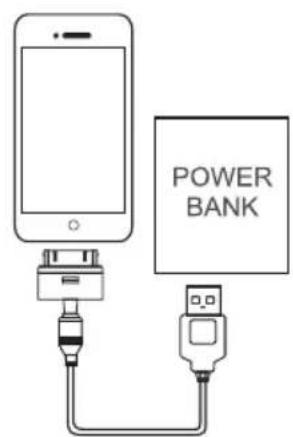
Figure 3 Charging Mobile phone
NOTICE:
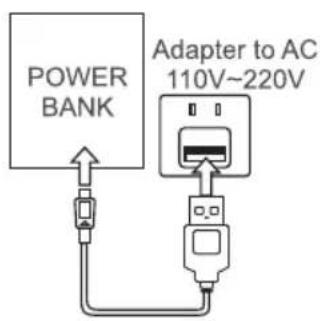
Figure 1 Adapter Charging
Connection diagram
Figure 2 USB Charging
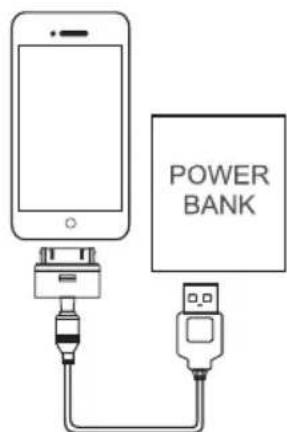
Figure 3 Charging Mobile phone
3A6EJIEXK:
3a da rapaHTnpate 6e30nacHaTa ekCnloaTau nHa npOdyKta, MoJ npOyTe pBKOBOdCTBOTO BHNMaTeJIHo npEiN I3NoJ3BaHe:
A. BhimhaHne:
1. Mo6nIhOTo 3axpaHbAne IMa BrpaDeHa JntHeBO-IOHHa 6aTePnra, He n3NoJ3BaIte MeTaN H OBeKTn npN pOdyKTu C Kbca Bepnra, 3a Da n36eHrHeTe DeΦeKTu No O6OpUdBaHcTo N pNcKObe No OTHOseHne Ha cnrypHoCTTa.
2. He noctabyte B ropeua n Blaxna cpea.
3. He pa3pyuwaBaIte nIIN TpaHcΦopMnpaITe B 6aTePnIa Mo6nIHO yCTpoNCTBO.
4. 06opudbaheTo n3bHraBa cneuKauNte, KOnto ce n3nckBaT 3a n3noJ3BaHe Ha npaBO-TOKOBo 3axpaHBAHe, ynotpe6ata Ha dpyRn BINOBe eJeKTpO3axpaHBAHe MoKe Da npuHHn NoXap HIn HeN3npaBHOCT.
5. TeKbK yIap Bbpy npOdykTa MoKe da npuHn noJap nIeEKCpIo3nJ.
B. YcNoBn 3a noJI3BaHe
1. Ako ИЗПОЛЗВATEnpODYКТа 3a пьв пьт Или aKO He e ИЗПОЛЗВан ДьлговpeMe, ЗарянOTO устpoистBO Има Нжда ot 8-10 ча са за пьлноЗapекдаHe.
2. TempeTypeh 6xBaT oT -10°C Do +45°C, 3a Na-Do6pn pe3yIaTn npi 3apeJdaHe, MoJIr n3NoJ3BaIe yCTpoIcTBOTo npi NODXODaIu TempeatypHn ycIOBnA.
3. Пп зарекдане и n3ролзванe,TOЗпpoДуКТ може leko da ce 3aToПЛN, KOeTo e HopmaJIHNo I He npeДCTaBЯBa Heu3npaBHOCT.
4. Ako npodykTnte He 6bdaT n3noJ3BaHn DblrO BpeMe, Heo6xOJMo e da rN 3apejdaTe MHHmym BeHbX Ha BCEKN TpN Meceua, 3a da 3ana3nte TexHNTe CBOICTBa 3a 3apejdaHe.
5. Мобиноуарядно устюво, akо He 6bde n3noJ3BaHOn
прдьлжntelno Врeme, щe n3ry6n moшнocT, Koeto e obuayho яВлене на
саморазрждаhe, akо стговорп дa Го n3poJ3BaTe, моля заpeдete ro
OTHOBO.
6. CbXpaHЯBaIte Mo6nIHoTo 3apAIDHO yCTpoIcTBO uNCTO, MoJnNoUcIeTe ro c YnCTa dpexa npedn da n3noJI3BaTe, aKO nopTbT e MpbceH.
SPECIFIKACIJA
| Model Number | Battery Capacity | Output Rated Capacity | Input | Battery Type | Output Port |
| VT-3510 With micro cable/ With type-c cable | 5000mAh | 3250mAh | DC:5V, 2.0A | Li-Polymer | Port 1: DC 5V, 2.1A |
| VT-3511 | 10000mAh | 6500mAh | DC:5V, 2.0A Type-c 5V,2.0A | Li-Polymer | Port 1: DC 5V, 2.1A |
| VT-3503 | 5000mAh | 3250mAh | DC:5V, 2.0A | Li-Polymer | Port 1: DC 5V, 2.1A Port 2: DC 5V, 2.1A |
| VT-3502 | 20000mAh | 13000mAh | DC:5V, 2.0A | Li-Polymer | Port 1: DC 5V, 2.1A Port 2: DC 5V, 2.1A |
UVOD
Ovaj proizvod predstavlja lagani, ekološki prihvatljiv mobilni i elegantan punjacč velikog kapaciteta za prijenosne urežaje, bilo gdje i bilo kada. Ovaj proizvod sadrži litij-ionsku bateriju velikog kapaciteta. Pomocu Micro USB kabela možete ne samo napajati prijenosne urežaje izravno,Ngu i puniti ugradenu bateriju. Proizvod pruža dovoljnu snagu za punjenje, koju možete koristiti tijekom slikovitih ekspedicija, na putovanjima, avanturama i na putu kuci.
PRIMJENJIV ZA
- Pogodan za iPhone, iPod, tablet, vecinu mobilnih Telefona i digitalnih proizvoda.
- Pogodan za prijenosne video igre PSP, NDSI, NDSL.
- Pogodan za MP3, MP4, MP5, e-knjige, GPS, prijenosne radio uredaje.
- Standardni USB izlaz, kompatibilan sa svim USB punjačima.
ZNAÇAJKE
- Jednostavan za korištenje, samo odaberite odgovarajući priključak za punjenje.
- Plug and play, funkcija u režimu Auto Sleep mod, kada nema odlazne struje, uredaj automatski prelazi u stanje mirovanja.
- Zašita od kratkog spoja, zašita od preopterećenja, zašita od suvišnog trošenja, inteligentna litijeva zašita, visoka učinkovitost pretvorbe, zašita od curenja.
KAKO KORISTITI
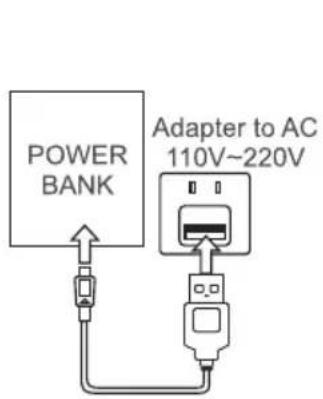
Figure 1 Adapter Charging
Connection diagram
Figure 2 USB Charging
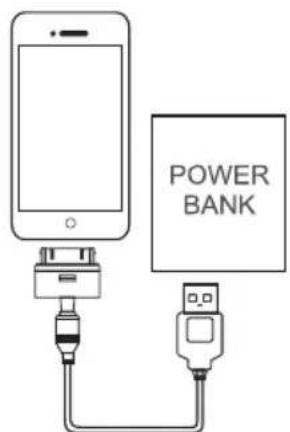
Figure 3 Charging Mobile phone
NAPOMENE:
Kako biste osigurali sigurno Funktioniranje proizvoda, prise uporabe, molimo pažljivo pročitajte ovu uputu za uporabu:
A. Upozorenje:
1. Mobilno napajanje ima ugradenu litij-ionsku bateriju, nemojte koristiti metalne predmete na proizvodima katkog spoja, kako bist e izbjegli kvarove na opremi i sigurnosne rizike.
2. Ne držite uredaj u vrućim i vlăznim prostorima.
3. Nemojte unistavati ili preradivati u bateriju za mobilni urejad.
4. Oprema zadovoljava specifikacja potrebne za korištenje napajanja istosmjmernom strujom, upotreba drugih vrsta napajanja sąze uzrokovati požar ili kvar.
5. Težak udarac na proizvod moze izazvati požar ili eksploziju.
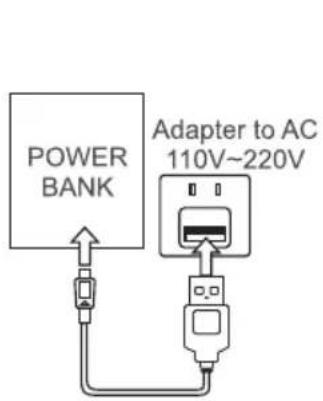
Figure 1 Adapter Charging
Connection diagram
Figure 2 USB Charging
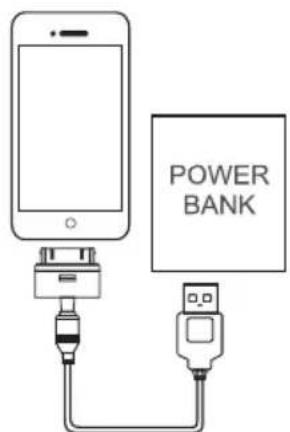
Figure 3 Charging Mobile phone
Notas:
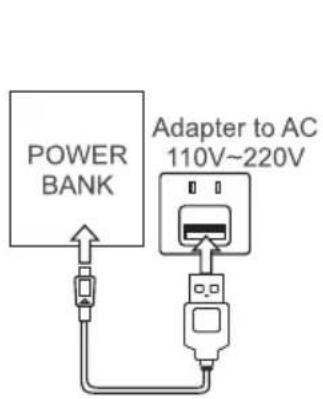
Figure 1 Adapter Charging
Connection diagram
Figure 2 USB Charging
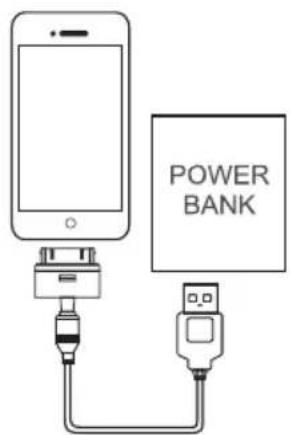
Figure 3 Charging Mobile phone
NOTAS:
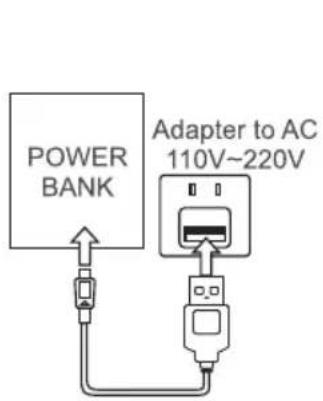
Figure 1 Adapter Charging
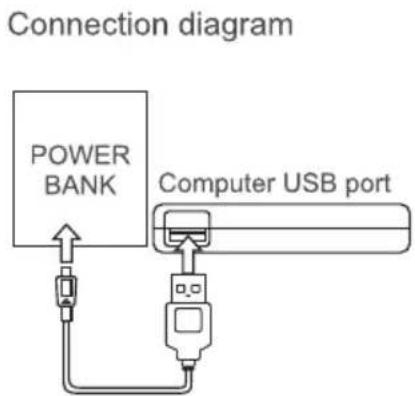
Figure 2 USB Charging
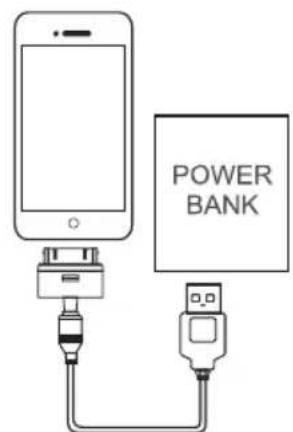
Figure 3 Charging Mobile phone
MEGJEGYZES:
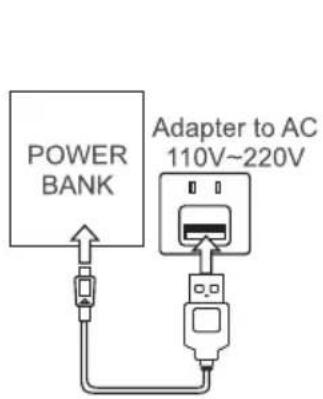
Figure 1 Adapter Charging
Connection diagram
Figure 2 USB Charging
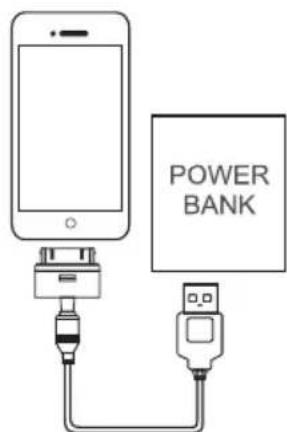
Figure 3 Charging Mobile phone
AVVISO:
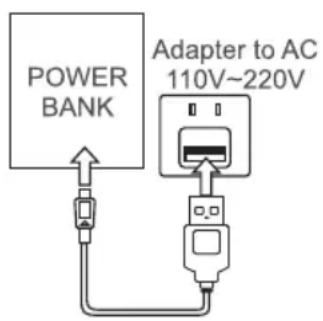
Figure 1 Adapter Charging
Connection diagram
Figure 2 USB Charging
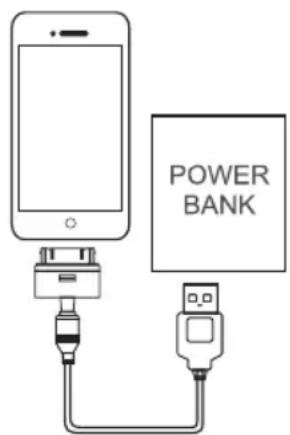
Figure 3 Charging Mobile phone
IAPATHPHSEI:
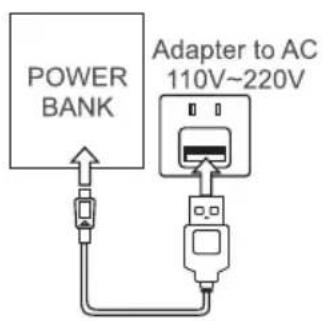
Figure 1 Adapter Charging
Connection diagram
Figure 2 USB Charging
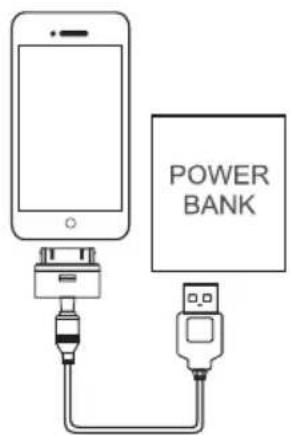
Figure 3 Charging Mobile phone
UWAGI:

Figure 1 Adapter Charging
Connection diagram
Figure 2 USB Charging
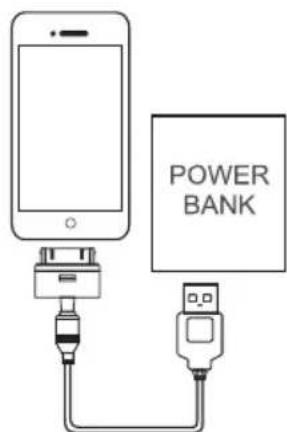
Figure 3 Charging Mobile phone
OBSERVATII:
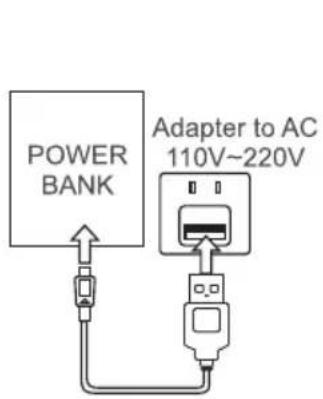
Figure 1 Adapter Charging
Connection diagram
Figure 2 USB Charging
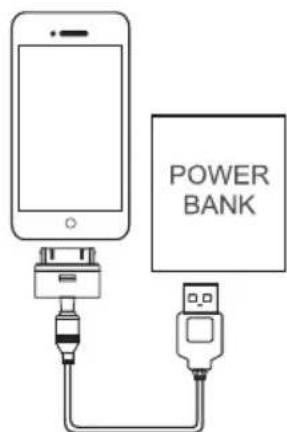
Figure 3 Charging Mobile phone
POZNÁMKY:
IN CASE OF ANY QUERY/ISSUE WITH THE PRODUCT, PLEASE REACH OUT TO US AT:
SUPPORT@V-TAC.EU
FOR MORE PRODUCTS RANGE, INQUIRY PLEASE CONTACT OUR DISTRIBUTOR OR NEAREST
DEALER. V-TAC EUROPE LTD. BULGARIA, PLOVDIV 4000, BUL.L.KARAVELOW 9B
Brand : V-TAC
Model : VT3510
Category : Power bank